How to Use the WHERE Statement
Juliana Meimei Ma, Quintiles
INTRODUCTION
This tutorial explores the WHERE statement used in both DATA steps and Procedures as well as the WHERE data set option. With the growing use of Version 6 on all
hardware platforms, most people can easily take advan-tage of these methods for creating subsets. An overview of
syntax is provided together with a basic description of
execution logic. Efficiency considerations are discussed.
Simple examples demonstrate correct syntax and potential
complications.
The primary audience for this discussion consists of programmers, statisticians, data managers, and other people who often need to create or process subsets of
SAS" data sets. Only basic knowledge of programming in the SAS system is assumed. The focus is on Release 6.06, with a brief mention of differences found in Release 6.04 and 6.07. Essentially all hardware platforms are covered.
TERMINOLOGY Efficiency Elements
There are two primary categories of elements to consider
when evaluating efficiency: machine and human. Machine efficiency elements include computer processing time,
often called CPU, and processing time for reading or writing computer data, called I/O for Input/Output.
Efficiency for humans is measured by considering pro-grammer time, level of expertise required, or clarity of final code. Major components of programmer time
include planning programming strategy, writing new
code, testing programs, running production programs, and reviSing existing code.
Always consider both machine and human elements when choosing between options for efficiency reasons. The choice may be difficult, or at least ambiguous, since the more machine efficient option can require additional human effort or vice-versa.
Large File Environment
In large file environments choosing an efficient
program-ming strategy tends to be important. A I11rge
file
can bedefined as a file for which processing all records is a
significant event. This may apply to files that are short and
wide, with relatively few observations but a large number of variables, or long and narrow, with only a few variables for many observations. The exact size that qualifies as
large depends on the computing environment. In a mainframe environment a file may need to have ten thousand records before being considered large. For a microcomputer, even one thousand records may seem to take a long time to process. Batch processing is used more
frequently for large file processing.
Types of WHERE
There are four "WHERE" types found in the SAS system.
This paper covers the universal types:
• WHERE statement (DATA step or Procedure) • WHERE data set option
The other two types are used for more specific
applications. The original source of WHERE probably stems from SQL (Structured Query Language). This exists in the SAS system as the WHERE clause of the SELECT statement in the SQL Procedure. For people using SAS/FSP", there is the WHERE command.
For the remainder of this paper, WHERE refers to the WHERE statement and WHERE= refers to the WHERE
data set option. Discussion of WHERE processing applies to both types. For information about using the two other
types, consult the appropriate SAS manual.
THE WHERE STATEMENT Syntax
The WHERE statement is used for selecting observations
from a SAS data set by specifying a simple or complex
conditional clause. In addition to standard comparison
and logical operators such as EQ or AND (p. 500 in
language), special operators are available. The syntax is identical whether the statement is used in a DATA step or a Procedure:
WHERE where-expression ;
For example, to create a subset
of
a permanent SAS data set that includes all observations with a certain value of a categorical variable:DATA subset; SET libname.indata;
WHERE catvar = value;
/*
other SAS statements' / OUlPUl;REIURN; RUN;
/*
OPTIONAL' //*
OPTIONAL' //*
OPTIONAL'/If no DATA step is required, then you should simply
process a subset directly, as in the following:
PROC FREQ DATA=libname.indata; WHERE catvar
=
value;TABLES varl • var2; RUN;
Special Operators
The special operators available for where-expressions supplement the regular operators. These are particularly useful because SAS functions cannot be used in where-expressions in Releases before 6.07. For example, in
Release 6.06 you might use CONTAINS or LIKE to substitute for the SUBSTR or INDEX functions. The
following examples demonstrate potential uses. See
pp. 500-503 in Language for further explanation and
examples.
rage >= 18 AND age <=34
0/
WHERE age BETWEEN 18 AND 34 ;r
'AA', 'AB', 'BA' • /WHERE idvar CONTAINS 'A' ;
/. Character or Numeric· /
WHERE anyvar IS MISSING; r'NO', 'NONE', 'N/A"/
WHERE name LIKE 'N%' ;
r
'DAN', 'DON', 'DUN" / WHERE name LIKE 'D _N' ;r
Soundex: 'CAIN', 'KAIN' • /WHERE name =. 'KANE' ; /. adding conditions· /
WHERE condition-l ;
WHERE SAME AND condition-2 ;
Exerution Logic
In a DATA step, the WHERE statement is not considered a
standard executable statement. Observations are selected before data values are moved into the program data vector (PDV). The selection occurs immediately after input data
set options are applied and before other DATA step
statements are executed. As a result, certain automatic variables cannot be used in where-expressions. Other
implications of WHERE processing logic become clearer when compared with Subsetting IF logic.
The WHERE statement can only be used in DATA steps
that use existing SAS data set(s) as input, i.e., a SET,
MERGE, or UPDATE statement must exist. If you are
using an TNPUT statement to read in "raw" fliesl then you
cannot use WHERE. A single WHERE statement can apply
to multiple data sets. Of course, this assumes that all the data sets include the variables referenced in the where-expression. In a complex DATA stepl you can
specify a separate WHERE statement for each SET, MERGE, or UPDATE statement.
Using WHERE is incompatible with the OBS= data set option and the POINT = option of the SET statement.
These statements select observations by observation
number. Also, FIRSTOBS= may not have a value other
than one. For instancC!1 you cannot use a testing strategy based on using OB5=100 when your program includes
WHERE.
Comparison to Subsetting IF
The #traditional'~ method of creating subsets in a DATA
step relies on the subsetHng IF statement (SubIF). In many
cases, you can produce the same subset using either WHERE or SubIF. Howeverl situations exist in which different results will be obtained (pp. 367-368 Language).
The values of FIRST. and LAST. may be different since WHERE selections are made before BY gruups are
defmed. With a MERGE or UPDATE based on a BY
statementl WHERE selects observations before the merge
while SubIF selects after the merge (see Example 2). Advantages of WHERE
• Uses index if appropriate
• Efficient (before transfer to PDV)
• Special operators available
• Can apply directly to Procedures Advantages of Subsetting IF
• Executable conditionally (IF-THEN) • Any input file type
• Use any automatic variables • Functions allowed
• Compatible with OB5=, POINT=, FIRSTOB5=
• Same in all versions/releases
THE WHERE DATA SET OPTION
The syntax of the WHERE data set option, called
WHERE=, is a combination of standard data set option parentheses and a where-expression. The selection criteria only apply to the last data set if more than one is listed in the same statement. The syntax is the Same for either
DATA steps or Procedures:
datasetname(WHERE=(where-expression));
For example:
DATA subset;
MERGE libname.indata(WHERE=(age > 35)) libname.trtment(WHERE=(trt='T')) ;
BYidvar;
r
SAS statements' / RUN;PROCFREQ
DA T A=libname.indata(WHERE=(catvar=value)); TABLES var1 • var2;
RUN;
The WHERE data set option has the same incompatibili-ties as the WHERE statement with the OBS= data set
option and the POINT = option of the SET statement. The limitation that FIRSTOB5=l must be true also applies. If both a WHERE statement and WHERE= are used
together in the same DATA step or Procedure, then the data set option takes precedence. In this situation, the WHERE statement is ignored.
WHERE PROCESSING
Procedures
Using WHERE processing is straightforward for Procedures that allow only one input data set. Four procedures adjust to allow for multiple input data sets:
APPEND, CALENDAR, COMPARE, DATASETS
(APPEND). APPEND allows either a WHERE statement or separate WHERE=. COMPARE allows a WHERE statement that applies to both BASE= and COMPARE= or a WHERE data set option associated with BASE= only.
Using Indexes
Selecting observations using WHERE or WHERE= takes advantage of indexes if they exist (pp. 221-223 Language). The SAS system automatically uses an appropriate index by following a standard algorithm that considers index availability and predicted machine resource requirements. Simple or complex indexes are considered given the variables in the where-expression. UsuallYI a relevant index is used when the predicted number of the selected observations is less than one third. When an index applies .. the resulting subset will be sorted in index order as opposed to physical order. If the NOM ISS option has been used to create the index (p. 256 Procedures), then WHERE processing will use that index only if missing values do not satisfy the where-expression, e.g., DEPT ='01'.
Efficient Strategies
The primary advantage of using WHERE strategies is
machine efficiency. Obviously, if you can avoid a DATA step completely then subset analyses are more efficient both in terms of programming effort and machine resources. If appropriate indexes are created and maintained .. WHERE processing will take advantage of them automatically. Planning ahead when creating analysis data sets is the best way to make use of WHERE processing for optimal machine efficiency.
When DATA steps using WHERE or SubIF produce the same subsetl the difference in execution logic means that using the WHERE strategy requires less machine resources. This can be true whether or not WHERE processing uses an index. The percentage difference varies
widely with the type of data sets and hardware platform but is generally in the 10-30% range. Example 3 provides a specific comparison. The advantage of using WHERE processing is greatest when a subset is a small percentage of the original data set and/or the original data set is wide. Differences Between Releases
The features of WHERE have increased since the original release. For Version 6 .. the overall differences are:
Release 6.04' 6.06 6.07
DATA y y y
PROC y y y
Functions N N Y 'does not include CONTAINS, LIKE special operators Release 6.07 includes the addition of SAS functions and greater machine efficiency for WHERE processing. General performance enhancements for creating and maintaining indexes and handling compressed data sets may also help WHERE strategies. When an index is used for WHERE processing .. Release 6.07 is more machine efficient than earlier Releases for the follo~ng:
• CONTAINS • LIKE
• comparison operators with the colon modifier • TRIM function
• SUBSTR function
• two or more EQ conditions (composite index)
EXAMPLES Example!
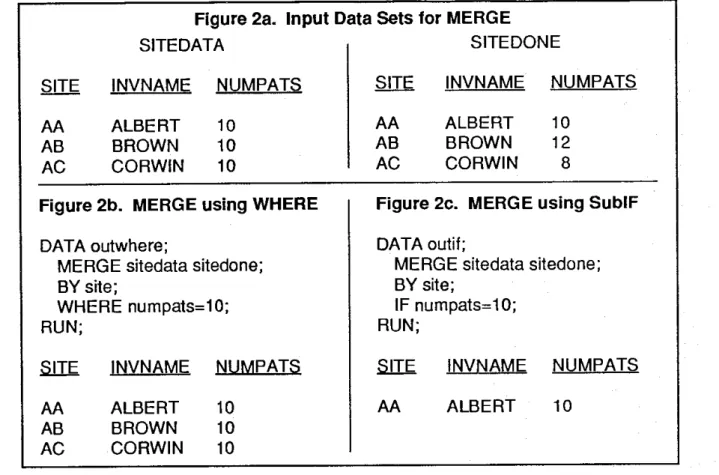
This is an example of automatic variables that cannot be used with WHERE. The objective of the DATA step in Figure 1 is to merge two data sets and select observations using IN=. Specifically, the patient and investigator data sets are merged in order to select only patii:mts that match the investigator data set. The error message occurs because WHERE selection is done before the IN= variables are defined. This is a situation for which SubIF must be used.
Figure 1. Automatic Variables
DATA outdata;
MERGE
patdata(IN= inpat)
invdata(IN= ininv) ;
BY invest;
WHERE ininv; /* same as invinv=1
*/
ERROR: VARIABLE ININV is not on file WORK.PATDATA
ERROR: VARIABLE ININV is not on file WORK.INVDATA
Figure 2a. Input Data Sets for MERGE
SITEDATA
SITEDONE
AA
AB
AC
INVNAME
ALBERT
BROWN
CORWIN
NUMPATS
10
10
10
Figure 2b. MERGE using WHERE
DATA outwhere;
MERGE sitedata sitedone;
BY site;
WHERE numpats=10;
RUN;
AA
AB
AC
Example 2
INVNAME
ALBERT
BROWN
CORWIN
NUMPATS
10
10
10
The results shown in Figures 2b and 2c demonstrate the difference between WHERE and SubIF when MERGE and BY are involved. When WHERE is used, all three sites are selected since the values of NUMP A TS are all ten before the merge is done. Since SubIF selection comes after the merge, only Site AA is included in that subset. There are no error messages in this situation, just the potential for erroneous results.
Example 3
The table in Figure 3 shows the differences in processing time when comparing specific WHERE and SublF strategies. The objective of the program was to process a subset of an existing SAS data set in order to produce a simple frequency table. No data manipulation was necessary in the DATA step besides selecting observations. The three strategies were:
AA
AB
AC
INVNAME
ALBERT
BROWN
CORWIN
NUMPATS
10
12
8
Figure 2c. MERGE using SublF
DATA outif;
MERGE sitedata sitedone;
BY site;
IF numpats=l
0;
RUN;
INVNAME
AA
ALBERT
NUMPATS
10
1) DATA using Sub setting IF followed by PROC FREQ 2) DATA using WHERE followed by PROC FREQ 3) PROC FREQ using WHERE
The programs were run on a 80386-based microcomputer using Release 6.04. The input data set had 238 variables, mostly numeric, and 1118 observations. The subset contained 381 observations (34%). The timing figures are averages of four repetitions.
The exact figures in this example are not as important as the conclusion that using WHERE can greatly reduce processing time in certain situations. The addition of DROP/KEEP to restrict the number of variables used would change the amount of difference between the two DATA step strategies. As noted earlier, the best strategy is to plan ahead and create data sets so that subset analysis programs avoid DATA steps altogether. This assumes, of
courser that machine efficiency is a priurity over the human time that advanced planning may involve.
Figure
3.
Strategy Comparisons
Time in Seconds
Strategies
DATA PROC
Total
1)
DATA with Subsetting IF, PROC
2)
DATA with WHERE, PROC
3).
PROC using WHERE
37
30
4
4
5
41
34
5
CONCLUSION
The WHERE statement and data set option are tools worth exploring when subset creation or processing is necessary.
Programmers should understand the differences between WHERE and the sub setting IF statement execution logic. Although continuing to use more traditional
programming strategies is easier across Releases,
migrating to more machine efficient strategies may be
worth the effort for large file environments.
SAS, SAS/FSP is a registered trademark of SAS Institute
Inc. in the USA and other countries. ® indicates USA registration.
RECOMMENDED READING
Beatrous, S. and Gifford, W., (1988), "Version 6 SAS Data Base System Architecture: Current and Future Features," Proc. of the Thirteenth Annual SAS Group IntI. Conference, Cary, NC: SAS Institute Inc., 145-154. (index file
structure.)
Clifford, W., Beatrous, 5., Stokes, J.T., and Mosmon, K. (1989), "Using New SAS Database Features and Options," Proc. of the Fourteenth Annual SAS Group IntI. Conference, Cary, NC: SAS Institute Inc., 335-346. (Database
perfor-mance tuning: buffers, compression, index files.)
Hardy, J .. (1991), "Effident SAS Software Programming," Proc. of the Sixteenth Annual SAS Group IntI. Conference, Cary, NC: SAS Institute Inc., 798-801.
Henderson, D.J, Rabb, M.G., and Polzin, J.A. (1991), ''The SAS Supervisor - A Version 6 Update," Proc. of the Sixteenth Annual SAS Group Inti. Conference, Cary, NC: SAS Institute Inc., 249-257. (Logical PDV, DATA step
compile and execution differences.)
Horwitz, L., and Thompson, T., (1988), "Effident Programming with the SAS System for Personal Computers: Save Time, Save Space," Proc. of the Thirteenth AnnUilI SAS Group Inti. Conference, Cary, NC: SAS Institute Inc., 625~30.
Howard, N. (1991), "Efficiency Techniques for Improving I/O and Processing Time in the DATA Step," Proc. of the Fourteenth Annual SAS Group Inti. Conference, Cary, NC: SAS Institute Inc., 284-289.
Knox, B.A. (1989), "Performance Tips for Using the SAS System on Personal Computers," Proc. of the Fourteenth Annual SAS Group Inti. Conference, Cary, NC: SAS Institute Inc.,1616-1619. (Version 6.03.)
Kretzman, P. (1991), "Old Wine, New Wineskins: Why the SQL Procedure Will Change the Way You Think," Proc. of the Sixteenth Annual SAS Group Inti. Conference, Cary, NC: SAS Institute Inc., 271-276.
M", J.M. (1991), "Efficiency Revisited: Large Files and Release 6.06," Proc. of the Sixteenth Annual SAS Group Inti. Conference, Cary, NC: SAS Institute Inc., 390-395.
Ma, J.M. (1987), "How to Use SAS Software Effectively on Large Files," Proc. of the Twelfth Annual SAS Users Group Inti. Conference, Cary, NC: SAS Institute Inc., 94-102.
Mackiernan, Y.D. (1989), "Don't Do Anything You Don't
Have To: Elementary Strategies For Processing Large Data Sets With SAS Software," Proc. of the Fourteenth Annual SAS Group Inti. Conference, Cary, NC: SAS Institute Inc., 17S-186.
Painter, S. (1991), "Efficient Use of SAS Data Set Indexes in SAS Applications," Proc. of the Sixteenth Annual SAS Group Inti. Conference, Cary, NC: SAS Institute Inc., 408-411. Polzin, J.A. (1991), "An Insider's Sneak Preview of the Next DATA Step Release," Proc. of the Sixteenth Annual SAS Group Inti. Conference, Cary, NC: SAS Institute Inc., 1041-1047.
SAS Institute Inc. (1987), SAS Applications Guide, 1987 Edition, Cary, NC: SAS Institute Inc.
SAS Institute Inc. (1990), SAS Language: Reference, Version 6, First Edition, Cary, NC: SAS Institute Inc. WHERE Statement, pp. 49S-504.
SAS Institute Inc. (1990), SAS Procedures Guide, Version 6, Third Edition, Cary, NC: SAS Institute Inc.
SAS Institute Inc. (1990), SAS Programming Tips: A Guide to Efficient SAS Processing, Cary, NC: SAS Institute Inc. SAS Institute Inc. (1989), SAS Language and Procedures: Usage, Version 6,First Edition, Cary, NC: SAS Institute Inc. Smith, U. (1991), "Efficient Use of Numeric and Character Data Types," Proc. of the Sixteenth Annual SAS Group Inti. Conference, Cary, NC: SAS Institute Inc., 329-336.
Thornton, R.G. and Boling, J. (1990), "The Painless Path to Release 6.06 of the SAS System," Proc. of the Fifteenth Annual SAS Group Inti. Conference, Cary, NC: SAS Institute Inc.,17-22. (WHERE, stored program facility, SQL, index files.)
Valentine-Query, P. (1991), '1ntroduction to Efficient Programming Techniques," Proc. of the Sixteenth Annual SAS Group Inti. Conference, Cary, NC: SAS Institute Inc., 266-270.
CONTACT ADDRESS Dr. J. Meimei Ma
Quintiles P. O. Box 13979