© 2012 MyAppSecurity Inc. All Rights Reserved.
[email protected] | www.myappsecurity.com Page 1
Table of Contents
Introduction: ... 2
Web Application details: ... 3
Building a Threat Model Diagram: ... 4
Cool Car Company Example: ... 5
Managing and Analyzing Threats: ... 6
Example: ... 6
Identify Data Elements: ... 7
Identify Roles: ... 7
Identify and build a Application component library: ... 8
Table of Figures
Figure 1 New Threat Model Wizard ... 3Figure 2 Component Properties ... 5
Figure 3: Cool Car Company Threat Model ... 6
Figure 4: Cool Car Company Threat Analysis ... 6
Figure 5 Manage Data Elements ... 7 Figure 6: Cool Car Company Technology Stack ... Error! Bookmark not defined.
Introduction:
ThreatModeler™ allows users to capture the entire flow of the application, and define certain properties based on which it automatically generates threats and classifies them under various risk categories. Its simple to use navigation wizard help users to enter the required information they will need to get started with their application and create the threat profile of the application. ThreatModeler™ provides a mind mapping approach to threat modeling, allowing the user to decompose the application just like they do it on the drawing board but at the same time provide features that a drawing board cannot. User can define the communication channel (protocols) between different components; assign data elements and widgets (like Form, URL, Cookie, Session, etc) to these components.
Once a user has completed the component diagram, ThreatModeler™ has an intelligent threat engine, which automatically identifies threats based on the information provided and automatically prioritizes the threats based on risk.
This article helps you create a threat model for an E-Commerce application using ThreatModeler™ and evaluate how it meets your application security needs.
© 2013 MyAppSecurity Inc. All Rights Reserved
[email protected] | www.myappsecurity.com
Page 3
To begin evaluation the user will require the following information: Web application details
Infrastructure stack that the application will be deployed on
Decoupled functional components that the application is comprised of Data that the application processes
Users who work with the application and their permissions
Web Application details:
Identify a web application which typically can be designed in a week or two. Things to identify at this step include:
URL
Web Application Owner Risk Category
Technology Framework (.NET/Java)
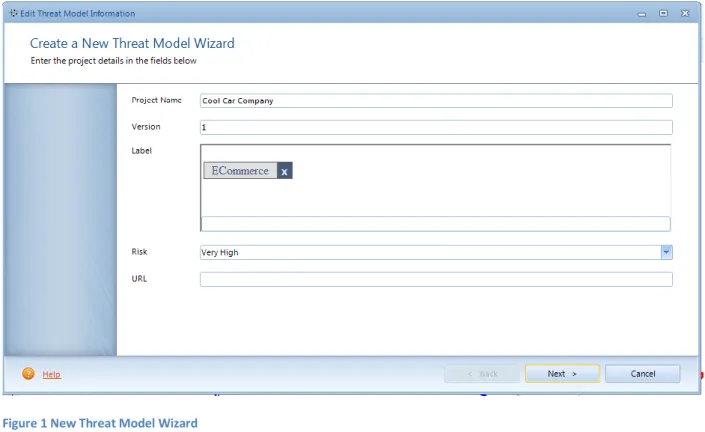
ThreatModeler provides a wizard to enter these details. An organization can also save threat model templates which can be used to speed up the process of creating a threat model. In this example the e-commerce application involves selling components for automobiles and is named Cool Car Company.
Building a Threat Model Diagram:
The Whiteboard is a simple drag-and-drop diagramming interface. The user creates a high level architecture of the application by using various components and interconnecting them by arrows which represent the communication protocol between them.
To the left of the screen is the Component Palette. The various icons in the Palette are the components that represent a feature of an application. The user can drag a component onto the canvas from this palette
Once several components are placed on the canvas, they can be linked to each other. Take the mouse cursor to the center of a component inside the box. Click and drag the mouse to the other component.
Right-click the interconnecting arrows to change the communication protocol. Select a
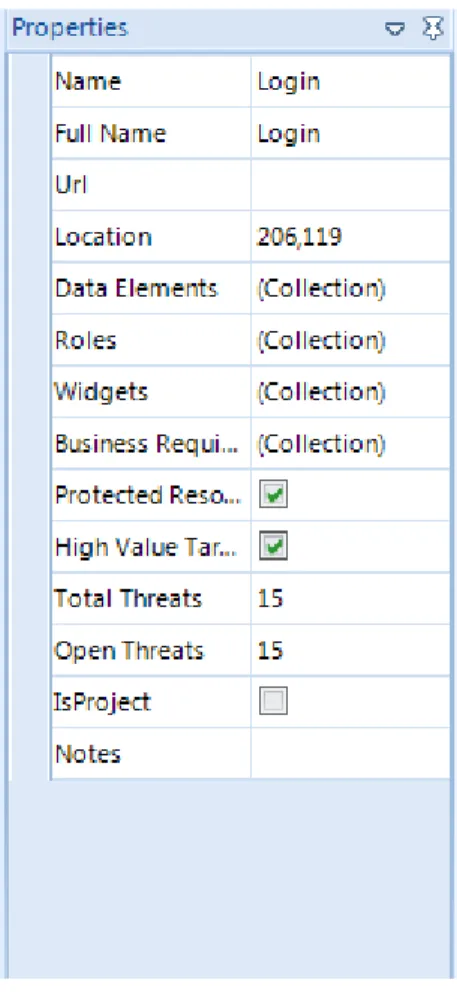
component and click the property panel at the right of the screen. Property window has several tabs to describe the component in detail
o Select the data elements that are used by this associated with the component. o Select the roles that with permission to access or use this component
o Select the Widgets that will be a part of this component along with the backend they will interact with. For e.g. A login page will have a form that might interact with the database at the backend to validate the password.
o Assign Business Requirements if any to this component.
o Select a Deployment component on which this component is deployed.
o Mark the checkbox if the component is a Protected resource i.e. accessible only after authentication.
o You can add notes for reference later or to capture your thoughts on component specific details.
o You can view those threats by clicking on View Threats in the right-click menu which shows up another screen with all the threats listed in tabular format for this component. o From this table, you can view further threat details, mitigation steps and add comments.
© 2013 MyAppSecurity Inc. All Rights Reserved
[email protected] | www.myappsecurity.com
Page 5
Figure 2 Component Properties
Right click a component and select View Attack Trees to display threats for this component in a graphical representation.
Cool Car Company Example:
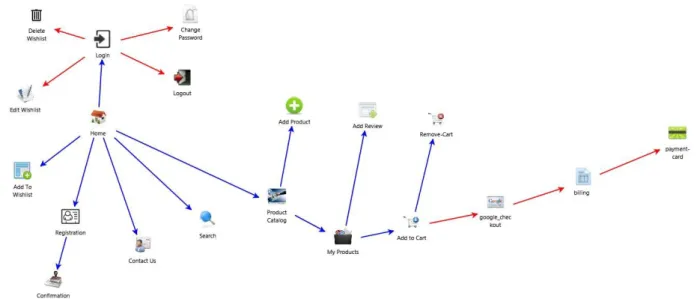
For our sample E-Commerce Application, the figure below illustrates a threat model of its high level architecture and data flow via the links:
Figure 3: Cool Car Company Threat Model
Managing and Analyzing Threats:
Once you have built the component diagram and defined properties, you can go to
Dashboard>Threat Management Console. This will bring up a screen which will show you all the threats to the entire application.
You can group them by components or by threats via ‘Group by’ drop down menu at the top of the screen.
You can change the status, add or review comments to a threat through this interface.
Example:
© 2013 MyAppSecurity Inc. All Rights Reserved
[email protected] | www.myappsecurity.com
Page 7
Identify Data Elements:
Click Data Elements under the Library tab
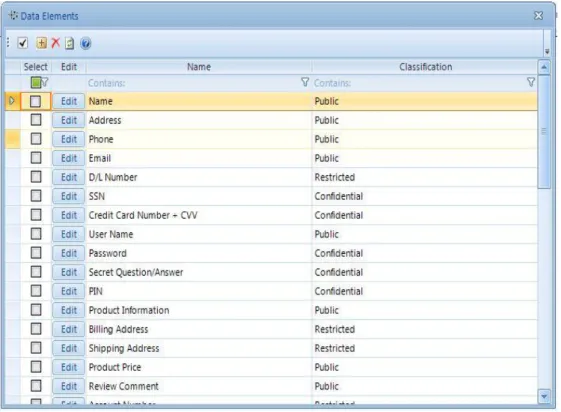
Review all the Data elements that are provided by ThreatModeler™ to make sure everything you need is available
If you have data elements not in the list, click on Add Data Elements (arrowed below).
Figure 5 Manage Data Elements
You can add as many Data Elements to the list. When you add a Data Element, specify the classification of that data for ThreatModeler™ to apply appropriate rules on that data.
Identify Roles:
1. Identify the various roles in your organization which may have access to the web application. 2. Below are the various roles typically associated with most applications –
a. Registered User, b. Unregistered User, c. Admin,
d. Maintenance. (Clarify if the maintenance is done under admin account in which case we won't need the maintenance role).
3. If a role doesn’t exist in the list, you can add a new role by clicking Roles under Library for others that you would like to add.
Identify and build an Application component library:
Identify the various components that provide functionality to your application. ThreatModeler™ comes bundled with a list of components like Login, Logout, Registration, etc. these components represent individual features of your application.
If a required component does not exist, you can add a new component by o Select Design Components under Library.
o Enter the name of the component
o Select an icon to represent the component. You can use the default icon for now in order to continue with the pilot. However, ThreatModeler™ does provide you a feature by which you can upload an icon which represents that component more appropriately. o Select the Associated Threats for that component. For reference, see Login component.
© 2013 MyAppSecurity Inc. All Rights Reserved
[email protected] | www.myappsecurity.com
Page 9
References:
If you have any further questions or need any additional information feel free to contact us at [email protected]