5
IHE Radiology
Technical Framework Supplement
Management of Radiology Report Templates
10(MRRT)
Trial Implementation
15 Date: April 21, 2015 20Authors: IHE Radiology Technical Committee
Email: [email protected]
Please verify you have the most recent version of this document. See here for Trial 25
Foreword
This is a supplement to the IHE Radiology Technical Framework V13.0. Each supplement undergoes a process of public comment and trial implementation before being incorporated into 30
the volumes of the Technical Frameworks.
This supplement is published on April 21, 2015 for trial implementation and may be available for testing at subsequent IHE Connectathons. The supplement may be amended based on the results of testing. Following successful testing it will be incorporated into the Radiology Technical Framework. Comments are invited and may be submitted at
35
http://ihe.net/Radiology_Public_Comments.
This supplement describes changes to the existing technical framework documents.
“Boxed” instructions like the sample below indicate to the Volume Editor how to integrate the relevant section(s) into the relevant Technical Framework volume.
Amend Section X.X by the following:
40
Where the amendment adds text, make the added text bold underline. Where the amendment removes text, make the removed text bold strikethrough. When entire new sections are added, introduce with editor’s instructions to “add new text” or similar, which for readability are not bolded or underlined.
45
General information about IHE can be found at: www.ihe.net.
Information about the IHE Radiology domain can be found at: http://ihe.net/IHE_Domains. Information about the organization of IHE Technical Frameworks and Supplements and the process used to create them can be found at: http://ihe.net/IHE_Process and
http://ihe.net/Profiles. 50
The current version of the IHE Radiology Technical Framework can be found at:
CONTENTS
55
Introduction to this Supplement ... 6
Open Issues and Questions ... 6
Closed Issues ... 6
General Introduction ... 9
60 Appendix A – Actor Summary Definitions ... 9
Appendix B – Transaction Summary Definitions ... 9
Glossary ... 9
Volume 1 – Profiles ... 10
33 Management of Radiology Report Templates (MRRT) Profile ... 10
65 33.1 MRRT Actors, Transactions, and Content Modules ... 10
33.1.1 Actor Descriptions and Actor Profile Requirements ... 12
33.1.1.1 Report Template Manager ... 12
33.2 MRRT Actor Options ... 12
33.3 MRRT Required Actor Groupings ... 12
70 33.4 MRRT Overview ... 12
33.4.1 Concepts ... 12
33.4.2 Use Cases ... 13
33.4.2.1 Use Case #1: New Template Storage ... 13
33.4.2.1.1 New Template Storage Use Case Description ... 13
75 33.4.2.1.2 New Template Storage Process Flow ... 13
33.4.2.2 Use Case #2: Template Import ... 13
33.4.2.2.1 Template Import Use Case Description ... 13
33.4.2.2.2 Template Import Process Flow ... 14
33.4.2.3 Use Case #3: Template Migration ... 14
80 33.4.2.3.1 Template Migration Use Case Description ... 14
33.4.2.3.2 Template Migration Process Flow ... 15
33.4.2.4 Use Case #4: Build Template ... 15
33.4.2.4.1 Build Template Description ... 15
33.4.2.4.2 Template Import Process Flow ... 16
85 33.4.2.5 Use Case #5: Manage Template ... 16
33.4.2.5.1 Manage Template Description ... 16
33.4.2.5.2 Manage Template Process Flow ... 17
33.5 MRRT Security Considerations ... 17
33.6 MRRT Cross Profile Considerations ... 17
90 Volume 3 – Transactions (continued) ... 18
4.103 Retrieve Imaging Report Template [RAD-103] ... 18
4.103.1 Scope ... 18
4.103.2 Actor Roles ... 18
4.103.3 Referenced Standards ... 18
95 4.103.4 Interaction Diagram ... 19
4.103.4.1 Request Template Message ... 19
4.103.4.1.1 Trigger Events ... 19
4.103.4.1.2 Message Semantics ... 19
4.103.4.1.3 Expected Actions ... 20
100 4.103.4.2 Template Response Message ... 21
4.103.4.2.1 Trigger Events ... 21
4.103.4.2.2 Message Semantics ... 21
4.103.4.2.3 Expected Actions ... 21
4.103.5 Security Considerations ... 21
105 4.103.5.1 Security Audit Considerations ... 21
4.104 Store Imaging Report Template [RAD-104]... 21
4.104.1 Scope ... 21
4.104.2 Actor Roles ... 21
4.104.3 Referenced Standards ... 22
110 4.104.4 Interaction Diagram ... 22
4.104.4.1 Send Template Message ... 22
4.104.4.1.1Trigger Events ... 22
4.104.4.1.2 Message Semantics ... 23
4.104.4.1.3 Expected Actions ... 24
115 4.104.5 Security Considerations ... 25
4.104.5.1 Security Audit Considerations ... 25
4.105 Query Imaging Report Template [RAD-105] ... 25
4.105.1 Scope ... 25
4.105.2 Actor Roles ... 25
120 4.105.3 Referenced Standards ... 25
4.105.4 Interaction Diagram ... 26
4.105.4.1 Query Templates Message ... 26
4.105.4.1.1 Trigger Events ... 26
4.105.4.1.2 Message Semantics ... 26
125 4.105.4.1.3 Expected Actions ... 28
4.105.4.2 Template Response Message ... 29
4.105.4.2.1 Trigger Events ... 29
4.105.4.2.2 Message Semantics ... 29
4.105.4.2.3 Expected Actions ... 31
130 4.105.5 Security Considerations ... 32
4.105.5.1 Security Audit Considerations ... 32
Volume 3 – Content Modules ... 33
8.1 Report Template Structure ... 33
8.1.1 Template Attributes ... 37
135 8.1.2 Section Attributes ... 39
8.1.3 Report Template Fields ... 39
8.1.3.1 Field Attributes ... 40
8.1.3.3 Text Field Attributes ... 42
140 8.1.3.4 Numeric Field Attributes ... 42
8.1.3.5 Selection List Field Attributes ... 42
8.1.3.5.1 Selection Items ... 43
8.1.3.6 Date Field Attributes ... 44
8.1.3.7 Time Field Attributes ... 44
145 8.1.3.8 Merge Field Attributes ... 44
8.1.3.9 Checkbox Field Attributes ... 45
8.1.4 Incorporating Templates into Other Templates ... 45
8.1.5 Permitted HTML5 Formatting Tags ... 45
8.1.6 Coded Content ... 46
150 8.1.6.1 Simple Format for Coded Content ... 46
8.1.6.2 Complex Coded Content ... 49
8.1.6.3 Managing Coded Content during Template Editing ... 49
8.1.7 Merging Data into Report Templates ... 49
8.1.8 Relationships among Templates ... 50 155
Introduction to this Supplement
This profile describes the Management of Radiology Report Templates (MRRT). It specifies a data model for templates that will serve as a format for how templates can be transmitted 160
between systems. It also specifies the desirable and common template features that reporting applications may support.
Open Issues and Questions
1. The profile currently specifies that the src attribute of an embed element shall contain the embedded template’s OID concatenated with “.html”. This facilitates easy rendering 165
of embedded templates by assigning the embedded template a file name matching its OID. Should the embed statement use just the OID string instead?
2. Should the type attribute of an embed element contain a more specialized type than “text/html”, such as “IMAGE_REPORT_TEMPLATE”. If so, IHE will need to apply for a new type.
170
Closed Issues
1. We reviewed RFD and XForms as possible alternative to HTML5 and they were judged less appropriate. HTML5 (http://www.w3.org/TR/html51/) was selected because, like radiology templates, it strikes a balance between expression of coded content and description of a user interface and the related data capture methods. HTML5 is 175
increasingly used as a method for displaying clinical images, facilitating the construction of multi-media reports in the future.
2. The subset of HTML5 used shall be valid XML (e.g., the appropriate close tags shall be used).
3. What are CDA® limits on section recursion? None. 180
4. An interoperable mechanism of retrieval of Merge fields is out of scope.
5. How should applications handle associated text, which when edited, calls into question associated coded entries (e.g., when the user negates text that is semantically linked to a field)? Clarifying text added to Section 8.1.6.3 describing possible application behavior in response to edited text with associated coded content. Span tag mechanism makes 185
association between coded template text and coded content clear.
6. What are the semantics of inheritance among templates? What other relationships should be specified between templates, if any? This functionality will be handled by inclusion of templates in other templates. Only specified relationship is “deprecated by”. See RAD TF-3:8.1.8.
190
7. Should templates be used to validate report instances? Are there any compelling use cases for this functionality? No compelling use cases were presented. In any case, this
would be better addressed using report instance templates, not report authoring templates described in this profile.
8. We have not identified any security issues. Are there any? We have addressed HTTPS in 195
the profile. Because we included SSL, the profile security issues are mitigated. The remaining security issues are out of scope, and relate to report instances that may contain PHI, or merge field access.
9. The draft profile requires a header (title) for each section. Are there use cases where this is a bad idea? Closed. No use cases were presented.
200
10.Is there a need to have a different section or template attribute to represent the name (rather than “title” or “header”)? No use cases were presented.
11.Should the coded content in the template attributes section follow the existing CDA® format, essentially serving as a mechanism to pass coded content to a report instance? Yes. There is no other practical mechanism to express coded content using HTML tags. 205
12.Should the Report Template Creator be able to retrieve templates and if so for what use case? Yes. Retrieve transaction added as optional for Template Creator. Use case is to edit or include existing templates.
13.Should caching for the Retrieve Imaging Report Template transaction be forbidden? No. Profile remains silent on this issue.
210
14.The Store Imaging Report Template transaction proposes the use of HTTP PUT. Is this the appropriate service? Should a POST be used instead? Are the proposed parameters for the transaction appropriate? What response codes are necessary? Closed. A POST should not be used. Because we can update a template with header information, PUT is appropriate. Parameters and response codes have been revised.
215
15.What should we call the templates described in this profile to distinguish them from CDA® report instance templates? Report authoring templates versus report instance templates. The first paragraph was modified to clarify this distinction.
16.Should correspondence be enforced between title in the head element and the dc:title in the Dublin Core? Yes. Clarified in profile text.
220
17.Is there a value in having more specific dates than the Dublin Core offers, (e.g., creation date, modification date, release date)? Because each new template version must have a new UID, each unique template does not have a life cycle. Closed. These dates express work flow information related to report template creation. This is best stored and managed elsewhere, rather than in the template itself.
225
18.Should we manage versioning and lifecycle of templates, and if so, how? No. However, the profile provides a template attribute that signifies the lifecycle stage of the template: DRAFT, ACTIVE, RETIRED. Applications could extend this formalism based on site preferences.
19.What are the use cases for identifying users and provider groups who are the intended 230
users of a template? Closed. This information is important to store in the templates themselves so it can be queried easily and migrated easily between systems.
20.In the Query Templates transaction, should the Responder simply return entire templates? No. It should only return template metadata so the Requester can choose the template(s) necessary, to conserve bandwidth / processing.
235
21.Is the ability to trigger a template by selecting a menu item (Section 8.1.4) necessary, sufficient, or excessive? Necessary but not sufficient. An inclusion mechanism is described so templates can be included by reference into other templates, even when not in response to selection of a menu item.
22.How should querying for coded values work? Is specifying the coding system required? 240
If so, how should it be specified? For example, within the same parameter value separated by a colon? I.e., codingValue= RADLEX:RID6434 as opposed to
codingSystem=RADLEX&codingValue=RID6434. This has been clarified in the text. 23.Should the Query Templates transaction explain more succinctly how AND and OR
operations work? Should the lowerDate and upperDate logic be more thoroughly 245
described? This has been clarified in the text.
24.Should it be possible to include templates in other templates by reference? Yes. This creates a potential conflict of namespaces between the two templates. To resolve the conflict, identifiers in the embedded template shall be prefixed with the title element of the embedded template.
General Introduction
Update the following Appendices to the General Introduction as indicated below. Note that these are not appendices to Volume 1.
Appendix A – Actor Summary Definitions
Modify Report Creator and add the following two actors to the IHE Technical Frameworks
255
General Introduction list of Actors:
Actor Definition
Report Creator A system that generates and transmits draft (and optionally, final) diagnostic reports, presenting them as DICOM Structured Reporting Objects. It may also retrieve work list entries for reporting steps from the Report Manager and provide notification of completion of the step, allowing the enterprise to track the status of an awaited report.
Report Template Manager A system that provides storage and management of report templates. Report Template Creator A system that enables a user to create and edit report templates.
Appendix B – Transaction Summary Definitions
Add the following transactions to the IHE Technical Frameworks General Introduction list of Transactions:
260
Transaction Definition
Retrieve Imaging Report Template [RAD-103]
A Requester retrieves a template from a Responder. Store Imaging Report Template
[RAD-104]
A Sender stores a report template to a Receiver. Query Imaging Report Templates
[RAD-105]
A Requester queries for a list of templates from a Responder.
Glossary
Add the following glossary terms to the IHE Technical Frameworks General Introduction Glossary:
None 265
Volume 1 – Profiles
33 Management of Radiology Report Templates (MRRT) Profile
This workflow profile concerns the use of imaging report templates to create diagnostic imaging reports. This profile distinguishes between report authoring templates, which are templates used by radiologists to guide the creation of a clinical imaging report, and report instance templates, 270
which describe technical constraints on the structure and content of imaging report instances, such as the constraints described in and XML schema or the HL7® Clinical Document Architecture. This profile applies to the former, report authoring templates, and describes methods for the formatting of imaging report templates and the management of their transport between template libraries and report creation systems. Specifically, this profile describes an 275
enhanced feature set for report authoring templates, delineates how such templates from a vendor-agnostic template library could be used immediately by a reporting system, and provides a format for migration of templates between reporting systems.
33.1 MRRT Actors, Transactions, and Content Modules
This section defines the actors, transactions, and content modules in this profile. General 280
definitions of actors are given in the Technical Frameworks General Introduction Appendix A at
http://ihe.net/Technical_Frameworks.
Figure 33.1-1 shows the actors directly involved in the MRRT Profile and the relevant
transactions between them. If needed for context, other actors that may be indirectly involved due to their participation in other related profiles are shown in dotted lines. Actors that have a 285
Figure 33.1-1: MRRT Actor Diagram
290
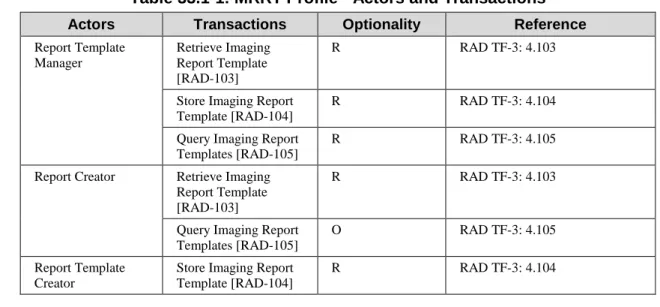
Table 33.1-1 lists the transactions for each actor directly involved in the MRRT Profile. To claim compliance with this Profile, an actor shall support all required transactions (labeled “R”) and may support the optional transactions (labeled “O”).
Table 33.1-1: MRRT Profile - Actors and Transactions
295
Actors Transactions Optionality Reference
Report Template Manager Retrieve Imaging Report Template [RAD-103] R RAD TF-3: 4.103
Store Imaging Report Template [RAD-104]
R RAD TF-3: 4.104
Query Imaging Report Templates [RAD-105]
R RAD TF-3: 4.105
Report Creator Retrieve Imaging Report Template [RAD-103]
R RAD TF-3: 4.103
Query Imaging Report Templates [RAD-105]
O RAD TF-3: 4.105
Report Template Creator
Store Imaging Report Template [RAD-104]
R RAD TF-3: 4.104
↑ [RAD-103] Retrieve Imaging Report Template
↑[ RAD-105] Query Imaging Report Templates Report Template
Manager
Report Creator Report Template
Creator
↓ [RAD-104] Store Imaging Report Template
↓ [RAD-105] Query Imaging Report Templates
↓ [RAD-103] Retrieve Imaging Report Template
↓ [RAD-104] Store Imaging Report Template
Actors Transactions Optionality Reference
Retrieve Imaging Report Template [RAD-103]
O RAD TF-3: 4.103
Query Imaging Report Templates [RAD-105]
O RAD TF-3: 4.105
33.1.1 Actor Descriptions and Actor Profile Requirements 33.1.1.1 Report Template Manager
The Report Template Manager shall support Store Imaging Report Template [RAD-104] as both the Sender and Receiver.
300
33.2 MRRT Actor Options
Options that may be selected for each actor in this profile, if any, are listed in the Table 33.2-1. Dependencies between options when applicable are specified in notes.
Table 33.2-1: Management of Radiology Report Templates - Actors and Options
305
Actor Option Name Reference
Report Template Manager No options defined -
Report Creator No options defined -
Report Template Creator No options defined -
33.3 MRRT Required Actor Groupings
None33.4 MRRT Overview
33.4.1 Concepts
310
A template is a document with a preset structure, used as a starting point for a Report Creator, so that the structure does not have to be recreated each time it is used. A template describes how a Report Creator should interact with a user to create a report instance.
For example, a radiologist may use a speech recognition system to create a narrative report describing the interpretation of a diagnostic imaging study. The speech recognition system 315
assists the radiologist in applying templates during the reporting process. The radiologist also may edit the text of the report using that system.
A previously published IHE whitepaper on the management of radiology report templates
provides more detail on how radiologists typically employ imaging report templates.
33.4.2 Use Cases
320
33.4.2.1 Use Case #1: New Template Storage
33.4.2.1.1 New Template Storage Use Case Description
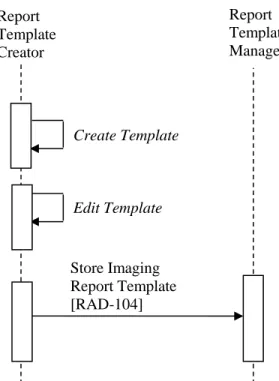
A radiologist may need a template to help create a report for a specific study. If such a template is not available in an accessible template library, the radiologist may use a Report Template Creator to create, then edit, a template that serves the need. That template is stored in a Report 325
Template Manager where it is available for later retrieval by a Report Creator. In some cases a single application may serve as both Report Template Creator and Report Template Manager. In other cases the Report Template Creator may be a separate application.
33.4.2.1.2 New Template Storage Process Flow
330
Figure 33.4.2.1.2-1: New Template Storage Process Flow in MRRT Profile 33.4.2.2 Use Case #2: Template Import
33.4.2.2.1 Template Import Use Case Description
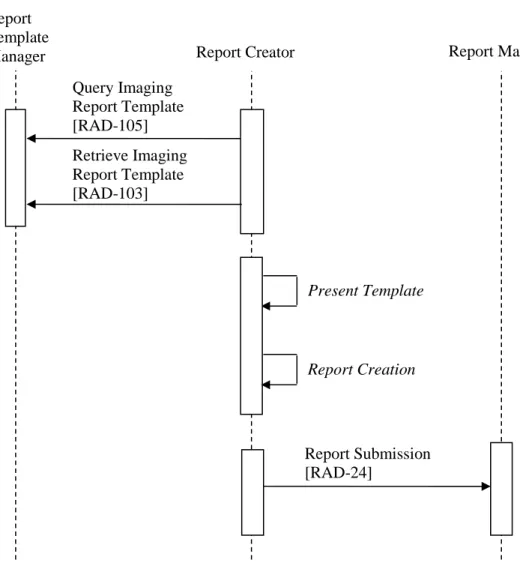
A radiologist may need a template to help create a report for a specific study. The Report Creator queries for and retrieves an appropriate template or templates from the Report Template
335 Report Template Creator Create Template Report Template Manager Store Imaging Report Template [RAD-104] Edit Template
Manager, either based on the users request or an automated algorithm. In some cases a single application may serve as both Report Template Manager and Report Creator, but in other cases the Report Template Manager may be maintained by a radiology practice, a reporting vendor, or a professional group. After selecting the template, the user creates a report based on the template.
33.4.2.2.2 Template Import Process Flow
340
Figure 33.4.2.2.2-1: Template Import Process Flow in MRRT Profile Note: Report Submission [RAD-24] is not part of this profile. It is shown to provide context.
33.4.2.3 Use Case #3: Template Migration
33.4.2.3.1 Template Migration Use Case Description
345
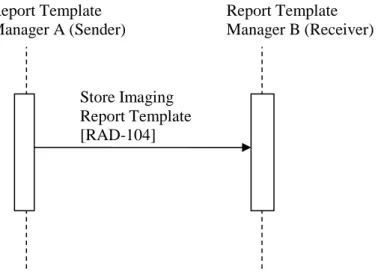
If a radiology practice elects to change reporting vendors, the practice will need to transmit its templates from their current Report Template Manager to a new Report Template Manager. They
Report Template
Manager Report Creator
Present Template Report Manager Report Submission [RAD-24] Query Imaging Report Template [RAD-105] Report Creation Retrieve Imaging Report Template [RAD-103]
would use the Store Imaging Report Template transaction to migrate the templates from their old Report Template Manager to the new Report Template Manager. This eliminates the need for custom programming to reverse-engineer the template format of the old vendor.
350
33.4.2.3.2 Template Migration Process Flow
Figure 33.4.2.3.2-1: Template Migration Process Flow in MRRT Profile 33.4.2.4 Use Case #4: Build Template
33.4.2.4.1 Build Template Description
355
Similar to Use Case #1, a radiologist may need a template to help create a report for a specific study. The radiologist may use a Report Template Creator to create, then edit, a template that serves the need. However, this template utilizes common pieces from other templates. That template is stored in a Report Template Manager where it is available for later retrieval by a Report Creator. 360 Report Template Manager A (Sender) Report Template Manager B (Receiver) Store Imaging Report Template [RAD-104]
33.4.2.4.2 Template Import Process Flow
Figure 33.4.2.4.2-1: Build Template Process Flow in MRRT Profile 33.4.2.5 Use Case #5: Manage Template
33.4.2.5.1 Manage Template Description
365
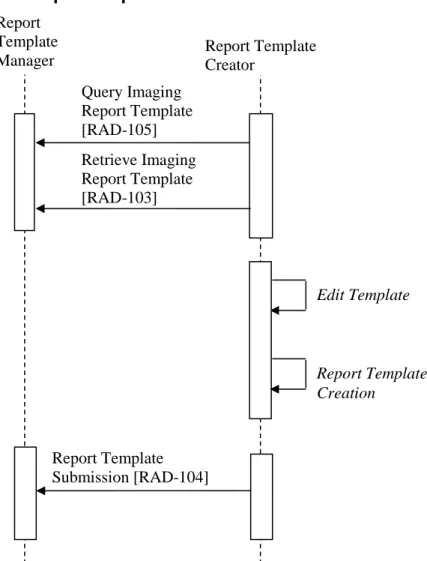
A radiologist has decided that a particular template should be retired, due to replacement to a new template. The radiologist may use a Report Template Creator to edit a template that changes the metadata. That template is stored in a Report Template Manager where it available for later retrieval by a Report Creator.
Report Template
Manager Report Template Creator
Edit Template Report Template Submission [RAD-104] Query Imaging Report Template [RAD-105] Report Template Creation Retrieve Imaging Report Template [RAD-103]
33.4.2.5.2 Manage Template Process Flow
370
Figure 33.4.2.5.2-1: Manage Template Process Flow in MRRT Profile
33.5 MRRT Security Considerations
None375
33.6 MRRT Cross Profile Considerations
SINR - Simple Image and Numeric Report. A Report Creator in SINR might be grouped with a Report Template Manager in this profile, yielding a unified reporting application that manages its own templates.
The transactions outlined here generally will occur before the transactions described in SINR and 380
shown in RAD TF-1: Figure 9.3-1. Report
Template
Manager Report Template Creator
Edit Template Report Template Submission [RAD-104] Query Imaging Report Template [RAD-105] Report Template Creation Retrieve Imaging Report Template [RAD-103]
Volume 3 – Transactions (continued)
4.103 Retrieve Imaging Report Template [RAD-103]
4.103.1 Scope
This transaction is used to retrieve a template from a Report Template Manager in the proper 385
format.
4.103.2 Actor Roles
Table 4.103.2-1: Actor Roles
Role: Requester: Requests a template or templates from the Responder
Actor(s): The following Actors may play the role of Requester:
• Report Creator
Role: Responder: Provides a template or templates in response to the request
Actor(s): The following Actors may play the role of Responder:
• Report Template Manager
Transaction text specifies behavior for each Role. The behavior of specific Actors may also be 390
specified when it goes beyond that of the general Role.
4.103.3 Referenced Standards
• IETF RFC2616 HyperText Transfer Protocol HTTP/1.1
• Extensible Markup Language (XML) 1.0 (Second Edition). W3C Recommendation 6 October 2000. http://www.w3.org/TR/REC-xml.
395
• Dublin Core Metadata Element Set, standardized as ISO Standard 15836: 2009 and ANSI/NISO Standard Z39.85-2012. http://dublincore.org/documents/dces/
4.103.4 Interaction Diagram
Figure 4.103.4-1: Interaction Diagram for Retrieve Imaging Report Template [RAD-103]
400
4.103.4.1 Request Template Message
The Requester sends a message to the Responder indicating the templates it would like to receive.
A Responder shall support handling such messages from more than one Requester. A Requester may choose to support making requests to more than one Responder.
405
4.103.4.1.1 Trigger Events
1. A Requester needs to collect templates for later use in anticipation of reporting in the future.
2. The user of a Requester, such as a Report Creator, invokes a template.
3. A Requester needs to retrieve a template that has been referenced by another template. 410
4.103.4.1.2 Message Semantics
The message is an HTTP GET request.
The HTTP request shall include the following parameters to identify the template to be returned. All parameter names and values are case-sensitive.
415
Table 4.103.4.1.2-1: HTTP Path Parameters
Parameter Name REQ Description Values
templateUID R Identifies template’s UID as known to both actors, expressed by the dcterms:identifier element shown in Table 8.1.1-1.
This value shall be a properly defined Object identifier (OID) as specified in ITI TF-2x: Appendix B.
The only binding required for both the Requester and Responder is the binding to the HTTP-GET. In this binding the sample message will be formatted as follows:
Responder Request Template
Requester
http://<location>/IHETemplateService/<templateUID>
The <location> part of the URL shall contain the host name, an optional port address, and may 420
be followed by an optional path. The remainder of the URL, including IHETemplateService and the following request parameters shall not be changed. See the discussion about location in ITI TF-2a: 3.11.4.1.2 Message Semantics.
If necessary, the Requester may perform the request to the web service utilizing HTTPS protocol. The Responder shall respond using HTTPS if requested.
425
The Responder may return HTTP redirect responses to a request. The Requester can expect to receive an error response, or the data requested, or a request to look elsewhere for the data. The Requester shall follow redirects, but if a loop is detected, it may report an error.
4.103.4.1.3 Expected Actions
The Responder shall parse the request and create a response containing the templates meeting the 430
parameters of the request in the proper format. If multiple requests are received, each is handled in sequence.
The Responder shall provide a response message header containing the appropriate status code indicating success, warning, or failure as shown in Table 4.103.4.1.3-1.
435 Table 4.103.4.1.3-1: HTTP Responses Service Status HTTP1.1 Status Codes Description Failure (see note 2)
503 – Busy This indicates that the Responder was unable to provide the template because it was out of resources.
404 – Not Found This indicates that the Responder was unable to provide the template because it did not exist on the responder at the time of the request. 401 -
Unauthorized
This indicates that the Responder refused to provide a template because authentication credentials were not provided or not sufficient. 400 – Bad
Request
This indicates that the Responder was unable to provide the template because the template UID is missing or corrupt.
Success 200 – OK This indicates that the request was successful and the Responder will provide the template.
Note 1: Other HTTP response codes may be returned by the Responder, indicating conditions outside of the scope of this transaction.
Note 2: It is recommended that the Responder complement the returned error code with a human readable description of the
440
If an error condition cannot be automatically recovered, at a minimum, the error should be displayed to the user by the Requester.
The Requester may wish to request any templates that are embedded in the response (see Section 8.1.4) immediately, rather than retrieve embedded templates on demand later when the
445
Responder may not be available.
4.103.4.2 Template Response Message
The Responder transmits the requested templates to the Requester.
4.103.4.2.1 Trigger Events
The Template Response message is created in response to a Responder receiving a Request 450
Template message.
4.103.4.2.2 Message Semantics
The message is a document in a HTTP GET response.
4.103.4.2.3 Expected Actions
The Respondershall format the document according to content definition in RAD TF-3: 8.1, and 455
return it in the HTTP response. The document shall be processed according to the features, configuration, and business logic of the Requester. Possibilities include making the template accessible to the user.
4.103.5 Security Considerations
Although the content of templates is not typically protected information, for consistency with 460
other transactions on the client, which likely will involve protected information, it is reasonable to expect support for HTTPS.
4.103.5.1 Security Audit Considerations
None
4.104 Store Imaging Report Template [RAD-104]
4654.104.1 Scope
This transaction is used to store templates in the proper format on another system.
4.104.2 Actor Roles
Table 4.104.2-1: Actor Roles
470
Actor(s): The following Actors may play the role of Sender:
• Report Template Creator
• Report Template Manager
Role: Receiver: Receives and stores templates
Actor(s): The following Actors may play the role of Receiver:
• Report Template Manager
Transaction text specifies behavior for each Role. The behavior of specific Actors may also be specified when it goes beyond that of the general Role.
4.104.3 Referenced Standards
IETF RFC2616 HyperText Transfer Protocol HTTP/1.1
Extensible Markup Language (XML) 1.0 (Second Edition). W3C Recommendation 6 475
October 2000. http://www.w3.org/TR/REC-xml.
Dublin Core Metadata Element Set, standardized as ISO Standard 15836: 2009 and ANSI/NISO Standard Z39.85-2012. http://dublincore.org/documents/dces/
4.104.4 Interaction Diagram
480
Figure 4.104.4-1: Interaction Diagram for Store Imaging Report Template [RAD-104] 4.104.4.1 Send Template Message
The Sender provides the template to a Receiver.
A Receiver shall support handling such messages from more than one Sender. A Sender may choose to support storing templates to more than one Receiver.
485
4.104.4.1.1Trigger Events
1. A Report Template Manager (acting as a Sender) needs to transmit a template to another Report Template Manager (acting as a Receiver) for storage.
Receiver
Send Template Sender
2. A Report Template Creator (acting as a Sender) needs to store a template that it has created or updated.
490
4.104.4.1.2 Message Semantics
The message is an HTTP PUT request. The Sendershall format the document according to content definition in RAD TF-3: 8.1.
The HTTP request shall include the following parameters to identify the template to be stored. All parameter names and values are case-sensitive.
495
Table 4.104.4.1.2-1: HTTP Path Parameters
Parameter Name REQ Description Values
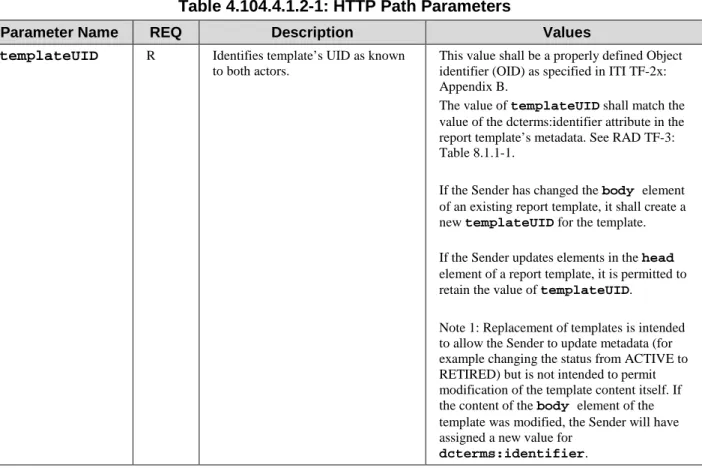
templateUID R Identifies template’s UID as known to both actors.
This value shall be a properly defined Object identifier (OID) as specified in ITI TF-2x: Appendix B.
The value of templateUID shall match the value of the dcterms:identifier attribute in the report template’s metadata. See RAD TF-3: Table 8.1.1-1.
If the Sender has changed the body element of an existing report template, it shall create a new templateUID for the template. If the Sender updates elements in the head element of a report template, it is permitted to retain the value of templateUID.
Note 1: Replacement of templates is intended to allow the Sender to update metadata (for example changing the status from ACTIVE to RETIRED) but is not intended to permit modification of the template content itself. If the content of the body element of the template was modified, the Sender will have assigned a new value for
dcterms:identifier.
The only binding required for both the Sender and Receiver is the binding to the HTTP-PUT. In this binding the sample message will be formatted as follows:
500
http://<location>/IHETemplateService/<templateUID>
The <location> part of the URL shall contain the host name, an optional port address, and may be followed by an optional path. The remainder of the URL, including IHETemplateService and the following request parameters shall not be changed.
If necessary, the Sender may perform the request to the web service utilizing HTTPS protocol. In 505
this case, the Receiver shall respond using HTTPS.
The Receiver may return HTTP redirect responses to a request. The Sender can expect to receive an error response, or the data requested, or a request to look elsewhere for the data. The Sender shall follow redirects, but if a loop is detected, it may report an error.
4.104.4.1.3 Expected Actions
510
The Receiver shall accept the request to store the template. If multiple requests are received, each is handled in sequence.
The Receiver shall store all metadata in the head element along with the complete contents of the report template contained in the body element. See RAD TF-3:8.1.
• If the dcterms:identifier of the template does not already exist on the Receiver, the 515
Receiver shall store the complete contents of the new template.
If the dcterms:identifier of the template already exists on the Receiver, the Receiver shall replace the existing template with the received template, including any updated values for the metadata attributes.
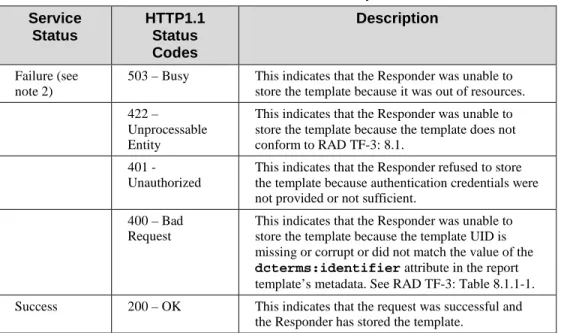
The Receiver shall provide a response message header containing the appropriate status code 520
indicating success, warning, or failure as shown in Table 4.104.4.1.3-1.
Table 4.104.4.1.3-1: HTTP Responses Service Status HTTP1.1 Status Codes Description Failure (see note 2)
503 – Busy This indicates that the Responder was unable to store the template because it was out of resources. 422 –
Unprocessable Entity
This indicates that the Responder was unable to store the template because the template does not conform to RAD TF-3: 8.1.
401 - Unauthorized
This indicates that the Responder refused to store the template because authentication credentials were not provided or not sufficient.
400 – Bad Request
This indicates that the Responder was unable to store the template because the template UID is missing or corrupt or did not match the value of the dcterms:identifier attribute in the report template’s metadata. See RAD TF-3: Table 8.1.1-1. Success 200 – OK This indicates that the request was successful and
the Responder has stored the template.
Note 1: Other HTTP response codes may be returned by the Receiver, indicating conditions outside of the scope of this transaction.
525
Note 2: It is recommended that the Receiver complement returned error code with a human readable description of the error condition.
If an error condition cannot be automatically recovered, at a minimum, the error should be displayed to the user by the Sender.
4.104.5 Security Considerations
530
Although the content of templates is not typically protected information, for consistency with other transactions on the client, which likely will involve protected information, it is reasonable to expect support for HTTPS.
4.104.5.1 Security Audit Considerations
None 535
4.105 Query Imaging Report Template [RAD-105]
4.105.1 Scope
This transaction is used to query templates from a Report Template Manager in the proper format.
4.105.2 Actor Roles
540
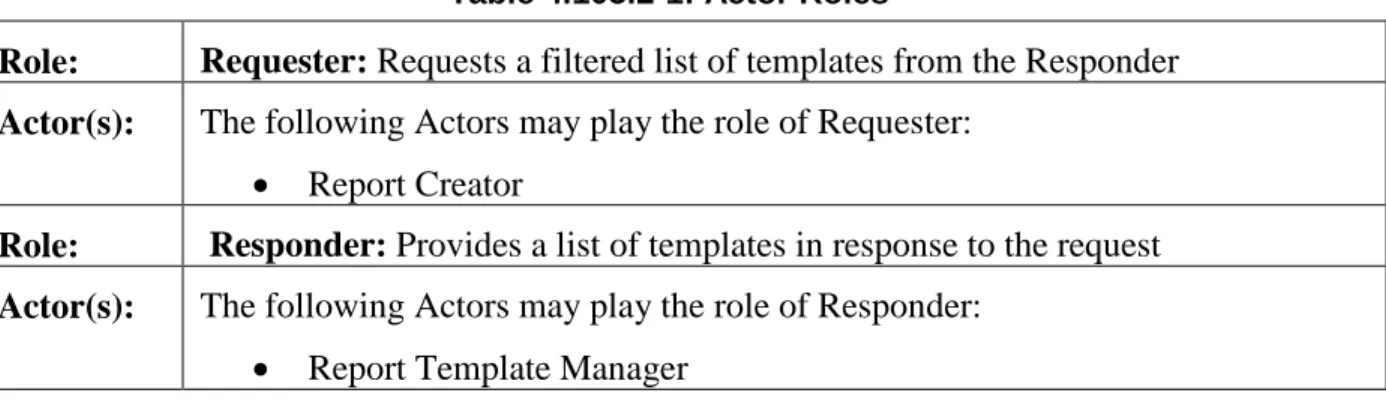
Table 4.105.2-1: Actor Roles
Role: Requester: Requests a filtered list of templates from the Responder
Actor(s): The following Actors may play the role of Requester:
• Report Creator
Role: Responder: Provides a list of templates in response to the request
Actor(s): The following Actors may play the role of Responder:
• Report Template Manager
Transaction text specifies behavior for each Role. The behavior of specific Actors may also be specified when it goes beyond that of the general Role.
545
4.105.3 Referenced Standards
• IETF RFC2616 HyperText Transfer Protocol HTTP/1.1
• Extensible Markup Language (XML) 1.0 (Second Edition). W3C Recommendation 6 October 2000. http://www.w3.org/TR/REC-xml.
• Dublin Core Metadata Element Set, standardized as ISO Standard 15836: 2009 and 550
4.105.4 Interaction Diagram
Figure 4.105.4-1: Interaction Diagram for Query Imaging Report Templates [RAD-105] 4.105.4.1 Query Templates Message
555
The Requester sends a message to the Responder indicating the list of templates it would like to receive.
A Responder shall support handling such messages from more than one Requester. A Requester may choose to support making requests to more than one Responder.
4.105.4.1.1 Trigger Events
560
1. A Requester needs to find templates for later use in anticipation of selecting an appropriate template for reporting in the future.
2. The user of a Requester, such as a Report Creator, invokes a template query.
4.105.4.1.2 Message Semantics
The message is an HTTP GET request. 565
To filter the template matches to be returned, the HTTP request shall include one or more of the following parameters. All parameter names and values are case-sensitive.
All parameters shall be supported by the Responder, and are optional for the Requester.
Table 4.105.4.1.2-1: HTTP Query Parameters
570
Parameter Name REQ Description Values
title O Wildcard query of the dc:title
tag.
This value shall be a string.
identifier O Exact query of the
dcterms:identifier tag.
This value shall be a properly defined Object identifier (OID) as specified in ITI TF-2x: Appendix B.
creator O Wildcard query of the
dcterms:creator tag.
This value shall be a string.
Responder Query Templates
Requester
Parameter Name REQ Description Values
publisher O Wildcard query of the
dcterms:publisher tag.
This value shall be a string.
license O Wildcard query of the
dcterms:license tag.
This value shall be a string.
lower_date O Query the date of the template for values on or after the specified lower date. See Note 1.
This value shall be encoded in the XML primitive date format. Multiple instances of this parameter are not permitted.
upper_date O Query the date of the template for values on or before the specified upper date. See Note 1.
This value shall be encoded in the XML primitive date format. Multiple instances of this parameter are not permitted.
language O Wildcard query of the
dcterms:language tag.
This value shall be an ISO 639 two-letter language code.
top_level_flag O Exact query of the top-level-flag tag.
This value shall be an xsd:Boolean.
status O Exact query of the status tag. This value shall be one of: DRAFT,
ACTIVE, or RETIRED
code_value O Exact query of the
entry/coding_schemes/coding_schem e designator tag and
entry/term/code value tag.
This value shall be a string containing the coding scheme from which the code value was drawn, and the code value itself separated by a colon. See Note 2.
code_meaning O Wildcard query of the
entry/term/code meaning tag.
This value shall be a string.
limit O Limits the results returned to a maximum number. If omitted, all matching results shall be returned.
This value shall be an integer.
offset O Skips the first number of matching results. If omitted, no results will be skipped.
This value shall be an integer.
sort O Returns the results in alphabetical order of a specified field. If omitted, results are ordered by title.
This value shall be a string, being one of the query parameters aside from limit, offset, or sort.
Note 1: Lower_date and upper_date are used to constrain the date of the template. For example, a lower_date of 2010-01-01 and an upper_date of 2010-12-31 will return all templates with a date in the year 2010. The query is inclusive of the date specified. If the value passed is not in XML primitive date format, an HTTP 400 error will be returned.
Note 2: When searching for code value, the coding system must also be specified. This is done by concatenating the
575
coding_scheme_designator, a colon, and the code_value. For example, when searching in RadLex (2.16.840.1.113883.6.256) for Computed Tomography (RID10321), the code_value to be queried for would be “2.16.840.1.113883.6.256:RID10321”.
The only binding required, for both the Requester and Responder, is the binding to the HTTP-GET. In this binding the Requester shall format the Query Templates message as follows: 580
http://<location>/IHETemplateService/?[parameter1_name]=[parameter1 value]& [parameter2_name]=[parameter2 value]
The <location>part of the URL shall contain the host name of the Responder, an optional port address, and may be followed by an optional path. The remainder of the URL, including
IHETemplateServiceand the following request parameters shall not be changed. See the 585
discussion about location in ITI TF-2a: 3.11.4.1.2 Message Semantics. If no search parameters are provided, allACTIVEtemplates match.
For the parameters specified as wildcard search, a template matches if the text string in the parameter value appears in the corresponding attribute of the template. Wildcard matching is insensitive to case. For example, searching the title for “abdomen” would match templates with 590
“CT Abdomen”.
Specifying multiple, different parameters indicates an AND relation, meaning that both
parameter values must be present for the template to match. For example, requesting that the title contains “CT” and the publisher contains “Hospital” would return only templates that met both of those criteria. However, specifying the same parameter multiple times indicates an OR 595
relation, where only one of the parameter values must be present in the template. For example, requesting that the title contains “CT” or the title contains “US” would return templates that match either of those criteria.
The Requester may perform the request to the web service utilizing HTTPS protocol. The Responder shall respond using HTTPS if requested.
600
The Responder may return HTTP redirect responses to a request. The Requester can expect to receive an error response, or the data requested, or a request to look elsewhere for the data. The Requester shall follow redirects, but if a loop is detected, it may report an error.
4.105.4.1.3 Expected Actions
The Responder shall parse the request and create a response containing the template headers 605
matching the parameters of the request as specified in Section 4.105.4.2.2. The Responder shall handle multiple requests.
The Responder shall return the appropriate status code indicating success, warning, or failure as shown in Table 4.105.4.1.3-1.
610
Table 4.105.4.1.3-1: HTTP Responses
Service Status HTTP1.1 Status Codes Description
Failure (see note 2)
503 – Busy This indicates that the Responder was unable to perform the query because it was out of resources.
401 - Unauthorized This indicates that the Responder refused to return results because authentication credentials were not provided or not sufficient.
400 – Bad Request This indicates that the Responder was unable to provide the template list because one or
Service Status HTTP1.1 Status Codes Description
more of the parameters are corrupt.
Success 200 – OK This indicates that the request was successful and the Responder will list matching templates.
Note 1: Other HTTP response codes may be returned by the Responder, indicating conditions outside of the scope of this transaction.
Note 2: It is recommended that the Responder complement the returned error code with a human readable description of the error condition.
615
4.105.4.2 Template Response Message
The Responder transmits the requested template headers to the Requester.
4.105.4.2.1 Trigger Events
The Template Response message is created in response to a Responder receiving a Query Templates message.
620
4.105.4.2.2 Message Semantics
The Template Response message is an HTTP GET response. The Template Response Message is expressed in XML.
A Responder shall format the response as described below. The Template Response message: 1. Shall begin with exactly one [1..1] XML declaration: <?xml version=“1.0”
625
encoding=“UTF-8”?> declaring the character set used. 2. Shall contain exactly one [1..1] templates element.
a. The templateselement may contain [0..*] template elements, one for each matching report template.
i. The template element shall contain an href attribute to indicate a URL 630
to retrieve the template.
ii. The templateelement shall contain exactly one [1..1] title element containing the name of the template.
iii. Thetemplate element shall contain exactly one [1..1] meta element declaring the character set used: <meta charset="UTF-8">.
635
iv. The templateelement may contain style information formatted according to HTML5 standards, using the style element for internal CSS style elements and the link element for CSS files.
v. The template element shall contain one or more [1..*] meta elements encoding Dublin Core metadata attributes for the template, as shown in 640
1. The name property of the metaelement will be used to specify the template attribute.
2. For Dublin Core template attributes, the “dcterms” namespace shall be used.
645
3. The content property of the metaelement will be used to specify the value of the template attribute.
vi. The template element shall contain exactly one [1..1] script element containing the entire contents of the script element for the template. vii. The templateelement shall comply with all other HTML5 constraints. 650
<?xml version=“1.0” encoding=“UTF-8”?> <templates>
<template href=”http://<location>/IHETemplateService/1.2.3.4.5”> 655
<title content=”CT Brain”</title> <meta charset="UTF-8">
<meta name=”dcterms.title” content=”CT Brain” />
<meta name=”dcterms.identifier” content=”1.2.3.4.5” />
<meta name=”dcterms.type” content=”IMAGE_REPORT_TEMPLATE” /> 660
<meta name=”dcterms.language” content=”en” />
<meta name=”dcterms.publisher” content=”Radiological Society of North America (RSNA)” />
<meta name=”dcterms.rights” content=”May be used freely, subject to license agreement” />
665
<meta name=”dcterms.license”
content=”http://www.radreport.org/license.pdf” />
<meta name=”dcterms.date” content=”2012-03-28” />
<meta name=”dcterms.creator” content=”Flanders AE, et al.” /> <meta name=”dcterms.contributor” content=”Bozkurt S [coder]” /> 670
<meta name=”dcterms.contributor” content=”Kahn CE Jr [editor]” /> <meta name=”dcterms.contributor” content=”American Society of Neuroradiology (ASNR)” /> <script> <template_attributes> 675 <top-level-flag>true</top-level-flag> <status>ACTIVE</status> <coding_schemes> <coding_scheme name=”RADLEX” designator=”2.16.840.1.113883.6.256” /> 680 </coding_schemes> <term type="modality">
<code meaning=”computed tomography” value=”RID10321” scheme=”RADLEX” />
</term> 685
<term type="body part">
<code meaning=”brain” value=”RID6434” scheme=”RADLEX” /> </term>
</template_attributes> </script>
690
</template>
<!--Additional template elements may appear here--> </templates>
695
Figure 4.105.4.2.2-1: Example of the Template Response message 4.105.4.2.3 Expected Actions
The Requester shall process the returned responses in a manner that is specific to its application. IHE does not mandate application-specific behavior but this may include, for example, rendering for the user the metadata received in the response and enabling the user to subsequently retrieve 700
If more sophisticated queries are required – more than what is provided for in Section 4.105.4.1.2, it is expected that the Responder will be capable of processing a large set of template responses and performing further filtering internally.
If the Requester receives an HTTP response code other than 200-OK, and cannot automatically 705
recover, at a minimum, the Requester should display the error to the user.
4.105.5 Security Considerations
Although the content of templates is not typically protected information, for consistency with other transactions on the client, which likely will involve protected information, it is reasonable to expect support for HTTPS.
710
4.105.5.1 Security Audit Considerations
Volume 3 – Content Modules
8.1 Report Template Structure
715
The format for report templates is expressed in HTML5 with extensions. Some of the extensions, such as custom data attributes, are supported by HTML5, while others, such as coded content in XML format, are not. Whenever possible, existing HTML5 tags are used to express template content. All HTML5 tags shall be closed so the report template can be validated as XML. Except for two XML blocks at the end of the report template, the document can be validated using 720
widely available HTML5 tools. Internal and external CSS style sheets may be used to render these templates. Inline styles are not permitted.
Although the format for report templates is expressed in HTML5, the Report Creator is not required to use an HTML5 rendering engine. HTML is simply a convenient method to express the concepts in the template. The Report Creator is required to expose the appropriate behavior, 725
for example allow the user to select an item from a selection list.
Examples of template content are provided in the figures below. In addition, an example template and external style sheet are available on the IHE ftp site.
Each template shall support the constraints described below. The template:
1. Shall begin with exactly one [1..1] HTML5 DOCTYPE declaration: <!DOCTYPE html> 730
2. Shall contain exactly one [1..1] html element.
a. The html element shall contain exactly one [1..1] head element.
i. Identifiers in the head element shall use an underscore (“_”) as separator. ii. The head element shall contain exactly one [1..1] title element
containing the name of the template. The value of the title element shall 735
be the same as the dcterms:title element shown in Table 8.1.1-1. iii. The head element shall contain exactly one [1..1] meta element declaring
the character set used: <meta charset="UTF-8">.
iv. The head element shall contain one or more [1..*] meta elements
encoding Dublin core attributes for the template, as shown in Figure 8.1-1 740
and Table 8.1.1-1.
1. The name property of the meta element will be used to specify the template attribute.
2. For Dublin Core template attributes, the “dcterms” namespace shall be used.
745
3. The content property of the meta element will be used to specify the value of the template attribute.
<head>
<title>CT Brain</title> 750
<meta charset="UTF-8">
<!—Dublin Core metadata elements here
<meta name="dcterms.title" content="CT Brain">
<meta name="dcterms.identifier" content="1.2.3.4.5">
<meta name="dcterms.type" content="IMAGE_REPORT_TEMPLATE"> 755
<meta name="dcterms.language" content="en">
<meta name="dcterms.publisher" content="Radiological Society of North America (RSNA)">
<meta name="dcterms.rights" content="May be used freely, subject to license agreement">
760
<meta name="dcterms.license"
content="http://www.radreport.org/license.pdf">
<meta name="dcterms.date" content="2012-03-28">
<meta name="dcterms.creator" content="Flanders AE, et al."> <meta name="dcterms.contributor" content="Bozkurt S [coder]"> 765
<meta name="dcterms.contributor" content="Kahn CE Jr [editor]"> <meta name="dcterms.contributor" content="American Society of Neuroradiology (ASNR)">
<link rel="stylesheet" type="text/css" href="IHE_Template_Style.css" /> </head>
770
Figure 8.1-1: Example of Dublin Core coded content in the <head> element
v. The head element shall contain exactly one [1..1] script element containing coded content.
1. The script element shall be assigned a type attribute of “text/xml”.
775
2. The script element shall contain exactly one [1..1] template_attributes element.
a. Thetemplate_attributes element may contain zero or more of the non-Dublin Core metadata elements specified in Table 8.1.1-2, such as status and top-level-flag.
780
b. The template_attributes element may contain zero or one [0..1] coding_schemes element
i. The coding_schemes shall contain one or more [1..*] coding_scheme elements.
1. Each coding_scheme shall contain exactly 785
one name attribute and one designator attribute.
c. The template_attributes element may contain zero or more [0..*] term elements containing additional coded
content applicable to the entire template that cannot be 790
represented in Dublin Core attributes.
i. term elements may be assigned a type attribute indicating the template attribute for which the term tuple is the value. See the example shown in Figure 8.1-2.
795
ii. Each termelement shall contain exactly onecode element.
1. Each code element shall contain exactly one meaning attribute, one scheme attribute and one value attribute. See Table 8.1.6.1-2. 800
<head>
<!--title and Dublin Core meta elements here--> <script type="text/xml">
<template_attributes> 805
<!--non-Dublin Core metadata attributes and term elements here--> <top-level-flag>true</top-level-flag> <status>ACTIVE</status> <coding_schemes> <coding_scheme name=”RADLEX” 810 designator=”2.16.840.1.113883.6.256” /> </coding_schemes> <term type="modality">
<code meaning=”computed tomography” value=”RID10321” scheme=”RADLEX” />
815
</term>
<term type="body part">
<code meaning=”brain” value=”RID6434” scheme=”RADLEX” /> </term>
<coded_content> 820
<!--Other coded content here--> </coded_content>
</template_attributes> </script>
</head> 825
Figure 8.1-2: Example of non-Dublin-Core template attributes in the <script> element
d. The template_attribtes element shall contain exactly one [1..1] coded_content element, such as that shown in Figure 8.1-3. The coded_content element contains coded content linked to specific elements in the bodyof the 830
template.
i. Coded content shall be expressed as described in Section 8.1.6.1.
<head> 835
<!-- title and Dublin Core meta elements here --> <script type="text/xml"> <template_attributes> <coded_content> <coding_schemes> 840 <coding_scheme name=”RADLEX” designator=”2.16.840.1.113883.6.256” /> </coding_schemes> <entry ORIGTXT="T003"> <term> 845
<code meaning=”Ankle” value=”RID28545” scheme=”RADLEX” /> </term>
<term>
<code meaning=”Right” value=”RID5825” scheme=”RADLEX” /> </term>
850
</entry>
<!—additional entry elements here--> </coded_content>
</template_attributes> </script>
855
</head>
Figure 8.1-3: Coded Content Example
vi. The head element may contain style information formatted according to HTML5 standards, using the style element for internal CSS style elements and the link element for CSS files.
860
vii. The head element shall comply with all other HTML5 constraints. b. The html element shall contain exactly one [1..1] body element.
i. Identifiers in the body element shall use a hyphen (“-“) as separator to maintain compatibility with HTML5 features, such as custom coded content.
865
ii. The body element shall contain at least one [1..*] section element whose opening tag specifies the attributes described in Table 8.1.2-1.
1. Each section element shall contain exactly one [1..1] header element.
a. The opening tag of the header element shall contain 870
exactly one [1..1] class attribute indicating the section level. The value of the attribute shall be the string “level” followed by an integer indicating the nesting level (e.g., “level1”).
b. The header element may contain the title text for the 875
2. Each section element shall contain at least one [1..*] HTML paragraph (p) element containing the section content.
8.1.1 Template Attributes
The following Dublin Core metadata attributes may be associated with each report template in 880
the head element.
The “Opt” (Optionality) column applies to the Report Template Creator Actor. For each report template:
• The Report Template Creator shall include values for metadata elements with optionality of “R”. The Report Template Creator may include values for metadata 885
elements with optionality of “O”.
• The Report Template Manager shall store the values for all metadata attributes, both those marked with optionality “R” and those marked with “O”.
Table 8.1.1-1: Dublin Core Metadata Elements for Report Templates
890
Dublin Core Template
Metadata Elements Description
Vocabulary
Constraint Opt
dcterms:title A human readable name for the template. There is enforced
correspondence with the title element in the head.
This value shall be the same as the value of the title element of the head element RAD TF-3: 8.1 2.a.ii
R
dcterms:identifier A unique alphanumeric identifier (OID) included in any report instance generated using the template
This value shall be an Object identifier (OID) as specified in ITI TF-2x: Appendix B. A new value shall be assigned when elements outside of the head element are modified. It is permitted to retain the value when the head
element is updated
R
dcterms:type Indicates the type of XML document Shall be
“IMAGE_REPORT_ TEMPLATE”
R
dcterms:publisher The organizations who have published the template (e.g., RSNA, the local site)
R
dcterms:rights Licensing considerations for the template
R
dcterms:license A reference to a license that may govern the use of the template
R
Dublin Core Template
Metadata Elements Description
Vocabulary
Constraint Opt
could be the most recent modification of the template
dcterms:creator An individual or group who primarily created this template
R
dcterms:contributor An individual or group who contributed to the template
O
dcterms:relation The identifier of a template which deprecates this template (i.e., a new version of this template)
O
dcterms:language The language in which the template is written
ISO 639 two-letter language code: although template encoding is UTF-8 as specified in the <head> section, some special characters in different languages will need to use the unicode representation.
O
The following additional metadata attributes may be associated with each report template in the template_attributes element:
Table 8.1.1-2: Other Metadata Elements for Report Templates
895
Template Metadata
Elements Description
Vocabulary
Constraint Opt
top-level-flag Binary attribute that indicates when the template should not be a subsection of another template
xsd:boolean O
status Marks templates that should no longer be used for creating reports.
Shall be one of:
DRAFT, ACTIVE, RETIRED
O
user-list The users to which this template may apply, separated by commas
O
provider-group-list
The provider groups to which this template may apply, separated by commas
O
8.1.2 Section Attributes
Table 8.1.2-1 shows the attributes that may be associated with each section. These attributes are specified as custom data attributes in the HTML start tag for the section. Figure 8.1.2-1 shows an example.
900
Table 8.1.2-1: Attributes of Report Template Sections
HTML5 Attribute Description Vocabulary Constraint Opt data-
section-name A human readable name for the section R
data- section-required
A flag indicating whether this section must appear in the report (can be
deleted) xsd:boolean O
id
Linking identifier for coded content that
corresponds to this item. O
<body> <section 905 id="T002" data-section-name="Procedure:" > <header class="level1">Procedure:</header> <p> 910
<!—Section content here--> </p>
</section> </body>
Figure 8.1.2-1: Example of <section> element
915
8.1.3 Report Template Fields
Many current reporting systems support the concept of fields, typically rendered as delimited by square brackets. Fields can serve many purposes, including:
Emphasize a part of the report that frequently should be modified by the provider (e.g., left/right information). Default text may be provided, even where there is an expectation 920
that it will be replaced or modified.
Enable rapid navigation among parts of the report that are frequently modified (e.g., using rewind and fast-forward buttons to move between fields).
Serve as a visual cue for more complex user interface behavior (e.g., verbal triggers, pick lists, and other field types).
925
Fields shall be described only using the HTML select or input elements and attributes as shown in Table 8.1.3-1 and in the subsections that follow.
Table 8.1.3-1: Attributes of Report Template Fields
930 Field Type HTML5 Element HTML5 Attribute HTML5 Attribute Value
Text input type text, textarea
Numeric input type number
Selection List select multiple single, multiple
Date input type date
Time input type time
Checkbox input type checkbox
8.1.3.1 Field Attributes
Table 8.1.3.1-1 shows the attributes associated with fields of any type. These are specified as attributes of the HTML element for the field.
935
Table 8.1.3.1-1: Attributes of Report Template Fields
HTML5
Attribute Description
Vocabulary
Constraint Opt
Name
A human readable alphanumeric
identifier for this field. R
data-field-type
The nature of the information intended to be captured by this field
TEXT, NUMBER, SELECTION_LIST, DATE, TIME, MERGE. See Sections
8.1.3.3 -8.1.3.8. R
data-field-merge-flag
Indicates whether content from an outside source can be accepted as the value of this field. If this attribute is
absent, the assumed value is ‘false’. xsd:boolean O
data-field- verbal-trigger
A word or phrase to enable rapid navigation to the field with a voice command. If no verbal trigger is specified, the Field name serves as
the default verbal trigger. O
Value
The value of the field if the user does not modify it. This value is shown when the report template is initially
displayed. O
data-field-
completion-Indicates an action that may be taken if the field is not populated by the
NONE