TS
®
45S ADSLSafe
TMTest Set
Network Support Division
No part of this publication may be reproduced, stored on a retrieval system, or transmitted, in any form or by any means electronic,
mechanical, photocopying, recording, or otherwise, without the prior written permission of Harris Corporation. The use of
trademarks or other designations is for reference purposes only.
NOTICE
Harris Corporation makes no warranties about this document. Harris Corporation reserves the right to make hardware and software
changes to the product described within this document without prior notice and without obligation to notify any person of such
revision or change.
TRADEMARKS
TS is a registered trademark of Harris Corporation.
REGULATORY INFORMATION
WARNING: This equipment generates, uses, and can radiate radio frequency energy, and, if not installed and used in accordance
with the installation manual, may cause interference to radio communications. It has been tested and found to comply with the limits
for a Class A digital device pursuant to Part 15, Subpart J of the FCC rules, which are designed to provide reasonable protection
against such interference when operated in a commercial environment. Operation of the equipment in a residential area is likely to
cause interference, in which case the user, at his own expense, will be required to take whatever measures may be required to
correct the interference.
Declaration of Conformity
®US
C
Standards Used:
FCC part 15
CISPR 22
EN300386-2:97 EMC, ESD Directives
EN61010.1 (1993). Safety Requirements
for Electrical Equipment for Measurement,
Control,and Laboratory Use.
CSA/CAN C22.2 No. 1010.1-92 Safety
Manufacturer: Harris Corporation
Network Support Division
809 Calle Plano
Camarillo, CA 93012 U.S.A.
Ed Zoiss, Director of Engineering
Importer: _________________________________
_________________________________
_________________________________
Signature:
_________________________________
Print:
_________________________________
Model: TS45S
Serial: ____________________
Harris Corporation officially declares the test equipment listed above is in conformity with Electromagentic
Compatibility Directive 89/336/EEC and Low Voltage Directive 73/23/EEC based on test results performed in a
typical configuration. This Conformity is indicated by the following symbols representing the European Community
and compliance organizations:
Network Support Division | 809 Calle Plano | Camarillo, CA 93012-8519 USA
Contents
■
Safety Information
1
■
Introduction
2
■
Design Features
2
■
Physical Characteristics
3
■
Controls and Indicators
4
■
Audio Controls
4
■
Keypad Controls and Indicators
5
■
Power and Connections
7
■
Battery
7
■
Line Cords
7
■
Operation
8
■
Talk/Monitor Switch
8
■
Operating the Test Set in Monitor Mode
9
■
Operating the Test Set in Talk Mode
9
■
Data Lockout Operation
10
■
Data Safe Practices
11
■
Lockout Override Operation
12
■
Operating Your Test Set on ADSL
13
■
Configuring Your Test Set
14
■
Maintenance
16
■
Replacing the Battery
17
■
Replacing the Belt Clip
17
■
Replacing the Line Cord
19
■
Warranty
21
■
Non-Warranty
21
■
Return or Repair of Equipment
22
Safety Information
Read First Before Use
The following IEC symbols are used either on the test set or in the manual:
WARNING:
Means conditions and hazards may pose risk to user.
CAUTION:
Means conditions and hazards may damage the test set.
See Manual for details
Earth Ground
Conformité Européenne
Industry Canada and U.S.
Safety Approval
Introduction
The TS45S Test Set is an analog test telephone used by installers, repair
technicians, and other authorized personnel for the testing of copper wire,
voice subscriber lines. In addition to standard off-hook telephone
operations (e.g., tone and pulse dialing), the TS45S has an on-hook
Monitor mode which allows the operator to monitor line conditions without
affecting voice or data signals that may be on the line. The TS45S has a
built in speakerphone allowing two-way conversation and freeing up the
operator’s hands for other tasks.
In today’s telecommunications environment, a large number of subscriber
lines carry both voice and data services simultaneously. The most common
combination is ADSL with POTS. The TS45S incorporates unique circuitry
(patent pending), which allows technicians to go off-hook to test the POTS
(voice) portion of an active ADSL circuit without disrupting the ADSL. In
addition, if the TS45S is accidentally connected to any subscriber data
service, it will not disrupt the service.
Design Features
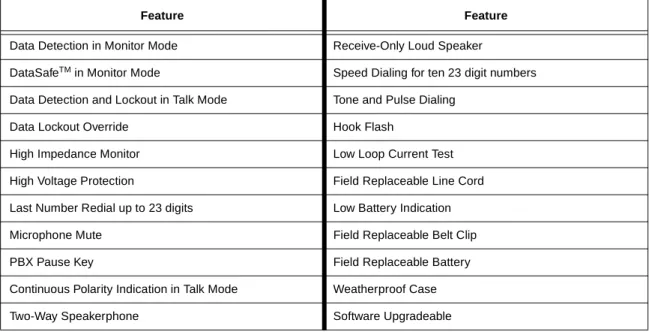
Table 1
lists the design features of the TS45S series.
Table 1. TS45S Series Design Features
Feature Feature
Data Detection in Monitor Mode Receive-Only Loud Speaker
DataSafeTM in Monitor Mode Speed Dialing for ten 23 digit numbers
Data Detection and Lockout in Talk Mode Tone and Pulse Dialing
Data Lockout Override Hook Flash
High Impedance Monitor Low Loop Current Test
High Voltage Protection Field Replaceable Line Cord
Last Number Redial up to 23 digits Low Battery Indication
Microphone Mute Field Replaceable Belt Clip
PBX Pause Key Field Replaceable Battery
Continuous Polarity Indication in Talk Mode Weatherproof Case
Physical Characteristics
The housing for the TS45S Test Set is made of high-impact plastic (see
Figure 1
). The test set is designed to provide rugged service and withstand
the rough handling and shocks normally associated with field use. The
housing is designed to permit operation of the test set in bad weather (e.g.,
in heavy rain and dust storms).
The belt clip (see
Figure 1
) is located at the keypad end of the housing
and is equipped with a spring-loaded clip that assures a secure
connection to belt loops and D-rings. The belt clip allows the test set to
be hung with the keypad and speakerphone facing the user for
convenient access. The belt clip may be replaced in the field. See
Maintenance
,
Replacing the Belt Clip
.
The test set is equipped with a field replaceable line cord. The line cord is
attached to the test set through a rubber strain relief at the transmitter end
of the test set (see
Figure 1
). See
Power and Connections
,
Line Cords
.
Several different configurations of line cords are available.
The test set provides a battery compartment (see
Figure 1
) which makes
battery replacement a simple procedure. See
Maintenance
,
Replacing the
Battery
.
The keypad (see
Figure 1
) has 19 keys that are recessed into the receiver
end of the housing. The recessed bezel provides physical protection for the
keypad and helps prevent accidental key press.
The Speakerphone speaker and microphone (see
Figure 1
) are located on
the keypad side of the test set.
Figure 1. Physical Characteristics
ts45s_006 LINE CORD STRAIN RELIEF SPEAKER KEY PAD BATTERY DOOR BELT CLIP TALK/MONITOR SWITCH POL POL MUTE LOW BATT TS 45S TS 45S DATA FL ASH LNR RCL SPEAKERPHONE MICROPHONE
Controls and Indicators
Audio Controls
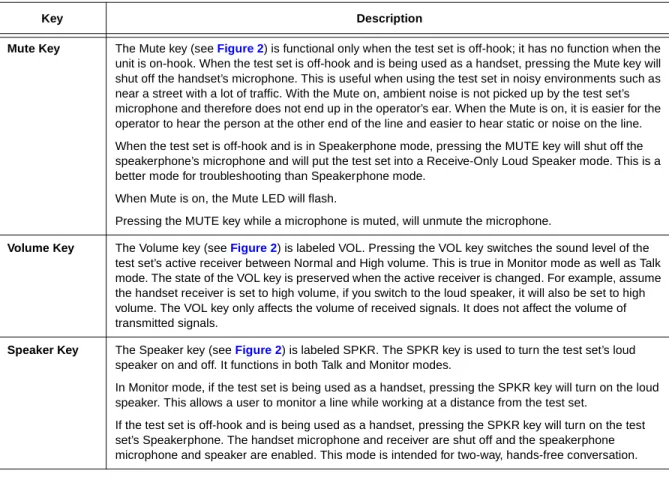
Table 2
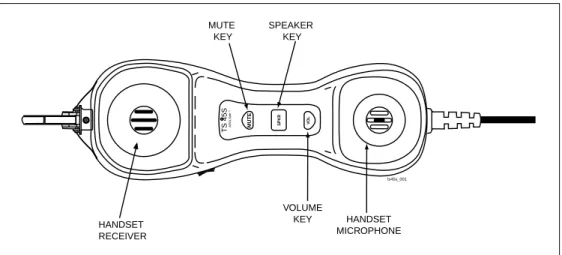
describes the audio control keys for the TS45S Test Set. The three
keys are located on the inside handle of the test set between the handset
receiver and the handset microphone (see
Figure 2
). These controls allow
the operator to switch between the handset and speakerphone, to mute the
active microphone, and to control the volume of the received audio signal.
Table 2. Test Set Audio Controls
Key Description
Mute Key The Mute key (see Figure 2) is functional only when the test set is off-hook; it has no function when the unit is on-hook. When the test set is off-hook and is being used as a handset, pressing the Mute key will shut off the handset’s microphone. This is useful when using the test set in noisy environments such as near a street with a lot of traffic. With the Mute on, ambient noise is not picked up by the test set’s microphone and therefore does not end up in the operator’s ear. When the Mute is on, it is easier for the operator to hear the person at the other end of the line and easier to hear static or noise on the line. When the test set is off-hook and is in Speakerphone mode, pressing the MUTE key will shut off the speakerphone’s microphone and will put the test set into a Receive-Only Loud Speaker mode. This is a better mode for troubleshooting than Speakerphone mode.
When Mute is on, the Mute LED will flash.
Pressing the MUTE key while a microphone is muted, will unmute the microphone.
Volume Key The Volume key (see Figure 2) is labeled VOL. Pressing the VOL key switches the sound level of the test set’s active receiver between Normal and High volume. This is true in Monitor mode as well as Talk mode. The state of the VOL key is preserved when the active receiver is changed. For example, assume the handset receiver is set to high volume, if you switch to the loud speaker, it will also be set to high volume. The VOL key only affects the volume of received signals. It does not affect the volume of transmitted signals.
Speaker Key The Speaker key (see Figure 2) is labeled SPKR. The SPKR key is used to turn the test set’s loud speaker on and off. It functions in both Talk and Monitor modes.
In Monitor mode, if the test set is being used as a handset, pressing the SPKR key will turn on the loud speaker. This allows a user to monitor a line while working at a distance from the test set.
If the test set is off-hook and is being used as a handset, pressing the SPKR key will turn on the test set’s Speakerphone. The handset microphone and receiver are shut off and the speakerphone microphone and speaker are enabled. This mode is intended for two-way, hands-free conversation.
WARNING:
Never hold the loud speaker up against your ear when it is on, or when
turning it on or off. Sounds emitted by the loud speaker can achieve levels
that are damaging to the ear.
Figure 2. Controls and Indicators
Keypad Controls and Indicators
Table 3
lists the keys on the keypad and other indicators on the test set.
Figure 3
illustrates the keypad and overlay.
HANDSET RECEIVER HANDSET MICROPHONE VOLUME KEY SPEAKER KEY MUTE KEY ts45s_001 MUTE SPKR VO L TS 45SADSL Saf e R TM
Table 3. Test Set Keypad Controls and Indicators
Key Description
Keypad The keypad (see Figure 3) is used to dial telephone numbers and make function selections. The
numeric keypad includes 12 standard dialing keys including the asterisk (❋) and the pound (#) keys. The
seven special purpose keys are labeled STORE/PROG, TONE/PULSE, RCL, LNR, PAUSE, FLASH, and DATA.
RCL Key The RCL (Recall) key is used for the storing and recalling of repertory dialing numbers. See the Program Speed Dialing Section.
FLASH Key The FLASH (Hook-Flash) key is used to interrupt loop current for a timed duration. The FLASH key only operates when the test set is off-hook. When pressed, the FLASH key will interrupt loop current for the
programmed hook-flash duration. See the Hook-Flash Duration Section.
DATA Key The DATA key is used to perform a high-speed data detection test when the test set is in Monitor mode. During the test, the unit hunts for data above the audio range. If data is detected on the line under test, you will hear a warning tone that will continue for about 5 seconds. If data is not detected, you will hear a brief all clear chime indicating the test was performed and no data was detected. This is the safest way to test for data.
When the test set is off-hook, pressing the DATA Key will cause the test set to measure loop current. If the current is below 20 mAdc, one of the two polarity LEDs will flash for about 5 seconds. If the loop current is 20 mA or higher no LEDs will flash. Low loop current may be indicative of a problem on the line.
LNR Key The LNR (Last Number Redial) key is used to redial the number most recently dialed. See the Last Number Redial Section for more details.
Table 3. Test Set Keypad Controls and Indicators (Cont’d)
Figure 3. TS45S Keypad and Overlay
Key Description
PAUSE Key The PAUSE key is used to insert a timed pause into a stream of dialed digits. The PAUSE key is most commonly used in combination with speed dial numbers that will be dialed out through a PBX. The
duration of the pause is user programmable. See the PBX Pause Duration Section.
STORE/PROG KEY The STORE/PROG key is used for storing speed dialing numbers and for programming special test set functions.
TONE/PULSE KEY The TONE/PULSE key is used to switch between tone and pulse dialing. The TONE/PULSE key is only active when the test set is off-hook. Any time the test set goes off-hook, the test set defaults to tone dialing. Once off-hook, pressing the TONE/PULSE key will change the dialing mode to pulse dialing. Pressing the key again will switch back to tone dialing.
Light Emitting Diodes (LEDs)
All LED indicators are located on the keypad (see Figure 3) inside the recessed area.
Polarity LED Notes: 1. The test set is not polarity sensitive, and will function in either polarity.
2. The POL LEDs will not light if the test set is on-hook or when the loud speaker is on.
When the test set is off-hook in handset mode, one of the two Polarity (POL) LEDs will illuminate automatically to indicate the DC polarity of the line. The green POL LED will light if the red test lead is connected to the Ring (negative) side of the line and the black test lead is connected to the Tip (positive) side of the line. The red POL LED will light if the test leads are reversed; that is, with the red test lead connected to the Tip (positive) side and with the black test lead connected to the Ring (negative) side.
Mute LED The MUTE LED flashes when the MUTE function is activated.
Low Battery LED The LOW BATT LED (battery low) flashes when the 9V battery is nearing the end of its life. The low battery LED will only become active in operating modes that use the battery.
Electronic Ringer The electronic ringer is enabled while the test set is on-hook.
7
FLASH DATA
1
PAUSE STORE
PROG PULSETONE
ABC DEF GHI JKL
2
3
4
5
6
MNO PRS8
TUV9
WXY0
QZ POLARITY LED BATTERY LED POLARITY LED MUTE LED ts45S_002 NUMERIC KEYS LOW BATT POL POL MUTE SPECIAL PURPOSE KEYSPower and Connections
Battery
Note: If the test set fails to operate properly at any time, first replace the
battery and retest before sending the test set in for repair.
A 9V Alkaline or Lithium transistor battery must be installed for the test set
to operate. Do not use rechargeable batteries. The battery performs two
main functions:
■
It powers the test set when on-hook.
■
It supplies supplementary current to the loud speaker (if on) when the
test set is off-hook.
The loud speaker draws more current than any other circuit in the test set. It
follows that the battery will last longer if the loud speaker is used in
moderation.
When the Low Battery LED begins flashing, the battery, and the unit has
anywhere from several hours to several days of life remaining depending on
how often the loud speaker is used.
See
Maintenance
,
Replacing the Battery
for instructions on changing the
battery.
If the test set ever stops working, remove the 9V battery, wait at least 20
seconds, then replace the battery. Use the same battery if you know it is
good or use a new battery if you are not sure. This will reset the test set. If it
still doesn’t work, please contact Harris Professional Services at (800)
437-2266.
Line Cords
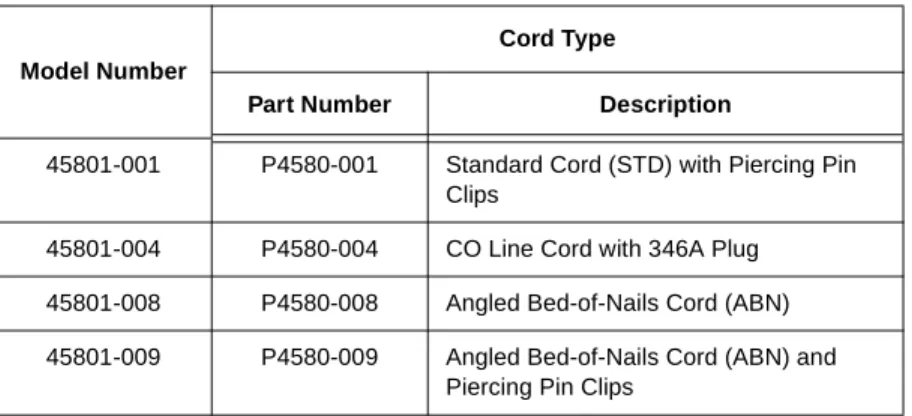
Table 4
lists the TS45S Test Set models and the line cords associated with
each. For information on availability of line cords, contact your local Harris
authorized distributor.
CAUTION:
Handling batteries should be done with care. Do not allow the
terminals to be shorted together. Dispose of battery properly to
ensure contacts cannot short. Disposal may be restricted by local
laws.
Operation
The test set has two basic modes of operation: Talk mode and Monitor
mode. Talk mode is used for off-hook operations (e.g., dialing verification,
automatic number identification, and audio quality verification). Monitor
mode is for audio monitoring of the Tip and Ring pair while on-hook. In
Monitor mode, the test set has a high input impedance, which allows
monitoring of the line without disrupting conversations or data signaling if
present.
Talk/Monitor Switch
The TALK/MONITOR switch is a rocker switch located on the side of the
test set (see
Figure 1
). Switching the TALK/MONITOR switch to the TALK
(T) position puts the test set into Talk mode. Switching the TALK/MONITOR
switch to the MONITOR (M) position puts the test set into Monitor mode.
Table 4. TS45S Model and Line Cord Types
Model Number
Cord Type
Part Number Description
45801-001 P4580-001 Standard Cord (STD) with Piercing Pin
Clips
45801-004 P4580-004 CO Line Cord with 346A Plug
45801-008 P4580-008 Angled Bed-of-Nails Cord (ABN)
45801-009 P4580-009 Angled Bed-of-Nails Cord (ABN) and
Piercing Pin Clips
CAUTION:
When testing circuits which are close to a battery source, the pops in the
handset receiver that result from clipping onto a line may be quite loud.
Although there is protection against acoustic shock built into the test set, if
the receiver is held tightly against the ear, acoustical shock may occur. The
test set is designed to rest comfortably on the shoulder with some space
between the receiver and the ear. It should be used in this position when
working close to a battery source.
Operating the Test Set in Monitor Mode
While in Monitor mode, the test set is always on-hook. The test set draws
no direct current from the line and it transmits no signals to the line. In this
mode, the test set has a high AC input impedance, which allows listening
for audio signals without disrupting conversations or data signaling that
might exist on the line. Either the handset receiver or the loud speaker can
be used to monitor a line. In the Monitor mode, the test set is typically used
to perform one or more of the following procedures:
■
Verification that a line is idle when looking for a line to borrow.
■Listening for noise on the line.
■
Hunting for tracer tones.
■
Performing a test for the presence of high frequency data on the line
using the DATA key.
Operating the Test Set in Talk Mode
When switched to Talk mode, the test set performs a short test for
high-speed data and talk battery on the line. If high-high-speed data is detected, the
test set will generate an audio alarm and will remain on-hook. If high-speed
data is not detected and talk battery is present, the test set will go off-hook.
When off-hook, the test set operates like a standard telephone; it is typically
used to verify the proper operation of a voice telephone line or to establish
temporary communications on a “borrowed pair”.
Originating a Call 1. Put the test set in Monitor mode.
2. Clip the test set to Tip and Ring of a subscriber loop. 3. Monitor (listen to) the line to verify it is idle.
4. If not idle, disconnect the test set from the line.
5. If the line is idle, move the TALK/MONITOR switch to the TALK position. The test set automatically tests for high-speed data and talk battery on the line.
6. If data is detected, the test set will not go off-hook (will lockout) and will beep indicating the presence of data. Try another line.
7. If there is no data and talk battery is present, the test set will go off-hook and draw dial tone. 8. Dial the desired number.
Disconnecting a Call
To disconnect a call, move the TALK/MONITOR switch to the MONITOR position or remove the test leads from the line.
Data Lockout Operation
With the increase in high capacity data lines in the distribution system,
comes the greater risk of disrupting data services when working on analog
lines. The test set is designed to be used by Outside Plant and Central
Office technicians to perform their normal duties while greatly reducing the
possibility of accidentally disrupting service on data lines that exist in the
same cables and distribution facilities as analog voice lines.
Accidentally going off-hook on a data line, while you are searching for talk
battery or dial tone on an unmarked terminal block or cable splice could
bring down one of these high capacity data lines. To prevent this from
occurring, the test set provides an automatic data lockout function. When a
test set, with its TALK/MONITOR switch in the TALK position, is connected
to a Tip and Ring pair, it will automatically test the line for high-speed data
(data signals that are above the human audio range) prior to going off-hook.
If data is detected, the test set will lockout, preventing itself from going
off-hook, and it will provide a continuous audio alarm indicating it has detected
data.
When the test set is locked out, it remains on-hook, it does not draw direct
current from the line and it presents a high AC impedance to the line to
prevent glitching and loading down of data signals on the line under test.
The test set can detect and protect the following data services: ISDN BRI,
ISDN PRI, 56k DDS, SW56, T1 and E1, HDSL, IDSL, SDSL, ADSL DMT,
ADSL CAP and ADSL LITE.
Answering a Call 1. If a ringing signal is received, move the TALK/MONITOR switch to the TALK position. The test set automatically tests for high-speed data on the line.
2. If there is no data and talk battery is present, the test set will go off-hook.
3. However, if data is detected, the test set will lockout and will beep, indicating data is present.
4. To go off-hook with data present, press the Override key sequence (see Lockout Override
Operation).
Ground Start Ground start lines are typically found on PBX installations. To activate an idle ground start telephone line, do the following:
1. Put the test set in Monitor mode, and connect the test leads to Tip and Ring of the ground start line. With a third wire, temporarily short the Tip side of the line to earth ground. A wire with an alligator clip at each end is often used for this. Do not allow clips to short network connections. 2. With the short-to-earth in place, move the TALK/MONITOR switch to TALK. When dial tone is
Data Safe Practices
Always monitor the line for an audible signal before attempting to go
off-hook to draw dialtone. The data detect circuitry on the test set is designed
to detect data signals above the human audio range. To detect data signals
within the human audio range, such as produced by voiceband modems
and subrate DDS transceivers, you must listen to the line using the unit’s
audio monitoring capability. If you hear the telltale hiss of a voice band
modem or low frequency data transceiver, do not move the TALK/
MONITOR switch to TALK. If you do switch to TALK, the test set will not
lockout because it does not detect low frequency data. It will go off hook
and it will interfere with the voice band modem or data transceiver. To avoid
this, try another line or wait until the line is idle.
Data detection is a two part process. The first part requires listening to the
line for audible data traffic in Monitor mode as described above. If the line is
quiet, then the second part is to use the data detect capability of the test set
to determine if there is data above the human audio range on the line. This
can be done in one of two ways.
■
First, you can test for high-speed data with the test set still in Monitor
mode by pressing the DATA key. If there is high-speed data on the pair,
the test set will generate a warning alarm for about 5 seconds. If there
is no data on the line, the test set will generate a short confirmation
tone. If all clear, then switch the test set to Talk mode, it will go off-hook.
■
Secondly, you can test for data by switching the TALK/MONITOR switch
to TALK. The test set will automatically perform a short test for
high-speed data. If there is data on the line, the test set will lockout, (will
remain on-hook) and will generate a data warning alarm. If there is no
data on the line, the test set will go-off-hook.
To test several lines in succession, wait 2 seconds after unclipping the test
leads from the present pair before connecting to the next pair. This allows
the test set to go back on-hook and the data detect circuitry to reset. If you
don’t wait 2 seconds, you may connect to the second line with the test set
still off-hook. If the second line happens to be carrying data, it will be
corrupted.
CAUTION:
Shorting the TIP and RING leads together while connected to a
data line will cause disruption to the data.
When going from pair to pair searching for tracer tone or dial tone it is best
to connect the test set to Tip and Ring of the pairs. Avoid the practice, either
in Talk or Monitor mode, of clipping one lead of the test set to ground, and
using the other lead to search for tracer tone or dial tone on a block. This
may create an electrical imbalance on a data line that will disrupt service.
Once you find the voice line you are searching for then it is OK to test Tip to
ground or Ring to ground on that line.
Be careful not to short the test leads together if you are connecting to a
data line (or any line for that matter), as this could bring down the service.
It is best to put the test set in Monitor mode when troubleshooting a line,
searching for capacitance kicks, RF signals, craft provided tones, etc.
Lockout Override Operation
Normally, when the test set detects data, it means the operator has
accidentally connected to a high-speed data line and should immediately
disconnect from the line to avoid disrupting the data service. But in some
cases the operator knows that he needs to go off-hook on a specific line
even though the test set is indicating that the line is a data line.
The following are scenarios where the operator may wish to override a data
lockout:
■
When there is false data detection due to RF pickup on a line that is
near an AM radio broadcast antenna. The RF induced in the line may
appear to be data.
■
When accessing POTS on a subscriber line that carries both ADSL and
POTS
Telephone lines near AM radio broadcast facilities, pick up the RF signals
from the broadcast antennas. Normally this isn’t a problem for the test set.
If the line is well balanced, the test set will not see the RF signal because it
is a common mode (longitudinal) signal. But if the line isn’t well balanced, a
portion of the RF signal will be converted to a differential (metallic) signal. If
the RF signal amplitude is high enough, it may be detected as high-speed
data by the test set. If you know for sure you are on such a line, use the
unit’s override capability to go off-hook.
The lockout override can only be activated when the TALK/MONITOR
switch is in the TALK position. To activate the override, press the STORE/
PROG key then the DATA key. If DC voltage is present, the test set will go
off-hook. To go back on-hook, simply unclip the test set’s test leads from the
line or put the unit into Monitor mode. The override key sequence must be
repeated each time a locked-out test set needs to be taken off-hook.
Operating Your Test Set on ADSL
The TS45S Test Set is designed to go off-hook on a line that
simultaneously carries POTS and ADSL, enabling access to the voice
portion of the line traffic without taking down the ADSL service. The reason
for going off-hook on this type of line is to verify the POTS portion is
working properly. Typical scenarios follow.
Originate a Call on an ADSL/POTS Line
1. Clip the test set’s leads to the ADSL line. It is best to clip both test leads to the line under test at about the same time to avoid prolonged line unbalance.
2. Move the TALK/MONITOR switch to TALK. The test set will automatically perform a test for high-speed data and will alarm indicating the presence of data (in this case, ADSL data).
3. Execute an Override by pressing the STORE/PROG key followed by the DATA key. The test set will go off-hook and will draw dial tone.
4. A call can be placed to verify dialing and speech quality.
Most of the time users of the test set will be originating calls but occasionally there may be a need to receive a call when connected to an ADSL pair.
Incoming Call 1. To detect an incoming ring signal on an ADSL pair, the only requirement is that the test set must be on-hook. It is not important what position the TALK/MONITOR switch is in.
2. If the TALK/MONITOR switch happens to be in the MONITOR position and the ring signal is received, the test set will sound its ringing tone.
3. Move the TALK/MONITOR switch to TALK. The test set will lockout and sound an alarm indicating that high-speed data is on the line. During the reception of a ring burst the test set will turn on its ringing tones for the duration of the ring burst. During the time between ring bursts, the test set will again generate an alarm to remind the user that ADSL data is still being detected.
4. To answer the incoming call, the user must execute a Lockout Override by pressing the STORE/ PROG key followed by the DATA key while the test set is in Talk mode. The test set will then go off-hook.
It is important to understand that ADSL lines are very sensitive to intrusion. Careless troubleshooting with any device, the TS45S Test Set included, will cause the ADSL service to shut down. But careful application of the test set will permit the solution of many voice service problems without shutting down the ADSL service.
Configuring Your Test Set
Last Number Redial In the Tone or Pulse dialing mode, the last number dialed can be automatically redialed by pressing the LNR key after going on-hook and then back off-hook. To redial a number, the LNR key must be the first key pressed after going back off-hook.
If, after going off-hook, any dialing key is pressed, the LNR memory will be cleared and the value of the pressed key will be the first number stored in the cleared memory.
The PAUSE key is considered a dialing key. If pressed, it is stored in the redial memory, taking up one of the 23 digit slots.
In tone dialing mode, the dialing keys that are permitted to be stored in LNR memory include
1,2,3,4,5,6,7,8,9,0,*,# and PAUSE. If the star (*) and pound (#) keys are pressed in pulse mode they will be ignored. The star (*) and pound (#) keys will not be redialed when the test set is in pulse mode even if the redial memory includes star (*) and pound (#).
Program Speed Dialing Numbers
While in Monitor mode, the test set allows the storage of ten speed dialing numbers in ten memory locations (0 through 9). Each location will store up to 23 digits. If an attempt is made to store more than 23 digits, only the first 23 are stored. The PAUSE key is accepted as a dialing digit when storing numbers.
Storing a Number When in Monitor Mode (Preferred Method)
1. Make sure the TALK/MONITOR switch is in the MONITOR position. 2. Press RCL.
3. Using the dialing keypad, enter the number to be stored. 4. Press the STORE/PROG key.
5. Press one of the number keys (0 through 9) to select the number of the memory location . 6. A confirmation tone will be issued by the test set.
Note: If the RCL key is pressed while programming a number sequence, the programming mode will be
exited; all other non-dialing keys will be ignored.
Storing the Last Number Dialed
If you dial a number then go on-hook and you decide you want to save that number in speed dialing memory, do the following:
1. Make sure the TALK/MONITOR switch is in the MONITOR position. 2. Press RCL.
3. Press LNR (Last Number Redial). 4. Press the STORE/PROG key.
5. Press one of the number keys (0 through 9) to select the number of the memory location. 6. A confirmation tone will be issued by the test set.
Storing a Number You Are Calling
1. Connect the test set to a working telephone line, set the TALK/MONITOR switch to TALK, and receive dial tone.
2. Dial the number. 3. Press STORE/PROG key.
Dialing a Stored Number
1. Connect the test set to a working telephone line. 2. Set the TALK/MONITOR switch to TALK.
3. When the test set goes off-hook, press RCL (RECALL) and then the number key (0 through 9) for the memory location. For example, to dial a number stored in location 5, press RCL and then 5. The number will be automatically dialed.
Putting a Pause in a Stored Number
In some situations it may be necessary to put a pause between digits of a stored number, as when accessing a trunk through a PBX that requires a 9 to get an outside line. You can do this by pressing the
PAUSE key at the point where the pause is required. For example, to store the number
9-555-1234, with a pause between the 9 and 5, enter 9[PAUSE]5551234. When the number is dialed out, there will be a pause between the 9 and 5. The duration of a pause is user programmable (see
Pause Duration).You can insert a longer pause by pressing PAUSE more than once.
Note: Each time the Pause key is pressed, it counts as one dialing digit.
Hook Flash Duration When the test set is off-hook, pressing the FLASH key causes a timed interruption of the loop current to occur. Some PBX setups or telephone office switches may use this signal to put a call on hold or to activate some special function. One flash is generated for each press of the key.
To change the flash duration value:
1. Make sure the TALK/MONITOR switch is in the MONITOR position. 2. Press the STORE/PROG key.
3. Press the FLASH key.
4. Press one of the following number keys (0 through 9) to select the desired hook flash length. Invalid entries are ignored. The test set provides a confirmation tone when the entry is accepted.
1 - 100 ms 6 - 600 ms (default)
2 - 200 ms 7 - 700 ms
3 - 300 ms 8 - 800 ms
4 - 400 ms 9 - 900 ms
5 - 500 ms 0 - 1000 ms
Pause Duration The PBX Pause feature allows the user to insert a delay into speed dialing numbers. This is required when dialing out through a system that provides a second dialtone (e.g., PBX). Different PBX devices may require different pause durations to allow enough time for the second dial tone to be returned. The pause duration is user programmable.
To change the PBX Pause duration:
1. Make sure the TALK/MONITOR switch is in the MONITOR position. 2. Press the STORE/PROG key.
3. Press the PAUSE key.
4. Press one of the following number keys (1 through 4) to select the desired pause length. Invalid entries are ignored. The test set provides a confirmation tone when the entry is accepted. 1 - 2 Seconds 2 - 3 Seconds 3 - 4 Seconds (default) 4 - 5 Seconds Speaker/High Volume Timeout
The loud speaker draws more current from the battery than any other circuit on the test set. The battery will be drained quickly if the loud speaker is left on continuously. To extend battery life, the test set has a timeout function that automatically turns off the loud speaker in 2 minutes when the test set is on-hook. A timer is started whenever the test set is put on-hook. As long as the test set is off-hook, the timer will not start.
Maintenance
Speaker/High Volume Timeout (Cont’d)
If the test set is used as a handset in Monitor mode and if the test set’s receiver has been set to high volume, the battery will be required to deliver enough current to drain the battery sooner than desired. So the same timeout that is applied to the loud speaker is applied to the high volume state in Monitor mode. If the test set is in Monitor mode with the receiver’s volume set to high volume the unit will revert to low volume after the timeout. When the test set is in Monitor mode with the loud speaker off and with the receiver volume set to low, it draws very little current from the battery. The default timeout duration is 2 minutes while on-hook and 240 minutes (4 hours) while off-hook. The off-hook timeout cannot be changed, but the on-hook timeout duration is user programmable. Remember, the longer the selected timeout duration the shorter the battery life.
To change the speaker timeout duration: 1. Put the test set in Monitor mode. 2. Press the STORE/PROG key. 3. Press the SPKR key.
4. Press the number keys (1 through 6) to select the desired duration. Invalid entries are ignored. The test set provides a confirmation tone when the entry is accepted. 1 - 2 Minutes (default) 2 - 5 Minutes 3 - 10 Minutes 4 - 20 Minutes 5 - 30 Minutes 6 - 40 Minutes
Factory Defaults The Restore Defaults function allows the user to restore all programmable features to their original factory settings. Performing this function does not clear stored telephone numbers. The defaults are:
Pause Duration — 4 seconds. Hook Flash Duration — 600 ms. Speaker Timeout — 2 minutes. To reset factory default values:
1. Press the STORE/PROG key.
2. Press the pound (#) key. The test set provides an audible indication when the entry is accepted.
Software Upgrade The test set can be upgraded as new releases become available. Contact Customer Service for obtaining software upgrades. Instructions for installing the upgrades are provided with the software upgrade.
WARNING:
Disconnect clips from any metallic connections before performing any maintenance.
Read all instructions completely and understand possible hazards to end user if
maintenance is not performed properly.
Replacing the Battery
Replacing the Belt Clip
CAUTION:
1. Batteries are hazardous to handle. Do not allow the terminals to be shorted together.
Severe burns or explosion can result if not handled properly. Dispose of battery properly
to ensure contacts cannot short. Disposal may be restricted by local laws.
2. Do not use CRC Cable Clean
®or any similar chlorinated solvent on the TS45S Test
Set. Doing so will damage the test set
Replacing the Battery
To replace the 9V battery:
Note: Be sure to replace the battery with a good 9V Alkaline or Lithium battery or the test set will not
operate properly.
1. Disconnect the test set from the line and place on a protected work surface with battery cover up.
Note: Battery cover screws are retained in the cover and will not come all the way out.
2. Using a Phillips screwdriver, loosen only the four screws attaching the battery door cover to the
back of the test set (see Figure 4).
3. Remove the battery door cover (see Figure 5). Do not access or handle printed circuits or other
areas of the test set other than the battery.
4. Remove the old battery from the test set (see Figure 6) and properly discard. Make sure the
battery’s terminals cannot short.
5. Insert a new 9V battery into the test set. When inserting the battery, observe the proper polarity. 6. Check that all sealing surfaces are clean and mate properly for water resistant seal.
7. Place the battery door cover on the test set (see Figure 5). Fasten the four screws securely (see
Figure 4). Do not over tighten screws. The battery door screws should be torqued to a maximum of 0.904 N-m or 8 in-lb.
Replacing the Belt Clip
The belt clip assembly is field replaceable in the event of damage or prolonged wear. To order a replacement belt clip, contact your local Harris authorized distributor.
To replace the belt clip assembly (see Figure 7):
1. Using a Phillips screwdriver, remove the screw that secures the belt clip to the test set housing at the keypad end.
2. Remove the old belt clip and replace with a new one. Secure the belt clip assembly to the test set housing with the original screw.
Figure 4. Battery Door View of Test Set
Figure 5. Removing Test Set Door Cover
Figure 6. Removing the Batteries
Figure 7. Belt Clip Replacement
POL POL MUTE LO BATT ts45s_011 TS 45S DATA ts45s_012 9 VOL T TS 45S DA TA RCL LNR ts45s_010 POL POL MUTE LO BA TT TS 42 TS 45S DATA RCL LNR ts4x_018 REMOVE THE SCREW THAT SECURES THE BELT CLIP TO THE TEST SET BELT CLIP
Replacing the Line Cord
A worn out or damaged line cord can be replaced by the user. To obtain a
replacement line cord contact your local distributor or Harris Corporation at
the location given in the Warranty Section.
Removing the Old Line Cord
To remove the old line cord:
Notes: 1. Battery cover screws are retained in the cover and will not come all the way out.
2. Be careful not to damage or pinch the speaker wires, printed circuit faces or insulating materials. 3. Be sure to account for all hardware removed. Loose or missing hardware could create a hazard for the end user.
1. Using a Phillips screwdriver, loosen only the four screws attaching the battery door cover to the
back of the test set (see Figure 4).
2. Remove the battery door cover (see Figure 5) and battery from the test set.
3. Loosen the two screws that hold the line cord to the PCB (see Figure 8).
4. Using needle nose pliers or one of the line cord clips, remove the two screws and washers from the line cord connectors.
5. Remove the plastic clip (see Figure 9) that holds the line cord strain relief in place.
6. Slip the line cord screw lugs (see Figure 10) through the hole in the end of the housing.
Installing New Line Cord
To install a new line cord:
1. From the outside of the housing, slide the screw lugs of a new line cord through the hole in the end of the test set housing. Make sure the crimp barrel offset side of the screw lugs is up (see
Figure 11) and that the line cord screw lugs are flush against the circuit board.
2. Fasten the red wire lug to the PCB (Ring) with screw and washer (see Figure 10).
3. Fasten the black wire lug to the PCB (Tip) with screw and washer (see Figure 10).
4. Insert the plastic clip over the line cord strain relief at the base of the test set housing (see
Figure 9) and press tightly into place. Inspect all work to ensure no pinched wires or areas where weather resistance and safe operation is affected.
5. Reinstall the battery. Observe the proper polarity.
Note: Do not over tighten screws. Over tightening will strip the plastic.
6. Place the battery door cover (see Figure 5) on the test set and fasten the four screws (see
Figure 4). Tighten screws to a maximum torque of 0.904 N-m or 8 in-lb.
WARNING:
Read all instructions completely and understand possible hazards to end
user if not performed properly.
WARNING:
Disconnect test set clips from any metallic connections before performing
this maintenance.
Figure 8. Removal/Installation of Line Cord
Screws
Figure 9. Removal/Installation of the Plastic Clip
Figure 10. Removal/Installation of Line Cord
Screw Lugs
Figure 11. Orientation of Line Cord Screw Lugs
TS 45R ts45s_020 TS 45R ts45s_019 RED LINE CORD SCREW LUG BLACK LINE CORD ts45s_003
Note: Speaker Not Shown For Illustration Purposes.
SCREW LUG Correct Orientation Incorrect orientation ts4x_021 Crimp barrel is offset
Warranty
Harris Corporation agrees to warranty its products are free from defects in
material and workmanship for the following periods:
■
Butt Sets and Test Sets – 18 months from date of manufacture.
■Line Cords and Accessories – 90 days from date of purchase.
This warranty constitutes the sole and exclusive warranty for products sold
by Harris Corporation, Network Support Division, and is in lieu of any other
warranty, express, implied, or statutory, including the warranty of
merchantability and fitness for a particular purpose. In no event shall Harris
be liable for any special, incidental, indirect, or consequential damages
arising out of the use of any product or from any other cause.
This warranty shall not apply to products which have been subjected to
mishandling, abuse, misuse, negligence, or accident, nor to products which
have been modified, altered, or repaired by personnel not authorized by
Harris.
Non-Warranty
Out-of-warranty maintenance, service, or repair of products is available
from the Harris Corporation, Network Support Division, on a time and
materials basis. In addition, Harris offers for sale some replacement
components. Harris Corporation recommends that out-of-warranty service
and repair of electronic products be completed at its Harris Corporation
Network Support Division, facility or authorized representative. Contact
Harris Repairs for the location of the Harris authorized repair facility nearest
you.
Return or Repair of Equipment
The return of any products for credit, other than for warranty service, is
done at the sole discretion of Harris Corporation. Before any product is
returned, including for warranty service, a Return Authorization (“RA”)
number must be obtained from the Customer Service Department by
calling (800) 437-2266. If the RA number is not clearly marked on the
shipping label, the package will not be accepted by Harris. All authorized
returns must be shipped, with shipping charges prepaid, fob destination,
and addressed as follows:
Harris Corporation
Network Support Division
809 Calle Plano
Camarillo, California 93012-8516
United States of America
Attn: Customer Service, RA# xxxxx
Specifications
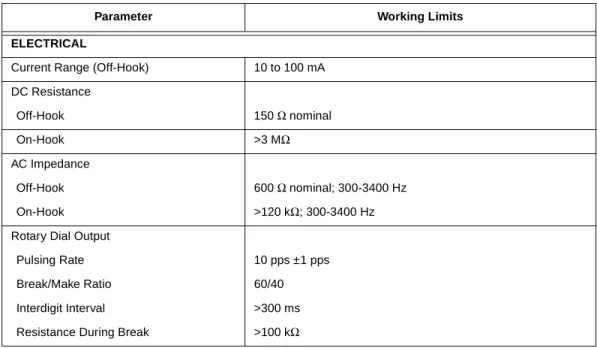
Table 5
lists TS45S Test Set specifications.
Table 5. Specifications
Parameter Working Limits ELECTRICAL
Current Range (Off-Hook) 10 to 100 mA
DC Resistance Off-Hook 150 Ω nominal On-Hook >3 MΩ AC Impedance Off-Hook 600 Ω nominal; 300-3400 Hz On-Hook >120 kΩ; 300-3400 Hz
Rotary Dial Output
Pulsing Rate 10 pps ±1 pps
Break/Make Ratio 60/40
Interdigit Interval >300 ms
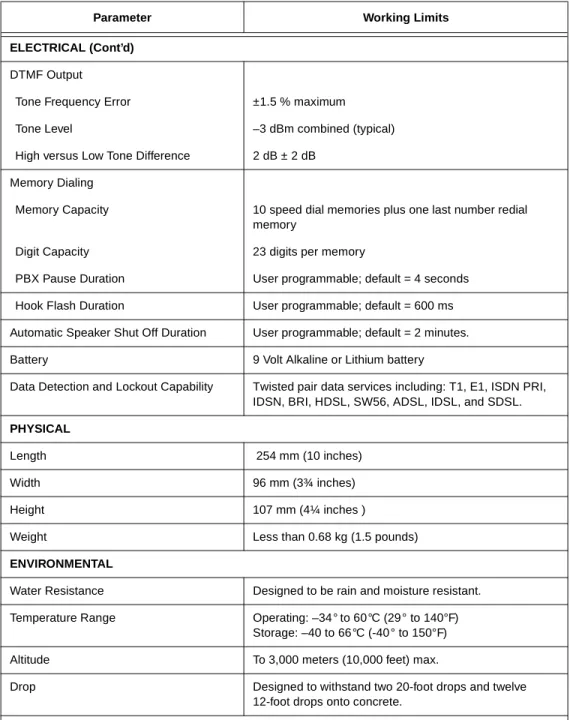
Table 5. Specifications (Continued)
Parameter Working Limits ELECTRICAL (Cont’d)
DTMF Output
Tone Frequency Error ±1.5 % maximum
Tone Level –3 dBm combined (typical)
High versus Low Tone Difference 2 dB ± 2 dB
Memory Dialing
Memory Capacity 10 speed dial memories plus one last number redial
memory
Digit Capacity 23 digits per memory
PBX Pause Duration User programmable; default = 4 seconds
Hook Flash Duration User programmable; default = 600 ms
Automatic Speaker Shut Off Duration User programmable; default = 2 minutes.
Battery 9 Volt Alkaline or Lithium battery
Data Detection and Lockout Capability Twisted pair data services including: T1, E1, ISDN PRI,
IDSN, BRI, HDSL, SW56, ADSL, IDSL, and SDSL.
PHYSICAL
Length 254 mm (10 inches)
Width 96 mm (3¾ inches)
Height 107 mm (4¼ inches )
Weight Less than 0.68 kg (1.5 pounds)
ENVIRONMENTAL
Water Resistance Designed to be rain and moisture resistant.
Temperature Range Operating: –34 ° to 60°C (29 ° to 140°F)
Storage: –40 to 66°C (-40 ° to 150°F)
Altitude To 3,000 meters (10,000 feet) max.
Drop Designed to withstand two 20-foot drops and twelve
12-foot drops onto concrete. Note: Specifications subject to change without notice.