Data Sheet
Cisco Business Edition 3000 8.6.3
Product Overview
Cisco
®Business Edition 3000 is an easy-to-manage solution that integrates the benefits of voice, video, mobility,
messaging, applications and voice gateway services on a single appliance. Consolidating these capabilities on a
single server creates a cost-effective solution that is simple to set up, manage, and use. This lowers total cost of
ownership (TCO) and provides a smooth transition from older, outdated telephony systems to unified
communications.
Cisco Business Edition 3000 is designed to deliver a unified communication experience, ranging from basic
telephony services to luxury advanced features that meet the requirements of your employees and your
customers, and help you achieve your long-term business goals. Designed for mid-sized organizations with
smaller IT staffs, the solution provides investment protection with the capacity to support up to 300 employees and
10 sites.
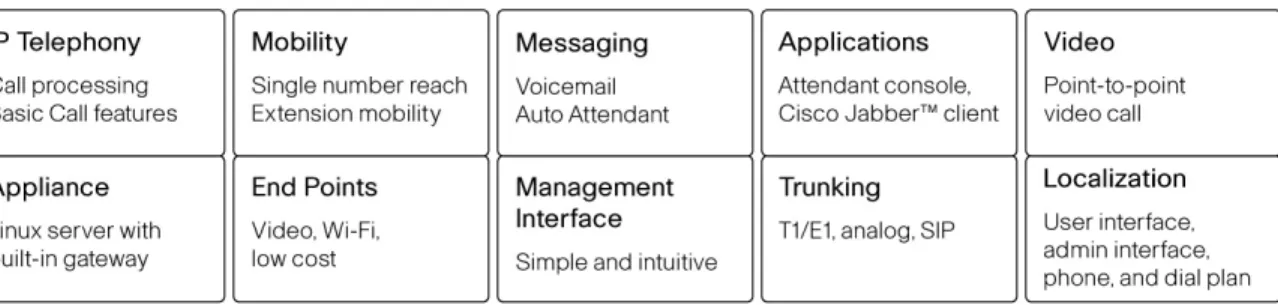
Figure 1 displays the primary components of the Business Edition 3000 solution.
Figure 1. Business Edition 3000 Components
The software is preinstalled on the purpose-built Linux appliance and consists of a single firmware image that
includes the underlying server operating system as well as unified communication application. Figure 2 is an
image of the appliance. The core elements are:
●
Cisco MCS 7890-C1 Edition 3000 Appliance with two built-in T1/E1 ports
Cisco MCS 7890-C1 is a one-rack unit (1RU) Cisco media-convergence-server that serves as the central
platform running call processing and voicemail application. It also includes a gateway with duel T1/E1 ports
for public switched telephone network (PSTN) access capability. The built-in T1/E1 gateway eliminates
costs for an additional T1/E1 interface.
●
Cisco Business Edition 3000 call processing software
The call processing software is included and preinstalled on the appliance to provide the core call
processing capabilities and other unified communication applications.
●
Simple intuitive administration interface for provisioning and management
Cisco Business Edition 3000 is managed by a web-based, easy-to-navigate administration interface which
simplifies initial setup, ongoing operation, and maintenance of the system. The appliance’s first-time-setup
wizard leads partners to perform initial setup of the system in a matter of hours. The move, add, change
administration interface allows administrators to provision and manage the system in simple flow.
Messaging is powered by the Cisco Unity
®Connection application with select feature sets.
Cisco Unity Connection is also pre-installed on Cisco Business Edition 3000 to serve as the voice
messaging application for foundational unified communication features such as voice mail, auto attendant,
etc. Select sets of features are supported for the purpose of simple and intuitive management. Please refer
to Table 3 for more details on user features.
●
Video capability
Cisco Business Edition 3000 provides point-to-point video call capability with Cisco-capable video-enabled
endpoints. The combination of the Business Edition 3000 and the video endpoints make it as easy to make
video calls as it is to make phone call.
●
Application for unified communication and collaboration
The Cisco Business Edition 3000 solution supports multiple applications to deliver unified communication
and collaboration experiences. Various desktop applications are supported, such as Cisco Jabber IM Client
(cloud-based with Cisco WebEx Connect
®service) and CUCI-RTX (China only). It also integrates with
Cisco WebEx
®Meeting Center.
●
Supported endpoints
Cisco Business Edition 3000 supports a series of IP phones that are also supported by Cisco Business
Edition 5000, Business Edition 6000, and Cisco Unified Communications Manager (enterprise version);
making it easier for customers to migrate to larger solutions when necessary. The supported phone
portfolio includes the low-cost Cisco Unified SIP Phone 3905, middle-level Cisco Unified IP Phone 6900
Series, high-end Cisco Unified IP Phone 8900 Series, Cisco Unified Conferencing Station 7937, and Cisco
Unified IP Wireless IP Phone 7925G.
●
Mobility
Cisco Business Edition 3000 includes mobility features for single-business voice mailbox and
reach-me-anywhere (also refer to single-number-reach) that intelligently manages, filters, routes, and connects calls
between an employee's IP desk phone and mobile cellular or home phone. Extension mobility is supported
to allow users to log into phones in an office other than a home office, and enjoy a consistent user
experience with a desk phone.
●
Trunking
Cisco Business Edition 3000 provides support on multiple types of trunks to meet different requirements for
PSTN accessibility. They include Primary Rate Interface (PRI), Session Initiation Protocol (SIP) trunking,
and analog trunks. Trunks can be deployed on central site as well as on remote sites using gateways at
remote sites. The built in T1/E1 gateway on Cisco Business Edition 3000 provides dual-PRI interfaces for
PSTN access.
●
Localization
Cisco Business Edition 3000 does not only localize the user option page; it also localizes the administration
page for an easy and simple management interface. The localization package for a country does not
include the localization for an administration interface and user-option page, but does include a dial plan for
the country, country-specific tones, phone localization for the country, announcements in local language,
prompts in local languages, and analog settings for the country. Each release will have a set of country
packs. Country packs are released at different times after first customer ship for each release.
For information on availability of country packs in Cisco Business Edition 3000 releases, please visit
http://www.cisco.com/en/US/products/ps11370/prod_bulletins_list.html
.
Primary Features and Benefits
This section provides detailed information on system capacity, supported features, applications, and endpoints for
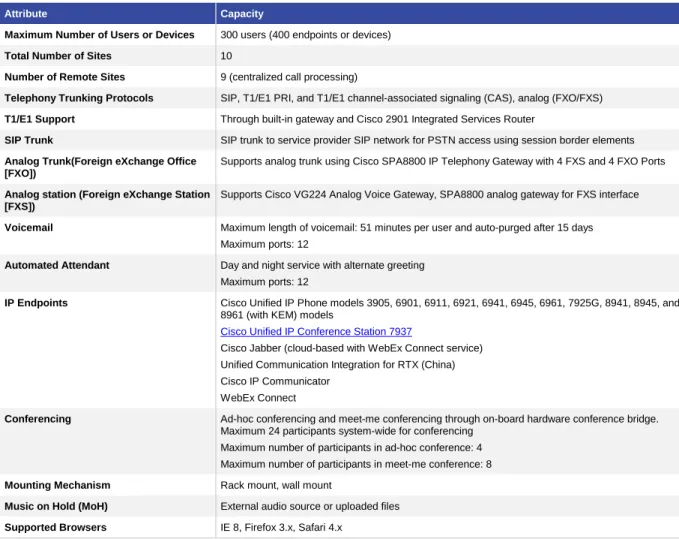
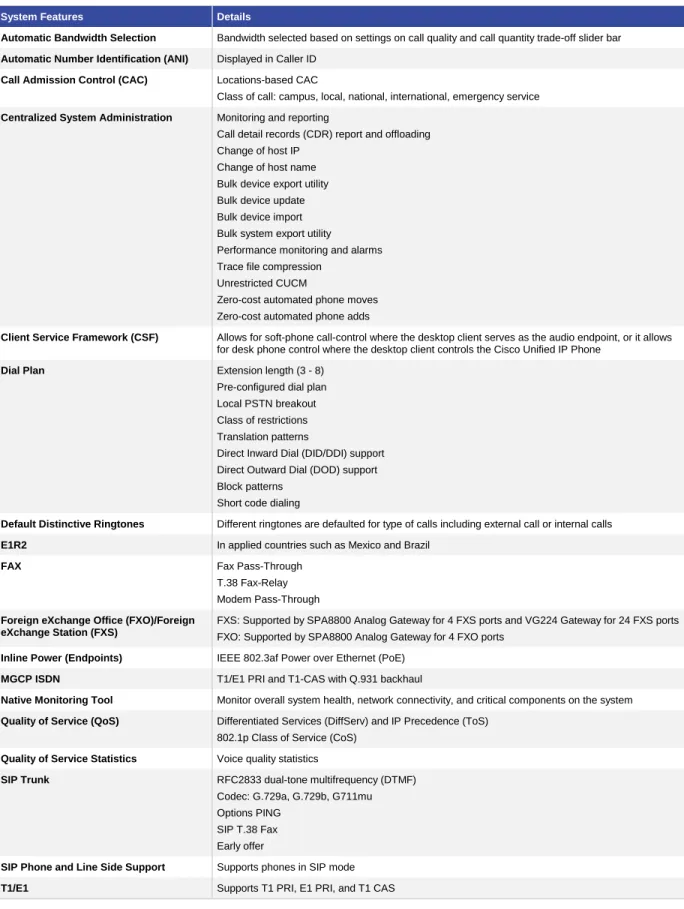
Cisco Business Edition 3000. Table 1 details system capacity and features. Table 2 outlines system features.
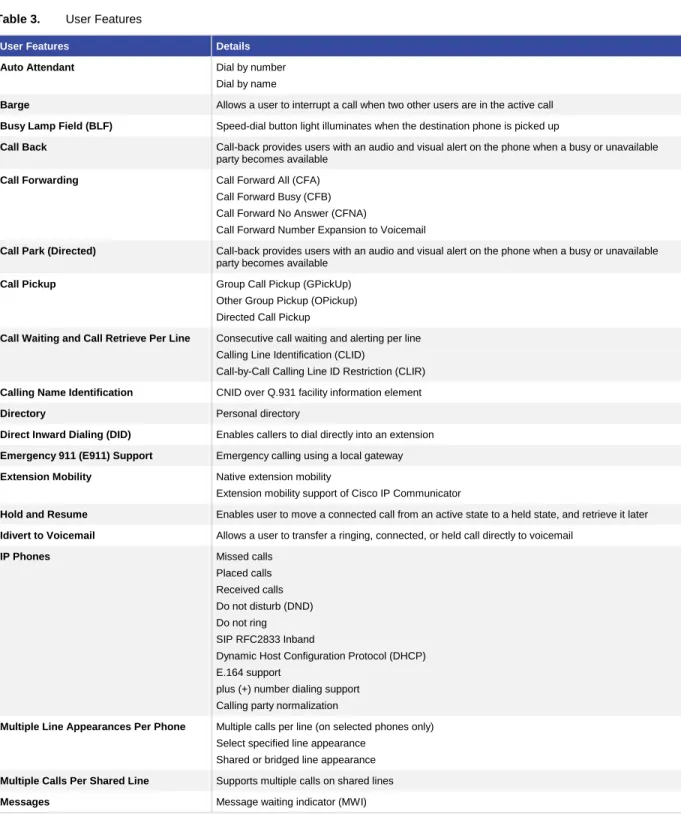
Table 3 highlights user features. And Table 4 lists the phone models that are supported.
System Capacity and Features
Table 1.
System Capacity
Attribute Capacity
Maximum Number of Users or Devices 300 users (400 endpoints or devices)
Total Number of Sites 10
Number of Remote Sites 9 (centralized call processing)
Telephony Trunking Protocols SIP, T1/E1 PRI, and T1/E1 channel-associated signaling (CAS), analog (FXO/FXS)
T1/E1 Support Through built-in gateway and Cisco 2901 Integrated Services Router
SIP Trunk SIP trunk to service provider SIP network for PSTN access using session border elements
Analog Trunk(Foreign eXchange Office [FXO])
Supports analog trunk using Cisco SPA8800 IP Telephony Gateway with 4 FXS and 4 FXO Ports
Analog station (Foreign eXchange Station [FXS])
Supports Cisco VG224 Analog Voice Gateway, SPA8800 analog gateway for FXS interface
Voicemail Maximum length of voicemail: 51 minutes per user and auto-purged after 15 days Maximum ports: 12
Automated Attendant Day and night service with alternate greeting Maximum ports: 12
IP Endpoints Cisco Unified IP Phone models 3905, 6901, 6911, 6921, 6941, 6945, 6961, 7925G, 8941, 8945, and 8961 (with KEM) models
Cisco Unified IP Conference Station 7937
Cisco Jabber (cloud-based with WebEx Connect service) Unified Communication Integration for RTX (China) Cisco IP Communicator
WebEx Connect
Conferencing Ad-hoc conferencing and meet-me conferencing through on-board hardware conference bridge. Maximum 24 participants system-wide for conferencing
Maximum number of participants in ad-hoc conference: 4 Maximum number of participants in meet-me conference: 8
Mounting Mechanism Rack mount, wall mount
Music on Hold (MoH) External audio source or uploaded files
Table 2.
System Features
System Features Details
Automatic Bandwidth Selection Bandwidth selected based on settings on call quality and call quantity trade-off slider bar
Automatic Number Identification (ANI) Displayed in Caller ID
Call Admission Control (CAC) Locations-based CAC
Class of call: campus, local, national, international, emergency service
Centralized System Administration Monitoring and reporting
Call detail records (CDR) report and offloading Change of host IP
Change of host name Bulk device export utility Bulk device update Bulk device import Bulk system export utility
Performance monitoring and alarms Trace file compression
Unrestricted CUCM
Zero-cost automated phone moves Zero-cost automated phone adds
Client Service Framework (CSF) Allows for soft-phone call-control where the desktop client serves as the audio endpoint, or it allows for desk phone control where the desktop client controls the Cisco Unified IP Phone
Dial Plan Extension length (3 - 8)
Pre-configured dial plan Local PSTN breakout Class of restrictions Translation patterns
Direct Inward Dial (DID/DDI) support Direct Outward Dial (DOD) support Block patterns
Short code dialing
Default Distinctive Ringtones Different ringtones are defaulted for type of calls including external call or internal calls
E1R2 In applied countries such as Mexico and Brazil
FAX Fax Pass-Through
T.38 Fax-Relay Modem Pass-Through
Foreign eXchange Office (FXO)/Foreign eXchange Station (FXS)
FXS: Supported by SPA8800 Analog Gateway for 4 FXS ports and VG224 Gateway for 24 FXS ports FXO: Supported by SPA8800 Analog Gateway for 4 FXO ports
Inline Power (Endpoints) IEEE 802.3af Power over Ethernet (PoE)
MGCP ISDN T1/E1 PRI and T1-CAS with Q.931 backhaul
Native Monitoring Tool Monitor overall system health, network connectivity, and critical components on the system
Quality of Service (QoS) Differentiated Services (DiffServ) and IP Precedence (ToS) 802.1p Class of Service (CoS)
Quality of Service Statistics Voice quality statistics
SIP Trunk RFC2833 dual-tone multifrequency (DTMF)
Codec: G.729a, G.729b, G711mu Options PING
SIP T.38 Fax Early offer
SIP Phone and Line Side Support Supports phones in SIP mode
System Features Details
Toll Restriction and Toll Fraud Support Applies to countries with toll restrictions
Transcoding Support On-server digital signal processor (DSP) supports transcoding
File Transfer Protocol (FTP) Support FTP, SFTP, and TFTP
User Features
Table 3.
User Features
User Features Details
Auto Attendant Dial by number
Dial by name
Barge Allows a user to interrupt a call when two other users are in the active call
Busy Lamp Field (BLF) Speed-dial button light illuminates when the destination phone is picked up
Call Back Call-back provides users with an audio and visual alert on the phone when a busy or unavailable party becomes available
Call Forwarding Call Forward All (CFA)
Call Forward Busy (CFB) Call Forward No Answer (CFNA)
Call Forward Number Expansion to Voicemail
Call Park (Directed) Call-back provides users with an audio and visual alert on the phone when a busy or unavailable party becomes available
Call Pickup Group Call Pickup (GPickUp)
Other Group Pickup (OPickup) Directed Call Pickup
Call Waiting and Call Retrieve Per Line Consecutive call waiting and alerting per line Calling Line Identification (CLID)
Call-by-Call Calling Line ID Restriction (CLIR)
Calling Name Identification CNID over Q.931 facility information element
Directory Personal directory
Direct Inward Dialing (DID) Enables callers to dial directly into an extension
Emergency 911 (E911) Support Emergency calling using a local gateway
Extension Mobility Native extension mobility
Extension mobility support of Cisco IP Communicator
Hold and Resume Enables user to move a connected call from an active state to a held state, and retrieve it later
Idivert to Voicemail Allows a user to transfer a ringing, connected, or held call directly to voicemail
IP Phones Missed calls
Placed calls Received calls Do not disturb (DND) Do not ring SIP RFC2833 Inband
Dynamic Host Configuration Protocol (DHCP) E.164 support
plus (+) number dialing support Calling party normalization
Multiple Line Appearances Per Phone Multiple calls per line (on selected phones only) Select specified line appearance
Shared or bridged line appearance
Multiple Calls Per Shared Line Supports multiple calls on shared lines
User Features Details
Multi-Party Conferencing Ad hoc conferencing (up to 4 participants) Drop last conference party
List all or drop any conference party
Meet-Me Conferencing (Up to 8 Participants)
Allows a user to host a meet-me conference in which other participants call a predetermined number at a scheduled time
Native Hunt Groups Longest-idle hunting Broadcast hunting Sequential hunting Circular hunting Forward to AA Forward to extension
Paging One-to-one paging and group paging using Cisco Unified Attendant Console - Compact Edition (CUAC-EC)
Redial Make a call from the last dialed number
Reach Me Anywhere (Also Refer to Single Number Reach)
Associates other phones, such as a mobile phone, with line 1 from the desk phone of the user. When a user receives a call on line 1 of the user’s desk phone, the external phone rings. When the user answers the call on one of the phones, the other phone stops ringing, is disconnected, and displays a missed call message. Reach Me Anywhere also allows the user to pick up in-progress calls on the desk phone or external phone without dropping the call.
Speed Dials User-programmable speed-dials from GUI
Transfer Blind transfer
Consultative transfer Direct transfer
User-Programmable Speed Dials, Call Forwarding, and Services
Call forward all
Message waiting indicator (MWI) DND Enable/Disable
Extension mobility Device mobility
Reach Me Anywhere (also refer to Single Number reach)
Voicemail Voicemail integration with Cisco Unity
Phones Supported
Table 4.
Phone Information
Phone Description
Cisco Unified SIP Phone 3905 The Cisco Unified SIP Phone 3905 is a cost-effective, entry-level IP phone that addresses the need for basic voice communications with common Cisco Unified Communications features in an attractive design that is also budget-friendly. The phone can fill the communication needs of cubicle, retail, classroom, manufacturing floor, and hallway, as well as various wall-mounted deployments. For more information on Cisco Unified SIP Phone 3905, please refer to the data sheet at: http://www.cisco.com/en/US/prod/collateral/voicesw/ps6788/phones/ps7193/ps11542/data_sheet_c7 8-651588.html
Cisco Unified IP Phone 6900 Series Models included: 6901, 6911, 6921, 6941, 6945, 6961
The Cisco Unified IP Phone 6900 Series offers affordable, reliable voice and video communications with a user- and eco-friendly endpoint. The Cisco Unified IP Phone 6900 Series is designed to improve productivity, foster collaboration, and reduce operating expenses with simplified, fully featured, and cost-effective communications that deliver a superior user experience. For more information on Cisco Unified IP phone 6900 series, please refer to the data sheet at: http://www.cisco.com/en/US/products/ps10326/products_data_sheets_list.html
Phone Description
Cisco Unified IP Phone 8900 Series Models included: 8941, 8945, 8961
The Cisco Unified IP Phones 8941 and 8945 support high-performance video and a color LCD screen that is large, vibrant, high-resolution, and fully-adjustable on the Cisco Business Edition 3000. This series is an ideal solution for knowledge workers, managers, and administrative staff. Cisco Unified IP Phone 8961 supports 10 tri-color illuminated LED feature/session keys. It supports at-a-glance status for both primary and shared lines with a large, vibrant high-resolution, fully-adjustable color display.
For more information on the Cisco Unified IP Phones 8900 Series, please refer to the data sheet at: http://www.cisco.com/en/US/products/ps10451/products_data_sheets_list.html
Cisco Unified IP Conference Station 7937 The Cisco Unified IP Conference Station 7937 voice instrument is a featured, IP-based, full-duplex, hands-free conference station for use on desktops and offices and in small- to medium-sized conference rooms. For more information on Cisco Unified IP Conference Station 7937, please refer to the data sheet at:
http://www.cisco.com/en/US/prod/collateral/voicesw/ps6788/phones/ps379/ps8759/product_data_sh eet0900aecd806e021a.html
Cisco Unified Wireless IP Phone 7925G Cisco Unified Wireless IP Phone 7925G enhances the user experience and personal freedom with support for Bluetooth. Increase business continuity by taking advantage of a new ruggedized industrial design. It provides on-campus mobility using voice over wireless LAN with the ability to extend advanced unified communications capabilities for mobile workers. For more information on Cisco Unified Wireless IP Phone 7925G, please refer to the data sheet at:
http://www.cisco.com/en/US/prod/collateral/voicesw/ps6788/phones/ps379/ps9900/data_sheet_c78-504890.html
Applications Supported
●
Cisco Unified IP Communicator (7.0 or higher)
Cisco IP Communicator is a Windows PC-based soft phone application that lets you use your personal
computer to make premium voice and video calls. Offering the latest in IP communications technology, it is
easy to acquire, deploy, and use. Cisco Unified IP communicator is integrated with Cisco Business Edition
3000 either with a desk phone, or as a primary phone for the user. To learn more about Cisco IP
Communicator read the data sheet at:
http://www.cisco.com/en/US/products/sw/voicesw/ps5475/products_data_sheets_list.html
●
WebEx Connect (7.1 or higher)
Cisco Business Edition 3000 is closely integrated with WebEx Connect IM for telephony services using the
Cisco Client Services Framework. Users can place, receive, and manage calls through their computer
while they are working remotely, or manage their Cisco IP phone from WebEx Connect in the office.
To learn more about WebEx Connect read the data sheet at:
http://www.cisco.com/en/US/products/ps10528/prod_literature.html
●
Cisco Unified Communication for RTX (China only)
Cisco Business Edition 3000 supports Cisco Unified Communication for RTX to provide unified
communication voice services using the Cisco Client Service Framework. Users can perform common
telephony features on RTX. For more information on CUC-RTX please visit:
●
Cisco Jabber Client on Mac (cloud-based service)
Cisco Jabber for Mac simplifies communications and enhances productivity by unifying presence, instant
messaging, voice, voice messaging, desktop sharing, and conferencing capabilities more securely into one
client on your desktop. Cisco Business Edition 3000 is integrated with the Cisco Jabber client to provide
voice features for users. For more information on Cisco Jabber on Mac visit:
http://www.cisco.com/en/US/prod/collateral/voicesw/ps6789/ps6836/ps11764/data_sheet_c78-688461.html
●
Cisco WebDialer as a directory page on the user web page
Cisco WebDialer is a click-to-dial application that helps enable users to easily place calls from their PCs
using any supported phone device. WebDialer is configured for the user by default on the user page on
Cisco Business Edition 3000. No additional software or license is needed. For more information on Cisco
WebDialer read the data sheet at:
http://www.cisco.com/en/US/products/sw/voicesw/ps556/products_data_sheet09186a00801f910d.html
●
Cisco Unified Attendant Console - Compact Edition (CUAC-EC)
Cisco Unified Attendant Console - Compact Edition is closely integrated into Cisco Business Edition 3000
for attendant group features. CUAC-CE brings control of the Cisco Unified IP phone to the Windows
desktop, adding presence and directory features to provide an all-in-one contact solution. For more
information on CUAC-CE, read the data sheet at:
http://www.cisco.com/en/US/products/ps11370/products_data_sheets_list.html
Localization
Cisco Manager Business Edition 3000 supports localization for both the user interface functions and the
administration interface.
Localization is supported through a country pack mechanism using a Common Open Policy (COP) file. Country
packs include the following components:
●
Dial plan
●
Country-specific tones
●
Localization components (needed only when a language other than English is used)
◦
Phone localization (needed when a language other than English is used)
◦
Announcements (needed only for non-English-speaking countries) in local language
◦
Prompts in local language
◦
User-page localization
◦
Administration interface localization including online help
Cisco Business Edition 3000 is preinstalled with dial plans and tones for the following countries:
●
United States
●
Canada (English)
●
India
When localization for a country other than the ones listed above is needed, administrators can download a country
pack from the Cisco website, and install the country pack in the first-time-setup wizard. Availability of country
packs can be found at:
http://www.cisco.com/en/US/products/ps11370/prod_literature.htm
Ordering Information
To place an order, contact your local Cisco representative. Visit the
Cisco Partner Locator
tool on the Cisco
website at
Partner Locator - Cisco Systems
, and search on “Unified Communications.” Check the box to “Search
for a partner specialized in small- or commercial-sized business” to find a certified Unified Communications
Partner in your area.
The Business Edition 3000 ordering process has been simplified for partners by providing the right price upfront
through distribution using
Fast Track
. It provides Partners with simple quoting using the
Quick Pricing Tool
, and
will bundle phones with user connect licenses (UCL). Tables 5, 6, and 7 describe the SKUs to use to order the
solution.
Table 5.
Appliance Ordering Information
Top-Level Part Number Description
MCS7890C1-BE8-K9= Cisco Business Edition 3000 appliance
Cisco IP phones with UCLs are available in bundles to ease ordering and licensing deployment.
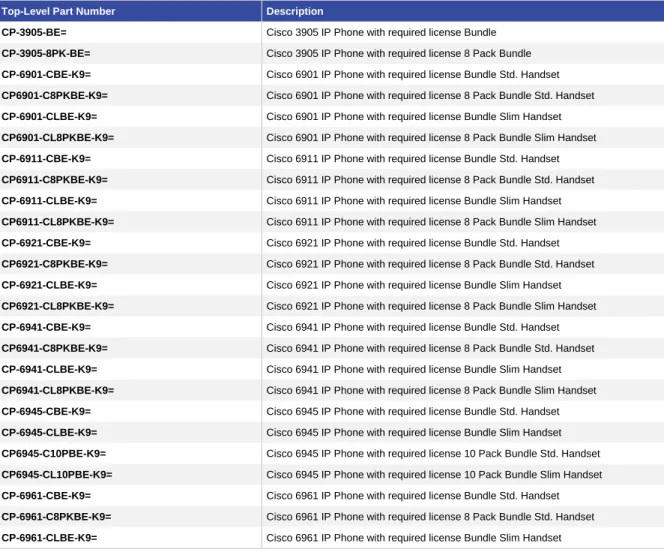
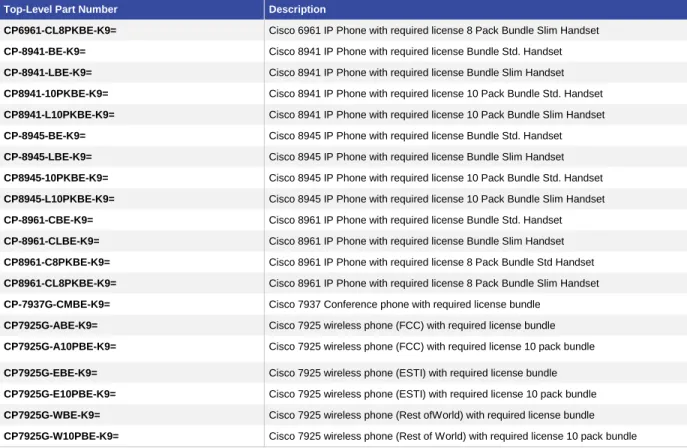
Table 6 lists the part numbers for ordering phone bundles.
Table 6.
Phone Ordering Information
Top-Level Part Number Description
CP-3905-BE= Cisco 3905 IP Phone with required license Bundle
CP-3905-8PK-BE= Cisco 3905 IP Phone with required license 8 Pack Bundle
CP-6901-CBE-K9= Cisco 6901 IP Phone with required license Bundle Std. Handset
CP6901-C8PKBE-K9= Cisco 6901 IP Phone with required license 8 Pack Bundle Std. Handset
CP-6901-CLBE-K9= Cisco 6901 IP Phone with required license Bundle Slim Handset
CP6901-CL8PKBE-K9= Cisco 6901 IP Phone with required license 8 Pack Bundle Slim Handset
CP-6911-CBE-K9= Cisco 6911 IP Phone with required license Bundle Std. Handset
CP6911-C8PKBE-K9= Cisco 6911 IP Phone with required license 8 Pack Bundle Std. Handset
CP-6911-CLBE-K9= Cisco 6911 IP Phone with required license Bundle Slim Handset
CP6911-CL8PKBE-K9= Cisco 6911 IP Phone with required license 8 Pack Bundle Slim Handset
CP-6921-CBE-K9= Cisco 6921 IP Phone with required license Bundle Std. Handset
CP6921-C8PKBE-K9= Cisco 6921 IP Phone with required license 8 Pack Bundle Std. Handset
CP-6921-CLBE-K9= Cisco 6921 IP Phone with required license Bundle Slim Handset
CP6921-CL8PKBE-K9= Cisco 6921 IP Phone with required license 8 Pack Bundle Slim Handset
CP-6941-CBE-K9= Cisco 6941 IP Phone with required license Bundle Std. Handset
CP6941-C8PKBE-K9= Cisco 6941 IP Phone with required license 8 Pack Bundle Std. Handset
CP-6941-CLBE-K9= Cisco 6941 IP Phone with required license Bundle Slim Handset
CP6941-CL8PKBE-K9= Cisco 6941 IP Phone with required license 8 Pack Bundle Slim Handset
CP-6945-CBE-K9= Cisco 6945 IP Phone with required license Bundle Std. Handset
CP-6945-CLBE-K9= Cisco 6945 IP Phone with required license Bundle Slim Handset
CP6945-C10PBE-K9= Cisco 6945 IP Phone with required license 10 Pack Bundle Std. Handset
CP6945-CL10PBE-K9= Cisco 6945 IP Phone with required license 10 Pack Bundle Slim Handset
CP-6961-CBE-K9= Cisco 6961 IP Phone with required license Bundle Std. Handset
CP-6961-C8PKBE-K9= Cisco 6961 IP Phone with required license 8 Pack Bundle Std. Handset
Top-Level Part Number Description
CP6961-CL8PKBE-K9= Cisco 6961 IP Phone with required license 8 Pack Bundle Slim Handset
CP-8941-BE-K9= Cisco 8941 IP Phone with required license Bundle Std. Handset
CP-8941-LBE-K9= Cisco 8941 IP Phone with required license Bundle Slim Handset
CP8941-10PKBE-K9= Cisco 8941 IP Phone with required license 10 Pack Bundle Std. Handset
CP8941-L10PKBE-K9= Cisco 8941 IP Phone with required license 10 Pack Bundle Slim Handset
CP-8945-BE-K9= Cisco 8945 IP Phone with required license Bundle Std. Handset
CP-8945-LBE-K9= Cisco 8945 IP Phone with required license Bundle Slim Handset
CP8945-10PKBE-K9= Cisco 8945 IP Phone with required license 10 Pack Bundle Std. Handset
CP8945-L10PKBE-K9= Cisco 8945 IP Phone with required license 10 Pack Bundle Slim Handset
CP-8961-CBE-K9= Cisco 8961 IP Phone with required license Bundle Std. Handset
CP-8961-CLBE-K9= Cisco 8961 IP Phone with required license Bundle Slim Handset
CP8961-C8PKBE-K9= Cisco 8961 IP Phone with required license 8 Pack Bundle Std Handset
CP8961-CL8PKBE-K9= Cisco 8961 IP Phone with required license 8 Pack Bundle Slim Handset
CP-7937G-CMBE-K9= Cisco 7937 Conference phone with required license bundle
CP7925G-ABE-K9= Cisco 7925 wireless phone (FCC) with required license bundle
CP7925G-A10PBE-K9= Cisco 7925 wireless phone (FCC) with required license 10 pack bundle
CP7925G-EBE-K9= Cisco 7925 wireless phone (ESTI) with required license bundle
CP7925G-E10PBE-K9= Cisco 7925 wireless phone (ESTI) with required license 10 pack bundle
CP7925G-WBE-K9= Cisco 7925 wireless phone (Rest ofWorld) with required license bundle
CP7925G-W10PBE-K9= Cisco 7925 wireless phone (Rest of World) with required license 10 pack bundle
Additional UCLs can be ordered as needed (under L-LIC-BE3K top level SKU) to add additional users or features
to Cisco Unified Communications Manager Business Edition 3000. Table 7 lists the different types of add-on
electronic licenses.
Table 7.
Additional Licensing Ordering Information
Top-Level Part Number Description
L-LIC-BE3K-ESS= Unified CMBE 3K Essential User Connect License (no voicemail)
L-LIC-BE3K-BAS= Unified CMBE 3K Basic User Connect License (no voicemail)
L-LIC-BE3K-ENH= Unified CMBE 3K Enhanced User Connect License (no voicemail)
L-LIC-BE3K-VM= Unified CMBE 3K Voicemail User Connect License
L-LIC-BE3K-ADJ= Unified CMBE 3K Adjunct Device License (no voicemail)