Clique: Perceptually Based, Task Oriented Auditory
Display for GUI Applications
Peter Parente
A dissertation submitted to the faculty of the University of North Carolina at Chapel Hill in partial fulfillment of the requirements for the degree of Doctor of Philosophy in the Department of Computer Science.
Chapel Hill 2008
Approved by: Gary Bishop, Advisor
Prasun Dewan, Co-principal Reader Gary Marchionini, Reader
c O2008 Peter Parente
Abstract
Peter Parente: Clique: Perceptually Based, Task Oriented Auditory Display for GUI Applications.
(Under the direction of Gary Bishop.)
Screen reading is the prevalent approach for presenting graphical desktop applications in audio. The primary function of a screen reader is to describe what the user encounters when interacting with a graphical user interface (GUI). This straightforward method allows people with visual impairments to hear exactly what is on the screen, but with significant usability problems in a multitasking environment. Screen reader users must infer the state of on-going tasks spanning multiple graphical windows from a single, serial stream of speech.
In this dissertation, I explore a new approach to enabling auditory display of GUI programs. With this method, the display describes concurrent application tasks using a small set of simultaneous speech and sound streams. The user listens to and interacts solely with this display, never with the underlying graphical interfaces. Scripts support this level of adaption by mapping GUI components to task definitions. Evaluation of this approach shows improvements in user efficiency, satisfaction, and understanding with little development effort.
To develop this method, I studied the literature on existing auditory displays, working user behavior, and theories of human auditory perception and processing. I then conducted a user study to observe problems encountered and techniques employed by users interacting with an ideal auditory display: another human being. Based on my findings, I designed and implemented a prototype auditory display, called Clique, along with scripts adapting seven GUI applications. I concluded my work by conducting a variety of evaluations on Clique. The results of these studies show the following benefits of Clique over the state of the art for users with visual impairments (1-5) and mobile sighted users (6):
1. Faster, accurate access to speech utterances through concurrent speech streams.
4. More efficient information seeking enabled by ubiquitous tools for browsing and search-ing.
5. Greater accuracy in describing unfamiliar applications learned using a consistent, task-based user interface.
Acknowledgments
I would like to thank all of the following people and organizations for their contributions to my research. Without them, this work would not exist.
The National Science Foundation and IBM, for funding my studies and research.
Gary Bishop, Prasun Dewan, Gary Marchionini, Russ Taylor, and Steve Weiss for serving on my committee.
Mary Whitton, for reviewing, commenting on, and approving my many user study pro-posals.
Chris Wiesen, for helping with the statistical analysis of my study data.
John Grose, for teaching an enlightening audiology course and taking the time to review my simplistic chapter about the human auditory system.
All of the participants in my user studies, for investing time and energy in my research.
Jason Morris, Leeanne Brown, and Barbara Riverdahl for openly sharing how they live and work.
Gary Bishop, for advising me on all things both great and mundane, for sharing his endless energy and compassion for people, and for motivating me with opportunities to do good.
My mother, father, and brother, for always supporting my endeavors, even when they took me far from home and their love.
Table of Contents
List of Tables . . . xii
List of Figures . . . xv
1 Introduction . . . 1
1.1 The Problem . . . 2
1.2 A Potential Solution . . . 5
1.3 Thesis and Approach . . . 9
1.4 Overview . . . 13
1.4.1 Example Audio . . . 14
2 Audio Computing Today . . . 15
2.1 Auditory Rendering . . . 16
2.1.1 Synthesized Speech . . . 16
2.1.2 Auditory Icons . . . 18
2.1.3 Earcons . . . 20
2.1.4 Ambient Sound . . . 22
2.1.5 Audio Mixing . . . 23
2.1.6 Stereophony and Spatialization . . . 23
2.1.7 Other Techniques of Note . . . 25
2.1.8 Summary of Techniques . . . 26
2.2 Interaction Metaphors . . . 26
2.2.2 Sonification . . . 28
2.2.3 Direct Manipulation . . . 29
2.2.4 Conversation . . . 31
2.2.5 Environments . . . 32
2.3 Audio Aware Systems . . . 33
2.3.1 Telephone Voice Response Systems . . . 34
2.3.2 Games . . . 35
2.3.3 Mobile Devices . . . 37
2.3.4 Desktop Applications . . . 39
2.3.5 Maps . . . 42
2.3.6 Graphs . . . 42
2.3.7 Diagrams . . . 43
2.3.8 Peripheral Awareness . . . 44
2.4 Audio Unaware Systems . . . 45
2.4.1 Model-Based User Interfaces . . . 45
2.4.2 Screen Reading . . . 47
2.4.3 Improvements on Screen Reading . . . 53
2.5 Methods for Further Study . . . 58
2.5.1 Built-in Versus Bolt-on . . . 58
2.5.2 Data Versus Task . . . 60
2.5.3 Speech Versus Iconic Sound . . . 65
2.5.4 Serial Versus Concurrent . . . 67
2.5.5 Ephemeral Versus Persistent . . . 69
2.5.6 Assistive Tech Versus Universal Design . . . 70
3 Requirements of the Working User . . . 72
3.1 Working Behaviors . . . 72
3.1.1 Information Seeking . . . 73
3.1.2 Content Creation . . . 79
3.1.3 Mediation . . . 81
3.2 Interaction with an Ideal Speech Display . . . 89
3.2.1 Design . . . 90
3.2.2 Execution . . . 95
3.2.3 Results . . . 98
3.2.4 Conclusion . . . 113
3.3 Summary of Behaviors . . . 115
4 Designing for the Listening Worker . . . 118
4.1 Human Audition . . . 118
4.1.1 Detection . . . 119
4.1.2 Perception . . . 129
4.1.3 Conception . . . 135
4.1.4 Summary of Audition . . . 139
4.2 Guidelines to Support the Listening Worker . . . 140
4.2.1 Views as Streams . . . 140
4.2.2 Tasks as Stream Content . . . 150
4.2.3 General Behavior . . . 155
4.3 Summary . . . 157
5 The Clique Auditory Display . . . 158
5.1 User Experience . . . 159
5.1.2 Environment . . . 165
5.1.3 Program and Task Navigation . . . 168
5.1.4 Subtask Navigation . . . 170
5.1.5 Information Seeking and Editing Commands . . . 171
5.1.6 Service Commands . . . 173
5.1.7 Keyboard Map . . . 178
5.2 Satisfied User Requirements . . . 182
5.3 Software Architecture . . . 183
5.3.1 I/O Pipeline . . . 185
5.3.2 Other Control Flows . . . 196
5.3.3 Interaction Patterns . . . 198
5.3.4 Scripts . . . 204
5.4 Satisfied Developer Requirements . . . 210
5.5 Implementation . . . 210
5.5.1 Example Applications . . . 214
5.6 Perspective: Clique and Screen Readers . . . 220
5.7 Summary . . . 222
6 Evaluating Clique . . . 225
6.1 Concurrent Streams Analysis . . . 225
6.1.1 Global Assumptions . . . 226
6.1.2 To Play One Utterance . . . 227
6.1.3 To Play All Utterances . . . 234
6.2 Ambient Display Heuristics . . . 235
6.2.1 Study Justification . . . 235
6.3 Visually Impaired User Evaluation . . . 243
6.3.1 Study Justification . . . 244
6.3.2 Design . . . 245
6.3.3 Execution . . . 254
6.3.4 Descriptive Statistics . . . 255
6.3.5 Statistical Inference . . . 265
6.3.6 Other Observations . . . 271
6.3.7 Study Conclusions . . . 275
6.4 Sighted User Evaluation . . . 276
6.4.1 Study Justification . . . 277
6.4.2 Design . . . 278
6.4.3 Execution . . . 282
6.4.4 Descriptive Statistics . . . 283
6.4.5 Statistical Inference . . . 285
6.4.6 Other Observations . . . 291
6.4.7 Study Conclusions . . . 292
6.5 Adaptation Feasibility . . . 294
6.5.1 Benefits . . . 299
6.5.2 Shortcomings . . . 302
6.6 Conclusion . . . 303
7 Conclusion . . . 306
7.1 Suggestions for Future Research . . . 307
7.1.1 Further Evaluation . . . 307
7.1.2 Visuals and Collaboration . . . 308
7.1.4 User Customization . . . 311
7.1.5 More Tools . . . 312
7.1.6 More Tasks . . . 313
7.2 Final Comments . . . 314
A User Study Surveys . . . 315
A.1 Perceived Usefulness and Ease of Use . . . 315
A.1.1 Usefulness . . . 316
A.1.2 Ease of Use . . . 316
A.1.3 Software . . . 316
A.2 NASA-TLX . . . 317
A.2.1 Instructions for Ratings . . . 318
A.2.2 Instructions for Sources of Workload . . . 319
A.2.3 Software . . . 320
B Sounds and Source . . . 323
B.1 Audio Recordings . . . 323
B.1.1 Attribution . . . 323
B.2 Obtaining the Source . . . 324
B.3 Example Notepad Script . . . 324
List of Tables
2.1 Auditory rendering techniques . . . 27
2.2 Screen reader usability problems . . . 60
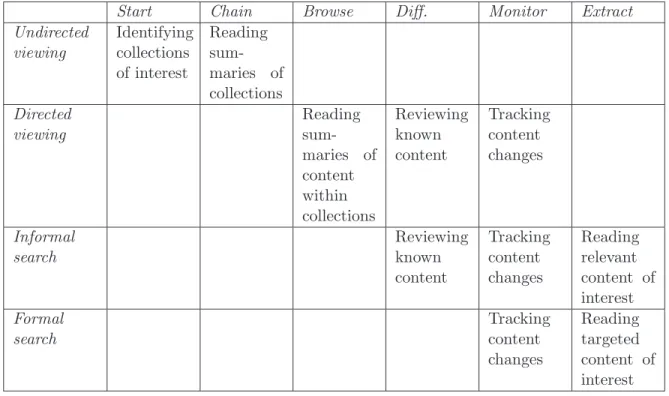
3.1 Information seeking modes and moves . . . 76
3.2 User tasks in the ideal auditory display study . . . 94
3.3 Initial and final codes . . . 97
3.4 Working behavior guidelines . . . 117
4.1 Factors affecting primitive auditory scene analysis . . . 134
5.1 Properties of the Clique virtual assistants . . . 161
5.2 Clique action earcons. . . 164
5.3 Clique state earcons . . . 164
5.4 Clique role auditory icons . . . 165
5.5 Clique environmental sound themes . . . 167
5.6 Clique menu drum beats . . . 168
5.7 Clique subtask commands . . . 172
5.9 Satisfied working behaviors . . . 183
5.10 Clique model interfaces . . . 190
5.11 Clique interaction patterns . . . 200
5.12 Satisfied developer requirements . . . 211
5.13 Clique adapters for GUI widgets . . . 213
5.14 Tasks and subtasks of the notepad script . . . 215
5.15 Tasks and subtasks of the Web browser script . . . 216
5.16 Tasks and subtasks of the calendar script . . . 218
5.17 Tasks and subtasks of the email script . . . 223
5.18 Tasks and subtasks of the archive manager script . . . 224
6.1 Exact times to play Clique utterances . . . 233
6.2 Descriptive statistics for speech accuracy by stream . . . 257
6.3 Descriptive statistics for speech accuracy by utterance . . . 259
6.4 Descriptive statistics for search task completion . . . 259
6.5 Descriptive statistics for recall accuracy . . . 261
6.6 Descriptive statistics for office task completion . . . 262
6.7 Descriptive statistics for workload scores (blind) . . . 264
6.8 Speech target accuracy p-values by stream . . . 266
6.10 PUEU usefulness p-values (blind) . . . 270
6.11 PUEU ease of use p-values (blind) . . . 271
6.12 Descriptive statistics for time measurements . . . 284
6.13 Descriptive statistics for workload scores (sighted) . . . 285
6.14 PUEU usefulness p-values (sighted) . . . 290
6.15 PUEU ease of use p-values (sighted) . . . 291
6.16 Measurements on application scripts . . . 295
6.17 Metrics on application scripts . . . 296
List of Figures
2.1 Screen reader view of the GUI desktop . . . 51
2.2 Accessibility hierarchy for a GUI dialog . . . 52
2.3 Metacity window switcher . . . 54
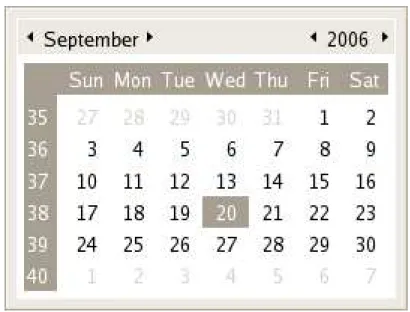
2.4 The GNOME date applet . . . 62
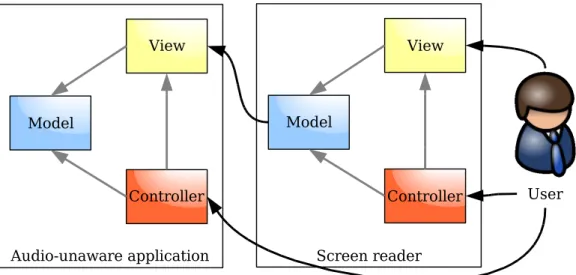
2.5 Screen reader model-view-controller diagram . . . 64
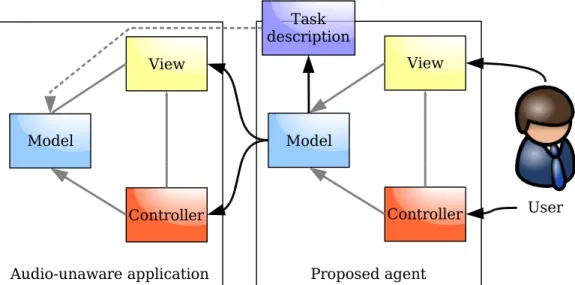
2.6 Proposed agent model-view-controller diagram . . . 65
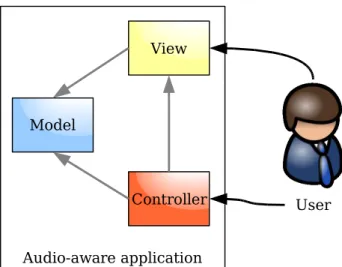
2.7 Audio aware application model-view-controller diagram . . . 66
3.1 Focus space stack progression over time . . . 89
4.1 Outer, middle, and inner ear . . . 119
4.2 Head related transfer function . . . 121
4.3 Middle ear transfer function . . . 124
4.4 Cross section of the cochlea . . . 126
4.5 Resolution and axis for sound localization . . . 130
4.6 Primitive auditory scene analysis . . . 133
4.7 Schema-based auditory scene analysis . . . 136
5.2 Task and subtask activation response streams . . . 170
5.3 Browsing response streams . . . 174
5.4 Searching response streams . . . 175
5.5 Editing response streams . . . 176
5.6 Clique keyboard map . . . 180
5.7 Clique model-view-controller diagram . . . 185
5.8 Clique input/output message pipeline architecture . . . 186
5.9 Tree pattern in Day by Day professional . . . 202
5.10 Linked browsing pattern in Microsoft Outlook Express . . . 203
5.11 Linked browsing pattern in Day by Day Professional . . . 204
6.1 Single stream times . . . 228
6.2 n-utterance, n-channel concurrency . . . 228
6.3 n-utterance, c-channel concurrency . . . 231
6.4 Concurrent speech accuracy by stream . . . 256
6.5 Concurrent speech accuracy by utterance . . . 258
6.6 Search task completion rate . . . 258
6.7 Learned input and output accuracy . . . 260
6.9 Office task completion rate . . . 263
6.10 Summed usefulness ratings (blind) . . . 263
6.11 Summed ease of use ratings (blind) . . . 264
6.12 Summed workload factor ratings (blind) . . . 265
6.13 Time of completion box and whisker plot . . . 285
6.14 Total interaction time box and whisker plot (sighted) . . . 286
6.15 Summed ease of use ratings (sighted) . . . 287
6.16 Summed usefulness ratings (sighted) . . . 288
6.17 Summed workload factor ratings (sighted) . . . 289
6.18 Class reuse in application scripts . . . 296
6.19 Class additions during prototype development . . . 297
6.20 Class additions ordered by script size . . . 298
6.21 Interaction pattern use . . . 299
6.22 Model adapter use . . . 300
A.1 Perceived Usefulness and Ease of Use survey software . . . 317
A.2 NASA Task Load Index ratings survey software . . . 321
Chapter 1
Introduction
The development of the graphical user interface (GUI) at Xerox PARC in the 1970’s and 1980’s changed the face of the personal computer. Within ten years, the pixel-based desktop environment made popular by Apple’s Macintosh operating system began to re-place the character-based command line on many workstations. Graphical user interfaces started to appear in a number of popular applications including word processors, spread-sheets, database front-ends, and communication clients. The benefits of the graphical desktop environment, such as direct manipulation and iconic representation (Shneider-man, 1992), reduced the level of expertise required to operate a computer for many people. Office workers with little technical experience joined programmers, engineers, and scientists as typical computer users.
home users, office workers, and computer gurus alike. Twenty years after its commercial debut, the GUI and its users are nearly ubiquitous.
1.1
The Problem
Yet while graphical user interfaces have been successful in many circumstances, the strong push for GUI development has actually disadvantaged some users and stymied useful alternatives. In the early 90s, concerns were raised about the accessibility prob-lems resulting from the rapid replacement of command line programs with GUI equiv-alents (Boyd et al., 1990). Prior to the advent of the commercial GUI, people with visual impairments enjoyed effective access to computers with the help of an assistive technology called a screen reader. Because the visual display was simply an 80 by 24 array of characters, a screen reader could easily extract meaningful text from the video buffer, and then speak it aloud using a speech synthesizer or convert it to Braille. What users with visual impairments heard or felt was equivalent to the lines of text that a sighted user saw.
GUI applications rendered the strategy of mining the video buffer for human-readable text practically useless. A grid of pixel color values supplanted the easily accessible array of characters. Bitmapped graphics that could be moved, obscured, and resized at runtime now filled the screen, not fixed lines of text easily reported by a screen reader. Explicit support from the windowing system or applications themselves was now required to interpret the content of the visual display.
guise became difficult to maintain. Developers struggled to find other ways to represent the screen, and eventually settled on a surprising solution. Instead of creating another mapping from on-screen elements to familiar audio forms, developers decided to expose GUI elements directly in audio. That is, the primary operation of modern GUI screen readers involves naming visual widgets, describing their state, and echoing events all within a narrow point of regard, often the keyboard input focus. For instance, a typical screen reader might report the selection of a menu item with speech saying, menu item, Save, disabled, Control-S.
While the approach of describing exactly what appears on the screen grants non-visual access, mimicking a successful non-visual paradigm does not guarantee equal success in audio. In fact, the decision to provide a thin auditory facade has established numerous long-standing usability problems in GUI screen readers (Barnicle, 2000; Edwards, 1991). To this day, users with visual impairments must deal with notions such as scrolling text boxes to hear clipped text, unfolding drop-down lists hidden to save screen space, navigating the spatial layout of controls they cannot see, and using tools built primarily for sighted, mouse wielding users such as drag-and-drop. Furthermore, prime benefits of the multitasking, graphical environment such as peripheral information channels and rapid task navigation are lost in the translation to a narrow, auditory point of regard.
and text messaging are quite common on these devices, but wholly unusable in many situations where a mobile user is likely to be.
User interfaces better suited to both screen readers and mobile devices are not hard to imagine. For instance, auditory displays designed around strengths and weaknesses of human hearing could prove fruitful in either situation. Nevertheless, developers have been reluctant to embrace such novel methods of interaction. Twenty years of building, testing, and improving graphical user interfaces represents a significant investment of resources. It is neither easy nor desirable to cast off the tools, techniques, and experience gained from this work in favor of creating wholly different, though potentially useful, audio solutions.
Two forces are in conflict here. On one hand, there is a desire to explore novel interface designs, particularly in the audio domain, to better support the growing pop-ulations of visually impaired (Vanderheiden, 1990) and mobile computer users. On the other hand, there is a devotion to the familiar graphical desktop metaphor and the years of work invested in improving its utility. A problem, therefore, is balancing these goals so that developers may create more usable, innovative audio user interfaces without sacrificing past efforts spent building mainstream GUI applications.
1.2
A Potential Solution
The result of this research is Clique, a software system that adapts GUI applications to an auditory display designed for a listening, working user. Clique presents the user with the tasks supported by GUI programs, not their visual representations, in a manner conducive to auditory perception and processing. The user interacts solely with the auditory display while Clique takes charge of inspecting and controlling the underlying programs via their GUIs. Representing common interactions between programs and users in a mode-independent way allows Clique to create a unified audio experience across a diverse set of applications. This ability requires no modifications to the original programs, only the construction of scripts binding task definitions to widgets in a GUI. More specifically, Clique differs from previous attempts to adapt GUI applications to audio in the following respects.
Adapting the Model Existing audio adaptation solutions change the domain in which information is rendered, but not the form of the information. For example, a screen reader describes a check box widget as a check box with or without a check in it. Likewise, a screen reader describes the operation of switching between programs in audio in terms of minimizing, maximizing, opening, and closing windows.
Clique changes both the rendering domain and the form of the rendered information as appropriate to auditory display. For example, a graphical check box is more natu-rally understood as a yes or no question in audio than as a square with a check mark in it. Similarly, switching between programs is more easily accomplished in audio by referencing a task by name rather than modifying the visual state of an unseen window.
These designs, however, assume that one narrow bandwidth audio channel is a sufficient replacement for the vastly wider bandwidth of the screen. These systems have yet to consider the potential benefits of many other techniques described in the research literature such as simultaneous audio streams and three-dimensional sound positioning. Clique integrates a gamut of audio rendering techniques including multiple simul-taneous synthesized voices, natural sounds called auditory icons, short musical motives calledearcons, and persistent environmental sounds located in a three-dimensional sound space. Each technique serves some purpose in the auditory display including, but not limited to, representing task state, indicating information type, and summarizing com-plex content. Concurrent streams, in particular, provide peripheral reports about in-active tasks in a multitasking environment. While Clique uses a variety of techniques, the design remains mindful of the strengths and weaknesses of each with respect to the information to be presented and the characteristics of human audition.
Designing for the Worker Current audio adaptation systems observe and report the interaction between a user and an application. If the application is accessible, all of features available on the GUI desktop are made available to the user in audio. Little is done by the adaptation system to enhance or filter these features in any way. Inherent in this design is the assumption that the tools available to a visual user are sufficient and necessary for a listening user. The striking differences between the human visual and auditory senses suggest that this presumption is incorrect.
attributes. The timing, concurrency, and similarity of audible reports made while the user is searching are the critical factors usability factors for an auditory search feature. Instead of exposing the features of the GUI desktop environment, Clique exposes its own set of tools designed to support the unique needs of the listening user. It provides substantial aids for memory and navigation to offset the problems of transience and invisibility associated with auditory information display (Lai and Yankelovich, 2003).
Supporting Common Tasks The earliest audio adaptation systems were built for expert users with visual impairments, often computer programmers who needed to “hear the screen” in order to complete tasks like formatting code and building software with visual interfaces. Today, such experts are a small minority of the total user population, yet such systems cater disproportionately to their uncommon needs. Less attention to minute visual details and more focus on facilitating common tasks might better serve today’s less technical, emailing, Web browsing, chatting user.
Clique makes common interactions like searching long lists, summarizing large bodies of text, and browsing structured documents more efficient in audio by sacrificing details about the exact appearance of information on the screen. For tasks that do not require an intimate understanding of the visual display, this approach eliminates non-essential interactions and feedback, and allows users to concentrate on information relevant to their goals instead of the appearance of that information in a visual interface.
Clique allows external audio adaptations for GUI programs to later become part of the original application. To make a GUI application accessible via Clique, a developer describes the tasks available in that application in terms of the interactions needed to complete them. The developer then associates this task description with the components to be inspected and manipulated in the GUI. However, binding tasks to GUI widgets is a convenience, not a requirement. A developer could create richer, more direct channels of communication between the model of the program and the auditory display provided by Clique thus bypassing, supplementing, or completely eliminating the GUI.
For example, a Clique script for a chat program might initially inspect and manip-ulate the chat application through its GUI. If the chat client developer later decides to support auditory display directly, he or she could update the original Clique script to have direct communication with the chat application model. The bindings from the au-ditory view to the chat application data model would change, but the tasks and auau-ditory display experienced by the user could remain untouched.
output over input, the term auditory display is used most often throughout this work when describing Clique.
1.3
Thesis and Approach
The following questions highlight the problems I tackled in my research. Their answers, particularly those involving user evaluation, lend support to my thesis:
Adapting GUI applications to an auditory display that describes concurrent user tasks via multiple streams of spatialized speech and sound provides a better user experience than a single stream narration of the screen. Such an approach can improve the awareness and effectiveness of people with visual impairments working in a multitasking environment, benefit sighted users working away from a graphical desktop, and function across diverse applications using third-party scripts.
What is the state of the art in designing auditory displays and how might it
be improved? I reviewed the current literature on designing auditory displays both for audio aware applications and as agents for audio unaware programs. I studied the metaphors and audio rendering techniques used to create the interfaces in both kinds of systems. I chose to further the integration of the variety of audio rendering techniques discussed in the literature, specifically concurrent audio streams, in an attempt to im-prove auditory display usability. I also chose to develop methods of adding auditory displays to audio unaware applications using accessibility interfaces and task-oriented scripts in order to keep development costs low.
develop a list of interactions the display must support. In addition, I performed a qual-itative user study involving thirteen sighted and six blind participants. During this study, I observed their methods for completing tasks in four office productivity appli-cations through an ideal auditory display: an expert human user. The results of the study indicate that an auditory display must provide significant memory aids, guiding prompts, content summaries, peripheral awareness, and effective searching and filtering tools.
How must the auditory display account for user audition? I studied the lit-erature on sound detection, perception, and attentive processing to build a model of the listening user. I used this model to build recommendations for applying auditory rendering techniques such as synthesized speech, auditory icons, spatial sound, and si-multaneous streams to satisfy the working user needs. The theory of auditory scene analysis (Bregman, 1990) plays a crucial part in these guidelines, particularly in sug-gesting that concurrent audio streams can increase the efficiency of user interaction over that of the single-talker auditory displays common today.
How does a software auditory display support the needs of the user as a
Can a GUI adaptation method account for user, task, and developer
re-quirements? Yes. I devised a method for separating how tasks are implemented in a particular GUI application and how they should be presented in audio. I implemented methods for accessing common GUI patterns via an accessibility toolkit on the Windows platform and adapters allowing interaction with them through the auditory display. This model-view separation allows a script developer to access information provided by an application through any public channel, in any form, and expose it in an appropriate, unified manner through the Clique auditory display.
Does Clique benefit blind users working in a multitasking environment? Yes. I analyzed the timings of utterances in the Clique concurrent stream design as well as the timings in a single stream display (e.g., screen reader). The proofs I developed show that individual utterances play sooner and repeat sooner in a concurrent design than in a serial one. An evaluation of the ability of listeners to report target and non-target utterances played concurrently revealed that not only did utterances play sooner, but that users with visual impairments were able to accurately hear more information sooner using concurrent streams rather than a serial stream.
In addition, I performed a heuristic evaluation of the peripheral speech and sound streams in Clique. This study revealed that these ambient streams provide useful infor-mation about related and unrelated tasks in an effective manner. In contrast, the single stream narration found in screen readers is incapable of providing similar awareness without risk of needlessly interrupting the user’s primary task, allowing the peripheral information to become stale, or letting the user interrupt the ambient report without even realizing it.
Does Clique benefit users with visual impairments in tasks already facilitated
and JAWS, the most popular commercial screen reader available today. The results of the study show users hear more information sooner, locate search results faster, and provide more accurate descriptions of newly learned tasks with Clique than with JAWS. Users with years of JAWS experience fare equally well using Clique to complete office work after only a few hours of practice, even when the tasks do not require peripheral information reported only by Clique. Responses to ease of use and usefulness surveys show positive correlations between Clique features and tasks such as concurrent speech and searching, searching and learning, and learning and working.
Does Clique confer benefits on sighted users? Yes. I conducted a user study comparing the performance of thirteen sighted participants completing tasks using a standard GUI email program after a brief hiatus from a workspace conducive to visual computing. In three separate trials, I varied the level of control participants had over Clique before they returned to the graphical desktop: no access, minimal commands, and all commands. The results show a significant reduction in the time spent completing tasks in the GUI after having minimal and full control over Clique. A Clique feature allowing the user to “record” spoken email passages and later see them highlighted in the GUI was critical to the reduction in time in both conditions. Ratings on questionnaires also highlight the subjective differences between having minimal and full access in terms of usefulness, ease of use, and workload.
appearing very often. Still, a long-tail of custom components exists requiring code specific to particular scripts. The extensibility of Clique was sufficient to handle these cases. Furthermore, I noted that the design of Clique is not adverse to reverting to screen reading when scripts are not available for whole applications or specific application tasks.
1.4
Overview
The next three chapters of this dissertation define the requirements of an effective au-ditory display. Chapter 2 reviews existing systems, their models of user interaction and techniques for presenting information aurally. The chapter concludes with a short assess-ment of user and developer needs, and a choice of methods for further study. Chapter 3 introduces the behaviors of the working user that an auditory display for office comput-ing tasks must support. This chapter includes findcomput-ings from a study of user interaction with an ideal auditory display (i.e., another human). Chapter 4 provides a basic review of how humans detect, perceive, and process sound based on human physiology and the theory of auditory scene analysis. This chapter concludes with recommendations on how to support the ways users work with respect to how they hear.
Chapter 5 introduces Clique, my implementation of the recommendations developed in the prior chapters. The first half of this chapter describes the Clique user experience. Explanations of how Clique satisfies the user requirements stated earlier are the heart of this section. The second half describes the software architecture of Clique, one that allows Clique to present a unified auditory display across disparate applications.
effec-tiveness of the concurrent speech, semi-modal searching, and task-based structure of Clique in comparison with the features of JAWS. A second summative study tests the value of using Clique during brief departures from a machine with a graphical display. A final analysis shows the feasibility of adapting applications to work with Clique with respect to extensibility and development effort.
The final chapter suggests directions for future work based on the benefits and the shortcomings of the Clique system. Topics such as automating the adaptation process and integrating task-based and screen-based auditory displays are discussed.
Each chapter in this work builds on information presented in earlier chapters. I advise that readers looking to glean the maximum amount of information from this work read the chapters in order. Nevertheless, readers willing to accept that justification for certain statements may appear in prior chapters may read select chapters in isolation. In many cases, I have included explicit references to chapters and sections where readers may find such validation.
1.4.1
Example Audio
In this document, I have tried to give clear textual descriptions and visual depictions of inherently auditory concepts. Yet I believe nothing can do them justice as well as auditory recordings. To this end, I have posted numerous sound and speech examples at
Chapter 2
Audio Computing Today
The purpose of this chapter is to examine the state of the art in designing software auditory displays. The first section reviews the building blocks of audio displays: tech-niques of rendering information in the auditory domain. Synthesized speech, audio icons, earcons, ambient sounds, concurrent streams, and spatialization methods are discussed. The second section describes common metaphors such as narration, direct manipulation, and conversation for combining these techniques into coherent displays. The third sec-tion reviews numerous systems with built-in support for audio output as well as systems that add auditory displays to existing, audio unaware programs. The chapter culminates with an analysis of the systems studied along shared dimensions. The results are used to select methods for further research based on their potential for minimizing development cost and maximizing usability of auditory displays for business applications.
2.1
Auditory Rendering
Modern computers are quite capable of producing rich audio output. Consumer-grade desktop sound cards have the ability to simultaneously output over one-hundred high quality (96 kHz, 24-bits resolution), filtered sounds through multiple speaker channels. Integrated sound chips for mobile devices, while not as advanced, are still quite capable of mixing multiple, high quality waveform sounds for stereo output. Furthermore, nearly all sound hardware is able to synthesize Musical Instrument Digital Interface (MIDI) music from sampled instrument banks. These means have been combined in many interesting and useful ways to convey information in audio.
2.1.1
Synthesized Speech
Synthesized speech is a sampled approximation of human speech generated from a source text. There are two classic methods for synthesizing speech (Binding et al., 1990). In
concatenative synthesis, a speech engine segments the source text into base components, hashes the components into a database of pre-recorded utterances, and concatenates the utterances to produce the desired output. The granularity of the segments, the hashing algorithm, and the database size may vary, but all concatenative systems follow this general approach. With a large database of high quality utterances, the synthesized output can be almost indistinguishable from true human speech at normal speaking rates. This naturalness is the primary benefit of concatenative synthesis.
may preclude the use of concatenative synthesis on devices with limited storage and memory. For instance, one high-quality AT&T Natural Voices speech database requires roughly 700 megabytes of on-disk storage and an average of 40 MB of memory during synthesis. As a result, concatenative synthesis is most attractive for applications that prize natural-sounding output over high rates of speech, flexibility in voicing, and sys-tem resources. Telephone voice response syssys-tems and public kiosks are two examples of systems best served by concatenative synthesis where casual users are quick to judge usefulness based on surface impressions (Duggan and Deegan, 2003).
The second method, formant synthesis, renders speech using a model of time-varying frequency bands in human speech spectra. The resulting speech is highly accurate at all speaking rates. Parameters such as head-size, aspiration, frication, gender, pitch fluctuation, and so on may be defined and configured to produce a practically infinite number of different voices. For instance, child, adult, and elderly sounding voices of both genders can be synthesized using the same model. These same parameters can be manipulated by the engine during synthesis to imbue speech with different prosodic or intonational qualities. A question like “Are you sure?” might be intoned as being very serious by changing the emphasis, rhythm, and pitch contour of the sentence. Since no speech database is required for synthesis, storage and memory requirements are relatively low. As a result, flexibility and small footprint are the main benefits of formant synthesis.
Regardless of what method is used, synthesized speech is able to convey any infor-mation that can be expressed in words to a user. The trade-off for such expressive power is time. Speech is a slow, serial method of communication. Pauses between sentences, stress on certain parts of words, and even pronunciation of certain syllables are just a few examples of the time dependent aspects of speech. As such, the rate of speech can be increased only so much before it loses information and becomes unintelligible. While expert users with visual impairments are able to listen to synthesized speech at rates up to 500 words per minute (Asakawa et al., 2003), more novice listeners are capable of parsing only 130 to 200 words per minute. Techniques such as removal of stop words, regular interval sampling, and dichotic time compression (i.e., the splitting of a single speech stream left-right channels overlapping in time) (Arons, 1994) can improve speech rates while maintaining critical information. Still, the results of these methods reduce the naturalness of the speech and likely require increased effort on the part of the listener to understand (Schmandt and Mullins, 1995).
2.1.2
Auditory Icons
Auditory icons are caricatures of real-world sounds, the sources of which are intended to represent sources of information (Gaver, 1986). The mapping from information source to its audio representation is accomplished by symbolic, metaphorical, and nomic analogies. Symbolic mappings are based on learned social conventions. The sound of wailing sirens indicating an accident has occurred is an example of a symbolic analogy. The user must be aware that sirens are used by emergency response vehicles to grasp the meaning behind the sound.
programmatic process in this case. The listener must recognize this connection before the meaning of the sound becomes apparent.
With a nomic mapping, the meaning of a concept is encoded in the physics of the sound event. For instance, any sound is a nomic representation of its source. Of the three types, nomic mappings are preferred because they derive from everyday listening experience and require the least effort to learn. Gaver (Gaver, 1986) gives the example of a letter thrown into a metal mailbox as an analogy for the arrival of email. A sound that is weighty, crackles like paper, and reverberates indicates that the email is large, consists primarily of text, and is one of the only messages in the box at the time. On the other hand, a light, muffled sound indicates a small message throw into a mailbox with many other messages. The properties of new email are encoded into configurable parameters of the two objects (message and mailbox) acting as the sound source.
Auditory icons are useful for representing nominal types of information. A large number of conceptual objects can easily be labeled with uniquely identifiable sounds. Parameterized auditory icons can also capture ordinal relationships. Listeners can judge whether one instance of an icon is louder, faster, more muffled, etc. than another instance of the same icon, especially when the two are presented close in time. How much louder, faster, or muffled is not as easy to judge, however. As a result, auditory icons have limited utility in representing interval or ratio data.
2.1.3
Earcons
Earcons are structured musical motives representing concepts in an audio display through learned relationships. Differences in musical dimensions across earcons correspond with differences in one or more dimensions of the information they represent. For instance, earcons may represent items in car dashboard and mobile phone menus (Vargas and An-derson, 2003; Leplatre and Brewster, 2000). In this example, two earcons following the same melody, but played on different instruments, represent two, independent top-level menus. The shared melody conveys the shared status of the top-level menus while the different timbres distinguish their identities.
audi-tory icons with weak or arbitrary mappings to their data. A family of N representational earcons may represent exactly N concepts.
Second, earcon grammars may be created from compound earcons, two or more simple earcons presented in succession to form one, longer earcon. The compound earcon itself is analogous to a spoken phrase and its component earcons are like parts of speech. For instance, an earcon having a simple melody can convey a copying action. Another earcon having a dinstinct melody can represent file objects. A compound earcon can sequence these two simpler earcons to communicate copying file. Additional earcons representing modifiers, direct objects, tense, and so on can be added to the sequence to convey increasingly complex concepts (e.g., copying a big file to a CD). A family of compound earcons may, therefore, represent a number of concepts equal to the cartesian product of legal, simple earcon combinations. With the introduction of modifier concepts, compound earcons can effectively represent ordinal concepts in addition to nominal ones.
nesting. Thus, family earcons are useful as a means of conveying nominal (e.g., menu or item identity), ordinal (e.g., relative depth of two items), and potentially interval (e.g., difference between two menu depths) information.
The earliest work on earcons recommended encoding information in simple musical qualities such as rhythm, pitch, octave, and loudness (Blattner et al., 1989). To the contrary, later work suggests that more complex qualities such as timbre, mode (e.g., major or minor), and consonance are better information channels for some applications (Lemmens, 2005; Hankinson and Edwards, 1999; Kline and Glinert, 1994; Brewster et al., 1993). Nevertheless, there is some consensus that, for family earcons, timbre, then rhythm, then register, then pitch, and finally loudness should vary as the hierarchy grows deeper. Chapter 4 speaks to this ordering given the properties of the human auditory sense.
2.1.4
Ambient Sound
2.1.5
Audio Mixing
Mixing is the process used to combine multiple sounds into one auditory stream. A simple mixing algorithm adds scaled samples from individual sound waveforms to create the combined sound. Barring quantization error, the final waveform contains all of the information from the original, separate sound streams. Audio mixing thus increases the information bandwidth of the auditory channel by allowing two or more sounds to play simultaneously rather than sequentially.
Although mixed sounds overlap in time, listeners are capable of “hearing out” the original streams in many circumstances. Concurrently presented musical tracks, for in-stance, can be heard as individual songs aiding their individual selection during browsing (Fernstr¨om and McNamara, 1998). Likewise, multiple speech streams of news articles can be heard and selected when presented simultaneously (Schmandt and Mullins, 1995). Listeners can also distinguish simultaneously presented earcons as well as determine their musical qualities (McGookin and Brewster, 2004a). In general, a person can dis-criminate among five concurrent non-speech sounds with moderate accuracy, and three sounds with a much lower error rate (Lorho et al., 2001). The ability of a listener to segregate and group both serial and simultaneous sounds is discussed more thoroughly in Chapter 4.
2.1.6
Stereophony and Spatialization
at highest intensity in the front-left and front-right channels, they will sound as if they are speaking to one another in front of the viewer. Furthermore, they will be slightly spatially offset from one another, most likely in correspondence with their locations on the screen. At the same time, if the ambiance of the current scene is equally encoded in all channels, the environment will sound as if it is surrounding the listener on all sides. Spatialization is a digital signal processing (DSP) technique that makes sound appear as if it originates from a source in three-dimensional space around a listener wearing or-dinary headphones. Unlike stereophony, the number of potential sound source locations is not limited by the number of physical speakers. Software DSP libraries are capa-ble of producing spatial sound on modern personal computers using predefined head related transfer functions (HRTFs) (Burgess, 1992). The HRTF determines the fre-quencies reaching the eardrum for a sound source located at some azimuth, elevation, and distance away and producing a given frequency spectrum (see Chapter 4). In this technique, a set of HRTFs is generated by measuring the frequency response at the eardrums of a model human head for near-impulse sounds. The sounds are generated by a real source located in the far-field at a variety of elevations and azimuths.
At render time, HRTFs in the set are selected based on their proximity to a virtual sound source. The filters nearest the desired point are interpolated to produce two approximate HRTFs, one for the left ear and the other for the right. The resulting filter is then applied to sounds during playback to simulate their origin at the azimuth and elevation of the virtual source. The distance of the sound source, on the other hand, is usually simulated by simply modifying the volume of the sound.
The HRTF approach makes sound spatialization a commodity on modern computers. Nevertheless, it has some limitations which must be considered:
es-pecially those with heads that vary greatly in size and structure from the model (e.g., children).
Distance is not included in the calculation of most HRTFs. Virtual locations in the near-field (e.g., within 1 meter of the head) cannot be accurately simulated.
Generating true impulse or step function sounds is difficult. The approximation introduces error into the recorded responses.
Only a few levels of elevation are sampled during HRTF recording. Creating localizable sounds above and below the level of the ears is difficult for this and other perceptual reasons (again, see Chapter 4).
Spatialization has found two primary uses in software systems. First, positioning sounds in space helps disambiguate concurrent sounds. Spatialization is one of the best ways to aid detection, localization, and intelligibility of two or more simultaneous speech streams (Simpson et al., 2006; Best et al., 2005; Brungart and Simpson, 2003). Simi-lar benefits are obtained when spatially separating concurrent earcons (McGookin and Brewster, 2004b). Second, the spatial positioning of a sound may represent information along another dimension. For instance, the spatial location of an audio news cast cir-cling around the head can indicate the current temporal position in the audio stream (Kobayashi and Schmandt, 1997).
2.1.7
Other Techniques of Note
in selection tasks. With respect to the techniques described above, spearcons are something of a cross between time compression for synthesized speech and auditory icons.
Simulated reverberation, the echoing of sound waves off of physical surfaces, can improve distance perception in auditory displays. On the other hand, it hinders the localization of sound sources in azimuth and increases masking among concur-rent streams (Shinn-Cunningham, 2000). Producing this effect is computationally prohibitive for complex geometries at present, further limiting its usefulness.
Sheppard-Risset scales create the auditory illusion of a sound appearing to rise or fall in pitch forever. The scales are created by cycling a finite set of sinusoidal tones in frequency and passing them through a bandlimited, raised-consine filter. The resulting sound is useful for conveying direction information using pitch orientation or rate information using shift speed (Beaudouin-Lafon and Conversy, 1996).
2.1.8
Summary of Techniques
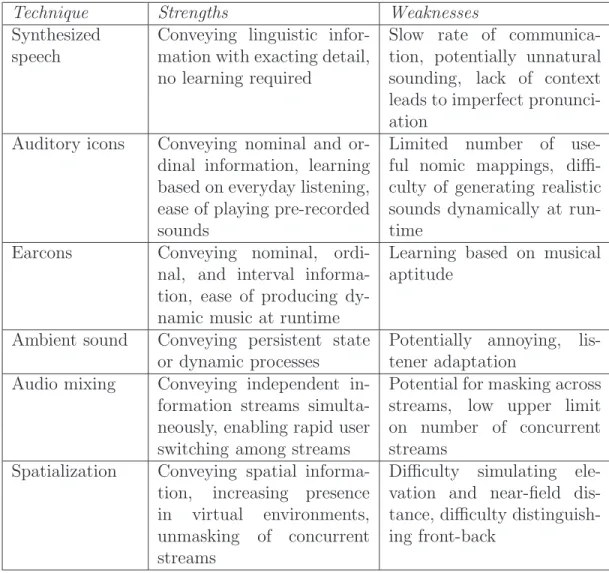
Table 2.1 summarizes the strengths and weaknesses of the techniques described in the preceeding sections.
2.2
Interaction Metaphors
Technique Strengths Weaknesses
Synthesized speech
Conveying linguistic infor-mation with exacting detail, no learning required
Slow rate of communica-tion, potentially unnatural sounding, lack of context leads to imperfect pronunci-ation
Auditory icons Conveying nominal and or-dinal information, learning based on everyday listening, ease of playing pre-recorded sounds
Limited number of use-ful nomic mappings, diffi-culty of generating realistic sounds dynamically at run-time
Earcons Conveying nominal, ordi-nal, and interval informa-tion, ease of producing dy-namic music at runtime
Learning based on musical aptitude
Ambient sound Conveying persistent state or dynamic processes
Potentially annoying, lis-tener adaptation
Audio mixing Conveying independent in-formation streams simulta-neously, enabling rapid user switching among streams
Potential for masking across streams, low upper limit on number of concurrent streams
Spatialization Conveying spatial informa-tion, increasing presence in virtual environments, unmasking of concurrent streams
Difficulty simulating ele-vation and near-field dis-tance, difficulty distinguish-ing front-back
Table 2.1: Auditory rendering techniques with their associated strengths and weak-nesses.
Only a handful of audio metaphors are in use today. The following sections describe these metaphors and note some representative systems. More example implementations of each are introduced in later sections in this chapter.
2.2.1
Narrator
at a time (i.e., a single, serial stream of speech). Non-speech sounds may be inserted into the narration to represent non-verbal information (e.g., embedded images) or to shorten or reinforce the presentation of text content.
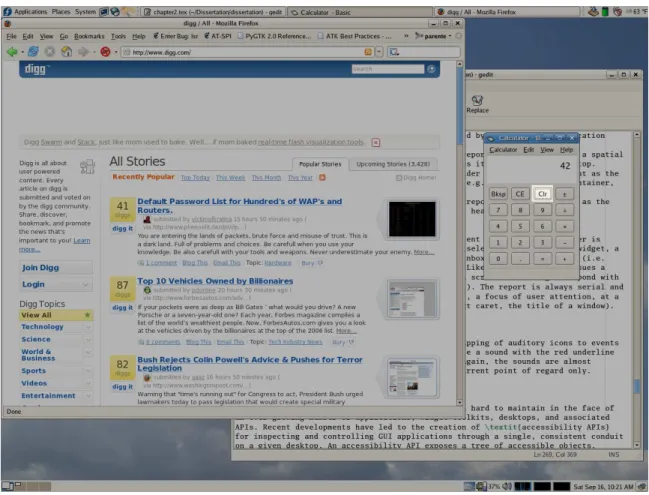
Conventional screen readers (Thatcher, 1994) operate under the narrator metaphor. A user with a visual impairment interacts with an application using its native user interface (e.g., a GUI). The screen reader monitors this interaction and reports important events and changes in the state of the visual user interface. The user has some control over how the narrator, the screen reader, operates, but most of his or her interaction is directed at the application. The auditory display is largely passive.
2.2.2
Sonification
The sonification metaphor is used to present data that cannot be linguistically summa-rized by a computer. Dimensions of the source information are encoded in the dimensions of non-speech sounds by the auditory display. The sounds are played, either in series or in parallel, for a listener. It is then the responsibility of the listener to deduce the encoded information from the sounds heard. The display designer must choose appro-priate mappings between data and sound dimensions to aid the listener in this task. For instance, ordinal rankings are more clearly conveyed by earcon register, an ordinal property, than by timbre, a nominal property.
are sounded at line segment intersections, pitch doubly encodes elevation, and intensity indicates how close the user is holding the stylus to a nearby shape. Mereu reports on a similar system for exploring three-dimensional images with either tone pan, pitch, and volume or earcon instrument, pitch oscillation, and instrument family encoding spatial x, y, and z coordination (Mereu and Kazman, 1997). Ghez, et al. report on a realtime sonification system for communicating arm position and joint motion to people lacking the proprioceptive sense (Ghez et al., 2000). Rhythm, tempo, and pitch contour provide strong cues for coordinating movements during patient rehabilitation. Sonification of time-varying data is also possible and has been applied to climate data (Flowers et al., 2001), Web server traffic (Farkas and Jeon, 2006; Barra et al., 2001), and program debugging sessions (Finlayson and Mellish, 2005; Vickers and Alty, 1998).
2.2.3
Direct Manipulation
Direct manipulation is the operative metaphor on all modern graphical desktop envi-ronments. Software concepts are represented by persistent visual icons that the user manipulates to bring about a change in the state of the system. For instance, a desktop icon may be clicked to open the file it represents or dropped on a trash bin icon to delete the file. The benefits of direct manipulation include reliance on recognition rather than recall, user feelings of increased control over the interaction, and easy reversibility of incremental actions (Shneiderman, 1992).
The Soundtrack system (Edwards, 1988) attempts to convert graphical direction ma-nipulation interfaces into auditory equivalent. Soundtrack plays distinct tones indicating the identity of graphical widgets in a word processor as the mouse cursor passes over them. A visually impaired user explores the contents of the screen by moving the mouse, listening to the tones, and clicking on desired sound objects. The interface produced by this straightforward conversion from graphics to sound proved difficult to master for all but musically trained users, and was later even disparaged by its creator (Edwards, 1992).
More recent work revisits auditory direct manipulation for common desktop appli-cations using design patterns as a guide (Frauenberger et al., 2005; Frauenberger et al., 2004). In this approach, common direct manipulation actions are mapped first to do-main independent interactions and then to appropriate auditory forms. Frauenberger describes the design of an auditory equivalent to a graphical file system browser follow-ing this method. He identifies the key components of the GUI file browser (i.e., toolbar, menubar, folder tree, file list, context menus, popup messages), maps them to design patterns (i.e., command areas, container navigation, contextual menus, messages), and finally to auditory widgets in a virtual sound space. For example, the graphical tool-bar becomes a bank of representational earcons while the menu turns into a grammar of family earcons with speech labels. As in Edwards’ approach, there remains a tight correspondence between graphical widgets and auditory sound sources.
hierarchical browser developed by Savidis, et al. uses spatialization to position sound objects in a ring around the user’s head (Savidis et al., 1996). The user points, gestures, speaks, and orients his or her head to select, move, insert, delete, and focus on particular objects in the ring. Only four objects are presented simultaneously at the front of the ring in an exploded view while the rest are crowded silently behind the user. The user turns the ring to bring silent sources to the front and into focus.
2.2.4
Conversation
The conversational metaphor draws on the familiar conventions of verbal communica-tion as a basis for human-computer interaccommunica-tion. Typically, an audio display following this metaphor has a single synthesized voice acting as a conversation partner. The speaker questions the user, responds to user queries, and gives feedback about user commands while honoring conversational behaviors like turn taking, timing, feedback, repair, and grounding (Cassell et al., 2000; Brennan and Hulteen, 1995). Unlike in the narrator metaphor, the speaker acts as an active intermediary between the user and the application, not a passive reporter.
The conversational metaphor is useful beyond telephony applications too. The Rea virtual real estate agent embodies the speaker in a graphical avatar (Cassell et al., 2000). Avatar body language supplements speech output by acting as a secondary information channel, and lip synchronization improves speech intelligibility. Some researchers even suggest that conversation and direct manipulation are one in the same, and that con-versation can serve as a useful model for designing audio, text, and graphical interfaces (Brennan, 1990).
2.2.5
Environments
The environment metaphor uses the sound of real-world places to represent virtual loca-tions in software (e.g., a task in a business application, an area in a first-person shooter game). Continuous ambient sounds create an atmosphere that serves to identify a loca-tion, distinguish it from others, and encode details about the virtual place. Navigation through the application is accomplished by navigating from one auditory environment to the next.
Use of the auditory environment metaphor is abundant in modern video games. For example, Halo (O’Donnell, 2002) is a first-person shooter video game featuring realistic sound environments that reflect the properties of a visual 3D virtual world. The humming of engines and buzzing of electronics suggest the player is currently on an alien spacecraft. Muffled footsteps direct attention to the presence of an enemy in an adjacent room. When the door to the room opens, the late echos of chatter hint at its large size. These sounds supplement the visuals of the game, helping to orient the player and increase realism.
is in each room by listening to speech and sounds representing its contents. The Audio Hallway system (Schmandt, 1998) organizes continuous spoken news reports in rooms connected to a long, straight hallway. The use of spatialization and concurrent streams gives the user the experience of walking down a hallway and hearing people talking in each room passed. Sawhney (Sawhney and Murphy, 1996) and Lumbreras (Lumbreras et al., 1996; Lumbreras and Rossi, 1995) propose similar designs for auditory navigation of hyperlinked content. In both systems, sounds are used to identify the user’s current browsing context as well as to indicate contexts reachable by following links.
2.3
Audio Aware Systems
A program with inherent support for auditory display is termed an audio aware appli-cation. Such an application uses sound hardware, mixing libraries, and system services available on most modern personal computing platforms to provide an auditory display. The information to be output and the possible ways of representing it in sound are coded directly into the application at design-time. When driven by the application model, this integration can result in an auditory display that is both usable and aurally pleasing.
Despite this state of affairs on the desktop, there are at least three commercial do-mains in which audio aware systems have thrived: telephone voice response systems, gaming, and mobile computing. In addition, the research literature on auditory dis-plays documents systems that have been implemented and tested, but almost never commercialized: audio desktops and desktop applications; sonification of maps, graphs, and diagrams; and audio aids for peripheral awareness. The following sections review representative systems in each of these areas.
2.3.1
Telephone Voice Response Systems
Skantze and Dahlb¨ack (Skantze and Dahlb¨ack, 2003) apply earcons and audio icons to a telephone voice response system for building maintenance. The non-speech sounds play in the background while the user queries the system about a particular room. The sounds are representative of the status of a room. For instance, the sound for a water valve in a water main room may play loudly if the valve is fully opened or sound muffled if it is partially shut. A study of this system revealed that users prefer the use of audio icons over earcon and speech-only designs during building walkthroughs.
Though not technically voice response systems, two other telephone related interfaces are worth mentioning here. Steel describes a system for augmenting conversations be-tween callers and human receptionists with audio icons and earcons (Steel et al., 2002). The sounds play when the receptionist is busy working on fulfilling a caller’s request so as to indicate that the call is not on hold or disconnected and to suggest that the caller should not interrupt. A study showed that the use of non-speech sounds in this context decreases the number of inappropriate interruptions at the cost of caller satisfaction.
The TalkBack system (Lakshmipathy et al., 2003) turns the process of reviewing messages on a conventional answering machine into a dialog between the recorded voice of the caller and the recipient. The recipient interrupts the playback of a recorded message to inject his or her own spoken responses. The entire audio clip (i.e., original message plus inserted response) is then returned to the original caller who may repeat the process. Though the conversation is asynchronous, the majority of users who tested the system felt they were in a real conversation and created higher quality responses than if they had simply returned the call. Time-compression of spoken messages is also supported, but did not help most users.
2.3.2
Games
mentioned earlier, Halo is a quintessential example of a game that incorporates “sounds to make it real” and “music to make you feel” (O’Donnell, 2002). Spatially located sounds, audio ambience, environmental effects, and spoken dialog immerse users in Halo’s environments and alert them to important in-game events. A dynamic sound track adjusts to the activity of the player’s current situation to create an emotional connection to the virtual world. Many first-person shooters and other adventure games created both before and after Halo make use of one or all of these techniques to some extent.
Commercial game designers have used audio primarily as a supplement to visual gameplay. There are examples, however, of games where audio is the primary medium and visual information is secondary. For example, the Band Brothers game for the hand-held Nintendo DS system encourages the cooperative production of music among multiple players. Each player chooses an instrument and tries to play his or her part by pressing one or more buttons in time with his or her partners. The Electroplankton game for the same platform provides a more open-ended experience where players use the system’s touch screen to manipulate the production of dynamic music and its ac-companying visual effects. Other popular games such as Dance Dance Revolution and Guitar Hero require the player to perform actions such as stamping on a footpad or strumming on a guitar shaped controller in time with music tracks.
Tow-ers of Hanoi), first-pTow-erson action games (e.g., avoid enemy bullets whizzing through 3D soundspace), and adventure games (e.g., puzzle solving in virtual acoustic worlds) show that not only is it possible to set games entirely in audio, but that such games may also prove enjoyable to both blind and sighted players (Winberg and Hellstr¨om, 2000; Friberg and G¨ardenfors, 2004; Roeber and Masuch, 2005).
2.3.3
Mobile Devices
Portable computing devices such as cell phones, PDAs, and music players prize small form factor, long battery life, and user mobility as good design. All three of these as-pects may be enhanced by auditory displays that enable eyes-free operation and smaller or non-existant screen space. At present, few commercial mobile devices enable fully eyes-free use via auditory displays. Specialized assistive technologies such as the Free-dom Scientific Braille ’n Speak notetaker, Owasys 22C screenless phone, and VisuAide Trekker navigation guide use synthesized speech to communicate information to people with visual impairments. Some automotive dashboard navigation systems such as the Pioneer AVIC-Z1 are fully speech enabled for both audio input and output, though most on the market today use speech output as a supplement to a visual user interface.
devised by Ross and Blasch (Ross and Blasch, 2000) combines a spatially positioned sonic carrot, spoken directional headings, and tactile feedback from a backpack to keep a walker on a planned route. The Drishti system (Helal et al., 2001) relies both on speech input and output for communicating travel routes and current travel conditions. Recent research literature is growing rich with additional examples of audio displays for mobile computing. Earcon grammars have been used to supplement visual menus in car control interfaces (Vargas and Anderson, 2003), PDAs (Brewster et al., 2003), and mobile phones (Leplatre and Brewster, 2000). Studies of some of these systems suggest that family earcons may reduce the number of user input gestures and menu selection errors. The Dolphin system (McGookin and Brewster, 2002) uses concurrent, spatialized earcons to provide context cues beyond the visual area on small PDA screens. Though a user study of browsing theme park maps in Dolphin failed to show significant improve-ment in speed and quality of planned routes between rides, later work by McGookin shows how the simultaneous earcons might be improved to better provide context (Mc-Gookin and Brewster, 2004a; Mc(Mc-Gookin and Brewster, 2004b). The Personal Universal Controller (PUC) (Nichols et al., 2002) generates remote control speech interfaces for appliances such as stereos, televisions, and DVD players. The PUC system uses the
model-view-controller (MVC) paradigm to generate both audio and graphical interfaces (view plus controller) from a single description of device capabilities (model).
excep-tions. Speech synthesis gives both summaries of information as well as full details of a stream.
2.3.4
Desktop Applications
Though few commercial business applications take advantage of auditory displays, re-search prototypes demonstrate how audio may be incorporated into the desktop envi-ronment. Cohen and Ludwig describe one of the earliest audio equivalents for a desktop windowing system (Cohen and Ludwig, 1991). Instead of representing applications us-ing visual windows and widgets, the system uses spatially positioned streams of speech to report application content. What the authors term filtears—auditory filters causing muffling, reverberation, pitch shifting, etc.—act like auditory typography to empha-size certain streams and de-emphaempha-size others. Headtracking and data glove input allow users to bring certain streams into focus and manipulate stream positions as they would windows with a mouse pointer. Using spatial audio in this manner to distinguish mul-tiple information streams increases user memory and comprehension of content over a non-spatialized equivalent (Baldis, 2001).
common user tasks in a medium independent manner. In one example, Frauenberger abstracts the interactions with a graphical file explorer application to the set of tasks they support: menu bars become the command area pattern, popup windows become the message pattern, trees and lists become container navigation patterns, and so on. He then implements an audio version of the same application by creating audio widgets enabling the tasks described by the patterns. The resulting audio interface is designed for the tasks at hand, not their original visual representations.
Audio-based Web browsers for people with visual impairments have become a popular research topic. The Brookestalk system (Zajicek et al., 1998) reads Web pages in full and summarizes them using extracted keywords and abridged text using synthesized speech. Goose and M¨oller describe a system that uses spatialized speech and sound to represent the relative locations of elements on a Web page. For instance, if the narrator is approaching a link while reading a Web page, a sound representing that link will grow louder and move toward the center of the virtual sound space until it is passed and fades into the distance. The AB-Web browser also maps a Web page into a virtual sound space, but, instead of reading through them linearly, allows a user to explore the layout and content of the page using an absolute pointing device (Roth et al., 2000; Roth et al., 1998). The related Websound tool provides a workspace for developers to associate sounds and other feedback with events and objects on a Web page (Petrucci et al., 2000). Home Page Reader (Asakawa and Itoh, 1998) is a commercial product from IBM that supplements the visual rendering of a Web page by the Internet Explorer Web browser with a complete auditory display using synthesized speech and earcons. Similarly, the FireVox extension (http://www.firevox.clcworld.net/) for the Firefox Web browser enables browsing of Web pages using synthesized speech without changes to the underlying browser.