relative merits and demerits of each model. It can be used to evaluate which distributed model or combination of models would be most suitable based on the business needs. This would be particularly relevant to organizations with users who are dispersed throughout a large region or across the world, and where improving the speed and efficiency of information collaboration and production across their enterprise would be the primary objective
MANAGING DISTRIBUTED
ACCESS
Table of Content
1. Introduction 3
2. Abbreviation and Acronyms used 3
3. The Foundation: The Documentum Repository 3
4. Why Distributed Access? 4
5. Documentum Solutions For Optimizing
Content Responsiveness 5
6. Relative Comparison Between Single And
Multiple Repositories 6
7. Documentum Distributed Architectures 7
About the Author
Lekha MenonLekha Menon is the Enterprise Content Management (ECM) Lead for the HiTech Industry Solution Unit’s Domain group. She has been focusing on developments in ECM for the last three years with an overall of 10 years of experience in Software Design, Development, Solution Architecting and Training. She has a Bachelors degree in Electronics. She can be reached at [email protected]
Introduction
Abbreviation and Acronyms used
The Foundation: The Documentum Repository
This paper attempts to outline the various options available to a design or solution architect while planning to implement a distributed architecture environment using EMC Documentum. It details the relative merits and demerits of each model that are essential to be considered during the planning stage before finalizing on a best-fit distributed architecture for any Documentum implementation.
The abbreviations and acronyms that are used in this manual are:
Acronym Definition/Description
ACL Access Control List
BOCS Branch Office Caching Services
DMS Document Management System
RCS Remote Content Server
WAN Wide Area Network
WDK Web development kit
The Documentum repository comprises the following:
• Metadata—stored in a relational database
• Content files—usually stored in the file system
EMC Documentum Content Server is the core server technology that manages the access to the content and metadata. It controls the access to the Documentum repository. Documentum provides the client/server-based (Documentum Desktop) as well as Web-based (Webtop - a J2EE-based web application framework) application interface for the users to access the content and metadata.
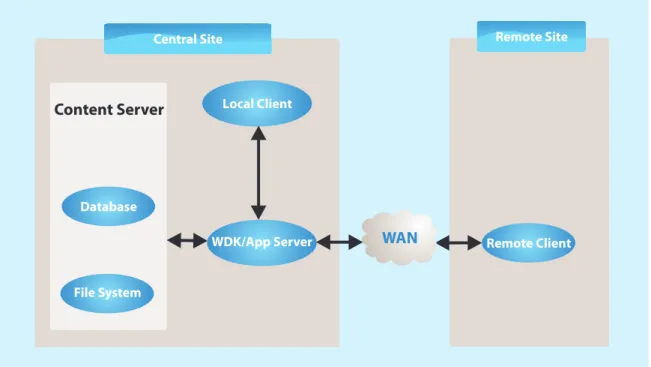
The Documentum repository is often hosted at a single location, and multiple workgroups within a global enterprise connect over the network to access and retrieve content as shown in the following figure.
Why Distributed Access?
The prospect of poor Wide Area Network (WAN) performance-unpredictable or slow data transfer time across vital WANs-has given pause to many organizations seeking to leverage the benefits of their content management systems enterprise-wide.
Several factors, such as the following, affect the content responsiveness:
• Bandwidth
• Network latency
• File size
• Frequency of remote fetches and updates
These mechanical challenges impact business. A distributed repository that determines how content is accessed and stored across multiple servers and systems within an enterprise addresses the key factors. When content files are hosted at multiple network locations, closer to the end user, the impact of network latency is mitigated. Network connections automatically transfer content among servers, rapidly delivering files where needed. Based on an organization’s needs, the most suitable architecture can be selected after evaluating the strengths and limitations of each model.
Figure 1: A Typical Documentum Implementation
Central Site Remote Site
Remote Client Local Client
Content Server
Database
File System
Documentum Solutions For Optimizing Content Responsiveness
The Documentum platform supports a solution that optimizes global content access and ensures content responsiveness for distributed task teams. Documentum supports several Distributed Architecture models, the most important of which are described below.
Single Or Multiple Repositories
Single repository
• Single Repository with Branch Office Caching Services (BOCS) - The primary repository maintains the document
meta-data, but the content is dynamically cached and stored, on demand, on a local file system located within a branch office, using BOCS.
• Single Repository with Multiple Content Servers - The primary repository maintains the document meta-data, but
multiple "content servers" are located close to remote users. The content is, therefore, stored at the location from which it is most frequently used.
• Single Repository with Multiple Content Servers Using Content Replication - The primary repository maintains the
document meta-data, and multiple "content servers" are located close to remote users. The content is stored at the location from which it is most frequently used. Additionally, a content replication job creates a copy of the content to store at each location.
Multiple repositories
• Multiple repositories using replication - In this case, there are multiple repositories for each location, and periodic
replication is scheduled to create copies of each docbase object (content and meta-data) at every other location.
• Multiple repositories as a federation – This is similar to the earlier model, but with an additional feature. A federation
allows one to manage the users, groups, and Access Control Lists (ACLs) for all participating repositories from a single "governing" repository.
Relative Comparison Between Single And Multiple Repositories
Comparison between Single and Multiple Repository Models
Single Repository Model Multiple Repository Model
?A single repository will enable real-time sharing of documents amongst users across locations. It would be relatively easier to manage as compared to a multi-repository model, at the same time providing a better performance over centralized content storage architecture.
?With multiple repositories, a user at one location will not be able to see a document uploaded by a user from the remote location unless the replication job has run.
?A single repository model is less dependent on the replication job since only the content is replicated. If the replication job has not run or failed due to any reason, a user from one location can still access the document from the remote site.
?With multiple repositories, replication jobs will be required for content synchronization at specific intervals which would hog the network bandwidth. Configuring replication at short intervals will affect performance, and keeping very long periods between replication would make it impossible for users across different locations to share documents on a real-time basis.
?This architecture will not by itself take care of Disaster Recovery. In a single repository model, if the remote content server goes down, the remote users can still connect to the central content server and continue to work. In this scenario, all the content that has already been replicated will be available. However, if the central content server goes down, the remote users cannot continue working as the repository is based in the central site.
?This architecture will handle the issue of Disaster Recovery to a large extent. With multiple repositories, if either content server crashes, all users can still work by
connecting to the other content server; however, only the replicated content and data will be available. The content and data that was not replicated since the last replication cycle will be lost.
?The index agent and index server can only be installed at the primary site; consequently documents that are uploaded to the remote site will not be indexed until the replication job has run, and the remote content has been replicated to the central site.
?With multiple repositories, since replication happens in a two-way manner, there can be situations of conflict where one user from remote site and another from central site, work on the same document before the replication has happened.
Documentum Distributed Architectures
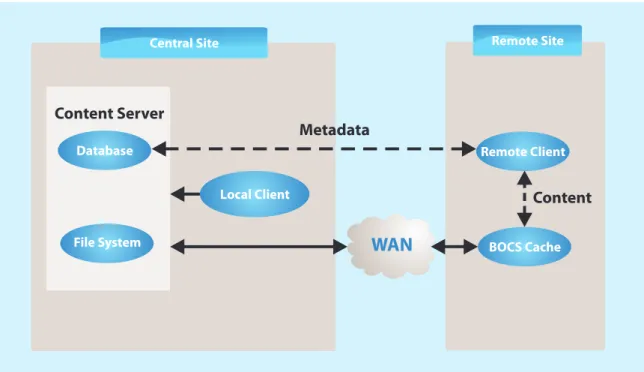
Single Repository Using BOCSEMC Documentum BOCS enables local access to content without the additional requirement of setting up a local content server. It speeds up resolution of performance issues experienced in branch offices when they are caused by network latency, by easily placing content caches close to end users in branch offices or other remote locations where there may be limited infrastructure and no onsite administrators. This helps in faster content transfers, particularly in high-latency environments. The content is stored locally, whereas the metadata, which is significantly smaller in size, is stored and managed centrally.
Data caching with BOCS enable users to read and write to local caches that are synchronized with the primary content repository. It is a self-contained installation that leverages BOCS of Documentum without installing an additional EMC Documentum Content Server and supports the use of existing hardware for local caches without purchasing specific machines to match the central Content Server. The administration is lightweight and can be setup through EMC Documentum Administrator. It is scalable and additional BOCS servers can be setup as and when needed, to accommodate future growth.
Using the BOCS configuration, when a remote user connects through a web browser, the EMC Documentum Web development kit (WDK)/Webtop Server detects the user's network location and redirects the request to the BOCS server. The BOCS server then determines if the requested content is available locally or whether it needs to be fetched from the nearest content server and cached locally. Once it is fetched, the content is presented to the users through the Web browser interface. The metadata comes directly from the central database; BOCS has nothing to do with the metadata, it only deals with read and write requests to the content.
BOCS also supports an additional feature knows as "Content precaching". If there is awareness of content that will be accessed frequently or regularly by the BOCS users, this content can be cached on the server prior to user requests. This will ensure that even first time users do not face the performance hit due to remote content access. Pre-caching can be performed by a job or programmatically.
A BOCS server can communicate with a Document Management System (DMS) server in either push or pull mode based on the configuration set in the BOCS configuration object. In push mode, the messages routed to the server through DMS are sent by the DMS server to the BOCS server, whereas in pull mode, messages routed to the server through DMS are picked up by the BOCS server; the DMS server does not send them to the BOCS server.
Asynchronous write operations ensure that a user does not wait for content to be saved to the repository when the network communication lines are slow. Additionally, other users in the network locations served by the BOCS server on which the content is parked have immediate access to the content.
Asynchronous write operations are best used when:
• The branch office and primary office are connected by slow network lines.
• When the content is used primarily by users at the network locations served by the BOCS servers.
• The content to be saved or checked in is a large content file.
Limitations
Using asynchronous write has the following limitations:
• Parked content is unavailable to users who are not accessing the repository through the BOCS server on which the
content is parked.
• If an application needs immediate access to particular content, asynchronous write cannot be used for that content
unless the application is rewritten to check for the parked state before obtaining the content.
Figure 2: A BOCS Implementation
Central Site Remote Site
Remote Client
BOCS Cache
Content Server
Content Metadata
Database
File System
Local Client
BOCS Advantages and Disadvantages
Strengths Limitations
?A Documentum content server installation is not required at the remote locations. This solution leverages the existing Documentum server installation and licensing.
?It requires Installation and Administration of BOCS at remote site. BOCS will also need separate licenses to be procured.
?BOCS is network-aware and will automatically download and upload content to the nearest content server, whether it is a remote content server or the primary content server.
?It functions only for Web-based user interface (Webtop). Clients using Desktop client server interface cannot experience the benefits of BOCS.
?Since there is no replicated content server or database to maintain, there is no need for onsite IT or other
administrative support. Everything can be easily handled from a central location. With BOCS, the metadata (as well as permissions and entitlements) is accessed from the content server through WDK on the application server, enabling administrators to maintain central control over all the content.
?With BOCS, the first user requesting content from a remote location may experience a fetching delay due to the latency issues and bandwidth constraints affecting other network users.
?The backup process will be much simpler than all other distributed models, as all the content will be available locally.
?The content needs to be transferred between the content server and BOCS at regular intervals. The bandwidth would need to be sufficient to accommodate this periodic replication.
?If full text searching is a a primary requirement, then replication becomes mandatory as the index server will only index the documents from the central server. In such a situation, BOCS is the preferred configuration.
Single Repository With Multiple Content Servers
In this model, content is stored in a distributed storage area. A distributed storage area has multiple component storage areas. One component is located at the repository’s primary site. Each remote site has one of the remaining components.
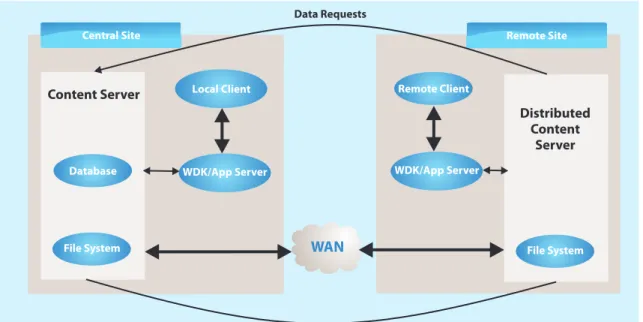
Each site has a full Content Server installation. This model can be used for either Web-based clients or Desktop clients. In this configuration, metadata requests are handled by the Content Server at the primary site, and requests to write content to storage are handled by the Remote Content Servers (RCS) as depicted in the following figure.
Figure 3: Single Repository Multiple Content Servers
Central Site Remote Site
Remote Client Local Client
Content Server
Data Requests
Content may be at either location, but distributed so that frequently used content is close to its user
Distributed Content
Server Database
File System File System
WDK/App Server WDK/App Server
Single Repository Model Advantages and Disadvantages
Strengths
Limitations
?
It exhibits improved performance for remote users as content is accessed from the local site. This model is beneficial where a set of users belonging to onegeographical location accesses common content, and the need for content sharing across several geographical locations is minimal.
?
The benefits are nullified in cases where content is frequently shared across multiple different geographical locations.?
Since the database and repository are available at a central location, there is only a single point of management and maintenance for database and repository.?
Users may still need to access content remotely, if they are accessing a document that is not stored at their current location. In this situation, theperformance experienced by the user would be similar to a non-distributed centralized content architecture.
?
Content Replication jobs can be added whenever needed, and stopped if not required.?
Interruptions in connectivity between main and remote locations would render the system unusable, as data requests are still routed to the main content Repository.?
For sites using Desktop clients, this model is the only model available for a single-repository distributed configuration.?
Installation is required at each remote site to add a local Content Server and Application Server. Thus, additional Documentum installation, administration and Management activities would be required at each site.?
This model is recommended for sites where full text searching is not a requisite. In such a situation, replication?
Backup would need to be planned because the standard EMC product for documentum backup –Single Repository With Multiple Content Servers Using Content Replication
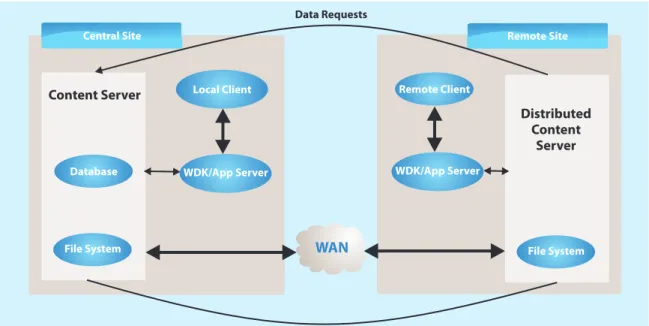
Documentum provides the ability to replicate content to one or more locations. This option entails a single repository with multiple content severs same as in the previous option. However, the content replication functionality will need to be used in this case as depicted in the following figure. The content is replicated from its source component to the remaining components by user-defined content replication jobs.
This model allows supporting the situation where the same piece of content is frequently accessed from multiple locations.
Content In A Distributed Storage Area
In this model, content is stored in a distributed storage area. A distributed storage area is a single storage area made up of multiple component storage areas. All sites in a model using a distributed storage area share the same repository, but each site has a distributed storage area component as its own local storage area to provide fast, local access to content. One component is located at the repository’s primary site, and each remote site has one of the remaining components. Each site has a full Content Server installation and an Application server (for Web-based clients) installation for the repository. The content is replicated from its source component to the remaining components by user-defined content replication jobs. This model can be used for either web-based clients or Desktop clients. Desktop clients at the remote
Figure 4: Single Repository with Replication
Central Site Remote Site
Remote Client Local Client
Content Server
Data Requests
Content Replication - Creates a local copy of Content
Distributed Content
Server Database
File System File System
WDK/App Server WDK/App Server
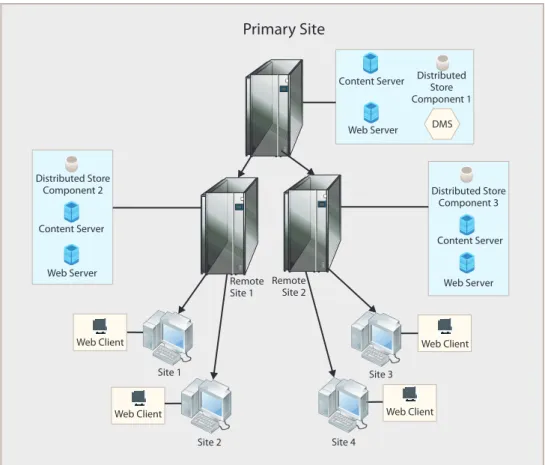
Figure 5: Single Repository with Distributed Storage
In this model, users in Site 1 and Site 2 are closer to Remote Site 1 and will access the content stored in the distributed storage component 2 located at the Remote site 1 distributed content server, whereas users in Site 3 and site 4 are closer to Remote Site 2 and will access content stored in the distributed storage component 3 located at the Remote site 2 distributed content server. If the users are logging in using a Web-based client, content requests are handled through the Web server at the appropriate branch office in the Remote sites 1 or 2. If the users are logging in using a Desktop-based client, content requests are handled by the Content Server in Remote sites 1 or 2.
Content Replication
Content replication is a process of replicating content files among distributed storage area components. This process ensures that users at each site have local copies of the files to access. Content replication can be scheduled to run automatically or it can be performed manually.
• Automatic Replication
The tools that can be used to replicate content automatically are:
Distributed Store Component 3 Distributed
Store Component 1
DMS
Distributed Store Component 2
Content Server Content Server
Primary Site
Content Server
Web Server Web Server
Web Server
Web Client
Web Client Web Client
Web Client Remote
Site 1
Site 1
Site 2 Site 4
Site 3 Remote
• Manual Replication
To manually replicate content files, the following administration methods can be used:
- REPLICATE
The REPLICATE administration method copies a file from one storage area to another. The disks on which both component storage areas reside must be accessible to the server.
- IMPORT_REPLICA
The IMPORT_REPLICA administration method imports a file from another component of the distributed storage area, or from an external file system into a storage area.
Both these methods can be executed from Documentum Administrator, the EXECUTE statement or the Apply method.
Single Repository with Replication Advantages and Disadvantages
Strengths Limitations
?Since the database and repository are available at a central location, there is only a single point of management and maintenance for database and repository.
?Installation is required at each remote site to add a local Content Server and Application Server. Thus, additional Documentum installation, administration and Management activities would be required at each site.
?If replication jobs are scheduled and content has been replicated locally, then it would provide a better performance as compared to the previous model, even when some content is frequently viewed by multiple locations.
?There are two ways documents can be replicated, scheduled or on-demand. if using scheduled replication, content may not be immediately available at remote sites. if using on-demand replication, performance may suffer due to network limitations.
?Users across all locations can view/share and modify documents on a real-time basis (unlike in a multi-repository model).
?Remote access still depends on the connection to the central repository, as all data requests are routed to the mail location.
?For sites using Desktop clients, this model is the only model available for a single-repository distributed configuration.
?This architecture will not by itself take care of Disaster Recovery. If the central server goes down, remote users cannot work either.
Multiple Repositories, Using Object Replication
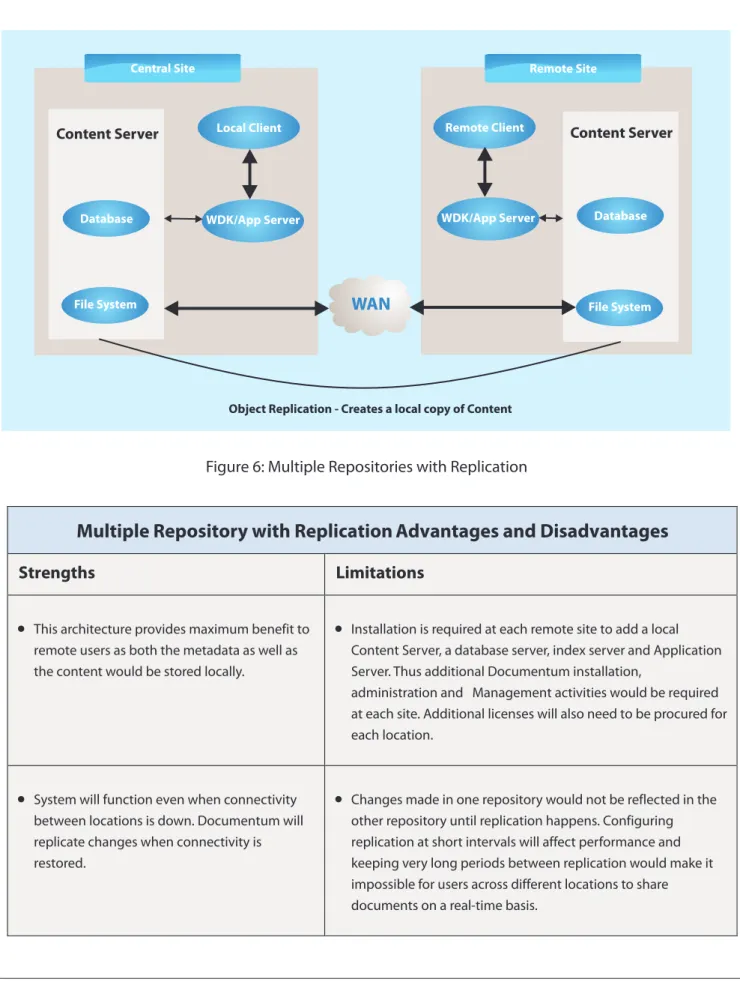
In this model, an actual and complete repository resides at each location. The repositories are synchronized with Documentum's Object Replication functionality. This ensures that when a new content is created, it is replicated to each location as shown in the following figure.
Figure 6: Multiple Repositories with Replication
Central Site Remote Site
Remote Client Local Client
Content Server Content Server
Object Replication - Creates a local copy of Content
Database Database
File System File System WDK/App Server WDK/App Server
WAN
Multiple Repository with Replication Advantages and Disadvantages
Strengths Limitations
?This architecture provides maximum benefit to remote users as both the metadata as well as the content would be stored locally.
?Installation is required at each remote site to add a local Content Server, a database server, index server and Application Server. Thus additional Documentum installation,
administration and Management activities would be required at each site. Additional licenses will also need to be procured for each location.
Multiple Repositories, Using Federation
This option is similar to the above option; however, a Federation provides some additional functionality. In this option, multiple repositories are bound together to facilitate management of global users, groups, and ACLs. Users, groups, and ACLs are automatically propagated to all of the repositories of the federation from the "governing" repository.
1. White Paper - Using EMC Documentum to Improve Content Responsiveness in Distributed Environments 2. http://www.dmdeveloper.com/articles/administration/distributed.html
3. Documentum Distributed Configuration Guide Version 6
References And Citations
About EMC Documentum:The EMC Documentum family of products by EMC helps to create content applications and solutions on a single foundation and build a common content repository. It is used to manage, store, secure, and deliver unstructured content in a systematic manner, according to predefined business rules, policies, and procedures. With a unified repository, various groups can easily share and reuse their content with other areas of the business that would benefit from access to this valuable information. More information can be obtained from www.emc.com.
Federation
Advantages and Disadvantages
Strengths
Limitations
?
Same advantages as with the previous model. Additionally, users, groups, ACLs can be managed centrally.?
Same disadvantages as with the previous model, with some added complexity in setting up the Federation.?
This option enables “Federated Search”, where a user can search across multiple repositories that form a federation.?
Replication is essential for this architecture. Requires a very good WAN bandwidth and periodicsolutions and outsourcing organization that delivers real results to global businesses, ensuring a level of certainty no other firm can match. TCS offers a consulting-led, integrated portfolio of IT and IT-enabled services delivered through its unique Global Network
TM
Delivery Model , recognized as the benchmark of excellence in software development.
A part of the Tata Group, India's largest industrial conglomerate, TCS has over 100,000 of the world's best trained IT consultants in 50 countries. The company generated consolidated revenues of US $5.7 billion for fiscal year ended 31 March 2008 and is listed on the National Stock Exchange and Bombay Stock Exchange in India. For more information, visit us at www.tcs.com
To know more about how we help companies in the High Tech Industry overcome their challenges to achieve real business results, Contact:[email protected]
provide leadership in technical and domain capabilities. HTTD supports both the presales and the delivery functions. HTTD consists of high tech domain CoEs, technology CoEs, Product Engineering groups and Domain University.