Driver for Active Directory
Implementation Guide
Identity Manager 4.0.2
February 2014
Legal Notice
THIS DOCUMENT AND THE SOFTWARE DESCRIBED IN THIS DOCUMENT ARE FURNISHED UNDER AND ARE SUBJECT TO THE TERMS OF A LICENSE AGREEMENT OR A NON-DISCLOSURE AGREEMENT. EXCEPT AS EXPRESSLY SET FORTH IN SUCH LICENSE AGREEMENT OR NON-DISCLOSURE AGREEMENT, NETIQ CORPORATION PROVIDES THIS DOCUMENT AND THE SOFTWARE DESCRIBED IN THIS DOCUMENT "AS IS" WITHOUT WARRANTY OF ANY KIND, EITHER EXPRESS OR IMPLIED, INCLUDING, BUT NOT LIMITED TO, THE IMPLIED WARRANTIES OF MERCHANTABILITY OR FITNESS FOR A PARTICULAR PURPOSE. SOME STATES DO NOT ALLOW DISCLAIMERS OF EXPRESS OR IMPLIED WARRANTIES IN CERTAIN TRANSACTIONS; THEREFORE, THIS STATEMENT MAY NOT APPLY TO YOU.
For purposes of clarity, any module, adapter or other similar material ("Module") is licensed under the terms and conditions of the End User License Agreement for the applicable version of the NetIQ product or software to which it relates or
interoperates with, and by accessing, copying or using a Module you agree to be bound by such terms. If you do not agree to the terms of the End User License Agreement you are not authorized to use, access or copy a Module and you must destroy all copies of the Module and contact NetIQ for further instructions.
This document and the software described in this document may not be lent, sold, or given away without the prior written permission of NetIQ Corporation, except as otherwise permitted by law. Except as expressly set forth in such license agreement or non-disclosure agreement, no part of this document or the software described in this document may be reproduced, stored in a retrieval system, or transmitted in any form or by any means, electronic, mechanical, or otherwise, without the prior written consent of NetIQ Corporation. Some companies, names, and data in this document are used for illustration purposes and may not represent real companies, individuals, or data.
This document could include technical inaccuracies or typographical errors. Changes are periodically made to the information herein. These changes may be incorporated in new editions of this document. NetIQ Corporation may make improvements in or changes to the software described in this document at any time.
U.S. Government Restricted Rights: If the software and documentation are being acquired by or on behalf of the U.S. Government or by a U.S. Government prime contractor or subcontractor (at any tier), in accordance with 48 C.F.R. 227.7202-4 (for Department of Defense (DOD) acquisitions) and 48 C.F.R. 2.101 and 12.212 (for non-DOD acquisitions), the government’s rights in the software and documentation, including its rights to use, modify, reproduce, release, perform, display or disclose the software or documentation, will be subject in all respects to the commercial license rights and restrictions provided in the license agreement.
© 2014 NetIQ Corporation and its affiliates. All Rights Reserved.
Contents 3
Contents
About this Book and the Library 7
About NetIQ Corporation 9
1 Understanding the Active Directory Driver 11
1.1 Key Terms . . . 11
1.1.1 Identity Manager . . . 11
1.1.2 Connected System . . . 11
1.1.3 Identity Vault . . . 11
1.1.4 Identity Manager Engine . . . 12
1.1.5 Active Directory Driver . . . 12
1.1.6 Driver Shim . . . 12
1.1.7 Remote Loader . . . 12
1.2 Data Transfers Between Systems . . . 13
1.3 Key Driver Features . . . 13
1.3.1 Local Platforms . . . 13
1.3.2 Remote Platforms . . . 14
1.3.3 Entitlements . . . 14
1.3.4 Password Synchronization Support . . . 15
1.3.5 Data Synchronization Support . . . 15
1.4 Default Driver Configuration . . . 16
1.4.1 User Object Name Mapping . . . 16
1.4.2 Data Flow. . . 16
2 Preparing Active Directory 21 2.1 Driver Prerequisites . . . 21
2.2 Where to Install the Active Directory Driver . . . 22
2.2.1 Local Installation . . . 22
2.2.2 Remote Installation on Windows Server Only . . . 22
2.2.3 Remote Installation on Windows and Other Platforms . . . 23
2.2.4 Remote Installation on a Windows Member Server. . . 23
2.3 Addressing Security Issues . . . 24
2.3.1 Authentication Methods . . . 24
2.3.2 Encryption Using SSL . . . 24
2.4 Creating an Administrative Account . . . 28
2.5 Configuring System Permissions . . . 28
2.6 Becoming Familiar with Driver Features . . . 28
2.6.1 Multivalue Attributes . . . 29
2.6.2 Using Custom Boolean Attributes to Manage Account Settings . . . 29
2.6.3 Provisioning Exchange Mailboxes . . . 30
2.6.4 Expiring Accounts in Active Directory . . . 30
2.6.5 Retaining eDirectory Objects When You Restore Active Directory Objects . . . 31
3 Installing the Driver Files 33 3.1 Installing the Driver Files . . . 33
4 Creating a New Driver 35
4.1 Gathering Configuration Information . . . 35
4.2 Creating the Driver in Designer . . . 36
4.2.1 Importing the Current Driver Packages . . . 37
4.2.2 Installing the Driver Packages . . . 37
4.2.3 Configuring the Driver . . . 42
4.2.4 Deploying the Driver . . . 43
4.2.5 Starting the Driver . . . 44
4.3 Activating the Driver . . . 44
4.4 Adding Packages to an Existing Driver . . . 44
4.5 Viewing Entitlements Onboarding Configuration Objects . . . 45
5 Upgrading an Existing Driver 47 5.1 Supported Upgrade Paths . . . 47
5.2 What’s New in Version 4.0.2 . . . 47
5.3 Upgrade Procedure . . . 48
6 Synchronizing Passwords 49 6.1 Securing Driver Connections . . . 49
6.2 Setting Up Password Synchronization Filters . . . 50
6.2.1 Allowing Remote Access to the Registry . . . 50
6.2.2 Not Allowing Remote Access to the Registry . . . 54
6.3 Retrying Synchronization after a Failure . . . 57
6.3.1 Retrying after an Add or Modify Event . . . 57
6.3.2 Password Expiration Time . . . 57
6.4 Disabling Password Synchronization on a Driver. . . 59
6.5 Diagnosing Password Synchronization Issues . . . 60
7 Managing Active Directory Groups and Exchange Mailboxes 61 7.1 Managing Groups. . . 61
7.2 Managing Microsoft Exchange Mailboxes . . . 62
8 Managing the Driver 65 9 Security Best Practices 67 9.1 Default Configuration of the Security Parameters . . . . 67
9.2 Recommended Security Configurations for the Remote Loader . . . 69
9.3 Recommended Security Configurations for the Simple Authentication Method. . . 70
10 Troubleshooting 73 10.1 Changes Are Not Synchronizing from the Publisher or Subscriber . . . 73
10.2 Using Characters Outside the Valid NT Logon Names . . . 74
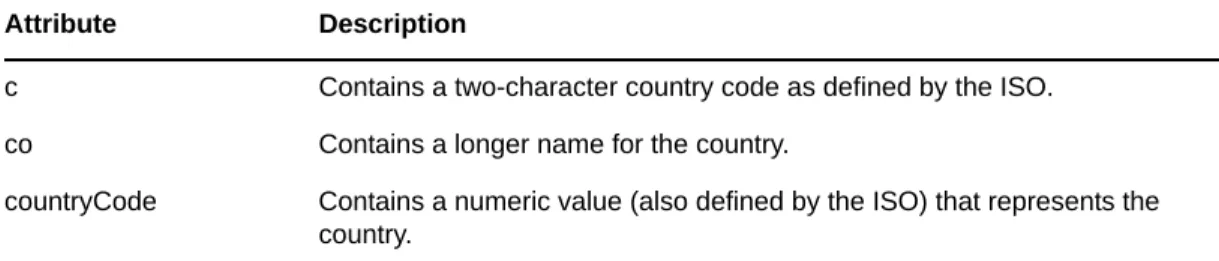
10.3 Synchronizing c, co, and countryCode Attributes . . . . 74
10.4 Synchronizing Operational Attributes . . . 74
10.5 Password Complexity on Windows Server. . . 75
10.6 Tips on Password Synchronization . . . 75
10.6.1 Providing Initial Passwords . . . 76
Contents 5
10.9 The Active Directory Account Is Disabled after a User Add on the Subscriber Channel . . . 78
10.10 Moving a Parent Mailbox to a Child Domain . . . 78
10.11 Restoring Active Directory . . . 78
10.12 Moving the Driver to a Different Domain Controller . . . 79
10.13 Migrating from Active Directory . . . 79
10.14 Setting LDAP Server Search Constraints . . . 79
10.15 Error Messages . . . 80
10.16 Performance is Degraded if eDirectory is Installed . . . 82
10.17 Modify Operations Fail on AD LDS Instances . . . 82
10.18 PowerShell Service Installation Fails for Active Directory Drivers on Windows 2012 Devices . . . 82
10.19 Deleting an Entitlement Assignment Attribute Does Not Correctly Reflect on the Mapped Resources . . . 82
10.20 Setting a Password in Active Directory also Sets the eDirectory Password Expiration . . . 83
10.21 Troubleshooting Driver Processes . . . 83
A Driver Properties 85 A.1 Driver Configuration . . . 85
A.1.1 Driver Module . . . 86
A.1.2 Driver Object Password (iManager Only) . . . 86
A.1.3 Authentication . . . 86
A.1.4 Startup Option . . . 87
A.1.5 Driver Parameters . . . 87
A.1.6 ECMAScript (Designer Only) . . . 90
A.1.7 Global Configurations (Designer Only) . . . 90
A.2 Global Configuration Values . . . 90
A.2.1 Configuration . . . 91
A.2.2 Entitlements . . . 92
A.2.3 Password Synchronization . . . 95
A.2.4 Account Tracking . . . 95
A.2.5 Managed System Information . . . 96
B Configuring the Driver for Use with an AD LDS/ADAM Instance 99 B.1 Prerequisites . . . 99
B.2 Installation Tasks . . . 100
B.2.1 Installing Internet Information Services . . . 100
B.2.2 Installing Certificate Services. . . . 100
B.2.3 Installing AD LDS/ADAM . . . 100
B.2.4 Requesting and Installing the Server Certificate . . . 101
B.3 Configuration Tasks . . . 102
B.3.1 Setting the Default Naming Context for Your AD LDS/ADAM Instance. . . 102
B.3.2 Creating a User in AD LDS/ADAM with Sufficient Rights . . . 102
B.3.3 Creating the AD LDS/ADAM Driver . . . 103
C Provisioning Exchange Accounts 107 C.1 Provisioning Exchange Server 2003 Accounts . . . 107
C.2 Provisioning Exchange Server 2007 Accounts . . . 109
C.2.1 Meeting the Prerequisites . . . 110
C.2.2 Installing the Service . . . 110
C.2.3 Configuring the Driver . . . 110
C.3 Provisioning Exchange Server 2010 Accounts . . . 112
C.3.1 Meeting the Prerequisites . . . 113
C.3.2 Installing the Service . . . 113
C.3.4 Configuring the Driver to Support Exchange Server 2010 Database Load Balancing . . . 115
C.4 Provisioning Exchange Server 2013 Accounts . . . 116
C.4.1 Meeting the Prerequisites . . . 117
C.4.2 Installing the Service . . . 117
C.4.3 Configuring the Driver . . . 117
C.4.4 Configuring the Driver to Support Exchange Server 2013 Database Load Balancing . . . 118
D Configuring PowerShell Support 121 D.1 Overview of PowerShell Functionality . . . 121
D.2 System Requirements . . . 121
D.3 Implementing PowerShell Cmdlets in the Active Directory Driver . . . 122
D.3.1 Sample Active Directory Policy Rule with Cmdlets . . . 122
D.3.2 Available Active Directory and Exchange Cmdlets . . . 123
D.3.3 Creating Active Directory Policies with Cmdlets . . . 124
D.3.4 Verifying Active Directory Cmdlet Execution . . . 124
E Trace Levels 127
About this Book and the Library 7
About this Book and the Library
The Identity Manager Driver for Active Directory Implementation Guide explains how to install, configure, and manage the Identity Manager Driver for Active Directory.
Intended Audience
This guide is intended for Active Directory administrators, Identity Manager administrators, and others who implement the Identity Manager driver for Active Directory.
Other Information in the Library
The library provides the following information resources:
Identity Manager Framework Installation Guide
Provides detailed planning and installation information for Identity Manager components.
Identity Manager Integrated Installation Guide
Provides integrated installation information for installing Identity Manager components.
Identity Manager Overview Guide
Provides conceptual information about Identity Manager. This book also provides an overview of the various components and many administration tasks.
Identity Manager Driver Guides
About NetIQ Corporation 9
About NetIQ Corporation
We are a global, enterprise software company, with a focus on the three persistent challenges in your environment: Change, complexity and risk—and how we can help you control them.
Our Viewpoint
Adapting to change and managing complexity and risk are nothing new
In fact, of all the challenges you face, these are perhaps the most prominent variables that deny you the control you need to securely measure, monitor, and manage your physical, virtual, and cloud computing environments.
Enabling critical business services, better and faster
We believe that providing as much control as possible to IT organizations is the only way to enable timelier and cost effective delivery of services. Persistent pressures like change and complexity will only continue to increase as organizations continue to change and the technologies needed to manage them become inherently more complex.
Our Philosophy
Selling intelligent solutions, not just software
In order to provide reliable control, we first make sure we understand the real-world scenarios in which IT organizations like yours operate—day in and day out. That's the only way we can develop practical, intelligent IT solutions that successfully yield proven, measurable results. And that's so much more rewarding than simply selling software.
Driving your success is our passion
We place your success at the heart of how we do business. From product inception to
deployment, we understand that you need IT solutions that work well and integrate seamlessly with your existing investments; you need ongoing support and training post-deployment; and you need someone that is truly easy to work with—for a change. Ultimately, when you succeed, we all succeed.
Our Solutions
Identity & Access Governance
Access Management
Security Management
Systems & Application Management
Workload Management
Contacting Sales Support
For questions about products, pricing, and capabilities, contact your local partner. If you cannot contact your partner, contact our Sales Support team.
Contacting Technical Support
For specific product issues, contact our Technical Support team.
Contacting Documentation Support
Our goal is to provide documentation that meets your needs. The documentation for this product is available on the NetIQ Web site in HTML and PDF formats on a page that does not require you to log in. If you have suggestions for documentation improvements, click Add Comment at the bottom of any page in the HTML version of the documentation posted at www.netiq.com/documentation. You can also email [email protected]. We value your input and look forward to hearing from you.
Contacting the Online User Community
NetIQ Communities, the NetIQ online community, is a collaborative network connecting you to your peers and NetIQ experts. By providing more immediate information, useful links to helpful
resources, and access to NetIQ experts, NetIQ Communities helps ensure you are mastering the knowledge you need to realize the full potential of IT investments upon which you rely. For more information, visit community.netiq.com.
Worldwide: www.netiq.com/about_netiq/officelocations.asp
United States and Canada: 1-888-323-6768
Email: [email protected]
Web Site: www.netiq.com
Worldwide: www.netiq.com/support/contactinfo.asp
North and South America: 1-713-418-5555 Europe, Middle East, and Africa: +353 (0) 91-782 677
Email: [email protected]
1
Understanding the Active Directory Driver 11
1
Understanding the Active Directory
Driver
This section contains high-level information about how the Active Directory driver functions.
Section 1.1, “Key Terms,” on page 11
Section 1.2, “Data Transfers Between Systems,” on page 13
Section 1.3, “Key Driver Features,” on page 13
Section 1.4, “Default Driver Configuration,” on page 16
1.1
Key Terms
Section 1.1.1, “Identity Manager,” on page 11
Section 1.1.2, “Connected System,” on page 11
Section 1.1.3, “Identity Vault,” on page 11
Section 1.1.4, “Identity Manager Engine,” on page 12
Section 1.1.5, “Active Directory Driver,” on page 12
Section 1.1.6, “Driver Shim,” on page 12
Section 1.1.7, “Remote Loader,” on page 12
1.1.1
Identity Manager
NetIQ Identity Manager is a service that synchronizes data among servers in a set of connected systems by using a robust set of configurable policies. Identity Manager uses the Identity Vault to store shared information, and uses the Identity Manager engine for policy-based management of the information as it changes in the vault or connected system. Identity Manager runs on the server where the Identity Vault and the Identity Manager engine are located.
1.1.2
Connected System
A connected system is any system that can share data with Identity Manager through a driver. Active Directory is a connected system.
1.1.3
Identity Vault
The Identity Vault is a persistent database powered by eDirectory and used by Identity Manager to hold data for synchronization with a connected system. The vault can be viewed narrowly as a private data store for Identity Manager or more broadly as a metadirectory that holds
enterprise-wide data. Data in the vault is available to any protocol supported by eDirectory, including the NetWare Core Protocol (NCP), which is the traditional protocol used by iManager, LDAP, and DSML.
Because the vault is powered by eDirectory, Identity Manager can be easily integrated into your corporate directory infrastructure by using your existing directory tree as the vault.
1.1.4
Identity Manager Engine
The Identity Manager engine is the core server that implements the event management and policies of Identity Manager. The engine runs on the Java Virtual Machine in eDirectory.
1.1.5
Active Directory Driver
A driver implements a data sharing policy for a connected system. You control the actions of the driver by using iManager to define the filters and the policy. For Active Directory, a driver implements the policy for a single domain.
1.1.6
Driver Shim
A driver shim is the component of a driver that converts the XML-based Identity Manager command and event language (XDS) to the protocols and API calls needed to interact with a connected system. The shim is called to execute commands on the connected system after the Output Transformation runs. Commands are usually generated on the Subscriber channel but can be generated by command write-back on the Publisher channel.
The shim also generates events from the connected system for the Input Transformation policy. A driver shim can be implemented either in Java class or as a native Windows DLL file. The shim for Active Directory is ADDriver.dll.
ADDriver.dll is implemented as a native Windows DLL file. It uses several different Windows APIs to integrate with Active Directory. These APIs typically require some type of login and authentication to succeed. Also, the APIs might require that the login account have certain rights and privileges within Active Directory and on the machine where ADDriver.dll executes.
If you use the Remote Loader, ADDriver.dll executes on the server where the Remote Loader is running. Otherwise, it executes on the server where the Identity Manager engine is running.
1.1.7
Remote Loader
A Remote Loader enables a driver shim to execute outside of the Identity Manager engine (perhaps remotely on a different machine). The Remote Loader is typically used when a requirement of the driver shim is not met by the Identity Manager server. For example, if the Identity Manager engine is running on Linux, the Remote Loader is used to execute the Active Directory driver shim on a Windows server.
The Remote Loader is a service that executes the driver shim and passes information between the shim and the Identity Manager engine. When you use a Remote Loader, you install the driver shim on the server where the Remote Loader is running, not on the server where the Identity Manager engine is running. You can choose to use SSL to encrypt the connection between the Identity Manager engine and the Remote Loader. For more information, see the Identity Manager 4.0.2 Remote Loader Guide.
Understanding the Active Directory Driver 13
When you use the Remote Loader with the Active Directory driver shim, two network connections exist:
Between the domain controller and the Remote Loader
Between Active Directory and the Active Directory driver shim
1.2
Data Transfers Between Systems
Data flows between Active Directory and the Identity Vault by using the Publisher and Subscriber channels.
The Publisher channel does the following:
Reads events from Active Directory for the domain hosted on the server that the driver shim is connecting to.
Submits that information to the Identity Vault. The Subscriber channel does the following:
Watches for additions and modifications to the Identity Vault objects.
Makes changes to Active Directory that reflect those changes.
You can configure the driver so that both Active Directory and the Identity Vault are allowed to update a specific attribute. In this configuration, the most recent change determines the attribute value, except for merge operations that are controlled by the filters and merge authority.
1.3
Key Driver Features
The sections below contains information about the key driver features.
Section 1.3.1, “Local Platforms,” on page 13
Section 1.3.2, “Remote Platforms,” on page 14
Section 1.3.3, “Entitlements,” on page 14
Section 1.3.4, “Password Synchronization Support,” on page 15
Section 1.3.5, “Data Synchronization Support,” on page 15
1.3.1
Local Platforms
A local installation is an installation of the driver on the Identity Manager server. The Active Directory driver can be installed on the Windows operating systems supported for the Identity Manager server. The supported operating system versions are Windows Server 2003 SP2 (32-bit), Windows Server 2008 SP2 (32-bit and 64-bit), Windows Server 2008 R2 (64-bit), Windows Server 2012 (64-bit), Windows Server 2012 R2 (64-bit), or later.
For more information about local installations, see Section 2.2, “Where to Install the Active Directory Driver,” on page 22.
For additional information about system requirements, see “System Requirements” in the Identity Manager 4.0.2 Framework Installation Guide.
1.3.2
Remote Platforms
The Active Directory driver can use the Remote Loader service to run on a Windows server other than the Identity Manager server. The Remote Loader service for the Active Directory driver can be installed on Windows Server 2003 SP2 (32-bit), Windows Server 2008 SP2 (32-bit and 64-bit), Windows Server 2008 R2 bit), Windows Server 2012 bit), and Windows Server 2012 R2 (64-bit).
For more information about remote installations, see Section 2.2, “Where to Install the Active Directory Driver,” on page 22.
For additional information about system requirements, see “System Requirements” in the Identity Manager 4.0.2 Framework Installation Guide.
1.3.3
Entitlements
The Active Directory driver supports entitlements. However, an action such as provisioning an account in the target directory is delayed until the proper approvals have been made. In Role-Based Services, rights assignments are made based on attributes of a user object. Entitlements standardize a method of recording this information on objects in the Identity Vault. From the driver perspective, an entitlement grants or revokes the right to something in Active Directory. You can use entitlements to grant the right to an account in Active Directory, to control group membership, and to provision Exchange mailboxes.
The Active Directory driver uses Permission Collection and Reconciliation service to map entitlements to resources and automatically assign those entitlements to users when permissions change in Active Directory. The driver updates the Resource Catalog so that it reflects the exact state of user permissions in Active Directory. The driver content includes an enhanced entitlement package that contains the following entitlements by default:
ExchangeMailbox: This entitlement grants or denies a Microsoft Exchange mailbox for the specified user.
Group: This entitlement grants or denies membership to a group in Active Directory. When the entitlement is revoked, Identity Manager removes the user from the group.
UserAccount: This entitlement grants or denies an Active Directory account for the specified user. When this entitlement is granted, the driver provides an enabled logon account. When this entitlement is revoked, the driver either disables or deletes the logon account, depending on the driver configuration.
The Active Directory driver also supports custom entitlements other than the default set provided, creating and automatically managing the relationship of identities to resource assignments. The driver uses a CSV file to map Active Directory entitlements into corresponding resources in the Resource Catalog. If an administrator then assigns a resource to a user in the User Application or in iManager, that change is reflected in Active Directory, and similarly, if an Active Directory
administrator makes a change to the user permission, that change is reflected in the Identity Vault and the corresponding resource is updated with the permission assignment.
The following packages contain the content necessary for collecting and reconciling permissions in Active Directory:
NOVLACOMSET 2.0.0 (Common Settings Advanced Edition)
NOVLADENTEX 2.0.0 (Active Directory Entitlements and Exchange Mailbox Support)
Understanding the Active Directory Driver 15
If you want the driver to support permission collection and reconciliation, ensure that these packages are installed on the driver. You can turn this functionality on or off using the new set of GCVs included with the driver. Also, to avoid broken reconciliations, turn off the Optimize Modify On
attributes that are a part of the entitlements.
You should enable entitlements for the driver only if you plan to use the User Application or Role-Based Entitlements with the driver. For more information about entitlements, see the Identity Manager 4.0.2 Entitlements Guide.
Prerequisites
Before continuing, ensure that you go through the prerequisites needed for enabling this
functionality. For general prerequisites, see “Prerequisites” in “Understanding Permission Collection and Reconciliation Service ” in the NetIQ Identity Manager 4.0.2 Common Driver Administration Guide. In addition to the general prerequisites, ensure that the Active Directory driver version is 4.0.0.2 or later.
Also, you need to set up administrative user accounts and configure a password policy for them. For more information, see “Setting Up Administrative User Accounts” and “Setting Up Administrative Passwords” in the NetIQ Identity Manager 4.0.2 Common Driver Administration Guide.
To use the new functionality included in the Active Directory driver, you can either create a new driver with the latest packages or upgrade packages on an existing driver. For more information about creating a driver, see Section 4.2, “Creating the Driver in Designer,” on page 36 or Section 4.4, “Adding Packages to an Existing Driver,” on page 44.
CSV File Format
The Active Directory driver can consume the entitlement information from the CSV file, which is present on the server where Identity Manager is installed. The CSV file must contain values of the Active Directory system permission information in the format specified below. The Active Directory administrator should maintain a separate CSV file for every custom entitlement. For example, a CSV file can contain details about issuing parking passes to the employees for the ParkingPass entitlement. A CSV file that holds ParkingPass entitlement details represents this information in the following format:
North, North Lot, North Parking Lot
where North is the entitlement value, North Lot is the display name in the User Application for the entitlement value North, and North Parking Lot is the description of the entitlement value, which is displayed in the User Application.
1.3.4
Password Synchronization Support
The Active Directory driver synchronizes passwords on both the Subscriber channel and the Publisher channel. For more information, see Chapter 6, “Synchronizing Passwords,” on page 49.
1.3.5
Data Synchronization Support
The Active Directory driver synchronizes User objects, Group objects, containers, and Exchange mailboxes.
1.4
Default Driver Configuration
The Active Directory driver is shipped with packages. When the driver is created with packages in Designer, a set of policies and rules are created suitable for synchronizing with Active Directory. If your requirements for the driver are different from the default policies, you need to modify the default policies to do what you want. Pay close attention to the default Matching policies. The data that you trust to match users usually is different from the default. The policies themselves are commented and you can gain a greater understanding of what they do by creating a test driver and reviewing the policies with Designer or iManager.
Section 1.4.1, “User Object Name Mapping,” on page 16
Section 1.4.2, “Data Flow,” on page 16
1.4.1
User Object Name Mapping
Management utilities for the Identity Vault, such as iManager and Designer, typically name user objects differently than the Users and Computers snap-in for the Microsoft Management Console (MMC). Make sure that you understand the differences so the Matching policy and any
Transformation policies you have are implemented properly.
1.4.2
Data Flow
Data flow between Active Directory and the Identity Vault is controlled by the filters, mappings, and policies that are in place for the Active Directory driver.
“Filters” on page 16
“Schema Mapping” on page 16
“Name Mapping Policies” on page 18
“Active Directory Logon Name Policies” on page 19
Filters
The driver filter determines which classes and attributes are synchronized between Active Directory and the Identity Vault, and in which direction synchronization takes place.
Schema Mapping
Table 1-1 through Table 1-6 list Identity Vault user, group, and Organizational Unit attributes that are mapped to Active Directory user and group attributes.
The mappings listed in the tables are default mappings. You can remap same-type attributes.
Table 1-1, “Mapped User Attributes,” on page 17
Table 1-2, “Mapped Group Attributes,” on page 17
Table 1-3, “Mapped Organizational Unit Attributes,” on page 17
Table 1-4, “Mapped Organization Attributes,” on page 17
Table 1-5, “Mapped Locality Class,” on page 17
Understanding the Active Directory Driver 17
Table 1-1 Mapped User Attributes
Table 1-2 Mapped Group Attributes
eDirectory’s L attribute is mapped to Active Directory’s physicalDeliveryOfficeName attribute, and eDirectory’s Physical Delivery Office Name attribute is mapped to Active Directory’s L attribute. Because similarly named fields have the same value, mapping the attributes this way enables the attributes to work well with iManager and the Microsoft Management Console.
Table 1-3 Mapped Organizational Unit Attributes
Table 1-4 Mapped Organization Attributes
The driver maps the Locality class, but there are no attributes for the class.
Table 1-5 Mapped Locality Class
Table 1-6 Mapped Non-Class Specific Attributes
eDirectory - User Active Directory - user
DirXML-ADAliasName userPrincipalName
sAMAccountName CN
L PhysicalDeliveryOfficeName
Physical Delivery Office Name l
nspmDistributionPassword nspmDistributionPassword
eDirectory - Group Active Directory - group
DirXML-ADAliasName userPrincipalName
eDirectory - Organizational Unit Active Directory - organizationalUnit
L physicalDeliveryOfficeName
Physical Delivery Office Name l
eDirectory - Organization Active Directory - organization
L physicalDeliveryOfficeName
Physical Delivery Office Name l
eDirectory Active Directory
Locality locality
eDirectory Active Directory
Name Mapping Policies
The Active Directory packages includes two name mapping policies that work together to help you reconcile different naming policies between the Identity Vault and Active Directory. When you create a user with the Active Directory Users and Computers tool (a snap-in for the Microsoft Management Console and abbreviated as MMC in this document) you see that the user full name is used as its object name. Attributes of the user object define pre-Windows 2000 Logon Name (also known as the
DirXML-EntitlementRef DirXML-EntitlementRef
DirXML-EntitlementResult DirXML-EntitlementResult Facsimile Telephone Number facsimiletelephoneNumber
Full name displayName
Given Name givenName
Group Membership memberOf
Initials initials
Internet EMail Address mail
Login Allowed Time Map logonHours
Login Disabled dirxml-uACAccountDisabled
Login Expiration Time accountExpires
Login Intruder Reset Time lockoutTime
Member member
OU ou
Owner managedBy
Postal Code PostalCode
Postal Office Box postOfficeBox
S st
SA streetAddress
See Also seeAlso
DirXML-SPEntitlements DirXML-SPEntitlements
Surname sn
Telephone Number telephoneNumber
Title title
Understanding the Active Directory Driver 19
NT Logon Name or sAMAccountName) and the Windows 2000 Logon Name (also known as the userPrincipalName). When you create a user in the Identity Vault with iManager or ConsoleOne, the object name and the user logon name are the same.
If you create some users in Active Directory by using MMC, and then create other objects in the Identity Vault or another connected system that is synchronized with the Identity Vault, the object can look odd in the opposite console and might fail to be created in the opposite system. However, you can use the name mapping policies to avoid this problem.
The Full Name Mapping policy is used to manage objects in Active Directory by using the MMC conventions. When this policy is enabled, the Full Name attribute in the Identity Vault is
synchronized with the object name in Active Directory.
The NT Logon Name Mapping policy is used to manage objects in Active Directory by using the Identity Vault conventions. When it is enabled, the Identity Vault object name is used to synchronize both the object name and NT Logon Name in Active Directory. Objects in Active Directory have the same names as the Identity Vault, and the NT Logon Name matches the Identity Vault logon name. When both of the policies are enabled at the same time, the Active Directory object name is the Identity Vault Full Name, but the NT Logon Name matches the Identity Vault logon name. When both policies are disabled, no special mapping is made. The object names are synchronized and there are no special rules for creating the NT Logon Name. Because the NT Logon Name is a mandatory attribute in Active Directory, you need some method of generating it during Add operations. The NT Logon Name (sAMAccountName) is mapped to the DirMXL-ADAliasName in the Identity Vault, so you could either use that attribute to control the NT Logon Name in Active Directory or you could build your own policy in the Subscriber Create policies to generate one. With this policy selection, users created with MMC use the object name generated by MMC as the object name in the Identity Vault. However, this name might be inconvenient for login to the Vault. Using the Name Mapping policies is controlled through Global Configuration Values. For information, see Section A.2, “Global Configuration Values,” on page 90.
Active Directory Logon Name Policies
The Windows 2000 Logon name (also known as the userPrincipalName or UPN) does not have a direct counterpart in the Identity Vault. The UPN looks like an e-mail address
([email protected]) and might in fact be the user’s e-mail name. The important thing to
remember when working with the UPN is that it must use a domain name (the part after the @ sign) that is configured for your domain. You can find out what domain names are allowed by using MMC to create a user and looking at the domain name drop-down box when adding the UPN.
The default configuration offers several choices for managing userPrincipalName. If your domain is set up so that the user’s e-mail address can be used as a userPrincipalName, one of the options to track the user’s e-mail address is appropriate. You can make userPrincipalName follow either the Identity Vault or Active Directory mail address, depending on which side is authoritative for e-mail. If the user e-mail address is not appropriate, you can choose to have a userPrincipalName constructed from the user logon name plus a domain name. If more than one name can be used, update the policy after import to make the selection. If none of these options are appropriate, then you can disable the default policies and write your own.
Use of the Active Directory Logon Name policy is controlled through Global Configuration Values. For information, see Section A.2, “Global Configuration Values,” on page 90.
2
Preparing Active Directory 21
2
Preparing Active Directory
Use the information in this section as you prepare to install the Active Directory driver:
Section 2.1, “Driver Prerequisites,” on page 21
Section 2.2, “Where to Install the Active Directory Driver,” on page 22
Section 2.3, “Addressing Security Issues,” on page 24
Section 2.4, “Creating an Administrative Account,” on page 28
Section 2.5, “Configuring System Permissions,” on page 28
Section 2.6, “Becoming Familiar with Driver Features,” on page 28
2.1
Driver Prerequisites
Identity Manager 4.0.2 and its prerequisites, as listed in “System Requirements” in the Identity Manager 4.0.2 Framework Installation Guide
Windows Server 2003 SP2 (32-bit and 64-bit), Windows Server 2008 (32-bit and 64-bit), Windows Server 2008 R2 (64-bit), Windows Server 2012 (64-bit), or Windows Server 2012 R2 (64-bit)
Internet Explorer 6.0 or later on the server running the Active Directory driver and on the target domain controller.
Active Directory domain controller DNS name or IP address, depending on the authentication methodNOTE
The domain functional level for the Active Directory driver is supported on Windows Server 2003, Windows Server 2008, Windows Server 2008 R2, Windows Server 2012, and Windows Server 2012 R2.
The Active Directory driver does not currently support Address Space Layout Randomization (ASLR). If you use ASLR in your environment, you must download the Enhanced Mitigation Experience Toolkit from Microsoft and disable ASLR for applications that do not support the ASLR feature.
Also, we recommend that the server hosting the Active Directory driver be a member of the Active Directory domain. This is required to provision Exchange mailboxes and synchronize passwords. If you don’t require these features, the server can be a member of any domain as long as the Simple (simple bind) authentication mode is used. To have bidirectional password synchronization, the Negotiate authentication option must be selected.
If you want to synchronize with an ADAM instance, see Appendix B, “Configuring the Driver for Use with an AD LDS/ADAM Instance,” on page 99 for more information.
If you want to synchronize Exchange accounts, see Appendix C, “Provisioning Exchange Accounts,” on page 107.
2.2
Where to Install the Active Directory Driver
The Active Directory driver shim must run on one of the supported Windows platforms. However, you don’t need to install the Identity Manager engine on this same machine. Using a Remote Loader, you can separate the engine and the driver shim, allowing you to balance the load on different machines or accommodate corporate directives.
The installation scenario you select determines how the driver shim is installed. If you choose to install the driver shim on the same machine as Identity Manager (where the Identity Manager engine and the Identity Vault are located), Identity Manager calls the driver shim directly. If you choose to install the driver shim on another machine, you must use the Remote Loader.
You can install the Active Directory driver on either the domain controller or a member server. Before you start the driver installation, determine where you want to install the driver.
Section 2.2.1, “Local Installation,” on page 22
Section 2.2.2, “Remote Installation on Windows Server Only,” on page 22
Section 2.2.3, “Remote Installation on Windows and Other Platforms,” on page 23
Section 2.2.4, “Remote Installation on a Windows Member Server,” on page 23
2.2.1
Local Installation
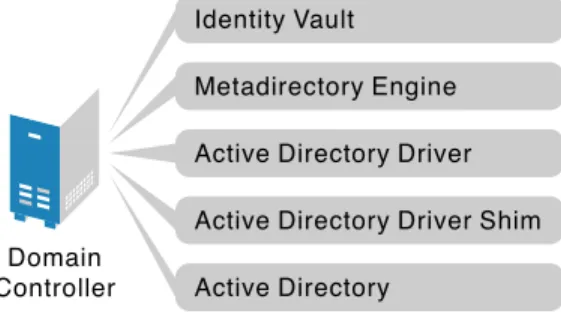
A single Windows domain controller can host the Identity Vault, the Identity Manager engine, and the driver.
Figure 2-1 All Components on the Domain Controller
This configuration works well for organizations that want to save on hardware costs. It is also the highest-performance configuration because there is no network traffic between Identity Manager and Active Directory.
However, hosting Identity Vault and the Identity Manager engine on the domain controller increases the overall load on the controller and increases the risk that the controller might fail. Because domain controllers play a critical role in Microsoft networking, many organizations are more concerned about the speed of the domain authentication and the risks associated with a failure on the domain controller than about the cost of additional hardware.
2.2.2
Remote Installation on Windows Server Only
You can install the Identity Vault, the Identity Manager engine, and the driver on a separate computer from the Active Directory domain controller. This configuration leaves the domain controller free of any Identity Manager software.
Domain Controller
Metadirectory Engine Identity Vault
Active Directory Driver
Active Directory
Preparing Active Directory 23
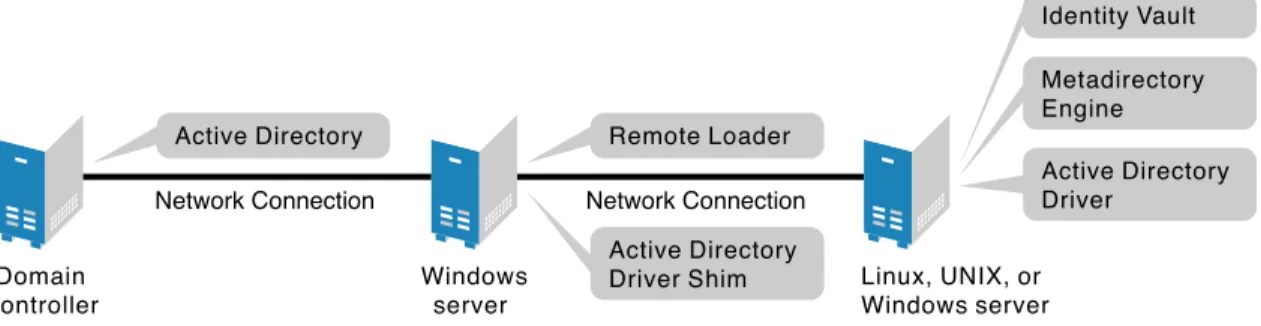
Figure 2-2 All Components on a Windows Server
This configuration is attractive if corporate policy disallows running the driver on your domain controller.
2.2.3
Remote Installation on Windows and Other Platforms
You can install the Remote Loader and driver shim on the Active Directory domain controller, but install the Identity Vault and the Identity Manager engine on a separate server.
Figure 2-3 Remote Loader and Driver on the Domain Controller
This configuration is attractive if your Identity Vault and Identity Manager engine installations are on a platform other than one of the supported versions of Windows.
Both types of remote installations eliminate the performance impact of hosting the Identity Vault and the Identity Manager engine on the domain controller.
2.2.4
Remote Installation on a Windows Member Server
If you have platform requirements and domain controller restrictions in place, you can use a three-server configuration.
Figure 2-4 Remote Loader and Driver on a Windows Server
This configuration is more complicated to set up, but it accommodates the constraints of some organizations. In this figure, the two Windows servers are member servers of the domain.
Domain Controller Network Connection Windows server Active Directory Identity Vault
Active Directory Driver Shim Active Directory Driver Metadirectory Engine
Domain Controller
Network Connection
Linux, UNIX, or Windows server
Metadirectory Engine Identity Vault
Active Directory Driver Remote Loader
Active Directory Active Directory Driver Shim
Domain Controller Active Directory Network Connection Windows server Remote Loader Active Directory Driver Shim Network Connection
Linux, UNIX, or Windows server Identity Vault Metadirectory Engine Active Directory Driver
2.3
Addressing Security Issues
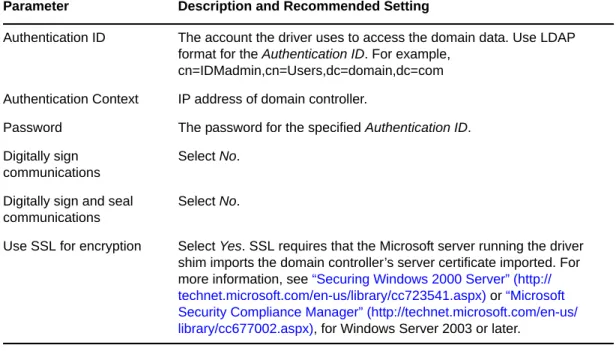
The major security issues to consider are authentication, encryption, and use of the Remote Loader. You might want to consider a security option called signing. See “Digitally sign communications” on page 68.
A simple prescription for managing security is not possible because the security profile available from Windows varies with the service pack, DNS server infrastructure, domain policy, and local policy settings on the server. The following sections explain your security choices and provide suggested configurations. When you implement your driver and when you upgrade components, pay close attention to security.
Section 2.3.1, “Authentication Methods,” on page 24
Section 2.3.2, “Encryption Using SSL,” on page 24
2.3.1
Authentication Methods
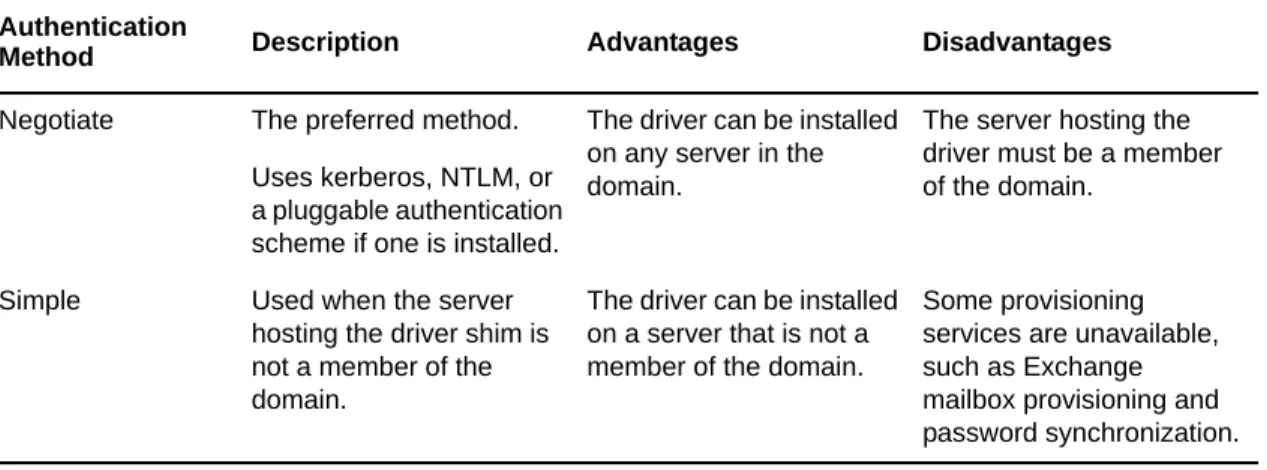
Authentication identifies the driver shim to Active Directory and, potentially, the local machine. To authenticate to Active Directory, you can use either the Negotiate method or the Simple (simple bind) method.
Table 2-1 Authentication Methods
NOTE: Active Directory driver uses Negotiate as the default authentication method. When the Active Directory driver’s basic configuration file is imported to create a new driver, the
authentication method is set to Negotiate by default. If you want to use Simple authentication, change the authentication setting on the driver’s property page after the driver is created.
2.3.2
Encryption Using SSL
SSL encrypts data. Depending on your configuration, SSL can be used in two places:
Between the Active Directory driver and the domain controller
Between the Identity Vault and the Remote Loader running the Active Directory driver
Password synchronization occurs between Active Directory and the Identity Vault. You need to make sure that you use SSL with any communication that goes across the network.
Authentication
Method Description Advantages Disadvantages
Negotiate The preferred method. Uses kerberos, NTLM, or a pluggable authentication scheme if one is installed.
The driver can be installed on any server in the domain.
The server hosting the driver must be a member of the domain.
Simple Used when the server hosting the driver shim is not a member of the domain.
The driver can be installed on a server that is not a member of the domain.
Some provisioning services are unavailable, such as Exchange mailbox provisioning and password synchronization.
Preparing Active Directory 25
If the Identity Manager engine, Identity Vault, the Active Directory driver, and Active Directory are on the same machine, you don’t need SSL. Communication isn’t going across the network.
However, if you are accessing Active Directory remotely by using an Active Directory driver shim on a member server, you need to set up SSL between the Active Directory driver shim and Active Directory. You do this by setting the SSL parameter to Yes on the driver configuration. See Step 5, in
“SSL Connection between the Active Directory Driver and the Domain Controller” on page 25. If you are using the Remote Loader on the domain controller, you can set up SSL between the Identity Manager engine and the Remote Loader. For additional information on SSL and Remote Loaders, see “Creating a Secure Connection” in the Identity Manager 4.0.2 Remote Loader Guide.
The following table outlines where SSL connections can be used for each of the scenarios discussed in
Section 2.2, “Where to Install the Active Directory Driver,” on page 22:
Table 2-2 SSL Connections
SSL Connection between the Active Directory Driver and the Domain Controller
To make SSL connections to an Active Directory domain controller, you must be set up to use SSL. This involves setting up a CA, then creating, exporting, and importing the necessary certificates. This is only needed if the Remote Loader is not running on a domain controller.
“Setting Up a Certificate Authority” on page 26
“Creating, Exporting, and Importing Certificates” on page 26
“Verifying the Certificate” on page 27
Configuration SSL Connections Available Single-Server No SSL connections are necessary. Two-Server: Identity Manager and the
Active Directory driver are on the same server
An SSL connection can be established between the Active Directory driver and the domain controller. See “SSL Connection between the Active Directory Driver and the Domain Controller” on page 25.
Dual-Server: Identity Manager is on one server but the Active Directory driver is on a separate server
An SSL connection can be established between Identity Manager and the Remote Loader running the Active Directory driver. See “SSL Connection Between the Remote Loader and Identity Manager” on page 27.
Three-Server An SSL connection can be established between the Active Directory driver and the domain controller. See “SSL Connection between the Active Directory Driver and the Domain Controller” on page 25.
An SSL connection can also be established between Identity Manager and the Remote Loader running the Active Directory driver. See “SSL Connection Between the Remote Loader and Identity Manager” on page 27.
Setting Up a Certificate Authority
Most organizations already have a CA. If this is the case for your organization, you need to export a valid certificate, then import it to the certificate store on your domain controller. The server hosting the driver shim must trust the root CA that the issuing CA of this certificate chains to.
If you do not have a CA in your organization, you must establish one. Novell, Microsoft, and several other third parties provide the tools necessary to do this. Establishing a CA is beyond the scope of this guide. For more information about the Novell solution, see the Novell Certificate Server 3.3 Administration Guide (http://www.novell.com/documentation/lg/crt33/index.html).
Creating, Exporting, and Importing Certificates
After you have a CA, the LDAP server must have the appropriate server authentication certificate installed for LDAP SSL to operate successfully. Also, the server hosting the driver shim must trust the authority that issued those certificates. Both the server and the client must support 128-bit
encryption.
1 Generate a certificate that meets the following Active Directory LDAP service requirements:
The LDAPS certificate is located in the local computer’s personal certificate store (programmatically known as the computer’s MY certificate store).
A private key matching the certificate is present in the local computer’s store and is correctly associated with the certificate.
The private key must not have strong private-key protection enabled.
The Enhanced Key Usage extension includes the Server Authentication (1.3.6.1.5.5.7.3.1) object identifier (also known as the OID).
The Active Directory fully qualified domain name (for example, DC01.DOMAIN.COM) of the domain controller appears in one of the following places:
The Common Name (CN) in the Subject field
The DNS entry in the Subject Alternative Name extension
The certificate was issued by a CA that the domain controller and the LDAPS clients trust. Trust is established by configuring the clients and the server to trust the root CA that the issuing CA chains to.
This certificate permits the LDAP service on the domain controller to listen for and automatically accept SSL connections for both LDAP and global catalog traffic.
NOTE: This information appears in the Microsoft Knowledge Base Article 321051, “How to enable LDAP over SSL with a third-party certification authority” (http://support.microsoft.com/ kb/321051). Consult this document for the latest requirements and additional information.
2 Export this certificate in one of the following standard certificate file formats:
Personal Information Exchange (PFX, also called PKCS #12)
Cryptographic Message Syntax Standard (PKCS #7)
Distinguished Encoding Rules (DER) Encoded Binary X.509
Base64 Encoded X.509
3 Install this certificate on the domain controller.
4 Ensure that a trust relationship is established between the server hosting the driver shim and the root CA that issued the certificate.
Preparing Active Directory 27
For more information on establishing trust for certificates, see “Policies to establish trust of root certification authorities” (http://technet.microsoft.com/en-us/library/cc775613(v=ws.10).aspx), in the Microsoft TechNet Library (http://technet.microsoft.com/library/bb625087.aspx).
5 In iManager, edit the driver properties and change the Use SSL (yes/no) option to yes.
6 Restart the driver.
When the driver restarts, an SSL connection is negotiated between the domain controller and the server running the Active Directory driver shim.
Verifying the Certificate
To verify the certificate, authenticate to Active Directory via SSL. Use the ldifde command line utility found on Windows servers. To use the ldifde command:
1 Open a command line prompt.
2 Enter ldifde -f output/input file -t 636 -b administrator domain password -s computerFullName
For example, you would use the following command if your server is configured for port 636.
ldifde -f out.txt -t 636 -b administrator dxad.netiq.com netiq -s parent1.dxad3.lab.netiq
The output is sent to the out.txt file. If you open the file and see the objects in Active Directory listed, you made a successful SSL connection to Active Directory and the certificate is valid.
SSL Connection Between the Remote Loader and Identity Manager
If you are using the Remote Loader, you need to set up SSL between the Identity Manager engine and the Remote Loader, and configure the settings between the driver and Active Directory.
For information on establishing an SSL connection between the Remote Loader and Identity Manager, see “Creating a Secure Connection” in the Identity Manager 4.0.2 Remote Loader Guide.
IMPORTANT: When the Remote Loader is running on a Windows 2003 SP2 32-bit server, the certificate must be in Base64 format. If you use the DER format, the Remote Loader fails to connect to the Identity Manager engine.
2.4
Creating an Administrative Account
In a test environment, use the Administrator account until you get the Active Directory driver working. Then create an administrative account that has the proper rights (including restricted rights) for the Active Directory driver to use exclusively to authenticate to Active Directory. Doing this keeps the Identity Manager administrative account insulated from changes to other administrative accounts. Advantages to this design are:
You can use Active Directory auditing to track the activity of the Active Directory driver.
You can implement a password change policy as with other accounts, then make necessary updates to the driver configuration.
This account name and password are stored in the driver configuration. Therefore, you must change this password whenever the account password changes. If you change the account password without updating the driver configuration, authentication fails the next time the driver is restarted.
At a minimum, this account must be a member of the Administrators group and have Read and Replicating Directory Changes rights at the root of the domain for the Publisher channel to operate. You also need Write rights to any object modified by the Subscriber channel. Write rights can be restricted to the containers and attributes that are written by the Subscriber channel.
To provision Exchange mailboxes, your Identity Manager account must have “Act as part of the Operating System” permission for the logon account.
2.5
Configuring System Permissions
In order to retrieve a user’s password on the Publisher channel, the driver requires system permissions in addition to Active Directory permissions.
Identity Manager also configures specific permissions for its own internal components. On domain controllers, the PWFilter component runs using SYSTEM privileges, so the local system account should have full permissions to the HKEY_LOCAL_MACHINE\SOFTWARE\Novell\PwFilter\Data
registry key, as well as any sub-keys.
The driver shim runs using SYSTEM privileges by default, so the system account should also have full permissions to the HKEY_LOCAL_MACHINE\SOFTWARE\Novell\PassSync\Data registry key, as well as any sub-keys. If the driver is run using any other account, that account should be given full
permissions to the HKEY_LOCAL_MACHINE\SOFTWARE\Novell\PwFilter\Data registry key, as well as any sub-keys. The account should also be a member of the Administrators group.
NOTE: The driver automatically provides default permissions to both PWFilter and the driver shim. Modifying these permissions can affect the functionality of the driver and should be performed with caution.
2.6
Becoming Familiar with Driver Features
This section discusses driver features you should become familiar with before deploying the Active Directory driver.
Section 2.6.1, “Multivalue Attributes,” on page 29
Preparing Active Directory 29
Section 2.6.4, “Expiring Accounts in Active Directory,” on page 30
Section 2.6.5, “Retaining eDirectory Objects When You Restore Active Directory Objects,” on page 31
2.6.1
Multivalue Attributes
The way the Active Directory driver handles multivalue attributes has changed from version 2. Version 2 treated multivalue attributes as single-valued on the Subscriber channel by ignoring all but the first change value in an Add or Modify operation. Version 3 and later of the Active Directory driver fully supports multivalue attributes.
However, when the Active Directory driver synchronizes a multivalue attribute with a single-value attribute, the multivalue attribute is treated as single-valued. For example, the Telephone Number attribute is single-valued in Active Directory, and multivalued in the Identity Vault. When this attribute is synchronized from Active Directory, only a single value is stored in the Identity Vault. This creates true synchronization and mapping between the two attributes, but can result in a potential loss of data if you have multiple values in an attribute that is mapped to an attribute with a single value. In most cases, a policy can be implemented to preserve the extra values in another location if this is required in your environment.
2.6.2
Using Custom Boolean Attributes to Manage Account Settings
The Active Directory attribute userAccountControl is an integer whose bits control logon account properties, such as whether logon is allowed, passwords are required, or the account is locked. Synchronizing the Boolean properties individually is difficult because each property is embedded in the integer value.
In version 2, the Active Directory driver took a shortcut that let you map userAccountControl to the eDirectory Login Disabled attribute, but didn’t let you map the other property bits within the attribute.
In version 3 and later, each bit within the userAccountControl attribute can be referenced
individually as a Boolean value, or userAccountControl can be managed in-total as an integer. The driver recognizes a Boolean alias to each bit within userAccountControl. These alias values are included in the schema for any class that includes userAccountControl. The alias values are accepted on the Subscriber channel and are presented on the Publisher channel.
The advantage of this is that each bit can be used as a Boolean, so the bit can be enabled individually in the Publisher filter and accessed easily. You can also put userAccountControl into the Publisher filter to receive change notification as an integer.
The integer and alias versions of userAccountControl should not be mixed in a single configuration. The following table lists available aliases and hexadecimal values. Read-only attributes cannot be set on the Subscriber channel.
Table 2-3 Aliases and Hexadecimal Values
Alias Hexadecimal Notes
dirxml-uACAccountDisable 0x0002 Read-write
For troubleshooting tips relating to the userAccountControl attribute, see Section 10.9, “The Active Directory Account Is Disabled after a User Add on the Subscriber Channel,” on page 78.
2.6.3
Provisioning Exchange Mailboxes
The Active Directory driver can be configured to provision Exchange accounts as well as Active Directory accounts. The Active Directory driver can provision Exchange Server 2003, Exchange Server 2007, Exchange Server 2010, and Exchange Server 2013 accounts. For information on configuring the driver to provision the Exchange mailboxes, see Appendix C, “Provisioning Exchange Accounts,” on page 107.
2.6.4
Expiring Accounts in Active Directory
If you map the eDirectory attribute of Login Expiration Time to the Active Directory attribute of accountExpires, an account in Active Directory expires a day earlier than the time set in eDirectory. This happens because Active Directory sets the value of the accountExpires attribute in full-day increments. The eDirectory attribute of Login Expiration Time uses a specific day and time to expire the account.
For example, if you set an account in eDirectory, to expire on July 15, 2007, at 5:00 p.m., the last full day this account is valid in Active Directory is July 14.
If you use the Microsoft Management Console to set the account to expire on July 15, 2007, the eDirectory attribute of Login Expiration Time is set to expire on July 16, 2007 at 12:00 a.m. Because the Microsoft Management Console doesn’t allow for a value of time to be set, the default is 12:00 a.m.
The driver uses the most restrictive settings. You can add an additional day to the expiration time in Microsoft depending upon what your requirements are.
dirxml-uACEncryptedTextPasswordAllowed 0x0080 Read-write dirxml-uACHomedirRequired 0x0008 Read-write dirxml-uACInterdomainTrustAccount 0x0800 Read-only
dirxml-uACNormalAccount 0x0200 Read-only
dirxml-uACPasswordCantChange 0x0040 Read-only dirxml-uACScript 0x0001 Read-write dirxml-uACPasswordNotRequired 0x0020 Read-write dirxml-uACServerTrustAccount 0x2000 Read-only dirxml-uACWorkstationTrustAccount 0x1000 Read-only
Preparing Active Directory 31
2.6.5
Retaining eDirectory Objects When You Restore Active Directory
Objects
Any Active Directory objects that are restored through the Active Directory tools delete the
associated eDirectory object when the objects are synchronized. The Active Directory driver looks for a change in the isDeleted attribute on the Active Directory object. When the driver detects a change in this attribute, a Delete event is issued through the driver for the object associated with the Active Directory object.
If you don’t want eDirectory objects deleted, you must add an additional policy to the Active Directory driver. Identity Manager 3.6.1 and later comes with a predefined rule that changes all Delete events into Remove Association events. For more information, see “Command Transformation - Publisher Delete to Disable ” in the Policies in Designer 4.0.2 guide.
3
Installing the Driver Files 33
3
Installing the Driver Files
There are several locations where you can install the driver files, as discussed in Section 2.2, “Where to Install the Active Directory Driver,” on page 22.
By default, the Active Directory driver files are installed on the Identity Manager server at the same time as the Identity Manager engine. The installation program extends the Identity Vault’s schema and installs the driver shim, the driver configuration file, and a utility to help with the configuration of the driver. It does not create the driver in the Identity Vault (see Chapter 4, “Creating a New Driver,” on page 35) or upgrade an existing driver’s configuration (see Chapter 5, “Upgrading an Existing Driver,” on page 47).
The following sections explain what to do if the Active Directory driver files are not on the server you want and how to install the Active Directory Discovery tool (used to gather configuration
information) on the appropriate Active Directory server:
Section 3.1, “Installing the Driver Files,” on page 33
Section 3.2, “Installing the Active Directory Discovery Tool,” on page 33
3.1
Installing the Driver Files
If you performed a custom installation and did not install the Active Directory driver on the Identity Manager server, you have two options:
Install the files on the Identity Manager server, using the instructions in “Installing the Metadirectory Server” in the Identity Manager 4.0.2 Framework Installation Guide.
Install the Remote Loader (required to run the driver on a non-Identity Manager server) and the driver files on a non-Identity Manager server where you want to run the driver. This is the method you should use if you do not want to install eDirectory and Identity Manager on the server that has Active Directory installed on it. See “Installing the Remote Loader” in the Identity Manager 4.0.2 Framework Installation Guide.
If you decide to use the Remote Loader and install it on a member server, you must configure the driver to use an SSL connection between the Remote Loader and the Identity Manager server. For more information on how to set up an SSL connection, see “Creating a Secure Connection” in the Identity Manager 4.0.2 Remote Loader Guide.
3.2
Installing the Active Directory Discovery Tool
The Active Directory Discovery tool helps gather information required to configure the driver. To install the Active Directory Discovery tool:
1 On the workstation that you use to configure Active Directory, launch the Identity Manager installation.
3 In the Welcome dialog box, click Next, accept the license agreement, then click Next to display the Select Components page.
4 Select both the Utilities option and the Customize the selected components options, clearing all other components, then click Next.
5 Deselect all components except for Active Directory Discovery Tool, then click Next.
6 Specify the installation path (the default is sufficient), then click Next.
7 Review the selected options, then click Install.
4
Creating a New Driver 35
4
Creating a New Driver
After the Active Directory driver files are installed on the server where you want to run the driver (see Chapter 3, “Installing the Driver Files,” on page 33), you can create the driver in the Identity Vault. You do so by installing the driver packages and then modifying the driver configuration to suit your environment. The following sections provide instructions:
Section 4.1, “Gathering Configuration Information,” on page 35
Section 4.2, “Creating the Driver in Designer,” on page 36
Section 4.3, “Activating the Driver,” on page 44
Section 4.4, “Adding Packages to an Existing Driver,” on page 44
Section 4.5, “Viewing Entitlements Onboarding Configuration Objects,” on page 45
4.1
Gathering Configuration Information
The Active Directory Discovery Tool gathers the information needed to configure the Active Directory driver (see Section 3.2, “Installing the Active Directory Discovery Tool,” on page 33 for information about installing the tool). The tool gathers a list of the domain controllers and Microsoft Exchange private message stores available in the domain and optionally creates an account in Active Directory suitable for the driver.
To run the tool:
1 On the workstation where you installed the tool, double-click the following file:
C:\Novell\NDS\DirXMLUtilities\ad_disc\ADManager. This is the default installation location for the file.
2 Click Discover to populate the tool with your domain information. The tool lists the following information:
Domain DN
Domain GUID
Domain Controller name
Proposed driver account name and password
3 If you want to see information for another domain, specify the domain name, a user with sufficient rights to look up domain information, and that user’s password, then click Discover.
4 When finished, click Done.
4.2
Creating the Driver in Designer
You create the Active Directory driver by installing the driver packages and then modifying the configuration to suit your environment. After you create and configure the driver, you need to deploy it to the Identity Vault and start it.
NOTE: Drivers are created with packages, and iManager does not support packages. In order to create drivers with the current version of Identity Manager, you must use Designer.
Section 4.2.1, “Importing the Current Driver Packages,” on page 37
Section 4.2.2, “Installing the Driver Packages,” on page 37