Developer’s Guide
Version 1.8Copyright
Copyright 2005-2009. ICEsoft Technologies, Inc. All rights reserved.
The content in this guide is protected under copyright law even if it is not distributed with software that includes an end user license agreement.
The content of this guide is furnished for informational use only, is subject to change without notice, and should not be construed as a commitment by ICEsoft Technologies, Inc.
ICEsoft Technologies, Inc. assumes no responsibility or liability for any errors or inaccuracies that may appear in the informational content contained in this guide.
ICEfaces is a registered trademark of ICEsoft Technologies, Inc.
Sun, Sun Microsystems, the Sun logo, Solaris and Java are trademarks or registered trademarks of Sun Microsystems, Inc. in the United States and in other countries.
All other trademarks mentioned herein are the property of their respective owners. ICEsoft Technologies, Inc.
Suite 200, 1717 10th Street NW Calgary, Alberta, Canada T2M 4S2
Toll Free: 1-877-263-3822 (USA and Canada) Telephone: 1-403-663-3322
Fax:1-403-663-3320
For additional information, please visit the ICEfaces website: http://www.icefaces.org
ICEfaces Developer’s Guide v1.8 March 2009
About this Guide
The ICEfaces® Developer’s Guide is your manual to developing ICEfaces applications. By reading through this guide, you will:
• Gain a basic understanding of what ICEfaces is and what it can do for you.
• Understand key concepts related to the ICEfaces Rich Web Presentation Environment. • Examine the details of the ICEfaces architecture.
• Access reference information for the following: — ICEfaces system configuration
— JSF Page Markup — Java API reference — JavaScript API reference — Custom Component TLD
• Learn to use advanced ICEfaces development features. For more information about ICEfaces, visit the ICEfaces website at:
http://www.icefaces.org
In this guide...
This guide contains the following chapters organized to assist you with developing ICEfaces applications:
Chapter 1: Introduction to ICEfaces — Provides an overview of ICEfaces describing its key features and capabilities.
Chapter 2: ICEfaces System Architecture — Describes the basic ICEfaces architecture and how it plugs into the standard JSF framework.
Chapter 3: Key Concepts — Explores some of the key concepts and mechanisms that ICEfaces brings to the application developer.
Chapter 4: ICEfaces Reference Information — Provides additional reference information for ICEfaces implementations.
Chapter 5: Advanced Topics — Introduces several ICEfaces advanced topics, such as server-initiated rendering, drag and drop, effects, Portlets, Push Server, Seam integration, Spring
ICEfaces Developer’s Guide v1.8
iv
Appendix A: ICEfaces Library/App. Server Dependencies — Shows the ICEfaces library dependencies.
Appendix B: ICEfaces Configuration Parameter Overview — Contains tables listing all ICEfaces parameters with their respective default values, along with brief notes on the parameter’s usage.
Prerequisites
ICEfaces applications are JavaServer Faces (JSF) applications, and as such, the only prerequisite to working with ICEfaces is that you must be familiar with JSF application development. For more information on Java Platform, Enterprise Edition (JEE), which JSF is a sub-component of, please refer to
http://java.sun.com/javaee/ .
Additional JSF resources can be found on the icefaces.org website.
ICEfaces Documentation
You can find the following additional ICEfaces documentation at the ICEfaces website (http://documentation.icefaces.org):
• ICEfaces Release Notes — Contains information about the new features and bug fixes included in this ICEfaces release. In addition, important time-saving Known Issues and detailed information about supported browsers, application servers, portal containers, and IDEs can also be found in this
document.
• ICEfaces Getting Started Guide — Includes information to help you configure your environment to run sample applications and a tutorial designed to help you get started as quickly as possible using ICEfaces technology.
ICEfaces Technical Support
For more information about ICEfaces, visit the ICEfaces Technical Support page at:
Contents
Copyright . . . ii
About this Guide . . . iii
Chapter 1
Introduction to ICEfaces . . . 1
Chapter 2
ICEfaces System Architecture . . . 3
Chapter 3
Key Concepts. . . 5
Direct-to-DOM Rendering . . . 6
Incremental, In-place Page Updates . . . 8
Synchronous and Asynchronous Updates . . . 9
Connection Management . . . 11
Server-initiated Rendering (Ajax Push) . . . 12
Partial Submit – Intelligent Form Processing . . . 13
Components and Styling . . . 15
Cascading Style Sheets (CSS) Styling . . . 15
Other Custom Components . . . 16
Drag and Drop . . . 17
Effects . . . 18
Browser-Invoked Effects . . . 18
Concurrent DOM Views . . . 19
Integrating ICEfaces With Existing Applications . . . 21
JSP Inclusion . . . 21
JSF Integration . . . 21
Facelets . . . 22
Chapter 4
ICEfaces Reference Information . . . 23
JSP Markup Reference . . . 24
Java API Reference . . . 25
JavaScript API Reference . . . 26
Partial and Full Submit . . . 26
View Removal . . . 27
Contents (continued)
ICEfaces Developer’s Guide v1.8
vi
Configuring faces-config.xml . . . 29
Configuring web.xml . . . 29
Components Reference . . . 34
ICEfaces Component Suite . . . 34
Standard JSF Components . . . 34
Apache MyFaces Tomahawk Components . . . 35
ICEfaces Component Suite . . . 36
Common Attributes . . . 36
Enhanced Standard Components . . . 39
ICEfaces Custom Components . . . 39
Styling the ICEfaces Component Suite . . . 41
ICEfaces Focus Management . . . 43
ICEfaces Library Dependencies . . . 46
ICEfaces Runtime Dependencies . . . 46
ICEfaces Component Runtime Dependencies . . . 46
ICEfaces Facelets Support . . . 47
ICEfaces Compile-time (Build) Dependencies . . . 47
ICEfaces Ant Build Script Support . . . 47
ICEfaces Sample Applications and Tutorials . . . 48
Sun JSF 1.1 RI Runtime . . . 48
Sun JSF 1.2 RI Runtime . . . 48
Apache MyFaces JSF 1.1 Runtime . . . 48
Chapter 5
Advanced Topics . . . 49
Server-initiated Rendering (Ajax Push) APIs . . . 50
PersistentFacesState.render() . . . 50
Rendering Considerations . . . 51
SessionRenderer . . . 52
RenderManager API . . . 53
Rendering Exceptions . . . 53
Server-initiated Rendering Architecture . . . 54
The DisposableBean Interface . . . 61
State Saving . . . 62
JSF Default State Manager . . . 62
Single Copy State Manager . . . 63
Optimizing Server Memory Consumption . . . 64
State Saving . . . 64
DOM Compression . . . 64
String Handling . . . 64
Connection Management . . . 66
Asynchronous Heartbeating . . . 66
Managing Connection Status . . . 67
Managing Redirection . . . 68
Optimizing Asynchronous Communications for Scalability . . . 70
GlassFish . . . 71
Jetty 6 . . . 72
Tomcat 6 and JBoss 4.2 . . . 72
Push Server . . . 74
Single-Point-of-Contact . . . 74
Asynchronous Request Processing . . . 75
Configuration . . . 75
Using ICEfaces in Clustered Environments . . . 77
Developing Portlets with ICEfaces . . . 78
ICEfaces Portlet Configuration . . . 78
Using the Portlet API . . . 80
Portlet Styles . . . 82
Supported Portal Implementations . . . 83
Using Ajax Push in Portlets . . . 84
Development and Deployment Considerations . . . 85
Running the ICEfaces Sample Portlets . . . 89
JBoss Seam Integration . . . 91
Resources . . . 91
Getting Started . . . 92
Bypassing Seam Interceptors . . . 92
Using Server-initiated Rendering . . . 92
Using the File Upload (ice:inputFile) Component . . . 96
Contents (continued)
ICEfaces Developer’s Guide v1.8
viii
Configuring Spring Applications to Work with ICEfaces . 97
Creating Drag and Drop Features . . . 104
Creating a Draggable Panel . . . 104
Adding Drag Events . . . 104
Setting the Event dragValue and dropValue . . . 105
Event Masking . . . 106
Adding and Customizing Effects . . . 107
Creating a Simple Effect . . . 107
Modifying the Effect . . . 107
Appendix A ICEfaces Library/App. Server Dependencies . . . .110
Appendix B ICEfaces Configuration Parameter Overview. . . .114
List of Figures
Figure 1: ICEfaces-enabled JSF Application ... 1
Figure 2: ICEfaces Architecture ... 3
Figure 3: Direct-to-DOM Rendering ... 6
Figure 4: Direct-to-DOM Rendering Via Ajax Bridge ... 7
Figure 5: Incremental Update with Direct-to-DOM Rendering ... 8
Figure 6: Synchronous Updates... 9
Figure 7: Asynchronous Update with Direct-to-DOM Rendering... 10
Figure 8: Server-initiated Rendering Architecture... 12
Figure 9: Partial Submit Based on OnBlur... 13
Figure 10: Drag and Drop Concept ... 17
Figure 11: CSS Directory Structure ... 42
Figure 12: Low-level Server-initiated Rendering... 51
Figure 13: Group Renderers... 55
Figure 14: Connection State Error ... 68
Figure 15: ICEfaces with Push Server ... 74
Figure 16: Servlet Container Library/Application Server Dependencies... 111
Figure 17: J2EE 1.4 Servers Library/Application Server Dependencies ... 112
ICEfaces Developer’s Guide v1.8
1
Chapter 1 Introduction to ICEfaces
ICEfaces® is the industry’s leading open-source, standards-compliant Ajax-based solution for rapidly creating enterprise grade, pure-Java rich web applications.
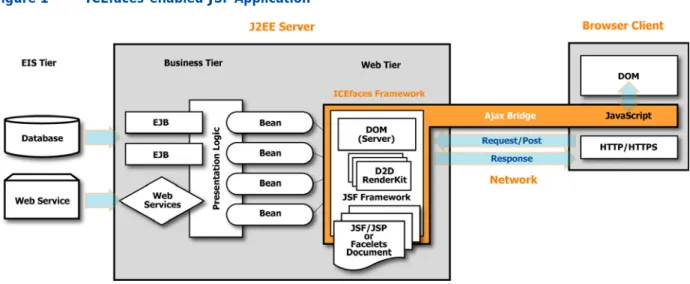
ICEfaces provides a rich web presentation environment for JavaServer Faces (JSF) applications that enhances the standard JSF framework and lifecycle with Ajax-based interactive features. ICEfaces replaces the standard HTML-based JSF renderers with Direct-to-DOM (D2D) renderers, and introduces a lightweight Ajax bridge to deliver presentation changes to the client browser and to communicate user interaction events back to the server-resident JSF application. Additionally, ICEfaces provides an extensive Ajax-enabled component suite that facilitates rapid development of rich interactive
web-based applications. The basic architecture of an ICEfaces-enabled application is shown in Figure 1 below.
Figure 1 ICEfaces-enabled JSF Application
The rich web presentation environment enabled with ICEfaces provides the following features: • Smooth, incremental page updates that do not require a full page refresh to achieve presentation
changes in the application. Only elements of the presentation that have changed are updated during the render phase.
• User context preservation during page update, including scroll position and input focus. Presentation updates do not interfere with the user’s ongoing interaction with the application. These enhanced presentation features of ICEfaces are completely transparent from the application development perspective. Any JSF application that is ICEfaces-enabled will benefit.
Beyond these transparent presentation features, ICEfaces introduces additional rich presentation features that the JSF developer can leverage to further enhance the user experience. Specifically, the developer can incorporate these features:
• Intelligent form processing through a technique called Partial Submit. Partial Submit automatically submits a form for processing based on some user-initiated event, such as tabbing between fields in a form. The automatic submission is partial, in that only partial validation of the form will occur (empty fields are marked as not required). Using this mechanism, the application can react intelligently as the user interacts with the form.
• Server-initiated asynchronous presentation update (Ajax Push). Standard JSF applications can only deliver presentation changes in response to a user-initiated event, typically some type of form submit. ICEfaces introduces a trigger mechanism that allows the server-resident application logic to push presentation changes to the client browser in response to changes in the application state. This enables application developers to design systems that deliver data to the user in a near-real-time asynchronous fashion.
ICEfaces Developer’s Guide v1.8
3
Chapter 2 ICEfaces System
Architecture
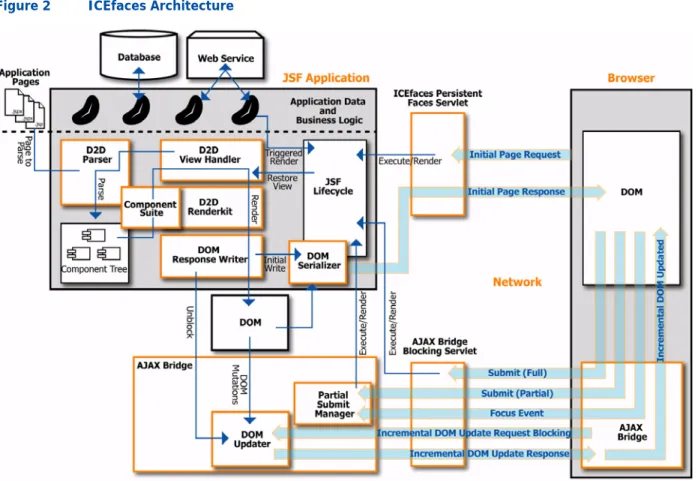
While it is not necessary to understand the ICEfaces architecture to develop ICEfaces applications, it is generally useful for the developer to understand the basic architecture of the system. Of particular relevance is gaining an understanding of how ICEfaces plugs into the standard JSF framework. Figure 2 below illustrates the basic ICEfaces architecture.
Figure 2 ICEfaces Architecture
The major elements of the ICEfaces architecture include:
• Persistent Faces Servlet: URLs with the “.iface” extension are mapped to the Persistent Faces Servlet. When an initial page request into the application is made, the Persistent Faces Servlet is responsible for executing the JSF lifecycle for the associated request.
• Blocking Servlet: Responsible for managing all blocking and non-blocking requests after initial page rendering.
• D2D ViewHandler: Responsible for establishing the Direct-to-DOM rendering environment, including initialization of the DOM Response Writer. The ViewHandler also invokes the Parser for initial page parsing into a JSF component tree.
• D2D Parser: Responsible for assembling a component tree from a JSP Document. The Parser executes the JSP tag processing lifecycle in order to create the tree, but does this once only for each page. The standard JSP compilation and parsing process is not supported under ICEfaces. • D2D RenderKit: Responsible for rendering a component tree into the DOM via the DOM Response
Writer during a standard JSF render pass.
• DOM Response Writer: Responsible for writing into the DOM. Also initiates DOM serialization for first rendering, and unblocks the DOM Updater for incremental DOM updates.
• DOM Serializer: Responsible for serializing the DOM for initial page response.
• DOM Updater: Responsible for assembling DOM mutations into a single incremental DOM update. Updater blocks on incremental DOM update requests until render pass is complete, and DOM Response Writer performs an unblock.
• Component Suite: Provides a comprehensive set of rich JSF components that leverage Ajax features of the bridge and provide the basic building blocks for ICEfaces applications.
• Client-side Ajax Bridge: Responsible for ongoing DOM update request generation and response processing. Also responsible for focus management and submit processing.
ICEfaces Developer’s Guide v1.8
5
Chapter 3 Key Concepts
The JSF application framework provides the foundation for any ICEfaces application. As such, an ICEfaces application page is composed of a JSF component tree that represents the presentation for that page, and the backing beans that contain the application data model and business logic. All standard JSF mechanisms such as validation, conversion, and event processing are available to the ICEfaces application developer, and the standard JSF lifecycle applies. The following sections explore some of the key concepts and mechanisms that ICEfaces brings to the application developer.
Direct-to-DOM Rendering
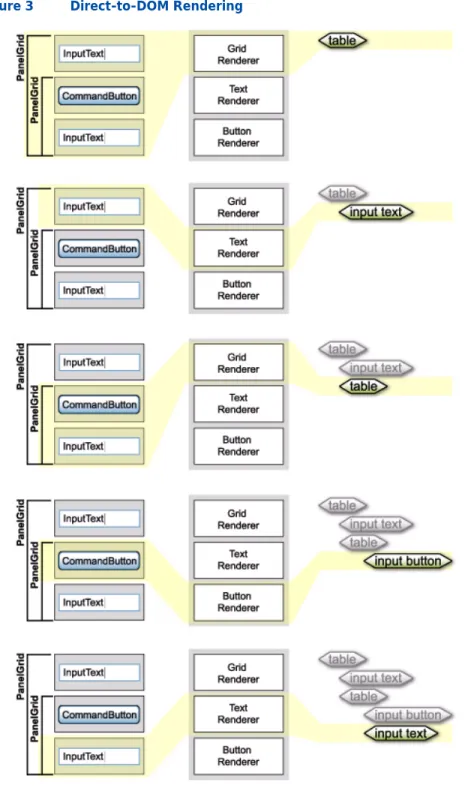
Direct-to-DOM (D2D) rendering is just what it sounds like—the ability to render a JSF component tree directly into a W3C standard DOM data structure. ICEfaces provides a Direct-to-DOM RenderKit for the standard HTML basic components available in JSF. The act of rendering a component tree into a DOM via the ICEfaces Direct-to-DOM RenderKit is illustrated in Figure 3, p. 6.
Key Concepts
ICEfaces Developer’s Guide v1.8
7
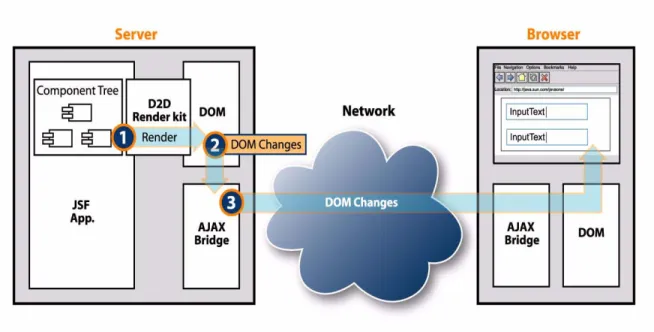
The way this basic Direct-to-DOM mechanism is deployed in an ICEfaces application involves server-side caching of the DOM and an Ajax bridge that transmits DOM changes across the network to the client browser where the changes are reassembled in the browser DOM. This process is illustrated in Figure 4.
Figure 4 Direct-to-DOM Rendering Via Ajax Bridge
When the ICEfaces JAR is included in your JSF application, the Direct-to-DOM RenderKit is automatically configured into the application. There are no other considerations from the developer perspective. Direct-to-DOM rendering is completely transparent in the development process.
Incremental, In-place Page Updates
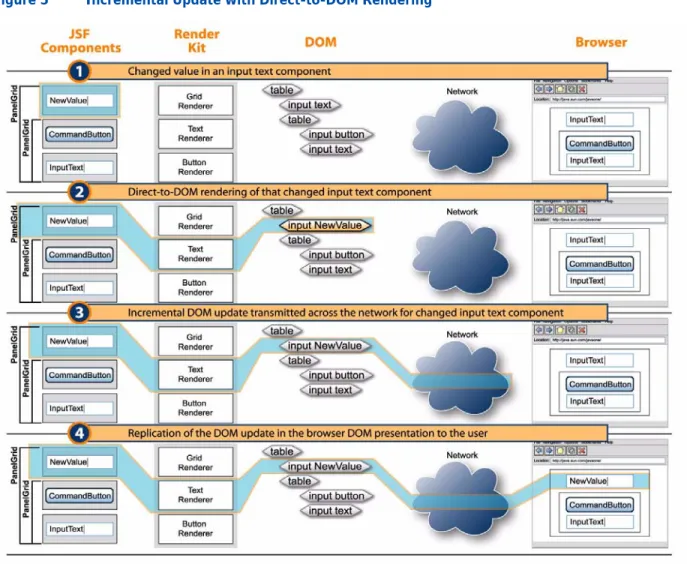
One of the key features of Direct-to-DOM rendering is the ability to perform incremental changes to the DOM that translate into in-place editing of the page and result in smooth, flicker-free page updates without the need for a full page refresh. This basic concept is illustrated in Figure 5, p. 8.
Figure 5 Incremental Update with Direct-to-DOM Rendering
Again, incremental updates are transparent from the development perspective. As the presentation layer changes during a render pass, those changes are seamlessly realized in the client browser. Armed with incremental Direct-to-DOM rendering, you can begin to imagine a more dynamic
presentation environment for the user. You no longer have to design pages around the full page refresh model. Instead, you can consider fine-grained manipulation of the page to achieve rich effects in the application. For example, selective content presentation, based on application state, becomes easy to implement. Components can simply include value bindings on their isRendered attribute to
programmatically control what elements of the presentation are rendered for any given application state. ICEfaces incremental Direct-to-DOM update will ensure smooth transition within the presentation
Key Concepts
ICEfaces Developer’s Guide v1.8
9
Synchronous and Asynchronous Updates
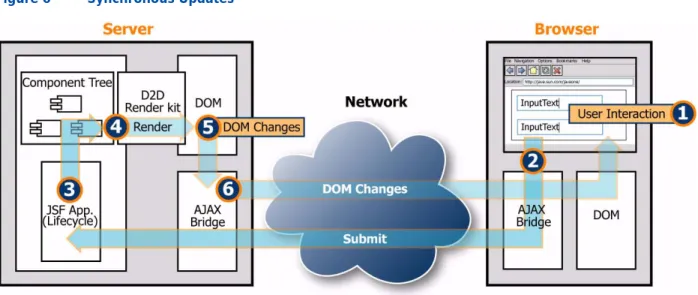
Normally, JSF applications update the presentation as part of the standard request/response cycle. From the perspective of the server-resident application, we refer to this as a synchronous update. The update is initiated from the client and is handled synchronously at the server while the presentation is updated in the response. A synchronous update for ICEfaces is illustrated in Figure 6, p. 9.
Figure 6 Synchronous Updates
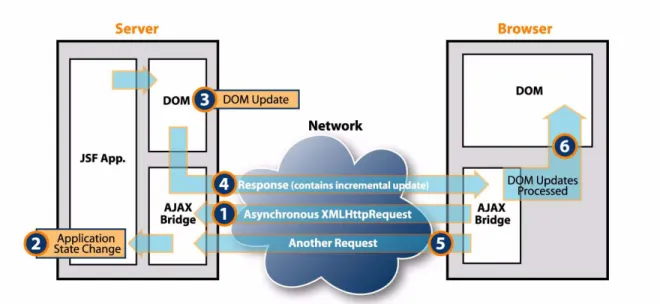
One serious deficiency with synchronous updates is that the application requires a client-generated request before it can affect presentation layer changes. If an application state change occurs during a period of client inactivity, there is no means to present changing information to the user. ICEfaces overcomes this deficiency with an asynchronous update mode that facilitates driving asynchronous presentation changes to the client, based on server-side application state changes. The ICEfaces application developer is not restricted to the standard request/response cycle of a normal JSF application. Again, the Ajax bridge facilitates ongoing asynchronous updates through the use of asynchronous XMLHttpRequests that are fulfilled when DOM updates become available due to a render pass. Because the process leverages incremental Direct-to-DOM updates for asynchronous presentation changes, you can expect these changes to occur in a smooth, flicker-free manner. Figure 7, p. 10 illustrates this process.
The primary consideration from the developer’s perspective is to identify and implement the triggers that cause the presentation updates to happen. Trigger mechanisms are entirely under developer control and can include standard JSF mechanisms like ValueChangeEvents, or any other outside stimulus.
Because it is important to manage the asynchronous rendering process in a scalable and performant manner, ICEfaces provides a Server-initiated Rendering API and implementation. See Server-initiated Rendering (Ajax Push), p. 12 for additional discussion.
Figure 7 Asynchronous Update with Direct-to-DOM Rendering
Asynchronous mode is the default for ICEfaces, but in cases where asynchronous updates are not required, ICEfaces can be configured to support synchronous mode only. Running in synchronous mode reduces the connection resource requirements for an application deployment. See Asynchronous vs. Synchronous Updates, p. 30 to specify the mode of operation.
When ICEfaces is running in asynchronous mode, it is possible for an outstanding request to remain open for an extended period of time. Depending on the deployment environment, it is possible for a long-lived connection to be lost, resulting in the loss of asynchronous updates. ICEfaces provides connection management facilities that allow the application to react to connection-related errors. See
Key Concepts
ICEfaces Developer’s Guide v1.8
11
Connection Management
Client/server connectivity is a key requirement for ICEfaces applications to function. For this reason, ICEfaces provides connection heartbeating and status monitoring facilities in the client-side Ajax bridge, and a Connection Status component to convey connection status information to the user interface. Additionally, ICEfaces provides the ability to automatically redirect to an error page when the connection is lost. See Connection Management, p. 66 for details on configuring connection management, and
ICEfaces Custom Components, p. 39 for additional information on the Connection Status component.
Server-initiated Rendering (Ajax Push)
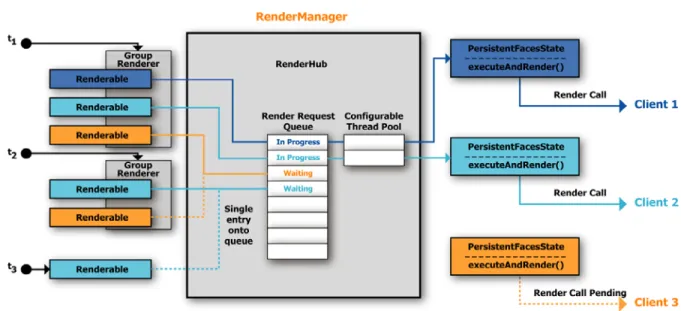
Asynchronous update mode in ICEfaces supports server-initiated presentation updates driven from application logic called Ajax Push. In ICEfaces, this is achieved by causing the JSF lifecycle render phase to execute in reaction to some state change within the application. The PersistentFacesState provides this API, and facilitates low-level server-initiated rendering on a per-client basis. While this low-level rendering mechanism looks simple to use, there are a number of potential pitfalls associated with it related to concurrency/deadlock, performance, and scalability. In order to overcome these potential pitfalls, ICEfaces provides a high-performance, scalable Server-initiated Rendering API, and strongly discourages the use of the low-level render call.
The server-initiated rendering architecture is illustrated in Figure 8.
Figure 8 Server-initiated Rendering Architecture
The key elements of the architecture are:
For detailed information, see Server-initiated Rendering (Ajax Push) APIs, p. 50.
Renderable A request-scoped bean that implements the Renderable interface and associates the bean with a specific PersistentFacesState. Typically, there will be a single Renderable per client.
RenderManager An application-scoped bean that manages all rendering requests through the RenderHub and a set of named GroupAsyncRenderers.
GroupAsyncRenderer Supports rendering of a group of Renderables. GroupAsyncRenderers can support on-demand, interval, and delayed rendering of a group.
Key Concepts
ICEfaces Developer’s Guide v1.8
13
Partial Submit – Intelligent Form Processing
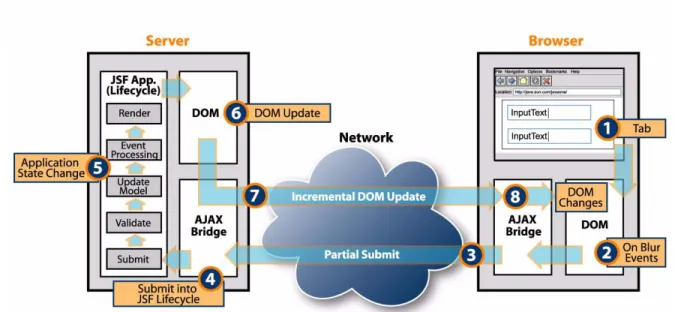
ICEfaces introduces a fine-grained user interaction model for intelligent form processing within an ICEfaces application. In JSF, the normal submit mechanism initiates the JSF application lifecycle, and as such, capabilities like client-side validation are not supported. Partial submit overcomes these limitations by tying the JavaScript event mechanism back into the JSF application lifecycle via an automatic submit. This automatic submit is partial in the sense that only partial validation of the form will occur.
The Ajax bridge does intelligent focus monitoring to identify the control associated with the partial submit, and turns off the required property for all other controls in the form. From here, a normal JSF lifecycle is performed, after which the required properties are restored to their previous state. The net effect of a partial submit is that the full validation process executes, but empty fields in the form are not flagged as invalid. Figure 9 illustrates partial submit based on an onBlur JavaScript event that occurs as the user tabs between controls in a form.
The client-side Ajax bridge provides a convenience function for tying JavaScript events to the partial submit mechanism. The API details can be found inJavaScript API Reference, p. 26, but the mechanism relies on only a small snippet of JavaScript being defined in the specific JavaScript attribute for the JSF component instance that is intended to cause the partial submit.
The granularity at which partial submits occur is entirely under developer control. In certain cases, it may be appropriate to evaluate and react to user input on a per-keystroke-basis, and in other cases, it may be appropriate as focus moves between controls. In still other cases, only specific controls in the form would initiate a partial submit.
Figure 9 Partial Submit Based on OnBlur
The backing application logic associated with a partial submit is also entirely under developer control. The standard JSF validator mechanism can be leveraged, or any other arbitrarily complex or simple evaluation logic can be applied. If standard JSF validators are used, it is important to design these validators to facilitate partial submits.
The Address Form demo from the ICEfaces samples illustrates a couple of different mechanisms that can be leveraged under a partial submit. Standard validators are attached to City, State, and ZIP input fields to catch invalid entries, but inter-field evaluation on the {City:State:ZIP}-tuple is also performed. Using valueChangedEvents associated with these input controls, it is possible to do inter-field analysis and morph the form based on current input. For example, entering a valid City will cause the State input control to change from an input text control to a select-one-of-many controls containing only the States that have a matching City.
Key Concepts
ICEfaces Developer’s Guide v1.8
15
Components and Styling
JSF is a component-based architecture, and as such, JSF application User Interfaces are constructed from a set of nested components. The JSF specification includes a number of standard components, but also provides for adding custom components to the JSF runtime environment. This extensible component architecture is leveraged in ICEfaces to support the standard components as well as several collections of custom components.
From the developer’s perspective, a component is represented with a tag in a JSF page, and the tag library descriptor (TLD) for that tag defines a component class, and a renderer class for the component. At runtime, TLDs configured into the web application are parsed, and assembled into a RenderKit, the default for JSF being the html_basic RenderKit. ICEfaces utilizes the html_basic RenderKit but replaces standard HTML renderers with Direct-to-DOM renderers.
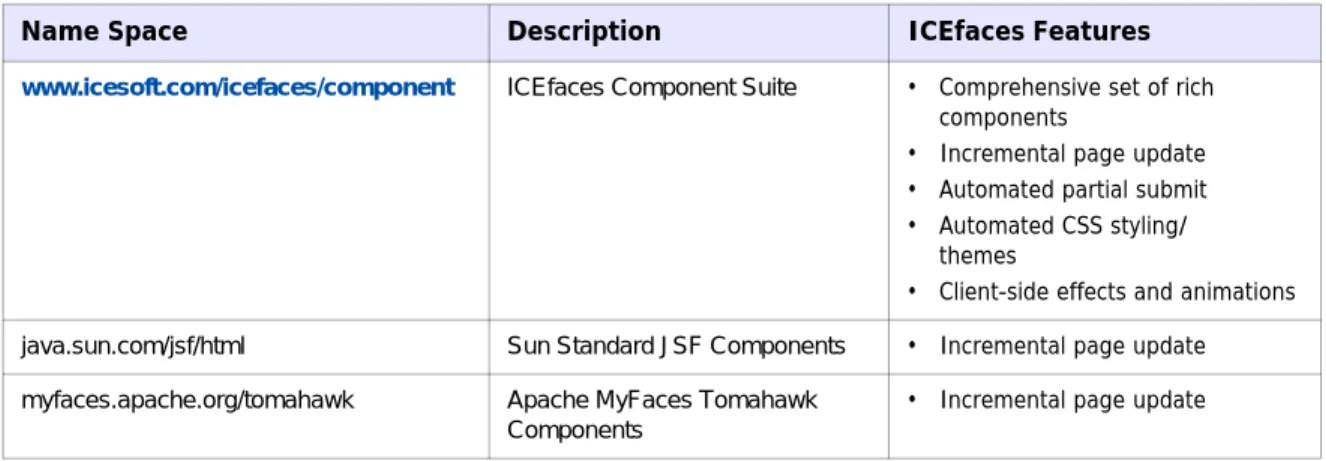
Table 1 identifies the component libraries (name spaces) that ICEfaces supports.
Table 1 ICEfaces-supported Component Libraries.
See Components Reference, p. 34 for more information on using the component libraries with ICEfaces.
Cascading Style Sheets (CSS) Styling
The purpose of Cascading Style Sheets (CSS) is to separate style from markup. ICEfaces encourages and supports this approach in the ICEfaces Component Suite by supporting automated component styling based on common CSS class definitions. This means that when the ICEfaces Component Suite is used to develop applications, those applications can be quickly and consistently re-skinned with a different look by replacing the CSS with a new CSS. More information about styling the ICEfaces Component Suite can be found in Styling the ICEfaces Component Suite, p. 41.
Name Space Description ICEfaces Features
www.icesoft.com/icefaces/component ICEfaces Component Suite • Comprehensive set of rich
components
• Incremental page update • Automated partial submit • Automated CSS styling/
themes
• Client-side effects and animations
java.sun.com/jsf/html Sun Standard JSF Components • Incremental page update myfaces.apache.org/tomahawk Apache MyFaces Tomahawk
Components
Other Custom Components
ICEfaces adheres to the extensible component architecture of JSF, and therefore supports inclusion of other custom components. Most existing custom components that use HTML-based renderers should integrate seamlessly into an ICEfaces application. However, if the component renderer incorporates significant JavaScript in its implementation or relies on Ajax techniques itself for its functionality, the likelihood of a conflict between the component JavaScript and the ICEfaces Bridge JavaScript is high, and can result in unpredictable behavior.
The most effective way to incorporate a new component into an ICEfaces application is to develop a standard JSF custom component that uses the ResponseWriter mechanism to render HTML markup. For an example of such a component, refer to the ice:inputText component renderer implementation, which can be found in the following file in the ICEfaces source distribution bundle:
Key Concepts
ICEfaces Developer’s Guide v1.8
17
Drag and Drop
ICEfaces includes support for dragging and dropping components using the script.aculo.us library. Any ice:panelGroup instance can be set to be draggable or a drop target.
For example, to make a panelGroup draggable, set the draggable attribute to true. <ice:panelGroup draggable="true">
The panel group (and all of its child components) can now be dragged around the screen. Any panelGroup can be set to a drop target as well by setting the dropTarget attribute to true. <ice:panelGroup dropTarget="true">
When a draggable panel is moved over or dropped on the drop target panel, events can be fired to the backing beans. These events include Drag Start, Drag Cancel, Hover Start, Hover End, and Dropped.
Figure 10 Drag and Drop Concept
Draggable panels can optionally have animation effects that modify their behavior and appearance panels. Table 2 lists these optional effects and their behavior.
Table 2 Drag and Drop Effects
See Creating Drag and Drop Features, p. 104 for details on how to build drag and drop applications.
Effect Behavior
revert When a panel is dropped, it moves back to its starting position.
ghosting A ghost copy of the drag panel remains at its original location during dragging.
Effects
ICEfaces uses the script.aculo.us library to provide animation effects. Effects can be easily invoked on components using the effect attribute. The value of the effect attribute is a value binding expression to a backing bean which returns the effect to invoke.
<ice:outputText effect="#{bean.messageEffect}"/>
Effects can be customized by modifying the properties of the effect object being used. For example, the effect duration could be changed. For more information, refer to Adding and Customizing Effects, p. 107.
Browser-Invoked Effects
Effects can also be tied to browser events, such as onmouseover.
<ice:outputText onmouseovereffect="#{bean.mouseOverEffect}"/>
These effects will be invoked each time the mouse moves over the outputText component.
See Adding and Customizing Effects, p. 107 for details on how to add effects in your ICEfaces application.
Key Concepts
ICEfaces Developer’s Guide v1.8
19
Concurrent DOM Views
By default, each ICEfaces user can have only one dynamically updated page per web application. In this configuration, a single DOM is maintained for each user session. Reloading an ICEfaces page synchronizes the browser to the server-side DOM. Opening a new browser window into the same application, however, leads to page corruption as DOM updates may be applied unpredictably to either window.
To allow multiple windows for a single application, concurrent DOM views must be enabled. See
Configuring web.xml, p. 29 to configure the web.xml file for concurrent DOM views.
With concurrent DOM views enabled, each browser window is distinctly identified with a view number and DOM updates will be correctly applied to the appropriate window. This introduces some important considerations for the application data model. Managed beans in session scope can now be shared across multiple views simultaneously. This may be the desired scope for some states, but typically, presentation-related state is more appropriately kept in request scope. For example:
<managed-bean>
<managed-bean-name>BoxesCheckedBean</managed-bean-name>
<managed-bean-class>com.mycompany.BoxesCheckedBean</managed-bean-class> <managed-bean-scope>request</managed-bean-scope>
</managed-bean>
Note: The ICEfaces request scope is typically longer lived than the request scope for non-dynamic applications. An ICEfaces request begins with the initial page request and remains active through user interactions with that page (such user interactions would normally each require a new request). One consideration is that new browser windows and page reloads of the same browser window are both regarded as new requests. Therefore, it is important to implement the dynamic aspects of the ICEfaces application so that asynchronous notifications are applied to all active requests and not just the initial one.
For applications that do not make use of Concurrent DOM views and require request scope to last only for the duration of a single user event, “standard request scope” must be enabled. See Configuring web.xml, p. 29 to configure the web.xml file for “standard request scope”.
Table 3 shows a summary of the Managed Bean Scope.
Table 3 Managed Bean Scope
State Managed Bean Scope
none For transient data.
request For typical view-related state, request-scope beans will persist through most user interaction but not through view changes. This is the recommended scope for ICEfaces applications that make use of multiple windows.
session For state that must be shared across views. application For state that must be shared across users.
If concurrent DOM views is configured, and multiple windows are created by the user, ICEfaces uses a single blocking connection to deliver asynchronous updates to all views in the session. This ensures that all views remain current without exceeding the maximum connection limit implemented in the browser. When views are destroyed by the user, it may be necessary to release view-specific resources such as threads or database connections. A listener mechanism has been added to support this.
Key Concepts
ICEfaces Developer’s Guide v1.8
21
Integrating ICEfaces With Existing Applications
JSP Inclusion
ICEfaces can be easily integrated with existing JSP-based applications through the dynamic JSP inclusion mechanism. Once you have developed a standalone page with the desired ICEfaces dynamic content, simply include that page into your existing JSP page with the following statement:
<jsp:include page="/content.iface" />
Note: Navigation (such as hyperlinks) from the embedded ICEfaces content will cause the entire page to be reloaded, but other interaction with the application will be incrementally updated in-place on the page.
Included ICEfaces pages must contain a <body> tag as the current implementation uses this tag as a marker. The contents of the <body> tag is precisely the content that is dynamically inserted into the including page. This restriction will be removed in a future release.
While using dynamic include is a suitable way to embed ICEfaces content into an existing non-ICEfaces JSP page, using dynamic include to embed content within an ICEfaces JSP page is not recommended. To include the content of one ICEfaces JSP in another ICEfaces JSP, the static inclusion syntax should be used: For JSP: <%@ include file="relativeURL" %> For JSPX: <jsp:directive.include file="relativeURL" />
JSF Integration
In most cases, the goal of adding ICEfaces to a JSF application will be to transform the entire application into an Ajax application, but there may be reasons for converting only parts over to ICEfaces. To handle some pages with ICEfaces and other pages with the JSF default mechanism, add the ICEfaces Servlet mappings for the ".iface" extension (as described in Configuration Reference, p. 29 of this
document) but do not remove the “Faces Servlet” mapping or Servlet initialization. Pages served through the default Faces Servlet are to be handled without ICEfaces. Then, to ensure that Direct-to-DOM renderers are applied to ICEfaces pages only, include “just-ice.jar” rather than “icefaces.jar” in your web application libraries. This .jar file contains a version of ICEfaces configured with a ViewHandler that will process only those pages with a “.iface” extension and a RenderKit that will not override the standard JSF components (such as <h:commandLink />) with Direct-to-DOM renderers. In this configuration, ICEfaces pages must contain only standard core JSF tags (“f:” tags) and ICEfaces tags (“ice:” tags).
Facelets
Facelets is an emerging standard and open source implementation, which provides a templating environment for JSF and eliminates the need for JSP processing. ICEfaces has been integrated with Facelets so the ICEfaces developers can take advantage of its capabilities. You can learn more about Facelet development at:
https://facelets.dev.java.net/
Refer to Steps 6 and 7 in Chapter 4, ICEfaces Tutorial: The TimeZone Application, of the
ICEfaces Getting Started Guide for details on how to port an existing ICEfaces application to run with Facelets, and how to leverage Facelet templating to implement ICEfaces applications.
ICEfaces Developer’s Guide v1.8
23
Chapter 4 ICEfaces Reference
Information
This chapter includes additional information for the following: • JSP Markup Reference
• Java API Reference
• JavaScript API Reference
• Configuration Reference
• Components Reference
• ICEfaces Component Suite
JSP Markup Reference
ICEfaces supports the JavaServer Faces JSP Document syntax, but does not process these documents via the standard JSP compilation/execution cycle. Instead, ICEfaces parses input documents directly, and assembles a JSF component tree by executing the given tags. This approach allows precise adherence to the ordering of JSF and XHTML content in the input document, thereby making the JSP Document syntax more suitable to web designers. Since Direct-to-DOM rendering makes use of a server-side DOM containing the output of the current page, it is necessary that the input document be readily represented as a DOM. This requires that the input be well-formed XML, which is the expected case for JSP Documents, but may not be adhered to in certain JSP pages. To handle JSP pages, ICEfaces converts them into JSP documents on the fly, performing a small set of transformations aimed at well-formedness (such as converting “<br>” to “<br/>”), before passing the document to the parser. While parsing documents directly does resolve ordering problems currently present with JSP and JSF, some restrictions are introduced:
• Well-formed XHTML markup is recommended; the conversion process can only repair simple well-formedness errors. In particular, the JSP namespace must be declared (as shown below) in order for a JSP document to parse properly.
xmlns:jsp="http://java/sun.com/JSP/Page"
• JSP directives, JSP expressions and inline Java code are all ignored.
• Custom JSP tags are not supported in general as ICEfaces only executes JSP tags initially to assemble the JSF component tree (JSF tags with complex processing may also not function as expected).
• ICEfaces supports the following JSP inclusion mechanisms:
— <%@ include %> and <jsp:directive.include />: The contents of the given file will be included in the input prior to parsing. This is currently the recommended inclusion mechanism with this ICEfaces release.
— <jsp:include />: The ICEfaces parser initiates a local HTTP request to perform dynamic inclusion. The current session is preserved, but otherwise the inclusion shares no state with the including page. If possible, use static inclusion with the current ICEfaces Release.
• Deprecated XHTML tags may create unexpected results in certain browsers, and should be avoided. Page authors should use style sheets to achieve stylistic and formatting effects rather than using deprecated XHTML presentation elements. In particular, the <font> tag is known to cause issues in certain browsers.
ICEfaces Reference Information
ICEfaces Developer’s Guide v1.8
25
Java API Reference
Refer to the ICEfaces SDK API included with this release. The API can also be found at:
http://documentation.icefaces.org/
Refer to the ICEfaces components API included with this release. The API can also be found at:
http://documentation.icefaces.org/
JavaScript API Reference
This section contains information for the following: • Partial and Full Submit
• View Removal
Partial and Full Submit
The ICEfaces Ajax bridge provides a couple of JavaScript functions that developers may find useful in certain situations. The functions are:
• iceSubmit(form, component, event) • iceSubmitPartial(form, component, event) The parameters for each are:
form: The form that is being submitted.
component: The component that is triggering the submit. event: The event that is being handled by the component.
In most cases, the components provided with ICEfaces render out and use these functions appropriately for the common use cases. For example, if you use the commandButton component, the rendered output from the component binds the iceSubmit function to the button’s onClick() handler. For components that support the partialSubmit attribute, like the commandButton, setting the partialSubmit attribute to true causes the renderer to bind the iceSubmitPartial function instead. See Table 5, p. 36 for a list of components that support the partialSubmit attribute.
However, there may be situations where the common usage does not apply or where you would simply like to customize the behavior of the component. In those cases, you can use the bridge functions yourself to change how or when the form submission is done.
For example, suppose you have a login page where you have a couple of input fields and a login button. Perhaps you would like the login button to stay disabled until you have values for both the username and the password. However, the default partial submit behavior is bound to onBlur, so the button cannot be enabled until the user tabs out of the password field. It is more intuitive to have the login button enabled after any text is typed in. This can be done like this:
<h:inputSecret id="password" value="#{login.password}"
onkeyup="setFocus('');iceSubmitPartial(form,this,event); return false;" redisplay="true" />
Rather than set the partialSubmit attribute to true, which would cause the component to call iceSubmitPartial in onBlur, you can directly call the iceSubmitPartial function in the handler that best suits your application design.
ICEfaces Reference Information
ICEfaces Developer’s Guide v1.8
27
View Removal
Under normal circumstances ICEfaces automatically handles disposal of server-side state associated with a view when that view is closed in the browser. However, in certain portal environments portlets can be removed dynamically from the page without triggering a full page refresh. In this situation, ICEfaces needs to be notified about the portlet removal to properly dispose the view corresponding to the portlet instance. Failure to do so could result in the view being retained until the user session expires or is terminated.
To facilitate timely view disposal in these cases, ICEfaces provides the disposeOnViewRemoval public
Javascript function that should be invoked by the portal container before it removes the portlet instance from the page. The function takes only one parameter which has to be a Javascript string representing the ID of an element that is the parent of the HTML fragment rendered by ICEfaces.
For example, if the the element with id="A" is the parent element rendered by the portal and the element with id="B" is the ice:portlet container (div) rendered by ICEfaces, the portal container will have to render a script tag that will wire-up the listener that will invoke ICEfaces’ public function
disposeOnViewRemoval when the view is closed by the user. In this example, onPortletRemove is
just a fictitious function that registers the callback invoked on portlet removal, which is invoked by the portal container when the user closes the view (this function should be replaced with portal specific code by the implementor).
<div id="A"> <script type="text/javascript"> onPortletRemove(function() { disposeOnViewRemoval('A'); }); </script> .... .... <div id="B"> .... .... </div> .... .... </div>
Bridge Connection Status Events
The ICEfaces Ajax bridge supports a set of callback APIs that can be used to implement custom JavaScript behaviors in response to bridge connection management events. These functions are: • Ice.onSendReceive(id, sendCallback, receiveCallback)
• Ice.onAsynchronousReceive(id, callback) • Ice.onServerError(id, callback)
Note: The onServerError callback function must provide an argument to receive the body of the error page content.
• Ice.onSessionExpired(id, callback) • Ice.onConnectionTrouble(id, callback)
• Ice.onConnectionLost(id, callback)
The parameters used are described in the following table:
By implementing these JavaScript callbacks application developers can create custom indicators and reactions for these events. For example, to show a JavaScript alert popup on session expiry this is what is needed:
<body id="document:body">
<script type="text/javascript">
Ice.onSessionExpired('document:body', function() { alert('Session has expired!');
}); </script>
Parameter Description
id the identifier of an element that is the parent or the child of the element owning the bridge instance (most of the time is the ‘body’ element)
callback callback invoked when event occurs
sendCallback callback invoked when the request is initiated
ICEfaces Reference Information
ICEfaces Developer’s Guide v1.8
29
Configuration Reference
This section explains some of the main configurations that should be considered when using ICEfaces, but is not comprehensive. For a complete overview of all the available ICEfaces configuration
parameters, see Appendix B ICEfaces Configuration Parameter Overview, p. 114.
Configuring faces-config.xml
The icefaces.jar file contains a faces-config.xml file that configures the ICEfaces extensions. Specifically, the configuration file registers the Direct-to-DOM renderers. There is no need for the developer to modify the ICEfaces faces-config.xml.
Configuring web.xml
Servlet Registration and Mappings
The application’s web.xml file must include necessary Servlet registration and mappings. The ICEfaces Servlets are registered as follows:
<servlet>
<servlet-name>Persistent Faces Servlet</servlet-name> <servlet-class> com.icesoft.faces.webapp.xmlhttp.PersistentFacesServlet </servlet-class> <load-on-startup> 1 </load-on-startup> </servlet> <servlet> <servlet-name>Blocking Servlet</servlet-name> <servlet-class>com.icesoft.faces.webapp.xmlhttp.BlockingServlet</servlet-class> <load-on-startup> 1 </load-on-startup> </servlet>
The Servlet mappings are established as follows: <servlet-mapping>
<servlet-name>Faces Servlet</servlet-name> <url-pattern>*.jspx</url-pattern>
</servlet-mapping> <servlet-mapping>
<servlet-name>Persistent Faces Servlet</servlet-name> <url-pattern>*.iface</url-pattern>
</servlet-mapping> <servlet-mapping>
<servlet-name>Persistent Faces Servlet</servlet-name> <url-pattern>/xmlhttp/*</url-pattern>
</servlet-mapping> <servlet-mapping>
<servlet-name>Blocking Servlet</servlet-name> <url-pattern>/block/*</url-pattern>
</servlet-mapping>
Defining the Context Listener
This is a not a parameter, per se, but a listener that is typically configured by default because it sits in icefaces.jar/META-INF/include.tld as: <listener> <listener-class> com.icesoft.faces.util.event.servlet.ContextEventRepeater </listener-class> </listener>
The ContextEventRepeater implements both the HttpSessionListener and ServletContextListener interfaces and was designed to forward servlet events to different parts of the ICEfaces framework. These events are typically of interest for gracefully and/or proactively keeping track of valid sessions and allowing for orderly shut down.
Application servers that don’t support configuring listeners this way may need to include this listener in their web.xml document:
<listener>
<listener-class>
com.icesoft.faces.util.event.servlet.ContextEventRepeater </listener-class>
</listener>
Asynchronous vs. Synchronous Updates
By default, ICEfaces runs in asynchronous update mode, which provides support for ICEfaces unique server-initiated rendering (Ajax Push) capabilities. However, many applications do not require the full capabilities provided by asynchronous update mode. In these cases, it is recommended that
synchronous update mode be configured.
Synchronous update mode can be enabled application-wide using the ICEfaces context parameter,
com.icesoft.faces.synchronousUpdate. Typically this is set in the web.xml file of your web
application as follows. <context-param>
<param-name>com.icesoft.faces.synchronousUpdate</param-name> <param-value>true</param-value>
</context-param>
There is no advantage to using asynchronous update mode for applications that do not use
server-initiated rendering, and there are additional resource requirements associated with its use. See
Optimizing Asynchronous Communications for Scalability, p. 70.Synchronous update mode should be used if your application does NOT use the ICEfaces server-initiated rendering features. When synchronous update mode is configured, monitoring and maintaining continuous connections to the server is not required. Instead, a connection is created for each user-initiated request, just as with any
ICEfaces Reference Information
ICEfaces Developer’s Guide v1.8
31
Note: When deploying multiple asynchronous ICEfaces applications to the same application
server/host-name, it is necessary to also deploy the ICEfaces Push Server. Refer to Push Server, p. 74. for more information.
Concurrent Views
To allow multiple windows for a single application, concurrent DOM views must be enabled. This is set through the ICEfaces context parameter, com.icesoft.faces.concurrentDOMViews. Typically, this
is set in the web.xml file of your web application: <context-param>
<param-name>com.icesoft.faces.concurrentDOMViews</param-name> <param-value>true</param-value>
</context-param>
Standard Request Scope
To cause request scope to last only for the duration of a single user event, “standard request scope” must be enabled. This is set through the ICEfaces context parameter,
com.icesoft.faces.standardRequestScope.
Typically this is set in the web.xml file of your web application: <context-param>
<param-name>com.icesoft.faces.standardRequestScope</param-name> <param-value>true</param-value>
</context-param>
Redirect on JavaScript Blocked
Some browsers are configured to block JavaScript interpretation or some browsers cannot interpret JavaScript content. For these instances, ICEFaces can be configured to redirect the browser to a custom error page.
This feature can be turned on application-wide using the ICEfaces context parameter,
com.icesoft.faces.javascriptBlockedRedirectURI. <context-param>
<param-name>com.icesoft.faces.javascriptBlockedRedirectURI</param-name> <param-value>...custom error page URL....</param-value>
</context-param>
If not specified, by default the server will send an HTTP error code ‘403 - Javascript not enabled’. This is to avoid any ambiguity, since the accessed page would be rendered but any interaction with it would be impossible.
Compressing Resources
Resources such as JavaScript and CSS files can be compressed when sent to the browser, improving application load time in certain deployments. The configuration works independently from the web-server configuration.
By default, ICEfaces will compress key resources. This may cause problems in configurations whereby another component is also configured to compress resources, such as certain portal containers. If necessary, you can disable it using the ICEfaces context parameter,
com.icesoft.faces.compressResources. <context-param>
<param-name>com.icesoft.faces.compressResources</param-name> <param-value>false</param-value>
</context-param>
Further customization of ICEfaces resource compression behavior is possible, such as specifying specific file types to be compressed. For more information, see the compressResources and
compressResourcesExclusions configuration parameters in Appendix B ICEfaces
Configuration Parameter Overview, p. 114.
Busy Indicator
By default, ICEfaces presents a busy indictor (hourglass cursor) and blocks user-interface events via the mouse while a submit or partial-submit is being processed.This feature provides the user with a visual indication that the application is busy and also prevents them from triggering additional submits while the previous submit is being processed. This prevents users from “chaining” multiple user interface events/submits while results from previous events are pending, which could result in confusing application behavior as the user-interface lags and then “catches” up with the user interactions. This feature can be disabled by specifying the following configuration parameter in the web.xml file of your web application:
<context-param>
<param-name>com.icesoft.faces.blockUIOnSubmit</param-name> <param-value>false</context-param>
</context-param>
Further customization of ICEfaces Ajax bridge behaviors is possible, such as implementing a custom busy indicator in JavaScript for your application. For more information, see Bridge Connection Status Events, p. 27.
File Upload
Applications that use the ice:fileUpload component must configure the upload servlet: <!-- file upload Servlet -->
<servlet>
ICEfaces Reference Information
ICEfaces Developer’s Guide v1.8
33
</servlet-class>
<load-on-startup> 1 </load-on-startup> </servlet>
The maximum file upload size can be specified in the web.xml file of your web application as follows: <context-param>
<param-name>com.icesoft.faces.uploadMaxFileSize</param-name> <param-value>1048576</param-value>
</context-param>
If not specified the default value for file upload is 10485760 bytes (10 megabytes).
To specify the directory location where uploaded files are stored, the following parameter is used: <context-param>
<param-name>com.icesoft.faces.uploadDirectory</param-name> <param-value>images/upload</param-value>
</context-param>
This parameter works in conjunction with the ice:inputFile component attribute “uniqueFolder” with four possible combinations as illustrated in the table below:
Note: The default upload directory specified via the configuration parameters above can be overridden on a per-instance basis via the uploadDirectory and uploadDirectoryAbsolute
attributes on the ice:inputFile component.
uniqueFolder
com.icesoft.faces.uploadDirectory
Set Not Set
True /application-context/uploadDirectory/sessionid/ /application-context/sessionid/ False /application-context/uploadDirectory/ /application-context/
Components Reference
ICEfaces supports the following JSF component libraries.
Table 4 JSF Component Libraries
The ICEfaces Component Suite classes and renderers are contained in the icefaces-comps.jar. The Sun Standard JSF Component renderers are contained in the icefaces.jar.
ICEfaces Component Suite
The ICEfaces Component Suite provides a complete set of the most commonly required components. These components offer additional benefits over other JSF component sets, such as:
• Optimized to fully leverage ICEfaces Direct-to-DOM rendering technology for seamless incremental UI updates for all components without full-page refreshes.
• Support for additional attributes for ICEfaces-specific features, such as partialSubmit, effects, renderedOnUserRole, etc.
• Support for comprehensive component styling via predefined component style sheets that are easily customized.
• Support for rich client-side component effects, such as fading, expand, collapse, etc. For more details, see ICEfaces Component Suite, p. 36.
Standard JSF Components
The standard JSF components as defined in the JSF specification are supported with Direct-to-DOM renderers. No additional ICEfaces-specific attributes are associated with the standard JSF component tags. ICEfaces-specific capabilities such as partial submit can be configured into the tag through the standard JavaScript-specific pass through attributes (e.g., onblur="iceSubmitPartial(form.this.event)"). The standard JSF component renderers do not support ICEfaces automated CSS styling.
Name Space Description ICEfaces Features
www.icesoft.com/icefaces/component ICEfaces Component Suite • Comprehensive set of rich
components
• Incremental page update • Automated partial submit • Automated CSS styling/themes • Client-side effects and animations
java.sun.com/jsf/html Sun Standard JSF Components • Incremental page update myfaces.apache.org/tomahawk Apache MyFaces Tomahawk
Components
ICEfaces Reference Information
ICEfaces Developer’s Guide v1.8
35
In certain cases it may not be desirable to have the ICEfaces Direct-to-DOM renderers replace the standard HTML renderers for the “h:” components, such as when you have complete JSF pages that are based on the standard “h:” component functionality and you do not want ICEfaces processing these pages. It is possible to configure ICEfaces to correctly support this scenario using the “just-ice.jar”. Refer to JSF Integration, p. 21 for more information.
Apache MyFaces Tomahawk Components
It is possible to integrate MyFaces Tomahawk components with ICEfaces and ICEfaces Component Suite Components on the same page. Any Tomahawk components used with ICEfaces will benefit from incremental UI updates. All other aspects of using the Tomahawk components will remain the same. For detailed information on using the MyFaces Tomahawk components with ICEfaces, refer to this related ICEfaces Knowledge Base article, Status of ICEfaces Support for MyFaces Tomahawk Components, which can be found on the ICEsoft Online Support Center
ICEfaces Component Suite
The ICEfaces Component Suite includes enhanced implementations of the JSF standard components and additional custom components that fully leverage the ICEfaces Direct-to-DOM rendering technology and provide additional ICEfaces-specific features, such as automated partial submit, incremental page updates, and easily configurable component look-and-feel.
Common Attributes
The following are descriptions of the common attributes that apply to the ICEfaces components. renderedOnUserRole The visibleOnUserRole attribute has been re-named to
renderedOnUserRole. If user is in given role, this component will be rendered normally. If not, nothing is rendered and the body of this tag will be skipped.
enabledOnUserRole If user is in given role, this component will be rendered normally. If not, then the component will be rendered in the disabled state.
visible The visible attribute has been added to all the relevant standard extended components. Used to render the visibility style attribute on the root element. Visible values: true || false.
Note: If the visible attribute is not defined, the default is visible. disabled The disabled attribute is a Flag indicating that this element must never
receive focus or be included in a subsequent submit. Unlike the readOnly which is included in a submit but cannot receive focus.
partialSubmit The partialSubmit attribute enables a component to perform a partial submit in the appropriate event for the component. The partialSubmit attribute only applies to custom and extended components.
Table 5, p. 36 shows which attributes are applicable to each ICEfaces component. Table 5 ICEfaces Component Attributes
ICEfaces Components renderedOnUserRole enabledOnUserRole visible disabled partialSubmit
column * columnGroup * columns commandButton * * * * * commandLink * * * * * commandSortHeader * * * dataExporter dataPaginator * * *
ICEfaces Reference Information
ICEfaces Developer’s Guide v1.8
37
effect form * * gMap * graphicImage * * headerRow * inputFile * * * inputHidden inputRichText inputSecret * * * * * inputText * * * * * inputTextarea * * * * * loadBundle menuBar * menuItem * * * menuItems * menuItemSeparator * menuPopup * message * * messages * * outputBody outputChart * outputConnectionStatus * outputDeclaration * outputFormat outputHead outputHtml outputLabel * * outputLink * * * * outputMedia * outputProgress * outputResource * outputStyle outputText * *
panelBorder * panelCollapsible panelConfirmation panelDivider * panelGrid * * panelGroup * * panelPositioned panelPopup * * panelSeries * panelStack * panelTabSet * panelTab * * * panelTooltip * portlet rowSelector selectBooleanCheckbox * * * * * selectInputDate * * * selectInputText * * * selectManyCheckbox * * * * * selectManyListbox * * * * * selectManyMenu * * * * * selectOneListbox * * * * * selectOneMenu * * * * * selectOneRadio * * * * * setEventPhase tabChangeListener tree treeNode
ICEfaces Reference Information
ICEfaces Developer’s Guide v1.8
39
Enhanced Standard Components
The standard JSF components have been enhanced to support ICEfaces partial page rendering, partialSubmit of editable components, and the ability to enable or disable and show or hide components based on user role.
The enhanced standard components included in the ICEfaces Component Suite are:
• commandButton • commandLink • dataTable — column • form • graphicImage • inputHidden • inputSecret • inputText • inputTextarea • message • messages • outputFormat • outputLabel • outputLink • outputMedia • outputText • panelGrid • panelGroup • selectBooleanCheckbox • selectManyCheckbox • selectManyListbox • selectManyMenu • selectOneListbox • selectOneMenu • selectOneRadio
ICEfaces Custom Components
The ICEfaces Component Suite also includes a set of custom components that fully leverage the ICEfaces Direct-to-DOM rendering technology.
The following custom components are provided: • dataExporter
• dataTable — column — columnGroup (new) — columns — commandSortHeader — dataPaginator — headerRow (new) — rowSelector • effect • gMap — gMapControl — gMapDirection — gMapGeoXml — gMapLatLng — gMaplatLngs — gMapMarker • inputFile • inputRichText • loadBundle • menuBar — menuItem — menuItems — menuItemSeparator • menuPopup • outputBody • outputChart • outputConnectionStatus • outputDeclaration • outputFormat • outputHead • outputHtml • outputProgress • outputResource • outputStyle • panelBorder • panelCollapsible • panelConfirmation
ICEfaces Reference Information
ICEfaces Developer’s Guide v1.8
41
• panelGroup • panelPositioned • panelPopup • panelSeries • panelStack • panelTabSet — panelTab • panelTooltip • portlet • selectInputDate • selectInputText • setEventPhase • tree — treeNode
For more information about the ICEfaces Component Suite, see the following resources: • ICEfaces Component Showcase demo
• ICEfaces Component Suite TLD (taglib)
Styling the ICEfaces Component Suite
The ICEfaces Component Suite fully supports consistent component styling via a set of predefined CSS style classes and associated images. Changing the component styles for a web application developed with the ICEfaces Component Suite is as simple as changing the CSS used.
A set of predefined style sheets are available to be used as-is, or customized to meet the specific requirements of the application. There are four predefined ICEfaces style sheets included:
• rime.css
• rime-portlet.css (for use when developing ICEfaces portlets) • xp.css
• xp-portlet.css (for use when developing ICEfaces portlets) • royale.css
These style sheets provide definitions for all style classes used in the ICEfaces Component Suite. The ICEfaces Component Suite renderers will render default style class attributes based on the style classes defined in the active style sheets. In order to use these style classes, page developers must specify a style sheet in their page.
Developers may also create their own custom style sheet based on a predefined ICEfaces style sheet. If the style class names match those defined in the ICEfaces style sheets, the ICEfaces components will use the specified styles by default, without the need to specify the style class names explicitly on each component.