Information security
◆ All measures taken to prevent unauthorized use of electronic data
– unauthorized use includes disclosure, alteration, substitution, or destruction of the data concerned
◆ Provision of the following three services
– Confidentiality
▪ concealment of data from unauthorized parties
– Integrity
▪ assurance that data is genuine
– Availability
▪ system still functions efficiently after security provisions are in place
Why is information security important?
◆ Governments, commercial businesses, and individuals are all storing information electronically
– compact, instantaneous transfer, easy access
◆ Ability to use information more efficiently has resulted in a rapid increase in the value of information
◆ Information stored electronically faces new and potentially more damaging security threats
– can potentially be stolen from a remote location
– much easier to intercept and alter electronic
Building blocks of a secure system
◆ Confidentiality: concealment from unauthorized parties
– identification – unique identifiers for all users
– authentication
▪ user: assurance that the parties involved in a real-time transaction are who they say they are
▪ data: assurance of message source
– authorization - allowing users who have been
identified and authenticated to use certain resources
◆ Integrity: assurance the data is has not been modified by unauthorized parties
– non-repudiation
Completing the security process
◆ Confidentiality + integrity → system security
◆ However, it is not enough for system to be secure
◆ System must also be available
– must allow guaranteed, efficient and continuous use of information
– security measures should not prohibitively slow down or crash system or make it difficult to use
▪ what good is a secure system if you can’t use it?
◆ Cryptographic systems
– high level of security and flexibility
Symmetric and Public key cryptosystems
Symmetric-key cryptosystem
◆ same key is used for
encryption and decryption
◆ system with 1000 users requires 500 keys
– each pair of users requires a different key
Public-key cryptosystem
◆ separate keys for encryption and decryption
◆ system with 1000 users requires 2000 keys
Public-key encryption: confidentiality
◆ Alice wants to send message M to Bob
– uses Bob’s public key to encrypt M
◆ Bob uses his private key to decrypt M
– only Bob has key
– no one else can decipher M
◆ Identification provided by public key encryption
◆ But … anyone can send message to Bob using his public key
Digital signatures
◆ Electronic equivalent of handwritten signatures
◆ Handwritten signatures are hard to forge
◆ Electronic information is easy to duplicate
◆ Digital signatures using public key encryption
– Idea:
▪ Bob uses his private key to “sign” a message
▪ Alice verifies signature using Bob’s public key
Certification authority
◆ A third party trusted by all users that creates, distributes, revokes, & manages certificates
◆ Certificates bind users to their public keys
◆ For example, if Alice wants to obtain Bob's public key
– she retrieves Bob's certificate from a public directory
– she verifies the CA's signature on the certificate itself
– if signature verifies correctly, she has assurance from the trusted CA this really is Bob's public key
– she can use Bob's public key to send confidential information to Bob or to verify Bob's signatures, protected by the assurance of the certificate
What is Cybercrime?
◆ Using the Internet to commit a crime.
– Identity Theft
– Hacking
– Viruses
◆ Facilitation of traditional criminal activity
– Stalking
– Stealing information
Cybercrime Components
◆ Computers
◆ Cell Phones
◆ PDA’s
High-Profile
Cybercrime-related Cases
◆ TJ Maxx data breach
– 45 million credit and debit card numbers stolen
◆ BTK Serial Killer
Computer Security - Threats
◆ Malware
– Software that has a malicious purpose
▪ Viruses
▪ Trojan horse
Computer Security - Threats
◆ Intrusions
– Any attempt to gain unauthorized access to a system
– Cracking
– Hacking
Computer Security - Threats
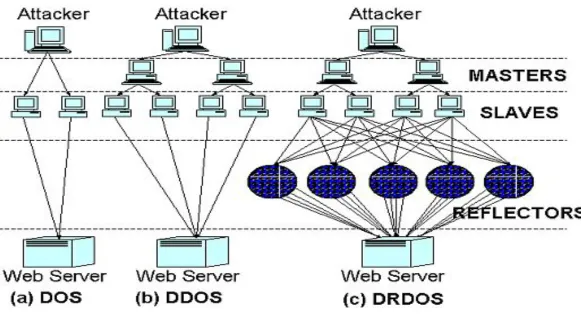
◆ Denial-of-Service (DOS)
– Prevention of legitimate access to systems
– Also Distributed-Denial-of-Service (DDoS)
– Different types:
▪ Ping-of-Death
▪ Smurf
Computer Security - Threats
Computer Security - Terminology
◆ People
– Hackers
▪ White Hat – Good guys. Report
hacks/vulnerabilities to appropriate people.
▪ Black Hat – Only interested in personal goals, regardless of impact.
Computer Security - Terminology
◆ Script Kiddies
– Someone that calls themselves a ‘hacker’ but really isn’t
◆ Ethical Hacker
– Someone hired to hack a system to find vulnerabilities and report on them.
Computer Security - Terminology
◆ Security Devices
– Firewall
▪ Barrier between network and the outside world.
– Proxy server
▪ Sits between users and server. Two main
functions are to improve performance and filter requests.
– Intrusion Detection Systems (IDS)
15-441 Networks Fall 2002
24
Why do we need security?
◆ Protect vital information while still allowing access to those who need it
– Trade secrets, medical records, etc.
◆ Provide authentication and access control for resources
◆ Guarantee availability of resources
15-441 Networks Fall 2002
25
What is “Security”
◆
Dictionary.com says:
– 1. Freedom from risk or danger; safety.
– 2. Freedom from doubt, anxiety, or fear; confidence.
– 3. Something that gives or assures safety, as:
▪ 1. A group or department of private guards: Call building security if a visitor acts suspicious.
▪ 2. Measures adopted by a government to prevent espionage, sabotage, or attack.
▪ 3. Measures adopted, as by a business or homeowner, to prevent a crime such as burglary or assault: Security was lax at the firm's smaller plant.
15-441 Networks Fall 2002
26
Who is vulnerable?
◆ Financial institutions and banks
◆ Internet service providers
◆ Pharmaceutical companies
◆ Government and defense agencies
◆ Contractors to various government agencies
◆ Multinational corporations
15-441 Networks Fall 2002
27
Common security attacks and their
countermeasures
◆ Finding a way into the network
– Firewalls
◆ Exploiting software bugs
– Intrusion Detection Systems
◆ Denial of Service
– Ingress filtering, IDS
◆ TCP hijacking
– IPSec
◆ Packet sniffing
– Encryption (SSH, SSL, HTTPS)
◆ Social problems
15-441 Networks Fall 2002
28
Firewalls
◆ Basic problem – many network applications and
protocols have security problems that are fixed over time
– Difficult for users to keep up with changes and keep host secure
– Solution
▪ Administrators limit access to end hosts by using a firewall
15-441 Networks Fall 2002
29
Firewalls
◆ A firewall is like a castle with a drawbridge
– Only one point of access into the network
– This can be good or bad
◆ Can be hardware or software
– Ex. Some routers come with firewall functionality
15-441 Networks Fall 2002
30
Firewalls
Intranet
DMZ
Internet
Firewall Firewall
15-441 Networks Fall 2002
31
Firewalls
◆
Used to filter packets based on a
combination of features
– These are called packet filtering firewalls
▪ There are other types too, but they will not be discussed
– Ex. Drop packets with destination port of 23 (Telnet)
– Can use any combination of IP/UDP/TCP header information
15-441 Networks Fall 2002
32
Firewalls
◆ Here is what a computer with a default Windows XP install looks like:
– 135/tcp open loc-srv
– 139/tcp open netbios-ssn
– 445/tcp open microsoft-ds
– 1025/tcp open NFS-or-IIS
– 3389/tcp open ms-term-serv
– 5000/tcp open UPnP
15-441 Networks Fall 2002
33
Firewalls
◆ What does a firewall rule look like?
– Depends on the firewall used
◆ Example: ipfw
– /sbin/ipfw add deny tcp from cracker.evil.org to wolf.tambov.su telnet
◆ Other examples: WinXP & Mac OS X have built in and third party firewalls
– Different graphical user interfaces
15-441 Networks Fall 2002
34
Intrusion Detection
◆ Used to monitor for “suspicious activity” on a network
– Can protect against known software exploits, like buffer overflows
15-441 Networks Fall 2002
35
Denial of Service
◆
SYN flooding attack
◆
Send SYN packets with bogus source address
– Why?
◆
Server responds with SYN ACK and keeps state
about TCP half-open connection
– Eventually, server memory is exhausted with this state
◆
Solution: use “SYN cookies”
– In response to a SYN, create a special “cookie” for the connection, and forget everything else
15-441 Networks Fall 2002
36
15-441 Networks Fall 2002
37
Denial of Service
◆ SMURF
– Source IP address of a broadcast ping is forged
15-441 Networks Fall 2002
38
15-441 Networks Fall 2002
39
Denial of Service
◆
Distributed Denial of Service
– Same techniques as regular DoS, but on a much larger scale
– Example: Sub7Server Trojan and IRC bots
▪ Infect a large number of machines with a “zombie” program
▪ Zombie program logs into an IRC channel and awaits commands
▪ Example:
▪ Bot command: !p4 207.71.92.193
▪ Result: runs ping.exe 207.71.92.193 -l 65500 -n 10000
15-441 Networks Fall 2002
40
Denial of Service
◆ Mini Case Study – CodeRed
– July 19, 2001: over 359,000 computers infected with Code-Red in less than 14 hours
– Used a recently known buffer exploit in Microsoft IIS
15-441 Networks Fall 2002
41
Denial of Service
◆ How can we protect ourselves?
– Ingress filtering
▪ If the source IP of a packet comes in on an interface which does not have a route to that packet, then drop it
▪ RFC 2267 has more information about this
– Stay on top of CERT advisories and the latest security patches
▪ A fix for the IIS buffer overflow was released
15-441 Networks Fall 2002
42
TCP Attacks
◆ Recall how IP works…
– End hosts create IP packets and routers process them purely based on destination address alone
◆ Problem: End hosts may lie about other fields which do not affect delivery
– Source address – host may trick destination into believing that the packet is from a trusted source
▪ Especially applications which use IP addresses as a simple authentication method
15-441 Networks Fall 2002
43
TCP Attacks
◆ TCP connections have associated state
– Starting sequence numbers, port numbers
◆ Problem – what if an attacker learns these values?
– Port numbers are sometimes well known to begin with (ex. HTTP uses port 80)
15-441 Networks Fall 2002
44
TCP Attacks
◆ If an attacker learns the associated TCP state for the connection, then the connection can be hijacked!
◆ Attacker can insert malicious data into the TCP stream, and the recipient will believe it came from the original source
15-441 Networks Fall 2002
45
TCP Attacks
◆ How do we prevent this?
◆ IPSec
– Provides source authentication, so Mr. Big Ears cannot pretend to be Alice
– Encrypts data before transport, so Mr. Big Ears
15-441 Networks Fall 2002
46
Packet Sniffing
◆ Recall how Ethernet works …
◆ When someone wants to send a packet to some else …
◆ They put the bits on the wire with the destination MAC address …
◆ And remember that other hosts are listening on the wire to detect for collisions …
15-441 Networks Fall 2002
47
Packet Sniffing
◆ This works for wireless too!
15-441 Networks Fall 2002
48
Packet Sniffing
◆ What kinds of data can we get?
◆ Asked another way, what kind of information would be most useful to a malicious user?
◆ Answer: Anything in plain text
15-441 Networks Fall 2002
49
Packet Sniffing
◆ How can we protect ourselves?
◆ SSH, not Telnet
– Many people at CMU still use Telnet and send their password in the clear (use PuTTY instead!)
– Now that I have told you this, please do not exploit this information
– Packet sniffing is, by the way, prohibited by Computing Services
◆ HTTP over SSL
– Especially when making purchases with credit cards!
◆ SFTP, not FTP
– Unless you really don’t care about the password or data – Can also use KerbFTP (download from MyAndrew)
◆ IPSec
References
Introduction to Information Security
ECC white paper, March 1997
http://www.certicom.com
The Information Security Process: Prevention, Detection and Response
James LaPiedra
GIAC practical repository, SANS Institute
http://www.giac.org/practical/gsec
InformIT Reference Guides