Automatic map generalisation from research to production
Rose Nyberg,
aMikael Johansson
aand Yang Zhang
aa Lantmäteriet, the Swedish mapping, cadastral and land registration authority; [email protected], [email protected], [email protected]
Abstract: The manual work of map generalisation is known to be a complex and time consuming task. With the development of technology and societies, the demands for more flexible map products with higher quality are growing. The Swedish mapping, cadastral and land registration authority Lantmäteriet has manual production lines for databases in five different scales, 1:10 000 (SE10), 1:50 000 (SE50), 1:100 000 (SE100), 1:250 000 (SE250) and 1:1 million (SE1M). To streamline this work, Lantmäteriet started a project to automatically generalise geographic information. Planned timespan for the project is 2015-2022. Below the project background together with the methods for the automatic generalisation are described. The paper is completed with a description of results and conclusions.
Keywords: Automatic map generalisation, ArcGIS, ModelBuilder, Flexible products, National mapping agency, Sweden
1.
Introduction
Development concerning maps and geographical information has been going on in Sweden since 1628 when the cartographer Anders Bure was appointed by the king to do a systematic measurement and mapping of the whole country. The maps were pencilled and painted by hand and with today’s eyes they look more like artwork than utilitarian maps.
Fig. 1. A historical map from Årsunda parish in Gästrikland,
dated 1664 (Source: https://etjanster.lantmateriet.se/historiskakartor/s/show.html?sho
wmap=true&archive=LMS&nbOfImages=2&sd_base=lms2&sd _ktun=4c4d535f5635362d313a31)
The continuous development during the centuries has led to a nowadays completely digital production line but with many manual operations remaining. The next step that now has been initiated is to automate the production of the smaller scale maps starting from the base map in 1:10000. One goal is to gather the manual forces in the work on the 1:10000 scale base map to increase the accuracy and quality, thus enhancing the possibilities to auto-mate the production of the smaller scale maps. A necessary task is to extend the basic geographic information in SE10 to cover the geographic information now only present in the other scales.
2.
Purposes
In addition to the above mentioned purpose an automated generalisation process also entails other benefits.
• A more flexible production line.
• Production of maps that are possible to use in a more flexible way.
• Increasing the efficiency in production so that updates are visible in all scales more quickly. • Facilitation of the development of new products. • Modernized and improved databases,
harmonized and comprehensive with flexible structure, synchronized with other Swedish authorities’ databases.
3.
Methods
We have analysed the state of art in automatic generalisation and have learnt from other mapping agencies that have worked with this for a while, e.g. collaborating with the experts at Dutch Kadaster, who have paved the way for us by showing that much of what we want to do is possible as described in “An Overview of the Dutch Approach to Automatic Generalization”. We also got knowledge from our contacts with various universities and from participating in European projects (for instance the project European Location Framework) and other European collabo-ration initiatives.
The development environment consists of
• ArcGIS Desktop version 10.4 with
ModelBuilder and FME Extension for ArcGIS • FME Desktop 2015 Oracle Edition
• Proprietary tools developed with ArcObjects (C#) and Python (ArcPy)
4.
Automatic generalisation
illogical generalisation results the current hypothesis is that the ladder model will be applied, i.e. to avoid the risk that features removed in one scale suddenly reappear in a smaller scale. Thus the steps all starts from the previous step, for example SE100 will be generalised from SE50. Another possibility is the star model where all derived scales are based on the same base map. The decision of which approach to use will be taken when the work on the next scale step is to be started.
The generalisation work has also been divided into phases based on feature type, starting with parts of hydrography and land cover. Together with the land cover the stand-alone polygons marsh, bedrock outcrop and rocky outcrop are handled.
When the generalization of more feature types is added it will be a challenge to merge them with the existing models. That is the moment when the generalization algorithms must handle more than one feature type at the same time, e.g. to ascertain that the road or railroad doesn’t splash through a generalized lake. The plan is to do the merging of one feature type at a time in the full model to reveal problems as early in the process as possible.
Using ArcGIS ModelBuilder to build the generalisation models, and the fact that they grew very fast, resulted in the need to divide the models into sub-models to get more readable models. All parameters, such as tolerances, were defined in a separate database table to facilitate changing parameter values in just one place and thus affect all models using that parameter.
For many feature types it is also necessary to divide the running of the generalisation models into partitions due to the huge amount of data to be processed. The running of the partitions has been distributed on several servers to minimize running time. The generalised partitions are then merged into one database.
Requirements have been defined both textually and with pictures of desired results after generalisation.
Automatic text placement is planned later on in the project, but the preparatory work to accomplish this has been started since it affects the data models for all geographic feature types.
4.1 Hydrography
The first phase only includes hydrography in the form of water surfaces (polygons), the line features will be handled in the next development phase. The hydrography has been complemented with fictitious network lines in an-other project, thus making a good generalization easier to implement.
4.1.1 Examples of requirements for hydrography
A feature that participates in a hydrographic network cannot be removed by the generalisation.
Exception:
A feature participating in a hydrographic network can be removed if it is replaced by another feature connecting to the network in exactly the same points.
Fig. 2. A small lake that is removed is here replaced with a river polyline
Fig.3. Even if the lake that is removed is at an endpoint in the network it is replaced with a river polyline
4.1.2 Examples of generalisation results for hydrography
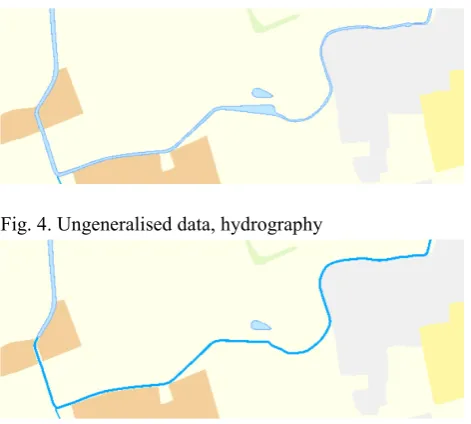
Water surfaces with an area less than the tolerance value have been replaced by a centerline. The fictitious net-work lines have been used to create centerlines for the narrow.
Fig. 4. Ungeneralised data, hydrography
Fig. 5. Generalised data, hydrography
4.1.3 Generalisation methods currently used for hydrography
Simplify polygon features to polylines: • Collapse water surface
• Eliminate small water surfaces and marshes • Collapse narrow rivers
• Aggregate small water surfaces and marshes • Simplify water surfaces, marshes and water lines • Eliminate small islands in water surfaces and
marshes
• Exaggerate small details in the shoreline (piers and forelands)
4.2 Land cover
The land cover fully covers the whole country and must be topologically correct. The stand-alone polygons (marsh, bedrock outcrop and rocky outcrop) are allowed to overlay the land cover.
4.2.1 Examples of requirements for land cover
Land cover polygons that fulfils the demands listed below should be removed.
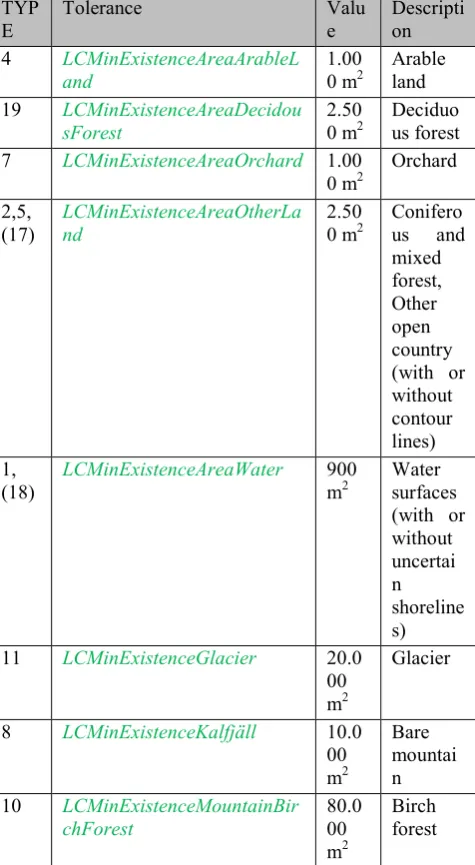
• The polygon area is less than the size given in the tolerance table.
• If the polygon is situated on an island (in a lake, ocean or river) and there are at least one more polygon with the same or bigger size.
Note! A water surface that participates in a hydrographic network cannot be removed by the generalisation without being replaced by a river polyline. This is described in separate requirements.
TYP
E Tolerance Value Description
4 LCMinExistenceAreaArableL
and 1.000 m2 Arable land
19 LCMinExistenceAreaDecidou
sForest 2.500 m2 Deciduous forest
7 LCMinExistenceAreaOrchard 1.00
0 m2 Orchard 2,5,
(17) LCMinExistenceAreaOtherLand 2.500 m2 Coniferous and mixed forest, Other open country (with or without contour lines) 1,
(18) LCMinExistenceAreaWater 900 m2 Water surfaces (with or without uncertai n shoreline s)
11 LCMinExistenceGlacier 20.0
00 m2
Glacier
8 LCMinExistenceKalfjäll 10.0
00 m2
Bare mountai n
10 LCMinExistenceMountainBir
chForest 80.000
m2
Birch forest
Table 1: Minimum values for different feature types in land cover.
Note! Smaller polygons can occur in the case the polygon is connected to a partition border or filling out a small is-land. The minimum size for islands (WaterBodyHoleMinExistenceArea) is 100 m2 today.
4.2.2 Examples of generalisation results for land cover
Elongated polygons and polygons with area less than the tolerance value have been removed.
Fig. 6. Ungeneralised data, land cover
Fig. 7. Generalised data, land cover
4.2.3 Generalisation methods used for land cover
• Exaggerate part or all • Delete narrow parts
• Dissolve adjacent land cover features of the same type
• Eliminate small land cover surfaces • Aggregate small land cover surfaces • Simplify land cover surfaces
• Eliminate small islands in some types of land cover surfaces
• Delete or exaggerate narrow parts of land cover surfaces
4.3 Automatic placement of texts
If no feature can be found invisible geographic features must be added to be able to compute the text’s geo-graphical extent.
5.
Result assessment
To support the assessment of the generalization results the examination app and the statistics model have been developed.
5.1 Examination app
The visual examination of the generalisation results has been done in an ArcGIS Portal app. By using the swipe widget it is easy for the reference group and other stakeholders to compare the maps before and after generalisation. The manually produced map can also be used for comparison.
Fig. 8. Examination app, generalised data, land cover to the left and manually produced map to the right
Fig. 9. Examination app, generalised data, land cover to the left and ungeneralised data, land cover to the right)
5.2 Statistics model
The statistics model is run before and after generalisation. The result from the statistics model is exported to Excel, where more detailed analysis and comparisons are possible to accomplish. To this moment the statistics result shows a varying reduction of number of features and number of vertices for the different feature types, something necessary to dig more deeply into in the future.
6.
Generalisation results and conclusions
Hitherto the generalisation results are living up to the expectations and requirements, although only a smaller part of the feature types has been processed. It is always possible to continue working on certain details, but the overall results is more than satisfactory so far.
A large part of the work consists of developing models for the generalization in ArcGIS Model Builder. It has been time consuming to find out the best way to work with the large number of models required. Some issues to struggle with is how to divide the models into sub-models in an appropriate manner, how to make the models as stable as possible, how to best design large models so that
they are easy to understand, and how to work several people in the same large model.
Hopefully some of these tasks will become more streamlined in ArcGIS Pro, so that by building the generalisation models modularly expansion should be fairly easy to achieve. Expansion includes adding more functionality but also reusing sub-models when the generalisation work continues with the next feature type phase and later on, the next scale step.
Platform improvements that would facilitate the generalisation work is as mentioned before a more stable tool for editing the generalisation models. More detailed improvements are
• A simplify tool that avoids creating gaps and overlaps between adjoining polygons
• A special designed tool for collapsing polygons to centerline polylines (today FME has been used)
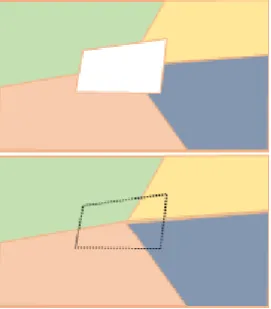
• A tool for filling holes in a topologically correct polygon layer with contributions from many adjoining polygons
Fig. 10. Example of filling of a hole in land cover layer
Although the ArcGIS Desktop platform with Model Builder can be improved as described above the platform provides excellent functionality for the generalisation work. It is possible to customize the basic functionality to proprietary data and requirements. Adjustment of tolerances is done in one stand-alone table and data sources can be changed fairly easy.
7.
Project sum up
conferences and in international cooperation, both our products and working methods can be improved.