E-Learn 2009: World Conference on E-Learning in Corporate, Government, Healthcare, & Higher Education; Vancouver, Canada, Oct 2009.
Assessment of Student Work on Geographically Distributed
Information Technology Project Teams
Charles C. Tappert and Allen Stix
Seidenberg School of CSISPace University
Pleasantville, New York, 10570, USA
[email protected], [email protected]
Abstract: There are issues in assessing the contributions of individual students on geographically distributed student teams working on information technology projects. At Pace University we have been using real-world student projects in capstone computing courses for about ten years. While the courses were conducted in a classroom environment during the early years, the current course has been essentially online for the last three years in order to reach a greater number of students. Through peer evaluations and other remote assessment techniques we have found it possible to assess the work of students on distributed teams.
Introduction
This paper concerns the issues in assessing the contributions of individual students on geographically distributed student teams as they work on information technology projects. We use team projects modeled on real-world development practice to provide students with the educational experience of collaborative efforts, similar to what is done in industry, in order to design, build, and test computer information systems. This is the fifth paper describing the way real-world student projects have been integrated into the capstone computing courses in the Seidenberg School of Computer Science and Information Systems at Pace University. The first described the development of computer information systems for actual customers (Tappert, 2002), the second emphasized projects relating to security (Tappert & Cha, 2004), the third focused on the interplay of student projects and research (Tappert, Stix, & Cha, 2007), and the fourth dealt with issues in managing the projects in the recent online course format with students geographically distributed around the world (Tappert & Stix, 2009).
We have been using real-world information technology projects in masters-level capstone computing courses for about ten years. Graduate-level capstone courses that provide real-world projects for actual customers are not new, e.g. see Novitzki (2001). Beginning with the fall 2006 semester, we migrated our highly successful, project-centered class from a traditional face-to-face format to an online format. We did this to be progressive (technical support for online courses had advanced to the point where it was reliable, fast, and offered excellent user interfaces), to cater to the desires of our professionally employed student body (no scheduling conflicts, no missed contacts because of travel, and no commuting costs), and to expand the student body to students residing in different parts of the world. In doing so we were confronting uncertainties about how to port the managerial mechanisms to teams working in the context of an online class. The online format precludes automatic, weekly assemblages that act as a safety net to the teams' interaction and smooth functioning. It is well known that projects undertaken by groups lacking co-presence presuppose a higher level of organizational and process skills among their members (Cusumano, 2008), and our previous paper (Tappert & Stix, 2009) described procedures that enabled the successful functioning of student development teams in our largely online course.
The Project-Oriented Capstone Course
The current capstone course is a project-oriented, one-semester, web-assisted course for masters-level computing students in which student teams develop real-world computer information systems for actual customers. Students learn the importance of a systematic approach in the process of developing robust systems, the management of projects, how to interact with customers and conduct requirements analysis, how to build and test systems, and the related technical and soft skills. Emphasis is placed on developing skills and knowledge in technical areas that have practical value in the workplace. In addition to technical skills, students develop problem-solving, critical thinking, communication, and teamwork skills. By working on real-world systems with actual customers, the students learn the appropriate skills – both technical and soft skills – for filling meaningful roles in the professional IT workplace.
A capstone course is usually the last course taken in a program of study, in this case to complete the master’s degree requirements. Because the students have completed all the basic courses for their degree, they have a solid understanding of the fundamentals of computing and information technology and have acquired the studentship to fill in any gaps, as necessary, through self learning and independent study. This course enables them to draw on this knowledge and to apply what they have learned, and possibly learn some new material, to complete a real-world team project for an actual customer, similar to what most computing professionals do in their work environment. It is usually a great learning experience for the students and especially for those who have not previously worked on projects. We believe it lays the foundation for effective teamwork that Denning and Riehle (2009) find inadequate in many programs. Students have their team to work closely with, to give them support, and to learn from; and they also have access to the instructor and the class as a whole for further support.
Although this is essentially an online course, we have three face-to-face meetings in a classroom during the semester: one near the beginning, one near the middle, and one at the end of the semester. These contacts, presence at which is highly recommended but not required, are typically attended by about two-thirds of the students – those who live or work in the greater New York City area. The first contact is important because it introduces communication standards and the archiving of course information. An extensive course website presents all the course information, with links in the left menu area providing access to the sections (pages) of the website:
• Homepage – includes the instructor information, textbooks, course description and goals, course requirements, and grading system.
• Syllabus – lists the weekly readings and assignments.
• Projects – contains a table of the semester’s projects, and provides for each project the customer's name and contact information, the description of the project, the names of the students on the development team assigned to the project, and a link to the project team’s website.
• Students – contains photos of the students so students know their classmates and the instructor can recall a student (possibly years later) when providing a letter of recommendation.
• Project Deliver – lists and describes the project deliverables.
• Grades – contains a table of the graded events and the current student grades indexed by the last 4 digits of their university ID number.
• A link to the Blackboard educational software system (Blackboard, 2009) used for quizzes, discussions, and collecting digital assignments.
From the project descriptions posted on the course website the students complete a project preference form during the first two weeks of the course. They list their current company and job title, number of years work experience in information technology, work and home locations, whether they can attend the three classroom meetings, preferred communication mode (email, phone, IM, etc.), top five project choices, top five availability time choices for project communication (day of week plus morning, afternoon, or evening), project skills (requirements engineering, system design, programming, databases, web design, networking, communication/leadership, etc.). The instructor uses this information to form teams, to select team leaders, and to assign teams to projects. Some of the customers are doctoral students who need research-supporting infrastructures.
A team is a group of individuals having the responsibility to jointly accomplish an objective, and in this course the objective is to successfully complete a project. Research has shown that work in teams enhances learning by creating an "active learning process." Student teams have been found particularly effective when the students actually need each other to complete the project. It is also the norm for employees to work in teams, and teams are used in all kinds of organizations, such as in industry, education, and government.
Most of the systems involve one or more of the following: programming, a database, a computer network, a Web interface. Java is the preferred language for projects that require programming. Non-programmers or weak programmers can contribute in many ways other than programming. A team usually consists of 3-5 students – an Architect-Designer, one or two Implementers, a Quality Officer, and a team Coordinator-Liaison. For small teams several team member functions can be combined. At least one team member, usually the Coordinator-Liaison, must be a good communicator for customer and instructor interactions. Once the project is underway, teams should interact at least once a week in addition to project work time, and interactions can be through a variety of communication modes, such as e-mail, online discussion, comments affixed to work-related materials, chat, and face-to-face.
For project development work we use the agile methodology, particularly Extreme Programming (XP) which involves small releases and fast turnarounds in roughly two-week iterations (Beck, 2000). Each team delivers a prototype system that performs the basic required functions to their customer at the halfway point of the semester. This is possible since, according to the 80-20 rule (Pressman, 2010), 80% of the project can be completed in 20% of
the time it would take to deliver the complete 100% system. A complete, high-quality system is delivered at the end of the semester.
The team project focuses on developing a computer information system that meets an actual customer's real needs. Although the requirements for the projects come from the customers, the course instructor is the “boss” or “Chief Information Officer” of each project team, and, as such, the person who makes all the major decisions. The project customer knows what he/she wants as an outcome but may not know the technical aspects of the project work (algorithms, program code, etc.). Some projects have subject matter experts who are knowledgeable about certain domain related aspects of a project. The customer, the subject matter experts, and the instructor can give advice to help guide the teamwork but are not expected to make major contributions to the actual project development effort.
There are many benefits from the project activities. The real-world projects provide valuable systems for the customers, allow the students to develop technical and soft skills, utilize student-centered team learning, foster interdisciplinary collaboration, encourage student involvement in the university and local communities, support student and faculty research, and enhance relationships between the university and local technology companies. Overall, these projects result in an advantageous outcome for all concerned.
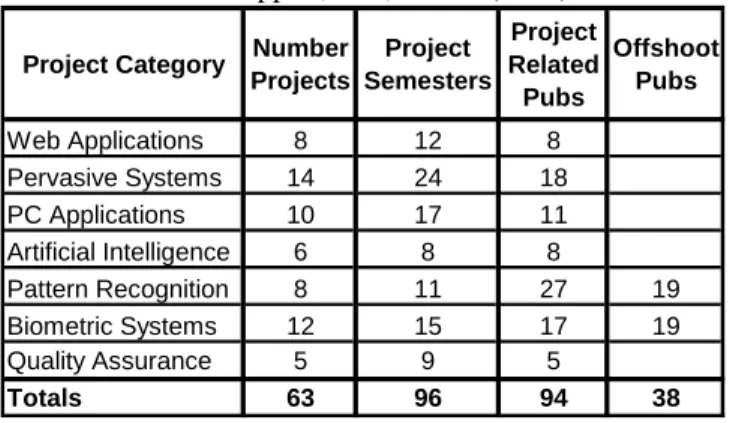
To inform the readers of the types of projects conducted, a summary of 63 projects and related 132 publications from 2001 to 2007 is presented in Table 1 (Tappert, Stix, & Cha, 2007). Depending on the nature of a project, the technical skills can involve e-Commerce and Internet technologies, client-server systems (especially those with Web interfaces to backend databases), relational databases, web design and interfaces, HTML, Java programming, and scripting languages such as PHP and Cold Fusion for accessing databases through web interfaces.
Project Category Number Projects Project Semesters Project Related Pubs Offshoot Pubs Web Applications 8 12 8 Pervasive Systems 14 24 18 PC Applications 10 17 11 Artificial Intelligence 6 8 8 Pattern Recognition 8 11 27 19 Biometric Systems 12 15 17 19 Quality Assurance 5 9 5 Totals 63 96 94 38
Table 1. Summary of projects and publications, from Tappert, Stix, & Cha (2007)
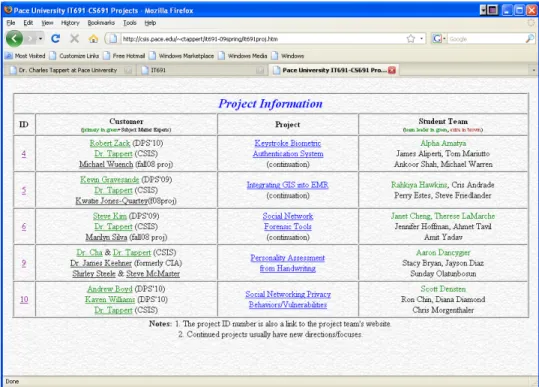
In the spring of 2009 we had five projects as shown on the Projects page of the course website (Figure 1). It was unusual this semester that most of the project customers were doctoral students enrolled in our Doctor of Professional Studies (DPS) program. The Projects page lists the projects and contains, for each project, the project ID number, the project customer(s) with links to detailed contact information, a link to a detailed project description (and whether the project is a continuation of an earlier one), and the student team (marking the team leader). The project ID number is also a link to the student team website for the project. The team website for the “Personality Assessment from Handwriting” project is shown in Figure 2.
Two of these projects will be briefly described. One, entitled “Personality Assessment from Handwriting,” involves the Lewinson-Zubin (L-Z) scales, scientific handwriting analysis scales proposed by Thea Stein Lewinson and Joseph Zubin, which have been used in handwriting analysis over the last half century (Lewinson & Zubin, 1944). One of the vexing problems of these scales is the time it takes for handwriting analysts to measure the L-Z scales. The goal of this project was to develop a computer assisted L-Z scale extraction system for the purpose of handwriting analysis. Most scales can be automatically and objectively extracted once documents are optically scanned, and a graphical user interface allows handwriting analysts to extract most L-Z scales more efficiently and objectively. What has been classified information until the recent publication of a book on spycraft (Wallace, Melton, & Schlesinger, 2008) is the fact that Lewinson worked for the CIA for eighteen years as a graphologist, and that the CIA used graphology for operations, in particular to assist operations officers in identifying potential targets for double agents.
The second project, entitled “Keystroke Biometric Authentication System,” extends previous work in the area of keystroke biometrics, one of the less-studied behavioral biometrics. Keystroke biometric systems measure typing characteristics believed to be unique to an individual and difficult to duplicate. Over the last five years, we have developed at Pace University long-text-input keystroke biometric systems for identification (one-of-n response) and
for authentication (accept/reject response). In this keystroke biometric area we have had about ten semesters of masters-level project work, three doctoral dissertations, three external conference papers, and a book chapter recently accepted for publication (Tappert, Villani & Cha, 2009). The focus this semester is on further developing the authentication system and conducting additional experiments.
Figure 1. The “Projects” page of the course website for spring 2009.
Geographically Distributed Student Teams
Currently about two-thirds of the students live or work in the greater NYC area. The remaining third come mostly from more distant regions of the east coast but some have been from as far away as California and London, and a group of students from India is expected to take the course in the fall of 2009. The distributed team issue is handled by a number of mechanisms and guidelines.
To facilitate communication among the project stakeholders, we insist that, except for extenuating circumstances, communication between a team and instructor, and between a team and a customer, be through the team leader, with all team members copied on communication email and given summaries of face-to-face meetings. This reduces communication to the instructor from individual students and keeps all stakeholders updated on project activities. Although we had the same guideline when the course was conducted in the classroom with local students, this guideline is even more critical for distributed teams. Also, the instructor creates and uses email distribution lists for the whole class, for each project team including the customer, and for all the customers.
Project team leaders must be local, either living or working in the greater NYC area. This allows for easy communication and meetings between the project team leaders and the project customers, who have, so far, all been local. It also allows for similar contact between the project team leaders and the instructor, enabling the instructor to keep informed of the progress of the project work.
The course website efficiently presents all the course information as described above for convenient centralized access. Most importantly, it contains the project-related information and links to the student-developed team project websites that are frequently updated with postings of project deliverables and other information. To ensure that the students read and understand the material on the course website, the first quiz contains questions on the course operation as described in the website material.
The three 3.5-hour classroom meetings are important to bring the local students together so they can meet many of their teammates and form some face-to-face bonding. The first meeting occurs after the first week of the semester. By this time:
• the students have introduced themselves online through a Blackboard forum, reviewed the course website, and submitted the project preference information form to the instructor
• the instructor has received the students’ project preferences and associated information, formed the student project teams, assigned teams to projects, chosen project team leaders, and posted the information on the project’s page of the course website
At this meeting the instructor and students introduce themselves face-to-face (half hour), the instructor gives a lecture on the nature and value of conducting real-world projects in a capstone course (one hour), the instructor reviews the specifics of the course material and describes each of the projects (one hour), and the students group themselves into their project teams and begin planning project activities (one hour). Some customers attend the first meeting to introduce themselves and to meet the members of their team.
At the second (midterm) meeting the students make PowerPoint slide presentations of their project prototypes (20-30 minutes per team depending on the number of projects – there were five projects in spring 2009 with 4-5 students per team). Material covered in these presentations includes, as appropriate and as time permits, a subset of the following items: brief description of project, summary of project specifications, frequency of meetings with customer/stake-holders and usual method of communication, plans to address changes in customer requirements, summary of user stories collected (if any), analyses accomplished (object-oriented might include defined classes and operations), design decisions and the trade-offs encountered, work breakdown structures, PERT chart, and/or Gantt chart, components built/planned, testing strategy, what was accomplished to complete the prototype, what will be added in the remainder of the semester, what has been easy/difficult during this half of the semester, and a prototype demonstration. Many customers attend the second meeting.
At the third (semester-end) meeting the students present their final project system. This meeting is similar to the second meeting, and most of the customers attend the final presentations.
Student Assessment
Student assessment is currently as follows: individual quizzes (20%), initial team assignment (10%), team project midterm (20%), team project final (20%), and team project technical paper (30%). Thus, 80% of a student’s grade is based on their contribution to the team effort with the quizzes (based primarily on the textbook material) providing the only direct individual assessment. Mid-term and final exams used in a previous two-semester course were eliminated allowing the students to focus on the project work in this one-semester course. The initial team
assignment, which is not related to the project and due early in the semester (after three weeks), provides the context for the students to learn to function as a team. The team has the ultimate responsibility for the project work and is graded accordingly. Grades on team events are determined by first assigning a team grade and then adjusting an individual student’s grade up or down based on evaluations of the student’s contribution from the instructor, the project's customer(s), and the student’s teammates.
Since this is a project-oriented course with no midterm or final exams, student grades depend mostly on their contribution to the project work. The usual expected time commitment per student for a 3-credit course is 3 hours per week in class and twice that outside of class, for a total of 9 hour per week. However, because this is an online course where students save commuting time, we expect a time commitment of about 10 hours per week, and this additional time commitment is one of the advantages of a distance-learning course.
One of the key project deliverables is a technical paper that summarizes the results of the project and is presented at our yearly internal conference, called “Student-Faculty Research Day," which is complete with a review process and proceedings, see for example this year’s website (Research Day, 2009). We have found that working to produce publications is a strong motivating factor for the students.
Blackboard Educational Software
The Blackboard educational software system (Blackboard, 2009) is used for quizzes, for collecting digital deliverables, and for discussion forums. There are discussion forums for archiving all instructor email to the whole class for easy reference, for student introductions (students are asked to introduce themselves online during the first week of the semester), for discussions related to the textbook and other course material, and for discussions relating to each of the projects. The project forums are used to discuss project-related material, and each project team is required to post a weekly project status report on their project forum. It might be mentioned that previously student teams gave their status reports verbally in the classroom and students could benefit by learning about the other projects and hearing the instructor feedback, whereas now they are posted on the project forums (and simultaneously on project websites) where they are less likely to be reviewed by students in other projects.
Self and Peer Evaluations
Finally, we use peer evaluations to assess the project contributions of each team member. Although used when the course was conducted in the classroom, peer evaluations are even more critical for distributed teams because some team members have minimal, if any, direct contact with the customer and instructor. Obtaining individual student grades on teamwork has been reported in the literature. For example, Clark, Davies, & Skeers (2005) created an elaborate web-based system to record and track self and peer evaluations, Brown (1995) has a system similar to ours but which uses more granular numerical input, and Wilkins & Lawhead (2000) use survey instruments.
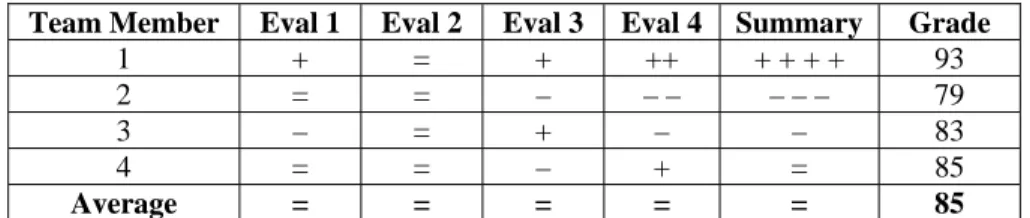
The students are required to provide self and peer evaluations three times during the semester – once after the initial assignment primarily to acquaint the students with the process, at the midterm checkpoint, and at the end-of-term checkpoint. They evaluate each team member, including themselves, by assigning “=” for average contribution, “+” for above average contribution, and “–” for below average contribution. Multiple “+” or “–” signs can be used to indicate extra strong or extra weak contributions, but the total number of plus and minus signs must balance out (i.e., be equal in number). A team grade for a particular deliverable or time interval is first determined, and then grades for individual students are adjusted relative to the team grade based on the peer evaluations along with additional input from the customers and instructor. For example, a typical peer evaluation summary chart with associated grades is shown in Table 2 for a four-member team. Each of the four evaluation columns shows the evaluation of a team member evaluating him/herself and the other team members. The summary column shows the sum of each row of evaluations, and the grade column shows the student grades. Here, a team grade of 85% is first determined and then individual grades are adjusted relative to the team grade, in this case up or down 2% for each “+” or “–” sign. For simplicity, this table shows only the peer evaluations, but customer and instructor evaluations are usually included as well. Team leader and instructor evaluations can be given extra weight, and self evaluations that appear overly inflated are usually eliminated.
Table 2. Example team peer evaluation and grade chart.
Team Member Eval 1 Eval 2 Eval 3 Eval 4 Summary Grade
1 + = + ++ + + + + 93
2 = = – – – – – – 79
3 – = + – – 83
4 = = – + = 85
Average = = = = = 85
Students are also asked a number of general questions for the time interval in question – the number of hours per week spent on project work, their specific contributions, their strengths and how these were used, their areas needing improvement, and what has enhanced and/or handicapped their team’s performance – and the responses might influence the instructor evaluation of a student’s contribution to the team effort. For additional input the instructor can discuss team member contributions with the team leader.
Customer Evaluations
At the end of the semester we survey the students using the Survey Monkey (2009) web-based survey system to obtain feedback on the team-customer interactions during the semester: whether the customer’s initial project specifications were clear and understood, whether the amount of contact/interaction was adequate, whether the speed of response to questions was adequate, and whether the continued guidance and direction on the project work was sufficient. This information is used to determine the team satisfaction with a customer and, for example, whether to continue or not continue a project with a particular customer.
Pedagogical Evaluations
At the end of the semester we survey the students to obtain feedback on the course methodologies and procedures, such as what has worked well or not well from the students’ point of view. We use these pedagogical evaluations to tweak or even radically change our methodologies and procedures from time to time, and to keep informed on the technologies and methodologies the student teams are using. We find, for example, that student teams use many modes of communication, and one of the interesting ones recently reported was Yugma Skype conference meetings where the Yugma plug-in (Yugma, 2009) allows Skype (Skype, 2009) users to share their computer screen.
Conclusions
Inasmuch as weekly class assemblages no longer exit, the online course format necessarily means a reduction in the face-to-face contact time of student teams jointly working on projects. All courses with a collaborative component requiring groups to complete a task requiring cooperation and coordination over an extended time will find that the students are forced into working in a distributed context. In order to assess the project work contributions of individual students, effective techniques for remote assessment of contributions by distributed students are required. We successfully confronted this issue and experienced success in a masters-level, capstone course in which teams of students in computer science and internet technology develop real-world systems for actual customers, a course that had been in successful operation for over five years in the face-to-face mode when it shifted to online.
References
Beck, K. (2000). Extreme Programming Explained. Addison-Wesley.
Blackboard (2009). Courseware product marketed by Blackboard, Inc. http://www.blackboard.com/.
Brown, R.W. (1995). Autorating: Getting Individual Marks from Team Marks and Enhancing Teamwork. Proc.
Frontiers Educ. Conf., IEEE/ASEE, Pittsburgh, Pa.
Australian Conf. Computing Educ., Newcastle, Australia.
Cusumano, M. (2008). Managing Software Development in Globally Distributed Teams. Communications of the ACM, Vol. 51, No. 2, 15-17.
Denning, P.J. & Riehle, R.D. (2009). The Profession of IT : Is Software Engineering Engineering? Communications
of the ACM, Vol. 52, No. 3, 24-26.
Lewinson, T.S. & Zubin, J. (1944). Handwriting Analysis. King's Crown Press.
Novitzki, J.E. (2001). Critical Issues in the Administration of an Integrating Capstone Course. Proc. Informing
Science and IT Education 2001.
Pressman, R. S. (2010). Software Engineering: A Practitioner's Approach (Seventh Edition). McGraw-Hill. Research Day (2009). http://csis.pace.edu/~ctappert/srd2009/.
Skype on Wikipedia (2009). http://en.wikipedia.org/wiki/Skype. Survey Monkey (2009). http://www.surveymonkey.com/.
Tappert, C.C. (2002). Students Develop Real-World Web and Pervasive Computing Systems. Proc. E-Learn 2002
World Conf. on E-Learning in Corporate, Government, Healthcare, and Higher Ed., Montreal, Canada.
Tappert, C.C. & Cha, S.-H. (2004). Security-Related Research and Projects in Computing Promote Student Awareness of Security Issues. Proc. ISECON 2004 (also Info. Systems Educ. J., Vol. 4, No. 82, 2006).
Tappert, C.C., Stix, A., & Cha, S.-H. (2007). The Interplay of Student Projects and Student-Faculty Research. Proc.
E-Learn 2007 World Conf. on E-Learning in Corporate, Government, Healthcare, and Higher Ed., Quebec City,
Canada.
Tappert, C.C. & Stix, A. (2009). Pedagogical Issues in Managing Information Technology Projects Conducted by Geographically Distributed Student Teams. Proc.Soc. IT & Teachers Educ. Conf. (SITE 2009), Charleston, South Carolina.
Tappert, C.C., Villani, M., & Cha, S. (2009). Keystroke Biometric Identification and Authentication on Long-Text Input. Chapter to appear in Behavioral Biometrics for Human Identification: Intelligent Applications, Edited by Liang Wang and Xin Geng. IGI Global.
Wallace, R., Melton, H.K, & Schlesinger, H.R. (2008). Spycraft: The Secret History of the CIA's Spytechs, from
Communism to al-Qaeda. Dutton.
Wilkins, D.E. & Lawhead, P.B. (2000). Evaluating Individuals in Team Projects. Proc. 31st SIGCSE Tech.
Symposium CS Educ., Austin, Texas, 172 – 175.