EAServer
6.0
DOCUMENT ID: DC00547-01-0600-01 LAST REVISED: July 2006
Copyright © 1997-2006 by Sybase, Inc. All rights reserved.
This publication pertains to Sybase software and to any subsequent release until otherwise indicated in new editions or technical notes. Information in this document is subject to change without notice. The software described herein is furnished under a license agreement, and it may be used or copied only in accordance with the terms of that agreement.
To order additional documents, U.S. and Canadian customers should call Customer Fulfillment at (800) 685-8225, fax (617) 229-9845. Customers in other countries with a U.S. license agreement may contact Customer Fulfillment via the above fax number. All other international customers should contact their Sybase subsidiary or local distributor. Upgrades are provided only at regularly scheduled software release dates. No part of this publication may be reproduced, transmitted, or translated in any form or by any means, electronic, mechanical, manual, optical, or otherwise, without the prior written permission of Sybase, Inc.
Sybase, SYBASE (logo), ADA Workbench, Adaptable Windowing Environment, Adaptive Component Architecture, Adaptive Server, Adaptive Server Anywhere, Adaptive Server Enterprise, Adaptive Server Enterprise Monitor, Adaptive Server Enterprise Replication, Adaptive Server Everywhere, Advantage Database Server, Afaria, Answers Anywhere, Applied Meta, Applied Metacomputing, AppModeler, APT Workbench, APT-Build, APT-Edit, APT-Execute, APT-Translator, APT-Library, ASEP, Avaki, Avaki (Arrow Design), Avaki Data Grid, AvantGo, Backup Server, BayCam, Beyond Connected, Bit-Wise, BizTracker, Certified PowerBuilder Developer, Certified SYBASE Professional, Certified SYBASE Professional Logo, ClearConnect, Client-Library, Client Services, CodeBank, Column Design, ComponentPack, Connection Manager, Convoy/DM, Copernicus, CSP, Data Pipeline, Data Workbench, DataArchitect, Database Analyzer, DataExpress, DataServer, DataWindow, DataWindow .NET, DB-Library, dbQueue, Dejima, Dejima Direct, Developers Workbench, DirectConnect Anywhere, DirectConnect, Distribution Director, Dynamic Mobility Model, e-ADK, E-Anywhere, e-Biz Integrator, E-Whatever, EC Gateway, ECMAP, ECRTP, eFulfillment Accelerator, EII Plus, Electronic Case Management, Embedded SQL, EMS, Enterprise Application Studio, Enterprise Client/ Server, Enterprise Connect, Enterprise Data Studio, Enterprise Manager, Enterprise Portal (logo), Enterprise SQL Server Manager, Enterprise Work Architecture, Enterprise Work Designer, Enterprise Work Modeler, eProcurement Accelerator, eremote, Everything Works Better When Everything Works Together, EWA, ExtendedAssist, Extended Systems, ExtendedView, Financial Fusion, Financial Fusion (and design), Financial Fusion Server, Formula One, Fusion Powered e-Finance, Fusion Powered Financial Destinations, Fusion Powered STP, Gateway Manager, GeoPoint, GlobalFIX, iAnywhere, iAnywhere Solutions, ImpactNow, Industry Warehouse Studio, InfoMaker, Information Anywhere, Information Everywhere, InformationConnect, InstaHelp, Intelligent Self-Care, InternetBuilder, iremote, irLite, iScript, Jaguar CTS, jConnect for JDBC, KnowledgeBase, Legion, Logical Memory Manager, M2M Anywhere, Mach Desktop, Mail Anywhere Studio, Mainframe Connect, Maintenance Express, Manage Anywhere Studio, MAP, M-Business Anywhere, M-Business Channel, M-Business Network, M-Business Suite, MDI Access Server, MDI Database Gateway, media.splash, Message Anywhere Server, MetaWorks, MethodSet, mFolio, Mirror Activator, ML Query, MobiCATS, MobileQ, MySupport, Net-Gateway, Net-Library, New Era of Networks, Next Generation Learning, Next Generation Learning Studio, O DEVICE, OASiS, OASiS logo, ObjectConnect, ObjectCycle, OmniConnect, OmniQ, OmniSQL Access Module, OmniSQL Toolkit, OneBridge, Open Biz, Open Business Interchange, Open Client, Open ClientConnect, Open Client/Server, Open Client/Server Interfaces, Open Gateway, Open Server, Open ServerConnect, Open Solutions, Optima++, Partnerships that Work, PB-Gen, PC APT Execute, PC DB-Net, PC Net Library, Pharma Anywhere, PhysicalArchitect, Pocket PowerBuilder, PocketBuilder, Power++, Power Through Knowledge, power.stop, PowerAMC, PowerBuilder, PowerBuilder Foundation Class Library, PowerDesigner, PowerDimensions, PowerDynamo, Powering the New Economy, PowerScript, PowerSite, PowerSocket, Powersoft, PowerStage, PowerStudio, PowerTips, Powersoft Portfolio, Powersoft Professional, PowerWare Desktop, PowerWare Enterprise, ProcessAnalyst, Pylon, Pylon Anywhere, Pylon Application Server, Pylon Conduit, Pylon PIM Server, Pylon Pro, QAnywhere, Rapport, Relational Beans, RemoteWare, RepConnector, Report Workbench, Report-Execute, Replication Agent, Replication Driver, Replication Server, Replication Server Manager, Replication Toolkit, Resource Manager, RFID Anywhere, RW-DisplayLib, RW-Library, SAFE, SAFE/PRO, Sales Anywhere, Search Anywhere, SDF, Search Anywhere, Secure SQL Server, Secure SQL Toolset, Security Guardian, ShareSpool, ShareLink, SKILS, smart.partners, smart.parts, smart.script, SOA Anywhere Trademark,SQL Advantage, SQL Anywhere, SQL Anywhere Studio, SQL Code Checker, SQL Debug, SQL Edit, SQL Edit/TPU, SQL Everywhere, SQL Modeler, SQL Remote, SQL Server, SQL Server Manager, SQL SMART, SQL Toolset, SQL Server/CFT, SQL Server/DBM, SQL Server SNMP SubAgent, SQL Station, SQLJ, Stage III Engineering, Startup.Com, STEP, SupportNow, S.W.I.F.T. Message Format Libraries, Sybase Central, Sybase Client/Server Interfaces, Sybase Development Framework, Sybase Financial Server, Sybase Gateways, Sybase IQ, Sybase Learning Connection, Sybase MPP, Sybase SQL Desktop, Sybase SQL Lifecycle, Sybase SQL Workgroup, Sybase Synergy Program, Sybase Virtual Server Architecture, Sybase User Workbench, SybaseWare, Syber Financial, SyberAssist, SybFlex, SybMD, SyBooks, System 10, System 11, System XI (logo), SystemTools, Tabular Data Stream, The Enterprise Client/Server Company, The Extensible Software Platform, The Future Is Wide Open, The Learning Connection, The Model For Client/Server Solutions, The Online Information Center, The Power of One, TotalFix, TradeForce, Transact-SQL, Translation Toolkit, Turning Imagination Into Reality, UltraLite, UltraLite.NET, UNIBOM, Unilib, Uninull, Unisep, Unistring, URK Runtime Kit for UniCode, Viafone, Viewer, VisualWriter, VQL, WarehouseArchitect, Warehouse Control Center, Warehouse Studio, Warehouse WORKS, Watcom, Watcom SQL, Watcom SQL Server, Web Deployment Kit, Web.PB, Web.SQL, WebSights, WebViewer, WorkGroup SQL Server, XA-Library, XA-Server, XcelleNet, XP Server, XTNDAccess and XTNDConnect are trademarks of Sybase, Inc. or its subsidiaries. 05/06
Unicode and the Unicode Logo are registered trademarks of Unicode, Inc.
All other company and product names used herein may be trademarks or registered trademarks of their respective companies. Use, duplication, or disclosure by the government is subject to the restrictions set forth in subparagraph (c)(1)(ii) of DFARS 52.227-7013 for the DOD and as set forth in FAR 52.227-19(a)-(d) for civilian agencies.
About This Book ... ix
CHAPTER 1 CORBA Component Overview ... 1
About CORBA ... 1
CORBA components in EAServer... 1
The CORBA component development process ... 2
CORBA component tutorials ... 3
CHAPTER 2 CORBA Component Life Cycles and Transaction Semantics .... 5
Component life cycles ... 5
States in the component life cycle ... 6
Stateful versus stateless components ... 8
Supporting early deactivation in your component ... 9
Supporting instance pooling in your component ... 10
Long versus short transactions ... 11
EAServer’s transaction processing model... 12
How EAServer transactions work ... 12
Benefits of using EAServer transactions ... 13
Defining transactional semantics... 14
Example ... 19
Dynamic enlistment in bean-managed transactions... 20
EAServer Transaction Manager ... 21
Resource recovery and transaction logging ... 22
Transaction interoperability ... 23
Resource manager ... 25
Enlisting XA resources with Transaction Manager ... 25
CHAPTER 3 Using CORBA IDL ... 27
Learning IDL... 27
IDL modules ... 27
Preprocessor directives ... 28
IDL interfaces ... 28
Contents
Deploying and viewing IDL with the Management Console .... 37
Deploying IDL from the command-line ... 37
Specifying Java package mappings for IDL modules... 38
Using IDL documentation comments ... 38
Refreshing the HTML documentation... 39
Viewing HTML documentation for IDL modules ... 40
CHAPTER 4 Managing CORBA Packages and Components ... 41
What is a CORBA package? ... 41
Managing CORBA packages in the Management Console ... 42
Managing CORBA packages with configuration scripts ... 43
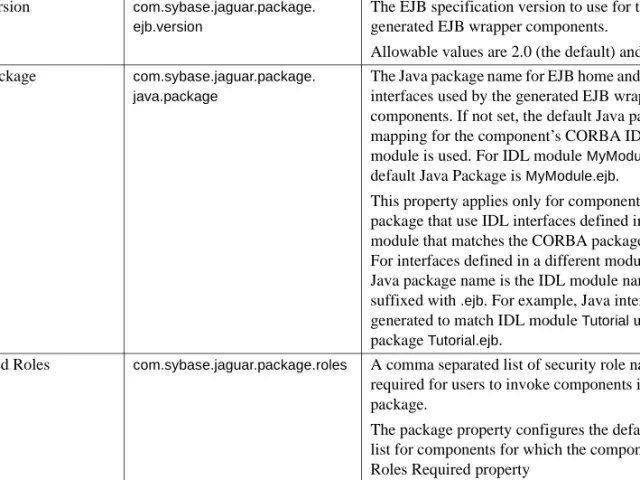
CORBA package property descriptions ... 45
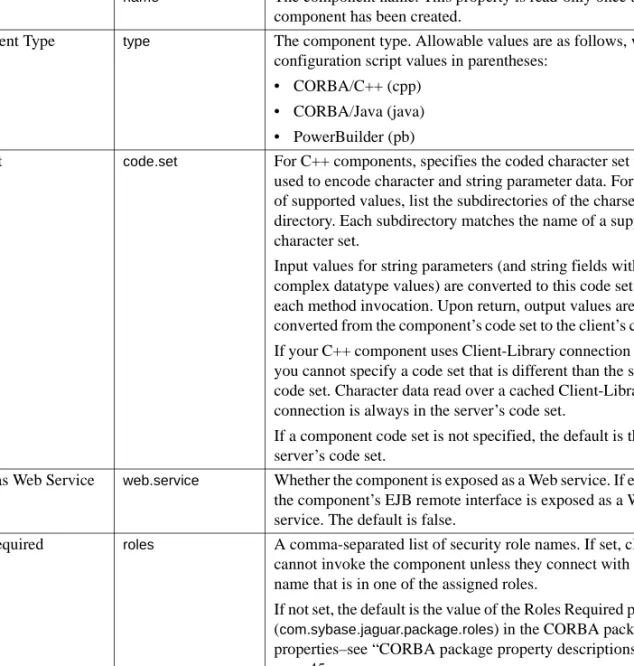
CORBA component property descriptions ... 45
Transaction type values ... 52
CHAPTER 5 Developing and Deploying PowerBuilder Components ... 55
Developing PowerBuilder components ... 56
Mapping datatypes ... 56 Accessing data ... 60 Logging errors ... 60 Managing transactions ... 61 Deploying components... 62 PowerBuilder components ... 62 Java packages ... 64 Web services... 64 Generated code... 64 Naming conventions... 65 Repository files... 65 Security roles... 65 Remote debugging ... 66 Troubleshooting ... 66
CHAPTER 6 Developing PowerBuilder Clients ... 67
Developing clients ... 67
Component access... 68
Web DataWindow... 68
CHAPTER 7 CORBA/C++ Overview... 71
Overview ... 71
Requirements ... 72
Supported datatypes ... 72
Using mapped IDL types ... 74
Overloaded methods ... 76
CHAPTER 8 Developing CORBA/C++ Components... 77
Procedure for creating C++ components ... 77
Generating C++ component files ... 78
C++ file naming conventions and locations ... 79
Regenerating changed C++ component methods... 80
Writing the class implementation ... 80
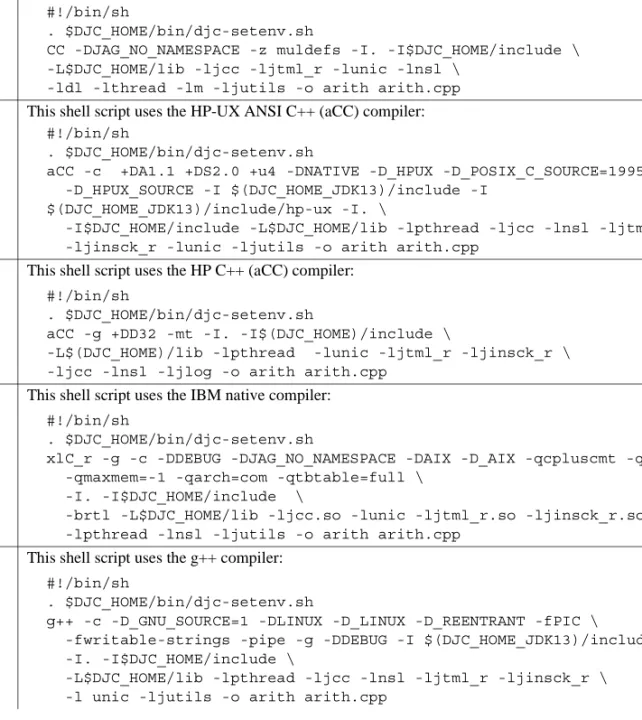
Compiling source files ... 81
Compiling on UNIX platforms ... 82
Compiling on Windows ... 83
Using data sources ... 84
Using ODBC data sources ... 84
Client-Library data sources ... 86
Oracle OCI data sources ... 88
Managing explicit OTS transactions... 91
Initializing the ORB ... 92
Calling CosTransactions::Current interface methods ... 93
Executing tasks outside of a transaction ... 94
Exceptions ... 95
Setting transaction state... 96
Issuing intercomponent calls ... 97
To components on a non-EAServer ORB ... 98
Handling errors... 98
Debugging C++ components ... 98
CHAPTER 9 Developing CORBA/C++ Clients... 101
Procedure for creating CORBA C++ clients ... 101
Generating stubs ... 102
Writing CORBA C++ clients ... 102
Adding required include and namespace declarations... 103
Instantiating component proxies... 104
Invoking methods ... 110
Processing result sets ... 110
Handling exceptions ... 118
Compiling C++ clients ... 120
Deploying C++ clients ... 120
Using the CosNaming interface ... 121
Using CORBA ORB implementations other than EAServer... 121
Connecting to EAServer with a third-party client ORB ... 121
Contents
CHAPTER 10 Tutorial: Creating C++ Components and Clients... 125
Overview of the sample application ... 125
Tutorial requirements ... 125
Creating the application ... 126
Verify your environment ... 126
Start EAServer and the Management Console ... 127
Import the IDL interface... 128
Define the package and component... 128
Generate server integration code and implementation templates 130 Write the server-side code ... 130
Create a user account ... 133
Write the client-side code ... 133
Compile the client executable ... 137
Run the client executable ... 139
CHAPTER 11 CORBA/Java Overview... 141
Overview ... 141
Requirements ... 142
Java IDL datatype mappings... 142
Binary, Fixed-Point, and Date/Time types... 143
Result set types... 144
User-defined IDL types... 144
Holder classes for IDL types ... 145
CHAPTER 12 Developing CORBA/Java Components ... 147
Procedure for creating CORBA/Java components... 147
Write the Java source file ... 148
Generate Java interface files for IDL types ... 149
Add package import statements... 149
Code the constructor ... 150
Add error handling code ... 150
Advanced techniques ... 151
Issue intercomponent calls... 151
Manage database connections ... 153
Return result sets ... 153
Access SSL client certificates ... 158
Set transactional state... 158
Retrieve user-defined component properties ... 159
Generating EJB wrapper components ... 160
CHAPTER 13 Developing CORBA/Java Clients... 161
Procedure for creating CORBA/Java clients ... 161
Generating Java stubs ... 162
Instantiating proxy instances ... 162
Configuring and initializing the ORB runtime... 163
Creating a Manager instance ... 168
Creating sessions ... 171
Creating stub instances ... 172
Executing component methods ... 175
Serializing component instance references ... 175
Handling exceptions ... 176
Deploying and running Java clients ... 178
Using other CORBA ORB implementations ... 179
Connecting to EAServer with a third-party client ORB ... 179
Connecting to third-party ORBs using the EAServer ORB.... 180
CHAPTER 14 Tutorial: Creating CORBA Java Components and Clients... 181
Overview of the sample application ... 181
Tutorial requirements ... 181
Creating the application ... 182
Start EAServer and the Management Console ... 182
Import the IDL interface ... 182
Define the package and component... 183
Compile the component implementation ... 184
Generate stubs and skeletons... 185
Create a user account ... 186
Create the client program ... 186
Run the client program ... 190
Audience This book is for application developers who develop C++ or
PowerBuilder® clients or components for deployment to EAServer, and developers who must maintain legacy EAServer CORBA/Java clients or components. Developers should be familiar with their chosen
programming languages, specifically Java, C++, or PowerScript®.
How to use this book Chapter 1, “CORBA Component Overview,” describes CORBA component concepts and the EAServer component models based on the CORBA model.
Chapter 2, “CORBA Component Life Cycles and Transaction Semantics,” explains the EAServer CORBA component life cycle and transaction processing models for CORBA and PowerBuilder
components.
Chapter 3, “Using CORBA IDL,” describes how CORBA component interfaces are defined in Interface Definition Language (IDL).
Chapter 4, “Managing CORBA Packages and Components,” describes how to deploy and configure CORBA components in EAServer. Chapter 5, “Developing and Deploying PowerBuilder Components,” describes EAServer-specific modifications for PowerBuilder components developed and deployed from the PowerBuilder IDE.
Chapter 6, “Developing PowerBuilder Clients,” describes how to develop PowerBuilder clients for EAServer components. describes how to develop PowerBuilder clients for EAServer components.
Chapter 7, “CORBA/C++ Overview,” provides an overview of things to consider when developing CORBA C++ clients and components for EAServer.
Chapter 8, “Developing CORBA/C++ Components,” describes how to implement CORBA components in C++.
Chapter 9, “Developing CORBA/C++ Clients,” describes how to implement CORBA clients in C++.
Chapter 10, “Tutorial: Creating C++ Components and Clients,” walks you through the creation and deployment of a CORBA/C++ component and a client that calls the component.
Chapter 11, “CORBA/Java Overview,” provides an overview of things to consider when developing CORBA/Java clients and components for EAServer.
Chapter 12, “Developing CORBA/Java Components,” describes how to implement CORBA components in Java.
Chapter 13, “Developing CORBA/Java Clients,” describes how to implement CORBA clients in Java.
Chapter 14, “Tutorial: Creating CORBA Java Components and Clients,” walks you through the creation and deployment of a CORBA/Java component and a client that calls the component.
Related documents Core EAServer documentation The core EAServer documents are available in HTML and PDF format in your EAServer software installation and on the SyBooks™ CD.
What’s New in EAServer 6.0 summarizes new functionality in this version. The EAServer API Reference Manual contains reference pages for proprietary EAServer Java classes and C routines.
The EAServer Automated Configuration Guide explains how to use Ant-based configuration scripts to:
• Define and configure entities, such as EJB modules, Web applications, data sources, and servers
• Perform administrative and deployment tasks
The EAServer CORBA Components Guide (this book) explains how to: • Create, deploy, and configure CORBA and PowerBuilder™ components
and component-based applications
• Use the industry-standard CORBA and Java APIs supported by EAServer The EAServer Enterprise JavaBeans User’s Guide describes how to:
• Configure and deploy EJB modules
• Develop EJB clients, and create and configure EJB providers • Create and configure applications clients
The EAServer Feature Guide explains application server concepts and architecture, such as supported component models, network protocols, server-managed transactions, and Web applications.
The EAServer Java Message Service User’s Guide describes how to create Java Message Service (JMS) clients and components to send, publish, and receive JMS messages.
The EAServer Migration Guide contains information about migrating EAServer 5.x resources and entities to an EAServer 6.0 installation. The EAServer Performance and Tuning Guide describes how to tune your server and application settings for best performance.
The EAServer Security Administration and Programming Guide explains how to:
• Understand the EAServer security architecture
• Configure role-based security for components and Web applications • Configure SSL certificate-based security for client connections
• Implement custom security services for authentication, authorization, and role membership evaluation
• Implement secure HTTP and IIOP client applications
• Deploy client applications that connect through Internet proxies and firewalls
The EAServer System Administration Guide explains how to:
• Start the preconfigured server and manage it with the Sybase Management Console
• Create, configure, and start new application servers • Define database types and data sources
• Create clusters of application servers to host load-balanced and highly available components and Web applications
• Monitor servers and application components
• Automate administration and monitoring tasks with command line tools The EAServer Web Application Programming Guide explains how to create, deploy, and configure Web applications, Java servlets, and JavaServer Pages. The EAServer Web Services Toolkit User’s Guide describes Web services support in EAServer, including:
• Support for standard Web services protocols such as Simple Object Access Protocol (SOAP), Web Services Description Language (WSDL), and Uniform Description, Discovery, and Integration (UDDI)
• Administration tools for deployment and creation of new Web services, WSDL document creation, UDDI registration, and SOAP management The EAServer Troubleshooting Guide describes procedures for
troubleshooting problems that EAServer users may encounter. This document is available only online; see the EAServer Troubleshooting Guide at
http://infocenter.sybase.com/help/index.jsp?topic=/com.sybase.help.eas_5.2.eas tg/html/eastg/title.htm.
jConnect for JDBC documents EAServer includes the jConnect™ for JDBC™ 6.0.5 driver to allow JDBC access to Sybase database servers and gateways. The jConnect for JDBC 6.0.5 Programmer’s Reference is available on the Sybase Product Manuals Web site at
http://infocenter.sybase.com/help/index.jsp?topic=/com.sybase.help.jconnjdbc_6. 05.prjdbc/html/prjdbc/title.htm&toc=/com.sybase.help.jconnjdbc_6.05/toc.xml.
Sybase Software Asset Management User’s Guide EAServer includes the Sybase Software Asset Management license manager for managing and tracking your Sybase software license deployments. The Sybase Software Asset Management User’s Guide is available on the Getting Started CD and in the EAServer 6.0 collection on the Sybase Product Manuals Web site at
http://infocenter.sybase.com/help/index.jsp?topic=/com.sybase.help.eas_6.0/title. htm.
Conventions The formatting conventions used in this manual are:
Formatting example To indicate
commands and methods When used in descriptive text, this font indicates keywords such as: • Command names used in descriptive text
• C++ and Java method or class names used in descriptive text • Java package names used in descriptive text
• Property names in the raw format, as when using Ant or jagtool to configure applications rather than the Management Console
variable, package, or
component
Italic font indicates:
• Program variables, such as myCounter
• Parts of input text that must be substituted, for example:
Server.log
• File names
• Names of components, EAServer packages, and other entities that are registered in the EAServer naming service
Other sources of
information Use the Sybase Getting Started CD, the SyBooks CD, and the Sybase Product Manuals Web site to learn more about your product:
• The Getting Started CD contains release bulletins and installation guides in PDF format, and may also contain other documents or updated information not included on the SyBooks CD. It is included with your software. To read or print documents on the Getting Started CD, you need Adobe Acrobat Reader, which you can download at no charge from the Adobe Web site using a link provided on the CD.
• The SyBooks CD contains product manuals and is included with your software. The Eclipse-based SyBooks browser allows you to access the manuals in an easy-to-use, HTML-based format.
Some documentation may be provided in PDF format, which you can access through the PDF directory on the SyBooks CD. To read or print the PDF files, you need Adobe Acrobat Reader.
Refer to the SyBooks Installation Guide on the Getting Started CD, or the README.txt file on the SyBooks CD for instructions on installing and starting SyBooks.
• The Sybase Product Manuals Web site is an online version of the SyBooks CD that you can access using a standard Web browser. In addition to product manuals, you will find links to EBFs/Maintenance, Technical Documents, Case Management, Solved Cases, newsgroups, and the Sybase Developer Network.
To access the Sybase Product Manuals Web site, go to Product Manuals at http://sybooks.sybase.com/nav/base.do.
Sybase certifications
on the Web Technical documentation at the Sybase Web site is updated frequently.
File | Save Menu names and menu items are displayed in plain text. The vertical bar shows you how to navigate menu selections. For example, File | Save indicates “select Save from the File menu.”
package 1 Monospace font indicates:
• Information that you enter in the Management Console, a command line, or as program text
• Example program fragments • Example output fragments
❖ Finding the latest information on product certifications
1 Point your Web browser to Technical Documents at http://www.sybase.com/support/techdocs/.
2 Select Products from the navigation bar on the left. 3 Select a product name from the product list and click Go.
4 Select the Certification Report filter, specify a time frame, and click Go. 5 Click a Certification Report title to display the report.
❖ Creating a personalized view of the Sybase Web site (including support pages)
Set up a MySybase profile. MySybase is a free service that allows you to create a personalized view of Sybase Web pages.
1 Point your Web browser to Technical Documents at http://www.sybase.com/support/techdocs/.
2 Click MySybase and create a MySybase profile.
Sybase EBFs and software
maintenance
❖ Finding the latest information on EBFs and software maintenance
1 Point your Web browser to the Sybase Support Page at http://www.sybase.com/support.
2 Select EBFs/Maintenance. If prompted, enter your MySybase user name and password.
3 Select a product.
4 Specify a time frame and click Go. A list of EBF/Maintenance releases is displayed.
Padlock icons indicate that you do not have download authorization for certain EBF/Maintenance releases because you are not registered as a Technical Support Contact. If you have not registered, but have valid information provided by your Sybase representative or through your support contract, click Edit Roles to add the “Technical Support Contact” role to your MySybase profile.
5 Click the Info icon to display the EBF/Maintenance report, or click the product description to download the software.
Accessibility
features EAServer has been tested for compliance with U.S. government Section 508 Accessibility requirements. The online help for this product is also provided in
Eclipse help formats, which you can navigate using a screen reader.
The Web console supports working without a mouse. For more information, see “Keyboard navigation” in Chapter 2, “Management Console Overview,” in the EAServer System Administration Guide.
The Web Services Toolkit plug-in for Eclipse supports accessibility features for those that cannot use a mouse, are visually impaired, or have other special needs. For information about these features see the Eclipse help:
1 Start Eclipse.
2 Select Help | Help Contents.
3 Enter Accessibility in the Search dialog box.
4 Select Accessible User Interfaces or Accessibility Features for Eclipse.
Note You may need to configure your accessibility tool for optimal use. Some screen readers pronounce text based on its case; for example, they pronounce ALL UPPERCASE TEXT as initials, and MixedCase Text as words. You might find it helpful to configure your tool to announce syntax conventions. Consult the documentation for your tool.
For additional information about how Sybase supports accessibility, see
Sybase Accessibility at http://www.sybase.com/accessibility. The Sybase Accessibility site includes links to information on Section 508 and W3C standards.
If you need help Each Sybase installation that has purchased a support contract has one or more designated people who are authorized to contact Sybase Technical Support. If you cannot resolve a problem using the manuals or online help, please have the designated person contact Sybase Technical Support or the Sybase subsidiary in your area.
About CORBA
CORBA is a distributed component architecture defined by the Object Management Group (OMG). EAServer supports many CORBA technologies, including:
• The Internet Inter-ORB Protocol (IIOP) for client-server component invocations.
• CORBA Interface Definition Language (IDL), for defining component interfaces and datatypes used in interfaces.
• Business component models for C++, PowerBuilder, and Java, based on the CORBA specifications.
• Standard CORBA APIs, such as the CosNaming API for naming services.
For information on the CORBA architecture, see the specifications available at the OMG Web site at http://www.omg.org.
CORBA components in EAServer
EAServer provides CORBA component models for these languages and technologies:
Topic Page
About CORBA 1
CORBA components in EAServer 1
The CORBA component development process 2
The CORBA component development process
• C++
• PowerBuilder • Java
EAServer hosts CORBA components using generated EJB wrapper components. EJB and CORBA components are fully interoperable. You can call EJB components from CORBA clients and vice-versa.
Java/CORBA versus EJB components
EAServer provides the Java/CORBA component model for backward compatiblity with EAServer 5.x and earlier versions. Sybase recommends you create EJB components for new Java development because they are more portable to other application servers.
The CORBA component development process
The high level CORBA development and deployment process for EAServer is:
1 If you are using C++ or Java, define the component interfaces in CORBA IDL and deploy the IDL to the EAServer repository. Chapter 3, “Using CORBA IDL,” describes how to do this.
If you are using PowerBuilder, you can define interfaces with the PowerBuilder IDE. PowerBuilder generates IDL when you deploy to EAServer.
2 Create EAServer entities to define the CORBA packages and components. The package and component properties specify the component interfaces and control interaction between EAServer and your implementation. Chapter 4, “Managing CORBA Packages and Components,” describes how to define and configure CORBA packages and components.
3 Develop the component implementation classes and deploy them to EAServer. For more information, see:
• Chapter 8, “Developing CORBA/C++ Components” • Chapter 12, “Developing CORBA/Java Components” • The PowerBuilder IDE documentation and online help
4 Run the jaguar-compiler command on the CORBA packages to generate the code and EJB wrapper components required to run the components in EAServer. You can do this several ways:
• From the PowerBuilder IDE, if using PowerBuilder. • From the Management Console as described in “Refreshing
CORBA packages in the Management Console” on page 43. • Using a configuration script, as described in “Managing CORBA
packages with configuration scripts” on page 43.
• Using the jaguar-compiler command-line tool, as described in Chapter 12, “Command Line Tools,” in the System
Administration Guide.
5 Create the client code to invoke the component methods. You can call CORBA components from any other client model, including EJB clients and Web components. For details on CORBA client models, see:
• Chapter 9, “Developing CORBA/C++ Clients” • Chapter 13, “Developing CORBA/Java Clients”
CORBA component tutorials
EAServer includes tutorials for CORBA/C++ and CORBA/Java components. See:
• Chapter 10, “Tutorial: Creating C++ Components and Clients” • Chapter 14, “Tutorial: Creating CORBA Java Components and
and Transaction Semantics
This chapter explains the EAServer CORBA component life cycle and transaction processing models for CORBA and PowerBuilder
components.
Transactions allow you to group database updates performed by multiple components into a single atomic unit of work, which greatly simplifies error recovery in component-based applications.
The component life cycle determines how instances of a component are allocated, bound to a client, and destroyed. The EAServer component life cycle is designed to maximize reuse of resources and minimize the possibility that a client application can monopolize a server resource. The component life cycle and the transaction model are tightly integrated. You must understand both to use transactions effectively in your application.
Component life cycles
The EAServer component life cycle is designed to: • Maximize sharing and reuse of server resources
• Minimize the possibility that a client application can monopolize server resources
To achieve these goals, EAServer supports the concepts of component instance pooling and early deactivation.
Topic Page
Component life cycles 5
EAServer’s transaction processing model 11
Component life cycles
Instance pooling allows a single component instance to service multiple
clients. The component life cycle contains activation and deactivation steps: Activation binds an instance to an individual client; deactivation indicates that the instance is unbound. Instance pooling eliminates resource drain from repeated allocation of component instances.
Early deactivation allows a component’s methods to specify when
deactivation occurs. Early deactivation prevents a client application from tying up the resources that are associated with a component instance and allows the instance to serve more clients in a given time frame. To achieve early deactivation, you can code or configure your component as described in “Supporting early deactivation in your component” on page 9.
A component that is deactivated after each method call and supports instance pooling is said to be a stateless component because the component’s state is reset across the boundary of a transaction and activation. Early deactivation and instance pooling promotes greater scalability by enabling an increasing number of clients to use a static number of instances. An application design based on stateless components offers the greatest scalability.
States in the component life cycle
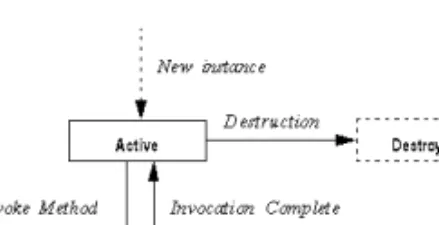
EAServer components in any component model follow the state diagram illustrated in this figure:
Figure 2-1: States in the EAServer component life cycle
The state transitions are as follows:
• New instance The EAServer runtime allocates a new instance of the component. The instance remains idle in the instance pool waiting for the first method invocation.
• Activation Activation prepares a component instance for use by a client. Once an instance is activated, it is bound to one client and can service no other client until it has been deactivated. If a component is transactional, activation also indicates the beginning of the instance’s participation in a transaction.
• In method In response to a method invocation request from the client, the EAServer runtime calls the corresponding method in the component. The next state depends on which of the transaction state primitives the method calls before returning. (For Java components, the state transition also depends on whether the method returns with an uncaught exception.) See “Using transaction state primitives” on page 16 for more information.
• Deactivation Deactivation indicates that the component is no longer bound to the client. Methods can call either the completeWork or
rollbackWork transaction state primitives to cause explicit deactivation of the instance. As discussed in “Using transaction state primitives” on page 16, these primitives also affect the transaction’s outcome. Deactivation can also occur automatically, under any of the following circumstances: • If the instance is participating in a transaction, the instance is
deactivated when the transaction commits, rolls back, or times out. • If you have configured the component’s Instance Timeout property to
a finite setting, an instance is deactivated if the time between consecutive method calls exceeds the timeout value. “CORBA component property descriptions” on page 45 describes how to configure this property.
If an exception occurs in a user transaction, you must call rollbackWork
after catching the exception; otherwise, a transaction deadlock may occur in the database, which can cause client applications to fail.
• Destruction Destruction occurs if the component instance cannot be recycled. “Supporting instance pooling in your component” on page 9 describes how to ensure instance reuse.If the component cannot be reused, deactivation is followed by destruction of the instance.
Component life cycles
The EAServer component life cycle allows component instances to be recycled; idle component instances can be cached when idle and bound to the service of individual clients only as needed. If your component has been coded to support early deactivation, a client holding a reference to the component’s stub or proxy object may be serviced by several different instances of the component. After each deactivation, the next method invocation causes an instance to be activated and bound to the client. Overall server scalability is increased because a new instance does not have to be instantiated each time a client invokes a method.
Stateful versus stateless components
A component that can remain active between consecutive method invocations is called a stateful component. A component that is deactivated after each method call and that supports instance pooling is said to be a stateless
component. Typically, an application built with stateless components offers
the greatest scalability.
Stateful components A stateful component remains active across method calls. EAServer wraps stateful CORBA components with an EJB stateful session bean. To run a CORBA component as stateful, the Stateful Session Bean (com.sybase.jaguar.component.tx_vote) property must be set to true–see “CORBA component property descriptions” on page 45.
Since deactivation happens at the mercy of client applications, you may wish to configure the Passivation Timeout property for stateful components so that a client cannot monopolize a component instance indefinitely. See “CORBA component property descriptions” on page 45 for more information.
Stateless components A is stateless if you disable the component’s Stateful Session Bean property (com.sybase.jaguar.component.tx_vote) —see Table 4-2 on page 46. You can also set the component’s
com.sybase.jaguar.component.tx_vote property to false in an Ant user configuration file. Alternatively, you can implement the component so that it calls either completeWork or rollbackWork in every method.:
Stateless components cannot use instance-specific data to accumulate data between method invocations. Some situations require that you accumulate data across method invocations. For example, a PurchaseOrder component might have an addItem() method that is called repeatedly to specify the contents of an order. In lieu of instance-specific data, you can use one of these alternatives to accumulate data:
• Accumulate data in a remote database Use connection caching and database commands to accumulate data in a remote database. This is the preferred technique. If you deploy your component to a cluster, it may run on multiple servers and the database provides a central location available from all servers.
• Accumulate data in the client Create a data structure that is passed to each method invocation and contains all accumulated data. This technique is only practical if the amount of data is small. Sending large amounts of data over the network will degrade performance.
• Accumulate data in a file If the accumulated data is small and
represented by simple data structures, you can store the data in a local file.
Supporting early deactivation in your component
Early deactivation prevents a client application from tying up the resources (such as connections) that are associated with a component instance.
To support early deactivation in CORBA and PowerBuilder components you can use one of these methods:
• Use a stateless component, which deactivates the component instance after each method invocation—see “Stateful versus stateless components” on page 8.
• In a stateful component, configure the number of seconds an active component instance can remain idle before the client’s proxy becomes invalid—see “Passivation Timeout” in Table 4-2 on page 46.
• Code your component to call one of the completeWork or rollbackWork
transaction state primitives to cause explicit deactivation of the instance. This technique is useful when your design requires deactivation to occur after some, but not all, method invocations. If the component is
transactional, the completeWork and rollbackWork primitives also affect the outcome of the transaction in which the component is participating. See “Using transaction state primitives” on page 16 for more information.
Supporting instance pooling in your component
Instance pooling eliminates resource drain caused by repeated allocation of new component instances.
Component life cycles
For Java components, you can implement a life cycle interface to control whether the component instances are pooled. These interfaces also provide
activate and deactivate methods that are called to indicate state transitions in a component instance’s lifetime. See “Set transactional state” on page 158. For PowerBuilder components, you can enable the Pooling option on the PowerBuilder wizard that you use to create your component. You can then write event scripts that respond to changes in an instance’s life cycle. See the Application Techniques manual in the PowerBuilder documentation for more information.
For C and C++ components, you can enable instance pooling using the Management Console. See “CORBA component property descriptions” on page 45. This method also allows you to configure pooling for Java
components that do not implement the ServerBean or IObjectControl interfaces, respectively.
To support instance pooling, code that responds to activation events must restore the component to its initial state (that is, as if it were newly created). the Java canReuse interfaces have methods that allow an instance to selectively refuse pooling. For PowerBuilder components, you can script the canBePooled
event to selectively refuse pooling.
When the component Pooled option is set in the Management Console, the Java
canReuse method is not called, even if the component implements the
ServerBean interface.
Long versus short transactions
EASever supports both long and short transactions, which are initially associated with stateful and stateless components, respectively. Both long and short transactions begin when a client calls one of a component’s business methods, as long as the component’s tx_type property is set to neither “not_supported” nor “supports.” Table 4-2 on page 46 describes the allowable values for tx_type. The behavior of short transactions conforms to the J2EE specification. Support for long transactions may be deprecated in future versions of EAServer.
Long transactions
A long transaction is associated with a stateful CORBA component instance the first time a client invokes one of its business methods, subject to the value of tx_type. Clients need not perform any special transaction work. By default, long transactions are enabled for backward compatibility. To disable long transactions, change to the EAServer bin directory, and run:
configure long-transactions-off
If you disable long transactions, short transactions are used instead. To re-enable long transactions, run:
configure long-transactions-on
In EAServer versions earlier than 6.0, stateful CORBA components, whose
tx_vote property was set to true, had to call either JagCompleteWork or
JagRollbackWork to end a transaction. And a component timeout resulted in the server rolling back the active transaction..
Short transactions
A short transaction is associated with a stateless component when a client invokes one of its business methods. EAServer automatically ends the transaction upon completion of the business method. If the component calls no APIs, the transaction is committed (as if JagCompleteWork was called). Short transactions are always enabled.
EAServer’s transaction processing model
An EAServer transaction is a transaction whose boundaries and outcome are determined by EAServer. Components can be marked as transactional in the Management Console. If a component is transactional, the EAServer transaction manager ensures that the component’s third-tier database queries execute as part of a transaction. Multiple components can participate in an EAServer transaction; the EAServer transaction manager ensures that all database changes performed by the participating transactions are all committed or rolled back.
Transactions All transactions are defined by the ACID test:
• Atomic If a transaction is interrupted, all changes that the transaction has made are cancelled or rolled back.
EAServer’s transaction processing model
• Consistent A transaction produces results that preserve invariant properties.
• Isolated A transaction’s intermediate states cannot be monitored or changed by other transactions; transactions execute their results one after another.
• Durable The changes that a transaction completes are permanent.
How EAServer transactions work
In the Management Console, you can declare EAServer components to be transactional. When a component is transactional and uses the EAServer connection management feature, commands sent on a third-tier database connection are automatically performed as part of a transaction. Component methods can call EAServer’s transaction state primitives to influence whether EAServer commits or aborts the current transaction.
If long transactions are enabled for the server, the component life cycle is tightly integrated with EAServer’s transaction model. Component instances that participate in a transaction are not deactivated until the transaction ends or until the component indicates that its contribution to the transaction is over (that is, its work is done and ready for commit or that its work must be rolled back). An instance’s time in the active state corresponds to the beginning and end of its participation in a transaction.
Benefits of using EAServer transactions
The benefits of using transactions to group database updates are clear. You can easily code methods in a single component to implement transactions that run against a single data source. However, those methods may in turn be executed by another component, which itself is defining a transaction. In this situation, error recovery becomes difficult. For example, consider the following scenario in which an Enrollment component calls both Registrar and Billing components: A transaction involving
multiple components In the following figure, the Registrar and StudentBilling components:Enrollment.enroll() method calls methods in the • Registar.reserveSeat() checks that a seat is available. If so, it decrements
the count of available seats and adds the student to the course’s enrollment list. If no seats are available, reserveSeat() fails.
• StudentBilling.addToBill() checks that the student has a billable credit record. If so, addToBill() adds the course cost to the student’s bill for that semester. If the student has a credit problem (if, for example, she owes money for an overdue book), addToBill() fails.
Figure 2-2: An example EAServer transaction
To be correct, both the database update made by the Registrar and the update made by the StudentBilling components must occur, or neither must occur. In other words, if the student cannot be billed, the course’s available seats must not be changed. To handle this case, you could add logic to the enroll() method to undo changes (requiring an unreserveSeat() method in Registrar). However, as more components are added to the scenario, the logic needed to undo previous changes quickly becomes unmanageable. It is much easier to define all the participating components to use EAServer transactions. Then an error in any component can induce a rollback of all changes made by the other participating components before the error occurred.
By defining the participating components to use EAServer transactions, you can be sure that the work performed by the components that participate in a transaction occurs as intended.
Defining transactional semantics
The component and server properties and the component implementation determine how your CORBA component participates in transactions. ❖ Defining how a component participates in transactions
1 Specify the component’s transaction attribute. Each component has a transaction attribute that determines whether instances of the component participate in transactions. “Transaction type values” on page 52 describes the attribute settings and their meanings.
EAServer’s transaction processing model
2 If long transactions are enabled in the server, and your CORBA
component is stateful, code methods to call the EAServer transaction state primitives. Each method should call the appropriate transaction state primitive to reflect the state of the work that the component has contributed to the transaction. “Using transaction state primitives” on page 16 describes the state primitives in detail.
If long transactions are disabled or the CORBA component is stateless, transactions end when each business method returns. Each business method can call completeWork or rollbackWork to influence the transaction outcome. If neither is called, the completeWork behavior is the default.
Transaction coordinator
The Java transaction Service (JTS) transaction coordinator complies with the JTS and the X/Open Architecture (XA) standards. The JTS transaction coordinator integrates the functionality of the shared connection and JTS/JTA transaction modes, and uses two-phase commit to coordinate transactions among multiple databases.
Note To verify that your EAServer edition supports two-phase commit, check the server console or the $DJC_HOME/logs/<serverName>.log file.
Transactional component attribute
Components in EAServer have a transaction type property that indicates how a component participates in transactions. You can view and change a
component’s Transaction Type property using the Management Console. For PowerBuilder components, you can specify the attribute in the PowerBuilder wizards (doing so ensures that it is saved with the PowerBuilder project and not overwritten by redeployment). Allowable values are described in “Transaction type values” on page 52.
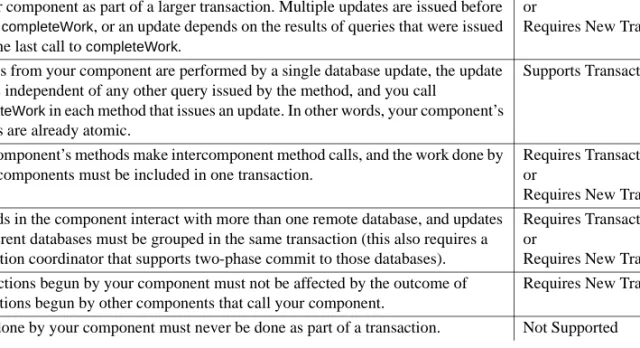
Table 2-1 lists design scenarios and the transaction type values that apply to each.
Table 2-1: Deciding on a transaction type value
For example, in the scenario illustrated in “A transaction involving multiple components” on page 12, the Enrollment component must be marked Requires Transaction or Requires New Transaction, since it calls methods in the
Registrar and StudentBilling components, and the work performed by the called components must be grouped in a single transaction. Both Registrar and
StudentBilling must be marked Supports Transaction or Requires Transaction so that their database updates can be grouped in the transaction begun by the
Enrollment component.
Transaction Not Supported is useful when your component performs updates to a noncritical database. For example, consider a component whose sole function is to log usage statistics to a remote database. Since usage statistics are not mission-critical data, you can choose Not Supported as the component’s transaction type value to ensure that the logging updates do not incur the overhead of using two-phase commit.
Determining when transactions begin
After a base client instantiates a transactional component, the first method invocation begins an EAServer transaction. This instance is said to be the root
instance of the transaction. If the root instance invokes methods in other
transactional components, those components join the existing transaction.
Design scenario
Applicable transaction type values
Your component interacts with remote databases, and its methods may be called by another component as part of a larger transaction. Multiple updates are issued before calling completeWork, or an update depends on the results of queries that were issued since the last call to completeWork.
Requires Transaction or
Requires New Transaction Updates from your component are performed by a single database update, the update
logic is independent of any other query issued by the method, and you call
completeWork in each method that issues an update. In other words, your component’s updates are already atomic.
Supports Transaction
Your component’s methods make intercomponent method calls, and the work done by called components must be included in one transaction.
Requires Transaction or
Requires New Transaction Methods in the component interact with more than one remote database, and updates
to different databases must be grouped in the same transaction (this also requires a transaction coordinator that supports two-phase commit to those databases).
Requires Transaction or
Requires New Transaction Transactions begun by your component must not be affected by the outcome of
transactions begun by other components that call your component.
Requires New Transaction Work done by your component must never be done as part of a transaction. Not Supported
EAServer’s transaction processing model
Use a stub or proxy object for the called component For transactions to occur with the intended semantics, you must perform intercomponent calls using a stub or proxy object for the called component. Do not invoke another component’s methods directly. For calls between PowerBuilder NVO components, use a PowerBuilder proxy object rather than calling the other NVO directly.
Using transaction state primitives
EAServer provides transaction state primitives that methods can call to direct the outcome of the current transaction. Each component model provides an interface containing methods for these primitives. Table 2-2 on page 17 lists the API mappings for each component type.
These methods end a component’s participation in a transaction (both cause the current instance to be deactivated):
• completeWork The component finished its work for the current transaction and should be deactivated when the method returns. This is the default behavior for stateless CORBA components; a component that calls no state primitive behaves as if this method were called. If long
transactions are disabled for the server, this is the default behavior for all CORBA components.
• rollbackWork The component cannot complete its work. Doom the current transaction and deactivate the instance when the method returns. These methods are used to maintain state after the method returns (they delay deactivation of the component instance):
• continueWork Continue this component’s participation in the current transaction after the method returns, and allow the transaction to be committed if the component is deactivated.
In stateful CORBA components with long transactions enabled in the server, this is the default behavior if a method calls no transaction primitive.
• disallowCommit Continue this component’s participation in the current transaction after the method returns, but roll back the transaction if the component is deactivated before calling another primitive besides
disallowCommit.
These primitives can be used to query the state of the transaction (if any) in which the method is executing:
• isInTransaction Query whether the current method is executing in the context of a transaction.
• isRollbackOnly Query whether the current transaction is doomed to be rolled back or is still viable.
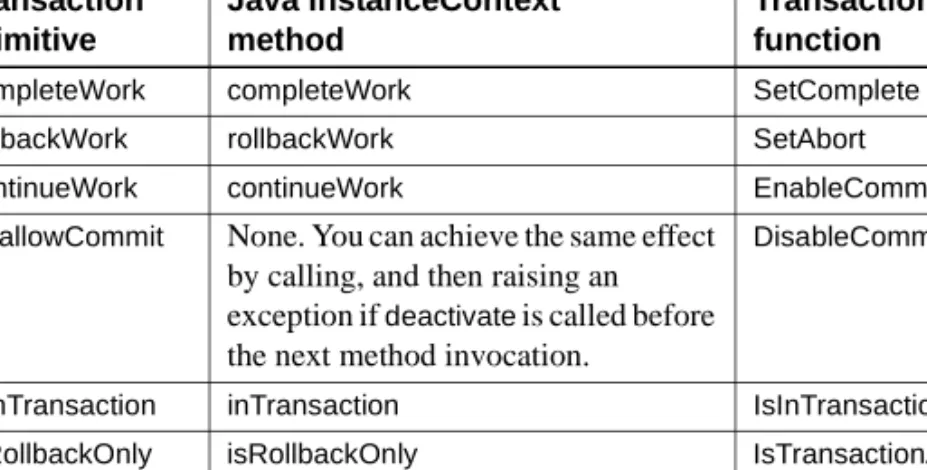
Table 2-2 describes how the transaction primitives are invoked in Java and PowerBuilder components. For information on the Java methods, see Chapter 1, “Java Classes and Interfaces,” in the EAServer API Reference. For information on the PowerBuilder TransactionServer object, see the Application Techniques manual in the PowerBuilder documentation and the PowerBuilder online help.
Table 2-2: Java and PowerBuilder transaction primitives
C and C++ components call the methods and routines in the following table to invoke transaction primitives. See the EAServer API Reference for
documentation of these methods and routines:
Transaction primitive Java InstanceContext method PowerBuilder TransactionServer function
completeWork completeWork SetComplete
rollbackWork rollbackWork SetAbort
continueWork continueWork EnableCommit
disallowCommit None. You can achieve the same effect by calling, and then raising an exception if deactivate is called before the next method invocation.
DisableCommit
isInTransaction inTransaction IsInTransaction
EAServer’s transaction processing model
Table 2-3: C and C++ transaction primitives
Any participating component can roll back the transaction by calling the
rollbackWork primitive; Java components can also cause a rollback by returning an unhandled exception. Only the action of the root component determines when EAServer commits the transaction. The transaction is committed when the root component returns with a state of completeWork and no participating component has set a state of disallowCommit.
You can use the transaction state primitives in any component; the component does not have to be declared transactional. Calling completeWork or
rollbackWork from methods causes early deactivation. “Supporting early deactivation in your component” on page 9 discusses how this feature can improve application performance.
Example
As discussed in “Benefits of using EAServer transactions” on page 12, EAServer transactions are most useful when your application uses intercomponent calls.
As an example, consider the scenario illustrated in “A transaction involving multiple components” on page 12. The pseudocode below shows the logic used to ensure that the work performed by the Registrar.reserveSeat() and
StudentBilling.addToBill() occurs within the same transaction.
In the Registrar component, the reserveSeat() method must check the number of seats. If there is space for the new student, then the method adds the student, decrements the count of available seats, and sets a state of completeWork. If a seat is not an available, the method calls rollbackWork to roll back the current transaction.
Here is the pseudocode for Registrar.reserveSeat():
check number of seats if enough seats
Transaction primitive C/C++ routine
completeWork JagCompleteWork rollbackWork JagRollbackWork continueWork JagContinueWork disallowCommit JagDisallowCommit isInTransaction JagInTransaction isRollbackOnly JagIsRollbackOnly
decrement number of seats add student to enrollment list completeWork
else
rollbackWork end if
Thetransaction attribute for Registrar must be Requires Transaction so that the query for available seats and the update of available seats always occur in the same transaction.
In the StudentBilling component, the addToBill() method must verify the student’s credit. If the student does not already owe money, the method adds the cost to the semester bill and sets a state of completeWork. If the student owes money, the method calls rollbackWork to roll back the current transaction. Here is the pseudocode for StudentBilling.addToBill():
check student’s balance if balance > 0
add cost to bill debit balance completeWork else
rollbackWork end if
Thetransaction attribute for StudentBilling must be Requires Transaction so that the balance query, the billing calculation, and the debit of the student’s balance always occur in the same transaction.
In the Enrollment component, the enroll() method first calls
Registrar.reserveSeat(). After Registrar.reserveSeat() returns, the method checks whether the transaction is still viable using the isRollbackOnly primitive. If the transaction is viable, the method calls StudentBilling.addToBill(). Here is the pseudocode for Enrollment.enroll():
invoke Registrar.reserveSeat() if isRollbackOnly returns true
return else
invoke StudentBilling completeWork
endif
Thetransaction attribute for Enrollment must be Requires Transaction so that the work done by StudentBilling and Registrar occurs as a single transaction.
EAServer’s transaction processing model
Dynamic enlistment in bean-managed transactions
EAServer supports dynamic enlistment for bean-managed transactions, which allows you to create a connection in one method, use the connection in another method, and close the connection in a third method.
For a JDBC 2.0 shared connection (PooledConnection), the container manages the single connection’s enlistment and deenlistment in transactions.
For XA connections, the Object Transaction Service libraries need to know all the resources that will participate in a transaction when it starts. If you get an XAConnection before you start a transaction, EAServer enlists the
XAConnection in the transaction. If you start a transaction before you create an XAConnection, EAServer creates the connection and enlists it in the transaction.
Dynamic enlistment allows you to do this:
connection1 = ds1.getConnection(); // A user_transaction.begin(); // connection2 = ds2.getConnection(); connection3 = ds3.getConnection(); // B connection2.close(); // user_transaction.commit(); // C connection3.close(); connection1.close();
Where at these points, the following are true: A – connection1 is not part of any transaction.
B – connection1, connection2, and connection3 are part of the user_transaction.
C – connection1 and connection3 are not part of any transaction.
Earlier versions of EAServer required you to get and release connections within a single component method. In bean-managed transactions, you had to get and release a connection within the scope of a transaction.
You can get only one connection per resource. Each getConnection call for the same database returns the same connection.
Note XA performance diminishes when connections span across methods.
EAServer Transaction Manager
The EAServer Transaction Manager supports the specifications for the Java Transaction API (JTA) 1.0 and the OTS/XA standards. The Transaction Manager supports the integrated functionality of these transaction coordinators: shared connections, OTS/XA, and JTS/JTA, and includes: • Resource recovery and transaction logging
• Transaction interoperability • Resource manager
The EAServer Transaction Manager enables EAServer to control the scope and duration of transactions across multiple resource managers. It also provides the ability to synchronize transactions and to communicate with other transaction managers using CORBA OTS. Connections and resources are dynamically enlisted into a transaction when they are requested.
Two-phase commit ensures that all changes to recoverable resources (for example, multiple database servers) occur automically, and the failure of any resource to complete causes all other resources to undo changes. Two-phase commit consists of a prepare phase and an execution phase. In the prepare phase, the transaction coordinator validates that all resources are available. In the execution phase, the transaction coordinator executes all updates to the resources.
You can define components and component methods so that the transaction coordinator automatically handles transactions (implicit control). You can also write component and client code to manage transactions (explicit control). EAServer implements the javax.transaction.TransactionManager interface, which allows it to control transaction boundaries, and to manage the interaction between Java and Encina transaction objects.
EAServer Transaction Manager
EAServer’s implementation of the javax.transaction.Transaction interface enables it to manage a set of javax.transaction.xa.XAResource resources that participate in a transaction. To determine the boundaries and outcome for these transactions, EAServer uses the CosTransaction::Resource interface.
Resource recovery and transaction logging
Resource recovery is a configurable option that provides object persistence and recovery operations. Basic persistence is achieved by writing transactions to a transaction log that contains all the information necessary to re-create the transaction. Persistence is supported for the CosTransactions::Resource and
CosTransactions::Synchronization objects that are registered with the transaction. Recovery is supported for JDBC connectors and native type resources that are registered with EAServer. When EAServer starts, the recovery manager is called, which reads the transaction log and starts transaction recovery.
Note Recovery operations can be performed only for transaction logs that were created for EAServer version 5.0 or later.
A transaction log provides enhanced debugging and integrates with the standard EAServer logging functionality. Monitoring functionality is also provided, which allows you to use the Management Console to view statistics, such as the total number of committed transactions and the average duration of transactions.
When EAServer starts, the TransactionLogManager verifies the transaction log’s integrity, automatically does necessary repairs, then runs the transaction log defragmenter. This helps to allocate space for new transactions. The recovery manager passes transaction information to the
TransactionLogManager, which is responsible for storing and deleting the transaction record from the transaction log.
You can set the following recovery options on the Transactions tab of the Server Properties dialog box:
• Enable Recovery – check to enable.
• Recovery Log File Name – enter the name of the file in which to store the transaction log. You can specify a file name only, or an absolute path to a file. If you specify a file name only, the file is created in the logs subdirectory or your EAServe installation.
• Log File Size – enter the maximum file size.
Recovering XA resources registered by user components
In this version of EAServer, you cannot directly recover XA resources that are registered by user components. However, you can enable EAServer to accomplish this task by using the following technique:
1 Create a wrapper DataSource class; for example, WrapperDataSource. 2 WrapperDataSource.getXAConnection() returns an XAConnection class that
corresponds to the XA connection with the resource. 3 Create an XA-type data source, and set its class name to the
WrapperDataSource class that you created.
Once these steps are implemented, EAServer takes care of the recovery process. This is useful when using a third-party JMS service with XA resources.
Transaction interoperability
EAServer Transaction Manager provides transaction interoperability in accordance with the OTS specifications.
Since EAServer runs in JTS mode, it can share the transaction coordinator across multiple servers. If a transactional component on one server invokes a component method on another server, both components can participate in the same transaction. Also, a client can invoke components on multiple servers that all participate in the same transaction. This feature is useful for load balancing. Figure 2-3 illustrates a scenario in which a client calls a component method on Server A, which calls a component method on Server B. Server A and Server B use different databases. To ensure that all the database updates occur within the scope of a single transaction, EAServer passes the transaction context between servers.
EAServer Transaction Manager
Figure 2-3: Transaction interoperability
Figure 2-4 illustrates an example where a client calls components on multiple servers, which all participate in the same transaction. The client manages the transaction by calling component methods on each server and passing the transaction context.
Figure 2-4: Server to server
Resource manager
The EAServer Transaction Manager includes an integrated resource manager that supports JDBC 1.0, JDBC 2.0, connectors, and XA resources for both Java and C++. The resource manager allows you to dynamically register resources and synchronize coordinators in accordance with OTS specification for CosTransactions. The resource manager is based on the functionality of both the Java Connection Manager and the Jaguar Connection Manager, which allows you to easily integrate new and existing resources. In future EAServer versions, customers will be able to use the resource manager to create and configure resources that EAServer can use.
Enlisting XA resources with Transaction Manager
When EAServer is running in two-phase commit mode, which is the default for version 5.0 and later, you can enlist XA resources with EAServer Transaction Manager.
❖ Enlisting XA resources
To enlist an XA resource into a current EAServer transaction: 1 Get the instance of Transaction Manager:
javax.transaction.TransactionManager tm =
com.sun.jts.jta.TransactionManager.getTransactionManagerImpl();
2 Get the instance of the transaction:
javax.transaction.Transaction trans = tm.getTransaction();
3 Register the XA resource with the transaction:
trans.enlistResource(xaresource);