Database Tuning
Adaptive Server® Enterprise
15.0.2
DOCUMENT ID: DC00841-01-1502-01 LAST REVISED: March 2009
Copyright © 2009 by Sybase, Inc. All rights reserved.
This publication pertains to Sybase software and to any subsequent release until otherwise indicated in new editions or technical notes. Information in this document is subject to change without notice. The software described herein is furnished under a license agreement, and it may be used or copied only in accordance with the terms of that agreement.
To order additional documents, U.S. and Canadian customers should call Customer Fulfillment at (800) 685-8225, fax (617) 229-9845. Customers in other countries with a U.S. license agreement may contact Customer Fulfillment via the above fax number. All other international customers should contact their Sybase subsidiary or local distributor. Upgrades are provided only at regularly scheduled software release dates. No part of this publication may be reproduced, transmitted, or translated in any form or by any means, electronic, mechanical, manual, optical, or otherwise, without the prior written permission of Sybase, Inc.
Sybase trademarks can be viewed at the Sybase trademarks page at http://www.sybase.com/detail?id=1011207. Sybase and the marks listed are trademarks of Sybase, Inc. ® indicates registration in the United States of America.
Java and all Java-based marks are trademarks or registered trademarks of Sun Microsystems, Inc. in the U.S. and other countries. Unicode and the Unicode Logo are registered trademarks of Unicode, Inc.
All other company and product names mentioned may be trademarks of the respective companies with which they are associated. Use, duplication, or disclosure by the government is subject to the restrictions set forth in subparagraph (c)(1)(ii) of DFARS 52.227-7013 for the DOD and as set forth in FAR 52.227-19(a)-(d) for civilian agencies.
About This Book ... ix
CHAPTER 1 Controlling Physical Data Placement... 1
Improving performance by controling object placement... 2
Identifying poor object placement... 3
Using sp_sysmon while changing data placement... 4
Improving I/O performance ... 4
Spreading data across disks to avoid I/O contention ... 4
Isolating server-wide I/O from database I/O ... 5
Keeping transaction logs on a separate disk... 6
Mirroring a device on a separate disk ... 7
Using segments ... 8
Creating objects on segments ... 9
Separating tables and indexes ... 10
Splitting large tables across devices ... 10
Moving text storage to a separate device... 10
Partitioning tables for performance ... 11
How Adaptive Server distributes partitions on devices ... 11
Space planning for partitioned tables ... 12
Read-only tables ... 13
Read-mostly tables... 13
Tables with random data modification ... 14
Adding disks when devices are full ... 15
Adding disks when devices are full ... 15
Adding disks when devices are nearly full... 16
Maintenance issues and partitioned tables ... 18
Regular maintenance checks for partitioned tables ... 18
CHAPTER 2 Data Storage ... 21
Query optimization ... 21
Query processing and page reads ... 22
Adaptive Server pages ... 23
Data and index pages... 24
Large object (LOB) pages... 25
Extents... 25
Pages that manage space allocation... 26
Global allocation map pages ... 27
Allocation pages ... 27
Object allocation map pages ... 27
How OAM pages and allocation pages manage object storage 28 Page allocation keeps an object’s pages together ... 29
Data access using sysindexes and syspartitions... 29
Space overheads... 30
Number of columns and size ... 30
Number of rows per data page ... 35
Additional number of object and size restrictions ... 36
Tables without clustered indexes ... 36
Locking schemes ... 37
Select operations on heap tables ... 38
Inserting data into an allpages-locked heap table ... 39
Inserting data into a data-only-locked heap table ... 40
Deleting data from a heap table... 41
Updating data on a heap table... 42
How Adaptive Server performs I/O for heap operations ... 43
Maintaining heap tables... 44
Transaction log: a special heap table ... 45
Asynchronous prefetch and I/O on heap tables... 46
Caches and object bindings ... 47
Heap tables, I/O, and cache strategies... 47
Select operations and caching... 49
Data modification and caching... 49
CHAPTER 3 Setting Space Management Properties... 53
Reducing index maintenance ... 53
Advantages of using fillfactor... 54
Disadvantages of using fillfactor ... 55
Setting fillfactor values... 55
fillfactor examples ... 56
Using the sorted_data and fillfactor options... 59
Reducing row forwarding... 60
Default, minimum, and maximum values for exp_row_size... 60
Specifying an expected row size with create table ... 61
Adding or changing an expected row size ... 62
Setting a default expected row size server-wide ... 62
Displaying the expected row size for a table ... 63
Leaving space for forwarded rows and inserts ... 66
Extent allocation commands and reservepagegap... 66
Specifying a reserve page gap with create table ... 67
Specifying a reserve page gap with create index ... 68
Changing reservepagegap ... 68
reservepagegap examples ... 69
Choosing a value for reservepagegap... 70
Monitoring reservepagegap settings... 71
reservepagegap and sorted_data options ... 71
Using max_rows_per_page on allpages-locked tables ... 73
Reducing lock contention... 74
Indexes and max_rows_per_page... 75
select into and max_rows_per_page ... 75
Applying max_rows_per_page to existing data ... 75
CHAPTER 4 Table and Index Size ... 77
Determining the sizes of tables and indexes ... 78
Effects of data modifications on object sizes... 79
Using optdiag to display object sizes... 79
Advantages of optdiag ... 80
Disadvantages of optdiag ... 80
Using sp_spaceused to display object size ... 80
Advantages of sp_spaceused... 81
Disadvantages of sp_spaceused... 82
Using sp_estspace to estimate object size... 82
Advantages of sp_estspace... 84
Disadvantages of sp_estspace... 84
Using formulas to estimate object size ... 84
Factors that can affect storage size... 85
Storage sizes for datatypes ... 85
Tables and indexes used in the formulas ... 87
Calculating table and clustered index sizes for allpages-locked tables ... 87
Calculating the sizes of data-only-locked tables... 94
Other factors affecting object size ... 99
Very small rows ... 100
LOB pages... 101
Advantages of using formulas to estimate object size... 102
Disadvantages of using formulas to estimate object size ... 102
Running reorg on tables and indexes... 103
Creating and maintaining indexes ... 104
Configuring Adaptive Server to speed sorting ... 104
Dumping the database after creating an index ... 105
Creating an index on sorted data... 105
Maintaining index and column statistics ... 106
Rebuilding indexes ... 107
Creating or altering a database ... 108
Backup and recovery... 110
Local backups... 110
Remote backups... 110
Online backups ... 110
Using thresholds to prevent running out of log space... 111
Minimizing recovery time ... 111
Recovery order ... 111
Bulk-copy... 111
Parallel bulk-copy ... 112
Batches and bulk-copy ... 112
Slow bulk-copy... 113
Improving bulk-copy performance ... 113
Replacing the data in a large table ... 114
Adding large amounts of data to a table ... 114
Using partitions and multiple bulk-copy processes... 114
Impacts on other users ... 114
Database consistency checker... 115
Using dbcc tune (cleanup)... 115
Using dbcc tune on spinlocks ... 115
Determining the space available for maintenance activities... 116
Overview of space requirements ... 117
Checking space usage and space available... 117
Estimating the effects of space management properties... 120
If there is not enough space ... 121
CHAPTER 6 Temporary Databases... 123
How temporary database management affects performance... 123
Using temporary tables... 124
Hashed (#) temporary tables ... 124
Regular user tables... 125
Worktables... 126
Temporary databases... 126
Session-assigned temporary database ... 126
Using multiple temporary databases ... 127
Creating user temporary databases ... 127
Placing system tempdb... 129
Configuring user-created temporary databases ... 132
General guidelines... 132
Logging optimizations for temporary databases... 139
User log cache (ULC) ... 140
Audience This book is for system administrators who are configuring the physical properties of Adaptive Server™.
How to use this book • Chapter 1, “Controlling Physical Data Placement” – explains how to improve performance by controlling the location of tables and indexes.
• Chapter 2, “Data Storage” – describes how Adaptive Server stores data rows on pages, and how those pages are used in select and data modification statements when there are no indexes.
• Chapter 3, “Setting Space Management Properties” – describes the four major space management properties for controlling space usage: fillfactor, expected row size, reserve page gap, and max rows per page.
• Chapter 4, “Table and Index Size” – explains how to determine the current sizes of tables and indexes and how to estimate table size for space planning.
• Chapter 5, “Database Maintenance” – explains how maintenance activities can affect the performance of other Adaptive Server activities, and how to improve the performance of maintenance tasks. • Chapter 6, “Temporary Databases” – discusses the performance
issues associated with using temporary databases. Related documents The Adaptive Server Enterprise documentation set consists of:
• The release bulletin for your platform – contains last-minute information that was too late to be included in the books.
A more recent version of the release bulletin may be available on the World Wide Web. To check for critical product or document information that was added after the release of the product CD, use the Sybase Product Manuals Web site.
• The Installation Guide for your platform – describes installation, upgrade, and some configuration procedures for all Adaptive Server and related Sybase products.
• What’s New in Adaptive Server Enterprise? – describes the new features
in Adaptive Server version 15.0, the system changes added to support those features, and changes that may affect your existing applications. • ASE Replicator Users Guide – describes how to use the Adaptive Server
Replicator feature to implement basic replication from a primary server to one or more remote Adaptive Servers.
• Component Integration Services Users Guide – explains how to use the
Component Integration Services feature to connect remote Sybase and non-Sybase databases.
• The Configuration Guide for your platform – provides instructions for performing specific configuration tasks.
• Enhanced Full-Text Search Specialty Data Store User’s Guide – describes
how to use the Full-Text Search feature with Verity to search Adaptive Server data.
• Glossary – defines technical terms used in the Adaptive Server
documentation.
• Historical Server Users Guide – describes how to use Historical Server to
obtain performance information for SQL Server® and Adaptive Server. • Java in Adaptive Server Enterprise – describes how to install and use Java
classes as datatypes, functions, and stored procedures in the Adaptive Server database.
• Job Scheduler Users Guide – provides instructions on how to install and
configure, and create and schedule jobs on a local or remote Adaptive Server using the command line or a graphical user interface (GUI). • Messaging Service Users Guide – describes how to use Real Time
Messaging Services to integrate TIBCO Java Message Service and IBM WebSphere MQ messaging services with all Adaptive Server database applications.
• Monitor Client Library Programmers Guide – describes how to write
Monitor Client Library applications that access Adaptive Server performance data.
• Monitor Server Users Guide – describes how to use Monitor Server to
obtain performance statistics from SQL Server and Adaptive Server. • Performance and Tuning Series – is a series of books that explain how to
• Basics – contains the basics for understanding and investigating
performance questions in Adaptive Server.
• Improving Performance with Statistical Analysis – describes how
Adaptive Server stores and displays statistics, and how to use the set statistics command to analyze server statistics.
• Locking and Concurrency Control – describes how to use locking
schemes to improve performance, and how to select indexes to minimize concurrency.
• Monitoring Adaptive Server with sp_sysmon – describes how to use
sp_sysmon to monitor performance.
• Monitoring Tables – describes how to query Adaptive Server
monitoring tables for statistical and diagnostic information.
• Physical Database Tuning – describes how to manage physical data
placement, space allocated for data, and the temporary databases. • Query Processing and Abstract Plans – describes how the optimizer
processes queries and how to use abstract plans to change some of the optimizer plans.
• Quick Reference Guide – provides a comprehensive listing of the names
and syntax for commands, functions, system procedures, extended system procedures, datatypes, and utilities in a pocket-sized book (regular size when viewed in PDF format).
• Reference Manual – is a series of books with detailed Transact-SQL™
information:
• Building Blocks – discusses datatypes, functions, global variables,
expressions, identifiers and wildcards, and reserved words. • Commands – documents commands.
• Procedures – includes system procedures, catalog stored procedures,
system extended stored procedures, and dbcc stored procedures. • Tables – discusses system tables and dbcc tables.
• System Administration Guide –
• Volume 1 – provides an introduction to the basics of system
administration, including a description of configuration parameters, resource issues, character sets, sort orders, and instructions for diagnosing system problems. The second part of this book is an in-depth description of security administration.
• Volume 2 – includes instructions and guidelines for managing
physical resources, mirroring devices, configuring memory and data caches, managing multiprocessor servers and user databases, mounting and unmounting databases, creating and using segments, using the reorg command, and checking database consistency. The second half of this book describes how to back up and restore system and user databases.
• System Tables Diagram – illustrates system tables and their entity
relationships in a poster format. Full-size available only in print version; a compact version is available in PDF format.
• Transact-SQL Users Guide – documents Transact-SQL, the
Sybase-enhanced version of the relational database language. This manual serves as a textbook for beginning users of the database management system. This manual also contains descriptions of the pubs2 and pubs3 sample databases.
• Troubleshooting Series –
• Troubleshooting: Error Messages Advanced Resolutions – contains
troubleshooting procedures for problems you may encounter. The problems discussed here are the ones the Sybase Technical Support staff hear about most often.
• Troubleshooting and Error Messages Guide – contains detailed
instructions on how to resolve the most frequently occurring Adaptive Server error messages. Most of the messages presented here contain error numbers (from the master..sysmessages table), but some error messages do not have error numbers, and occur only in the Adaptive Server error log.
• Users Guide for Encrypted Columns – describes how to configure and use
encrypted columns with Adaptive Server.
• Using Adaptive Server Distributed Transaction Management Features –
explains how to configure, use, and troubleshoot Adaptive Server DTM features in distributed transaction processing environments.
• Using Sybase Failover in a High Availability System – provides
instructions for using Sybase Failover to configure an Adaptive Server as a companion server in a high availability system.
• Unified Agent and Agent Management Console – describes the Unified
Agent, which provides runtime services to manage, monitor, and control distributed Sybase resources.
• Utility Guide – documents the Adaptive Server utility programs, such as
isql and bcp, which are executed at the operating system level. • Web Services Users Guide – explains how to configure, use, and
troubleshoot Web services for Adaptive Server.
• XA Interface Integration Guide for CICS, Encina, and TUXEDO –
provides instructions for using the Sybase DTM XA interface with X/Open XA transaction managers.
• XML Services in Adaptive Server Enterprise – describes the Sybase native
XML processor and the Sybase Java-based XML support, introduces XML in the database, and documents the query and mapping functions that are available in XML services.
Other sources of
information Use the Sybase Getting Started CD, the SyBooks CD™, and the Sybase Product Manuals Web site to learn more about your product: • The Getting Started CD contains release bulletins and installation guides
in PDF format, and may also contain other documents or updated information not included on the SyBooks CD. It is included with your software. To read or print documents on the Getting Started CD, you need Adobe Acrobat Reader, which you can download at no charge from the Adobe Web site using a link provided on the CD.
• The SyBooks CD contains product manuals and is included with your software. The Eclipse-based SyBooks browser allows you to access the manuals in an easy-to-use, HTML-based format.
Some documentation may be provided in PDF format, which you can access through the PDF directory on the SyBooks CD. To read or print the PDF files, you need Adobe Acrobat Reader.
Refer to the SyBooks Installation Guide on the Getting Started CD, or the
README.txt file on the SyBooks CD for instructions on installing and
starting SyBooks.
• The Sybase Product Manuals Web site is an online version of the SyBooks CD that you can access using a standard Web browser. In addition to product manuals, you will find links to EBFs/Maintenance, Technical Documents, Case Management, Solved Cases, newsgroups, and the Sybase Developer Network.
To access the Sybase Product Manuals Web site, go to Product Manuals at http://www.sybase.com/support/manuals/.
Sybase certifications
❖ Finding the latest information on product certifications 1 Point your Web browser to Technical Documents at
http://www.sybase.com/support/techdocs/. 2 Click Certification Report.
3 In the Certification Report filter select a product, platform, and timeframe and then click Go.
4 Click a Certification Report title to display the report.
❖ Finding the latest information on component certifications 1 Point your Web browser to Availability and Certification Reports at
http://certification.sybase.com/.
2 Either select the product family and product under Search by Base Product; or select the platform and product under Search by Platform. 3 Select Search to display the availability and certification report for the
selection.
❖ Creating a personalized view of the Sybase Web site (including support pages)
Set up a MySybase profile. MySybase is a free service that allows you to create a personalized view of Sybase Web pages.
1 Point your Web browser to Technical Documents at http://www.sybase.com/support/techdocs/.
2 Click MySybase and create a MySybase profile. Sybase EBFs and
software maintenance
❖ Finding the latest information on EBFs and software maintenance 1 Point your Web browser to the Sybase Support Page at
http://www.sybase.com/support.
2 Select EBFs/Maintenance. If prompted, enter your MySybase user name and password.
3 Select a product.
4 Specify a time frame and click Go. A list of EBF/Maintenance releases is displayed.
Padlock icons indicate that you do not have download authorization for certain EBF/Maintenance releases because you are not registered as a Technical Support Contact. If you have not registered, but have valid information provided by your Sybase representative or through your support contract, click Edit Roles to add the “Technical Support Contact” role to your MySybase profile.
5 Click the Info icon to display the EBF/Maintenance report, or click the product description to download the software.
Conventions SQL is a free-form language. There are no rules about the number of words you can put on a line or where you must break a line. However, for readability, all examples and most syntax statements in this manual are formatted so that each clause of a statement begins on a new line. Clauses that have more than one part extend to additional lines, which are indented. Complex commands are formatted using modified Backus Naur Form (BNF) notation.
Table 1 shows the conventions for syntax statements that appear in this manual:
Table 1: Font and syntax conventions for this manual Element Example
Command names, procedure names, utility names, and other keywords display in sans serif font.
select sp_configure
Database names and datatypes are in sans serif font. master database Book names, file names, variables, and path names are
in italics.
System Administration Guide sql.ini file
column_name
$SYBASE/ASE directory
Variables—or words that stand for values that you fill in—when they are part of a query or statement, are in italics in Courier font.
select column_name
from table_name
where search_conditions
Type parentheses as part of the command. compute row_aggregate (column_name) Double colon, equals sign indicates that the syntax is
written in BNF notation. Do not type this symbol. Indicates “is defined as”.
::=
Curly braces mean that you must choose at least one of the enclosed options. Do not type the braces.
{cash, check, credit}
Brackets mean that to choose one or more of the enclosed options is optional. Do not type the brackets.
[cash | check | credit]
The comma means you may choose as many of the options shown as you want. Separate your choices with commas as part of the command.
• Syntax statements (displaying the syntax and all options for a command) appear as follows:
sp_dropdevice [device_name] For a command with more options:
select column_name from table_name where search_conditions
In syntax statements, keywords (commands) are in normal font and identifiers are in lowercase. Italic font shows user-supplied words. • Examples showing the use of Transact-SQL commands are printed like
this:
select * from publishers
• Examples of output from the computer appear as follows:
pub_id pub_name city state
--- --- --- ---
0736 New Age Books Boston MA
0877 Binnet & Hardley Washington DC
1389 Algodata Infosystems Berkeley CA
(3 rows affected)
In this manual, most of the examples are in lowercase. However, you can disregard case when typing Transact-SQL keywords. For example, SELECT,
Select, and select are the same.
Adaptive Server sensitivity to the case of database objects, such as table names, depends on the sort order installed on Adaptive Server. You can change case sensitivity for single-byte character sets by reconfiguring the Adaptive Server sort order. For more information, see the System Administration Guide. The pipe or vertical bar ( | ) means you may select only
one of the options shown.
cash | check | credit
An ellipsis (...) means that you can repeat the last unit as many times as you like.
buy thing = price [cash | check | credit] [, thing = price [cash | check | credit] ]... You must buy at least one thing and give its price. You may choose a method of payment: one of the items enclosed in square brackets. You may also choose to buy additional things: as many of them as you like. For each thing you buy, give its name, its price, and (optionally) a method of payment.
Accessibility
features This document is available in an HTML version that is specialized for accessibility. You can navigate the HTML with an adaptive technology such as a screen reader, or view it with a screen enlarger.
Adaptive Server HTML documentation has been tested for compliance with U.S. government Section 508 Accessibility requirements. Documents that comply with Section 508 generally also meet non-U.S. accessibility guidelines, such as the World Wide Web Consortium (W3C) guidelines for Web sites.
Note You might need to configure your accessibility tool for optimal use. Some screen readers pronounce text based on its case; for example, they pronounce ALL UPPERCASE TEXT as initials, and MixedCase Text as words. You might find it helpful to configure your tool to announce syntax conventions. Consult the documentation for your tool.
For information about how Sybase supports accessibility, see Sybase Accessibility at http://www.sybase.com/accessibility. The Sybase Accessibility site includes links to information on Section 508 and W3C standards.
If you need help Each Sybase installation that has purchased a support contract has one or more designated people who are authorized to contact Sybase Technical Support. If you cannot resolve a problem using the manuals or online help, please have the designated person contact Sybase Technical Support or the Sybase subsidiary in your area.
Placement
This chapter explains how to improve performance by controlling the location of tables and indexes.
To make the most of physical database tuning, understand these distinctions between logical and physical devices:
• The physical disk or physical device is the hardware that stores the data.
• A database device or logical device is all or part of a physical disk that has been initialized (with the disk init command) for use by Adaptive Server. A database device can be an operating system file, an entire disk, or a disk partition.
See the Installation Guide and the Configuration Guide for your platform for information about specific operating system constraints on disk and file usage.
• A segment is a named collection of database devices used by a database. The database devices that make up a segment can be located on separate physical devices.
Topic Page
Improving performance by controling object placement 2
Improving I/O performance 4
Partitioning tables for performance 11 Space planning for partitioned tables 12 Adding disks when devices are full 15 Maintenance issues and partitioned tables 18
Improving performance by controling object placement
• A partition is a subset of a table. Partitions are database objects that can be managed independently. You can split partitioned tables, so multiple tasks can access it simultaneously. You can place a partition on a specific segment. If each partition is on a different segment and each segment has its own database device, queries accessing these tables benefit from improved parallelism. See create table in the Reference Manual:
Commands and the Transact-SQL Users Guide for more information
about creating and using partitions.
Use sp_helpdevice, sp_helpsegment, and sp_helpartition to get more information about devices, segments, and partitions.
Improving performance by controling object placement
Adaptive Server allows you to control the placement of databases, tables, and indexes across physical storage devices, which can improve performance by equalizing the reads and writes to disk across many devices and controllers. For example, you can:
• Place database data segments on a specific device or devices, storing the database log on a separate physical device so that reads and writes to the log do not interfere with data access.
• Spread large, heavily used tables across several devices.
• Place specific tables or nonclustered indexes on specific devices. For example, you might place a table on a segment that spans several devices and its nonclustered indexes on a separate segment.
• Place the text and image page chain for a table on a separate device from the table. The table stores a pointer to the actual data value in the separate database structure, so each access to a text or image column requires at least two I/Os.
• Distribute tables evenly across partitions on separate physical disks to provide optimum parallel query performance and improve insert and
update performance.
For multiuser and multi-CPU systems that perform a lot of disk I/O, be especially aware of physical and logical device issues and the distribution of I/O across devices:
• Use enough physical devices, including disk controllers, to ensure physical bandwidth.
• Use an increased number of logical devices to ensure minimal contention for internal I/O queues.
• Determine and use a number of partitions that allows parallel scans and meets query performance goals.
Identifying poor object placement
Your system may benefit from more appropriately placed objects if: • Single-user performance is satisfactory, but response time increases
significantly when Adaptive Server executes multiple processes. • Access to a mirrored disk takes twice as long as access to an unmirrored
disk.
• Objects that are frequently accessed (“hot objects”) degrade the performance of queries that use the tables in which these objects are located.
• Maintenance activities take a long time.
• tempdb performance is affected if it shares disk space with other databases. Most system procedures and applications use tempdb as their workspace, and are adversely affected if tempdb shares the same disk with other databases.
• insert performance is poor on heavily used tables.
• Queries that run in parallel perform poorly, due to an imbalance of data pages on partitions or devices, or they run in serial, due to extreme imbalance.
If you experience problems due to disk contention and other problems related to object placement, check for and correct these issues:
• Random-access (I/O for data and indexes) and serial-access (log I/O) processes use the same disks.
• Database processes and operating system processes use the same disks. • Serial disk mirroring.
Improving I/O performance
Using sp_sysmon while changing data placement
Use sp_sysmon to determine whether data placement across physical devices is causing performance problems. Check the entire sp_sysmon output during tuning to verify how the changes affect all performance categories.
Pay special attention to the output associated with: • I/O device contentions
• All-pages locked heap tables • Last page locks on heaps • Disk I/O management
You can also use Monitor Server or the monitoring tables to help identify problems.
See Monitoring Adaptive Server with sp_sysmon and Monitoring Tables, which are both part of the Performance and Tuning Series.
Improving I/O performance
To improve I/O performance in Adaptive Server, try: • Spreading data across disks to avoid I/O contention • Isolating server-wide I/O from database I/O
• Separating data storage and log storage for frequently updated databases • Keeping random disk I/O away from sequential disk I/O
• Mirroring devices on separate physical disks
• Using partitions to distribute table data across devices
Spreading data across disks to avoid I/O contention
Avoid bottlenecks by spreading data storage across multiple disks and multiple disk controllers.
• Place databases with critical performance requirements on separate devices. If possible, also use separate controllers than those used by other databases. Use segments as needed for critical tables, and partitions as needed for parallel queries.
• Put heavily used and frequently joined tables on separate disks. • Use segments to place tables and indexes on their own disks.
Avoiding physical contention in parallel join queries
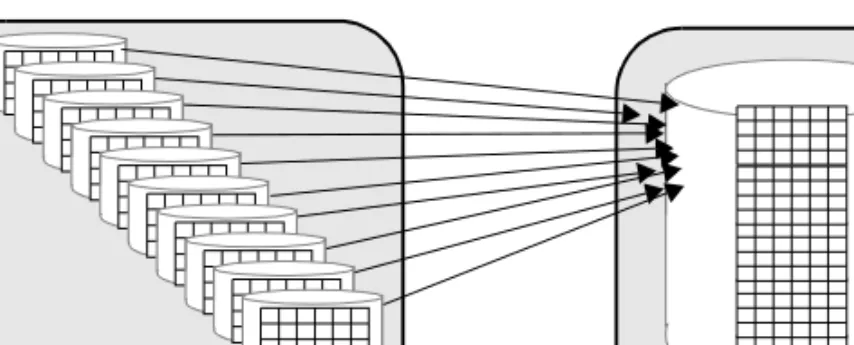
Figure 1-1 illustrates a join of two tables, orders_tbl and stock_tbl. There are 10 worker process available: orders_tbl has 10 partitions on 10 different physical devices and is the outer table in the join; stock_tbl is nonpartitioned. The worker processes have a problem with access contention on orders_tbl, but each worker process must scan stock_tbl. There may be physical I/O contention if the entire table does not fit into cache. In the worst case, 10 worker processes attempt to access the physical device on which stock_tbl resides. Avoid physical I/O contention by creating a named cache that contains the entire table stock_tbl. Another way to reduce or eliminate physical I/O contention is to partition both
orders_tbl and stock_tbl and distribute those partitions on different physical devices.
Figure 1-1: Joining tables on different physical devices
Isolating server-wide I/O from database I/O
Place system databases with heavy I/O requirements (for example, tempdb and
sybsecurity) on physical disks and controllers other than where application databases reside.
Improving I/O performance
tempdb
It is a heavily used database that affects all processes on the server and is used by most system procedures. It is automatically installed on the master device. If more space is needed, you can expand tempdb to other devices. If you expect
tempdb to be quite active, place it on a disk—the fastest available—that is not used for other important database activity. .
On some UNIX systems, I/O to operating system files is significantly faster than I/O to raw devices. tempdb is always re-created, rather than recovered, after a shutdown; therefore, you may be able to improve performance by moving tempdb onto an operating system file instead of a raw device. Test this on your own system.
See Chapter 6, “Temporary Databases,” for more placement advice for
tempdb.
sybsecurity
Once enabled, the auditing system performs frequent I/O to the sysaudits table in the sybsecurity database. If your applications perform a significant amount of auditing, place sybsecurity on a disk that is used for tables where fast response time is not critical. Ideally, place sybsecurity on its own device. Use the threshold manager to monitor free space to avoid suspending user transactions if the audit database fills up. See Chapter 16, “Managing Free Space with Thresholds,” In System Administration Guide, Volume 2 for information about determing appropriate thresholds.
Keeping transaction logs on a separate disk
Place transaction logs on a separate segment, preventing the logs from competing with other objects for disk space. Placing the logs on a separate physical disk:
• Improves performance by reducing I/O contention
• Ensures full recovery in the event of hard disk failures on the data device • Speeds recovery, since simultaneous asynchronous prefetch requests can read ahead on both the log device and the data device without contention Both create database and alter database require you to use with override before you can place the transaction log on the same device as the data.
The log device can experience significant I/O on systems with heavy update activity. Adaptive Server writes log pages to disk when transactions commit, and may need to read log pages into memory to replace deferred updates with deferred operations.
When log and data are on the same database devices, the extents allocated to store log pages are not contiguous; log extents and data extents are mixed. When the log is on its own device, Adaptive Server allocates the extents sequentially, thus reducing disk head travel and seeks, and maintaining a higher I/O rate.
Adaptive Server buffers log records for each user in a user log cache, which reduces contention for writing to the log page in memory. If log and data are on the same devices, user log cache buffering is disabled, which results in serious performance degradation on SMP systems.
See Chapter 6, “Overview of Disk Resource Issues,” in the System
Administration Guide: Volume 1.
Mirroring a device on a separate disk
Disk mirroring is a high availability feature that allows Adaptive Server to duplicate the contents of an entire database device.
See Chapter 2, “Disk Mirroring,” in the System Administration Guide,
Volume 2.
If you mirror data, put the mirror on a separate physical disk from the device that it mirrors, minimizing mirroring’s performance impact. Disk hardware failure often results in whole physical disks being lost or unavailable If you do not use mirroring, or use operating system mirroring, you may see slight performance improvements by setting disable disk mirroring
configuration paramter to 1.
Mirroring can increase the time taken to complete disk writes, since the writes are executed on both disks, either serially or simultaneously. Disk mirroring has no effect on the time required to read data.
Mirrored devices use one of two modes for disk writes:
• Nonserial mode – can require more time to complete a write than an unmirrored write requires. In nonserial mode, both writes start at the same time, and Adaptive Server waits for both to complete. The time to complete nonserial writes is the greater of the two I/O times.
Using segments
• Serial mode – increases the time required to write data even more than nonserial mode. Adaptive Server starts the first write and waits for it to complete before starting the second write. The time required is the sum of the two I/O times.
Using serial mode
Despite its performance impact, serial mode is the default mode because it guards against failures that occur while a write is taking place.
Since serial mode waits until the first write is complete before starting the second write, a single failure cannot affect both disks. Using nonserial mode improves performance, but you risk losing data if a failure occurs that affects both writes.
Warning! If your mirrored database system must be absolutely reliable, use serial mode.
Using segments
A segment is a label that points to one or more logical devices. Use segments to improve throughput by:
• Splitting large tables across disks, including tables that are partitioned for parallel query performance
• Separating tables and their nonclustered indexes across disks • Separating table partitions and index across the disks
• Placing the text and image page chain on a disk other than the one on which the table resides, where the pointers to the text values are stored In addition, you can use segments to control space usage:
• Tables or partitions cannot grow larger than their segment allocation. You can use segments to limit the table or partition size.
• Tables or partitions on other segments cannot use the space allocated to objects on another segment.
Creating objects on segments
Each database can use up to 32 segments, including the 3 segments that are created by the system (system, log segment, and default) when a database is created.
Tables and indexes are stored on segments. If you execute create table or create index without specifying a segment, the objects are stored on the default
segment for the database. Naming a segment in either of these commands creates the object on that segment. You can use the sp_placeobject system procedure to assign all future space allocations to take place on a specified segment, so tables can span multiple segments.
A system administrator must initialize the device with disk init and allocate the device to the database. Alternatively, the database owner can do this using
create database or alter database.
Once the devices are available to the database, the database owner or object owners can create segments and place objects on the devices.
When you create a user-defined segment, you can place tables, indexes, and partitions on that segment using the create table or create index commands:
create table tableA(...) on seg1
create nonclustered index myix on tableB(...) on seg2
This example creates the table fictionsales, which is partitioned by range according to values in the date column:
create table fictionsales (store_id int not null, order_num int not null, date datetime not null) partition by range (date)
(q1 values <= ("3/31/2005") on seg1, q2 values <= ("6/30/2005") on seg2, q3 values <= ("9/30/2005") on seg3, q4 values <= ("12/31/2005") on seg4)
By controlling the location of critical tables, you can arrange for these tables and indexes to be spread across disks.
Using segments
Separating tables and indexes
Use segments to place tables on one set of disks and nonclustered indexes on another set of disks. You cannot place a clustered index on a different segment than its data pages. When you create a clustered index using the on
segment_name clause, the entire table is moved to the specified segment, and
the clustered index tree is built on that segment.
You can improve performance by placing nonclustered indexes on a separate segment.
Splitting large tables across devices
Segments can span multiple devices, so you can use them to spread data across one or more disks. This can help balance the I/O load for large and busy tables. For parallel queries, it is essential that you create segments across multiple devices for I/O parallelism during partitioned-based scans.
See Chapter 8, “Creating and Using Segments,” in the System Administration
Guide, Volume 2.
Moving text storage to a separate device
When a table includes a text, image, or Java off-row datatype, the table itself stores a pointer to the data value. The actual data is stored on a separate linked list of pages called a large object chain (LOB).
Writing or reading a LOB value requires at least two disk accesses, one to read or write the pointer, and one for subsequent reads or writes for the data. If your application frequently reads or writes LOB values, you can improve
performance by placing the LOB chain on a separate physical device. Isolate LOB chains on disks that are not busy with other application-related table or index access.
When you create a table with LOB columns, Adaptive Server creates a row in
sysindexes and syspartitions for the object that stores the LOB data. The value in the name column is the table name prefixed with a “t”; the indid is always 255. If you have multiple LOB columns in a single table, there is only one object used to store the data. By default, this object is placed on the same segment as the table.
Use sp_placeobject to move all future allocations for the LOB columns to a separate segment.
Partitioning tables for performance
Partitioning a table can improve performance for several types of processes. • Partitioning allows parallel query processing to access each partition of the
table. Each worker process in a partitioned-based scan reads a separate partition.
• Partitioning allows you to load a table in parallel with bulk copy. For more information on parallel bcp, see the Utility Programs manual. • Partitioning allows tou to distribute a table’s I/O over multiple database
devices.
• Semantic partitioning (range-, hash- and list-partitioned tables) improves response time because the query processor eliminates some partitions. • Partitioning provides multiple insertion points for a heap table. The tables you choose to partition and the type of partition depend on the performance issues you encounter and the performance goals for the queries on the tables.
See Chapter 10, “Partitioning Tables and Indexes” in the Transact-SQL Users
Guide book for more information about, and examples using and creating
partitions.
How Adaptive Server distributes partitions on devices
In versions earlier than 15.0, Adaptive Server automatically maintained an affinity between partitions and devices when you created multiple partitions on a segment that was mapped to multiple database devices. This is no longer the case in Adaptive Server 15.0 and later; all partitions are created on the first device. To achieve affinity between partitions and devices:
1 Create a segment for a particular device. 2 Explicitly place a partition on that segment.
You can create as many as 29 user segments, and you must use the alter table
syntax from Adaptive Server version 15.0 and later to create the segments, because the earlier syntax (alter table t partition 20) does not support explicit placement of partitions on segments.
Achieve the best I/O performance for parallel queries by matching the number of partitions to the number of devices in the segment.
Space planning for partitioned tables
You can partition tables that use the text, image, or Java off-row data types. However, the columns themselves are not partitioned—they remain on a single page chain.
RAID devices and partitioned tables
A striped redundant array of independent disks (RAID) device can contain multiple physical disks, but Adaptive Server treats such a device as a single logical device. You can use multiple partitions on the single logical device and achieve good parallel query performance.
To determine the optimum number of partitions for your application mix, start with one partition for each device in the stripe set. Use your operating system utilities (vmstat, sar, and iostat on UNIX; Performance Monitor on Windows) to check utilization and latency.
To check maximum device throughput, use select count(*), using the index
table_name clause to force a table scan if a nonclustered index exists. This
command requires minimal CPU effort and creates very little contention for other resources.
Space planning for partitioned tables
When you are planning for partitioned tables, consider how to maintain: • Load balance across the disk for partition-based scan performance and for
I/O parallelism
• Cclustered indexes, which require approximately 120% of the space occupied by the table to drop and re-create the index or to run reorg rebuild
The space planning decisions you make depend on the: • Availability of disk resources for storing tables
• Nature of your application mix and of the incoming data (for semantic-partitioned tables)
Estimate the frequency with which your partitioned tables need maintenance: some applications need indexes to be re-created frequently to maintain balance, while others need little maintenance.
For those applications that need frequent load balancing for performance, having space in which to re-create a clustered index or run reorg rebuild
provides fastest and easiest results. However, since creating clustered indexes requires copying the data pages, the space available on the segment must be equal to approximately 120% of the space occupied by the table.
See “Determining the space available for maintenance activities” on page 116. The following descriptions of read-only, read-mostly, and random data modification provide a general picture of the issues involved in object placement and in maintaining partitioned tables.
See Chapter 10, “Partitioning Tables and Indexes” in the Transact-SQL Users
Guide for information about the specific tasks required during maintenance.
Read-only tables
Tables that are read-only, or that are rarely changed, can completely fill the space available on a segment, and do not require maintenance. If a table does not require a clustered index, you can use parallel bulk copy (parallel bcp) to completely fill the space on the segment.
If a clustered index is needed, the table’s data pages can occupy up to 80% of the space in the segment. The clustered index tree requires about 20% of the space used by the table.
This space requirement varies, depending on the length of the key. Initially, loading the data into the table and creating the clustered index requires several steps, but once you have performed these steps, maintenance is minimal.
Read-mostly tables
The guidelines above for read-only tables also apply to read-mostly tables with very few inserts. The only exceptions are as follows:
• If there are inserts to the table, and the clustered index key does not balance new space allocations evenly across the partitions, the disks underlying some partitions may become full, and new extent allocations are made to a different physical disk. This process is called extent stealing.
Space planning for partitioned tables
In huge tables spread across many disks, a small percentage of allocations to other devices is not a problem. Detect extent stealing by using
sp_helpsegment to check for devices that have no space available, and by using sp_helpartition to check for partitions that have disproportionate numbers of pages.
If the imbalance in partition size leads to degradation in parallel query response times or optimization, you may want to balance the distribution by using one of the methods described in Chapter 10, “Partitioning Tables and Indexes” in the Transact-SQL Users Guide.
• If the table is a heap, round-robin-partitioned table, the random nature of heap table inserts should keep partitions balanced.
Take care with large bulk copy in operations. However, if the table is a semantic partitioned table, consider changing the partition condition using
alter table... partition by for appropriate load balance.
You can use parallel bulk copy (parallel bcp) to send rows to the partition with the smallest number of pages to balance the data across the partitions. See Chapter 4, “Using bcp to Transfer Data to and from Adaptive Server,” in the Utility Guide.
Tables with random data modification
Tables with clustered indexes that experience many inserts, updates, and deletes over time tend to lead to data pages that are approximately 70 to 75% full. This can lead to performance degradation in several ways:
• More pages must be read to access a given number of rows, requiring additional I/O and wasting data cache space.
• On tables that use allpages locking, the performance of large I/O and asynchronous prefetch suffers because the page chain crosses extents and allocation units.
Buffers brought in by large I/O may be flushed from cache before all of the pages are read. The asynchronous prefetch look-ahead set size is reduced by cross-allocation unit hops while following the page chain. For tables that use data-only locking, large I/O and asynchronous prefetch performance suffers because the forward pages cross extents and allocation units.
Once the fragmentation starts to degrade on application performance, perform maintenance, keeping in mind that dropping and recreating clustered indexes requires 120% of the space occupied by the table.
If space is unavailable, maintenance becomes more complex and takes longer. The best, and often cheapest, solution is to add enough disk capacity to provide room for the index creation.
Adding disks when devices are full
Simply adding disks and recreating indexes when partitions are full may not solve load-balancing problems. If a physical device that holds a partition becomes completely full, the data-copy stage of recreating an index cannot copy data to that physical device.
If a physical device is almost completely full, recreating the clustered index does not always succeed in establishing a good load balance.
Adding disks when devices are full
The result of creating a clustered index when a physical device is completely full is that two partitions are created on one of the other physical devices. devices2 and device3 are completely full, as shown in Figure 1-2.
Figure 1-2: A table with three partitions on three devices
In the example above, adding two devices, repartitioning the table to use five partitions, and dropping and recreating the clustered index produces the following results:
Data Empty
Adding disks when devices are full
Figure 1-3 shows these results.
Figure 1-3: Devices and partitions after create index
The only solution, once a device becomes completely full, is to bulk-copy the data out, truncate the table, and copy the data into the table again.
Adding disks when devices are nearly full
If a device is nearly full, recreating a clustered index does not balance data across devices. Instead, the device that is nearly full stores a small portion of the partition, and the other space allocations for the partition steals extents on other devices. Figure 1-4 shows a table with nearly full data devices.
Device 1 One partition, approximately 40% full.
Devices 2 and 3 Empty. These devices had no free space when create index
started, so a partition for the copy of the index cannot be created on the device.
Devices 4 and 5 Each device has two partitions, and each is 100% full.
device1 device2 device3 device4 device5
Data Empty
Figure 1-4: Partitions almost completely fill the devices
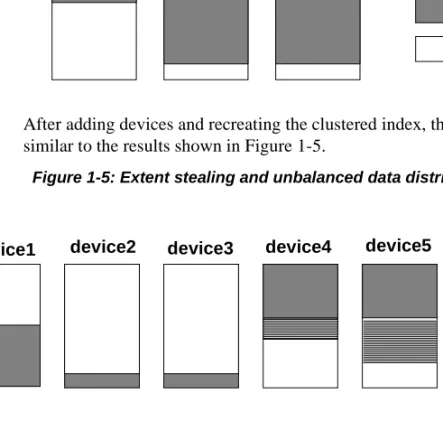
After adding devices and recreating the clustered index, the result might be similar to the results shown in Figure 1-5.
Figure 1-5: Extent stealing and unbalanced data distribution
Once the partitions on device2 and device3 use the small amount of space available, they start stealing extents from device4 and device5.
Re-creating the indexes another time may lead to a more balanced distribution. However, if one of the devices is nearly filled by extent stealing, re-creating indexes again does not solve the problem.
Using bulk copy to copy the data out and back in again is most effective solution to this form of imbalance.
To avoid situations such as these, monitor space usage on the devices, and add space early.
Data Empty
device1 device2 device3
Data Empty
device1 device3 device5
Stolen pages
Maintenance issues and partitioned tables
Maintenance issues and partitioned tables
Maintenance activity requirements for partitioned tables depend on the frequency and type of updates performed on the table.
Partitioned tables that require little maintenance include:
• Tables that are read-only or that experience very few updates. For tables that have few updates, only periodic checks for balance are required. • Tables where inserts are well-distributed across the partitions. Random
inserts to partitioned heap tables and inserts that are evenly distributed due to a clustered index key that places rows on different partitions do not develop skewed distribution of pages.
If data modifications lead to space fragmentation and partially filled data pages, you may need to recreate the clustered index.
• Heap tables where inserts are performed by bulk copy. You can use parallel bulk copy to direct the new data to specific partitions to maintain load balancing.
Partitioned tables that require frequent monitoring and maintenance include tables with clustered indexes that tend to direct new rows to a subset of the partitions. An ascending key index is likely to require more frequent maintenance.
Regular maintenance checks for partitioned tables
Routine monitoring for partitioned tables should include the following types of checks, in addition to routine database consistency checks:
• Use sp_helpartition to check the balance on partitions. If some partitions are significantly larger or smaller than the average, recreate the clustered index to redistribute data.
• Use sp_helpsegment to check the balance of space on underlying disks. • If you recreate the clustered index to redistribute data for parallel query
performance, check for devices that are nearing 50% full. Adding space before devices become too full avoids the complicated procedures described earlier in this chapter.
• Use sp_helpsegment to check the space available as free pages on each device, or use sp_helpdb to check for free kilobytes.
• Your index key tends to assign inserts to a subset of the partitions. • Delete activity tends to remove data from a subset of the partitions, leading
to I/O imbalance and partition-based scan imbalances.
• The table has many inserts, updates, and deletes, leading to many partially filled data pages. This condition leads to wasted space, both on disk and in the cache, and increases I/O because more pages need to be read for many queries.
This chapter explains how Adaptive Server stores data rows on pages, and how those pages are used in select and data modification statements when there are no indexes. This chapter lays the foundation for understanding how to improve Adaptive Server performance by creating indexes, tuning queries, and addressing object storage issues.
Query optimization
The Adaptive Server optimizer attempts to find the most efficient access path to your data for each table in a query by estimating the cost of the physical I/O needed to access the data, and the number of times each page must be read while in the data cache.
In most database applications, there are many tables in the database, and each table has one or more indexes. Depending on whether you have created indexes, and what kind of indexes you have created, the optimizer’s access method options include:
• Table scan – reading all the table’s data pages, sometimes hundreds or thousands of pages.
• Index access – using the index to find only the data pages needed, sometimes as few as three or four page reads in all.
• Index covering – using only an index to return data, without reading the actual data rows, requiring only a fraction of the page reads required for a table scan.
Topic Page
Query optimization 21
Adaptive Server pages 23
Pages that manage space allocation 26
Space overheads 30
Tables without clustered indexes 36
Query optimization
Using the appopriate indexes on tables should allow most queries to access the data they need with a minimum number of page reads.
Query processing and page reads
Most of a query’s execution time is spent reading data pages from disk. Therefore, most performance improvement comes from reducing the number of disk reads needed for each query.
When a query performs a table scan, Adaptive Server reads every page in the table because no indexes are available to help it retrieve the data. The query may have poor response time, because disk reads take time. Queries that incur costly table scans also affect the performance of other queries on your server. Table scans can increase the time other users have to wait for a response, since they use system resources such as CPU time, disk I/O, and network capacity. Table scans use a large number of disk reads (I/Os) for a given query. When you have become familiar with the access methods, tuning tools, the size and structure of your tables, and the queries in your applications, you should be able to estimate the number of I/O operations a given join or select operation will perform, given the indexes that are available.
If you know what the indexed columns on your tables are, and the table and index sizes, you can often look at a query and predict its behavior. For different queries on the same table, you might be able to draw these conclusions: • This query returns a single row or a small number of rows that match the
where clause condition.
The condition in the where clause is indexed; it should perform two to four I/Os on the index and one more to read the correct data page.
• All columns in the select list and where clause for this query are included in a nonclustered index. This query will probably perform a scan on the leaf level of the index, about 600 pages.
Adding an unindexed column to the select list would force the query to scan the table, which would require 5000 disk reads.
• No useful indexes are available for this query; it is going to do a table scan, requiring at least 5000 disk reads.
This chapter describes how tables are stored, and how access to data rows takes place when indexes are not being used.
Chapter 5, “Indexes,” in Performance and Tuning Series: Locking and
Concurrency Control describes access methods for indexes. Chapter 3,
“Setting Space Management Properties” and Chapter 4, “Table and Index Size” explain how to determine which access method is being used for a query, the size of the tables and indexes, and the amount of I/O a query performs. These chapters provide a basis for understanding how the optimizer models the cost of accessing the data for your queries.
Adaptive Server pages
These types of pages store database objects: • Data pages – store the data rows for a table.
• Index pages – store the index rows for all levels of an index.
• Large object (LOB) pages – store the data for text and image columns, and for Java off-row columns.
Adaptive Server versions 12.5 and later do not use the buildmaster binary to build the master device. Instead, Sybase has incorporated the buildmaster
functionality in the dataserver binary.
The dataserver command allows you to create master devices and databases with logical pages of size 2K, 4K, 8K, or 16K. Larger logical pages allow you to create larger rows, which can improve your performance because Adaptive Server accesses more data each time it reads a page. For example, a 16K page can hold 8 times the amount of data as a 2K page, an 8K page holds 4 times as much data as a 2K page, and so on, for all the sizes for logical pages. The logical page size is a server-wide setting; you cannot have databases with varying size logical pages within the same server. All tables are automatically appropriately sized so that the row size is no greater than the current page size of the server. That is, rows cannot span multiple pages.
See the Utility Guide for specific information about using the dataserver
command to build your master device.
Adaptive Server may be required to process large volumes of data for a single query, DML operation, or command. For example, if you use a data-only-locked (DOL) table with a char(2000) column, Adaptive Server must allocate memory to perform column copying while scanning the table. Increased memory requests during the life of a query or command means a potential reduction in throughput.
Adaptive Server pages
The size of Adaptive Server logical pages determines the server’s space allocation. Each allocation page, object allocation map (OAM) page, data page, index page, text page, and so on is built on a logical page. For example, if the logical page size of Adaptive Server is 8K, each of these page types are 8K in size. All of these pages consume the entire size specified by the size of the logical page. OAM pages have a greater number of OAM entries for larger logical pages (for example, 8K) than for smaller pages (2K).
Page headers and page sizes
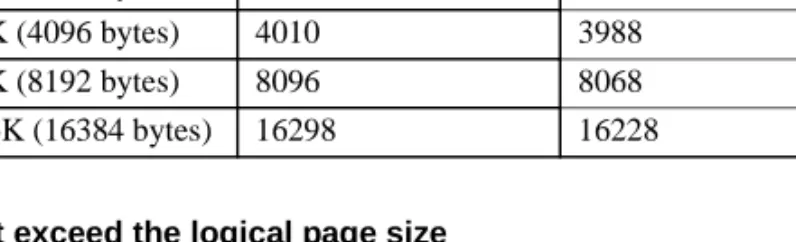
All pages have a header that stores information, such as the partition ID that the page belongs to, and other information used to manage space on the page. Table 2-1 shows the number of bytes of overhead and usable space on data and index pages for a server configured for 2K pages.
Table 2-1: Overhead and user data space on data and index pages
The rest of the page is available to store data and index rows.
For information on how text, image, and Java columns are stored, see “Large object (LOB) pages” on page 25.
Data and index pages
Data pages and index pages on data-only-locked tables have a row offset table that stores pointers to the starting byte for each row on the page. Each pointer takes 2 bytes.
Data and index rows are inserted on a page starting just after the page header, and fill in contiguously. For all tables and indexes on data-only-locked tables, the row offset table begins at the last byte on the page, and grows upward. The information stored for each row consists of the actual column data, plus information such as the row number and the number of variable-length and null columns in the row. Index pages for allpages-locked tables do not have a row offset table.
Locking Scheme Overhead Bytes for user data
Allpages 32 2016
Rows cannot cross page boundaries, except for text, image, and Java off-row columns. Each data row has at least 4 bytes of overhead; rows that contain variable-length data have additional overhead.
See Chapter 4, “Table and Index Size,” for more information on data and index row sizes and overhead.
Large object (LOB) pages
text, image, and Java off-row columns for a table are stored as a separate data structure, consisting of a set of pages. These columns are known as large object, or LOB, columns. Each table with a text or image column has one of these structures. If a table has multiple LOB columns, it still has only one of these separate data structures.
The table itself stores a 16-byte pointer to the first page of the value for the row. Additional pages for the value are linked by next and previous pointers. Each value is stored in its own separate page chain. The first page stores the number of bytes in the text value. The last page in the chain for a value is terminated with a null next-page pointer.
Reading or writing a LOB value requires at least two page reads or writes: • One for the pointer
• One for the actual location of the text in the text object
Each LOB page stores up to 1800 bytes. Every non-null value uses at least one full page.
LOB structures are listed separately in sysindexes. The ID for the LOB structure is the same as the table’s ID. The index ID column is indid and is always 255, and the name is the table name, prefixed with the letter “t”.
Extents
Adaptive Server pages are always allocated to a table, index, or LOB structure. A block of 8 pages is called an extent. The size of an extent depends on the page size the server uses. The extent size on a 2K server is 16K; on an 8K it is 64K, and so on. The smallest amount of space that a table or index can occupy is 1 extent, or 8 pages. Extents are deallocated only when all the pages in an extent are empty.
Pages that manage space allocation
The use of extents in Adaptive Server is transparent to the user except when examining reports on space usage. For example, reports from sp_spaceused
display the space allocated (the reserved column) and the space used by data and indexes. The unused column displays the amount of space in extents that are allocated to an object, but not yet used to store data.
sp_spaceused titles
name rowtotal reserved data index_size unused
-- -- - ----
---titles 5000 1392 KB 1250 KB 94 KB 48 KB
In this report, the titles table and its indexes have 1392KB reserved on various extents, including 48KB (24 data pages) that is unallocated.
Note Adaptive Server avoids wasting extra space by filling up existing allocated extents in the target allocation page, even though these extents are assigned to other partitions. The net effect is that extents are allocated only when there are no free extents in the target allocation page
Pages that manage space allocation
In addition to data, index, and LOB pages used for data storage, Adaptive Server uses other types of pages to manage storage, track space allocation, and locate database objects. The sysindexes table also stores pointers that are used during data access.
The pages that manage space allocation and the sysindexes pointers are used to: • Speed the process of finding objects in the database.
• Speed the process of allocating and deallocating space for objects. • Provide a means for Adaptive Server to allocate additional space for an
object that is near the space already used by the object. This helps performance by reducing disk-head travel.
These pages track the disk space use by database objects:
• Global allocation map (GAM) pages contain allocation bitmaps for an entire database.
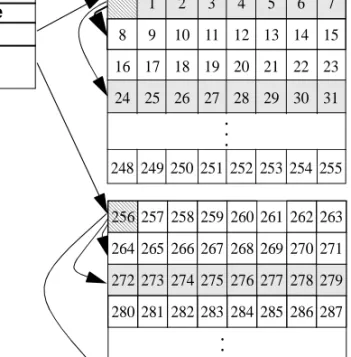
• Allocation pages track space usage and objects within groups of 256 pages, or .5MB.