Improving Two-
Thumb Text Entry
on Touchscreen Devices
Antti Oulasvirta, Anna Reichel, Wenbin Li,
Yan Zhang, Myroslav Bachynskyi
Max Planck Institute for Informatics
Keith Vertanen
Montana Tech of the
University of Montana
Per Ola Kristensson
University of St Andrews
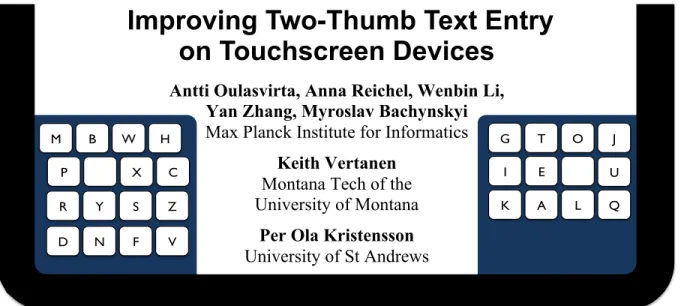
Figure 1. KALQ (pronounced as in “calculated”) is a soft keyboard designed to improve two-thumb text entry on tablet devices. Its design considers grip, coordinated performance of the two thumbs, and linguistic and motor errors.
ABSTRACT
We study the design of split keyboards for fast text entry with two thumbs on mobile touchscreen devices. The layout of KALQ was determined through first studying how users should grip a device with two hands. We then assigned let-ters to keys computationally, using a model of two-thumb tapping. KALQ minimizes thumb travel distance and maxim-izes alternation between thumbs. An error-correction algo-rithm was added to help address linguistic and motor errors. Users reached a rate of 37 words per minute (with a 5% error rate) after a training program.
Author Keywords
Soft keyboards; keyboard optimization; two-thumb text entry; touchscreen devices; bimanual performance
ACM Classification Keywords
H.5.m. Information interfaces and presentation (e.g., HCI): Miscellaneous.
INTRODUCTION
Tablet computers and large smartphones with touchscreens are commonly interacted with using two thumbs. Use of the thumbs has an intuitive appeal: the grip is stable and sup-ports typing while walking, sitting, or lying down. Despite these advantages, the low rate of text entry is a recognized problem. Reported rates (in words per minute, wpm) for two-thumb typing on a touchscreen range from 14 wpm [24] to 31 wpm [8]. Compare this range to other input tech-niques with mobile devices: 55 wpm with 8–10 fingers on a
tablet placed on a surface [15], 44 wpm with a stylus [22], and 60 wpm with two thumbs on a physical mini-QWERTY keyboard [4]. With such rates, two-thumb text entry on touchscreens may be limited to simple tasks such as entry of messages, addresses, calendar events, and names [2].
Our goal is to investigate the upper limit of typing perfor-mance via methods known to improve typing perforperfor-mance.
We address two major issues. First, no convention exists comparable to touch typing with physical keyboards that informs how to hold the device or how to move the thumbs. Touchscreens offer poor tactile feedback for keypresses, and the touch sensor does not allow the thumb to rest on its next target while the other thumb is moving, a technique known to boost rates with physical buttons [5]. Moreover, users may grip the device in ways that are detrimental to performance. Second, it is not known whether the QWERTY layout, traditionally used such that both thumbs are respon-sible for a single key, is efficient when the thumbs do all
the presses.
The design of KALQ, shown in Figure 1, is informed by a series of studies that shed light on these open questions: 1. Button size, keyboard shape, and position are
in-formed by a study of symmetric two-hand grips (N=6). 2. Letter-to-key assignment is resolved computationally,
informed by a model of two-thumb performance ac-quired from a bimanual tapping task (N=20).
3. Online error correction is based on a large corpus of mobile text and by modeling tap inaccuracies.
To evaluate KALQ we trained users (N=6) longitudinally in the new layout using a number of performance-enhancing strategies. Users reached 37 wpm upon completion of the training. We conclude by discussing performance gains brought about by each design decision.
Permission to make digital or hard copies of all or part of this work for personal or classroom use is granted without fee provided that copies are not made or distributed for profit or commercial advantage and that copies bear this notice and the full citation on the first page. To copy otherwise, or republish, to post on servers or to redistribute to lists, requires prior specific permission and/or a fee.
CHI 2013, April 27–May 2, 2013, Paris, France.
Copyright © 2013 ACM 978-1-4503-1899-0/13/04...$15.00. D! N! F! V! R! Y! S! Z! P! X! C! M! B! W! H! U! G! T! O! K! A! L! Q! I! E! !
Possible(design(
J!Goal and Approach
We cast the design problem as a performance-optimization problem: the goal is to find the design with minimal aver-age thumb movement time for typing representative English sentences. Movement time MT is measured here as target-acquisition time in tapping tasks and is considered in con-junction with accuracy and errors. In our effort to improve entry rates, our design choices favor superior performance. To maximize typing performance, we discuss not only de-sign choices but also typing skill.
Our design process consists of five steps performed on a 7" tablet:
In Step 1: Grip Study, we consider grips allowing land-scape-oriented device usage. We single out one grip that is best both in performance and in reducing occlusion of the display. We then decide on button size and on keyboard position, size, and shape. In the subsequent steps, we as-sume this grip, because it yields the best tapping performance. These choices place our focus on split keyboard designs with non-overlapping movement of thumbs.
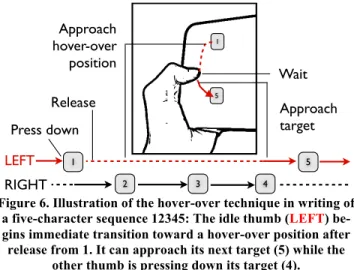
In Step 2: Thumb Movement Modeling, we study two-thumb performance in the N-return task, a novel vari-ant of the Fitts’ task modified for bimanual tapping. It al-lows us to model same-side taps and taps that alternate sides while taking into account lateralization (differences between the dominant and non-dominant hand). In line with previous work, in addition to the standard Fitts’-model pa-rameters, our model for alternate-side taps considers the time elapsed while the thumb awaits its turn [4,5,19]. To minimize MT in alternating taps, users adopted a hover-over
strategy wherein the “idle” thumb travels toward its next target and hovers over it, waiting for its turn. We found that if a long time has elapsed, visual attention is needed to re-cover the position of the thumb. This is at considerable cost to MT, something that the computational layout optimizer tries to avoid.
In Step 3: Computational Layout Optimization, we uti-lize a computational keyboard-optimization method [7,16, 22,32] to evaluate 5.6 million letter-to-key assignments. We extend previous work in keyboard optimization to two -thumb entry. We follow a hybrid method that combines global and local search. The layout of the best keyboard is further optimized via horizontal row-shifting.
In Step 4: Error Correction, we add error correction that addresses two factors: linguistic context and the distribution of touch inaccuracies. The error-correction algorithm al-lows skilled users to increase their speed by letting the algo-rithm correct errors.
In Step 5: Training and Evaluation, after the users’ base-line performance with QWERTY is established, they under-take a special 13–19-hour training program addressing the learning of key locations, grip, idle-thumb movement, use of spacebars, motor programs for frequent bigrams and words, and error correction.
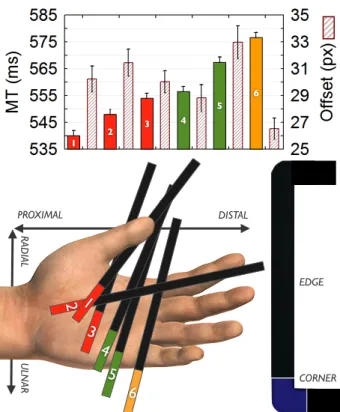
Figure 2. Top: Tapping performance with a breakdown by grip. The error bars denote 95% CIs. Bottom: The six grips examined in our study. The colored rectangle depicts the touch
area of the tablet’s corner on the palmar space.
STEP 1: GRIP AND KEYBOARD LAYOUT
The grip on a device determines several performance-affecting factors: the degrees of freedom in joint movement, the controlling muscles, and the orientation of the thumbs’ joints in relation to the display. It also determines the key-board’s ideal size, position, and shape.
Previous work on touchscreens has analyzed grips in terms of the framing it provides within the kinematic tree of the upper limbs [31]. We here identify the best-performing grip empirically, discuss the framing involved, and derive a keyboard layout. We focus on symmetric grips since they tend to be more stable and may offer simpler motor control than asymmetric grips. To define a grip, we utilize basic terminology of anatomy and joint movement [23]. A gripis defined by the touching area and the angle of the tablet’s edge and corner on the palmar space (Figure 2: bottom). Given a touch area, the hand clasps the device and the fin-gers extend around the back side (Figure 3). Within the space of possible grips, we ruled out uncomfortable grips, unstable grips, and grips that are equivalent in terms of joint movement. This resulted in six candidate grips. These were grouped on the basis of the touch area on the palmar space:
The corner rests on the proximal palmar area, either on the thenar/hypothenar eminence or on the thenar crease.
The corner rests on the distal palmar area. It touches the palmar crease.
The corner rests on the digital crease. It is oriented along the ulnar–radial axis.
1 2 3 4 5 6
6
PROXIMAL DISTAL RAD IAL U LN AR5
4
3
CORNER EDGE2 1
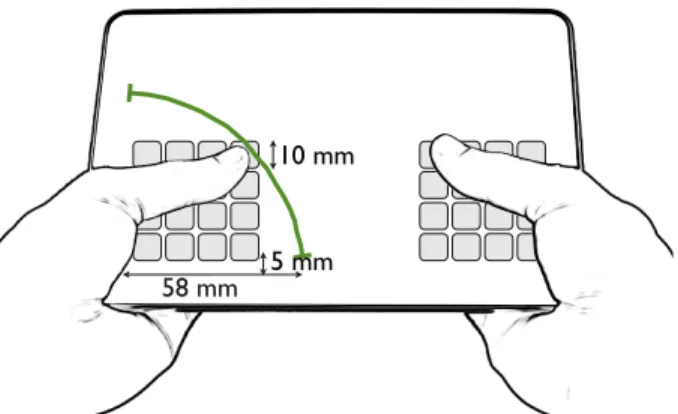
1 2 3 4 5 6Figure 3. To design the layout of the keyboard for Grip 1, we place two rectangular keygrids in the active regions defined by
the thumb sweep of a radius of 58 mm. Button size is 9.9 mm.
Method
We employed a tapping task with point-targets appearing randomly one at a time on either side of the display. Targets appeared only in the thumb’s active area: the area that the thumb can reach without “breaking” the grip. The drawback of using random targets with no preview is that average performance is slower [14] and the user’s thumb may oc-clude a target. The advantage over the standard recipro-cal/cyclical tasks is that active areas can be thoroughly sampled with fewer subjects.
Students from Saarland University participated in the study: six right-handed males, with ages ranging from 23 to 26 (M 23.8). The experiment followed a within-subjects design with one factor: Grip (6 levels; see Figure 2). After intro-duction of a grip, its active region was calibrated by having the user sweep his or her thumb from its highest position to its lowest position. The experimental task was to hit a red crosshair + as quickly and accurately as possible. A new crosshair appeared immediately after the previous one was pressed. Side and position were randomized for each target. Three sessions were completed per subject per grip, with each session having 1,000 targets. To minimize order ef-fects, pre-trial practice was employed and breaks were pro-vided between trials. We used a Samsung Galaxy Tab 7.0 Plus with a capacitive 7" 1024x600 display. The experiment was carried out in an office room with no distractions. Sub-jects were compensated at 10€/hour.
Results
The dataset has 108,000 (6x3x6x1,000) taps. We filtered out taps 3 SD ± the mean of MT, leaving 106,185 valid taps (mean MT 556.9 ms, SD 113.8). To identify the best grip, one-way ANOVA was performed on MT and offset (the distance between the touch point and the target center). Figure 2 (top) presents MT (colored bars) and offset (graded bars) for the six grips, along with 95% confidence intervals (CIs). The effect of Grip was significant both for MT,
F5,106179=242.6, p<.001, and for offset, F5,106179=33.3,
p<.001. Grip 1 emerges as the fastest, with an average MT
of 539.8 ms. A post hoc test (Bonferroni corrected) showed
that Grip 1 had significantly lower MT than the other grips: all ps<.001. Its offset was also significantly smaller than Grip 5’s but was larger than Grip 6’s (both ps<.001). The difference from other grips in offset was not significant.
Discussion
The best grip, Grip 1, is presented in detail in Figure 3. We chose Grip 1 because it had the lowest average MT. Though Grip 1’s active region is the smallest (width 57.6 mm), it can easily accommodate enough buttons for the alphabet. This grip benefits from the tablet’s edge being on the thenar crease, locking the more distal joints of the hand. The fast-est grips, 1–3, all inhibit control by distal muscles and joints, and they rely on the three thumb joints for tapping. By contrast, grips 4–5 allow control by the more distal pal-mar muscles, which have a small cross-sectional area so are not as fast [23]. Our tentative conclusion is that pull-ing/pushing the thumb with the wrist or distal parts of the hand is slower. However, our data is from a limited sample of right-handed male students.
Design Implications
Given this grip, we determine three parameters of the key-board layout. First, to determine button size, we took the 99% confidence interval for Grip 1’s offset (31 pixels). For simplicity, we assumed a square button design, arriving at a button width of 62 pixels. To utilize the full active area, we increased the width slightly, to 66 pixels (9.9 mm). This button width is in line with the recommendations of two earlier studies of button size for thumb tapping [25,27]. To determine the layout and position of the keyboard, we examined the active area for this grip by averaging the sweep radii of subjects. We assumed regular shapes, and we fitted the largest rectangle consisting of 9.9 mm buttons inside. This resulted in a 4x4 square-shaped grid, shown in Figure 3. A 3x5 row layout similar to QWERTY would have required either smaller buttons or exceeding the active area. Previous work has shown that tapping the corners or edges of the active region is slower [9,27]. In our design, only the two medial corner buttons would fall close to these ineffi-cient areas; others are clearly within the active area. We learned in informal testing that the areas close to the proxi-mal edge of the tablet are particularly hard to reach, so we shifted the keyboard 5 mm up, as Figure 3 shows.
Figure 4. In the N-return task, a number sequence of N+2 keys appears on two 4x4-button grids (left, right). The first key (1) is tapped on one side, then N keys on the other (2)(3)(4). Then
there is a return to the first side for 5. Here, N is 3.
10 mm 58 mm 5 mm 2 4 3 1 5
STEP 2: MODELING TWO-THUMB PERFORMANCE
We now describe how we extended the modeling of two-thumb text entry from physical keyboards to touchscreens. Our model addresses the following issues: 1. Same-side taps: sequential keypresses on one side 2. Alternating taps: switches between sides
3. Lateralization:difference between left and right thumb To inform model optimization and user training (Steps 3
and 5), we focus on superior performance, defined as the fastest tap sequences with under 5% errors. This approach is justified because letter-to-key assignments based on such a measure favor performance-enhancing typing strategies. We focus on speed here and will address accuracy in Step 4.
Background
The state-of-the-art predictive model for two-thumb text entry is a modification of Fitts’ law and was developed for physical keyboards [4,5,20]. Movement time from keyn-1 to
keyn, follows the Shannon formulation of Fitts’ law:
𝑡!"##$𝑘𝑒𝑦!!!,𝑘𝑒𝑦! =𝑎+𝑏 𝐼𝐷=𝑎+𝑏 𝑙𝑜𝑔! !!+1 , (1)
where D is the distance between keys, W is the width of keyn,
ID is the index of difficulty derived from D and W, and a and
b are empirical parameters.
For alternate-side (switching) taps, the “idle” thumb is as-sumed to approach its next target aggressively. Its movement time is affected by not only ID but also the time elapsed,
telapsed, before its turn. After it presses keyn, the thumb
imme-diately starts to approach keyn.If it has not yet reached it
when its turn comes, the remaining movement is shorter than if having to start from the beginning. If telapsed is long enough
for the thumb to reach keyn, it can rest over or on it. Then,
only a minimal time tmin is needed for pressing keyn. The total
time Tn for the nth letter in a word is:
𝑇!=
𝑇!!!+𝑡!"##$ 𝑘𝑒𝑦!!!−𝑘𝑒𝑦! 𝑠𝑎𝑚𝑒
𝑚𝑎𝑥 !!!!!!!"#
!!!!!!!"##$(!"#!!!!!"#!) 𝑜𝑝𝑝𝑜𝑠𝑖𝑡𝑒
(2)
In the case of touchscreens, resting on a key is impossible because it would cause an erroneous tap. For one to benefit from the waiting time, there are two possibilities: the thumb can either stay in the air in a fixed position or hover over the next key. Because D is smaller with the latter technique,
and tfitts as well, we taught this technique to our subjects.
Data Acquisition: The N-Return Experiment
Our data are acquired from a bimanual tapping task wherein we manipulate telapsed by increasing the number of buttons
that one hand is typing while the other is waiting. In the
N-return task, the user has to type a sequence of 3–7 num-bers (i.e., 1≤N≤5). Therefore, a thumb has to wait for N
keys before it returns to tapping. In each sequence, the first key is on one side, then N keys on the other, and the last key is back on the initial side. Figure 4 illustrates the task.
Participants: Twenty right-handed male students were re-cruited from Saarland University (average age 24.5 years,
SD 3.2). Half of the subjects were well acquainted with touch-typing in a physical QWERTY context. They were compensated for their time at €10/hour. To motivate the subjects further [4], we offered a bonus of 30€ to the best 10% of subjects with respect to average MT.
Experiment design: The experiment followed a randomized block design with 10 unique number sequences. The sides and positions of the 3–7 numbers were randomized within their keygrids with the constraint of disallowing repeated taps. Use of many repetitions was deemed necessary for users to learn the parallel movement of the “idle” thumb. Each sequence had 10 trials, each with 10 repetitions.
Task and apparatus: The experimental task was to tap the sequence of numbers in ascending order 10 times as rapidly as possible while trying not to miss any key. The numbered targets were persistently shown during a trial to allow pre-planning of movement. If a subject failed to complete a trial because of an error rate higher than 5%, the trial had to be redone. The same tablet device was used as in Step 1.
Procedure: Subjects were first taught Grip 1 and the hov-er-over technique. For the hovhov-er-over technique, we in-structed subjects to position the thumb over the next key while waiting for its turn. During the experiment, feedback on keypresses was given in real time via a black asterisk * (correct) and red asterisk * (incorrect). After each trial, a screen appeared with a summary of the speed and accuracy.
Modeling
In view of space restrictions, we omit the reporting of aver-age data and focus on the highest performance within a condition (each condition had 10x10 N+2-tap sequences). To model best-case performance, we omitted sequences
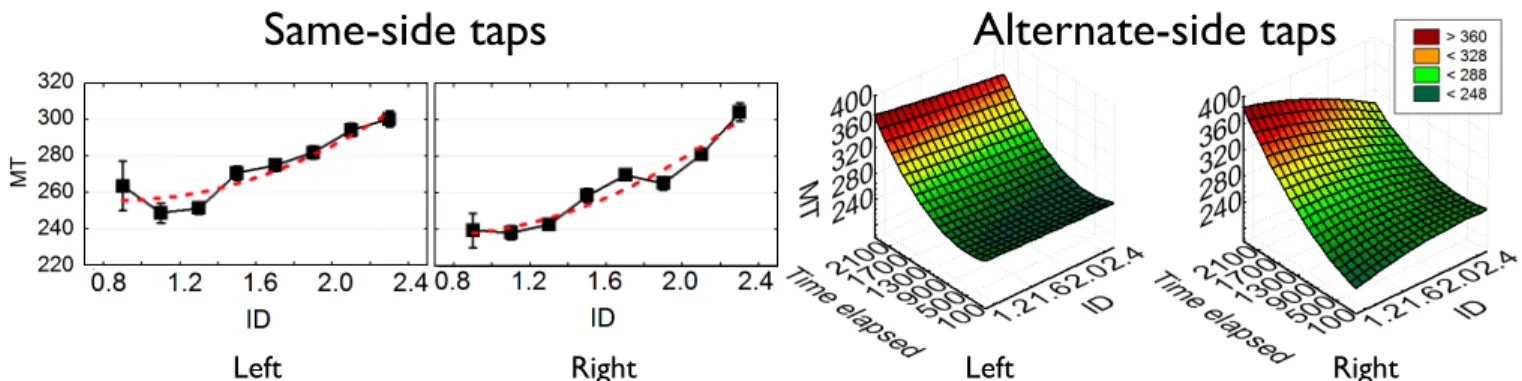
Figure 5. Models of same-side taps and alternate-side taps. Separate plots for left and right hand. Vertical bars denote 95% CIs.
Left Right Left
Alternate-side taps
Right
Same-side taps
with taps longer than 1,000 ms. Because in Step 3 we use pixel coordinates, we here report D in pixel units. In all models, we use eight ID conditions. For modeling of side-switch taps, we use six telapsed conditions.
Same-Side Taps
For same-side taps, the subset of the fastest 7% of tap se-quences constitutes 25,296 data points, or 65% of all data. This indicates that performance in this task improved quick-ly, stabilizing near a user’s personal best. We model MT
with a polynomial:
𝑀𝑇!"#$=319.5−89.0 𝐼𝐷+36.7 𝐼𝐷! (3) 𝑀𝑇!"#!!=237.3−7.6 𝐼𝐷+13.8 𝐼𝐷! (4)
The R2 values for the left and right side were .94 and .95, respectively (we later replicated this finding in a study of same-side taps). We draw two observations from Eq. (3) and (4):
1. Moderate lateralization: The dominant hand is about 30 ms faster than the non-dominant.
2. The lowest-ID targets are slower than medium-ID tar-gets, in contrast to the standard Fitts’-law models. The need for a squared term can be explained by the obser-vation that a thumb at times occludes nearby targets
(low-ID) and it needs to be moved away for seeing the target. If one limits to ID≥1.3, a first-order model suffices.
Alternating Taps
Out of 14,619 returning taps (the Nth tap) in data, filtering to the best 15% within a condition yielded 5,105 data points (35% of the total). The 5% threshold was chosen to address the fact that reaching the best performance in alternating taps requires quite a few repetitions, and we had fewer ob-servations of returning taps per sequence. Our model is a bivariate quadratic function with telapsed (see Background)
and ID as the predictive variables:
𝑀𝑇!"#$=265.286−9.501 𝐼𝐷−0.024 𝑡!"#$%!&+2.003 𝐼𝐷!
−0.007 𝑡!"#$%!& 𝐼𝐷+3.322∗10! 𝑡
!"#$%!&! (5) 𝑀𝑇!"#!!=142.601+86.564 𝐼𝐷+0.062 𝑡!"#$%!&−17.949 𝐼𝐷!
−0.035 𝑡!"#$%!& 𝐼𝐷+1.930∗10! 𝑡!"#$%!&! (6)
The fit for left- and right-thumb models was satisfactory:
R2=.79. The following observations were made:
1. Alternating taps are faster than same-side taps but only when telapsed is small.
2. The non-dominant thumb (here, the left) is better at switching between thumbs when telapsed < 600 ms. In
this range, its performance is less dependent on ID: it can virtually “teleport” over its next target.
3. The dominant hand is better only for very brief switch-es with a short distance.
4. In alternate-side taps, ID has almost no effect, except for brief switches by the dominant (here, right) hand. 5. There is a large penalty for long waiting. This slowing
effect similar to that observed in previous work [11].
Figure 6. Illustration of the hover-over technique in writing of a five-character sequence 12345: The idle thumb (LEFT) be-gins immediate transition toward a hover-over position after
release from 1. It can approach its next target (5) while the other thumb is pressing down its target (4).
Discussion
We learned that the non-dominant hand is generally the better switcher, with a faster average MT. also We observed that for brief switches (small telapsed) MT is virtually
unaf-fected by both telapsed and ID, and in this case switches are
faster than same-side taps, contrary to the slowing effect of switches reported earlier [11]. The benefit is due to the hov-er-over behavior wherein the thumb moves immediately towards its next target, only needing to press down when its turn arrives (Figure 6). Observing this behavior is unsur-prising, given that we taught it to the participants.
The previous model for physical keyboards (Eq. 2) predicts
decreasing MT as telapsed rises. In contrast, for taps where
telapsed > 600 ms, a substantial penalty in MT was observed,
similar to the slowing effect [11]. We conjecture that this is due to interrupted memory [1]: As time passes without at-tention to the idle side, uncertainty over the thumb’s posi-tion grows. Once the thumb’s posiposi-tion has been forgotten, it needs to be restored via a glance [17].
Design Implications
We arrived at three implications for letter assignment: 1. Maximize alternation between thumbs.
2. In same-side tapping, favor the dominant-hand side. 3. While the non-dominant side supports multiple key
clusters, keys on the dominant-hand side should be packed around a center, to minimize travel costs.
Figure 7. A hybrid optimizer using local and global search.
Release LEFT RIGHT Press down 1 5 2 3 4 1 5 Approach hover-over position Wait Approach target Gradient)Descent))500#itera)ons# Annealing))10#X#3,000#itera)ons# Gradient)Descent)10,000#itera)ons# 5,000#random#layouts# 100#best# 10#best# 1)winner)
STEP 3: COMPUTATIONAL LAYOUT OPTIMIZATION
Finding a mapping of letters to keyslots that minimizes fin-ger travel time is an NP-complete problem that is best ad-dressed by means of computational optimization methods [16]. In this section, we formulate this problem as a combi-natorial optimization problem, extending existing keyboard optimization research from a single end-effector (i.e., a fin-ger or stylus) to two end-effectors.
In line with previous work [16], the keyboard is represented as a permutation of 26 letters, two spacebars, and four emp-ty keyslots. Inclusion of empemp-ty slots allows the optimization algorithm to move them around the grids. The goal is to find a permutation that minimizes our cost function: aver-age MT as defined by simulated typing of a representative corpus of sentences under equations 3–6. Representing keyboard as a permutation assigned to a fixed grid with keyslots yields a problem size of 4x1026.
We extend previous work in permutation-based optimization by creating a hybrid approach that utilizes both gradient descent and simulated annealing(Figure 7). Initially, gradi-ent-descent search is performed from 5,000 random starting locations. We pick the 100 best permutations, assuming that these must have gotten some critical parts of the layout cor-rect. Simulated annealing is performed 10 times for each candidate layout. This effectively searches around the promising keyboard before convergence at the best local optimum. In the final step, gradient descent is performed for the 10 best keyboards. For this step, we allow double and triple transpositions also. This modification is inspired by evolutionary algorithms wherein larger transpositions are allowed [28]. With the iteration counts given in Figure 7, this process yields a total of 5.6 million iterations. As our corpus we use the MobileEmail corpus, consisting of phrases written with mobile devices from the Enron e-mail dataset [12,29]. It has 2,109 sentences and 20,500 words, with, on average, 4.1 letters per word. We simulate let-ter-by-letter transitions by applying equations 3–6 as ap-propriate and keeping a record of thumb location and telapsed.
Double keypresses were assumed to follow equations 3 and 4 with D = 0 + ε. Following a recommendation from previ-ous work [19], our spacebar policy is alternation: the thumb on the opposite side always presses the spacebar.
In each iteration, the average cost C1 of a permutation is
calculated for a corpus by means of Eq. 3–6. After this step, two keys are transposed and the cost of the new layout C2 is
calculated. The only exception is the beginning of a new phrase, when the thumb starts at the third button from the edge on the second row (initial position). If C2<C1, the new
permutation is accepted. If not, there are two alternatives for acceptance or rejection of C2. In gradient descent, we
never choose a permutation with lower cost. In simulated annealing, we consult the Boltzmann distribution:
𝑃 𝑎𝑐𝑐𝑒𝑝𝑡 𝐶! =1/(1+𝑒
!!!!!
! ), (7)
where T is the temperature parameter, which we set to 90 [16]. Decreasing the temperature parameter T prevents the search from getting stuck too early at a local optimum [28]. Our implementation follows existing work [16]:
1. set T = 90
2. function (initial keyboard, T): Keyboard 3. repeat
4. choose two keys to transpose from initial keyboard 5. determine the modified keyboard’s cost
6. if new_cost < old_cost then 7. accept the modified keyboard 8. else
9. use the Boltzmann distribution, Eq. 7 10. reduce T
11. increase i
12. until i = maximum_iterations 13. return keyboard with lowest cost
Layout tuning: We conducted a row-tuning exercise for the best keyboard. This was inspired by recent split-keyboard designs such as dextr (see textwithdextr.com) in which key columns and rows are not aligned. Each row of keys (8 in all) was shifted 0, 20, 40, or 60 pixels horizontally, inde-pendent of all others, yielding 48=65,536 layouts, from
which we picked the best one. We looked at horizontal shifting only, because we learned that shifting vertically
would require extending the thumb too far in attempts to reach the topmost keys. The resulting design shifts rows 2–4 on the left-hand side 20 pixels right). This change produced a gain of only 0.1 wpm. The negligible gain is due to the interconnectedness of keys: shifting a key decreases the distance to some keys but increases the distance to others.
Outcome: KALQ
KALQ (as in “calculated”) is the best keyboard after 5.6M iterations and layout tuning with a predicted entry rate of 49.0 wpm. For comparison, we created a quasi-QWERTY layout in a 4x4 grid, following QWERTY’s division of but-tons by hand and retaining their relative order (top-to-bottom, left-to-right). KALQ is superior to the quasi-QWERTY layout by 4.1% and to the alphabetical layout by 6.1%.
The following observations were made about KALQ: 1. The division of work is almost equal, at 54% and 46%
for the right and left thumb, respectively.
2. Alternation is rapid: 62% of the taps are switches. 3. Travel distances are short: On average, the left thumb
moves 86 px, the right 117.
4. The spacebars are centrally located.
5. The right thumb handles all vowels except y. The clustering of vowels around the spacebar favors quick
switches and minimizes travel distance. The right thumb is responsible for 64% of same-side taps. 6. The left thumb has most of the consonants, exploiting
its ability to hover above the next button sooner. It has most first letters of words and most of the consonants.
Figure 8. A visualization of two statistical properties of typing with KALQ: Average MT to key-targets (hue: slow fast)
and frequency (transparency 1–100).
Figure 8 depicts the average movement times and the fre-quency of taps on letters. It demonstrates how the right thumb’s side has quick-to-operate, frequently pressed keys clustered around the spacebar, whereas the left thumb has only a few fast-action keys while the rest are more diffuse. This exploits the unique switching characteristics observed in the N-return study. A typing example is given in Table 1.
STEP 4: ERROR CORRECTION
Previous work has shown improvements in text-entry accu-racy on mobile devices through error-correction techniques that consider linguistic context and movement characteris-tics [6,9,13]. Ideally, error correction should operate in real time, correcting erroneous characters as they are typed. Building on previous work [13], we constructed an error-correction technique for KALQ that utilizes both linguistic information and the movement model for two-thumb text entry. For each touch point T, the error-correction model finds the key 𝐾∗ that maximizes the posterior probability:
𝐾∗=arg max
! 𝑃 𝐾 𝑇 𝑃 𝐾 . (8)
Movement Model
Since KALQ is a new keyboard layout there is no straight-forward method to collect representative touch point data. We could not train a likelihood model on the evaluation study’s touch point data as this would mean we would train the model on the same subjects. Therefore, we instead esti-mated the likelihood P(K|T) by using a prescriptive model that assumes normal distribution of touch points [13], which is justified by existing evidence [9]. The probability of a touch point belonging to a particular key is
𝑃 𝐾𝑇 =exp −!!!
!!! , (9)
where 𝑑! is the Euclidean distance between the touch point and the center of the key and 𝜎! is an estimate of the
vari-ance of the touch point distribution around that particular key’s center. This parameter was estimated from training data of Step 2 that is disjoint from the evaluation (Step 5).
Language Model
The prior probability P(K) was estimated using a statistical language model trained on a large corpus. Our character-based n-gram model estimated the probability of the next key based on up to the previous six characters of context:
Letter Hand D (px) telapsed (ms) MT (ms)
S L -‐ -‐ 266 O R 93 266 232 U R 93 -‐ 252 N L 66 485 250 D L 66 -‐ 266 S L 93 -‐ 266 _ R 66 782 246 G R 148 -‐ 268 O R 132 -‐ 263 O R 0 -‐ 237 D L 93 1015 255 Table 1. Predicted typing performance with KALQ.
𝑃 𝐾 =𝑃 𝐾 𝐶 ≈𝑃 𝐾 C!!!!!!), (10)
where C is all previously written text and 𝐶!!!!!! are the last
six characters written.
We trained our model on a sample of 778M messages sent via Twitter (12/2010–6/2012). Duplicate tweets, retweets, and non-English-language tweets were eliminated via a language-identification module [18, 19] (with a CI of 95%). We included only tweets written on mobile devices as judged from a tweet’s source string. We split each tweet into one or more sentences and kept only sentences wherein all words (after removal of punctuation such as commas) were in a list of 330K English words. The latter word list was obtained by concatenation of a number of human-edited dictionaries (Wiktionary, Webster’s dictionary, the CMU pronouncing dictionary, and GNU aspell). After fil-tering, the training data consisted of 94.6M sentences, 626M words, and 2.56G characters.
Our language model used a vocabulary of the letters A–Z
plus space, apostrophe, comma, period, exclamation point, and question mark. Using the SRILM toolkit, we trained a 7-gram language model, using Witten–Bell smoothing and no count cutoffs. In response to resource constraints of our mobile device, we entropy-pruned the model to reduce its size. Our final model had 1.4M parameters (all n-gram probabilities plus backoff weights) and a compressed disk size of 9 MB. We tested the predictive power of the model by using a set of messages written on Blackberry mobile devices [12]. We measured language-model performance in terms of average per-letter perplexity. The perplexity indi-cates the average number of choices the model thinks are possible next, given the previous context. The perplexity of the MobileEmail sentences in our model was 3.84. Despite its small size, the model performed well even when com-pared to an unpruned 10-gram model with 340M parame-ters. This large model only reduced the test set's perplexity to 3.44.
STEP 5: TRAINING AND EVALUATION
Empirical evaluation is preferable to model-based predic-tions in the case of novel layouts, because predicpredic-tions have turned out to be higher than the empirically achieved rates (e.g., compare the prediction in [32] to empirical rates re-ported in [33]). Overestimation may arise from the fact that Fitts’-law-based models disregard factors that affect typing
D! N! F! V! R! Y! S! Z! P! X! C! M! B! W! H! U! G! T! O! K! A! L! Q! I! E! ! J!
performance. However, for validation of a novel keyboard design, a compromise between sample size and the length of training must be sought. We preferred securing sufficient time for learning new motor programs over a large N.
Training Program and Performance Assessment
To minimize the training time and to maximize eventual performance, we developed a systematic training program. Our training program builds on existing work: teaching key locations [29], practicing frequent bigrams and distributing practice over time [33], and rewarding high performance monetarily [4]. “Cold turkey” evaluation, wherein users type randomly selected phrases with no special practice, may not allow time for performance to approach a model’s predicted performance.
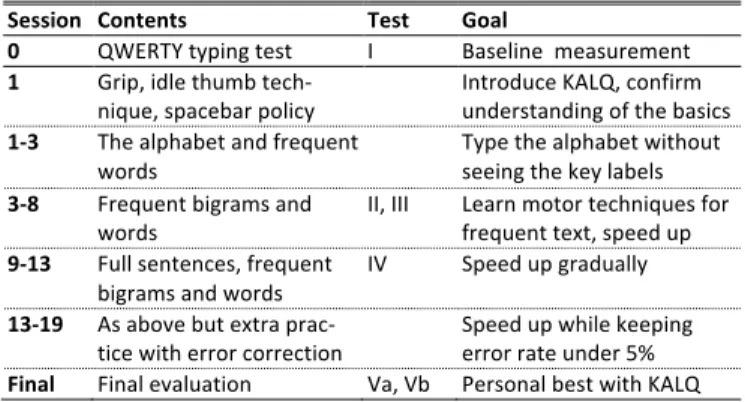
The program consists of 13–19 one-hour sessions structured in the manner Table 2 describes. The baseline performance level is assessed first with QWERTY, without practice and instruction in typing. The first training sessions with KALQ focus on learning the grip, spacebar use, and the hover-over technique. We provide instructions in each and monitor performance. Key locations are practiced by typing the al-phabet without seeing the key labels. After learning these basics, the trainees enter sessions with the most common English bigrams and words. In the subsequent full-sentence practice, they type randomly chosen sentences of increasing length from the MobileEmail corpus [12,29]. From that point on, we set performance goals and give feedback on typing rate. We also include a special session that focuses on bigrams or words that had been slower than average for the user. After performance starts to stabilize, toward the 12th session, we introduce error-correction exercises, ask-ing users to speed up and ignore errors.
Participants
Six right-handed students (3 M, 3 F) were recruited from Saarland university (M 25 years, SD 3.52). They reported having almost no experience with large touchscreen devices such as tablets, and only one was a touch-typist on physical QWERTY keyboards. The participants were compensated at 10€/hour, and the two best were given a bonus of €100.
Session Contents Test Goal
0 QWERTY typing test I Baseline measurement 1 Grip, idle thumb tech-‐
nique, spacebar policy Introduce KALQ, confirm understanding of the basics 1-‐3 The alphabet and frequent
words Type the alphabet without seeing the key labels 3-‐8 Frequent bigrams and
words II, III Learn motor techniques for frequent text, speed up 9-‐13 Full sentences, frequent
bigrams and words IV Speed up gradually 13-‐19 As above but extra prac-‐
tice with error correction Speed up while keeping error rate under 5% Final Final evaluation Va, Vb Personal best with KALQ
Table 2. Our program for training and assessing typing performance with KALQ.
Figure 9. Development of text entry speed throug the training program. The vertical bars denote 95% CIs. Measurement of Typing Performance
Six tests were carried out throughout the program (see Ta-ble 2): the first for QWERTY and the rest to track improve-ment in KALQ. Our QWERTY setup was a full-width three-rows-plus-spacebar keyboard identical to the built-in key-board of the tablet (button sizes larger than in KALQ). Be-cause using the same phrase sets repeatedly overestimates entry rates [33], we used separate phrases sets for training vs. testing. Our phrase set is a subset of the MobileEmail corpus with verified memorable sentences: 200 phrases, 1,073 words, and 5,253 characters [12]. The training phrase sets had 1,147 unique sentences after the removal of these sentences. Presentation order was randomized. All tests included a 15-minute warm-up session. Users’ final per-formance was tested with and without error correction (tests
Va and Vb in Table 2).
Apparatus and Materials
We used a Samsung Galaxy Tab 7.7", which has a slightly larger and more responsive touch sensor than the tablet of our previous studies. Feedback on error rate and wpm was given after each phrase. In exercises but not in testing, a REDO button appeared if the error rate exceeded 5%. Dur-ing typDur-ing, a black asterisk * was presented for correct taps and a red one * for incorrect taps. With error correction, coloring was turned off to improve the latency of feedback.
Results
We calculate wpm with words of five characters. Error rate is character error rate (CER), calculated by using the Damerau-Levenhstein distance.
Typing Performance
The users’ baseline performance with the full-width QWERTY layout was 27.7 wpm (9.0% CER). Figure 9 shows the development of typing performance over the course of the program. In the final test, after, on average, 16.8 hours of training (min. 13 h, max. 19 h), the users reached 37.1 wpm (5.2% CER). The difference to QWERTY was significant (see Figure 9).
We believe that in a task involving text generation, their performance would be even better. We noticed that in the transcription task, long sentences caused problems, because users often had to glance at the stimulus phrase and they lost the position in the text because only asterisks were
pro-KALQ QWERTY
1 4 8 11 13-19
Test day wpm
vided as resumption cues. Therefore, we examined the dis-tribution of MT and divided the phrases into two bins by whether they contained taps longer than 900 ms. The latter, in our experience, correlates well with the glancing behav-ior. The average typing speed for “non-glance phrases” was indeed slightly higher: 40.2 wpm (4.0% CER). This result is considered tentative, because an eye-tracker was not used.
Effect of Error Correction
The users’ entry rate with error correction was about the same as without it: 36.7 wpm (6.4% CER). Disappointing-ly, the error rate was slightly higher with the online version of our error-correction technique than without it.
We hypothesized that this is probably due to the chicken-and-egg problem of no suitable training data from true KALQ expert users being available before the experiment was conducted. Therefore, once experimental data had been collected, we performed two offline experiments with the typing data. We used a single user typing 26 phrases as training data, a dataset disjoint from the testing data on which we ran the offline experiment. The typing data from this user were then used to re-estimate the error-correction model’s touch-point parameters. We found that allowing the error-correction algorithm to learn touch-point regulari-ties from even a single expert KALQ user was enough to result in a percentage point’s reduction in CER, both for test data originally collected with online error correction and for data originally collected without it. We also investi-gated the impact of allowing the error-correction algorithm to leverage prior recognition context (the sets of likelihoods and priors for all previously typed keys) instead of having to rely on a character string as the sole prior context. In other words, the error-correction algorithm performs a search through all possible letter combinations over the entire prior context when it tries to identify the most likely text in view of the user’s input, instead of just performing a point estimate for the last inputted key. Since a search over all letter sequences is infeasible, we used a pruning beam to speed up the search. We found that using prior recognition context further reduced the error rate, with a 1.3 percentage point reduction in CER, both for test data collected with online error correction and data collected without it.
DISCUSSION
This work has contributed to understanding how to design usable and effective keyboards for two-thumb text entry on mobile devices using touchscreens. We have presented a series of studies with the goal of improving text entry rates. With all design choices in play, trained users achieved an entry rate of 37 wpm (5% CER)—an improvement of 34% over their “naïve” baseline performance with a standard touch-QWERTY system. This rate represents an improve-ment of 19% over the best rate, of 31 wpm, reported in the previous literature [8]. However, the entry rates are not di-rectly comparable due to differences in the samples and the training procedures. Nevertheless, given that our users were non-native speakers, we consider the result promising.
More interestingly, the results can help future efforts by providing estimates of the gains attributable to different design and ergonomic choices:
• Grip: Grasping the tablet with its corner in the “valley”
created by the thenar and hypothenar eminence yields ~4% faster tapping performance than does a “random” grip. Moreover, the associated keyboard layout (Figure 3) occludes the display the least.
• Hover-over technique: By analyzing an existing model
of two-thumb typing, we proposed a thumb coordination technique wherein the idle thumb is approaching its next target and hovers over it to minimize travel distance. Based on Figure 5, we estimate that this typing strategy saves about 10–20% on MT in alternating taps.
• Optimization of letter assignment: KALQ was optimized
computationally from a model of best-performance two-thumb typing. As a result, it maximizes alternating taps and minimizes same-side travel distances. Our model pre-dicted a benefit of only 4% over a comparable quasi-QWERTY layout. However, this prediction was made as-suming the same typing technique and grip.
• Error correction: We developed an error-correction technique that adapts well-known techniques to the unique motor and linguistic aspects of two-thumb typing. Although our users’ error rates were not improved by the online version of our corrector, offline analyses showed that with better parameters, the error rate can be de-creased by 1.3 percentage points.
The design of KALQ is readily usable. The layout has space to accommodate more buttons without breaking the grip. Backspace, shift, punctuation, and special characters can be placed in the empty slots on KALQ‘s right-hand side. To tune the keyboard to the hand dimensions of the user, it could be scaled, with calibration asking the user to perform the sweep gesture shown in Figure 3, and left-handed users could select a version wherein the left and right keygrids are swapped. However, because the associated improve-ment due to the optimization layout is small, not many us-ers may want to learn KALQ. Our results suggest that tangi-ble improvements can be achieved also for QWERTY simply by changing the grip and learning the hover-over technique. However, we hypothesize that, because of the smaller travel distances, KALQ is more ergonomic when used intensively. We foresee several opportunities to reach even higher typ-ing rates. To improve letter-to-key assignment, other factors affecting two-thumb typing should be incorporated, such as the angle of approach, occlusion by the thumb’s tip, and the absolute screen location of keys. To improve the design for goals other than performance, especially learning time, multi-objective optimization could be used [7]. Error cor-rection can be improved through training of the movement model with real-world user data. We have studied only one grip, which is probably contingent on properties unique to our sample. Future research should address other grips and find designs that work with the distribution of grips that
users normally exhibit. Finally, our sampling has been lim-ited to right-handed male students and a 7" tablet. Future research needs to examine handedness and the different hand sizes and form factors. Larger form factors are likely to exhibit phenomena similar to those reported here, but smaller form factors will face novel issues, such as that the thumbs’ active regions will overlap [5].
ACKNOWLEDGEMENTS
The code for optimization, predictive models, the keyboard, and empirical data are released on our project homepage. This work was supported by the Max Planck Center for Visual Computing and Communication (MPC-VCC), EPSRC (grant number EP/H027408/1), and the Scottish Informatics and Computer Science Alliance.
REFERENCES
1. Altman, E.M., and Trafton, J.G. Memory for goals: An activa-tion-based model. Cognitive Science 26, 1 (2002), 39-83. 2. Bao, J. Pierce, S. Whittaker, and S. Zhai. Smart phone use by
non-mobile business users. Proc. MobileHCI’11, ACM Press (2011).
3. Castellucci, S.J., and MacKenzie, I.S. Gathering text entry metrics on Android devices. Ext. Abst. CHI’11, ACM Press (2011), pp. 1507–1512.
4. Clarkson, E., Clawson, J., Lyons, K., and Starner, T. An em-pirical study of typing rates on mini-QWERTY keyboards. Ext. Abstr. CHI’05, ACM Press (2005), 1288–1291. 5. Clarkson, E., Lyons, K., Clawson, J., and Starner, T.
Revisit-ing and validatRevisit-ing a model of two-thumb text entry. Proc. CHI’07, ACM Press (2007), 163–166.
6. Clawson, J., Lyons, K., Rudnick, A., Iannucci Jr., R.A., and Starner, T. Automatic whiteout++: correcting mini-QWERTY typing errors using keypress timing. Proc. CHI’08, ACM Press (2008), pp. 573-582.
7. Dunlop, M., and Levine, J. Multidimensional pareto optimiza-tion of touchscreen keyboards for speed, familiarity and im-proved spell checking. Proc. CHI’12, ACM Press (2012), 2669–2678.
8. Goel, M., Findlater, L., and Wobbrock, J. Walktype: Using accelerometer data to accommodate situational impairments in mobile touch screen text entry. Proc. CHI’12, ACM Press (2012).
9. Goodman, J., Venolia, G., Steury, K. and Parker, C. Language modeling for soft keyboards. Proc. AAAI’02, (2002), pp. 419– 424.
10. Karlson, A., Bederson, B., and Contreras-Vidal, J. Under-standing single-handed mobile device interaction. Handbook of Research on User Interface Design and Evaluation for Mo-bile Technology (2006), 86–101.
11. Kin, K., Hartmann, B., and Agrawala, M. Two-handed mark-ing menus for multitouch devices. ACM TOCHI 18, 3 (2011). 12. Kristensson, P., and Vertanen, K. Performance comparisons of
phrase sets and presentation styles for text entry evaluations. Proc. IUI’12, ACM Press (2012), pp 29-32.
13. Kristensson, P.O. and Vertanen, K. Asynchronous multimodal text entry using speech and gesture keyboards. Proc. Inter-speech’11, ISCA (2011), pp. 581-584.
14. Kvalseth, T. Quantitative models of motor responses subject to longitudinal, lateral, and preview constraints. Human Factors 20, 1 (1978), 35–39.
15. Li, F., Guy, R., Yatani, K., and Truong, K. The 1line key-board: a QWERTY layout in a single line. Proc. UIST’11, ACM Press (2011), 461–470.
16. Light, L., and Anderson, P. Typewriter keyboards via simulat-ed annealing. AI Expert (1993).
17. Logan, G., and Crump, M. The left hand doesn’t know what the right hand is doing. Psychological Science 20, 10 (2009). 18. Lui, M., and Baldwin, T. Cross-domain feature selection for
language identification. Proc. IJCNLP’11, Chiang Mai, Thai-land, pp. 553-561.
19. Lui, M., and Baldwin, T. langid.py: An off-the-shelf language identification tool. Proc. ACL 2012, Jeju.
20. MacKenzie, I., and Soukoreff, R. A model of two-thumb text entry. Graphics interface (2002), 117–124.
21. MacKenzie, I., and Soukoreff, R. Phrase sets for evaluating text entry techniques. Ext. Abst. CHI’03, ACM Press (2003), 754–755.
22. MacKenzie, I., and Zhang, S. The design and evaluation of a high-performance soft keyboard. Proc. CHI’99, ACM Press (1999), 25–31.
23. Neumann, D., and Rowan, E. Kinesiology of the musculoskele-tal system: foundations for physical rehabilitation. Mosby Philadelphia, 2002.
24. Oulasvirta, A., and Bergstrom-Lehtovirta, J. Ease of juggling: studying the effects of manual multitasking. Proc. CHI’11, ACM Press (2011), 3103–3112.
25. Parhi, P., Karlson, A., and Bederson, B. Target size study for one-handed thumb use on small touchscreen devices. Proc. MobileHCI’06, ACM Press (2006), 203–210.
26. Parisod., A., Kehoe, A., and Corcoran, F. Considering appro-priate metrics for light text entry. Proc. iHCI’10 (2010), pp. 98–101.
27. Perry, K., and Hourcade, J. Evaluating one handed thumb tapping on mobile touchscreen devices. Proc. Graphics Inter-face (2008), 57–64.
28. Rao, S. Engineering optimization: theory and practice. Wiley, 2009.
29. Sears, A., Jacko, J., Chu, J., and Moro, F. The role of visual search in the design of effective soft keyboards. Behaviour & Information Technology 20, 3 (2001), 159–166.
30. Vertanen, K., and Kristensson, P. A versatile dataset for text entry evaluations based on genuine mobile emails. Proc. Mo-bileHCI’11, ACM Press (2011), 295–298.
31. Wagner, J., Huot, S., and Mackay, W. Bitouch and bipad: Designing bimanual interaction for hand-held tablets. Proc. CHI’12, ACM Press (2012).
32. Zhai, S., Hunter, M., and Smith, B. The Metropolis key-board—an exploration of quantitative techniques for virtual keyboard design. Proc. UIST’00, ACM Press (2000), pp. 119– 128.
33. Zhai, S., Sue, A., and Accot, J. Movement model, hits distribu-tion and learning in virtual keyboarding. Proc. CHI’02, ACM Press (2002), 17–24.