Collaborative Learning Skills in Multi-touch Tables
for UML Software Design
Mohammed Basheri
Faculty of Computing and IT King Abdulaziz University
Jeddah, Saudi Arabia
Liz Burd
School of Engineering and Computing Sciences Durham University
Durham, United Kingdom
Malcolm Munro
School of Engineering and Computing Sciences Durham University
Durham, United Kingdom
Nilufar Baghaei
Department of Computing Unitec Institute of Technology
Auckland, New Zealand
Abstract— The use of Multi-touch interfaces for collaborative learning has received significant attention. Their ability to synchronously accommodate multiple users is an advantage in co-located collaborative design tasks. This paper explores the Multi-touch interface’s potential in collaborative Unified Modeling Language diagramming by comparing it to a PC-based tool, looking at the Collaborative Learning Skills and amount of physical interactions in both conditions. The results show that even though participants talked more in the PC-based condition, the use of the Multi-touch table increased the amount of physical interactions, and encouraged the “Creative Conflict” skills amongst the team members.
Keywords—Collaborative Design; Multi-touch Table; PC-based; Collaborative Learning Skills
I. INTRODUCTION
The use of Multi-touch interfaces for collaborative learning has received significant attention. They can accommodate more than one user at a time. This is particularly useful for learning through large, shared display systems like tabletops [2]. Another interesting aspect of the Multi-touch environment is that it provides new opportunities for interaction between humans and computers. This area has been investigated by researchers from different educational backgrounds who have found Multi-touch environments to be useful as interaction through touch is both intuitive and natural [3, 4].
Many studies have shown the benefits of using Multi-touch environments to enhance collaborative work. Using such systems encourages students to collaborate and create an environment wherein they can discuss their findings and integrate their ideas seamlessly with no technological hindrances. In addition, such systems can enhance students’ interaction skills and promote teamwork. For instance, [5] built a system called Futura which is a game based learning system for learning about sustainable development. In this study, players use Multi-touch surfaces to build healthy environment by supporting population growth in an urban environment. Multi-touch surfaces have also been used for collaborative information gathering. A tool called WebSurface was used to facilitate users’ browsing of the Web
collaboratively in order to collect information from different websites. With the use of Multi-touch surfaces users were able to seek information, browse multiple pages simultaneously, and easily gather the information they found [6]. Multi-touch surfaces also have the potential to allow co-located collaboration activities, thus permitting small groups to work together collaboratively [7] and offering equal opportunities for such group work [8].
To the best of our knowledge, there has been little research to determine the potential of using Multi-touch tables to enhance co-located collaboration in software design using Unified Modeling Language (UML). Object-oriented analysis and design can be a very complex task, as it requires knowledge of requirements analysis, design and UML. The problem statement is often vague and incomplete and students need a lot of experience to be successful in analysis. UML is a complex modelling language and students have many problems to become skilled at it. Furthermore, UML modelling like other design tasks is not a well-defined process. There is no single best solution for a problem, and often there are several alternative solutions for the same requirements. The level of collaboration in Futura [5] and WebSurface [6] is limited and restricted to simple actions performed by users, such as putting words in the right context, arranging items over tables, and simple click and drag actions. However, UML design involves advanced design issues that raise new collaboration needs, such as linking nodes and annotation. In this paper the potential of using Multi-touch technology for software design using UML is explored by comparing it with PC-based collaborative software design and examining the collaboration learning skills and physical interactions in both conditions.
II. RELATED WORK
A great deal of interesting work has recently been done on touch tables, much of it investigating the role of Multi-touch in enhancing collaborative activities. Morris et al. [9] investigated the success of using Multi-touch tabletops to improve cooperation during group functions and tasks. They reported that Multi-touch tabletops improved team member awareness considerably, indicating that Multi-touch tabletops
improve information sharing between group members. Harris et al. [10] compared the differences between single and Multi-touch tabletops in group task performance and found that Multi-touch tabletops improved task performance, whereas single-touch tabletops did not. In another research study [11] the effectiveness of Multi-touch tabletops was examined, by comparing multi-mouse and Multi-touch tabletops. Multi-mice were seen to be utilized more than Multi-touch tabletops for the following reasons: (1) users were better able to interact with any part of the display using multi-mice than using Multi-touch; (2) users were more familiar with multi-mouse tabletops; (3) variability in the usage of Multi-touch tables. On the other hand it was noted that users of Multi-touch displayed fewer grammatical errors than those of multi-mouse. A study by [12] shows that Multi-touch tabletops increase the awareness and common ground of group members working collaboratively to achieve a specific outcome, as well as increasing the effectiveness of group tasks and obligations [13]. From the aforementioned research studies, it can be concluded that Multi-touch tabletops enhance group interaction and therefore enhance the realization of group goals.
Much research has been conducted with the aim of improving collaboration among users in software design using UML. This includes studies such as COLLECT-UML [14], CoLeMo [15], CAMEL [16], and AUTO-COLLEAGUE [17]. AUTO-COLLEAGUE does not support collaborative drawing for UML diagrams, as COLLECT-UML and CoLeMo do; it does, however, offer a chat system as its main collaboration tool. These systems are not designed to support a face-to-face collaboration style, but rather for distributed collaborative work. Very little research other than the Software Design Board [18], which is a shared whiteboard application, supports collaborative software design.
III. COMPARATIVE STUDY
Using Multi-touch table for collaborative UML diagramming has not been widely researched. To the best of our knowledge, there is no Multi-touch table based editor for UML diagramming available. We have developed a Multi-touch collaborative UML editor named “MT-CollabUML” [19] to encourage face-to-face collaborative software design. In order to keep a same variable in both Multi-touch table and PC-based conditions, MT-CollabUML tool was used in both settings.
IV. PARTICIPANTS
For the purposes of the research sixteen master program students who were studying “Software Engineering for the Internet” were selected. The participants were all familiar with collaboratively designing software using UML and had completed the course. The participants formed eight groups, each consisted of two people.
Fig.1. PC-based condition
V. EXPERIMENT DESIGN
A within-subject experiment was conducted to compare how the participants used PC with how they used Multi-touch table in terms of collaborative design.
Similarities and differences were studied in terms of qualitative behavior in the eight groups of two students, who worked on creating UML-State diagrams. The goal was to identify differences in the level of collaborative design process across experimental conditions. To ensure the validity of our investigation, we decided to compare the use of MT-CollabUML tool in both PC-based and Multi-touch table conditions. In both conditions, we provided two similar design tasks with the same level of difficulty and complexity.
Two separate tasks were implemented, each of which involved the creation of UML-State diagrams through a process of planning, discussion, decision making, drawing and reflection. In order to ensure that the tasks were of the same complexity and required the same level of skills, the course tutor was consulted.
Counterbalanced measures design was conducted in this experiment to help keep the variability low. For every pair of groups, we gave one group a UML design task and asked them to complete it using the MT-CollabUML tool in PC-based “Fig.1” The other group was asked to complete the same task using the MT-CollabUML tool on Multi-touch table based “Fig. 2”. Then the groups switched and were asked to complete the second task using PC and Multi-touch conditions.
Before the experiment began, all the students underwent basic training in the use of the MT-CollabUML tool in the Multi-touch table and PC-based. The experiment took place in Durham University’s SynergyNet lab “Fig. 3”, and a within-subject study design was used for both the PC-based and the Multi-touch surface. The groups were given as much time as they needed to complete the tasks. All collaborative UML diagramming activities were video recorded for analysis. For the Multi-touch and the PC-based conditions, two cameras were focused on the tables from two directions to ensure all group members captured. Qualitative analysis was followed to analyze the collaborative design process. Timeline (in minutes) for all design activities along with discussion timeline per subject was generated using Microsoft Visio. Design activities
included adding or deleting node, adding or correcting text, linking or unlinking node and moving node.
Furthermore, the quantitative analysis was considered by calculating the physical interactions (design activities) per minute for each subject in Multi-touch and PC-based conditions following Harris el al. work [20].
Fig.2. Multi-touch table condition
Fig.3. SynergyNet lab
Group member’s learning experience and success are influenced by the quality of communication in team discussion [21]. Collaborative learning Skills includes Active Learning, Creative Conflict and Conversation [21, 22]. According to Soller [23] using Collaborative learning Skills promotes effective collaboration learning. Therefore, the verbal communication among each pair in both conditions were recorded and analyzed to find out if there were differences between conditions in term of type of verbal contribution. Baghaei [1] and Soller [23]’s verbal communication categories were used in this study. Communication Categories includes ten types; “Request, Inform, Maintain, Acknowledge, Motivate,
Argue, Introduce & Plan, Disagree, Task and Off-Task”.
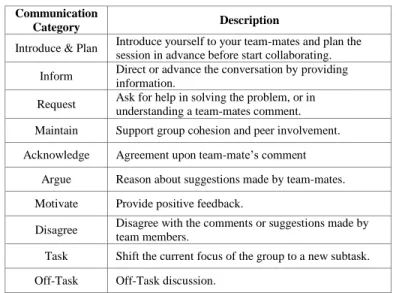
TABLE I describes the communication categories used in the Multi-touch table and PC-based conditions.
VI. STUDY FINDINGS &DISCUSSION
The aim of this study was to explore the benefits of using a Multi-touch table as a tool to encourage students’ collaboration and to enhance the quality of communication amongst team members. We looked at the amount of talking, the amount of
physical interaction, collaboration logs and the use of communication categories in both conditions.
The results showed that participants talked more in the PC based condition (M= 5.61, SD=2.18) than they did in the Multi-touch table based (M=4.29, SD=1.71). The difference between the conditions was statistically significant (p=0.004). The qualitative analysis for the collaboration logs (design process) explained the reason behind this difference: the PC-based condition did not support parallelism design activities on the face-to-face collaboration, and it only allowed for sequential-participative design to be carried out. Therefore, subjects had to stop designing activities to engage in discussion to decide the next step. However, the Multi-touch table condition supported the parallel-participative design, in which subjects were able to carry out multiple designing activities and discussion at the same time. Also, the PC-based condition increased single-subject domination, in which one single-subject performed most of the designing activities. A study by Paul Marshall et al. [24] showed that dominant subjects talk more, and the results supported Marshall’s findings, showed that the subject who interacted more physically (dominated more) talked the most.
A. Use of Communication Categories
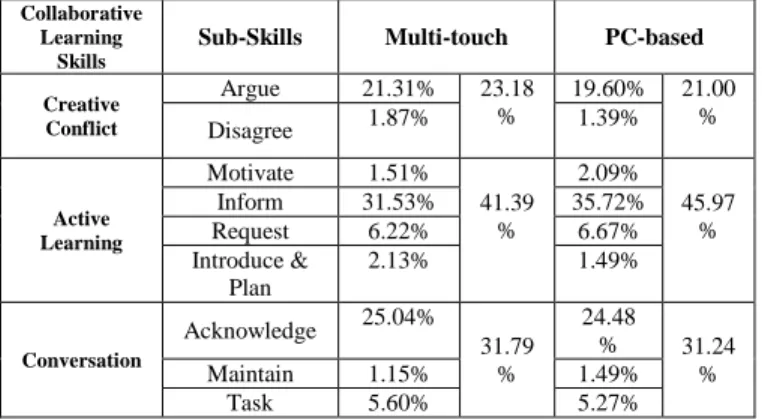
TABLE II shows that “Inform” sub-skill used in PC-based
condition (35.72%) more than in the Multi-touch based condition (31.53%). In PC and Multi-touch settings subjects tend to “Request” help, used “Acknowledge”, “Motivate”,
“Maintain”, “Disagree” as well as discussed about the next
step “Task “ almost at the same level. However, the subjects discussed about what are they going to do “Introduce & Plan”
in the Multi-touch condition (2.13%) more than in the PC-based condition (1.49%). Furthermore, Multi-touch setting encouraged “Argue” more (21.31%) than the PC setting
(19.60%). However, subjects used “Off-Task” discussion in the
Multi-touch (3.64%) more than in the PC (1.79%). Both conditions promoted the effective collaborative learning. The Multi-touch condition encouraged the “Creative Conflict” skills more than the PC-based condition as shown in TABLE II. The PC-based condition encouraged “Active Learning” skills more
Communication
Category Description
Introduce & Plan Introduce yourself to your team-mates and plan the session in advance before start collaborating.
Inform Direct or advance the conversation by providing information.
Request Ask for help in solving the problem, or in understanding a team-mates comment.
Maintain Support group cohesion and peer involvement. Acknowledge Agreement upon team-mate’s comment
Argue Reason about suggestions made by team-mates. Motivate Provide positive feedback.
Disagree Disagree with the comments or suggestions made by team members.
Task Shift the current focus of the group to a new subtask. Off-Task Off-Task discussion.
than the Multi-touch condition. It can be seen that the subjects in both conditions engaged in “Conversation” skills almost at the same level.
TABLE II. COLLABORATIVE LEARNING SKILLS IN MULTI-TOUCH AND
PC-BASED CONDITIONS
Collaborative problem-solving has some benefits such as encouraging students to verbalise their thinking; encouraging students to work together, ask questions, explain and justify their opinions; increasing students’ responsibility for their own learning; and encouraging them to elaborate and reflect upon their knowledge [23, 25, 26]. Verbal communication is one of the most important components of any collaboration [27]. In this study, Collaborative Learning Conversation Skills Taxonomy has been applied. Collaborative Learning Conversation Skills Taxonomy is the understanding and knowledge of how to communicate effectively, aimed at enhancing the learning process in a group discussion [23]. Most of the previous studies applied the Collaborative Learning Conversation Skills Taxonomy to structured non-verbal communication in distributed collaboration settings [1, 28, 29]. This taxonomy has been applied in this present study in order to explore which skills might be adopted by subjects in face-to-face collaboration in both experiment conditions without forcing them to use a structured communication. The result shows that there is some difference between the Multi-touch table condition and PC-based conditions in terms of the collaborative learning communication skills that were adopted. TABLE II shows that in the Multi-touch table condition, subjects tended to use the ‘Creative Conflict’ skills more than when they were in the PC-based condition. Using ‘Creative Conflict’ skills, which are ‘Argue’ and ‘Disagree’, can be useful in producing creative interactions; it leads to productive discussion when it is directed at ideas rather than people [30]. In both conditions, subjects used the ‘Conversation’ skills almost an equal amount of the time. However, in the PC-based condition, ‘Active Learning’ skills were used the most, particularly using the ‘Inform’ skill, which was highest in the PC-based condition. The reason for the frequent use of ‘Inform’ skills in the PC-based condition is related to single-subject domination, in which the dominant single-subject used ‘Inform’. For example, Subject 2 in Group 1 was the dominant subject in the PC-based condition, and was using leading
phrases such as: ‘I think it is better to have a circle here and an end button here’, and: ‘Actually, I think you do not have to make capital letter, write specify amount’. The total number of ‘Inform’ phrases used by this subject was 58, while in the Multi-touch table condition it was 44.
B. Collaboration Log
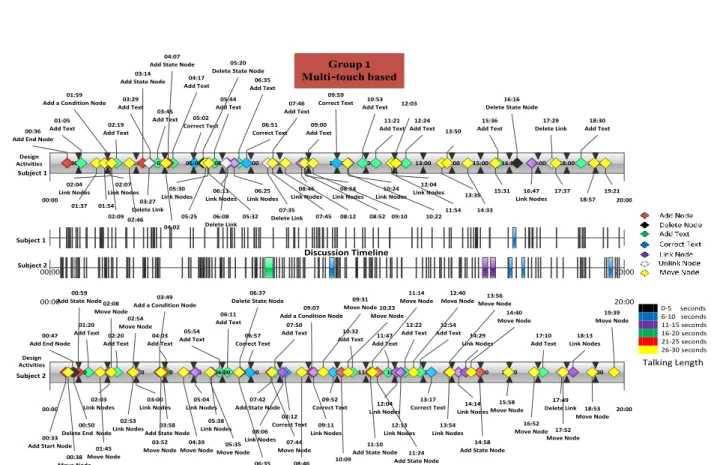
The mouse in the PC-based condition played an important role in the use of the MT-CollabUML tool, where it is used for adding, deleting, linking, unlinking, and moving nodes. Therefore, the subject who controls the mouse dominates the physical design activities in the PC-based condition as shown in TABLE III. The collaboration log shows that Subject 2 “Fig. 5” was controlling the mouse in the PC-based condition all the time and he/she was dominating the design activities as well. In contrast, because of using hand gestures instead of the mouse in the Multi-touch condition, the single subject domination decreased as shown in “Fig.4”. The Multi-touch table encourages parallel-participative design and equity of physical interaction. These findings are supported by our previous study showing that Multi-touch table increases the equity of participation [31]. Subjects Control Mouse (PC-based) Dominating in PC-based Dominating in Multi-touch Group 1 PC Multi-touch 1 2 Group 2 Multi-touch PC 3 4 Group 3 PC Multi-touch 5 6 Group 4 Multi-touch PC 7 8 Group 6 Multi-touch PC 9 10 Group 7 PC Multi-touch 11 12 Group 8 Multi-touch PC 13 14 Group 9 PC Multi-touch 15 16 Total 10/16 9/16 15/16
The analysis of the collaboration log also shows that the Multi-touch table enabled pairs to engage in more physical design activities than the PC-based condition as shown in TABLE IV and TABLE V. For example, Subject 1 in the PC setting “Fig. 5” was able to interact physically only in some design activities such as “Adding Text” or “Correcting Text”. On the other hand, when the same subject (Subject 1) worked in the Multi-touch condition “Fig. 4”, it was an opportunity to be engaged in all design activities such as “Adding Node”, “Moving Node”, “Linking Node”, and “Deleting Node”.
Collaborative Learning
Skills
Sub-Skills Multi-touch PC-based
Creative Conflict Argue 21.31% 23.18 % 19.60% 21.00 % Disagree 1.87% 1.39% Active Learning Motivate 1.51% 41.39 % 2.09% 45.97 % Inform 31.53% 35.72% Request 6.22% 6.67% Introduce & Plan 2.13% 1.49% Conversation Acknowledge 25.04% 31.79 % 24.48 % 31.24 % Maintain 1.15% 1.49% Task 5.60% 5.27%
Group 1 Multi-touch based 00:00 20:00 Add Node Delete Node Add Text Correct Text Link Node Unlike Node Move Node 0-5 seconds 6-10 seconds 11-15 seconds 16-20 seconds 21-25 seconds 26-30 seconds Talking Length Discussion Timeline Design Activities 00:00 20:00 Subject 1 Design Activities 00:00 20:00 00:00 20:00 10:00 08:00 12:00 11:00 05:44 Add Text 03:45 Add Text 05:02 Correct Text 03:00 04:00 09:00 Add Text 01:20 Add Text 11:00 11:21 Add Text 10:53 Add Text 04:03 Add Text 13:00 02:00 00:59 05:54 Add Text 10:00 04:17 Add Text 06:11 Add Text 07:00 07:00 06:00 11:47 Add Text 09:00 01:05 Add Text 02:19 Add Text 09:00 02:00 12:00 05:00 06:35 Add Text 03:00 07:50 Add Text 10:32 Add Text 12:54 Add Text 06:00 08:00 13:00 04:00 01:00 03:29 Add Text 06:57 Correct Text 05:00 07:46 Add Text 12:22 Add Text 02:20 Add Text 12:24 Add Text 15:36 Add Text 18:30 Add Text 14:00 15:00 16:00 17:00 18:00 19:00 06:51 Correct Text 09:59 Correct Text 01:59
Add a Condition Node
00:36 Add End Node
02:04 Link Nodes
02:07
Link Nodes 05:30
Link Nodes Link Nodes06:11 06:25 Link Nodes 08:46 Link Nodes 08:54 Link Nodes 10:24 Link Nodes 12:04 Link Nodes 16:47 Link Nodes 03:14
Add State Node 04:07 Add State Node
03:27 Delete Link 06:08 Delete Link 07:35 Delete Link 17:29 Delete Link 05:20
Delete State Node
16:16 Delete State Node
01:37 01:54 02:0902:46 04:02 05:25 05:32 07:45 08:12 08:52 09:10 10:22 11:54 12:03 13:39 13:50 14:33 15:31 17:37 18:57 19:21 14:00 15:00 16:00 17:00 18:00 19:00 17:10 Add Text 08:12 Correct Text 09:52 Correct Text 13:17 Correct Text 03:49
Add a Condition Node 09:07
Add a Condition Node 00:47
Add End Node
02:03 Link Nodes 02:53 Link Nodes 03:00 Link Nodes 05:04 Link Nodes 05:38 Link Nodes 08:06 Link Nodes 09:11 Link Nodes 12:04 Link Nodes 12:13 Link Nodes 13:54 Link Nodes 14:14 Link Nodes 14:29 Link Nodes 18:13 Link Nodes 00:33 Add Start Node
00:59 Add State Node
03:58 Add State Node
07:42 Add State Node
10:09 Add State Node
11:10 Add State Node 11:24
Add State Node
14:58 Add State Node 00:50
Delete End Node
17:49 Delete Link 06:37
Delete State Node
00:38 Move Node 01:45 Move Node 02:08 Move Node 02:54 Move Node 03:52 Move Node 04:39 Move NodeMove Node05:35
06:35 Move Node 07:44 Move Node 08:46 Move Node 09:31 Move Node 10:23 Move Node 11:14 Move Node 12:40 Move NodeMove Node13:56
14:40 Move Node 17:52 Move Node 15:58 Move Node 16:52 Move Node 18:53 Move Node 19:39 Move Node Subject 1 Subject 2 Subject 2
Fig.4. Collaboration log for Multi-touch table collaborative design
TABLE V. DESIGN ACTIVITIES IN MULTI-TOUCH CONDITION
VII. CONCLUSION
In this paper, the differences in collaborative software design amongst groups of students working in PC-based vs. Multi-touch conditions were investigated. We hypothesized that the Multi-touch table would increase the effectiveness of the collaborative process by enhancing collaboration learning skills and increasing physical interactions amongst team members.
The results indicate the benefit of using the Multi-touch MT-CollabUML tool as opposed to the PC-based version in enhancing collaborative software design. The Multi-touch environment increases the amount of physical interactions and subjects’ engagements in the design activities. MT-CollabUML tool in the Multi-touch setting encouraged subjects to be engaged in a discursive conversation using “Creative Conflict” skills. More research needs be done in this area to fully explore the advantages and disadvantages of using Multi-touch tables in professional software design.
ACKNOWLEDGMENT
The authors acknowledge that the hardware for this research has been provided by the Engineering and Physics Research Council (EPSRC) under grand research number RES-139-25-0400.
REFERENCES
[1] N. Baghaei, A. Mitrovic, and W. Irwin, "Supporting collaborative learning and problem-solving in a constraint-based CSCL environment for UML class diagrams," International Journal of Computer-Supported Collaborative Learning, vol. 2, pp. 159-190, 2007.
[2] J. Han, "Low-cost multi-touch sensing through frustrated total internal reflection," in Proceedings of the 18th Annual ACM Symposium on User Interface Software and Technology, Seattle, WA, USA 2005, pp. 115-118.
[3] G. Ciocca, P. Olivo, and R. Schettini, "Browsing museum image collections on a multi-touch table," Information Systems, vol. 37, pp. 169-182, 2012.
[4] J. Kolb, B. Rudner, M. Reichert, M. Bajec, J. Eder, W. Aalst, J. Mylopoulos, M. Rosemann, M. J. Shaw, and C. Szyperski, "Towards Gesture-Based Process Modeling on Multi-touch Devices " in Advanced Information Systems Engineering Workshops. vol. 112, W. Aalst, J. Mylopoulos, M. Rosemann, M. J. Shaw, and C. Szyperski, Eds.: Springer Berlin Heidelberg, 2012, pp. 280-293.
[5] A. N. Antle, A. Bevans, J. Tanenbaum, K. Seaborn, and S. Wang, "Futura: design for collaborative learning and game play on a multi-touch digital tabletop," in Proceedings of the fifth international conference on Tangible, embedded, and embodied interaction Funchal, Portugal: ACM, 2010.
[6] P. Tuddenham, I. Davies, and P. Robinson, "WebSurface: an Interface for Co-located Collaborative Information Gathering," in Proceedings of the ACM International Conference on Interactive Tabletops and Surfaces Banff, Alberta, Canada: ACM, 2009, pp. 181-188
[7] J. Rick, A. Harris, P. Marshall, R. Fleck, N. Yuill, and Y. Rogers, "Children designing together on a multi-touch tabletop: an analysis of spatial orientation and user interactions," in Proceedings of the 8th International Conference on Interaction Design and Children Como, Italy: ACM, 2009.
[8] Y. Rogers, Y. Lim, W. R. Hazlewood, and P. Marshall, "Equal Opportunities: Do Shareable Interfaces Promote More Group
Group 1 PC- based 00:00 14:00 00:00 14:00 Add Node Delete Node Add Text Correct Text Link Node Unlike Node Move Node 0-5 seconds 6-10 seconds 11-15 seconds 16-20 seconds 21-25 seconds 26-30 seconds Talking Length Discussion Timeline Design Activities 00:00 14:00 00:00 14:00 01:00 02:00 03:00 04:00 05:00 06:00 07:00 08:00 09:00 10:00 11:00 12:00 13:00 01:26 Add Text 02:15 Add Text 03:14 Add Text 03:29 Add Text 06:04 Add Text 07:01 Add Text 07:20 Correct Text 07:45 Add Text 09:25 Add Text 12:26 Add Text 12:50 Add Text 12:56 Add Text 04:30 Link Nodes 01:15 Move Node 02:06 Add State Node
04:04 Delete Link 11:06 Move Node 09:36 Link Nodes 09:14 Add State Node
08:24 Link Nodes 02:24 Move Node 08:04 Correct Text 05:42 Delete Link 12:00 13:00 01:46 Correct Text 02:00 10:00 11:17 Link Nodes 01:24 Move Node 02:47 Link Nodes 02:38 Link Nodes 02:35 Delete Link 03:59 11:56 Move Node 02:02 Link Nodes 12:27 Correct Text 07:00 11:21 Move Node 02:49 Move Node 05:00 01:23 Add State Node
02:29 Link Nodes 02:00 Delete Link 11:43 Move Node 02:29 Move Node 01:14
Add Start Node
03:53 Link Nodes 01:41 Correct Text 06:31 Link Nodes 02:57
Add State Node
07:24 Link Nodes 03:00 01:53 Move Node 08:00 02:43
Add a Condition Node
07:18 Correct Text 03:37 Correct Text 05:21 Link Nodes 03:55 Move Node 11:59 Move Node 08:00 Correct Text 06:00 02:07 Move Node 01:17 Add End Node
12:01 Move Node 02:58 Move Node 09:00 02:55
Add State Node
11:24 Move Node 11:00 13:02 Move Node 01:00 01:51 Link Nodes 04:08 04:27 05:00 Move Node 05:25 Move Node 05:54 06:20 Move Node 07:28 Move Node 09:18 Move Node 10:34 Move Node 10:57 Move Node Design Activities Subject 1 Subject 2 Subject 1 Subject 2
Participation Than Single User Displays?," Human Computer Interaction, vol. 24, pp. 79-116, 2009.
[9] M. R. Morris, J. Lombardo, and D. Wigdor, "WeSearch: supporting collaborative search and sensemaking on a tabletop display," in Proceedings of the 2010 ACM conference on Computer supported cooperative work Savannah, Georgia, USA: ACM, 2010, pp. 401-410. [10] A. Harris, J. Rick, V. Bonnett, N. Yuill, R. Fleck, P. Marshall, and Y.
Rogers, "Around the table: are multiple-touch surfaces better than single-touch for children's collaborative interactions?," in Proceedings of the 9th international conference on Computer supported collaborative learning. vol. 1 Rhodes, Greece: International Society of the Learning Sciences, 2009, pp. 335-344.
[11] T. E. Hansen and J. P. Hourcade, "Comparing multi-touch tabletops and multi-mouse single-display groupware setups," in Proceedings of the 3rd Mexican Workshop on Human Computer Interaction Mexico: Universidad Politécnica, 2010, pp. 36-43.
[12] P. Isenberg and D. Fisher, "Collaborative Brushing and Linking for Co-located Visual Analytics of Document Collections," Computer Graphics Forum, vol. 28, pp. 1031-1038, 2009.
[13] K. C. Dohse, T. Dohse, J. D. Still, and D. J. Parkhurst, "Enhancing Multi-user Interaction with Multi-touch Tabletop Displays Using Hand Tracking," in Advances in Computer-Human Interaction, 2008 First International Conference on, 2008, pp. 297-302.
[14] N. Baghaei and A. Mitrovic, "A constraint-based collaborative environment for learning UML class diagrams," in Lecture Notes in Computer Science. vol. 4053/2006, M. Ikeda, K. D. Ashley, and T.-W. Chan, Eds.: Springer Berlin / Heidelberg, 2006, pp. 176-186.
[15] W. Chen, R. H. Pedersen, and Ã. y. Pettersen, "CoLeMo: A collaborative learning environment for UML modelling," Interactive Learning Environments, vol. 14, pp. 233 - 249, 2006.
[16] M. Cataldo, C. Shelton, C. Yongjoon, H. Yun-Yin, V. Ramesh, D. Saini, and W. Liang-Yun, "CAMEL: A Tool for Collaborative Distributed Software Design," in Fourth IEEE International Conference on Global Software Engineering, ICGSE 2009. , 2009, pp. 83-92. [17] K. Tourtoglou, M. Virvou, G. Tsihrintzis, R. Howlett, and L. Jain,
"User Stereotypes Concerning Cognitive, Personality and Performance Issues in a Collaborative Learning Environment for UML," in Studies in Computational Intelligence. vol. 142/2008, G. A. Tsihrintzis, M. Virvou, R. J. Howlett, and L. C. Jain, Eds.: Springer Berlin / Heidelberg, 2008, pp. 385-394.
[18] J. Wu, T. Graham, R. Bastide, P. Palanque, and J. Roth, "The Software Design Board: A Tool Supporting Workstyle Transitions in Collaborative Software," in Engineering Human Computer Interaction and Interactive Systems. vol. 3425, R. Bastide, Ed.: Springer Berlin / Heidelberg, 2005, pp. 143-147.
[19] M. Basheri and L. Burd, "Exploring the Significance of Multi-touch Tables in Enhancing Collaborative Software Design using UML," in
Frontiers in Education Conference, Seattle, Washington, USA (in press), 2012.
[20] A. Harris, J. Rick, V. Bonnett, N. Yuill, R. Fleck, P. Marshall, and Y. Rogers, "Around the table: Are multiple-touch surfaces better than single-touch for children's collaborative interactions?," 2009, pp. 335-344.
[21] S. Jarboe, "Procedures for enhancing group decision making," Communication and Group Decision Making, pp. 345-383, 1996. [22] M. McManus and R. Aiken, "Monitoring computer-based problem
solving," Journal of Artificial Intelligence in Education, vol. 6, pp. 307-336, 1995.
[23] A. Soller, "Supporting social interaction in an intelligent collaborative learning system," International Journal of Artificial Intelligence in Education (IJAIED), vol. 12, pp. 40-62, 2001.
[24] P. Marshall, E. Hornecker, R. Morris, N. Sheep Dalton, and Y. Rogers, "When the fingers do the talking: A study of group participation with varying constraints to a tabletop interface," in 3rd IEEE International Workshop on Horizontal Interactive Human Computer Systems, 2008., 2008, pp. 33-40.
[25] N. Webb, J. Troper, and R. Fall, "Constructive activity and learning in collaborative small groups," Journal of Educational Psychology, vol. 87, pp. 406-406, 1995.
[26] N. Rummel and H. Spada, "Learning to Collaborate: An Instructional Approach to Promoting Collaborative Problem Solving in Computer-Mediated Settings," Journal of the Learning Sciences, vol. 14, pp. 201-241, 2013/01/24 2005.
[27] D. L. Craig and C. Zimring, "Support for collaborative design reasoning in shared virtual spaces," Automation in Construction, vol. 11, pp. 249-259, 2002.
[28] S. I. Ng, C. K. Tan, L. M. Yeo, and K. W. Lee, "Digitally Engendering Soft Skills Through Stixy - A Web-based Bulletin," 3L; Language, Linguistics and Literature, The Southeast Asian Journal of English Language Studies., vol. 18, pp. 73-89, 2012.
[29] L. Song and S. W. McNary, "Understanding students’ online interaction: Analysis of discussion board postings," Journal of Interactive Online Learning, vol. 10, pp. 1-14, 2011.
[30] J. Robertson, J. Good, and H. Pain, "BetterBlether: The design and evaluation of a discussion tool for education," International Journal of Artificial Intelligence in Education, vol. 9, pp. 219-236, 1998.
[31] M. Basheri, L. Burd, and N. Baghaei, "A Multi-touch Interface for Enhancing Collaborative UML Diagramming," in ACM Annual Conference of the Australian Computer-Human Interaction Special Interest Group (OZCHI) Melbourne, Australia, 2012.