Tangible Interfaces for Pervasive Gaming
Bernhard Jung
ISNM – International School of New Media Willy-Brandt-Allee 31c
23554 Lübeck +49 (0)451-672923
Andreas Schrader
ISNM – International School of New Media Willy-Brandt-Allee 31c
23554 Lübeck +49 (0)451-672927
Darren V. Carlson
ISNM – International School of New Media Willy-Brandt-Allee 31c
23554 Lübeck [email protected]
ABSTRACT
With pervasive gaming, novel types of games have recently emerged. The idea is to apply pervasive computing technology - which embeds computers in real-world, everyday environments - to games. By bringing gaming back to natural, social interaction spaces, pervasive gaming aims to overcome some restrictions of conventional computer games: Players are no longer tied to computer screens and human-human interaction is not constrained by graphical user interfaces (GUIs), which is a crucial aspect of traditional non-computer games. Our approach to pervasive gaming also builds on tangible user interfaces (TUIs) where players interact with the game environment by physically grasping and moving real-world objects. In this paper, we propose a simple and cost-effective, but efficient and powerful approach to tangible and pervasive gaming based on Phidgets. The framework, as well as two example games, have been developed as part of a Game Design course at the ISNM.
Keywords
INTRODUCTION
From the first pinball machines to 3D-Graphic-based video engines, electronic and digital games have become a central part of our everyday life. But whereas traditional card or table-top games have always played a prominent role in social group activities, computer gaming tends to be an isolated activity as the players are forced to focus their attention almost exclusively to computer screens. Even the advent of online gaming and so-called LAN-parties has not essentially changed the situation. Participants are often sitting next to one another while still being focused on the action on the screen. The human-to-human interaction is limited by the interactions allowed by the game interface, which in most cases is only a graphical user interface controlled by a keyboard, mouse, or joystick. The most advanced games with photo-realistic graphic engines and embedded Hollywood actor video scenes as well as hi-fidelity sound tracks composed by professional and well-known musicians even increase the immersive effects. The same is true for new advanced interface technologies, like 3D monitors or glasses, racing game steering wheels, etc. The final goal in these games is to either provide immersive virtual reality experiences or augmented virtuality game qualities to let the gamer dive into worlds which are not possible and in most cases also not desirable in the real world, e.g. ego-shooters and war games.
All these trends and developments contribute, arguably, to the negative public reputation computer gaming still suffers from. At the ISNM – International School of New Media we believe, that computer games should be re-developed with an inter-disciplinary, inter-cultural focus. By involving researchers and developers from social disciplines, new game ideas could be developed, which provide new valuable game ideas with social relevance.
With pervasive gaming, a new era of games has been recently evolving. By integrating computer functionality into real-world objects (smart objects), new forms of games can be developed that are weaved into the real world through the use of physical objects as human-computer interfaces, thus freeing the players from the restrictions of stationary computer monitors. A well-known recent example is PACManhattan [10]. Based on the 1980’s video game Pac-Man, the New York University realized a game in the streets of Manhattan, where four real players are able to run around the Washington square park area of Manhattan, dressed up as the game ghosts.
The increased participation of female players is indicative for the higher social factor of pervasive as compared to standard video games. In the traditional game industry, the percentage of female developers is about 10% according to a New York Times article from 2004, whereas about 81% of game players are male [7].
In a Pervasive Gaming Workshop at the PERVASIVE'2004 conference in Vienna [5], the use of Tangible Interfaces for the design of pervasive games was discussed. Tangible Interfaces have been proposed by Hiroshi Ishii (MIT Media Lab) as a new means for human-computer-interaction [8]. Tangible User Interfaces (TUIs) support the use of graspable – not just pervasive - real-world objects as intuitive interfaces that follow familiar metaphors. TUIs allow for a convenient combination of real and virtual worlds. Beside the support of people with non-technical background, TUIs also inherently support collaboration, since objects can be easily shared by several persons.
The following research ideas have been identified on the Vienna workshop:
• Find intuitive metaphors
• Find applications of tangible metaphors
• Investigate methodologies for realizing identified applications
At the ISNM we follow the Vienna perspective in combining Tangible Interfaces with Pervasive Games to create Tangible Games, where players can physically interact with real-world game elements.
RELATED WORK
Some first game-like approaches have been performed within the MIT Media Lab. A good example is the AudioPad [12], which allows for music composition using a tangible interface consisting of physical pucks on a tabletop used to control a real-time music synthesis process. Tangible Augmented Reality for gaming was proposed by Ulbricht and Schmalstieg [13]. Cheok et al. have described two systems, TouchSpace and Human Pacman that use tangible interfaces to Augmented Reality-based, ubiquitous computing environments [1, 2]. A simpler approach is to use the player’s body as the tangible interface. One of the first approaches in the commercial area was realized with the EyeToy system [3]. Here, a camera is used to track the movements of the user. Nokia used the mobile phone as the tangible interface for mobile games. The Nokia Xpress-onTM Fun Shells [9] have inbuilt accelerometer sensors, which can be used to control games on the phone display and to realize sound and light effects on the phone itself. With the integrated compass and RFID reader, location-based gaming can also be realized. A comprehensive discussion of tangible user interfaces in game design has been provided by Ullmer and Ishii [14].
Although the idea of combining real-world artifacts with computerized sensor or actor functions has been around for some years, a comprehensive framework for realizing tangible games is still missing. In this paper we propose a simple and cost-effective, but efficient and powerful approach to tangible gaming by using Phidgets [11] and Macromedia Flash as off-the-shelf components. By providing software for combining both pieces, we hope to support class-room development of tangible games.
TECHNICAL APPROACH
Since our school is not equipped for hardware manufacturing, we searched for an easy-to-use hardware set providing actors and sensors, which can be embedded in real objects and easily controlled by simple-to-write software. We decided for the Phidgets portfolio [11]. Phidgets are a short form for Physical Gadgets and have been developed at the University of Calgary. Phidgets provide simple APIs for the major programming languages and are connected to the computer system using USB. Actors include motors, valves, lamps, displays, fans, etc. Sensors are available for pressure, temperature, motion, light, proximity, etc. In addition, RFID (Radio Frequency Identification) labels and readers are available as well. The Phidgets boards support analog and digital I/O and can therefore easily be used to sense and control the environment. By embedding Phidgets into physical objects, tangible interfaces can easily be constructed.
Design and could immediately start developing without learning a special game programming language.
PhidgetLink
The PhidgetLink is an event bridge designed to broadcast sensor hardware and switch data from a Phidget Interface Kit or Phidget RFID reader to any networked application via simple XML structures. For our purposes, the PhidgetLink was designed to generically support tangible game controllers from within Macromedia Flash game engines, but it could also be used by any application capable of network connectivity and simple XML parsing.
Our motivation stems from the fact that, while Macromedia Flash provides sophisticated graphics and network functionality, the Flash player does not support connections to local hardware, DLLs or COM directly. To work around this limitation, we constructed the PhidgetLink which wraps Phidgets hardware functionality and broadcasts related sensor and switch data across the local network as XML. Since Flash has native support for XML and network connectivity, sensor data can be reliably integrated in this way.
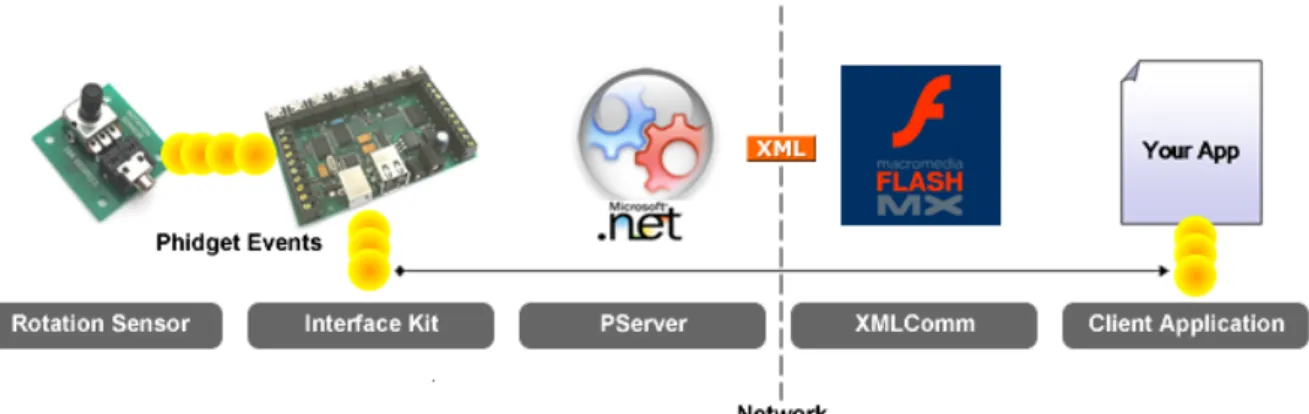
PhidgetLink includes both a Windows console application and a set of ActionScript 2.0 support classes designed for inclusion into Flash-based games. The ActionScript 2.0 classes automatically enable any Flash application to receive data from a PhidgetLink through simple events. The following diagram outlines the process.
Figure 1: Phidget Server event flow diagram
The PhidgetLink supports analog sensors and switches on ports 1-8 plus any number of Phidget RFID readers connected to the local USB interface. All events are broadcast along with the index number of the sensor which received the update. In this way, any number of sensors, switches or RFID readers may be used simultaneously.
During runtime, ths PhidgetLink dynamically creates a set of PhidgetHandlers, each connected to a specific hardware device. These multi-threaded PhidgetHandlers are responsible for tracking
low-level events from their specific hardware and forwarding these events to the PhidgetLink entity which aggregates, packages and sends events as XML.
The PhidgetLink package mainly consists of the following elements.
PhidgetServer.exe A precompiled version of the Phidget Server. This application can be run from any .NET 1.1 platform.
Interop.PHIDGET.dll The COM interop DLL for integrating the Phidget Interface driver.
Example.fla An example Flash document that includes instructions on how to integrate PServer events into Flash applications.
XMLComm.as The counterpart to the PServer within a Flash application. This class enables automatic event management with the Pserver. PhidgetSensorEvent.as Utility class used when a new sensor value is received. PhidgetSwitchEvent.as Utility class used when a new switch value is received.
The PhidgetLink workflow is as follows: 1. Install the Phidget hardware and drivers.
2. Start the PhidgetServer, which begins receiving Phidget hardware events. 3. In the Flash game, create an XMLComm object with the desired network port. 4. Add a game class as an Event listener with the XMLComm object.
5. Initialize the XMLComm object (this will start updating the game class with Phidget events as they are received from the PhidgetServer).
6. Respond to Phidget events as needed in the game class.
EXAMPLE GAMES
The following two examples are prototypes developed at the ISNM within the course Digital Game Design during summer semester 2004. The participants were equipped with a set of sensors and actors from the Phidgets collection, including: RFID sensors, pressure sensors, rotation sensors, LEDs, motors, etc. There was no restriction for development or design software tools and the teams had only about four weeks of time for finishing the entire project.
Game 1: Guardian Angel
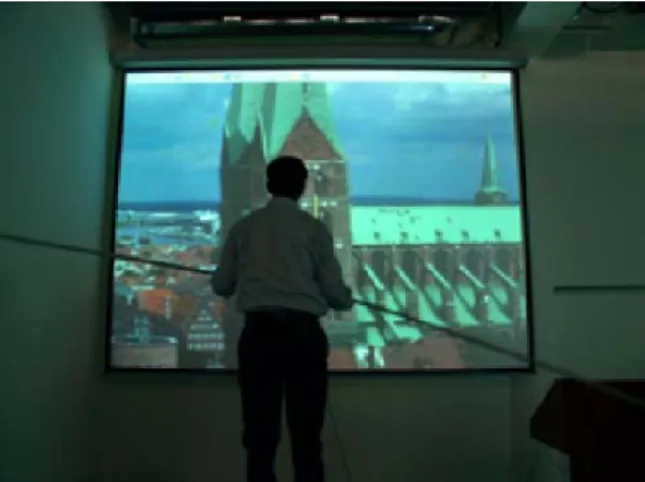
The first group decided for an immersive video experience providing a wall-sized image using a video beamer. The initial concept for "Guardian Angel" was based on the idea of guiding a virtual figure walking on a tight rope across a big valley with strong winds and virtual birds landing on the either end of the balancing pole and put her off balance. The player acts as a Guardian Angel and helps the virtual figure keep balance by using touch sensors. Very early this turned out to be too challenging for the short amount of time available. The team decided to let the player herself to become the tightrope walker using a real balancing pole as the tangible interface. The plastic pole is equipped with a rotation sensor and is used to control the Flash animated movie projected in front of the player via the PhidgetLink software. The rope is created using 3D software (Discreet 3D Studio Max) and overlaid onto photographs from church towers in Lübeck. The effect of moving was simulated by slowly zooming the image.
Figure 2: Guardian Angel game
The photograph and the rope image move as the player adjusts the balancing rod and attempts to find the centre of gravity in order to stay on the rope (see Fig. 2). To enhance the immersive experience, visitors to the exhibition had to stand on a chair while a wind and aural effects soundtracks were used to make the experience even more realistic. The game is “won” when the player successfully reaches the tower. If balance is not achieved and maintained, the player looses balance and “falls” of the rope.
Although the general impression of the game setup is an immersive virtual reality approach, the main difference is the tangible object interface using a real balancing pole to interact with the virtual scene. The player is standing in the middle of the player group and is therefore surrounded by a social group of enthusiastic promoters. The computer itself is invisible for the player and acts unobtrusively in the background. Further information about the project can be found on the project web page [6].
Game 2: Fruit Salad
The second group developed a two-player board-game that included several “smart”, sensor-equipped real-world objects. The board was set up to host a variety of removable “fruits”, represented by RFID labels with images of the corresponding fruit. The goal of the game is to collect “good” combinations of individual fruit objects into physical “salad bowls” integrated
into the board. Each of the two salad bowls is connected to an RFID reader, thus making the game logic aware of the current progress of fruit salad preparation. Moreover, a physical push-button is used to draw cards from a simulated card deck which indicates a player’s next turn (e.g. move one forward, move two forward, pause, etc.). The board itself is composed of four round discs each of which is connected to a motor. A hollow plastic apple hosts an accelerometer (shaker) sensor which, when used during certain game state, triggers the rotation of the four board discs, thus changing the spatial arrangement of the available fruits. In total, the physical board and other physical game elements are linked to the digital game logic over one shaker sensor, two push-buttons, four motors, sixteen RFID tags, and 2 RFID readers from the Phidgets collection.
In addition to the board, a computer screen or wall projection is used to display information about the game state that cannot be directly perceived from the board positions. This includes the players’ overall scores and detailed information about currently collected and still missing fruit. The display is also used for showing certain elements of chance like drawing a random card from a deck and 3D animations triggered by the player’s shaking activities.
Figure 3: Fruit Salad board design & game play
Through the integration of the physical game board, tangible interaction devices, computer controlled game logic, and computer visualizations, the Fruit Salad game combines advantages of computer games, such as animated multimedia presentations, and traditional, non-computer games, such as its inherently social setting with direct face-to-face communication between the players (and passersby). More information about the Fruit Salad game project can be found at [4].
CONCLUSIONS
Pervasive gaming extends conventional computer games in at least two ways: (1) it emphasizes direct, tangible interaction with physical objects thereby increasing the physical activity of players. (2) Being situated in everyday environments where the computer interface remains unobtrusive, players’ social interaction is encouraged. Both of these elements can also be found in many traditional, non-computer games.
Our approach to the implementation of tangible and pervasive games builds on the Phidgets sensor and motor kit. Our software framework combines Phidgets and Macromedia Flash as off-the-shelf components to provide a simple, low-cost yet powerful platform for the construction of tangible games. The software as well as the two example games have been developed within a one-semester course on Game Design at the ISNM. This demonstrates – besides the high degree of students’ motivation in this course – that classroom development of tangible, pervasive games is feasible with the chosen approach.
The two games presented in this paper were showcased during an Open House event in summer 2004 where they received a considerable amount of attention. Visitors generally seemed to enjoy the games’ tangible interfaces and gave very positive feedback. Quite obviously, the game-play stimulated conversations between visitors – players and non-players – which marks a distinct contrast to most conventional video games.
REFERENCES
1. Cheok, A.D.; Goh, K.H.; Liu, W.; Farbiz, F.; Fong, S.W.; Teo, S.L.; Li, Y., and Yang, X. “Human Pacman: a mobile, wide-area entertainment system based on physical, social, and ubiquitous computing”, in Personal and Ubiquitous Computing vol. 8, 2004, pp. 71–81.
2. Cheok, A.D.; Yang, X.; Ying, Z.Z.; Billinghurst, M., and Kato, H. “Touch-Space: Mixed Reality Game Space based on Ubiquitous, Tangible, and Social Computing,” in Personal and Ubiquitous Computing
vol. 6, 2002, pp. 430-442.10.
3. EyeToy System, Sony Playstation. http://www.eyetoy.com/german/index.html. 4. Fruit Salat Project, http://www.isnm.de/projects/FruitSalad.html.
5. “Gaming Applications in Pervasive Computing Environments”, Workshop at the PERVASIVE’2004, Vienna, April 18-23, 2004, http://www.pervasive2004.org/workshops.php#W1.
6. Guardian Angel Project, http://www.isnm.de/projects/GuardianAngel.html.
7. Hafner, K. “What Do Woman Game Designers Want?”, in New York Times, Oct. 14th, 2004, http://tech2.nytimes.com/mem/technology/techreview.html?res=980DE0DC1F3BF937A25753C1A9629 C8B63.
8. Ishii, H., and Ullmer, B. “Tangible Bits: Towards Seamless Interfaces between People, Bits and Atoms,“ in Proceedings CHI 97, ACM Conference on Human Factors in Computing Systems, Atlanta, Georgia USA 22-27 March 1997.
9. Nokia Xpress-onTM Fun Shells, http://www.nokia.com/nokia/0,4879,58227,00.html. 10. PacManhattan Project, http://www.pacmanhattan.com/.
11. Phidgets Inc., Calgary, Canada. http://www.phidgets.com.
12. Patten, J.; Recht, B.; and Ishii, H. “Audiopad: A Tag-based Interface for Musical Performance,” in NIME’02, New Interface for Musical Expression, Dublin, Ireland, May 24-26, 2002. See also http://tangible.media.mit.edu/projects/audiopad/.
13. Ulbricht, C., and Schmalstieg, D. “Tangible Augmented Reality for Computer Games,” in Proceedings of the Third IASTED International Conference on Visualization, Imaging and Image Processing” 2003, pp. 950-954. See also http://www.cg.tuwien.ac.at/research/publications/2003/Ulbricht-2003-TanX/#BibTeX.
14. Ullmer, B., and Ishii, H. “Emerging Frameworks for Tangible User Interfaces,” in Human-Computer Interaction in the New Millenium, John M. Carroll (ed.), Addison-Wesley, August 2001, pp. 579-601.