Configuration
Planning Guide
Release 6.2
Rev A
July 2013
NOTICE
The information contained in this document is subject to change without notice. UNLESS EXPRESSLY SET FORTH IN A WRITTEN AGREEMENT SIGNED BY AN AUTHORIZED REPRESENTATIVE OF STRATUS TECHNOLOGIES, STRATUS MAKES NO WARRANTY OR REPRESENTATION OF ANY KIND WITH RESPECT TO THE INFORMATION CONTAINED HEREIN, INCLUDING WARRANTY OF MERCHANTABILITY AND FITNESS FOR A PURPOSE. Stratus Technologies assumes no responsibility or obligation of any kind for any errors contained herein or in connection with the furnishing, performance, or use of this document.
Software described in Stratus documents (a) is the property of Stratus Technologies Bermuda, Ltd. or the third party, (b) is furnished only under license, and (c) may be copied or used only as expressly permitted under the terms of the license. The software described in this document is covered by the following copyright: © Stratus Technologies Bermuda, Ltd. 2008, 2009-2013.
Stratus documentation describes all supported features of the user interfaces and the application programming interfaces (API) developed by Stratus. Any undocumented features of these interfaces are intended solely for use by Stratus personnel and are subject to change without warning.
This document is protected by copyright. All rights are reserved. Stratus Technologies grants you limited permission to download and print a reasonable number of copies of this document (or any portions thereof), without change, for your internal use only, provided you retain all copyright notices and other restrictive legends and/or notices appearing in the copied document.
Stratus, the Stratus logo, ftServer, and the ftServer logo are registered trademarks of Stratus Technologies Bermuda, Ltd.
The Stratus Technologies logo, the Stratus 24 x 7 logo, ActiveService, ftScalable, Automated Uptime, and Active Upgrade are trademarks of Stratus Technologies Bermuda, Ltd.
The Application Availability Experts, ComputeThru, everRun, and SplitSite are registered trademarks or trademarks of Stratus Technologies Bermuda, Ltd.
Microsoft® and Windows® are registered trademarks of Microsoft Corporation in the United States and/or other countries; Xen® and Citrix® are registered trademarks and XenServer™, XenCenter™, and XenConvert™ are trademarks of Citrix Systems, Inc.; Java® is a registered trademark of Sun Microsystems; Linux® is a registered
trademark of Linus Torvalds. Intel® is a registered trademark of Intel Corporation. All other trademarks are the property of their respective owners.
Stratus everRun products are protected by one or more of the following patents: U.S. Patent Numbers: 5,600,784; 5,615,403; 5,787,485; 5,790,397; 5,896,523; 5,956,474; 5,983,371; 6,038,685; 6,205,565; 6,279,119; 6,473,869; 6,728,898; 7,373,545; 7,877,552. European Patent Numbers: EP0731945; EP0974912; EP0986784; EP0993633; EP1000397; EP1000404; EP1029267; EP1496434; GB2392536; Japanese Patent Numbers: 3679412; 4166939; 4264136. Other patents pending.
The product makes use of software covered under the GNU Public License (GPL) and the Lesser GNU Public License (LGPL). For a written copy of these licenses, see /var/ everRun/ current_everRun/licenses on any XenServer host on which everRun software is installed. Stratus will make source components available upon request, as required under the terms of the GPL. Contact everRun MX Support (US Toll-Free) 866-763-1813 or (International) 602-852-3094.
Chapter 1 — Introduction
Overview ... 1
Contents of This Guide ... 1
Chapter 2 — Configuration Fundamentals
Overview ... 3Production Deployments ... 3
FT-SMP Requirements ... 4
Option A: A Local Two-Host Pool ... 4
Option B: A Local Multi-Host Pool ... 5
Option C: A SplitSite Two-Host Pool ... 6
General Deployment Guidelines ... 6
For More Information ... 8
Chapter 3 — Server Fundamentals
Overview ... 9XenServer Hosts ... 9
Where to start? ... 9
How many servers? ... 9
How many CPUs? ... 10
What CPUs are supported? ... 11
How much RAM? ... 11
CPU and Server Rules ... 12
System Management (Client) Computer ... 12
Quorum Service Computers ... 13
Contents
Chapter 4 — Network Fundamentals
Overview ...15
LAN Requirements ...15
Management LAN ...15
Management LAN Best Practices ...16
Providing an Isolation IP Address ...16
Private LANs (Availability Links) ...16
Private LAN (A-Link) Rules ...17
Subnet Configuration Options ...17
Private LAN (A-Link) Best Practices...18
Public Production LANs ...19
Public Production LAN Rules ...19
Public Production LAN Best Practices ...19
Additional NICs ...20
Multicast Network Traffic ...20
Provide TCP/IP Configurations for Production Deployment ...20
Summary ...20
Chapter 5 — Quorum Service Fundamentals
Overview ...21When is Quorum Service Required? ...21
Quorum Service Rules ...22
Quorum Service Best Practices ...23
Summary ...23
Chapter 6 — Storage Fundamentals
Overview ...25everRun Storage Support ...25
everRun Data Protection ...26
everRun Mirroring...26
Storage Subsystem Data Protection ...27
Performance and Placement ...29
Storage Rules ...30
Chapter 7 — Summary of Deployment Options
Overview ... 31
Configuration Options ... 31
Meeting Your Availability Goals ... 31
Protection Level 3 (System Level Fault Tolerance) ... 32
Protection Level 2 (Component Level Fault Tolerance) ... 32
Protection Level 1 (Basic Failover) ... 33
Surviving Management LAN Segmentation Failure ... 34
Best Practices to Avoid LAN Segmentation Failure ... 34
Summary of Deployment Guidelines ... 34
Comparison of everRun Deployment Options ... 35
Appendix A — Option A: Local Two-Host Pool
Overview ... 37 Software ... 37 Servers ... 38 Networking ... 39 Storage ... 41 PVM Deployment for FT-SMP ... 41 System Connectivity ... 41Appendix B — Option B: Local Multi-Host Pool
Overview ... 43 Software ... 43 Servers ... 44 Quorum Service ... 45 Networking ... 46 Storage ... 48 System Connectivity ... 48Appendix C — Option C: Two-Host SplitSite Pool
Overview ... 51Software ... 52
Servers ... 52
Storage ...56 PVM Deployment for FT-SMP ...56 System Connectivity ...56
Brief Glossary
everRun Terminology ...59 XenServer and Industry Terminology ...61
This document describes configuration options and best practices for the three supported classes of everRun installation: a local two-host pool; a local multi-host pool; and a SplitSite pool.
Audience
This guide is written for experienced technical personnel responsible for configuring, installing, administering, and managing network server hardware and software, including Microsoft Windows virtual machines.
Use this guide to plan your everRun deployment. The document provides planning information to help define the configuration that will meet your availability needs. Refer to it again when you are installing everRun, to recall the configuration details and settings that will ensure a successful system deployment.
This manual contains a brief glossary of key terms. After you install, you’ll find an extensive glossary of terms in the everRun Online Help, which is accessible from the eAC management GUI.
everRun Guides
The following everRun documents are shipped with this release:
• Read Me First is an overview of the everRun installation sequence, which explains all components and documents needed.
• everRun Product Overview* is a quick overview of everRun product features and functionality.
• everRun Release Notes* covers all known issues that affect the current release. • everRun Setup and Installation Guide* provides step-by-step instructions for
setting up your system.
current release.
• everRun Configuration Planning Guide describes configuration issues and best practices for the three supported classes of installation: a local two-host pool; a local multi-host pool; and a SplitSite pool.
• everRun SNMP Guide* describes everRun's implementation of the Simple Network Management Protocol (SNMP).
• everRun Messages Guide is a complete reference guide to the messages generated by each everRun component.
• everRun Evaluation Guide describes a process for testing an everRun configuration as part of a first-time setup, evaluation, or proof of concept. • everRun Hardware Guide identifies the key considerations for sizing and
purchasing servers to run everRun software.
* These documents may be accessed (in PDF format) from the Welcome tab of the eAC. The entire documentation set is also available from the everRun product download site located on the everRun Customer Portal at http://everRun-support.stratus.com
everRun Online Help
In addition to the published guides, everRun contains an extensive online help system, with instructions for configuring and operating the everRun system. The online help contains a keyword search facility as well as an index and glossary.
everRun Online Help contains detailed information about everRun system
administration, including online help pages for each of the everRun (ev) command-line
options.
You access the Online Help from the eAC Help menu. Choose Help > Contents to see a table of contents view; Help > Index for an alphabetical index of topics; or Help > Search to open a keyword search view of the Help system.
The everRun Online Help is also available as a standalone Windows HTML file (in CHM format) for users who want to consult online help when the eAC is not accessible.
Overview
This document provides guidelines to help plan your everRun installation and select the appropriate system, network, and storage components for your everRun
configuration. These planning guidelines are meant to ensure maximum success during system installation and operation.
For help in understanding the terms used in this guide, please read the everRun Product Overview and consult the brief glossary at the end of this document. Before starting your installation, review the everRun Release Notes provided with this release. To install, use both the Read Me First installation overview and the step-by-step installation details in the everRun Setup and Installation Guide.
Contents of This Guide
This guide describes the supported everRun deployments.
• Chapter 2, Configuration Fundamentals, describes the elements of an everRun system. It describes the supported production configurations:
- Option A: A local, two-host pool. Minimum requirements for this option are slightly more demanding when your pool includes any protected VMs running in Level 3 SMP mode (FT-SMP operation).
- Option B: A local, multi-host pool.
- Option C: A SplitSite® (disaster tolerant) two-host pool, where each host is
located in a different room or facility, usually separated by very long distances. Appendixes A to C provide specific configuration guidelines for each of these deployments.
• Chapter 3, Server Fundamentals, lists XenServer host requirements.
addressing schemes needed to interconnect pool resources.
• Chapter 5, Quorum Service Fundamentals, discusses everRun quorum service, which runs on general-purpose computers. It provides automatic restart capabilities and data integrity assurances if specific failure modes occur. • Chapter 6, Storage Fundamentals, describes storage hardware resources and
configuration information.
• Chapter 7, Summary of Deployment Options, lists strategies for meeting your availability goals using everRun Level 3, Level 2, and Level 1 fault tolerance, as defined in the following table. The chapter describes the configuration options as mandatory or not supported, and rates them as Good, Better, or Best choices for fault tolerance or resiliency.
Fault Tolerance Level Properties
Level 3, System-Level Fault Tolerance
• Zero downtime for any failure
• Retention of application state and memory state during failures
• All the benefits of Level 2 Level 2, everRun Component-
Level Fault Tolerance
• Automated fault management policies handle server, network, and storage subsystem failures.
• Assured recovery of virtual machines • Zero downtime due to I/O failures • Zero data loss
Level 1, Basic Failover (Citrix XenServer HA)
• Basic failover to another host, with resource calculation to determine the number of simultaneous host failures that can be worked around
• Monitoring the health of hosts within a pool • Shared-storage configuration required
(special Citrix licensing requirements apply).
Overview
This chapter describes the production deployments supported in this release.
Production Deployments
The production options detailed in this guide are:
• Option A: A Local two-host pool. This redundant two-host configuration is located in a single site, such as a computer room. It uses private, directly connected availability link (A-link) networks. Option A is the simplest to
configure. It is the configuration encouraged for evaluations — including tests and demonstrations of failures, recoveries, and repair scenarios.
• Option B: A Local multihost pool. This configuration integrates quorum services for a two, three, or four host pool. Quorum services are integrated to ensure the integrity of PVMs in the pool against multiple network failure scenarios, and to provide for unattended startup of PVMs after specific server failures have occurred. Quorum services are always recommended and required for all but the simplest of configurations (refer to Option A).
• Option C: A SplitSite® (disaster-tolerant) two-host pool. This configuration represents the everRun SplitSite option, a disaster-tolerant deployment that maintains hardware redundancy as well as redundancy of physical computer rooms and the buildings containing them. Because of the geographic separation, the SplitSite option requires careful planning of component placement and more complex networking topologies. Quorum services are also required.
FT-SMP Considerations
Multi-processor VMs protected with Level 3 (System-Level Fault Tolerance or FT-SMP) provides important scalability benefits, but it also imposes additional hardware
Configuration
• FT-SMP operation requires Intel processors that implement the Extended Page Tables (EPT) feature.
• Each Level 3 PVM running in multiprocessor mode (SMP) uses 512 MB incremental RAM and CPU threads.
• Level 3 SMP PVMs depend on higher network performance between the XenServers. Actual demands vary with application load. If you deploy two SMP PVMs on the same pool, specify a different physical server as the primary host for each. It is possible to deploy multiple FT-SMP PVMs on the same pool, however due to application variables, configuration of more than 2 PVMs must be modeled to characterize the impact on performance.
Option A: A Local Two-Host Pool
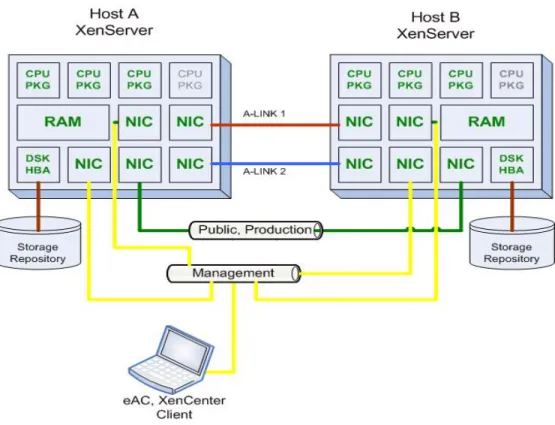
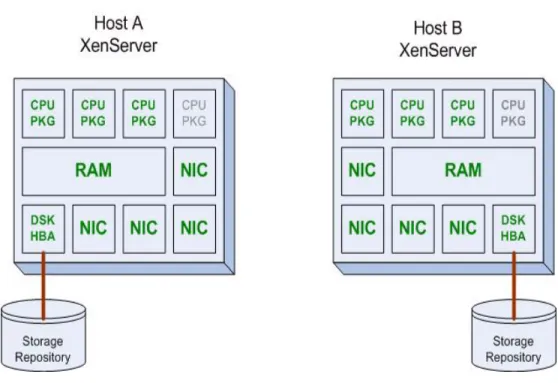
An everRun protected VM (PVM) requires two physical servers, and provides
redundancy by connecting a set of resources on a primary host server to a second set of resources on a different physical host, as shown in Figure 1.
This option uses two servers in a single room with directly connected Ethernet cable or fiber connections for A-Link1 and A-Link2. The first everRun (PVM) host for the protected VM resides on XenServer Host A, and the redundant everRun host is allocated from resources on XenServer Host B. The two A-links provide redundant, private connections between the two everRun hosts. Option A is recommended for evaluations and some production deployments because it is simple to configure and offers adequate insurance against common failure modes. A-Link LANs must be configured “perfectly” when deploying Option A.
A direct-connected two-host configuration does not require you to enable quorum services. The short, point-to-point, A-link LANs minimize the likelihood of
simultaneous A-link network failures, and the potential for an undesirable split-brain condition to occur. Beginning with v6.2, everRun MX configurations are no longer limited to using A-Links for quorum networking. Configuration of quorum services is highly recommended for all production deployments (refer to Option B).
Option A is recommended for: • Evaluations
• Production deployments when adequate split-brain avoidance measures can be applied
• Option B cannot be considered for added benefits quorum.
Review the details in Appendix A for detailed requirements and recommendations if you will deploy Option A.
Option B: A Local Two, Three, or Four Host Pool
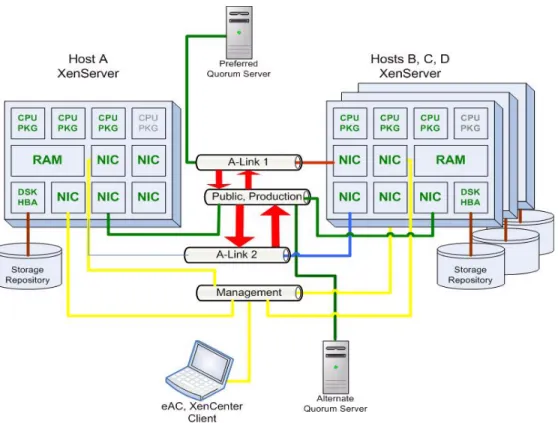
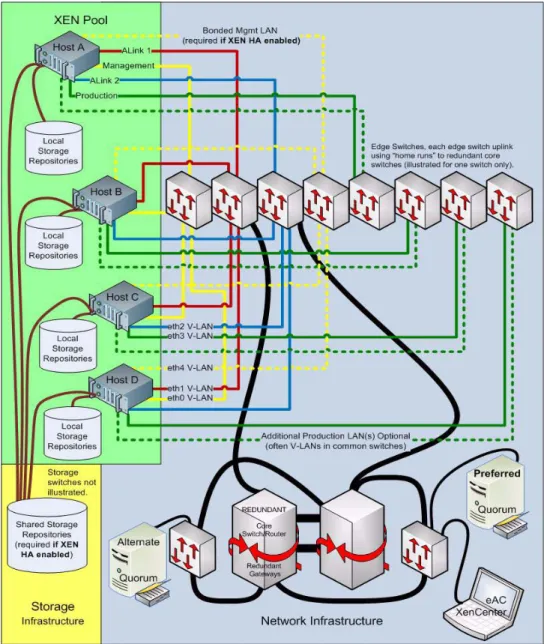
Use Option B (Figure 2) if you are planning to deploy a pool of two to four XenServer hosts on a single site — with quorum service.
Figure 2 A two, three, or four host pool on one site.
This deployment includes two to four XenServer hosts at the same location. To supply the required quorum service, two quorum computers are configured and placed on a LAN. The networks are typically interconnected as shown in Figure 2. Any network can be configured for use with quorum services. All quorum communications are routable. Option B is highly recommended for:
• Production deployments of two, three, or four XenServers in a common computer room.
• When redundant facilities (sites) are not feasible or not required.
Review the details in Appendix B for detailed requirements and recommendations if you will deploy Option B.
Option C: A SplitSite Two-Host Pool
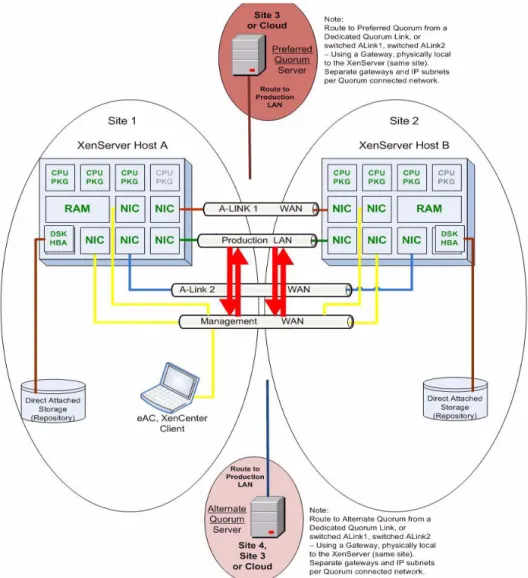
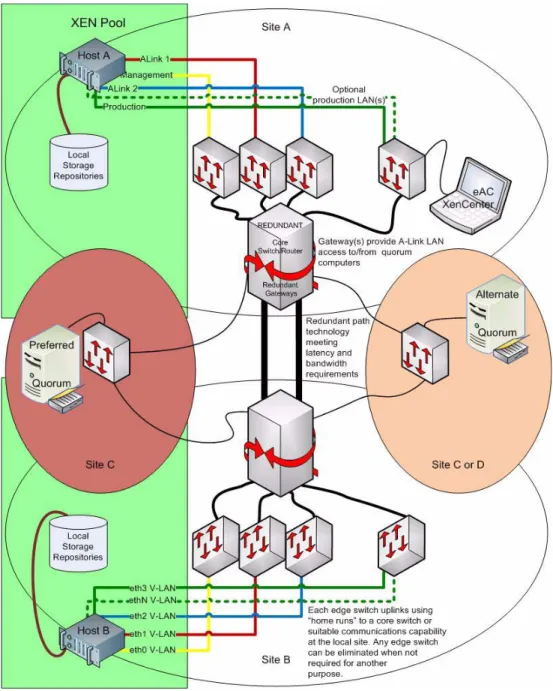
In a SplitSite deployment (shown in Figure 3 ), the two XenServer hosts are located in separate data centers or in geographically separate buildings, with wide area
between sites A and B - and quorum computers are required (when one site fails, quorum communications with a surviving host on another site must NOT be interrupted). A common and simpler alternative to Figure 3, using direct connected A-Links (i.e. “campus SplitSite” with private fiber) works well.If you are not experienced with SplitSite designs, consider a professional services engagement with your service provider.
SplitSite requires quorum service, configured in accordance with best practices. For best fault tolerance, a preferred quorum computer is located in a third facility and an alternate is located in a fourth. However, the alternate quorum computer can also be placed with the preferred quorum computer and still yield satisfactory results. When only two sites (or a single gateway) are available, some failures can break quorum communications with PVMs on the surviving site. Whenever a surviving PVM loses access to quorum and cannot safely complete fault handling, PVMs at the surviving site must shut themselves down and be manually restarted (a disaster recovery scenario). If Option C meets your needs, review the details in Appendix C carefully before beginning your installation — and make certain you include appropriate infrastructure for the PVMs you plan to include in your deployment.
Option C is best for:
• Production deployments when you must protect against facility falures - in addition to common equipment failures.
• Synchronous, automatic DR deployments when adequate A-Link networks can be provided.
Review the details in Appendix C for detailed requirements and recommendations if you will deploy Option C.
General Deployment Guidelines
In addition to deployment topologies outlined in Appendixes A, B, and C, you can plan to protect your virtual machines at Level 3, 2, or 1, or an appropriate combination of those protection levels.
If you do not plan to include XenServer HA (everRun Level 1) in your pool, some requirements associated with Level 1 can be eliminated. Specifically:
• You do not need to configure shared storage. When using only everRun Level 3 and Level 2, you only need to provide local storage.
• There is no need to consider host fencing as a result of the XenServer HA
protection algorithm. You can place Level 3 and Level 2 PVMs on any host in the pool and depend on everRun fault-handling and quorum for all eventualities.
Figure 3 A SplitSite configuration has one XenServer host on each of two sites. The deployment shown includes active, switched A-link networks and storage attached directly to each host.
• You are NOT required to meet the XenServer HA requirement of a bonded NIC pair on the management network. However, it is recommended that you implement this bonded NIC to provide maximum reliability of the management network. Because a bonded NIC uses two separate network cards, this configuration consumes a minimum of four, not five NICs.
The following points describe the relationship of quorum service and everRun automatic/manual master failover.
• If quorum service is enabled, it overrides everRun's automatic pool master failover. A VM continues to operate when the pool master fails, but the system administrator manually designates the new pool master host as required. • If quorum service is disabled the everRun Management Service (MMS) provides
pool master failover based on an alternative “Isolation IP address” capability.
For More Information
Networking is further described in Chapter 4, quorum service in Chapter 5, and storage in Chapter 6. When selecting a deployment option, you may find it helpful to review Chapter 7, which compares the availability provided by various deployment options and includes additional SplitSite perspectives. Appendices A, B, and C provide deployment details for software, servers, quorum service, networking, storage, and PVMs, as well as a connectivity diagram for each configuration.
If you have questions that are not addressed in this guide, or if you need help to plan a custom configuration that meets your availability needs, consult your everRun MX reseller for professional deployment services.
Overview
Hardware redundancy enables everRun-protected VMs to operate through failures, resulting in very high levels of availability for Windows environments. This chapter describes the basic hardware and software requirements for hosts in an everRun pool, and the general-purpose computers required for system management or quorum service management.
XenServer Hosts
The basic hardware requirement for a single protected VM is two separate XenServer hosts that are members of the same resource pool. Each server should be configured according to the guidelines in this chapter.
Server Fundamentals
3
Where to start?
Choose two or more servers from those listed on the Citrix XenServer Hardware Compatibility List (HCL) at the link shown below.
Tip: Browse to http://hcl.xensource.com/?showall=no&subtab=systems
To narrow your search, specify “server” and enter your vendor of choice. See “CPU and Server Rules” on page 15 for more information.
How many servers?
Acquire the number of servers you will deploy to meet your capacity and redundancy requirements. See “CPU and Server Rules” on page 15 for more information.
NOTE: Guidelines and a worksheet for planning your vCPU demand on a XenServer host are available in the KnowledgeBase at the everRun support website. To review these guidelines, log in to everRun Technical Support with your How many CPUs?
Populate each server with enough CPU cores/threads to meet your performance needs. The total number of CPUs required will vary greatly, according to your system design.
This section lists a few factors to consider when planning your CPU requirements. See “CPU and Server Rules” on page 15 for more information.
• The XenServer environment uses four CPUs.
• Each running (non-protected) VM requires one or more CPUs on the XenServer host where it will run and each protected VM represents CPU requirements on two separate XenServer hosts.
• Each L3 PVM requires (up to) 6 extra CPU threads for an AM. • Each L2 PVM requires 1 extra CPU thread for an AM.
• Consider the capacity requirements on each host after failover has occurred. For example, Level 2, and Level 1 PVMs may require additional resources on the machines they fail over to.
- Level 3 protected VMs — Always reserve the same number of CPUs on both hosts.
- Level 2 protected VMs — The default configuration (recommended) reserves the same number of CPUs on the active and standby hosts. It is possible to reserve a different number of CPUs on the redundant host, resulting in some disadvantages. Online migration cannot be performed (hindering software upgrade and repair scenarios) and following a failure requiring Windows to restart on the redundant host - capacity will be adjusted down/up to match the number of CPUs reserved.
- Level 1 protected VMs — After the VMs fail over, VM performance of all VMs will be reduced unless free CPU resources are reserved for the worst case scenario.
• XenServer permits a higher vCPU demand than physical CPUs that exist (over committing CPUs), however when all become active, performance can degrade significantly. For best performance, you should provide enough physical CPU threads on each server to minimize or eliminate over committing CPUs.
• For acceptable availability, you should provide a minimum of 1 CPU thread for each vCPU of demand on both servers.
customer password, click the Knowledge button, and choose the Documents category in the list at left. Then type "CPU Overcommit Counters" into the Search This Category window and click Search.
What CPUs are supported?
A list of the processors currently supported for everRun Level 3 SMP, Level 3 uniprocessor, and Level 2 protection is available at:
http://everRun-support.stratus.com
If you want to evaluate whether your hardware supports everRun Level 3 multiprocessor (SMP), Level 3 uniprocessor, or Level 2 operation, download and run the everRun Compatibility Check utility to prequalify your hardware. The utility, which is available in the Tools and Utilities section of the everRun download site, checks CPU vendor, brand, and type; microcode revision; and other features required for everRun operation. It runs from a DVD or USB key attached to the target hardware and does not require XenServer or everRun software to be installed at the time. For instructions, download the Compatibility Check Readme document, also available at the everRun site in the Tools and Utilities category.
How much RAM?
Populate each server with sufficient RAM to support all the VMs you need to run at once. XenServer limits you to the number of VMs the physical RAM can support. Provide a minimum of 4GB of RAM per server to accommodate four (or more) protected VMs and the XenServer environment. Less RAM will constrain you to have fewer VMs or VMs with smaller amounts of memory.
Tip: Make sure each of the XenServer hosts contains enough RAM to support your requirementswhen another host fails. Meeting this recommendation also provides capacity for online migration of Level 2 and Level 1 PVMs in repair or recovery scenarios.
For best availability and performance, a protected VM should have identical RAM allocated on its redundant everRun host. The following guidelines apply to different PVM types.
• Level 3 protected VM — Always requires an identical amount of RAM on both hosts. everRun is utilizing this RAM for Windows simultaneously on both physical hosts even before a failure.
Each VM protected at Level 3 (uniprocessor) or Level 2 uses 128 MB of incremental RAM (beyond that configured for Windows for an AM) on both hosts. It is mandatory to meet this RAM requirement on each host.
Each Level 3 PVM running in multiprocessor (SMP) mode uses 512 MB incremental RAM instead of 128 MB.
System Management (Client) Computer
The client computer(s) used for everRun management can be any general-purpose computers running Windows 7, Windows XP, Windows Vista, Windows Server 2003, Windows Server 2008, Windows Server 2008 R2 (all editions and versions).
You use the client computer to access the two graphical management interfaces in the everRun system:
• The everRun Availability Center (eAC) — The browser-based eAC everRun management GUI can be loaded and run by any Flash-enabled web browser on any computer.
• Level 2 protected VM — Unless configured otherwise at the time of protection, Level 2 PVMs reserve identical RAM on both hosts.
RAM allocated to Level 2 PVMs depletes available resources on the host; thus Level 2 PVMs have priority over Level 1 PVMs when failover attempts are processed. In Level 2 protection the amount of RAM configured for the standby side is reserved when the PVM is started (in advance of any host failure). Online migration (a feature that permits you to maintain PVM operation during software updates or hardware repair scenarios) can be performed only if the RAM is identically configured on both hosts. However, if a PVM is configured to use less RAM on the standby host, it will still be possible to migrate with restart. • Level 1 protected VM — Requires identical RAM on two hosts, according to
your failover needs. It is best to have ample RAM reserved when a single host failure would cause many VMs to fail over. If adequate RAM is not available, some Level 1 VMs cannot be restarted on another XenServer host.
CPU and Server Rules
Select a server with approved Intel processors from the lists available at http:// everRun-support.stratus.com
Minimum of 2 servers per pool; 4 maximum have been qualified.
Each CPU must be the same family and model, and otherwise be eligible to join a common XenServer pool.
Provide a minimum of 4 CPU cores per server; 160 CPU threads (vCPUs) maximum per server. An everRun PVM may contain up to 8 vCPUs. The actual number of CPUs required varies with the PVMs you plan to deploy. Refer to “How many CPUs?” on page 12 for guidelines.
• The XenCenterinterface — XenCenter is the client application for remote management of XenServer hosts. It can be installed and run on any management computer.
Quorum Service Computers
Quorum services should be enabled with all deployments, however they can be considered optional for deployment Option A. If your deployment uses active, switched A-Link networks, quorum service software is required. Quorum service software should be installed on two Windows XP (SP2 or newer), Windows Server 2003 or 2008, Windows Vista, or Windows 7 computers, as described in Chapter 5.
Summary
For more information about everRun server configurations, see Chapter 7, “Summary of Deployment Options”. After you select a deployment option, refer to the relevant appendix (A to C) before procuring hardware, preparing the infrastructure, and beginning your hardware and software installation.
Overview
Proper attention to network design can make the difference between building a configuration that functions and building a configuration that delivers the availability you require when a hardware or network failure occurs. This chapter describes requirements and best practices for the management LAN, private (A-link) LANs, and public (production) LAN.
LAN Requirements
A minimum of four physical LANs (using four or five NICs per host) are recommended, as shown in Figure 1 on page 4. A NIC is added whenever a bonded management LAN is used. A bonded management LAN is strongly recommended when deploying Level 1-protected VMs (called XenServer High Availability [HA] in Citrix documentation). In addition to its primary functions, each LAN type may be used to meet quorum requirements for deployment Options B or C. The total number of networks may exceed the minimum- up to XenServer maximums. For example, your deployment may call for more than a single Production LAN for some PVMs - or for separate physical LANs for different PVMs. Additionally, you may decide to use dedicated networks for Quorum services - or integrate Quorum with your Management, A-Link, or Production networks.
Quorum services are descussed in Chapter 5 (Quorum Service Fundamentals) - however quorum considerations specific to each LAN type are integrated in the sections that follow.
Management LAN
The XenServer management LAN interconnects pool members and management applications. It is required to reach Network Time Protocol (NTP) servers, import or export a VM, and to synchronize or migrate PVMs (and VMs) between hosts in the pool.
Network Fundamentals
bonded NIC pair on each host, to provide management LAN redundancy between hosts and network switches.
Providing an Isolation IP Address
The pool-wide isolation IP address, described in the final row of the preceding table, is used by the everRun management service to maintain availability of pool management capabilities in deployment Option A only. It enables everRun to automatically appoint a replacement if the active pool master should fail for a few minutes. Configuring this feature is useful in simple configurations when the administrator is not familiar with XenServer pool management.
Pool-wide isolation IP address configuration is explained in greater detail in the everRun Availability Center (eAC) Online Help.
Subnet Configuration Options and Requirements - Management LAN)
When setting up your Management network, you can elect to assign each XenServer host (control domain) on a common IP subnet — or you can configure routes between hosts.
• If you are configuring a local, two-host pool (Option A), all hosts are typically configured using a common subnet. Requirements:
Physical Configuration Best Practices - Management LAN
Provide independent production and management NICs and LANs whenever possible. Connect each management NIC through switches and uplinks such that no switch or uplink failure can impact more than one XenServer host or both NICs in a bonded pair.
Bonded NICs are strongly recommended for the management LAN, if you plan to enable XenServer HA (deploy Level 1 PVMs) in your pool. Configure the bonded NIC pair on the management LAN, with each NIC cabled to a separate Ethernet switch.
Configure gateway access between your management LAN and other LANs as required for mangement computer access (including LANs used for remote management purposes).
To support online migration of a Level 2 protected VM or (re)synchronization of a Level 3 PVM, all NICs, switches, and uplinks must be capable of 155 Mbps or greater, with full duplex connections. 1 GbE components end-to-end or faster are recommended. 155 Mbps uplink capacity is sufficient for limited SplitSite configurations, however if Level 3 SMP PVM(s) are deployed, the minimum (end-to-end) bandwidth requirement increases to 1 Gbps.
Identify a device with a static IP address for use by everRun’s Management Service (MMS) failover. This device must be configured to reply to ICMP ping requests initiated by all hosts in the pool, and it should remain powered on at all times on the management LAN. MMS failover is applicable to deployment Option A (without Xen HA enabled), and in other situations when quorum services are temporarily disabled.
- Static IP address assignments
- One or more NTP servers must be accessible from the XenServer hosts - IP access among all XenServer hosts
- IP networking between management computers and the XenServer hosts • If you are configuring a local two, three or four host pool (Option B), all hosts
are typically configured using static IP addresses on a common subnet. Requirements and considerations:
- All requirements of Option A must be met
- The quorum service features can be configured using the Management, or a different LAN.
• If you are configuring a SplitSite configuration (Option C), where the two hosts are in separate locations, routed Management LANs are sometimes prescribed by the network administrator and required for quorum to be effective. Requirements and considerations:
- All requirements of Option A must be met
- The quorum service features can be configured using the Management, or a different LAN. Separate gateways local to each site are necessary to reach quorum computers and support proper fault handling when networks fail.
Private LANs (Availability Links)
Level 3 and Level 2 Protected VMs use two LANs for private availability-link networks (A-link 1 and A-link 2). Within a protected VM, the A-link networks connect the two everRun hosts for the protected VM.
Physical Configuration Best Practices - LANs
Do not configure NIC bonding for availability-link (A-link) networks. Do not assign both A-Links on on the same multi-port card or server board.
Hardware failures impacting multiple ports have happened and should be guarded against.
Subnet Configuration Options and Requirements - Private LANs When setting up your network IP addresses, you can elect to assign each A-link to a single IP address range (two subnets total) — or you can assign a separate IP address range to the connection at each end of the A-link (four subnets total). This section describes the appropriate use of two-subnet and four-subnet approaches for the supported everRun configuration options.
• If you are configuring a local, two-host pool (Option A), all hosts are configured using two subnets (one for A-Link1 and one for A-Link2). Because the LANs are not switched or routed, everRun default address ranges are almost always used. Requirements:
- IP address range assigned for each A-Link network.
- The range must provide two IP addresses for each PVM (everRun defaults provide 100 addresses, more than enough for PVMs)
• If you are configuring a local two, three or four host pool (Option B), all hosts are typically configured using two subnets (one for A-Link1 and one for A-Link2). With local configurations, there is rarely an advantage to configuring routable A-Link networks. Requirements and considerations:
- All requirements of Option A must be met
- If the A-Links will be switched networks (more that two XenServer hosts or use of A-Links to implement quorum), do NOT use default everRun address ranges. You must assure no address conflicts with other network devices that might have access to these LANs -- including other everRun pools (installed using default assignments).
- Configure dedicated IP address ranges for each A-Link whenever a switched network configuration is used.
- If routable A-Links are desired, refer to Option C. It is uncommon but possible to install a SplitSite compliant, two host configuration in a single room.
Provide independent LANs for A-links in each XenServer host. If both A-Links use common physical components, a single failure escalates to multiple failures simultaneously. Connect each A-link NIC through switches, routers, and uplinks such that:
- An uplink failure can only impact one A-Link LAN.
- A gateway failure can only impact one XenServer host's connectivity to other hosts or Quorum Computers (if configured using A-Link LANs).
- All NICs, switches, and uplinks should be capable (end-to-end) of 1Gbps (or faster), full-duplex connections. The minimum (end-to-end) speed is 155 Mbps only if Level 3 SMP PVM(s) are NOT configured.
- Quorum service features can be configured using A-Links -- or without the use of any A-Links LANs. Refer to Chapter 5 "Quorum Service Fundamentals". • If you are configuring a SplitSite configuration (Option C), where the two hosts
are in separate locations, routed A-Link WANs are often prescribed by the network administrator. Requirements and considerations:
- All requirements of Option A must be met
- The quorum service features are required, however it is not necessary to meet the requirements using A-Link WANs
- Routable A-Links may be used to reach Quorum. When using A-Links for Quorum access use separate IP address ranges and gateways (one local to each site) to fault handle correctly when networks fail. This means two subnets for each A-Link in use with quorum.
- Point-to-point A-Links can be configured ("campus SplitSite") using dedicated long distance fiber or other media. Point-to-point A-Links cannot be used for Quorum access -- so only a single IP address range and no gateways are configured.
NOTE: Quorum is required for campus SplitSite configurations. A different WAN using separate gateways and IP address ranges (and SplitSite license) must be allocated for quorum networks. See Chapter 5 "Quorum Service
Fundamentals".
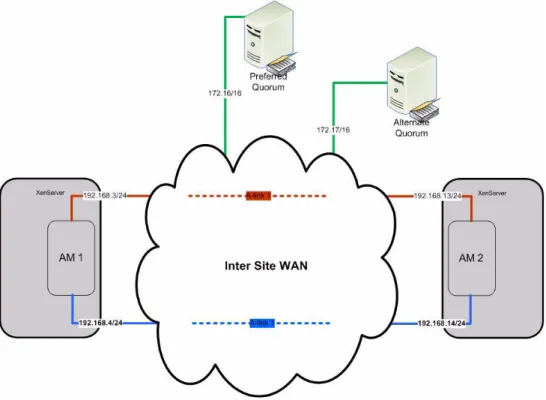
Figure 4 is a simplified illustration of a routed four-subnet scheme. Each end of an A-link has a separate path, via a local gateway, to a quorum computer. The drawing shows an option to configure the preferred quorum computer using one of the A-Link WANs; a similar pathway would be configured to the alternate quorum computer, using the same approach. While Quorum services should be configured for all deployments, use of A-Link networks for this purpose are optional (see Chapter 5, “Quorum Service Fundamentals”).
Figure 4 Simplified sketch of a four-subnet scheme that provides separate
pathways to each end of each availability link (A-link). IP addresses in the illustration are samples, not examples.
Note: Configuration of Quorum Computers is possible using any routed network between sites. Use of an A-Link is shown in figure 4 for illustration purposes. Refer to Chapter 5 "Quorum Service Fundamentals" for complete
information about configuring quorum services.
.
Public Production LANs
Production networks connect virtual machines and LAN-based clients must use a single vLAN. VMs protected at everRun Level 3 and Level 2 provide redundant, layer 2 LAN access for the Windows operating system by managing separate physical NICs on two XenServer hosts as a redundant pair. Up to six (in releases older than v6.2) public production LANs can be configured for each PVM. A XenServer knowledge
article (available at http://support.citrix.com/article/CTX123158) describes considerations for XenServer switch ports.
Additional Production NICs
everRun supports up to six virtual NICs per protected VM. A maximum of twelve virtual devices (NICs and disks combined) are allowed per protected VM. For information about the maximum number of physical NICs supported by XenServer, refer to the Citrix XenServer documentation at the Citrix website (http://
support.citrix.com) or the everRun MX support website (http://www.stratus.com/Stratus/ Home/Services/CustomerSupport ).
Physical Configuration Rules - LAN
Although it is possible in some circumstances to combine production and management NICs, such a configuration is not recommended.
Production LANs must pass layer 2 multicasts between all ports connected to the physical NICs on each host in the pool. Even if the XenServer hosts containing the NICs are on different sites (deployment Option C) both NICs must be connected to a common (v)LAN.
Do not configure NIC bonding for production networks.
Comply with best practices for quorum network configurations (on a non-routable LAN) if using Production NICs to access Quorum computers. See Chapter 5 for a discussion of quorum service and quorum service computers. Never configure both NICs of a redundant pair to a common network switch.
Physical Configuration Best Practices - LAN
Although more than one Production LAN can be configured using a common physical NIC, it is not recommended. For maximum redundancy (of multiple LANs for one PVM), provide separate NICs and LANs for each production LAN.
Connect each production physical NIC through switches and uplinks such that no one switch or uplink failure can impact the ability of production clients to connect to the redundant host.
Absence of multicast network traffic will delay failover response. In very quiet LAN environments consider adding a multicast generator to accelerate failover response.
TCP/IP Configurations for Production Deployment
This document does not describe production TCP/IP configurations for the VMs you plan to install on the pool. However, it is recommended you accommodate each Production LAN on each protected VM within your IP address range.
These LANs can be used for configuration of Quorum services, however they are most appropriate for deployment Option B (site failure protection is beyond scope).
Production LANs are layer 2 implementations, and cannot be routed between XenServer host locations.
In Option C (SplitSite), a routed WAN quorum configuration (using A-Links,
Management WAN or a seperate, low bandwith WAN) is required to achieve ideal fault handling results. For some classes of network failure. non-routed quorum solutions result in synchronous replication DR behaviors (intentional outages and manual restart). Refer to Chapter 5 "Quorum Service Fundamentals".
Summary
This chapter has provided insight into the requirements each deployment option imposes on the networks. For more information about which option best supports your deployment needs, see Chapter 7, Summary of Deployment Options. After you select a deployment option, use the corresponding appendix as a checklist during detailed planning and installation exercise.
Overview
The quorum service communicates with Level 3 and Level 2 PVMs to ensure integrity during failures of XenServer hosts or multiple networks (for example, simultaneous failure of all A-links and production LANs) between hosts in an everRun configuration. This failure scenario may occur when direct connected Ethernet cable routes exceed three meters; when switches or patch panels are introduced; when multiple networks share a common uplink; and when a multi-port NIC hangs or fails impacting more than a single LAN connection. Network configuration best practices attempt to minimize the likelihood of network failures, but when such measures fail, quroum services
implement the final measures required to assure data integrity.
The fault management software, aided by quorum service managers, selects an appropriate everRun compute instance that can safely continue, regardless of where a failure occurs -- if one XenServer and its connection to the current quorum survives. A PVM instance that may be running, but is isolated from its "peer" and quorum service will correctly "halt" and SplitBrain can be avoided. A quorum service is installed on Windows client computers, which are placed strategically on one of the networks. In deployment option C (SplitSite) gateways are configured to provide sustained quorum access through the failure modes that can happen to servers, sites and networks. In deployment option B (two, three or four hosts on one site) attention is paid to handling the failure modes than can happen to servers and local networks (not the site). Two quorum service computers are configured, placed and accessed using networks available to the XenServer resource pool. Only one quorum computer is required to support correct fault handling. Two are provided, so when one fails or is restarted, the other can be automatically placed on line (elected). Whenever both quorum service computers are unavailable, PVMs downgrade themselves to run on only a single XenServer host (SplitBrain prevention). Later, when either quorum service computer is recovered, the PVMs upgrade themselves to full redundancy again.
Quorum Service
The requirements for quorum service (Windows) computers are described in the “Quorum Service Computers” section. To facilitate automatic recovery after large-scale power outages, access to the quorum service (which was in use prior to the outage) can authorize PVMs to start with integrity, but without redundancy — even if one physical server fails to recover. Automatic recovery features are most applicable to deployment Option B, where it is likely a power outage can impact all XenServer hosts -- at the same time.
This chapter describes when quorum service is required and summarizes the rules and best practices for quorum service configuration.
When is Quorum Service Required?
All configurations can benefit from the use of quorum service computers. When configured carefully, deployment Option A mimizes the likelihood of SplitBrain failure modes and justifies deploying without Quorum. Such configurations (particularly evaluations) can justify the simplest of configurations without Quorum services. Quorum service is required for each of the following deployment scenarios: • Deployment Option B (two, three or four host pool). No additional license is
required to enable use of quorum services.
• Deployment Option C (SplitSite). A SplitSite license is required to configure quorum services properly -- and survive real site failures (including power outages that impact only one of two sites) with no downtime. A SplitSite license is not required to use quorum services safely resulting as a synchronous replication DR capability where some failures will cause PVMs to shutdown and require manual intervention to start..
Quorum Service Rules
Provide two quorum service computers for the everRun pool.
Quorum service installs as a Windows service on XP SP2 or newer, Server 2003, Vista, or Windows 7. Other Windows operating systems may work but are not certified for use with everRun MX.
Quorum service must not be installed on a VM residing in the pool where everRun is installed. Quorum service must NOT be installed on a PVM on the same or another pool. A PVM Production LAN may fail over to an alternate physical location and violate the integrity of the SplitSite design.
Quorum service computers must be configured using static IP addresses.
everRun protected VMs contact quorum service computers using UDP. By default,
Quorum service computers communicate with AMs operating on everRun-enabled pool member (or master) hosts using UDP. By default, firewalls must open port 2188 between A-link NICs and quorum service computers.
everRun quorum service installations can coexist on the same computer with other applications and services, including quorum service for earlier everRun FT and everRun HA products. That is, quorum service installations from different product families (such as everRun FT/HA products) operate independently, and may be installed side by side on the same quorum service computer.
If you are running a quorum service from a prior version of the everRun MX/2G/VM product, it is recommended that you install the quorum service that is part of the latest everRun version. Newer versions of the quorum service software are backward-compatible with all versions of the everRun MX/2G/VM.
Quorum Service Best Practices
Configure two quorum service computers with minimum common networking between the quorum computers and the XenServer hosts. In SplitSite licensed configurations, specify four subnets and separate, local gateways associated with each NIC Management A-link, or designated Quorum network and quorum service traffic.
Quorum service computers should not reside on the same site as any XenServer host when deploying Option C (SplitSite). If PVM redundancy is not impacted, but both preferred and alternate quorum computers fail for a common reason, PVMs will gracefully downgrade redundancy — then continue to operate using one host, pending recovery of a quorum computer. However, if a XenServer host and the elected quorum computer fail for a common reason, everRun hosts running on the surviving XenServer shut themselves down.
Exception: When deploying Option B (two, three, or four Host on one site) the entire pool is
on one site, placing both quorum computers at the same location — where all hosts in the same site can fail for a common reason. Deployments on a single site are not expected to survive site wide failures (including power outages impacting all equipment on the site).. If the preferred and alternate quorum service computers must reside on a common site, power them from separate AC power sources (phases) or configure them on separate UPS devices. Make all provisions you can cost justify, then document when PVMs must shut down to protect themselves (even when one XenServer continues to function).
When deploying Option C (SplitSite), configure a physical network route from each XenServer to a preferred quorum service computer using one of the networks
(Management, A-Links or dedicated Quorum computer) available to the XenServer and associated gateway. Make sure that nothing in the route (including a gateway) can fail and cause both hosts to lose contact with the preferred quorum service computer.
Option: When deploying Option B (two, three or four Host on one site) the entire pool is on
one site, placing both quorum computers at the same location — when all hosts in the same site using a Production network with no gateway — creates no additional liability.
Summary
Optimum configuration and placement of the quorum service computers vary,
depending on your deployment needs and choices. Key variables are the number of sites you have to work with, as well as the network designs that interconnect the hosts and sites. After choosing a deployment option in Chapter 2, refer to the appendix for that option to obtain additional quorum service details.
When deploying Option C (SplitSite), configure a separate physical network route from each XenServer to an alternate quorum using a second of the networks (Management, A-Links or dedicated Quorum computer) available to the XenServer gateway — with no hardware in common with the A-link 1 LAN/gateway. Make sure that nothing in the route (including a gateway) can fail and cause both hosts to lose contact with the alternate quorum service computer.
Option: When deploying Option B (two, three or four Host on one site) the entire pool is on
one site, placing both quorum computers at the same location — when all hosts in the same site using a Production network with no gateway — creates no additional liability.
Overview
You must configure storage capacity, functionality, and performance sufficient to meet the needs of all PVMs you plan to deploy on the pool. A minimum of 72 GB of direct-attached storage per XenServer host is adequate for evaluation and testing. You should increase storage capacity and functionality as required to accommodate the storage features in your design and the applications you plan to install.
This chapter describes some availability and performance tradeoffs associated with the storage options avaiable enabling you to make informed compromises.
everRun Storage Support
everRun supports both types of storage repositories (SRs) described in the everRun documentation:
• Host-specific storage — physical storage directly attached to a host, or networked storage allocated to a single host. In both cases, the storage is not available to other hosts in the pool. Also called local storage. All features of everRun are supported with direct attached storage except everRun Storage System Data Protection (a PVM disk type described later in this chapter). • Shared storage — networked physical storage with access to all hosts in the
pool. This type of storage includes a variety of storage options, including iSCSI and FC-SAN. You can configure these options as described in the Storage chapter of the XenServer Administrator’s Guide and “About Storage Configuration” in the everRun Online Help.
everRun Data Protection
The storage options described in this chapter are based on two methods that can be used for everRun data protection:
Storage Fundamentals
disk images on separate virtual disks. Each everRun-protected VM relies on a pair of virtual disk images (VDIs). It is best (fault tolerance and performance) if the VDI are created in XenServer storage repositories (SRs) on different physical disk systems. everRun mirror sets maintain identical information in each VDI. If a fault occurs on one of the disks in a mirror set everRun reconfigures the mirror set to provide continuous access and no data loss.
• Storage subsystem data protection is a path-redundant option, available to users who prefer to integrate intelligent SAN systems and meet storage redundancy needs using the storage fabric. This option relies exclusively on the storage hardware to protect the data. Both everRun hosts access data on a common VDI. If one server or pathway to the storage fails, the everRun software activates the alternate pathway on the other server hosting the protected VM. Storage subsystem data protection must be implemented using a "RAW" type VDI. As such features (i.e. snapshots) that depend on VHD type VDI are not applicable.
everRun Mirroring
Host-specific storage repositories using everRun data mirroring (see Figure 5) provide most the most comprehensive data protection for Level 3 and Level 2 PVMs.
NOTE: Separate shared storage devices, such as iSCSI, can provide adequate storage
repositories (SRs) for everRun mirrored storage. Most configurations use direct attached storage unless a SAN exists and must be incorporated into the solution.
everRun mirrored storage requires separate virtual disks (XenServer virtual disk images, or VDIs) for redundancy. Storage repositories provide the greatest fault tolerance when implemented in physically separate storage subsystems.
Shared storage is required when configuring everRun Level 1 (XenServer HA) protected VMs, or when implementing storage subsystem data protection (path-redundant) disks for everRun Levels 3 and 2.
Storage Subsystem Data Protection
Storage subsystem data protection (the path-redundant alternative to everRun mirrored protection) relies exclusively on features of the storage hardware to provide fault resiliency (see Figure 6). In this type of data protection, everRun provides a redundant access path to common, shared storage, but everRun does not provide redundancy of the data.
Shared storage accessible to all hosts in the pool supports:
• Level 3 and Level 2 storage subsystem data protection, with path redundancy. - Using 50% of the storage capacity required to implement everRun mirroring. - Limited to features of "RAW" disks (i.e. no snapshot support).
• Level 1 basic failover protection requires shared storage (see Figure 6).
If using SAN storage with everRun mirrored data protection, configure separate virtual disks in separate storage repositories, in physically separate storage subsystems (see Figure 7).
Figure 7 Redundant hosts with shared storage-based local storage repositories
Performance and Placement
You should consider performance needs and placement requirements when configuring SAN(s). Direct attached disks often perform best and are located where the XenServers are placed.Performance considerations include:
Performance Issue Considerations
Resource contention I/O intensive loads compete for the performance capabilities of host bus adapter (HBA) caches, pathways to the storage system, and the storage system itself. Storage system Controllers, caches, and physical access characteristics
are shared among hosts competing for common physical resources. Random patterns of access perform better than I/Os that are synchronized, such as dual reads/ writes and mirror copy accesses typical of everRun mirrored storage.
For best performance with everRun mirror sets, locate the mirror set members in physically different storage systems, and configure physical storage with battery-backedup, write-back caches. Direct attached storage is often the best solution.
Storage fabric Common switches and physical pathways perform best when loads are distributed randomly.
For best performance with everRun mirror sets, configure separate pathways through the storage network for each host.
If you include FC-SAN storage in your deployment, configure multipath FC-SAN to minimize the likelihood of connectivity loss.
Placement considerations include:
Summary of Storage Options
• The number of storage systems provided, as well as their location, creates tradeoffs of availability, performance, and functionality. You may configure FC-SAN, iSCSI, or NFS servers as host-specific storage directly attached to a host, or as shared repositories available to all pool members. (EXCEPTION: An NFS server cannot host the XenServer state file in Level 1 PVMs.)
• iSCSI and NFS servers must not be configured on the management LAN or any IP subnet that the management LAN can route to. Do not share storage LANs with everRun A-Links or PVM production LANs. A NIC must be added for the dedicated use of LAN-based storage architectures.
Placement Issue Considerations
Single points of failure Storage vendors minimize single points of failure. However, problems with firmware or storage networks render storage systems inaccessible to all hosts at the same time.
Separate storage systems and storage network configurations add insurance against inadvertently configuring a single point of failure. Using separate sites (facilities) for the XenServers and associated storage offers the greatest insurance against any single point of failure.
Storage Rules
Do not configure any Ethernet accessed (i.e. iSCSI) storage access via the Management, A-link (everRun private) or production (client) networks. Dedicated storage NICs are used with Ethernet based SANs.
When enabling XenServer HA, the state file (a file that maintains the pool
heartbeat) cannot reside on NFS servers. Only FC-SAN and iSCSI are supported for this purpose. This limitation applies only to the XenServer state file. Storage for Level 3 and Level 2 PVMs can reside on NFS servers.
• When deploying storage subsystem data protection (SSDP) -- it is necessary to create a RAW storage repository containing a RAW VDI for each PVM disk.
• Do not exceed eleven disks (VDI) for a single PVM. (The sum of disks and production LANs must not exceed twelve.)
• It is recommended that you use redundant NICs for Ethernet-based storage access — configured as path-redundant storage with multipathing enabled. When adding NICs, be aware of how many active NICs are accumulating within each host in this pool (XenServer 6.0 supports a maximum of sixteen active NICs per host). • Independent storage systems for each pool member provide:
- Highest availability.
- Higher performance (if using everRun mirror sets).
NOTE: Always configure large caches in RAID controllers and provide battery backup
(BBU). The absence of BBU (or battery failure) will result in significant performance loss. Effective storage caches largely compensate for non-optimal choices of RAID type and over commitment of individual storage repositories (RAID groups and LUNs).
• PVMs support storage volumes up to 2 TB in capacity.
- Disks larger than 2TB can be used by overriding the use of VHD storage repositories (VDI type = RAW).
- RAW disks do not support snapshot features of everRun or XenServer. - Disks larger than 2TB require GPT partitioning. MBR disks are limited to
2TB or smaller.
This chapter provides general guidelines. For implementation details, see the appendix that describes the deployment option you choose to configure.
Overview
This chapter recaps XenServer pool configurations suitable for everRun production deployments. It lists considerations for applying Level 3, Level 2, and Level 1 everRun protection on each deployment option. It then contrasts the supported configurations in a summary table, which rates availability features as Good, Better, and Best.
Configuration Options
All production deployments require hardware redundancy to deliver the value of everRun protection. Redundant physical hosts, storage, networking and quorum service are appropriately configured and deployed in support of the availability goals for your production environment.
The table in “Comparison of everRun Deployment Options” on page 43 compares the deployments in terms of their fault tolerance features. After selecting a deployment option, refer to the corresponding appendix to design a hardware configuration and a plan to integrate with your infrastructure.
Meeting Your Availability Goals
everRun protection Levels 3 and 2 can be deployed on each of the deployment options. Level 1 depends on shared storage and bonded NICs, and is compatible with
configuration Options A and B.
NOTE: Option C bridges multiple sites. Attempts to configure shared storage across
multiple sites, even if possible, cannot uphold the objectives of site-level fault tolerance.
The following sections list factors to consider when designing a deployment strategy to
Summary of
Protection Level 3 (System-Level Fault Tolerance)
• Choose Level 3 for applications that cannot be permitted to fail as a consequence of a (single) hardware failure in the pool, storage, or networks.
• Level 3 PVMs continue to run through failures of storage or networks — and even after a complete failure of a physical host.
• Multiple PVMs may coexist on the same pool, however DO not exceed everRun recommended vCPU over commit ratios (refer to PAGE 10 How many CPUs?).
Protection Level 2 (Component-Level Fault Tolerance)
• Choose Level 2 for applications that must tolerate storage and network failures, even in cases when some XenServer host failures may require (protected) Windows migration (with reboot) to the other host
• Choose Level 2 for deployments requiring more than 1 CPU if the more
demanding A-link bandwidth and latency requirements for Level 3 SMP cannot be met.
Option A
Local Two-Host* Local Multi-HostOption B SplitSite Two-Host*Option C
• Level 3 protected VMs have no single point of failure — not the servers, nor the storage, nor the network devices.
• You can deploy less critical, Level 2 PVMs on the same two hosts without compromising uptime of more important Level 3 PVMs.
• In Option A, you can deploy less critical, Level 1 PVMs on the same two hosts without
compromising uptime of more important Level 3 PVMs.**
• If you “misconfigure” Level 3 PVMs (placing L3 PVMs on more than just two hosts and enabling XenServer HA) the survival of all cannot be guaranteed in case of a management LAN segmentation. • You can deploy less critical,
Level 2 PVMs to any hosts in the pool without impacting Level 3 PVMs (if all Level 3 PVMs reside on two common XenServers). • You can deploy less critical, Level 1 PVMs on any hosts in the pool without impacting Level 3 PVMs (if all Level 3 PVMs reside on two common
XenServers).*
• Level 3 Protected VMs have no single point of failure — including the room (site) where the servers, storage and network devices physically reside.
• You can deploy less critical, Level 2 PVMs on the same two hosts without compromising uptime of Level 3 PVMs.
* If your deployment uses any Level 3 PVMs with two or more CPUs (SMP multiprocessor), 1Gbps of band-width for both A-link networks is required. Deployments using only uniprocessor Level 3 PVMs can oper-ate with a minimum of 155 Mbps A-link network bandwidth.
** An exception occurs when failures already exist before a management LAN segmentation failure. Refer to Surviving Management LAN Segmentation Failure below.