Oracle® Applications
Concepts
Release 11
i
(11.5.10)
Part No. B13892-01Oracle Applications Concepts, Release 11i(11.5.10) Part No. B13892-01
Copyright © 2000, 2004, Oracle. All rights reserved. Primary Author: Robert Farrington
Contributing Author: Sarita Brahmandam, Ivo Dujmovic, Steven Chan, Henriette Fux, Deyu Hu, Mike Mast, Emily Nordhagen, Lyn Pratt
Contributor: Robert Azzopardi, Nadia Bendjedou, Michael Bernstein, Eric Bing, Anne Carlson, Subash Chadalavada, Carole Eubanks, Eric Fichet, Michael Fiore, Ric Ginsberg, Cliff Godwin, Brad Goodwin, Billy Greene, John Heimann, Jeff Lunn, Steve Mayze, K.R. Narayanan, Kent Noble, Lisa Parekh, Andrew Rist, Joan Ryan, Greg Seiden, Yun Shaw, Leslie Studdard, Keith M. Swartz, Millie Wang
The Programs (which include both the software and documentation) contain proprietary information; they are provided under a license agreement containing restrictions on use and disclosure and are also protected by copyright, patent, and other intellectual and industrial property laws. Reverse engineering, disassembly, or decompilation of the Programs, except to the extent required to obtain interoperability with other independently created software or as specified by law, is prohibited.
The information contained in this document is subject to change without notice. If you find any problems in the documentation, please report them to us in writing. This document is not warranted to be error-free. Except as may be expressly permitted in your license agreement for these Programs, no part of these Programs may be reproduced or transmitted in any form or by any means, electronic or mechanical, for any purpose. If the Programs are delivered to the United States Government or anyone licensing or using the Programs on behalf of the United States Government, the following notice is applicable:
U.S. GOVERNMENT RIGHTS Programs, software, databases, and related documentation and technical data delivered to U.S. Government customers are "commercial computer software" or "commercial technical data" pursuant to the applicable Federal Acquisition Regulation and agency-specific supplemental regulations. As such, use, duplication, disclosure, modification, and adaptation of the Programs, including documentation and technical data, shall be subject to the licensing restrictions set forth in the applicable Oracle license agreement, and, to the extent applicable, the additional rights set forth in FAR 52.227-19, Commercial Computer Software--Restricted Rights (June 1987). Oracle Corporation, 500 Oracle Parkway, Redwood City, CA 94065. The Programs are not intended for use in any nuclear, aviation, mass transit, medical, or other inherently dangerous applications. It shall be the licensee's responsibility to take all appropriate fail-safe, backup, redundancy and other measures to ensure the safe use of such applications if the Programs are used for such purposes, and we disclaim liability for any damages caused by such use of the Programs.
The Programs may provide links to Web sites and access to content, products, and services from third parties. Oracle is not responsible for the availability of, or any content provided on, third-party Web sites. You bear all risks associated with the use of such content. If you choose to purchase any products or services from a third party, the relationship is directly between you and the third party. Oracle is not responsible for: (a) the quality of third-party products or services; or (b) fulfilling any of the terms of the agreement with the third party, including delivery of products or services and warranty obligations related to purchased products or services. Oracle is not responsible for any loss or damage of any sort that you may incur from dealing with any third party.
Oracle is a registered trademark of Oracle Corporation and/or its affiliates. Other names may be trademarks of their respective owners.
Contents
Send Us Your Comments
Preface
1
Applications Architecture
Introduction . . . 1- 1 The Desktop Tier . . . 1- 2 Forms Client Applet . . . 1- 4 Oracle JInitiator . . . 1- 4 The Application Tier . . . 1- 5 Web Server . . . 1- 5 Forms Server . . . 1- 8 Reports Server . . . 1-11 Discoverer Server . . . 1-12 Concurrent Processing Server . . . 1-13 Admin Server . . . 1-14 Daily Business Intelligence (DBI) . . . 1-14 The Database Tier . . . 1-15 The Oracle Applications Technology Layer . . . 1-15 Oracle Applications DBA (AD) . . . 1-15 Oracle Common Modules (AK) . . . 1-16 Oracle Applications Utilities (AU) . . . 1-16 Oracle Application Object Library (FND) . . . 1-16 Oracle Workflow (OWF) . . . 1-18 Oracle Alert (ALR) . . . 1-20 Oracle XML Publisher (XDO) . . . 1-20
2
Applications File System
Introduction . . . 2- 1 The DATA Directory . . . 2- 2 DB and ORA Directories . . . 2- 2 The COMN Directory . . . 2- 3 The APPL Directory . . . 2- 4 Product Directories . . . 2- 5 Language Files . . . 2- 9
Core Technology Directories . . . 2- 9 Distributing the APPL_TOP Across Disks . . . 2-10 Environment Settings . . . 2-10
3
Applications Database Organization
Introduction . . . 3- 1 Oracle User IDs . . . 3- 1 APPS Schema . . . 3- 1 Custom Schema Access . . . 3- 3 Data Access . . . 3- 3 Oracle Server Organization and Requirements . . . 3- 3 Oracle Server Tablespaces . . . 3- 3 Oracle Applications Tablespaces . . . 3- 4 Sizing Factor . . . 3- 4
4
Database Features and Release 11i
Introduction . . . 4- 1 Performance Features . . . 4- 1 Business Intelligence Features . . . 4- 3 Scalability . . . 4- 3
5
AutoConfig
Introduction . . . 5- 1 The Applications Context . . . 5- 1 AutoConfig Scripts and Directories . . . 5- 2 AutoConfig Operation . . . 5- 3 Management Tasks . . . 5- 7
6
Cloning
Introduction . . . 6- 1 Cloning Tools . . . 6- 1 Cloning Across Platforms . . . 6- 1 Cloning Options . . . 6- 2 Rapid Clone Operation . . . 6- 2 Rapid Clone and Oracle Universal Installer . . . 6- 3 New Cloning Features in Release 11.5.10 . . . 6- 3 Summary . . . 6- 4
7
Shared APPL_TOP
8
Oracle Applications Manager
Introduction . . . 8- 1 Oracle Applications Manager Features . . . 8- 1 Additional Features . . . 8- 3 Generic Service Management . . . 8- 4
9
Authentication and Integration
Introduction . . . 9- 1 Oracle9i Application Server . . . 9- 1 Oracle Application Server 10g . . . 9- 2 Oracle Portal . . . 9- 3 Oracle Discoverer . . . 9- 3 Enterprise-Wide Single Sign-On . . . 9- 4 Application Server Integration Options . . . 9- 5 Basic Single Sign-On Deployment Scenario . . . 9- 6 Advanced Single Sign-On Deployment Scenarios . . . 9- 9 Advanced Single Sign-On Options . . . 9-12
10
Advanced Tablespace Management
Introduction . . . 10- 1 Details of Oracle Applications Tablespace Model . . . 10- 1 Oracle Applications Tablespace Migration Utility . . . 10- 2 Customizations . . . 10- 3
11
High Availability
Introduction . . . 11- 1 Patching Hints and Tips . . . 11- 1 Maintenance Mode . . . 11- 2 Shared APPL_TOP . . . 11- 2 Staged APPL_TOP . . . 11- 3 Distributed AD . . . 11- 5 Nologging Operations . . . 11- 5 Disaster Recovery . . . 11- 7
12
Load Balancing
Introduction . . . 12- 1 Categories of Load Balancer . . . 12- 2 Load Balancing Options . . . 12- 213
Security
Introduction . . . 13- 1 Authentication . . . 13- 1 Authorization . . . 13- 1
Audit Trail . . . 13- 2 Network Security . . . 13- 2 Oracle User Management . . . 13- 2 Security Strategies . . . 13- 3
14
Network Topologies
Introduction . . . 14- 1 Strategies . . . 14- 1 Latency . . . 14- 1 Satellite Links . . . 14- 1 Wireless LANs . . . 14- 215
Internationalization Support
Introduction . . . 15- 1 Languages and Character Sets on the Database Tier . . . 15- 1 Languages and Character Sets on the Application Tier . . . 15- 2 Character Sets on the Desktop Tier . . . 15- 2 External Documents . . . 15- 3 Globalization and Country-Specific Functionalities . . . 15- 3 Dates and Numbers . . . 15- 3 Multiple Reporting Currencies . . . 15- 4 NLS-Independent Application Servers . . . 15- 4 NLS Settings . . . 15- 416
Multi-Org Architecture
Introduction . . . 16- 1 Overview . . . 16- 1 Multi-Org Partitioned Objects . . . 16- 2 Converting to Multi-Org . . . 16- 2
17
Multiple Reporting Currencies
Introduction . . . 17- 1 Functional Currencies . . . 17- 1 MRC Architecture . . . 17- 2
Glossary
Index
Send Us Your Comments
Oracle Applications Concepts, Release 11i (11.5.10)Part No. B13892-01
Oracle welcomes your comments and suggestions on the quality and usefulness of this publication. Your input is an important part of the information used for revision.
• Did you find any errors?
• Is the information clearly presented?
• Do you need more information? If so, where?
• Are the examples correct? Do you need more examples? • What features did you like most about this manual?
If you find any errors or have any other suggestions for improvement, please indicate the title and part number of the documentation and the chapter, section, and page number (if available). You can send comments to us in the following ways:
• Electronic mail: [email protected]
• FAX: 650-506-7200 Attn: Oracle E-Business Suite Documentation Manager • Postal service:
Oracle E-Business Suite Documentation Manager Oracle Corporation
500 Oracle Parkway
Redwood Shores, CA 94065 USA
If you would like a reply, please give your name, address, telephone number, and electronic mail address (optional).
Preface
Intended Audience
Welcome to Release 11i(11.5.10) of theOracle Applications Concepts.
This book is intended for all those planning to deploy Oracle E-Business Suite Release 11i, or contemplating significant changes to a configuration. It focuses on high-level, strategic topics, to enable system administrators and others make informed decisions about the various installation and configuration choices open to them. The book does not attempt to replace or supplant the installation, maintenance, and upgrade manuals. As such, it does not describe procedures in depth, but gives a broad outline of the actions needed to achieve a particular goal. The book is arranged such that it starts with topics that will apply to all installations, then examines areas which, while optional, will be relevant to most sites. Typically, these optional subjects are interrelated, so that a site will most likely be implementing more than one. Finally, several specialized areas are discussed; these are mainly topics that are mentioned primarily for reference.
Note: This book typically uses UNIX nomenclature in specifying files and directories. Windows users should substitute the appropriate Windows terms where applicable. For example, a UNIX .env (environment) file will be a .cmd (command) file on Windows.
See Related Documents on page x for more Oracle Applications product information.
Documentation Accessibility
Our goal is to make Oracle products, services, and supporting documentation accessible, with good usability, to the disabled community. To that end, our documentation includes features that make information available to users of assistive technology. This documentation is available in HTML format, and contains markup to facilitate access by the disabled community. Standards will continue to evolve over time, and Oracle is actively engaged with other market-leading technology vendors to address technical obstacles so that our documentation can be accessible to all of our customers. For additional information, visit the Oracle Accessibility Program Web site at
http://www.oracle.com/accessibility/
Accessibility of Code Examples in Documentation
JAWS, a Windows screen reader, may not always correctly read the code examples in this document. The conventions for writing code require that closing braces should appear on an otherwise empty line; however, JAWS may not always read a line of text that consists solely of a bracket or brace.
Accessibility of Links to External Web Sites in Documentation
This documentation may contain links to Web sites of other companies or organizations that Oracle does not own or control. Oracle neither evaluates nor makes any
representations regarding the accessibility of these Web sites.
Structure
1 Applications Architecture 2 Applications File System
3 Applications Database Organization 4 Database Features and Release 11i 5 AutoConfig
6 Cloning
7 Shared APPL_TOP
8 Oracle Applications Manager 9 Authentication and Integration 10 Advanced Tablespace Management 11 High Availability 12 Load Balancing 13 Security 14 Network Topologies 15 Internationalization Support 16 Multi-Org Architecture
17 Multiple Reporting Currencies Glossary
Related Documents
This book was up to date at the time it was initially published. It is included on the Oracle Applications Document Library CD, which is supplied in the Release 11iUpdate CD Pack. You can download soft-copy documentation from http://otn.oracle.com/documentation, or you can purchase hard-copy documentation from the Oracle Store at http://oraclestore.oracle.com. The Oracle E-Business
Suite Documentation Library CD-ROM Release 11.5.10+ contains the latest information, including any documents that have changed significantly between
releases. If substantial changes to this book are necessary, a revised version will be made available on the "virtual" documentation CD on OracleMetaLink.
You should have the following key books on hand as you deploy and maintain Oracle Applications. Depending on the requirements of your particular installation, you may also need additional manuals or guides.
Installing Oracle Applications
This guide provides instructions for managing the installation of Oracle Applications products. You should use this guide in conjunction with individual product user’s guides and implementation guides.
Oracle Applications Maintenance ProceduresandOracle Applications Maintenance Utilities
These two guides provide information on maintaining the Oracle Applications file system and database. They contain how-to steps, screenshots, and other guidelines for running the Applications DBA (AD) utilities.
Oracle Applications Product Update Notes
Use this guide as a reference for upgrading an installation of Oracle Applications. It includes new features, enhancements, and changes made to database objects, profile options, and seed data.
Oracle Applications System Administrator’s Guide
This guide provides planning and reference information for the Oracle Applications System Administrator. It contains information on how to define security, customize menus and online help, and manage concurrent processing.
Oracle Workflow Administrator’s Guide
This guide explains how to carry out the setup steps necessary for Oracle Applications products that include workflow-enabled processes, as well as how to monitor the progress of runtime workflow processes.
Oracle Workflow Developer’s Guide
This guide explains how to define new workflow business processes and customize existing Oracle Applications embedded workflow processes. It also describes how to define and customize business events and event subscriptions.
Oracle Applications User’s Guide
This guide explains how to enter data, query, run reports, and navigate using the graphical user interface (GUI) available with Oracle Applications. It also includes information on setting user profiles, as well as running and reviewing reports and concurrent processes. You can access this user’s guide online by choosing ”Getting Started with Oracle Applications” from any Oracle Applications help file.
Oracle Applications Developer’s Guide
This guide contains the coding standards followed by the Oracle Applications development teams. It describes the Oracle Application Object Library components needed to implement the Oracle Applications user interface, as described in the Oracle Applications User Interface Standards for Forms-Based Products. It also provides information to help you build your custom Oracle Forms Developer 6iforms so that they integrate with Oracle Applications.
Oracle Applications User Interface Standards for Forms-Based Products
This guide contains the user interface (UI) standards followed by Oracle Applications development. It describes the UI for the Oracle Applications products and how to apply this UI to the design of an application built using Oracle Forms.
Multiple Reporting Currencies in Oracle Applications
If you use the Multiple Reporting Currencies feature to record transactions in more than one currency, refer to this manual before implementing your Oracle Applications products. This manual details additional steps required to implement Oracle
Applications products with this feature.
This guide describes how to set up and use the Oracle Applications Multiple Organization support feature, so you can define and support several different organization structures from a single installation of your Oracle products. Oracle eTechnical Reference Manuals
Each eTechnical Reference Manual (eTRM) contains database diagrams and a detailed description of database tables, forms, reports, and programs for a specific Oracle Applications product. This information helps you convert data from your existing applications, integrate Oracle Applications data with non-Oracle applications, and write custom reports for Oracle Applications products. Oracle eTRMs are available on Oracle MetaLink.
Do Not Use Database Tools to Modify Oracle Applications Data
Oracle STRONGLY RECOMMENDS that you never use SQL*Plus, Oracle Data Browser, database triggers, or any other tool to modify Oracle Applications data unless otherwise instructed.
Oracle provides powerful tools you can use to create, store, change, retrieve, and maintain information in an Oracle database. But if you use Oracle tools such as SQL*Plus to modify Oracle Applications data, you risk destroying the integrity of your data and you lose the ability to audit changes to your data.
Because Oracle Applications tables are interrelated, any change you make using an Oracle Applications form can update many tables at once. But when you modify Oracle Applications data using anything other than Oracle Applications, you may change a row in one table without making corresponding changes in related tables. If your tables get out of synchronization with each other, you risk retrieving erroneous information and you risk unpredictable results throughout Oracle Applications.
When you use Oracle Applications to modify your data, Oracle Applications
automatically checks that your changes are valid. Oracle Applications also keeps track of who changes information. If you enter information into database tables using database tools, you may store invalid information. You also lose the ability to track who has changed your information because SQL*Plus and other database tools do not keep a record of changes.
1
Applications Architecture
Introduction
This chapter describes the Oracle Applications architecture and some of the features that this architecture supports. The following topics are included:
• Overview • The Desktop Tier • The Application Tier • The Database Tier
• The Oracle Applications Technology Layer
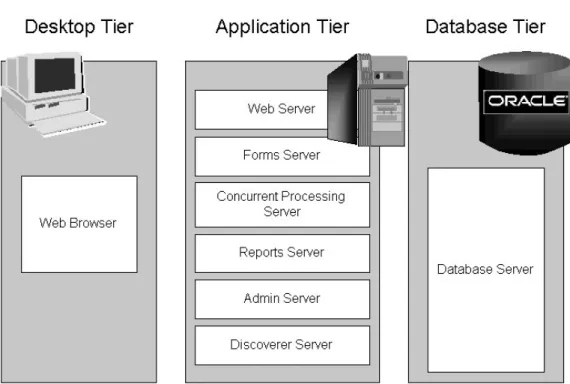
TheOracle Applications Architectureis a framework for multi-tiered, distributed
computing that supports Oracle Applications products. In this model, variousserversare distributed among multiple levels, ortiers.
A server is a process or group of processes that runs on a single machine and provides a particular functionality, often referred to as aservice. For example, theHTTP serveris a process that listens for and processes HTTP requests, and theForms serveris a process that listens for and processes requests for activities related to Oracle Forms.
A tier is a logical grouping of services, potentially spread across more than one physical machine. The three-tier architecture that comprises an Oracle E-Business Suite installation is made up of thedatabase tier, which supports and manages the Oracle database; theapplication tier, which supports and manages the various Applications components, and is sometimes known as the middle tier; and thedesktop tier, which provides the user interface via an add-on component to a standard web browser. A machine may be referred to as anode, particularly in the context of a group of computers that work closely together in acluster. Each tier may consist of one or more nodes, and each node can potentially accommodate more than one tier. For example, the database can reside on the same node as one or more application tier components. This may be done for simplicity of administration, or (as in the case of concurrent processing) to maximize performance by reducing network traffic.
Centralizing the Oracle Applications software on the application tier eliminates the need to install and maintain application software on each desktop client PC, and also enables Oracle Applications to scale well with an increasing load. Extending this concept further, one of the key benefits of using theShared APPL_TOPmodel (see Chapter 7) is the need to maintain only a single copy of the relevant Applications code, instead of a copy for every application tier machine.
On the database tier, there is increasing use ofReal Application Clusters(RAC)
environments, where multiple nodes support a single database instance to give greater availability and scalability.
Figure 1-1 Oracle Applications Architecture
The connection between the application tier and the desktop tier can operate successfully over a Wide Area Network (WAN). This is because the desktop and application tiers exchange a minimum amount of information, for example field value comparison differences. In a global operation with users at diverse locations, requiring less network traffic reduces telecommunications costs and improves response times for users.
The Desktop Tier
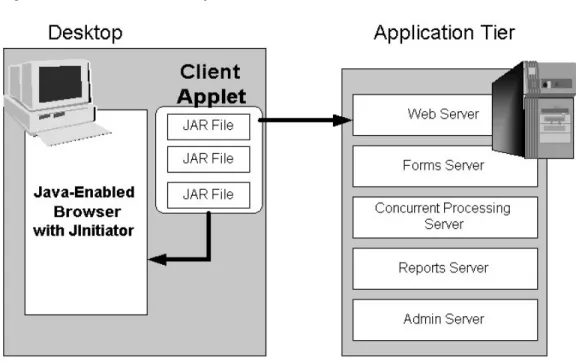
The client interface is provided through HTML for the newer HTML-based
applications, and via a Java applet in a Web browser for the traditional Forms-based interface.
Figure 1-2 Forms-based Desktop Tier Architecture
In Oracle Applications Release 11i, each user logs in to Oracle Applications through the E-Business Suite Home Page on a desktop client web browser. The E-Business Suite Home Page provides a single point of access to HTML-based applications, Forms-based applications, and Business Intelligence applications.
Once logged in via the E-Business Suite Home Page, you need not sign on again to access other parts of the system. Oracle Applications does not prompt again for user name and password, even when you navigate to other tools and products. Oracle Applications also retains preferences as you navigate through the system. For example, if you registered in the E-Business Suite Home Page that German is your preferred language, this preference carries over whether you access Forms-based or HTML-based applications.
Figure 1-3 Example Oracle E-Business Suite Home Page
Forms Client Applet
TheForms client appletis a general-purpose presentation applet that supports all Oracle Applications Forms-based products, including those with customizations and extensions. The Forms client applet is packaged as a collection ofJava Archive(JAR) files. The JAR files contain all Java classes required to run the presentation layer of Oracle Applications forms.
Oracle JInitiator
The Forms client applet must run within a Java Virtual Machine (JVM) on the desktop client. TheOracle JInitiatorcomponent allows use of the Oracle JVM on web clients, instead of the browser’s own JVM. JInitiator is implemented as a plug-in (Netscape) or ActiveX component (Microsoft Internet Explorer).
In the traditional, Forms-based Oracle Applications environment, JInitiator was run as part of the standard Applications sign-on process. Now, with the move to a mainly HTML-based environment, JInitiator is only invoked when a user chooses to access functions that require it, such as running a form. If JInitiator has not been installed, the Web browser prompts the user to download the required installation executable. The Forms client applet and commonly used JAR files are downloaded from the Web server at the beginning of the client’s first session. Less commonly used JAR files are downloaded as needed. The JAR files are cached in a directory specified when JInitiator was installed. An example of this would be: "C:\Program Files\Oracle\Jinitiator
Note: Selecting "Show console" on the "Basic" JInitiator tab will allow you to observe downloading of JAR files, to confirm they are being downloaded when they should be.
All updates to JAR files are installed on the application tier and downloaded to the client automatically, via the caching mechanism outlined above.
The Application Tier
Theapplication tierhas a dual role: hosting the various servers that process the business logic, and managing communication between the desktop tier and the database tier. This tier is sometimes referred to as themiddle tier. Oracle9iApplication Server (9iAS) provides the technology used on the application tier. Six servers comprise the application tier for Oracle Applications:
• Web server • Forms server • Reports server
• Discoverer server (optional) • Concurrent Processing server • Admin server
Try to avoid using a mixture of different platforms on your application tier. This makes maintenance easier, since only one set of patches needs to be downloaded.
Load Balancing
The application tier supports load balancing among many of its servers to provide higher availability, fault tolerance, reliability, and optimal scalability. If you have more than one of any of the following types of server, load balancing can be employed: • Web server
• Forms server • Reports server • Discoverer server
• Concurrent Processing server
Typically, load balancing is most commonly used to spread the load across multiple Web servers, where the load may vary significantly. Chapter 12 discusses the various types of load balancing in more detail.
Web Server
The Oracle HTTP server (powered by Apache) acts as the Web server. It processes the requests received over the network from the desktop clients, and includes additional components such as:
• Web Listener • Java Servlet Engine • JavaServer Pages (JSP)
The Web listener component of the Oracle HTTP server accepts incoming HTTP requests (for particular URLs) from client browsers.
If possible, the Web server services the requests itself, for example by returning the HTML to construct a simple Web page. If the page referenced by the URL needs advanced processing, the listener passes the request on to theservlet engine, which contacts the database server as needed.
HTML-Based Applications and the Oracle Applications Framework
The Oracle HTML-based (formerly known as Self-Service) Applications: • Do not use Oracle Forms for the interface
• Are designed in pure HTML and JavaScript
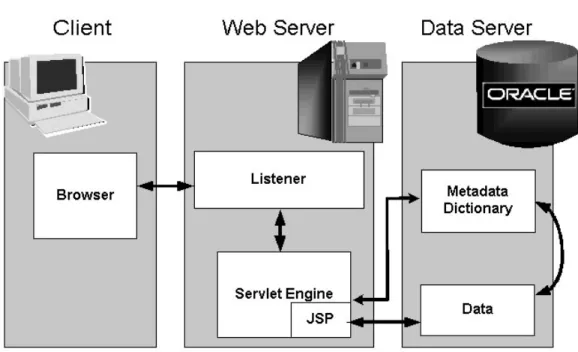
• Dynamically generate HTML pages by executing Java code • Use a metadata dictionary for flexible layout
• Operate by direct connection to the Web server
TheOracle Applications Frameworkis the development platform for HTML-based applications. It consists of a Java-based application tier framework and associated services, designed to facilitate the rapid deployment of HTML-based applications. Notable Oracle Applications Framework components include:
• Business Components for Java(BC4J), included in Oracle JDeveloper, is used to create Java business components for representing business logic. It also provides a mechanism for mapping relational tables to Java objects, and allows the separation of the application business logic from the user interface.
• AOL/Jsupplies the Oracle Applications Framework with underlying security and applications Java services. It provides the Oracle Applications Framework with its connection to the database, and with application-specific functionality such as flexfields.
The Framework-based applications logic is controlled by procedures that execute through the Java servlet engine, which is provided by the Apache JServ module. The servlet engine uses the metadata dictionary in constructing the Framework UI.
Figure 1-4 HTML-Based Applications Architecture
Java Servlet Access with HTML-Based Applications
An HTML-based Applications module uses the following access path: 1. The user clicks the hyperlink of a function from a browser. 2. The browser makes a URL request to the Web listener.
3. The Web listener contacts the Servlet engine (JServ) where it runs a JSP.
4. The JSP obtains the content from the Applications tables and uses information from the metadata dictionary to construct the HTML page.
5. The resulting HTML page is passed back to the browser, via the Web server. Figure 1-5 Oracle Applications Framework Architecture
Oracle Applications Framework Processing Details
The following is a more detailed explanation of how the JSP obtains the content from the Applications tables and uses information from the metadata dictionary to construct the HTML page.
1. AOL/J validates user access to the page.
2. The page definition (metadata UI definition) is loaded from the metadata repository on the database tier into the application tier.
3. The BC4J objects that contain the application logic and access the database are instantiated.
4. The Java Controller programmatically manipulates the page definition as necessary, based on dynamic UI rules.
5. UIX (HTML UI Generator) interprets the page definition, creates the corresponding HTML in accordance with UI standards, and sends the page to the browser.
Forms Server
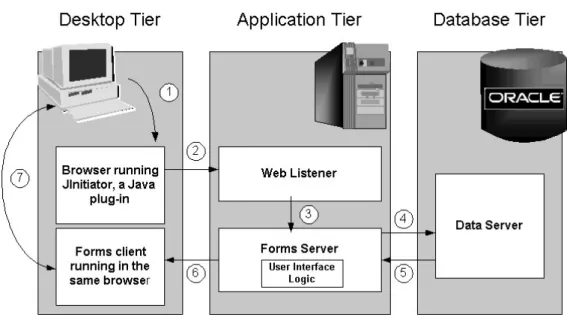
TheForms serverhosts the Oracle Applications forms and associated runtime engine that support the professional interface. It is an Oracle Developer 6icomponent that mediates the communication between the desktop client and the Oracle database server, displaying client screens and initiating changes in the database according to user actions.
The Forms server caches data and provides it to the client as needed, for example when scrolling through multiple order lines that exceed the limitations of a single screen. The Forms server communicates with the desktop client using these protocols: • Standard HTTP network connection
• Secure HTTPS network connection • TCP/IP connection
Chapter 13 compares HTTP and HTTPS from a security perspective.The Forms server communicates with the Oracle database server using theOracle Netnetworking infrastructure.
Forms Server Architecture
When a user initiates an action in the Forms client applet, such as entering data into a field or clicking a button, data is passed to the Forms server on the application tier. The user interface logic runs in the Forms server, and determines the appropriate user interface effect based on the user’s action. For example, a window may open, or another field value may be populated. If necessary, the database tier is contacted for any data not already cached on the application tier, or for data-intensive processing.
Figure 1-6 Forms Server Architecture
Once a connection has been made, many operations can be performed with little or no further interaction with the Forms server. For example, when a few field values change in response to a user action, there is no need to update the entire screen. In this scenario, only the changed fields are updated with the new values.
Load Balancing Among Forms Servers
Oracle Applications supports automatic load balancing among multiple Forms servers. Such a load balancing configuration utilizes an additional Forms component called theMetrics server, which acts as a single point of coordination for all Forms server requests.
The Metrics server is located on one application server. Metrics clients located on the other application servers periodically send load information to the Metrics server so that it can determine which application server has the lightest load.
Forms Server load balancing operates as follows.
1. The client requests a Forms session and the request is sent to the load balancer (Metrics Server), via the Web Listener.
2. The load balancer determines the least-loaded Forms server and returns its name via an HTML page.
3. The client can now access the least-loaded Forms server directly.
4. From this point on, all communication is between the client desktop and the designated Forms server.
Note: Using the 11.5.10 Rapid Install, you can if desired set up load balancing for Forms and Web servers during the initial installation.
Forms Listener Servlet Architecture
Oracle E-Business Suite Release 11isupports the use of socket mode for intranet users, HTTPS for Internet users, and HTTP mode for Forms-based (professional user interface) communication. TheForms Listener Servletis a Java servlet that delivers the ability to run Oracle Forms applications over HTTP and HTTPS connections. It manages the creation of a Forms Server Runtime process for each client, as well as network communications between the client and its associated Forms Server Runtime process. The client sends HTTP requests and receives HTTP responses from the Web server, which acts as the network endpoint for the client.
Benefits of using the Forms Listener Servlet include: • Ability to re-establish dropped network connections
• Fewer machines and ports need to be exposed at the firewall • Easier firewall/proxy server configuration
• More robust and secure deployment over the Internet
Use of Forms Listener Servlet results in an approximately 40% increase in network traffic, since the HTTP protocol is more "chatty" than sockets. The actual performance overhead of this increase in network traffic will depend on existing network latency: • LAN users may observe an 8-10% decrease in response time, but this is generally not
noticeable given the bandwidth and speed of internal networks.
• WAN users (assuming a 150ms network latency) may observe up to a 30% decrease in response time performance, but this must be set against the extra security and robustness of the ability to run over the Internet using standard protocols. Requirements for using the Forms Listener Servlet include:
• Installation of Developer 6iPatchset 7 or higher (see Oracle MetaLink Note 125767.1,Upgrading Developer 6i with Oracle Applications 11i).
• Deployment of the Forms server and the Web server on the same node.
With Forms Listener Servlet, load balancing of Forms-based traffic is accomplished usingJServ Load Balancing. This requires use of the iAS 1.0.2.2.2 Apache
p7listenerservlet.pdf. For steps needed to implement Forms Listener Servlet with Applications, see Oracle MetaLink Note 201340.1,Using Forms Listener Servlet with Oracle Applications 11i.
Reports Server
The Reports server is automatically installed on the same node as the Concurrent Processing server, and its reports are contained in the same directory as the concurrent processing reports. However, reports generated by the Reports server are monitored and administered separately from concurrent processing reports.
The Reports server dynamically selects the report language at runtime, so users see their reports in their preferred language.
Reports Server Architecture
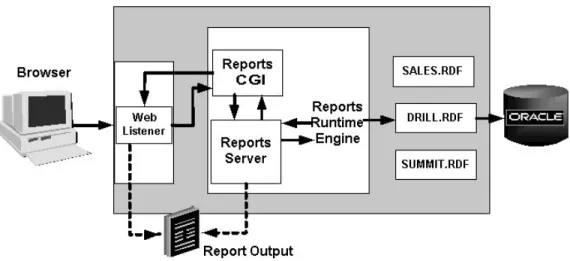
The request for an HTML-based report is similar to the flow of any other HTML-based Applications request:
Figure 1-9 Reports Server Architecture
1. The user clicks the hyperlink of a function from a browser. 2. The browser makes a URL request to the Web listener.
3. The Web listener contacts the Reports server through the reports Web CGI. The reports Web CGI allows the user to run reports and see the output through a Web browser.
4. The Reports server starts the Reports runtime engine.
5. The Reports runtime engine locates the necessary reports and connects to the database to query the requested information.
6. The queried information is presented to the user in the form of an HTML page.
Clustering and Load Management
When there are a large number of users, it may be beneficial to have multiple Reports servers. In this configuration, one of the Reports servers is designated as themaster Reports server. This server receives the initial request and distributes it to one of the other
Reports servers, depending on the load each can handle. The master Reports server is capable of determining how many runtime engines each of the Reports servers can support.
Oracle E-Business Suite Release 11isupports multiple languages on a single Reports server.
Discoverer Server
The Discoverer server comprises Oracle Discoverer 4i, a key component of the Oracle9i
Application Server (9iAS). Discoverer is an ad hoc query, reporting, analysis, and publishing tool that allows business users at all levels of an organization to gain immediate access to information from data marts, data warehouses, and online transaction processing (OLTP) systems. Report builders and analysts can easily create, modify, and execute ad hoc queries and reports. Casual users can navigate through predefined reports and graphs via business views that hide the complexity of the underlying data structures.
Oracle Discoverer 4ihides the complexity of the database, presenting it through an intuitive, easy to understand interface. It maps potentially unfamiliar database terms such as tables to familiar terms such as folders, enabling those unfamiliar with database syntax to access key information using standard business terms.
Discoverer 4iis tightly integrated with Oracle E-Business Suite Release 11i, allowing E-Business Suite users to employ Discoverer to analyze data from selected
business areas in Financials, Operations, Human Resources, Purchasing, Process Manufacturing, Activity Based Management, and other products.
The Discoverer server complements the Reports server, by allowing performance of ad hoc queries and analysis of the resulting query output. It also allows users to perform projections based on possible changes to the business environment or other strategic factors.
Discoverer End User Layer
The Discoverer End User Layer is the key to providing ease of use to the underlying data in the Oracle Applications database. It is a layer ofmetadata(data describing data) that is located in the Oracle Applications database, separate from the actual Applications data. Three software components are used to access the End User Layer:
• Discoverer Administrator Edition- Allows creation and maintenance of the End User Layer and manages the administration of security grants for users and responsibilities.
• Discoverer Plus- This applet is used to create queries; create and carry out analytic calculations; chart selected data; share query results with users; and export Discoverer workbooks in various formats. Oracle provides predefined workbooks which can be used as bases for ad hoc queries. Discoverer Plus is located on the Discoverer server, to allow centralized administration.
• Discoverer Viewer- This utility allows execution of queries in existing
workbooks, displaying the resulting business data in the form of tables and charts in the user’s Web browser.
Concurrent Processing Server
As described previously, user interactions with Oracle Applications data are conducted via HTML-based Applications or the more traditional Forms-based
Applications. However, there are also reporting programs and data updating programs that need to run either periodically, or on an ad hoc basis. These programs, which operate in the background while users continue to work on other tasks, may contain a very large number of data-intensive computations, and are run using theconcurrent processingarchitecture. To ensure that resource-intensive concurrent processing operations do not interfere with interactive operations, they are run on a specialized server, theConcurrent Processing server.
Processes that run on the concurrent processing server are calledconcurrent
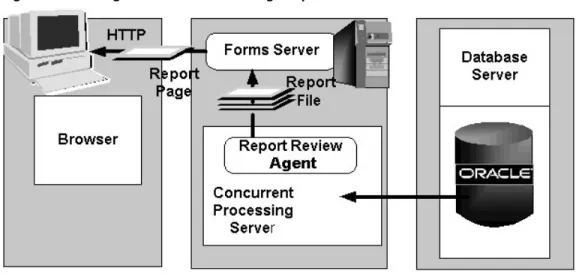
requests. When you submit such a request, either through HTML-based or Forms-based Applications, a row is inserted into a database table specifying the program to be run. Aconcurrent managerthen reads the applicable requests in the table, and starts the associated concurrent program. TheInternal Concurrent Managerservice monitors the database table for new requests, controls the other concurrent managers, and determines when a request should be processed and which concurrent manager should carry it out. Figure 1-8 Viewing Concurrent Processing Output
Viewing Concurrent Processing Output
The Concurrent Processing server communicates with the data server using Oracle Net. The resultant log or output file from a concurrent request is passed back to the
Report Review Agent, also known as theWeb Review Agent. The Report Review Agent passes a file containing the entire report to the Forms server. The Forms server passes the report back to the user’s browser one page at a time. You can use profile options to control the size of the files and pages passed through the system, depending on your network capacity and report volume.
Parallel Concurrent Processing
Parallel concurrent processingallows you to distribute concurrent managers across multiple nodes in a cluster environment, spreading concurrent processing across available nodes. Parallel concurrent processing enables you to:
• Run concurrent processes on multiple nodes to improve concurrent processing throughput
• Continue running concurrent processes on the remaining nodes when one or more nodes fail
• Administer concurrent managers running on multiple nodes from any node in the cluster
One or more concurrent managers can be specified to run on one or more nodes, to best suit your processing needs and fully utilize available hardware resources.
Admin Server
The Admin (Administration) server is located on the node where you maintain the data model and data in your Oracle Applications database. You carry out the following operations from this server:
• Upgrading Oracle Applications
This process is conducted only when you are upgrading to a new release from an earlier one, such as 10.7 or 11.0. You use theAutoUpgradeutility (adaimgr) to upgrade Oracle Applications.
• Applying database patches to Oracle Applications
In general,Applications patchesconsist of files and scripts that update the file system and database objects. Most patches consist of a number ofpatch driver filesthat perform different functions. Thecopy (c) drivermodifies Applications files, thedatabase (d) drivermodifies Applications database objects, and thegenerate (g) drivergenerates forms, reports, graphics, or message files. Newer patches combine the actions of the copy, database, and generate driver files into a single
unified (u) driverfile.
You use theAutoPatchutility (adpatch) to perform these updates. AutoPatch may also be used to apply cumulative patches such asmini-packs(for example, 11i.AD.H) and
maintenance packs(for example, 11.5.10). • Maintaining Oracle Applications data
Some features, such as Multiple Reporting Currencies, require regular maintenance to ensure that updates are propagated to the additional tables and schemas they use. TheAD Administrationutility (adadmin) enables you to carry out this and various other file system and database maintenance tasks.
Daily Business Intelligence (DBI)
Daily Business Intelligence (DBI) is a reporting framework that is integrated with Oracle E-Business Suite. It replaces the Business Intelligence System (BIS), and includes a new set of materialized views that pre-summarize transaction data. Using Daily Business Intelligenceoverview pages, managers can view summarized information across multiple organizations, drilling down to specific transaction details on a daily basis.
For example, theProfit and Loss pageprovides an overview of revenue, cost of goods sold, expenses, and gross margin by line of business. Managers can use this page to view revenue to date, track it against forecast, and compare it to previous periods. If actual revenue is trailing forecast revenue, managers can investigate the root cause, drilling down to specific lines of business, specific managers, or even specific customer invoices
Daily Business Intelligence resides in the same instance as the transactional
system. This single instance architecture reduces the need for a separate maintenance and administration team, and optimizes reporting performance. It also utilizes the materialized view and incremental refresh capabilities of the Oracle database, thereby enabling organizations to refresh data daily, hourly, or at any required frequency.
Note: The old BIS views are still available for use, although they may occasionally be altered or replaced to reflect changes to underlying table definitions.
The Database Tier
The database tier contains the Oracle database server, which stores all the data maintained by Oracle Applications. The database also stores the Oracle Applications online help information.
More specifically, the database tier contains the Oracle data server files and Oracle Applications database executables that physically store the tables, indexes, and other database objects for your system.
In general, the database server does not communicate directly with the desktop clients, but rather with the servers on the application tier, which mediate the communications between the database server and the clients.
The Oracle Applications Technology Layer
The Oracle Applications technology layer lies between the Oracle Applications technology stack and the Oracle Applications product-specific modules. It provides features common to all Oracle Applications products.
Products in the Oracle Applications technology layer include: • Oracle Applications DBA (AD)
• Oracle Applications Object Library (FND) • Oracle Applications Utilities (AU)
• Oracle Common Modules (AK) • Oracle Workflow (WF)
• Oracle Alert (ALR)
• Oracle Applications Framework (FWK) • Oracle XML Publisher (XDO)
Oracle Applications DBA (AD)
The Applications DBA product provides a set of tools for administration of the Oracle Applications file system and database. AD tools are used for installing, upgrading, maintaining, and patching the Oracle Applications system. The AD utilities include:
• AD Administration- Performs general maintenance tasks for Oracle Applications. • AD Merge Patch- Merges multiple patches into a single, integrated patch.
• AutoPatch- Applies patches and adds new languages and products to an Oracle Applications system.
• AutoUpgrade- Upgrades a system to the latest version of Oracle Applications. • Rapid Clone- Used to copy (clone) an Oracle Applications system.
• Rapid Install- Sets up a fully configured Oracle Applications system, including the latest certified technology stack and all patches, mini-packs, and other updates.
Oracle Common Modules (AK)
AK is an active data dictionary that enables you to define Oracle Applications
components for the HTML-based Applications, and generate many of the characteristics of Oracle Applications at runtime.
TheOracle Common Modulescan be used to develop inquiry applications for the HTML-based Applications, without the need for any programming. They allow storage of language-translated labels for all the attributes on a transaction page, thus assisting with the provision of support for multiple languages.
For example, the AK Runtime Dictionary may be used to define an attribute or reusable component such as the customer name attribute, which can be reused any time a customer name field is displayed on an HTML page.
Note: AK is superseded by JDeveloper’sMetaData Services(MDS) repository in Framework 5.7 (with Applications Release 11.5.8).
Oracle Applications Utilities (AU)
The Applications Utilities (AU) component is used to maintain the Oracle Applications system.
AU hosts a collection of files copied from other products. This allows generating on-site classes of files such as Forms and reports, or running reports invoked by the Reports server from a standard, shared location. Generating forms or reports may require access to shared PL/SQL libraries, so these files are copied to AU_TOP as well.
The Oracle Applications Java files are stored in AU_TOP, as well as in JAVA_TOP and <PROD>_TOP.
Oracle Application Object Library (FND)
The Oracle Application Object Library is a key component of the Applications technology layer. It consists of a collection of reusable code, programs, and database objects that provides common functionality across all products.
Oracle Application Object Library offers many features to make system administration easier, such as security setup and maintenance, and management of concurrent
processing. Using Application Object Library ensures that the processing of flexfields or the procedure for report submission, for example, does not vary from one product to another. Oracle Application Object Library also provides capabilities for developers to extend the operation of Oracle Applications by allowing the creation of custom programs that interact with the base modules.
Standard User Interface
Oracle Application Object Library supports the integration of Oracle Applications by providing standardized functionality and capabilities across all products so that the look and feel remains the same from product to product.
Shared Flexfield value sets
Flexfields allow the entry of certain important information to be standardized across all products. One example is the Accounting Flexfield, which is used by Financials products and Manufacturing products.
Standard Report Submission (SRS)
The procedure to submit a background report to the concurrent manager using SRS is the same, regardless of the product that owns the report. SRS takes advantage of shared flexfield value sets.
Applications Online Help
The presentation of Applications Online Help is also standardized across all products.
Developer Features
Oracle Application Object Library provides many features for developers creating custom forms, reports, or programs that interface with Oracle Applications. GUI and coding standards
The same coding and Graphical User Interface (GUI) standards used by Oracle Applications developers are available to custom developers.
Standard Report Submission
Custom reports can be integrated into Standard Report Submission so that they can be submitted and monitored using the same procedures as other Oracle Applications reports. Developers can set up certain menus and responsibilities to access custom reports or standard objects.
Flexfield Development
Flexfields used on custom forms can take advantage of existing flexfield capabilities such as value sets, validation, and security rules.
Custom menus and responsibilities
Custom menus and responsibilities can be seamlessly integrated with Oracle Applications.
Features for System Administrators
Oracle Application Object Library provides many features to simplify administration of Oracle Applications, enabling the system administrator to carry out routine tasks quickly and easily. These features include:
• Setting up new users- Registering new Oracle Applications users, and giving them access to only those Forms, functions, and reports they need to do their jobs.
• Managing security- Deciding which users have access to each product, and within a product, which Forms, functions, and reports a user can access.
• Setting user and system profiles- Aprofileis a set of changeable options that affects the way Oracle Applications looks and behaves. A system administrator can set profile values at site, application, responsibility, and user levels.
• Managing concurrent processing- Monitoring and controlling concurrent
processing using interfaces such as Oracle Applications Manager (OAM). Chapter 8 describes this in more detail.
Oracle Application Object Library Security
Oracle Application Object Library controls access to the data in Oracle Applications via user sign-ons and responsibilities. Each user must have a valid user name and password to gain access to Oracle Applications.
Aresponsibilityis a level of authority in Oracle Applications that lets Applications users access only those functions and data appropriate to their roles in the
organization. Responsibilities allow access to a specific product, operating unit, set of books, and a restricted list of windows, functions, reports, and groups of products, or data groups.
Note that the Forms available from the navigation menus vary by responsibility. For example, the Purchasing User navigation menu does not include all the forms that are available to the Purchasing Superuser navigation menu.
When you install Oracle Applications, a standard Applications user called SYSADMIN is created for you. Several default responsibilities are also created. Since the SYSADMIN sign-on is automatically assigned to the System Administrator responsibility, you can use SYSADMIN to create new user signons and assign them to responsibilities. You can also create any custom responsibilities you need.
Oracle Workflow (OWF)
Oracle Workflow provides an infrastructure for the enterprise-wide communication of data related to defined business events, providing the capabilities needed to:
• Manage enterprise business processes that may span trading partners • Support standard and personalized business rules
• Streamline and automate transaction flows • Manage exceptions without manual intervention
Oracle Workflow lets you model and maintain your business processes using a graphical workflow builder. You can model and automate sophisticated business processes, defining processes that can loop, branch into parallel flows and
rendezvous, decompose into sub-flows, branch on task results, time out, and more. Acting as asystem integration hub, Oracle Workflow can apply business rules to control objects and route them between applications and systems. It extends the reach of business process automation throughout an enterprise and beyond, to include any email user, web user, or system, enabling people to receive, analyze, and respond to
notificationsneeding their attention. Users can respond to a notification via any standard email system or standard Web browser.
your organization and customers or suppliers, without modifying existing business processes and without changing applications code.
The Oracle WorkflowBusiness Event Systemprovides a workflow-enabled solution for your enterprise application integration requirements. The Business Event System is an application service delivered with Oracle Workflow that uses Oracle Advanced Queuing technology to communicate business events between systems. The Business Event System supports the following types of integration:
• Message-based point-to-point system integration • System integration messaging hubs
• Distributed applications messaging
The Business Event System uses Oracle Advanced Queuing to propagate messages between communication points on systems, calledagents, using a specified protocol. Events received from external systems are processed by an agent listener that runs on that agent’s queue.
TheOracle Workflow Event Managerenables registration of significant business events for selected applications, including functions that generate the XML event messages. Users of those applications can registersubscriptionson events that are significant to their systems, to take actions such as triggering custom code.
Operation
When a business event occurs, the Workflow Event Manager executes any subscriptions registered on the event. For local events, the subscribing code can be executed
synchronously, in the same database transaction as the code that raised the event, or asynchronously, deferring costly subscription processing to a later time, and thus allowing control to be returned more quickly to the calling application. Events can also be received asynchronously from external systems. Before producing the XML event message, the Event Manager minimizes processing by checking whether event information is required by subscriptions on the event.
You can review and respond to your business process notifications from one central window, known as theworklist, using a standard Web browser. This offers the flexibility to prioritize tasks and to define sort criteria, giving you the flexibility to organize your work the way you wish. For example, you can group notifications by type or subject, to avoid having to jump from one context to another. Alternatively, you can focus on time critical tasks first, sorting by priority or due date. Oracle Workflow is fully integrated with the Oracle E-Business Suite, providing the ability to drill down to any Oracle E-Business Suite or associated URL to view or complete a transaction.
Additional Capabilities
The flexibility of the powerfulWorkflow Engineevent activities enable you to model business events within workflow processes. Event activities can be used to model content-based routing, transformations, error handling, and so on. A workflow process can be started or processed by an inbound message, and can send an outbound message or raise an event to the Event Manager. XML function activities give you access to event content data within workflow processes. Workflow processes based on business events give the greatest flexibility when implementing an integration solution. However, the Business Event System can also run independently of the Workflow Engine, to enable point-to-point messaging to be utilized.
You can perform complex transformations between different formats required for your business documents. Oracle Workflow allows you to apply a stylesheet to an XML event
message. In addition, when queues are defined within the Business Event System, you specify the logic used to enqueue and dequeue messages. This logic, called aqueue handler, can include transformations.
Oracle Workflow also allows you to take advantage of XML support in the Oracle database. Oracle9iand later releases deliver native support for XML via a new XML data type, which makes the manipulation of XML data and documents in applications seamless and straightforward. From Oracle9i, the database server offers the capability to generate, massage, and transform XML data and documents inside the runtime engine itself, giving excellent scalability and performance.
Oracle Alert (ALR)
Oracle Alert (ALR) allows you to email system notifications to users when an exception or event has occurred. Some products are delivered with predefined alerts, which can be used to notify users about specified database exceptions as they occur, and perform routine tasks automatically according to a schedule you define.
For example, you can configure Oracle Alert to send an email to key database administrators when a tablespace in the Oracle Applications database does not have adequate free space.
Oracle XML Publisher (XDO)
Oracle XML Publisher is a Java-based product based on the World Wide Web Consortium (W3C)Extensible Stylesheet Language(XSL). Specifically, XML Publisher utilizes the
XSL-FOstandard to transform XML data into aformatting object(FO). A formatting object contains both data and formatting information, and can be further transformed to an output format such as Portable Document Format (PDF).
XML Publisher usesdata definitionsandtemplatesto produce output reports in the desired format. A data definition is a data source (or a combination of data sources) that either is XML or can produce XML. Examples include output from concurrent programs and Web services. A template is a report definition, which sets out how a report should look. The template layout can be user-specified. Supported templates currently include RTF, PDF Forms, and XSL.
Key features of XML Publisher include:
• Provides a template-based, easy-to-use publishing solution that enables end-users to develop and maintain report formats to suit specific business needs.
• Allows users to employ familiar desktop tools such as Adobe Acrobat, Microsoft Excel, and Microsoft Word to create and maintain reports in their preferred format, and then use XML Publisher to convert these documents to the XSL-FO format.
• Offers a variety of options for published documents, such as multiple output formats, multiple languages, and multiple delivery options.
Core Components
The core components of XML Publisher are a Java-based set of publishing tools accessible via Java APIs from Oracle Applications or from any Java-based application.
format; other formats such as HTML and RTF will be supported in future releases of XML Publisher.
• PDF Document Merger- The PDF Document Merger accepts XML data and a PDF document as input, and uses a mapping between the XML and the fields in the document to merge the data into the PDF document.
• PDF Form Processor- The PDF Form Processor is used to add attributes such as watermarks to a merged document.
• RTF Template Parser- Report templates can be created in theRich Text Format
(RTF) document format, and converted to an XSL-FO format that can be applied to XML data.
Template Manager
The Template Manager enables you to upload and maintain your templates and data sources. Key features include:
• Data Source Registration- Data sources that generate XML data can be registered with XML Publisher. These can be concurrent programs such as Oracle Reports, or BC4J objects that are able to generate XML data.
• Template Registration- Templates used to format report data must be registered with XML Publisher. They can then be applied to the report data to create the final published output. Supported template types include PDF, RTF, and XSL-FO. • XML Publisher APIs- XML Publisher provides APIs to allow other Oracle
2
Applications File System
Introduction
An Oracle Applications Release 11isystem utilizes components from many Oracle products. These product files are stored below a number of key top-level directories on the database and application server machines.
Note: No Applications files are installed on desktop client machines, although JAR files and their supporting utilities are downloaded as required.
Depending on how you chose to install Applications, these product directories may be located on a single machine (the simplest case) or on multiple machines (the most common type of deployment). Operating systemenvironment settingsindicate the location of the various files in the file systems of the database and application server machines. This chapter discusses the association between these environment settings and the corresponding files and directories.
Note: <dbname> is the name of your system determined through Rapid Install at the time of installation. For example, PROD.
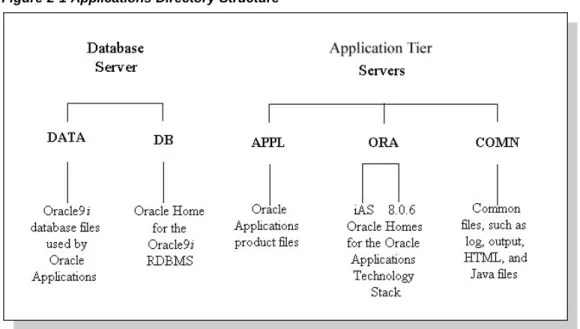
• The <dbname>DATA or DATA_TOP directory is located on the database server machine, and contains the system tablespaces, redo log files, data tablespaces, index tablespaces, and database files.
• The <dbname>DB directory is located on the database server machine, and contains the ORACLE_HOME for the Oracle9idatabase.
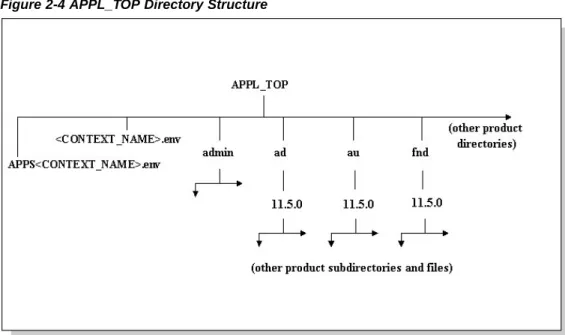
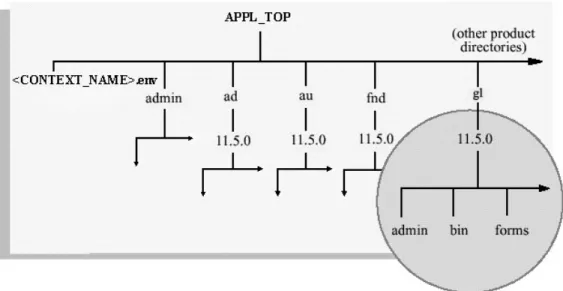
• The <dbname>APPL or APPL_TOP directory contains the product directories and files for Oracle Applications.
• The <dbname>ORA directory contains the ORACLE_HOMEs for the Applications technology stack components.
• The <dbname>COMN or COMN_TOP (or COMMON_TOP) directory contains directories and files used across products.
Oracle Applications Environment
Oracle Applications makes extensive use of environment settings to locate executable programs and other files essential to Applications operation. These environment settings are defined when you install Oracle Applications. Many of the settings are defined by information you provide when running Rapid Install, while others have the same values in all installations.
The environment settings and their associated values are stored inenvironment files, which have a.envsuffix (.cmdon Windows). Environment files and settings are discussed in more detail later in this chapter.
The DATA Directory
The<dbname>DATA file system contains the data (.dbf) files of the Oracle
database. Rapid Install installs the system, data, and index files in directories below several mount points on the database server. You can specify the directory names of the mount points on the database server during installation.
DB and ORA Directories
Oracle Applications supports employing an Applications database of one version, while linking Applications programs using the tools from a second or third version of the database. Thismultiple ORACLE_HOMEsconfiguration allows new features of the database to be supported, while maintaining compatibility with earlier releases. Release 11iutilizes three ORACLE_HOMEs:
• The 9.2.0 ORACLE_HOME (Applications database home) is located in the
<dbname>DB directory. It contains the files needed for running and maintaining the Oracle Applications database.
• The 8.0.6 directory contains the ORACLE_HOME for the Developer 6iproducts (Forms, Reports, and Graphics). The product libraries in the 8.0.6 ORACLE_HOME are used to relink Oracle Applications executables.
• The iAS directory, also under the <dbname>ORA, contains the ORACLE_HOME for Oracle9iApplication Server.
The COMN Directory
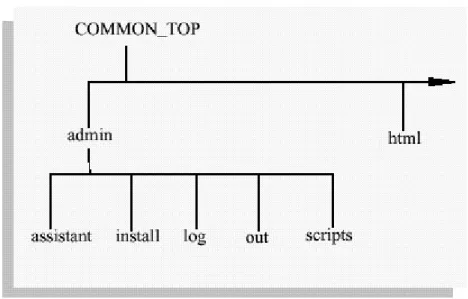
The <dbname>COMN or COMMON_TOP directory contains files used by many different Oracle Applications products, and which may also be used with third-party products. Figure 2-2 COMMON_TOP Directory Structure
The admin directory
The admin directory, under the COMMON_TOP directory, is the default location for the concurrent manager log and output directories. When the concurrent managers run Oracle Applications reports, they write the log files and temporary files to the log subdirectory of the admin directory, and the output files to the out subdirectory of the admin directory.
Figure 2-3 COMMON_TOP admin Directory Structure
You can change the location the concurrent managers write these files to, so that, for example, the log and output files are written to directories in each <PROD>_TOP directory. This may be more desirable in terms of disk space management, or the need to avoid a possible performance bottleneck on a system that has a high concurrent processing throughput.
Note: For further details, see Overview of Concurrent Processing,Oracle Applications System Administrator’s Guide.
Theinstallsubdirectory of the admin directory contains scripts and log files used by Rapid Install. Thescriptssubdirectory of admin contains scripts used to start and stop services such as listeners and concurrent managers.
The html directory
The OA_HTML environment setting points to thehtmldirectory. The Oracle Applications HTML-based sign-on screen and Oracle HTML-based Applications HTML files are installed here. Thehtmldirectory also contains other files used by the HTML-based products, such as JavaServer Page (JSP) files, Java scripts, XML files, and style sheets. Rapid Install and the AD utilities copy the HTML-based product files from each <PROD>_TOP directory to subdirectories in thehtmldirectory.
The java directory
The JAVA_TOP environment setting points to thejavadirectory. Rapid Install installs all Oracle Applications JAR files in the Oracle namespace of this JAVA_TOP directory. The
javadirectory also holds third-party Java files used by Oracle Applications, as well as other zip files.
The portal directory
Theportaldirectory contains the Rapid Install Portal files. The Rapid Install Portal is a web page that provides access to post-install tasks that may be necessary for your installation, plus server administration scripts, installation documentation, and online help. Using a browser, you can view the Rapid Install Portal after you run Rapid Install. The temp directory
Thetempdirectory is used for caching by some products such as Oracle Reports. The util directory
Theutildirectory contains the third-party utilities licensed to ship with Oracle Applications. These include, for example, the Java Runtime Environment (JRE), Java Development Kit (JDK), and the Zip utility.
The scripts directory
Thescriptsdirectory contains application tier control scripts such asadstrtal.shand
adstpall.sh, which are located in the <CONTEXT_NAME> subdirectory.
The APPL Directory
Oracle Applications files are stored in the<dbname>APPL directory, which is known as theAPPL_TOPdirectory.