Trapeze Networks
Mobility System 4.1
First published June 2006 (V1.0) Published by Broadband-Testing La Calade, 11700 Moux, Aude, France Tel : +33 (0)4 68 43 99 70
Fax : +33 (0)4 68 43 99 71
E-mail : [email protected] Internet : http://www.broadband-testing.co.uk
2006 Broadband-Testing
All rights reserved. No part of this publication may be reproduced, photocopied, stored on a retrieval system, or transmitted without the express written consent of the authors.
Please note that access to or use of this Report is conditioned on the following:
1. The information in this Report is subject to change by Broadband-Testing without notice.
2. The information in this Report, at publication date, is believed by Broadband-Testing to be accurate and reliable, but is not guaranteed. All use of and reliance on this Report are at your sole risk. Broadband-Testing is not liable or responsible for any damages, losses or expenses arising from any error or omission in this Report.
3. NO WARRANTIES, EXPRESS OR IMPLIED ARE GIVEN BY Broadband-Testing. ALL IMPLIED WARRANTIES, INCLUDING IMPLIED WARRANTIES OF MERCHANTABILITY, FITNESS FOR A PARTICULAR PURPOSE AND NON-INFRINGEMENT ARE DISCLAIMED AND EXCLUDED BY Broadband-Testing. IN NO EVENT SHALL Broadband-Testing BE LIABLE FOR ANY CONSEQUENTIAL, INCIDENTAL OR INDIRECT DAMAGES, OR FOR ANY LOSS OF PROFIT, REVENUE, DATA, COMPUTER PROGRAMS, OR OTHER ASSETS, EVEN IF ADVISED OF THE POSSIBILITY THEREOF.
4. This Report does not constitute an endorsement, recommendation or guarantee of any of the products (hardware or software) tested or the hardware and software used in testing the products. The testing does not guarantee that there are no errors or defects in the products, or that the products will meet your expectations, requirements, needs or specifications, or that they will operate without interruption.
5. This Report does not imply any endorsement, sponsorship, affiliation or verification by or with any companies mentioned in this report. 6. All trademarks, service marks, and trade names used in this Report are the trademarks, service marks, and trade names of their respective
owners, and no endorsement of, sponsorship of, affiliation with, or involvement in, any of the testing, this Report or Broadband-Testing is implied, nor should it be inferred.
TABLE OF CONTENTS
EXECUTIVE SUMMARY... 1
INTRODUCTION – WIRELESS MOBILITY: YEAR 2006 ... 2
AN OVERVIEW OF THE TRAPEZE MOBILITY SYSTEM... 3
MXR-2 Focus... 3
MOBILITY SYSTEM V4.1 PUT TO THE TEST ... 6
Test Introduction... 6
Initial Deployment: RingMaster Planning ... 6
Stage Two Deployment: Drop-ship Deployment ... 8
MXR-2: Day-To-Day Management (MSS) And User Control... 9
Roaming Capabilities (Featuring Network Domains) ... 10
OVERALL SUMMARY... 11
APPENDIX: A EUROPEAN CUSTOMER CASE STUDY – KAISER’S TENGELMANN . 12 What Was The Objective?... 12
What Was The Solution?... 12
And The Results? ... 12
TABLE OF FIGURES
Figure 1 – MXR-2 Mobility Exchange ... 4Figure 2 – MP-370 Mobility Point... 4
Figure 3 – Our Initial Labs Plan To Import Into RingMaster ... 6
Figure 4 –RingMaster-Edited Floorplan For Broadband-Testing Labs ... 7
Figure 5 –Drop-ship Deployment Log... 8
Figure 6 –Monitoring Options – Local and Remote ... 9
Broadband-Testing
Broadband-Testing is Europe’s foremost independent network testing facility and consultancy organisation for broadband and network infrastructure products. Based in the south of France, Broadband-Testing offers extensive labs, demo and
conference facilities. From this base, Broadband-Testing provides a range of specialist IT, networking and development services to vendors and end-user organisations throughout Europe, SEAP and the United States.
Broadband-Testing is an associate of the following:
• NSS Network Testing Laboratories (specialising in security product testing)
• Broadband Vantage (broadband consultancy group)
• Limbo Creatives (bespoke software development)
Broadband-Testing Laboratories are available to vendors and end-users for fully independent testing of networking, communications and security hardware and software.
Broadband-Testing Laboratories operates an Approval scheme which enables
products to be short-listed for purchase by end-users, based on their successful approval. Output from the labs, including detailed research reports, articles and white papers on the latest network-related technologies, are made available free of charge on our web site at http://www.broadband-testing.co.uk
The conference centre in Moux in the south of France is the ideal location for sales training, general seminars and product launches, and Broadband-Testing can also provide technical writing services for sales, marketing and technical documentation, as well as documentation and test-house facilities for product development.
Broadband-Testing Consultancy Services offers a range of network consultancy services including network design, strategy planning, Internet connectivity and product development assistance.
EXECUTIVE SUMMARY
With the new features in v4.1 of Trapeze’s Mobility System, the company has expanded still further in its key areas of ease of use, speed and ease of deployment, roaming capabilities and scalability We have always been impressed with the planning and deployment capabilities of Trapeze’s Ringmaster software, but the feature set is now incredibly extensive and still very easy to use. “What-if” type capacity planning makes even very large deployments totally feasible.
The “drop-ship” deployment options makes major installations across 10’s or 100’s of branch/satellite offices incredibly simply, automated and therefore without the risk of human error. It also adds a lot of appeal to a managed service provider where minimising installation and support costs is paramount.
Trapeze’s Network Domain feature of clustering Mobility Domains extends the already impressive roaming capabilities and overall scalability of the system.
Overall manageability of complex wireless networks is made relatively simply, courtesy of a very easy to understand GUI-based system that has improved further from its already impressive starting point and intermediate updates.
User control, from security and centralised, one-time authentication, to bandwidth/application control is impressive, especially so for a wireless network solution.
Overall, the sheer speed of deployment and ease of day-to-day data management with the Mobility System 4.1 means that the all-important Operating Expense (OpEx) costs are kept as low as possible. This makes the solution an excellent product from an ROI perspective, as well as seemingly offering a unique approach to adding wireless connectivity simply, extensively (as required) and cost-effectively from day one.
NB: This report focuses on testing the key features of the 4.1 release – notably the drop-ship deployment and the Network Domain capabilities – as well as assessing the updated product overall, with a focus on the MXR-2 Mobility Exchange, Trapeze’s branch office/managed service/SMB solution. For more information regarding the scalability, security and real-time application (VoIP etc) capabilities of the Mobility System, please check our website: www.broadband-testing.co.uk for our previous reports on Trapeze, including the Trapeze Networks Mobility Systems Giant WLAN Test.
We have also included a series of user case study graphics briefs throughout the introduction to the report, in order to highlight the real-world use of this technology – see boxouts.
Broadband-Testing – Trapeze Networks Mobility System 4.1
Page 2
INTRODUCTION – WIRELESS MOBILITY: YEAR 2006
When Trapeze Networks introduced its WLAN switch-based architecture back in 2003, hot on the back of Symbol’s first ever WLAN switch, it is fair to say that it really did change the way you were allowed to think about wireless networking.
Not only did it replace the “fat” Access Point with a “thin” version containing only that configuration information that was absolutely necessary – so immediately making these easily stolen devices completely useless to a thief or hacker – but it also enabled you to provide a very structured approach to WLANs. The Trapeze system was, and still is, based around the idea of the Mobility Exchange (MX) switch - the hardware platform upon which the whole Trapeze solution, the Mobility System, is based. MXs manage users' identities as they roam and configure and control all aspects of the Mobility Points or MPs (Trapeze speak for APs) and third-party access points.
Multiple MXs function as a peer-to-peer system to support mobility and enforce security. So one MX can support a mobile user's connection to a subnet even though the actual attachment to that subnet is through a different MX.
Initially, one limitation of the Trapeze concept was that their MPs had to be connected only to MX ports, but this restriction has since been lifted meaning that they can be connected to any third-party switch port. So an MX-to-MX exchange requires no changes to existing IP backbones. The idea of the MX is to make sure that attributes like virtual private groups, access control lists (ACLs), authentication, usage tracking, location tracking and network statistics stay with users anywhere they roam in the network. The MXs exchange users' identities amongst themselves, ensuring secure access to the appropriate user services and distributing intelligence throughout the Trapeze Mobility System, now in v4.1 as tested. This concept has been extended into the realms of the Network Domain (see later) which we put the test here.
We also examine what new features are in v4.1 to benefit the
remote/branch office environment or the managed service provider, where ease of deployment and low operating costs are mandatory. This
supplements our existing testing on Trapeze products which includes the biggest and most ambitious Wireless LAN test simulation ever, carried out in association with Iometrix Networks of San Francisco, to prove the scalability of Trapeze Networks' Mobility System switched WLAN solution, featuring a total of 20 Mobility Exchange switches inter-connected via a Cisco router acting as the network core. Here we were able to support over 11,000 simultaneous, authenticated users in a simulated seven story tenanted building, while running real-time applications – streamed video and VoIP – successfully; as vindicated by a group of visiting journalists. So, the scalability is a given; but what about the new features in v4.1 and how they improve on what Trapeze already offers? And what key features does the MXR-2 MX offer for enterprise branch office users and managed service providers? To find out, read on…
AN OVERVIEW OF THE TRAPEZE MOBILITY
SYSTEM
In the introduction we talked about there being classic “fat” APs at one end of the scale and now positively waif-like APs at the other. Well, the Trapeze solution sits somewhere in the middle, with intelligence both in a dedicated switch and the Mobility Points or MPs. The system supports .a, .b, and .g standards on the same MP, though we tested only .b and .g this time around. A Trapeze WLAN solution consists of a number of different components and comprises the Mobility Exchange, Mobility Point, Mobility System Software and the RingMaster deployment tool. We will focus on the latter two components during our test section, but here is a quick overview of the solution.
At the heart of the system is the MX (Mobility Exchange) switch, which is available in a variety of sizes to fit different requirements (see Trapeze Networks website for more details:
http://www.trapezenetworks.com/en/products/index.asp
Trapeze has a strap line - Identity-Based Networking – which the MX is at the heart of. It enables attributes like VLAN/subnet assignments, access control lists (ACLs), time of day policy, encryption type, and other
authorizations, as well as client authentications, to stay with users as they roam from wired to wireless and throughout the WLAN. The system also tracks users’ network usage and locations as they roam. Since mobile enterprise users can connect to the WLAN from a variety of locations, the MX shifts the management focal point from device ports and fixed
geography to user identities and the services they need no matter where they are. The MXs exchange the full set of user attributes among themselves, providing per-user services and distributing intelligence throughout the Trapeze Mobility System.
Since each MX device is an Ethernet switch, and because of its support for dynamic VLANs, the MX integrates directly with existing wired
infrastructures and requires no changes to client or network protocols. The MX can be located at any point on the network, supporting both direct and indirect connections to the Mobility Points. Importantly, the MX manages all aspects of the MPs and when directly connected to them, provides them with Power over Ethernet (PoE) through PoE enabled Ethernet ports.
MXR-2 Focus
For the testing, the MX devices we used were Trapeze’s MXR-2s. The MXR-2 is designed to be a new breed of Mobility Exchange (MX) switch that addresses the needs of wireless LAN services in remote branch offices. Trapeze claims that what sets the MXR-2 apart from other MXs is its automatic no-touch deployment and remote configuration and
management capabilities - all of which require no onsite IT expertise. The device itself is approximately 8”x6”x1.25” – the size of a modern paperback book. But despite its small form factor and low cost, the MXR-2 supports the same feature set as the Trapeze MX-8, MX-20 and MX-400 wireless LAN switches. All of the secure mobility, policy enforcement, and AAA and 802.1X offload features are supported. Equally, the MXR-2 supports the same MPs and third-party access points (APs) deployed at
Broadband-Testing – Trapeze Networks Mobility System 4.1
Page 4
headquarters and other branch offices. It delivers power-over-Ethernet (PoE) to MPs, eliminating the need for power injectors. The MXR-2
supports up to three MPs, making it easy to scale wireless LAN services at branch offices.
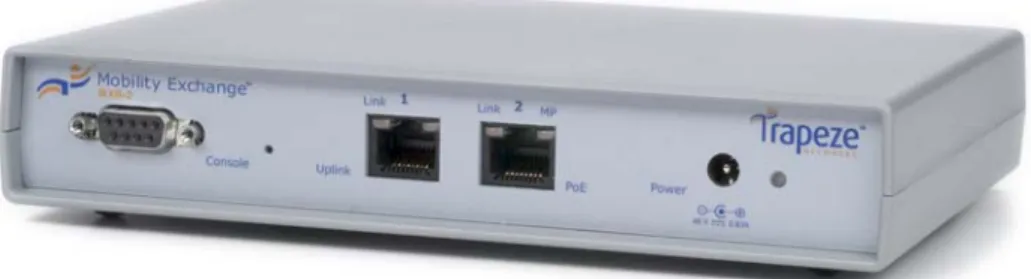
Figure 1 – MXR-2 Mobility Exchange
In total there are just four interfaces to worry about; an Ethernet uplink port to connect into the main company Ethernet switch, a PoE Ethernet port for direct MP attachment (we connected to an MP-370, see photo below), a serial port for connection to a PC/laptop to access the CLI and connector to the external power supply. For installation purposes, the MXR-2 is
equipped with the Trapeze Web Quick Start for fast configuration of the basic connectivity requirements or it can be configured through WebView or the CLI. Alternatively, RingMaster, the planning and management tool suite can be used to enable the MXR-2 to obtain its configuration locally or from a remote location.
Of more interest to us here, however, is its drop-ship deployment capability. Recognising that technical skills are not readily available at remote
facilities, Trapeze designed the MXR-2 as a self-configuring wireless LAN switch. Remote staff need only power-up the MXR-2 and connect it to the local Ethernet. We put this to the test (see test section).
Focusing On The Branch Office or Managed Services Environment
How many times have we heard the Utopian chant from vendors – the marriage of extensive, enterprise-class features with an ease of use level that enables non-technical users, such as those found in a remote/branch office, to fully exploit that feature set? Moreover, not only to be able to exploit that feature set, but to do so without keeping a central helpdesk team fully occupied at great expense to that company.
According to Noel Bruton, a UK-based, independent consultant who advises companies in improving their helpdesk and IT user support services, the time taken to resolve a support call can be from around four minutes for 60% of all incoming requests for help, but can then increase to an average of 37 minutes of actual effort, if there is no immediate resolution. Worse still, that time period may be spread across two days or more of an open helpdesk call. This means that just a single call may cost a service provider in the region of €30 and that is a very conservative estimate. Multiply that by a hundred users making just one call each a month and the cost of that support burden starts to look alarming.
From the service provider perspective, therefore, minimising support calls is the difference between running a profit-making service and one that is simply a major loss-maker. This is especially important for a service provider in a managed service environment but something that is all too commonly overlooked. However, this is precisely what Trapeze Networks has set out to achieve here with its MXR-2 devices and the latest version of its Mobility System in v4.1 guise.
Here is where many of the early wireless products – typically “fat” Access Points (or Mobility Points in Trapeze speak) with very limited scalability and less than error-free performance – fell down, sometimes literally and often. They simply didn’t – and in some cases still don’t – offer either the depth of features or the reliable performance of the new generation of WLAN switch products, such as the MXR-2 devices that act as the platform for our Mobility System testing in this report.
Given that this is a branch office or SMB solution we’re talking about, these feature and performance benefits have to be made available in a simple fashion that doesn’t require networking experts to be on-hand to manage on a daily basis. But in the all-important areas – quality, reliability, key feature availability - these products have to be 100% in line with those at the enterprise level. In other words, just because a business is relatively small, it doesn’t mean that it can manage with a low-end product with limited features and dubious reliability. On the contrary, that business may be 100% dependent on its network. And in the case of a major Enterprise user, what they have back at the head office must be mirrored at the branch or remote office, whether that’s security related, virtual networking related or simply to ensure permanent, reliable connections.
What is needed, then, in addition to enterprise-class security and other features, is the ability to provide a simple deployment method, followed by near-invisible day-to-day management, and therefore extremely low OpEx. The MXR-2 with the Mobility System software appears to deliver precisely these requirements.
Broadband-Testing – Trapeze Networks Mobility System 4.1
Page 6
MOBILITY SYSTEM V4.1 PUT TO THE TEST
Test Introduction
For this round of testing we were focusing on specific function and application and areas:
Ease of deployment at central and branch offices Ease of day-to-day management
Scalability in terms of roaming capabilities
To test these features we simulated a head and branch office scenario, using MXR-2’s at two sites, simulating a WAN connection with a Layer 3 Ethernet switch.
Initial Deployment: RingMaster Planning
With the Mobility System, the starting point comes with Trapeze’s
RingMaster planning, deployment, and management software. RingMaster is a software tool, based around a context-sensitive, rules-based engine that enables a network manager to perform pre- and post-deployment planning, configuration, verification, management and optimisation of the WLAN infrastructure. It includes a complete, wizard-based, virtual site survey (using existing graphics of floor plans) with a built-in library of RF attenuation factors, and deployment mechanism that can arguably remove the need for a physical - and expensive - site survey to be carried out to plan the WLAN deployment.
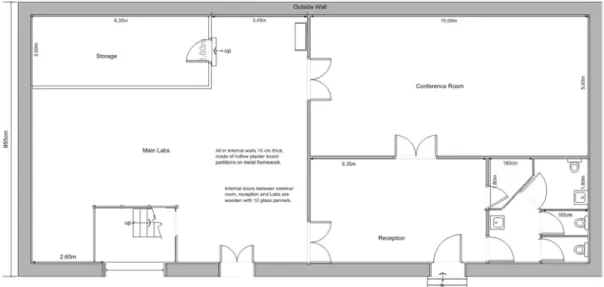
Figure 3 – Our Initial Labs Plan To Import Into RingMaster
RingMaster automatically determines the number of MPs that need to be installed in any part of a building, taking into consideration the building obstacles on the floor plan, the number of users, and the level of traffic they’re likely to generate. It also allows the network manager to easily adjust WLAN capacity with minimal disruption as all the “what-if” type scenario investigations can be carried out offline. Used with the MSS RF stats, as we mentioned RingMaster can be used for rogue detection as well as to verify RF coverage in general.
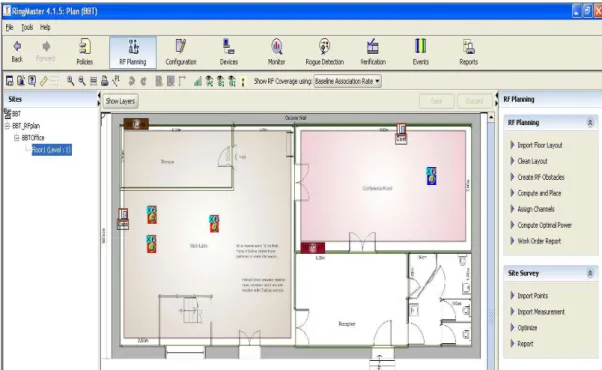
Our starting point here was a design of our test labs which we imported into RingMaster. This then formed the basis of our deployment as we edited details such as wall thickness and type, identified reflective surfaces and other elements which effect RF coverage. A drop-down list of options lets you match the thickness levels and material type of each building element, and the corresponding attenuation factors are then used to calculate how to deploy a Trapeze solution. This itself is based around a number of variable parameters such as, what is the lowest connection speed you want users to connect at before going out of range.
The RF attenuation factors are applied to walls, doors, windows and other “obstructions” so you can even perform “what if” type analyses before you even order the products, as part of the pre-sales consultancy, to work out the most cost-effective method of deployment, given that there is always a trade-off in WLAN between speed and coverage.
Figure 4 –RingMaster-Edited Floorplan For Broadband-Testing Labs On approving a plan, you can then commit it to RingMaster, which then creates a new diagram and report showing exactly where to place each element (MXs, MPs etc) of the solution, even down to which ports on the MX switch to use – all designed to minimise human error and speed deployment.
Like any good network management product, RingMaster can be used in a pro-active way to minimise problems, but in the event of a potential problem it issues automatic alerts about network changes, while a wizard-based interface can be used for resolving network conflicts. A fault and event view for all MX and MP events is integrated and general performance statistics are available in tabular and graphical format, with various file export options supported.
Broadband-Testing – Trapeze Networks Mobility System 4.1
Page 8
Stage Two Deployment: Drop-ship Deployment
Two key elements of the product were important to our test here, “no touch” deployment and remote management. Since, in our test we simulated head and remote offices, the idea was: how can you simply, and at a very low cost, deploy WLAN into many hundreds or even thousands of branch or satellite offices?
The MXR-2 features an option called drop-ship deployment, meaning that a configuration can be created centrally, then simply sent out over the “Ether” to the remote sites, so the MXR-2 automatically picks up the correct configuration on being attached to the remote network. So, at the remote site, the only human requirement is to connect to MXR-2 to power supply, and connect two Ethernet cables, one to the Mobility Point (via a PoE port) and a second to whatever the office is using as a central switch/router with Internet/WAN access. This sounds really simple, and it is, but it works. It also means that any software or configuration changes in the future can be very easily managed.
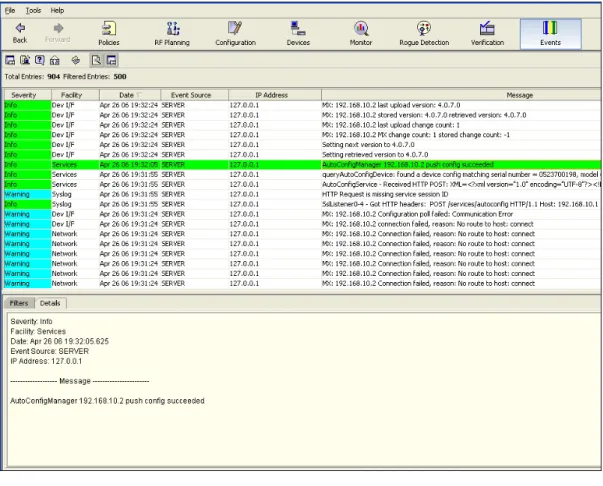
Figure 5 –Drop-ship Deployment Log
The Events Log confirms when a drop-ship (push config) deployment is successful. Configuring the deployment took literally just a few minutes. Compare this with the costs involved in either:
a) Having all the MXs delivered initially to head office, then centrally configuring each MXR-2 before sending them out to each branch office.
b) Sending an engineer to each and every branch office to configure the MXR-2’s onsite.
MXR-2: Day-To-Day Management (MSS) And User
Control
On a day-to-day basis, the MXR-2’s in our test could be fully remote managed, something we simulated in the labs without problems and that is of great value both in an enterprise/branch office and managed service type model. For example, we were able to monitor device status and analyse performance on an ongoing basis.
Figure 6 –Monitoring Options – Local and Remote
Being a small device designed for remote office use doesn’t mean the MXR-2 has a basic specification. All MXs perform Layer 2 forwarding and support Layer 3-4 and identity-tracking capabilities. MXs integrate with wired infrastructures and offer redundant load-sharing links, 802.1Q trunking, spanning tree and per-VLAN spanning tree (PVST+). They also support IGMP snooping, which is vital to supporting IP multicast streams. This means that both traditional and real-time applications are equally supported and have proven in extreme levels of testing when combining MXR-2s with other MXs from higher up the Trapeze product range.
Day-to-Day Security And WAN Traffic Optimisation
Security wise the MXR-2 provides localised AAA capabilities to keep local wireless services going, even if the WAN link fails, thanks to an integrated Radius server. When the WAN link is operational, the MXR-2 offers several key features to control and prioritise bandwidth. First, the MXR-2 offloads 802.1X/EAP processing, which can reduce traffic to centralized AAA servers by up to 70%. In addition, QoS and DiffServ classification for data in and out of the MXR-2 let IT control and prioritise different traffic types, such as voice over wireless, streaming video, ERP and web traffic. Quality of service (QoS) is done with Layer 3-4 application information on a per-user or per-group basis. What this means is that the MXR-2 is a very flexible device, simultaneously supporting native subnet connectivity for roaming corporate users, remote wireless users on the corporate headquarters VLAN, secure access for local employees, and locked down and isolated guest access to the Internet. From a managed services perspective, it even enables IT to resell bandwidth to one or more wireless ISPs.
Broadband-Testing – Trapeze Networks Mobility System 4.1
Page 10
Roaming Capabilities (Featuring Network Domains)
With the focus on the centralised authorisation through the MXs, they exchange users' identities amongst themselves, ensuring secure access to the appropriate user services and distributing intelligence throughout the Trapeze Mobility System. This concept has now been extended, to take in the idea of Network Domains, essentially a cluster of Trapeze Mobility Domains, enabling the tight control over users to be extended across a truly distributed, multi-site deployment.
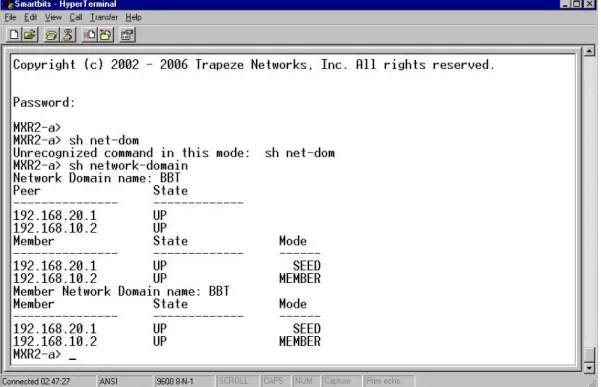
We put this to the test with our two office scenario, so where each Mobility Domain effectively replicates itself, creating a single Network Domain. Setting up two MXR2’s – as “a” and “b” - with each as a seed (see below) and member node, we were then able to roam between the two physical domains without losing our user identity as we were re-associated at the second domain/MP. Simple ping tests further confirmed that, from a user perspective, roaming is completely transparent certainly transparent to a user experience.
Figure 7 –Confirming Network Domain Availability At The CLI
Network Domains Explained
A Network Domain is a group of geographically dispersed Mobility Domains that share information over a WAN link. This shared information allows a user configured in one Mobility Domain to establish connectivity on an MX switch in a remote Mobility Domain. The MX switch forwards the user traffic by creating a VLAN tunnel to an MX switch in the remote Mobility Domain. In a Network Domain, one or more MX switches acts as a seed device. A Network Domain seed stores information about all of the VLANs on the Network Domain members. The Network Domain seeds share this information among themselves, so that every seed has an identical database. This maintains the simplicity of management concept that Trapeze focuses upon, while providing real flexibility.
OVERALL SUMMARY
Broadband-Testing has been regularly analysing the Trapeze Mobility System offering now for three years and has never failed to be impressed by the company’s depth of thought and ability to execute upon those ideas. Again, this time around is no exception – we are impressed with the direction Trapeze has moved forward in and especially the added ease of deployment that comes with the drop-ship deployment option. Equally, scalability – always a very strong point for Trapeze – has been extended thanks to the Network Domain concept, itself a logical extension of the flexible Mobility Domains that Trapeze has always offered.
If wireless network deployment is about ease, speed, low-cost, low OpEx, scalability (notably in terms of user authentication), broad application support and minimal disruption to the existing network, then Trapeze has ticks in all the right boxes. Add to this the kind of pro-active modelling and capacity-planning that the RingMaster tool offers, the excellent rogue-detection capabilities of the MSS and the comprehensive support for real-time applications such as VoIP and you have a very complete solution indeed.
As such, we totally recommend the Trapeze Mobility System – seen here in v4.1 guise – to any company or managed service provider looking to implement or offer a serious wireless network solution.
Broadband-Testing – Trapeze Networks Mobility System 4.1
Page 12
APPENDIX: A EUROPEAN CUSTOMER CASE
STUDY – KAISER’S TENGELMANN
What Was The Objective?
Kaiser’s Tengelmann, a major grocery store chain, wanted to introduce efficiencies and operational savings by providing wireless LAN access in its stores for cash systems, reverse vending systems that automate beverage container recycling, kiosks for customer interaction and advertising
displays.
The company needed a secure, easy-to-manage wireless LAN solution that could be replicated across its more than 700 stores with minimal IT effort. The wireless LAN also needed to support wireless handheld terminals that are used widely by store managers, as well as a variety of applications in Kaiser's Tengelmann warehouses.
What Was The Solution?
Each Kaiser’s Tengelmann store now has a Trapeze Networks MXR-2 wireless LAN switch and three Mobility Point access points. At the
headquarters’ data centre, a Trapeze MX-400 wireless LAN switch provides redundancy for the in-store wireless LANs. The Trapeze RingMaster planning and management software suite provides centralised control and monitoring over the entire wireless network, while the MXR-2s, being designed specially for remote sites and branch office applications, proved the ideal wireless LAN infrastructure for Kaiser’s Tengelmann stores. Despite its small size, the MXR-2 supports the same set of features as all of the other wireless Mobility Exchange switches in the Trapeze product family, including the MX-400. Any level of security can be supported, with multiple options for authentication and encryption.
The Trapeze MX-400 wireless LAN switch is deployed in a centralised data centre at Kaiser's Tengelmann headquarters, where it provides redundancy and enhances resilience for the remote MXR-2s. The MX-400 wireless LAN switch can take over the configuration and management of remote in-store Trapeze Mobility Points using the Automatic Distributed Access Point (Auto-DAP) capability. Remote Trapeze Mobility Points will automatically locate the MX-400 in the unlikely event of a local switch failure.
And The Results?
Initial deployment of the MXR-2 switches was highly automated, so the IT staff did not have to travel to the individual sites. Local facility personnel needed only to install the MXR-2s, power them up, and plug them into the local network. The MXR-2 switches were configured remotely by a
RingMaster server at a central site. In-store personnel did not need to bring up a console port or do any configuration of the switch. This means the rollout of hundreds of wireless LANs proceeded rapidly. The installation of the Trapeze wireless LANs was completed at Kaiser’s Tengelmann stores at a rate of 40 per week.
Each store is equipped with three Trapeze Mobility Point radios. The Mobility Points blend into the stores’ environment due to their compact, discreet design, with an internal antenna and an appearance like that of a
smoke detector. This reduces the likelihood of tampering by customers or employees. The Mobility Points provide wireless connectivity and facilitate secure mobility. They also enable quality of service (QoS) for critical applications, permit seamless roaming and support a wide range of handheld Wi-Fi devices commonly used in the retail industry.
RingMaster introduces additional operational efficiencies by streamlining these important functions:
Defining centralised policies for switches.
Automating RF planning of wireless LANs in the Kaiser’s Tengelmann stores.
Simplifying management and navigation among the remote networks.
Enabling centralized monitoring and alarm management.
With the implementation of the Trapeze Mobility System at all of its stores, Kaiser’s Tengelmann is looking to gain a serious advantage over its
competitors. By providing company-wide, secure mobile access, employees will enjoy the increased productivity enabled by fast
network access — whether they are ringing up an order, conducting inventory or working in the warehouse.