Using Daily Build Concept at
Ericsson Radio Systems AB
Tomas Myrberg
Reg. no. LiTH-IDA-Ex-00-63
Abstract
Daily build is a software development model that is based on a very simple principle: build and test the entire system very frequently, preferably every day. This process should be handled automatically in order not to increase the workload on the designers. A number of benefits will then arise, such as minimization of integration problems, fast feedback on project progress, detection of errors early and the avoidance of placing test-ing too late in the project. A requirement to be able to use the daily build concept is to also utilize the incremental development lifecycle model.
Department Wideband Radio Networks at Ericsson Radio Systems AB strives to intro-duce the daily build concept, and this master’s thesis was aimed at developing a tool to handle the automation of the process. Furthermore, a study of two other departments at the company, which already have initiated their own daily build processes, was per-formed in order to find out how their solutions was implemented. The experience from these two department shows that daily build contributed to higher software quality and better project control, even though planning becomes more complex when incremental development is used. The increased control and quality benefits coincides with the goals Wideband Radio Networks management has stipulated for daily build.
Table of contents
1 Introduction ... 1
1.1 Ericsson Radio Systems AB ...1
1.2 The master’s thesis ...1
1.3 Purpose of the report ...1
1.4 Structure of the report ...2
1.5 Reading recommendations ...2
2 Method ... 3
2.1 The report ...3
2.1.1 Interviews ...3
2.1.2 Literature ...3
2.1.3 Critique concerning the method ...3
2.2 Implementation of daily build tool ...3
2.2.1 Lifecycle model ...3
2.2.2 Semi-prototyping ...4
2.2.3 Critique concerning the method ...4
3 Wideband Radio Networks ... 5
3.1 Organisation ...5
3.2 Product development ...5
3.3 Why daily build? ...5
4 Daily build ... 7
4.1 Problems with standard methods ...7
4.2 Daily build concept ...7
4.2.1 Basic concept ...7
4.2.2 Broken builds ...8
4.2.3 Daily build under pressure ...8
4.2.4 Frequency of builds ...9
4.3 Benefits of daily build ...9
4.4 Drawbacks of daily build ...11
4.5 Impact on development process ...11
4.6 Automatic testing pitfalls ...11
4.6.1 Scope and purpose of automation ...12
4.6.2 Saving time? ...12
4.6.3 Change ...12
4.6.4 Value of automation ...12
4.6.5 First automation project ...13
5 The daily build tool ... 15
5.1 Implementation ...15
5.1.1 Choice of language ...15
5.1.2 Choice of design model ...16
5.2 Functionality ...16
5.2.1 Build ...16
5.2.2 Tests ...16
5.2.3 E-mail and sms messages ...17
5.2.5 Javadoc ... 17
5.3 User interface ... 18
5.3.1 Setup file ... 18
5.3.2 Tool invocation ... 18
5.3.3 Build and test report ... 19
6 Daily build at Wideband Radio Networks ...25
6.1 Daily build usage ... 25
6.1.1 Organization and scope ... 25
6.1.2 Processes ... 25
6.1.3 Build frequency ... 25
6.1.4 Automatic tests ... 25
6.2 The daily build tool ... 26
7 Daily build at OSS Application Design & Services ...27
7.1 Daily build usage ... 27
7.2 Benefits of daily build ... 27
7.3 The daily build tool ... 27
8 Daily build at BSC Development ...31
8.1 Daily build usage ... 31
8.2 Benefits of daily build ... 32
8.3 The daily build tool ... 32
8.3.1 The old tool ... 32
8.3.2 The new tool ... 32
9 Comparison of the departments daily build usage ...35
9.1 Organisation and lifecycle model ... 35
9.1.1 Team organization ... 35
9.1.2 Incremental development ... 35
9.2 Build frequency ... 35
9.3 Processes and instructions ... 35
9.4 Daily build tools ... 36
9.4.1 Maintainability ... 36 9.4.2 Performance ... 36 9.4.3 Automatic tests ... 37 9.4.4 Reports ... 37
10 Recommendations ...39
10.1 Feature teams ... 39 10.2 Documentation ... 39 10.3 Automatic testing ... 39 10.4 Start-up project ... 3911 Terminology ...41
12 References ...45
Index ...47
1 Introduction
This report constitutes a master’s thesis at the Master of Science program Computer Science and Engineering at Linköping University.
1.1
Ericsson Radio Systems AB
The master’s thesis has been performed at Ericsson Radio SystemsAB in Linköping (Center for Radio Network Control).
The task of the company, as described by their own presentation on the web, is:
“The unit holds the responsibility for the design and development of central parts of software used in all the current cellular systems as well as future wideband systems. The unit is a competence center within the areas of Operation and Maintenance and Security Management for cellular systems. The Center for Radio Network Control is also responsible for development and marketing of tele-com simulators, a Supply Unit for Software Prod-ucts and a department for Research and
Innovation, which has a close cooperation with the Linköping University.”
More precisely, the work has been performed at Wideband Radio Networks, also known as departmentLVA/U, one of several departments that employs about 70 of the 850 employees. Wideband Radio Networks is further described in chapter 3, Wideband Radio
Networks, on page 5.
1.2
The master’s thesis
Most of the time spent on the master’s thesis has concerned implementing a daily build tool to be used by the department. The concept of daily build is explained in chapter 4,
Daily build, and the tool itself is briefly described in chapter 6, Daily build at Wideband Radio Networks. Furthermore, the thesis work has resulted in this report. The
program-ming part will however not be described in detail here.
1.3
Purpose of the report
The aim of this report is to:
• Describe the daily build concept.
• Describe the daily build work at departmentsLVA/K (BSC Development) andLVA/L
(OSS Application Design & Services).
• Describe and to some extent evaluate the daily build plans at Wideband Radio Net-works and at the same time describe the functionality and intended usage of the implemented daily build tool.
1.4
Structure of the report
This is the structure of the thesis:
1. Introduction
This chapter explains the purpose and scope of the master’s thesis and briefly describes the structure of this report.
2. Method
The method chapter explains the methods used during the master’s thesis.
3. Wideband Radio Networks
Chapter 3 describes the department Wideband Radio Networks. It also accounts for the reasons stated by department management to initiate the daily build work.
4. Daily build
This chapter explains the concept of daily build and what benefits one might expect when using it.
5. The daily build tool
A major part of the master’s thesis dealt with implementing a tool that automates the daily build process. This chapter describes the result.
6. Daily build at Wideband Radio Networks
This is where you find a description of how daily build will be performed at Wideband Radio Networks.
7. Daily build at OSS Application Design & Services
OSS Application Design & Services has been using daily build for some time, and this chapter tells how. The tools and methods used are explained and the benefits experienced by the users are accounted for.
8. Daily build at BSC Development
Like OSS Application Design & Services, BSC Development has already started a daily build project. This chapter explains how, as in chapter 7.
9. Comparison of the departments daily build usage
By comparing the daily build work and tools from the three departments, one can extract some conclusions of how Wideband Radio Networks should manage their daily build work.
10. Recommendations
This chapter contains some recommendations to Wideband Radio Networks concerning the usage of daily build.
11. Terminology
Definition and explanation of some words and concepts used in this thesis.
12. References
An index of references used to gather the information in this thesis.
Index
A list of words to look up.
1.5
Reading recommendations
Those who know nothing about Ericsson Radio SystemsAB and the current daily build activities should read the entire thesis to grasp the subject. If you only are unfamiliar with the topic daily build and would like to learn some more, read chapter 4, Daily build to chapter 10, Recommendations, but focus on chapter 4.
In order to find out more about the implemented daily build tool itself, reading [7] is recommended. The reader is advised to use chapter 11, Terminology, on page 41 when unfamiliar expressions are found.
2 Method
The method used for retrieving the information in this thesis is presented in this chapter, as well as how the requirements and usability demands of the daily build tool were gathered.
2.1
The report
The primary source of information to this report has essentially been interviews and study of literature.
2.1.1 Interviews
To be able to evaluate the daily build process at Wideband Radio Networks, some inter-views have been made. The persons interviewed are involved with the daily build work at other departments of Ericsson Radio SystemsAB, namely BCS Development and OSS Application Design & Services1. The questions asked concerned the usage of daily build and the benefits they have experienced from it, the tools they use, their functionality and usability and finally the follow-up work performed.
Interviews at Wideband Radio Networks have also taken place to enquire the depart-ments plans for daily build.2
2.1.2 Literature
Books partly dealing with daily build and some articles concerning the subject have been studied. Test automation is commonly discussed in various papers, so papers on automation have also been read.
Furthermore, documentation from BCS Development and OSS Application Design & Services dealing with their solutions was also studied, even though this documentation have been sparse.
2.1.3 Critique concerning the method
Holding more interviews to gain a fuller understanding of other perspectives of the daily build process and tools of the other departments would have been interesting. Comparing this with the work at other companies would have been even more interest-ing, but this was not prioritized and was never performed.
2.2
Implementation of daily build tool
Most of the time allotted for this master’s thesis has been spent on the implementation of the daily build tool. This section briefly describes how.
2.2.1 Lifecycle model
The “Code-and-Fix” model as stated in for example [2] was selected. The main reason for this choice is the time saved in the activities that are not outstanding in a project involving only one person, such as vast planning, documentation and complex quality assurance measures. The main focus in this model is the code. The extreme approach where no documentation is produced was however avoided. Both a detailed project plan and a requirement specification was written before the coding was initiated.
1 Two persons at BCS Development and one person at OSS Application Design & Services have
been interviewed, see [10] and [11]. One main interview took place at each department, followed by several follow-up occasions.
2 The ones interviewed were department manager Stefan Werna and section manager Lena
2.2.2 Semi-prototyping
The functionality of the tool and mainly the contents of the documentation it automati-cally generates has been developed in cooperation with future users and others who have taken interest in the product. They have especially in the beginning of the imple-mentation work given feedback on how they would like to use the tool when a proto-type has been presented. This was very valuable in the beginning of the project since it was not quite clear what the orderers wanted the daily build tool to be able to perform. Calling it “prototyping” could however be an exaggeration. No strict prototyping method has been used. Feedback would then have been received by evaluating ques-tionnaires and documentation from interviews with the users. The response has rather been given to me on a voluntary basis when someone felt they had something to say about the product. Their evaluations have therefore not been controlled or supervised by me at any time.
2.2.3 Critique concerning the method
The Code-and-Fix model may save some time at first glance, but since some important actions are not present, there is always a risk that a project using it can utterly fail. If a more secure method had been chosen, the master’s thesis would most likely have con-sumed more time, but risk management and quality assurance would have been improved.
Using a stricter form of prototyping could have given feedback earlier. Evaluations on voluntary and non-controlled basis tend to be postponed and incomplete. Some may have neglected to report any opinions they might have regarding the prototype, and others have even ignored the whole evaluation. Thereby there is a risk of dissatisfaction when the tool is used at a later time.
Letting a team use the tool in the final phase to try it out would have been tremendously advantageous. But since their available time is rather limited, this has been scheduled to after the completion of this thesis.
3 Wideband Radio Networks
This chapter describes departmentLVA/U, Wideband Radio Networks, and their rea-sons to initiate a daily build project. Details concerning the daily build plans are found in chapter 6, Daily build at Wideband Radio Networks, on page 25.
3.1
Organisation
Department Wideband Radio Networks is divided into four organizational units. The first one is the management team, and the other three are called sections. They are the
RNCElement Management, theRNCTraffic and the Security section. The daily build tool will be used by theRNCElement Management section, which is further divided into sep-arate teams consisting of about half a dozen designers each.
3.2
Product development
The department is developing parts of the infrastructure for the third generation mobile telephone systemWCDMAfor Ericsson. The design responsibility is focused on the node Radio Network Controller (RNC). TheRNC Element Management concept is briefly pre-sented below.
In order for the network operator to be able to configure theRNCand supervise it, a web based operation and maintenance system, theRNC Element Manager, is produced. It is designed so that the operator using a thin client, for example aPCorUNIXstation with a web browser, through anIP intranetwork can load theRNC’s Element Manager. ARNC
Element Manager consist of a number of applications needed to manage theRNC. An example of an application is the “RBSManager” which is used to set up the links with the base stations that the cellular phones communicates with.
TheRNC Element Manager applications are all implemented in Java. TheRNC Traffic parts are however implemented in C++. Furthermore, the incremental development life-cycle model is used by all sections.
3.3
Why daily build?
Department manager Stefan Werna states three main reason to introduce daily build, which all are described in section 4.3, Benefits of daily build, on page 9.
• Increased control
Department management gains better control of current project status. They can see how far you have reached, not only the amount of hours spent on the project, which may differ from actual progress.
• Detection of errors sooner
Frequent builds and tests reveal errors in the code sooner than if daily build was not used. This saves a lot of time.
• Earlier integration tests
Testing the interfaces between different parts of the code early saves huge amounts of time when flaws are detected soon after their introduction compared to if they were found late in the project.
4 Daily build
Daily build is hardly a new process. It has been used by various companies for more than a decade, but the name “daily build” was not commonly used until Cusomano and Selby published their book, see [1]. The process is still not widely spread, and this chap-ter will explain the basic concepts for those who are unfamiliar with it.
4.1
Problems with standard methods
Those who are not using the daily build process often suffer from disadvantages stated in this section, as described in [1] for example.
The software is often developed by separate teams, with limited or no contact. But sooner or later the subsystems need to be integrated, and this is when you discover flaws in subsystem interfaces. Depending on the gravity of the errors, actions required may vary from small code alterations to large time-consuming design modifications. Testing is often performed quite late in the project, in most cases when the coding is nearly completed. This testing phase is usually rather extensive in terms of time since the stability of the product has not been tested before. If errors found while testing are severe, vast amounts of time may be wasted while fixing it. Completing the debugging before the intended release date can then be a problem.
Since some time has passed between the actual coding of the incorrect code and the dis-covery of the fault another problem arises. Perhaps the programmer does not remember what that part of the code was all about, and then have to waste some time trying to recall its purpose. Or even worse: the programmer may even have left the company, and no one else is fully aware of how that code works.
If you are unlucky, the source of the error is not easily detected. It might be anywhere in the code, which may be quite extensive at the end of the project.
Finally, project managers find it hard to estimate the current stability of the code and measuring the progress. If a certain amount of the time available for the current project has been spent, how are the managers to know if the same amount of the work has been done or if they are behind schedule?
4.2
Daily build concept
As the name reveals, daily build concerns everyday activities. Even though “frequent build” or even “weekly build” might be more appropriate in some cases, the term “daily” will consistently be used in this thesis.
4.2.1 Basic concept
The basic ideas are very simple and are described below.
• Build every day
The entire system shall be compiled and linked every day. This requires a sufficient code growth and that the designers actually check in their alterations often into the configuration management tool used.
• Run tests every day
Smoke tests or regression tests shall be executed every day when the build is successful. Whether the tests shall include the current increment’s code or only test completed increments when incremental development is used, see section 4.5 on page 11, is optional.
Actually, the test part is not required to call your process “daily build”, but as stated in [2], without it the daily build can be considered meaningless. Perhaps the name “daily build and test” is more appropriate when tests are involved, but the “and test” part is often implicit.
Keeping the tests up to date is of course necessary in order for them to be meaningful. If they do not evolve at the same rate as the code, they most likely will not find errors introduced after the last change in the test.
Automating this process, both build and test, is advantageous. [3] claims that
automa-tion is even necessary to make the daily build work without requiring too much manag-ing efforts. The automated build and test is then often run at night so it includes the latest changes made during the day. The result is presented in some way the next morn-ing. Some manual effort can however not be avoided. Furthermore, all tests are not suit-able for automation, see section 4.6 on page 11.
4.2.2 Broken builds
If either the build or tests fail, you have a so called “broken build”. This is of course to be avoided. The goal of the daily build process is to keep the number of broken builds minimal. Breaking the build is strictly forbidden. It is utterly important that each build and test succeeds, and that the persons involved understand this. The one responsible for break-ing it should be punished in some way accordbreak-ing to [1] and [2]. Suggested punishments, that actually are used by some companies, are paying a fine, wearing a silly hat or hav-ing to be in charge of the daily build process. There is however a risk that this kind of punishments only ridicule the daily build process, and makes it into a game instead. Perhaps breaking the build becomes considered fun. Furthermore, this kind of punish-ments most likely is not compatible with Swedish traditions, in this case especially Eric-sson’s customs.
[3] recommends that the selection of those responsible for the daily build supervision is performed carefully to increase the seriousness of breaking the build. If they are recog-nized as good designers and are at least informal leaders with some authority, they can influence the attitude of the other designers. This also requires that working with daily build is a high status activity. Additionally, if high management is informed each time a build is broken, the daily build process is taken more seriously.
But if the build or test fails, the error must be found and corrected before the next build. Otherwise you loose some or all of the advantages with the process, see section 4.3. It is also hard to maintain a no-broken-builds attitude among the developers if the builds are broken too often, which contradicts the daily build goal stated above.
In [1], [2] and [3] it is described that in extreme cases, the one responsible for the broken build will immediately be summoned to work, where he must correct the bug in order for the build to continue. Remember that the build and test is most often run at night, which makes this rule quite unpopular, but effective.
4.2.3 Daily build under pressure
In critical periods of the project, when the workload is high, one might tend to view the daily build process as something that one does not have time for. That is exactly the opposite of how you are supposed to think according to [2]. When the programmers are stressed, they often make more errors and test their own code less, which makes it even more important to keep the daily build and tests running.
4.2.4 Frequency of builds
To fully take advantage of all the benefits from the process, as described in section 4.3, a build and test should be executed each day. However, if the code growth is not large enough to justify this, a “frequent build” approach may be taken, as many companies do, see [1]. Builds and tests are then performed a few times each week. Some satisfies with once a week, and others even as seldom as once a month, even though this hardly justifies the name “daily build”.
But as [2] points out, if a broken build appear, the impact on the benefits is larger the less frequent you perform the build and tests. If several weeks go by until you produce a non-broken build, practically all advantages are lost.
4.3
Benefits of daily build
There are a number of benefits gained from daily build stated in [1], [2] and [3]:
Minimization of integration problems
Since interfaces between subsystems made by different programmers or teams are checked very frequently, integration problems are minimized and a “big bang” integra-tion at the end of the project is avoided.
Within an ordinary development model, the waterfall model for example, integration tend to take place late in the project, which may cause detection of bugs that are not that easily corrected. Redesign may even have to be made, or in extreme cases the whole project can fail.
Fast feedback on project progress
Code growth and error detection are reported on a daily basis. At any time you know whether the system is executable or not. The managers can easily tell if the time spent on the project corresponds to the amount of code written.
Avoids placing test phase last
Usually the test phase is placed rather late in the project, often too late. Daily build ensures that tests are executed from day one, or whenever tests are constructed.
Improves programmer motivation
One can literally watch the code grow every day, and seeing that it works and that your part is useful increases the programmer motivation.
In [3] it is also stated that the stress on the designers is reduced. This is due to that high workload is avoided at the end of a project, when lots of problems ordinarily appears. The pressure is instead distributed more evenly across the entire project, as illustrated in figure 1.
Figure 1. The stress level is more evenly distributed when daily build is used. The figure shows hypothetical data.
Errors are found quickly and are easily located
When the interval between builds and tests is short, errors are found very soon after their introduction, and can therefore rapidly be corrected. This requires good tests, of course. Perhaps the error even makes the code uncompilable, which perhaps would not have been detected until the integration test phase late in the project.
Designer’s
Time End of project
stress level Not using
daily build Using daily build
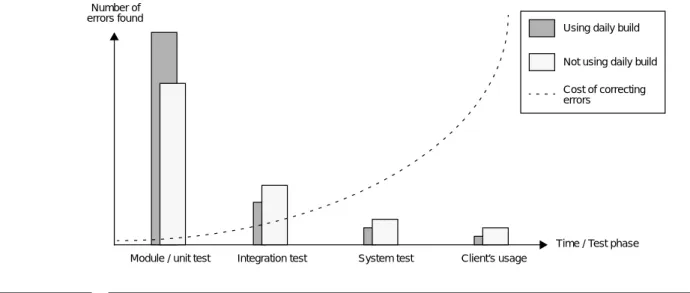
A large amount of time can be saved when errors are detected early since the cost of cor-recting it increases dramatically the longer it takes to find it. This is shown in figure 2 which also illustrates that errors are found earlier when daily build is used.
If the system passes both build and tests on day∆ and either one fails on day∆ +δ, whereδ is the build interval, then the bug must have been introduced somewhere between these two days. Ifδis small the code probably has not grown that much and the possible incorrect code sections can easily be isolated. If daily build is not used, locating the error can be a difficult task since it can be located anywhere in a rather large part of the code.
There is always a deliverable product
Each time a build succeeds you have a deliverable product, at least in theory. If someone needs an executable version of the product made so far, it is there.
Brings testers and programmers tighter together
By making testers and programmers work together one can bridge the gap between them.
Increases accuracy of planning
Since bugs are detected and fixed continuously and the system is kept stable at all times, the risk of breaking the time plan due to severe bugs decreases3.
Decreases leadtime
[3] claims leadtime is reduced since the “pulse” of the project gets higher and system test can proceed in parallel with the development. Finally the amount of documentation can be decreased since the communication often only resides within the feature team and documenting it may become unnecessary. Communication with the test team, if any, also increases as stated above, which means some bugs they have found can be managed without complex error report handling. But this can also lead to a drawback as stated in section 4.4.
3 But note that the planning itself is not any easier just because daily build is used. Incremental
development, which is required (see page 11), may on the contrary make the planning harder and more time-consuming, especially if this method is new to the persons involved.
Time / Test phase Number of
errors found
Using daily build
Not using daily build
Cost of correcting errors
Figure 2. Errors are found earlier and with a lesser cost when daily build is used. This figure shows hypothetical data and is based upon the experience of Stefan Werna, the former manager of OSS Application Design & Services and now manager of Wideband Radio Networks. The latter part of the figure, system test and onwards, is however somewhat speculative, since the department had not reached those phases yet when Stefan Werna left.
4.4
Drawbacks of daily build
No development model lacks flaws, and neither does daily build.
The problem that arises is a tendency towards premature releases, according to [2]. Even though no errors are found by the daily build tools at a specific time, the product may not be ready for an external delivery. This might not be understood by people outside the development group, and they therefore demands a release. A release requires that time have to be spent on preparations, including writing documentation, hiding features in the code that are still under development and cloaking debugging devices used. There is also a risk that quick fixes makes the code work for this release, but in the long run, those parts will have to be replaced. Thus that code will have to be written twice, which is not very efficient.4
In [3] it is recognized that the decreased leadtime resulting from increased communica-tion advantage also may lead to a drawback. The documentacommunica-tion can degenerate and become far too insufficient. This is particularly a risk if the documentation already was sparse before daily build was applied.
4.5
Impact on development process
Using daily build impacts the development process.
Incremental development
Using the traditional waterfall model, no buildable or fully testable code is completed until very late in the project. This makes daily build impossible. In [6] and somewhat in [1], [2] and [3] incremental development is suggested instead, which heavily affects design.
Feature teams and customer feature design
[3] and [6] also recommends feature teams instead of teams based on system modules. A feature team is responsible for parts of all modules involving a certain customer feature, unlike system module teams where teams handle one or several modules each. That would make coordination and planning between those who are module responsible unbearable when a daily build approach is used.
Feature teams implementing a customer feature also allows early prototyping.
Testing
The traditional test phases, such as module tests, integration tests and system tests, may disappear. Instead a feature team can include any tests in the daily build when it feels appropriate.
It is however unlikely that all phases will be covered by the tests included in the daily build process. The later tests, including systems test and so on, will most likely be per-formed outside the scope of daily build.
4.6
Automatic testing pitfalls
This section will briefly point out some important problems and misunderstandings dealing with test automation, even though it is outside the scope of this thesis. A more complete discussion can be found in [4] and [5]. Regression tests are not fully affected by the reasoning in this section.
4 The premature release flaw is however not outstanding at Wideband Radio Systems. Release
4.6.1 Scope and purpose of automation
First of all, I would like to stress that automatic testing is not the final solution when one tries to discover bugs in the code. It can never replace manual testing and inspections, but is only a complement. Furthermore it is important to realise why one has automatic testing at all. It is not to be used because it makes testing more exciting or because it is considered to be a “hot” method. The only purpose is to find errors. If no errors are found, perhaps your automated test suites only verifies some functionality instead of searching for bugs.
4.6.2 Saving time?
Perhaps the intended goal is to reduce the time spent on testing. That will never be achieved. Creating and maintaining a good test suite intended for automation take more time than running a manual test once. So for each automatic test suite you create, you will have less time to spend on running manual tests. And those are the ones that will find the most errors, even as many as 80% says [4]. So when deciding if to automate a test or not, you have to estimate what manual tests you will loose, and how many errors will go undetected. If those are many, and severe ones, you probably should not auto-mate that test. The estimation is however not easy to do, but nevertheless important. Time is also not saved concerning documentation of test suites. This will still have to be thoroughly performed. A process and a test plan concerning test automation are also to be maintained.
4.6.3 Change
Then consider the next issue: if a test passes the first time you run it, what is the chance it will fail the next time? The answer is “negligible” if the code has not changed in some way5. Then you have to ask yourself “Is it meaningful to repeat this test time after
time?”.
Well, if the code does change, then another problem arises. Sooner or later the test suite will become obsolete since it is not adapted to the current code status. Then you either have to discard it or update it. The latter is not necessarily easily done, but might con-sume as much time as writing an entirely new suite. No matter what alternative you choose, if the suite has not found enough errors by now to justify the effort automating it, then you should have left it a manual test after all. So when determining if it should be automated at all, consider how many code changes it will survive. This is particularly to be contemplated if the code involves aGUIsince those tend to change a lot during the development.
4.6.4 Value of automation
So what are the benefits of automatic testing compared to the manual counterpart? Well, [4] claims that such an comparison is meaningless. They are two different processes, not two ways of executing the same one. The time spent on running test suites is often used as a measurement, but since consuming time is not the purpose of testing, the number of bugs found is a better way of measuring the value of the tests. So when deciding whether to automate a test or not, one should ask oneself “Will I find more bugs if I automate this test?”.
[5] claims that “An automated test’s value is mostly unrelated to the specific purpose for which it was written. It’s the accidental things that count: the untargeted bugs that it finds.“. This is deduced from the fact that the error often is not introduced in the specific code you are testing. The error has appeared due to a change in code you are using in the tested code, and which was assumed to be correct. These kind of errors are more
ily found by an automatic test since a manual test would not be rerun very often, if rerun at all. But expecting that the test will detect bugs exclusively in the designated code is consequently not necessarily correct.
4.6.5 First automation project
When starting a test automation process, determining what to automate is not easy. Since no exact figures can be deduced when reasoning about automation and its prob-lems, such as “If I automate this test, I will loose exactly five manual tests which would have found seventeen errors”, testing the automation process by starting a small scale experiment is recommended.
First make sure there is a test plan. It ought to tell what to automate, how to automate it and how and by whom the tests will be created and maintained. Expected costs and benefits are also to be pinpointed here.
Then start the automation in a very small scale. You can not automate all the tests for your system at once. Gather statistics from each test execution. Also make sure your test suites are not made weaker in order for them to be automatable.
Now evaluate the test plan and the outcome of the tests automated so far. Consider feed-back from those involved. This will hopefully give valuable experience of what to auto-mate, how it shall be done and what benefits and cost it produces. The number of test suites used can now gradually increase. They must constantly be updated so they test the current features of the code, not just the old ones.
5 The daily build tool
In order to handle the automation of the daily build process, Wideband Radio Networks needs a tool that handles the compilation and testing of their system with minimal man-ual involvement, and which also reports the result in a meaningful way. This chapter describes the tool that serves this purpose, and that was implemented as a major part of the master’s thesis. A more thorough description of the daily build tool is presented in the user’s guide, see [7].
5.1
Implementation
This section accounts for the choice of implementation language and design model.
5.1.1 Choice of language
The tool is implemented in the script language Perl, version 5. A system programming language, such as C++ for example, was not chosen due to the following reasons, which are discussed in [8]:
• The daily build tool uses existing programs6 to perform its tasks; • There is no need to implement complex algorithms;
• String manipulation is heavily used when report pages are produced, see section 5.2.4, HTML report pages, on page 17;
• Execution speed is not a primary concern.
The last point raises an important issue. A scripting language is undoubtedly slower than a system programming language, which commonly is the result of using an inter-preter instead of a compiler and the fact that the language is designed for easy usage – not for efficient mapping to the underlying hardware. Even though speed is an impor-tant factor for the daily build tool, the intention is that it can spend an entire night per-forming its task. The amount of data handled can therefore grow rather large before the execution time becomes a problem.
Furthermore, the time you loose in execution speed you gain in development speed. It is stated in [8] that any programmer can produce that same number of lines of code in a certain time, no matter what language is used. Since scripting language code is very compact – in one line you can perform tasks that require several dozen of lines in a sys-tem programming language – development time is reduced. The limited amount of time to spend on this project calls for a scripting language.
Perl was not selected after an extensive study of other scripting languages, but since it is commonly used at Wideband Radio Networks, which might benefit future maintenance. Perhaps another language should have been chosen since it is more efficient in some areas. But finding the best language could have meant implementing the tool, or parts of it, in each of the potential implementation languages and then comparing the result. This consuming exercise was however not prioritized. And since the most time-consuming part of the execution in fact is not the execution of the script itself, but the compilation of the code, only a negligible amount of execution speed can be gained by changing implementation language.
6 These are the Cello build support tool (the compiler), the hardware simulatorSimCello, the
test component executorttcn_execute, the ClearCase command line interfacecleartool, theHTML documentation generator Javadoc and theUNIX e-mail toolsendmail as well as someUNIX system calls.
5.1.2 Choice of design model
The object oriented features in Perl version 5 has not been used since there is no call for it in this case. Functional programming and a structure with several separate scripts and modules have been used.
5.2
Functionality
The daily build tool automatically executes a number of steps when initiated: • Build the system;
• Test suite execution;
• E-mail andSMS message sending;
• HTML report file and Javadoc documentation generation.
No manual actions have to be taken once started. A setup file and arguments given at invocation control the tool’s behaviour, see section 5.3.1, Setup file, and section 5.3.2, Tool
invocation, on page 18. Every action performed is logged in log files. 5.2.1 Build
The build is performed by Cello’s build support tool, which is based upon clearmake. Compilation is controlled from specification files named “build.spec” where packages to be compiled are declared. The locations of the specification files can be found in the directories stated after theBUILDSPEC tags in the setup file. The version of each file to select is determined by ClearCase labelling.
The actual result of the build is interpreted from the messages given by the compiler, which are directed to a log file. Only Java is supported by the daily build script and the jar files that are generated by a successful build are made available to the test component executor.
5.2.2 Tests
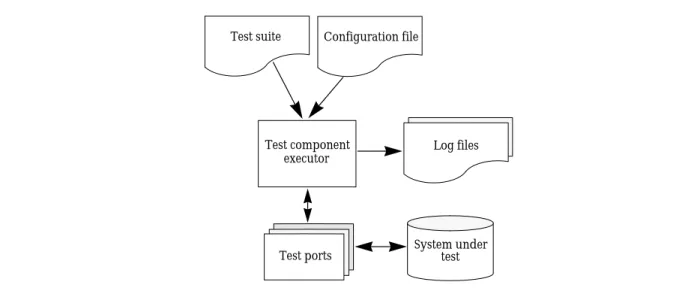
All test suites are in the “Tree and Tabular Combined Notation” (TTCN) format, a choice made by the test team. The test component executor executes test suites based upon their respective configuration file. It communicates with the compiled code via test ports where signals are sent and received. If unexpected signals are returned by the code, an error has occurred. Errors as well as correct results are documented in log files. This is all illustrated in figure 3.
Test suite Configuration file
Test component executor
Log files
Test ports System undertest
Figure 3. Overview of the test case executor environment. Test suites and configuration files are selected in the daily build setup file, see section 5.3.1 on page 18. The log files are used to determine the results of the tests.
The daily build tool interprets the log files after executing the test suites, and thereby determines the outcome.
There is no support for automaticGUI testing.
5.2.3 E-mail andSMS messages
Each time the daily build script is run, an e-mail is sent to each recipient specified in the setup file. It contains a summary of build and test results, as in figure 4. Choosing a newsgroup as one of the recipients makes the report widely available.
Unless theSMS-MODE tag in the setup file is set to “off”,
SMS messages are also sent to telephone numbers specified. There is also a “failure” set-ting which makes these mes-sages only being sent if either build or tests fail. However, the contents is a limited ver-sion of the text in figure 4, sinceSMS messages only can contain a very small amount of characters.
Figure 4. An example of the contents of an e-mail sent after completing build and tests.
5.2.4 HTML report pages
The result of the build and test is presented in a number ofHTML files that are automati-cally generated each time the daily build script is run. The intention is to make the data presented in a compact way where only the information needed is shown.
Old reports are not deleted but are stored and easily accessed as well. Some simple build and test statistics are also maintained.
There is a presentation of theHTML pages in section Build and test report on page 19.
5.2.5 Javadoc
If theJAVADOC-MODE tag in the setup file is not set to “off”, Javadoc documentation will be generated for the packages that have been selected for build. This documentation is integrated with the rest of the report.
Result of daily build and test for 1 Dec. 1999 ---Result of build: Success!
Result of designer tests: Success! Result of test team tests: Failure! There are no build errors.
All designer test suites passed.
3 out of 4 test team test suites didn’t pass. The report is located at
5.3
User interface
This section describes the user interface to the daily build tool and theHTML report files that are generated each build.
5.3.1 Setup file
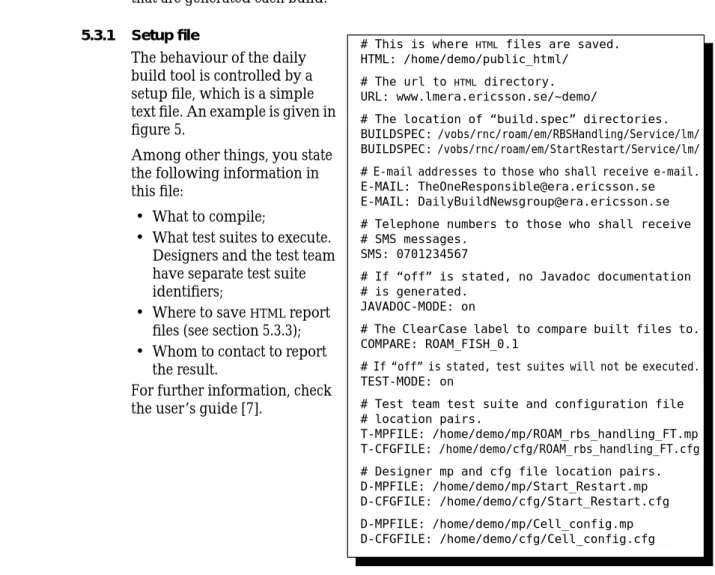
The behaviour of the daily build tool is controlled by a setup file, which is a simple text file. An example is given in figure 5.
Among other things, you state the following information in this file:
• What to compile;
• What test suites to execute. Designers and the test team have separate test suite identifiers;
• Where to saveHTML report files (see section 5.3.3); • Whom to contact to report
the result.
For further information, check the user’s guide [7].
Figure 5. An example of a setup file. Some tags are not included. To make the script work, the tagsHTML,
URL andBUILDSPEC need to be stated in the setup file, but the rest can be ignored.
5.3.2 Tool invocation
The daily build tool is invoked from aUNIX shell by calling
> perl dailyBuild.pl
or since the system supports the “#!” syntax, which starts the first row in the script file and tells where to find the interpreter,
> dailyBuild.pl
is enough. If default values are not wanted some arguments may be given, see [7]. An example is
> dailyBuild.pl -clean -d /tmp/db/ -cello /home/demo/cello/ -view daily_build_view
# This is where HTML files are saved. HTML: /home/demo/public_html/
# The url to HTML directory. URL: www.lmera.ericsson.se/~demo/
# The location of “build.spec” directories. BUILDSPEC: /vobs/rnc/roam/em/RBSHandling/Service/lm/ BUILDSPEC: /vobs/rnc/roam/em/StartRestart/Service/lm/ # E-mail addresses to those who shall receive e-mail. E-MAIL: [email protected] E-MAIL: [email protected] # Telephone numbers to those who shall receive # SMS messages.
SMS: 0701234567
# If “off” is stated, no Javadoc documentation # is generated.
JAVADOC-MODE: on
# The ClearCase label to compare built files to. COMPARE: ROAM_FISH_0.1
# If “off” is stated, test suites will not be executed. TEST-MODE: on
# Test team test suite and configuration file # location pairs.
T-MPFILE: /home/demo/mp/ROAM_rbs_handling_FT.mp T-CFGFILE: /home/demo/cfg/ROAM_rbs_handling_FT.cfg # Designer mp and cfg file location pairs. D-MPFILE: /home/demo/mp/Start_Restart.mp D-CFGFILE: /home/demo/cfg/Start_Restart.cfg D-MPFILE: /home/demo/mp/Cell_config.mp D-CFGFILE: /home/demo/cfg/Cell_config.cfg
5.3.3 Build and test report
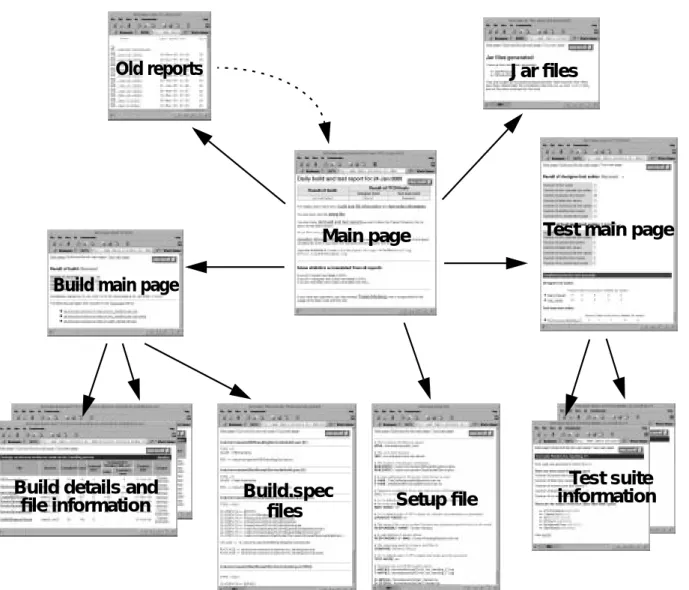
The report consists of several separate files that shall be viewed using a web browser. Their structure is illustrated in figure 6 and their contents are described below.
Main page
Build.spec
files
Setup file
Test main page
Test suite
information
Build main page
Build details and
file information
Old reports
Jar files
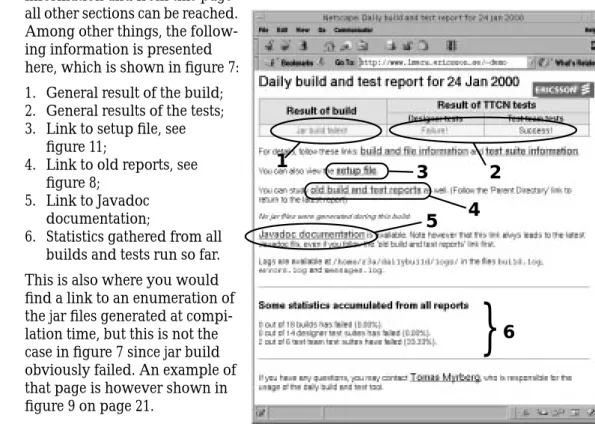
The main page presents general information and from this page all other sections can be reached. Among other things, the follow-ing information is presented here, which is shown in figure 7: 1. General result of the build; 2. General results of the tests; 3. Link to setup file, see
figure 11;
4. Link to old reports, see figure 8;
5. Link to Javadoc documentation;
6. Statistics gathered from all builds and tests run so far. This is also where you would find a link to an enumeration of the jar files generated at compi-lation time, but this is not the case in figure 7 since jar build obviously failed. An example of that page is however shown in figure 9 on page 21.
Figure 7. Example of report main page. Compilation has succeeded, but the jar build failed for some reason which is accounted for in the log file. Errors have been found by the designer’s test suites, but the test team’s suites have been executed without any errors. Javadoc documentation has been generated.
Old reports are all stored so
that one can track any occur-ring events. From the main page you reach links to every report generated so far, as in figure 8. These lead to respec-tive report main page. Old Javadoc documentation and old jar file enumerations are however not saved, but are discarded when a new report is generated.
Figure 8. Directory listing of old reports directory. If the build and test script is executed several times on the same day, subdirectories in the date-labelled directory contain the separate reports. Otherwise a click on the date-labelled link leads directly to the main report page for that date.
1
2
5
}
6
3
4
Jar files generated from a
suc-cessful build are accounted for in the report page as shown in figure 9.
By listing the generated jar files, one can conclude what correct files were used for testing, as described below.
Figure 9. Each jar file generated during the build is enumerated on a jar information page.
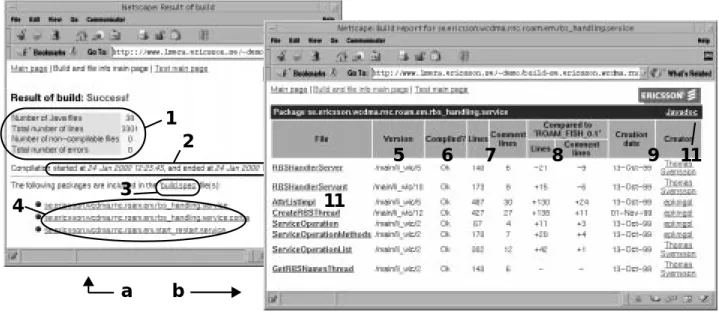
The information dealing with the build is separated into several pages. This is shown in figure 10 where an example of build and file information is presented. Included features in the main build page are:
1. Statistics for this build; 2. Compilation time;
3. Link to “build.spec” files that tells what was selected for build, see figure 11; 4. Links to detailed description of all packages built;
Each package have their own page where files are studied in detail. The information found there consists of:
5. ClearCase version of the compiled file;
6. Error warnings if there are any errors in a class, with link to error description; 7. The number of lines and comment lines in the file;
8. The change in number of lines compared to other ClearCase version7;
9. Creation date and creator, with mailto-link;
10. Compilation error descriptions, if any (not shown in figure 10); 11. Links to Javadoc documentation.
7 Selected in the setup file by theCOMPARE tag. This is probably the latest release label.
a
b
1
2
3
4
5
6
7
8
9
11
11
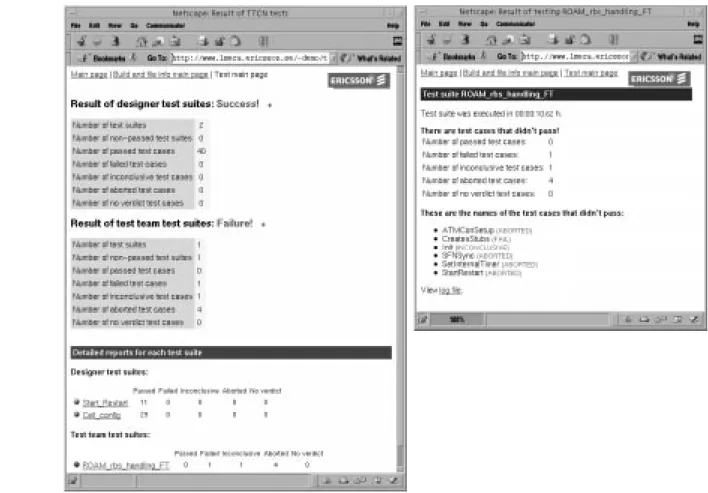
The test information is also split over several different pages. Just like in the build pages, there is a main page with general information. Each test suite then has a link to a sepa-rate test suite report page. This is illustsepa-rated in figure 12.
Each test suite is executed even if the build fails. The result of this is that the jar files gen-erated from the previous successful build is used instead of the ones that were not pro-duced. The main test page will in this case contain a warning that states that some tests might be irrelevant. The jar file page shown in figure 9 tells what tests are not affected by compilation failure.
The test feature can be entirely turned off in the setup file. In this case, there will of course not be any descriptions of test suites in the report.
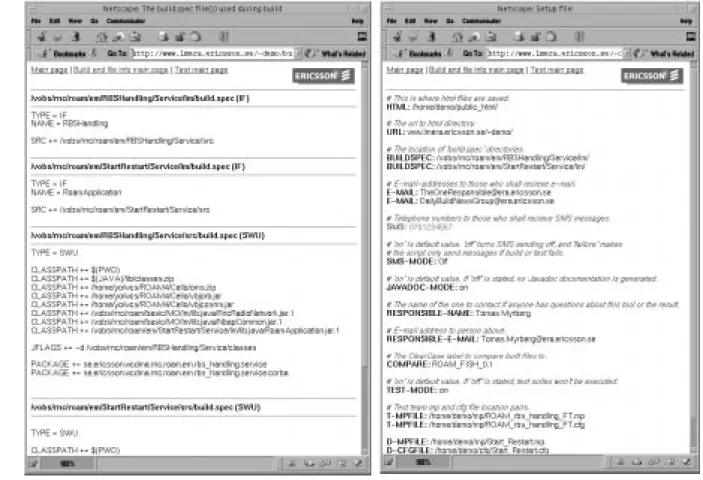
Figure 11. The build.spec files used are stored on the report page (image to the left) as well as the setup file used (to the right). This enables complete tracking of the latest and also old build and test reports.
Figure 12. The test report pages. The main test page (to the left) contains some statistics divided into designer and test team sections. A link for each test suite leads to a detailed report for that specific suite. This page, as shown in the image to the right, tells which test cases passed and which did not. It also contains a link to a log file generated byttcn_execute during test suite execution. This can be studied to further analyse the outcome of the tests. It is however not exemplified here.
6 Daily build at Wideband Radio Networks
This chapter examines how Wideband Radio Networks intend to implement their daily build work.This information is gathered through interviews with department manage-ment.
6.1
Daily build usage
This section describes how the department intends to use the daily build concept.
6.1.1 Organization and scope
The goal is to use the daily build concept at all the sections of the department. This will however not be implemented right away, but a pilot project only involving one team of theRNCElement Management section will be initiated at first. The next step is to spread the concept to the entire section, and finally to the whole department.
Few non-broken builds are expected in the initial pilot project. As the process matures however, a low degree of broken builds is demanded. The goal is not 100% successful builds since that would be unrealistic, but 90% is considered achievable.
Department manager Stefan Werna finds it essential to assign a person to be responsible for the daily build process. This agrees with the opinions stated in [1], [2] and [3]. The two latter documents claim that an entire build team might be needed in large projects.
6.1.2 Processes
Constructing and maintaining strict processes regarding daily build and associated tests are not considered a priority. Most likely there will instead be a set of instructions pro-duced which in detail describes the manual efforts that are necessary to make the daily build work.
6.1.3 Build frequency
It is very doubtful that Wideband Radio Systems produce enough code to fully take advantage of daily build, i.e. execute the build and test every day. The interval will therefore be a few days, or perhaps even a week.
Department manager Stefan Werna suggests a varying build frequency, which is also men-tioned in [3]. Since the code growth in a project is not constant, which is illustrated in figure 13, the build frequency can be held low in the beginning and in the end of a project since changes are not frequent. In the most productive phases the build frequency can radically be increased. This way the build interval can vary from a week to a day.
Figure 13. The code growth is not constant in a project. In the early and late phases, few lines of code is actually added to the total amount of code according to Stefan Werna. The figure illustrates this by showing hypothetical data.
6.1.4 Automatic tests
Regression testing will be applied by the daily build tool. These test suites will to a large extent be reused designer constructed tests used for module testing. The test team will then add tests suites aiming at a higher level of tests such as integration tests.
Code volume
It is realized that all tests can not be automated. Stefan Werna’s goal is to automate about 60% of all tests. Repeating these tests over and over again is expected to locate a large amount of errors that otherwise would not have been found so soon or so easily.
6.2
The daily build tool
It is not yet specified how the tool presented in chapter 5 will be used. There are how-ever two ways to use it: in a small or a large scale.
Small scale
A designer or a group of designers can use the tool to build and test a small part of the code. They will use a setup file and a report location of their own, see section 5.3, that selects the intended packages and test suites. A separate daily build, perhaps with a higher build and test frequency than the official one, can then be held.
Large scale
Even though using the tool in a small scale may be convenient, it is not its main purpose. It is intended to be used by several teams at once, including the test team. Thereby you gain the synchronization advantage of the daily build process. The tool can either be executed automatically with a prespecified interval, or manually on demand when there is sufficient new code to justify a new build.
When used in a large scale, there is a need for someone who is responsible for the daily build process who decides the build frequency and performs follow-up actions based upon the build and test results. This person may or may not be the same one who is in charge of keeping the setup file up to date. When the number of packages to be built and test suites to be executed grows, maintaining this file can become non-trivial, so it must not be neglected.
7 Daily build at OSS Application Design & Services
DepartmentLVA/L, also known as OSS Application Design & Services, has some experi-ences from daily build which will be accounted for here. The information in this chapter is gathered from [10].
OSS Application Design & Services develops telecom management products for the mobile telephone systemGSM. Their products are developed by teams implementing one application each, similarly to a feature team approach, in an incremental fashion. The choice of programming languages is C++ and Java.
7.1
Daily build usage
A daily build project was initiated in the middle of 1998. This was influenced by the
WCP8 directives which states that daily build can be used to achieve their goals. At first, only the build part was included. But later on, in the early fall 1999, automatic tests were also included to some extent.
Daily build is performed every day, so the term “daily” is certainly justified. All code that has been produced since the day before will be included in the build and tested as well. For some time however, only 15-20% of the basic tests9 were automated, and no
function tests10were executed. This situation is of limited value, so efforts were taken to improve the amount of automated basic tests. In the early summer of 2000 approxi-mately 30% of those tests were automated. This is more advantageous, but the relative small increase of automated tests shows that an increase of the degree of automation is not that easily achieved.
There does not exist any processes concerning daily build or automatic tests. The value of this has nevertheless been recognized, and some efforts to compose these processes are currently in progress.
7.2
Benefits of daily build
There has been no evaluation of the result of using daily build. It is commonly believed though that the quality of the product increases since errors are found sooner when the complete system is built and tested so often.
It is also believed that an increase of the amount of basic tests that are automated and the introduction of automatic function tests would be very beneficial.
7.3
The daily build tool
The daily build tool is entirely based on a make file system, or rather the clearmake facil-ity built into ClearCase. Acron daemon11 executes a script which in turn executes the
top makefile each night. This triggers other makefiles in the file structure. All files sub-jected to change, and the files depending on them, will thereby be compiled and linked. Both C++ and Java files are used. Regretfully, compilation of files might sometimes occur even though no changes have been made in that particular file. This is due to a non-complete adaptation to ClearCase, which may lead to some efficiency loss.
8 The World Class Provisioning program is intended to reduce lead-times, increase product
quality and raise the productivity at Ericsson.
9 OSS Application Design & Services defines basic tests as “tests where the code is verified against
the design”.
10 OSS Application Design & Services defines function tests as “tests where the functionality is
tested against the functional requirements from a user’s perspective“.
The result of the compilation is summarized in an e-mail, which is sent to a newsgroup. It can thereby be read by those who are interested, which should include the designers, the testers and the managers. An example of an e-mail is shown in figure 14.
Automatic tests are also executed by the make file system. Each source file has an own makefile which is controlled by another makefile at the subsystem level in the directory hierarchy. This is also where one can state additional tests that do not follow the stand-ard naming convention or exclude tests from execution. Unfortunately, noGUI tests can be included since no appropriateGUI test tool has been integrated with the daily build script.
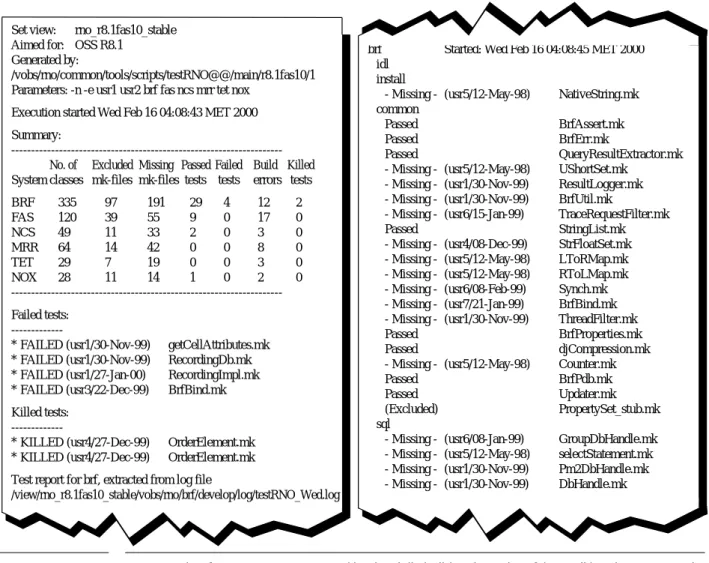
A Java file has a corresponding test class that performs the tests. A C++ class on the other hand contains amain() method that handles the testing. In both cases, the result of a test case execution is either “passed” or “failed”. The result of all test cases are out-lined in another e-mail sent to the same destination as the build mail. An example is pre-sented in figure 15.
Some actions to improve the readability of the build and test reports may be initiated in the future since it sometimes can be hard to find the requested information.
Few manual effort have to be taken to make the daily build script run properly. Basically, all you have to do is to provide correct makefiles when new files are introduced, and editing makefiles on subsystem level if you want to exclude test cases or add additional ones. The designer responsible for the file in question is the one who shall perform this action, and available templates makes this an easy task. In the standard case it’s a matter of minutes, but more complicated situations exist.
The designer of a class is also the one who creates the test class or test method12. The test
coverage tool PureCoverage fromPure Atria® Softwareis used to ensure that the test
cases written in C++ has an adequate degree of coverage13.
Build view: rno_r8.1fas10_preliminary Aimed for: OSS R8.1
Generated by:
/vobs/rno/common/tools/scripts/buildRNO@@/main/r8.1fas10/2 Parameters: -d -c -r -n -e usr1 usr2 brf fas ncs mrr tet nox Execution started Sat Dec 18 01:30:13 MET 1999
Changes in CXC System Rev Build Release file structure --- --- --- ---
---BRF P3J_7 OK OK N/A No previous CXC FAS P3J_6 Failed Skipped Skipped
NCS P3J_7 OK OK N/A No previous CXC MRR P3J_6 OK OK N/A No previous CXC TET P2J_7 OK OK N/A No previous CXC NOX P2J_7 OK OK N/A No previous CXC Released CXCs are available in:
/export/home/release/rno/CXCs/latest
(COMMON) New or changed versions since previous release: ./etc/branchOrder.cfg@@/main/r8.1fas10/1
./tools/scripts/buildRNO@@/main/r8.1fas10/2 ./tools/scripts@@/main/r8.1fas10/1
Figure 14. An example of an e-mail sent by the daily build script. The compilation of the subsystemFAS has failed. From the message in the end of the mail one might conclude that the defect file is in fact FasICDMProbInterfReport.java.
(BRF) New or changed versions since previous release: ./develop/src/install/brf.7@@/main/r8.1fas10/1 ./develop/src/install/brf.ipf@@/main/r8.1fas10/1
[many rows in the mail left out here]
./develop/src/ui_java/WorkingDialog.mk@@/main/r8.1fas10/1 (FAS) New or changed versions since previous release: ./develop/src/fasmaphandling/fas.gnip.cfg@@/main/r8.1fas10/1
[many rows in the mail left out here]
./develop/src/ui_java/TestFasTableTranslation.java@@/main/r8.1fas10/1
[many rows in the mail left out here]
clearmake: Error: Don’t know how to make “FasICDMProbInterfReport.java”. Stop.
ERROR[MAKESYSTEM] Sat Dec 18 03:13:25 MET 1999 Make failed in /vobs/rno/fas/develop/src/ui_java
*** Error code 1
When a broken build arises there is no strict rules to apply concerning what to do about it. The designer responsible for the error is supposed to correct it, but this is not
enforced. There are however plans to introduce some kind of enforcing measures.
12 The approach of letting the one who created some code test it as well is not considered a good
practice. There is a risk that one only verifies the features that works instead of searching for errors. This practice is used at OSS Application Design & Services by tradition, but the configuration management tool and the automatic test tool does not really impede the usage of a separate test case writer.
13 PureCoverage does however only have a line coverage control mechanism. The amount of lines
executed at least once, expressed in percent, is checked. But if several paths are possible from a line, for example in anif(…) {…} statement it is not checked that each choice is taken at least once. A branch, decision or path coverage tool makes those additional tests.
Set view: rno_r8.1fas10_stable Aimed for: OSS R8.1
Generated by:
/vobs/rno/common/tools/scripts/testRNO@@/main/r8.1fas10/1 Parameters: -n -e usr1 usr2 brf fas ncs mrr tet nox
Execution started Wed Feb 16 04:08:43 MET 2000 Summary:
---No. of Excluded Missing Passed Failed Build Killed System classes mk-files mk-files tests tests errors tests BRF 335 97 191 29 4 12 2 FAS 120 39 55 9 0 17 0 NCS 49 11 33 2 0 3 0 MRR 64 14 42 0 0 8 0 TET 29 7 19 0 0 3 0 NOX 28 11 14 1 0 2 0 ---Failed tests:
---* FAILED (usr1/30-Nov-99) getCellAttributes.mk * FAILED (usr1/30-Nov-99) RecordingDb.mk * FAILED (usr1/27-Jan-00) RecordingImpl.mk * FAILED (usr3/22-Dec-99) BrfBind.mk Killed tests:
---* KILLED (usr4/27-Dec-99) OrderElement.mk * KILLED (usr4/27-Dec-99) OrderElement.mk Test report for brf, extracted from log file
/view/rno_r8.1fas10_stable/vobs/rno/brf/develop/log/testRNO_Wed.log
brf Started: Wed Feb 16 04:08:45 MET 2000 idl
install
- Missing - (usr5/12-May-98) NativeString.mk common
Passed BrfAssert.mk Passed BrfErr.mk
Passed QueryResultExtractor.mk - Missing - (usr5/12-May-98) UShortSet.mk
- Missing - (usr1/30-Nov-99) ResultLogger.mk - Missing - (usr1/30-Nov-99) BrfUtil.mk
- Missing - (usr6/15-Jan-99) TraceRequestFilter.mk Passed StringList.mk - Missing - (usr4/08-Dec-99) StrFloatSet.mk - Missing - (usr5/12-May-98) LToRMap.mk - Missing - (usr5/12-May-98) RToLMap.mk - Missing - (usr6/08-Feb-99) Synch.mk - Missing - (usr7/21-Jan-99) BrfBind.mk - Missing - (usr1/30-Nov-99) ThreadFilter.mk Passed BrfProperties.mk Passed djCompression.mk - Missing - (usr5/12-May-98) Counter.mk Passed BrfPdb.mk Passed Updater.mk (Excluded) PropertySet_stub.mk sql
- Missing - (usr6/08-Jan-99) GroupDbHandle.mk - Missing - (usr5/12-May-98) selectStatement.mk - Missing - (usr1/30-Nov-99) Pm2DbHandle.mk - Missing - (usr1/30-Nov-99) DbHandle.mk
Figure 15. An example of a test report generated by the daily build script. A lot of the mail has been cut out in the right column, but its contents is very similar to the present part.
8 Daily build at BSC Development
BSC Development, or simply departmentLVA/K, has initiated a daily build initiative some time ago. The department is working with Base Station Controller (BSC) develop-ment within theGSMsystem.BSCis a node in the Ericsson systemsCME20 andCMS40 and is anAXE10 application.
The information in this chapter is gathered from [11].
The designers of the department are organized in small function oriented feature teams working with an incremental development model. They solely use the programming language C.
8.1
Daily build usage
The use of daily build originates from the need to coordinate the work performed at five geographically separated design offices in three countries. By building the system they develop at a daily basis, blunders in the communication between the offices could be detected much easier and faster. This was launched in march of 1998. Later it was real-ized that introducing automatic tests as well could be beneficial.
Today build and test is performed on demand, i.e. when there has been enough code produced to justify a new daily build execution. This does in reality mean that the inter-val between builds is a few days to a week. An illustration of build frequency is shown in figure 16. The automatic tests are purely regression tests that cover the basic tests14.
At first, a basic test is executed manually by the designer to verify that no errors are present. Later that test is included in the automated test list as a regression test.
No daily build or automatic test processes have been constructed at the department. A number of working instructions is considered to be sufficient.
14 Basic tests at BCS Development include module test, where white box tests examine the logic of
the code at subroutine level, and process/unit test, where black box tests studies clusters of modules working as a single process.
Figure 16. The numbers of builds performed each month during march to november 1999. As you can notice, build and tests were performed more frequently than every other day in the beginning of the period, but turns into a weekly build in the second half of the period.
5 10 15 20
march april may june august september october november number
of builds
8.2
Benefits of daily build
Even though no measurements has been performed to analyse the actual benefits of daily build, it is believed that advantages exist.
Project management has become an easier task when the department has been using daily build. It has lead to better control of the work currently performed. The precision of project, or rather increment, time requirement planning has significantly increased, and the discrepancy between estimated time needs and actual time consumption has therefore been minimal.
It is also believed that the quality of the software has increased. Corrections of errors are performed much sooner than if daily build was not used. That is since modifications have impact on the product already the next build. One does not have to wait for a dis-tant delivery date to detect that one’s alterations were necessary.
Furthermore lead times have most likely been cut.
8.3
The daily build tool
BCS Development has previously used another set of tools for their daily build work. First, the old tool is briefly described, and then the currently used tool is presented.
8.3.1 The old tool
When the daily build project was initiated, a build script implemented as a Bourne shell script was used. It worked similarly as the present tool, as described below, but it was abandoned since they found that a Bourne shell script has too low execution speed and the possibility to express complex issues is quite low. It is also not satisfactory in the area of sending signals to processes, which is a key feature in the execution.
Additionally, the testing was performed somewhat different in the old days. Executing a test case would result in a log file. There was also another file present, prepared before the execution of the test case and containing the expected result. Using theUNIX system calldiff, it was determined if the two files differed, and if they did it was considered a failed test.
8.3.2 The new tool
The daily build is now performed by a set of Perl scripts. The build is managed by their environment specific build support tool that handles C, C++ and assembler, but only C is used. ClearCase is integrated with the script, and is used for version handling. Not only one version of the code is built, but a second one is compiled as well. This way there is one build labelBASELINE that is made out of code that has already passed build and tests once, and should pass again, and then another build labelledTEMP_BASELINE
dealing with later versions with new code that’s not yet been under regression test. Automation of module tests is controlled by one or several module test instruction (mti) files per file to be tested. These are written in C and performs subroutine calls to the code. Executing the mti file results in another executable file, and when one runs it the result of the test is revealed by the return value.
In order to verify that the tests cover enough of the code, the code coverage tool Pure-Coverage is used each execution of the daily build script. In order for a test to be valid, it must cover 100% of the code. Some cases are exceptions, since limitations in the tool report only 99% coverage, but this is the lowest degree of coverage allowed. Note how-ever the remark in footnote 13 on page 29.
The build and test are documented in e-mails that are sent to those who specify that they would like to receive a copy each time execution is done. More precisely, there are two different mails sent. The first one contains information concerning module test and code coverage.