Securing Android BYOD(Bring your Own Device) with Network
Access Control(NAC) and MDM(Mobile Device Management)
Jericho Concepcion1, Jed Chua1, Gregory Siy1 and Alexie Ballon1 1De La Salle University - Manila
*Corresponding Author: [email protected]
Abstract: Bring your own device (BYOD) is a business policy wherein employees are able to bring their own personal mobile devices. However, there exists serious security issues in regards to the exposure of vulnerabilities by unauthorized accessing of network resources and threat attached to devices connecting to the network. Network Access Controls (NAC) are currently being used to provide policies and authentication of endpoint devices in the BYOD network. Mobile Device Management establishes a network monitoring and controlling data configuration settings of mobile devices in the network. The in-band implementation uses a security appliance located in the flow of live network traffic that analyzes and captures traffic flows. The current results of the study are the implementation of the core mobile policies, specifically, the password strength policy and the mobile locking policy. The results of NAC are the connection and authentication of the BYOD device to the accounts database. This study aims to establish and enforce security policies using the in-band approach by integrating the combination of NAC and MDM.
Key Words: BYOD; NAC; MDM; in-band
1. INTRODUCTION
BYOD (Bring your Own Device) is a common company policy currently being implemented in organizations and academic institutions whereas personal devices are given permission to be used in a professional setting. Implementing the BYOD policies brings external threats to the organization such as accessing of sensitive information by unauthorized users simply by connecting to the network without any security policies [6]. Most organizations have no system in dealing with users who violate the company technology policies, thus, making the company system more vulnerable.
Besides security purposes, the implementation of BYOD are currently initiated through an out-of-band approach. The out-of-band approach design is the positioning of the network appliance placed in-band for pre-connect and authentication functions, but placed themselves outside the rest of the session leaving the post-connect functions to other devices. The in-band
approach also offers lower overall cost of deployment and management [7].
To address the aforementioned problem, a BYOD study is relevant by incorporating the NAC (Network Access Control) and MDM (Mobile Device Management) technologies to secure the network. NAC is a networking solution that is composed from a set of protocols to define and implement a policy used to secure access to network resources by devices when these devices initially join the network [8]. MDM is a mobile management system that manages mobile devices through monitoring the activity and applies check compliance upon the installation of an agent in the device that attempts to connect to the network. [9]
The combination of both MDM and NAC with an in-band approach provides role based monitoring and centralized authentication network paths [10]. NAC and MDM components will be based on open source software applications. A virtual machine will be used to recreate the architectural design of the server system and the software will be
tested inside this virtual environment. The deployment of the System will be done both in the virtual environment inside a personal laptop.
To secure BYOD, the study's focus is to enforce mobile policies to secure the devices when post connected to the network. The Android policies will be invoked through the built-in API. Through this embedded API, the pushing and triggering of the policies will be implemented. The administrator will be choosing among the built-in mobile policies given in the API and will be creating the BYOD policy by combining the different embedded mobile policies [3].
2. ANGUARD
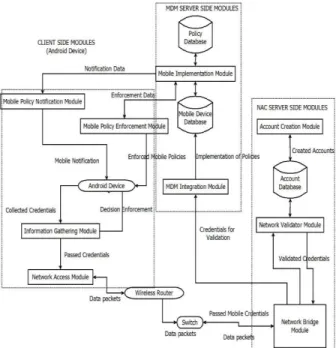
In the creation of the latest design of the system, the experiment focuses on the four main modules of the study; namely, the Mobile Policy Implementation module, Network Validator module, Network Access module, and Account Creation module. These modules are the starting points that serve as the core of the study due to their main functionalities of implementing the mobile policies and connecting the Android device to the server.
Fig. 1. Architectural Design of the System.
The system will be divided into client side modules. NAC side modules and MDM side modules (refer for figure 1). The client side modules will be in charge of collecting credential data from the android
device such as username, password, mac address and IP address at the same time passing the decisions and notifications that were made back to the android device. The NAC side modules primary roles are for receiving the credential data from the client side then validating them and authenticating the users who attempt to enter the network. The MDM side Modules handles the mobile policies to be implemented on the client device and the triggering of mobile policies to be enforced.
2.1 Mobile Policy Implementation Module
Fig. 2. Mobile Policy Implementation Flowchart The Mobile Policy Implementation module implements the standard mobile policies directed by the network/policy administrator to the mobile devices connected to the MDM server. The module focuses on the proper implementation and ensure that each policy is properly followed in each end device authenticated by the NAC server by role. The module focuses on checking whether the user is violating any compliance checks by the devices implemented and stored in the Policy Database after being enabled (See figure 2). The module will be
responsible in ensuring that each end device authenticated is strictly following the standard mobile policies.
This will serve as the interface implemented by the MDM server through the use of an HTML interface. This will allow easy access by the administrator of the MDM server to be light-weight. The module will be responsible in the client provisioning policies and distributing the direct commands and notifications to other devices, authorization policies. The policies are already predefined in the API provided by Android The policies are hard-coded into the 3rd-party application in the client android device and the server prompts the client to enable the application. Upon enabling of the application in the client device, policies are enforced immediately.
2.2 Network Validator Module
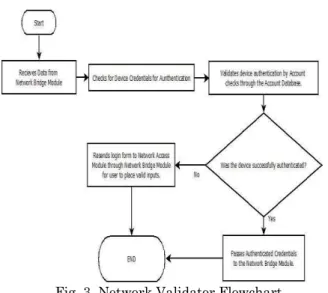
Fig. 3. Network Validator Flowchart
After receiving the credential data from the Network Bridge Module, it will validate the user authentication by account checking in the Account Database for the user accounts and. If the user account is found in the User Accounts table and the username and password for that account is valid, the IP address of the device will be stored in the User Log table base on the Account_ID, a user request token is generated by the server, the Last_Login field will be updated with the server timestamp and the User_Request_Token field will be updated with the device’s token. It will then pass the authenticated credentials to the Network Bridge Module to be passed to the MDM Integration Module. If the account is not found or there is a mismatch in the
login credentials, it will prompt an “invalid login credential” notification to the Network Access Module through the Network Bridge Module and asks for a resend of login form for trying to authenticate the device again.
2.3 Account Creation Module
The account creation module will be a web interface using html and PHP to be able to connect to SQL. There will be 4 inputs in the interface, which are username, password, retype password and user type. The username will follow a strict minimum length of 6 characters. The password has to be at least 8 characters containing a capital and a special character. The user type will be a dropdown list which will include the list of available types such as faculty or student. If one the input fields is invalid the administrator will be prompted that one their inputs is not allowed thus having to change them before it is accepted. Once accepted the account will be saved to the database and be available.
2.4 Information Gathering Module
Fig. 4. Information Gathering Flowchart If the Android device sends login credentials, the information gathering module will start collecting the device credentials such as application information, MAC and IP addresses. Application information is collected for later use in the MDM if the device is already authenticated into the network. MAC and IP address are collected for account mapping in the NAC server. Ownership information is needed by the NAC server to determine who owns the device and could monitor it more specifically. Model and MAC address information is for granular inspection and filtering for whitelisted devices on the
network as it will allow the policy enforcement point to control access into the network on specific devices. Application data information is useful for the MDM server passed thru NAC messaging as it is a component in securing and controlling the mobile device with the use of MDM. This data will be sent to the Network Access module for more processing. The Information Gathering Module also tags the MAC address of the device as “denied” or “accepted” and is passed back to the server to inform the network enforcement point about the condition of the device through whitelisting.
3. TESTING
3.1 Mobile Policy Implementation Module
In this module, the experiment focuses on implementing MDM policies in the BYOD devices. The study attempts to program the mobile policies and ensure the proper enforcement of these policies when connected and disconnected from the network.
Figure 5. Policy Enforcement Interface
The Mobile Policy Implementation modules uses the Device Administration API in which the policies are located in the library contained in the device_admin.xml file. Afterwards, the policies are set depending on the administrator's preferences then configured and enforced into the Android Virtual Device Manager (See figure 5). This specifically handles security criteria.
One of the Mobile Policy Implementation focus is the implementation of the Disable Camera policy that is enabled by calling the policy from the API (See figure 6). After the policy has been activated, the Disable Camera policy will now be enforced, locking the camera.
Figure 6. Disable Camera Policy Enforcement
3.2 Information Gathering Module
In the Information Gathering module, the experiment is the attempt to gather the IP Address and the MAC address of the device upon logging in the network for security purposes and in order to track the devices connected.
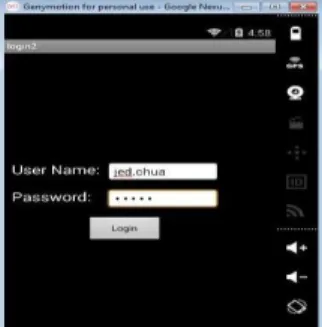
Figure 7. Android Device Login Interface
The first frame illustrates the log-in page of the BYOD device which asks for the log-in credentials of the user (See Figure 7).
Figure 8. Android Device Login Interface
Once the phone has a successful login (Refer to the Network Validator module) the information gathering module obtains the mac address and IP address of the phone and stores it in the database under the user_logs table. The user_logs table's account_id field is a foreign key to the account_id in
the user_accounts database because two devices can be logged in with the account thus having different addresses. The experiment used the jed.chua account to login in the device since it is an existing account in the database. The mac address and IP address were successfully stored in the database.
3.3 Network Validator Module
In the Network Validator module, the focus of this module is to gather the necessary data for authentication of the BYOD device when attempting to connect to the network. Afterwards, it then authenticates the information gathered by checking the Accounts Database (See figure 9).
Figure 9. Accounts Database
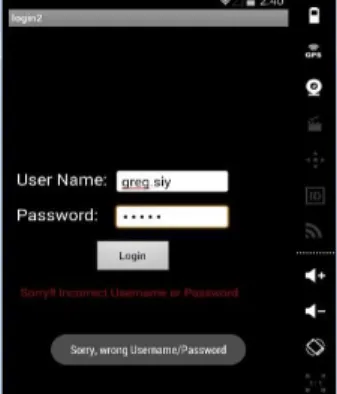
The Accounts Database created during the experiment contains the entire user accounts authorized to access the network. As seen in the next frames during the experiment, the students attempted to log in using a non-existent account (See figure 10) and a dummy account (See figure 11) existing in the Accounts database.
Figure 10. Android Device Unsuccessful Login
The first attempt is to login using the account "greg.siy" with password 12345 (See figure 10). The login was not successful since the account
was never created or existing in the database (See figure 9).
Figure 11. Android Device Successful Login
We next logged in with the account jed.chua with password jchua. The login was successful because the account was created by the account creation module and was saved in database (See figure 9).
The first part creates a connection to the database accounts. The variables contain the database authentication parameters and after a connection to the MySQL database is completed, a query finding the username and password is run. The query checks the accounts database and the user_accounts table and checks for the username and password. If the username and password is found and the value “1” is sent back to the client android device confirming that the authentication is valid else “0” which means that the authentication is invalid.
3.4 Accounts Creation Module
In the Accounts Creation module, the experiment creates the user accounts that can be authorized by the Network Validator module into the network.
For the account creation module the students created an account with username: "jed.chua", password: "jchua", first name: "Jed", last name: "Chua" and with a role of a "Student". The account was successfully created and stored in the database (See figure 12). The administrator creates an account for the user using the Account Creation Module. The module makes use of both html and PHP. The administrator fills out a username, password and pick a user type for the user that will be registered.
4. CONCLUSIONS
Based on the results from the tests, there is a successful account creation, login authentication and mobile policy enforcement. The account creation module is the one responsible for creating the account that will be saved in the database. The accounts are created via a web interface that is controlled by the administrator. The account creation module was successful in creating the account "jed.chua" and was in the database. The Information Gathering module and Network Access Module collects information from the android database and retrieves the result of the authentication whether successful or not, which will be shown on the android device. It uses the Network Validator module to validate the information sent.
In our test the username 'jed.chua' and its password 'jchua' were successful in the login since it was created by the account creation module and saved in the database. However, the "greg.siy" account was not accepted since it was not created and does not exist. After the device has successfully joined the network policies will be pushed onto the device using the mobile policy implementation module. An interface will be provided for the admin to activate the policies that have been implemented. Our results show that the disable camera policy was enforced on the device when activated as well as the minimum password length policy.
5. ACKNOWLEDGMENTS
The group would like to thank Dr. Alexis Pantola and Ms. Arlyn Ong for assisting and sharing to us their knowledge and expertise in computer networks and wireless communication.
6. REFERENCES
T.Guevin, S.Thakkar, D.Compton, & P. Foy(2012, September 13). Method and Apparatus for Network Access Control Retrieved from http://www.faqs.org/patents/app/20120233657#b Android Developers (2013). Dashboards. Retrieved
from:
https://developer.android.com/about/dashboards/i ndex.html
Android Developers (2013). Device Administration.
Retrieved from:
http://developer.android.com/guide/topics/admin/ device-admin.html
Android Developers (2013). Device Policy Manager.
Retrieved from:
http://developer.android.com/reference/android/ap p/admin/DevicePolicyManager.html
Udinic (2013, April 24). Write your own Android
Authenticator. Retrieved from:
http://udinic.wordpress.com/2013/04/24/write-your-own-android-authenticator/
Doyle (2013, July). The Mobile Edge: Securing BYOD
[Online]. Retrieved from
http://newsroom.cisco.com/feature-content?articleId=1226791
J. Brown, S. Jackson, & K. Scarfone (2013 March). Guidance on the strategies and tools needed for a secure and productive bring-your-own-device program. Retrieved from http://www .edtechmagazine.com/higher/sites/edtechmagazine .com.higher/files /byod-security-g.pdf
Trustwave. (2009, October). Network Access Control(NAC) Software. Retrieved from
http://www
.cse-cst.gc.ca/documents/services/cc/trustwave- v340-sec-eng.pdf.
K. Johnson (2012, March). SANS Mobility/BYOD
Security Survey. Retrieved from
http://www.sans.org/reading-room/analysts-program/mobility-sec-survey
Trustwave. (2009, October). Network Access Control(NAC) Software. Retrieved from
http://www
.cse-cst.gc.ca/documents/services/cc/trustwave- v340-sec-eng.pdf.