administration system
Constantina Doulgeraki, Nikolaos Partarakis, Panos Karampelas, Constantine Stephanidis Technical Report 335, ICS-FORTH, Heraklion, Crete, Greece, March 2004
Abstract
Administering complex research projects entails considerable effort especially for sharing a common understanding of project goals and for timely monitoring of progress. Additional difficulties may be encountered if project members are distributed in different geographical locations and speak different languages. One approach to the solution of this problem is the use of specialised on-line tools. Several existing project management tools have been reviewed to analyse the extent of assistance offered to project members. For the majority of the project stakeholders, existing tools appear rather complicated to use and difficult to learn. Based upon our findings, an interactive, user -friendly and accessible web-based application has been designed and implemented to support on-line project administration, through a set of easy-to-learn and easy-to-use facilities. WebPro provides facilities to project members, according to their role in the project and the assigned tasks. The evaluation of WebPro has confirmed that it improves specific aspects of project administration tasks, by facilitating a higher degree of user interaction; it is user -friendly, by offering possibilities for overall reduction of the time required for the accomplishment of certain project tasks and it is accessible by people with disabilities, by complying with WCAG 1.0 Level A guidelines.
Table of Contents
1 INTRODUCTION ...3
2 RELATED WORK...5
2.1 PROJECTMANAGEMENT...5
2.2 SOFTWARE TOOLS FOR PROJECT ADMINISTRATION...6
2.3 PROJECT MANAGEMENT SYSTEMS’ GENERAL CHARACTERISTICS...7
2.3.1 Spreadsheet-based applications ...8
2.3.2 Windows applications...9
2.3.3 Web-based tools ... 10
2.3.4 Functionality and usability issues for Project management tools ... 13
2.4 THE WEBPRO SYSTEM... 15
3 SYSTEM DESIGN AND IMPLEMENTATION... 18
3.1 REQUIREMENTS ANALYSIS... 18
3.1.1 Requirements engineering – The usability requirements model ... 18
3.1.2 Analysis of the context... 19
3.1.3 System goals ...19 3.1.4 System requirements ... 20 3.1.5 Interface requirements ... 21 3.1.6 Technical requirements ... 21 3.2 TASK ANALYSIS...21 3.3 PROTOTYPING... 23 3.4 WEBPRO ONTOLOGIES... 26
3.5 GENERAL ARCHITECTURE OF THE SYSTEM... 29
3.6 TECHNICAL CHARACTERISTICS... 30
4 THE WEBPRO SYSTEM ... 32
4.1 WEBPRO FEATURES... 32
4.1.1 User roles and access rights ... 32
4.1.2 Members administration ... 33
4.1.3 Projects – Tasks... 34
4.1.4 Administration Tools ... 40
4.1.5 Communication ... 42
4.1.6 Informal communication functionality... 44
4.1.7 Communication related facilities ... 46
4.1.8 Notepad... 47
5 USABILITY EVALUATION ... 48
5.1 HEURISTIC EVALUATION... 48
5.1.1 Rating usability problems... 49
5.1.2 Heuristic rules ... 50
5.1.3 Results of WebPro heuristic evaluation ... 51
5.1.4 Results of heuristic evaluation in terms of severity... 53
5.2 USER TESTING... 53
5.2.1 Evaluation laboratory... 53
5.2.2 Selecting users ... 55
5.2.3 Interaction scenarios ... 55
5.2.4 Post-test questionnaire... 55
5.2.5 Transforming data into findings and recommendations ... 56
5.2.6 Users characteristics results... 56
5.2.7 Evaluation criteria... 61
5.2.8 Results ... 62
5.2.9 Results of the Post-Test Questionnaire... 65
6 CONCLUSIONS ... 68
6.1 FUTURE WORK... 68
APPENDIX I. EVALUATION: QUESTIONNAIRES AND USE SCENARIOS... 73
1. BACKGROUND INFORMATION QUESTIONNAIRE... 74
2. INTERACTION SCENARIOS... 79
1 Introduction
Modern organizations and research institutes organize their work in the form of projects. Each project comprises a number of participants with different roles and responsibilities. The project manager is the main actor and the head of the team participants’ hierarchy. Project management entails considerable effort especially regarding sharing a common understanding of the project goals with the project team , as well as the timely monitoring of the project’s progress. At the same time , managers should have organizational and interpersonal communication skills in order to form a productive working team that have the required skills to deal with the project goals but also the possibility to work together effectively and efficiently. Furthermore, communication between manager and project members should be carried out with respect of each member’s characteristics in order to avoid conflicts within the team. All the above efforts must focus on achieving the main goal which is the completion of the project within time and budget.
Another aspect identified in modern organizations is the cooperation of participants in the context of a project from different geographical locations. This happens especially within multinational organizations that undertake world wide research or development projects. The difficulties that arise from such organizational status can be identified as lack of interpersonal communication, problematic cooperation of parties, communication problems due to different languages, difficulties in the creation of project deliverables acceptable by all parties and last but not least manager control over the project participants.
Much research has been conducted to address the above difficulties and several approaches have been put forward. The most popular approach proposed by computer scientists recommends the use of specialized project administration tools. The creation of such specialized tools is facilitated by the evolution of internet technology and by the emergence of new techniques for interpersonal communications , such as on-line chats, message boards and email facilities that offer alternative ways of communication in the computerized environment.
Although great effort has been put in the creation of tools that provide the aforementioned facilities, there are still several issues that need to be addressed, in particular concerning the usefulness, usability, and user-friendliness of support tools. For example, many of the available project administration tools are complicated to use and difficult to learn.
This technical report describes a novel project management tool, named WebPro, supporting all the aspects of project organization, implementation and supervision, based on an in-depth analysis of the related user requirements. The proposed system addresses a wide variety of users, including managers, middle managers and simple users, fostering collaboration and communication between them through the provision of appropriate mechanisms. Furthermore, the system offers the appropriate facilities to all members, and especially to project managers, for project administration, allocation and monitoring of funds, and administration of members.
The structure of this report reflects the user based design approach that was adopted for the creation of WebPro. Section 2 discusses related work, and aims at identifying potential pitfalls and drawbacks as well as potential useful mechanisms and facilities
in existing systems while section 3 reports on the design and implementation of WebPro system, discussing all the related phases. Section 4 presents the available functionality and the user interface of WebPro, highlighting the added benefits of using the system in project mana gement. Section 5 reports the results of the usability evaluation of WebPro and finally section 6 presents the conclusions of the reported work.
2 Related Work
2.1
Project
Management
The evolution of project management is originated from the work done in large scale military systems. These systems required an organized approach in order to manage the complex interrelationships among an enormous number of different tasks performed by a variety of different specialists. Kerzner [1] defines project management as “the planning, organizing, directing, and controlling of company resources for a relatively short-term objective that has been established to complete specific goals and objectives”. Project management entails all the stages of a project, namely, initiation, scheduling, realization, evaluation and completion (see Figure 2-1). During this process several stakeholders are involved, including a project manager and the project team. The main duty of the project manager is to identify project’s tasks, allocate the identified workload to project team members , guide them towards the completion of their work, assure the quality of the deliverables, and evaluate the intermediate and final results according to project’s goals, budget and time schedule. Correspondingly, members of the team, are responsible for undertaking specific tasks and subtasks of a project, following manager’s directions and reporting the results of their work.
The success of the project depends to a large extent on the competence and expertise of the project manager and of the team members. The project manager, as the main responsible for the advancement of the project, should be able to organize, allocate, inspect, assist, correct and evaluate the work of the project team. Such a demanding process requires several capabilities, such as, for example , the ability to communicate with the other members of the team and the clients, to concentrate on each activity of the project and to be able to appropriately react to deviations from project goals or time schedule. In particular , the role of communication in the project life-cycle is of paramount importance since members of the project team communicate with a variety of synchronous and asynchronous means: conversations, discussions , brainstorming, meetings and consultations, as well as exchanging messages, opinions and news. Communication problems during the life-cycle of a project may have severe consequences on the project’s outcomes. Therefore, these problems have to be timely identified, analyzed and solved, and. the ability to communicate using various communication styles emerge s as one of the most important skills of a project manager.
The fundamental objectives of project management are defined as follows [2] :
• to “get the job done”, and
• to attain the objectives of the project within
- scheduled time,
- expected cost, and
- with predefined performance.
These three targets provide the focal point for all project management efforts and require attention and energy on the part of the project manager. They also set the constraints within which project management operates , and are sometimes referred to as a triple constraint [2]. The challenge of project management lies in finding a
balance among these constraints and to provide appropriate means for their satisfaction.
A fourth constraint often mentioned in literature concerns good client relations [2]. According to this, the ultimate measure of project success is the client. If in the process of meeting the three critical dimensions the manager or the project staff alienates from the client, the project fails. A project can be considered succes sful only if the client, whether it is a group of internal users or a client in another company, is satisfied with the results. Client interaction is particularly important for information systems (IS) projects.
The above analysis made clear that the proc ess of project management entails many risks for the success of a project. Among the management-related risks the following are the most frequently cited in the project management literature [2]:
• Poorly defined goals and specifications;
• Lack or insufficiency of project plan;
• Unrealistic deadlines and budgets;
• Lack of communication between project members’ team and between clients. Although some projects fail for technical reasons, most failures are caused by people who ignore the principles of good project management.
2.2 Software tools for project administration
With the objective to address the risks, difficulties and complexity concerning project management, many project administration tools have been developed nowadays, providing assistance to all the project participants. These tools aim to aid project stakeholders to complete a project successfully. The main advantages of such tools are discussed in the following paragraphs.
The majority of the tools claims that they reduce the managerial workload of project managers by facilitating the distribution of tasks and improving the reporting process by providing real-time information about project activities including status, progress and open issues. They also provide visualization of project activities , and as a consequence more opportunities to project managers to identify and deal with potential problems , saving time and reducing managerial coordination and communication overhead.
Apart from the benefits for project managers, there are also several benefits for the team members. The tools usually provide personalized document folders and work areas as well as mechanisms to log personal comments and document the hours of work. Other available facilities allow team members to easily access, share and collaborate on various tasks and documents. Thus, time is saved by boosting personal and team productivity as well as self -confidence through the available facilities and mechanisms.
There are several tools that claim that they assist the administration of a project. A thorough review of such systems has been performed to identify their advantages and disadvantages and analyze their usability and usefulness.
Figure 2-1: Project management process overview
2.3 Project management systems’ general characteristics
A review of several existing project management systems was performed to identify the key characteristics of such systems and to analyze their advantages and disadvantages. Particular attention has been paid to usability analysis of the existing systems identifying the major usability problems of each of them. The analysis of the systems showed that commercially available project management tools can be divided in two main categories in terms of the supported computer platform: desktop applications and web–based tools.Desktop applications can be further subdivided in spreadsheet applications and standard windows applications. Spreadsheet-based applications mainly provide means to manage task deadlines, task budget and numerical data , and in some cases they also facilitate the human resource management requirements of a project. The absence of advanced functions such as communication facilities or individual work areas appears as a major disadvantage of this tools’ category.
2.3.1 Spreadsheet-based applications
An example of spreadsheet-based application is StgCost [3]. This tool provides several fields where project managers can fill in project related information such as project and task deadlines, estimated budget and assigned users. With the help of macro commands, the application can make calculations based on the existing information. The main advantage of the system is that it can be quite helpful for engineering calculations and statistics. Furthermore, StgCost is relatively easy to setup, modify and use, since it is possible to change one variable, and immediately see the effect on all the interconnected variables of the spreadsheet
However, there are several disadvantages in spreadsheet applications that are also evident in StgCost. First of all, there are limited possibilities to perform design calculations. This term is used to describe a procedure where users perform a calculation in a series of logical steps. In that way users feel that they perform the requested function in the same way they would have done if they didn’t use an automated system. For example , in order to calculate the total hours of work for a specific user in a spreadsheet application, a macro should be called that produces the requested calculation. On the contrary, design calculation requires a series of actions where the user first chooses the desired employee, then sets the time period and finally computes the sum of hours. The latter process is exactly the same as in the case of manual calculation, and arguably makes the user of the system feel more comfortable with respect to spreadsheet applications.
Another similar problem identified in spreadsheet applications is that the original equations used to perform the calculations are not displayed, and, as a consequence, the automated printed report becomes illegible. Even in an on-line version of a spreadsheet, it is difficult to read and verify a long equation that calculates a result. Thus, there are certain difficulties for the user to verify and check the results of the calculations performed with a spreadsheet application such as StgCost.
Apart from calculation related problems, several usability problems can also be identified. StgCost and in general all the systems based on the spreadsheet metaphor require that the users are already experienced in using such applications and thus do not provide adequate assistance and guidance to novice users. Furthermore, these applications are built on the basis of a generic spreadsheet framework, which includes several other functions that are not useful in the specific context of project administration and sometimes constitute a overhead to end-users.
Another basic usability problem can be considered the fact that in spreadsheet applications new functions are added to alter the existing and straightforward spreadsheet functionality according to the needs of the project management application. Spreadsheets were originally created in order to transfer the forms used in traditional workspaces into electronic forms in a personal computer. As new functions were added to the spreadsheet metaphor, it became more difficult for users to understand and work with the new complex functionality.
concerning project status. Finally, as noted for all the spreadsheet tools, “StgCost” does not also provide mechanisms for interpersonal communication, acting only as a tool for monitoring various project parameters and can be used mainly by project managers.
2.3.2 Windows applications
The objective of windows project management applications is to provide managers with the means to organize and manage a project. These applications offer more advantages with respect to spreadsheet applications, such as a wide variety of graphical representations for project overview and statistics, algorithm s for cost estimation, risk management and quick insertion of data with the help, however, of spreadsheet functionality. Furthermore, these systems often provide managers with the appropriate mechanisms to organize their working time using calendar compone nts and notification services.
Nevertheless, this type of tools has two main disadvantages. Most applications do not provide communication facilities for project members, and as a result there are difficulties in team organization and member intercommunication. Additionally, in many cases these systems require a certain amount of training in order for the end user to complete advanced tasks.
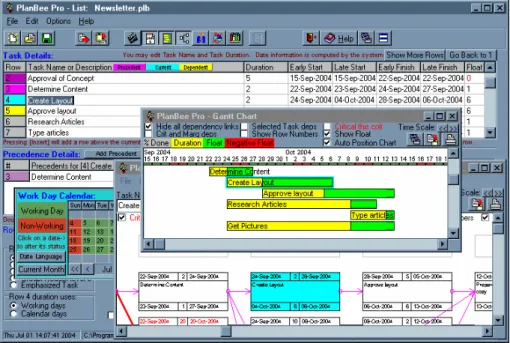
A representative application of this category is the Plan Bee project management tool [4]. Plan Bee is a desktop tool that uses a spreadsheet mechanism to gather and display relevant project data. Through a variety of graphical representations, including Gantt charts and schedule networks, it provides useful information on the project status and on-going processes. The tool also provides useful mechanisms such as personal and project calendar, cost estimation procedures and an automatic report generation mechanism. Finally, another important feature that assists the management of a complex project is the possibility of creating a project tasks’ decomposition hierarchy with arbitrary depth. . However, there are essential disadvantages of Plan Bee especially concerning the usability of its user interface, as depicted in Figure 2-2. For example, the colour-coding that is used in order to identify the basic parts of interest results in screen pollution by several different colours (colour pollution usability problem). Another problem that can be easily identified is the existence of several pop-up windows that confuse users and make interaction more difficult. Concerning functionality, the lack of communication facilities between project members creates the impression that the goal of Plan Bee is mainly to give managers an efficient way to manage their projects in an individual rather than in a team-based manner.
Figure 2-2: Plan Bee System
2.3.3 Web-based tools
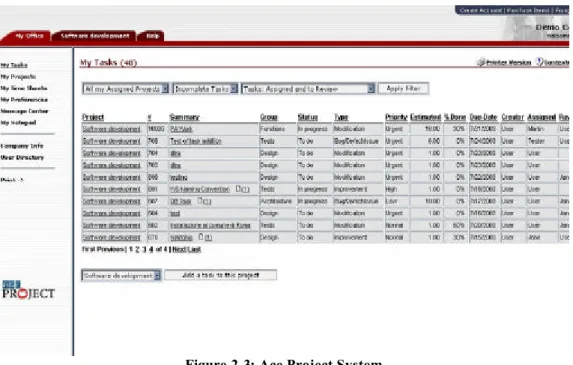
Examples of web–based tools are Ace Project [5], Double chocolate [6], and Xcolla [7]. Ace Project is an online planning tool that allows users to manage any type of projects within their organization (see Figure 2-3). It offers a useful timesheet module, a project calendar facility and an email notification service that are basically used to achieve interpersonal communication between the project members. Furthermore, it provides several graphical representations such as Gantt charts that provide project overview , status etc. Last but not least, “ace project” users have the ability to access several project statistics for monitoring the basic aspects of each task.
However, Ace Project, apart from several useful features, also has certain disadvantages. First of all, the system is based on a form filling metaphor in order to complete most of the tasks. This process can be quite annoying for the end-user especially for performing simple operations such as results filtering. On the other hand, several improvements can be made on the communication mechanisms of the system since only a message board and an email notification service are provided. These features can be effective for asynchronous communication but the requirements of the team members demand also synchronous communication facilities. In addition, an important disadvantage is the absence of graphical representation for the project statistics. Finally, the existing documents area has only a single directory for all the project documents, which does not fulfil the requirements for a hierarchical organization of project’s documents.
Figure 2-3: Ace Project System
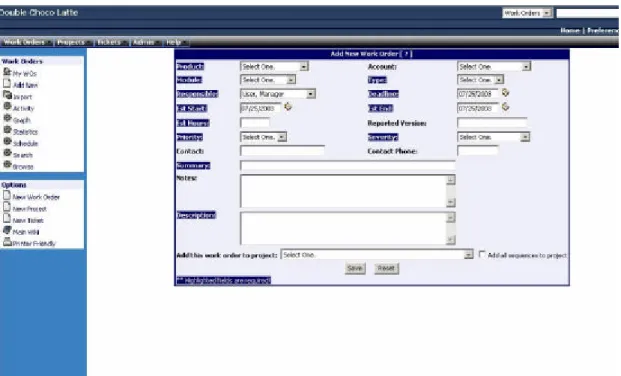
Double Chocolate, on the other hand, is an open source project management tool that offers functionality for administrating projects and tasks (Figure 2-4). It allows the decomposition of a project in n– levels of tasks and subtasks , facilitating the organizational management of the project and personnel. The communication between the manager and project members is established through reminders that notify each user on expiration. Furthermore, managers can perform various tasks regarding the administration of their project or team using the relevant administration functionality. Nevertheless, many disadvantages can be identified in Double Chocolate. The basic problem identified in “double chocolate” is that the users cannot understand how the system works, or what action they must perform in order to complete a task, due to the fact that it does not offer online help and does not include explanations and descriptions on how a user could complete a task. Another serious problem is that the system doesn’t provide a general overview of all the projects in which the user participates. The same applies to managers, since they have to search and find a specific project in order to monitor its status or manage it. Furthermore, the communication facilities provided by the system do not offer all the required functionality, but only asynchronous notifications. Finally, other components, such as document areas and personal work spaces, are completely absent. As a result of these drawbacks, “double chocolate” is basically a tool assisting the manager to monitor a project and not a tool for helping the whole project team to work efficiently and effectively.
Figure 2-4: Double Chocolate System
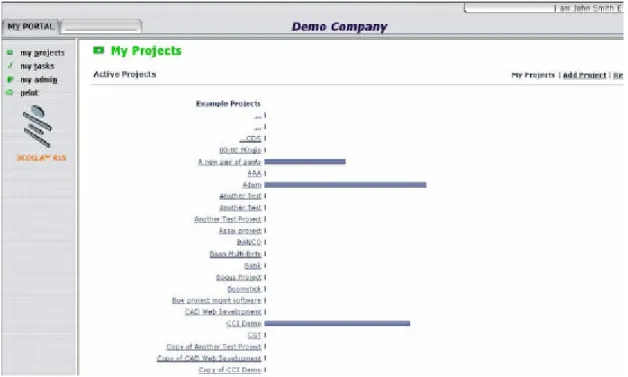
Xcolla is another web tool with the ambition to provide team members across an organization with a comprehensive and easy-to-use environment for managing projects (Figure 2-5). It offers several facilities, such as reportable project deliverables, task status overviews, Gantt charts, a journal to track personal work and time, document management, project overview charts, group and personal calendar. The tool also provides different access rights to the members of the project team.
Xcolla lacks communication facilities having only email notifications. Other identified problems of the tool are the lack of graphical or text representation of related statistics. Finally, the access rights’ mechanism does not provide a unified authorisation technique for all team members, based on user role s. Each team member can have different access rights for a specific resource. This approach might seem flexible, but in the end, users become confused especially in cases where a project manager does not have access to a document while simple users may have.
Figure 2-5: Xcolla System
2.3.4 Functionality and usability issues for Project management tools
The above analysis revealed the existence of many functionality and usability problems concerning existing project management systems, which however may not be evident to inexperienced users. The next sections will discuss functionality and usability issues that should be taken into account for a successful online project management system as these emerge from the analysis of the existent systems.
• Functionality Issues. This category contains mechanisms and tools that in general are absent in the majority of the available systems.
• Usability Issues. This category is mainly concerned with problems in the interaction process, difficulties in understanding system functions and problems that occur as a result of bad decisions during the system design phase of the analysed systems.
Functionality Issues
The analysis of project management in the previous sections shows that project managers should know about the existence of appropriate and available resources, since getting the right people involved in a project drastically improves the chances for success. For example, a developer might be very talented and experienced, but not appropriate for a collaborative task, if the specific person prefers to work individually and not within a team. Of course, it is not expected that the system could make decisions instead of the project manager, but it could provide some clues, e.g. , candidate member profile, that can help the project manager to make the right decisions for appointing a project team.
Another issue is that the project manager is responsible for carrying out demanding operations such as the communication with the project team and the administration of project funds and human resources. These operations, in order to be carried out efficiently in the context of a web based tool, demand the existence of specialized mechanisms that support such tasks. The most important fact that must be considered in order to address the communication issues is that people communicate in a wide variety of ways, such as direct or indirect, formal or informal communication, etc. Thus, diverse means of communication should be supported by a web based project administration tool. Another important issue in project management is the administration of project funds. This function is necessary in order to provide a prediction about how feasible the completion of each project is within the planned budget and time. Moreover, a mechanism that provides the necessary information about the workload of each employee and the resources needed in order to complete each task is necessary for monitoring the feasibility of a project. All these functions must be provided through various graphical representations, making visible the most important aspects in alternative forms.
Finally, a crucial aspect for the success of such a supporting system is the existence of error prevention mechanisms and powerful help facilities. Since project management applications contain much information and often require complex and crucial actions, it is necessary for the system to prevent errors, providing at the same time the user with the appropriate on-line explanatory information, in order to complete a task effectively, efficiently and correctly.
These functionality issues have been taken into have been incorporated in the design of the prototype system.
Usability Issues
Usability issues can have a great effect in the success of an application. Thus, special consideration should be taken concerning usability issues in project management applications , since project managers and members have many responsibilities to concurrently take care of. A project management tool is required to be designed in a way that can minimize the time required in order to perform an operation. It is, thus, clear that manager actions must be short and receive immediate feedback. To accomplish this requirement it is important to minimize the occasions that users need to fill in data or perform several actions in order to complete a task.
Another usability issue that should be taken into account in a project administration system is to provide managers with the appropriate functionality in terms of tools that will assist them to complete their tasks. In many existing systems, managers should first create a project, then find it from the available project list and finally open it and decompose it into subtasks. Subsequently, the tasks should be identified and assigned to the appropriate members. A more usable approach could be to provide users with the ability to create a project then decompose it into various tasks and assign the m to other users in a single step. Furthermore, managers should be able to pause in any of these steps if they do not wish to carry out all the steps at once. At a convenient time, the project manager should be able to resume the process and complete the task decomposition and assignment. Thus, mechanisms for locating recently created projects
should be available , presenting not only the newly created project but also the relevant details, e.g., tasks and subtasks or assigned and unassigned tasks.
Another issue related to flexibility of management is the possibility of decomposing a project in subtasks of arbitrary level. The usability issues identified concerning the existence of arbitrary levels are related to the user’s confusion when dealing with many levels of projects and tasks , and the lost in space syndrome likely to occur due to the adopted navigation metaphor. The solution to the above issue is the adoption of a hierarchical presentation of the task levels, such as a tree view representation.
Many applications implement the same interface and functionality for a software development or a construction project. This might be confusing at first because it is quite clear that a construction and a software development project are different kind of projects, requiring different interfaces. The answer to that problem can be provided by a structural analysis of these two kinds of projects. Firstly, both can be subdivided into tasks. Each of these tasks can be further specified through defining task details. Furthermore, users can be assigned with the responsibility to complete these tasks in a predefined time period. Users also provide information about the progress achieved in each task by filling in time reports describing the work done and the achieved progress. Continuing the analysis, in both cases users can organize meetings related to the project. Managers irrespectively of the project type need to have access to information, provided by Gantt charts, status reports and project statistics. The above analysis provided evidence that although the existence of different interfaces may seem more appropriate at a first sight, a generic interface can effectively be applied to all different project types, since in any project type the basic members’ tasks and needs remain the same.
Another usability issue that must be taken into account is that a graphical user interface must be equally understandable by both experienced and novice users. However, sometimes project management systems need to use complex terminology and/or abbreviations that are not familiar to novice users. The solution to this problem is to use terminology or abbreviations that are easy to understand for all the end users irrespectively of their expertise in the scientific field of the project management application, and to include the explanations or the full description of the abbreviations used in the application. Thus, novice users could use this index to search for the explanation of the unknown terms.
2.4 The WebPro system
To cater for the aforementioned functionality and usability issues, a novel project administration sys tem is proposed called WebPro. WebPro is a web-based system that provides team members across an organization with a comprehensive and easy-to-use environment for managing large and complex projects. This system addresses to project teams that consist of members who are travelling, are located in different cities or countries, and people outside the company, such as consultants or contractors, providing the optimum solution as a project administration tool enabling at the same time effective and efficient communication. The only necessary equipment that a project team member needs to operate is a personal computer or a laptop or a handheld device with an internet
browser and access to the internet. In general, WebPro allow s project members to collaborate and share information through a common channel anytime and anywhere. WebPro supports and facilitates communication, cooperation and co-ordination of activities among company employees, customers and sub vendors, in all stages of a project. Furthermore, it enables the project team to access the most up-to-date project-related documents from any location and at any time, without the need to maintain massive paper files. Another benefit is that it helps to avoid problems, e.g., it is not possible for a part of the team to work with incorrect designs, since there is always the correct version on-line. The system, furthermore, offers a cooperative editing mechanism for project documents, based on an iterative review process, which allows original and reviewed versions of a document to be available for the users. This feature is very important especially when the organization has multiple distant workplaces.
In addition, WebPro enables project managers, through role based access rights, to control the data and functions that will be available to project participants. Other benefits of WebPro stem from the deliverable review mechanism. The basic issue that is addressed by such a mechanism is the need for cooperation between project members in order to create a project deliverable. This procedure entails in real life several reviewing iterations. In WebPro, when an electronic deliverable is created, the responsible project members are notified immediately to proceed with its review. When their review has been delivered, the responsible member is immediately notified. This mechanism provides the means to accomplish the required iterations in order to produce a deliverable of good quality.
Another aspect that is considered to be quite important in WebPro is the real time notification system. As it has been already mentioned, WebPro users can be located in different geographical regions, so an appropriate mechanism should be provided to these users in order to be immediately notified about issues concerning their work. This task is accomplished by the notification mechanism. Furthermore, users can be notified about several other issues related to their participation in a project, such as invitation to participate in a project or meeting, etc. In case of new assignments, relevant notifications are sent to the responsible member. In this way, the required communication between project members concerning everyday activity is automatically achieved.
The communication facilities provided by WebPro also include user-driven interpersonal communication tools such as message board and chat. The message board module provides asynchronous communication, and the users can post messages regarding any issue and view the replies that may be posted at any later time. The chat facility, on the other hand, provides the means of real time (synchronous) communication where users can participate in an online discussion and post or reply to any message posted by another user.
Another benefit from using WebPro is that it enables the project manager to decompose project workload in multi-level hierarchical tasks. The manager can create tasks that can be split to several sub tasks in order to be assigned to different members of the project team. This hierarchical structure allows full control and monitoring of the project work as well as rescheduling or reorganization of the project. Furthermore, the project manager is
particularly useful in order to have an overview of the project. Gantt charts provide a graphical representation the project and tasks status. In this way managers can release resources for a task that is in front of its timetable and apply these resources to tasks that seem to delay project’s completion. On the other hand, time reports are useful for monitoring the amount of time employee’s work and for calculating salaries. Last but not least, project calendar contains information about appointments, meetings and deadlines of a project. The information provided by WebPro is very useful for managers and users in order to monitor and organize their activities.
WebPro offers also a user interface customization mechanism that can be used to adjust the user interface according to users’ individual preferences. When users select the configuration facility, several options are provided for modifying the system structure through adding or removing the available options according to the tools that are frequently used. If a message board facility is not used, for example, it can be removed through the configuration menu. Moreover, the users can customize the presentation of the content on the screen, altering the position of the display or the colours of the user interface.
Last but not least, WebPro was designed and implemented following a process where users, designers and usability experts ha d an important role. During the design and implementation of the prototype, several design iterations were made in order to encapsulate the results of formative evaluations. During these sessions, designers and end users were asked to review an early prototype of the system in order to recognize potential problems or issues such as lack of functionality, usability problems, difficulties in understanding terminology etc. The results of such a process offered to the developers the opportunity to adapt the systems design in order to fulfil user expectations and needs. After the completion of the development phase, a final evaluation iteration was performed. The process adopted heuristic and user based methods which are two of the most popular evaluation approaches. Usability experts are involved in heuristic evaluation in order to identify existing usability problems and the consequences of these. The results provide feedback to designers and developers concerning the potential usability problems that they should solve before the system becomes available to end users. User based evaluation is carried out with the participation of target end users. The y are asked to perform specific scenarios of use in a controlled environment and subsequently fill in questionnaires about the scenarios they have carried out, providing at the same time their overall opinion regarding the usability of the system. During this session, user actions are captured by cameras in the controlled environment of the usability evaluation laboratory, and the data collected through the cameras and the evaluation questionnaires are processed in order to identify possible interaction or usability problems. This process is very useful in order to ensure system success according to user needs and satisfaction.
3 System design and implementation
This chapter provides an overview of the design life cycle of WebPro in terms of user interface and database functionality. The first step of the design phase was the requirements analysis, followed by the tasks analysis. The design phase was completed with the creation of sketches of the user interface of the prototype.
3.1 Requirements analysis
3.1.1 Requirements engineering – The usability requirements model
Requirements engineering has been defined as “the activities involved in discovering, documenting and maintaining a set of requirements for a computer-based system” [8]. The overall objective of requirements analysis is to increase the effectiveness of software development projects, and therefore it must be accomplished during the first stages of software design. Requirements analysis focuses on the management of functional requirements, that state what a system would be able to do, while all other requirements are categorized as non-functional requirements. Non-functional requirements are usually seen as limitations in the design space for the design of functional requirements [9]. During the requirements analysis phase of WebPro, the model proposed in [9] and [10] was used (see Figure 3-1).
Figure 3-1: Usability requirement model (adapted from [9])
………... Analysis of context ………... System goals ………... System requirement s ………... Interface requirements ………... Technical requirements Demand of features Functional
requirements requirements Interaction
Representational requirements
Implementation requirements
The above model is divided into five levels. At the first level, called “Analysis of context”, the work domain is analyzed and documented in relation to four areas, and namely tasks, users, environment and organizational goals. At the next level, called “System goals”, the system features are defined in terms of what the system should accomplish, what problems it should solve and what tasks it should support. At the third level, called “System requirements”, functional and interaction requirements are specified. Functional requirements can be specified as software requirements which are the programming requir ements to provide features, and hardware requirements to execute the functionality. Interaction requirements concern communication between the user and the system. Functional requirements aim to attain usefulness and interaction requirements aim to attain usability. At the fourth level, called “Interface requirements”, the representational design of the graphical user interface is defined. In this step, both the visualization of information in the system and the visualization of the graphical user interface are specified. At the last step, called “Technical requirements”, all requirements are transformed to implementation requirements. Implementation requirements are requirements that can be directly implemented [9].
In the following subsection, the requirements analysis results for WebPro will be described.
3.1.2 Analysis of the context
At the level of the context analysis, the main task, the environment, the organizational goals of the system and the system users were identified. The main task of the system is to provide all team members across an organization with a comprehensive and easy-to-use environment (organizational goal) for managing large and complex projects. Additionally, the system would be used by team members who are travelling, are located in different cities or countries, and people outside the company (environment of use). The users of the system would be team members, and possible have different roles in the team. Three groups were identified, and namely the user group of managers, of moderators and of simple users. Project managers have the responsibility to organize and administrate a project. Moderators are a group of users that can have the same responsibility but in the context of a task and are directed by a manager. The simple users are those who work in the project and carry out the tasks that are assigned to them. It should be mentioned that the system should be accessible by users with different characteristics, including people with disability.
3.1.3 System goals
At this level of the requirements analysis, the system goals must be defined. WebPro is a project administrating system, and therefore it needs to include tools for organizing and administering projects.
To facilitate the organization and the administration of a project, the system should provide project managers’ with a variety of tools for decomposing a project to tasks and assigning them to project members. It is also important to provide various pieces of information related to other project members, such as skills or workload, in order to facilitate their assignment in project tasks.
Project managers should have the ability to supervise the project team and the work through the system. Therefore, the appropriate tools for monitoring each project member’s work and workload should be available , as well as meaningful graphical representation reports regarding project and task progress. Furthermore, the team members should have the appropriate tools to communicate with each other in order to exchange expertise, take decisions, ask or answer queries, discuss project or task problems and deliver outcomes.
Supporting the above facilities, WebPro provides users with the appropriate mechanisms to perform project administration activities with minimum complexity and maximum efficiency.
3.1.4 System requirements
At the level of “System requirements” the software, the hardware and the interaction requirements need to be specified. Software requirements describe the software features that must be incorporated into WebPro in order to help the users to achieve their goals, while hardware requirements concern the appropriate infrastructure for the system and the interaction requirements to encapsulate the necessary features that should be included in order to ensure quality of interaction between the system and the users.
The main requirement of project managers is to organize and monitor projects via the system. Project organization includes a number of functions that should be used in order to perform different operations. First of all, the project creation phase must be considered, where the manager should fill in the required information, such as project start date, due date, description, budget, etc. Subsequently, the manager should have the ability to decompose the project into tasks/subtasks and assign each task to project members. At the same time, the manager should be able to stop the project creation phase without completing, e.g., the task decomposition or the task assignment phase, and resume this process at a more convenient time. During the task decomposition phase, the manager should be able to define a new task, providing information about the task characteristics, such as title, description, start date, completion date, etc. There should also be the possibility to further decompose a task in subtasks and so on to the appropriate level according to the project needs. After the completion of the decomposition phase, the project manager should be able to assign the predefined tasks to the system users. The task assignment procedure is easily achieved by selecting the task and the user who will take the responsibility to carry out the task. This process should be facilitated by the system providing details regarding candidate’s workload and skills.
Other mechanisms that should be provided are related to the supervision and monitoring of the project. Thus, there is a need for a general status task overview, graphical representation of various metrics, e.g., Gantt charts to view task progress so that tasks that could delay project completion can be identified early. Moreover, since delayed tasks in a critical project path can delay the whole project, a relevant mechanism should exist, such as structure network charts, in order to assist identifying such cases as early as possible. Other project statistics should provide information about the project’s status, number of tasks, hours of work, estimated hours need, etc.
Another important feature is the time report mechanism, which allows managers to create reports about the hours worked by a specific user in a specific period. This mechanism can be proved very useful for monitoring progress and tracking project budget.
To achieve interpersonal communication among WebPro users, the need of formal and informal communication facilities is required. Formal communication is needed to deliver job results, to notify users about changes that affect their work and to exchange project documents. This is achieved with the use of a documents area facility and a notification service. Through the documents area, users can access and store project documents and reference material. The notification service offers automatic asynchronous and synchronous alerts via e-mail or SMS (Short Message Service) or via the integrated WebPro facility. The notification service should be able to send alerts when a task assignment or an event, meeting, or appointment invitation occurs. Alerts can also be sent when users report that a task has been completed or when a manager wishes to remove a member from its project team. On the other hand, informal communication is needed when a user wishes to exchange opinions with other users in an informal fashion. This should be facilitated by a message board component that will enable users to create threads representing topics for discussion. In addition, informal communication can be supported through a chat component that will provide users with the ability to create chat rooms of special interest to instantly discuss relevant topics with other users.
In order to provide high quality interaction, with the WebPro system should adopt human-computer interaction guidelines and especially WCAG 1.0 Level A guidelines in order to be accessible by all users, including users with disability.
3.1.5 Interface requirements
Interface requirements are particularly useful in order to achieve high quality of interaction. The user interface and functionality offered by WebPro have been designed and evaluated with the use of various human-computer interaction methods which are presented, with details and examples, in Section 3.3.
3.1.6 Technical requirements
The technical requirements are presented in details in Chapter 4.
3.2 Task analysis
The second phase of the WebPro design cycle was task analysis. User tasks are of special interest to developers, because “computer systems are designed to help people to carry out tasks more efficiently and to carry out tasks that were previously not possible” [11]. In general, task ana lysis provides a common ground between designers and users and “it allows designers to understand users’ work and users to understand designs” [12]. Task analysis is the process of analyzing the way people perform their jobs, the things they do, the things they act on and things they need to know [13]. The output of task analysis is the decomposition of the tasks that the users of the system usually perform and, depending on the techniques used, the plans and sequences of actions they use to perform their tasks.
Task analysis was used not to capture a form of requirements, but to contribute towards the complete statement of the requirements. The task structure stemmed from this method leaded towards the creation of an internal model of the system which matched the expectations elicited from the users.
The hierarchical task analysis (HTA) method was adopted. HTA identifies a goal to be achieved by the user and describes it in terms of the task and plans required to achieve it. It involves iterative decomposition of tasks into smaller subtasks. In HTA, each task is continually broken down until an appropriate ending point is reached [13].
HTA is usually utilized to analyze tasks where a clear goal can be determined and tasks and subtasks are required to accomplish such a goal. The indication of variable steps and sequences is an essential part of task modelling, since there is always a degree of variation in the way tasks are performed. HTA is usually utilized for analyzing relatively simple cognitive and physical tasks [13].
The advantage of decomposing a task into subtasks (parts) is that “understanding the parts and their structural relationship can be instrumental in designing performable and learnable tasks, artefacts to facilitate these tasks, prerequisite instruction etc” [11]. Subtasks can be further expanded to capture more details. In some circumstances, subtasks can be broken down into individual keystrokes or mouse clicks. A detailed model of this kind would enable precise performance analysis. Furthermore, it is a very economical method, but nevertheless requires specific expertise on t he part of the designer [14].
At first, a general analysis of the system structure was developed containing the basic ontologies of the system as produced by the requirements analysis in the “System requirements” step. This analysis is presented in Figure 3-2.
Figure 3-2: General ontologies task analysis
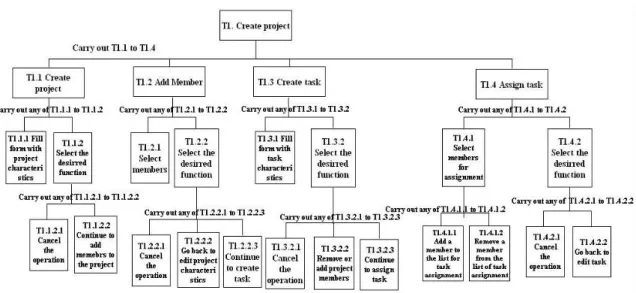
Subsequently, a more detailed analysis of the specific parts and actions was performed. Figure 3-3 presents an example of the actions required on behalf of the project manager to create a project and to assign tasks to users. Different task analysis schemas were created for different user roles, according to the access rights of each role.
Figure 3-3: Task decomposition of the “ create project” task
3.3 Prototyping
After completing the task analysis phase, the prototyping phase was initiated. “A prototype is an easily changeable draft or simulation of at least a part of an interface” [16]. Several tools for prototyping are presented in Figure 3-4.
Figure 3-4: Prototyping methods and tools [17]
In the WebPro prototyping phase, a tool was used that belongs to the facade tools and have intermediate fidelity. Facade tools allow the creator to specify input behaviour next to the drawings and text, something which is not possible with pencil and paper. These
low intermediate high Fidelity
Mock -ups Facade tools
Rapid application development Examples
Paper & Pencil Sticky notes Plastic objects Whiteboard Tcl/Tk Hypercard Power point Delphi Visual basic NeXT UIM/X for X C++ CAD
prototypes, which look and feel like the actual application, operate on a limited set of artificial data but nonetheless effectively show to users the impact of their actions [17]. Explanatory prototypes are drawings of prospective layouts of the system. They are usually very detailed - concerning typography, colour schemes, navigation and graphic elements. The tool that was used in order to produce prototypes was Microsoft PowerPoint. PowerPoint was chosen because is widely known, and users are familiar with it, while changes can be done quickly with higher precision than if drawn by hand. Power Point fulfils the requirements for good prototyping postulated by Szekely, 1994: “Ease of use, Fast turn around, Flexibility, Useful throughout the development cycle, Executable and Version control” [18]. The outcome of this phase, the prototype, allows designers and developers to work through the details of the system without doing extensive, time consuming, and expensive design and programming. Prototyping, in general, assists users to examine and alter things while the design is still flexible, before the final system is implemented.
In the WebPro design phase, a design prototype was elaborated to depict the functionality of the final system. In the remaining of this section, some representative screens are presented indicating the main characteristics of the system. The first example in Figure 3-5 represents the template of the general user interface that includes placeholders for the other components that will be used in the system. It consists of three navigation areas, the left navigation area that includes all the main functions that should be available to the users irrespectively of the task they perform, the central navigation area is the actual work place where the appropriate user interface component is loaded wit h the respective functionality for accomplishing the selected task and the right navigation area where the available choices of the selected task are presented. For example, when a user manages a project on the task level, in the option navigation area the task related functions are displayed such as add, edit, delete and assign task.
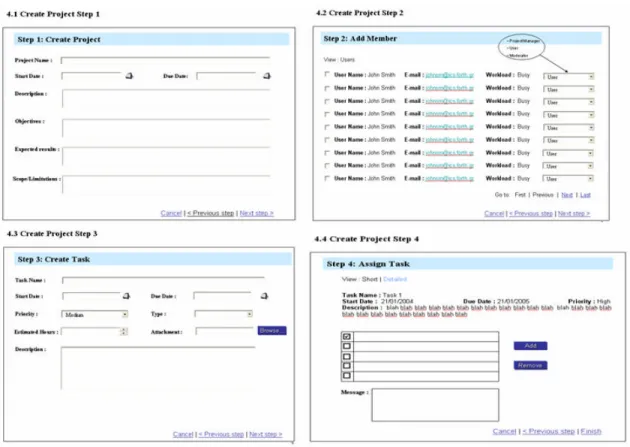
The second example in Figure 3-6 presents the four steps that a project manager has to follow in order to fill in the project details, to invite people to participate in the new project and to add and assign a task to one or more users.
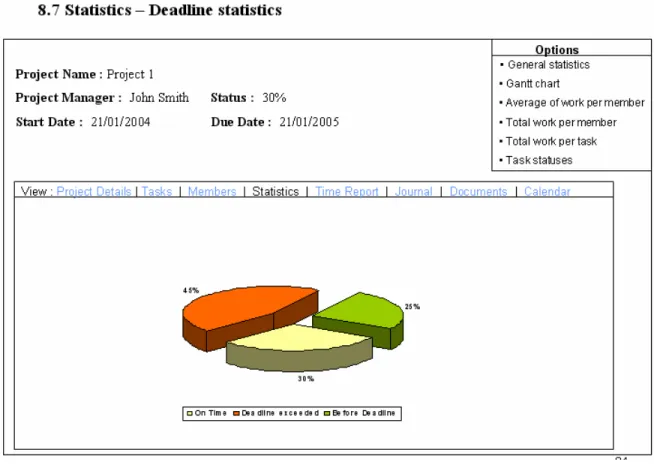
The third example in Figure 3-7 represents the user interface of the statistical diagrams created by the system. On the options region, all the statistics diagrams available to a project manager are displayed.
An evaluation process of the prototypes was performed with the participation of user interface experts and end users. During evaluation, experts and users evaluators identified some problems that gave input to design iterations. An example of usability problem identified during the evaluation of the prototype was the existence of a options bar under the menu navigation bar, that confused users because the options bar position reduced the visibility of the navigation options of the menu bar. Thus, the options bar was repositioned in a separate area of the prototype and was clearly distinguished from the menu bar.
Figure 3-5: Prototype of the main page
Figure 3-7 Prototype depicting tasks statistics
3.4
WebPro ontologies
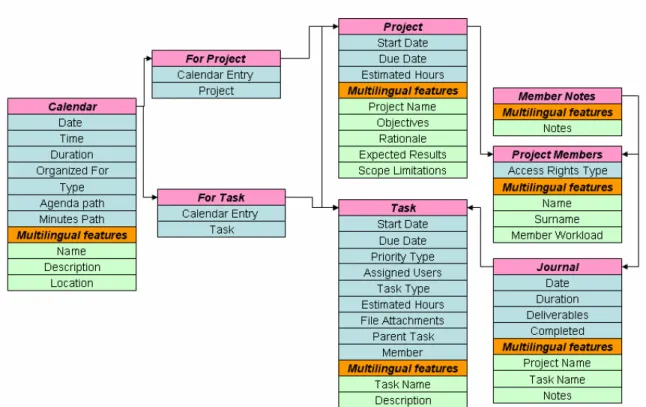
Before focusing on the implementation of WebPro, a brief description of the database ontologies will be presented. These ontologies correspond one to one with the ontologies described at the beginning of the task analysis section. The WebPro database ontologies do not provide an exact representation of the way ontologies are represented in the database, but a simplified abstract form in which unnecessary information is removed in order to provide a more understandable and intuitive representation.
Figure 3-8 represents the main WebPro ontologies that are used to store the main object types into database. Each of these ontologies is represented in a table containing either multilingual or monolingual information, and all the tables are interconnected according to the relationship between ontologies. For example , the connection between the project and member tables shows that each project has a number of participating members. Furthermore, the connections between task and project display that each project is decomposed into a number of tasks. Additional connections exist between project member-journal and journal-task that show that each project member fills a journal for a specific journal-task.
Figure 3-8: General WebPro ontologies
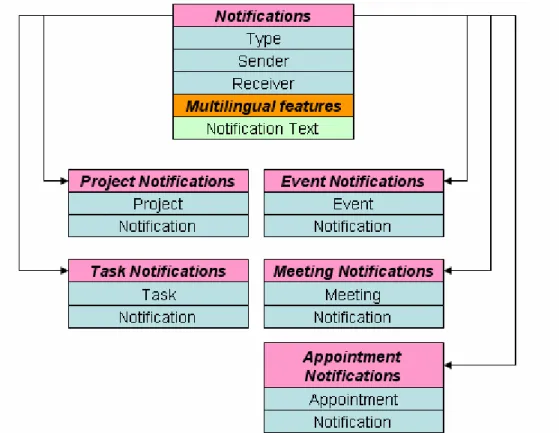
Apart from the main ontologies, there are some additional ontologies used to describe structures and objects for several functions or components of the WebPro system. The most important of them are presented in Figure 3-9 and Figure 3-10. Figure 3-9 displays the notification ontology containing multilingual and monolingual information for any kind of notification. Each table contains information according to a certain type of notification, e.g., the project notification table contains information related to a project. Figure 3-10 displays the ontologies used in the document area and message board components respectively. These two tables are used to display either the folders or the documents inside a documents area. The connection between the documents and folders depicts that each document is stored in a specific folder. The Message board component consists of two tables that include topics and messages. The connection between messages and topics shows the relation between a message and a specific topic.
3.5 General architecture of the system
The outcomes of the system design phase were used as an input to the implementation phase of WebPro. Task analysis and user interface prototyping provided WebPro developers with a complete representation of the system. The next step was to transform the designers’ view of the final product into a real working prototype.
The WebPro implementation is based on a three-tier architecture that is presented in Figure 3-11. The three layers represent the data access layer, the business logic layer and the presentation layer.
The data access layer is responsible for storing and communicating data between the database and the application. This layer uses stored procedures for faster retrieval or insertion in the database, reducing the amount of client side processing by looking up data and maintaining key values and internal integrity. Furthermore, using stored procedures, the database server creates for each query a plan that includes all the information required to return the data effectively to the client. This plan is stored in the system’s cache, so that it can be reused when needed [19]. Another advantage of the stored procedure is that the database server can create indexes, thus increasing the speed of interaction.
The business logic layer contains web-services and data transformation functionality providing information to the presentation layer in a meaningful form. Web-services are implemented in the C# programming language using XML description files for communicating with the stored procedures. Thus, the business logic layer is totally independent from the implementation of specific parts of the data access layer, and allows the replacement of the data access layer without redeveloping the business layer. For example, the SQL Server database can be replaced by an Oracle database making the appropriate changes only in the XML description files. Another important feature implemented in the business logic layer is the data transformation functionality. This feature is used in order to transform data returned by web services into object types that can be easily manipulated at the presentation level. In order to achieve the transformation, a class was developed to capture the data returned by the web services and subsequently transform the XML data into programming language’s objects that can further be elaborated. The main benefit of this procedure is that it provides the ability to rapidly implement the presentation layer of an application without conveying complex structures. The same layer offers the mechanisms to perform all the necessary calculations , and the final data to be displayed are conveyed to the presentation layer. The presentation layer is responsible for the user interface of the system and incorporates the designs created during the design phase. For the implementation of the presentation layer ASP.NET and C#.NET were used.
Figure 3-11: General architecture
3.6 Technical characteristics
This section provides an overview of the WebPro implementation details as well as of client software requirements. Implementation details concern the tools, programming languages, database management systems and query languages adopted to develop the functionality provided by each layer of the system. Client software requirements are the requirements that a client computer must meet in order to operate WebPro via the World Wide Web.
Ø Implementation Details
• Microsoft .Net platform
o Presentation layer
§ Single page Architecture
§ ASP.NET server controls
§ C# for the code behind page
o Business logic layer
§ C# classes for data representation
§ C# Data access methods
o Web services
§ C# web methods
§ XML unified data access wrappers
• Microsoft SQL Server 2000 Database
o Data access layer
§ Stored Procedures
Ø Client – Requirements
• Internet Explorer 5.5 or greater
• Mozilla 1.x or greater
• Galeon
• Mozilla Firebird
• Konqueror 3.1 or greater
4 The WebPro System
In the previous sections, an overview of all the design and implementation details concerning the development of WebPro was provided. Chapter 5 provides a detailed description of “WebPro” functionality including aspects of the design rationale and system characteristics.
4.1 WebPro features
4.1.1 User roles and access rights
In the requirements analysis phase, three user categories were identified. Each of these categories uses the system performing different operations. For example, manager’s administrating tasks involve the project decomposition, task assignment, members administration etc. On the other hand, simple users fill in journa ls, communicate with other team members, etc. A flexible role based access mechanism was adopted in order to address these issues.
The identified user roles are manager, moderator and simple user. Users can have different roles depending on the task of the project they work for , as depicted in Figure 4-1. In this figure, User1 is moderator for Task1 and Task2 of Project1, and 2 simple user for Task1 of Project2.
Figure 4-1: First example of access rights hierarchy
The access rights of the users depend on the roles that are assigned to them. There are three kinds of access right levels according to the user roles identified in WebPro.
User1 Role: Moderator Project1 Role: Manager Project2 Role: Manager Task1 User1 Role: Moderator Task2 User1 Role: Simple user
• Managers Access Rights. Managers have full access rights to all project functions, subprojects and tasks controlling everything that is related to the project workflow.
• Moderators Access Rights. Moderators have increased responsibilities concerning the subproject or task they administer, e.g., to ensure quality and timely delivery of work.
• Simple users. Users are the ones who carry out the tasks and produce the final deliverables of the project.
Thus, users should have different access rights depending on the project that the y participate; a user can have manager access rights to a project and user access rights to another project. Moreover, if a project is decomposed into various tasks and subtasks, it is possible for a user to have different access rights for two tasks of the same project, as depicted in Figure 4-2., where user1 has moderator access rights for task1 and user access rights for task3.
Figure 4-2: Second example of access rights hierarchy
4.1.2 Members administration
One of the major responsibilities of a project manager is to select the team members that will participate in a project. As previously discussed, this is a very important task, since an experienced team can work effectively and efficiently, thus reducing the risk of delay or failure. Therefore, project managers should select the best team to work on a project. The required skills are not only technical skills, but also problem solving and interpersonal skills. In general, good team members gain high self-esteem and show strong commitment to the project’s success [2].
In order to facilitate such task, WebPro includes a user profiling mechanism. During the registration process, users have to fill in a form concerning their expertise and their qualifications. The provided information can be used when a manager selects members
User1 (A.R.: Moderator)
Project1
Manager (A.R.: Full Access)
Task1 User2 (A.R.: Moderator) Task2 User1 (A.R.: User) Task3
for the project team. Moreover, the manager is provided with a member administration facility that provides the opportunity to invite a new user to participate in the project or remove an existing user from a project. Furthermore, managers can view the workload of each member, which is a metric that indicates the time that a user can allocate to a new project. The workload computed by the system based on the number of tasks in which a user is engaged during a specific time period. In this way, managers have the ability to make the best decisions in terms of availability and experience of the user they wish to invite.
4.1.3 Projects – Tasks
The following subsections present the available mechanisms for creating, describing and organizing a project.
4.1.3.1 Project General Characteristics
In WebPro, users with the role of manager can create new projects by selecting the appropriate function. During this phase, they must fill in a form with the basic project details such as title, description, estimated hours, and completion date.
4.1.3.2 Project Plan
During the creation of a project, the manager has to fill in some information related to the project in order to formulate the project plan. The project plan is a set of statements that describe the overall approach of project development, specify the resource requirements, project budget and organizational responsibilities, and define the management processes. In addition, the project plan outlines all risk factors and risk management strategies, as well as how changes are managed and the quality of the deliverables is assured. The information provided by the project manager is used to inform team members.
4.1.3.3 Project decomposition
Project decomposition enables the project manager to decompose the project into hierarchically structured, well-defined and manageable tasks or activities. In Figure 4-3 the theoretical model of project decomposition is illustrated. The number of decomposition levels is related to the work of the project and the work model of the project manager. It is also important in this process to identify the tasks that should be completed in order to consider the whole project as completed.
WebPro supports project decomposition allowing the project manager to create several multi-nested hierarchical tasks with an unlimited number of subtasks. Moreover, apart from project managers, moderators can split a task to several other tasks according to the workload, estimating the required hours to complete the subtasks. Moderators can also assign the new subtasks to other users and distribute the workload according to the availability of the users. In that way, a complex task is managed more efficiently and effectively, since it is split into subtasks assigned to several users. Simple users cannot break their tasks into subtasks; they can only work to complete the assigned task. Figure 4-4 and Figure 4-5 present the project’s list and the task decomposition of a project in WebPro.
![Figure 3-1: Usability requirement model (adapted from [9])](https://thumb-us.123doks.com/thumbv2/123dok_us/1629272.2721951/20.918.210.721.675.927/figure-usability-requirement-model-adapted.webp)