Implementation and Analysis of a Refactoring Tool for
Detecting Code Smells
Amandeep Kaur*, Himanshi Raperia**
[email protected]
*CS, Punjab College Of Technical education and *CSE, Lovely Professional University Phagwara **CSE, Lovely Professional University Phagwara
Abstract:
Software development is a field which is in action for decades. Preparing code for Software is not a difficult task, but preparing an efficient code is complicated one. To change the code is to make internal structure of the code easier to understand and economic to modify, without changing the behavior and desired response. More changes will make software patchy. No Software is free from smells especially the patchy one. Lots of work has been done for detecting and removing a few of the smells (Refactoring) from code. In this paper our main focus will be on tool SCSD (Software Code Smell Detector) developed, uses a bit classification, clustering approach with K-mean Clustering Algorithm to detect the code smells, which can implement completely different architecture if it discovers smell.Keywords:
Software, Code, Refactoring, K-mean, Clustering, Classifications, .Net, Java, Object Oriented languages, C#, syntax, Semantics.Council for Innovative Research
Peer Review Research Publishing System
Journal
:
INTERNATIONAL JOURNAL OF COMPUTERS & TECHNOLOGY
Vol 6, No 1
[email protected]
Introduction:
Software development is at boon from last decade or two. All software suffers from code smells. A code smell can be said as drawback of the code. Code smells get introduced in software due to recursive implementation and design problems which calls for maintenance and evolution of the software. There are numerous code smells, but our tool is capable of detecting four smells only and they are:a.
Large Class:
Large classes, like long methods, are difficult to read, understand, and troubleshoot. Does the class contain too many responsibilities? Can the large class be restructured or broken into smaller classes? If possible, it should be done.b.
Dead Code:
Ruthlessly delete code that isn't being used. That's why we have source control systems!c.
Long Method:
Long methods, are difficult to read, understand, and troubleshoot. Does the method try to accomplish too many tasks? Can it be restructured or broken into smaller methods? If possible, it should be done. d.Long Parameter List:
Long ParameterList, are there to increase complexity of the method. Thus makes it harder to understand and troubleshoot. Does the method contain too many variables or arguments? Try to use as variables as minimum as possible.
For long class, if a lot of variables are declared and they are jamming up the memory in the regular memory cycle, then we need to remove them. The cases are like that
What type of constraints we are going to put over the code for the long method
Where we are going to find the long method
How we are going to find the long method We have inherited the C++ structure. The function block starts with a round bracket. If we are getting a round bracket it means the previous structure written before is the name of the function that we have to store the name of the function in the array file to represent it later on.
Objectives of Study:
a. Designing a tool for detecting code smells from any object oriented software during development phase only.
b. To present a generic tool to analyze any OO software for presence of code smells. c. To apply clustering and classification with
K-mean techniques for segregating code smells based upon their extensions. d. For suggesting reasons for code smells in
different modules.
e. Ultimately will help to achieve understandability, flexibility, simplicity and to reduce power requirements.
Tools used:
This tool has been developed in .Net Environment as Front-End and SQL Server as Back-End. K-mean nearest neighbor algorithm is used tocreate clusters on the basis of different combinations like .cs for classes. Then theses clusters are used to classify different groups for each classes, methods and parameters. Further theses classified groups are checked for if contains Long Parameter List, Long Method, Long Class & Dead Code. It gives totally a different approach.
Implementation:
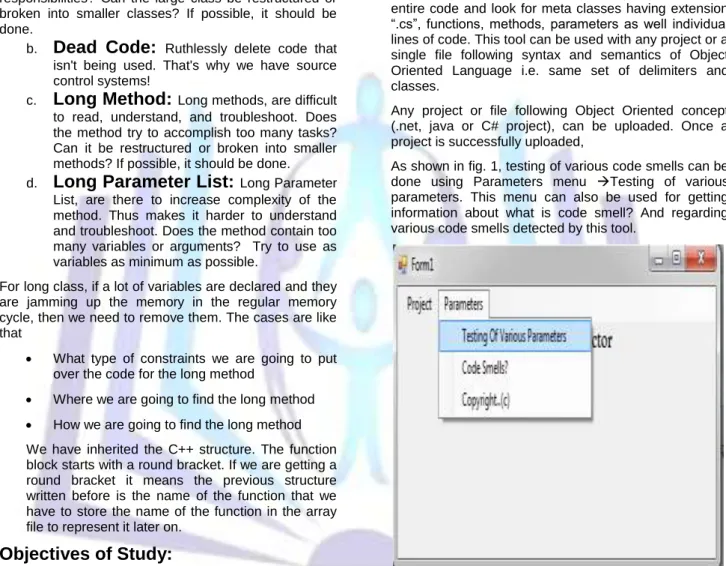
This Proposed code smell detector tool is implemented in Visual Studio 2010. .net environment is used to develop the tool because of default support for optimizing code and inbuilt support for code refactoring. This tool is capable for tracing entire code and look for meta classes having extension “.cs”, functions, methods, parameters as well individual lines of code. This tool can be used with any project or a single file following syntax and semantics of Object Oriented Language i.e. same set of delimiters and classes.Any project or file following Object Oriented concept (.net, java or C# project), can be uploaded. Once a project is successfully uploaded,
As shown in fig. 1, testing of various code smells can be done using Parameters menu Testing of various parameters. This menu can also be used for getting information about what is code smell? And regarding various code smells detected by this tool.
Figure 1: Showing Parameters menu to select Testing of various parameters.
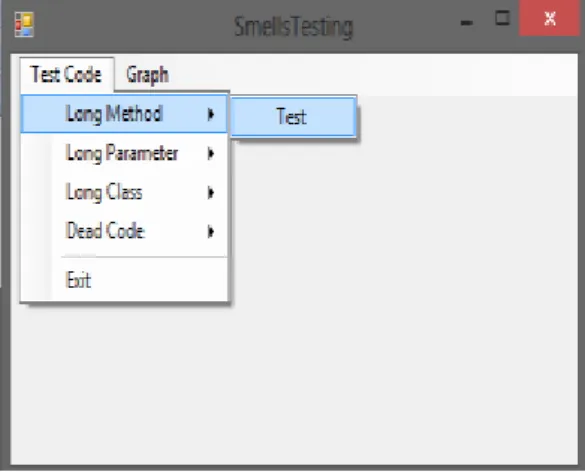
Smell Testing dialog box will allow us to have testing of software code on the basis of
Long Methods
Long Parameter List
Long Classes and
Figure 2: Showing select Test Code and
Then long method and then click on Test
to show Long Method Dialog box.
If we are dealing with complete project, then we can use option “Load All files” and then click on start option to start tracing process, here all long methods will be displayed in Long Methods list box, Otherwise if one is dealing with a single file hen in that case, we can simply click on start and there is no need of loading all files.
Figure 3: Showing Long Method dialog box, giving options for loading all files, start testing and storing results for creation of graphs.
. If we click on any file manually then it will show all long methods in Long Methods dialog box of that respective file, then we can see code of method in Data of methods dialog box.
Figure 4: Showing Loaded files and long methods of employee.cs class and code of employee_load method in Data Of Method Dialog box.
Another test is regarding long parameter list, generally it says that any method using parameters as arguments and those parameters are not in use. In that case method will be long and complex one.
We can check for, which parameters are not in use, by following Long Parameter list. If we click on any file in All files list box, It will show all methods based upon long parameter list in Long Parameter Methods list box. If we click on any of the method there, it will show justification that why this method is considered long, which parameters are created but not used as such.
Figure 5: Showing Various Parameters just declared but not used.
Same way around, we can check for Long classes, They are those classes, which are trying to cover as many jobs as it can. Those jobs may be independent, related or not related at all. Those contents can be moved or shifted to some more sub classes, if they related or we can shift them to new classes if they are independent or not related at all. As adding up more and more code in same class, will only increase the complexity and will
make code harder to understand. Even more number of comments are also increasing complexity and as they cannot help in refactoring or debugging. They are there for helping users not the developers.
Figure 6: Showing various Long Classes, Methods responsible and code of that class.
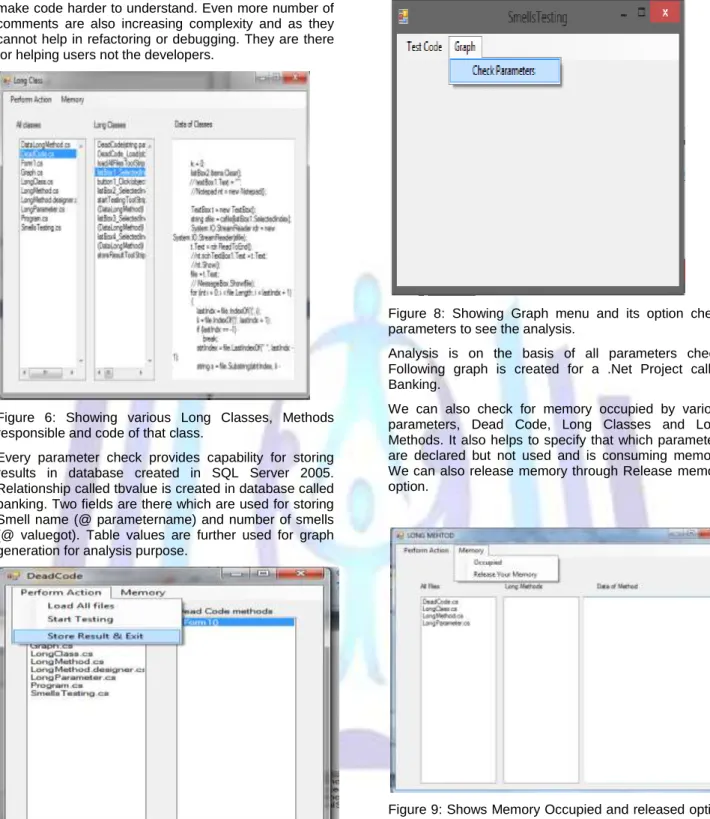
Every parameter check provides capability for storing results in database created in SQL Server 2005. Relationship called tbvalue is created in database called banking. Two fields are there which are used for storing Smell name (@ parametername) and number of smells (@ valuegot). Table values are further used for graph generation for analysis purpose.
Figure 7: Showing Tool traversing code for finding Dead Code and Store result and Exit option.
Click on store result and exit. If you do not store the result then graph will not be created and all parameter checks should be performed and their respective results should be stored. Otherwise we will not be capable of performing it.
Figure 8: Showing Graph menu and its option check parameters to see the analysis.
Analysis is on the basis of all parameters check. Following graph is created for a .Net Project called Banking.
We can also check for memory occupied by various parameters, Dead Code, Long Classes and Long Methods. It also helps to specify that which parameters are declared but not used and is consuming memory. We can also release memory through Release memory option.
Figure 9: Shows Memory Occupied and released option for long Method Check.
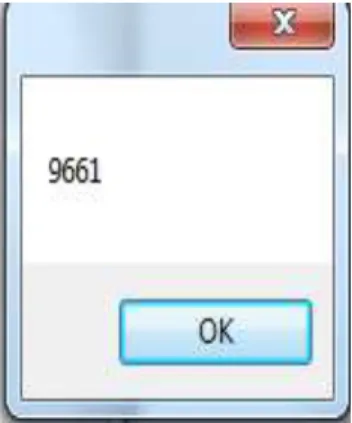
Memory is occupied and released is represented in terms of bytes. We have used mmcb variable to calculate this parameter. We can also convert it into KB’s by applying requires formulas. Where
1 KB = 1021 Bytes.
Figure 10: Shows Memory Occupied in Bytes.
Talking about the dead code – a dead code is a code which is not giving the client means the caller a response on time. As per the operating system rules a dead code stops working after 2000 ms. so check the process with the help of the task manager of the operating system where a processes tab is available. To clarify the statement, a browser would be a great example. if we are opening up a browser for the first time , it allocates a certain amount of memory to the browser and all the other tabs which we are opening up shares the same amount of space from the allocated space . If the allocated space is over, it fetches the last working tab and releases its memory and allocates it to itself. If the memory is not getting release, it is considered to be a dead tab which results into the browser hang some times. We have applied the same concept in our technique.
Long Class: The Long class wraps a value of the primitive type long in an object. An object of type Long contains a single field whose type is long. In addition, this class provides several methods for converting a long to a String and a String to a long, as well as other constants and methods useful when dealing with a long. For a long class to be detected, we first need to search out that what exactly a long message in a class is.
Suppose a class has 50 lines and only 30 lines are such lines which are acting like a memory consumed part originally but now we do have 10 lines which are being declared only but not getting used. Hence we need to find those classes which are not getting used by the code section. For this purpose we would be using an array file. As soon as you upload a project, it searches all the .cs files of the project and one by one it executes them.
A class always starts from the keyword class hence, If the keyword class if found we consider it as a class and the class body is to be considered to be from where it gets a curly bracket. Now to check out the memory cycle, we need to perform the cyclic redundant less code.
Analysis: This tool was used for two projects i.e. Banking and Code Smell Project. Both are created in .Net. This analysis shows that any of the project created, suffers from some code smells, which need to be Refactored. This analysis shows that Quality is compromised because of presence of those code smells. Refactoring will help to ensure the Quality Control, which will ultimately lead to Quality assurance
as well. Project named “Code Smell” suffers from more smells of Long Methods, Parameter Lists and Dead Code, Where as Project called “Banking” Suffers smell of more number of Long Classes. Memory can be saved by removing Dead code and unwanted parameters. Complexity can be simplified to major extent, if it would be possible to divide Large Classes and Long Methods into more in number but small, simplified and relevant ones.
Figure 11: Shows graph of various code smells and their analysis on the basis of various Code Smells found by the tool.
Here we have applied a little classification technique in the development phase. Suppose if we to put on a java file , we need to put it in the code that if the extension ends with .java then it could go to the directory where exactly the files are stored and we can copy all the files from the directory and put it on to the development and testing phase .
Conclusion
This paper introduces an innovative Detection tool for finding out various smells presence in code using a bit of classification approach. In this approach all files have extension either .java or .cs files can be used. For this purpose a bit classification technique is being used. Suppose if we to put on a .cs file , we need to put it in the code that if the extension ends with .cs then it could go to the directory where exactly the files are stored and we can copy all the files from the directory and put it on to the development and testing phase. At initial stage classification helps to identify all code file and helps to load them into the list box and then helps to check the smells in that code. Four Smells have been successfully detected out of code. Memory can be saved by removing Dead code and unwanted parameters. Complexity can be simplified to major extent, if it would be possible to divide Large Classes and Long Methods into more in number but small, simplified and relevant ones. Once these code smells are discovered, we can refactor them to improve upon scalability, maintanability, reusability, unserstandability as well as modifiability.
Future Work
“Change or Updation is the law of
nature.”
Even though a positive level of Smell recognition has been achieved in this paper, the recognition rate is excellent as compared to other tools or previous works of various researchers. As every software, has to evolve, this tool also requires updating. So in future some another algorithm instead of K-Mean clustering can be used for getting better results. More number of smells can be captured from the code by enhancing the tool. Refactoring of some of these smells can be done at run time to show actual performance being improved like Extract and move methods in case of Long Method Code smell or Sub class classes in case of Large Classes. More over this project is compatible for detecting code smells only in Object Oriented languages, but it can be expanded to work upon MATLAB, C or with code of web languages like PHP, Java Script etc. It can be made more generic one.
References:
[1] Baghel Ranjan, Baghel Vimal, Ilyas Mohd. (2012), Seminal description of Data Mining approaches with reference to Rough Dataset Approaches, MIT International Journal Of Computer science & Information Technology, Vol. 2, No. 1, Jan 2012, P 25-3
[2] Francesa Arcelli Fontana, Pietro Braione, Marco Zanoni (2011), Automatic Detection Of Bad Smells in Code: An experimental assessment, Journal Of Object Technology, Published at AITO P 1-38.
[3] Felienne Hermans, Martin Pinzger and Arie Van Deursen (Report TUD-SERG-2011-030), Detecting Code Smells in Spreadsheet Formulas, delft University Of Technology, Software Engineering research Group Technical Report Series P 111-15
[4] Isela Macia, alessandro Garcia, Arndt von Staa (2010), Defining and Applying Detection Strategies For Aspect Oriented Code Smells, Brazilian Symposium On Software Engineering P 60-69.
[5] Isela Macia, alessandro Garcia, Arndt von Staa (2010), An Exploratory Study Of Code Smells In Evolving Aspect Oriented Systems, P 203-21
[6] Wong Sunny, kim Mirvung, Dalton Michael (2011), Deteting Software Modularity Violations, ICSE ’11 May 2011, Waikiki Honolulu, HI, USA P 21-28.
[7] Whitehead Jim, Zimmerman Tom (2011), Clones: What is that Smell, © Springer Science + Business Media, LLC 2011 P 503-530.