Towards a Catalog of Usability Smells
∗Diogo Almeida
Departamento de Informática, University of Minho, HASLab/INESC TEC Braga, Portugal[email protected]
José Creisssac Campos
Departamento de Informática,University of Minho & HASLab/INESC TEC
Braga, Portugal
[email protected]
João Saraiva
Departamento de Informática, University of Minho & HASLab/INESC TEC
Braga, Portugal
[email protected]
João Carlos Silva
Dep. de Tecnologias/DIGARC, Instituto Politécnico do Cávado e do Ave Barcelos, Portugal[email protected]
ABSTRACT
This paper presents a catalog of smells in the context of interac-tive applications. These so-calledusability smellsare indicators of poor design on an application’s user interface, with the potential to hinder not only its usability but also its maintenance and evo-lution. To eliminate such usability smells we discuss a set of pro-gram/usability refactorings. In order to validate the presented us-ability smells catalog, and the associated refactorings, we present a preliminary empirical study with software developers in the context of a real open source hospital management application. Moreover, a tool that computes graphical user interface behaviour models, giv-ing the applications’ source code, is used to automatically detect usability smells at the model level.
Categories and Subject Descriptors
H.5.2 [Information Interfaces and Presentation (e.g., HCI)]: User Interfaces; D.2.8 [Software Engineering]: Metrics; D.2.9 [Software Engineering]: Management: Software Quality Assurance
General Terms
Design, Languages, Verification
Keywords
Graphical User Interfaces, Code Smells, Empirical Studies
∗This work was partially funded by the ERDF - European
Re-gional Development Fund through the COMPETE Programme (op-erational programme for competitiveness) and by National Funds through the FCT (Portuguese Foundation for Science and Technol-ogy), within projects reference FCOMP-01-0124-FEDER-020484 (J. Saraiva) and FCOMP-01-0124-FEDER-020554 (J. C. Campos).
Permission to make digital or hard copies of all or part of this work for personal or classroom use is granted without fee provided that copies are not made or distributed for profit or commercial advantage and that copies bear this notice and the full citation on the first page. Copyrights for components of this work owned by others than ACM must be honored. Abstracting with credit is permitted. To copy otherwise, or republish, to post on servers or to redistribute to lists, requires prior specific permission and/or a fee. Request permissions from [email protected].
SAC’15, April 13–17, 2015, Salamanca, Spain. Copyrightc 2015 ACM ISBN/14/04...$15.00. DOI string from ACM form confirmation
1.
INTRODUCTION
As the complexity and diversity of systems increases, software engineers need to adapt and improve the way they develop soft-ware. In fact, popular consumer electronic devices, like for ex-ample a smart TV, already run complex software systems consist-ing of millions of lines of code. Mobile computconsist-ing devices are also changing the way we interact with software: smartphone and tablets provide powerful usability experiences, which is one of the main reasons of their success. The fact that application need to be accessible on all these different platforms poses additional chal-lenges on user interface designers and programmers.
To efficenty handle large and complex interactive software sys-tems, the development of such systems should follow software en-gineering good practices such as, software documentation, software testing, software design patterns, software best practises, software quality, so that the development time and cost is minimized. The use of such good practices also makes it easier (or possible) to maintain and evolve such complex systems. Although there are ad-vanced interactive frameworks, like for example WebRatio1, Sym-fony2, and outSystems3, and approaches like [7], [4], [15] and [23] that provide powerful abstraction mechanisms to develop and test-ing interactive applications, the reality is that poorly designed ap-plications are still far too common. In [12] a survey of common bad designs of interactive applications is presented. Techniques and tools to quantify the complexity interactive applications are pro-posed in [15, 23]. Techniques to eliminate detected anolamies are defined in [5, 7]. These techniques, however, consider the running application only, and not its source code.
In the past, the software and language engineering communities have developed a shared understanding of which characteristics in the source code of software applications might make its compre-hension, maintenance and, thus, evolution more complex. Features like long methods’ names or large sets of nested conditionals are not necessarily errors in the application’s source code, but they might indicate a weakness in the applications’s implementation. Martin Fowler has captured this notion under the concept of source code smells [9]. A large catalog of suchbad smellsfor the Java
1http//www.webratio.com 2
http://symfony.com
3
programming language was defined. In order to eliminate such bad smells, a set of program transformations (program refactorings) was introduced. A program refactoring is a source-to-source pro-gram transformation that aims at improving propro-gram comprehen-sion, and consequently maintenance and evolution, without chang-ing the programs external behaviour. Thus, program refactorchang-ings are usually used to eliminate bad smells.
Although a lot of research on program smells/refactorings has been done [6, 11, 1] and on conducting empirical studies to val-idate such refactorings [16, 13], the human computer interaction community has not yet fully incorporated these results in order to improve interactive applications. While typical approaches for evaluating user interfaces are mainly concerned with their design (consider, for example, the review on usability evaluation methods in [8]), implementations aspects have been shown to be relevant to-wards the quality (that is, the usability) of interactive system. See, for example, [2] on software architectures and usability. This begs the question of whether the idea of code smells might be transposed to the analysis of user interfaces.
In this paper we describe how the notion of source code smell is adapted to interactive applications. We propose a catalog of smells, namedUsability Smells, that define usability related anomalies in the design of interactive applications. Our catalog is based on the original catalog of source code smells defined by Fowler.
The catalog consists of a set of six smells (Middle Man, Shot-gun Surgery,Inappropriate Intimacy,Feature Envy,Too Many Lay-ersandInformation Overload), that directly follow Fowler’s code smells, and their respective refactorings. To validate our catalog we present a qualitative empirical study with real software devel-opers. To run the study we used asmellyusability application: an open source interactive application that manages an hospital. Thus, software developers were asked about ther selected usability smells identified in that application, the severety of such smell/anomaly, and how to solve it.
Finally, the paper presents a tool that supports the automated analysis of interactive systems, which is used to automatically rea-son about usability smells giving a model of the application’s be-havior. The goal is to understand how behavioural models can be used to detect the presence of usability smells.
The remainder of the paper is structured as follows: Section 2 presents our Usability Smells Catalog, Section 3 explains and dis-cusses how we performed an empirical evaluation of the catalog, Section 4 discusses the automated detection of usability smells, and is followed by the concluding remarks in Section 5.
2.
A CATALOG OF USABILITY SMELLS
In order to define a catalog of smells that indicate potential prob-lems with the usability of software applications, we considered the well-known catalog of Fowler’s source code smells [9] and adapted it to the usability context. Because, Fowler’s catalog was defined in the context of object oriented programming, we do not expect all smells to necessarily have a correspondence in software usability. For example, theSwitch Statements, according to Fowler, this code smell happens mainly in object oriented programming. This smell is based on lacking switch statements. The switch statements typ-ically appears duplicated on code and they are used in conditions like "Test if A else do next test. Test if B else do next test." and so one. Normally, these statements can be found scattered on code. The problem appears when is necessary change a statement of one switch, this change will obligate the programmer change the others switch. In these cases the program must implement polymorphism erasing the duplicate code ofSwitch Statements. This smell is im-possible to define in theUsability Smellscontext because the idea
of switch statements is overtake by top bars, menus, links and other components that allow the user browse in different pages.
Following the approach of Hermans et al. [10], we consider those Fowler’s smells that are related to interdependencies of class/object entities in the source code. Hermans et al. considered such depen-dencies as inter-worksheet dependepen-dencies in a spreadsheet setting. In this paper we consider those smells as defining interdependen-cies between windows (or panes4) in interactive software
applica-tions. Thus, we start with a catalog of six smells that we organize in three groups:implementation,designanddomain.
Smells in theimplementationgroup are related to the structure of the application’s source code. This group is composed by two smells:
• Shotgun Surgery— This smell addresses the fact that user interfaces are subject to constant change and the structure of the applications source code might impact negatively with the ability to change parts of the user interface.
• Too Many Layers— This smell indicates that the user is forced to go through a cascade of windows, thus providing poor usability.
Smells in thedesigngroup capture features of the user interface design. This group is composed by the following two smells:
• Middle Man— This smell happens when part of a dialog is delegated to another window needlessly.
• Information Overload— This smell occurs when too much information is presented at once.
Finally, thedomain groupconsists of smells that relate to poten-tial problems in the user interface that are related to the applica-tion’s domain:
• Inappropriate Intimacy— This smells occurs when concep-tually distinct windows are grouped together.
• Feature Envy— This smell happens when some part of the interfacestealsinformation or functionality that logically be-long somewhere else in the interface.
This last group of smells appears on windows with the same do-main that is, windows that contain related information. For exam-ple, imagine that we have two windows: the first one displays cars’ information while the second one allows editing some car’s details. As both windows show cars’ information, they belong to the same domain.
Next, we discuss in detail each of these smells.
2.1
Shotgun Surgery
According to Martin Fowler, Shotgun Surgery appears when mak-ing a smak-ingle change to a system requires changmak-ing many classes in the system. This is an implementation smell that we believe exists most of the time because code is re-used. For example, when a pro-grammer develops an application, it is normal to re-use some pieces of code in different places. If the same block of code is used in 10, 100 or more places, at some point it becomes impossible for the programmer to remember all the places where that block of code was used. Problems appear when changes to the logic of the reused
4
For simplicity sake, in what follows we will use the term window although the same concepts and ideas can be applied to any user interface structuring element.
code are needed, because all the places where the code is used need to be change.
The same happens in interactive applications. We have observed, for example, that it is normal for programmers to use the same basic form in different windows. As the amount of reuse increases so does the programmer’s difficulty to remember all the places where that has happened. One solution to this is to refactor the definition of the form into a single class or method. If the different windows where the form is used belong to the same domain, the possibility of redesigning the user interface so that a single window/form pair is used (i.e. grouping all the windows into one) should also be considered.
2.2
Too Many Layers
Too Many Layers is the second smell in the implementation group. This smell occurs when an application has too many windows and, to perform one task, end-users need to pass through four, five or even more windows. The need to go through all of these windows severely affects user performance in accomplishing the task.
One possibility to eliminate the Too Man Layers smell is for the programmer creates a common menu to all windows with links for each one and for example, in interactive applications, when one window open the previous close. Another possibility is get together all the windows with common information and structure. With this last possible solution the user does not need course more than nec-essary windows to complete their objectives. This possible refac-toring helps users travel more easily in the interface without excess of information and a better structure.
2.3
Middle Man
The Middle Man smell occurs when there are at least two win-dows, and the first window mistakenly delegates information or behavior to the second window. The anomaly occurs when this information can be displayed (or the behavior performed) by the first window with advantage, but for some reason it was decided to delegate it to the other window.
Martin Fowler presented a good example of this smell: imagine an employer and an employee. The employer orders the employee to do something that he can do himself. If for any reason the em-ployee is dismissed and the employer needs something that he has always delegated to him, he will do not know how to do that. This will happen because all the experience was in the employee and not on the employer. For this reason, if we think in classes, the em-ployer class is an empty class without logic, an unnecessary class.
We adopt this smell by mapping classes to windows or panes. The attributes of the class become the information in the page/pane, and the methods become available actions. To understand this map-ping, imagine a page with a form. For some reason the user did not fill a field of the form and then, when the user try to submit, a new window appears and shows a message about the error. The first window delegates the presentation of this message to the second window. The anomaly appears when it is possible to perform a task without needing to delegate it to another window.
Our idea of refactoring is firstly understand if the window who delegates the task can perform it or not so, if the window can per-form it, this task should be kept there. So the user will not be distracted by another window and he main focus will continue in the first one.
2.4
Information Overload
Excess of information is the most typical Usability Smell. This smell occurs when programmers introduce more information that is required. We can see this smell in many websites, for example,
in mobile applications normally programmers implement public-ity systems to win some money. This publicpublic-ity affects the system usability and usually forces end-users see other sites just for per-forming some tasks in its application. Another example is when in some applications we see information we do not need or useless components like buttons or links that do nothing.
2.5
Inappropriate Intimacy
We included Inappropriate Intimacy into the domain group be-cause it does not change directly the code structure but it affects the usability application and occurs into the windows that belong to the same domain.
According to Martin Fowler and Felinne Hermans the smell oc-curs when a class give more importance and has more dependences and details from other classes.
Inappropriate Intimacy occurs when two or more windows be-long to the same domain and the path to them are different and they have at least one task that depends of another window. Our idea of refactoring is first of all validate that all the windows belong to the same domain, if this validation occurs the programmer must group all the windows into one to facilitate end-users perform the tasks they contain accessing only one path.
2.6
Feature Envy
Besides Inappropriate Intimacy, Feature Envy is another domain smell. Fowler’s consider that Feature Envy appears when a class has more dependences and details of implementation from other classes becoming more closed.
This smell occurs when a window has at least one task that be-longs to another window. Imagine two windows: the first one is used to manager bank accounts and second one shows clients in-formation. The second window has the possibility to introduce new clients. This task does not belong to this window because its pur-pose is to show information not managing clients’ accounts. Our solution for this smell is trying to understand the domain and trans-fer the wrong task to its proper place. In the example given, the solution is transferring the possibility to introduce new clients to first window, where end-users can manage bank accounts.
3.
EVALUATION
In this section we explain how we evaluated our smells with real programmers. This preliminary evaluation consist in getting some reactions and answers to some questions like:
1. What is the opinion of the programmers about these smells?
2. Usability Smells affect the application usability?
3. What kind of refactoring they present to change these smells?
4. Which are the best refactoring for these Usability Smells? To answer these research questions, we performed one quantitative evaluation. In order to do that, we use five programmers and ask them to look at one application and execute some tasks. We use an application called OH-Open Hospital found on Sourceforge: an open source applications repository. OH has the purpose to support the management and the activities of the St. Luke Hospital in An-gal (Uganda). The following subsections describe the results about each one of these smells, except Feature Envy which was not found in the case study.
3.1
Results
In general, all participants understood what usability smells are, and agreed that all the smells are serious anomalies and that they
Figure 1: Example of Middle Man Usability Smell
hamper the application usability. When asked about how they could change the anomalies, participants suggested solutions easily. All participants agreed and liked our solutions to refactor the smells. Finally, in this paper we will not present results of the Feature Envy smell since it was not found in the OH application
Middle Man:In this smell we started by asking participants to try edit one element without selecting it in the table. In this case, a new window appeared showing them an error message, see fig-ure 1. We considered this example a Middle Man smell because there are two windows where the first one delegates to the other a task, which in this case is showing a message. Some participants stated that for a sporadic end-user this smell is not serious, how-ever for a regular end-user this will be boring and will affect task performance. In the evaluation, when ask their opinion about the use of pop-up windows to show information, 83% of the partici-pants disagreed. 50% agreed that information should be presented in the same window, the other 50% refrained . According to them, closing one window every time something is wrong is boring. The majority of the participants stated that they prefer seeing error mes-sages in the same window where the error occurs. They preferred to see error messages in red and in the low right corner. However if in a form, this red message should be to the right of where the error occurs. In the case of messages that are informative and/or large, then appearing in a new window was considered acceptable.
According to these responses, our refactoring is: if the results of the task that was delegated to another windows can be fit and ad-justed to the delegating window, they should be transferred there. If this task is to show a message, it can appear on same window if it is an error, or in a different window if it is information. In case the message is informative and it is necessary to help end-users com-plete some specific task, this informative message can be presented in the same window too. When asked about the adequacy of our Refactoring all participants agreed to them. Additionally some of the participants indicated that the application become more intu-itive and better structured.
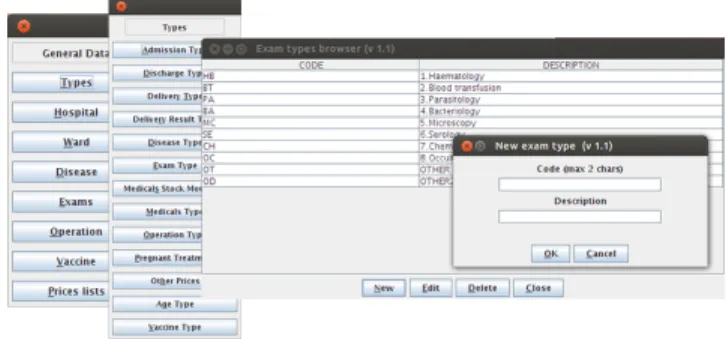
Too Many Layers: In this case we asked participants to create a new type of Exam. To carry out this task, participants had to go through the four windows in figure 2. We asked participants what they thought about going through all of these windows to realize one task. All participants found it unappropriated. Some partici-pants said "it is boring going through all these windows to do that", "at some point I will not know where am I". Besides that, almost all participants (84%) claimed that this smell could be avoided if there was a top menu with all these options. Another solution pointed by participants was using shortcuts and breadcrumbs to help them know where they are in the application. The majority of
partici-Figure 2: Example of To Many Layers Usability Smell
pants (83%) believed this is a serious smell that really affects the application usability. According to these answers, we define the refactoring to this smell as joining all windows in a top single menu helping end-users realize a task with less clicks and adding bread-crumbs and shortcuts. With these changes, end-users always know where they are and fewer steps are required to realize the tasks. To validate the refactoring we showed our solution to participants. According to 92% of them our refactoring helps the application by creating a better organized and a cleaner interface.
Shotgun Surgery:In order to explain this smell to participants, we asked them to perform five tasks. Each task guided them to five similar windows and each one of them had one table and four but-tons (Edit, New, Delete, Close), see figure 3. The only difference between these windows was the table contents. Firstly, we asked participants what they thought about the windows and all of them answered: "for me all the windows are the same one". Secondly, we asked if they could find some useful information in these win-dows and some of them answered: "No, to find some information I need to travel through all these windows". 91% of the participants agree the windows disposition and the way that users need to find information affected the productivity and efficiency of the tasks. The next question was what the participants thought about joining all these windows into one. Almost all of them (82%) agreed that this grouping should be done and some of the participants pointed out that that would simplify the search. After this, we explained that, hypothetically, in all these five windows the programmers re-used parts of code. Then, we asked participants if they felt that having re-used the same code in ten or more places in an applica-tion, they would remember all the places where they had done it. 75% of the participants agreed that it would be very difficult to re-member all the places where they had re-use the code. Finally we asked what they would change or do to resolve this anomaly. We gather many ideas to resolve this. However, all of them said that, if all the windows had the same domain or were equal, they could be joined into one and that would help end-users navigate through all of them. Some participants suggested using windows divided into two or more views and some components like Combo Boxes or Drop down menus to select and show all these windows. With these answers we define our refactoring to this smell as: if pro-grammers have re-use code in multiple windows which are in the same domain, then joining the windows should be considered. Fi-nally, we presented our refactoring to participants. All agreed that identical windows should be united. If programmers re-use lots of code in different places, another possible solution to help them re-member all of the places is creating an application structure map. This map must have all windows’ structures, re-use code and all the information programmers find useful.
Figure 3: Example of Shotgun Surgery Usability Smell
Figure 4: Example of Inappropriate Intimacy Usability Smell
Inappropriate Intimacy:This Usability Smell was explained to participants by showing them two different windows, see figure 4. In the first one they could create, edit and delete information about all types of vaccines in the system. In second window, participants could manage all patients who received the vaccines. These two windows were in different places and were accessed with different paths. Firstly, we asked participants if they thought that these two windows belonged to same domain; 92% of participants agreed. However, they added that it was difficult to understand the win-dows’ domain because they were separated and in different places in the application. 83% of participants agreed that joining these two windows in the same menu would help them to more easily understand where they were and what their purpose was, increas-ing tasks productivity. When asked what they would change, the answers were: "joining windows in the same domain is a good so-lution" and "using shortcuts really helps". The majority of par-ticipants (66%) considered that this is a serious anomaly and for 25% this smell is indifferent. With these answers, we define our refactoring to Inappropriate Intimacy as: if two windows have the same domain, they should be together if that increases application usability. Some solutions are: joining windows into the same win-dow, assigning them the same path in the application menu and use components like Shortcuts in both windows, helping end-users travel between them. When we showed our solution to participants 92% of them agreed that the refactoring increases application us-ability helping them navigate in the interface.
Information Overload: The last Usability Smell that we ana-lyzed was Information Overload. In this case, we asked participants to open the Pharmaceuticals Stock window. This window aims to
Figure 5: Example of Information Overload Usability Smell
help end-users manager and search all medicines in the hospital. In this window we can see lots of unnecessary information, such as unnecessary titles - for example, explaining end-users that a ta-ble is a tata-ble, or that buttons are buttons (see figure 5) - and quite complex advanced search dialogue. In the first case, all participants were asked what was the purpose of explain that a table is a table or a group of buttons is a group of buttons. All stated that the ti-tles are unnecessary. In the second case, lots of possibilities in the advanced search dialog makes it difficult for the end-users to un-derstand how they can execute a search. We observed that almost all participants initially payed more attention to areas with more components, forgetting others. Indeed, they stated that they did not understand the purpose of these components because they were too many. When ask about the excess of information in the ap-plication, 92% agreed that it affected productivity and application readability. For 50% of the participants Information Overload is a serious anomaly that really affects application usability, and only 25% disagree with this sentence. In our opinion, excess of informa-tion may be caused by misuse of the components of the tools that the programmer uses. Our refactoring to Information Overload is: understand if an application has excessive information and remove it. To help the programmer find this excess of information usabil-ity tests can be carried out. If not feasible, programmers might ask others to help them identifying these excesses.
4.
SMELLING GUI BEHAVIOUR MODELS
WITH GUISURFER
In the previous sections we presented both a catalog of usability smells and an empirical study with software developers to validate it. Although programmers may relate the usability smells to the source code of the application, we wish to automate this process. Thus, we extended a tool that extracts GUI behaviour models given the source code of an interactive application, so that it identifies in the GUI model usability smells. By identifying the smells at a behaviour model level rather than at source code level, we provide a more concise and abstract view of the usability smell. Our idea is to further extend this tool with a set of program/model refactorings that the user can select in order to eliminate the smell: the selected refactoring is performed both at model and source code level.
The GUISURFER framework [20] provides libraries and tools that support the automated analysis of interactive systems. The tool uses advanced software language engineering techniques, like strategic programming [17], program slicing, model-driven engi-neering [19] and model-based testing [18], to extract realistic GUI behaviour models from the source code of an interactive applica-tion.
In this paper we extend the GUISURFERtool in order to identify usability smells of our catalog, in the generated behavior model. This is our first step in providing a full usability refactoring frame-work for interactive applications.
The GUISURFERwas developed following a traditional modu-lar approach as shown by its architecture displayed in Figure 6: It consists of a language dependent front-end (Figure 6: left col-umn), which includes different parsers for different languages: cur-rently supporting Java, Wx/Haskell [14] (a portable and native GUI library for Haskell programming language), and GWT [21] (an
Figure 6: TheGUISURFERArchitecture (left and center) and generated smelly GUI behavioural model (right).
open source set of tools that allows web developers to create and maintain complex JavaScript front-end applications in Java). The language dependent front-end uses a generic abstract syntax tree (AST) implementation that is able to represent any programming language [22]. This generic AST is then traversed by generic strate-gic traversal functions that slice out the language dependent GUI aspect of the source code (Figure 6: top left column).
The back-end of GUISURFERis independent of the applications programming language, and it computes GUI behavior models from the GUI aspects produced by the language dependent front-end (Figure 6: center column). These graph-based models abstract all the interface widgets and their relationships. It also automatically generates finite state machine, modeling the interface. These mod-els are illustrated through state diagrams in order to make them visually appealing [19].
In order to identify usability smells in the generated GUI be-havioral models, we apply different graph based metrics and algo-rithms to the inferred graph-based models which are able to com-pute such smells (6: bottom center column). As a result, GUISURFER
generatesGUI smelly models, that is to say that it produces models with the usability smells identified marked in red in the visual rep-resentation of model (Figure 6: right column). Moreover, we ex-tended the generated models so that when the user selects a red re-gion, a notification identifying the smell is automatically displayed. To detect usability smells in the generated models, we use dif-ferent metrics/algorithms. For example, the pagerank link analysis algorithm is used to represent the probability that users randomly executing events will arrive at any particular state [3]. We use this analysis to compute the relative importance of the model states. Larger nodes define window internal states with higher importance within the overall application behavior. With this analysis we are able to identify theMiddle Mansmell (cf. section 2.3): This smell occurs in such a model when there are at least two windows, and the first window delegates its information or behavior to the sec-ond window. In fact, the GUI smelly model displayed in Figure 6 (right) displays the automatically generated behavior model for the hospital management system used in the empirical study, where the middle man smell is marked in red.
In this paper, and mainly due to space limitations, we presented
the definition of a single smell of our catalog in terms of the gen-erated behavior model. The current version of GUISURFER im-plements the detection of smell in the models, only. We are now implementing the corresponding catalog of usability refactorings so that users can select which refactor to perform in order to elimi-nate the smell in the model. In such an implementation, the source code will co-evolve too.
5.
CONCLUSION
Considering interactive systems, two perspectives on quality can be considered. A first one related to the implementation, where programmers are typically more focused on the quality attributes of the code being produced. And a second one where main concerns focus the quality of the interaction between users and systems.
This paper introduced usability smells that are indicators of poor design on an application’s user interface. A catalog of six usability smells has been defined and structured in three groups: implemen-tation,designandomain. For each usability smell we associated a usability refactoring. Using the defined catalog we detected 5 usability smells in the context of a real open source hospital man-agement application.
To validate our usability smells catalog, and the associated refac-torings, we presented a preliminary empirical study with software developers in the context of the hospital management application. Although the small number of participants in the study does not al-low a relevant statistic analysis of the results, a qualitative analysis of the study provides interesting results: Firstly, most participants agreed with the detected smells, pointing out refactoring ideas that, for the most part, were aligned with our own proposed refactor-ings. Secondly, the users agreed with the refactorings suggested for eachUsability Smell. Lastly, the GUISURFERtool has been used to support the detection of usability smells from behavioral models. Dialogue models have been used to detect the presence of likely usability smells.
Our objective has been to define a catalog of usability smells and associated refactorings. After validating this study through an em-pirical study we believe this style of approach can fill a gap between
the analysis of code quality via the use of metrics or other tech-niques, and usability analysis performed on a running system with real users. The automated detection of usability smells through GUISURFERseems to be a promising approach allowing us to eas-ily visualize usability smells. One potential interesting follow up on this work is to combine smell detection with model-based test-ing in order to improve the quality of the testtest-ing process by ustest-ing smells as guide to relevant features to test.
6.
REFERENCES
[1] R. Abreu, J. Cunha, J. P. Fernandes, P. Martins, A. Perez, and J. Saraiva. Smelling faults in spreadsheets. In2014 IEEE International Conference on Software Maintenance and Evolution (ICSME), pages 111–120. IEEE Computer Society, Sept 2014.
[2] L. Bass, B. E. John, N. Juristo, and M.-I. Sanchez-Segura. Usability-supporting architectural patterns. InProc. 26th Int. Conf. on Software Engineering, ICSE ’04, pages 716–717. IEEE Computer Society, 2004.
[3] P. Berkhin. A survey on pagerank computing.Internet Mathematics, 2:73–120, 2005.
[4] W.-K. Chen and J.-C. Wang. Bad smells and refactoring methods for gui test scripts. In T. Hochin and R. Y. Lee, editors,SNPD, pages 289–294. IEEE Computer Society, 2012.
[5] W.-K. Chen and J.-C. Wang. Bad smells and refactoring methods for gui test scripts. InSoftware Engineering, Artificial Intelligence, Networking and Parallel Distributed Computing (SNPD), 2012 13th ACIS International Conference on, pages 289–294, Aug 2012.
[6] J. Cunha, J. P. Fernandes, H. Ribeiro, and J. Saraiva. Towards a catalog of spreadsheet smells. InProceedings of the 12th International Conference on Computational Science and Its Applications - Volume Part IV, ICCSA’12, pages 202–216, Berlin, Heidelberg, 2012. Springer-Verlag.
[7] B. Daniel, Q. Luo, M. Mirzaaghaei, D. Dig, D. Marinov, and M. Pezzè. Automated gui refactoring and test script repair. In Proceedings of the First International Workshop on
End-to-End Test Script Engineering, ETSE ’11, pages 38–41, New York, NY, USA, 2011. ACM.
[8] A. Dix, J. E. Finlay, G. D. Abowd, and R. Beale.
Human-Computer Interaction (3rd Ed). Prentice-Hall, 2003. [9] M. Fowler.Refactoring: Improving the Design of Existing
Code. Addison-Wesley Professional, 1999.
[10] F. Hermans, M. Pinzger, and A. van Deursen. Detecting and visualizing inter-worksheet smells in spreadsheets. InProc. 34th Int. Conf. on Software Engineering, ICSE ’12, pages 441–451. IEEE Press, 2012.
[11] F. Hermans, M. Pinzger, and A. van Deursen. Detecting and refactoring code smells in spreadsheet formulas.Empirical
Software Engineering, pages 1–27, 2014.
[12] J. Johnson.GUI Bloopers 2.0. Morgan Kaufmann, 2007. [13] M. Kim, T. Zimmermann, and N. Nagappan. An empirical
study of refactoring challenges and benefits at microsoft. IEEE Transactions on Software Engineering, 40(7), July 2014.
[14] D. Leijen. wxhaskell: A portable and concise gui library for haskell. InProceedings of the 2004 ACM SIGPLAN Workshop on Haskell, Haskell ’04, pages 57–68, New York, NY, USA, 2004. ACM.
[15] A. Miniukovich and A. De Angeli. Quantification of interface visual complexity. InProceedings of the 2014 International Working Conference on Advanced Visual Interfaces, AVI ’14, pages 153–160, New York, NY, USA, 2014. ACM.
[16] G. H. Pinto and F. Kamei. What programmers say about refactoring tools?: An empirical investigation of stack overflow. InProceedings of the 2013 ACM Workshop on Workshop on Refactoring Tools, WRT ’13, pages 33–36, New York, NY, USA, 2013. ACM.
[17] J. Silva, J. C. Campos, and J. Saraiva. Combining formal methods and functional strategies regarding the reverse engineering of interactive applications. InInteractive Systems, volume 4323 ofLecture Notes in Computer Science, pages 137–150. Springer, 2007.
[18] J. Silva, J. Saraiva, and J. Campos. A generic library for GUI reasoning and testing. InSAC ’09: Proc. ACM Symp. on Applied Computing, pages 121–128. ACM, 2009. [19] J. C. Silva, J. C. Campos, and J. Saraiva. Models for the
reverse engineering of Java/Swing applications. In3rd Int. Wksp on Metamodels, Schemas, Grammars, and Ontologies for Reverse Eng., number 1/2006 in Mainzer Informatik-Berichte. Johannes Gutenberg-Universität Mainz, 2006. [20] J. C. Silva, C. Silva, R. D. Gonçalo, J. Saraiva, and J. C.
Campos. The GUISurfer tool: Towards a language independent approach to reverse engineering GUI code. In Proc. 2nd ACM SIGCHI Symp. Eng. Interactive Computing Systems, EICS ’10, pages 181–186. ACM, 2010.
[21] A. Tacy, R. Hanson, J. Essington, and A. Tökke.GWT in Action. Manning Publications Co., 2nd edition, 2013. [22] M. G. T. Van den Brand, H. A. de Jong, P. Klint, and P. A.
Olivier. Efficient annotated terms.Softw. Pract. Exper., 30(3):259–291, Mar. 2000.
[23] M. Zen and J. Vanderdonckt. Towards an evaluation of graphical user interfaces aesthetics based on metrics. In M. Bajec, M. Collard, and R. Deneckôlre, editors,IEEE 8th International Conference on Research Challenges in Information Science, RCIS 2014, Marrakech, Morocco, May 28-30, 2014, pages 1–12. IEEE, 2014.