by
Weikai Zang
A thesis submitted in partial fulfillment of the requirements for the degree of
Master of Science (MSc) in Mathematics and Computational Science
The Faculty of Graduate Studies Laurentian University Sudbury, Ontario, Canada
iii
shorthand gestures as English letters, words and sentences using Leap Motion Controller. The program is intended to provide a novel way for the users to interact with electronics by waving gestures in the air to input texts instead of using keyboards. In the recognition mode, the dynamic time warping algorithm is used to compare the similarities between different templates and gesture inputs and summarize the recognition results; in the edit process, users are able to build their own gestures to customize the commands. A series of experiment results show that the program can achieve a considerable recognition accuracy, and it has consistent performance in face of different user groups.
Keywords
Human-Computer Interaction, Teeline Shorthand, Leap Motion Controller, Dynamic Time Warping, Hand Gesture Recognition
iv
Foremost, I would like to express my sincere gratitude to my advisor Prof. Ratvinder Singh Grewal for the continuous support of my master study and research. His guidance helped me during the time of research and writing of this thesis.
Besides my advisor, I would like to thank my committee members, Prof. Julia Johnson and Prof. Kalpdrum Passi for their insightful comments and hard questions; and all Computer-Human Interaction Lab (CHIL) members for their help and kindly suggestions.
Last but not the least, I owe sincere and earnest thankfulness to my family: my parents, for giving birth to me at the first place and supporting me spiritually throughout my life.
v
Abstract ... iii
Acknowledgements ... iv
Table of Contents ... v
List of Tables ... viii
List of Figures ... ix List of Appendices ... xi Chapter 1 ... 1 Introduction ... 1 1.1 Background ... 1 1.2 Current situation... 3 1.3 Thesis objective ... 4 1.4 Thesis outline ... 6 Chapter 2 ... 7 Literature Review... 7
2.1 Leap Motion Controller ... 7
2.1.1 Overview ... 7
2.1.2 Motion tracking data ... 9
2.1.3 System architecture ... 11
2.2 Shorthand ... 13
2.2.1 Introduction to shorthand ... 13
2.2.2 Classification... 14
2.2.3 Teeline shorthand ... 15
2.3 Programming language and analysis software ... 17
Chapter 3 ... 19
Design ... 19
3.1 Program algorithm-Dynamic Time Warping ... 19
vi 3.2.1 Overall design ... 23 3.2.2 Recognition mode ... 25 3.2.3 Edit mode ... 26 3.2.4 Database ... 28 3.2.5 Implementation flow ... 29 3.2.6 Program interface ... 31 Chapter 4 ... 34 Evaluations ... 34 4.1 Testing preparation ... 34 4.2 Questionnaire ... 35 4.3 Pilot testing ... 38
4.3.1 What is pilot testing? ... 38
4.3.2 Conducting the pilot testing ... 39
4.4 Experiment I... 41 4.4.1 Objective ... 41 4.4.2 Hypotheses ... 41 4.4.3 Methodology ... 42 4.4.4 Results ... 48 4.5 Experiment II ... 52 4.5.1 Objective ... 52 4.5.2 Hypotheses ... 53 4.5.3 Methodology ... 53 4.5.4 Results ... 58 Chapter 5 ... 65 Discussion ... 65 5.1 Discussion in Experiment I ... 65 5.2 Discussion in Experiment II ... 73 Chapter 6 ... 82
vii
6.2 Future work ... 84
Bibliography ... 87
Appendix ... 91
Appendix A Program source code ... 91
Appendix B Approval letter of research application ... 120
Appendix C Questionnaire template in experiments ... 121
Appendix D Statistical analysis results ... 125
Appendix E Additional findings in program’s performance for different user groups ... 134
Difference in recognition accuracies based on users’ experience with video games ... 134
Difference in recognition accuracies based on users’ experience with motion control devices... 136
viii
TABLE 4.2VARIATION IN RECOGNITION ACCURACY WITH INCREASING SAMPLE SIZE
USING DATABASE 1 ... 49
TABLE 4.3VARIATION IN RECOGNITION ACCURACY WITH INCREASING SAMPLE SIZE USING DATABASE 2 ... 50
TABLE 4.4OVERALL RECOGNITION ACCURACY FOR EACH PARTICIPANT’S RECORD .... 59
TABLE 4.5FREQUENCY ANALYSIS FOR OVERALL RECOGNITION ACCURACIES ... 61
TABLE 5.1OPTIMAL SAMPLE SIZE FOR EACH CHARACTER USING DATABASE 1 ... 69
TABLE 5.2OPTIMAL SAMPLE SIZE FOR EACH CHARACTER USING DATABASE 2 ... 69
ix
FIGURE 2.2HAND TRACKING ... 9
FIGURE 2.3FINGER TRACKING... 10
FIGURE 2.4TOOL TRACKING ... 10
FIGURE 2.5A SWIPE GESTURE, A KEY TAP GESTURE, AND A SCREEN TAP GESTURE (FROM LEFT TO RIGHT) ... 11
FIGURE 2.6THE SCALE MOTION, ROTATION MOTION, AND TRANSLATION MOTION (FROM LEFT TO RIGHT) ... 11
FIGURE 2.7NATIVE APPLICATION INTERFACE ... 12
FIGURE 2.8TEELINE SHORTHAND ALPHABET ... 16
FIGURE 2.9REVISED TEELINE ALPHABET ... 17
FIGURE 3.1EUCLIDEAN DISTANCE OF TWO TIME-DEPENDENT SEQUENCES X AND Y ... 20
FIGURE 3.2TIME ALIGNMENT OF TWO TIME-DEPENDENT SEQUENCES X AND Y ... 21
FIGURE 3.3PROGRAM OVERVIEW ... 24
FIGURE 3.4RECOGNITION MODE ... 25
FIGURE 3.5EDIT MODE... 27
FIGURE 3.6FLOWCHART OF THE PROGRAM ... 29
FIGURE 3.7CONSOLE WINDOW ... 32
FIGURE 3.8DISPLAY WINDOW (WHEN DRAWING A TEELINE CHARACTER “A”) ... 32
x
FIGURE 4.3VARIATION IN RECOGNITION ACCURACY WITH INCREASING NUMBER OF
TEMPLATES USING DATABASE 2 ... 52
FIGURE 4.4AGE DISTRIBUTION OF PARTICIPANTS ... 55
FIGURE 4.5GENDER OF PARTICIPANTS ... 56
FIGURE 4.6PARTICIPANTS’EXPERIENCE PLAYING VIDEO GAMES ... 56
FIGURE 4.7PARTICIPANTS’EXPERIENCE INTERACTING WITH MOTION CONTROL DEVICES ... 57
FIGURE 4.8HISTOGRAM OF RECOGNITION ACCURACIES USING DATABASE 1 ... 62
xi
APPENDIX BAPPROVAL LETTER OF LU’S REB ... 120 APPENDIX CQUESTIONNAIRE TEMPLATE IN EXPERIMENTS ... 121 APPENDIX DSPSSSTATISTICAL ANALYSIS RESULTS ... 125 APPENDIX EADDITIONAL FINDINGS IN PROGRAM’S PERFORMANCE FOR DIFFERENT
Chapter 1
Introduction
1.1
Background
Human-Computer Interaction (HCI) refers to the process of information exchange between a person and a computer using certain dialogue, in a certain interactive way, to complete a certain task. HCI is more and more common in modern society; people communicate with one another by phone, work on the computer, and use advanced machines to improve production. The way people interact with computer is constantly developing over time.
The field of human-computer interaction has developed greatly, and has shifted from a time where people adapted to the computers to where, now, computers are adapting to human needs. The evolution has gone through several stages:
Manual work;
Use of job control language and interactive command language;
Manipulating with graphical user interfaces;
Human-computer interaction using multi-channel, multi-media intelligent stage.
The now ubiquitous direct manipulation interface is the direct manipulation of
graphical objects; this is where objects visible onscreen are directly manipulated with a pointing device [1]. For example, a light-pen was used to manipulate objects, which included grabbing and moving objects, changing size, and using constraints with the support of a SketchPad [2]; following this, in 1965, the mouse was developed as a cheap replacement for light-pens and became famous as a practical input device in the 1970s [3]. The current international standard X Window System was developed in 1984, which allows drawing and moving windows on the display device with a mouse and keyboard.
In recent years, the emergence of motion control devices has made a big difference in the way people interact with computers. In 2006, the release of the Nintendo Wii had a massive effect on the gaming industry [4]. After the Nintendo Wii, the
first-generation Kinect was introduced in 2010, which raised users’ enthusiasm for motion control products. With these products, people can manipulate their virtual characters in game by changing their own body movements rather than remaining seated or holding a console or a mouse in one position. Motion-controlled games rapidly became popular in Europe and America, spreading to Asian countries [5]. In 2013, the launch of the Leap Motion controller (LM) once again expand the way of
human-computer interaction. This small motion controller makes motion control practical not only in gaming, but also in many other fields.
The goal of this thesis is to design a program using the hand motion-sensing feature of the Leap Motion controller to detect people’s writing gestures in the air and recognize them as plain texts in English.
1.2
Current situation
Since the release of the Leap Motion Controller (LM), more and more applications have been published on Airspace: the name of the applications store for LM. When Leap Motion Controller first launched, there were 75 apps in the store; today, in 2016, there are over 200 apps are shown in the store [6]. These applications are available on Windows, OS X or Web Link platforms, and cover education, games, music, and many other different categories. LM is becoming increasingly common in everyday life, and will be applied in various fields in the future.
The goal of gesture recognition is interpreting human gestures into computer language with mathematical algorithm for people and machines to interface more easily [7]. Hand gesture recognition is a challenging interdisciplinary research project, related to both computer science and language technology. Over the past few years, it has
become commonplace technology in both entertainment and gaming markets.
Hidden Markov Model (HMM) and Dynamic Time Warping (DTW), two different algorithms, are widely applied in speech recognition systems. Since the hand gesture recognition is similar to the speech recognition with regards to process time variable data, HMM and DTW can be used in hand gesture recognition as well. The Hidden Markov Model is a statistical analysis model that can be used to describe the temporal and spatial variations of gesture signals. When applied to fingertip tracking and hand gesture recognition, this method has been proven to work well [8]. The Dynamic Time Warping is an algorithm for measuring similarity between two temporal
sequences even though the lengths of the two sequences are different. According to a paper published in 2012, DTW performed better than HMM when applied to gesture recognition [9].
1.3
Thesis objective
With the development and popularization of motion controllers, interpreting hand or finger movements as character inputs using hand tracking devices will improve and evolve. The main objective of this thesis is to develop a program that employs the DTW algorithm to analyze and recognize three-dimensional hand gestures using Leap Motion Controller. The LM is able to detect and record hands’ and fingers’
movements in the air, and an abbreviated symbolic writing method called Teeline shorthand will be employed as gesture inputs. The program will perform the following functions:
Reading templates from a database to identify hand gestures;
Recording users’ gesture inputs;
Applying DTW to compare between templates and users’ inputs to recognize Teeline shorthand;
Allowing users to add their own templates to database.
The project is novel since it uses the Leap Motion Controller for gesture recognition. Although it works like other motion control devices, such as Kinect, Leap Motion focuses on tracking hand and finger movements, which makes it more precise and efficient than Kinect when tracking subtle movements. Many authors have illustrated the use of Kinect in finger-writing (see [10-12]). As a new motion control device, Leap Motion is rarely mentioned in hand gesture recognition. Next, rather than using English characters, this project requires the input of Teeline shorthand. The Teeline alphabet consists of characters that are simpler than the individual letters of the English alphabet, thereby simplifying the input and reducing the complexity of three-dimensional writing. In addition, the program allows users to build their own gestures into the database, which is a novel idea in the field of gesture recognition.
With this function, the usability and flexibility of this program can be improved.
1.4
Thesis outline
This thesis is organized as follows: The literature review is detailed in Chapter 2, which lists in detail the foundation of the Leap Motion Controller and Teeline
shorthand used in this thesis. Chapter 3 introduces the method for gesture recognition applied in this thesis, and explains the functions of the program. The experiments that were conducted to test the recognition accuracy of the program and the results are presented in Chapter 4. Chapter 5 addressed further discussion about experiment results. Finally, Chapter 6 presents the conclusion of this project and suggests future areas of research.
Chapter 2
Literature Review
2.1
Leap Motion Controller
2.1.1
Overview
The Leap Motion controller is a small peripheral device (3 x 1.2 x 0.5 inches) that is designed to be placed on a physical desktop and connected to a computer. It can sense the objects observed in the device’s field of view. The Leap Motion system tracks every movements of the hand, finger and finger-like tool, and reports discrete
positions, gestures, and motions [13]. The Leap Motion controller uses optical sensors and infrared lights. The heart of the device consists of two cameras and three infrared LEDs. The sensors have a field of view of 150 degrees wide and 120 degrees deep when the LM is in its standard operating position, and it can detect objects in a range of 4 feet width by 1 inch to 2 feet height [14].
Figure 2.1 Leap Motion coordinate system
The Leap Motion works based on a right-handed Cartesian coordinate system (Figure 2.1), with the origin centered at the top in the center of the LM controller. The x- and z-axes lie in the horizontal plane, with the z-axis running parallel to the short edge of the device and increasing positive values toward the user. The y-axis is vertical and has positive values increasing upwards [15].
Leap Motion has the capability of tracking objects using the following units in terms of physical quantities: millimeters in distance, microseconds in time, and radians in angle. As stated by the manufacturer, the sensor’s accuracy in fingertip position detection is approximately 0.01 millimeters; however, the studies in a paper published in 2013 demonstrated that under real conditions, the accuracy of Leap Motion is less than 0.2 millimeters for the static case and less than 1 millimeters for the dynamic case [16].
2.1.2
Motion tracking data
Leap Motion will provide a set of data as an update when it tracks hands, fingers, and tools in its field of view. This set of data is named Frame and it contains the measured coordinates of the current position and other information about each detected entity. The Frame object is essentially the root of the Leap Motion data model.
Hands Hands are the main entities tracked by the LM controller, and this model provides information about lists of the fingers associated with the hand (Figure 2.2). Since an internal model of a human hand is built inside the Leap Motion software to provide predictive tracking and validate the data from its sensors, LM is able to track finger positions even when parts of a hand are not visible [14].
Figure 2.2 Hand Tracking
Fingers The Leap Motion controller provides information about each finger on a hand (Figure 2.3). With the internal model of hand, the finger positions will be estimated based on recent observations when part of a finger is out of LM’s field of view. Fingers are identified by type name, i.e. thumb, index, middle, ring, and pinky.
Figure 2.3 Finger Tracking
Tools Tools are independent of hands, and these always recognized as being held like a pencil (Figure 2.4). The Leap Motion system defines tools as thin and cylindrical objects, longer, thinner, and straighter than a finger.
Figure 2.4 Tool Tracking
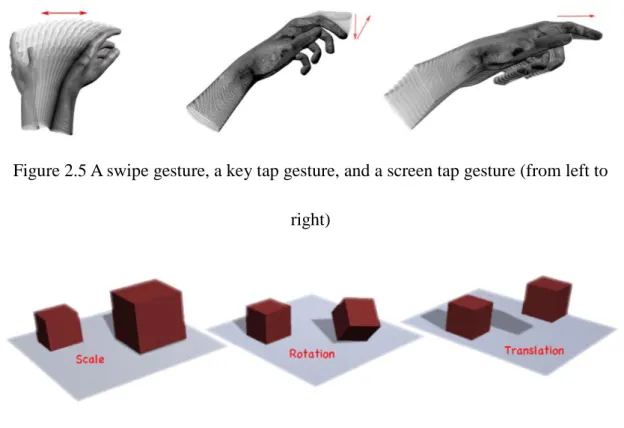
Gestures and Motions The Leap Motion controller also provides another two data models: gestures and motions. Gestures are classified as pre-defined movement patterns, and motions are recognized as the basic types of movements inherent in the change of a user’s hands over a period of time. Representative gestures are swipe, key tap, and screen tap (Figure 2.5), for example, and motions include scale, rotation, and translation (Figure 2.6). By default, the recognition of ‘Gestures and Motions’ is disabled; however, this is a function that can be manually enabled.
Figure 2.5 A swipe gesture, a key tap gesture, and a screen tap gesture (from left to right)
Figure 2.6 The scale motion, rotation motion, and translation motion (from left to right)
Since the tracking data for gestures and motions have not being applied in hand gesture recognition in this project, the gestures and motions model that allows LM to recognize them will be kept disabled. Furthermore, to simplify the recognition inputs, only hands and fingers data will be used in this thesis.
2.1.3
System architecture
The Leap Motion software receives motion tracking data via the USB bus that is connected to the Leap Motion controller device. This data is then transferred to a Leap-enable application. A Leap Motion Software Development Kit (SDK) is provided for the public to develop Leap-enabled applications; this comprises of two
varieties of Application Programming Interfaces (API) in several programming languages including C++, Java, and JavaScript for getting the Leap Motion data from LM software [17].
A native interface is a dynamic library that developers can use to create new, Leap-enabled applications, and a WebSocket interface and JavaScript client library allow users to create Leap-enabled web applications. In this thesis, the writing recognition program uses the native interface through a dynamically loaded library; which will be expanded on later in this paper.
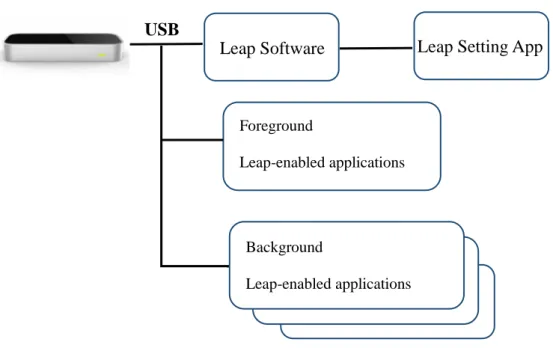
Figure 2.7 Native Application Interface
As shown in Figure 2.7, the Leap Motion application (Leap Setting App) is a Control Panel on Windows that allows users to configure the Leap Motion operations. The Leap Motion software (Leap Motion Service) takes advantage of the dynamically
Leap Setting App Leap Software Foreground Leap-enabled applications Background Leap-enabled applications USB
loaded library which is connected to it, to process information received from the controller and send it to the running foreground Leap-enabled applications by default. The foreground Leap-enabled application can receive the motion tracking data from the software and connect to the software to execute commands using the native library. Unless it receives a request from the application, the software does not send tracking data to a background Leap-enabled applications. Configuration settings for
applications in background are determined by the foreground application [17].
The Leap Motion SDK supports many kinds of commonly used programming languages, such as Unity, C#, C++, and Java, and so forth. Since the Native
Application Interface allows Leap-enabled applications to directly link to the library in C++, it was chosen as the programming language for this project.
2.2
Shorthand
2.2.1
Introduction to shorthand
Shorthand is any system of abbreviated symbolic rapid handwriting that can be used to transcribe the spoken word [18]. Many forms of shorthand exist. A typical
shorthand system uses simplifying symbols or abbreviations for letters and characters, which, for instance, would help a well-trained journalist to accurately speed-write at the rate of the spoken word at press conferences or similar scenarios, without
recorders or computers. Although primarily devised and used to record oral dictation or discourse, some systems of shorthand are used for compact expression; for
example, healthcare professionals use shorthand notes for medical charts and correspondence [19].
The use of simplifying symbols in shorthand makes it easier to record English; this notion is also the case for Leap Motion: abbreviated letters and ‘shorthand’ codes in three-dimensional recognition makes the program easier to use. Moreover, hand gesture recognition using the Leap Motion controller, the simpler strokes are needed so users can avoid long periods of time in an uncomfortable position holding their hands up in the air. In conclusion, shorthand is a better option for inputting than English, and therefore, in this project, it will be applied in the writing recognition program.
2.2.2
Classification
The earliest known indication of shorthand systems is from the Parthenon in Ancient Greece, which lays out a writing system primarily based on vowels, using certain modifications to indicate consonants [20]. Many languages have their own shorthand systems. For example, an abbreviated, highly cursive form of Chinese characters were used for recording court proceedings in Imperial China, and an interest in shorthand
developed towards the end of the 16th century in England [20]. There are a number of different systems currently in use, and according to the shape, these can be classified as geometric, script, and semi-script shorthand.
The first modern shorthand systems were geometric. These are based on circles, parts of circles, and straight line placed strictly horizontally, vertically, or diagonally. Script shorthand was devised based on the motions of ordinary handwriting, and it is
commonly used in countries such as Austria, Italy, and Russia now. Semi-script shorthand is also named Script-Geometric shorthand, and this system is a combination of the geometric systems and the script systems. The Teeline shorthand applied in this project is one example of a semi-script shorthand system. It is the most recommended shorthand method for journalists in the UK and New Zealand [21].
2.2.3
Teeline shorthand
Developed by James Hill in 1968, Teeline shorthand became a widely recognized method based on the English alphabet [22]. Teeline is a system that depends on reducing the letters of the English alphabet to their simplest possible forms, jointing characters together using a streamlined way to transcribe the words. Due to its flexibility and comparatively simple theory, Teeline shorthand gained popularity for its ability to adapt to the individual’s own pattern of use.
Figure 2.8 illustrates the Teeline shorthand alphabet. As can be seen from this
alphabet, some characters are similar to those in the English alphabet, such as ‘c’ and ‘v’, and some characters are far from their original forms like ‘f’ and ‘s’. However, all characters in Teeline shorthand are simple lines (curved or straight), which can be easy and logical to learn, and fast and accurate to use for beginners. The simplicity and understandability of Teeline shorthand are the critical reasons for choosing it for hand gesture recognition in this project, rather than other shorthand systems.
Figure 2.8 Teeline Shorthand Alphabet
In order to take advantage of the Teeline alphabet in the hand gesture recognition program, some revisions of the system were made. A revised version of the Teeline shorthand alphabet is shown in Figure 2.9. In the revised Teeline alphabet, character ‘x’ was modified from two strokes to one stroke, so user just need to do one gesture to draw a ‘x’ like drawing other characters. Furthermore, a new character to represent ‘space’ was added to this revised alphabet, allowing people to insert a space between
the two words they draw by waving this gesture rather than having to move hands to a keyboard and type it in. The arrow beside each character in the Teeline alphabet indicates the direction in which a character should be written. In maintaining this, the input will be formatted and therefore recognized by the program.
Figure 2.9 Revised Teeline Alphabet
2.3
Programming language and analysis software
In the last few decades, various programming languages have been created, superseded, modified or combined; and one of them is the C++ programming language. C++ can be easily understand and developed; it is supported by the LM’s SDK; and its library can be directly linked by the Leap-enabled application; all of the above make it a powerful and effective programming language for this project.
applied using IBM SPSS Statistics 21. It is a highly efficient program that allows users to enter data, run analyses, as well as display results in tables and graphs within a matter of minutes [23, 24]. The benefits of SPSS including effective data
management, wide range of options, and clear output organization, which makes it an effective software for the statistical analyses in this thesis [25].
Chapter 3
Design
3.1
Program algorithm-Dynamic Time Warping
Gesture recognition interprets human gestures by using mathematical algorithms to translate these gestures into computer language; the aim is to enable people and machines to communicate more easily [26]. The hand gesture recognition algorithms can be divided into three main categories: template matching-based algorithms, statistics-based algorithms, and data classification-based algorithms. Dynamic Time Warping (DTW) is a well-known template matching technique with the advantages of simple principle and flexible operation [27]. DTW was originally developed in
automatic speech recognition to cope with different speaking speeds [28, 29], and has been widely used in handwriting recognition, image analysis, and many other fields [30-33].
3.1.1
Euclidean distance
In mathematics, the Euclidean distance is the straight-line distance between two points in Euclidean space.
space, then the distance (𝑑) from 𝑝 to 𝑞, or from 𝑞 to 𝑝 is given by the formula [34]: 𝑑(𝑝, 𝑞) = 𝑑(𝑞, 𝑝) = √(𝑞1− 𝑝1)2+ (𝑞 2− 𝑝2)2+ ⋯ + (𝑞𝑛− 𝑝𝑛)2 = √∑(𝑞𝑖 − 𝑝𝑖)2 𝑛 𝑖=1
3.1.2
Dynamic programming
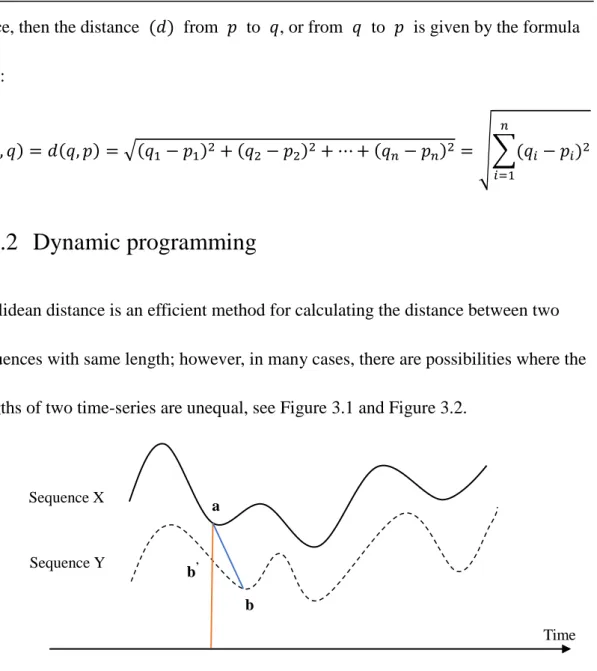
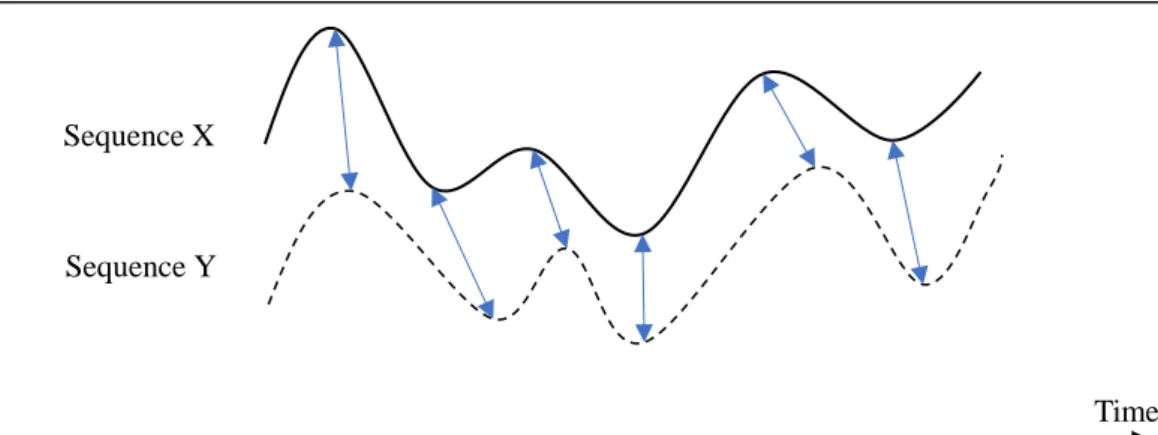
Euclidean distance is an efficient method for calculating the distance between two sequences with same length; however, in many cases, there are possibilities where the lengths of two time-series are unequal, see Figure 3.1 and Figure 3.2.
Figure 3.1 Euclidean distance of two time-dependent sequences X and Y
Sequence X Sequence Y Time a b b’
Figure 3.2 Time alignment of two time-dependent sequences X and Y Sequence X and sequence Y are two similar time-dependent sequences. When using Euclidean distance to decide the distance between X and Y, the corresponding element of 𝑎 in sequence X is 𝑏′ in sequence Y. However, the actual correspond element of
𝑎 in sequence Y is 𝑏. Therefore, Euclidean distance becomes ineffective for
calculating 𝑑𝑖𝑠𝑡𝑎𝑛𝑐𝑒 between two sequences in different lengths. Unlike Euclidean distance, Dynamic Time Warping (DTW) is an algorithm that uses dynamic
programming to find an optimal alignment between two given (time-depend) sequences.
Consider two time-dependent sequences 𝑋 ≔ (𝑥1, 𝑥2, … , 𝑥𝑚) of length 𝑚 ∈ 𝐍 and
𝑌 ≔ (𝑦1, 𝑦2, … , 𝑦𝑛) of length 𝑛 ∈ 𝐍, where 𝑥𝑖 and 𝑦𝑗 are elements at index 𝑖 and
𝑗 in 𝑋 and 𝑌, respectively. Each element can be a vector with dimension 𝐾, which represents a measurement at a certain time or position. In order to align these two sequences, a 𝑛 × 𝑚 matrix needs to be built. The element 𝑑(𝑖, 𝑗) in position (𝑖, 𝑗)
Sequence X
Sequence Y
of this matrix represents the distance between elements 𝑥𝑖 and 𝑦𝑗, it is determined by Euclidean distance: 𝑑(𝑖, 𝑗) = √(𝑥𝑖 − 𝑦𝑗)2. In other words, dynamic programming
is an algorithm that looks for a warping path through numbers of elements in the matrix; the elements are the distances when the 𝑖 − 𝑡ℎ element in 𝑋 is aligned to the
𝑗 − 𝑡ℎ element in 𝑌 [35].
An alignment from 𝑋 to 𝑌 can be represented by a warping path
𝑤 = {𝑤(1), 𝑤(2), … , 𝑤(𝑘), … , 𝑤(𝐾)}, where 𝑚𝑎𝑥(𝑚, 𝑛) ≤ 𝐾 ≤ 𝑚 + 𝑛 − 1. The warping path satisfies the following conditions [36]:
1) Boundary condition: 𝑤1 = (1,1) and 𝑤𝐾 = (𝑚, 𝑛).
2) Monotonicity condition: if one point in the path is 𝑤𝑘−1 = (𝑎′, 𝑏′), then for the next point 𝑤𝑘= (𝑎, 𝑏) in this path, the conditions (𝑎 − 𝑎′) ≥ 0 and (𝑏 − 𝑏′) ≥ 0 are always true.
3) Local continuity condition: if one point in the path is 𝑤𝑘−1= (𝑎′, 𝑏′), then for the next point 𝑤𝑘 = (𝑎, 𝑏) in this path, the conditions
(𝑎 − 𝑎′) ≤ 1 and (𝑏 − 𝑏′) ≤ 1 are always true
Constrained by the three conditions above, there are only three directions for a point to follow at position (𝑖, 𝑗) in a warping path, including 𝑝𝑜𝑠𝑖𝑡𝑖𝑜𝑛(𝑖 + 1, 𝑗),
increase in a sequence, however, the valid warping paths will increase exponentially. For instance, with the distance measure (e.g. Euclidean distance) 𝑑(𝑖, 𝑗), the
accumulated distance 𝐷(𝑖, 𝑗) along warping path 𝑤 can be calculated by [35]:
𝐷(𝑖, 𝑗) = 𝑑(𝑖, 𝑗) + 𝑚𝑖𝑛{𝐷(𝑖 − 1, 𝑗 − 1), 𝐷(𝑖 − 1, 𝑗), 𝐷(𝑖, 𝑗 − 1)} 𝑓𝑜𝑟 1 ≤ 𝑖 ≤ 𝑚, 1 ≤ 𝑗 ≤ 𝑛
The object of DTW is to find the warping path 𝑤, which minimizes the distance
𝐷𝑤(𝑋, 𝑌), and the DTW distance between 𝑋 and 𝑌 is calculated by:
𝐷𝑇𝑊(𝑋, 𝑌) = 𝐷(𝑚, 𝑛)
Typically, when 𝑋 and 𝑌 are more similar to each other, 𝐷𝑇𝑊(𝑋, 𝑌) is smaller; otherwise 𝐷𝑇𝑊(𝑋, 𝑌) will be larger [27].
3.2
Program implementation
In this section, the implementation of the project will be presented. First, a brief introduction to the framework of the project will be illustrated. Following this, two different modes of the program will be detailed. In the third section, the database used in this project will be described. Finally, the interface of the program will be
explained.
3.2.1
Overall design
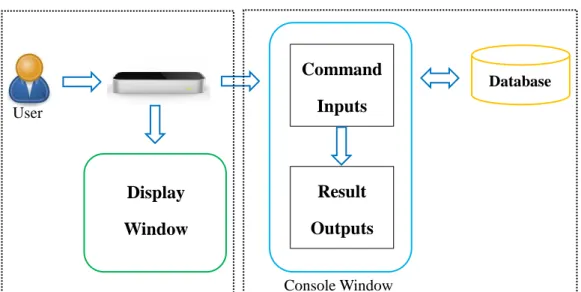
There are five main components of the hand gesture recognition program: the gesture data input by the user, the Leap Motion controller that tracks and records hand
movements, the display window that shows the movement path, the console window that receives commands and gives output, and the database that stores templates for the matching algorithm.
Figure 3.3 Program Overview
Figure 3.3 demonstrates how the program works. It can be divided into two phases. During the first phase, the Leap Motion Controller (LM) captures Teeline shorthand gestures done in the air. The LM detects and records the user’s hand movements and then sends the data to the display window on computer monitor where the user’s hand movement path will be depicted in 2D space. In the second phase, with the hand gestures completed, the user inputs commands using a separate window from the display window called console window. The program will compare the gesture tracking data to the templates in the database and then output a recognition result in English letter(s) to display on the console window. In Recognition mode, the database
Command Inputs Database Display Window Result Outputs User Console Window
includes sample gesture data for analyzing users’ input gestures data. In Edit mode, the program allows users to save gesture information and thus add new templates to the database. These two modes of the program, Recognition mode and Edit mode, will be illustrated in the next two subsections.
3.2.2
Recognition mode
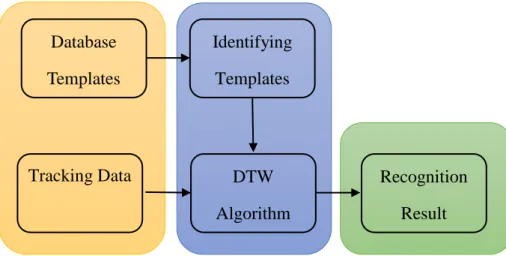
Recognition mode is the core function of the program. In this mode, there are two different input sources: the gesture information drawn by the user, and the database includes templates for matching algorithm. In Recognition mode, only one output is allowed: the recognition result analyzed by the program using the Dynamic Time Warping algorithm. In order to deliver a clear explanation, the program’s work process in Recognition Mode is expounded in Figure 3.4.
Figure 3.4 Recognition Mode
At the beginning of this mode, the program will retrieve each template from the Database Templates Identifying Templates DTW Algorithm
Tracking Data Recognition
Result
database. It matches each letter in English with the corresponding Teeline shorthand gesture template in the database, thus assigning each Teeline shorthand template an English letter as its name. This process can be recognized as the program is
identifying templates. When the user finishes her/his Teeline shorthand gestures, the Leap Motion Controller will record the gesture tracking data and send it to the program as test samples. Following this, the DTW algorithm will be called to compare the similarities of each test sample to each template in the database. The similarities are represented by the DTW distance, and the shorter the distance, the higher the similarity. When the smallest value of the DTW distance between the test sample and a template in database is found, the English letter name of that template will be assigned to the test sample. After the program processes through all the test samples, it will output the name of each sample in sequence as the recognition result.
3.2.3
Edit mode
Some gesture recognition systems suffer from the severe limitation that an end-user is unable to add any new gestures to the pre-existing database of gestures [37]. Such limitations mean the system are unadaptable; users are restricted and cannot
customize the program based on their own habits and preferences, thus lowering its usability. For this reason, several applications sold in Apple App Store have added a function that allows end-users to define new gestures in the application library. For
example, an app called Short Hand by LizzardWerks in the Apple Store allows users to create their own shortcuts. Once installed and programed, the user can type out these shortcuts commands and they will be changed into full words and sentences [38].
Taking the above into consideration, for the purpose of increasing the utility of the program, an Edit mode is designed besides the Recognition mode. This mode allows users to create their own gesture templates and add them into the database for future use.
Figure 3.5 Edit Mode
It can be seen from Figure 3.5, the program’s work process in Edit mode is quite simple. Users design their own gestures with the Leap Motion Controller, which records the tracking data and then sends it to the program. The program saves this tracking data to a file as a template that specified by user using a filename and then outputs it to the database. At the end of Edit mode, a new template is added to the database, and if the new gesture is used again, the template can be identified by the program in the Recognition mode.
User Create Gesture Save Tracking Data New Template in Database
3.2.4
Database
In this project, the database is a folder under the C++ release folder. There are 270 Teeline shorthand templates included in this folder, and every template is a text file. The file contains the movement path for each Teeline shorthand character in the form of points with x-axis and y-axis positions. Recalling Figure 2.9 in Chapter 2, a revised Teeline shorthand alphabet of 27 characters was applied in this project. Therefore, 10 templates are allocated for each Teeline character from “a” to “z” plus a space.
At the beginning of this project, all 270 templates in the database were built by one person: the author. With regard to the technique applied for gesture recognition in this program, Dynamic Time Warping, which yields results by comparing the similarities between templates and test samples. Therefore, there is a need to increase the
diversity of the templates for each Teeline character by building another database by various persons instead of one. A database built by different people includes diverse writing styles, which may help recognize various gesture test samples and increase the recognition accuracy of the program. In the next chapter, however, the building of an additional database by collecting samples from different users will be described; that is, collecting one template for each character in the Teeline alphabet from each person and building a database of 270 samples from ten different people. These two
accuracy of the program, this will be further detailed in Chapter 4.
3.2.5
Implementation flow
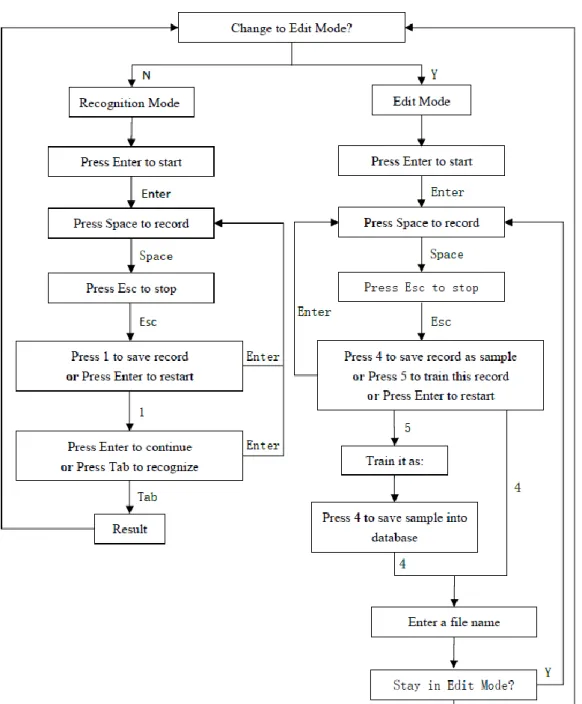
Figure 3.6 gives the flowchart of the whole program:
The whole program executes as shown above. At the beginning of the program, users can choose one of the two modes by pressing “Y” or “N” keys according to their demands. Whether in Recognition mode or in Edit mode, there are several steps that are the same for the users to follow; in other words, both modes need the same input commands, as follows:
Enter command: this command is used for activating the display window on screen.
Space command: this command is used for directing Leap Motion to start to track hand movement and record tracking data.
ESC command: this command is used for stopping the hand tracking and guiding the program to proceed according to the following instructions.
In the Recognition mode, the user can draw one Teeline character at a time and save it temporarily using input command “1”. If the user wants to draw more than one
character, she needs to input the “Enter” key again to draw the next character and followed by “1” to save the next record until all characters the user intends to draw have been completed. The total number of characters drawn is displayed on the console window by inputting the “Tab” and the recognition results will be given as well.
In Edit mode, there are three options for the user after s/he creates a new gesture. By inputting command “4”, the program will guide the user to save the record as a template in the database; and the user will need to name the new template file. Command “5” gives the user access to train the new gesture template, which allows the user to assign a meaning (an English letter or word) to the new gesture.
Furthermore, command “5” is followed by command “4”, which means the user is still asked to save it into database. If the user is unsatisfied with the gesture, the “Enter” key command allows the user to discard it if preferred. If the user intends to add more than one new gesture into the database, s/he only needs to input “Y” after the prompt “stay in Edit Mode”, and then repeat the above steps.
3.2.6
Program interface
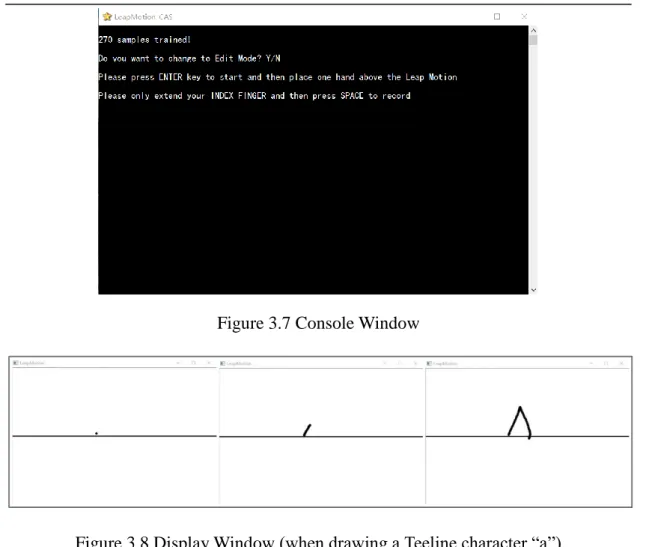
The program interface consists of two parts: the console window and the display window. They are illustrated in Figure 3.7 and Figure 3.8 respectively.
Figure 3.7 Console Window
Figure 3.8 Display Window (when drawing a Teeline character “a”)
Using the console window in Figure 3.7, users are able to input commands to control the flow of the program and read the recognition result at the end. The hand gestures are made in the air using the motion control device and are consequently invisible; the display window, therefore, is needed for users to monitor their hand movements and help them finish the gestures. The user’s hand movement path is illustrated in the Display Window, Figure 3.8. The line on this window is a reference line correspond to the line on Figure 2.9, which helps the user decide the position of each Teeline
shorthand character. The little black point on the screen is like a penpoint indicating the position of the user’s index fingertip. When the Space key command is received
by the program, the display window will show the user’s hand movement path as the user drawing Teeline gestures. The action mimics the behavior that drawing on the screen, but without the user actually touching the screen itself. When a gesture is done and the “ESC” key command is received by the program, the display window will only show the path that the user just drew. Until the next “Enter” key command is made and user put their hand above the Leap Motion, the display window will be immediately refreshed as in Figure 3.8.
Chapter 4
Evaluations
In user-centered interaction design, usability testing is a technique to evaluate a product or system by running trials with users. This gives designers the opportunity to see how end-users interact with a product or system, and is thus an irreplaceable usability practice [39]. Usability testing focuses on measuring a human-made application’s capacity to meet its intended purpose. The crucial objective for a hand gesture recognition system like the one in this project is to correctly recognize users’ gestures. For this program, the most important aspect of the usability test is testing recognition accuracy.
4.1
Testing preparation
In order to test the recognition accuracy of the program in this project, a number of users will try out the application and evaluate the system. The usability testing will be conducted at Laurentian University, and students will be recruited as the participants of the experiments. According to the requirements of the Office of Research Services, all research involving human subjects that is conducted at Laurentian University must be reviewed and approved by Laurentian University Research Ethics Board (LU’s REB) in advance to ensure compliance with the highest ethical standards of the
Tri-Council Policy Statement (TCPS).
Before proceeding with the usability testing, a few documents about the project were submitted to LU’s REB for consideration. The documents included the research proposal, and the ethics form that describes the potential risks and benefits to human participants. The documents were reviewed by the REB and an approval letter for this usability test was issued (Appendix 2).
4.2
Questionnaire
Questionnaires are one of the most important parts of the market research process. They are the means by which the responds of target respondents are transformed into quantifiable variables, and they are the measuring device for things that are not directly observable [40]. For this project’s usability test, a questionnaire will be used to collect the participant’s background information and related experience on games and motion control products; the information collected will be helpful for further comparison and analysis among all participants to find out the relation between users’ experience and the recognition accuracies.
Following the suggested questionnaire design principles (see [41-44]), and based on the information the testing was required to collect, a questionnaire was designed for
the experiments in this paper (Appendix 3). Concentrating on the participants, the questionnaire focused on five categories: their English capability (Q1-Q2), their demographic profiles (Q3-Q7), their knowledge of shorthand (Q8-Q9), their experience of video games (Q10), and previous experience with any kinds of
gesture-controlled products (Q11-Q13). All the questions were closed-ended questions, except for Question 3, which inquired about the program the participant is in. All questions were organized into groups based on categories and were ordered in a logical sequence.
The first two questions were designed to see if the participant would be able to use the program independently, since the prompts on the console window are in English and the participant would need to input commands according to the different prompts.
The demographic profile of the participants includes their program, age range, gender, mother tongue and dominant hand, all of which will be used for classifying
participants into various groups to compare the differences in program recognition accuracies. The target responders of this project are students at LU, therefore age has been broken up into eight balanced groups, with each group having a five-year range. The mother tongue information will indicate participants’ normal writing habits, such as from left to right or from right to left. A participant’s dominant hand is crucial
information to analyze if the program is accommodating to both right-handed and left-handed people.
This project’s hand gesture recognition program uses Teeline shorthand; therefore, it is necessary to collect data regarding the participants’ experience with shorthand. The data will be applied in analyzing whether the program can accommodate to new as well as experienced shorthand users.
Much of psychological research has been focused on the negative aspect of gaming effects (see [45-47]), but Isabela Granic has suggested that people may need a more balanced perspective to understand the influences of video games [48]. Some authors have focus on exploring both the positive and negative effects of video games, and the authors found that playing video games benefits people in several ways [48, 49]. In comparison with those who do not play video games at all, people who play
experience cognitive benefits, motivational benefits, emotional benefits, and social benefits [48]. Thus, Question 10 was included in the questionnaire to test that whether people who play video games will better handle the program (gain higher recognition accuracy).
questions of the questionnaire are related to the participants’ experience with gesture-based interfaces and motion control technology. Data collected from these questions will be used to validate that whether or not the more experience a user has with gesture interfaces or motion control devices, the easier the program is for him/her to use and the more accurate the recognition result will be.
In total, the questionnaire consists of 13 questions, each of which should be easily answered, so the predicted time for completion is 5 minutes. This duration is long enough for participants to fill the questionnaires and does not take up too much of the whole experiment’s time, which is acceptable for the usability testing.
4.3
Pilot testing
4.3.1
What is pilot testing?
‘Pilot testing’, also referred to as a ‘pilot experiment’ or ‘pilot study’, is a small-scale trial, where a few participants take the test and comment on the mechanics. It is a quick and convenient way to evaluate feasibility, time, cost, adverse events, and statistical variability in an attempt to predict an appropriate sample size and improve upon the study design prior to performing a full-scale research project [50].
If the conductor will run a usability test for the first time;
If the conductor will test an unfamiliar subject area;
If a remote, unmoderated study needs to be conducted;
If a high-visibility project will be involved in the test;
If conductor is prepared to work on a one-shot research project.
Not only the novel practitioners, but also veteran usability practitioners can benefit from running pilot tests.
4.3.2
Conducting the pilot testing
In order to find out if the tasks are clear in the experiment, if the data collected from the tests can be used, and how much time to schedule for testing one user, a few pilot experiments were conducted prior to the full-scale study.
For the pilot testing, four participants from Laurentian University were recruited; two females and two males, from different departments including Science Communication, Computational Science and Business Administration. Three participants were in age range of 21-25 years old and one participant was in the age range of 26-30 years old. Participants were tested one by one, each one given the same tasks in the same order throughout the whole process.
Based on the pilot studies, the average time for participants to complete all the tasks was about 30 minutes. Each participant had to complete the following tasks: reading a consent form and completing a questionnaire (about 10 mins), looking at the Teeline shorthand alphabet and practicing doing gestures using Leap Motion controller (about 5 mins), and recoding Teeline characters using the program (15 mins). Depending on the participant’s practice time and their speed, each test duration varied slightly. In addition, the following deficiencies were also found after the pilot tests:
For most people who do not know about shorthand, Question 8 in the questionnaire seems unclear for them to answer;
Since the program needs keyboard inputs as well as gesture control, new
obstacles were brought about, wherein users had to execute the correct commands in order to keep the program running fluently; for instance, the program’s
response did not meet the user’s expectation if no/incorrect commands were given to the program;
The input method of the laptop affects the operations of the program.
Some modifications were made to solve the problems found in pilot testing:
Being present when the participants filled out the questionnaire and explaining the meaning of shorthand to them in detail;
Connecting an extra keyboard to the laptop so that command inputs can be done by the conductor instead of the participants, this allowing participants to focus on drawing gestures alone;
Ensuring the input method is in English before starting the experiment. The changes listed above were applied in the full-scale experiments which will be described in next two subsections.
4.4
Experiment I
4.4.1
Objective
The objective of Experiment I is to test the influence sample size in the database has on the recognition accuracy of the program. As stated in subsection 3.2.4 Database, for this project one database (Database 1) has already been built. It contains10 samples for each symbol in Teeline alphabet (Figure 2.9), for a total of 270 samples for the 27 Teeline characters. In order to compare the difference between the
recognition accuracies using different databases, another database will be built by the researcher using samples from population. Both databases will be applied in this experiment, and the next experiment in section 4.5 Experiment II.
4.4.2
Hypotheses
processed and identified in Recognition mode and then compared to the user inputs to obtain a recognition result. Two databases are used in this project, and they have the same properties, but differ in the writing styles. The database built by one individual has all the samples in a unified style since it was created by one person. However, the database of templates made by the population has ten different styles of writing each character from ten individuals. As a result, the following hypotheses arose:
Hypothesis 1: The more templates the database includes for matching algorithm, the higher the program recognition accuracy will be;
Hypothesis 2: There is an optimal sample size for each Teeline character, so that the recognition accuracy remains nearly constant even when the sample size for each character increases past that number in the database;
Hypothesis 3: The source of the templates in the database will not significantly affect the optimal sample size.
In order to verify the above hypotheses, the process of Experiment I is illustrated in subsection 4.4.3 Methodology.
4.4.3
Methodology
Eleven participants were recruited for Experiment I. In the first part of Experiment I, the first ten participants were asked to create templates for each Teeline shorthand
character to build a database; and in the second part of Experiment I, one participant was recruited as the tester to evaluate the hypotheses mentioned in subsection 4.4.2 Hypotheses.
Ten out of eleven practitioners will independently accomplish the same tasks step by step as follows:
1. Read through a consent form and sign it if s/he agrees to participate. 2. Fill out the questionnaire (Appendix 3).
3. Review the Teeline shorthand alphabet as in Figure 2.9 (the alphabet was reproduced in a large-sized font, and attached to the wall or placed on the participant’s table as desires)
4. Practice drawing Teeline gestures using Leap Motion controller to get familiar with the LM’s sensing area and the program’s running process.
5. Draw one Teeline character at each time, which the conductor will save to the new database (Database 2); only one sample is needed from each person for each character. Once all 27 Teeline shorthand symbols have been completed and saved, the participant will have completed Experiment I.
In the first part, five females and five males were recruited to be the first ten
Economics, Business Administration, Computational Science, Biomedical Biology, Chemical Engineering, Mining Engineering, Zoology and Ecology. All of the
participants’ English skills were good enough to successfully carry out the tasks of the experiment. The ages of the participants ranged from 16 to 25, with the exception of one participant, whose age range was 31 to 45. All of the participants were
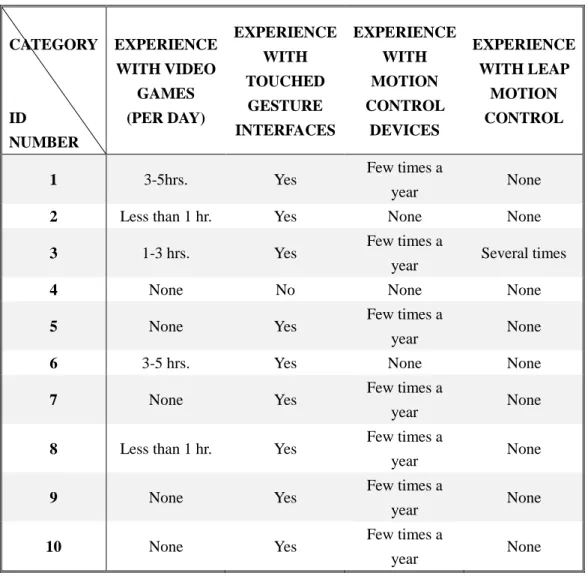
right-handed, and none of them previously knew or had used any form of shorthand. The other data collected from their questionnaires has been summarized in Table 4.1 below.
Table 4.1 Data Collected from Questionnaires CATEGORY ID NUMBER EXPERIENCE WITH VIDEO GAMES (PER DAY) EXPERIENCE WITH TOUCHED GESTURE INTERFACES EXPERIENCE WITH MOTION CONTROL DEVICES EXPERIENCE WITH LEAP MOTION CONTROL
1 3-5hrs. Yes Few times a
year None
2 Less than 1 hr. Yes None None
3 1-3 hrs. Yes Few times a
year Several times
4 None No None None
5 None Yes Few times a
year None
6 3-5 hrs. Yes None None
7 None Yes Few times a
year None
8 Less than 1 hr. Yes Few times a
year None
9 None Yes Few times a
year None
10 None Yes Few times a
year None
All of the information collected from Question 10 to Question 13 in the questionnaires is listed above. The first column of the table represents the
participant’s ID, which was given based on the order in which they took part in the experiment, while the other columns represents their answers for specific questions. In Experiment I, the records of all ten participants were used as the templates in Database 2 rather than as test samples. Therefore, the information provided in the second column, which details each participant’s experience playing video games
(Question 10), is not particularly relevant and will not be referred to within this subsection. After observing the data, the answers that were provided for Questions 11 to 13 were quite similar across participants. The answers provided regarding
participants’ experience with motion control devices, which were “few times a year” and “no experience”, both mean that they had very little experience in this aspect. It can then be concluded that those individuals who built Database 2 have all had prior experience carrying out gestures on a touch-screen device, although they are novices to shorthand and motion control products, specifically, the Leap Motion controller. From now on, this research will regard Database 1 having been built by an
experienced user (in both two aspects including manipulating motion control product and using shorthand), whereas Database 2 will be considered to have been created by novice users.
The new database (Database 2) had the same total number of samples as the older database (Database 1). The eleventh participant in Experiment I was recruited to test the performance of the program using the different databases. The tester was asked to do the following tasks:
1. Read through a consent form and sign it if s/he agrees to participate. 2. Fill out the questionnaire (Appendix 3).
4. Practice drawing Teeline gestures using the Leap Motion controller to get familiar with the LM’s sensing area and the program’s running process.
5. Draw each Teeline character ten times; the record will be saved by the conductor.
In the second part, the eleventh participant was independent of any of the templates in the two existing databases. In other words, no sample created by the participator was in any of the two databases. The questionnaire reveals that the eleventh participant has had no prior experience with Teeline shorthand or the Leap Motion controller.
Once the tester finished all 27 characters, there were 270 test samples in the records. The recognition accuracies of the program using each of the databases were evaluated as shown in Figure 4.1.
Figure 4.1 Evaluation Process in Experiment I Initial Database 1, Database 2
Ten Records for a Teeline character
Recognizing using templates using Database 1
Recognizing using templates using Database 2 Recognition Result 1
Recognition Result 2 Move to next character
All 27 characters recognized, add one sample for each character using Databases 1 and Database 2
As seen in Figure 4.1, the 27 Teeline characters are recognized separately. The two initial databases include only one template for each character, that is, 27 samples in total in each database at first. The initial databases were used to recognized 10 test samples for each Teeline shorthand character done by the eleventh participant from ‘a’ to ‘z’ plus ‘space’. The recognition results were recorded and the accuracies are obtained. Then one more sample is added for each Teeline character using Database 1 and Database 2 respectively (a total 54 samples in each database), and the recognition process above is repeated. These final recognition accuracies are obtained until there are 10 samples for each character in the two databases, and the loop was ended. Following this procedure, the recognition accuracies of each Teeline shorthand characters at various database sample sizes (from 27 to 270) using two different databases are recorded. The results will be addressed in next subsection.
4.4.4
Results
The test samples that were drawn by the eleventh participant in Experiment I were recognized using Database 1 and Database 2 with a gradually increasing number of template gestures included. The recognition accuracies are listed in Table 4.2 and Table 4.3.
Table 4.2 Variation in Recognition Accuracy with Increasing Sample Size using Database 1 Sample Size Character 1 2 3 4 5 6 7 8 9 10 A 50% 50% 50% 60% 60% 100% 100% 100% 100% 100% B 80% 80% 70% 60% 70% 80% 80% 90% 90% 90% C 0% 0% 20% 70% 90% 80% 80% 90% 90% 80% D 10% 40% 70% 80% 90% 90% 90% 100% 100% 100% E 40% 40% 80% 90% 80% 80% 90% 90% 90% 100% F 20% 20% 50% 60% 80% 90% 90% 90% 90% 90% G 90% 90% 100% 100% 100% 100% 100% 100% 100% 100% H 100% 80% 90% 90% 90% 100% 100% 100% 100% 80% I 90% 100% 90% 100% 100% 100% 100% 100% 100% 100% J 70% 90% 90% 100% 100% 100% 100% 100% 100% 100% K 100% 90% 40% 20% 40% 50% 30% 20% 80% 90% L 100% 100% 100% 100% 90% 100% 100% 100% 100% 100% M 0% 40% 30% 20% 40% 40% 100% 100% 100% 100% N 80% 80% 90% 90% 90% 90% 100% 100% 100% 100% O 40% 70% 70% 80% 80% 80% 80% 80% 80% 80% P 90% 90% 100% 90% 90% 90% 90% 90% 90% 90% Q 100% 100% 100% 100% 100% 100% 100% 100% 100% 100% R 100% 100% 100% 100% 100% 100% 100% 100% 100% 100% S 70% 80% 90% 100% 100% 100% 100% 100% 100% 100% T 60% 60% 60% 60% 60% 60% 60% 60% 60% 60% U 90% 100% 100% 100% 100% 100% 100% 100% 100% 90% V 20% 70% 40% 70% 90% 100% 100% 100% 100% 100% W 100% 100% 100% 100% 100% 100% 100% 100% 100% 100% X 100% 100% 100% 100% 100% 100% 100% 100% 100% 100% Y 100% 80% 90% 90% 90% 90% 90% 90% 90% 90% Z 60% 60% 50% 70% 80% 90% 90% 90% 90% 90% Space 100% 70% 90% 90% 90% 100% 100% 100% 100% 100%
Table 4.3 Variation in Recognition Accuracy with Increasing Sample Size using Database 2 Sample Size Character 1 2 3 4 5 6 7 8 9 10 A 50% 60% 70% 70% 70% 70% 70% 70% 70% 100% B 50% 70% 80% 80% 80% 80% 90% 80% 80% 70% C 60% 70% 80% 80% 80% 90% 90% 100% 100% 100% D 20% 70% 100% 90% 90% 100% 100% 90% 90% 90% E 60% 70% 70% 70% 70% 80% 80% 80% 80% 80% F 80% 80% 90% 90% 90% 90% 90% 90% 90% 90% G 0% 40% 20% 80% 50% 50% 50% 50% 60% 70% H 10% 10% 30% 70% 100% 100% 100% 100% 100% 100% I 50% 100% 90% 90% 100% 100% 100% 100% 100% 100% J 0% 100% 100% 100% 100% 100% 100% 100% 100% 100% K 0% 50% 80% 100% 100% 100% 100% 100% 100% 100% L 50% 30% 70% 100% 100% 100% 100% 100% 90% 90% M 40% 50% 80% 90% 100% 100% 100% 100% 100% 100% N 60% 50% 100% 90% 100% 100% 100% 100% 100% 100% O 50% 70% 60% 50% 60% 70% 70% 80% 80% 80% P 70% 80% 30% 60% 40% 10% 80% 80% 90% 90% Q 100% 100% 100% 90% 90% 90% 90% 100% 100% 100% R 100% 100% 100% 100% 100% 100% 100% 100% 100% 100% S 60% 60% 60% 60% 70% 100% 100% 100% 100% 100% T 100% 100% 100% 100% 100% 100% 100% 100% 100% 100% U 100% 100% 100% 100% 100% 100% 100% 100% 100% 100% V 90% 90% 90% 100% 100% 100% 100% 100% 100% 100% W 100% 100% 100% 100% 100% 100% 100% 100% 100% 100% X 100% 100% 100% 100% 100% 100% 100% 100% 100% 100% Y 70% 70% 70% 70% 100% 90% 100% 100% 100% 100% Z 10% 10% 20% 20% 20% 50% 50% 60% 70% 70% Space 100% 100% 90% 80% 90% 90% 90% 90% 90% 90%
The first columns in Table 4.2 and Table 4.3 list all of the 27 characters in the Teeline shorthand alphabet, and the first rows of the tables represent the number of templates for each character in the two databases. For example, the “1” represents that there was
only one sample for each Teeline character using Database 1 and Database 2,
respectively, while the “10” represents that there were ten templates for each Teeline character in each of the two databases. Since there were ten test samples generated by Participant 11 for each Teeline character, the recognition accuracy for each character at each sample size is calculated by the following equation:
𝐴𝑐𝑐 = (the number of the correctly recognized test samples 10⁄ ) × 100%.
In order to verify the hypotheses in subsection 4.4.2 Hypotheses, and examine the true nature of the relationship between the recognition accuracies and the sample size for each character, the data in Table 4.2 and Table 4.3 were imported to SPSS to be analyzed. The scatter plots are displayed in Figure 4.2 and Figure 4.3.
Figure 4.2 Variation in recognition accuracy with increasing number of templates using Database 1
Figure 4.3 Variation in recognition accuracy with increasing number of templates using Database 2
Since the shapes of the points in the two figures above are similar to ellipses, the relationship between the recognition accuracies and the sample sizes for each Teeline shorthand character is linear, and the linear relation between them will be further confirmed and discussed in Chapter 5.
4.5
Experiment II
4.5.1
Objective
The aim of the second experiment is to test the recognition accuracy of the program. As previously mentioned, accuracy is the most significant property of a hand
recognition program; it is the crucial factor in evaluating the utility, and usability of a product. The two databases applied in Experiment I will be used in this experiment as well. To test the recognition accuracies for all the characters in the database, a
pangram is an ideal choice for this study. Experiment II will use the 35-letter pangram: “The quick brown fox jumps over the lazy dog”.
4.5.2
Hypotheses
In this second test, one sentence in Teeline shorthand is recognized using two
databases. The databases were already introduced in section 4.4 Experiment I. Based on the fact that Database 1 and Database 2 have the same properties except for the sample source, the hypotheses are made as follows.
Hypothesis 1: The recognition accuracies have no significant difference between different sourced databases used in the program.
Hypothesis 2: It is consistent when comparing the program’s performance (overall
recognition accuracies) for users in different groups
4.5.3
Methodology
For Experiment II, 30 participants were recruited. Each participant was asked to write the pangram in the Teeline shorthand alphabet once. The gestures drawn by each participant were recorded and recognized using Database 1 and Database 2
and a Leap Motion Controller attached to it; all were placed in front of the
participants. Participants were seated at the table and had the Leap Motion Controller placed directly in front of them. The Teeline shorthand alphabet was either placed on the table beside the laptop or attached on the wall for participants’ convenience. The space between words is a separate character, and also need to be drawn as part of the Teeline alphabet; therefore, participators have a total of 43 Teeline shorthand gestures to draw to complete the pangram. The tasks that they performed are as follows: 1. Read through a consent form and sign it if s/he agrees to participate.
2. Fill out the questionnaire (Appendix 3).
3. Review the Teeline shorthand alphabet as in Figure 2.9 (the alphabet was reproduced in a large-sized font, and attached to the wall or placed on the participant’s table as desires)
4. Practice drawing Teeline gestures using Leap Motion controller to familiarize themselves with the LM’s sensing area and the program’s running process
5. Write the whole pangram in Teeline shorthand alphabet, drawing one character at a time from the beginning to the end.
All 30 participants were randomly selected, and they came from sixteen different programs including Biomedical Biology, Computational Science, Economics, Health Promotion, Philosophy, Science Communication, and Mathematics, and others. There
were 27 right-handed participants involved in this research, while the other three tended to use their left hand more frequently when carrying out tasks. All of the participators had no prior knowledge about shorthand, as well as no experience with the Leap Motion Controller. Other information collected from questionnaires for all participants were illustrated from Figure 4.4 to Figure 4.7.
Figure 4.5 Gender of participants
Figure 4.7 Participants’ Experience Interacting with Motion Control Devices
It can be concluded from observing the above charts that there were an equal number of female and male participants. Ten participants were aged between 16 to 20, sixteen participants were aged between 21 to 25, three participants were aged between 26 and 30 and one participant is aged between 26 and 30. Out of the participants, twelve had never played video games, nine played video games for a maximum of one hour per day on average, six averagely spent one to three hours on video games per day, while three participants claimed to play video games for longer than three hours each day on average (two of them played three to five hours and one took over five hours to play each day on average). With regard to their experience with motion control devices, 22 out of the 30 participants had previously tried motion control devices (17 participants played them several times a year, 4 participants played on a monthly basis, and 1