The following paper was originally published in the
Proceedings of the Twelfth Systems Administration Conference (LISA ’98)
Boston, Massachusetts, December 6-11, 1998
For more information about USENIX Association contact:
1. Phone:
510 528-8649
2. FAX:
510 548-5738
3. Email:
[email protected]
4. WWW URL: http://www.usenix.org
Mailman:
The GNU Mailing List Manager
John Viega, Reliable Software Technologies
Mailing List Manager
John Viega
– Reliable Software Technologies
Barry Warsaw and Ken Manheimer
– Corporation for National Research Initiatives
ABSTRACT
Electronic mailing lists are ubiquitous community-forging tools that serve the important needs of Internet users, both experienced and novice. The most popular mailing list managers generally use textual mail-based interfaces for all list operations, from subscription management to list administration. Unfortunately, anecdotal evidence suggests that most mailing list users, and many list administrators and moderators are novice to intermediate computer users; textual interfaces are often difficult to use effectively.
This paper describes Mailman, the GNU mailing list manager, which offers a dramatic step forward in usability and integration over other mailing list management systems. Mailman brings to list management an integrated Web interface for nearly all aspects of mailing list interaction, including subscription requests and option settings by members, list configuration and Web page editing by list administrators, and post approvals by list moderators. Mailman offers a mix of robustness, functionality and ease of installation and use that is unsurpassed by other freely available mailing list managers. Thus, it offers great benefits to site administrators, list administrators and end users alike. Mailman is primarily implemented in Python, a free, object-oriented scripting language; there are a few C wrapper programs for security.
Mailman’s architecture is based on a centralized list-oriented database that contains configuration options for each list. This allows for several unique and flexible administrative mechanisms. In addition to Web access, traditional email-command based control and interactive manipulation via the Python interpreter are supported. Mailman also contains extensive bounce and anti-spam devices.
While many of the features discussed in this paper are generally improvements over other mailing list packages, we will focus our comparisons on Majordomo, which is almost certainly the most widely used freely available mailing list manager at present.
Introduction
Electronic mailing lists often have humble begin-nings: someone collects a list of email addresses of like-minded people, and these people begin sending email to each other using an explicit distribution list. This type of simple list is fairly easy for a novice to start, and in fact many end-user mail applications let people easily set up such distribution lists.
Often however, such mailing lists will grow and evolve, gaining and losing members while existing members’ addresses change over time. As they do, explicit lists of addresses become extremely unwieldy. List administrators quickly tire of adding and remov-ing subscribers manually, and answerremov-ing email per-taining to the list. As a result, administrators generally turn to mailing list management software to automate the process.
The first generation of mailing list managers automated tedious administrative functions such as subscribing and unsubscribing from mailing lists, as well as many of the other common requests, such as getting background information on a list, and getting a list of subscribed members. They also allowed for lists
to be administered via an email interface, so that list administrators would not need to have direct access to the machine on which the list software ran.
However, this generation of mailing list manage-ment software has traditionally been quite complex; users are often unable to figure out how to get on or off a list, leading to many messages along the lines of ‘‘please unsubscribe me.’’ List administrators often find it time consuming and difficult to perform admin-istrative tasks by email, especially when editing spe-cial message headers is required, as is the case with approving held messages in Majordomo. In fact, many of the most popular mail user agents (MUAs) of today (including the Netscape mail reader) make it fairly dif-ficult for the user to edit arbitrary headers. System administrators frequently have a difficult time setting up such software, especially when many commonly desired features such as list archiving are only avail-able as third-party add-ons, if at all.
Mailman is helping to pioneer the second genera-tion of free mailing list managers. While even three years ago email messages were the only reasonable user interface that would make mailing lists accessible
Mailman: The GNU Mailing List Manager Viega, Warsaw, and Manheimer
to every Internet user, today the World Wide Web is generally considered ubiquitous. In fact, the Web offers a high level of familiarity and usability for mail-ing list users, who are typically at least as experienced, if not more so, at browsing the Web. Considering the frequency with which most users interact with the administrative interface of a mailing list, using a Web form that presents all the options is much less of a bur-den than having to learn or relearn an arcane syntax for mail commands. Ironically enough, instructions for interacting with mailing lists are commonly found on Web pages.
Functionality Overview
Mailman’s primary distinction from other mail-ing list managers is its Web interface, which is dis-cussed in the following section. However, in addition to having all of the features people expect from a list management system, such as digests and moderators, Mailman integrates a rich set of general-purpose fea-tures.
One such feature is automatic bounce handling. Much like the SmartList mailing list manager [Sma98], Mailman looks at all delivery errors, and uses pattern matching to figure out which email addresses are bouncing. By default, once the number of bounces from an address reaches a configurable threshold, the address becomes disabled, but not removed. The administrator is then sent a message and can decide whether the address should be re-enabled or removed. However the administrator could set the list to be more aggressive, automatically removing addresses after a certain number of bounces. We have examined several thousands of bounce messages received while administrating Majordomo-based lists, from which we determined the current set of patterns.1Applying these patterns to bounces has a
two-fold benefit: we do not need to answer ‘‘-request’’ mail, and we rarely need to handle bounce disposition manually. On large lists, this automation can be impor-tant, as bounced email can easily produce 10 to 100 times as much email as actual list submissions [Lev97].
Mailman also contains several anti-spam devices that significantly reduce the amount of spam that reaches end users. First, member addresses are not presented in a form that traditional spammer-launched webcrawlers will recognize. For example mail-man__at__list.orgwould be used in href links, while in displayed text, spaces would replace the
__at__.
Second, Mailman’s delivery scripts apply a num-ber of configurable and extensible filters to the incom-ing message, such as requirincom-ing the list address to be
1Bounce patterns are based on regular expressions, and are
not currently extensible without editing the Mailman source code.
named in the To: or Cc: fields, or rejecting messages from known spam sites. These, as well as other mea-sures, have proven to be very effective in preventing most spam from reaching the list, while still allowing valid messages to propagate.
Mailman also offers integrated support for many things that have traditionally been provided in add-on packages, or have required hacking with other list management software. Mailman is distributed with such features as archiving of messages sent to a list, fast bulk mailing by multiplexing SMTP connections, multi-homing for virtual domains and gating mail to and from NNTP news groups. Mailman also uses the GNU autoconf tool to make the setup process easy; in contrast, the Majordomo maintainers admit that Majordomo is difficult to install [Bar98].
Thus, Mailman is able to provide a system administrator with a mailing list manager that is not only easy to install, but also is easy to use at every level, and includes the major pieces of functionality a list administrator might want without requiring addi-tional searches and downloads.
Web Interfaces to Mailing Lists
While Mailman does provide Majordomo-like mail-based commands for compatibility, we downplay this, as we feel that a good Web-based user interface is much more desirable to the majority of users. Our Web-based interface allows for full access to all of Mailman’s features, including subscription and option requests, browsing lists on the same (potentially vir-tual) host, viewing Web-based Hypermail-like archives, etc.
There are many third-party Web front-ends to Majordomo [Bar98]. However, most of them are little more than simplistic interfaces to subscribing and unsubscribing. The most notable exception is Major-Cool [Hou96], which additionally provides end users with a way of browsing all mailing lists on a machine, as well as a full-featured interface to the list configura-tion. However, MajorCool suffers from several usabil-ity problems, all of which are addressed by Mailman.
First, MajorCool has the problem that malicious users can subscribe and unsubscribe other people from mailing lists over the Web. Mailman, on the other hand, requires confirmation emails for subscriptions. For unsubscribing, users must enter a password into a CGI field, which can be generated by Mailman, and delivered to the subscribed email address on request.
Second, MajorCool requires that it and an HTTP server must be co-located on the machine running Majordomo and Sendmail [Hou98]. In contrast, Mail-man has been tested with a mail transport and Web server running on separate machines in an NFS envi-ronment, and has been tested with the transport, Web server, and Mailman all running on separate machines, where Mailman scripts are run via rsh or ssh.
Third, MajorCool’s interaction with end users is limited. Its goal with respect to end users is to give them a way to browse all the lists on a machine, not to provide a nice Web-based mechanism for interacting with the mailing list. Mailman provides full support for editing options such as the digest mode on both a per-list and per-user basis and whether posts to a list should be sent back to the user. List member email addresses can also be kept completely private by sup-pressing their visibility on the subscriber list Web page.
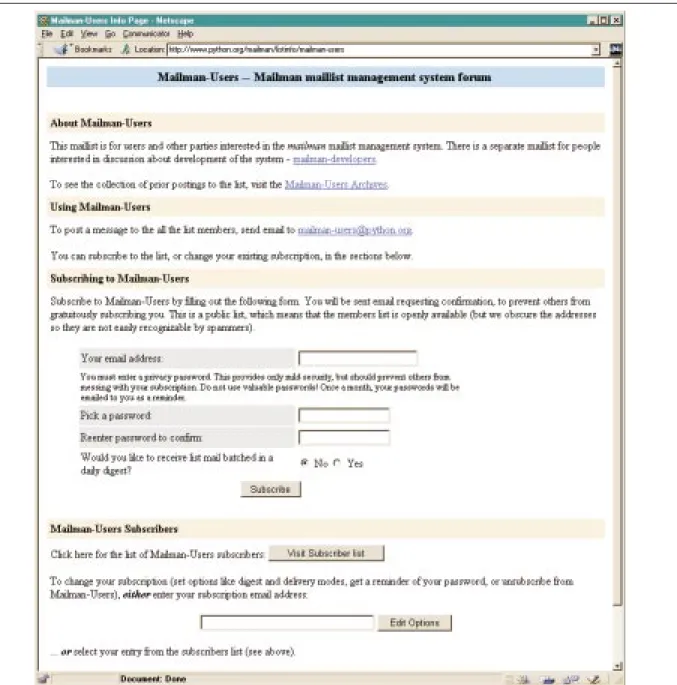
Figure 1: Web subscription and general list information page. Finally, MajorCool’s administrative interface is
mainly geared towards interfacing to the traditional Majordomo configuration. In contrast, many of Mail-man’s administrative options allow for customization
of the list’s Web interface. In fact, Mailman also allows the list administrator to provide a ‘‘real’’ Web page for his mailing list, and he can edit HTML tem-plates for this page via a password protected Web-based interface. MajorCool essentially lacks the notion of each list having its own home page.
Example
Figure 1 shows a screen shot of part of the Web subscription and general list information page for a Mailman mailing list.2 All of the presented
2This and other screenshots in this paper were generated by
Mailman 1.0b4. Some of the details may have changed since the time of writing.
Mailman: The GNU Mailing List Manager Viega, Warsaw, and Manheimer
components are configurable by the list owner, includ-ing the list description shown in the title banner, as well as the HTML displayed in the ‘‘About’’ section. While these are easily changed by setting options on the list administration page, in fact the list owner can actually edit the full HTML template from which this page is generated. Thus the list owner can rearrange sections, and even omit standard boilerplate text, such as might be necessary if a list was configured not to provide archives, or if postings were completely dis-abled.
Note that when subscribing, a user must pick a password. This password is used by members when they change their subscription options. Password reminders are periodically mailed to members.
Subscribing users also have the option of receiv-ing messages as they are delivered to the list, or batched in digest form. The list owner can enable or disable digests on a per-list basis, and set other digest parameters. Of course, users can easily switch from receiving individual postings to receiving digests via their personal options Web page. This is useful for when a user goes on vacation and wants to continue to receive mailing list traffic, but wants the impact on their mailbox to be minimized.
The general information page also contains but-tons to view the list of subscribers (for public lists; individual members can still opt to remain unpubli-cized), and to edit an existing member’s list options.
Architecture
Mailman is written almost completely in Python [Pyt98], a freely available, object-oriented scripting language. There are a few C wrapper programs for security purposes. Mailman currently requires at least Python 1.5, which is freely available in both source and (for many platforms) binary form at http://www.python.org/.
System Architecture
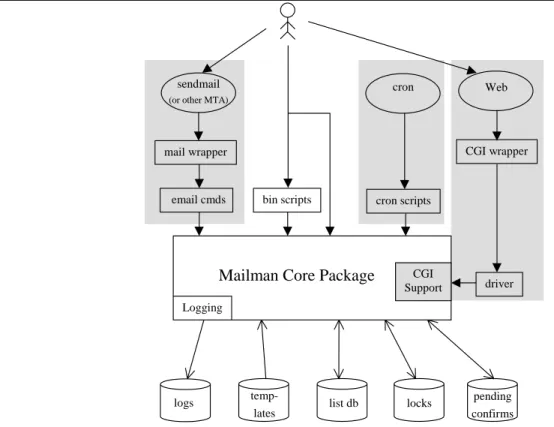
The Mailman system architecture is illustrated in Figure 2. In the center of the system are the core Mail-man classes and modules, organized as a Python pack-age [Ros97]. The architecture of these classes is described in the next section. There are two sub-pack-ages in the core package, one that contains classes for logging, and another that contains modules that sup-port the CGI interface.
The Mailman package mediates access to various disk files used during its operation. For example, the logging classes write update messages to file when subscriptions or unsubscriptions are requested or ful-filled, or when various types of error conditions occur. Lock files are created and consulted by package mod-ules for synchronization between processes. Also, as described in more detail below, every active list is associated with some persistent state, contained in list database files.
For increased security, subscription requests that originate via the Web interface are held for confirma-tion by the subscribing email address. These pending confirmations are also contained in files on disk, as are other pending actions, such as postings that are being held for approval. When a user subscribes via the Web, he is emailed a confirmation message con-taining a random number. The user need only reply to the original message in order to be subscribed. This feature eliminates the possibility that users will be subscribed to mailing lists against their will, while imposing minimal burden on the user. The list owner has control over the confirmation mechanism used as well.
Templates are used for most of the textual mes-sages that are generated by Mailman and sent to list members via email. This has one immediate and one future benefit. First, by removing most of the textual messages from the source code, it is easier to maintain and modify the messages, with systematic approaches for including placeholders in the template. Second, this arrangement provides the framework for future localization efforts. Although not currently imple-mented, this framework would allow us to arrange the templates in language specific subdirectories, for access on a per-list or possibly per-user basis.
The various front-end mechanisms used to access Mailman functionality are shown at the top of the figure. On the left is shown access through the incoming mail system; Mailman supports several mail transport agents (MTAs), including sendmail and qmail. In a sendmail installation for example, aliases are installed in the system’s /etc/aliases3 file.
Typi-cally, five aliases are installed for each active mailing list. Three of these point to a C wrapper program, which in turn executes Python code to perform various email-based commands such as posting a message to the list, evaluating Majordomo-style list commands sent to the ‘‘-request’’ address, or forwarding a mes-sage to the list owner.
The most common access method is through the Web interface, as shown on the top right of the figure. Here, the user or list administrator views one of the various Mailman Web forms in their browser, entering information in the text entry fields and/or clicking but-tons presented on the form. When the form is submit-ted, the browser posts it to the Web server, which can be any standard Web server configured to run CGI scripts. The CGI script is another C wrapper program that in turn calls a central Python ‘‘driver ’’ script. The driver then imports the appropriate module from the CGI support package and executes it for the selected functionality.
3This file may in fact reside in other locations, depending
on the system. For example, on many Solaris machines this file is located in /etc/mail/aliases.
The driver script’s primary function is to catch and usefully report any error in the Mailman system. Normally such errors would generate Python excep-tions, which if left uncaught, would percolate up to the top of the script’s execution stack, and cause the CGI script to exit with an error code. This in turn would force the HTTP server to display a less than useful error message to the end user. The driver script is designed to catch all errors and to report the most use-ful error message possible. When such an error occurs, the end user is presented with a Web page informing them of the error, including a Python traceback and a dump of the CGI environment variables. This infor-mation is also written to a Mailman log file on the list management site. In this way, such errors can be quickly identified, and end users are given more infor-mation than just a generic Web server failure message.
Mailman Core Package
Logging
CGI Support
logs
temp-lates list db locks
pending confirms driver
bin scripts cron scripts
email cmds mail wrapper sendmail
(or other MTA)
cron Web
CGI wrapper
Figure 2: System Architecture. Another mechanism shown in Figure 2 is access
via cron jobs. Mailman contains a number of cron scripts which are used, among other things, to mail the periodic password reminders. These cron scripts use the same core Mailman classes as other subsystems previously described.
Mailman also contains a number of scripts intended to be run by the system administrator via a shell command line. These scripts use the core pack-age to provide higher level functionality. For example, to create a new mailing list, the system administrator would execute thenewlistcommand, providing the name of the new mailing list, the list administrative
password, and the email address of the list owner. This is all that is necessary to create the list; all other list configurations are performed through the Web admin-istrative interface. Other command line scripts are pro-vided to set the site password, remove lists, subscribe members en masse, etc.
One of the more unique features of Mailman is that the core classes can be accessed interactively via the Python interpreter. This allows the system admin-istrator to simply fire up an interactive Python session, import the appropriate Mailman module from the package, instantiate instances of various classes, call methods on those instances, and even inspect the vari-ous objects involved.
This is an extremely powerful ability, because it means that the system administrator is not limited to those functions which are provided by the various Mailman scripts. In fact, the administrator proficient in Python can easily code their own routines using the core classes, prototyping and developing them by using an interactive Python interpreter session. The administrator is even able to perform one time proce-dures directly inside the interpreter.
It is even conceivable that other access mecha-nisms and front-ends could be created. For example, more specialized non-Web based GUIs could be developed, or perhaps a set of CORBA interfaces to the Mailman system could be specified. This might be useful, for example, to a user that is a member of a dozen or so mailing lists running on many systems
Mailman: The GNU Mailing List Manager Viega, Warsaw, and Manheimer
throughout the Internet. Having a CORBA interface to Mailman would allow such a user to write a single script (in his language of choice) which could switch his subscription to digest mode when he goes on vaca-tion, and then back to his preferred distribution mode upon his return.
Software Architecture
The central component of the Mailman core package is the MailListclass, instances of which are used to represent every active mailing list. Instance variables (‘‘attributes’’ in Python parlance) contain all the information pertinent to the mailing list, including member addresses and option settings. This information is stored in a persistent database via Python’s built-in object serialization mechanism.
Thus, for example, when a user accesses a partic-ular mailing list via the Web, the invoked CGI script instantiates theMailListclass, passing to the con-structor the name of the mailing list. When created, the instance variables for this object are restored from the persistent database. Mailman uses Python’s mar-shalmodule [Pyt98A] to save and restore persistent attributes. marshal is a low-level built-in module providing object serialization. The higher level
picklemodule is not used since the data structures involved are relatively simple, and marshal thus provides better performance.
The MailListclass is multiply derived from several task-oriented mix-in classes. These mix-in classes provide the basic mailing list-centric function-ality described in the previous sections, such as the ability to handle Majordomo-style email commands, generate HTML content for Web presentation, per-form digesting, archiving, and delivery, and handle bounce disposition, etc.
The use of task-oriented mix-in classes has advantages and disadvantages. One important benefit is that new tasks can often be integrated as easily as creating a new mix-in class, and extending the list of base classes for the MailList class. The most recent example of this ease of extensibility was when the Usenet gateway feature was added. This was implemented by creating a new base class called
GatewayManager, which contains all the code for posting email messages to NNTP servers. Another important benefit of the mix-in approach is seen in conjunction with the persistency mechanism described above. Persistent attributes are designated by using a naming convention; specifically, if the attribute name starts with an underscore it is not persistent. Python’s introspection capabilities allow Mailman to inspect all the attributes of an instance, ignoring those with names beginning with an underscore. The remaining attributes are stored in a Python dictionary, and that dictionary is then saved to disk withmarshal.
When a new mix-in base class is added, and that class adds new attributes to the state of the list
instance, those attributes are automatically made per-sistent due to this introspection property. Of course, there are versioning issues to deal with, but simply by adhering to the naming convention described above, new state supporting new functionality can easily be added.
One disadvantage of the mix-in architecture is that it can complicate the interactions between the tasks. Primarily, experience has shown that simply ini-tializing each base class’s attributes can be tricky.
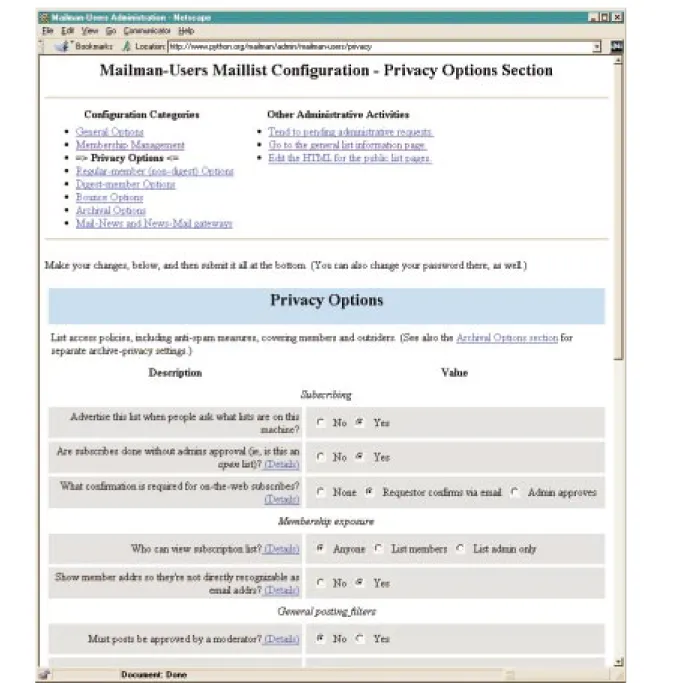
Many persistent attributes are tied to options pre-sented on a Web page. Figure 3 shows one of the list administration pages for a Mailman list. Shown here are some of the list specific privacy options available, including whether the list is advertised and what style of subscription confirmation is to be used. Each of these options is coupled to an attribute on the Mail-Listinstance for the specified list. When the option is changed on the posted Web form, the instance attribute is modified, and the state is saved on disk.
Performance
While Mailman is too new to have much hard data in the way of performance metrics, we do know that, given a well designed mailing list management system, the performance of the mail transport agent (MTA) will have a much more significant impact. We have found that even a low-end configuration can han-dle large amounts of traffic. For example, one mailing list managed by Mailman has had up to 3000 sub-scribers, and often receives 100 messages in a day (i.e., hundreds of thousands of daily deliveries). The list runs on a low-end Pentium with 48MB of RAM. The machine runs sendmail on GNU/Linux. The machine also hosts an NNTP news feed for a small ISP, and is able to handle the load, although sendmail sometimes needs to queue messages. As Mailman pro-ceeds through beta test, we plan to gather more detail performance data.
Future Directions
Mailman development is ongoing and highly active. Major projects to be undertaken in the near future include:
•
Integrating searching with list archives.•
Manually configurable and automatically used relays for distributing server and network load (along the lines of RFC 1429 [Tho93]).•
An optional threaded persistent server, as opposed to the current ‘‘start-by-request’’ model shared with Majordomo.•
A separation of the roles of list administrator and list moderator.•
PGP integration.Availability and Compatibility
Mailman 1.0 is currently in beta release, but is already being used at a number of sites. More
information on Mailman can be had at http://www.list.org. Various mailing lists are currently being run for Mailman discussions (managed by Mail-man of course!):
Figure 3: List administration page.
•
URL http://www.python.org/mailman/listinfo/mailman-users is for system administrators who are using Mailman to manage their mailing lists.
•
URL http://www.python.org/mailman/listinfo/ mailman-developers is for those who would like to help future development of Mailman.Bleeding edge snapshots of the Mailman devel-opment code is also available via anonymous CVS. See the developers URL above for details.
Mailman should work out of the box on any Unix-based platform on which Python runs. It is known to work on SunOS, Solaris, all major distribu-tions of Linux, FreeBSD, Irix and NextStep. Mailman will work with any MTA, since it communicates via the SMTP port instead of through a command. How-ever, Mailman currently generates sendmail-style aliases only. Therefore, aliases for MTAs such as qmail must be modified and installed by hand. Python itself has been ported to a large number of systems, including most known Unix-like systems, various Windows platforms (NT and Windows 95), and MacOS. Python source code is freely available, as are pre-built binaries for many platforms.
Mailman: The GNU Mailing List Manager Viega, Warsaw, and Manheimer
Mailman should work with any HTTP daemon that allows for CGI directories. It is known to work with Apache, NCSA, and Java Web Server.
For current Majordomo users, the transition to Mailman is straightforward; there is a command-line script in the distribution that imports a Majordomo distribution list into Mailman.
Acknowledgements
Mailman was originally written by John Viega. It has since been extended, and is currently being devel-oped and maintained by John Viega, Ken Manheimer, and Barry Warsaw. The mailman-developers mailing list and the Python community have provided invalu-able feedback on this software, including Guido van Rossum, Scott Cotton, Janne Sinkkonen, Michael McLay and Hal Schechner. We would like to thank these people and all others on the Mailman users and developers lists.
Mailman uses free software by Timothy O’Mal-ley for dealing with HTTP cookies. It also integrates Pipermail, free software by Andrew Kuchling that handles message archiving. The archiving code also uses free software by Aaron Watters.
We would like to give special thanks to the Python Software Activity (PSA), and the Corporation for National Research Initiatives (CNRI) for hosting the PSA. We would also like to thank Guido van Rossum for inventing Python.
We would also like to give special thanks to Richard Stallman and the Free Software Foundation for their support and guidance.
Author Information
John Viega is a Research Associate at Reliable Software Technologies. He holds an M.S. in Com-puter Science from the University of Virginia. His research interests include software assurance, pro-gramming languages, and object-oriented systems. Contact him at [email protected] .
Barry Warsaw is a systems engineer at CNRI. He is member of the team developing advanced Inter-net technologies such as the Knowbot Operating Envi-ronment mobile code system, the Application Gate-way System high-availability server farm, and the Grail Internet Browser. He is a member of the Python Software Activity and contributes to the development of Python. He has been involved with various open source projects for many years. Contact him at [email protected] .
Ken Manheimer is a member of the technical staff at CNRI, developing and researching application of mobile agent systems, server farms, and other advanced network technologies. His former life involved managing a large installation of Unix sys-tems at NIST, where he devised, with Barry Warsaw, the Depot for sharing installed software across sites –
which he presented many LISA’s ago (LISA IV, 1990). Currently Ken manages only a few systems, including the python.org server system, on which he manages the Python Software Activity. Contact Ken Manheimer at [email protected] .
References
[Bar98] D. Barr. The Majordomo FAQ. http://www. greatcircle.com/majordomo/majordomo-faq.html . [Cha92] D. Chapman. ‘‘Majordomo: How I Manage
17 Mailing Lists Without Answering ‘-request’ Mail.’’Proc. Usenix LISA VI, Oct. 1992.
[Hou96] B. Houle. ‘‘MajorCool: A Web Interface To Majordomo.’’Proc. Usenix LISA X, Oct. 1996. [Hou98] B. Houle. MajorCool Introduction. http://
ncrinfo.ncr.com/pub/contrib/unix/MajorCool/Docs . [Lev97] J. Levitt.Ten Questions For Majordomo (An
Interview With D. Brent Chapman). http:// techweb.cmp.com/iw/author/internet8.htm . [Ros97] G. van Rossum.Built-in Package Support in
Python 1.5. http://www.python.org/doc/essays/ packages.html .
[Pyt98]The Python Language Website. http://www. python.org/ .
[Pyt98A]Built-in Module marshal. http://www.python. org/doc/lib/module-marshal.html .
[Sma98]The SmartList FAQ. April 1998 revision. http://www.mindwell.com/smartlist/ .
[Tho93] E. Thomas. RFC1429: Listserv Distribute Protocol. Feb. 1993. http://www.faqs.org/rfcs/ rfc1429.html .