Int. J. Advanced Networking and Applications
Volume: 05, Issue: 02, Pages:1867-1872 (2013) ISSN : 0975-0290
1867
Medical Web Interface for Wireless Sensor
Networks
Andrei Maciuca
Department of Computer Science, Politehnica University, Bucharest, Romania Email: [email protected]
Dan Popescu
Department of Computer Science, Politehnica University, Bucharest, Romania Email: [email protected]
---ABSTRACT--- The current paper proposes a smart web interface designed for monitoring the status of the elderly people. There are four main user types used in the web application: the administrator (who has power access to all the application’s functionalities), the patient (who has access to his own personal data, like parameters history, personal details), relatives of the patient (who have administrable access to the person in care, access that is defined by the patient) and the medic (who can view the medical history of the patient and prescribe different medications or interpret the received parameters data). The main purpose of this web application is to receive and analyze received data from body sensors like accelerometers, EKG or GSR sensors, or even ambient sensors like gas detectors, humidity, pressure or temperature sensors. After processing the harvested information, the web application decides if an alert has to be triggered and sends it to a specialized call center (for example, if the patient’s body temperature is over 40 degrees Celsius).
Keywords – java enterprise edition 6, JBoss Application Server, medical, MySql, Primefaces, wireless sensors ---
Date of Submission : August 04, 2013 Date of Acceptance : October 01,2013 ---
I. INTRODUCTION
W
ireless sensor networks (WSN) have gained considerable popularity due to their flexibility in solving problems in different application domains and have the potential to change our lives in many different ways. Also, the latest advances in VLSI technology and MEMS (Micro-Electro-Mechanical Systems), as well as in wireless communication technology made it possible to manufacture sensor networks where very large numbers of very small nodes are scattered across some environment in order to sense and report to a central node (user)[1]. As current healthcare systems are facing new challenges because of the high rate of growth of the elderly population, the necessity of wireless sensor networks in our lives is becoming more and more obvious. That is why the impeding health crisis has attracted researchers to implement optimal and quick health solutions. The non-intrusive and ambulatory health monitoring of patient’s vital signs with real time updates of medical records via the internet provides economical solutions to the challenges that health care systems face[2].WSNs have been successfully applied in various application domains, like military applications, area monitoring, home monitoring, transportation, health applications (some of the health applications for sensor networks are supporting interfaces for the disabled, integrated patient monitoring, diagnostics and drug administration in hospitals, tele-monitoring of human physiological data and tracking & monitoring doctors or patients)[3].
It is mandatory for the users of wireless sensor networks to have access to a friendly interface where they can see the history of sensor readings. Beside these logging information, the users must be provided with a medical interpretation of the readings. Of course, it would be best if they could have access to all these facilities from anywhere, without installing any additional third party software. This is where web applications come and offer solution to all these demands. They can be accessed from any device with internet access and web browser capabilities, specialized persons like medics can have access to a special area of the application and interpret the patients sensor readings and provide medication and advices for a healthier life.
II. WEB APPLICATION CONTEXT
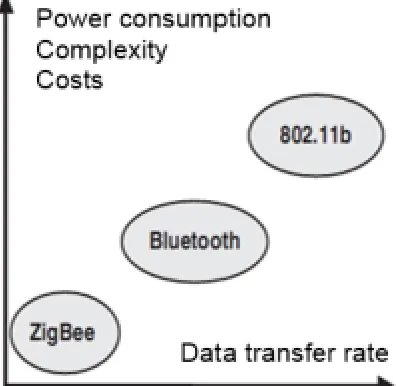
The web application has to integrate with the WSN and collect harvested data parameters in order to analyze the received information. Therefore, the communication between the sensors and the application is done using the ZigBee protocol. In figure 1 a chart has been represented that shows why ZigBee is the correct approach for this communication. The main reasons for choosing ZigBee were low consumption, complexity and costs. Even if the data sent ratio is low, this is not an impediment in our case [4], [5].
Fig. 1. ZigBee positioning compared to other wireless technologies
Afterwards, the saved data is used for showing patient’s history or creation of a chart with the values received from a sensor (for example, a chart containing the patient’s temperature for a specified amount of time will be presented in the application).
Beside the logging functionality of the parameters, the most important part of the application is triggering alerts. These alerts are vital to the system in case an unfortunate event happens. As the application is designed for the elderly people, fast requests to the hospital, firemen or relatives have to be initiated in case of alerts. There are two ways of sending alerts available in the system: via email and SMS. In most of the cases, both methods are required in order to have a faster response. Emails are sent to a call center that is available at any time. From this call center, a human operator redirects the alerts to the most appropriate specialized institution. In case the web application has received data from gas sensors that indicate an abnormal air composition, it is very probable that there is a fire in the patient’s house; therefore, the firemen are alerted. On the other hand, if the web application receives data from the body sensors indicating that the patient’s temperature is very high (the maximum and minimum size for each parameter will be defined by a specialized person, in most of the cases doctors), then the human operator will redirect this request to an ambulance that will go to the patient’s house and take the required actions.
III. WEB APPLICATION DATABASE DESIGN
The chosen database for persistence of all required information was MySQL. The main reason for this selection was that MySQL is open source, so there are absolutely no costs when going in production mode. In figure 2 is presented a print screen from MySQL Workbench, which offers all the functionalities needed from a database client.
Fig 2. Database tables
The given name of the schema was mwsni (Medical Wireless Sensor Network Interface). It contains seven tables:
1. The ALERTS table with the following columns: - ID – primary key
- TRIGGERED_DATE – the date when the alert was triggered
- DESCRIPTION – a description for the alert, optional field
- PARAMETER_ID – foreign key to the PARAMETER table, stores the id of the parameter that sent an abnormal value
- PARAMETER_REGISTERED – the value that was received from the parameter and is not located within the specified interval
2. The INSTITUTION table that contains the following columns:
- ID – primary key
- NAME – name of the institution
- INSTITUTION_TYPE_ID – foreign key to the INSTITUTION table, stores the id of the institution
- ADDRESS – address of the institution - DESCRIPTION – a description of the
institution, optional field
3. The INSTITUTION_TYPE table that is a nomenclature of the institution
- ID – primary key
- NAME – name of the institution type (like hospital etc.)
4. The PARAMETER_ACCEPTED_VALUES
table stores the minimum and maximum values that are accepted for a parameter (these values have to be decided by a specialized person like doctors)
- ID – primary key
Int. J. Advanced Networking and Applications
Volume: 05, Issue: 02, Pages:1867-1872 (2013) ISSN : 0975-0290
1869
- USER_ID - foreign key to the USER table, stores the id of the user that the values are applied to
- MIN_VALUE – the minimum value of the parameter
- MAX_VALUE – the maximum value of the parameter
5. The PARAMETERS table stores all the parameters that can be received from sensors (both ambient: light, pressure, CO2 composition, ambient temperature etc and body: beats per minute, arterial pressure, EKG, GSR, body temperature etc.)
- ID – primary key
- NAME – name of the parameter
- DESCRIPTION – description of the parameter, optional field
6. The USER table stores all the users that have access in the application
- ID – primary key
- NAME – name of the user
- PASSWORD – password required for login, it is saved in an encrypted state in the database using MD5
- EMAIL – email of the user - ADDRESS – address of the user - PHONE – the user’s phone
- USER_TYPE_ID – foreign key to the USER_TYPE table, stores the id of the user’s type
- INSTITUTION_ID – foreign key to the INSTITUTION table, stores the id of the institution that the user is allocated to - USERNAME – the username required for
login
7. The USER_TYPE table, which is a nomenclature for the user table
- ID – primary key
- NAME – name of the user type (like administrator, patient, doctor or relative)
IV. TECHNOLOGIES AND TOOLS USED FOR DEVELOPING THE WEB APPLICATION
All the technologies and tools used for development are the latest in the branch.
The IDE used for development was Eclipse Kepler. This was just a personal choice, other IDEs like NetBeans or IntelliJ Idea can be used without having any integration problems. The project is of a Maven project type. For building, the m2e connectors provided as plugin in the Eclipse IDE were used. Below are presented some snapshots of attributes defined in the pom.xml file of the project:
“<groupId>ro.mwsni</groupId> <artifactId>mwsni</artifactId> <version>1.0‐SNAPSHOT</version> <packaging>war</packaging>
<name>Medical Wireless Sensor Network Interface </name>
<description>Medical Wireless Sensor Network Interface </description>”
“<repositories> <repository> <id>jboss</id>
<name>JBoss Release Repository</name> <url>http://repository.jboss.org/maven2 </url>
</repository>
<!‐‐ Used for pdf generator ‐‐> <repository>
<id>thirdparty‐uploads</id>
<name>JBoss Thirdparty Uploads</name> <url> http://wo‐
repository.doit.com.br/content/repositories /thirdparty/ </url>
</repository>
<!‐‐ The JBoss Community public repository is a composite repository of several major repositories ‐‐>
<!‐‐
http://community.jboss.org/wiki/MavenGettin gStarted‐Users ‐‐>
<repository>
<id>prime‐repo</id>
<name>PrimeFaces Maven Repository</name>
<url>http://repository.primefaces.org </url>
<layout>default</layout> </repository>
<repository>
<id>jboss‐public‐repository</id> <name>JBoss Repository</name>
<url>http://repository.jboss.org/nexus/co ntent/groups/public </url>
<!‐‐ These optional flags are
designed to speed up your builds by reducing remote server calls ‐‐>
<releases> </releases> <snapshots>
<enabled>false</enabled> </snapshots>
</repository> </repositories>”
Also, these are some of the dependencies used for the project:
“<dependency>
<groupId>org.jboss.seam.security</groupId
>
<artifactId>seam‐security‐api </artifactId>
<version>3.1.0.Final</version> </dependency>
<dependency>
<groupId>joda‐time</groupId> <artifactId>joda‐time</artifactId> <version>1.6</version>
<dependency>
groupId>org.jboss.seam.security</groupId> <artifactId>seam‐security</artifactId> <version>3.1.0.Final</version> </dependency>
<dependency>
<groupId>org.jboss.seam.faces</groupId> <artifactId>seam‐faces</artifactId> <version>3.1.0.Final</version> </dependency>
<dependency>
<groupId>com.ocpsoft</groupId> <artifactId>prettyfaces‐jsf2 </artifactId>
<version>3.3.3</version> </dependency>
<dependency>
<groupId>org.jboss.weld</groupId> <artifactId>weld‐core</artifactId> <version>1.1.9.Final</version> </dependency>
The chosen application server was JBoss version 7.1.1. JBoss Application Server 7 is a fast, powerful, implementation of the Java Enterprise Edition 6 specification. The state-of-the-art architecture built on the Modular Service Container enables services on-demand when your application requires them. JBoss Application Server 7.1.1.Final release is a certified implementation of the Java Enterprise Edition 6 Web Profile specification. There are some example technologies from Java Enterprise Edition Platform that are provided in JBoss Application Server: Java Servlet 3.0, Java Server Faces (JSF) 2.0, Java Server Pages (JSP) 2.0 and Expression Language (EL) 1.2, Context and Dependency Injection (CDI) 1.0, Dependency Injection for Java Enterprise Java Beans 3.1, Java Persistence API 2.0, Bean Validation 1.0, Java Message Service (JMS) API 1.1, JAX-RS for RESTfull Web Services 1.1, JAX-WS for XML based web services 2.2 and so on [6].
As mentioned before, Java Persistence API was used for the persistence of the data. This technology provides Java developers with an object/relational mapping facility for managing relational data in Java applications. The main areas covered by the Java Persistence are the following:
• The Java Persistence API • The query language
• The Java Persistence Criteria API • Object/relational mapping metadata
Below is presented the parameter model class in order to show the use of annotations JPA provides.
@Entity
@Table(name = "PARAMETER")
public class Parameter implements Serializable {
private static final long serialVersionUID = 1L;
private Long id; private String name;
private String description;
public Parameter() { }
public Parameter(Long id) { this.id = id;
} @Id
@Basic(optional = false) @GeneratedValue(strategy = GenerationType.IDENTITY)
@Column(name = "id", nullable = false) public Long getId() {
return id; }
public void setId(Long id) { this.id = id;
}
@Column(name = "NAME") public String getName() { return name;
}
public void setName(String name) { this.name = name;
}
@Column(name = "DESCRIPTION") public String getDescription() { return description;
}
public void setDescription(String description) {
this.description = description; }
@Override
public int hashCode() { int hash = 0;
hash += (id != null ? id.hashCode() : 0);
return hash; }
@Override
public boolean equals(Object object) { if (!(object instanceof Parameter)) {
return false; }
Parameter other = (Parameter) object;
if ((this.id == null && other.id != null) || (this.id != null &&
!this.id.equals(other.id))) { return false; }
return true; }
@Override
public String toString() {
return "Parameter[ id=" + id + " ]";
Int. J. Advanced Networking and Applications
Volume: 05, Issue: 02, Pages:1867-1872 (2013) ISSN : 0975-0290
1871
Another used technology was Enterprise Java Beans 3.1. Enterprise beans are Java EE elements that implement Enterprise JavaBeans (EJB) technology. They run in the EJB container, a runtime environment within the Application Server. Even if the EJBs are transparent to the application developer, the EJB container offers system-level services like transactions or security to its enterprise beans. These services have to ability to build and deploy enterprise beans in a very fast manner, forming the foundation of transactional Java EE applications.
Being written in the Java programming language, an enterprise bean is a server-side component that encapsulates the business logic of the application. The business logic represents the code that has as main task to reproduce what the application has to do. In the proposed application, for example, the enterprise beans might implement the business logic in methods called checkParameterStatus() or triggerAlert(). By invoking these methods, clients can access the parameter or alert services provided by the application.
Enterprise beans also simplify the development of large, distributed applications. As the EJB container provides system-level services to enterprise beans, the bean developer can concentrate on business problems. The EJB container, rather than the developer bean, is responsible for system-level services such as transaction management and security authorization.
The beans contain the application’s business logic, not the client, so this helps the client developer to concentrate on the presentation of the client. The client developer does not have to code the routines that implement business rules or access databases. As a result, the clients are thinner, a benefit that is particularly important for clients that run on small devices.
As enterprise beans are portable components, the application assembler can build new applications from existing beans. These applications can run on any compliant Java EE server if and only if they use the standard APIs.
Context dependency injection (CDI) is a core technology in the application. The most fundamental services provided by CDI are as follows:
• Contexts: CDI has the ability to bind the lifecycle and interactions of stateful components to well-defined but extensible lifecycle contexts.
• Dependency injection: The main purpose of using CDI is its ability to inject components into an application in a type safe way, including the ability to choose at deployment time which implementation of a particular interface to inject In addition, CDI provides the following services:
• Integration with the Expression Language (EL), which allows any component to be used directly within a JavaServer Faces page or a JavaServer Pages page
• The ability to decorate injected components • The ability to associate interceptors with
components using typesafe interceptor bindings • An event-notification model
• A web conversation scope in addition to the three standard scopes (request, session, and
application) defined by the Java Servlet specification
• A complete Service Provider Interface (SPI) that allows third-party frameworks to integrate cleanly in the Java EE 6 environment
A major theme of CDI is loose coupling. CDI does the following:
• Decouples the server and the client by means of well-defined types and qualifiers, so that the server implementation may vary
• Decouples the lifecycles of collaborating components by doing the following:
o Making components contextual, with automatic lifecycle management
o Allowing stateful components to interact like services, purely by message passing • Completely decouples message producers from
consumers, by means of events
• Decouples orthogonal concerns by means of Java EE interceptors
Along with loose coupling, CDI provides strong typing by • Eliminating lookup using string-based names for
wiring and correlations, so that the compiler will detect typing errors
• Allowing the use of declarative Java annotations to specify everything, largely eliminating the need for XML deployment descriptors, and making it easy to provide tools that introspect the code and understand the dependency structure at development time [7].
For the user interface part, the implementation offered by Primefaces for JSF 2.0 was chosen. (as it can be seen in the pom.xml file presented). PrimeFaces is a lightweight library, all decisions made are based on keeping PrimeFaces as lightweight as possible. Usually adding a third-party solution could bring a overhead however this is not the case with PrimeFaces. It is just one single jar with no dependencies and nothing to configure. Components in PrimeFaces are developed with a design principle which states that "A good user interface component should hide complexity but keep the flexibility" while doing so [8]. The simplicity and easy to develop attractive user interface elements make Primefaces a perfect choice. For example, in order to implement a sortable, navigable and filtered data table, only a few lines of code have to be written (below is presented the data table for the parameter administration):
“<p:dataTable id="parametersList"
var="parameter"
value="#{parameterAction.parameterDataModel }" paginator="true" rows="5"
paginatorTemplate="{CurrentPageReport} {FirstPageLink} {PreviousPageLink}
{PageLinks} {NextPageLink} {LastPageLink} {RowsPerPageDropdown}"
rowsPerPageTemplate="5,10,15" lazy="true"
paginatorPosition="bottom"
<p:column sortBy="#{parameter.id}"
filterBy="#{parameter.id}"> <f:facet name="header"> <h:outputText
value="#{messages['parameter.id']}" /> </f:facet>
<h:outputText value="#{parameter.id}" /> </p:column>
<p:column sortBy="#{parameter.name}"
filterBy="#{parameter. name}"> <f:facet name="header">
<h:outputText
value="#{messages['parameter.name']}" /> </f:facet>
<h:outputText value="#{parameter.name}"
/>
</p:column> <p:column
sortBy="#{parameter.description}"
filterBy="#{parameter. description }"> <f:facet name="header">
<h:outputText
value="#{messages['parameter.description']} " />
</f:facet> <h:outputText
value="#{parameter.description}" /> </p:column>
<p:column>
<f:facet name="header"> <h:outputText
value="#{messages['actions']}" /> </f:facet>
<p:commandButton
id="viewParameterButtonId" icon="ui‐icon‐
view"
title="#{messages['actions.view']}"
action="#{parameterAction.view(parameter)}"
update=":parameterDialogForm"
oncomplete="parameterDialog.show();"> <p:resetInput target=":parameterDialogForm"
/> </p:commandButton> <p:commandButton
id="ediParameterButtonId" icon="ui‐icon‐
edit" title="#{messages['actions.edit']}"
update=":parameterDialogForm"
action="#{parameterAction.edit(parameter)}"
oncomplete="parameterDialog.show();"> <p:resetInput target=":parameterDialogForm"
/></p:commandButton> <p:commandButton
id="deleteParameterButtonId" title="#{messages['actions.delete']}"
update=":parametersListForm"
action="#{parameterAction.deleteActivate(pa rameter)}" />
</p:column>
<f:facet name="footer">
<p:commandButton id="addParameterButtonId"
icon="ui‐icon‐add"
title="#{messages['global.action.add']}"
action="#{parameterAction.add()}"
update=":parameterDialogForm"
oncomplete="parameterDialog.show();"> <p:resetInput target=":parameterDialogForm"
/></p:commandButton> </f:facet>
</p:dataTable>”
V. CONCLUSION
In conclusion, wireless sensor parameters interpretation in a web modern way can be vital in improving the quality of life of the elderly or people with chronic diseases. The development of a modern web application that can be accessed from any device with internet access and a web browser is essential in tracking and monitoring the current state of both ambient and body parameters of the patient. Having a very administrable application is a must because, for example, the minimum and maximum values of parameters can differ from person to person (this is the reason for adding the user_id column in table parameter_accepted_values).
ACKNOWLEDGEMENTS
This work was supported in part by the Romanian Ministry of Education and Research under grant of POSDRU Project ID 76813.
REFERENCES
[1] Juan J. Villacorta, María I. Jiménez, Lara del Val and Alberto Izquierdo, A Configurable Sensor Network Applied to Ambient Assisted Living, Sensors 2011, 11, 10724-10737; doi:10.3390/s111110724
[2] Khan, J. Y., and Yuce, M. R., Wireless Body Area Network (WBAN) for medical applications. In: Campolo, D. (Ed.), New Developments in Biomedical
Engineering. INTECH, 2010. ISBN:
978-953-7619-57-2
[3] Shandi, R., Noroozi, S., Roushanbakhti, G., Heaslip, V., and Liu, Y., Wireless technology in the evolution of patient monitoring on general hospital wards. J.
Med. Eng. Technol. 34(1):51–63, 2010
[4] Sahin Farahani, ZigBee Wireless Networks and Tranceivers, Elsevier, USA, 2008
[5] George Aggelou, Wireless Mesh Networking, McGraw-Hill Communications, USA, 2009. [6] https://docs.jboss.org/author/display/AS71/Getting+S
tarted+Guide
[7] http://docs.oracle.com/javaee/6/tutorial/doc/giwhl.ht ml