Article
1
Open-sourced remote sensing data management with
2
the Irish Earth Observation (IEO) Python module
3
Guy Serbin 1 and Stuart Green 2,*
4
1 Environment, Soils, and Land Use Department, Teagasc Environmental Research Centre, Johnstown Castle,
5
Co. Wexford, Y35 N2D6, Ireland; [email protected]
6
2 Agri-Food Business and Spatial Analysis Department, Teagasc National Food Research Centre, Ashtown,
7
Dublin 15, Ireland; [email protected]
8
* Correspondence: [email protected]; Tel.: +353-53-917-1201
9
10
Abstract: Many remote sensing analytical data products are most useful when they are in an
11
appropriate regional or national projection, rather than globally based projections like Universal
12
Transverse Mercator (UTM) or geographic coordinates, i.e., latitude and longitude. Furthermore,
13
leaving data in the global systems can create problems, either due to misprojection of imagery
14
because of UTM zone boundaries, or because said projections are not optimised for local use. We
15
developed the open-source Irish Earth Observation (IEO) Python module to maintain a local
16
remote sensing data library for Ireland. This pure Python module, in conjunction with the IEOtools
17
Python scripts, utilises the Geospatial Data Abstraction Library (GDAL) for its geoprocessing
18
functionality. At present, the module supports only Landsat TM/ETM+/OLI/TIRS data that have
19
been corrected to surface reflectance using the USGS/ESPA LEDAPS/ LaSRC Collection 1
20
architecture. This module and the IEOtools catalogue available Landsat data from the USGS/EROS
21
archive, and includes functions for the importation of imagery into a defined local projection and
22
calculation of cloud-free vegetation indices. While this module is distributed with default values
23
and data for Ireland, it can be adapted for other regions with simple modifications to the
24
configuration files and geospatial data sets.
25
Keywords: Remote sensing, Python, data management, Landsat, open-source
26
27
1. Introduction
28
The recent availability of free, calibrated Earth observation (EO) data from NASA, USGS, and
29
ESA archives, including those from MODIS, Landsat, and the Sentinel satellites, has enabled the
30
development of local EO data libraries that can consist of hundreds or thousands of scenes. These
31
local libraries require optimisation of data and cataloguing in order to maximise their utility. For
32
each data library, a number of questions need to be answered. Firstly, the spatial extent of each
33
library, and appropriate scenes, needs to be determined. Once that has been determined, a database
34
of available scenes and associated metadata needs to be established and updated as new scenes are
35
acquired. Each library needs to download, ingest, and properly archive and catalogue needed scenes
36
in a manner that is most useful for analytical exploitation. Data catalogues also require metadata on
37
data quality, including spatiotemporal accuracy.
38
Local and regional remote sensing analyses are often most useful when data are in local
39
projections that are optimised for global positioning systems (GPS) and make use of recent, more
40
accurate reference spheroids [1]. There are a couple of reasons for this: accompanying local and
41
regional data sets are often in a local projection that best describes the local landscape, and is less
42
sensitive to geodetic changes due to plate tectonics. Secondly, remote sensing data are often
43
distributed in global projection systems, which may distort local geographic features. The Irish
44
Transverse Mercator projection [1] was created to more accurately map the Republic of Ireland and
45
Northern Ireland, and is based upon the European Terrestrial Reference System (ETRS89).
46
Commercial and open-source image server software do exist for the management of geospatial
47
data archiving and serving, e.g., ArcGIS Image Server (commercial; ESRI, Redlands, CA, USA),
48
Erdas Apollo (commercial; Hexagon Geospatial, Norcross, GA, USA), GeoServer [2], and Jagwire
49
(commercial; Harris Geospatial Solutions, Inc., Boulder, CO, USA). However, these products are not
50
automatically configured for discovery of available, calibrated data from external data providers,
51
nor for ordering and ingesting them into local archives without additional scripting and
52
configuration. Furthermore, hardware and software costs and maintenance requirements often
53
make the use of these software packages prohibitive, particularly where local analysis requirements
54
may only require a lightweight data management solution.
55
With these considerations in mind, we have created the new open source Irish Earth
56
Observation (IEO) Python module and the associated IEOtools scripts for the management of local
57
Landsat 4 – 8 imagery archives. While the defaults for this module and the IEOtools scripts are for
58
Ireland, including both the Republic and Northern Ireland, they can easily be adapted to other local
59
projections. These can also be incorporated with any software, whether commercial or open-source,
60
that provides support for Python scripting. The aim of this paper is to describe these and show
61
how they can be of utility for the remote sensing community.
62
2. Considerations for a projection-specific geoprocessing module
63
2.1 Decision to use a specific projection
64
As part of various remote sensing projects, we decided to create a local library of Landsat 4 – 8
65
TM/ ETM+/ OLI/TIRS imagery, starting from 1982 and onwards. We identified Landsat World
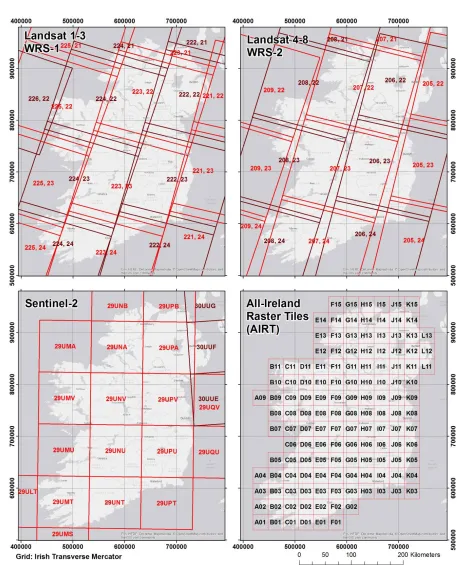
66
Reference System 2 [WRS-2; 3] tiles that intersected with Ireland’s land masses (Figure 1) to facilitate
67
queries of available scenes. Initially, data were kept in the Universal Transverse Mercator (UTM)
68
projections, which spanned UTM Zones 29 and 30 North. While UTM is convenient for global
69
distribution of some satellite data products, e.g., Landsat, it caused problems with data projection
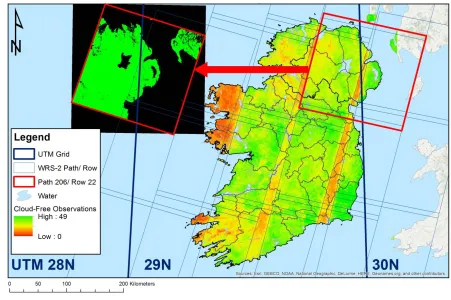
70
where scene centres lay immediately to the east of the UTM 29N/ 30N boundaries, as seen in Figure
71
2. In this Figure, a Landsat scene from WRS-2 Path 206 Row 22, with a scene centre just to the east of
72
the boundary between UTM Zones 29N and 30N, was misprojected westward over the Atlantic
73
Ocean, just to east of the boundary between UTM Zones 28N and 29N. We discovered that warping
74
of these scenes into ITM fixed this issue, and minimised potential geometric errors that might have
75
occurred by warping data into a different UTM Zone.
76
2.2 ENVI format
77
We decided to utilise the ENVI raster data format (Harris Geospatial, Boulder, CO, USA) for
78
raster data products, due to the flexibility of the ENVI header (*.hdr, HDR) format. Each HDR is a
79
text file that contains required and optional metadata tags [4], and accompanies the main data file.
80
Required tags include data type, lines and samples, number of bands, and data ordering (e.g., band
81
sequential, band interleaved by line or pixel). Optional tags can include metadata like spectral data,
82
image classification scheme class names, colour tables, projection, solar acquisition geometry, and
83
scene acquisition time metadata. Because these tags are optional, potentially useful metadata are
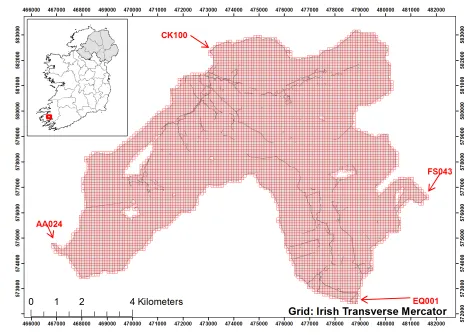
84
often missing, but this format enables us to easily add in what we deem necessary. Additionally, this
85
format enables us to create new metadata tags where needed.
86
2.3 LEDAPS and LaSRC surface reflectance products
87
Landsat 4 – 7 Surface Reflectance [LEDAPS; 5,6] and Landsat 8 Surface Reflectance Code
88
[LaSRC; 7] Collection 1 Level 2 products available from the US Geological Survey’s (USGS) Earth
89
Resources Observation and Science (EROS) Center’s Sciences Processing Architecture (ESPA)
90
include surface reflectance (SR), thermal infrared (TIR), a pixel quality assurance (QA) layer, and
91
possible indices. The pixel QA layer is based upon the Fmask algorithm [8], and differs between
92
LEDAPS and LaSRC products. While both pixel QA products include bit values for clear land,
93
[6,7]. The LaSRC pixel QA layer differs in that it also includes bit values for cirrus cloud confidence
95
and pixels affected by terrain occlusions [7]. Our data importation algorithms are optimised to
96
import the SR, TIR, and pixel QA products. For all products, created ENVI HDR metadata include
97
product-specific descriptions including the 21 character Landsat scene identifier, and data
98
acquisition time. For the SR and TIR products, missing sensor-specific band wavelength, full-width
99
half maximum (FWHM), and band names were added to the final products. Legacy support is
100
included for pre-Collection 1 LEDAPS and LaSRC Fmask products, and for these missing class
101
names and a class colour scheme are added to aid in visualisation.
102
2.4 New metadata
103
The text-based nature of ENVI HDR files has been used by other software packages like
104
SPIRITS [9] to maximise the effectiveness of remote sensing data. Because every HDR contains
105
simple metadata tags and values, customised metadata can be created to improve the usefulness of
106
data products. This capability is also exploited in IEO, via the optional “parent rasters” tag. This tag
107
was created as a diagnostic means of tracing the input data used to create an output raster product,
108
and help identify issues with raster processing code or raster geometry. Within IEO, it is
109
implemented during the ingestion process for stacked Landsat imagery and vegetation index (VI)
110
products.
111
2.5 File extensions
112
The ENVI file format is very flexible with respect to data file extensions, and can automatically
113
handle numerous ones provided that they are accompanied by a HDR. As such, ENVI data files can
114
include *.img, *.dat, *.envi, and other file extensions, or none at all. For IEO, we’ve chosen the *.dat
115
extension for a few reasons. Firstly, ENVI data files historically used the *.dat extension, and certain
116
software packages, like ArcGIS Desktop (ESRI, Redlands, CA, USA), have preferred this extension
117
for data importation. Secondly, the *.img extension has been historically been associated with the
118
Erdas Imagine (Hexagon Geospatial, Norcross, GA, USA) format.
119
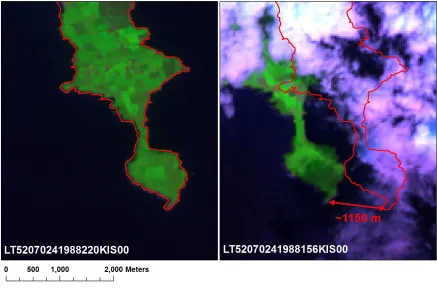
We also make use of the virtual raster (VRT, *.vrt) format for the rapid mosaicking of Landsat
120
scenes in different WRS-2 Rows in the same Path that are from the same date. While this format does
121
help conserve disk space, it has limited capabilities with respect to raster metadata.
122
3. The code and data files
123
The IEO Python module and IEOtools scripts were written in open-source Python 3, with the
124
most recent code written using the Anaconda Python (Anaconda, Inc., Austin, TX, USA,
125
https://www.anaconda.com/) distribution, but is designed to also be Python 2.7 compliant. The IEO
126
and IEOtools code includes open-source Python code from other sources. We adapted code from
127
Erickson et al. [10] for vector and raster data processing. Methods for handling and saving ENVI
128
data types were used from Boggs [11]. Code was also created with the aid of Python online
129
documentation [12].
130
3.1 The IEO Python module
131
The IEO module is designed to install as a Python egg file via python setup.py install. The
132
installation process will create a configuration file, ieo.ini, unless one is adapted from sample_ieo.ini. It
133
will also create a default file structure for a Landsat archive and a metadata catalogue, unless these
134
already exist. It will also attempt the installation of a number of prerequisite libraries, if not already
135
installed, specifically the Geospatial Data Abstraction Library (GDAL; http://www.gdal.org/),
136
NumPy (http://www.numpy.org/), NumExpr
137
(https://numexpr.readthedocs.io/en/latest/index.html), and the Pillow implementation of the Python
138
Imaging Library (PIL, https://pillow.readthedocs.io) Python modules.
139
The IEO module 1.x versions have been designed mainly to support 30 meter Landsat 4 – 8 TM/
140
are not currently supported, though support may be added to future versions. Additionally
142
Sentinel-2 data are not supported, but are planned for version 2.0 and higher. The main IEO module,
143
ieo.py, contains a number of functions designed to handle LEDAPS/ LaSRC files from both Landsat
144
Collection 1 (starting with version 1.1.1) and Pre-Collection 1 datasets
145
(https://landsat.usgs.gov/what-are-naming-conventions-landsat-scene-identifiers). With IEO version
146
1.1.1, users may choose to utilise to 40 character Landsat Product Identifier rather than the 21
147
character Scene Identifier [6,7] for output filenames, though the default is set to the latter.
148
The module is broken down into a number of sections. The first section imports required
149
libraries and configuration data. This includes module variables available to external Python code
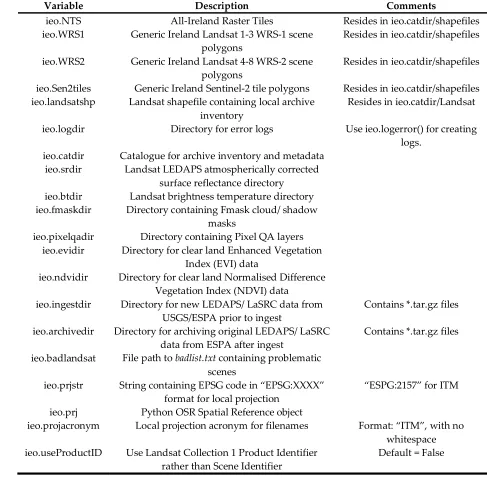
150
which call IEO, and are detailed in Table 1. While many of these values are set in the ieo.ini
151
configuration file, they are mutable, should user requirements dictate a change in one or more
152
values between scripts, e.g., a case where a user wants to manage two different archives in two
153
different projections using this software. The next section belongs to a number of uncategorised
154
functions that are utilised by other functions:
155
1. logerror(): error function logging.
156
2. extract_xml(): XML tag value extraction.
157
3. get_landsat_fileparams(): extract Landsat satellite number, WRS Path, WRS Row, acquisition
158
year, acquisition day of year, and acquisition date (YYYYMMDD) from a Landsat Scene
159
Identifier.
160
4. makegrid(): by default, this function will create the AIRT, provided that a shapefile with the
161
outline of Ireland is provided (makegrid(inshape = <path to Ireland shapefile>)). However, it is
162
designed to flexibly create tile grids, including settings for tile dimensions and numbers in the
163
south – north and west – east directions. It should be noted that currently there is a maximum of
164
676 tiles in the west – east direction, but this can easily be increased in the future versions with
165
minimal code changes. It can be used to create grids that intersect any shapefile, as seen in
166
Figure 3 for the Upper Caragh, Owenroe, and Kealduff sub-catchments in Co. Kerry. Each grid
167
tile also has a tile name, where letters denote the location starting with “A” in the west and “1”
168
in the south. For the AIRT, the southwesternmost tile that could be created is named “A01”,
169
whereas for a grid like the one portrayed in Figure 3, it would be “AA001”.
170
5. makeparentrastersstring(): this function takes a list of filenames that are used to create an
171
output raster, and formats the ENVI HDR string.
172
The next section contains functions specifically for scene reprojection and accuracy assessment:
173
1. reproject(): this function will warp data from its native projection to the locally-defined
174
projection, by default ITM. It does so by calling an external function, gdalwarp, using
175
subprocess.Popen. The output will be in ENVI format.
176
2. checkscenelocation(): this function checks the relative spatial accuracy of Landsat scenes that
177
were warped to the local projection, rejecting any warped scene whose scene centre is over 50
178
km from the generic scene centre in the WRS-1 or WRS-2 locally-projected polygons that are
179
defined in ieo.WRS1 and ieo.WRS2, respectively. The details of the shapefiles are discussed in
180
further detail later in this text and in Table 2.
181
The following section contains functions for Landsat import and VI calculations:
182
1. envihdracqtime(): this function will read the acquisition time, if present, from an ENVI header
183
file.
184
2. maskfromqa(): this function creates a binary memory mask from the Pixel QA layer using the
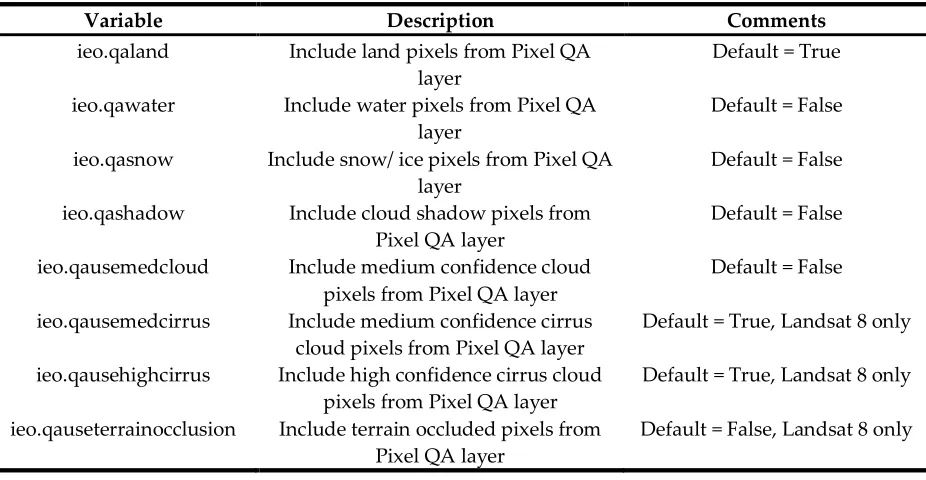
185
Boolean module variables described in Table 3. Like with the variables described in Table 1,
186
these are also mutable for scripts calling the IEO module, though unlike those, default values
187
are hard-coded in ieo.py. The created output data mask will have values of 1 for good pixels,
188
and 0 for bad.
189
3. calcvis(): this function calculates the Normalised Difference Vegetation Index [NDVI; 13] and
190
Enhanced Vegetation Index [EVI; 14] for clear land pixels from Landsat data.
191
4. EVI(): this function is called by calcvis() to calculate EVI, and returns a two-dimensional double
192
5. NDIndex(): this function calculates a two-band normalised difference index (Band A – Band B)/
194
(Band A + Band B), and returns a two-dimensional double integer (numpy.int16 type) array. It is
195
called by calcvis() to calculate NDVI.
196
6. importESPA(): this function ingests new LEDAPS/ LaSRC data from the USGS/EROS/ESPA,
197
either in gzipped TAR file (tar.gz) or decompressed formats, provided that said data are in
198
GeoTIFF or ENVI formats. HDF formats are not supported. It decompresses the data, virtually
199
stacks them where necessary, warps the data into the local projection, and calculates VIs. It then
200
cleans up intermediate files, and archives the original gzipped TAR file to ieo.archdir.
201
7. ESPAreprocess(): this function adds a Landsat scene identifier string as a new line to text file to
202
be uploaded to ESPA for processing.
203
Then there is a section for file compression and decompression utilities:
204
1. unzip(): opens *.zip files.
205
2. maketarfile(): creates a gzipped TAR file in ieo.archdir of all *.dat and *.hdr files in a directory.
206
The tar.gz is named based upon the Landsat scene identifier string found in the compressed
207
files.
208
3. untarfile(): this extracts the contents of a tar.gz to disk.
209
3.1.1. ENVIfile.py submodule
210
The ENVIfile.py submodule writes data and metadata in ENVI file format. The bulk of this
211
module is a class called ENVIfile(). The class contains three subclasses: file, header, and colorfile. The
212
file subclass contains a function for processing class parameters that relate to raster data
213
dimensionality and type. The header subclass contains two functions- ENVIfile.header.readheader()
214
reads in existing ENVI header metadata into class attributes, and ENVIfile.header.prepheader()
215
prepares class attributes that are used for output header metadata. The colorfile subclass writes
216
colorfiles (*.clr) text files containing RGB values for classification values to aid in their display in GIS
217
software.
218
The attributes of this class include output raster data (data). By default, it contains a dictionary
219
(hash) called headerdict, with a nested dictionary of default ENVI header file tags with None values,
220
headerdict[‘default’]. This dictionary is then populated automatically populated with subdictionaries
221
containing supported data types, e.g., Landsat TM, Pixel QA, NDVI, and EVI, which are cloned from
222
the default subdictionary, and populated with the appropriate metadata for each data type, along
223
with a subdictionary containing codes to differentiate different Landsat data types. These values are
224
the used to create ENVIfile.header subclass attributes via ENVIfile.header.getdictdata(). The headerdict
225
can also be called from external Python code in order to flexibly create HDR files, though this is most
226
efficiently handled the using ENVIfile.header subclass attributes.
227
3.1.2. Included data files
228
Included with the IEO module are a number of shapefiles that reside in the shapefiles
229
subdirectory of ieo.catdir. By default, four shapefiles in ITM are included, as summarised in Table 2.
230
The first consists of Sentinel-2 tiles [15] for Ireland, Landsat WRS-1 and 2 Path/Row tiles [16], and
231
finally a new polygon data set, the All-Ireland Raster Tile (AIRT) system, as seen in Figure 1. AIRT
232
was developed to better analyse time series of Landsat data from different but overlapping Landsat
233
paths, and is utilised by other Python modules which call IEO.
234
Also included is a text file called badlist.txt, which contain dates for which Landsat imagery
235
were found to have contained either serious geometric or radiometric issues, an example of which
236
can be seen in Figure 4. The scenes included in this file include some that were geometrically
237
corrected to pre-Collection 1 Level-1 Terrain Corrected (L1T,
238
https://landsat.usgs.gov/landsat-processing-details) standards, the spatial accuracy for which ideally
239
should be within a pixel (https://landsat.usgs.gov/geometry). The dates in this file are in YYYYJJJ
240
format, whereby YYYY denotes the year and JJJ the day of year. The problematic dates were
241
determined by manual observation of derived data sets, often through the use of the parent rasters
242
3.2. IEOtools Python scripts
244
IEOtools (https://github.com/Teagasc/IEOtools) are a collection of Python scripts which call the
245
IEO module, and do the bulk of the importation work for the local library. The majority of the tools
246
are designed to utilise the USGS/EROS Earth Science Processing Architecture (ESPA) for handling
247
LEDAPS/ LaSRC data, although one is for creating VRT files following data ingestion. It is
248
recommended that these be downloaded and installed in a directory path that is convenient for the
249
end user to execute them. They are designed to be used in conjunction with the USGS/EROS/ESPA
250
website (https://espa.cr.usgs.gov/) and the ESPA Bulk Downloader software
251
(https://github.com/USGS-EROS/espa-bulk-downloader), but at present do not exploit the
252
USGS/EROS ESPA API (https://github.com/USGS-EROS/espa-api). These scripts are described in
253
terms of their order of use:
254
1. updateshp.py: This script will query Landsat scene metadata for WRS-2 scenes of interest, and
255
save new data available from the USGS, including the scene footprint in the local projection and
256
metadata. These will be saved in ieo.landsatshp, which will be created if it doesn’t already exist
257
on disk. The specific scenes queried are determined by settings in the accompanying
258
updateshp.ini file, either by specified ranges in the “pathrowvals” line, or from ieo.WRS2 if
259
“useWRS2 = Yes” is set. The script is designed to exploit two different modes of data ingestion.
260
The default method utilises JSON-based queries, which target a specific Minimum Bounding
261
Rectangle (MBR), though a legacy option allows for the use of large XML global metadata files
262
that are available from Landsat metadata service
263
(https://landsat.usgs.gov/download-entire-collection-metadata). The second option is not
264
recommended as it requires downloading several large files containing metadata for every
265
available Landsat acquisition globally. This script requires that the user have a USGS/EROS
266
Registration System (ERS, https://ers.cr.usgs.gov/register/) account to query data. It will
267
download scene thumbnails to the ieo.catdir/Landsat/Thumbnails directory and save their local
268
file locations under the “Thumb_JPG” field. It also will identify Landsat scenes that were
269
ingested by IEO in ieo.srdir, ieo.btdir, ieo.fmaskdir, ieo.pixelqadir, ieo.ndvidir, and ieo.evidir, and save
270
their file path locations to the appropriate polygons’ feature metadata under the “LEDAPS”,
271
“BT”, “Fmask”, “Pixel_QA”, “NDVI”, and “EVI” fields, respectively. It does not have any
272
required command line switches, but will query the user for their ERS username and password
273
if these are not supplied. Full detail on these command line options is available by using the –
274
help switch.
275
2. makeESPAproclist.py: This script will check the available scenes in the shapefile from the
276
previous script, and existing surface reflectance data in ieo.srdir. It then creates a list of new
277
scenes to download, excluding scenes that cannot be processed by LEDAPS due to low sun
278
elevation angles (< 15°) or lack of ancillary data (see
279
https://landsat.usgs.gov/landsat-surface-reflectance-high-level-data-products). The script’s
280
behaviour can be modified a number of command line options, including which scenes to
281
process by WRS-2 Path, Row, maximum cloud cover, etc. Full detail on these command line
282
options is available by using the –help switch.
283
3. The list produced in step 2 is uploaded to https://espa.cr.usgs.gov/, and the following products
284
should be requested:
285
a. Input metadata
286
b. Surface reflectance
287
c. Brightness temperature
288
d. Pixel QA
289
e. ENVI format (IEO functions also will work with GeoTiff, but not HDF or
290
NetCDF).
291
4. Once the order is complete, processed scenes are downloaded using the ESPA Bulk
292
5. newespaimport.py: scans for new available scenes in ieo.ingest, identifies missing data, and then
294
calls ieo.importespa() to ingest the new data into the local archive. Its behaviour can be modified
295
via command line switches, use –help for more detail.
296
6. makevrts.py: This script creates VRTs for ingested data, and saves file path locations and
297
metadata to CSV files in ieo.catdir/Landsat. Its behaviour can be modified via command line
298
switches, use –help for more detail.
299
3.3. Adaptability for other country, regional, or state plane grids
300
While IEO and IEOtools configuration files and geodatabase contain defaults for Ireland, these
301
can easily be adapted for other grid systems with the following modifications prior to IEO
302
installation. Firstly, the end user will have to acquire geospatial data sets, e.g., an outline of the area/
303
region/ country for which they desire to adapt the module, and Landsat WRS-1, WRS-2 [16], and
304
Sentinel-2 [15] generic scene footprint data. They then will need to create subsets of the required
305
WRS-1, WRS-2, or Sentinel-2 tiles. These will need to be warped into a recommended local
306
projection. The next step is to create a custom ieo.ini file, which can be adapted from the sample_ieo.ini
307
file that is provided in the installation’s config subdirectory. It is important to populate this file with
308
accurate values, as the defaults are all for Ireland, and said values will affect the behaviour of both
309
IEO and IEOtools. Upon installation, the new ieo.ini will be installed inside the IEO module egg file.
310
After installation, the user should create a new national/ regional tile system using ieo.makegrid(),
311
ideally by using extents that have been buffered out past the extent of the regional shapefile
312
(recommended minimum of 300 m buffer, but up to user), and tiles that can fit 60 m × 60 m pixels, for
313
compatibility Landsat MSS, TM/ ETM+/ OLI/TIRS, and Sentinel-2 data. Within IEOtools, only one
314
script, updateshp.py, has custom settings that are configurable in updateshp.ini. If a different region is
315
used, then it is important to update this configuration file, as the defaults are also for Ireland.
316
4. Conclusions and future development
317
The open source Python IEO module and IEOtools scripts allow for easy, efficient management
318
of large Landsat data archives. The IEO module can be used by external Python code to manage and
319
access large volumes of locally-stored LEDAPS/ LaSRC-corrected surface reflectance data, while
320
providing means to assess data quality, e.g., account for possible geometric errors by data exclusion.
321
Thus, this module can help extend the capabilities of any software, including commercial server or
322
workstation packages, which can utilise Python scripting. While the defaults for this software are for
323
Ireland, it is designed to work with any GDAL-supported coordinate system with simple
324
modifications to configuration files, and is even flexible enough to accommodate for multiple
325
libraries using multiple projections.
326
Future versions of IEOtools will incorporate the USGS/EROS ESPA API
327
(https://github.com/USGS-EROS/espa-api) to streamline the ordering of scenes. We intend for future
328
versions of this software to include support for Landsat MSS, Sentinel-1, Sentinel-2, EO-1 Hyperion
329
and ALI, and other past, current, and future sensors. We invite those who make use of this software
330
to help contribute to this project and make it a more useful product for the geospatial community.
331
Author Contributions: Conceptualization, G.S.; Methodology, G.S.; Software, G.S.; Validation, G.S.; Formal
332
Analysis, G.S.; Investigation, G.S.; Resources, G.S. and S.G.; Data Curation, G.S. and S.G.; Writing-Original
333
Draft Preparation, G.S.; Writing-Review & Editing, G.S. and S.G.; Visualization, G.S.; Supervision, G.S. and S.G.;
334
Project Administration, G.S.; Funding Acquisition, S.G.
335
Funding: This research was funded as part of the CForRep project.
336
Acknowledgments: We also gratefully acknowledge the assistance of Mark Pelletier of Inuteq LLC in
337
reviewing the code and contributing a function for XML tag parsing. Karen O’Neill and Daire Ó hUallacháin
338
are acknowledged for supplying the Upper Caragh, Owenroe, and Kealduff sub-catchments shapefile of Co.
339
Kerry with data provided from the KerryLIFE Project (LIFE 13 NAT/IE/000144) and the Irish Environmental
340
Conflicts of Interest: The authors declare no conflict of interest. The funders had no role in the design of the
342
study; in the collection, analyses, or interpretation of data; in the writing of the manuscript, and in the decision
343
to publish the results.
344
References
345
1. 1. Ordnance Survey Ireland; Ordnance Survey of Northern Ireland New map projections for Ireland;
346
Dublin, Ireland, 16 February 2001, 2001; p 11.
347
2. 2. Open Source Geospatial Foundation Geoserver. http://geoserver.org/ (11 April 2018),
348
3. 3. NASA, Landsat 7 science data users handbook. National Aeronautics and Space Administration:
349
Greenbelt, MD, 2011.
350
4. 4. Harris Geospatial Solutions ENVI header files.
351
http://www.harrisgeospatial.com/docs/ENVIHeaderFiles.html (14 February 2018),
352
5. 5. Masek, J.G.; Vermote, E.F.; Saleous, N.E.; Wolfe, R.; Hall, F.G.; Huemmrich, K.F.; Feng, G.; Kutler, J.;
353
Teng-Kui, L., A Landsat surface reflectance dataset for North America, 1990-2000. Geoscience and Remote
354
Sensing Letters, IEEE 2006, 3, 68-72.
355
6. 6. U.S. Geological Survey, Landsat 4-7 surface reflectance (LEDAPS) product guide. Department of the
356
Interior: Sioux Falls, SD, USA, 2018.
357
7. 7. U.S. Geological Survey, Landsat 8 surface reflectance code (LaSRC) product guide. Department of the
358
Interior: Sioux Falls, SD, USA, 2017.
359
8. 8. Zhu, Z.; Woodcock, C.E., Object-based cloud and cloud shadow detection in Landsat imagery.
360
Remote Sensing of Environment 2012, 118, 83-94.
361
9. 9. Eerens, H.; Haesen, D., Spirits software for the processing and interpretation of remotely sensed
362
image time series user's manual. European Commission Joint Research Centre Ispra, Italy, 2016; p 392.
363
10. 10. Erickson, J.; Daniel, C.; Payne, M. The Python GDAL/OGR Cookbook.
364
http://pcjericks.github.io/py-gdalogr-cookbook/index.html (15 February 2018),
365
11. 11. Boggs, T. Spectral python. http://pydoc.net/Python/spectral/0.17/spectral.io.envi/ (15 February 2018),
366
12. 12. Python Software Foundation Python documentation. https://docs.python.org (15 February 2018),
367
13. 13. Rouse, J.W., Jr.; Haas, R.H.; Deering, D.W.; Schell, J.A. Monitoring the vernal advancement and
368
retrogradation (green wave effect) of natural vegetation; Texas A&M University: College Station, TX, October
369
1973, 1973; p 93.
370
14. 14. U. S. Geological Survey Landsat surface reflectance-derived spectral indices product guide; U.S. Geological
371
Survey: Sioux Falls, SD, USA, December 2017, 2017; p 31.
372
15. 15. European Space Agency Sentinel-2 data products.
373
https://sentinel.esa.int/web/sentinel/missions/sentinel-2/data-products (10 April 2018),
374
16. 16. U.S. Geological Survey Path/Row shapefiles. https://landsat.usgs.gov/pathrow-shapefiles (12
375
February 2018),
376
377
Tables
380
Table 1. IEO module variables that are available to external scripts and modules and defined in
381
ieo.ini. Values shown here are defaults for Ireland, but can be modified prior to installation for local
382
projections and needs.
383
Variable Description Comments
ieo.NTS All-Ireland Raster Tiles Resides in ieo.catdir/shapefiles ieo.WRS1 Generic Ireland Landsat 1-3 WRS-1 scene
polygons
Resides in ieo.catdir/shapefiles
ieo.WRS2 Generic Ireland Landsat 4-8 WRS-2 scene polygons
Resides in ieo.catdir/shapefiles
ieo.Sen2tiles Generic Ireland Sentinel-2 tile polygons Resides in ieo.catdir/shapefiles ieo.landsatshp Landsat shapefile containing local archive
inventory
Resides in ieo.catdir/Landsat
ieo.logdir Directory for error logs Use ieo.logerror() for creating logs.
ieo.catdir Catalogue for archive inventory and metadata ieo.srdir Landsat LEDAPS atmospherically corrected
surface reflectance directory ieo.btdir Landsat brightness temperature directory ieo.fmaskdir Directory containing Fmask cloud/ shadow
masks
ieo.pixelqadir Directory containing Pixel QA layers ieo.evidir Directory for clear land Enhanced Vegetation
Index (EVI) data
ieo.ndvidir Directory for clear land Normalised Difference Vegetation Index (NDVI) data
ieo.ingestdir Directory for new LEDAPS/ LaSRC data from USGS/ESPA prior to ingest
Contains *.tar.gz files
ieo.archivedir Directory for archiving original LEDAPS/ LaSRC data from ESPA after ingest
Contains *.tar.gz files
ieo.badlandsat File path to badlist.txt containing problematic scenes
ieo.prjstr String containing EPSG code in “EPSG:XXXX” format for local projection
“ESPG:2157” for ITM
ieo.prj Python OSR Spatial Reference object
ieo.projacronym Local projection acronym for filenames Format: “ITM”, with no whitespace ieo.useProductID Use Landsat Collection 1 Product Identifier
rather than Scene Identifier
Default = False
Table 2. Default polygon vector layers contained in the shapefiles subdirectory of ieo.catdir. With the
386
exception of AIRT, all shapefiles were subsetted and warped from geographic latitude and longitude
387
in a WGS-84 datum to Irish Transverse Mercator (ITM) projection. WRS denotes World Reference
388
System, and all shapefiles used were for descending orbits [16]. * denotes a product that was warped
389
to ITM.
390
Layer name Description Source
Ireland_Sentinel2_tiles_ITM Sentinel 2 tiles that touch Ireland [15]
Ireland_WRS1_Landsat_1_3_ITM Landsat WRS-1 Path/Row scenes [16]
Ireland_WRS2_Landsat_4_8_ITM Landsat WRS-2 Path/Row scenes [16]
AIRT All-Ireland Raster Tile grid, 29
×30 km grid IEO module
391
Table 3. IEO module variables that control the behaviour of the maskfromqa() function and their
392
default values as hard-coded in ieo.py. These can be modified within scripts which call either this
393
function or calcvis().
394
Variable Description Comments
ieo.qaland Include land pixels from Pixel QA layer
Default = True
ieo.qawater Include water pixels from Pixel QA layer
Default = False
ieo.qasnow Include snow/ ice pixels from Pixel QA layer
Default = False
ieo.qashadow Include cloud shadow pixels from Pixel QA layer
Default = False
ieo.qausemedcloud Include medium confidence cloud pixels from Pixel QA layer
Default = False
ieo.qausemedcirrus Include medium confidence cirrus cloud pixels from Pixel QA layer
Default = True, Landsat 8 only
ieo.qausehighcirrus Include high confidence cirrus cloud pixels from Pixel QA layer
Default = True, Landsat 8 only
ieo.qauseterrainocclusion Include terrain occluded pixels from Pixel QA layer
Default = False, Landsat 8 only
Figures
397
398
Figure 1. Polygon vector data sets distributed with the IEO geodatabase, in Irish Transverse
399
Mercator projection. Upper left and right: Landsat 1 – 3 WRS-1 and 4 – 8 WRS-2 Path/ Row
400
combinations, respectively. Lower left: Sentinel-2 tiles. Lower right: the All-Ireland Raster Tile
401
(AIRT) system.
402
404
Figure 2. Severe geolocation errors that can occur when using data from differing UTM zones.
405
407
408
Figure 3. A 149 × 108 tile grid of the Upper Caragh, Owenroe, and Kealduff sub-catchments in Co.
409
Kerry that was created using the makegrid() function. Each tile measures 100 m × 100 m. Red letter
410
412
Figure 4. Examples of correct (left) and incorrect (right) geometric corrections found in Landsat
413
Level-1 Terrain Corrected (L1T, https://landsat.usgs.gov/landsat-processing-details) scenes of
414
Downmacpatrick, Co. Cork. The scene on the right is excluded in the badlist.txt file.
415
416