Animating Instructional Materials in Computer
Education: An Approach to Designing and Teaching
Concepts in Data Structures Using L
A
TEX
Damilola Osikoya
1,∗, Adeleke Oluwalani
2,†1,2School of Computer Science, University of Witwatersrand, Johannesburg, South Africa.
Abstract
Animation gives a different perception on what is being visually presented. Research has shown that students are likely to understand what is being taught from the combination of animation and text than just with text. Students easily understand scientific concepts in narrative and animated forms. Data structure is a way of storing and arranging data. The efficacy of searching these stored data is very important, so is it vital that they are stored with the right algorithm. This paper presents animations designed to support teaching in computer education. Our main focus is to present controlled animated instructional materials in teaching topics in data structures. We have created three scientifically animated instructional materials in data structures consisting of the Stacks, Queues and Trees. These scientific spheres have been chosen to demonstrate the basic ideas of this work, because of its simplicity in representing the animations. We hope to develop reasonable sets of instructional material of different subject areas that will be stored in a database repository. These are intended to be delivered to students through an e-learning website and/or Mobile phones to support them with additional learning opportunities.
Keywords: Animations, Data Structures, Controlled Animations, Computer Education
Received on 07 March 2012; accepted on 01 June 2012; published on 10 August 2012
Copyright © 2012 Damilola Osikoya and Adeleke Oluwalani, licensed to ICST. This is an open access article distributed under the terms of the Creative Commons Attribution license (http://creativecommons.org/licenses/by/3.0/), which permits unlimited use, distribution and reproduction in any medium so long as the original work is properly cited. doi:10.4108/eeel.2012.07-09.e3
1. Introduction
With the increase in technology, the demand for multimedia especially in learning environments has been on the high. Multimedia offers animated learning and graphical instructional materials that can be projected and/or taught in class. Multimedia also allows students to have a pictorial understanding and build a mental model of complex concepts.
Instructional presentation must be developed in a way that students would understand the message being passed across to them. The designer must understand that students learn in different ways and must therefore develop instructional materials that would suit his students. Research shows that animations and diagrammatic representation helps to
∗
Main Author. Email:[email protected] †
Corresponding Author. Email:[email protected]
reduce the cognitive load on students and increases learning and information retention [6]. Murray et al [18] citing other authors reveals that animation supports teaching and learning process, helps students to understand abstract concepts and increases their motivation.
Many students find it difficult to understand data structures in computer science simply because its concept is abstract. To condense this problem, it would be helpful to teach data structures with animations so that students can have a visual understanding of algorithmic concepts of data structures such as trees, stacks and queues. These instructional contents should be available to students for revision even after their teachers have explained in class
data structures. The remainder of the paper is organized as follows. In Section 2, we will describe the related work. Methodology of system is illustrated in Section 3. Section 4 and 5 illustrates the design and implementation. Finally, we make a conclusion of work and describe future work in Section 6.
1.1. E-learning
Knowledge is simply what people know and to promote knowledge, an intermediary such as Internet, Personal Digital Assistant (PDA), mobile phones and laptops needs to be created. With increase in Web technologies and multimedia applications, E-learning has come forward to become the new model for knowledge acquisition. The web technology offers content delivery, collaboration, easy accessibility, socialization and customized learning. E-learning is student centric as it extends teaching and learning beyond the drawbacks of the classroom. It does not only offer content presentation, but also the system that facilitate pedagogical methods [14].
Consider a situation where students are seperated physically but take instructional lessons through a technologically driven medium, or an instance where students have to submit an assignment, check examination results, view syllabus and schedules etc. E-learning offers a wide range of support to learners and tutors and as such relies on human contribution for it to be successful [29]. It offers services such as:
• Resource sharing; i.e, support for learning objects, online test and quizzes and learning database repositories.
• Specific services of content management services, knowledge management and self assessment.
• Management of user and administrator, collab-oration (chats, blogs and messaging), and event management.
• Presentation of content (in browsers such as Mozilla and Internet explorer), and user activity tracking (for taking statistics and history of usage).
As much as E-learning cannot replace classroom learning, it offers quick training to learners and makes sure its goal is achieved by technologically offering help to students to find their way within the knowledge society.
1.2. Animated Instruction
Interactive multimedia attempts to shapen the cognitive orientation of students by helping them
have a better theoretical understanding of subjects, reconcile ideas, and create alternative meaning to the problem they come across. It also helps to construct a learners environment differently from the one imparted by the teacher [12]. In order to improve students understanding of science subjects, we need to look into a way of improving concept presentation and integrate it into student’s curriculum. For students to retain knowledge about these concepts, they must be able to develop a mental model of how these processes are formed. Animation helps to improve the retention of these concepts and processes, [15].
According to Harrison et al [13], animation occurs when the illusion of movement is created from a sequence of still frames. When rays are focused on the retina, an impression is made. This impression causes an optical illusion and remains for a period of time after the rays have diminished. Optical illusion according to [1], also called the illusion of motion, persistence of vision or perception of motion occurs when the retina retains a pile of images. When these images are exposed to the eyes, it retains them and there is a smooth blend between the time the image disappears and the appearance of another image.
Students tend to understand presentations from both animation and text than just text alone, [17]. Research shows that students easily understand scientific concepts when presented in narrative and animated form. Conceptual representation in science has helped in human cognition especially in solving abstract theories and solving problems, [5]. In a classroom study conducted byFernanz et al [10], it was found that a large number of students were more comfortable with teachers using animated instructions in supplementing their theoretical understanding. In another study, more than half of the sampled students claim to pay more attention to animated instructions rather than other forms of instruction.
Animation allows information to be represented in various ways [18] and gives the learner a different conceptual thinking, thus, reducing the learners cognitive load. As a result, if learning instruction is knitted into more than one instructional package, the level of learning of students is improved.
activities that produces the animation.
For animation to be effectively recognized as a useful tool, it must be able to draw the attention of the targeted audience to key features of the presentation [7]. Designing instructional animated materials as an educational resource requires creativity and inventiveness of the designer as well as understanding of how the message would be effectively passed across. Controlled animation simply breaks the flow of animation into frames. With users having control over animation, they can pause, play, zoom etc. This pacing effect induces a positive impact on students cognition [16]. On the other hand, continuous animation plays without interference and increases the cognitive load on students. Investigation shows that users who participated in the controlled animation performed better in transfer tests than students who participated in continuous animation. By simple clicks, users can control the pace of animation and understand the animation frame by frame. This shows that learners tend to understand concepts in slow controlled frames rather than fast-paced versions such as videos and flash.
Animation according to Tversky [30] needs move towards the schematic and move away from focusing on graphic richness and realism. If students can control what they learn by pausing, playing restarting resizing and zooming, concepts would be well understood and the problem of imagining and illusions would be eliminated. More recently, animated multimedia has evolved to be one of the best forms of interactive learning, helping students to develop a strong mental model of the subject matter and gradually overcoming the limitation of the traditional medium of instruction. It has also provided students with a tool which is interactive, visual, dynamic, and supports the growth of learning [19].
2. Related work
Different instructional materials have been developed over time. However, development of animated instructional course content seems not to be popular. Chen [3] designed a software application and a user defined algorithm animator that features the visualization of commonly used data structures a where users can observe data using an algorithm file. Data structures are added to the frame and users can watch changes made during execution.
Segura et al [25] described a tool for interactive visualization of data structures and algorithm skills which aims to demonstrate the behavior of algorithms in data structures. This implementation aims to teach students with the use of a software where
students can download a file and go through a series of steps to install. The user communicates with the package through the user interface which consist of an interactive module and a panel with which animations are displayed. This tool is for high level algorithm implementation and does not provide learners an easy way in understanding the concept of algorithm.
JAWAA (Java And Web-based Algorithm Animation) [20] a multiplatform tool was developed to generate animations for demonstrations in the classroom, generate animations for programs and create animations for data structures to run over the web. Users are provided with an interface where they can write animations.
Reddy et al [23] and Pinter et al [21] also provided animated instructions in “Flash”. While [23], developed an interactive computer animated program for teaching the concept of blood coagulation in medicine, [21], developed an interactive animation tutorial for teaching basic digital and analogue electronics work.
Other tools that can be used for content development include Adobe presenter, Microsoft PowerPoint; [9], JavaScript; [8], HTML5; [22], CSS3 and MathML; [2], PGF/TikZ; [26], LATEX; [24]. HTML5, CSS3 and
MathML are still undergoing acceptance by W3C standardization committee, but most recent browsers already support some of its features.
This paper describes a controlled animated tutorial environment (combination of text and animation) of simple user-defined algorithms used to teach trees, stacks and queues where operations such as insertion of elements into and deleting of elements from queues, arrays and stacks for data structures in computer science can be illustrated visually. We intend to build an animated environment that would help computer science students have a visual understanding of what is taught in text. Our goal is to transform our tutorial environment into a more efficient pedagogical tool and establish a more effective learning environment for students.
3. Methodology
used to produce our instructional contents. Our focus would be on the GUI and the effectiveness of the tools which would benefit users. Examples would be used to demonstrate the pedagogical efficacy of the tool. Communication and content delivery in the academia is very important especially when there is a limit on what can be done on conventional software like Microsoft Word because of its limitations [24]. For this reason, LATEX which is an alternative document preparation
system for quality typesetting is recommended. LATEX
contains a collection of macros which allow users to typeset almost everything [24].
TikZ/PGF (Portable Graphics Format) is a LATEX
package used for creating graphics. TikZ means “TikZ ist kein Zeichenprogramm” provides syntaxes for describing graphics in LATEX. TikZ is used to specify
fonts, path, syntax for nodes and trees, transform coordinates and group graphic parameters[26].
We have been able to implement some scientific concepts in computer science as part of our initial design. Our shapes are drawn with using TikZ and our presentation is designed using beamer. To implement stimulate mathematical Web software development in our code with beamer, we use the commands below. We use the columns command to divide the page. The first column is in textual form showing the textual part of the presentation and the animation is embedded into the second column. After writing our codes, they are stored in Tex format and translated into XML which is then converted into LATEX and finally into PDF form.
Beamer is a class of LATEX used for presentations
displayed on the projector. Beamer presentations are different from other types of presentations in WYSI-WYG [27] programs like open office and PowerPoint. Creating presentations in beamer is just like creating any other LATEX documents. Thus, to effectively use
beamer, you must have a good knowledge of LATEX.
Beamer slides are created frame by frame and are structured using different environments. Our work is limited to using TikZ/PGF to design our animated instructional content. Beamer would be used to produce the slides for presentation which would be outputted in PDF.
4. Design
The codes are stored in TeX format and translated into XML which is then converted into LATEX and finally
into PDF form. For example the following commands shows codes on how a stack in incremented. The
\begin{tikzpicture}and \end{tikzpicture}houses
the commands that performs the animation where we draw what we intend to appear in the animation. In the
first line, we declared a commandonlystack.
\begin{tikzpicture} \newcommand{\onlystack}
{\begin{animateinline}[poster=first,controls]{6}% \begining
{\draw (-2.0,-1)--(-1,-1); \draw [->](-.5,-1)--(-.9,-1); \node (a) at (-.3,-1) [blue]{SP};
\node (a) at (-1.5,3.5) [blue]{size()=0}; \node (a) at (-1.5,3.1) [blue]{isempty()=1}; \node (a) at (-1.5,2.7) [blue]{top()=-1};} \newframe
\begining
{\draw(-2.0,-1)--(-1,-1);
\draw (1,-1)--(2,-1)--(2,-.5)--(1,-.5)--(1,-1); \node (a) at (1.4,-.7) [blue]{5};
\draw [->](2.3,-.5)--(2,-.5); \node (a) at (2.5,-.5) [blue]{SP}; \node (a) at (1.5,3.5) [blue]{size()=1}; \node (a) at (1.5,3.1) [blue]{isempty()=0}; \node (a) at (1.5,2.7) [blue]{top()=5}; \node (a) at (1.5,2.3) [blue]{push()=5};} \end{animateinline}}
\end{tikzpicture}
Figure 1. Output
5. Implementation
conceptual theories of data structures.
In this paper, we shall demonstrate how to implement Data structures structures in an animated and instruc-tional form using Tikz and Beamer. Our objective is to help students have a better understanding of various algorithms in data structures either through self study or through an instructor. We also aim to allow the users have a control over the animation and observe the steps in understanding the abstact concept of data structures. To control the animations, we have buttons that can play, zoom, pause and increase or decrease the speed of the animation these are provided so that users can view their animation and have control over it’s pace.
5.1. Stack Implementation Using Arrays
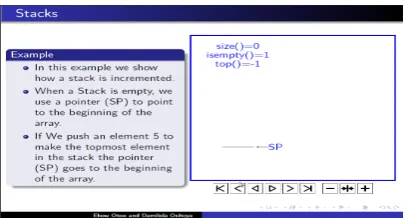
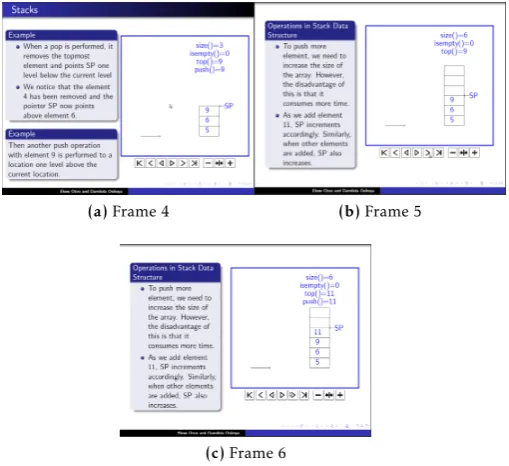
We shall start by creating presentation slides in beamer and use Tikz commands to create our animations frame by frame. The textual presentation is shown on the left while the controlled animation is on the right. Stacks are Last in, First out abstract data structures characterised by some basic operations including Push, Pop and Top. In this example, we have been able to demonstrate how stacks are incremented using an array. When stacks are empty a pointer SP points to the empty stack and when a push operation occurs, pointer SP goes to the begining of the array.
Other push operations are performed adding element 6 and 4 as shown in the figure below. A pop operation then occurs and removes the element 4 making SP drop back to 6. A push operation of 9 is performed and the array becomes full. we increment the stack to allow more push and pop operations to be done.
5.2. Stack Implementation with Linked List
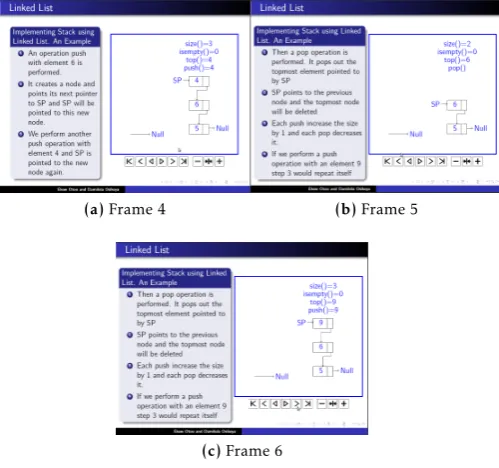
Gilberg, [11] defined Linked list as a collection of data where each element contains the location of the next element. To implement our stack using linked list, we have been able to develop a frame by frame example. At first, the linked list is empty. The next frame is as a result of a click on the same presentation slide which adds an element 5 into the stack with an operation push. Two push operations are performed with elements 6 and 4. A pop operation is performed on the linked list before a final push with element 9.
While performing these operations, we display the operations performed on the presentation slide so that the student can understand what operation we perform at any given time. For example when we performed an operation push(), the animation shows the size of the linked list size()=3 which shows the number of element in the stack at any point or time. With the linked list
(a)Frame 1 (b)Frame 2
(c)Frame 3
Figure 2. Stack Implementation (Array)
(a)Frame 4 (b)Frame 5
(c)Frame 6
Figure 3. Stack Implementation (Array)
not empty IsEmpty()=0. Since the last push operation push()=9, the topmost element in the linked list is represented by top()=9.
5.3. Queue Implementation Using Arrays
(a)Frame 1 (b)Frame 2
(c)Frame 3
Figure 4. Stack Implementation (Linked List)
(a)Frame 4 (b)Frame 5
(c)Frame 6
Figure 5. Stack Implementation (Linked List)
an element in the queue at the tail of a queue and Dequeue() which deletes an element from the the front of the queue. Other operations include Size(), IsEmpty(), top() and front().
As shown in Figure 6 and 7, we have implemented an array with size 5 and we increment with and enqueue() operation of element 5. The tail moves to the next empty while the head remains in the same place and
(a)Frame 1 (b)Frame 2
Figure 6. Queue Implementation (Arrays)
we perform the same with elements 7 and 2. When a dequeue operation is performed, element 5 is removed and head moves to 7. With more enqueues we would exhaust the stack.
(a)Frame 3 (b)Frame 4
Figure 7. Queue Implementation (Arrays)
5.4. Queue Implementation Using Linked List
To demonstrate the implementation of our queue using linked list, we design our linked list so that both head and tail points to null then we perform an enqueue() of 5 which creates a node and both head and tail point to the new node. We perform and enqueue of 6 and 9 which sees head pointing to th new node and tail pointing to the new node. With this operations we have deduced that all enqueues are performed on the tail and all dequeues are performed on the head. When a dequeue() is performed, element 5 would be deleted and the header points to 6.
5.5. Insert Operations in Trees
(a)Frame 1 (b)Frame 2
Figure 8. Queue Implementation(Linked list)
(a)Frame 3 (b)Frame 4
Figure 9. Queue Implementation(Linked list)
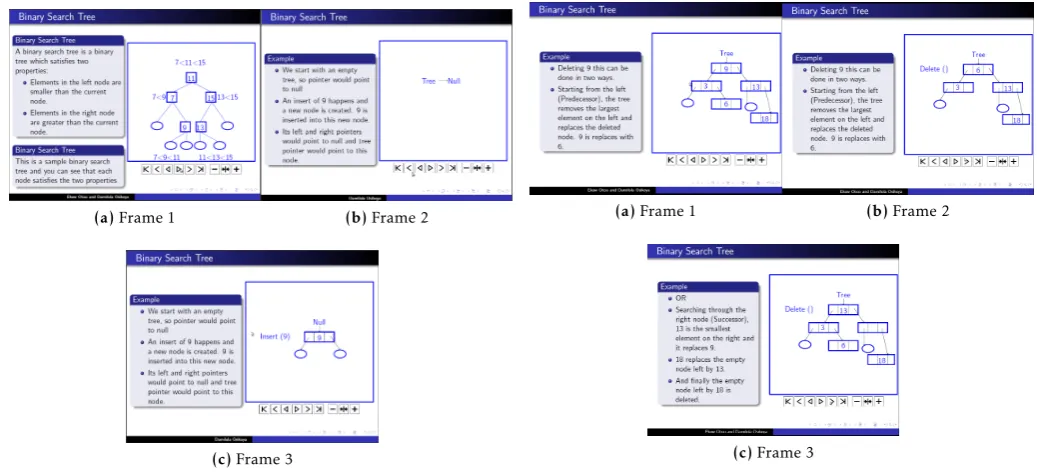
tells weather its a leaf node. The figure below shows controlled animated frames of an insert algorithm in a binary tree.
(a)Frame 1 (b)Frame 2
(c)Frame 3
Figure 10. (Insert Operations in a Binary Tree)
(a)Frame 4 (b)Frame 4
(c)Frame 4
Figure 11. (Insert Operations in a Binary Tree)
5.6. Delete Operations in Trees
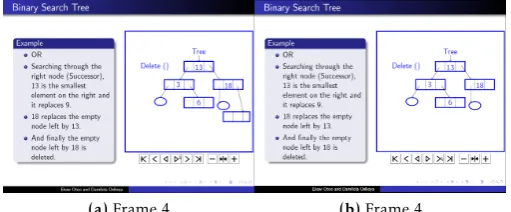
To perform a Delete() operation in a tree, we either start from the left (Predecessor) or from the right (Sucessor). Using the predecessor, the tree scans the left of the largest element (in this case 6). It replaces node 9 with it and deletes the node which 6 occupies.
(a)Frame 1 (b)Frame 2
(c)Frame 3
Figure 12. (Insert Operations in a Binary Tree)
(a)Frame 4 (b)Frame 4
Figure 13. (Insert Operations in a Binary Tree)
leaving its node empty. Element 18 replaces the empty node left by 13 and the empty node left by element 18 is deleted.
6. Conclusion
Creating animated instructional multimedia in scientific domain is a work in progress and is expected to be refined as more research is made into it. A benefit of our approach is that students can go through animated slides with or without an instructor, allowing students to develop a mental model in the working memory.
The applicability of the work presented in this paper is its use in facilitating teaching and learning of other esoteric scientific concepts. In this case, algorighm in data structures can be understood going through the animation frame-by-frame in a controlled manner. This approach can also be used by students to learn on their mobile phones where instructional contents can be uploaded onto their phones for revision or study.
It is important to note that although there are different approaches to implementing instructional contents, none has been able to proof the integration of text and animation in a controlled manner in the scientific sphere. Our approach in this research captures and embeds scientific concept animation in presentations. It is expected that this research contributes to the studies to implementing animated instructional contents which would help students have a better understanding of theoretical concepts.
We are developing a tool that would converts sequence tagged diagrams from SVG and XML to TikZ to provide an ease in developing animated content in PDF. This approach would make it easier for instructors to quickly compile lecture notes. In future, we also hope to develop an android application that would enable students to download lecture notes in PDF onto their mobile devices.
References
[1] Anderson, J. and Anderson, B. [1993], ‘The Myth of Persistence of Vision Revisited’,Journal of Film and Video 45(1), 3–12.
[2] Ausbrooks, R., Buswell, S., Dalmas, S., Devitt, S., Diaz, A., Hunter, R., Smith, B., Soiffer, N., Sutor, R., Watt, S. et al. [2001], ‘Mathematical Markup Language (MathML) Version 2.0’,W3C Recommendation 2001.
[3] Chen, T. and Sobh, T. [2001], ‘A tool for data structure visualization and user-defined algorithm animation’,
Frontiers in Education Conference, 2001. 31st Annual1, 2–
7.
[4] Chen, T., Sobh, T. and Tibrewal, A. [2003], ‘A Tool for Data Structure Visualization and User-defined Algorithm Animation’, Journal of STEM Education :
[5] Cheng, P. C.-H. [1999], ‘Unlocking conceptual learning in mathematics and science with effective representa-tional systems’,Computers & Education33, 109–139. [6] Edgar, D. W. [2006], ‘The effects of computer animated
instruction upon understanding of high school students’, Southern region conference american association for
agricultural education..
[7] Faraday, P. and Sutcliffe, A. [1997], ‘Designing effective multimedia presentations’, Proceedings of the ACM
SIGCHIpp. 272–278.
[8] Flannagan, D. [1997], JavaScript: The Definitive Guide, 2nd edn, O’Reilly & Associates.
[9] Fletcher, K. [2009], Adobe Presenter, Microsoft Power-Point, and Blackboard Vista: tools that work together for creating and presenting online instructional content, number 6, ACM, New York, NY, USA, pp. 243–248. [10] GarcĜa, R. R., QuiroÂť, J. S., Santos, R. G.,
GonzaÂťlez, S. M. and Fernanz, S. M. [2005], ‘Interactive multimedia animation with Macromedia Flash in Descriptive Geometry teaching’,Computers & Education 49(3), 615–639.
[11] Gilberg, R. F. and Forouzan, B. A. [2005],Data Structures:
A pseudocode Approach with C., 2 edn, Thompson Course
Technology.
[12] Harper, B., Hedberg, J., Wright, R., Corderoy, R. et al. [1996], ‘Interactive multimedia development and cognitive tool’, Proceedings of the 1996 international
conference on Learning sciences.
[13] Harrison, Hummell, Laura, J. and III, H. L. [2010], ‘Incorporating Animation Concepts and Principles in STEM Education’,Technology Teacher69(8), 20–25. [14] Leung, C.-H. and Chan, Y.-Y. [2007], ‘Knowledge
Management System for Electronic Learning of IT Skills’,
SIGITE’07.
[15] Lin, L., Atkinson, R. K. et al. [2011], ‘Using Animations and Visual Cueing to Support Learning of Scientific Con-cepts and Processes’,Computers & Education,56(3), 650– 658.
[16] Mayer, R. E., Chandler, P. et al. [2001], ‘When Learning Is Just a Click Away: Does Simple User Interaction Foster Deeper Understanding of Multimedia Messages’,Journal
of Educational Psychology93(2), 390–397.
[17] Mayer, R. E. and Moreno, R. [2002], ‘Animation as an Aid to Multimedia Learning’,Educational Psychology Review 14(1), 87–99.
[18] Murray, M., Guimaraes, M. et al. [2009], ‘Animated Courseware Support for Teaching Database Design’,
Issues in Informing Science and Information Technology6.
[19] Pagliano, O., Brown, W. E., Rule, G., Bajzek, D. et al. [2007], ‘Improving animation tutorials by integrating simulation, assessment, and feedback to promote active learning’, Proceedings of World Conference on E-Learning in Corporate, Government, Healthcare, and Higher
Education.
[20] Pierson, W. C. and Rodger, S. H. [1998], Web-based animation of data structures using JAWAA, Vol. 30, pp. 267–271.
[21] Pinter, R., Radosav, D., Maravi Cisar, S. et al. [2010], ‘Interactive Animation in Developing e-Learning Con-tents’,33rd International Convention on Information and Communication Technology, Electronics and Microelectron-icspp. 1–5.
[22] Polewczak, J. [2005],Latex, MathmlL, and Text4HT: Tools
for Creating Accessible Document, Mathematics, CSUN,
Northridge, http: // www. csun. edu/ hcmth008/ mathml/ acc_ tutorial. pdf.
URL:
http://www.youscribe.com/catalogue/manuels-et- fiches-pratiques/savoirs/autres/tex-mathml-and-tex4ht-tools-for-creating-accessible-documents-211962
[23] Reddy, U. M., Sripada, B. N., Kulkarni, R. et al. [2007], ‘How to Teach Medical Concepts Using Animations by Designing Multimedia Instructional Application’,
Systems, Man and Cybernetics2, 1778–1785.
[24] Salzberg, B., Murphy, T. et al. [2005], LaTeX: When Word Fails You,in‘SIGUCCS’05’, p. pp.241 243.
[25] Segura, C. and Pita, I. [2006], ‘A Tool for Interactive Lear-ning of Data Structures and Algorithms’, Pro- ceedings of the 8th Simposio Internacional so- bre Informática
Educativa.
[26] Tantau, T. [2010],The TikZ and PGF Packages, Vol. 2.10, http://sourceforge.net/projects/pgf.
[27] Tantau, T., Wright, J. and Miletić, V. [2010],The beamer
class, Vol. 3.10, http://bitbucket.org/rivanvx/beamer.
[28] Taylor, M. J., Pountney, D. C. and Baskett, M. [2008], ‘Using animation to support the teaching of computer game development techniques’, Computers & Education 50, 1258–1268.
[29] Trifonova, A. [2003], Hoariding content in M-learning context, PhD thesis, University of Trento, Italy.
[30] Tversky, B. and Morrisony, B. [2002], ‘Animation: can it facilitate?’, International Journal of Human-Computer