Adaptive Mobile Visualization – The Chameleon
Framework
Paulo Pombinho1, Maria Beatriz Carmo2, Ana Paula Afonso1
1
University of Lisboa, Faculty of Sciences, LaSIGE, Campo Grande, Lisboa, Portugal [email protected]; [email protected]
2
University of Lisboa, Faculty of Sciences, BioISI – Biosystems & Integrative Sciences Institute, Campo Grande, Lisboa, Portugal
mbcarmo @fc.ul.pt
Abstract. The evolution of mobile devices and the development of high speed wireless networks have supported a widespread use of these devices with increasingly more complex applications. This reality has fostered the research in the field of information visualization in mobile devices. However, the limited screen space, resource constraints and interaction restrictions impose difficulties to developers and users of these applications. An approach to address these problems is to adapt the visualization to the user context. However, these proposals are normally designed in an ad-hoc fashion and are difficult to generalize. In addition, existing solutions are focused only in some subset of possible characteristics of the user context or only address a very specific domain and related adaptations. The objective of this paper is to present the design of a framework for adaptive mobile visualization (AMV) applications, denominated Chameleon, and the development and evaluation of prototypes that use this conceptual-based framework.
Keywords: mobile devices, information visualization, adaptive visualization, context-awareness.
1.
Introduction
In the last years, we have witnessed a general widespread of users with mobile subscriptions. As of the end of the 1st quarter of 2013, the number of mobile subscriptions had exceeded 6.4 billion with estimates to reach 9.1 billion in 2018 [1]. This is especially relevant in undeveloped countries, where the mobile subscriptions far exceed the number of fixed phone line subscriptions [2]. The growth of mobile device usage is also coupled with the development of wireless infrastructures. Mobile broadband connections are becoming widely used, especially in developed nations with more than half of the population using these [3]. The combination of these factors means that access to information is becoming permanent, not restricted in time or place, and becoming, in a sense, almost ubiquitous.
planning was made in advance, users are now opting to perform planning choices, in situ, using increasingly more complex services and applications. The increase in complexity of these tasks is also directly related with the availability of much more powerful smartphones. This can be seen in the increasing number of smartphones sold and the fact that in several countries more than half of the subscribers already have a smartphone [3].
Despite becoming powerful mobile devices, even the most recent smartphones have some limitations when compared to traditional desktop computers. However, in spite of some differences in processing power or graphical capabilities, it is the reduced screen space and the differences in the interaction paradigm that can be considered the major limitations. The smaller screen space means that whatever is shown on-screen, has to be important to the user, and conveyed in an easily perceived way [4]. Furthermore, the usability of these progressively more complex systems has to be carefully explored, since inexperienced users will not enthusiastically adopt these services if the complexity of the interaction and its restrictions are not removed [5, 6]. These issues are particularly important in mobile visualization systems that are generally difficult to design and use if these limitations are not addressed.
To address these problems many approaches have been proposed. A typical approach is to develop context-aware systems where the user context is used to diminish the restrictions imposed by the small screens of mobile devices and adapt the visualization to the user context. Reichenbacher defines adaptive mobile visualization (AMV) as concerning the adjustment of the diverse components of the visualization process, such as the interface, the information and the visualization, to the user’s context [6]. Adaptive applications to the user’s context are especially relevant when considered to improve the usability of information visualization tasks in mobile devices with a small screen, and in reducing the cognitive load that is inherent to mobile scenarios.
Although several authors have studied and proposed systems and models for adaptive mobile visualization [7, 8, 9], they present some limitations. Some are high level conceptual frameworks only analyzing AMV in a theoretical perspective, others explore and cover only a subset of contexts. Additionally, existing systems are generally designed for specific domains and contexts, increasing the difficulty in their reusability [10].
Our objective is to propose a conceptual software framework to serve as basis to support the development of mobile visualization applications, structured in the components of contexts of use, adaptation objects and adaptation methods, which is able to use and manage a broad and diverse set of contexts and related adaptations.
In this paper we propose the Chameleon framework, a conceptual AMV framework. The proposed framework uses a top-down approach, relating the three basic components of adaptive visualization applications, namely the adaptation objects, adaptation methods, and usage contexts, with the three main layers of the infrastructure. This approach aims to facilitate the design of AMV applications that adapt the information, visualization and user interface, according to a diverse set of contexts and adaptation methods. We also present AMV prototypes that use the Chameleon design principles as a proof-of-concept.
In the next section we describe the identification and categorization of the use contexts that can be obtained in a mobile scenario. In section 3 we review and categorize the different visualization application objects that can be adapted and, in section 4 we present the adaptation methods categorization. In section 5 we present the proposed Chameleon Framework and in section 6 we describe some prototypes that have been developed, as a proof of concept, based on the Chameleon framework. Finally, in section 7, we present our conclusions and the future work.
2.
Mobile Environment Use Contexts
There are several studies that explore and categorize the set of contexts that can be relevant for a user in a mobile environment. Although these proposals suggest different names or a different mapping of the contexts associated with each category, there are some similarities amongst them. In the next section we will present these categorizations in order to analyze the context dimensions that are important to consider in AMV applications and to propose the categorization used in the Chameleon framework.
2.1. Use Context Categorizations
Schilit et al. [11] suggested that the different use context dimensions are divided in three categories: Computing Context (for example, network connectivity or bandwidth), User Context (for example, user profile and location) and Physical Context (for example, luminosity level and temperature). Chen and Kotz [12] proposed two additional categories: Time Context (for example, time and date) and a Context History (for example, logs of previous context values).
Predic and Stojanovic [13] suggest three distinct categories: Technical Characteristics of the Environment (the device and its connectivity characteristics), Logical Characteristics of the User’s Environment (user’s location and the identification of near objects and persons) and Physical Characteristics of the User’s Environment (for example, light and noise levels).
Desertot et al. [15] suggest four context categories related to the management of services in the transportation domain: Device Context (the software and hardware specification of the device), Execution Context (composed by the dynamic execution contexts of the different services), Environment Context (containing the user location, noise and light levels) and the User Context (in which the user preferences are stored).
In Hofer et al. [16] the contexts are divided in two distinct categories: Physical Context, representing all the concrete characteristics that are obtained through physical sensors, and a Logical Context, that represents the more abstract information. A similar categorization is proposed by Prekop and Burnett [17]: Internal and External Contexts. The former are essentially directly specified by the users or captured by their interaction, while the latter are captured by hardware sensors.
Finally, Han et al. [18] suggest a division in three categories: Physical Context, consisting in the physical characteristics of the surrounding environment objects, an Internal Context composed by abstract entities (people, tasks, emotions, amongst others), and a Social Context in which user relations with other people are contained.
2.2. Proposed Categorization
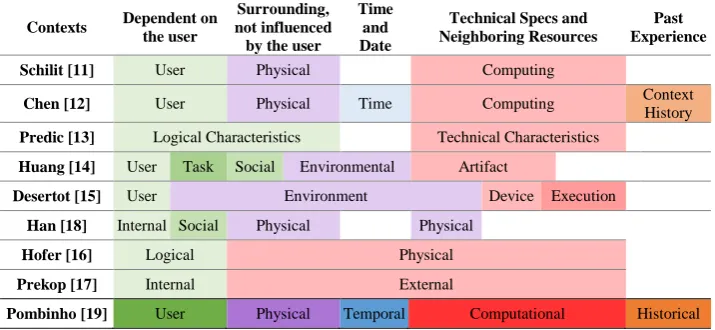
Despite the existence of some specific differences between the different categorizations presented, these can be generally compared, allowing us to understand how they relate to one another. Figure 1 shows, in each line, a representation of the context categorizations proposed by the different authors, showing what types of contexts are considered, and how these categorizations are mapped to our proposal. Our proposal (presented in the last line of the table) distinguishes between contexts that are directly dependent on the user (User) from those relating to the user’s surrounding environment but not directly influenced by him (Physical), temporal contexts (Temporal), information regarding the technical specs of the device and neighboring resources (Computational), and the information about the past experience and historical data (Historical).
By analyzing the context categorizations we can observe that there is, with only a few exceptions [13, 15], a distinction between those contexts related and directly dependent on the user and those that are not related. This shows the importance given to the user characteristics in adaptive systems.
Although some classifications follow a more minimalistic approach and categorize the remaining contexts only in one category [16, 17], we consider that it is important to further distinguish between them because of their semantic differences. For this reason, by analyzing the remaining categorizations, despite some differences, both the Physical and the Computational contexts become quite evident, with most categorizations making this distinction.
Fig. 1. Different proposed context categorizations
For this reasons, the categorization of mobile contexts [19] that we propose in the Chameleon framework, combines the proposal made by Schilit et al. [11] and Chen et al. [12] since they encompass the most comprehensive categorization of mobile contexts of use. We chose to expand the notion of Context History from Chen, which considers the historical values of the contexts, and increasing the scope of the Historical Context, to encompass all the data that relates to previous events and user experiences.
We identified five categories (Fig. 2): User Context, Physical Context, Temporal Context, Computation Context and Historical Context, which we briefly describe below, and present some of the contexts and the methods to obtain them.
Device Specifications Network Connection Available Resources User Profile
Spatial Contexts User Task and Goal
Visual and Sound Contexts Weather Conditions Surrounding Environment
t
Hour and Date Week Day Season of the year Previously Visited Locations
Previous Choices Past Experience
Fig. 2. Categorization of the contexts of use
User Context: This category contains the context dimensions that are related to the users and depend directly from them. These include the user’s profile information and can be configured directly by the user or obtained using information available in the user’s social network accounts. Normally this context contains information about the
Contexts Dependent on the user
Surrounding, not influenced by the user
Time and Date
Technical Specs and Neighboring Resources
Past Experience
Schilit [11] User Physical Computing
Chen [12] User Physical Time Computing Context History Predic [13] Logical Characteristics Technical Characteristics
Huang [14] User Task Social Environmental Artifact
Desertot [15] User Environment Device Execution
Han [18] Internal Social Physical Physical
Hofer [16] Logical Physical
Prekop [17] Internal External
user’s age, gender, nationality, proficiency in the use of mobile devices, disabilities, general preferences of the user among others.
Other types of user context are the spatial characteristics of the user. These include the user’s location, which can be calculated using global positioning systems or inferred with the use of other sensors integrated in the mobile device; orientation information, obtained using the device’s digital compass and gyroscopes; and the speed and acceleration, acquired using the location shifts or the accelerometer.
Lastly, information about the user’s current task is also categorized as a user context that might be manually specified by the user or it could be inferred using information from the user’s calendar or historical contexts.
Physical Context: The physical contexts are those that are not directly influenced by the user. Information about the light conditions and noise levels at the user’s location can be obtained using the mobile device light sensor and microphone. In the same way, the current weather conditions near the user might be calculated using sensors such as the barometer, thermometer or hygrometer, present in some devices, or, in their absence, obtained through the use of a weather web server available online. Similarly, traffic conditions, can be obtained in online servers, usually associated with the map servers.
Temporal Context: Obtained using the device’s internal clock and calendar. They might be lower level, for example, the current time or date, or higher level, such as, the day of the week, season of the year, or information about the current day (for example, is it a holiday or matches a specific event).
Computation Context: The computation context category is related to the technical specifications of the mobile device, its wireless data connections and the identification of neighboring resources, such as printers, computers, or other mobile devices, that could be connected to the device.
The majority of the device specifications can be obtained during the installation phase. They include the type and processing capability of the device’s processor, memory and storage capacity, graphical specifications, such as the screen size, resolution and pixel density, and the available types of interaction peripherals. Information about the data connections should be obtained in real time for specifications that are dynamic, such as the currently available connection quality or the available bandwidth. Finally, the presence of devices in the vicinity of the user could be obtained using wireless protocols such as, Bluetooth, Wi-Fi or Universal Plug and Play, among others.
Historical Context: The historical context consists of a record of the user’s previous history and should be obtained by the use of recorded logs. These logs may consist, for example, in a list of places the user has previously visited or previous queries and the choices that derived from them.
3.
Mobile Visualization Application Objects
We have analyzed two existing proposals that suggest a categorization for the adaptation objects in the AMV systems discussed above.
Predic et al. [13] propose three distinct categories: Display of Information and Services (in which adaptations are made to the information and the way it is presented, and also to the available services), Automated Execution of Commands (for example, recalculating a route when identifying that the user has missed an exit) and Storage of Contextual Information (which allows the application to automatically extract the users preferences).
Despite having a focus on cartographic information, Reichenbacher states that adaptation objects are all the elements that can be altered by the user or the applications, according to the use context [7]. The author proposes three different categories: Visualization (for example, the map style or the position and size of graphical elements), User Interface (for instance, which map functions are available) and Geospatial Information (how much cartographical data is considered, and what area it related to).
Although the two presented categorizations appear to follow slightly different approaches (i.e. one more related to the type of each object, and the other to the different types of adaptation), they do partially match each other. “Display of Information and Services” closely relates to the “Visualization” category, “Automated Execution of Commands” is partially related to the “User Interface”, and, in a sense, “Storage of Contextual Information” includes the “Geospatial Information”.
Our aim is to propose an information visualization framework that facilitates the development of AMV applications with a broader scope of types of information, not only limited to geospatial information and map based applications. For this reason, our approach is based on the one proposed by Reichenbacher, but generalizing it to allow the design of AMV systems without limitations in the selection of the adaptation objects. For this reason, we consider three categories: Information, Visualization and Interaction.
The Information Objects category contains the data (not only geospatial) that is obtained by the AMV application and that will potentially be shown to the user or used by the system, and the specification of how the information was searched and the type of filtering used, how much information is obtained and how it is ranked.
The Visualization Objects comprise the graphical elements that are directly related to the information visualization on the device, i.e. the actual information that is visualized by the user. Examples of visualization objects are the type of codification used for the graphical elements, the position, size and color of the symbols used, and how these are arranged on the screen and what type of iconography is used and its level of detail.
Although, as will be described in the next section, adaptation for the two categories are substantially different, many of their actual adaptation objects are usually tightly coupled together. For this reason, when considering the objects we have chosen to aggregate the two categories in an Information Presentation category.
4.
Mobile Visualization Adaptation Methods
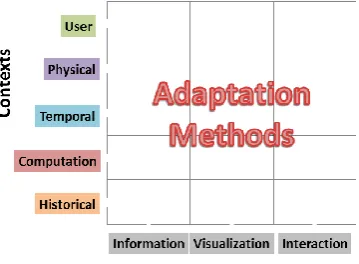
Adaptation methods are the techniques used to adapt the adaptation objects in response to the variations of the different contexts. We are going to analyze the most relevant adaptation methods using a matrix that relates the different categories of context to the categories of object they adapt [19]. The possible combinations are shown in Figure 3. For simplicity, these methods are grouped by the context category they adapt to.
Fig. 3. Adaptation methods matrix
User Context: Concerning the user profile, characteristics such as age, language and nationality may influence the Visualization used and Information presented, adapting, respectively, the type of graphics used, the language and time definitions and the currency. The type of Interaction may also be adapted according to the experience in using the device and the application, the disabilities and the preferences of the user. Through these contexts it is possible to present more complex interfaces, or more simple ones, depending on the user’s needs and capabilities. Lastly, the Information presented can also be adapted according to the user interests, the locations he has marked as important (for example, his home and work place) and also cultural and social elements.
Regarding the spatial characteristics, the location context allows to show Information about what is near the user. In the same way, the orientation context of the user can be used to show only the information about what is in front of him, or related to what the user is looking at. Likewise, properties such as speed, acceleration and the type of movement done by the user, may be used, not only, to calculate where the user is headed and to estimate how long he will take to arrive there, but also to adapt the way information is Visualized (for example, reducing the magnification of a map as the speed increases) or the type of Interaction available (for example, using different techniques to select objects on the screen whether the user is walking or running). The geographic proximity of friends and family can be used to assist the search for locations that are in the proximity of the groups of users.
Physical Context: Information about lighting conditions and noise levels, in the surroundings of the user location, are important to adapt the way information is Visualized by the user. The lighting conditions context can enable the application to adapt the colors used and the screen’s brightness and contrast in a way that it may enhance the information displayed and be correctly understood. Concerning the noise levels, it is possible adapt the Interaction by increasing or reducing the volume of the device depending whether the user is, respectively, in a noisy or silent location.
The information about the weather conditions can be used to show different Information. If the user is, for example, looking for a restaurant, in a sunny day with warm temperatures, the application may raise the relevance of a restaurant with a terrace, and the reverse if it is cold and rainy. In a similar way, it is possible to filter the information presented to the user, using information about the surrounding environment. For example, if the user is near the sea, the application could show beaches or museums if the user is near a touristic area. Additionally, using the current traffic conditions, as is already done in systems like TomTom [20], makes it possible to suggest alternative information that allows the user to avoid crossing locations that have heavy traffic.
Temporal Context: The temporal information may allow different types of adaptation. The Visualization of information (for example, the colors and icons used) can be altered depending on the time of the day (for example, using different colors whether it is night or day), as used in some navigation and astronomy software [20, 21], among others.
Using the local time context, it is possible to filter the presented Information, taking into account the schedules of the locations and whether they are open or close. Similarly, the presentation of information about events may take into account the current date and omit information that is still a long time away.
Computation Context: The knowledge of the characteristics of the device may enable the application to proceed with different types of Visualization and Interaction adaptations: the computational load of the application may be adjusted by disabling complex features if the device is less powerful or is currently overloaded; the detail and size of the icons may be increased or reduced depending on the size and resolution of the screen; and alternate modes of interaction may be applied depending on the devices available.
The network characteristics may be used to allow a better use of the available resources, through the use of a cache and by choosing the best time to obtain the needed data. Regarding the cost of using the network connection, this information allows the application to know whether to give priority to speed (in case of billing by time) or to prioritize the reduction of the amount of data (in case of billing by amount of traffic).
Finally, the use of the information about the nearby available resources (printers, screens among others) may allow a better interconnection of the mobile devices with the different devices in its vicinity.
5.
Adaptive Mobile Visualization Framework
Some research has already explored AMV (Adaptive Mobile Visualization) frameworks. Reichenbacher suggests the outline of a conceptual framework for the adaptation of the display of geo-referenced information in mobile environments [22]. In this framework, the key elements identified are the user, the context and the current task.
Reichenbacher distinguishes between adapted visualization, where tools are offered to the users, so that they may change the characteristics of the visualization displayed, and adaptive visualization, where the display characteristics are automatically adapted using information about the current contexts of use [7]. The basic building blocks of an adaptive cartographic visualization application are identified as the context dimensions, the objects that can be adapted, and the adaptation methods. This framework
Tonder et al. [23], propose a model that incorporates an adaptive interface in the design of a map visualization system for mobile devices. This model consists of four main components: A “Data Model” that contains the information being displayed in the system; a “Knowledge Base” that manages and obtains the four different types of context used (namely user profile, user task, time and location); the “User Monitoring and Modeling Component”, which is responsible for accepting the user interaction data, and to automatically determine the user’s preferences and behavior; and the “Adaptation Engine” that manages the adaptations of the visualization (visual representations, detail and zoom level), information (filtering) and interface (menu options).
Panagiotakopoulos et al. [24] describe a context-aware platform for monitoring patients suffering from special phobias. An ontology based context model was designed that uses a diverse set of contexts to be able to provide a complete set of data that describes the current situation of the patient. The proposed framework is composed by six main components: “Context Providers” that are responsible for obtaining the diverse context data from the sensors and external sources; an “Aggregating Agent” that gathers all the data obtained from the context providers and analyses which data is useful; an “Inference Agent” that interprets the data from the previous component to generate high level contexts; a “Profile Agent” responsible for managing the profile information about the patients; a “Service Adaptation Agent” that queries the two previous agents to decide which actions should be taken; and finally the “Service Coordination Agent” responsible for managing the communication between the different agents present in the framework.
Dobre describes the CAPIM, Context Aware Platform using Integrated Mobile services [25]. This platform uses an architecture with four different layers. The first layer is responsible for collecting the context information, the second layer stores and aggregates the different contexts, the third layer contains context-aware execution rules and, lastly, the fourth layer comprises the visualization and user interaction.
Finally, Kuflik et al. [26] present a framework for context aware communication in visitor’s guides. This framework uses information from four different contexts: Contextualized Information, which consists, for example, on information about the exhibits in a museum; Spatial Context, which is the visitor’s current location; Temporal Context, which encompasses the current time and visit phase and duration; and finally, the Social Context, which refers to the role of a user inside a group.
with only these contexts in mind and, thus, hindering their potential of being expanded with richer context dimensions. Furthermore, the systems that do use other contexts are usually developed for a very specific domain and, as a consequence, are organized in a way that, although it might excel at those specific goals, is not really capable of being replicated in different domains and scenarios.
Our aim is to propose a framework for the creation of AMV applications that can solve, or at least minimize, the previously stated limitations. For this reason, we propose the Chameleon framework designed to support the development of AMV applications that can use a broad set of contexts, and also allow additional contexts to be easily added at any given time. Additionally, the framework also was designed to allow its use in different domains and scenarios, involving also the generalization of the concepts of adaptation objects and adaptation methods.
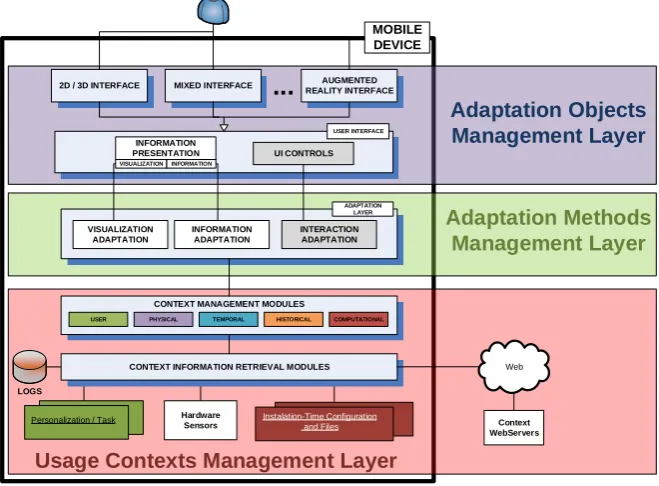
The architecture of the Chameleon framework model (Fig. 4) consists of three main layers, described in the next sections, which correspond to the management layers of the adaptation objects (top blue), the adaptation methods (middle green) and the usage contexts (bottom red).
Instalation-Time Configuration and Files
Personalization / Task
LOGS
Web
2D / 3D INTERFACE
USER INTERFACE
MIXED INTERFACE AUGMENTED
REALITY INTERFACE
INFORMATION
PRESENTATION UI CONTROLS
VISUALIZATION ADAPTATION
INFORMATION ADAPTATION
INTERACTION ADAPTATION
ADAPTATION LAYER
CONTEXT MANAGEMENT MODULES
CONTEXT INFORMATION RETRIEVAL MODULES
Hardware
Sensors Context
WebServers MOBILE
DEVICE
Usage Contexts Management Layer
Adaptation Methods
Management Layer
Adaptation Objects
Management Layer
...
VISUALIZATION INFORMATION
USER PHYSICAL TEMPORAL HISTORICAL COMPUTATIONAL
Fig. 4. Chameleon framework (detailed view of each layer in Fig. 5, 6 and 7)
5.1. Adaptation Objects Management Layer
mixed interface in which both types of visualization displays are used simultaneously (Fig. 5). It should be stressed that the interface types available are not exhaustive and that, since many objects are common to all interfaces, the organization of the framework with additional interfaces would not change.
Thus, the diverse elements that compose these distinct interfaces form the set of adaptation objects. For these, management is divided in two modules: User Interface Controls and the Information Presentation module. The former is responsible for the objects that are directly related to the interaction controls of the interface and the Information Presentation module (corresponding to the information and visualization categories of adaptation objects), is responsible for both the information objects themselves, and the objects that relate to how the information is visualized.
As was discussed earlier, despite being different objects and associated with different adaptation methods, we have chosen to incorporate both information and visualization in the same module since they are usually coupled together. In this module, each adaptation object is responsible for knowing and calling the related adaptation methods.
2D / 3D INTERFACE
USER INTERFACE
MIXED INTERFACE AUGMENTED
REALITY INTERFACE
INFORMATION
PRESENTATION UI CONTROLS
...
VISUALIZATION INFORMATION
Fig. 5. Adaptation objects management layer
5.2. Adaptation Methods Management Layer
Regarding the Adaptation Methods Management Layer, it consists in three modules that are responsible for the different types of adaptation (Fig. 6). This way, the interaction adaptation module is responsible for managing the adaptations of objects directly related with the user interface control. The information adaptation module and the visualization adaptation module will manage the information and visualization adaptations, respectively, requested by the adaptation objects that correspond to the information presentation module.
VISUALIZATION ADAPTATION
INFORMATION ADAPTATION
INTERACTION ADAPTATION
ADAPTATION LAYER
Fig. 6. Adaptation methods management layer
As an example, an adaptation method that changes the symbols displayed on screen according to whether it is night or day might perform differently if information on the light conditions surrounding the user is also an available use context. For example, it may be night, but the user may be in a well-lit environment, or vice-versa.
5.3. Use Contexts Management Layer
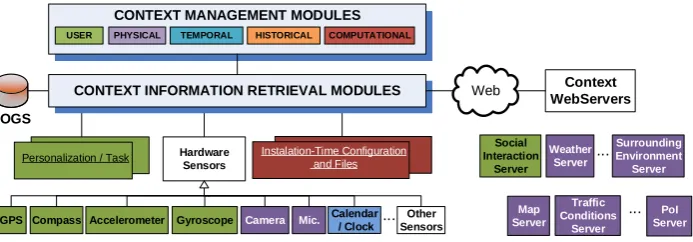
The layer responsible for managing the contexts is composed of two sub layers: Context Management Modules and Context Information Retrieval Modules (Fig. 7).
Instalation-Time Configuration and Files Personalization / Task
LOGS
Web
GPS Compass Calendar
/ Clock Other Sensors ...
Accelerometer Camera Mic.
Social Interaction Server Weather Server Surrounding Environment Server CONTEXT MANAGEMENT MODULES
CONTEXT INFORMATION RETRIEVAL MODULES
Hardware Sensors Gyroscope Context WebServers ... Map Server PoI Server ...
USER PHYSICAL TEMPORAL HISTORICAL COMPUTATIONAL
Traffic Conditions
Server
Fig. 7. Usage contexts management layer
The Context Information Retrieval Modules are responsible to define the access to the different sources of contextual information. They communicate directly with these sources and, for this reason, consist mainly on low level contexts. Since the types of communication can differ greatly, we divided these modules into five groups, each of which communicate with different types of sources of contextual information: internal databases in which historical records are stored, a set of dynamic files that contain personalization information and information about the user’s current task, fairly static files created in installation time and configuration, a set of hardware sensors integrated with the mobile device and, a set of context servers available by using a wireless data connection. These modules are also responsible for communicating updates of the context, either at specified intervals, or whenever the context is changed.
The Context Management Modules are responsible for using the different lower level context values, obtained from the Context Information Retrieval Modules, and communicate these values to the adaptation methods. These modules may use, and transmit, information from only one lower level module or they may aggregate information about several lower level contexts, and fuse them into a higher level context. As an example, if we consider a higher level context: Weather Conditions that can have values, such as, “summer day” or “rainy day”, it will be calculated in the respective Context Management Module using information from lower level Context Information Retrieval Modules: namely the Temperature, Humidity, Precipitation and so on, obtained from the device sensors.
maintain a log of the different contexts available and use this information as a Contextual source itself. As was explained above, it also allows Context Data Aggregation, by fusing different lower level contexts into a higher level one. Finally, we also allow Context Data Filtering, both time-based, where the context values are communicated at specific time intervals, or change-based, where the contexts are only communicated to the higher layers when changing.
5.4. Flow of Information
Every layer in the Chameleon framework communicates directly with the ones above or below. An application based on this framework model will consist of a set of diverse objects, which may, or may not, be intended for future adaptation. These objects are categorized depending on their type as Visualization, Information or Interaction objects. Each object may have a set of adaptation methods to which they are associated. These adaptation methods have the responsibility to decide when to adapt the objects and also to retrieve contextual information from the lower level, either to decide if it is time to perform an adaptation, or to identify how the adaptation should proceed.
The adaptation methods request contextual information from the Context Management Modules responsible for the type of context required. These Context Management Modules are, in turn, responsible for retrieving the necessary contextual information from the different Context Information Retrieval Modules that communicate with the information sources. After obtaining the required information, the Context Management Modules can either relay the unprocessed lower level contexts (for example, time or temperature), or process a set of different contexts into a higher level and more complex one (for example, using information from the GPS and accelerometer, state if the user is walking or driving).
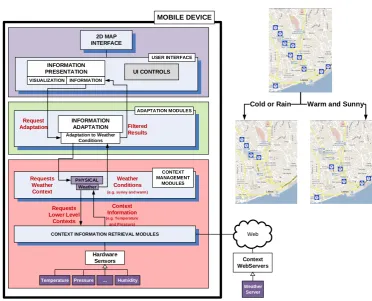
As an example of a possible flow of information using the Chameleon Framework, considering a mobile application for the visualization of restaurants drawn in a map that is adapted to the user location and the surrounding weather conditions. Fig. 8 represents the adaptation matrix, with the contexts involved and the objects that are adapted.
We have an adaptation object “Restaurant Results”, which consists on the actual information about the existing restaurants in the vicinity of the user. This information object, will then call an adaptation method to filter which information is displayed in different locations and weather scenarios. Fig. 9 highlights the components of the Chameleon framework that are used in this example.
The adaptation method will then request the Physical – Weather Context Management Module for the required contextual information. The Weather Context module will be responsible for communicating with the lower level, asking the sensors present in the device or, alternatively, a weather server, available through the Internet, to calculate which weather conditions are present in the user surroundings.
Fig. 8. Adaptation matrix for restaurant example
Web
Temperature ... Humidity
Weather
Server
2D MAP INTERFACE
USER INTERFACE
INFORMATION
PRESENTATION UI CONTROLS
INFORMATION ADAPTATION
ADAPTATION MODULES
CONTEXT INFORMATION RETRIEVAL MODULES
Hardware Sensors
Pressure
Context WebServers
MOBILE DEVICE
VISUALIZATION INFORMATION
PHYSICAL Request
Adaptation Filtered Results Adaptation to Weather
Conditions
CONTEXT MANAGEMENT
MODULES Requests
Weather Context
Weather Conditions
(e.g. sunny and warm)
Weather
Requests Lower Level
Contexts
Context Information
(e.g. Temperature and Pressure)
Cold or Rain Warm and Sunny
Fig. 9. Information flow example
6.
Prototypes of AMV Applications
In this section we describe the prototypes developed, based on the Chameleon framework model, which evaluated the use of different contexts and proposed new visualization and information adaptation methods. These visualization applications are described below and categorized using the adaptation matrix described in Fig. 3. All the prototypes have been evaluated using usability studies, detailed in their respective references.
Adaptation to User Location and Orientation: We developed and evaluated an AMV application that allows users to search for points of interest (PoI) using a mobile device, while using information about their location and orientation to aid in the point of interest identification [28]. The adaptation matrix for this prototype has Information (PoI results) and Visualization (Compass, PoI pictures) objects being adapted to User Contexts, namely the location and orientation.
The location and orientation contexts are obtained through the use of position (GPS) and orientation (digital compass) sensors. The developed application includes an augmented reality interface that shows the surrounding points of interest marked in a compass rose, representing the vicinity of the user, giving, to the user, clues about other existing results (Fig. 10).
Fig. 10. Location and orientation adaptation prototype
The information about each PoI is adapted according to where the user is pointing the device. To help the user identify and associate the existing PoI to their physical counterparts, stored pictures of these points are used. In each instance, the pictures of the PoI that were taken closest to the current location and orientation of the user are shown. The addition of these pictures helps the user to compare what s/he is currently seeing in the real world, and correctly identifying the shown point of interest.
(Building Map) objects being adapted to User Contexts (Acceleration, Orientation and the Indoor Location).
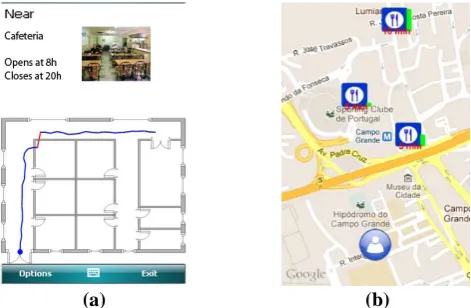
To be able to correctly identify the position of the user, we proposed an indoor positioning method that does not need previously installed physical infrastructures in a building. Furthermore, this approach does not need external sensors, avoiding the restriction of the user’s natural movements when using a mobile device and walking indoors. The developed application allows the position of users inside a building to be inferred from the movement done by the user (Fig. 11a). To achieve this goal we use the mobile device’s accelerometer to detect when the users takes a footstep, and the digital compass to determine the direction of each footstep. Using this information and the knowledge of the buildings floor plan we can calculate with an acceptable accuracy the indoor location of the user.
(a) (b)
Fig. 11. (a) Indoor positioning AMV prototype (b) Adaptive recommendation AMV prototype
Adaptation to Mixed Environments: The previous algorithm was itself adapted by contextual information obtained when the user is outdoors [30]. The use of these contexts allow adaptations to be made to the parameters of the indoor positioning algorithm, to allow a better match to the way each user walks at any given time, while also compensating for differences between indoor and outdoor movements. Furthermore, this AMV application prototype aims to be used in mixed environments (indoor and outdoor), automatically adapting the type of interface used, according to the type of environment the user is in.
The adaptation matrix adapts Information (PoI Results, Room Information) and Visualization (Type of Interface, Building Map) objects to User Contexts (Acceleration, Orientation, Outdoor Location, Speed and Step Size, Indoor Location).
while the graphical symbols are adapted to represent more than one point of interest while conveying the most relevant ones.
More recently, in [32] we evaluated an enhanced version of the point of interest relevance calculation. This adaptive recommendation algorithm uses contextual information about location, areas of interest, time and temporal distance, and historical context of previous searches to improve the relevance calculation that was previously done.
The adaptation matrix for this prototype adapts Information (PoI Relevance and Filtering) and Visualization (Presented PoI, PoI Symbols) objects to Historical (Past Searches and Choices), Temporal (Time and Date) and User (Location) contexts.
This prototype presents the most relevant points of interest drawn over a map, showing their relevance and how much time the user would need to get to those locations (Fig. 11b).
7.
Conclusions
In this paper we have presented the Chameleon framework using a top-down approach matching the three main building blocks of adaptive information visualization applications, namely: adaptation objects, adaptation methods and contexts of use with the framework’s three main layers.
The proposed framework has the goal of being sufficiently generic to allow a comprehensive set of contexts to be used, allowing contextual information to be obtained from diverse sources, whether directly from the device sensors, databases, or from online contextual servers. Furthermore, the layered structure of the framework model allows a high degree of independence between the modules in each layer, permitting their reuse in different applications and domains.
We have applied the proposed model in the development and evaluation of several AMV applications, using diverse contexts and have proposed different adaptation methods.
Regarding future work, we intend to enrich our framework by proposing new AMV applications based on the Chameleon and that explore novel visualization adaptation methods that use other diverse contexts. As an example, the type of environment where the user is at (for example, in an industrial zone, in the middle of a park, near a beach) can be used to adapt the type of information that is presented as well as how it is presented. To this purpose, we are also currently working on new modules to obtain new types of contextual information.
Acknowledgements. The work presented here is based on research funded by the FCT - Fundação para a Ciência e Tecnologia (Portuguese Science and Technology Foundation) through the SFRH/BD/46546/2008 scholarship and also supported by centre grant to BioISI, Centre
Reference: UID/MULTI/04046/2013 and the LaSIGE Research Unit, Centre
References
1. Ericsson Mobility Report – On the Pulse of the Networked Society (2013). [Online] http://www.ericsson.com/res/docs/2013/ericsson-mobility-report-june-2013.pdf (accessed April 2014)
2. ITU – Key Global Telecom Indicators for the World Telecommunication Service Sector, November 2011 (2011).
3. ComScore Whitepaper – Mobile Future in Focus: February 2012 (2012).
[Online] http://www.comscore.com/Insights/Presentations_and_Whitepapers/2012/2012_Mo bile_Future_in_Focus (accessed April 2014)
4. Holtzblatt, K.: Designing for the Mobile Device: Experiences, Challenges, and Methods. In Communications of the ACM, 48 (7), 33-35. (2005)
5. Chittaro, L.: HCI Aspects of Mobile Devices and Services. In Personal and Ubiquitous Computing, Springer-Verlag, 8 (2), 69-70. (2004)
6. Burigat, S., Chittaro, L.: Visualizing the Results of Interactive Queries for Geographic Data on Mobile Devices. In Proceedings of the 13th Annual ACM International Workshop on Geographic Information Systems, ACM Press, 277-284. (2005)
7. Reichenbacher, T.: Mobile Usage and Adaptive Visualization. In Encyclopedia of GIS, part 16. Heidelberg: Springer-Verlag, 677-682. (2008)
8. Nivala, A.–M., Sarjakoski, L. T.: User Aspects of Adaptive Visualization for Mobile Maps. In Cartography and Geographic Information Science, Towards Ubiquitous Cartography, 34 (4), 275-284. (2007)
9. Cai, G., Xue, Y.: Activity-Oriented Context-Aware Adaptation Assisting Mobile Geo-Spatial Activities. In Proceedings of the 11th IUI, 354-356. (2006)
10. Schwinger, W., et al: Context-Awareness in Mobile Tourism Guides. In Handbook of Research on Mobile Multimedia, Second Edition. IGI Global, 534-552. (2009)
11. Schilit, B., Adams, N., Want, R.: Context-Aware Applications. In Proceedings of the IEEE WMCSA, Santa Cruz, California, 85-90. (1994)
12. Chen, G., Kotz, D.: A Survey of Context-Aware Mobile Computing Research. In Technical Report, Department of Computer Science, Dartmouth College. (2000)
13. Predic, B., Stojanovic, D., Djordjevic-Kajan, S.: Developing Context-Aware Support in Mobile GIS Framework. In Proceedings of the 9th AGILE Conference. (2006)
14. Huang, H., Gartner, G.: Using Activity Theory to Identify Relevant Context Parameters. Location Based Services and TeleCartography II, From Sensor Fusion to Context Models, Springer-Verlag, 35-45. (2009)
15. Desertot, M., et al: A Context Aware Framework for Services Management in the Transportation Domain. In Proceedings of the 10th Annual International Conference on New Technologies of Distributed Systems (NOTERE), 157-164. (2010)
16. Hofer, T., et al: Context-Awareness on Mobile Devices – The Hydrogen Approach. In Proceedings of the 36th Annual Hawaii International Conference on System Sciences, 292-302. (2002)
17. Prekop, P., Burnett, M.: Context and Ubiquitous Computing. Special Issue on Ubiquitous Computing Computer Communications, 26 (11), 1168-1176. (2003)
18. Han, L., Jyri, S., Ma, J., Yu, K.: Research on Context-Aware Mobile Computing. In Proceedings of the 22nd International Conference on Advanced Information Networking and Applications, 24-30. (2008)
19. Pombinho, P., Afonso, A. P., Carmo, M. B.: Chameleon – A Context Adaptive Visualization Framework for a Mobile Environment. In Proceedings of the Information Visualization IV’2011 Conference, 151-157. (2011)
20. TomTom HD Traffic (2014) http://www.tomtom.com/. (Accessed April 2014)
21. Google Sky Maps (2014) http://www.google.com/mobile/skymap/. (Accessed April 2014) 22. Reichenbacher, T.: Adaptive Concepts for a Mobile Cartography. In Journal of Geographical
23. Tonder, B. v., Wesson, J.: Using Adaptive Interfaces to Improve Mobile Map-Based Visualization. In Proceedings of the SAICSIT, 257-266. (2008)
24. Panagiotakopoulos, T. C., Lymberopoulos, D. K.: Monitoring of Patients Suffering from Special Phobias Exploiting Context and Profile Information. In Proceedings of the 8th IEEE International Conference on BioInformatics and BioEngineering – BIBE 2008, 1-6. (2008) 25. Dobre, C.: CAPIM: A Platform for Context-Aware Computing. In Proceedings of the P2P,
Parallel, Grid, Cloud and Internet Computing International Conference, 266-272. (2011) 26. Kuflik, T., et al: Generic Framework for Context-Aware Communication Services in
Visitor’s Guides. In Journal of Software Engineering and Applications, 4, 268-281. (2011) 27. Bellavista, P., et al: A Survey of Context Data Distribution for Mobile Ubiquitous Systems.
In ACM Computing Surveys, 44 (4), 24. (2012)
28. Pombinho, P., Carmo, M. B., Afonso, A. P., Aguiar, H.: Location and Orientation Based Queries on Mobile Environments. In Proceedings of the Computer Graphics, Visualization, Computer Vision and Image Processing 2010 International Conference. (2010)
29. Pombinho, P., Afonso, A. P., Carmo, M. B.: Point of Interest Awareness Using Indoor Positioning with a Mobile Phone. In Proceedings of the 1st International Conference on Pervasive and Embedded Computing and Communication Systems. (2011)
30. Pombinho, P., Afonso, A. P., Carmo, M. B.: Mixed Environment Adaptive System for Point of Interest Awareness. In Proceedings of the Location Awareness for Mixed and Dual Reality Workshop, in conjunction with IUI 2012. (2012)
31. Pombinho, P., Carmo, M. B., Afonso, A. P.: Evaluation of Overcluttering Prevention Techniques for Mobile Devices. In Proceedings of the Information Visualization (IV2009), 127 – 134. (2009)
32. Pombinho, P., Carmo, M. B., Afonso, A. P.: Context Aware Point of Interest Adaptive Recommendation. In Proceedings of the Context-Awareness in Retrieval and Recommendation Workshop, in conjunction with IUI 2012. (2012)
Paulo Pombinho is graduated in Informatics from the Faculty of Sciences of the University of Lisbon (FCUL). He obtained an MSc in Informatics and is currently obtaining his PhD in Informatics from the same University. He is a researcher in the Large-Scale Information Systems Laboratory (LaSIGE) and the Laboratory of Agent Modelling (LabMAg). His research interest include mobile computing, information visualization, human-computer interaction and adaptive systems.
Maria Beatriz Carmo is graduated in Mathematics from the Faculty of Sciences of the University of Lisbon (FCUL), Portugal. She holds a PhD in Informatics from the same University. She is an assistant professor in the Department of Informatics of FCUL and a researcher in BioISI– Biosystems & Integrative Sciences Institute. Her research interests include visualization, augmented reality, computer graphics and virtual environments.
Ana Paula Afonso is graduated in Informatics from the Faculty of Sciences of the University of Lisbon (FCUL), Portugal. She holds a PhD in Informatics from the same University. She is an assistant professor in the Department of Informatics of FCUL and a researcher in the Large-Scale Information Systems Laboratory (LaSIGE). Her research interests are: Mobile computing; location and context computing, spatial-temporal information visualization, interactive visualization, mobile interaction, mobile visualization.