This paper describes the design and implementation of two interfaces that support faceted search on smart phones and other small-screen devices. The first interface features a “modal overlay” for query refinement, and the second interface utilizes a “teaser” design for query refinement. The topics of faceted search and design for small screen devices are discussed, as well as related research. The implementation of the interfaces is described in detail.
Headings:
Classification -- Systems -- Faceted Mobile devices
FACETED SEARCH INTERFACE DESIGN FOR SMART PHONES
by Lee E Shaw
A Master’s paper submitted to the faculty of the School of Information and Library Science of the University of North Carolina at Chapel Hill
in partial fulfillment of the requirements for the degree of Master of Science in
Information Science.
Chapel Hill, North Carolina July 2012
Approved by
Introduction
Faceted search interfaces can be seen in many places, including commercial and library websites. These interfaces allow users to choose from a list of characteristics, or facets, pertaining to the contents of a collection, sometimes showing the number of elements in the collection that share this facet. By selecting a facet, users are able to narrow or expand the number of results that are displayed. Typically more than one facet may be selected at the same time, simulating the Boolean “AND, OR” logic of traditional information retrieval.
In the past, faceted interfaces have been implemented in interfaces designed for desktop computer displays, which typically have enough space to display facets and search results simultaneously. A faceted search interface may consist of a list of facets, a search box, and a list of search results. When a website using this type of interface is accessed by a small screen device it can become difficult to fit all of these elements comfortably on the screen.
access a partially visible facet page using a swiping motion. Again, users are able to browse and refine by swiping back and forth between the results page and the facets page. The modal overlay and teaser designs were selected because they are becoming more commonly seen in other settings, and for this preliminary research, it seemed appropriate to start with designs that are already somewhat familiar and simple to
comprehend. Doing so places the emphasis on the location of the facets rather than on the novelty of the interface. The interfaces were created using a combination of HTML, CSS, PHP, JavaScript, and the JavaScript library, JQuery.
Rather than a create a new data set for this study, it seemed more practical to use an existing website with a faceted search interface, and modify it using the aforementioned designs. The Media Resources Center (MRC) at the University of North Carolina employs a robust faceted search interface for its online film collection, and the designs discussed in this paper were built using this website as a foundation.
Although testing the utility and usability of the two interface designs with human
participants fell beyond the scope of this study, a usability test design was created for use in further research and is discussed in a later section of this paper.
Faceted Search and Filmfinder
The starting assumption is that the overall goals of faceted navigation are to support flexible movement through the information space, provide suggestions of navigation choices at each point in the search process, provide seamless integration with keyword search, allow for fluid
switching between refining and expanding, prevent empty result sets, and provide a feeling of control and understanding without confusion. (p. 1) A number of researchers have studied faceted search, and have found that it enhances the usability of retrieval and browsing interfaces (English, Hearst, et al., 2002; Lemieux, 2009; Tunkelang, 2009). Faceted search is commonly employed in online commerce websites (Amazon, Zappos, etc.) and is also visible in other places, such as library websites.
search works best when there is a broad taxonomy that is relatively shallow (Lemieux, 2009).
The UNC Media Resource Center (MRC), which is located in the Undergraduate Library at the University of North Carolina, contains more than 28,000films that are available to students and faculty. The MRC uses a webpage with a faceted search
interface called “Filmfinder” to assist users in browsing the film collection. This interface offers the flexibility of searching by title, director or performer, keyword, release year, genre, country, format, or language— individually or in conjunction (see Figure 1). Once the initial query has been issued, the user can refine search results using facet categories that include availability, format, genre, subject, country, release year, director or
performer, and new titles (see Figure 2).
Figure 2. The Filmfinder search results page. The current queries is shown and can be edited in the search bar (A), results are shown in a results window below (B), and facets for query refinement (C) are displayed to the left.
The Filmfinder website offers hundreds of facets to assist in searches, which is a powerful feature on a large screen device. On a small screen device, however, the interface becomes difficult to use efficiently. When the entire interface is displayed, it is too small to read. Zooming in, on the other hand, does not allow the facets, results, and search bar to be viewed at the same time. This makes browsing and query refinement a challenge.
Designing for Smart Phones
Smart phone use is commonplace in the United States. As smart phones continue to evolve and become a more popular way to access the Web, a persistent challenge is designing for the input methods and smaller display areas of these devices. Many web pages are designed twice for compatibility with both large and small screen devices.
A
Visitors may be routed automatically to the mobile version of a website, typically indicated by an “m” as part of the URL, if they are using a small screen device. While omitting content from mobile versions of webpages to save screen space is an option, it is not desirable or feasible in all cases, especially as webpages are more frequently visited with mobile devices, and it becomes harder to predict what the “important” content will be to the end user.
There is conflicting research pertaining to search performance on small screen devices. Sweeney and Crestani (2005) have shown that there is little difference in a user’s ability to judge the relevance of search results on a desktop or mobile device, or the speed with which they are able to do so, suggesting that smart phones are equal to desktop computers as tools for information retrieval and browsing. However, it is noted that screen size does affect search in other ways. For example, smaller display areas may lead to reduced recall due to increased difficulty of viewing multiple results (Sweeney & Crestani, 2005).
The research of Jones, Buchanan, and Thimbleby (2003) indicates that screen size does affect a user’s ability to quickly and accurately make relevance judgments, and suggests that designers should change the way that information is displayed when viewed on a mobile device. The authors present several design guidelines for smart phones. One such guideline is to reduce the amount of page-to-page navigation necessary to view search results, instead relying on scrolling. They also suggest that more, rather than less,
and Crestani (2005) is supportive, also discouraging making result summaries shorter for smart phones. It is suggested that designers make users aware of whether or not a search result is pointing them to a small-screen optimized web page or a regular web page. This guideline was probably more relevant at the time of publication, as the ability of smart phones to accurately display web pages has improved, and certain web technologies that were particularly difficult for smart phones to process are no longer in common use (e.g. frame-based web design).
Related Research
The literature pertaining specifically to faceted search interfaces for smart phones is still very limited. What follows is an overview of two peer-reviewed studies that involve faceted search on smart phones, as well as two articles published on uxmatters.com that are devoted specifically to the design of faceted search interfaces for smart phones, and from which the design ideas discussed in this paper were taken. The facet-oriented FaThumb (Karlson et al., 2006) and TapGlance (Robbins, Lee, Fernandez, 2008) studies have made progress in the area of faceted search interfaces for mobile devices, but they have left certain crucial questions unanswered, such as how to redesign websites that implement faceted search for use with smart phones. FaThumb explored faceted search with a large dataset that was accessed using the keypad of a mobile phone. TapGlance (influenced by FaThumb) attempted to lay the foundation for a “unified smartphone interface,” largely based on facets. The articles from uxmatters.com, written by Greg Nudelman (2010), explored design ideas for faceted search interfaces.
FaThumb
The “FaThumb” interface, designed by Karlson, Robertson, Robbins, Czerwinski, and Smith (2006) attempts to address the question of how to design a faceted search interface for a mobile device. The interface created for the study combines text search and facet based navigation, enabling users to iteratively filter search results. The authors’ goal was to address three main concerns with mobile device search: reliance on text entry,
searching off the device, and under utilizing processor power and storage space. A secondary but intertwined objective was to study the differences between text-based and facet based search.
For the formative evaluation of the system, a search interface prototype was created. The search index included yellow page listings for Washington State (about 39,000). These listings were augmented to include other data relevant to the study, such as
neighborhoods and relative distances from pre-determined locations. The data were classified using a navigable tree of hierarchically organized facets with the following characteristics: 8 top level facets, a maximum of 8 metadata attributes, maximal depth of 5, and just over 200 terminal attributes. Although the authors used a limited and highly specific data set for the study, they specify that the system was intended to handle any sort of data set.
in a 3x3 grid that mapped to the 3x3 phone keypad. Different colors were used to show the position within a hierarchy.
There were 17 participants in the study, all familiar with mobile device usage. They were given tasks of varying difficulty— (1) directed, (2) simple browse, (3) complex browse, using either (1) text based search, or (2) facet based search. Tasks were designed to approximate real-life information needs. Dependent variables collected during the study included task time, error rate, logs of interactions per task, user satisfaction ratings and overall preference.
Incorrect tasks results were discarded from analysis. On average, facet based search outperformed text based search, but not significantly. Text based search was more effective when the subject was known, and otherwise facet navigation was preferable, which confirmed the hypothesis. Several usability issues were also noted; for example, users typing incomplete search criteria, failing to sort, using incorrect sort criteria, making errors in scanning results, and making business classification errors.
This study contributed valuable research to the area of faceted search on smart phones, but also had distinct limitations. First off, FaThumb was designed for use with a standard mobile phone keypad, which brings the scalability of the system into question. Not only does it limit the number of facets that can be presented to the user to the number of keys (eight, with the ninth button used as a menu), but it also represents a marginal input method given that few smart phones currently rely on a nine button keypad..
TapGlance
A study conducted by Robbins, Lee, and Fernandez (2008) attempts to develop a
“unifying visualization and interaction paradigm” for smart phones. The authors note that numerous interfaces and interaction styles are employed by different smart phones, carriers, and third party applications, creating an aggravating environment for users in which they are required to constantly “relearn” interfaces. Drawing from research in spatial data navigation, faceted search, and glanceable information displays, their goal was to create an interface that could “unify the most common smartphone interactions.”
Several design goals were specified for the TapGlance project. One goal was to ensure that the design functions well on devices with less-than-optimal processing speeds and screen resolutions. This goal is referred to as “design for emerging markets,”
attention, and that this requirement should be avoided in the design of smartphones, which are commonly used in situations where the device is not the user’s only focal point. In a similar vein, the authors wanted to make lists “glanceable,” meaning that users could pick out items of interest from the periphery of the display rather than serially navigating through lists of options. The researchers strived to maintain a “consistent interface metaphor,” in line with the goal of interface unification, and lastly (and of the most relevance to this paper), the authors wanted to design an interface that “use[d] facets to reunite search and browse.” Drawing from the previously discussed FaThumb project, they believed that facet-based search could be a useful paradigm for smartphone
interaction design because the user is freed from having to type free text, which is a tedious smartphone interaction. The UI created by the authors was ultimately structured around faceted search. For example, to locate information based on creation,
modification, and viewed dates, the user would select the “date” option (i.e. facet), and would be presented with sub-facets, such as “today” and “last week.”
Like the FaThumb interface, the TapGlance interface demonstrated how facets might be displayed on a small screen device. The main goal of the design, however, was to offer a new UI paradigm for smartphones and not necessarily a novel approach to facet-based search on a mobile device.
Design Patterns for Mobile Faceted Search
for Mobile Faceted Search,” parts 1 and 2 (2010). In these articles, Nudelman addresses the basic challenge of designing a faceted search interface for a mobile device, and suggests several methods that could be used to overcome this challenge.
Nudelman opens with the example of Amazon.com, arguing that while the large screen version of the website could be considered the “gold standard” for faceted search, the mobile version of the website is lacking. Two of the biggest shortcomings that he highlights are the poor use of screen space and the lack of iterative query flow, each of which make the user experience between the two versions of the website completely different.
Nudelman offers four solutions to the problem of limited “screen real estate.” The first is referred to as “four corners.” When using this design, almost the entire screen is devoted to displaying search results with the exception of a thin bar at the top of the screen that echoes the query and the number of results. Nudelman argues that displaying more search results enhances the user search experience, and improves “finding efficiency.”
and feedback loop of a regular faceted search interface. According to Nudelman, the four corners and modal overlay design patterns work well in conjunction. When used together, selecting one of the corner buttons brings up the modal overlay menu, and the corner button contains an “X” icon that can be clicked to return to search results. The next two design patterns that he describes can also be used in conjunction, “watermark” and “full page refinement.” The full page refinement option simply devotes the entire screen to faceted refinement, sorting, and the query text box. This is made possible by a fluid transition between search results and the refinement menu, which is accomplished by using watermarks. Watermarks are non-intrusive graphics that suggest an action to the user, such as shaking the mobile device, or making a circular motion on the surface of the screen. These graphics may appear for a second or two and then disappear. Watermarks can also be animated to more thoroughly convey the appropriate action to the user.
pattern, each of these options work in conjunction with each other and with the search results. The user is able to enter a query in basic mode, and then fluidly switch to advanced mode to refine the query with facets.
Design Scenario
The following design scenario was developed to guide the process of implementation. It is meant to describe a realistic scenario in which the interfaces might be used.
at the subject facets. He sees that one film is associated with the facet “survival” and clicks on it out of curiosity. The movie “Enemy Mine” appears as the result. Nobody in the group has seen this movie, and they decide that it is a good choice. As luck would have it, the movie is available.
Implementation
Two separate faceted mobile interfaces to the MRC were built as the focus of this research: 1) a modal overlay, and 2) a teaser. Both interfaces were implemented using a combination of HTML, CSS, JavaScript, and PHP. A JavaScript library called JQuery Mobile (http://jquerymobile.com/) was used to simplify the task of creating a basic mobile interface. The JQuery Mobile library contains code and graphics for creating common mobile Web features that are optimized for touch and use graphic elements such as color gradients and rounded corners to create a sleek, modern look that is easily
recognizable as a mobile interface. The teaser interface uses a JavaScript library called Swipe (http://swipejs.com/) as a template.
File Structures
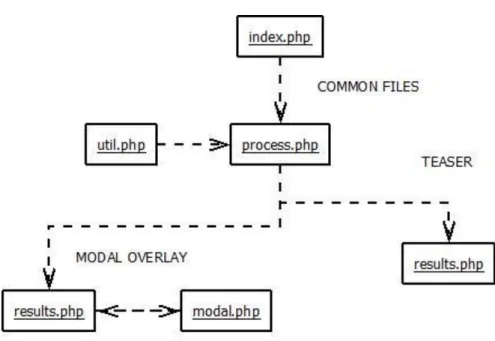
There are three common files between the two interfaces called index.php, process.php, and util.php. They are responsible for getting queries and processing them into lists of results and facets. . The file index.php is the starting point for each interface. It contains a form with a field for entering a text query and options to search by genre, country format, or language. These fields can be used individually or in unison. In both interfaces, the form is handled by a file called results.php. results.php includes the file process.php which uses a series of functions to process the query. These functions are located in the file util.php. The teaser interface handles both the results and facets in results.php. The modal overlay interface uses an additional file called modal.php to display the facets. Figure 4 shows the interaction between files.
XML Parsing
The ability to get search results in XML format was advantageous to this research in that it obviated the need to gain access to and learn the functionality of the MRC database. Implementation essentially became a three step problem: 1) Retrieve the XML document programmatically, 2) parse the XML document, and 3) display the data in a prescribed format.
However, there were challenges involved in handling the XML documents. Firstly, various URLs needed to be assembled dynamically to get the correct XML file from the Filmfinder website. Learning the correct syntax for these URLs was a task of trial and error, as there was no readily available documentation on how to construct them. The code for building search URLs was created by issuing a number of different queries on the Filmfinder website, observing the resulting URLs, and recreating them
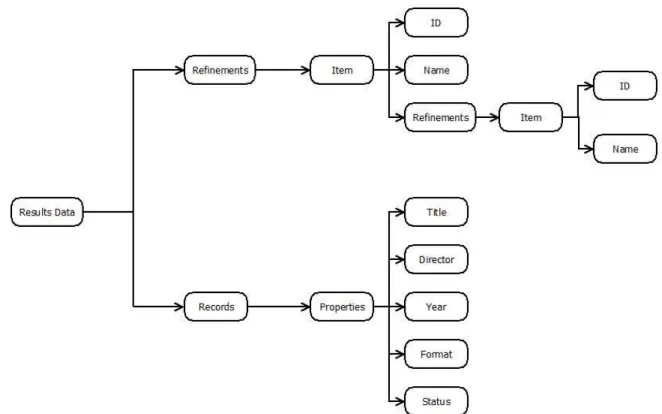
Figure 5. A high-level overview of the XML documents returned by the Filmfinder website.
The ease with which data could be extracted from the XML was largely dependent on the tag names used by Filmfinder. The more distinct the tag names enclosing the desired data were, the easier it was to extract this data. For example, the XML documents returned by Filmfinder had only one tag called “<searchTerms>,” but hundreds of tags called
“<item>”, which referred to multiple different kinds of data. Retrieving data in the latter case required subdividing the XML documents into smaller chunks until the tag names became distinct.
Teaser
interface. While there are numerous interfaces available on the Web that are designed for swiping, none could be found that were designed specifically for page transition with a teaser. Most teaser-like interfaces appear to be designed for browsing collections of pictures, and very few have the crucial quality of showing a portion of the page to be swiped to.
Creating a teaser interface “from scratch” would have been prohibitively time-consuming, and so the challenge became to find an approximate design that could be reworked to be more like the desired teaser interface. Several different designs were taken from the Web and modified slightly to fit the needs of this study. This iterative process involved testing different approaches. One of the main challenges was to find an approach that would support smooth transitions between the screens of the teaser
interface.
A library called Swipe (http://swipejs.com/) ultimately became the template for the teaser interface. Swipe is a basic but powerful library designed for page transitioning using a swiping motion. Although the library does not natively support a teaser interface, it is easy to work with and functions more smoothly and reliably than many other templates that were considered.
Query Storing and Handling Facets
unnecessary to retrieve and parse an XML document each time the user navigates to a different page. Depending on what the user has searched for, the text query, language, format, country, and genre are saved in session variables. When transitioning from index.php to results.php or from results.php to modal.php in the case of the modal overlay, these values are persistent. Also, if a user selects a facet, a new XML document is retrieved, but the original query is not lost and does not need to be parsed from the new XML document.
The facets that appear on the first page of the Filmfinder website (language, country, genre, and format) are also included on index.php, although the lists are abbreviated. These facets, which make up the initial queries, are the only facets that are stored in session variables. The other facets, appearing on the results page (subject, director or performer, availability, and new titles), are drawn from the returned XML documents. The complete lists of the first sets of facets (language, genre, format, and country) can be viewed in the HTML on the Filmfinder homepage. The second set, however, is returned by the Filmfinder database and is dependent on a particular query. For example, for the query “star wars,” under the facet category “director or performer,” the value “Carrie Fisher” appears. However, this facet might not be returned by other queries. A function called getFacets() was created with the intention of pulling facets from XML results and converting them to HTML links to new search results including the selected facet.
The file index.php contains a form with a field for entering a text query and options to search by genre, country, format, or language. These fields can be used individually or in conjunction.
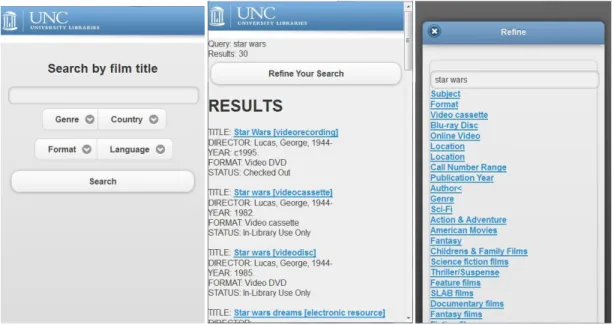
Figure 6. Modal interface. (From left to right) index.php, results.php, and modal.php
Below, the main sections of the index.php file are described. 1.
The beginning code accesses the session variables and sets them to NULL. Effectively, this resets the query if the user returns to index.php
<?php
session_start();
$_SESSION['query']=NULL; $_SESSION['format']=NULL; $_SESSION['language']=NULL; $_SESSION['country']=NULL; $_SESSION['genre']=NULL; ?>
2.
In the head of the index file there are links to a JQuery Mobile .css file, the local style sheet, style.css, and two JQuery libraries.
<!DOCTYPE html PUBLIC "-//W3C//DTD XHTML 1.0 Transitional//EN" "http://www.w3.org/TR/xhtml1/DTD/xhtml1-transitional.dtd">
<html lang="en" xml:lang="en" xmlns="http://www.w3.org/1999/xhtml"> <head>
<title>MRC Teaser</title>
<meta name="viewport" content="width=device-width, initial-scale=1">
<link rel="stylesheet" href="http://code.jquery.com/mobile/1.0/jquery.mobile-1.0.min.css" />
<link rel="stylesheet" type="text/css" href="style.css" />
<script src="http://code.jquery.com/jquery-1.6.4.min.js"></script> <script src="http://code.jquery.com/mobile/1.0/jquery.mobile-1.0.min.js"></script>
</head>
These files give the page a standard look and feel for a mobile phone, using rounded edges, shadows, color gradients, and large page elements to make the interface look modern and amenable to touch.
The JQuery Mobile library uses a particular method to construct mobile web pages. <div> tags are used with HTML5 “data-role” attributes such as “page” and “content” to style elements.
<body>
<div data-role="page" id="wrapper"> <img src="img/library_header.jpg"/>
<div data-role="content"><h2>Search by film title</h2> 4.
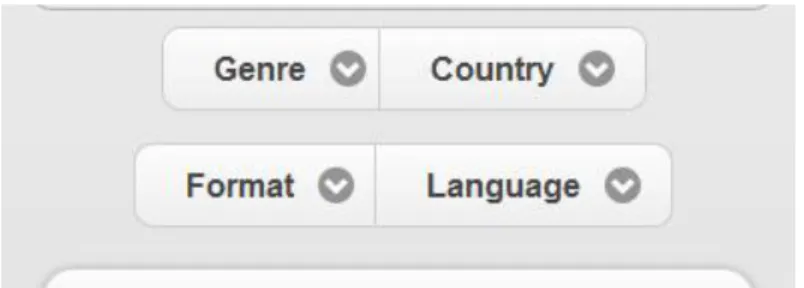
A form is used to get the user query and any selected facets. <div> tags surround the first two facet lists (genre and country) and the second two (format, language) so that they can be displayed 2x2 (see Figure 8).
Figure 8. Buttons displayed 2X2.
<form name="search" action="results.php" method="get" data-transition="none"> <input type="text" name="query" />
<div data-role="controlgroup" data-type="horizontal" id="firstrowbuttons">
<?php
include("include/genrelist.php"); include("include/countrylist.php"); ?>
</div>
<div data-role="controlgroup" data-type="horizontal"> <?php
include("include/formatlist.php"); include("include/languagelist.php"); ?>
</div>
The lists of values for genre, country, format, and language are stored in separate PHP files that generate HTML form fields with the facets as choices.. Although the Filmfinder website offers hundreds of values for these listings, for this research it did not seem necessary to include them all on the starting page. Only a small portion of the values that seemed most common were included. For genre, broad and familiar genres were selected, such as “Comedy & Satire.” More specific genres such as “Nomads & Nomadic Peoples” were excluded. Countries with large and noteworthy movie industries or regional values that covered a large number of countries (e.g. Latin America) were chosen, and languages were chosen primarily based on this list. There were not nearly as many values for
format, so all formats were included. Table 1 shows all of the facets that were included. Genre:
Spanish
util.php
This file contains functions that are used by process.php and results.php to process queries and display results. The functions that are found in this file are described below.
1.
processQuery()
This is a simple function that replaces blank spaces in text queries with a “+” symbol. Given that queries are being issued programmatically as URLs, there can be no blank spaces, and the Filmfinder website uses this symbol. As an example, the query “star wars” needs to be converted to “star+wars” in order to properly retrieve search results.
function processQuery($str){
if(substr_count($str, " ")>0){
$newStr=str_replace(" ", "+", $str); return $newStr;
} else{
return $str; }
} 2.
assembleVariableString()
a specific order: format, language, country, and then genre. If any of these variables contain values, they are added to the URL string. Semicolons are added dynamically to separate the values. Finally, a string that appears at the end of every query URL is added. Table 2 Shows examples of queries and the resulting URLs
function assembleVariableString($f, $l, $c, $g, $q){ $count=0;
$variableString; $beginning; if(!$q){
if ($g) {
if($f OR $l OR $c)
$beginning="action=or:"; else $beginning="action=nob:"; } else $beginning="action=or:"; } else{
}
Query: star wars URL:
http://search.lib.unc.edu/filmfinder/search?Ntt=star+wars&Ntk=Title&Nty=1&sugg= Query: star wars + (facet) Sci Fi
URL:
http://search.lib.unc.edu/filmfinder/search?Ntt=star+wars&Ntk=Title&action=nob:42900 81830&Nty=1&sugg=
Query: star wars + (facet) Sci Fi + (facet) United States URL:
http://search.lib.unc.edu/filmfinder/search?Ntt=star+wars&Ntk=Title&action=or:429496 7215,true|nob:4290081830&Nty=1&sugg=
Query: (facet) Sci Fi URL:
http://search.lib.unc.edu/filmfinder/search?action=nob:4290081830&Nty=1&sugg=
Table 2. Example queries and resulting URLs. 3.
formURL()
This function forms the actual URL that is passed to the Filmfinder website as a query. If there are only facets selected but no text, the dynamic section of the URL changes
slightly, beginning with “search?Ntt=”, instead of “search?” The key phrase that returns search results as XML instead of HTML is stored in a variable called $export which is added to the end of the URL later. The processQuery() function is invoked to add the prerequisite “+” symbols to the text query. The assembleVariableString() function is called and the results are stored in a variable called $variables. The entire URL consists of the Web address ($mrc), the text query ($processedQuery), the facets ($variables), and the special string to return XML ($export).
function formURL($query, $format, $language, $country, $genre){
else $mrc="http://search.lib.unc.edu/filmfinder/search?Ntt="; $export="&output-format=export";
$processedQuery=processQuery($query);
$variables=assembleVariableString($format, $language , $country , $genre, $query);
return $mrc.$processedQuery.$variables.$export; }
4.
getTagValue()
The function getTagValue() retrieves the contents of the first instance of a supplied tag within a supplied string. This function, along with getTagValues(), are fundamental to parsing the XML returned by the Filmfinder queries. The string ($str) supplied to the function could be a small code segment or an entire XML file. The tag ($t) is a complete tag, such as “<collection>”. The first thing that the function does is create a closing tag by changing “<” to “</”. The desired data is presumed to be between the first instance of the supplied tag and the first instance of this end tag.The function then finds the positions within the string of the opening and closing tags, and returns the content in between. This could be either a single value or further layers of XML.
function getTagValue($str, $t){ $tag=$t;
$tagLength=strlen($tag); $string=$str;
$endTag=str_replace("<","</",$tag);
$start=0; $end=0; $pos=0; $i=0;
$start=strpos($string, $tag)+$tagLength; $end=strpos($string, $endTag);
$length=(int)$end-(int)$start;
$value=substr($string, $start, $length); return $value;
5.
getTagValues()
To return the values in multiple instances of the same tag, the function getTagValues() is used. The function has the same basic structure as getTagValue(), but uses a loop to search through the entire string, storing the values of each instance of the supplied tag. The first four lines in the loop are very similar to the code in the getTagValue() function. A counter is used to increment the position in the return array and the search string is shortened from the end of the tag that was last processed to the end of the string.
function getTagValues($str, $t){ $tag=$t;
$tagLength=strlen($tag); $string=$str;
$endTag=str_replace("<","</",$tag); $values = array();
$start=0; $end=0; $pos=0; $i=0;
while(isNext($string, $tag)!=FALSE){
$start=strpos($string, $tag)+$tagLength; $end=strpos($string, $endTag);
$length=(int)$end-(int)$start;
$values[$i]=substr($string, $start, $length);
$i++;
$pos=$end+1;
$string=substr($string, $pos); }
return $values; }
6.
The function getResults() takes an array which, in this case, is the one returned
getTagValues(). Each value in this array is a single string containing the data for a search result. The purpose of getResults() is to further parse each element, storing each result in a two-dimensional array that contains the title, director, year published, format, and availability.
function getResults($p){ $resultsArray=array(); $count=0;
foreach($p as $property){
$resultsArray[$count][0]=getTagValue($property, "<Main-Title>"); $resultsArray[$count][1]=getTagValue($property, "<Director>"); $resultsArray[$count][2]=getTagValue($property, "<Published>"); $resultsArray[$count][3]=getTagValue($property, "<Item-Types>"); $resultsArray[$count][4]=getTagValue($property, "<Statuses>"); $resultsArray[$count][5]=strip_tags(getTagValue($property, "<LocalId>")); $count++; } return $resultsArray; } 7. printResults()
The function printResults() is called on the results.php page, printing the array returned by getResults() as HTML.
function printResult($r){
echo "<div class='result'>"; echo "TITLE: <a
href='http://search.lib.unc.edu/filmfinder/search?R=UNC" .$r[5]."'>".$r[0]."</a><br/>"; echo "DIRECTOR: ".$r[1]."<br/>";
echo "YEAR: ".$r[2]."<br/>"; echo "FORMAT: ".$r[3]."<br/>"; echo "STATUS: ".$r[4]."<br/>"; echo "</div>";
}
8.
In the XML document returned by the MRC website, genre, language, country, and format are referred to with codes. The function getFacetById() takes an id and returns the corresponding facet name as a string.
function getFacetNameById($id){ switch ($id) {
case 4290081865:
echo "Action & Adventure"; break;
case 4290081902:
echo "Comedy & Satire"; break;
case 4294952098:
return "Documentary" ; break; case 4294966284: return "Drama"; break; case 4293616639: return "Horror"; break; case 4290081762:
return "Independent cinema"; break; case 4294241600: return "Musicals"; break; case 4290081830: return "Sci-Fi"; break; case 4290081833: return "Thriller/Suspense"; break; default:
return "Error: unknown facet Id"; }
9.
getFacets()
First, the code retrieves the entire section of the XML document that contains the facets, using the same mechanism as the getTagValues() function. The function was then meant to loop through this subsection of XML to retrieve individual facets. The facets were to be stored as links to the results page. Clicking on a facet would update the query and take the user back to the search results page. A fully operational version of the function that met these requiremetns was not produced. This is explained in more detail the section, Challenges and Limitations of the Implementation, later in the paper.
function getFacets($str){ $tag="<refinements>"; $tagLength=strlen($tag); $string=$str; $endTag="</refinements><summaryInfo>"; $start=strpos($string, $tag)+$tagLength; $end=strpos($string, $endTag); $length=(int)$end-(int)$start;
$facets=substr($string, $start, $length); $tag="<item>"; $tagLength=strlen($tag); $string=$facets; $endTag="</item>"; $start=0; $end=0; $pos=0; $i=0; $values=Array(); while(strpos($string, $tag)!==FALSE){ $start=strpos($string, $tag)+$tagLength; $end=strpos($string, $endTag); $refinementsStart=strpos($string, "<refinements><item>"); $refinementsEnd=strpos(substr($string, $refinementsStart), "</refinements>"); $length=(int)$end-(int)$start;
$fac=substr($string, $start, $length);
$values[$i]=substr($fac, strpos($fac, "<name>"), strpos($fac, "</name>")-31);
$i++;
$pos=$end+1;
}
return $values; }
process.php
This file is embedded in the results.php file for each interface and it is the first code that is run on the results.php page. It takes a query and/or facet selections, issues a query to the MRC website, and processes the XML file that is returned.
1.
Session variables are made accessible at the beginning of the file, and util.php is included to gain access to the functions described in the previous section.
<?php
session_start(); include("util.php"); 2.
The query and facets are saved as session variables and stored in local variables for use with the formURL() function.
$_SESSION['query']=$_GET["query"]; $_SESSION['format']=$_GET["format"]; $_SESSION['language']=$_GET["language"]; $_SESSION['country']=$_GET["country"]; $_SESSION['genre']=$_GET["genre"]; $query=$_SESSION['query'];
The PHP function file_get_contents() takes a URL as an argument and returns the document that is specified by that URL. The formURL() function is used to pass a URL to the function, and the XML document that is returned is stored in a variable called $fileContents.
$fileContents = file_get_contents(formURL($query, $format, $language, $country, $genre));
4.
The following lines of code are used to get the desired data and store them in variables. First number of results of retrieved from a tag called “numberOfMatchingResults.” Next the entire section of XML with results is retrieved and passed to getTagValues() to get each individual result. This XML is passed to getResults(), which divides each results into title, director, year, format, and status.. Next the facets are retrieved and stored in a variable called $facets.
$matches=getTagValue($fileContents,"<numberOfMatchingResults>"); $records=getTagValue($fileContents,"<records>");
$properties=getTagValues($records,"<properties>"); $results=getResults($properties);
$facets=getFacets($fileContents); ?>
Modal Overlay
The modal overlay design allows users to access a list of facets by clicking on a button, bringing up a smaller window which is laid on top of the search results page. Clicking on a facet or clicking on an “x” returns the user to the results page (see Figure 6).
results.php displays the search results. A button labeled “Refine Your Search” is featured prominently at the top of the screen. Pressing it displays the file modal.php as a pop-up. 1.
At the beginning of the file, process.php is included and, as with index.php, the header contains links to the JQuery Mobile style sheets and JavaScript libraries.
<?php
include("process.php"); ?>
<!DOCTYPE html PUBLIC "-//W3C//DTD XHTML 1.0 Transitional//EN" "http://www.w3.org/TR/xhtml1/DTD/xhtml1-transitional.dtd"> <html xmlns="http://www.w3.org/1999/xhtml">
<head>
<meta name="viewport" content="width=device-width, initial-scale=1"> <link rel="stylesheet"
href="http://code.jquery.com/mobile/1.0/jquery.mobile-1.0.min.css" /> <link rel="stylesheet" type="text/css" href="style.css" /> <!--Styles page for mobile-->
<script src="http://code.jquery.com/jquery-1.6.4.min.js"></script> <!--Styles page for mobile-->
<script src="http://code.jquery.com/mobile/1.0/jquery.mobile-1.0.min.js"></script>
</head> 2.
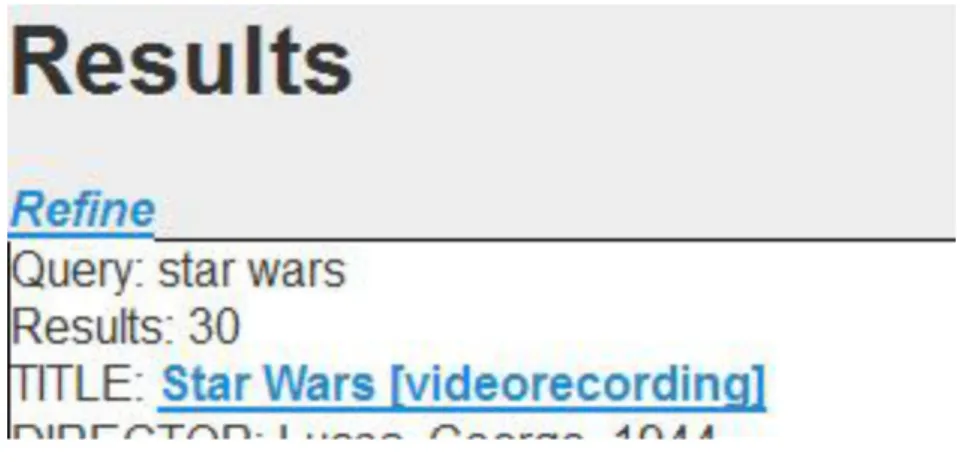
If a text query, language, genre, country, or format value has been passed, it is displayed at the above the search results. The number of results is also displayed.
<body>
<a href="index.php"><img src="img/library_header.jpg" /></a> <div id="results" class="page">
<?php
if($query OR $format OR $language OR $country OR $genre){ echo "Query: ".$query."<br/>";
if ($country) echo "Region: ".getFacetNameById($country)."<br/>";
if ($genre) echo "Genre: ".getFacetNameById($genre)."<br/>";
if ($format) echo "Format: ".getFacetNameById($format)."<br/>";
if ($language) echo "Language: ".getFacetNameById($language)."<br/>";
} else{
}
echo "Results: ".$matches; ?>
3.
A “Refine your search” button, linked to modal.php, is placed directly above the results. <a href="modal.php" data-rel="dialog" data-role="button">Refine Your Search</a>
<h1>RESULTS</h1>
4.
If there is a query, either text or facet, results are printed. <?php
if ($query OR $format OR $language OR $country OR $genre){ foreach ($results as $result){
printResult($result); echo "<br/>";
} }
5.
Typical paging buttons are added to the interface to give the appearance of a paging mechanism with 20 results per page (see Figure 9). It should be noted that the links are simply placeholders. Making them functional would require determining how the paging mechanism works for the Filmfinder website and reproducing it, which did not seem necessary for this study.
if ($matches>20){
echo "Results page: "; $pages=ceil($matches/20); for($i=1;$i<$pages;$i++){
echo "<a href=''>".$i."</a> "; }
echo "<a href=''>Next</a>"; }
?>
</div> </body>
Figure 9. Paging buttons at the bottom of the results list. results. Modal overlay - modal.php
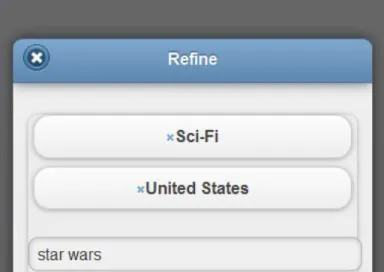
This page is displayed on top of the search results page when the user clicks the “Refine Your Search” button. It contains the facets that are associated with a particular search results page. It also displays the current query. Any facets that have been selected are displayed as buttons with an ‘x’ next to the facet name (see Figure 10). Clicking on these buttons removes the facet from the query and returns the user to the results page.
Figure 10. An “x” by selected facets indicates that the facets can be deselected.
1.
<?php session_start(); include("util.php"); $query=$_SESSION['query']; $genre=getFacetNameById($_SESSION['genre']); $format=getFacetNameById($_SESSION['format']); $country=getFacetNameById($_SESSION['country']); $language=getFacetNameById($_SESSION['language']); ?> <!DOCTYPE html> <html> <head> <title>MODAL OVERLAY</title>
<meta name="viewport" content="width=device-width, initial-scale=1"> <link rel="stylesheet" href="http://code.jquery.com/mobile/1.0/jquery.mobile-1.0.min.css" /> <script src="http://code.jquery.com/jquery-1.6.4.min.js"></script> <script src="http://code.jquery.com/mobile/1.0/jquery.mobile-1.0.min.js"></script> </head> <body> 2.
If there is a text query, it is displayed above the facets. If a language, format, genre, or country has been selected, they are displayed above the facets as buttons. These buttons have an ‘x’ image called “negate.png” next to the facet name, indicating removal of the facet. The buttons link back to the search results page with the facet value that was selected erased from the URL.
<div data-role="page">
<div data-role="header" data-theme="b"> <h1>Refine</h1>
</div><!-- /header --> <div data-role="content">
<ul data-role="listview" data-inset="true" data- filter="false">
<?php
if($_SESSION['genre'])
echo "<ahref='results.php?query=".$query."&format=". $_SESSION['format']."&language=". $_SESSION['language']."&country=" $_SESSION['country']."&genre=". ($_SESSION['genre']=NULL)."' data-role='button'> <img src='img/negate.png'/>".$genre."</a>"; if($_SESSION['format'])
($_SESSION['format']=null)."&language=". $_SESSION['language']."&country=". $_SESSION['country']."&genre=".
$_SESSION['genre']."' data-role='button'> <img src='img/negate.png'/>".$format."</a>";
if($_SESSION['country'])
echo "<a href='results.php?query=".$query."&format=".
$_SESSION['format']."&language=".$_SESSION['language']."&country=". ($_SESSION['country']=null)."&genre=".$_SESSION['genre']."' data- role='button'>
<img src='img/negate.png'/>".$country."</a>"; if($_SESSION['language'])
echo "<a href='results.php?query=".$query."&format=". $_SESSION['format']."&language=".
($_SESSION['language']=null)."&country=". $_SESSION['country']."&genre=".
$_SESSION['genre']."' data-role='button'> <img src='img/negate.png'/>".$language."</a>";
?> <br/>
The facets are displayed as links to the results page, with their values included in the URL.
Teaser - results.php
Figure 11. The teaser interface in motion, moving from the facet list on the right towards the results list on the left.
1.
Process.php is included at the beginning of the file and the standard JQuery style sheets and JavaScript libraries are included in the header.
<?php
include("process.php");
echo " "; //temporary fix. nothing appears without an echo ?>
<!DOCTYPE html PUBLIC "-//W3C//DTD XHTML 1.0 Transitional//EN" "http://www.w3.org/TR/xhtml1/DTD/xhtml1-transitional.dtd"> <html xmlns="http://www.w3.org/1999/xhtml">
<head>
<meta name="viewport" content="width=device-width, initial-scale=1"> <link rel="stylesheet"
href="http://code.jquery.com/mobile/1.0/jquery.mobile-1.0.min.css" /> <script src="http://code.jquery.com/jquery-1.6.4.min.js"></script> <script src="http://code.jquery.com/mobile/1.0/jquery.mobile-1.0.min.js"></script>
<title>TEASER</title>
<link rel='stylesheet' href='style.css'> </head>
<body>
<header>
</header>
2.
A link to the facets (labeled “Refine”) is included as a supplementary access method (see Figure 12). Clicking on this link slides back and forth between results and facets, as if the user had swiped to the right or left.
<nav>
<a href='#' id='next' onclick='slider.next();return false;'><em>Refine</em></a>
</nav>
Figure 12. A “Refine” button moves between facets and results without having to
physically swipe the screen 3.
The part of the page that slides begins here. The results are contained in an <li> tag where id=”page1”. Facets are contained in an <li> tag where id=”page2”. These list items are within a <div> tag where id=”slider” The query, the number of search results, and the results are displayed here. Although the paging mechanism was not competed, a
placeholder for it is included in the code below.
<div id='slider'> <ul>
<?php
if($query OR $format OR $language OR $country OR $genre){ echo "Query: ".$query."<br/>";
if ($country)
echo "Region: ".getFacetNameById($country)."<br/>"; if ($genre)
echo "Genre: ".getFacetNameById($genre)."<br/>"; if ($format)
echo "Format: ".getFacetNameById($format)."<br/>"; if ($language)
echo "Language: ".getFacetNameById($language)."<br/>"; }
else{
echo "No query"; }
if ($query) echo "Results: ".$matches;
if ($query OR $format OR $language OR $country OR $genre){ foreach ($results as $result){
printResult($result); echo "<br/>";
} }
if ($matches>20){ echo "Results page: "; $pages=ceil($matches/20); for($i=1;$i<$pages;$i++){
echo "<a href=''>".$i."</a> "; }
echo "<a href=''>Next</a>"; }
?> </li> 4.
The facets are displayed here.
<li style='display:none' id="page2"> <div>
<?php
foreach ($facets as $f) {
echo "<a href='#'>".$f."</a>"; echo"<br/>"; } ?> </div> </li> 5.
<script src='swipe.js'></script> <script>
// slider
var slider = new Swipe(document.getElementById('slider'), {}),
// tabs
selectors = document.getElementById('tabSelector').children; </script>
</body> </html>
Challenges and Limitations of the Implementation
The implementation of these designs fell short of meeting all of the desired criteria. This was due to various challenges involved in coding and parsing the XML.
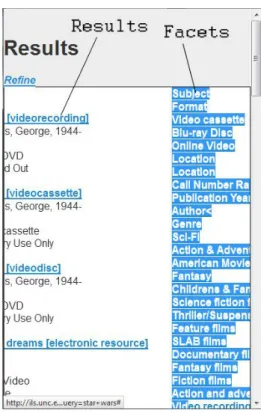
Parsing the XML documents to retrieve facets proved to be a more difficult task than retrieving search results. The facets use a hierarchical structure of <item> tags embedded in <refinements> tags (see Figure 5), meaning that there was little uniqueness to the tags surrounding the desired data. Developing an effective parsing algorithm to extract the facets “inside” of other facets was a challenge. Another challenge was finding a solution to the problem of distinguishing between facet headings (e.g. “format”) and facets (e.g. video cassette), and displaying them appropriately. Difficulties in developing solutions to these challenges meant that other goals were not met, especially the dynamic creation of facets as links to refined search results. Paging mechanisms were not fully implemented due to time constraints.
screen to be shown on another, allow rich content to be displayed on both screens, and create a smooth, functional touch interface. Each attempt at implementation seemed to fall short in one or more of these areas.
For the modal overlay, the optimal implementation would have made the background of the overlay transparent so that the list of search results was still partially visible beneath the facet list. In the actual implementation, however, this goal was not achieved and the background of the modal overlay remains opaque.
Experiment Design
An experiment to test the effectiveness of each interface was designed, but not executed due to time constraints. The experiment design was informed by usability and user experience testing conventions with human participants. It is described in its entirety in Appendix A.
Conclusion
Designing new faceted search interfaces may require the development of new GUI components. While modal overlay designs are relatively commonplace and easy to tailor to faceted search, teaser designs are more challenging. Quality teaser interfaces for faceted search may need to be built from scratch or require extensive reworking of existing code. The Web development community would benefit from the creation of a library offering many different types of faceted search interfaces for small-screen devices.
References
Cutrell E., Robbins, D., Dumais, S. and Sarin, R. (2006). Fast, flexible filtering with Phlat - Personal search and organization made easy. Proceedings of the SIGCHI conference on Human Factors in computing systems (pp 261-270). New York, NY: ACM.
English, J., Hearst, M. Sinha, R., Swearingen, K., Yee, K. (2002). Flexible Search and Navigation Using Faceted Metadata. Technical report, University of Berkeley, School of Information Management and Systems.
Hearst, M. (2006). Design Recommendations for Hierarchical Faceted Search Interfaces. ACM SIGIR Workshop on Faceted Search, August, 2006. New York, NY: ACM. Hearst, M. (2008). UIs for Faceted Navigation: Recent Advances and Remaining Open
Problems. Proceedings of the 2008 Workshop on Human-Computer Interaction and Information Retrieval, October, 2008. (pp 13-17).
Jones, M., Buchanan, G., Thimbleby, H. (2003). Improving web search on small screen devices. Interacting with Computers (15) 479–495.
Karlson, A., Robertson, G., Robbins, D., Czerwinski, M., and Smith, G. (2006).
Lemieux, S. (2009). Designing for faceted search: KMWorld. Retrieved November 3, 2011, from http://www.kmworld.com/Articles/Editorial/Feature/Designing-for-faceted-search-52781.aspx
Nudelman, G. (2009). Best Practices for Designing Faceted Search Filters. Retrieved November 5, 2011 from http://www.uxmatters.com/mt/archives/2009/09/best-practices-for-designing-faceted-search-filters.php
Nudelman, G. (2010a). Design Patterns for Mobile Faceted Search: Part I :: UXmatters. Retrieved November 3, 2011, from
http://www.uxmatters.com/mt/archives/2010/04/design-patterns-for-mobile-faceted-search-part-i.php.
Nudelman, G. (2010b). Design Patterns for Mobile Faceted Search: Part II :: UXmatters. Retrieved November 3, 2011, from
http://www.uxmatters.com/mt/archives/2010/05/designpatterns-for-mobile-faceted-search-part-ii.php.
Robbins, D., Lee, B. & Fernandez, R. (2008). TapGlance: designing a unified smartphone interface, Proceedings of the 7th ACM conference on Designing Interactive Systems (pp 386-394). New York, NY: ACM.
Sweeney, S., Crestani, F. (2005). Effective search results summary size and device screen size: Is there a relationship? Information Processing and Management (42),
1056– 1074.
Appendix A - Usability Evaluation Study Study Proposal
Methods
I will be designing two different interfaces for faceted search using an iterative design process based on established design principles and user feedback. There are two different general methods that I will be using for this research. For the initial design, I will be using heuristic evaluation methods, followed by formative usability evaluation. I intend to perform two cycles of interface design followed by user feedback. The initial design will be based purely on heuristic evaluation, but subsequent iterations will be based on both heuristic evaluation and user feedback.
Data Collection
Participants will be asked to use think-loud protocols for the usability evaluation portion of the project. This should reveal what the participants are thinking as they perform each task, which can be used to assess the effectiveness of visual cues and other design decisions. As noted by Wildemuth (2009), there are two different kinds of think-aloud protocols, concurrent and retrospective protocols. I will be employing concurrent protocols for my study. There are two different reasons for this decision. The first is that I will not be capturing the actions of the participants on video, the most common
circumstance under which retrospective think-aloud protocols are used. The second reason is that I am not concerned with usability measures such as speed of task
Wildemuth (2009) describes how think-aloud protocols are often used in conjunction with other data collection methods. For this study I will also be using the semistructured interview method to collect participant feedback regarding the system. There will be specific questions about the interface that I will ask participants (the interview guide can be found in the appendix), but the course of the interview will not be predetermined. If other questions arise that are relevant to the interface during the course of the interview, they may be pursued. If a participant has a substantial amount of useful information to share, the guide may be followed loosely; otherwise the guide will be followed more strictly to ensure coverage of the desired topics. Notes will be taken by hand.
Questions
There are seven essential questions that will be asked during the semistructured interviews:
1. What do you think of the interface?
This question will be asked to get feedback about the general likeability of the interface. The goal is to get feedback about the interface that will not be covered in later questions, such as aesthetic aspects.
2. Is the facet menu easy to find?
This question will be asked to get a sense of whether or not participants had trouble finding the menu with the faceted search options.
3. Is the facet menu easy to use?
The goal of this question is to uncover any potential difficulties encountered by participants in using the faceted search menu.
4. Is transition between the results and facets smooth?
5. Are enough facets shown?
I would like to be able to balance readability with a useful number of options. This question will address that design goal.
6. Is the response time fast enough?
Slow processing speeds can be a great detraction from usability. This question will be asked to see if participants find the system reactions to be fast enough.
7. Is the facet menu something that you would use?
This question is to draw the distinction between an interface that a participant cannot find fault with and one that they would use. If the answer to the question is “no,” this will prompt the question “what could be changed to make you use it?”
I feel that these methods are appropriate to a formative study of faceted search interfaces for smart phones. Given the small number of participants, the goal of these tests will be to get as much information as possible from each individual participant. The emphasis of this research is on the design of interfaces that will support faceted search, and the main purpose of the evaluations will be to ensure the quality of the interfaces, which may be used for further research.
Given that the interface is being designed for the MRC, an appropriate sample population would include people who are likely to use the MRC, i.e. students at UNC. I will recruit either undergraduates or graduate students for my evaluations. A total of six participants will be recruited, most likely from SILS courses. Participation will be on a voluntary basis.
I will design two interfaces using the web technologies HTML, CSS, Javascript, and XML. The first of these interfaces will use the “modal overlay” method described in the literature review section of this document, and the second will use the “teaser”
method. The collection used in the study will be the UNC media resources center (MRC). B. Evaluation
Interface evaluations will take no longer than 30 minutes. Each participant will look at only one interface, and two participants will look at each interface, for a total of four participants in each development cycle. Four participants will have used each interface by the end of the study.
I will ask participants to perform three tasks that involve refining searches using the facet menus. The tasks will follow the same basic formula each time:
1. Perform a search
2. Refine results using facets 3. Perform a refined search 4. Refine results using facets
An example task would be to 1) search for “Star Wars,” 2) limit the results to videocassettes, 3) limit the results to videocassettes and DVDs, 4) search for “Star Wars Episode 4.” The tasks should involve both complex, multi-faceted refinement and also transitions between query and refinement. Participants will be asked to use think-aloud protocols while performing tasks, and will be interviewed following the tasks.
Data Analysis
can remain unchanged. Responses to interview questions will be analyzed in a similar manner, and if multiple participants seem to focus on the same issues, those issues will be take priority when redesigning the interfaces.
Advantages and Disadvantages
There are two major disadvantages to the methods described above. The first disadvantage is that the data collected by think aloud protocols and from the interviews will be qualitative, subjective, and will require careful analysis. The second disadvantage is the limited number of participants, which may add to the first disadvantage.
The advantage to these methods is that they will allow for the focus to remain on design, while at the same time providing a certain amount of user feedback. The iterative design process offers the advantage of user feedback at multiple stages.
Summary
This study would be of potential interest to a number of different groups. First and foremost, this research may interest designers who wish to incorporate faceted search into mobile applications and websites. If modal overlay is demonstrated to be a viable and efficient alternative to current practices, developers would be very interested to see the results of this study, and may choose to use or improve upon the experimental design. This research would also potentially be of interest to scholars who study information organization (IO), information retrieval (IR), and human-computer interaction (HCI). To the study of IO, this research will offer new findings on facet-based organization for smart phones, for IR, how to effectively combine query-based search with facet-based search on smart phones, and to the study of human-computer interaction, this research will create new knowledge related to the usability of smart phones and faceted search.
Study Design
There will be 2 evaluation cycles. Each cycle will involve 2 interfaces and 2 participants per interface, meaning 4 participants per cycle, and 8 participants total.
An email asking for volunteers will be sent to each of two classes that I am enrolled in. Participants that respond will be asked to meet in the School of Information and Library Science (SILS) library in Manning Hall at an arranged time. They will be given
Participants will be asked to sit at a table in the SILS library and will be given a smart phone that I will provide. The seating will be arranged in such a way that I am able to view the screen as participants are performing tasks. Participants will be asked to speak aloud while they are performing the tasks, explaining their motivation for each action. I will observe and take notes. When a task has been completed, the next task will begin. When all three tasks have been completed, I will interview the participants using a semi-structured interview guide.
Evaluations should last no longer than 30 minutes. In the rare case that an evaluation lasts for 30 minutes, the session will be brought to a close and the participant will be thanked for their time.
Tasks
Tasks are designed to utilize facets and to thoroughly test the unique properties of each interface (modal overlay & teaser). Tasks are also designed to be realistic, i.e. search tasks that media resources center patrons would reasonably perform.
1) Please find movies under the genre ‘drama’ from the country Argentina, available on DVD. Search through the subject categories and select ‘employees.’ Find only films directed by Carlos Sorin. Identify a film of his listed as a comedy.
3) Find all movies with Harrison Ford. Narrow the results to science fiction movies. Find Blade Runner. Search for all movies directed by Ridley Scott. Narrow the results to movies published since the year 2000.
4) Search the collection for a film that you are not familiar with, but that you would like to see.
Interview Guide
A. Interview Guide
Topics:
Overall impressions, facet menu impressions, use of facet menu Essential Quetions (and related extra questions):
1. What was your overall impression of the interface?
a. How do you like the look and feel of the interface?
2. How did the facet menu assist in the task?
a. What worked with the facet menu?
b. What didn’t work?
c. How would you incorporate the facet menu into a search ‘in the wild’?
3. How would you describe the transition between the main screen and the facet menu?
a. How does the transition affect workflow?
4. Did you encounter any problems using the facets?
5. How did the system respond to your actions?