C H A P T E R
42
Understanding Session Initiation Protocol (SIP)
This chapter describes SIP and the interaction between SIP and Cisco Unified Communications Manager.
This section covers the following topics:
• SIP Trunk Configuration Checklist, page 42-1 • SIP Phone Configuration Checklist, page 42-1 • SIP Networks, page 42-2
• SIP and Cisco Unified Communications Manager, page 42-2
• SIP Functions That Are Supported in Cisco Unified Communications Manager, page 42-10 • Cisco Unified Communications Manager SIP Endpoints Overview, page 42-25
• SIP Line Side Overview, page 42-27 • SIP Standards, page 42-27
• Cisco Unified Communications Manager Functionality That Is Supported by Phones That Are Running SIP, page 42-30
• Where to Find More Information, page 42-35
SIP Trunk Configuration Checklist
The “Trunk Configuration Checklist” section on page 43-1 provides an overview of the steps that are required to configure SIP trunk in Cisco Unified Communications Manager, along with references to related procedures and topics.
SIP Phone Configuration Checklist
Table 44-2 in the “Phone Configuration Checklist” section on page 44-2 provides an overview of the steps that are required to configure a Cisco Unified IP Phone that runs SIP. If you want to configure a third-party phone that runs SIP, refer to the Configuration Checklist for Third-Party Phones That Are Running SIP in the Cisco Unified Communications Manager Administration Guide.
SIP Networks
A SIP network uses the following components:
• SIP Proxy Server—The proxy server works as an intermediate device that receives SIP requests from a client and then forwards the requests on the behalf of the client. Proxy servers can provide functions such as authentication, authorization, network access control, routing, reliable request retransmission, and security.
• Redirect Server—The redirect server provides the client with information about the next hop or hops that a message should take, and the client then contacts the next hop server or user agent server directly.
• Registrar Server—The registrar server processes requests from user agent clients for registration of their current location. Redirect or proxy servers often contain registrar servers.
• User Agent (UA)—UA comprises a combination of user agent client (UAC) and user agent server (UAS) that initiates and receives calls. A UAC initiates a SIP request. A UAS, a server application, contacts the user when it receives a SIP request. The UAS then responds on behalf of the user. Cisco Unified Communications Manager can act as both a server and a client (a back-to-back user agent). SIP uses a request/response method to establish communications between various components in the network and to ultimately establish a call or session between two or more endpoints. A single session may involve several clients and servers.
Identification of users in a SIP network works through:
• A unique phone or extension number.
• A unique SIP address that appears similar to an e-mail address and uses the format
sip:<userID>@<domain>. The user ID can comprise either a user name or an E.164 address. Cisco Unified Communications Manager only supports E.164 addresses; it does not support e-mail addresses.
• An e-mail address format ([email protected]) that is supported on Cisco Unified Communications Manager with SIP route patterns.
SIP and Cisco Unified Communications Manager
All protocols require that either a signaling interface (trunk) or a gateway be created to accept and originate calls. For SIP, the user must configure a SIP trunk. For more information, refer to Trunk Configuration in the Cisco Unified Communications Manager Administration Guide.
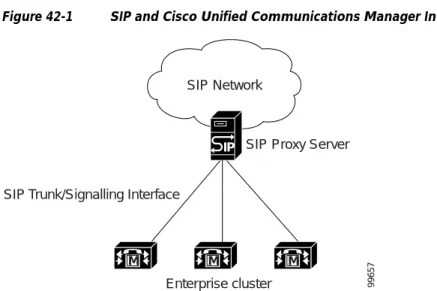
SIP trunks connect Cisco Unified Communications Manager networks and SIP networks that are served by a SIP proxy server, as Figure 42-1 demonstrates. As with other protocols, SIP components fit under the device layer of Cisco Unified Communications Manager architecture. As is true for the H.323 protocol, you can configure multiple logical SIP trunks in the Cisco Unified Communications Manager database and associate them with route groups, route lists, and route patterns. To provide redundancy, in the event of failure of one logical SIP interface, other logical SIP interfaces provide services in the same route group list. Assigning multiple Cisco Unified Communications Manager nodes under SIP trunk device pools also achieves redundancy.
Chapter 42 Understanding Session Initiation Protocol (SIP)
SIP and Cisco Unified Communications Manager
Figure 42-1 SIP and Cisco Unified Communications Manager Interaction
SIP trunks support multiple port-based routing. Multiple SIP trunks on Cisco Unified Communications Manager can use port 5060, the default, which is configurable from the SIP Trunk Security Profile Configuration window. For TCP/UDP, SIP trunks use the remote host and local listening port to do the routing (the remote host can comprise IP, FQDN, or SRV). For TLS, SIP trunks use X.509 Subject Name to do the routing.
For SIP trunks, Cisco Unified Communications Manager only accepts calls from the SIP device whose IP address matches the destination address of the configured SIP trunk. In addition, the port on which the SIP message arrives must match the one that is configured on the SIP trunk. After the call is accepted, Cisco Unified Communications Manager uses the configuration for the SIP profile setting, Reroute Incoming Request to new Trunk based on, which is configured on the SIP trunk on which the call arrives, to determine whether the call gets rerouted to another SIP trunk. Depending on the configuration, Cisco Unified Communications Manager may perform one of the following tasks:
• Never reroute to a different SIP trunk.
• Parse the IP address or domain name and port number in the contact header and attempt to match the information to a SIP trunk; if a SIP trunk is found, reroute the call. If no SIP trunk is found, the SIP trunk on which the call arrived handles the call.
• Parse the IP address or domain name and port number in the Call-Info header, look for the parameter, purpose=x-cisco-origIP, and attempt to match the IP address and port to a SIP trunk; if a SIP trunk if found, reroute the call. If no SIP trunk is found or if the parameter does not exist in the Call-Info header, the SIP trunk on which the call arrived handles the call.
Media Termination Point (MTP) Devices
You can configure Cisco Unified Communications Manager SIP devices (lines and trunks) to always use an MTP. If the configuration parameters are set to not use an MTP (default case), Cisco Unified Communications Manager will attempt to dynamically allocate an MTP if the DTMF methods for the call are not compatible. For example, phones that are running SCCP support only out-of-band DTMF, and Cisco Unified IP Phones using SIP (7905, 7912, 7940, 7960) support only RFC2833. Because the DTMF methods are not identical, Cisco Unified Communications Manager will dynamically allocate an MTP. If, however, a phone that is running SCCP that supports RFC2833 and out of band, such as Cisco Unified IP Phone 7971, calls a Cisco Unified IP Phone 7940 that is using SIP, Cisco Unified
Communications Manager will not allocate an MTP because both phones support RFC2833. By having
M M M
IP
SIP Network
Enterprise cluster SIP Trunk/Signalling Interface
SIP Proxy Server
Note Although Cisco Unified Communications Manager provides an MTP Required check box for SIP IP phones, you should not check this check box for Cisco Unified IP Phones that are running SIP. (Only generic, third-party SIP IP phones use this check box.) Checking this check box can cause problems with Cisco Unified Communications Manager features such as shared lines. When this check box is not checked, Cisco Unified Communications Manager will still insert MTPs dynamically as needed. Thus, little or no benefit occurs in checking the MTP Required check box for Cisco Unified IP Phones.
Configuring Regions (Region Relationship) for SIP Devices with the MTP
Required Option Enabled
When you configure a region relationship, you must ensure that you choose an audio codec that has sufficient bandwidth for all the devices that will be used in a call. This includes configuring the codec for devices that will be in the same region as well as devices that are in different regions. When you configure a trunk or third-party phone to use SIP and Media Termination Point Required is enabled, Cisco Unified Communications Manager Administration only allows you to choose a G.711 codec in the MTP Preferred Originating Codec field. When you assign the SIP trunk or third-party phone that is running SIP with the MTP Required option enabled to the device pool for that region, you must verify that the region relationship between the SIP device and the MTP device is configured to use a codec with equal or greater bandwidth (G.711 or Wideband/AAC codec).
SIP Service Parameters
You can individually configure SIP timers and counters for functionality on different servers. Refer to
Service Parameters Configuration in the Cisco Unified Communications Manager Administration Guide for full information on how to configure service parameters.
SIP Interoperability
The SIP Interoperability Enabled service parameter, which supports the Cisco CallManager service, determines whether Cisco Unified Communications Manager supports Session Initiation Protocol (SIP) for SIP stations and SIP trunks. Devices that run SIP, for example, phones and trunks, require that you set this parameter to True; when you set this parameter to False, Cisco Unified Communications Manager ignores SIP messages, and SIP devices do not function; that is, phones that run SIP cannot register with Cisco Unified Communications Manager and SIP trunks cannot interact with Cisco Unified Communications Manager. The default value specifies True. You must restart the Cisco CallManager service if you change the value of this parameter.
Chapter 42 Understanding Session Initiation Protocol (SIP)
SIP and Cisco Unified Communications Manager
SIP Timers and Counters
SIP timers and counters act as configurable service parameters. The following tables describe the various SIP timers and counters and give their default values and range values:
Note When the SIP device is using TCP transport and a timer times out, the SIP device does not retransmit. The device relies on TCP to retry.
Table 42-1 SIP Timers That Are Supported in Cisco Unified Communications Manager
Timer Default Value Default Range Definition
Trying 500
milliseconds
100 to 1000 Time that Cisco Unified Communications Manager should wait for a 100 response before retransmitting the INVITE.
Connect 500
milliseconds
100 to 1000 Time that Cisco Unified Communications Manager should wait for an ACK response before retransmitting the 2xx response to the INVITE.
Disconnect 500
milliseconds
100 to 1000 Time that Cisco Unified Communications Manager should wait for a 2xx response before retransmitting the BYE request. Expires 180000
milliseconds
60000 to 300000
Valid time that is allowed for an INVITE request.
rel1xx 500
milliseconds
100 to 1000 Time that Cisco Unified Communications Manager should wait before retransmitting the reliable1xx responses.
PRACK 500
milliseconds
100 to 1000 Time that Cisco Unified Communications Manager should wait before retransmitting the PRACK request.
PUBLISH 500
milliseconds
100 to 1000 This parameter specifies the maximum time, in milliseconds, that Cisco Unified
Communications Manager will wait to re-send a PUBLISH request. If a response is not received before the time specified in this timer expires, Cisco Unified
Communications Manager re-sends the request when this timer expires.
Table 42-2 SIP Retry Counters That Are Supported in Cisco Unified Communications Manager
Retry Counter Default Value Default Range Definition
INVITE 6 1 to 10 Number of INVITE retries
Supported Audio Media Types
The following table describes the various supported audio media types:
Supported Video Media Types
The following table describes the various supported video media types:
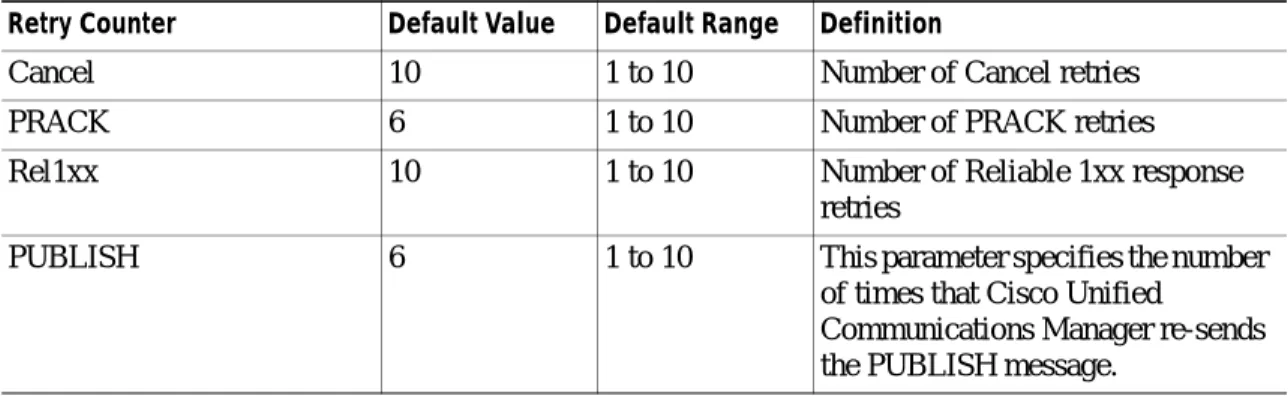
Cancel 10 1 to 10 Number of Cancel retries
PRACK 6 1 to 10 Number of PRACK retries
Rel1xx 10 1 to 10 Number of Reliable 1xx response retries
PUBLISH 6 1 to 10 This parameter specifies the number of times that Cisco Unified
Communications Manager re-sends the PUBLISH message.
Table 42-2 SIP Retry Counters That Are Supported in
Cisco Unified Communications Manager (continued)
Retry Counter Default Value Default Range Definition
Table 42-3 Supported Audio Media Types
Type Encoding Name Payload Type Comments
G.711 u-law PCMU 0
GSM Full-rate GSM 3
G.723.1 G723 4
G.711 A-law PCMA 8
G.722 G722 9
G.728 G728 15
G.729 G729 18 Support all combinations of annex A and B
RFC2833 DTMF Telephony-event Dynamically Assigned
Acceptable range comprises 96 - 127
AAC mpeg4-generic Dynamically Assigned
Acceptable range comprises 96 - 127
ILBC iLBC Dynamically
Assigned
Acceptable range comprises 96 - 127
Table 42-4 Supported Video Media Types
Type Encoding Name Payload Type
H.261 H261 31
Chapter 42 Understanding Session Initiation Protocol (SIP)
SIP and Cisco Unified Communications Manager
Supported Application Media Type
The following table describes the supported application media types:
Supported T38fax Payload Type
The following table describes the various supported application media types:
SIP Profiles for Trunks
SIP trunks and SIP endpoints use SIP profiles. SIP trunks use SIP profiles to define the Default Telephony Event Payload Type, the Disable Early media on 180, and the Reroute Incoming Request to new Trunk based on configuration. For more information on SIP profiles, see the “SIP Profiles for Endpoints” section on page 42-32 and “SIP Profile Configuration” in the Cisco Unified Communications
Manager Administration Guide.
SIP Trunk Security Profiles
Cisco Unified Communications Manager Administration groups security-related settings for the SIP trunk to allow you to assign a single security profile to multiple SIP trunks. Security-related settings include device security mode, digest authentication, and incoming/outgoing transport type settings. You apply the configured settings to the SIP trunk when you choose the security profile in the Trunk Configuration window. For more information, see the Cisco Unified Communications Manager Security
Guide.
SIP UDP Port Throttling
SIP UDP port throttle thresholds help prevent Denial of Service (DOS) attacks from SIP trunks and SIP stations. When the incoming packet rate exceeds the configured threshold for a SIP station or SIP trunk
H.263++ H263-2000 Acceptable range comprises 96 - 127
H.264 H264 Acceptable range comprises 96 - 127
Table 42-4 Supported Video Media Types (continued)
Type Encoding Name Payload Type
Table 42-5 Supported Application Media Types
Type Encoding Name Payload Type
H.224 FECC H224 Acceptable range comprises 96 - 127
Table 42-6 Supported T38fax Payload type
Type Encoding Name Payload Type
Tip Be aware that the enterprise parameter Denial-of-Service Protection Flag must be set to True for these parameter values to take effect.
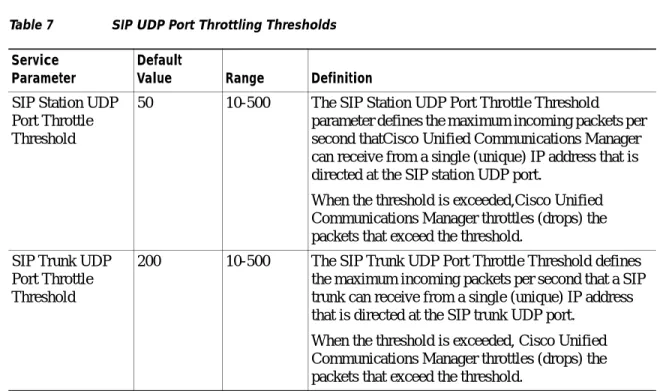
Table 7 describes the configurable threshold values:
Tip If the incoming packet rate on a SIP trunk UDP port from a single IP address exceeds the configured SIP Trunk UDP Port Throttle Threshold during normal traffic, reconfigure the threshold. When a SIP trunk and SIP station share the same incoming UDP port, Cisco Unified Communications Manager throttles packets based on the higher of the two service parameter values. You must restart the Cisco CallManager service for changes to these parameters to take effect.
SIP Trunks Between Releases of Cisco Unified CallManager and Cisco Unified
Communications Manager
Cisco Unified Communications Manager Release 6.0 (and later) and Cisco Unified CallManager Release 4.0 (and later, including 5.x) support TCP and UDP as Transport Types when they are used with SIP trunks. However, release 4.x uses one TCP connection per SIP call; releases 5.x and 6.x and later support multiple SIP calls over the same TCP connection (referred to as TCP connection reuse).
The following Cisco products support TCP; however, not all support TCP Reuse (see Table 42-8 for more information):
• Cisco Unified CallManager Release 4.1 - No TCP Connection Reuse
• Cisco Unified CallManager Release 4.2 - No TCP Connection Reuse
Table 7 SIP UDP Port Throttling Thresholds
Service Parameter
Default
Value Range Definition
SIP Station UDP Port Throttle Threshold
50 10-500 The SIP Station UDP Port Throttle Threshold parameter defines the maximum incoming packets per second thatCisco Unified Communications Manager can receive from a single (unique) IP address that is directed at the SIP station UDP port.
When the threshold is exceeded,Cisco Unified Communications Manager throttles (drops) the packets that exceed the threshold.
SIP Trunk UDP Port Throttle Threshold
200 10-500 The SIP Trunk UDP Port Throttle Threshold defines the maximum incoming packets per second that a SIP trunk can receive from a single (unique) IP address that is directed at the SIP trunk UDP port.
When the threshold is exceeded, Cisco Unified Communications Manager throttles (drops) the packets that exceed the threshold.
Chapter 42 Understanding Session Initiation Protocol (SIP)
SIP and Cisco Unified Communications Manager
• Cisco Unified CallManager Release 5.1(x)- TCP Connection Reuse
• Cisco Unified Communications Manager Release 6.0(x) and later - TCP Connection Reuse
• Cisco IOS 12.3(8)T and above - TCP Reuse
• Cisco IOS 12.3(8)T and below - No TCP Reuse
Table 42-8 lists the SIP trunk connectivity that is supported among Cisco Unified CallManager and Cisco Unified Communications Manager releases and the IOS gateway.
If a Release 6.x (or later) system makes multiple calls over a TCP-based SIP trunk to a 4.x system, the 4.x system will only connect one call. The rest of the calls will not get connected.When using SIP trunks between 4.x and 6.x (or later) systems, you must configure both systems to use UDP as the Outgoing Transport Type, so calls between the release 4.x and 6.x (or later) systems will connect properly. (See
Table 42-8.)
To configure UDP, use Cisco Unified Communications Manager Administration:
• For Cisco Unified Communications Manager Release 6.0 (and later) that is connecting to a Release 4.x system, choose UDP as the Outgoing Transport Type from the SIP Trunk Security Profile Configuration window.
• For Cisco Unified CallManager Release 4.0 (and later)that is connecting to a Release 6.x (or later) system, choose UDP as the Outgoing Transport Type from the Trunk Configuration window. For more information about SIP trunks and transport types, see the Cisco Unified Communications
Manager Security Guide and the Cisco Unified Communications Manager Administration Guide. Table 42-8 SIP Trunk Compatibility Matrix
Cisco Unified CallManager Release 4.x
Cisco Unified CallManager 5.x and Cisco Unified Communications Manager
6.x IOS 12.3(8)T Below IOS 12.3(8)T
Cisco Unified CallManager Release 4.x
UDP/TCP UDP only UDP only UDP/TCP
Cisco Unified CallManager 5.x and Cisco Unified Communications Manager 6.x and later
UDP only UDP/TCP UDP/TCP UDP only
IOS 12.3(8)T UDP only UDP/TCP UDP/TCP UDP only
SIP Forking for SIP Trunk
Call setup (INVITE) requests sent by Cisco Unified Communications Manager on a SIP trunk may be replicated and forwarded to multiple destinations by a SIP proxy (called forking). Cisco Unified Communications Manager supports forking, subject to the following limitations:
• Cisco Unified CallManager Release 4.x does not accept provisional responses (such as 180 Ringing) from more than five destinations. It does not accept a successful response (200 Ok) from any destination that is not among the first five to respond.
• Cisco Unified CallManager Release 5.x and Cisco Unified Communications Manager Release 6.x do not accept provisional responses (such as 180 Ringing) from more than 20 destinations. They do not accept a successful response (200 Ok) from any destination that is not among the first 20 to respond.
• If Cisco Unified CallManager Releases 4.x, Cisco Unified CallManager Release 5.x, and Cisco Unified Communications Manager Release 6.x accept a provisional response (183 Session Progress) that contains a session (media) description, they do accept a successful (200 Ok) response only from the same destination, and they will not accept any change in the session description from the provisional response to the successful response.
• If Cisco Unified CallManager Releases 4.x, Cisco Unified CallManager Release 5.x, and Cisco Unified Communications Manager Release 6.x are configured to acknowledge provisional
responses (with the SIP PRACK method), Cisco Unified Communications Manager will not accept provisional responses and/or a successful response from any destination other than the first one to respond.
No other configuration options affect Cisco Unified Communications Manager support of downstream SIP forking.
SIP Functions That Are Supported in Cisco Unified
Communications Manager
Cisco Unified Communications Manager supports the following functions and features for SIP calls:
• Basic Calls Between SIP Endpoints and Cisco Unified Communications Manager, page 42-11 • DTMF Relay Calls Between SIP Endpoints and Cisco Unified Communications Manager,
page 42-12
• Supplementary Services That Are Initiated If an MTP Is Allocated, page 42-13 • Ringback Tone During Blind Transfer, page 42-13
• Supplementary Services That Are Initiated by SIP Endpoint, page 42-14 • Enhanced Call Identification Services, page 42-14
• Redirecting Dial Number Identification Service (RDNIS), page 42-17 • Redirection, page 42-17
• Support of G. Clear Codec for SIP Trunks, page 42-18
• Support of Multilevel Precedence and Preemption for SIP Trunks, page 42-20 • Support for Secure V.150.1 Modem over IP over SIP Trunks, page 42-20
Chapter 42 Understanding Session Initiation Protocol (SIP)
SIP Functions That Are Supported in Cisco Unified Communications Manager
• Support for G.729a and G.729b Codecs Over SIP Trunks, page 42-21 • Support for SIP T.38 Interoperability With Microsoft Exchange, page 42-21
Basic Calls Between SIP Endpoints and Cisco Unified Communications
Manager
This section includes three basic calling scenarios. Two scenarios describe incoming and outgoing calls, while the other one describes the use of early media, which is a media connection prior to the connection or answer of a call. The section describes the following calling scenarios:
• Basic Outgoing Call, page 42-11 • Basic Incoming Call, page 42-11 • Use of Early Media, page 42-11
Basic Outgoing Call
You can initiate outgoing calls to a SIP device from any Cisco Unified Communications Manager device. A Cisco Unified Communications Manager device includes SCCP or SIP IP phones or fax devices that are connected to Foreign Exchange Station (FXS) gateways. For example, an SCCP IP phone can place a call to a SIP endpoint. The SIP device that answers the call triggers media establishment.
Basic Incoming Call
Any device on the SIP network, including SIP IP phones or fax devices that are connected to FXS gateways, can initiate incoming calls. For example, a SIP endpoint can initiate a call to an SCCP IP phone. The SCCP IP phone that answers the call triggers media establishment.
Use of Early Media
While the PSTN provides inband progress information to signal early media (such as a ring tone or a busy signal), the same thing does not occur for SIP. The originating party includes Session Description Protocol (SDP) information, such as codec usage, IP address, and port number, in the outgoing INVITE message. In response, the terminating party sends its codec, IP address, and port number in a 183 Session Progress message to indicate possible early media.
The 183 Session Progress response indicates that the message body contains information about the media session. Both 180 Alerting and 183 Session Progress messages may contain SDP, which allows an early media session to be established prior to the call being answered.
When early media needs to be delivered to SIP endpoints prior to connection, Cisco Unified Communications Manager always sends a 183 Session Progress message with SDP. Although Cisco Unified Communications Manager does not generate a 180 Alerting message with SDP, it does support the 180 Alerting message with SDP when it receives one.
The SIP Profile Configuration window contains a Disable Early Media on 180 check box. Check the check box to play local ringback on the called phone and connect the media upon receipt of the 200OK response. See the “SIP Profile Configuration Settings” section on page 101-1.
DTMF Relay Calls Between SIP Endpoints and Cisco Unified Communications
Manager
MTPs now dynamically get allocated, if needed, based on the DTMF methods that are used on each endpoint.
Forwarding DTMF Digits from SIP Devices to Gateways or Interactive Voice Response (IVR) Systems
for Dissimilar DTMF Methods
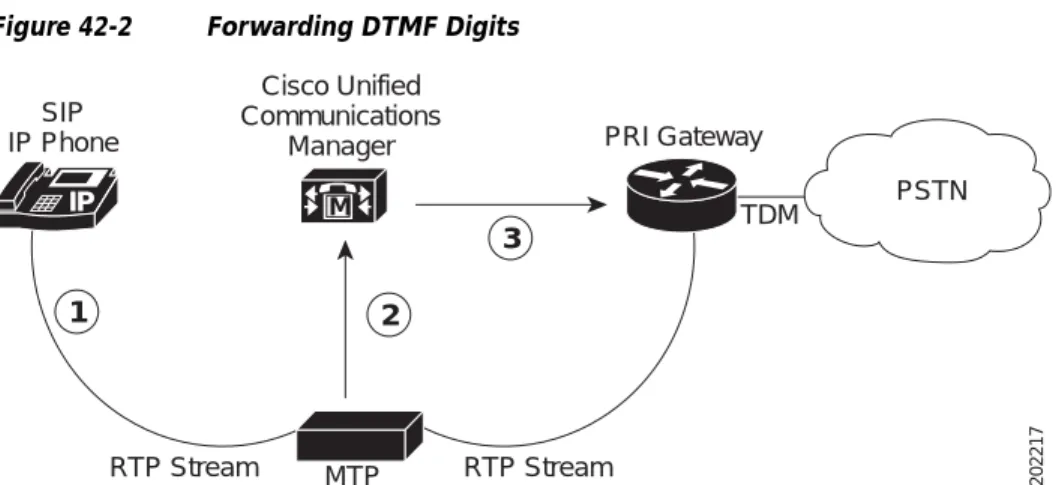
The following example (Figure 42-2) shows the MTP software device that is processing inband DTMF digits from the phone that is running SIP to communicate with the Primary Rate Interface (PRI) gateway. The RTP stream carries RFC 2833 DTMF, as indicated by a dynamic payload type.
Figure 42-2 Forwarding DTMF Digits
Figure 42-2 begins with media streaming, and the MTP device has been informed of the DTMF dynamic payload type.
1. The phone that is running SIP initiates a payload type response when the user enters a number on the keypad. The phone that is running SIP transfers the DTMF inband digit (per RFC 2833) to the MTP device.
2. The MTP device extracts the inband DTMF digit and passes the digit out of band to Cisco Unified Communications Manager.
3. Cisco Unified Communications Manager then relays the DTMF digit out of band to the gateway or IVR system.
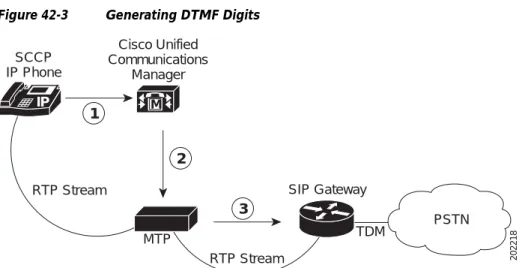
Generating DTMF Digits for Dissimilar DTMF Methods
As discussed in DTMF Relay Calls Between SIP Endpoints and Cisco Unified Communications Manager, page 42-12, SIP sends DTMF inband digits, while Cisco Unified Communications Manager only supports out-of-band digits. The software MTP device receives the DTMF out-of-band tones and generates DTMF inband tones to the SIP client.
M IP
SIP IP Phone
Cisco Unified Communications
Manager
MTP
PRI Gateway
PSTN TDM
RTP Stream RTP Stream
1 2
3
Chapter 42 Understanding Session Initiation Protocol (SIP)
SIP Functions That Are Supported in Cisco Unified Communications Manager
Figure 42-3 Generating DTMF Digits
Figure 42-3 begins with media streaming, and the MTP device has been informed of the dynamic DTMF payload type.
1. The SCCP IP phone user presses buttons on the keypad. Cisco Unified Communications Manager collects the out-of-band digits from the SCCP IP phone.
2. Cisco Unified Communications Manager passes the out-of-band digits to the MTP device.
3. The MTP device converts the digits to RFC 2833 RTP-compliant inband digits and forwards them to the SIP client.
Supplementary Services That Are Initiated If an MTP Is Allocated
The system supports all supplementary services that the SCCP endpoint initiates during a SIP call. Cisco Unified Communications Manager internally manages SCCP endpoints without affecting the connecting SIP device. Any changes to the original connecting information get updated with re-INVITE or UPDATE messages that use the Remote-Party-ID header. See SIP Extensions for Caller Identity and Privacy for more information on the Remote-Party-ID header.
The “Ringback Tone During Blind Transfer” section on page 42-13 describes a blind transfer, which is unique as a supplementary service because it requires Cisco Unified Communications Manager to provide a media announcement.
Ringback Tone During Blind Transfer
For SCCP-initiated blind transfers, Cisco Unified Communications Manager needs to generate tones or ringback after a call already has connected. In other words, Cisco Unified Communications Manager provides a media announcement for blind transfers.
A blind transfer works when the transferring phone connects the caller to a destination line before the target of the transfer answers the call. A blind transfer differs from a consultative, or attended transfer, in which one transferring party either connects the caller to a ringing phone (ringback received) or speaks with the third party before connecting the caller to the third party.
Blind transfers that are initiated from an SCCP IP phone allow ringback to the original, connected SIP device user. To accomplish ringback, Cisco Unified Communications Manager uses an annunciator software device that is often located with an MTP device.
M IP
SCCP IP Phone
Cisco Unified Communications
Manager
MTP
SIP Gateway
PSTN TDM
RTP Stream RTP Stream
1
2
3
With an annunciator, Cisco Unified Communications Manager can play predefined tones and
announcements to SCCP IP phones, gateways, and other IP telephony devices. These predefined tones and announcements provide users with specific information on the status of the call.
Supplementary Services That Are Initiated by SIP Endpoint
The following sections describe supplementary services that a SIP endpoint can initiate.
• SIP-Initiated Call Transfer, page 42-14 • Call Hold, page 42-14
• Call Forward, page 42-14
SIP-Initiated Call Transfer
Cisco Unified Communications Manager supports SIP-initiated call transfer and accepts REFER requests or INVITE messages that include a Replaces header.
Call Hold
Cisco Unified Communications Manager supports call hold and retrieve that a SIP device initiates or that a Cisco Unified Communications Manager device initiates. For example, when a SCCP IP phone user retrieves a call that another user placed on hold, Cisco Unified Communications Manager sends a re-INVITE message to the SIP proxy. The re-INVITE message contains updated Remote-Party-ID information to reflect the current connected party. If Cisco Unified Communications Manager originally initiated the call, the Party field in the Remote-Party-ID header gets set to calling; otherwise, it gets set to called. For more information on the Party field parameter, see Enhanced Call Identification Services, page 42-14.
Call Forward
Cisco Unified Communications Manager supports call forward that a SIP device initiates or that a Cisco Unified Communications Manager device initiates. With call forwarding redirection requests from SIP devices, Cisco Unified Communications Manager processes the requests. For call forwarding that is initiated by Cisco Unified Communications Manager, the system uses no SIP redirection messages. Cisco Unified Communications Manager handles redirection internally and then conveys the connected party information to the originating SIP endpoint through the Remote-Party-ID header.
Enhanced Call Identification Services
This section describes the following SIP identification services in Cisco Unified Communications Manager and how Cisco Unified Communications Manager conveys these identification services in the SIP:
• Line Identification Services
– Calling Line Presentation (CLIP) and Restriction (CLIR)
Chapter 42 Understanding Session Initiation Protocol (SIP)
SIP Functions That Are Supported in Cisco Unified Communications Manager
• Name Identification Services
– Calling Name Presentation (CNIP) and Restriction (CNIR)
– Connected Name Presentation (CONP) and Restriction (CONR)
Cisco Unified Communications Manager provides flexible configuration options to provide these identification services either on a call-by-call or a statically preconfigured for each SIP signaling interface basis.
Calling Line and Name Identification Presentation
Cisco Unified Communications Manager includes the calling line (or number) and name presentation information in the From and Remote-Party-ID headers of the initial INVITE message from Cisco Unified Communications Manager. The From header field indicates the initiator of the request. Cisco Unified Communications Manager uses Remote-Party-ID headers in 18x, 200 and re-INVITE messages to convey connected name and identification information. The Remote-Party-ID header also gives detailed descriptions of caller identity and privacy. Cisco Unified Communications Manager sets the Party field of the Remote-Party-ID header to calling for calling ID services.
Note See the Cisco IOS SIP Configuration Guidefor more general information on Remote-Party-ID header.
Example:
Bob Jones (with external phone number=8005550100) dials out to a SIP signaling interface; the From and Remote-Party-ID headers contain
From: “Bob Jones” <sip:8005550100@localhost>
Remote-Party-ID: “Bob Jones”<8005550100@localhost; user=phone>; party=calling;screen=no;privacy=off
Calling Line and Name Identification Restriction
Calling line (or number) and name restrictions configuration occurs on the SIP signaling interface level or on a call-by-call basis. The SIP trunk level configuration takes precedence over the call-by-call configuration. To configure on a call-by-call basis, refer to the Route Group Configuration in the Cisco
Unified Communications Manager Administration Guide.
Calling line and name restrictions configuration also occurs independently of each other. For example, you may choose to restrict only numbers and allow names to be presented.
Example 1
With a restricted calling name, Cisco Unified Communications Manager sets the calling name in the From header to a configurable string. Cisco Unified Communications Manager sets the display field in the Remote-Party-ID header to include the actual name but sets the Privacy field to name:
From: “Anonymous” <sip:8005550100@localhost>
Remote-Party-ID: “Bob Jones”<sip:9728135001@localhost; ;user=phone>; party=calling;screen=no;privacy=name
Example 2
With a restricted calling number, Cisco Unified Communications Manager leaves out the calling line in the From header; however, Cisco Unified Communications Manager still includes the calling line in the Remote-Party-ID header but sets the Privacy field to privacy=uri:
From: “Bob Jones” <sip:@localhost>
Remote-Party-ID: “Bob Jones”<sip:8005550100@localhost; ;user=phone>; party=calling;screen=no;privacy=uri
Example 3
With a restricted calling name and number, Cisco Unified Communications Manager sets the Privacy field to privacy=full in the Remote-Party-ID header:
From: “Anonymous” <sip:localhost>
Remote-Party-ID: “Bob Jones”<sip:8005550100@localhost;user=phone>; party=calling;screen=no;privacy=full
Connected Line and Name Identification Presentation
Cisco Unified Communications Manager uses connected line and name identification as a
supplementary service to provide the calling party with the connected party number and name. The From header field indicates the initiator of the request. Cisco Unified Communications Manager uses Remote-Party-ID headers in 18x, 200, and re-INVITE messages to convey connected information. Cisco Unified Communications Manager sets the Party field of Remote-Party-ID header to called.
Example 1
Cisco Unified Communications Manager receives an INVITE message with a destination address of 800555. Cisco Unified Communications Manager includes the connected party name in 18x and 200 messages as follows:
Remote-Party-ID: “Bob Jones”<98005550100@localhost; user=phone>; party=called;screen=no;privacy=off
Connected Line and Name Identification Restriction
You can configure connected line (or number) and name restrictions on the SIP trunk level or on a call-by-call basis. The SIP trunk level configuration takes precedence over the call-by-call configuration. To configure on a call-by-call basis, refer to the Route Group Configuration in the Cisco Unified
Communications Manager Administration Guide.
Similar to Calling ID services, users can restrict connected number and name independently of each other.
Example 1
Cisco Unified Communications Manager sets the display field in the Remote-Party-ID header to include the actual name but sets the Privacy field to privacy=name:
Remote-Party-ID: “Bob Jones”<8005550100@localhost; user=phone>; party=called;screen=no;privacy=name
Example 2
With a restricted connected number, Cisco Unified Communications Manager still includes the connected number in the Remote-Party-ID header but sets the Privacy field to privacy=uri:
Chapter 42 Understanding Session Initiation Protocol (SIP)
SIP Functions That Are Supported in Cisco Unified Communications Manager
Example 3
With a restricted connected name and number, Cisco Unified Communications Manager sets the Privacy field to privacy=full in the Remote-Party-ID header:
Remote-Party-ID: “Bob Jones”<8005550100@localhost; user=phone>; party=called;screen=no;privacy=full
Redirecting Dial Number Identification Service (RDNIS)
Cisco Unified Communications Manager uses the SIP Diversion header in the initial INVITE message to carry available RDNIS information.
Note When a call gets redirected from a DN to a voice-mail server/service that is integrated with Cisco Unified Communications Manager using a SIP trunk, the voice mailbox mask on the voice-mail profile for the phone modifies the diverting number in the SIP Diversion header. This behavior is expected because the diversion header gets used by the Cisco Unified Communications Manager server to choose a mailbox.
Redirection
The following scenario represents the behavior that you will get if the Redirect by Application check box on the SIP Profile Configuration window is unchecked. Previously, the redirection from the SIP network got handled at the SIP stack level, and the system accepted and forwarded all redirection requests to the contacts in the redirection response out to the same trunk on which the redirection response was received. No consulting or applying of any additional logic to handle or restrict how the call is redirected occurred. For example, if the redirection contact in a 3xx response to an outgoing INVITE was a Cisco Unified Communications Manager registered phone and the stack is handling redirection, the call gets redirected back out over the same trunk instead of being routed directly to the Cisco Unified Communications Manager phone. Getting redirected to a restricted phone number (such as an international number) means that handling redirection at the stack level will cause the call to be routed instead of being blocked.
Checking the Redirect by Application check box that is on the SIP Profile Configuration window and configuring this option on the SIP trunk allows the Cisco Unified Communications Manager
administrator to
• Apply a specific calling search space to redirected contacts that are received in the 3xx response.
• Apply digit analysis to the redirected contacts to make sure that the call gets routed correctly.
• Prevent DOS attack by limiting the number of redirection (recursive redirection) that a service parameter can set.
• Allow other features to be invoked while the redirection is taking place.
For more information, see the “SIP Profile Configuration Settings” section on page 101-1 and “Trunk Configuration” in the Cisco Unified Communications Manager Administration Guide.
Support of G. Clear Codec for SIP Trunks
The G. Clear (Clear channel) codec enables tandem switching of Digital Signal-0 (DS-0) data circuits through a voice network that uses SIP trunks and Cisco Unified Communications Manager. The G.Clear codec uses 64 kb/s of bandwidth (not including IP packet overhead), which is similar to the G.711 codec. The Cisco Unified Communications Manager selects the codec of a voice call and prioritizes the G. Clear codec ahead of the G.711 mulaw and G.711 alaw codecs in the media table.
You may require the G.Clear codec or the G.729 codec in a region or some other low-bandwidth codec for calls to remote regions. The G.729 codec, which is optimized for speech, uses significantly less bandwidth than the G. Clear codec. Be aware that the G.Clear codec is an option only to explicitly allow it to run in lower bandwidth regions.
G. Clear codec calls require separate Differentiated Services Code Point (DSCP) values in the header of IP packets. This differs from traditional voice codecs and video calls and must be tagged uniquely by the MLPP precedence level. Service parameters apply these capabilities.
G. Clear codec calls maintain consistency throughout the gateway by using the RTP dynamic payload type 125. The dynamic payload type gets statically allocated by using Cisco Unified Communications Manager.
SIP trunk support for the G. Clear codec provides intercluster operability. The codec, which is negotiated as a supported media type in SIP Session Description Protocol (SDP) messaging, gets statically encoded to RTP payload type 125.
Note No G. Clear codec support exists for media termination points.
Support exists for ISDN bearer capability for incoming ISDN data calls (restricted and unrestricted digital) that exit the VoIP network on another T1 PRI trunk.
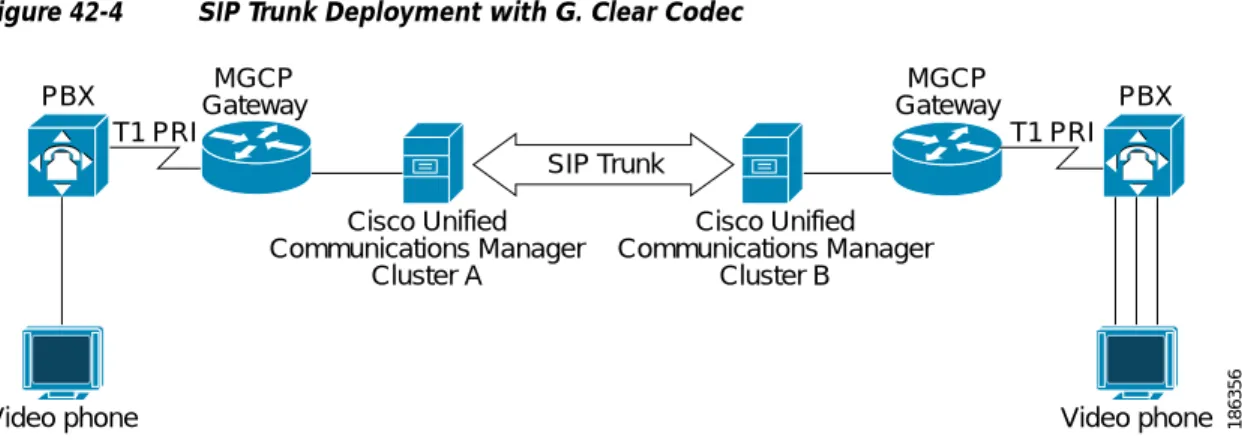
Figure 42-4 shows a typical SIP trunk deployment that has the G.Clear codec enabled.
Figure 42-4 SIP Trunk Deployment with G. Clear Codec
Two SIP service parameters enable the G. Clear codec over SIP trunks: SIP Route Class Naming Authority and SIP Clear Channel Data Route Class Label. The SIP Route Class Naming Authority parameter represents the naming authority and context for the labels that are used in SIP signaling that represent the route class. The value specifies a domain name that is owned by the naming authority. The default specifies cisco.com.
To signal a particular route class value, Cisco Unified Communications Manager incorporates the domain name and the appropriate route class label, as defined in the SIP Clear Channel Data Route Class
SIP Trunk
Video phone
PBX PBX
T1 PRI T1 PRI
MGCP Gateway
MGCP Gateway
Video phone 186356
Cisco Unified Communications Manager
Cluster A
Cisco Unified Communications Manager
Chapter 42 Understanding Session Initiation Protocol (SIP)
SIP Functions That Are Supported in Cisco Unified Communications Manager
The SIP Clear Channel Data Route Class Label represents the clear channel data route class in SIP signaling. This parameter and the SIP Route Class Naming Authority parameter create the complete signaling syntax for the SIP clear channel data route class value. The default specifies ccdata.
Route class signaling proves useful when you are interworking with TDM networks that make routing decisions based on route class and clear-channel data route classes. The default domain name that is specified in the parameter applies to interaction between Cisco switches. You can change the parameter to any vendor– or deployment–specific requirements. The far-end switch should receive the same value that is configured in the parameter.
The following entities do not get supported or are disabled:
• H.323 ICTs with the G. Clear codec do not get supported.
• Skinny Client Control Protocol (SCCP) devices with the G. Clear codec do not get supported.
• T1 and E1 CAS with the G. Clear codec do not get supported.
• RSVP with the G. Clear codec does not get supported.
• MLPP over E1 trunks does not get supported.
• Echo cancellation and zero suppression for outbound G. Clear codec calls get disabled.
• Frame aligning individual DS-0 circuits that transit the VoIP network do not get supported because terminal equipment takes responsibility for the bonding of the individual DS-0 circuits that are defined by ITU H.244.
• Fast Start and Media Termination Point Required options in Cisco Unified Communications Manager do not work with G. Clear that is enabled.
Early Offer for G.Clear Calls
Cisco Unified Communications Manager supports limited early offer for G.Clear data calls (also known as clear channel). The Early Offer for G.Clear Calls feature provides support for third-party SIP user agents that can do early offer to negotiate data calls without using a Media Termination Point. MTPs do not support the G.Clear codec.
If you enable both Media Termination Point Required and Early Offer for G.Clear Calls for a SIP device, the system does not allocate the MTP if the G.Clear codec in present in the offer. The system only allocates the MTP if the call is not G.Clear, and the MTP is required.
The Early Offer for G.Clear Calls feature supports both standards-based G.Clear (CLEARMODE) and proprietary Cisco Session Description Protocols (SDP), including CCD, G.nX64, and X-CCD.
To enable or disable Early Offer for G.Clear Calls, choose one of the following options on the SIP Profile Configuration window in Cisco Unified Communications Manager Administration:
• Disabled (default)
• CLEARMODE
• CCD
• G.nX64
Support of Multilevel Precedence and Preemption for SIP Trunks
Cisco Unified Communications Manager Administration supports Voice over Secured IP (VoSIP) networks with Multilevel Precedence and Preemption (MLPP) for SIP trunks. It adds a Resource Priority and SIP-Reason header to messages. SIP-signaled resources are prioritized by Cisco Unified
Communications Manager to free up those resources so that the networks can function during emergencies and congestion. Resource Priority Namespace Network Domains and Resource Priority Namespace Lists can be configured to enable prioritization as required.
Resource Priority Namespace Network Domains
The Resource Priority Namespace Network Domain in SIP signaling is similar to the ISDN precedence Information Element (IE) and ISDN User Part (ISUP) precedence parameters used in legacy TDM MLPP networks.
The Resource Priority Namespace Network Domain is included on outbound calls and based on translation patterns or route patterns directing the call to the SIP trunk. The following messages include the configured Resource Priority Namespace Network Domain:
• INVITE
• UPDATE
• REFER
For inbound calls, the network domain is compared to a list of acceptable network domains. The network domain of an incoming call is examined only if the call terminates to a Cisco Unified Communications Manager endpoint. For all other call types, the network domain is not validated against a local
configuration. The configuration of acceptable network domains must be added to the SIP Profile. SIP trunks can respond to updated precedence signals and the following supplementary services:
• Precedence Call Waiting
• Call Transfer
• Call Forwarding
• Three-way Calling
The following headers, mapping, and queuing are not supported:
• Accept-Resource-Priority header.
• Inclusion of RP header in PRACK and ACK.
• Mapping of precedence levels between namespaces.
• Call queuing and other non-MLPP services.
Support for Secure V.150.1 Modem over IP over SIP Trunks
Support for secure V.150.1 based Modem over IP (MoIP) communications between an IP STE and legacy (BRI or analog) Secure Terminal Equipment (STE) across a SIP trunk and an intercluster SIP trunk. SIP trunks transport the Session Description Protocol (SDP) information for outbound calls and signal Cisco Unified Communications Manager when MoIP SDP information is received for inbound calls. Devices can call between clusters by using SIP to negotiate a V.150.1 secure call.
Chapter 42 Understanding Session Initiation Protocol (SIP)
SIP Functions That Are Supported in Cisco Unified Communications Manager
Note No configuration of MoIP over SIP trunks is required.
Support for G.729a and G.729b Codecs Over SIP Trunks
G.729a and G.729b are low-bandwidth codecs that can be used for calls that are initiated over SIP trunks. Be aware that this feature is required for endpoints that do not support delayed media calls and do not want to use a higher-bandwidth codec, such as G.711.
Because an MTP needs to be pre-allocated for early-offer calls, you must configure an external MTP or transcoder device to use this feature. The software MTP does not support G.729 over SIP trunks. Although this feature supports all four G.729 codecs (G.729, G.729a, G.729b, and G.729ab), the system cannot distinguish between G.729 and G.729a or between G.729b and G.729ab. Therefore, Cisco Unified Communications Manager Administration provides only two options for configuring these codecs on SIP trunks: G729/G729a and G729b/G729ab.
The G.729 codec over SIP trunks applies only to outgoing calls, and incoming calls are not affected. Be aware that the system does not support midcall codec switching from G.729 to any other codec.
Support for SIP T.38 Interoperability With Microsoft Exchange
The T.38 standard comes from the ITU-T Recommendation for real-time transfer of Group 3 facsimile (fax) communication over IP networks. In Cisco Unified Communications Manager, the implementation of T.38 interoperability with Microsoft Exchange enables the system to switch a call from audio to T.38 fax.
The following steps show how the Microsoft Exchange Server establishes a call to a fax machine:
a. The exchange server establishes an audio call with the fax machine.
b. The fax machine send fax tones (CNG) to the exchange server.
c. The exchange server recognizes the fax tones and tries to renegotiate the call as a T.38 fax (or T.38 fax relay) call.
Cisco Unified Communications Manager Administration allows you to configure a SIP Profile that supports T.38 fax communication. This profile applies to SIP trunks only, not phones that are running SIP or endpoints.
SIP PUBLISH
SIP PUBLISH provides the preferred mechanism for Cisco Unified Communications Manager Release 6.0 (and later) to send IP phone presence information to Cisco Unified Presence Release 6.0 (and later) over a SIP trunk because it provides improved performance. PUBLISH also provides presence
information on a line basis; for example, for do not disturb and mobility. Only outbound PUBLISH gets supported. (Cisco Unified Communications Manager Release 6.0 [and later] uses
SUBSCRIBE/NOTIFY for presence when communicating to Cisco Unified Presence release 1.0.) PUBLISH represents a SIP method for event state publication. RFC 3903 provides a framework for the publication of event state from a user agent to an entity that is responsible for the composition of this event state and distributing it to interested parties through the SIP Events framework. The mechanism
In addition, RFC 3903 defines a concrete usage of that framework for the publication of presence state by a presence user agent to a presence compositor.
SIP trunk works with Cisco Unified Presence to provide the presence information for the Cisco Unified Communications Manager registered phones. In release 5.0, Cisco Unified Presence collected the presence information from Cisco Unified CallManager through the SIP subscription mechanism. The Cisco Unified Communications Manager to Cisco Unified Presence interaction works properly when the SIP subscription mechanism is used; however, this mechanism brings some performance concerns. Both Cisco Unified Communications Manager and Cisco Unified Presence must maintain a separate subscription dialog for each phone that is being watched. Moreover, if a phone is interested by two different users, and each user has a different watch rule, Cisco Unified Presence will issue two different SUBSCRIBE requests to the Cisco Unified Communications Manager SIP trunk for the same number.
In Cisco Unified Communications Manager Release 6.0 (and later), a SIP trunk can use PUBLISH as the mechanism for the presence interaction with Cisco Unified Presence. Cisco Unified Communications Manager acts as the Event Publication Agent (EPA), publishing the presence information of its managed phones; Cisco Unified Presence acts as the Event State Compositor (ESC), receiving the published presence information, aggregating it, and updating the watcher phone displays accordingly.
Cisco Unified Communications Manager and Cisco Unified Presence High-Level Architecture
Overview
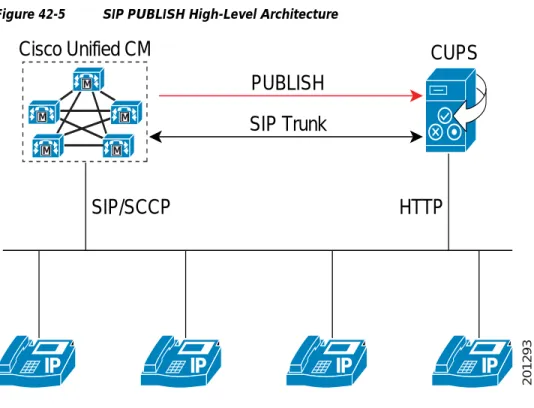
Figure 42-5 shows how Cisco Unified Communications Manager, Cisco Unified Presence, and Cisco Unified IP Phones work together.
• Cisco Unified Communications Manager manages all the IP phones, and Cisco Unified Communications Manager uses the SIP or SCCP interface to control the phones.
• An HTTP interface also exists between the IP phones and Cisco Unified Presence. This interface gets used for Cisco Unified Presence to update phone screens. It also gets used for Cisco Unified Presence to detect user login/logout activities.
• The SIP trunk interface gets used to pass the presence data between Cisco Unified Communications Manager and Cisco Unified Presence.
Chapter 42 Understanding Session Initiation Protocol (SIP)
SIP Functions That Are Supported in Cisco Unified Communications Manager
Figure 42-5 SIP PUBLISH High-Level Architecture
Cisco Unified Communications Manager Administration Configuration Tips for PUBLISH
The following configuration tips apply to Cisco Unified Communications Manager Administration when a SIP trunk is configured for PUBLISH:
• From the SIP Trunk Configuration window, configure a SIP trunk to access the Cisco Unified Presence (destination address).
Tip To maximize the distributed performance in a multinode cluster, Cisco recommends that you configure the SIP trunk to use the default device pool.
• From the Service Parameters Configuration window for the Cisco CallManager service, in the CUP PUBLISH Trunk field, choose the SIP trunk that you configured.
• Configure a Cisco Unified Presence end user (User Management > End User Configuration) and assign a licensing unit to the user (System > Licensing > Capabilities Assignment).
• Associate the end user with the line appearance (Device > Phone Configuration). From the Phone Configuration window, click the DN that the user will use to access the Cisco Unified Presence. Click the Associated End Users button. From the Find and List Users window, choose an end user that will access the Cisco Unified Presence.
Note You can associate one line appearance with up to five end users.
• DND Support for SIP Trunk PUBLISH—Because DND is device based in release 6.0 (and later), if a device is changed to the DND state, all Cisco Unified Presence-enabled line appearances that are associated with this device could get published. When a device gets changed to the DND state, DND as well as the busy/idle status will get published together to give Cisco Unified Presence more
Cisco Unified CM
CUPS
PUBLISH
SIP Trunk
SIP/SCCP
HTTP
M
M
M M
M
IP
IP
IP
IP
• Shared Lines—If Phone A and Phone B are sharing DN 1000, when a user picks up Phone A and makes a call on the line 1000, Cisco Unified Communications Manager notifies Cisco Unified Presence that line 1000 is busy. This information gives the watcher the illusion that all lines for DN 1000 are busy. This does not represent accurate information because line 1000 on Phone B remains idle. Cisco Unified Communications Manager tells Cisco Unified Presence that line 1000 on Phone A is busy. In release 6.0 (and later), Cisco Unified Communications Manager publishes by line appearance. The system considers a line appearance a (DN, Device) pair.
• Multiple Partitions—When Cisco Unified Communications Manager publishes the presence status of a DN, it also shows the partition in which the DN is associated.
• Associating Username—With shared line and multiple partitions supported, Cisco Unified Presence cannot assume that it works only with one DN for each phone and also one partition across the whole Cisco Unified Communications Manager system. In release 6.0 (and later), because a line
appearance can be associated with an end user, a SIP trunk will publish the status of the line appearance on behalf of the end user that is associated with that line appearance, which means it can get used to identify Cisco Unified Presence-enabled lines. If a line appearance is associated with an end user, the system is considered as Cisco Unified Presence-enabled; therefore, its presence information will get published.
Service Parameters for PUBLISH
The following Cisco CallManager service parameters get used to configure PUBLISH:
• CUPS PUBLISH Trunk
• Default PUBLISH Expiration Timer
• Minimum PUBLISH Expiration Timer
• Retry Count for SIP Publish
• SIP Publish Timer
Serviceability Performance Counters
Cisco Unified Serviceability collects and displays the following PUBLISH-related performance counters:
• SIP_StatsPublishIns
• SIP_StatsPublishOuts
• SIP_StatsRetryPublishOuts
• SIP_StatsRetryRequestsOut
The following performance counters exist in Cisco Unified CallManager Release 5.x, but the PUBLISH feature impacts their values:
• SIP_SummTotalOutReq
• SIP_SummTotalInRes
• SIP_StatsRetryRequestsOut
Security Recommendations
RFC 3903 suggests the use of TLS and digest authentication against issues such as Access Control, Denial of Service Attacks, Replay Attacks, and Man in the Middle Attacks. Because Cisco Unified Communications Manager and Cisco Unified Presence support TLS and digest authentication, no changes occurred in release 6.0. The administrator can configure and enable TLS and digest
Chapter 42 Understanding Session Initiation Protocol (SIP)
Cisco Unified Communications Manager SIP Endpoints Overview
BAT Support
The following BAT tools assist in migrating Cisco Unified Presence users to Cisco Unified Communications Manager:
• BAT provides a tool that examines all Cisco Unified Presence licensed users and their primary extensions and associated device line appearances for users after Cisco Unified Communications Manager is upgraded from 5.x to 6.0 (and later). You need this tool during the upgrade/migration of Cisco Unified Presence when connecting to Cisco Unified Communications Manager (because all the backend subscriptions get deleted and the new line appearance-based presence needs to be available for the Cisco Unified Presence users). To perform the migration, BAT uses the Export and Update functions. The export csv format follows: User ID, Device, Directory Number, Partition. The last three columns form a line appearance.
• To access the Export and Update windows, choose Bulk Administration > Users > Export Line
Appearance and Bulk Administration > Users > Update Line Appearance.
• The Export and Update windows include a check box, Export Line Appearance for CUP User Only (and Update Line Appearance for CUP Users Only). When this check box gets checked, the export or update operation gets performed on the Cisco Unified Presence users. Non-Cisco Unified Presence users do not get exported or updated.
Cisco Unified Communications Manager SIP Endpoints
Overview
The Cisco Unified IP Phones 7911, 7941, 7961, 7970, and 7971 get deployed as a SIP endpoint in a Cisco Unified Communications Manager Back to Back User Agent (B2BUA) environment. The SIP provides the primary interface between the phone and other network components. In addition to SIP, other protocols get used for various functions such as DHCP for IP address assignment, DNS for domain name to address resolution, and TFTP for downloading image and configuration data.
This section provides an example illustration and brief description of the B2BUA and peer-to-peer environments.
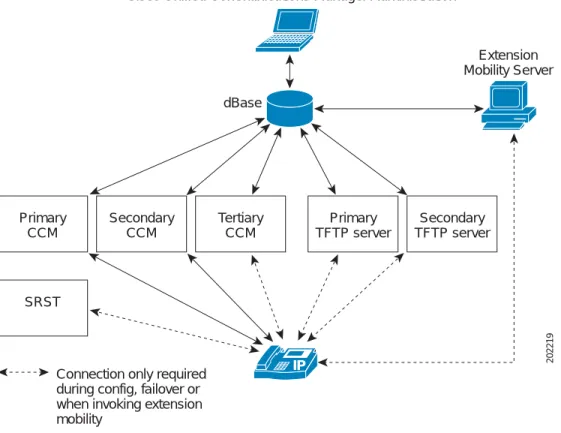
Figure 42-6 Cisco Unified Communications Manager B2BUA Network
Figure 42-6 shows a simplified example of a Cisco Unified Communications Manager B2BUA network that shows a main site and a branch office deployment. Each site includes a mixture of phones that are running SIP and phones that are running SCCP. The main site contains the Cisco Unified
Communications Manager cluster and voice mail server. Each phone at the main site and the branch office site homes to a set of primary, secondary, and tertiary Cisco Unified Communications Managers. This provides redundancy of call control in the event of the failure of an individual Cisco Unified Communications Manager server.
Phones that are running SIP that are at the main site direct all session invitations to Cisco Unified Communications Manager. Based on routing configuration and destination, Cisco Unified
Communications Manager will either extend a call locally to another phone that is running SIP or phone that is running SCCP, through the main site voice gateway across the IP WAN to one of the phones in the branch office, or through the main site voice gateway to the PSTN. Calls that are originating from phones in the branch office get routed similarly with the added ability of routing calls to the PSTN through the branch office voice gateway.
The branch office includes an SRST gateway that is deployed for access to the main site IP WAN and for PSTN access. Phones that are running SIP in the branch office will direct all session invitations to the Cisco Unified Communications Manager at the main site. Similarly to the phones at the main site, Cisco Unified Communications Manager may extend the call to a phone at the main site, through the main site voice gateway across the IP WAN to a phone in the branch office, or to the PSTN. Depending on the routing configuration of the Cisco Unified Communications Manager cluster, PSTN calls that originate from the phones in the branch office can get routed to the PSTN through the gateway at the main site, or they can be routed locally to the PSTN through the branch office gateway.
Secondary TFTP server
IP 202219
Primary TFTP server Tertiary
CCM dBase
Cisco Unified Communications Manager Administration
Extension Mobility Server
Secondary CCM Primary
CCM
SRST
Connection only required during config, failover or when invoking extension mobility
Chapter 42 Understanding Session Initiation Protocol (SIP)
SIP Line Side Overview
The SRST gateway also acts as a backup call control server in the event of an IP WAN outage. Both the phones that are running SIP and phones that are running SCCP will fail over to the SRST gateway during a WAN failure. By doing so, the phones in the branch office can have their calls routed by the SRST gateway. This includes calls that originate and terminate within the branch office and calls that originate and terminate in the PSTN.
SIP Line Side Overview
The SIP line side feature affects Cisco Unified Communications Manager architecture, the TFTP server, and the Cisco Unified IP Phones. The phone features of the phone that is running SIP, which are equivalent to the phone features of the phone that is running SCCP, behave similarly. Cisco Unified IP Phones 7941/61/71/70/11 support all features and most CTI applications. Cisco Unified IP Phones 7905/12/40/60 support a reduced feature set (for example, limited MOH and failover capabilities). SIP trunk side applications work for both phones that are running SCCP and phones that are running SIP. For detailed information on the features capabilities of phones that are running SIP, refer to the user guide for the specific Cisco Unified IP Phone that is running SIP.
SIP Standards
The following SIP standards get supported in Cisco Unified Communications Manager:
• RFC3261, RFC3262 (PRACK), RFC3264 (offer/answer), RFC3311 (UPDATE), 3PCC, page 42-27 • RFC3515 (REFER) also Replaces and Referred-by Headers, page 42-28
• Remote Party Id (RPID) Header, page 42-28 • Diversion Header, page 42-28
• Replaces Header, page 42-28 • Join Header, page 42-29
• RFC3265 + Dialog Package, page 42-29 • RFC3265 + Presence Package, page 42-29 • RFC3265 + KPML Package, page 42-29
• RFC3265 + RFC3842 MWI Package (unsolicited notify), page 42-29 • Remotecc, page 42-29
• RFC4028 Session Timers, page 42-30
RFC3261, RFC3262 (PRACK), RFC3264 (offer/answer), RFC3311 (UPDATE), 3PCC
This SIP standard supports the following Cisco Unified Communications Manager features:
• Basic Call
• Hold and Resume
• Music on Hold
• Abbreviated Dialing
• Call Forwarding (for example, 486 and 302 support)
• Meet-Me
• Pickup, Group Pickup, Other Group Pickup
• 3-way calling (local mixing of phone that is running SIP)
• Parked Call Retrieval
• Shared line: Basic Call
RFC3515 (REFER) also Replaces and Referred-by Headers
These SIP standards support the following Cisco Unified Communications Manager features:
• Consultative Transfer
• Early Attended Transfer
• Blind Transfer
Remote Party Id (RPID) Header
This SIP standard supports the following Cisco Unified Communications Manager features:
• Calling Line ID (CLID)
• Calling Party Name ID (CNID)
• Dialed Number ID Service (DNIS)
• Call-by-call Calling Line ID Restriction (call-by-call CLIR)
RPID represents a SIP header that is used for identification services. RPID indicates the calling, called, and connected remote party information to the other party for identification and callback, legal intercept, indication of user identification and user location to emergency services, and the identification of users for accounting and billing services.
Diversion Header
This SIP standard supports the following Cisco Unified Communications Manager features:
• Redirected Number ID Service (RDNIS)
• Call Forward All Activation, Call Forward Busy, Call Forward No Answer
Replaces Header
This SIP standard supports the following Cisco Unified Communications Manager feature:
Chapter 42 Understanding Session Initiation Protocol (SIP)
SIP Standards
Join Header
This SIP standard supports the following Cisco Unified Communications Manager feature:
• Shared Line: Barge
RFC3265 + Dialog Package
This SIP standard supports the following Cisco Unified Communications Manager feature:
• Shared Line: Remote State Notifications
RFC3265 + Presence Package
These SIP standards support the following Cisco Unified Communications Manager features:
• BLF on Speed Dial
• BLF on Missed, Placed, Received Calls lists
RFC3265 + KPML Package
These SIP standards support the following Cisco Unified Communications Manager features:
• Digit Collection
• OOB DTMF
RFC3265 + RFC3842 MWI Package (unsolicited notify)
These SIP standards support the following Cisco Unified Communications Manager feature:
• Message Waiting Indication
Remotecc
This SIP standard supports the following Cisco Unified Communications Manager features:
• Ad hoc conferencing
• Remove Last Participant
• Conflist
• Immediate Diversion
• Call Park
• Call Select