ON-LINE REMOTE CONTROL OF MATLAB SIMULATIONS
BASED ON ASYNCHRONOUS COMMUNICATION MODEL
L’. ˇCirka, M. Kal´uz, M. Fikar
Institute of Information Engineering, Automation, and Mathematics Faculty of Chemical and Food Technology, STU in Bratislava
Radlinsk´eho 9, 812 37, Bratislava
Abstract
In this paper, we propose a new approach to remote control of Simulink models. The simulations are processed in MATLAB/Simulink and they are controlled remotely over the Internet. Communication between client and server side is provided by asynchronous HTTP request-response model. All requests sent from a user to server are processed by simulation in the time of their arrival and responses with ongoing results are returned back to client’s Web page.
1
Introduction
In the past, we used MATLAB Web Server (MWS) to simulate models of technological processes on-line ([1], [2], [3], [5]). The advantage of MWS was that it allowed developers to create Web based MATLAB applications easily, just by remote calls to M-files located on the server. MWS uses the HyperText Markup Language HTML and supports graphical objects. Unfortunately, the approach based on MWS was limited only to batch tasks and did not allow any kind of inter-activity in simulations during their runtime. Moreover, MWS was discontinued since MATLAB version 2006b and it is no longer supported.
Our MWS based control applications were later rebuilt using technologies provided by MATLAB Compiler ([6]), specifically with Java and C/C++ executables. The drawbacks of these approaches are various unsupported functionalities (Simulink, some toolboxes, etc.). Therefore, we looked for alternative technologies to rebuild our control applications.
Our actual approach is based on HTTP Socket Server ([7], [8]) that is based on independent open-source projectWeb Server, developed and published by Dirk-Jan Kroon ([9]). This server executes native MATLAB code over the Web. The server side service is emulated in by Java package classesjava.net.* which are designed for I/O network communications. The service in set up to process common HTTP requests for GET and POST methods sent from client side Web pages. The source code of the server consists of M-file executable scripts and functions containing base methods for handling HTTP request/response model and methods for local execution of server side processing scripts.
Although this approach does not allow changes in simulation parameters directly at run-time, we were able incorporate this feature to our applications with the use of Database Tool-box, MySQL database, jQuery and asynchronous communication model. In this communication model, the simulation is invoked by HTTP request sent by user. At runtime, the simulation periodically stores new data to database and checks for new requests from user, which are also transferred through database. Simultaneously, the client side Web page periodically reads the simulation data from database and generates on-line interactive charts.
2
On-line Remote Control of Simulink Schemes
Remote Control of Simulink schemes is based on a HTTP Socket Server (Simulation Server), standard HTTP server (Operational Server), database (for example MySQL), and MATLAB with Database Toolbox.
2.1 Simulation Server
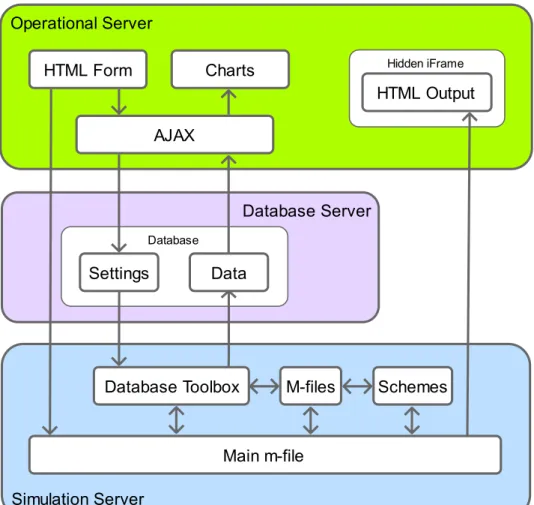
Simulation Server receives the data entered in client’s HTML input form (Figure 1) and passes this information to MATLAB. Here, it is processed by appropriate M-file scripts. After script execution is finished, results are sent back to client as the HTML document. These M-files can also contain commands for running the simulations. In this case, the results are not returned until the simulation ends, and during its run, it is not possible to make any changes in its parameters.
One of options to add interactivity is the use of MATLAB’s Database Toolbox. Each parameter that is considered to be a variable is stored in a database. During the simulation, MATLAB collects new client’s request from database and writes actual simulation data to it.
pencil
Exported at: Wed Oct 23 2013 11:39:20 GMT+0200
maglev
Simulation Server Database Server Database Operational Server Hidden iFrame HTML Form Charts HTML Output AJAX Settings Data Database Toolbox Main m-file M-files SchemesFigure 1: Operational Architecture
2.2 Operational Server
As the operational server, any HTTP server with the support of server-side scripting language can be used. This server stores information sent by user in database and collects simulation data from database (Figure 1). The main Web page for simulation control is also provided by the operational server. The data from user’s input form are sent to the simulation server to run the MATLAB simulation with predefined parameters (attribute action=’Main m-file’). Simultaneously, the asynchronous communication (AJAX) is initiated for (i) data acquisition from database and real-time graph plotting and (ii) transfer of new user requests to database. At the end, the simulation server returns the output HTML document. To avoid the overwriting of current user’s Web page by this output, it is forwarded to hidden iFrame element.
- D/A Converter -Power Amplified - Coil 6 6 Ball ? 6 Position Sensor A/D Converter um u i x ym y Fm Fg Fa
Figure 2: Basic scheme of the magnetic levitation model [4]
2.3 Database Server
Database server serves as data exchanger between client and MATLAB/Simulink (Figure 1). User defined data is stored in database table “Settings”. The MATLAB script performs in predefined time intervals comparison of current simulation parameters with those stored in “Settings” table, and if there is some change, the new values are applied. The runtime simulation results from Simulink are continuously stored in table “Data”, from where the client’s Web page collects them to plot the charts.
3
Example
To show how our application works, we have chosen a laboratory model of magnetic levitation representing the real laboratory model of magnetic levitation CE 152 from Humusoft [4]. The control objective for this model is to keep the metal ball in the levitating position between the magnetic coil and bottom base.
The mathematical model of the Magnetic levitation system shown in Figure 2 is divided into following blocks:
• D/A converter • power amplifier
• ball and coil subsystem • position sensor
• A/D converter
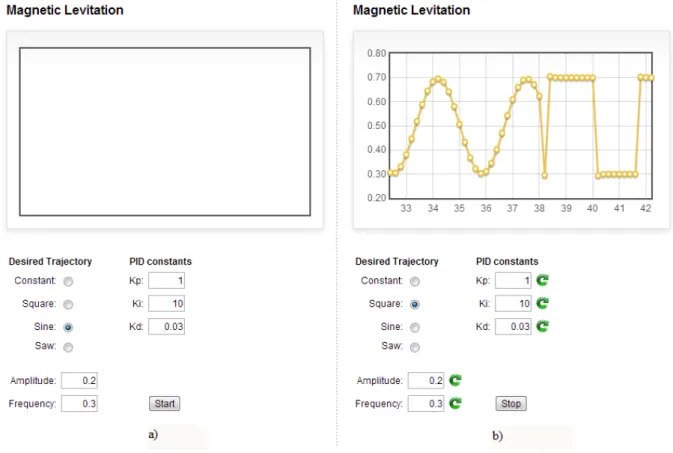
The mathematical model of CE 152 can be found in official documentation [4]. The main user interface is shown in Figure 3. User can define PID parameters and select the shape of desired control trajectory: straight line, sine function, square, saw teeth. Data sent from the web form (Figure 3a) are processed by main M-file (Figure 1) as follows:
1. validation of input data is performed;
2. connection to MySQL database is established;
3. data from the web form are stored in database table “Settings”; 4. simulation scheme is opened;
Figure 3: Magnetic levitation web page
6. simulation is executed (duration is set to max. 15 min).
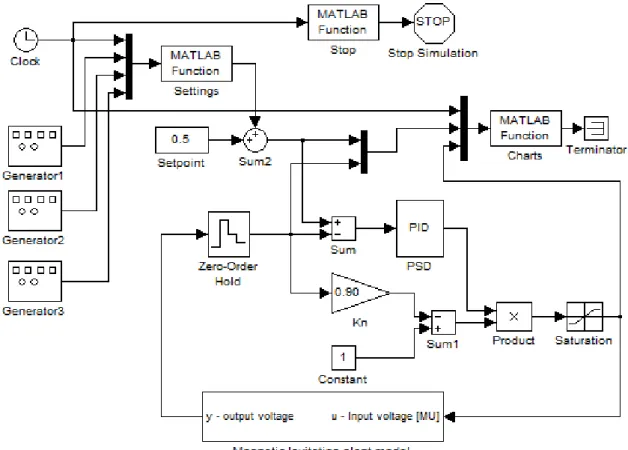
The Simulink scheme used for simulation in shown in Figure 4.
During the simulation, the MATLAB function defined in blockSettings periodically loads the data (trajectory type, PID parameters, etc.) from the database. This block also uses set_param function to make projection of requested parameters’ values loaded from database to parameters of Simulink scheme. Another function defined in blockCharts continuously saves data (time, desired and controlled trajectory) to database table “Data”.
In parallel with the simulation, asynchronous communication is running between the user’s Web browser and operational server. Simulation data stored in database table “Data” are plotted in user’s Web page using the JavaScript library Flot. Figure 3b shows setpoint trajectory change from sine to square. By clicking theStop button, user can stop the simulation. In this case, the special parameter in table “Settings” is set to 1, and according to its value, theStop Simulation block performs the appropriate action (Figure 4).
4
Conclusion
We have proposed and verified a method to change interactively parameters of Simulink simu-lations using remote communication over Internet. The solution is based on MATLAB HTTP Socket server. It is effective and very stable, provides all MATLAB resources and makes possible future extensions without undesirable restrictions.
Above mentioned principles can be applied also for remote control of real laboratory devices.
Figure 4: Scheme of simulation
Acknowledgements
The Authors gratefully acknowledge the contribution of the Scientific Grant Agency of the Slovak Republic under the grants 1/0973/12 and 1/0053/13.
References
[1] M. Bakoˇsov´a, J. Baleja, and L’. ˇCirka. Modeltool 1.0 - a model toolbox for matlab/simulink. In 14th Annual Conference Proceedings: Technical Computing Prague 2006, pages 12–12. Humusoft s.r.o., Humusoft s.r.o., 2006.
[2] L’. ˇCirka, M. Bakoˇsov´a, M. Fikar, and M. Herceg. Dynamic simulations of chemical pro-cesses via the matlab web server. In Proceedings of the 15th Annual Conference Technical Computing Prague 2007, pages 34–34. Humusoft s.r.o., Humusoft s.r.o., 2007.
[3] P. Doval’, L’. ˇCirka, and M. Fikar. Expid - experimental identification toolbox. InProceedings of the 15th Annual Conference Technical Computing Prague 2007, pages 38–38. Humusoft s.r.o., Humusoft s.r.o., 2007.
[4] Humusoft. CE 152 Magnetic Levitation Model: User’s Manual. Humusoft, 2002.
[5] M. Kal´uz, L’. ˇCirka, and M. Fikar. Matlab tool for identification of nonlinear systems. In19th Annual Conference Proceedings: Technical Computing Prague 2011, pages 62–62. Humusoft s.r.o., Humusoft s.r.o., 2011.
[6] M. Kal´uz, L’. ˇCirka, and M. Fikar. Virtual laboratory of process control. InProceedings of the 18th International Conference on Process Control, pages 348–351. Slovak University of Technology in Bratislava, Slovak University of Technology in Bratislava, 2011.
[7] M. Kal´uz, L’. ˇCirka, and M. Fikar. Advances in online courses on process control. In Proceedings of 9th IFAC Symposium Advances in Control Education, volume 9, pages 235– 240, 2012.
[8] M. Kal´uz, L’. ˇCirka, and M. Fikar. On-line matlab-based educational tools for process control related courses. In 20th Annual Conference Proceedings: Technical Computing Bratislava 2012, pages 35–35. Humusoft s.r.o., RT Systems, s.r.o., 2012.
[9] D. J. Kroon. Web server. online, url: http://www.mathworks.com/matlabcentral/ fileexchange/29027, 2011.
L’uboˇs ˇCirka
Institute of Information Engineering, Automation, and Mathematics
Faculty of Chemical and Food Technology, Slovak University of Technology in Bratislava Radlinsk´eho 9, 812 37, Bratislava, Slovak Republic
E-mail: [email protected] Martin Kal´uz
Institute of Information Engineering, Automation, and Mathematics
Faculty of Chemical and Food Technology, Slovak University of Technology in Bratislava Radlinsk´eho 9, 812 37, Bratislava, Slovak Republic
E-mail: [email protected] Miroslav Fikar
Institute of Information Engineering, Automation, and Mathematics
Faculty of Chemical and Food Technology, Slovak University of Technology in Bratislava Radlinsk´eho 9, 812 37, Bratislava, Slovak Republic
![Figure 2: Basic scheme of the magnetic levitation model [4]](https://thumb-us.123doks.com/thumbv2/123dok_us/8722625.2362088/3.892.283.618.76.295/figure-basic-scheme-magnetic-levitation-model.webp)