FlexPod Cooperative
Support Model
Quick Reference Guide
NetApp and Cisco share a long history of support collaboration with FlexPod®, a data center solution that is
unified, pretested, and validated. It is a full solution created from best-in-class components coupled with simplified management and validated design guides, which create repeatable, scalable deployments for customers and partners.
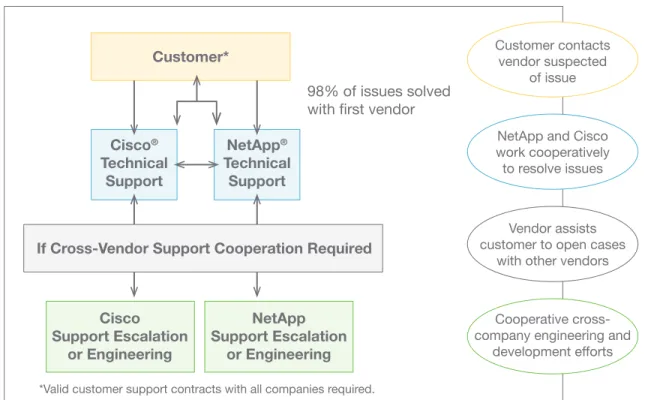
With the launch of the FlexPod platform, NetApp and Cisco established Cooperative Support, a strong, scalable, and flexible support model to address the unique support requirements of the FlexPod converged infrastructure. The Cooperative Support model takes advantage of the combined experience, resources, and technical support expertise of NetApp and Cisco to provide a streamlined process for identifying and resolving a customer’s FlexPod support issue, regardless of where the problem resides.
The FlexPod Cooperative Support model helps makes sure that your FlexPod system operates efficiently and benefits from the most up-to-date technology, while providing an experienced team to help resolve integration issues.
98% of issues solved
with first vendor
*Valid customer support contracts with all companies required.
Cisco
®Technical
Support
NetApp
®Technical
Support
Cisco
Support Escalation
or Engineering
NetApp
Support Escalation
or Engineering
Customer*
Customer contacts vendor suspectedof issue
NetApp and Cisco work cooperatively to resolve issues
Vendor assists customer to open cases
with other vendors
Cooperative cross-company engineering and
development efforts
If Cross-Vendor Support Cooperation Required
1. Customer contacts the vendor whose component is suspected of causing the issue. 2. NetApp and Cisco work cooperatively to resolve the issue.
3. All cases remain open with each vendor until the customer agrees that issue is resolved.
NetApp Support
NetApp Priority and Business
Impact Definitions
To make sure that your request is prioritized correctly, NetApp has established service request definitions. When you contact NetApp, you are asked to assign your request a priority level.
Cisco Support
Cisco Severity and Business
Impact Definitions
To make sure your that request is prioritized correctly, Cisco has established service request definitions. When you contact the TAC, you are asked to assign your request a severity level.
Priority 1 (P1) A NetApp® system or cluster is
down, is unable to serve data, is in a state of frequent or repeating “panic” or “hang,” or is in a state of degraded performance sufficient to prevent normal business operations.
Priority 2 (P2) A NetApp node, system, or cluster is experiencing an infrequent, isolated, or intermittent “panic” or “hang”, or is in a state of degraded performance that allows business operations to continue, but at an inconsistent or less-than-optimal rate.
Priority 3 (P3) A NetApp node, system, or cluster is experiencing an issue, anomaly, or cosmetic defect that inflicts little or no business impact, and a viable and mutually agreeable workaround or hardware of software upgrade exists to mitigate the problem.
Priority 4 (P4) Normal requests for information regarding the installation, con-figuration, use, and maintenance of NetApp equipment. This includes administrative inquiries and return material authorization (RMA) informa-tion. There is no impact to production systems or business operations.
Severity 1 (S1) A Network or environment is down or there is a critical impact to business operations. Customer and Cisco commit all necessary resources around the clock to resolve the situation.
Severity 2 (S2) Operation of an existing network or environment is severely degraded or significant aspects of business operations are negatively affected by inadequate performance of Cisco®
products. Customer and Cisco commit full-time resources during normal business hours to resolve the situation.
Severity 3 (S3) Operational performance of a network or environment is impaired, while business operations remain functional. Customer and Cisco commit resources during normal business hours to restore service to satisfactory levels.
Severity 4 (S4) Customer requires information or assistance with Cisco product capabilities, installation, or configu-ration. There is little or no effect on business operations.
Open a service request to talk to a NetApp Customer Success Service engineer, or use support.netapp.com online resources to get technical information on demand.
NetApp Online Support
Access online technical assistance to quickly resolve P3 and P4 issues with NetApp at support.netapp.com. Download the latest soft-ware release and patches, log and monitor problem
Open a service request to talk to a Cisco Technical Assistance Center (TAC) engineer, or use Cisco.com online resources to get technical information on demand.
Cisco Online Support
Use the online TAC Service Request Tool to quickly submit S3 and S4 service requests: www.cisco.com/techsupport/servicerequest (for registered cisco.com users with valid
NetApp Phone Support
For P1 or P2 issues, you can find your local NetApp Customer Success Service team contact at www.netapp.com/us/support/ngs-contacts.aspx. If you do not have Internet access, the following list contains local numbers to begin the process and open a case with NetApp.
NetApp Technical Support Contacts
United States and Canada
888 4-NETAPP (888 463-8277)
EMEA/Europe
00.800.44.NETAPP (00.800.44.638.277)
Asia/Pacific
+800.800.80.800
For a complete list of worldwide support numbers, go to: www.netapp.com/us/ support/ngs-contacts.html.
Cisco Phone Support
For S1 or S2 issues, or if you do not have Internet access for S3 or S4 issues, contact the Cisco TAC by telephone to submit your service requests.
Contacts
For a list of global contact numbers, visit: www.cisco.com/en/US/suport/tsd_ cisco_worldwide_contacts.html
Cisco Email Support
Customers may choose to email Cisco using [email protected] for any non-urgent issues in place of using the phone support line. Email cases automatically default to severity code S3.
Contacting Net App:
Prepare for Your Support Cal
l
The case resolution time can be significantly shortened if you have the following information available when you initiate a support call.
What you will need:
• Identify your SupportEdge Premium Service entitlement.
• Locate the serial numbers of your storage controllers, software products such as Opera-tions Manager, and other relevant products. • Provide NetApp with your contact
information at the beginning of the call in case the call gets dropped.
Contacting Cisco:
Prepare for Your Online Support Request
The fastest way to create S3 and S4 service requests and submit them to the TAC is to use the online TAC Service Request Tool.What you will need:
• Your Cisco Service Contract number • Product serial number and chassis
serial number
• Product model number and its hardware configuration
The following information will help expedite your case:
• Meaningful case title stating the problem accurately
• History of the problem
• Network topology and explanation • Output from “show tech” command (if
applicable) and all other relevant output • Software versions and types of equipment • Relevant syslog and tacac logs before the
issue occurred
Follow these steps:
1. Go to www.cisco.com/techsupport/ servicerequest.
2. Describe the issue.
3. The TAC Service Request Tool recommends resources for immediate resolution of the issue. 4. If your issue is not resolved by using these
automatic solutions, your service request is assigned to a Cisco TAC engineer. 5. You can enter case notes at the bottom of
the Query screen. Document relevant case events such as business impact, even if they are not purely technical in nature.
The following information will help expedite your case:
• Problem description with error messages on hosts, clients, and switches
• Priority, business impact, and system status • Manual AutoSupport™ message triggered
before your call
• Description of the environment • Actions taken to resolve the issue • Changes on storage controller, hosts,
clients, or network that could have triggered the issue
• OS version of hosts, clients, and switches • Error log files from NetApp system, hosts,
clients, and switches
Escalate a Case
All cases are assigned case owners, who are typically based in our Customer Success Services Support Center. A customer can request an increase in priority level at any time based on the priority definitions. To escalate your case, call NetApp Technical Support and ask to speak to the duty manager.
Escalate a Case
If you are not completely satisfied with the progress in resolving your service request, contact your regional technical support center and ask to speak to the duty manager. For a list of all regional phone numbers, go to www.cisco.com/techsupport/contacts.
© 2013 Cisco Systems, Inc. All rights reserved. No portions of this document may be reproduced without prior written consent of Cisco Systems, Inc. Specifications are subject to change without notice. Cisco, Cisco Nexus, Cisco UCS, and SMARTnet are registered trademarks and Cisco Unified Computing System is a trademark of Cisco Systems, Inc. NetApp, the NetApp logo, Go further, faster, ExpressPod, and FlexPod are trademarks or registered trademarks of NetApp, Inc. in the United States and/or other countries. Microsoft is a registered trademark and Hyper-V is a trademark of Microsoft Corporation. Oracle is a registered trademark of Oracle Corporation. SAP is a registered trademark of SAP AG. VMware and VMware vSphere are registered trademarks and vCenter is a trademark of VMware, Inc. All other brands or products are trademarks or registered trademarks of their respective holders and should be treated as such.
© 2013 NetApp, Inc. All rights reserved. No portions of this document may be reproduced without prior written consent of NetApp, Inc. Specifications are subject to change without notice. NetApp, the NetApp logo, Go further, faster, ExpressPod, and FlexPod are trademarks or registered trademarks of NetApp, Inc. in the United States and/or other countries. Cisco, Cisco Nexus, Cisco UCS, and SMARTnet are registered trademarks and Cisco Unified Computing System is a trademark of Cisco Systems, Inc. Microsoft is a registered trademark and Hyper-V is a trademark of Microsoft Corporation. Oracle is a registered trademark of Oracle Corporation. SAP is a registered trademark of SAP AG. VMware and vSphere are registered trademarks and vCenter is a trademark of VMware, Inc. All other brands or products are trademarks or registered trademarks of their respective holders and should be treated as such.
Unassigned Case is pending assignment to a Technical Support Engineer. Active Active investigation.
Pending Customer Data
Additional data has been requested to progress with the investigation.
Pending Solution Proposed
A solution has been provided; waiting for the customer to verify.
Pending
Bug Fix Engineering is developing a fix. Closed Issue is resolved to the customer’s
satisfaction.
Customer
Updated The customer has updated a service request by using the Cisco TAC Service Request Tool.
Customer Requested Closure
The customer has requested that the service request be closed.
Cisco Pending
The Cisco TAC engineer is currently investigating the issue. No work- around has been identified at this time.
Close
Pending The Cisco TAC engineer has provided a solution that will solve the issue. Customer should contact the assigned engineer if the problem has not been solved.
Customer
Pending The Cisco TAC engineer has requested information from the customer and is waiting for a response. No workaround has been identified.
Release
Pending Cisco Development Engineering is reviewing the issue for a code fix that would resolve the issue; however, the software release with the fix is not yet available.
Service Order
Pending The Cisco TAC engineer has sent the customer a hardware replacement.
Status of NetApp Support Request Cases
The following table lists status notifications.