Dane Jordan
Advisor: Bridget Benson
Senior ProjectElectrical Engineering Department California Polytechnic State University
San Luis Obispo June 10, 2015
Abstract
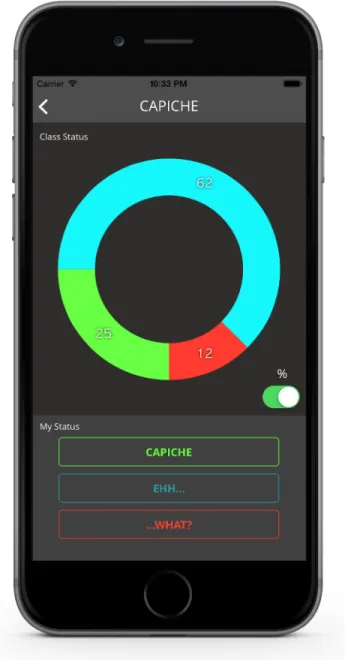
Capiche! is an application that provides real-‐time feedback to teachers, while allowing everyone in the classroom both students and teachers to see how well the material is being absorbed all anonymously. The student interface will consist of three buttons-‐ Capiche!, Ehh... ,and ...what? to allow to students to input their understanding from complete comprehension to no comprehension. The live update data of the entire classroom will then be displayed on everyone’s phones and tablets. Furthermore, on the teacher’s device the lecture audio will be recorded and synced with the data, so that the teacher can review the lecture after the delivery and pinpoint locations in the lecture where the students lost comprehension.
Capiche! 3
Acknowledgements
I would like to thank Rachel DeNoble, Jillian Ray, Angelina DiFrancesco, Kayla McCarty, and Lucas David for helping get Capiche! off the ground.
I would also like to thank Bridget for her great guidance and counseling throughout the development of Capiche!
I would like to thank Helen Hwang, Scott Cutler, and Monroe Chabrier for their continuous work in growing Capiche! as a business.
Finally, I would like to thank everyone who has chimed in and given great feedback and positive insight to keep this project going strong.
Table of Contents
Abstract ... 2
Acknowledgements ... 3
List of Tables and Figures... 5
Introduction ... 6
Product Description ... 7
Block Diagram and Specifications ... 7
Design ... 9
Software ... 9
Screenshots ... 10
Testing and Results ... 13
Feedback ... 13
Future Work ... 16
Analysis of Senior Project Design ... 17
Appendix A: Market Research ... 19
Market Size, Interests, and Competitors ... 19
Capiche!’s Advantage and Market Cost ... 20
Market Goals and Plan Going Forward ... 21
Appendix B: References ... 22
Capiche! 5
List of Tables and Figures
FIGURE 1: BLACK BOX DIAGRAM _____________________________________________________________________________________ 7 FIGURE 2: SOFTWARE FLOW DIAGRAM ______________________________________________________________________________ 9 FIGURE 3: MAIN STUDENT INTERFACE _____________________________________________________________________________ 10 FIGURE 4: REAL-‐TIME INSTRUCTOR INTERFACE __________________________________________________________________ 11 FIGURE 5: INSTRUCTOR TRENDING GRAPH INTERFACE __________________________________________________________ 12
TABLE 1: ENGINEERING SPECIFICATIONS ___________________________________________________________________________ 8 TABLE 2: TESTING AND MODIFICATIONS __________________________________________________________________________ 13 TABLE 3: MAIN COMPETITORS ______________________________________________________________________________________ 20
Introduction
It’s the middle of your Calculus III class and you’re in deep taking notes on triple integrals when suddenly something doesn’t click. You look around and everyone else is still furiously writing down notes. Questions start running through your head -‐ are you supposed to know this? Was this covered in the reading you didn’t get to? Are you the only one confused? The teacher stops and asks if anyone has any questions, but you don’t know what exactly to ask. Before anyone mutters anything, the teacher then continues on in the lecture, and the confusion remains.
This is the problem. Students across campus are confused and never speak up to voice their lack of understanding. As well, when teachers make honest attempts to see if the students really understand, they’re met with blank stares and no questions asked. With a more material to cover, the teacher continues with the lecture, yet the material is going unabsorbed and the true level of understanding the class holds is uncertain.
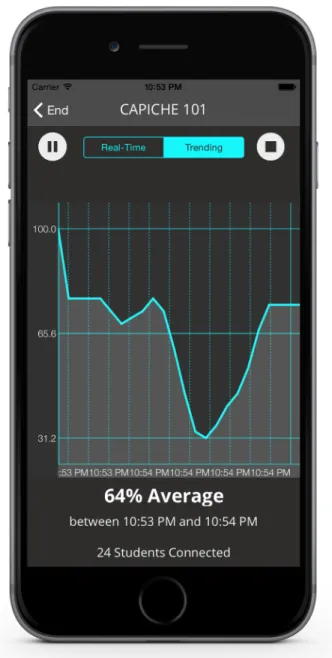
That is where Capiche! comes into play. Now, any stigma of being confused is instantly removed, allowing the teachers to voice their confusion without fear of judgement, and teachers can see real time exactly how well the students are getting the material. As well, lecture audio gets recorded, and at the end of the class the audio is synced up with a trending graph of all of the students inputs, so teachers can see exactly where the students got confused, press on the graph, and jump right to the point in the lecture to address how the material was being conveyed. Current attempts to solve this problem, such as Top Hat and iClicker do not allow for real-‐time updates, allowing no information on a second-‐to-‐ second basis available for either students or teachers (See Appendix A).
Capiche! 7
Product Description
As described earlier, what’s wrong with the present solution is the fact that is requires a poll to be initiated, and answers to be collected at a specified time. This addresses the problem of gauging everyone’s opinions and testing their comprehension. However, in a lecture
environment, especially one filled with complex mathematics, posting a mathematical poll may not be the most effective and won’t really gauge student comprehension as well as directly asking the students themselves. That is the advantage of our application. With a live feed update, no time will ever have to be taken out of lecture to address the class, because information will be live updating constantly. As well, if the teachers desire, they can record their lecture audio and use the trending graph to pinpoint exactly where changes in comprehension took place.
Block Diagram and Specifications
This shows the upper level black box diagram, and specifications necessary for Capiche! to run. The section is divided into two parts, the main block diagram and the specifications needed on each iOS device.
Figure 1: Black Box Diagram
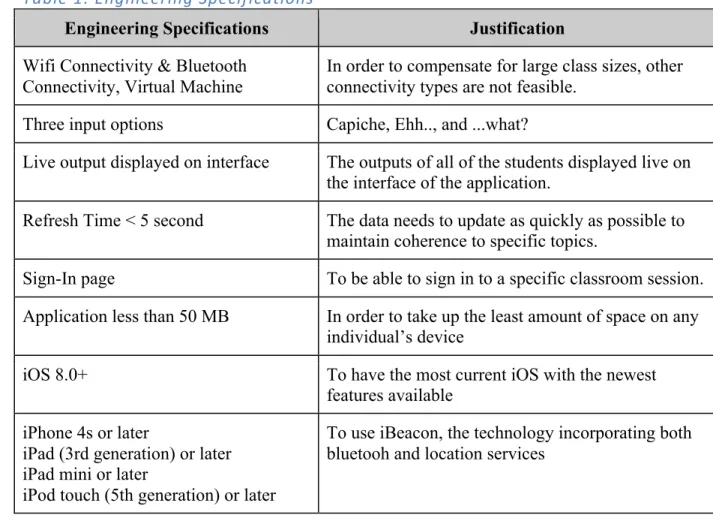
Table 1: Engineering Specifications
Engineering Specifications Justification
Wifi Connectivity & Bluetooth Connectivity, Virtual Machine
In order to compensate for large class sizes, other connectivity types are not feasible.
Three input options Capiche, Ehh.., and ...what?
Live output displayed on interface The outputs of all of the students displayed live on
the interface of the application.
Refresh Time < 5 second The data needs to update as quickly as possible to
maintain coherence to specific topics.
Sign-In page To be able to sign in to a specific classroom session.
Application less than 50 MB In order to take up the least amount of space on any
individual’s device
iOS 8.0+ To have the most current iOS with the newest
features available
iPhone 4s or later
iPad (3rd generation) or later iPad mini or later
iPod touch (5th generation) or later
To use iBeacon, the technology incorporating both bluetooh and location services
Capiche! 9
Design
This section includes both the software and hardware design specifications.
Software
Figure 2: Software Flow Diagram
Depending on the user type designated at signup, the user is sent to either the student or instructor viewcontroller. For the student, once a signal is generated via iBeacon (low Bluetooth energy) by an instructor, they can join the class and then start sending input. For the instructor, once the class is created, they can start hosting the class, waiting on students to join. Once they see enough students join, they can start recording the lecture audio and viewing the data on a trending graph.
Screenshots
Capiche! 11
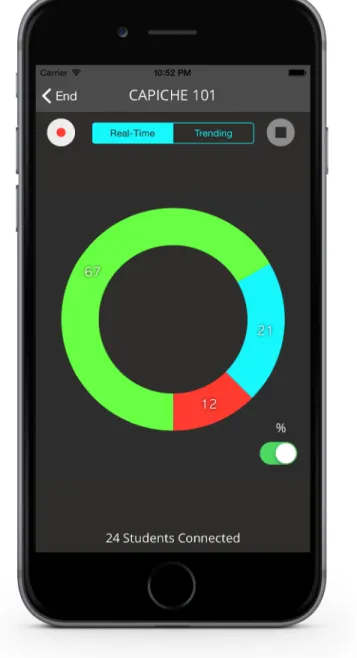
Figure 4: Real-‐Time Instructor Interface
Figure 5: Instructor Trending Graph Interface
Hardware:
Capiche! 13
Testing and Results
Four tests were necessary to get Capiche! up and running as desired. See the table below for details on the tests conducted and changes made.
Table 2: Testing and Modifications Test
Number Location Bug Change(s) Made
1 Benson’s CPE 329
Class Students could not login in Allowed students to choose school then changed the code to progress naturally to the finding class session screen
2 “” Created class sessions
weren’t visible to students
Fixed code, the session objectIDs were saving incorrectly. Changed how the class sessions were saved on the backend.
3 “” Individual Student
Objects not being created
Fixed code to allow for individual student objects to be made so each student had his/her own respective input
4 “” N/A N/A
5 Zhang’s EE 228 Class N/A Changed selected button transparency and
vibrancy
Feedback
Various feedback was collected from students to change/update the design. Across the board people loved it. Out of 21 total entries, 17 would recommend to a friend, and 14/21 would pay for the application, ranging from .99 to $5
T imest amp A re you a st udent or inst ruct or? W hat class did you demo in? If you' re a st udent , what major are you? O verall, what did you think? How usef ul is Capiche! app in the cont ext you used it? W ould you reccomend Capiche! to a friend? W hat part of the app did you like the most ? W hat are your thought s on the user int erf ace/ user experience? W hat was your least favorit e part ? A bsolut ely anyt hing else? How much would you pay for Capiche per quart er? Did you experience any bugs? If answered yes above, please describe the bug/ glit ch. W hich T V show great est of all 5/ 12/ 2015 8: 57: 22 S tudent CP E 329 CP E 8 8 8 I like the idea/ purpose of the app. It's very helpf ul, especially to those who have a hard time speaking up during class. It's easy to use/ underst and af ter someone explains it. Not sure if I would have same experience if I just downloaded on my own. O ther than that , the appearance/ st yle is good as well as the flow of usage. $6-$10 No G rey' s A nat omy 5/ 12/ 2015 8: 57: 35 S tudent CP E 329 No 5 4 4 E asy to use. Int erf ace is really simple to underst and $1-$5 Y es My phone didn' t connect , had to use a loaner phone F riends 5/ 14/ 2015 9: 58: 20 S tudent E E 335 EE 4 3 3 User int erf ace E ast to use 0. 99 No House of Cards 5/ 14/ 2015 10: 01: 20 S tudent E E 335 EE 5 4 5 Cool app, nice int erf ace, easy to int eract wit h easy to use/ underst and, could add more feat ures no one asked quest ions when the teacher asked. Maybe add a feat ure that you can type a quest ion and ask via capiche? Chat room wit h teacher moderat or? Q uest ions via capiche G ood st uf f so far. 0. 99 No 5/ 14/ 2015 10: 01: 37 S tudent E e 335 Ee 10 7 8 How simple and easy it is Looks good too I like the colors N/ a 5 No A rrest ed developement 5/ 14/ 2015 10: 01: 51 S tudent E E 335 EE 5 5 6 G reat idea V ery easy to use S ome of the int erf ace such as how the but ton pressing works 1. 99 No House of Cards 5/ 14/ 2015 10: 03: 46 S tudent E E 335 EE 9 5 7 I enjoyed the simplicit y the most . It doesn' t require much work at all to obt ain the desired inf ormat ion regarding the st at us of the classroom. T here isn' t any unneeded inf ormat ion dist ract ing the user. T he layout of the app is fant ast ic; very easy to use and clean. Might encourage a st udent to not ask a quest ion if the st udent sees that everyone but themselves is underst anding the topic. P erhaps a way to ask anonymous quest ions?? I think this app would work best in a classroom wit h underclassman/ freshma n or large lect ure halls. T his will represent st udent s who are not comf ort able to ask quest ions. Most upperclassman in normal classroom set tings are able to ask quest ions wit hout a problem, and the class wouldn' t be represent ed well by the app because part icipat ion would be lacking. 0 No B reaking B ad 5/ 14/ 2015 10: 04: 39 S tudent E E 335 EE 3 2 3 E asy Int erf ace Make it easy to use Do not think that it is reasonable to expect everyone in the class to have the app. O n top of that , I think it is even more unreasonable to expect everyone to act ively part icipat e. I think the idea that this app is trying to solve is awesome. T here exist s a problem where st udent s become lost during a lect ure. However, I do not think that this app is the way to solve that problem. T his app requires far too much user int eract ion and user dependence to be successf ul. E ven if everyone were to use this app during class, I wouldn' t think that the dat a would be very accurat e. It is very easy to forget to press the but ton when you get lost
. I commend
Capiche! 15 5/ 21/ 2015 14: 46: 32 S tudent E E 228 EE 5 2 2 Let me voice my underst anding. I'm not used to doing that , and I feel like that 's good, as long as the inst ruct or responds accordingly (which I did not see happening wit h this demo. ..) A ppealing and easy UI . However found it quit e dist ract ing in class due to the real time, animat ed response in the circle. P erhaps if you could have the choice to minimize it, so while the apps open, it 's not a complet e dist ract ion. Dist ract ed me from lect ure while I wat ched the wheel respond to the class' s underst anding. F elt chained to the app, i.e. I had to eit her be fully at tent ive to it, or not at all. F elt like a wast e of bat tery to have open for a 50 minut e lect ure. (saw 10% go down from just one lect ure) However the app seems to be relat ively bat tery ef ficient . A ll above in least favorit e part . G reat Idea! Just need the int eract iveness reduced. W e are supposed to pay at tent ion to the lect ure, not our phones. A lso it's useless unless the teacher responds to the class' s underst anding. 0 No B reaking B ad 6/ 4/ 2015 21: 52: 02 S tudent P HI L 314 Mat h 5 5 5 I liked how simple it was, and how it updat ed really fast E veryt hing was great N/ A I think that for the inst ruct or, you should creat e a not ificat ion sound if around 50% or more of the class is on the "what ?" /red opt ion. (I 'm saying this because my prof essor cont inued to lect ure even though half of us were ext remely conf used) 0 No G ame of T hrones 6/ 7/ 2015 7: 02: 54 Inst ruct or P hil 314 N/ A 5 5 5 T he fact that an immediat ely inf ormed about st udent tracking. It is easy to use and read. W as def init ely helpf ul. Not hing really A visual or vibrat ion warning when the "I don' t capiche" threshold hit s a cert ain percent age (set table by the inst ruct or) 5 No Um. ..T oddlers and T iaras ;) [Ha! B reaking B ad, of course! ]
Future Work
Capiche! will eventually grow to be the world’s biggest learning technology platform. In the near future, my team and I will be expanding to all available hardware platforms, and do further beta testing to ensure the best design. Then next we will have to devise a go to market strategy, launch and grow from there. All of next year our software developer Helen Hwang will be growing Capiche! on other platforms as her senior project at Cal Poly. As well, we have another member Monroe Charier who will hopefully be enlisting in the entrepreneurial senior project course at Cal Poly. Our team is four strong and growing. In the meantime I will be adding the ability of teachers to ask open ended or scripted
questions, with students having either a multiple choice interface to answer or an
anonymous text-‐based answer, that will include upvoting so other students who have the same question can upvote it, all of course anonymously. As well, I will be adding an alert sound if a certain percentage threshold of lack of comprehension is crossed, allowing teachers to immediately address any issues.
Capiche! 17
Analysis of Senior Project Design
1. Summary of Functional Requirements
a. Describe the overall capabilities or functions of your project or design. Describe what your project does.
i. Classroom Connection improves the process of learning by providing both
students and teachers with data on how effective current teaching methods are. By live polling the students, data will be available at any moment to students and professors alike.
2. Primary Constraints
. Describe significant challenges or difficulties associated with your project or
implementation. For example, what were limiting factors, or other issues that impacted your approach?
. The most significant challenge associated with this project is designing the application to
fit seamlessly into lectures, so that the application is not slowing down the process of learning but rather speeding it up. As well, making the user interface user-friendly and very easy to use could pose difficult.
3. Economic
. What economic impacts result?
. The main economic impacts that would result are a small increase to teacher and student
investment into the classroom. As well, if the application makes it to large scale, it would allow for more jobs and would then stimulate the economy. However, server space will be needed to host the mass amounts of data that will inherently arise.
4. If Manufactured on a Commercial Basis
. Since this application requires no additional hardware other than the smartphones and
tablets to run them on, no additional manufacturing will be necessary.
5. Environmental
. The energy needed to maintain the amount of servers needed for widespread application
will have to come from clean sources, ideally solar power. However, due to initial financial limitations, less clean sources of energy will need to be utilized to remain lucrative. These sources consist of nuclear power, coal, and thermal energy. The current methods for harvesting that energy come with negative environmental impacts, such as nuclear waste and greenhouse gases.
6. Manufacturability
. Since this application is completely software-based, no manufacturing will be necessary
to ensure its success. The iTunes store provides the nesting grounds for its growth into the market.
7. Sustainability
. Describe any issues or challenges associated with maintaining the completed device, or
system.
. Regular application updates and bugs will have to be addressed to solve any problems
that may occur due to widespread usage of the application. As well, adaptation to new classroom types might also need to be addressed, i.e. if the application finds its way outside of a university setting and into businesses and other lecture environments.
. Having the application run without any sort of delay between loading screens or classroom sessions would be an optimum improvement to the design of the project.
b. Describe any issues or challenges associated with upgrading the design.
. Possible changes to the user-interface may pose difficulties to new users, and will thus
have to be considered 8. Ethical
. Describe ethical implications relating to the design, manufacture, use, or misuse of the
project. Analyze using one or more ethical frameworks in addition to the IEEE Code of Ethics.
. In regards to the IEEE Code of Ethics, this application must present the data as it is input,
without any error, so we are honest and realistic in stating claims or estimates based on available data. As well, this application will help seek, accept, and offer honest criticism of technical work, to acknowledge and correct errors, and to credit properly the contributions of others. This will increase the teacher’s accountability to teach at his/her best capacity, as well as the student’s accountability to make a solid effort at trying to understand the material.
9. Health and Safety
. Describe any health and safety concerns associated with design, manufacture, or use of
this project.
. The only risk that this application poses to health and safety is if one were to use the
application while operating heavy machinery, then the safety of the user and others would be at jeopardy.
10. Social and Political
. Describe social and political issues associated with design, manufacture and use.
. The main social issue that could occur is the rejection of the information by the teacher,
or complete apathy to this new information, which could cause further tension and problems. It would put more pressure on the professors to be very receptive to the students’ needs, and would add another facet to be considered when considering the particular effectiveness of a certain teacher’s teaching style. Another issue that could arise is the purposeful misrepresentation of the true comprehension level, i.e. someone could purposefully press the wrong input, perhaps due to outside factors such as his/her personal relation with the teacher. A political issue, although unlikely, that may arise is mandating a specific comprehension rate for teachers in order to determine their eligibility to teach.
11. Development
. Describe any new tools or techniques, used for either development or analysis that you
learned independently during the course of your project.
. The main new tool learned will be the programming language Swift. Learning this
Capiche! 19
Appendix A: Market Research
Capiche! can easily bridge the gap between students and professors. Currently, when students have trouble with learning the material, they choose to go to office hours during the week at their own convenience. The problem with this is that professors don’t have enough hours that can accommodate all the students and don’t want to spend more hours. Also, students don’t want to feel like they’re making themselves look bad in front of professors asking questions that may be too simple or obvious. With this application, all the students and professors can feel like they’re on the same page.
Market Size, Interests, and Competitors
The market that we are interested is our own classroom, namely electrical engineering lectures. However, our problem is not unique to just electrical engineering, or even just engineering. Many classrooms covering a range of complex topics (mathematics, science, liberal arts, etc.) can often encounter patches of very dense material that requires a lot from student and teacher alike. Campuses across the world could benefit from this application. Therefore our market is all university students who attend any higher-education campus. In the United States alone, this would be around 13 million people.
The main companies that play in our market comprise of mainly iClicker, Top Hat, and Poll Everywhere, applications in the iTunes store. However, all of these companies have against us is market penetration, not specific customer addressing. All of these companies and applications address their market in the form of question response, where professors/students pose questions and then poll answers, waiting for responses to come in. That is where our company comes into play. Where our market consists of the same customers, we address a separate customer need, that is representation and a voice in a classroom that may not account for it.
What our competitors like iClicker, Top Hat, and Poll Everywhere don’t have is a live feedback system for both the students and faculty. The faculty can ask questions to students however much they want and get answers whenever, but Capiche! has no correlation to this. Instead, this
Table 3: Main Competitors
Competitor Product Cost for User
iClicker Radio frequency device/Application that allows a student to
anonymously respond to questions created by instructors.
$10/semester (Application)
$45 (Hardware Device)
Top Hat Application that can control classroom slides as well as can
quiz/test students with multiple choice based questions, teachers can see output display of results anonymously.
$20/semester
Poll
Everywhere Application that can be used both in and outside of the classroom to create multiple-choice or open-answer polls. $15/month
Table 1 above depicts Capiche!’s competition and cost estimate for a typical user. These
applications are very similar in that they poll students anonymously with questions posed by the instructors. This is in no way what the purpose of Capiche! is. Also, the costs for this application is fairly high compared to what our estimate cost is planned to be. Planning to create our
application and list it on the iTunes application store, we will sell to download our application for $5/quarter.
Capiche!’s Advantage and Market Cost
These main companies that play in our market are great for polling students for an in class quiz or attendance, but in no way give a live feedback system that continuously pools how students are feeling with the lecture. There is nowhere in the market that uses this sort of idea and Capiche! will be the first created in the market. That being said, Capiche!’s window of
opportunity is somewhat small as many of our competitors can come up and produce this idea very quickly. With the money they have and the resources they can use, these companies can create a live feedback system within weeks. With an estimated time of ten weeks to complete this project, there is a high chance that Capiche! can be the first of its kind.
Capiche! 21
Market Goals and Plan Going Forward
The goals of the market research activity are to best gauge the market that we are interested in. By polling students and faculty of each of the different colleges on this campus, we can get a good idea of where Capiche! can be most effective. Our anticipation is that math and science based majors will be the primary target for our application. We will be asking them questions pertaining to their judgment of how well material is conveyed and received in classrooms.
The capabilities of Capiche! are to improve learning in classrooms everywhere and give a voice to students who have not been able to have one. The main goal is to decrease if not completely eliminate the amount of confusion in the classroom that inhibits learning.
We don’t necessarily need to have any partners in making this product a success. As this is an original idea, once the application is created, we can advertise it and make it successful. Another reason we don’t need partners is because there are no competitors that have our product yet so customers will have no other option but to use Capiche!. Although we don’t need partners, there are some key potential customers that we must be in contact with. These include schools all around the nation as well as professors.
Appendix B: References
[1]"App Store Downloads on ITunes." Apple.com. N.p., 2014. Web. 27 Oct. 2014. <https://itunes.apple.com/us/genre/ios/id36?mt=8>.
The iTunes application store website was used to find how to list our application as well as how much the applications similar to our product generally cost to download. We also determined that we will code Classroom Connection using Swift.
[2]"Educator and Institutional Pricing Options." TopHat. Top Hat Monocle Inc., 2014. Web. 26 Oct. 2014. <https://www.tophat.com/signup>.
Top Hat’s official website helped understand its purpose and the features they have compared to its other competitors. Also, this site gave us the cost of downloading the application for both students and faculty. As a competitor, we will list our download cost at a lower price to attract both students and teachers to Classroom Connection.
[3]"Fast Facts." National Center for Education Statistics. N.p., n.d. Web. 22 Oct. 2014. <http://nces.ed.gov/fastfacts/display.asp?id=98>.
Using this governmental domain site, we were able to find that currently 13 million people attend high level education campuses. This means that the market we’re interested in consists of
approximately 13 million people across the nation. That being said, our application can spread quickly and generate thousands of dollars with this amount of people.
[4]"iClicker Information." Hawaii.edu. N.p., n.d. Web. 26 Oct. 2014. <http://www.cis.hawaii.edu/guc/ars/student.html>.
The information on the iClicker was used to figure out the purpose of this device as well as compare it to other competitors including Classroom Connection. Using this website, we were able to figure out its advantages and disadvantages.
[5]"Los Angeles, CA (LAX-Los Angeles Intl.) to Chicago Vacation Package Deals | Expedia."
Expedia. Expedia, 26 Oct. 2014. Web. 26 Oct. 2014.
<http://www.expedia.com/packagesearch?submit=1&fromDate=09%2F15%2F2015&to Date=09%2F17%2F2015&destinationId=178248&ttla=CHI&originId=6000346&ftla=L AX&numberOfRooms=1&adultsPerRoom%5B1%5D=2#hotelName=&action=filterPack ageSearch&sortOrder=0&startIndex=0&packageType=2&rfrr=SP.Tray.1.PS>.
Capiche! 23
The frequently asked questions on Poll Everywhere gave us insight of what the company does and how they are different from other competitors. Using this reference, we were also able to get a cost estimate of how much a student/teacher has to pay in order to use this application. We came to the conclusion that Poll Everywhere is one of our weaker competitors.
[7]"Purchase Clicker Tools - IClicker." IClicker. N.p., n.d. Web. 26 Oct. 2014. <http://www1.iclicker.com/purchase/>.
The iClicker website gave us an idea of how much it costs for a student to use this device. This is a more expensive approach and as a result, one of our weaker competitors. iClicker, more
commonly, uses a hardware device. This can cost users approximately $45. With an application on the phone, all the student needs to do is purchase the application rather than buy any
hardware.
[8]"Software Engineer III Salary | Salary.com." Salary.com. N.p., n.d. Web. 24 Oct. 2014. <http://www1.salary.com/Software-Engineer-III-salary.html>.
Using Salary.com, we were able to determine the average cost of a software engineer to create our website. We used the median salary to estimate how much it would cost for an engineer to work on the website for two and half days (this is the maximum amount of time it should take to create the website). Assuming the employee works full-time (8 hours per day, 5 days per week), we concluded it would cost approximately $900 to create our website.