Working with methods
Subjects:
Methods and parameter modifiers
The default parameter-passing behavior
The out modifier
The ref modifier
The params modifier
Introduction
Programmers need to be able to break large programs into smaller chunks that are easy to handle.
C# lets you divide your class code into chunks known as methods. Properly designed and implemented methods can greatly simplify the job of writing complex programs.
The Structure of a Method
A method is a block of code with a name. You can execute the code from somewhere else in the program by using the method’s name. You can also pass data into a method and receive data back as output.
A method is a function member of a class. Methods have two major sections, as shown in Figure – the method headerand the method body.
• The method header specifies the method’s characteristics, including the following: − Whether the method returns data and, if so, what type.
− The name of the method.
− What types of data can be passed to and from the method and how that data should be treated.
The Structure of a Method
The following example shows the form of the method header.
For example, the following code shows a simple method called MyMethod that, in turn, calls the WriteLinemethod several times:
void MyMethod() {
Method Invocations
You can call other methods from inside a method body.
The phrases call a methodand invoke a method are synonymous.
You call a method by using its name, along with the parameter list.
Method Invocations
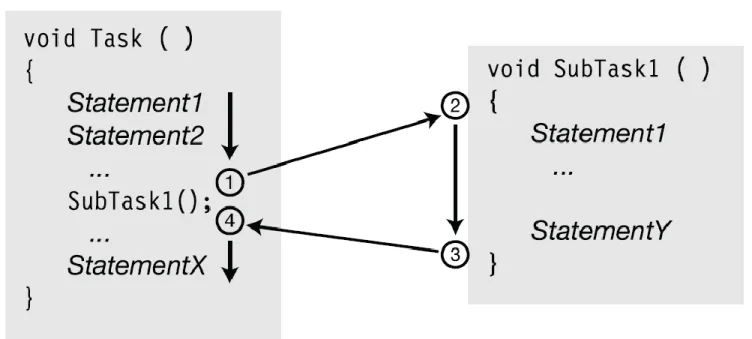
Figure illustrates the sequence of actions when a method is called:
1. Execution of the current method suspends at that point of the invocation. 2. Control transfers to the beginning of the invoked method.
Instance Fields vs. Local Variables
Like fields, local variables store data. While fields usually store data about the state of the object, local variables are usually created to store data for local, or transitory, computations. Table compares and contrasts local variables and instance fields.
Flow of Control
The term flow of control refers to the flow of execution through a program. By default, program execution moves sequentially from one statement to the next. The flow-of-control statements allow you to modify the order of execution.
Selection statements: These statements allow you to select which statement or block of statements to execute.
if: Conditional execution of a statement.
if...else: Conditional execution of one statement or another.
switch: Conditional execution of one statement from a set.
Iteration statements: These statements allow you to loop, or iterate, on a block of statements.
for: Loop—testing at the top.
while: Loop—testing at the top.
do: Loop—testing at the bottom.
foreach: Execute once for each member of a set.
Jump statements: These statements allow you to jump from one place in the block or method to another.
break: Exit the current loop.
continue: Go to the bottom of the current loop.
goto: Go to a named statement.
Flow of Control
Return Values
A method can return a value to the calling code. The returned value is inserted into the calling code at the position in the expression where the invocation occurred.
To return a value, the method must declare a return type before the method name.
If a method doesn’t return a value, it must declare a return type of void.
The following code shows two method declarations. The first returns a value of type int. The second doesn’t return a value.
A method that declares a return type must return a value from the method by using the following form of the return statement, which includes an expression after the keyword
Return Values
The Return Statement and Void Methods
Void methods do not require return statements. When the flow of control reaches the closing curly brace of the method body, control returns to the calling code, and no value is inserted back into the calling code. Often, however, you can simplify your program logic by exiting the method early when certain conditions apply.
You can exit a void method at any time by using the following form of the return statement, with no parameters:
return;
Recursion
Besides calling other methods, a method can also call itself. This is called recursion. Recursion can produce some very elegant code, such as the following method for computing the factorial of a number. Notice in this example that inside the method, the method calls itself with an actual parameter of one less than its input parameter.
Recursion
Defining and Using a Method
Consider the following example:
class Example {
public int anInt; // Nonstatic
public static int staticInt; // Static
public void InstanceMethod() // Nonstatic {
Console.WriteLine(“This is an instance method.”); }
public static void ClassMethod() // Static
{
Console.WriteLine(“This is a class method.”); }
}
Defining and Using a Method
Note: The distinction between static and nonstaticmembers is important.
To invoke a nonstatic — instance — method, you need an instance of the class.
To invoke a static — class — method, you call via the class name, not an instance.
!
The following code snippet assigns a value to the object data member anInt and the class, or static, member staticInt:
Example example = new Example(); //Create an instance of //class Example.
example.anInt = 1; //Initialize instance
//member through instance. Example.staticInt = 2; //Initialize class member
The following snippet defines and accesses InstanceMethod() and ClassMethod() in almost the same way:
Example example = new Example(); //Create an instance. example.InstanceMethod(); //Invoke the instance
//method with that instance.
Example.ClassMethod(); //Invoke the class method //with the class.
// The following lines won’t compile.
example.ClassMethod(); //Can’t access class methods //via an instance.
Example.InstanceMethod(); //Can’t access instance //methods via a class.
Defining and Using a Method
The expression example.InstanceMethod() passes control to the code contained
within the method. C# follows an almost identical process for
Example.ClassMethod(). Executing the lines just shown generates this output:
This is an instance method. This is a class method.
After a method completes execution, it returns control to the point where it was called. That is, control moves to the next statement after the call.
The bit of C# code given in the two sample methods does nothing more than write a silly string to the console, but methods generally perform useful (and complex) operations such as calculate sines, concatenate two strings, sort an arrays, etc. A method can be as large and complex as you want, but try to strive for shorter methods.
Defining and Using a Method
using System;
using System.Collections.Generic; using System.Text;
namespace MethodsExample {
class Example {
public int anInt; // Nonstatic
public static int staticInt; // Static public void InstanceMethod() // Nonstatic {
Console.WriteLine("This is an instance method."); }
public static void ClassMethod() // Static {
Console.WriteLine("This is a class method."); }
Defining and Using a Method
public class Program {
static void Main(string[] args) {
Console.WriteLine("->Example with methods->");
Example example = new Example();//Create an instance. example.InstanceMethod(); //Invoke the instance method
//with that instance.
Example.ClassMethod(); //Invoke the class method with //the class.
Console.ReadLine(); }
Having Arguments with Methods
A method in the following example no data passes into or out of the method:
public static void Output()
{
Console.WriteLine(“this is a method”); }
Compare this example to real-world methods that do something. For example, the mathematical sine operation requires some type of input — after all, you have to calculate the sine of something. Similarly, to concatenate two strings, you need two strings. So the Concatenate() method requires at least two strings as input.
Passing an argument to a method
Most methods require some type of arguments if they’re going to do something. You pass arguments to a method by listing them in the parentheses that follow the method name. Consider this small addition to the earlier Example class:
public class Example {
public static void Output(string someString) {
Console.WriteLine(“Output() was passed the argument: “ + someString);
} }
We could invoke this method from within the same class, like this:
Output(“Hello”);
We would then see this output:
Output() was passed the argument: Hello
The values you input to a method are method arguments, or parameters.
The program passes to the method Output() a reference to the string “Hello”. The method receives the reference and assigns it the name someString. The Output()
method can use someString within the method just as it would use any other string
variable. Let`s change the example in one minor way:
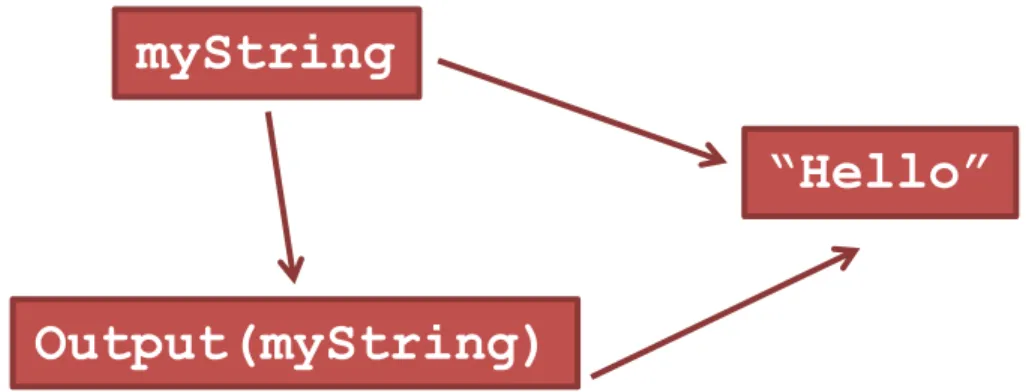
string myString = “Hello”; Output(myString);
This code snippet assigns the variable myString to reference the string “Hello”. The call Output(myString) passes the object referenced by myString, which is your
“Hello”. Figure 1 depicts this process. From there, the effect is the same as before.
Passing an argument to a method
Figure 1: Copying the value of myStringto someString The placeholders you specify for
arguments when you write a
method — for example,
someString in Output() — are parameters. The values you
pass to a method via a
parameter are arguments.
“Hello” myString
The
WriteLine()
method
You may have noticed that the WriteLine() construct is nothing more than a method call that’s invoked by a Console class:
Console.WriteLine(“this is a method call”);
WriteLine() is one of many predefined methods provided by the .NET Framework library. The Console predefined class refers to the application console (also known as
the command prompt or command window). The argument to the
WriteLine()method is a single string. The + operator enables the programmer to combine strings, or to combine a string and an intrinsic variable, before the sum is passed to WriteLine():
string s = “Sarah”;
Console.WriteLine(“My name is “ + s + “ and my age is “ + 3);
The
WriteLine()
method
A second form of WriteLine() provides a more flexible set of arguments:
Console.WriteLine(“My name is {0} and my age is {1}.”, “Sarah”, 3);
Methods and parameter modifiers
Methods can be implemented within the scope of classes or structures (and prototyped within interface types) and may be decorated with various keywords (internal,
virtual, public, new, etc.) to qualify their behavior. At this point in the text, each of our methods has followed this basic format:
// Recall that static methods can be called directly // without creating a class instance.
class Program {
// static returnVal MethodName(args) {...}
static int Add(int x, int y) {
return x + y; }
Methods and parameter modifiers
Modifier Meaning in life
(None) If a parameter is not marked with a parameter modifier, it is assumed to be passed by value, meaning the called method receives a copy of the original data.
out Output parameters must be assigned by the method being called (and therefore are passed by reference). If the called method fails to assign output parameters, you are issued a compiler error.
ref The value is initially assigned by the caller and may be optionally reassigned by the called method (as the data is also passed by reference). No compiler error is generated if the called method fails to assign a ref parameter.
The default parameter-passing behavior
The default manner in which a parameter is sent into a function is by value. Simply put, if you do not mark an argument with a parameter-centric modifier, a copy of the data is passed into the function. What is copied will depend on whether the parameter is a value type or a reference type.
// Arguments are passed by value by default.
static int Add(int x, int y) {
int ans = x + y;
// Caller will not see these changes as you are modifying a //copy of the original data
x = 10000; y = 88888;
The default parameter-passing behavior
Numerical data falls under the category of value types. Therefore, if you change the values of the parameters within the scope of the member, the caller is blissfully unaware, given that you are changing the values on a copy of the caller’s data:
static void Main(string[] args) {
Console.WriteLine("***** Fun with Methods *****");
// Pass two variables in by value.
int x = 9, y = 10;
Console.WriteLine("Before call: X: {0}, Y: {1}", x, y); Console.WriteLine("Answer is: {0}", Add(x, y));
Console.WriteLine("After call: X: {0}, Y: {1}", x, y); Console.ReadLine();
The
out
modifier
Methods that have been defined to take output parameters (via the out keyword) are under obligation to assign them to an appropriate value before exiting the method in question (if you fail to do so, you will receive compiler errors).
// Output parameters must be assigned by the called method. static void Add(int x, int y, out int ans)
{
ans = x + y; }
The
out
modifier
static void Main(string[] args) {
Console.WriteLine("***** Fun with Methods *****");
// No need to assign initial value to local variables used as output //parameters.
int ans;
Add(90, 90, out ans);
Console.WriteLine("90 + 90 = {0}", ans); Console.ReadLine();
}
Finally, remember that methods that define output parameters must assign the parameter to a valid value before exiting the methods. Therefore, the following method will result in a compiler error, as the parameter has not been assigned within the method scope:
static void ThisWontCompile(out int a) {
The
ref
modifier
Reference parameters are necessary when you wish to allow a method to operate on (and usually change the values of) various data points declared in the caller’s scope (such as a sorting or swapping routine).
Note the distinction between output and reference parameters:
• Output parameters do not need to be initialized before they passed to the method. The reason for this? The method must assign output parameters before exiting.
• Reference parameters must be initialized before they are passed to the method. The reason for this? You are passing a reference to an existing variable. If you don’t assign it to an initial value, that would be the equivalent of operating on an unassigned local variable.
Let’s check out the use of the ref keyword by way of a method that swaps two strings:
// Reference parameters.
public static void SwapStrings(ref string s1, ref string s2) {
string tempStr = s1; s1 = s2;
s2 = tempStr; }
static void Main(string[] args) {
string s1 = "Flip”, s2 = "Flop";
Console.WriteLine("Before: {0}, {1} ", s1, s2); SwapStrings(ref s1, ref s2);
Console.WriteLine("After: {0}, {1} ", s1, s2); Console.ReadLine();
The
params
modifier
The params keyword allows you to pass into a method a variable number of parameters (of the same type) as a single logical parameter. As well, arguments marked with the params keyword can be processed if the caller sends in a strongly typed array or a comma-delimited list of items.
Let’s create a function that allows the caller to pass in any number of arguments and return the calculated average. If you were to prototype this method to take an array of doubles, this would force the caller to first define the array, then fill the array, and finally pass it into the method. However, if you define CalculateAverage() to take a params of integer data types, the caller can simply pass a comma-delimited list of doubles. The .NET runtime will automatically package the set of doubles into an array of type double behind the scenes:
// Return average of "some number" of doubles.
static double CalculateAverage(params double[] values) {
Console.WriteLine("You sent me {0} doubles.“, values.Length);
double sum = 0;
if(values.Length == 0) return sum;
for (int i = 0; i < values.Length; i++) sum += values[i];
return (sum / values.Length); }
The
params
modifier
// Return average of "some number" of doubles.
static double CalculateAverage(params double[] values) {
Console.WriteLine("You sent me {0} doubles.", values.Length); double sum = 0;
if(values.Length == 0) return sum;
for (int i = 0; i < values.Length; i++) sum += values[i];
return (sum / values.Length); }
static void Main(string[] args) {
Console.WriteLine("***** Fun with Methods *****");
// Pass in a comma-delimited list of doubles... double average;
average = CalculateAverage(4.0, 3.2, 5.7, 64.22, 87.2); Console.WriteLine("Average of data is: {0}", average);
// ...or pass an array of doubles. double[] data = { 4.0, 3.2, 5.7 }; average = CalculateAverage(data);
Console.WriteLine("Average of data is: {0}", average);
// Average of 0 is 0!
Console.WriteLine("Average of data is: {0}", CalculateAverage()); Console.ReadLine();
Summary of Parameter Types
Member overloading
Like other modern object-oriented languages, C# allows a method to be overloaded. Simply put, when you define a set of identically named members that differ by the number (or type) of parameters, the member in question is said to be overloaded.
class Program {
static void Main(string[] args) { }
// Overloaded Add() method.
static int Add(int x, int y) { return x + y; }
static double Add(double x, double y) { return x + y; }
static long Add(long x, long y) { return x + y; }
}
The caller can now simply invoke Add() with the required arguments and the compiler is happy to comply, given the fact that the compiler is able to resolve the correct implementation to invoke given the provided arguments:
static void Main(string[] args) {
Console.WriteLine("***** Fun with Method Overloading *****");
// Calls int version of Add() Console.WriteLine(Add(10, 10));
// Calls long version of Add()
Console.WriteLine(Add(900000000000, 900000000000));
// Calls double version of Add() Console.WriteLine(Add(4.3, 4.4));