Intel
®
Virtualization Technology Specification
for the IA-32 Intel
®
Architecture
C97063-002
April 2005
THIS DOCUMENT AND RELATED MATERIALS AND INFORMATION ARE PROVIDED “AS IS” WITH NO WARRANTIES, EXPRESS OR IMPLIED, INCLUDING BUT NOT LIMITED TO ANY IMPLIED WARRANTY OF MERCHANTABILITY, FITNESS FOR A PARTICULAR PURPOSE, NON-INFRINGEMENT OF INTELLECTUAL PROPERTY RIGHTS, OR ANY WARRANTY OTHERWISE ARISING OUT OF ANY PROPOSAL, SPECIFICATION, OR SAMPLE. INTEL ASSUMES NO RESPONSIBILITY FOR ANY ERRORS CONTAINED IN THIS DOCUMENT AND HAS NO LIABILITIES OR OBLIGATIONS FOR ANY DAMAGES ARISING FROM OR IN CONNECTION WITH THE USE OF THIS DOCUMENT.
INTEL DISCLAIMS ALL LIABILITY, INCLUDING LIABILITY FOR INFRINGEMENT OF ANY PROPRIETARY RIGHTS, RELATING TO USE OF INFORMATION IN THIS SPECIFICATION. NO LICENSE, EXPRESS OR IMPLIED, BY ESTOPPEL OR OTHERWISE, TO ANY INTELLECTUAL PROPERTY RIGHTS IS GRANTED HEREIN.
INTEL MAY MAKE CHANGES TO SPECIFICATIONS AND PRODUCT DESCRIPTIONS AT ANY TIME, WITHOUT NOTICE.
DEVELOPERS MUST NOT RELY ON THE ABSENCE OR CHARACTERISTICS OF ANY FEATURES OR INSTRUCTIONS MARKED “RESERVED” OR “UNDEFINED.” IMPROPER USE OF RESERVED OR UNDEFINED FEATURES OR INSTRUCTIONS MAY CAUSE UNPREDICTABLE BEHAVIOR OR FAILURE IN DEVELOPER'S SOFTWARE CODE WHEN RUNNING ON AN INTEL® PROCESSOR. INTEL RESERVES THESE FEATURES OR INSTRUCTIONS FOR FUTURE DEFINITION AND SHALL HAVE NO RESPONSIBILITY WHATSOEVER FOR CONFLICTS OR INCOMPATIBILITIES ARISING FROM THEIR UNAUTHORIZED USE.
INTEL PROCESSORS MAY CONTAIN DESIGN DEFECTS OR ERRORS KNOWN AS ERRATA, WHICH MAY CAUSE THE PRODUCT TO DEVIATE FROM PUBLISHED SPECIFICATIONS. CURRENT CHARACTERIZED ERRATA ARE AVAILABLE UPON REQUEST.
INTEL CORPORATION MAY HAVE PATENTS OR PENDING PATENT APPLICATIONS, TRADEMARKS, COPYRIGHTS, OR OTHER INTELLECTUAL PROPERTY RIGHTS THAT RELATE TO THE PRESENTED SUBJECT MATTER. THE FURNISHING OF DOCUMENTS AND OTHER MATERIALS AND INFORMATION DOES NOT PROVIDE ANY LICENSE, EXPRESS OR IMPLIED, BY ESTOPPEL OR OTHERWISE, TO ANY SUCH PATENTS, TRADEMARKS, COPYRIGHTS, OR OTHER INTELLECTUAL PROPERTY RIGHTS. EXCEPT THAT A LICENSE IS HEREBY GRANTED TO COPY AND REPRODUCE THIS DOCUMENT FOR INTERNAL USE ONLY.
COPYRIGHT © 2000-2005, INTEL CORPORATION.
CONTENTS
PAGE
CHAPTER 1
INTRODUCTION AND VMX OVERVIEW
1.1 ABOUT THIS DOCUMENT . . . 1-1 1.2 VIRTUAL MACHINE ARCHITECTURE . . . 1-1 1.3 INTRODUCTION TO VMX OPERATION . . . 1-2 1.4 LIFE CYCLE OF VMM SOFTWARE . . . 1-2 1.5 VIRTUAL-MACHINE CONTROL STRUCTURE . . . 1-3 1.6 DISCOVERING SUPPORT FOR VMX OPERATION. . . 1-4 1.7 ENABLING AND ENTERING VMX OPERATION . . . 1-4 1.8 RESTRICTIONS ON VMX OPERATION . . . 1-5 CHAPTER 2
VIRTUAL-MACHINE CONTROL STRUCTURE
2.1 OVERVIEW . . . 2-1 2.2 FORMAT OF THE VMCS REGION . . . 2-2 2.3 ORGANIZATION OF VMCS DATA . . . 2-3 2.4 GUEST-STATE AREA . . . 2-3 2.4.1 Guest Register State . . . 2-3 2.4.2 Guest Non-Register State . . . 2-5 2.5 HOST-STATE AREA . . . 2-7 2.6 VM-EXECUTION CONTROL FIELDS . . . 2-7 2.6.1 Pin-Based VM-Execution Controls . . . 2-8 2.6.2 Processor-Based VM-Execution Controls . . . 2-8 2.6.3 Exception Bitmap . . . 2-9 2.6.4 I/O-Bitmap Addresses . . . 2-10 2.6.5 Time-Stamp Counter Offset . . . 2-10 2.6.6 Guest/Host Masks and Read Shadows for CR0 and CR4. . . 2-10 2.6.7 CR3-Target Controls . . . 2-10 2.6.8 Controls for CR8 Accesses . . . 2-11 2.7 VM-EXIT CONTROL FIELDS . . . 2-11 2.7.1 VM-Exit Controls . . . 2-11 2.7.2 VM-Exit Controls for MSRs . . . 2-12 2.8 VM-ENTRY CONTROL FIELDS. . . 2-13 2.8.1 VM-Entry Controls . . . 2-13 2.8.2 VM-Entry Controls for MSRs . . . 2-13 2.8.3 VM-Entry Controls for Event Injection . . . 2-14 2.9 VM-EXIT INFORMATION FIELDS . . . 2-15 2.9.1 Basic VM-Exit Information . . . 2-15 2.9.2 Information for VM Exits Due to Vectored Events . . . 2-15 2.9.3 Information for VM Exits That Occur During Event Delivery . . . 2-16 2.9.4 Information for VM Exits Due to Instruction Execution. . . 2-17 2.9.5 VM-Instruction Error Field . . . 2-19 2.10 SOFTWARE ACCESS TO THE VMCS AND RELATED STRUCTURES . . . 2-19 2.10.1 Software Access to the Virtual-Machine Control Structure . . . 2-19 2.10.2 VMREAD, VMWRITE, and Encodings of VMCS Fields. . . 2-20 2.10.3 Software Access to Related Structures . . . 2-22 2.10.4 The VMXON Region . . . 2-22 2.11 USING VMCLEAR TO INITIALIZE A VMCS REGION . . . 2-23
CONTENTS
PAGE
CHAPTER 3
VMX NON-ROOT OPERATION
3.1 INSTRUCTIONS THAT CAUSE VM EXITS. . . 3-1 3.1.1 Relative Priority of IA-32 Faults and VM Exits. . . .3-1 3.1.2 Instructions That Cause VM Exits Unconditionally . . . .3-2 3.1.3 Instructions That Cause VM Exits Conditionally . . . .3-2 3.2 OTHER CAUSES OF VM EXITS . . . 3-4 3.3 CHANGES TO INSTRUCTION BEHAVIOR IN VMX NON-ROOT OPERATION . . 3-5 3.4 OTHER CHANGES IN VMX NON-ROOT OPERATION . . . 3-7 3.4.1 Event Blocking. . . .3-7 3.4.2 Treatment of Task Switches . . . .3-8 CHAPTER 4
VM ENTRIES
4.1 BASIC VM-ENTRY CHECKS. . . 4-2 4.2 CHECKS ON VMX CONTROLS AND HOST-STATE AREA . . . 4-2 4.2.1 Basic Checks on VMX Controls. . . .4-2 4.2.2 Checks on Physical Addresses and Referenced Data . . . .4-3 4.2.3 Checks on Host Control Registers and MSRs. . . .4-4 4.2.4 Checks on Segment and Descriptor-Table Registers . . . .4-5 4.2.5 Checks Related to Address-Space Size . . . .4-5 4.3 CHECKING AND LOADING GUEST STATE. . . 4-5 4.3.1 Checks on the Guest State Area . . . .4-6 4.3.1.1 Checks on Guest Control Registers, Debug Registers, and MSRs . . . .4-6 4.3.1.2 Checks on Guest Segment Registers. . . .4-6 4.3.1.3 Checks on Guest Descriptor-Table Registers . . . .4-10 4.3.1.4 Checks on Guest RIP and RFLAGS. . . .4-10 4.3.1.5 Checks on Guest Non-Register State. . . 4-10 4.3.1.6 Checks on Guest Page-Directory Pointers . . . 4-12 4.3.2 Loading Guest State . . . 4-12 4.3.2.1 Loading Guest Control Registers, Debug Registers, and MSRs . . . .4-13 4.3.2.2 Loading Guest Segment Registers and Descriptor-Table Registers . . . 4-14 4.3.2.3 Loading Guest RIP, RSP, and RFLAGS. . . .4-15 4.3.2.4 Loading Page-Directory Pointers . . . .4-15 4.3.3 Clearing Address-Range Monitoring . . . 4-15 4.4 LOADING MSRS . . . 4-15 4.5 EVENT INJECTION . . . 4-16 4.5.1 Details of Event Injection . . . .4-16 4.5.2 VM Exits During Event Injection . . . .4-18 4.6 SPECIAL FEATURES OF VM ENTRY . . . 4-19 4.6.1 Interruptibility State . . . .4-19 4.6.2 Activity State . . . 4-19 4.6.3 Delivery of Pending Debug Exceptions after VM Entry . . . 4-20 4.6.4 Interrupt-Window Exiting . . . .4-21 4.6.5 VM Entries and Advanced Debugging Features . . . .4-21 4.7 VM-ENTRY FAILURES DUE TO GUEST STATE . . . 4-22 4.8 MACHINE CHECKS DURING VM ENTRY . . . 4-23 CHAPTER 5
VM EXITS
CONTENTS
PAGE
5.2 RECORDING VM-EXIT INFORMATION AND UPDATING CONTROLS. . . 5-4 5.2.1 Basic VM-Exit Information . . . 5-4 5.2.2 Information for VM Exits Due to Vectored Events . . . 5-8 5.2.3 Information for VM Exits During Event Delivery. . . 5-9 5.2.4 Information for VM Exits Due to Instruction Execution. . . 5-10 5.3 SAVING GUEST STATE . . . 5-11 5.3.1 Saving Control Registers, Debug Registers, and MSRs . . . 5-12 5.3.2 Saving Segment Registers and Descriptor-Table Registers . . . 5-12 5.3.3 Saving RIP, RSP, and RFLAGS . . . 5-13 5.3.4 Saving Non-Register State . . . 5-14 5.4 SAVING MSRS. . . 5-16 5.5 LOADING HOST STATE . . . 5-16 5.5.1 Loading Host Control Registers, Debug Registers, MSRs . . . 5-16 5.5.2 Loading Host Segment and Descriptor-Table Registers . . . 5-17 5.5.3 Loading Host RIP, RSP, and RFLAGS . . . 5-19 5.5.4 Checking and Loading Host Page-Directory Pointers . . . 5-19 5.5.5 Updating Non-Register State . . . 5-19 5.5.6 Clearing Address-Range Monitoring . . . 5-20 5.6 LOADING MSRS . . . 5-20 5.7 VMX ABORTS . . . 5-20 5.8 MACHINE CHECK DURING VM EXIT . . . 5-21 CHAPTER 6 VMX CAPABILITY REPORTING 6.1 BASIC INFORMATION. . . 6-1 6.2 VM-EXECUTION CONTROLS . . . 6-2 6.3 VM-EXIT CONTROLS . . . 6-2 6.4 VM-ENTRY CONTROLS . . . 6-2 6.5 MISCELLANEOUS DATA . . . 6-3 6.6 VMX-FIXED BITS IN CR0 . . . 6-3 6.7 VMX-FIXED BITS IN CR4 . . . 6-3 6.8 VMCS ENUMERATION . . . 6-4 CHAPTER 7
VMX INSTRUCTION SET REFERENCE
7.1 OVERVIEW . . . 7-1 7.2 CONVENTIONS . . . 7-2 7.3 VMX INSTRUCTION REFERENCE . . . 7-3 VMCALL—Call to VM Monitor . . . 7-4 VMCLEAR—Clear Virtual-Machine Control Structure . . . 7-6 VMLAUNCH/VMRESUME—Launch/Resume Virtual Machine . . . 7-9 VMPTRLD—Load Pointer to Virtual-Machine Control Structure . . . 7-12 VMPTRST—Store Pointer to Virtual-Machine Control Structure . . . 7-15 VMREAD—Read Field from Virtual-Machine Control Structure . . . 7-17 VMRESUME—Resume Virtual Machine . . . 7-20 VMWRITE—Write Field to Virtual-Machine Control Structure . . . 7-21 VMXOFF—Leave VMX Operation. . . 7-24 VMXON—Enter VMX Operation . . . 7-26
CONTENTS
PAGE
CHAPTER 8
INTERACTIONS WITH SYSTEM-MANAGEMENT MODE
8.1 TREATMENT OF SMI DELIVERY . . . 8-1 8.2 TREATMENT OF RSM . . . 8-2 8.3 PROTECTION OF CR4.VMXE IN SMM . . . 8-3 APPENDIX A
BASIC EXIT REASONS APPENDIX B
VM-INSTRUCTION ERROR NUMBERS APPENDIX C
ENCODINGS OF FIELDS IN THE VMCS
C.1 16-BIT FIELDS . . . C-1 C.1.1 16-Bit Guest-State Fields . . . C-1 C.1.2 16-Bit Host-State Fields. . . C-2 C.2 FULL 64-BIT FIELDS . . . C-2 C.2.1 Full 64-Bit Control Fields . . . C-2 C.2.2 Full 64-Bit Guest-State Fields . . . C-3 C.3 32-BIT FIELDS . . . C-3 C.3.1 32-Bit Control Fields . . . C-4 C.3.2 32-Bit Read-Only Data Fields . . . C-4 C.3.3 32-Bit Guest-State Fields . . . C-5 C.3.4 32-Bit Host-State Field . . . C-6 C.4 NATURAL 64-BIT FIELDS . . . C-6 C.4.1 Natural 64-Bit Control Fields . . . C-7 C.4.2 Natural 64-Bit Read-Only Data Fields . . . C-7 C.4.3 Natural 64-Bit Guest-State Fields . . . C-8 C.4.4 Natural 64-Bit Host-State Fields . . . C-9 INDEX
CHAPTER 1
INTRODUCTION AND VMX OVERVIEW
1.1
ABOUT THIS DOCUMENT
This documents describes Intel® Virtualization Technology for IA-32 processors, referred to as VT-x. VT-x constitutes a set of virtual-machine extensions (VMX) that support virtualization of processor hardware for multiple software environments by using virtual machines.
This document is organized as follows:
•
Chapter 1 gives an overview of the virtual-machine extensions.•
Chapter 2 details the virtual-machine control structure (VMCS) and its usage.•
Chapter 3 details processor behavior in VMX non-root operation.•
Chapter 4 details the operation of VM entries.•
Chapter 5 details the operation of VM exits.•
Chapter 6 details VMX capability reporting.•
Chapter 7 provides a reference for the new VMX instructions.•
Chapter 8 details interactions between VMX operation and system-management mode (SMM).This document assumes the reader is familiar with IA-32 processor features and makes refer-ences to IA-32 features published in the following documents:
•
The IA-32 Intel® Architecture Software Developer’s Manual, Volume 1: Basic Architecture.•
The IA-32 Intel® Architecture Software Developer’s Manual, Volumes 2A & 2B:Instruction Set Reference.
•
The IA-32 Intel® Architecture Software Developer’s Manual, Volume 3: System Programming Guide.•
The Intel® Extended Memory 64 Technology Software Developer’s Guide, Volume 1 & 2.1.2
VIRTUAL MACHINE ARCHITECTURE
Virtual-machine extensions define processor-level support for virtual machines on IA-32 proces-sors. Two principal classes of software are supported under the virtual machine architecture:
•
Virtual-machine monitor (VMM): A VMM acts as a host and has full control of theprocessor(s) and other platform hardware. VMM presents guest software (see below) with an abstraction of a virtual processor and allows it to execute directly on a logical processor.
INTRODUCTION AND VMX OVERVIEW
A VMM is able to retain selective control of processor resources, physical memory, interrupt management, and I/O.
•
Guest software: Each virtual machine is a guest software environment that supports a stack consisting of operating system (OS) and application software. Each operates independently of other virtual machines and uses on the same interface to processor(s), memory, storage, graphics, and I/O provided by a physical platform. The software stack acts as if it were running on a platform with no VMM. Software executing in a virtual machine must operate with reduced privilege so that the VMM can retain control of platform resources.1.3
INTRODUCTION TO VMX OPERATION
Processor support for virtualization is provided by a new form of processor operation called VMX operation. There are two kinds of VMX operation: VMX root operation and VMX non-root operation. In general, a VMM will run in VMX root operation and guest software will run in VMX non-root operation. Transitions between VMX root operation and VMX non-root oper-ation are called VMX transitions. There are two kinds of VMX transitions. Transitions into VMX non-root operation are called VM entries. Transitions from VMX non-root operation to VMX root operation are called VM exits.
Processor behavior in VMX root operation is very much as it is outside VMX operation. The principal differences are that a set of new instructions (the VMX instructions) is available and that the values that can be loaded into certain control registers are limited (see Section 1.8). Processor behavior in VMX non-root operation is restricted and modified to facilitate virtual-ization. Instead of their ordinary operation, certain instructions (including the new VMCALL instruction) and events cause VM exits to the VMM. Because these VM exits replace ordinary behavior, the functionality of software in VMX non-root operation is limited. It is this limitation that allows the VMM to retain control of processor resources.
There is no software-visible bit whose setting indicates whether a logical processor is in VMX non-root operation. This fact may allow a VMM to prevent guest software from determining that it is running in a virtual machine
Because VMX operation places these restrictions even on software running with current privi-lege level (CPL) 0, guest software can run at the priviprivi-lege level for which it was originally designed. This capability may simplify the development of a VMM.
1.4
LIFE CYCLE OF VMM SOFTWARE
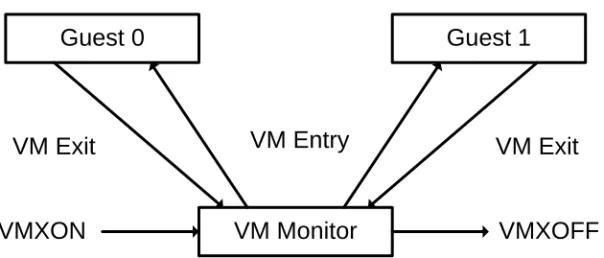
Figure 1-1 illustrates the life cycle of a VMM and its guest software by illustrating the interac-tions between them.
•
Software enters VMX operation through execution of the VMXON instruction.•
The VMM can then enter its guests into virtual machines (one at a time) using VM entries. The VMM effects a VM entry using the VMX instructions VMLAUNCH andINTRODUCTION AND VMX OVERVIEW
VMRESUME; it regains control using VM exits. VM exits transfer control to an entry point specified by the VMM. The VMM can take action appropriate to the cause of the VM exit and can then return to the virtual machine via a VM entry.
•
Eventually, the VMM may decide to shut itself down and leave VMX operation. It does so by executing the VMXOFF instruction.1.5
VIRTUAL-MACHINE CONTROL STRUCTURE
VMX non-root operation and VMX transitions are controlled by a data structure called a virtual-machine control structure (VMCS).
Access to the VMCS is managed through a component of processor state called the VMCS pointer (one per logical processor). The value of the VMCS pointer is the 64-bit address of the VMCS. The VMCS pointer can be read and written using the instructions VMPTRST and VMPTRLD. The VMM configures a VMCS using other instructions: VMREAD, VMWRITE, and VMCLEAR.
A VMM could use a different VMCS for each virtual machine that it supports. For a virtual machine with multiple logical processors (virtual processors), the VMM could use a different VMCS for each virtual processor.
Chapter 2 describes the structure of a VMCS. Chapter 3, Chapter 4, and Chapter 5 provide details on how the VMCS controls VMX non-root operation, VM entries, and VM exits. Chapter 7 provides detailed descriptions for each of the new VMX instructions.
Figure 1-1. Interaction of a Virtual-Machine Monitor and Guests
VM Monitor
Guest 0
Guest 1
VM Exit
VM Entry
VM Exit
VMXOFF
VMXON
INTRODUCTION AND VMX OVERVIEW
1.6
DISCOVERING SUPPORT FOR VMX OPERATION
System software can determine whether a processor supports VMX operation using CPUID. If CPUID.1:ECX.VMX[bit 5] =1, then VMX operation is supported. See Figure 1-2.
The VMX architecture is designed to be extensible so that future processors can support features not present initially and not described in this document. The availability of such features is reported to software using a set of capability MSRs (see Chapter 6).
1.7
ENABLING AND ENTERING VMX OPERATION
Before system software can enter VMX operation, it must enable it by setting CR4.VMXE[bit 13] = 1. VMX operation can then be entered by executing the VMXON instruc-tion. VMXON causes an invalid-opcode exception (#UD) if executed with CR4.VMXE = 0. Once in VMX operation, it is not possible to clear CR4.VMXE (see Section 1.8). System soft-ware can leave VMX operation by executing the VMXOFF instruction. CR4.VMXE can be cleared outside of VMX operation after executing of VMXOFF.
VMXON is also controlled by the IA32_FEATURE_CONTROL MSR (MSR address 0000003AH). This MSR is cleared to zero when a logical processor is reset. The relevant bits of the MSR are described below:
•
Bit 0 is the lock bit. If this bit is clear, VMXON causes a general-protection exception. If the lock bit is set, WRMSR to this MSR causes a general-protection exception. Once the lock bit is set, the MSR cannot be modified until a power-up reset condition.•
Bit 2 enables VMXON. If this bit is clear, VMXON causes a general-protection exception.Figure 1-2. CPUID Extended Feature Information ECX
31 15141312 9 8 6 5 4 3 2 1 0 Reserved ECX 11 10 16 23222120191817 24 25 26 27 28
VMX—Virtual Machine Extensions DS-CPL—CPL Qual. Debug Store
SSE3—Streaming SIMD Extensions 3
30 29
TM2—Thermal Monitor 2 CNXT-ID—L1 Context ID
EST—Enhanced Intel® SpeedStep Tech.
MONITOR—Monitor/Mwait
INTRODUCTION AND VMX OVERVIEW
Before executing VMXON, software should allocate a naturally aligned 4KB region of memory that a logical processor may use to support VMX operation.1 This region is called the VMXON region. The physical address of the VMXON region (called the VMXON pointer) is provided in an operand to VMXON. Section 2.10.4 details how software should initialize and access the VMXON region.
1.8
RESTRICTIONS ON VMX OPERATION
VMX operation places restrictions on processor operation. These are detailed below:
•
VMX operation restricts the values that may be loaded in registers CR0 and CR4. The following bits must be 1: CR0.PE, CR0.NE, CR0.PG, and CR4.VMXE. VMXON fails if any of these bits are clear (see “VMXON—Enter VMX Operation” on page 7-26). Any attempt to clear these bits during VMX operation (including VMX root operation) using the MOV CR instruction causes a general-protection exception. These bits cannot be cleared by VM entry or VM exit.CR0.PE and CR0.PG restrictions imply that VMX operation is supported only in paged protected mode (including IA-32e mode). Therefore, guest software cannot be run in unpaged protected mode or in real-address mode. If a VMM is to support guest software that expects to run in unpaged protected mode or in real-address mode, the VMM must support emulation of these modes. A VMM can use “identity” page tables to emulate unpaged protected mode and can use virtual-8086 mode as part of a strategy to emulate real-address mode.
Future processors may differ with regard to bits in CR0 and CR4 that are fixed while in VMX operation. The requirements imposed by a particular processor is reported to software using VMX capability MSRs (see Section 6.6 and Section 6.7).
•
VMXON fails if a logical processor is in A20M mode (see “VMXON—Enter VMX Operation” on page 7-26). Once the processor is in VMX operation, A20M interrupts are blocked. Thus, it is impossible to be in A20M mode in VMX operation.•
The INIT signal is blocked whenever a logical processor is in VMX root operation. It is not blocked in VMX non-root operation; instead, INITs cause VM exits (see Section 3.2).1. Future processors may require that a different amount of memory be reserved. If so, this fact is reported to software via the VMX capability-reporting mechanism.
CHAPTER 2
VIRTUAL-MACHINE CONTROL STRUCTURE
2.1
OVERVIEW
The virtual-machine control data structure (VMCS) is defined for VMX operation. The VMCS manages transitions in and out of VMX non-root operation (VM entries and VM exits) as well as processor behavior in VMX non-root operation. A VMCS can be manipulated by the new instructions VMCLEAR, VMPTRLD, VMREAD, and VMWRITE.
A VMM could use a different VMCS for each virtual machine that it supports. For a virtual machine with multiple logical processors (virtual processors), the VMM could use a different VMCS for each virtual processor.
A logical processor associates with each VMCS a 4KB region in memory called the VMCS region.1 Software references a VMCS by using the 64-bit physical address of this region; such an address is called a VMCS pointer. Every VMCS pointer must be 4KB-aligned (bits 11:0 must be zero). In addition, the pointer must not set bits beyond the processor’s physical-address width.2
A logical processor may maintain any number of active VMCSs, at most one of which is the current VMCS:
•
Software makes a VMCS active by executing VMPTLRD with the address of the VMCS. The processor may optimize VMX operation by maintaining the state of an active VMCS in memory, on the processor, or both. Software should not make a VMCS active on more than one logical processor (see Section 2.10.1 for how to migrate a VMCS from one logical processor to another). Software makes a VMCS inactive by executing VMCLEAR with the address of the VMCS. A logical processor will not use an inactive VMCS or maintain its state on the processor.If VMXOFF is executed while a VMCS is active, the VMCS data in the corresponding VMCS region are undefined after execution of VMXOFF. Software can avoid this problem by avoiding execution of VMXOFF while any VMCS is active.
•
Software makes a VMCS current by executing VMPTLRD with the address of the VMCS; that address is loaded into the current-VMCS pointer. The VMX instructions VMLAUNCH, VMPTRST, VMREAD, VMRESUME, and VMWRITE operate on the current VMCS. In particular, the VMPTRST instruction stores the current-VMCS pointer into a specified memory location (it stores the value FFFFFFFF_FFFFFFFFH if there is no current VMCS). A VMCS remains current until either software executes VMPTRLD with1. Future implementations may use VMCS regions of a different size. Software should consult the VMX capability MSR VMX_BASIC to determine the size of the VMCS region (see Section 6.1).
2. Software can determine a processor’s physical-address width by executing CPUID with 80000008H in EAX. The physical-address width is returned in bits 7:0 of EAX.
VIRTUAL-MACHINE CONTROL STRUCTURE
the address of a different VMCS (which then becomes the current VMCS) or software executes VMCLEAR with the address of the current VMCS (after which there is no current VMCS).
This document frequently uses the term “the VMCS” to refer to the current VMCS.
2.2
FORMAT OF THE VMCS REGION
A VMCS region comprises 4KB contiguous bytes. The format of a VMCS region is given in Table 2-1.
The first 4 bytes of the VMCS region contain the VMCS revision identifier. Processors that maintain VMCS data in different formats (see below) use different VMCS revision identifiers. These identifiers enable software to avoid using a VMCS region formatted for one processor on a processor that uses a different format.
Software should write the VMCS revision identifier to the VMCS region before using that region for a VMCS. The VMCS revision identifier is never written by the processor; VMPTRLD may fail if its operand references a VMCS region whose VMCS revision identifier differs from that used by the processor. Software can discover the VMCS revision identifier that a processor uses by reading the VMX capability MSR VMX_BASIC(see Section 6.1).
The next 4 bytes of the VMCS region are used for the VMX-abort indicator. The contents of these bytes do not control processor operation in any way. A logical processor writes a non-zero value into these bytes if a VMX abort occurs (see Section 5.7). Software may also write into this field.
The remainder of the VMCS region is used for VMCS data (those parts of the VMCS that control VMX non-root operation and the VMX transitions). The format of these data is imple-mentation-specific. VMCS data are discussed in Section 2.3 through Section 2.9.
To ensure proper behavior in VMX operation, software should maintain the VMCS region and related structures (enumerated in Section 2.10.3) in writeback cacheable memory. Future imple-mentations may allow or require a different memory type. Software should consult the VMX capability MSR VMX_BASIC (see Section 6.1).
Table 2-1. Format of the VMCS Region
Byte Offset Contents
0 VMCS revision identifier
4 VMX-abort indicator
VIRTUAL-MACHINE CONTROL STRUCTURE
2.3
ORGANIZATION OF VMCS DATA
The VMCS data are organized into six logical groups:
•
Guest-state area. Processor state is saved into the guest-state area on VM exits and loaded from there on VM entries.•
Host-state area. Processor state is loaded from the host-state area on VM exits.•
VM-execution control fields. These fields control processor behavior in VMX non-root operation. They determine in part the causes of VM exits.•
VM-exit control fields. These fields control VM exits.•
VM-entry control fields. These fields control VM entries.•
VM-exit information fields. These fields receive information on VM exits and describe the cause and the nature of VM exits. They are read-only.The VM-execution control fields, the VM-exit control fields, and the VM-entry control fields are sometimes referred to collectively as VMX controls.
2.4
GUEST-STATE AREA
This section describes fields contained in the guest-state area of the VMCS. As noted earlier, processor state is loaded from these fields on every VM entry (see Section 4.3.2) and stored into these fields on every VM exit (see Section 5.3).
2.4.1
Guest Register State
The following fields in the guest-state area correspond to processor registers:
•
Control registers CR0, CR3, and CR4 (64 bits each).•
Debug register DR7 (64 bits).•
RSP, RIP, and RFLAGS (64 bits each).1•
The following fields for each of the registers CS, SS, DS, ES, FS, GS, LDTR, and TR: — Selector (16 bits).— Base address (64 bits). The base-address fields for CS, SS, DS, and ES have only 32 architecturally-defined bits; nevertheless, the corresponding VMCS fields have 64 bits.
— Segment limit (32 bits). The limit field is always a measure in bytes.
1. This document uses the notation RAX, RIP, RSP, RFLAGS, etc. for processor registers because imple-mentations of VMX also support Intel® EM64T. In a few places, notation such as EAX is used to refer to lower 32 bits of the indicated register.
VIRTUAL-MACHINE CONTROL STRUCTURE
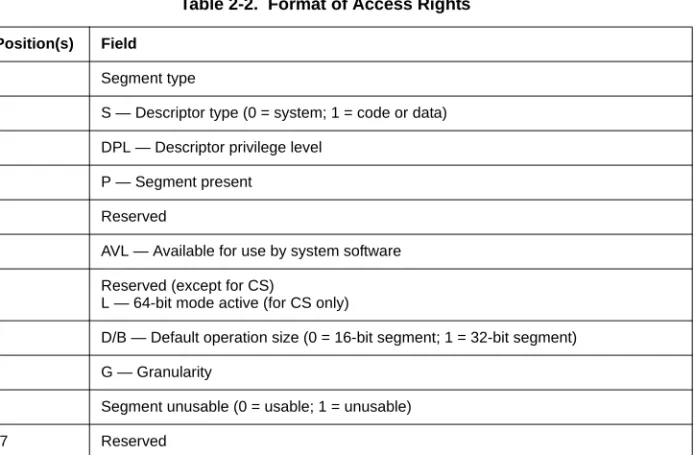
— Access rights (32 bits). The format of this field is given in Table 2-2 and detailed as follows:
•
The low 16 bits correspond to bits 23:8 of the upper 32 bits of a 64-bit segment descriptor. While bits 19:16 of code-segment and data-segment descriptors correspond to the upper 4 bits of the segment limit, the corresponding bits (bits 11:8) are reserved in this VMCS field.•
Bit 16 indicates an unusable segment. Attempts to use such a segment fault except in 64-bit mode. In general, a segment register is unusable if it has been loaded with a null selector.1•
Bits 31:17 are reserved.The base address, segment limit, and access rights compose the “hidden” part (or “descriptor cache”) of each segment register. These data are included in the VMCS because it is possible for a segment register’s descriptor cache to be inconsistent with the segment descriptor in memory (in the GDT or the LDT) referenced by the segment register’s selector.
1. There are a few exceptions to this general statement. For example, a segment with a non-null selector may be unusable following a task switch that fails after its commit point; see “Interrupt 10—Invalid TSS Exception (#TS)“ in Section 5.14 (Exception and Interrupt Reference) of IA-32 Intel® Architecture Soft-ware Developer’s Manual, Volume 3. In contrast, the TR register is usable after processor reset despite having a null selector; see Table 9-1 in Section 9.1 (Initialization Overview) of IA-32 Intel® Architecture
Table 2-2. Format of Access Rights
Bit Position(s) Field
3:0 Segment type
4 S — Descriptor type (0 = system; 1 = code or data) 6:5 DPL — Descriptor privilege level
7 P — Segment present
11:8 Reserved
12 AVL — Available for use by system software
13 Reserved (except for CS)
L — 64-bit mode active (for CS only)
14 D/B — Default operation size (0 = 16-bit segment; 1 = 32-bit segment)
15 G — Granularity
16 Segment unusable (0 = usable; 1 = unusable)
VIRTUAL-MACHINE CONTROL STRUCTURE
Note that the value of the DPL field for SS is always equal to the logical processor’s current privilege level (CPL).1
•
The following fields for each of the registers GDTR and IDTR: — Base address (64 bits).— Limit (32 bits). The limit fields contain 32 bits even though these fields are specified as only 16 bits in the architecture.
•
The MSRs IA32_DEBUGCTL (64 bits), IA32_SYSENTER_CS (32 bits), IA32_SYSENTER_ESP (64 bits), and IA32_SYSENTER_EIP (64 bits).2.4.2
Guest Non-Register State
In addition to the register state described in Section 2.4.1, the guest-state area includes the following fields that characterize guest state but which do not correspond to processor registers:
•
Activity state (32 bits). This field identifies the logical processor’s activity state. When a logical processor is executing instructions normally, it is in the active state. Execution of certain instructions and the occurrence of certain events may cause a logical processor to transition to an inactive state in which it ceases to execute instructions.The following activity states are defined:2
— 0: Active. The logical processor is executing instructions normally.
— 1: HLT. The logical processor is inactive because it executed the HLT instruction. — 2: Shutdown. The logical processor is inactive because it incurred a triple fault3 or
some other serious error.
— 3: Wait-for-SIPI. The logical processor is inactive because it is waiting for a startup-IPI (Sstartup-IPI).
Future processors may include support for other activity states. Software should read the VMX capability MSR VMX_MISC (see Section 6.5) to determine what activity states are supported.
•
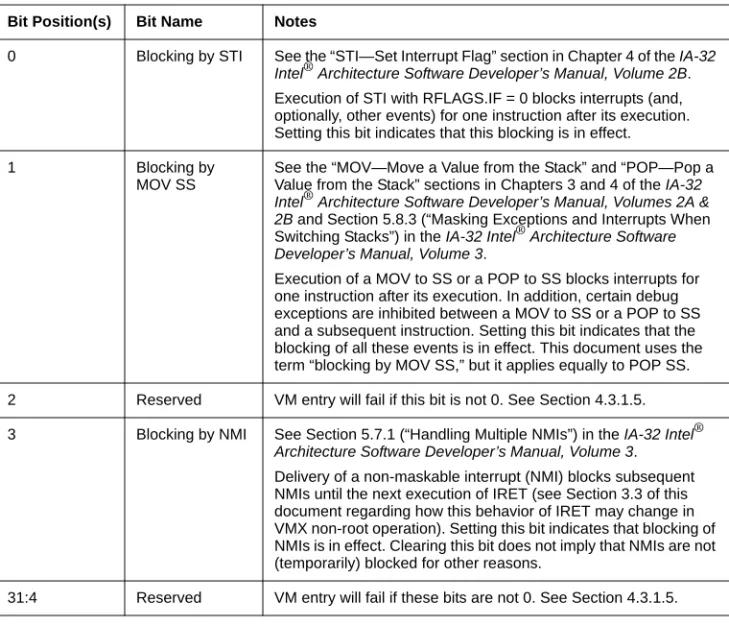
Interruptibility state (32 bits). The IA-32 architecture includes features that permit certain events to be blocked for a period of time. This field contains information about such blocking. Details and the format of this field are given in Table 2-3.1. In protected mode, CPL is also associated with the RPL field in the CS selector. However, the RPL fields are not meaningful in real-address mode or in virtual-8086 mode.
2. Execution of the MWAIT instruction may put a logical processor into an inactive state. However, this VMCS field never reflects this state. See Section 5.1.
3. A triple faultoccurs when a logical processor encounters an exception while attempting to deliver a dou-ble fault.
VIRTUAL-MACHINE CONTROL STRUCTURE
•
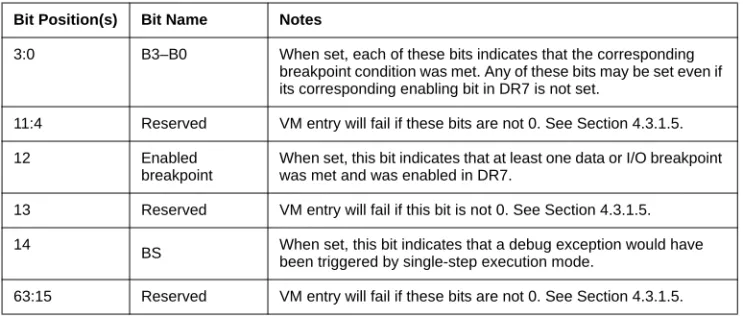
Pending debug exceptions (64 bits). IA-32 processors may recognize one or more debug exceptions without immediately delivering them.1 This field contains information about such exceptions. Details and the format of this field is given in Table 2-4.•
VMCS link pointer (64 bits). This field is included for future expansion. Software should set this field to FFFFFFFF_FFFFFFFFH to avoid VM-entry failures (see Section 4.3.1.5).Table 2-3. Format of Interruptibility State
Bit Position(s) Bit Name Notes
0 Blocking by STI See the “STI—Set Interrupt Flag” section in Chapter 4 of the IA-32 Intel® Architecture Software Developer’s Manual, Volume 2B. Execution of STI with RFLAGS.IF = 0 blocks interrupts (and, optionally, other events) for one instruction after its execution. Setting this bit indicates that this blocking is in effect.
1 Blocking by
MOV SS
See the “MOV—Move a Value from the Stack” and “POP—Pop a Value from the Stack” sections in Chapters 3 and 4 of the IA-32 Intel® Architecture Software Developer’s Manual, Volumes 2A & 2B and Section 5.8.3 (“Masking Exceptions and Interrupts When Switching Stacks”) in the IA-32 Intel® Architecture Software Developer’s Manual, Volume 3.
Execution of a MOV to SS or a POP to SS blocks interrupts for one instruction after its execution. In addition, certain debug exceptions are inhibited between a MOV to SS or a POP to SS and a subsequent instruction. Setting this bit indicates that the blocking of all these events is in effect. This document uses the term “blocking by MOV SS,” but it applies equally to POP SS. 2 Reserved VM entry will fail if this bit is not 0. See Section 4.3.1.5. 3 Blocking by NMI See Section 5.7.1 (“Handling Multiple NMIs”) in the IA-32 Intel®
Architecture Software Developer’s Manual, Volume 3. Delivery of a non-maskable interrupt (NMI) blocks subsequent NMIs until the next execution of IRET (see Section 3.3 of this document regarding how this behavior of IRET may change in VMX non-root operation). Setting this bit indicates that blocking of NMIs is in effect. Clearing this bit does not imply that NMIs are not (temporarily) blocked for other reasons.
31:4 Reserved VM entry will fail if these bits are not 0. See Section 4.3.1.5.
1. For example, execution of a MOV to SS or a POP to SS may inhibit some debug exceptions for one instruction. See Section 5.8.3 (“Masking Exceptions and Interrupts When Switching Stacks”) of IA-32 Intel® Architecture Software Developer’s Manual, Volume 3.
In addition, certain events incident to an instruction (for example, INIT) may take priority over debug traps generated by that instruction. See Table 5-2 (“Priority Among Simultaneous Exceptions and Interrupts”) in
VIRTUAL-MACHINE CONTROL STRUCTURE
2.5
HOST-STATE AREA
This section describes fields contained in the host-state area of the VMCS. As noted earlier, processor state is loaded from these fields on every VM exit (see Section 5.5).
All fields in the host-state area correspond to processor registers:
•
CR0, CR3, and CR4 (64 bits each).•
RSP and RIP (64 bits each).•
Selector fields (16 bits each) for the segment registers CS, SS, DS, ES, FS, GS, and TR. There is no field in the host-state area for the LDTR selector.•
Base-address fields for FS, GS, TR, GDTR, and IDTR (64 bits each).•
The MSRs IA32_SYSENTER_CS (32 bits), IA32_SYSENTER_ESP (64 bits), and IA32_SYSENTER_EIP (64 bits).In addition to the state identified here, some processor state components are loaded with fixed values on every VM exit; there are no fields corresponding to these components in the host-state area. See Section 5.5 for details of how state is loaded on VM exits.
2.6
VM-EXECUTION CONTROL FIELDS
The VM-execution control fields govern VMX non-root operation. These are described in Section 2.6.1 through Section 2.6.8.
Table 2-4. Format of Pending-Debug-Exceptions
Bit Position(s) Bit Name Notes
3:0 B3–B0 When set, each of these bits indicates that the corresponding breakpoint condition was met. Any of these bits may be set even if its corresponding enabling bit in DR7 is not set.
11:4 Reserved VM entry will fail if these bits are not 0. See Section 4.3.1.5.
12 Enabled
breakpoint
When set, this bit indicates that at least one data or I/O breakpoint was met and was enabled in DR7.
13 Reserved VM entry will fail if this bit is not 0. See Section 4.3.1.5. 14
BS When set, this bit indicates that a debug exception would have been triggered by single-step execution mode.
VIRTUAL-MACHINE CONTROL STRUCTURE
2.6.1
Pin-Based VM-Execution Controls
The pin-based VM-execution controls constitute a 32-bit vector that governs the handling of asynchronous events (interrupts). There are two pin-based VM-execution controls currently defined:
•
Bit 0: External-interrupt exiting. If this control is 1, external interrupts cause VM exits. Otherwise, they are delivered normally through the guest interrupt-descriptor table (IDT). If this control is 1, the value of RFLAGS.IF does not affect interrupt blocking.•
Bit 3: NMI exiting. If this control is 1, non-maskable interrupts (NMIs) cause VM exits. Otherwise, they are delivered normally using descriptor 2 of the IDT. This control also determines interactions between IRET and blocking by NMI (see Section 3.3).All other bits in this field are reserved as follows: bits 31:5 are reserved to 0; bit 1, bit 2, and bit 4 are reserved to 1.1 Failure to set reserved bits properly causes subsequent VM entries to fail (see Section 4.2).
2.6.2
Processor-Based VM-Execution Controls
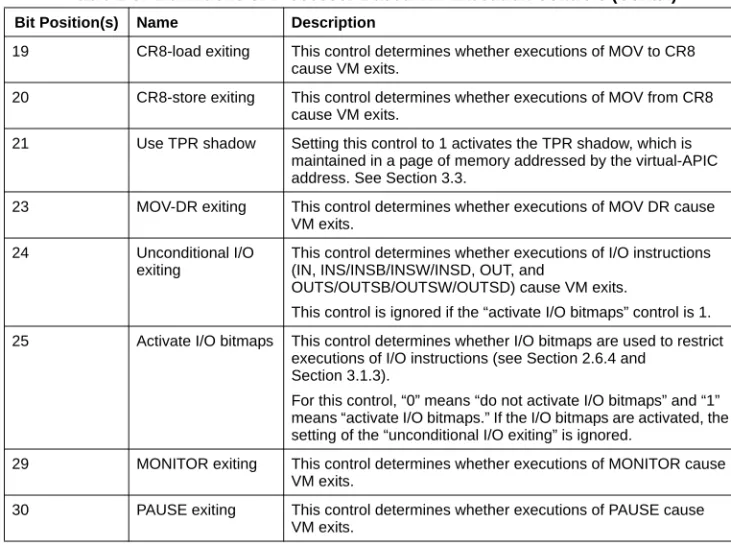
The processor-based VM-execution controls are a 32-bit vector that governs the handling of synchronous events, mainly those caused by the execution of specific instructions.2 Table 2-5 lists the controls supported. See Chapter 3 for complete details of how these controls affect processor behavior in VMX non-root operation.
1. Software may consult the VMX capability MSR VMX_PINBASED_CTLS (see Section 6.2) to determine how it should set the reserved bits.
2. Some instructions cause VM exits regardless of the settings of the processor-based VM-execution con-Table 2-5. Definitions of Processor-Based VM-Execution Controls
Bit Position(s) Name Description
2 Interrupt-window
exiting
If this control is 1, a VM exit occurs at the beginning of any instruction if RFLAGS.IF = 1 and there are no other blocking of interrupts (see Section 2.4.2).
3 Use TSC offsetting This control determines whether executions of RDTSC return a value modified by the TSC offset field (see Section 3.3). 7 HLT exiting This control determines whether executions of HLT cause
VM exits.
9 INVLPG exiting This determines whether executions of INVLPG cause VM exits. 10 MWAIT exiting This control determines whether executions of MWAIT cause
VM exits.
11 RDPMC exiting This control determines whether executions of RDPMC cause VM exits.
12 RDTSC exiting This control determines whether executions of RDTSC cause VM exits.
VIRTUAL-MACHINE CONTROL STRUCTURE
Other bits in this field are reserved as follows: bit 0, bits 18:17, bit 22, bits 28:27, and bit 31 are reserved to 0; bit 1, bits 6:4, bit 8, bits 16:13, and bit 26 are reserved to 1.1 Failure to set reserved bits properly causes subsequent VM entries to fail (see Section 4.2).
2.6.3
Exception Bitmap
The exception bitmap is a 32-bit field that contains one bit for each IA-32 exception. When an exception occurs, its vector is used to select a bit in this field. If the bit is 1, the exception causes a VM exit. If the bit is 0, the exception is delivered normally through the IDT, using the descriptor corresponding to the exception’s vector.
Whether a page fault (exception with vector 14) causes a VM exit is determined by bit 14 in the exception bitmap as well as the error code produced by the page fault and two 32-bit fields in the VMCS: the page-fault error-code mask and page-fault error-code match. See Section 3.2 for details.
19 CR8-load exiting This control determines whether executions of MOV to CR8 cause VM exits.
20 CR8-store exiting This control determines whether executions of MOV from CR8 cause VM exits.
21 Use TPR shadow Setting this control to 1 activates the TPR shadow, which is maintained in a page of memory addressed by the virtual-APIC address. See Section 3.3.
23 MOV-DR exiting This control determines whether executions of MOV DR cause VM exits.
24 Unconditional I/O
exiting
This control determines whether executions of I/O instructions (IN, INS/INSB/INSW/INSD, OUT, and
OUTS/OUTSB/OUTSW/OUTSD) cause VM exits.
This control is ignored if the “activate I/O bitmaps” control is 1. 25 Activate I/O bitmaps This control determines whether I/O bitmaps are used to restrict
executions of I/O instructions (see Section 2.6.4 and Section 3.1.3).
For this control, “0” means “do not activate I/O bitmaps” and “1” means “activate I/O bitmaps.” If the I/O bitmaps are activated, the setting of the “unconditional I/O exiting” is ignored.
29 MONITOR exiting This control determines whether executions of MONITOR cause VM exits.
30 PAUSE exiting This control determines whether executions of PAUSE cause VM exits.
1. Software may consult the VMX capability MSR VMX_PROCBASED_CTLS (see Section 6.2) to deter-mine how it should set the reserved bits.
Table 2-5. Definitions of Processor-Based VM-Execution Controls (Contd.)
VIRTUAL-MACHINE CONTROL STRUCTURE
2.6.4
I/O-Bitmap Addresses
The VM-execution control fields include the 64-bit physical addresses of I/O bitmaps A and B (each of which are 4KB in size). I/O bitmap A contains one bit for each I/O port in the range 0000H through 7FFFH; I/O bitmap B contains bits for ports in the range 8000H through FFFFH. A logical processor uses these bitmaps if and only if the “activate I/O bitmaps” control is 1. If the bitmaps are used, execution of an I/O instruction causes a VM exit if any bit in the I/O bitmaps corresponding to a port it accesses is 1. See Section 3.1.3 for details. If the bitmaps are used, their addresses must be 4KB-aligned.
2.6.5
Time-Stamp Counter Offset
VM-execution control fields include a 64-bit TSC-offset field. If the “RDTSC exiting” control is 0 and the “use TSC offsetting” control is 1, this field controls executions of the RDTSC instruction. The signed value is combined with the contents of the time-stamp counter (using signed addition) and the sum is reported to guest software in EDX:EAX. See Chapter 3 for a detailed treatment of the behavior of RDTSC in VMX non-root operation.
2.6.6
Guest/Host Masks and Read Shadows for CR0 and CR4
VM-execution control fields include guest/host masks and read shadows for the CR0 and CR4 registers. These fields control executions of instructions that access those registers (including CLTS, LMSW, MOV CR, and SMSW).
In general, bits set to 1 in a guest/host mask correspond to bits “owned” by the host:
•
Guest attempts to set them (using CLTS, LMSW, or MOV to CR) to values differing from the corresponding bits in the corresponding read shadow cause VM exits.•
Guest reads (using MOV from CR or SMSW) return values for these bits from the corre-sponding read shadow.Bits cleared to 0 correspond to bits “owned” by the guest; guest attempts to modify them succeed and guest reads return values for these bits from the control register itself.
See Chapter 3 for details regarding how these fields affect VMX non-root operation.
2.6.7
CR3-Target Controls
The VM-execution control fields include a set of 4 64-bit CR3 target values and a 32-bit CR3-target count. Executions of MOV to CR3 in VMX non-root operation do not cause a VM exit if its source operand matches one of these values; if the CR3-target count is less than 4, then not all the CR3-target values are considered.
There are no limitations on the values that can be written for the CR3 target values. VM entry fails (see Section 4.2) if the CR3-target count is greater than 4.
VIRTUAL-MACHINE CONTROL STRUCTURE
Future processors may support a different number of CR3-target values. Software should read the VMX capability MSR VMX_MISC (see Section 6.5) to determine the number of values supported.
2.6.8
Controls for CR8 Accesses
The CR8 register can be used to access the task-priority register (TPR) of the logical processor’s local APIC. The VMCS contains two fields that control MOV CR8 instructions if the “use TPR shadow” VM-execution control is 1:
•
Virtual-APIC page address (64 bits). This field is the physical address of the 4KB virtual-APIC page. The virtual-APIC page contains the TPR shadow, which is read and written by the MOV CR8 instructions. The TPR shadow comprises bits 7:4 in byte 128 of the APIC page. If the “use TPR shadow” VM-execution control is 1, the virtual-APIC page address must be 4KB-aligned.•
TPR threshold (32 bits). Bits 3:0 of this field determine the threshold below which the TPR shadow (see previous item) cannot fall. A VM exit occurs after an execution of MOV to CR8 that reduces the TPR shadow below this value.Note that the TPR in the local APIC can also be accessed using memory-mapped I/O. These controls does not affect access made in that way. They affect only MOV CR8 instructions (see Section 3.1.3 and Section 3.3).
2.7
VM-EXIT CONTROL FIELDS
The VM-exit control fields govern the behavior of VM exits. They are discussed in Section 2.7.1 and Section 2.7.2.
2.7.1
VM-Exit Controls
The VM-exit controls constitute a 32-bit vector that governs the basic operation of VM exits. Two VM-exit controls are currently defined:
•
Bit 9: host address-space size. This control determines whether a logical processor is in 64-bit mode after the next VM exit. Its value is loaded into CS.L, IA32_EFER.LME, and IA32_EFER.LMA on every VM exit.11. Since Intel® EM64T specifies that IA32_EFER.LMA is always set to the logical-AND of CR0.PG and IA32_EFER.LME, and since CR0.PG is always 1 in VMX operation, IA32_EFER.LMA is always identical to IA32_EFER.LME in VMX operation.
VIRTUAL-MACHINE CONTROL STRUCTURE
•
Bit 15: acknowledge interrupt on exit. This control affects VM exits due to external interrupts:— If such a VM exit occurs and this control is 1, the logical processor acknowledges the interrupt controller, acquiring the interrupt’s vector. The vector is stored in the VM-exit interruption-information field, which is marked valid.
— If such a VM exit occurs and this control is 0, the interrupt is not acknowledged and the VM-exit interruption-information field is marked invalid.
All other bits in this field are reserved as follows: bit 12 and bits 31:18 are reserved to 0; bits 8:0, bits 11:10, bits 14:13, and bits 17:16 are reserved to 1.1 Failure to set reserved bits properly causes subsequent VM entries to fail (see Section 4.2).
2.7.2
VM-Exit Controls for MSRs
A VMM may specify lists of MSRs to be stored and loaded on VM exits.
The following VM-exit control fields determine how MSRs are stored on VM exits:
•
VM-exit MSR-store count (32 bits).This field specifies the number of MSRs to be stored on VM exit. It is recommended that this count not exceed 512.2 Otherwise, unpredictable processor behavior (including a machine check) may result during VM exit.•
VM-exit MSR-store address (64 bits). This field contains the physical address of the VM-exit MSR-store area. The area is a table of entries, 16 bytes per entry, where the number of entries is given by the VM-exit MSR-store count. The format of each entry is given in Table 2-6. If the VM-exit MSR-store count is not zero, the address must be 16-byte aligned.See Section 5.4 for how this area is used on VM exits.
The following VM-exit control fields determine how MSRs are loaded on VM exits:
•
VM-exit MSR-load count (32 bits).This field contains the number of MSRs to be loaded on VM exit. It is recommended that this count not exceed 512. Otherwise, unpredictable processor behavior (including a machine check) may result during VM exit.31. Software may consult the VMX capability MSR VMX_EXIT_CTLS (see Section 6.3) to determine how it should set the reserved bits.
2. Future implementations may allow more MSRs to be stored reliably. Software should consult the VMX capability MSR VMX_MISC to determine the number supported (see Section 6.5).
Table 2-6. Format of an MSR Entry
Bit Position(s) Contents
31:0 MSR index
63:32 Reserved
127:64 MSR data
VIRTUAL-MACHINE CONTROL STRUCTURE
•
VM-exit MSR-load address (64 bits). This field contains the physical address of the VM-exit MSR-load area. The area is a table of entries, 16 bytes per entry, where the number of entries is given by the VM-exit MSR-load count (see Table 2-6). If the VM-exit MSR-load count is not zero, the address must be 16-byte aligned.See Section 5.6 for how this area is used on VM exits.
2.8
VM-ENTRY CONTROL FIELDS
The VM-entry control fields govern the behavior of VM entries. They are discussed in Section 2.8.1 through Section 2.8.3.
2.8.1
VM-Entry Controls
The VM-entry controls constitute a 32-bit vector that governs the basic operation of VM entries. There is one VM-entry control currently defined: bit 9, IA-32e mode guest. This bit determines whether the logical processor is in IA-32e mode after VM entry. Its value is loaded into IA32_EFER.LMA and IA32_EFER.LME as part of VM entry.1
All other bits in this field are reserved as follows: bits 11:10 and bits 31:13 are reserved to 0; bits 8:0 and bit 12 are reserved to 1.2 Failure to set reserved bits properly causes subsequent VM entries to fail (see Section 4.2).
2.8.2
VM-Entry Controls for MSRs
A VMM may specify a list of MSRs to be loaded on VM entries. The following VM-entry control fields manage this functionality:
•
VM-entry MSR-load count (32 bits). This field contains the number of MSRs to be loaded on VM entry. It is recommended that this count not exceed 512. Otherwise, unpre-dictable processor behavior (including a machine check) may result during VM entry.3•
VM-entry MSR-load address (64 bits). This field contains the physical address of theVM-entry MSR-load area. The area is a table of entries, 16 bytes per entry, where the number of entries is given by the VM-entry MSR-load count. The format of entries is described in Table 2-6. If the VM-entry MSR-load count is not zero, the address must be 16-byte aligned.
See Section 4.4 for details of how this area is used on VM entries.
1. Since Intel® EM64T specifies that IA32_EFER.LMA is always set to the logical-AND of CR0.PG and IA32_EFER.LME, and since CR0.PG is always 1 in VMX operation, IA32_EFER.LMA is always identical to IA32_EFER.LME in VMX operation.
2. Software may consult the VMX capability MSR VMX_ENTRY_CTLS (see Section 6.4) to determine how it should set the reserved bits.
3. Future implementations may allow more MSRs to be loaded reliably. Software should consult the VMX capability MSR VMX_MISC to determine the number supported (see Section 6.5).
VIRTUAL-MACHINE CONTROL STRUCTURE
2.8.3
VM-Entry Controls for Event Injection
VM entry can be configured to conclude by delivering an event through the guest IDT (after all guest state and MSRs have been loaded). This process is called event injection and is controlled by the following three VM-entry control fields:
•
VM-entry interruption-information field (32 bits). This field provides details of the event to be injected. Table 2-7 gives the format of this field.— The vector (bits 7:0) determines which entry in the IDT is used.
— The interruption type (bits 10:8) determines details of how the injection is performed. In general, a VMM should use the type hardware exception for all exceptions other than breakpoint exceptions (#BP; generated by INT3) and overflow exceptions (#OF; generated by INTO); it should use the type software exception for #BP and #OF.
— For exceptions, the deliver-error-code bit (bit 11) determines whether delivery pushes an error code on the guest stack.
— VM entry injects an event if and only if the valid bit (bit 31) is 1.
•
VM-entry exception error code (32 bits). This field is used if and only if the valid bit (bit 31) and the deliver-error-code bit (bit 11) are both set in the VM-entry interruption-information field.•
VM-entry instruction length (32 bits). For injection of events whose type is software interrupt, software exception, or privileged software exception, this field is used to determine the value of RIP that is pushed on the stack.See Section 4.5 for details regarding the mechanics of event injection, including the use of the interruption type and the VM-entry instruction length.
VM exits clear the valid bit (bit 31) in the VM-entry interruption-information field.
Table 2-7. Format of the VM-Entry Interruption-Information Field
Bit Position(s) Content
7:0 Vector of interrupt or exception 10:8 Interruption type:
0: External interrupt 1: Reserved
2: Non-maskable interrupt (NMI) 3: Hardware exception
4: Software interrupt
5: Privileged software exception 6: Software exception
7: Reserved
11 Deliver error code (0 = do not deliver; 1 = deliver)
30:12 Reserved
VIRTUAL-MACHINE CONTROL STRUCTURE
2.9
VM-EXIT INFORMATION FIELDS
The VMCS contains a section of read-only fields that contain information about the most recent VM exit. Attempts to write to these fields with VMWRITE fail (see Chapter 7).
2.9.1
Basic VM-Exit Information
The following VM-exit information fields provide basic information about a VM exit:
•
Exit reason (32 bits). This field encodes the reason for the VM exit and has the structure given in Table 2-8.Because some VM-entry failures load processor state from the host-state area (see Section 4.7), software must be able to distinguish such cases from true VM exits. Bit 31 is used for that purpose. Bits 15:0 provide basic information about the cause of the VM exit (if bit 31 is clear) or of the VM-entry failure (if bit 31 is set). Appendix A lists basic exit reasons.
•
Exit qualification (64 bits). This field contains additional information about the cause of VM exits due to the following: debug exceptions; page-fault exceptions; start-up IPIs (SIPIs); task switches; INVLPG; VMCLEAR; VMPTRLD; VMPTRST; VMREAD; VMWRITE; VMXON; control-register accesses; MOV DR; I/O instructions; and MWAIT. The format of the field depends on the cause of the VM exit. See Section 5.2.1 for details.2.9.2
Information for VM Exits Due to Vectored Events
Event-specific information is provided for VM exits due to the following vectored events: exceptions (including those generated by the instructions INT3, INTO, BOUND, and UD2); external interrupts that occur while the “acknowledge interrupt on exit” VM-exit control is 1; and non-maskable interrupts (NMIs). This information is provided in the following fields:
•
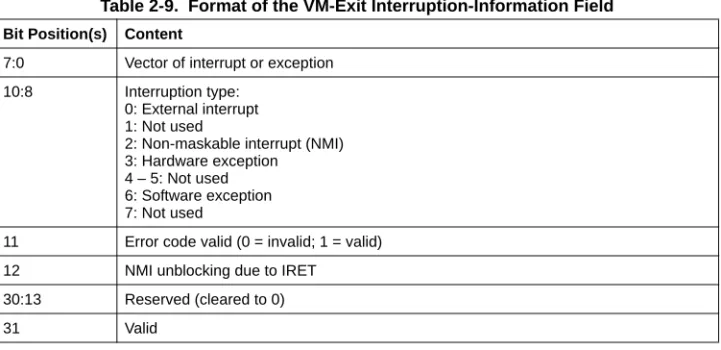
VM-exit interruption information (32 bits). This field receives basic informationassociated with the event causing the VM exit. The format of this field is given in Table 2-9.
Table 2-8. Format of Exit Reason
Bit Position(s) Contents
15:0 Basic exit reason
30:16 Reserved (cleared to 0)
VIRTUAL-MACHINE CONTROL STRUCTURE
•
VM-exit interruption error code (32 bits). For VM exits caused by hardware exceptions that would have delivered an error code on the stack, this field receives that error code. Section 5.2.2 explains the interruption-type field and provides details of how these fields are saved on VM exits.2.9.3
Information for VM Exits That Occur During Event Delivery
Additional information is provided for VM exits that occur during event delivery in VMX non-root operation. This information is provided in the following fields:
•
IDT-vectoring information (32 bits): see Table 2-10. The individual fields are defined as they were for the VM-exit interruption-information field (see Section 2.9.2). However, in this case, they refer not to the cause of the VM exit but to the event that was being delivered in VMX non-root operation when the VM exit occurred. The type field may receive value 4 (software interrupt) if the VM exit occurred during the delivery of a software interrupt. In this case, the vector field receives the interrupt number.Table 2-9. Format of the VM-Exit Interruption-Information Field
Bit Position(s) Content
7:0 Vector of interrupt or exception 10:8 Interruption type:
0: External interrupt 1: Not used
2: Non-maskable interrupt (NMI) 3: Hardware exception
4 – 5: Not used 6: Software exception 7: Not used
11 Error code valid (0 = invalid; 1 = valid)
12 NMI unblocking due to IRET
30:13 Reserved (cleared to 0)
VIRTUAL-MACHINE CONTROL STRUCTURE
•
IDT-vectoring error code (32 bits). On VM exits that set bits 31 and 11 in the IDT-vectoring information field, this field receives the error code that would have been delivered onto the stack by the event that was being delivered through the IDT (see above) at the time of the VM exit.See Section 5.2.3 explains the interruption-type field and provides details of how these fields are saved on VM exits.
2.9.4
Information for VM Exits Due to Instruction Execution
The following fields are used for VM exits caused by attempts to execute certain instructions in VMX non-root operation:
•
VM-exit instruction length (32 bits). For VM exits resulting from instruction execution, this field receives the length in bytes of the instruction whose execution led to the VM exit. See Section 5.2.4 for details of when and how this field is used.•
Guest linear address (64 bits). This field is used in the following cases:— VM exits due to attempts to execute LMSW with a memory operand. This field receives the linear address of that operand.
— VM exits due to attempts to execute INS or OUTS. The field receives the value of the linear address generated by ES:(E)DI (for INS) or segment:(E)SI (for OUTS) at the time the instruction started.
See Section 5.2.4 for details of when and how this field is used.
Table 2-10. Format of the IDT-Vectoring Information Field
Bit Position(s) Content
7:0 Vector of interrupt or exception 10:8 Interruption type:
0: External interrupt 1: Not used
2: Non-maskable interrupt (NMI) 3: Hardware exception
4: Software interrupt 5: Not used
6: Software exception 7: Not used
11 Error code valid (0 = invalid; 1 = valid)
12 Undefined
30:13 Reserved (cleared to 0)
VIRTUAL-MACHINE CONTROL STRUCTURE
•
VMX-instruction information (32 bits). For VM exits due to attempts to execute VMCLEAR, VMPTRLD, VMPTRST, VMREAD, VMWRITE, or VMXON, this field receives details about the instruction that caused the VM exit. The format of the field is given in Table 2-11.Table 2-11. Format of the VMX-Instruction Information Field
Bit Position(s) Content
1:0 Scaling:
0: no scaling 1: scale by 2 2: scale by 4 3: scale by 8
Undefined for register instructions (bit 10 is set) or for memory instructions with no index register (bit 10 is clear and bit 22 is set)
2 Reserved (cleared to 0) 6:3 Reg1: 0 = RAX 1 = RCX 2 = RDX 3 = RBX 4 = RSP 5 = RBP 6 = RSI 7 = RDI 8–15 represent R8–R15, respectively Undefined for memory instructions (bit 10 is clear)
9:7 Address size:
0: 16-bit 1: 32-bit 2: 64-bit
Other values not used
Undefined for register instructions (bit 10 is set) 10 Mem/Reg (0 = memory; 1 = register)
Note that VMCLEAR, VMPTRLD, VMPTRST, and VMXON are always memory instructions and thus clear this bit.
14:11 Reserved (cleared to 0) 17:15 Segment register: 0: ES 1: CS 2: SS 3: DS 4: FS 5: GS
Other values unused
Undefined for register instructions (bit 10 is set) 21:18 IndexReg (encoded as Reg1 above)
Undefined if bit 22 is set or undefined 22 IndexReg invalid (0 = valid; 1 = invalid)
VIRTUAL-MACHINE CONTROL STRUCTURE
2.9.5
VM-Instruction Error Field
The 32-bit VM-instruction error field does not provide information about the most recent VM exit; in fact, it is not modified on VM exits. Instead, it provides information about any error encountered by a non-faulting execution of one of the VMX instructions. See Section 7.2 for details of its use and Appendix B for a listing of error numbers.
2.10 SOFTWARE ACCESS TO THE VMCS AND RELATED
STRUCTURES
This section details guidelines that software should observe when accessing a VMCS and related structures as well as the potential consequences for failing to follow such guidelines.
2.10.1
Software Access to the Virtual-Machine Control Structure
To ensure proper processor behavior, software should observe certain guidelines when accessing an active VMCS.
No VMCS should ever be active on more than one logical processor. If a VMCS is to be “migrated” from one logical processor to another, the first logical processor should execute VMCLEAR for the VMCS (to make it inactive on that logical processor and to ensure that all VMCS data are in memory) before the other logical processor executes VMPTRLD for the VMCS (to make it active on the second logical processor).
Software should never access or modify the VMCS data of an active VMCS using ordinary memory operations, in part because the format used to store the VMCS data is implementation-specific and not architecturally defined, and also because a logical processor may maintain some VMCS data of an active VMCS on the processor and not in the VMCS region. The following items detail some of the hazards of performing such accesses:
•
Any data read from a VMCS with an ordinary memory read does not reliably reflect the state of the VMCS. Results may vary from time to time or from logical processor to logical processor.•
Writing to a VMCS with an ordinary memory write is not guaranteed to have a determin-istic effect on the VMCS. Doing so may lead to unpredictable behavior. Any or all of the 26:23 BaseReg (encoded as Reg1 above)Undefined if bit 27 is set or undefined 27 BaseReg invalid (0 = valid; 1 = invalid)
Undefined for register instructions (bit 10 is set) 31:28 Reg2 (same encoding as Reg1 above)
Undefined on VM exits due to VMCLEAR, VMPTRLD, VMPTRST, and VMXON Table 2-11. Format of the VMX-Instruction Information Field (Contd.)
VIRTUAL-MACHINE CONTROL STRUCTURE
following may occur: (1) VM entries may fail for unexplained reasons or may load undesired processor state; (2) the processor may not correctly support VMX non-root operation as documented in Chapter 3 and may generate unexpected VM exits; and (3) VM exits may load undesired processor state, save incorrect state into the VMCS, or cause the logical processor to transition to a shutdown state.
Software can avoid such problems by removing any linear-address mappings to a VMCS region before executing a VMPTRLD for that region and by not remapping it until after executing VMCLEAR for that region.
Software should use the VMREAD and VMWRITE instructions to access the different fields in the current VMCS (see Section 2.10.2 for details).
Software should initialize all fields in a VMCS (using VMWRITE) before using the VMCS for VM entry. Failure to do so may result in unpredictable behavior; for example, a VM entry may fail for unexplained reasons, or a successful transition (VM entry or VM exit) may load processor state with unexpected values.
2.10.2
VMREAD, VMWRITE, and Encodings of VMCS Fields
Every field of the VMCS is associated with a 32-bit value that is its encoding. The encoding is provided in an operand to VMREAD and VMWRITE when software wishes to read or write that field. These instructions fail if given, in 64-bit mode, an operand that sets an encoding bit beyond bit 32. See Chapter 7 for details of the operation of these instructions.
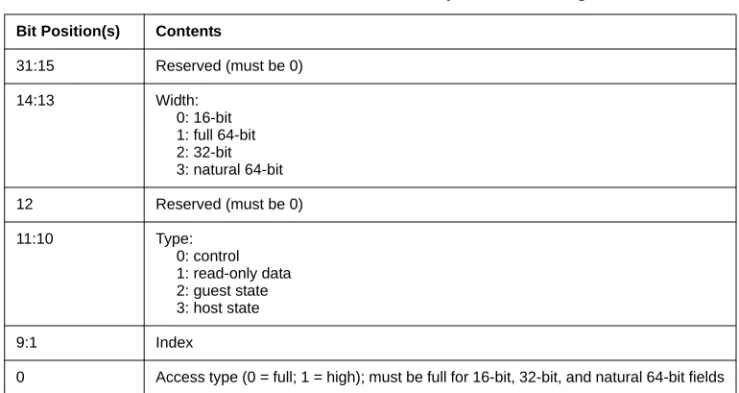
The structure of the 32-bit encodings of the VMCS components is determined principally by the width of the fields and their function in the VMCS. The structure is summarized in Table 2-12.
Table 2-12. Structure of VMCS Component Encoding
Bit Position(s) Contents
31:15 Reserved (must be 0) 14:13 Width: 0: 16-bit 1: full 64-bit 2: 32-bit 3: natural 64-bit 12 Reserved (must be 0) 11:10 Type: 0: control 1: read-only data 2: guest state 3: host state 9:1 Index
VIRTUAL-MACHINE CONTROL STRUCTURE
The following items detail the meaning of the bits in each encoding:
•
Field width. Bits 14:13 encode the width of the field (which may be 16 bits, 32 bits, full 64 bits, or natural 64 bits). A field is full 64 bits if a 32-bit VM monitor would need to access the entire field; it is natural 64 bits if a 32-bit VM monitor would need to access only the low 32 bits. For example, the field for RIP in the host-state area is natural 64 bits because a 32-bit VM monitor does not need to access the high 32 bits of the field (they would always be zero); in contrast, the VM-exit MSR-store address requires full 64 bits because it is a physical address that may be 64 bits in any processor mode.Full 64-bit fields are specially treated to allow 32-bit software access to all 64 bits of the field. Such access is allowed by defining, for each such field, an encoding that allows direct access to the high 32 bits of the field. See below.
•
Field type. Bits 11:10 encode the type of VMCS field: control, guest-state, host-state, or read-only data. The last category includes the exit information fields and the VM-instruction error field.•
Index. Bits 9:1 distinguish components with the same field width and type.•
Access type. Bit 0 must be 0 for all fields except those whose field width is full 64-bit (see above). A VMREAD or VMWRITE using an encoding with this bit cleared to 0 accesses the entire field. For a full 64-bit field, a VMREAD or VMWRITE using an encoding with this bit set to 1 accesses only the high 32 bits of the field.Appendix C gives the encodings of all fields in the VMCS.
The following describes the operation of VMREAD and VMWRITE based on processor mode, VMCS-field width, and access type:
•
16-bit fields:— A VMREAD returns the value of the field in bits 15:0 of the destination operand; other bits of the destination operand are cleared to 0.
— A VMWRITE writes the value of bits 15:0 of the source operand into the VMCS field; other bits of the source operand are not used.
•
32-bit fields:— A VMREAD returns the value of the field in bits 31:0 of the destination operand; in 64-bit mode, bits 63:32 of the destination operand are cleared to 0.
— A VMWRITE writes the value of bits 31:0 of the source operand into the VMCS field; in 64-bit mode, bits 63:32 of the source operand are not used.
•
64-bit fields (full and natural) using the full access type outside IA-32e mode.— A VMREAD returns the value of bits 31:0 of the field in its destination operand; bits 63:32 of the field are ignored.
— A VMWRITE writes the value of its source operand to bits 31:0 of the field and clears bits 63:32 of the field.
VIRTUAL-MACHINE CONTROL STRUCTURE
•
64-bit fields (full and natural) using the full access type in 64-bit mode.— A VMREAD returns the value of the field in bits 63:0 of the destination operand — A VMWRITE writes the value of bits 63:0 of the source operand into the VMCS field.
•
Full 64-bit fields using the high access type.— A VMREAD returns the value of bits 63:32 of the field in bits 31:0 of the destination operand; in 64-bit mode, bits 63:32 of the destination operand are cleared to 0. — A VMWRITE writes the value of bits 31:0 of the source operand to bits 63:32 of the
field; in 64-bit mode, bits 63:32 of the source operand are not used.
Software seeking to modify a full 64-bit field outside IA-32e mode should first use VMWRITE with the full access type (establishing bits 31:0 of the field while clearing bits 63:32) and then use VMWRITE with the high access type (establishing bits 63:32 of the field).
2.10.3
Software Access to Related Structures
In addition to data in the VMCS region itself, VMX non-root operation can be controlled by data structures that are referenced by pointers in a VMCS (for example, the I/O bitmaps). Note that, while the pointers to these data structures are parts of the VMCS, the data structures themselves are not. They are not accessible using VMREAD and VMWRITE but by ordinary memory writes.
Software should ensure that each such data structure is modified only when no logical processor with a current VMCS that references it is in VMX non-root operation. Doing otherwise may lead to unpredictable behavior (including behaviors identified in Section 2.10.1).
2.10.4
The VMXON Region
Before executing VMXON, software allocates a region of memory (called the VMXON region) that the logical processor may use to support VMX operation. The physical address of this region (the VMXON pointer) is provided in an operand to VMXON. Like VMCS pointers, the VMXON pointer must be 4KB-aligned (bits 11:0 must be zero); in addition, the pointer must not set any bits beyond the processor’s physical-address width.
Before executing VMXON, software should write the VMCS revision identifier (see Section 2.2) to the VMXON region. It need not initialize the VMXON region in any other way. Software should use a separate region for each logical processor and should not access or modify the VMXON region of a logical processor between execution of VMXON and VMXOFF on that logical processor. Doing otherwise may lead to unpredictable behavior (including behaviors identified in Section 2.10.1).