Copyright c2011 by InternationalJournal.org
CALL, SMARTBOARDS AND E.S.L.
Zahida Chebchoub
UAE University, UAE
In this article, the author will highlight the main uses of Smartboard technology as well as the application of CALL (Computer Assisted Language Learning) in an ESL course. Advantages as well as drawbacks the researcher encountered through the use of this type of technology will be presented. The emphasis will be put on the type of activities that worked well with the use of CALL and Smartboards in an ESL classroom with learners whose first language is Arabic. The author will also pinpoint to culturally appropriate materials that were used in the classroom.
Keywords:Smartboard technology, ESL, Call, Students’ reactions to classroom technology.
INTRODUCTION
In September 2010, UAE University installed Smartboards in every classroom and lecture theatre throughout its campus. Prior to starting the new academic year, staff members and faculty received some training on how to use this modern technology by attending a series of workshops. However, the use of classroom technology is not completely new to UAE faculty and especially instructors of the University Foundation courses instructors. In fact, these instructors have been using CALL (computer assisted language learning) and therefore are accustomed to using technology in their ESL classes. Throughout the first and second semester, the investigator has used both types of technology in her classroom. Three groups of students were involved in this research; their level is considered to be lower-intermediate. The author of this article who is also an ESL instructor met with these students (a total of 65 students; 20 students approximately per group) daily from Sunday to Wednesday for a couple of hours. Two of these were spent in a computer laboratory where every student had access to a desktop computer.
METHODOLOGY FOR DATA COLLECTION
The author has used questionnaires, interviews with students and informal observation. She also kept a journal where she jotted down specific events or incidents that occurred during the lessons. Adrian1 reports: “I began writing anecdotal notes in my lesson plans describing how we
ϭAdrian, Bobbi F. Incorporating the SMART Board for Smart Teaching Nov 01, 2004 URL:http://www.techlearning.com/article/3054
incorporated technology and the overall success level...The class also participated in class meetings. During this time, students shared their opinions on technology-incorporated lessons. These results were documented in the teacher lesson plans as well. These three methods of data collections allowed for a subjective review of technology integration”.
CALL SESSIONS
Most experts in the fields of technology and education agree that computer assisted learning help learners tremendously in acquiring new information. In fact, Carole R. Beal, W. Lewis Johnson, Richard Dabrowski, & Shumin Wu2 say in this respect: “Computer simulation environments for learning have been associated with increased student engagement”. The author of this article agrees entirely with this statement as proven by the outcome of the UAEU CALL sessions she conducts throughout each academic semester.
A BRIEF OVERVIEW OF THE ESL CALL SESSIONS CONDUCTED BY THE AUTHOR
At the beginning of each of these weekly sessions, a folder would be put in a shared drive that can be accessed by all the students present in the computer laboratory. The activities would be selected prior to starting the session. The language exercises would correspond with and focus on the language aspects that were covered during the ESL classes spent in a regular classroom (equipped with a Smartboard). The author would also prepare some quizzes to be taken during these computer lab sessions as it is convenient to have them in such a setting; every student can work independently and interactively with the activities and can take quizzes at her own pace. From time to time there would be very brief teacher-centered classroom activities where the chosen activity is broadcast to the whole class. In this particular situation, students would not have the opportunity for any digital input but would rather contribute to the exercise by answering questions asked by the teacher. The author found this teacher intervention to be quite useful when used in a parsimonious way as it allowed students to have a short rest from independent/digital interactive learning. Apart from this advantage, this teacher intervention in this entirely non-human teacher environment benefited weak students and helped them to grasp some language points that were not clear to them. The activities that were inserted in the folder (accessed by students in a shared drive called the “X-drive”) included exercises that developed reading, listening and writing skills. However, several of these exercises were devoted to vocabulary items and grammar points that had been introduced to students prior to the computer laboratory session. In order not to bore the students, short time-out sessions (between 5 and 7 minutes) were given to students after they had worked independently on the computer for 30 minutes. During these “breaks”, students were allowed to check their email accounts, browse through the Internet, simply just relax or go for a short walk outside the computer laboratory classroom. These breaks were quite beneficial as they allowed students to come back to the activities refreshed and rested. Spending too long a time working on a computer and looking at the computer screen can damage the eyesight and tire students. When asked about the effect of
Ϯ
Carole R. BEAL, W. Lewis JOHNSON, Richard DABROWSKI , & Shumin WU Individualized feedback and simulation-based practice in the Tactical Language Training System: An experimental evaluation. In Looi, C.K. (Editor); McCalla, G. (Editor); Bredeweg, B. (Editor). Artificial Intelligence in Education: Learning through Intelligent and Socially Informed Technology. Amsterdam, , NLD: IOS Press, 2005. p 747
these breaks, students were unanimous in stating that these short breaks helped their concentration levels.
VOCABULARY AND GRAMMAR CALL ACTIVITIES USED IN THE COMPUTER LABORATORY
These activities consisted of in-house exercises using software programs specially designed for this category. The vocabulary words that were part of the exercises came from lists of words taken from the course textbook and the program curricula and syllabi. Games included speedword, matchword, jigword, wordsearch and wordweb categories. These games trained students in mastering the meaning, spelling and in context use of the vocabulary words they had to learn for the English course they were taking in the course of one semester.
LISTENING COMPREHENSION AND READING COMPREHENSION CALL ACTIVITIES USED IN THE COMPUTER LABORATORY
The most important advantage to allowing students the opportunity to practise listening in the computer laboratory is the fact that students can listen to the material at their own pace by using headphones. Students reported that this was quite beneficial because they were able to focus on what they were listening to without any outside noise interference or any other sort of disruption. In a way, the computer lab acted as an audio lab as well. However, there was a slight drawback to this type of exercise; students are often required to listen to a lecture and take notes and/or fill in blanks. Doing this by using the Microsoft Word software was somewhat a hindrance to them for one main reason: our ESL students are not accustomed to typing fast in English. However, I often solved this problem by preparing note taking paper to hand in to them. But despite this, I strongly encouraged them to use Microsoft Word to take notes and answer the listening comprehension questions. I wanted them to get used to typing using the English keyboard.
WRITING PRODUCTION EXERCISES CALL ACTIVITIES USED IN THE COMPUTER LABORATORY
My students have a 4 hour a week writing production session with another teacher where they learn how to write essays on various types and topics. Therefore, the writing production activities they had in the computer lab sessions were minimal and consisted mainly of journal entries and creative writing such as writing short poems and formal and informal letters. The main purpose of these writing production activities was to increase students’ confidence and help them to increase their fluency. Above all, these activities were meant to remove the inhibition ESL learners may have when it comes to writing in a second language. In order to make these activities as creative and fun-filled as possible, I always encouraged students to use all the available features found in Windows; Microsoft word, clip art, page background, etc. One of the activities students enjoyed much was to called: “My very first CD”. I provided each student with a blank CD with a sleeve and cover. The very first step consisted of composing short poems/paragraphs on a set of selected themes (examples of themes that were used: My week, Mother’s Day, My favourite object, my country, etc...). All the writing was typed by students using Microsoft word. Then, students designed the CD cover and sleeve using Microsoft clip-art,
Paint, etc. They were encouraged to paste photographs they had taken onto the Microsoft word document. Some of the students opted for Power Point and Windows movie maker. Those who could play a musical instrument recorded their music and those who could not selected a piece of music according to the theme of their poem/paragraph and to their own taste. They also recorded their writing by reading it out loud. Finally, they printed their designed CD covers and sleeves, burnt the CD’s and produced beautiful CD’s. This activity was so successful that I included in each of the ESL courses I have been teaching. Its success confirms Irvin’s3 comments on technology used in writing: The use of technology is often highly motivating to adolescents in terms of getting them to read and write more carefully and with more effort. The ability to revise on the computer, to add effects (color, graphics, sound) to presentations, and to code or mark text using word processing features such as highlighting motivates many students, especially when this capability is combined with an authentic purpose to read and write. Other researchers also found technology in the classroom to enhance learning. For instance, Klopfer4 emphasizes the importance of technology in developing students’ critical thinking in a fun way; through games and peer exchange of ideas: “Through technology-enabled role play and interaction face to face with their peers, students can engage in deep, meaningful explorations of complex topics.” Daccord5 said in this context: I also saw that the computers helped promote student-centered and independent learning.
STUDENTS’ REACTIONS TO COMPUTER LAB SESSIONS (OBTAINED THROUGH THE USE OF QUESTIONNAIRES AND OTHER MEANS OF INVESTIGATION)
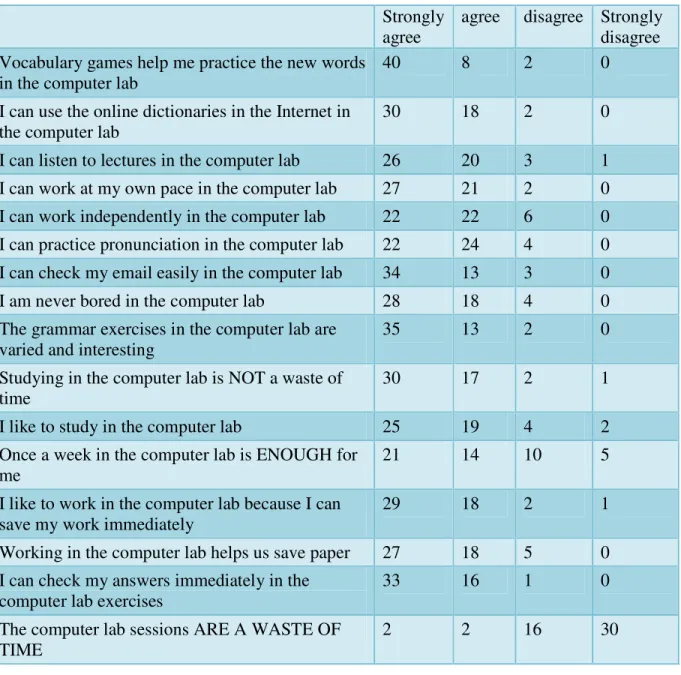
A questionnaire was administered to students in order to collect information about their opinions about the usefulness of computer lab activities. 50 students took part in the survey. Table 1 summarizes the results in raw data form.
The questionnaire comprised a section where respondents could record their comments in English or in Arabic. When they were in Arabic, they were translated by the author into English. Here are some of these comments:
Student 5: I learn many things in the lab. I can improve my self within.
Student: I like the computer lab sessions very much. This helps me to do better in VTL Student 22 (translated from Arabic into English): The computer lab is another place where we have our lessons in order for us to break the routine. We need to change the place of studying that is why having our lessons once a week in a computer lab.
3
Irvin, Judith L. Taking Action on Adolescent Literacy : An Implementation Guide for School Leaders. Alexandria, VA, USA: Association for Supervision & Curriculum Development, 2007. p 43.
4
Klopfer, Eric. Augmented Learning: Research and Design of Mobile Educational Games. Cambridge, MA, USA: MIT Press, 2008. p. 70.
5
Daccord, Tom Teaching History With Technology February 8, 2003. Retrieved from http://www.besthistorysites.net/teachwithtech/article_tech.html
Student 3: I like to study in the computer lab.
Table 1. Results in raw data form. Strongly agree
agree disagree Strongly disagree Vocabulary games help me practice the new words
in the computer lab
40 8 2 0
I can use the online dictionaries in the Internet in the computer lab
30 18 2 0
I can listen to lectures in the computer lab 26 20 3 1 I can work at my own pace in the computer lab 27 21 2 0 I can work independently in the computer lab 22 22 6 0 I can practice pronunciation in the computer lab 22 24 4 0 I can check my email easily in the computer lab 34 13 3 0 I am never bored in the computer lab 28 18 4 0 The grammar exercises in the computer lab are
varied and interesting
35 13 2 0
Studying in the computer lab is NOT a waste of time
30 17 2 1
I like to study in the computer lab 25 19 4 2 Once a week in the computer lab is ENOUGH for
me
21 14 10 5 I like to work in the computer lab because I can
save my work immediately
29 18 2 1
Working in the computer lab helps us save paper 27 18 5 0 I can check my answers immediately in the
computer lab exercises
33 16 1 0
The computer lab sessions ARE A WASTE OF TIME
2 2 16 30
Student 47 (translated from Arabic into English): I wish all lessons took place in the computer lab
Student 19 (translated from Arabic into English): I wish all sessions were in the computer lab all week long
Student 7 (translated from Arabic into English): The computer lab and studying in it is fun and useful. I wish all lessons were in it.
Student 12: students need various and new exercises in the computers. Once in the week is not enough in the computer lab. It is very useful for students
Student 18: I hope to study all my English classes in the lab
Student 5: It’s nice to have classes inside a computer lab. It never makes us tired but one day session is enough because sitting in front of computer will harm our eyes…so this time is enough for us. Thanks teacher for taking us to the computer lab.
Student 25: quiet/ nice/ we change the style of studying
Student 43: we hope that computer lab sessions will be every day because I think it’s very important and advantage
From the results of the survey, we can conclude that, as whole, students are satisfied with the time spent in the computer lab. They were almost unanimous in stating that vocabulary games helped them to practise new words. During informal interviews the author conducted with these students, a great majority stated that the games improved their spelling of the VTL words they had to master for the course they were taking. However, a few students mentioned that they sometimes felt a little bored and isolated during the computer lab sessions but after having a short break or by browsing through the net, they felt rested and ready for another lab session.
SMARTBOARD USE
Smartboards are becoming more and more common throughout academic institutions. A Smartboard is available in each classroom that was used by the author. At the beginning of each lesson/session, the author or sometimes one of her students would switch on the Smartboard.
BRIEF OVERVIEW OF SMARTBOARD TECHNOLOGY USE
As stated earlier in this article, UAE University introduced and installed Smartboards in every classroom, lecture theatre and laboratory throughout its campus starting from September 2010. As a whole, this tool has been and still is a very useful one in the field of ESL more than in any other type of course and especially content courses as in content courses professors usually display the content of their lecture in a Power Point project presentation and do not therefore use all the features available in the Smartboard.
The main reasons for Smartboard usefulness in an ESL class lie in the following points:
Audio-visual aids that facilitate second language acquisition are readily available to the instructor.
The variety of pen colours and line shapes make the material presentation appealing to learners.
The Internet, a valuable source of activities, is readily available.
A myriad of software programs can be used in the Smartboard (Microsoft, PowerPoint, Excel, etc.
Lessons and activities can be saved and re-used at later times
Smartboard activities cater for different types of learners
MAIN ADVANTAGES TO USING SMARTBOARD IN AN ESL CONTEXT AT UAEU AND AS EXPERIENCED BY THE AUTHOR
Teachers are able to prepare PowerPoint presentations ahead of time and use them in class. They may add notes to the presentation during the lesson. Students can listen to lectures for listening comprehension practice on the Smartboard; there is no need to carry CD players. The sound system is excellent in the Smartboard. Besides, there are loud speakers incorporated in the ceiling of the classroom. All students can hear perfectly without having to move closer to the teacher’s desk such as is the case with CD players. The author also noticed a great improvement in students’ level of attentiveness and interest during the lesson. This goes well in accord with the results provided by the study; “Applying Smartboard Technology in Elementary School Classrooms Investigation of a School-Wide Initiative” that was undertaken by the Health and Education Research Group, Faculty of Education, University of New Brunswick in 2007 and stated: “All educators reported strong agreement regarding the benefits of using SMART Board technology in the classroom, and that interactive whiteboard technology should be part of an overall framework for better practices in an inclusionary educational system. Similarly, participants strongly agreed that that their capacity to teach had been enhanced through the use of SMART Board technology and students were more engaged in the learning process when such technology was integrated in instructional activities”.
DRAWBACKS RELATED TO THE USE OF SMARTBOARD TECHNOLOGY IN AN ESL CLASS SETUP
Despite its numerous advantages, Smartboard technology does have some drawbacks. The main ones being the following:
Technical problems such as power outage and/or loss of wireless connection
Unclear hand-writing
Some Internet sites may be unsuitable for a young audience and/or culturally inappropriate; the teacher has to be careful when searching for information
STUDENTS’ REACTIONS TO COMPUTER LAB SESSIONS (OBTAINED THROUGH THE USE OF QUESTIONNAIRES AND OTHER MEANS OF INVESTIGATION)
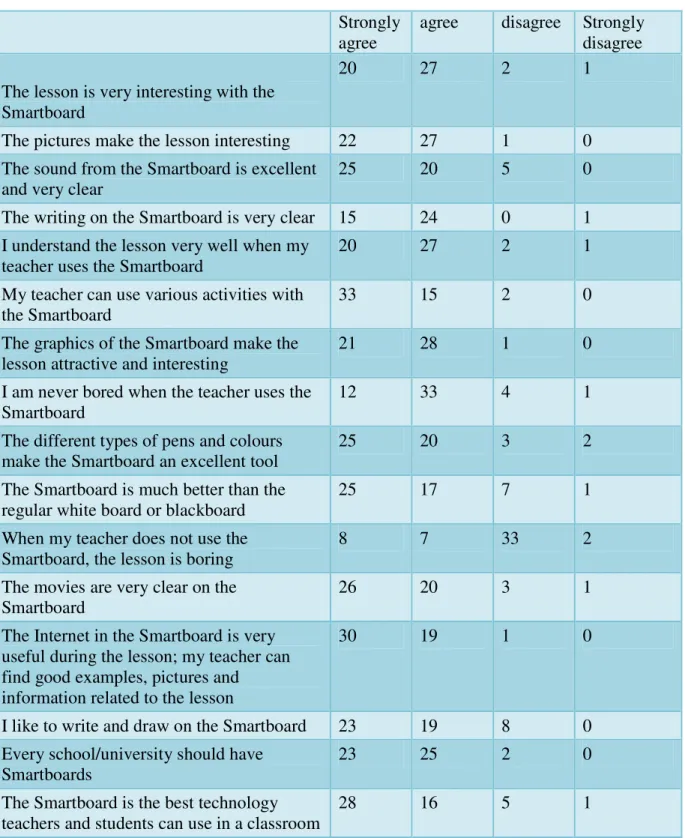
A questionnaire was administered to students in order to collect information about their opinions about the usefulness of computer lab activities. 50 students took part in the survey. Table 2 summarizes the results in raw data form.
Table 2 Results in raw data form. Strongly
agree
agree disagree Strongly disagree The lesson is very interesting with the
Smartboard
20 27 2 1
The pictures make the lesson interesting 22 27 1 0 The sound from the Smartboard is excellent
and very clear
25 20 5 0
The writing on the Smartboard is very clear 15 24 0 1 I understand the lesson very well when my
teacher uses the Smartboard
20 27 2 1
My teacher can use various activities with the Smartboard
33 15 2 0
The graphics of the Smartboard make the lesson attractive and interesting
21 28 1 0
I am never bored when the teacher uses the Smartboard
12 33 4 1
The different types of pens and colours make the Smartboard an excellent tool
25 20 3 2
The Smartboard is much better than the regular white board or blackboard
25 17 7 1
When my teacher does not use the Smartboard, the lesson is boring
8 7 33 2
The movies are very clear on the Smartboard
26 20 3 1
The Internet in the Smartboard is very useful during the lesson; my teacher can find good examples, pictures and
information related to the lesson
30 19 1 0
I like to write and draw on the Smartboard 23 19 8 0 Every school/university should have
Smartboards
23 25 2 0
The Smartboard is the best technology teachers and students can use in a classroom
28 16 5 1
The questionnaire comprised a section where respondents could record their comments in English or in Arabic. When they were in Arabic, they were translated by the author into English. Here are some of these comments:
Student 11: (translated) sometimes, there are some errors. Sometimes the Smartboard does not work and this has a negative effect on the lesson.
Student 38: Smartboards have many problems and sometimes they are very slow. I have a suggestion: students and teachers should know how to fix simple things in Smartboards because we waste time if we have problems and the technician comes after few minutes
Student 9: (translated) the Smartboard is an excellent tool but it has some defects. It takes time for it to be switched on and it also breaks down suddenly or stops suddenly.
Student 1: It is easy and fun to use
Student 5: the biggest problem in the Smartboard is that the student and the teacher can’t write well. However, it is useful and good.
CONCLUSIONS
This present classroom research results and findings has proven that incorporating technology such as Smartboards and CALL, namely in ESL teaching, can highly improve learners
REFERENCES
1. Adrian, B. F. Incorporating the SMART Board for Smart Teaching Nov 01, 2004 URL:http://www.techlearning.com/article/3054
2. Beal, C.R., Johnson, W.L., Dabrowski, R., & Wu, S. Individualized feedback and simulation-based practice in the Tactical Language Training System: An experimental evaluation. In Looi, C.K. (Editor); McCalla, G. (Editor); Bredeweg, B. (Editor). Artificial Intelligence in Education: Learning through Intelligent and Socially Informed Technology. Amsterdam, NLD: IOS Press, 2005. p 747.
3. Klopfer, E. Augmented Learning: Research and Design of Mobile Educational Games. Cambridge, MA, USA: MIT Press, 2008. p.70.
4. Irvin, J. L. Taking Action on Adolescent Literacy: An Implementation Guide for School Leaders. Alexandria, VA, USA: Association for Supervision & Curriculum Development, 2007. p. 43.
5. Daccord, T. Teaching History with Technology February 8, 2003. Retrieved from http://www.besthistorysites.net/teachwithtech/article_tech.html