Remote Router
Porting with T1
A guide to getting more
from your network for less
Use Patton’s T1 EtherRocket and your existing
hardware to provide the most economical
network connectivity to your branch office,
remote site, or Internet connection.
Copyright
© 2001 Patton Electronics Company. All rights reserved.
Trademarks
T1-EtherRocket is a trademark of Patton Electronics Company. All other trademarks are the property of their respective owners.
Introduction
Connectivity isn’t just a luxury, it is a necessity. Today, every office is filled with network-aware applications chewing-up bandwidth. With eCommerce becoming the trading method of choice, connectivity with trading part-ners is a must. Of course, Email/WWW traffic is now the preferred method for communication and information. Traditional deployment strategies require capital equip-ment purchases, trained personnel for configurations, and a truck roll to the site for installation. Through out-sourcing, many have looked towards several hot tech-nologies that promised bandwidth and connectivity to the masses. Unfortunately, these technologies have somewhat missed the mark. The integration of an exist-ing network with the outsourced network has proved to be expensive, complicated, or simply non-existant. As businesses and ISP’s strive to connect remote branch-es to the network, managers and engineers have to pro-vide optimum network performance while balancing lean budgets and scarce technical resources. Using Patton’s Remote Router Porting, enterprise users and service providers can use tried-and-true data services to keep-up with demand while maintaining low costs.
Traditional Network Connectivity
Remote network connectivity requires three fundamen-tal pieces: equipment, configuration, and insfundamen-tallation. A common theme with all of these three is expense, expense, and expense. Let’s take a look at how a tra-ditional remote office/network would be connected to the central site.Equipment, Configuration,
and Installation
First, T1 or Fractional-T1 service is ordered between the central site and the remote office. With competitive prices for T1 and Fractional-T1 services at an all time low, you can scale from 64 kbps all the way up to a blazing 1.5 megabits a second and provide the band-width and connectivity required without extra cost. Next, a router, CSU/DSU, and cables are delivered to the remote site and the central site. A technician goes to the remote site to connect everything together and configures the router. After connecting the T1 link to the CSU/DSU, the user must connect the CSU/DSU to the serial port of the router (V.35, EIA-530, X.21, or RS-232).
Usually special cables are required as most router man-ufacturers use one type of connector to present a variety of interfaces (for example, Cisco typically uses an HD-60 connector). The serial port on the router is then con-figured internally upon detection of the cable’s pinout. The physical connection and orientation of the CSU/DSU also has to be determined. For instance, many CSU/DSU manufacturers may present the physi-cal V.35 interfaces on a DB-25, HD-26, or M/34 con-nector. The orientation of DTE or DCE gender must be determined. WAN Transmission devices are usually assumed to be DCE, but that is not always the case. Installing and configuring a branch office router and associated hardware requires time and highly trained personnel. A laptop is a standard requirement for con-figuring, testing, and troubleshooting a router. In addi-tion to configuring the router’s port at the central site, the installer at the branch office has to deal with the local router’s dizzying number of configuration options, software features, protocols, routing tables, security features…most of which are not needed. This array of options, coupled with the cryptic command line interface used in most routers, make configuration a daunting task.
What would you pay
for all of this?
It is clear that the use of a router, a WAN interface device, special cables, a laptop, and specialized personnel for configuration and management, can make branch office interconnection expensive and time consuming. These costs are amplified as more remote networks come on-line. Routers and CSU/DSUs, with all their complexities and limitations, do not present a simple, economical, and repeatable solution to remote networking.
For example, a typical remote site supporting 1–150 users would cost approximately $7,100 in equipment, configuration, and installation expenses.
Wouldn’t it be nice if there were an easier, lower cost way to connect up to the world? Yes!
Item Cisco 2600 Series Router WAN serial cables T1/FT1 CSU/DSU Accessories Technician’s time Qty 2 2 2 1 8 hrs Total Cost $4,500 $220 $1,790 $150 $440 Note Routers required for both ends of the link
Cables to connect the router to the CSU/DSU
T1 or Fractional-T1 CSU/DSU T1 cables and miscellaneous Based on $55/hour and 1 hour each way to remote office
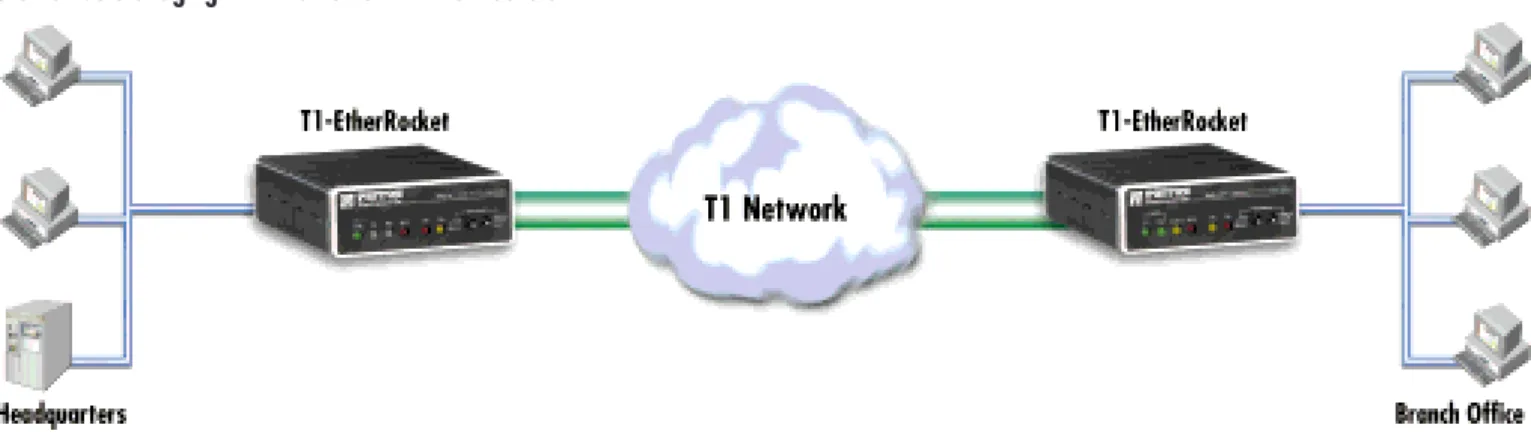
Porting creates a virtual Ethernet port at the central site router while giving the remote site a standard Ethernet network connection. Plus, RRP leaves the config-uration and routing smarts at the head office instead of the remote site. Incorporating a T1/FT1 CSU/DSU, the Point-to-Point Protocol (PPP), and Ethernet bridging technologies, RRP offers network managers and integra-tors a simple and economical way to deploy LAN-to-LAN connectivity. Here’s how it works. At the remote office, RRP replaces the traditional router and configuration, T1 CSU/DSU, and cables with a single Patton EtherRocket‘. The T1-EtherRocket connects to the T1 WAN on one port and to the local LAN with its Ethernet Port.
On the other end of the T1 link, at the central site, any standard T1 CSU/DSU, such as the Patton Model 2720/C, is connected to an available router port. The central site router is then configured to act as a PPP Half-Bridge. Half-Bridging is just like standard Ethernet
bridg-ing except that the router (at the cen-tral site) takes the bridged Ethernet packet from the remote LAN and converts it into a routed packet. Now, the router can be configured to process this packet with security, special access rules, or privileges. In other words, all of the traditional remote site configuration you would have done can be eliminated!
Basic Bridging:
LAN over the WAN
In the most common installation of WAN Ethernet Bridging, two LAN segments are connected with a common WAN interface such as T1. Each bridge connects to the local Ethernet LAN and builds a table of local hosts on that network. If an Ethernet message is not for a local host, the bridge forwards it over the WAN to the remote bridge. Two Patton T1-EtherRockets can be used to link two Ethernet LANs over a T1/FT1 link (see figure 2).Bridging in a Nutshell
Bridges became available in the early 1980s and were used to connect multiple
physical networks together so they could function as one logical network. Bridges are not complicated devices and
oper-ate at the lowest logical level within the net-work. Here’s what they do: A bridge has two ports—the local side and the remote side. During operation, a bridge analyzes all
net-work messages on the local side, builds a table of local hosts and simply forwards
non-local messages to the remote port. The Point-to-Point Protocol (PPP) is a stan-dard method of transporting Ethernet packets over the wide area. Now wide-area-networks can use bridging to deliver economical LAN
connectivity with plug-and-play ease.
PPP makes the World go ‘Round
The Point-to-Point Protocol (PPP) is the industry standard protocol for encapsulating data for transport over a point-to-point link. PPP provides a method of establishing, con-figuring, maintaining, and terminating a point-to-point data connection. Operating on all media that are full duplex in nature, PPP is a symmetric peer-to-peer protocol, which can be broken into three main components:• A standard for encapsulating datagrams over serial links.
• A Link Control Protocol (LCP) for establishing, con-figuring, and testing the data-link connection.
• A family of Network Control Protocols (NCPs) for establishing and configuring different network-layer protocols. The NCP is the actual data from the network.
When a T1 link is first established, PPP automatically negotiates line parameters with the far end. After the physical link is up, PPP will request to configure a net-work control protocol for the link. In the case of bridg-ing, PPP will configure the Bridging Control Protocol (BCP) as the link’s network control protocol. BCP allows LAN-to-LAN bridging using PPP as the link protocol. In operation, BCP passes the complete Ethernet frame
from the local network to the remote network. At the far end, the Ethernet frame is extracted from the PPP frame and passed on to the network.
Deploying RRP: Combining
Bridging, PPP, and a little Magic
RRP uses the technology of bridging, with PPP for stan-dards-based transport, with a router configuration to offer a routed network connection with only one router. Deploying RRP requires three main elements: Central-Site T1 CSU/DSU, Central-Central-Site Router, and a Patton T1-EtherRocket at the branch office (see figure 3).Rolling-out the Remote Site
All that is needed at the remote network location is one Patton EtherRocket™ (Model 2720/I). The T1-EtherRocket is equipped with a T1/FT1 interface and connects directly to the T1 Demarcation point via an RJ-48C twisted pair patch cable. The Ethernet interface uses a standard RJ-45 connector and connects directly to a LAN switch. Because the T1-EtherRocket integrates both hardware and software, the installer has only two interfaces to connect. For most installations there is little or no configuration required.
If configuration is required, it will consist of setting up the T1 line. DIP switches on the underside of the EtherRocket allow the selection of the number of DS0s, or T1 band-width, that will carry data. The switches are pre-config-ured for 24 DS0s (1.536 Mbps), network clock, ESF/B8ZS framing and line coding. Most applications will use these settings unchanged. If there is a need to access the full suite of features and diagnostics, the T1-EtherRocket is equipped with a RS-232 control port which provides access to user-friendly screen menus. The 10Base-T Ethernet port of the T1-EtherRocket does not use a MAC or IP address and is completely plug-and-play. As soon as the unit is powered up, the built-in bridge enters “promiscuous” mode and listens to all Ethernet traffic on the LAN. The bridge then floods all Ethernet packets to the central LAN until it learns the addresses of all local hosts attached to the branch office LAN. As the bridge learns it creates a host table, and thereafter forwards packets destined for the central LAN. Addresses are automatically deleted from the bridge’s memory after eight minutes of inactivity. The WAN-side T1-EtherRocket negotiates a PPP link with the central router. After the link is established, the Bridge Control Protocol is established. Ethernet packets can now be passed end-to-end over the T1 transparently.
Central Site Setup
The central site is where all the intelligence is…and all the magic. The router located at headquarters requires an available WAN serial connection (e.g V.35, EIA-530, X.21, and so on) or built in T1/FT1 WAN Interface Card. If using a WAN serial port, an external T1 CSU/DSU (Use Patton Model 2720/C) will be needed to connect the router’s serial port to the T1
net-work. Typically, the router 10/100Base-T port is con-nected directly to the local LAN switch.
The T1 CSU/DSU connects directly to the T1 network demarcation. Configure the CSU/DSU for bandwidth (number of DS0s), clock mode (normally Network clock), framing, and line coding. Next connect the CSU/DSU to the router’s serial port using the appro-priate cable.
In order for the central routed network to connect to a remote branch Ethernet network, the serial or WAN inter-face of the central router needs to be configured as a PPP IP half-bridge. In this configuration the T1-EtherRocket sends bridge packets to the router’s serial interface. The router will then take the Ethernet Packet and route these packets based on its IP address. At the same time the router’s port will convert routed packets destined for the remote LAN and forward them to the T1-EtherRocket. The example below shows the simple router configura-tion on a Cisco router using a serial interface config-ured as a PPP Half-Bridge. Using a Patton T1-EtherRocket, the Cisco’s serial interface will now func-tion as node on the remote Ethernet network. As such, the serial interface on the Cisco router will have an IP address on the same Ethernet subnet as the T1-EtherRocket. The hosts on the remote network will then use this IP address as their default gateway.
For example:
1) We assign the Branch Office the logical IP network IP of 192.168.1.0/24 (netmask=255.255.255.0). 2) The Cisco serial interface (s0) is assigned the address of 192.168.1.1 (netmask=255.255.255.0). This “.1 “ address is also the default gateway for the
remote network. This removes any routing/forward-ing intelligence from the remote network and places it at the central site where it belongs. In essence, you are remotely porting the router’s serial interface to the remote network.
The associated Cisco configuration is quite simple and will set the serial interface s0 to accommodate PPP half-bridging for the above example.
Going Beyond: Advanced RRP
for the Wide-Area
Some networking systems do not define network num-bers in packets sent out over a network. If a packet does not have a specific destination network number, a router will assume that the packet is destined for the local segment and will not forward it to any other sub-network. However, in cases where two devices need to communicate over the wide-area, bridging can be used to transport non-routable protocols.
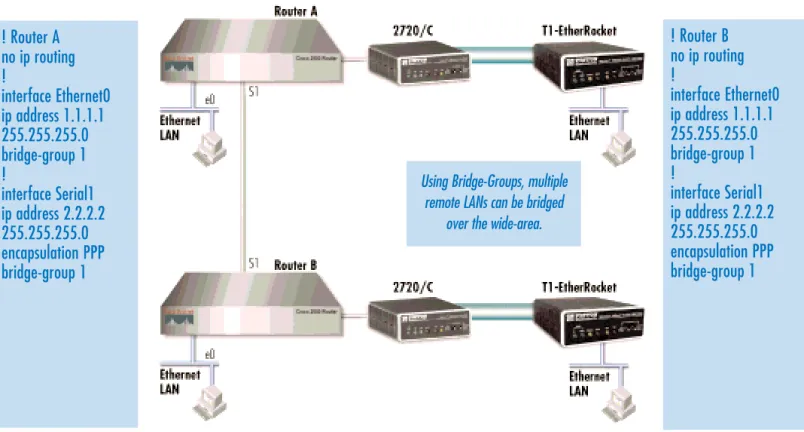
The following configuration illustrates transparent bridg-ing between Cisco routers and Patton’s bridgbridg-ing devices over an example serial link. Bridging will occur between both LANs connected on Router A and Router B.
;
interface s0
ppp bridge ip
ip address 192.168.1.1 255.255.255.0
Figure 4. Bridging groups
! Router A
no ip routing
!
interface Ethernet0
ip address 1.1.1.1
255.255.255.0
bridge-group 1
!
interface Serial1
ip address 2.2.2.2
255.255.255.0
! Router B
no ip routing
!
interface Ethernet0
ip address 1.1.1.1
255.255.255.0
bridge-group 1
!
interface Serial1
ip address 2.2.2.2
255.255.255.0
Using Bridge-Groups, multiple remote LANs can be bridged
RRP is Changing the World!
Remote Router Porting offers simplicity of installation, configuration, and management. This directly translates into savings and advantages:
• Savings per Installation.Fewer pieces of equip-ment needed per branch connection translate imme-diately into lower cost per branch site installation.
• Fewer Points of Failure. By using a single piece of equipment and only two cables per instal-lation, RRP achieves greater network reliability and additional savings in personnel time, and equip-ment repairs or replaceequip-ments.
• Better Tech. Resources Allocation. Since the T1-EtherRocket eliminates the branch router, there is no longer a need to send a router specialist to con-figure branch office equipment; this frees key per-sonnel to tend to more difficult configuration or installation issues in other parts of the network.
• WAN Service Flexibility. The T1-EtherRocket offers T1 rates from nx56kbps and nx64kbps to 1.544Mbps data rates, as the branch office grows and the need for more bandwidth arises, the user simply leases more DS0s from the carrier, and con-figures the T1-EtherRocket accordingly.
How Does This Sum Up?
Save $3,500 or more by deploying Patton’s EtherRocket solution with all new equipment. If you have a spare router port, you can save over $5,000! Wouldn’t it be nice if there were an easier, lower cost way to connect up to the world? Now there is. Use Patton’s T1-EtherRocket™ with Remote Router Porting.
Additional Resources
For additional information or questions, contact:
Jose Ventura
Product Manager, T1/E1/Fiber [email protected]
+1 (301) 975-1000, ext. 142
Item Patton T1-EtherRocket Cisco 1700 Series Router T1/FT1 CSU/DSU Accessories Technician’s time Qty 1 1 1 1 3 hrs Total Cost $895 $1,500 $895 $75 $165 Note Call for great pricing! Router for central site if no spare port is available. T1 or Fractional-T1 CSU/DSU T1 cables and miscellaneous Based on $55/hour and 1 hour each way to remote office
Related Information
You can get these documents in PDF* for FREE at
www.patton.com/library.shtml
RRP over DSL
Model 1082/I
Model 1088/I
Model 1089/I
Model 1092/I
RRP over T1 or E1
Model 2720/I
Model 2701/I
RRP with Tiny Bridges
Model 2121
Model 2124
Model 2130
Model 2135
RRP over Fiber
Model 1184/I
Model 1185/I
Learn about DSL, T1/E1/Fiber, and Remote Access Servers technologies from our Network Access Solutions Guide.
If you are an ISP or want to learn about Remote Access Server tech-nology, you’ll want to get our Remote Access Solutions Guide.
Find out how easy it is to become an Internet Service Provider by reading the Build Yourself an ISP White Paper.
Ever heard of RRP? Well read this Remote Router Porting with T1 Position Paper and learn how RRP can help you get much more from your network connectivity budget for far less.
Patton has a complete line of bridging products for every interface
Network Access Solutions Guide
Dedicated Access • Interface Converters • Network Termination & Extension Units • xDSL Modems & Concentrators Dial-Up Remote Access Servers • Enterprise Solutions • Service Provider Solutions
Dial-Up and Dedicated Access
Remote Access Solutions Guide
• Enterprise Solutions • Service Provider Solutions • RAS Product Overviews • Additional Resources
Lower costs for the local loop h t t p : w w w / / a c c e s s . p a t t o n . c o m
Get our T1/E1 Network Technology Overview presentation.
s an ISP you will offer a service which general-ly includes some kind of access to the Internet. This can be through dial-up modems, DSL, cable, wireless…you name it! There are two ways of becoming an ISP. One is by becoming a Virtual ISP which is reselling another ISP’s service under your own name. The other way is by becoming a facilities based provider which means you own and operate the physi-cal pieces which make up your network. By becoming a facilities based provider you’ll get some routers and servers, an upstream Internet connection and some phone lines. The number one service a provider offers is dial-up modem access. The center of being an ISP is the Internet and the foremost service is Dial-up modem access, with just a few pieces of equipment you too can build yourself an ISP.
What does it mean to be an ISP?
The Internet is nothing more than the world’s largest net-work-of-networks. Networks use a vari-ety of languages (orprotocols) that enable the devices connected to them to communicate. In the case of the Internet, TCP/IP is the protocol that everyone uses to talk to each other. The basic function of an ISP is to connect dial-up callers to the Internet. Typically, customers will call with their modem or TA using Windows Dial-Up Networking (DUN), and con-nect using the Point-to-Point Protocol (PPP). To offer this service means having the capability to answer V.90/K56Flex™ modem and ISDN B-Channel digital calls. Once callers are connected, they will send and receive IP packets to-and-from your network. It is your job to send-and-receive IP packets to-and-from the rest of the world.
There are two distinct sets of Internet users and they fall into the groups of consumer and business. Consumer cus-tomers represent the large base of everyday users and are price sensitive. Business customers will require you to pro-vide top-notch service but they will also pay for it. Business customers also may need to connect an office to the Internet, in which case you will route a small piece of the Internet to them called a subnet.
What you need to become a facilities based ISP…the view from 25,000 feet
There are actually very few pieces to the ISP puzzle. By breaking up the ISP’s network infrastructure into three dis-tinct areas, we can easily see where each piece fits. The three areas are (see diagram below): 1)Access Network . This is where access services
are added. For example, these can be remote access servers for terminating dial-up modems or DSL modems for leased-line connections.
A
TOPIC:Build yourself an ISP WHITE PAPER PATTON ELECTRONICS COMPANY
So you’ve been bitten by the Internet bug and want to dive into the World Wide Web by becoming what is called an Internet Ser vice Provider (ISP).
The good news is that it is actually ver y easy….
T1/E1/PRI Dial-In Trunks from the Telco DNS, RADIUS, E-mail, WWW/FTP, & News
Remote Access Servers
Ethernet Switch Local Servers Router Access Distribution Core Remote Router Porting with T1
A guide to getting more from your network for less
Use Patton’s T1 EtherRocket and your existing hardware to provide the most economical network connectivity to your branch office, remote site, or Internet connection.