Centriq Training C# Application Developer Career Track.
JOB FINDER
Contact Management System
Michael E Rich
3344 S. Sterling Avenue • Apt. A
Independence, MO 64052
Phone 816.699.7375
Table of Contents
Overview of Job Finder ... 1
Features beyond the minimum requirements ... 2
Screen Prints ... 3
Technical Section ... 12
Table Planning Document ... 12
ERD ... 13
Code Samples ... 14
Conclusions ... 16
Overview
Six weeks of intensive training have culminated in the active server page project – Job Finder. With our instructor acting
as “Project Manager”, we were given two weeks to build, test and deploy...
his project began with an XHTML 1.0/CSS template from SymiSun which has been modified extensively
and converted to a ASP.NET 3.5 Masterpage with 10 subpages using Microsoft Visual Web Developer
2010 Express. The site utilizes ADO.NET to manage/maintain Job Posting data and to track any
correspondence related to the postings. The database was built using Microsoft SQL Server Management
Studio 2008. Hosting is provided by GoDaddy: http://www.everythingisanobject.com/JF2
Project Requirements
•
Build 4 SQL database tables minimum with primary/foreign relationships and all fields to show
pertinent data. Lookup tables can be added.
•
Build 6 apsx pages minimum: 1) Masterpage/CSS/Images, 2) Default.aspx, 3) Companies.aspx
4) JobPostings.aspx, 5) Contacts.aspx, 6) Communications.aspx
•
The various pages should all display active listings of their respective database tables and have the ability to
add, delete and update records.
•
The respective pages should have the ability to display detailed information when a certain record is selected.
•
The pages should have a link or button to add new records without having to select a specific record in the
GridView.
•
Deletes in all but the Communications page should be “soft” deletes, in other words, put in inactive status and
not hard deleted from the database.
•
All non-primary key id selections for inserts and updates should be done with a dropdown list.
•
Convert Notes fields to Multi line in the Details/FormView for inserts/updates.
•
All required fields should have validation controls.
T
Additional Features
Added once the minimum projects requirements were met:
•
Security:
•
Certain controls and features were “locked down” requiring a Admin login to access:
•
Checkbox, add record, details view, edit, insert and delete, delete on GridView – hidden.
•
Checkbox to toggle inactive records.
•
Convert the Companies URL to an active hyperlink to that company’s site.
•
“View Jobs” link on the companies page allowing quick navigation to jobs for that company.
•
“View Communications” on the Job Postings page allowing quick navigation to communications for that
posting.
•
“View Communications” on the Contacts page allowing quick navigation to communications for that
contact.
•
“Maps” link to view the Google Map for the Company location.
•
GridView on the Companies (Employers) page was changed to a ListView giving the page a “business card”
look, with a hover pop up menu to display detailed information. (The SQL query for this pop up is detailed
in the technical section.)
•
AJAX calendar extenders on the date field textboxes
•
AJAX watermark extenders on the phone field textboxes
•
Added a States lookup table to the database for the States field dropdown lists.
•
Dropdown filter on the Communications page to show Communications by Job Postings
•
Account creation wizard page
•
Password recovery page
Screen Prints
FIGURE 1.1
Showing Companies (Employers) GridView in anonymous view. Show inactive checkbox ishidden. Add companies button is hidden. Deactivate link in GridView is hidden.
FIGURE 1.2
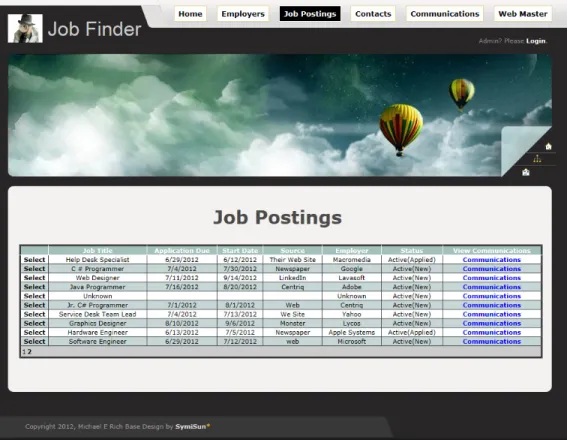
Showing Job Postings page in anonymous view. View Deleted Jobs checkbox is hidden. Add Job Posting button is hidden. Delete link in GridView is hidden.FIGURE 1.3
Showing Contacts page in anonymous view. Show Inactive Contacts is hidden. Add ContactFIGURE 1.4
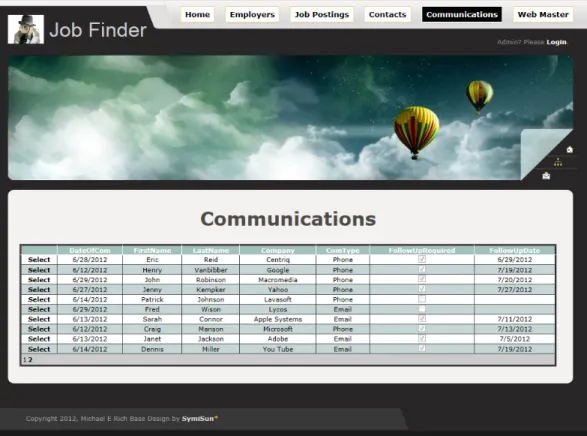
Showing Communications Page in anonymous view. Filter By Active Jobs DropDown hidden. Add Communications button is hidden.FIGURE 1.5
Showing Communications Page in logged on view. Filter By Active Jobs DropDown and AddFIGURE 1.6
Showing Companies (Employers) Page in logged on view. Show Inactive Checkbox, Add Company button and Deactivate link in GridView revealed.FIGURE 1.7
Showing Companies (Employers) Details Page in logged on view - Insert mode. Page is accessed by clicking on the Add Company button above the GridView.FIGURE 1.8
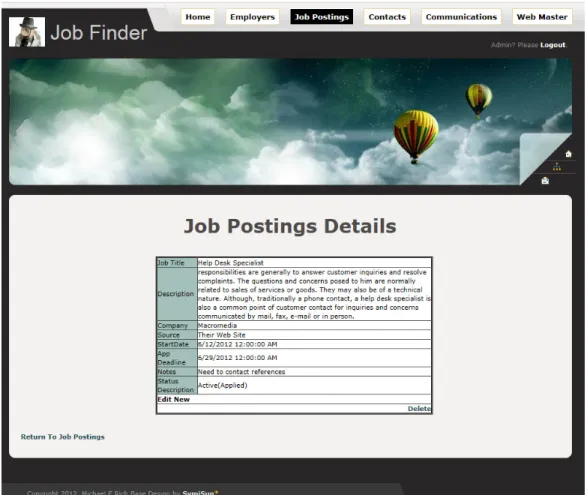
Showing Job Postings Details Page in logged on view - Edit mode. From here you can Edit, Insert or Delete a record.FIGURE 2.0
Showing New Account Wizard Page.FIGURE 2.2
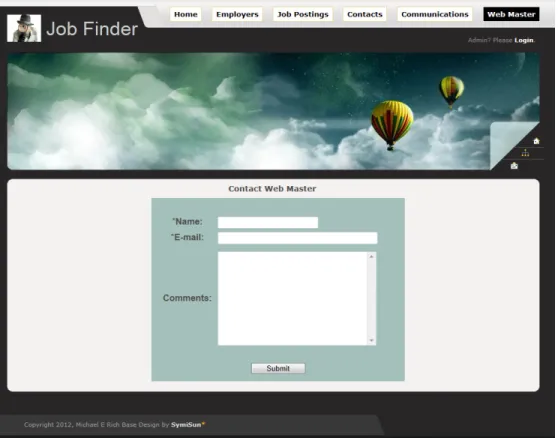
Showing Email Contact Page.Technical Section
Database Table Planning Outline:
JFCompanies DataType Allow Nulls Validation
CompanyID int (PK auto increment) no
Name nvarchar(50) no rfv
Street nvarchar(150) yes
City nvarchar(75) yes
State nvarchar(2) yes max char /dropdownlist
Zip nvarchar(10) yes rexv
Phone nvarchar(25) no rfv + rexv
Website nvarchar(2000) yes rfv + rexv
Notes nvarchar(max) yes
CompanyStatus bit no rfv
Logo nvarchar(50) yes
JFJobPostings DataType Allow Nulls Validation
JobPostingsID int (PK ai) no
JobTitle nvarchar(100) no rfv
Description nvarchar(MAX) yes
Source nvarchar(1000) yes
CompanyID int (FK) no rfv
StartDate datetime(sm) yes ajax ext
ApplicationDeadlineDate datetime(sm) yes ajax ext
JobPostingsStatus int (FK) no rfv
Notes nvarchar(MAX) yes
JFContacts DataType Allow Nulls Validation
ContactID int (PK ai) no
FirstName nvarchar(50) no rfv
LastName nvarchar(50) no rfv
OfficePhone nvarchar(25) yes ajax ext
MobilePhone nvarchar(25) yes watermark
Email nvarchar(50) no rfv + rexv
CompanyID int (FK) no rfv
Notes nvarchar(MAX) yes
IsActive bit no rfv
JFCommunications DataType Allow Nulls Validation
CommID int (PK ai) no
JobPostingsID int (FK) no rfv
ContactID int (FK) no rfv
DateOfCom datetime(sm) yes
Notes nvarchar(MAX) yes
ComType nvarchar(1000) yes possible lookup
FollowUpRequired bit yes
FollowUpDate datetime yes
JFJobPostingsStatus DataType AllowNulls Validation
JobPostingsStatus int (PK ai) no
Description nvarchar(50) no rfv
J F C o m p a n ie s C o m p a n yI D in t N o N a m e n va rc h a r( 5 0 ) N o S tr e e t n va rc h a r( 1 5 0 ) Y e s C it y n va rc h a r( 7 5 ) Y e s S ta te ID in t Y e s Z ip n va rc h a r( 1 0 ) Y e s P h o n e n va rc h a r( 2 5 ) N o W e b si te n va rc h a r( 2 0 0 0 ) Y e s N o te s n va rc h a r( M A X ) Y e s C o m p a n yS ta tu s b it N o L o g o n va rc h a r( 5 0 ) Y e s G o o g le M ap n va rc h a r( M A X ) Y e s C o lu m n N am e C o n d e n se d T y p e N u lla b le J F J o b P o s ti n g s Jo b P o st in g sI D in t N o Jo b T it le n v a rc h ar (1 0 0 ) N o D e sc ri p ti o n n v a rc h ar (M A X) Y e s S o u rc e n v a rc h ar (1 0 0 ) Y e s C o m p an yI D in t N o S ta rt D a te sm al ld a te ti m e Y e s A p p lic a ti o n D e a d lin e D at e sm al ld a te ti m e Y e s Jo b P o st in g sS ta tu s in t N o N o te s n v a rc h ar (M A X) Y e s C o lu m n N a m e C o n d e n se d T y p e N u lla b le J F C o n ta c ts C o n ta ct ID in t N o F ir st N a m e n v a rc h ar (5 0 ) N o L a st N a m e n v a rc h ar (5 0 ) N o O ff ic e P h o n e n v a rc h ar (2 5 ) Y e s M o b ile P h o n e n v a rc h ar (2 5 ) Y e s E m a il n v a rc h ar (5 0 ) N o C o m p a n y ID in t N o N o te s n v a rc h ar (M A X ) Y e s Is A c ti v e b it N o C o lu m n N am e C o n d e n se d T yp e N u lla b le J F C o m m u n ic a ti o n s C o m ID in t N o Jo b P o st in g sI D in t N o C o n ta ct ID in t N o D at e O fC o m sm a lld a te ti m e Y e s N o te s n v ar c h a r( M A X) Y e s C o m T yp e n v ar c h a r( 1 0 0 0 ) Y e s F o llo w U p R e q u ire d b it N o F o llo w U p D a te sm a lld a te ti m e Y e s C o lu m n N am e C o n d e n se d T y p e N u lla b le J F J o b P o s ti n g s S ta tu s Jo b P o st in g sS ta tu s in t N o D e sc ri p ti o n n v a rc h a r( 5 0 ) N o C o lu m n N a m e C o n d e n se d T y p e N u lla b le J F S ta te s S ta te ID in t N o S ta te S h o rt n va rc h a r( 7 ) Y e s S ta te Lo n g n va rc h a r( 5 0 ) Y e s C o lu m n N am e C o n d e n se d T .. . N u lla b le E n ti ty R e la ti o n s h ip D ia g ra m
Code Samples
SQL Query populating pop-up box (hover) for Employer details:
SELECT
JFCompanies
.
Street
+
' '
+
JFCompanies
.
City
+
' '
+
JFStates
.
StateShort
+
' '
+
CAST
(
JFCompanies
.
Zip
AS
nvarchar
(
10
))
+
' - Phone: '
+
CAST
(
JFCompanies
.
Phone
AS
nvarchar
(
10
))
+
' - Notes: '
+
JFCompanies
.
Notes
AS
Info
FROM
JFCompanies
INNER
JOIN
JFStates
ON
JFCompanies
.
StateID
=
JFStates
.
StateID
WHERE
(
JFCompanies
.
CompanyID
=
@CompanyID
)
List of controls used on JF:
1. MultiView & Views
2. Image
3. LoginStatus
4. MasterPage – ContentPlaceHolders
5. LoginView
6. LoggedInTemplate
7. LoginName
8. Login
9. Labels
10. Buttons
11. LinkButtons
12. CreateUserWizard
13. DropDownList
14. SQLDataSource
15. GridView
16. DetailsView
17. ListView
18. CheckBox
19. TextBox
20. Table
21. RequiredFieldValidator
22. RegularExpressionValidator
23. AJAX Calendar Extender
24. AJAX WaterMark Extender
25. PasswordRecovery
26. SiteMapDataSource
27. TreeView
Conclusions
I am very pleased with the outcome of this project. Future versions might include more lookup tables and greater
flexibility to be able to better track recruiting agencies that provide a number of different contacts and jobs. The
more flexibility - the more complex the table and query structure. For now I will remove the test data from the
database and begin using Job Finder in my own continuing job search.
I cannot say enough how much I appreciate all the staff at Centriq. The instructors have been brilliant and have
genuinely showed their desire for us to succeed. The classroom environment has been such as to foster
collaboration between classmates. I’ve made new friends whose questions, feedback and ideas have been key to
expanding my knowledge.
Michael E Rich
3344 S. Sterling Avenue Apt. A
Independence, MO 64052
816-365-3561
Email:
[email protected]
Website
:
www.everythingisanobject.com
http://www.linkedin.com/pub/michael-rich/37/b80/998
Application Developer
SUMMARY OF QUALIFICATIONS
• Microsoft Certified Technology Specialist (MCTS): 3.5 .NET Framework Web Applications. (expected by 09/2012) • Excellent foundation knowledge in designing and developing web applications using .NET framework.
• 13 years desk side support for 3000+ desktops, laptops and virtual machines. • Highly detail oriented IT professional who learns new technologies quickly
• As a skilled troubleshooter I keep keen focus on the task at hand and arrive quickly at an accurate solution.
TECHNICAL SKILLS
Visual Studio 2010, C#.NET 3.5, ASP.NET, ADO.NET, AJAX, LINQ, SQL, SQL Server 2008, SSMSE 2008, XHTML, JavaScript, CSS 2.0, Windows XP, Vista, Windows 7, Office 2010, McAfee ePolicy Orchestrator, Symantec Endpoint Encryption, McAfee Endpoint Encryption for PC, Encryption Anywhere, Windows PowerShell, AutoIT
PROFESSIONAL EXPERIENCE
State Street Bank (formally IFTC) June 1998 to Present
Kansas City, MO
Senior Associate - Service Desk Specialist (2007 to Present)
• Provide Desk Side Support to 3 KC locations with 3000+ PCs and employees working from home.
• Script applications to assist with ePO tasks and interface with PSTools command line tools.
• Monitor ePolicy Orchestrator server (antivirus) throughout the day being aware of success or failure of daily tasks and any threats that may be detected.
• Migrate ePolicy Orchestrator server software to new KC virtual server working with DBA to set up SQL database server on back end.
Set up policies and tasks for all PCs and Virtual Machines at 3 KC locations.
• Query SQL database of PCs for compliance with DLP – data loss prevention – McAfee lockdown of USB ports – push agent. • Manage 500 Virtual machines maintaining adequate free space and free resources for best performance.
• Support 100+ laptop users. Responsible for new deployment, imaging, encryption and loaner laptops. • Test and modify GAIA – State Street’s global image. Modify KC localization.
• Resolve Remedy (trouble) tickets sent to us by Boston or directly entered by us.
• Mentor contractors – Act as information resource, transfer knowledge to contractors on our team.
• Interface with employees answering questions, concerns and issues with Active Directory accounts.
• Add/remove/update printers on 4 print servers. Migrate printer backup info from old servers to new. Work with vendors on moves and new printer setup issues.
• Administer DHCP – InfoBlox, perform audits, add/remove/update reservations to avoid IP conflicts.
Help Desk Coordinator / PC Support Specialist II (1998 to 2007)
• Test software titles and PC BIOS for Y2K compliance at Investors Fiduciary Trust Company.
• Setup, maintain and configure isolated network with two servers and 20 to 30 workstations for Y2K testing. • Provide Help Desk tier 1 and 2 support, break fix, Take calls and assign work load to floor techs.
• Build and document PC images.
• Maintain databases: IP Master (TN3270 mainframe sessions) in MS Access.
• Serve as Lead Move Coordinator for PC moves, assure accuracy of documentation, much pre-move prep work, • DHCP, test desk jacks, re-mapping of 3270 sessions, assign workload day of move to co-workers.
• Maintain and update both RJ45 and twisted pair punch downs in LAN closets. • Setup DSL lines for Auditors.
• Diagnose and fix NT, 2000 and XP workstations utilizing SMS tools.
• Test new technology – software (Shiva) modems to replace hardware modems, Clear Cube Blade PCs, Sun Ray and Wise Thin Clients.
EDUCATION AND TECHNICAL TRAINING
Centriq Training, Leawood, KS January 2012 - Present
• Technical Competencies:
- C#, ASP.NET 3.5, ADO.NET, AJAX, LINQ, Visual Studio 2010, SQL, SQL Server 2008, SSMSE 2008, Database Design, XHTML, and CSS 2.0.
• Professional IT Project Experience:
- Widgets and Gadgets: Created a secure application for managing product data.
- S.A.T. Project: Created a secure application for managing students, courses, and scheduling data.
- Job Finder Project: Created a secure ASP.NET application for the purpose of tracking job posting related information using C# and the .NET 3.5 framework. The application tracks companies, job postings, contacts, and communication data through the lifecycle of a job application. Built and scripted a SQL Server 2008 database from scratch where all data was stored. This application uses various aspects of ASP .NET including membership, directory security, data controls, e-mail functionality, and custom error handling. Managed all aspects of this project from creating the MasterPage all the way through database and website deployment. Projects available for review live at the following URL: www.everythingisanobject.com.
• Soft Skills Training:
- Customer Care & Effective Communication.
• Certifications:
- Microsoft Certified Technology Specialist (MCTS): 3.5.NET Framework Web Applications. (expected 09/2012)
Foss Training, Shawnee Mission, KS 1998 to 2004
• Coursework completed:
- A+ and Networking Essentials Training
- Microsoft Class 688BC Internetworking with Microsoft TCP/IP on Microsoft NT 4.0
- Microsoft Class 922 Supporting Microsoft Windows NT Core Technologies
- Microsoft Class 2152BC Implementing Microsoft Windows 2000 Professional and Server
- Microsoft Class 2153AC Implementing Microsoft Windows 2000 Network Infrastructure
- Microsoft Class 2272BCP Implementing and Supporting Microsoft Windows XP Professional
- Microsoft Class Microsoft Visual Basic Scripting and Microsoft Windows Script Host Essentials
HONORS / ACTIVITIES
•
Eagle Scout – Boy Scouts of America
COMMUNITY COMMITMENT
Missouri Department of Corrections February 2004 to Present
Western Regional Diagnostics and Corrections Center – Saint Joseph MO – (WRDCC)
Volunteer Chaplain
• Coordinate Religious Services