Is
su
e
B
r
Ie
f
CA L I FOR N I A HEALTHCARE FOUNDATIONWorkflow Analysis:
EHR Deployment Techniques
Introduction
This investigation of workflow analysis and its uses in the implementation of electronic health records (EHRs) is the fourth in a series of tactically oriented issue briefs to come out of the California Networks for EHR Adoption (CNEA) initiative. The CNEA program was begun in 2006 to speed adoption and lower the overall cost of EHRs in California community clinics and health centers (CCHC).1 In August 2008, eight grantees
representing four models of EHR deployment were funded to advance the adoption of EHRs in the safety net and to share their experiences. Through this collaboration, an array of services has been provided to support the adoption of EHR and other applications. The CNEA models and grantees include:
National Network.
1. Build or leverage existing EHR networks, often national in scope, to provide for individual or groups of clinics in California. Grantees:
Open Door Community Health Center
◾ ◾
(ODCHC) in partnership with Our Community Health Information Network (OCHIN)
Voxent (formerly Next Generation Health
◾ ◾
Network)
Clinic Consortia.
2. Work with California clinic consortia to expand their existing EHR product and implementation services to at least three of their members. Grantees:
Redwood Community Health Coalition
◾ ◾
(RCHC)
California Rural Indian Health Board
◾ ◾
(CRIHB)
Multi-site Expansion.
3. Support for multi-site clinics to expand adoption of their existing EHR product and implementation services to at least three additional clinic sites. Grantees:
Golden Valley Health Centers (GVHC)
◾ ◾
Shasta Community Health Center (SCHC)
◾ ◾
Hospital-based Regional Extension.
4. Grants
awarded to local hospitals to extend their existing EHR product and implementation services to CCHCs in a region or service area. Grantees:
San Mateo Medical Center (SMMC)
◾ ◾
The Children’s Clinic, Serving Children
◾ ◾
and Their Families (TCC), Long Beach, CA For additional information about the CNEA initiative and collaborative models of adoption, please see “Making a Connection: Clinics Collaborate on EHR Deployment” from the California HealthCare Foundation at
www.chcf.org.
Overview
Organizations embarking on the process of selecting and implementing an EHR system are often advised that documenting or analyzing workflow must be their first task. This admonition amounts to a barrier for the many organizations that have little practical experience with
documenting or analyzing workflow. Encountering jargon-filled phrases such as “technology-enabled business process redesign” further mystifies the
To help clinics move effectively toward their goals in EHR adoption, this issue brief explores the stages of workflow analysis, process mapping, and process redesign. It uses examples from the CNEA grantees to illustrate the value of these tasks and how to approach them.
EHR implementation is a complex and disruptive process. Workflow analysis can organize that process and engender staff buy-in, which is necessary to be successful. Process mapping provides a visual representation of current processes that allows clinics to evaluate how well they are working, where the bottlenecks lie, where variations occur between clinical sites and/or staff, and where tasks can fall through the cracks. Process redesign completes the improvement cycle by devising ways to reorganize processes, making them more efficient now and in the future when the EHR is introduced.
The CNEA grantees’ experiences bear out the wisdom of analyzing workflow before, during, and after
implementing an EHR. Collectively, workflow analysis, process mapping, and process redesign can help clinics save money, create greater staff satisfaction, smooth the transition to the EHR, improve patients’ experience, and provide the roadmap for achieving clinical transformation through health IT.
What Is Workflow?
Workflow refers to the interaction of processes (made up of tasks) through which a clinic or hospital provides health care to patients. Patient registration is an example of a process, as is a medication refill. Confirming a patient’s insurance or checking that a prescription is current are examples of tasks within these processes. Process mapping, or flowcharting, involves diagramming all of the tasks required to carry out a process, and identifying the points at which one process intersects with another. Process analysis, or workflow analysis, addresses inefficiencies and bottlenecks revealed by the process mapping. Process redesign uses the information
gathered from the analysis and rearranges, eliminates, or restructures tasks to make the process more efficient (i.e., less time-consuming, fewer hand-offs, clear accountability, and protocol- or rules-based). Process redesign also takes into account the introduction of factors such as new hires, new programs and, most importantly, new technology systems like EHRs.
Tools, Techniques, and Tips for
Analyzing Workflow
There are many ways to approach conducting a workflow analysis, but key success factors should be considered:
Bring together a multidisciplinary team.
1. Few clinical
processes start and end in the same department. If a given process crosses functional boundaries, it is vital that a multidisciplinary group documents the process. The perspective of all involved is essential for getting an accurate picture of the end-to-end flow of information and for reaping important by-products of workflow analysis: improved communication, appreciation for everyone’s role in the process, and an understanding of the value of compromise in creating opportunities for improvement.
Make sure the process analysis—written narrative
2.
or a process map—includes, at a minimum, a
review by staff actually doing the work. Managers
may not be aware of the level of variation in process that has evolved over time, or the “on the fly” steps involved under various circumstances. What’s more, the review may provide an opportunity to see how tasks and responsibilities have evolved in ways that are not foreseen or reflected in job descriptions.
Don’t rely on the vendor for workflow analysis.
3.
Many EHR vendors will provide worksheets or other tools for workflow analysis, but the questions on these worksheets are primarily intended to inform higher-level vendor tasks (e.g., how many reference labs are used, or what type of vital sign devices are used). A greater level of specificity is required for process mapping and analysis. Clinic employees are the true
experts in the matter of overall workflow and the individual processes involved.
Assign responsibility for the task by appointing
4.
a project manager, data steward, or other point
person. This individual can keep the process moving
forward and make sure that the workflow analysis informs the EHR configuration and implementation process. They can also make sure that the workflow analysis and process maps are continually updated to reflect changes that occur over time.
Common Clinic Processes to Be Analyzed
Often clinics have a difficult time knowing where to begin or which processes are most important to analyze. One approach is to take a high-level view of a patient’s end-to-end interaction with the health center, from scheduling to keeping an appointment, checking in, receiving service, checking out, and paying for the visit. Variations in this process may occur depending on whether the individual is a new patient or a returning one; an adult or child; a walk-in patient; and/or a person with a specific type of insurance. Examining these end-to-end workflows reveals the more granular workflows and clinical processes they contain. Carlos Avina, quality improvement/EHR implementation manager with Community Health Clinic Ole, offered this list of process categories from which to start (see Table 1).
“It’s an amazing amount of work,” observed RCHC’s Dr. Robert Moore. “You have to analyze every workflow at
your site. We had a list of 150 current workflows before we began defining our future workflows.”
The next step involves interviewing or discussing the workflow with the people involved in carrying out each process in order to write detailed descriptions. The description of a process should answer these questions:
What is the process? (For example, registering a
◾ ◾
patient or refilling a prescription.)
Are there important patient care processes that do not
◾ ◾
involve seeing a patient? (For example, dealing with an abnormal lab result.)
What are the tasks or steps involved? (For example,
◾ ◾
checking a patient’s insurance or confirming that a prescription is up to date.)
What are the variations to these processes? Are there
◾ ◾
acceptable reasons for process variations by clinic site? Who completes the process? Do several types of staff
◾ ◾
perform the same tasks? Is this a good example of cross-training or is it a duplication of effort? How long does it take?
◾ ◾
Where are the bottlenecks where the process gets
◾ ◾
interrupted or slowed? Has some staff member already found a way around such points?
Do some tasks need to be done more than once in a
◾ ◾
given process? (For example, must the same data be entered at different points during patient check-in?)
Behavioral Health • Billing Processes • Case Management • Group Appointments •
Health Wellness Events
•
Immunizations
•
In-house Labs
•
Table 1. Clinic Process Categories
Medical Records (MR) • Medications • Refills • Schedule 2 •
Phone Answering Processes
• Post Visit • Provider Processes • Reception • Registration • Walk-in Clinic • Referral Processes • Incoming • Outgoing • Reporting •
Rooming Patients with Vitals
•
Scheduling Protocols
•
Provider Working Hours
•
Appointment Types
•
Triage
Are there places where the process regularly stalls?
◾ ◾
(For example, in getting information from one staff member to another.)
A particularly important component of documenting processes for EHR implementation is the collection of all of the paper forms used by staff members. This step is crucial because each of the tasks represented by a paper form will need to be provided for in the EHR. In particular, the fee ticket, super bill, or encounter form is traditionally used to collect many kinds of data beyond what is needed for billing. Notations on the encounter form often trigger the work of others in performing or arranging for ancillary services to the patient. Understanding where and how these data will be collected and communicated is an important part of the EHR-enabled workflow design.
Process Mapping
Most clinics choose to develop process maps, or
flowcharts, which can include all of the points described above. Turning a written description of a process into a
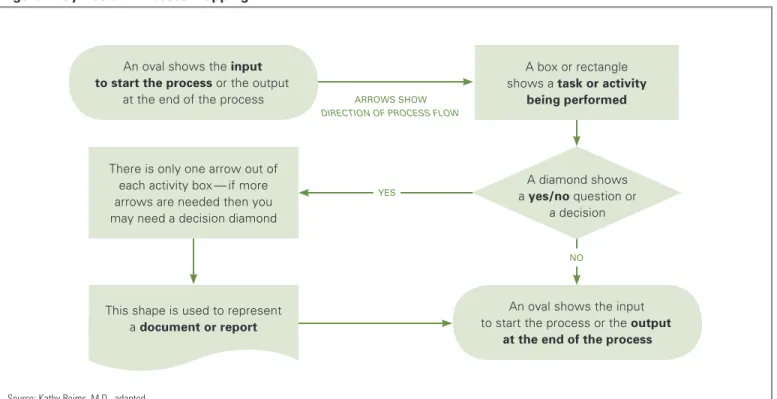
diagram provides a visual snapshot of the flow, making it easier to “see” where efforts are duplicated and where processes intersect and are dependent on each other (see Figure 1). It also adds a discipline to the task of improvement and allows for involvement of key players. Making a process map does not need to be a high-tech endeavor. First, the mapping team should walk through the process once or twice, taking notes as described above. The most effective tools for charting the process may be a whiteboard or large sheet of paper and some sticky notes. Each task in a process should be recorded on a note; then the notes are moved around until the current sequence of tasks is represented accurately. At this point, some organizations find it useful to use Microsoft Visio, Word, or PowerPoint to create process diagrams. These can help determine the level of detail at which the process analysis will be conducted. It should be possible to diagram an entire process on one page. The chart or diagram should then be posted where the team and staff can review it over several days, adding thoughts and observations. When the process map is finalized, it can be used as a “through
Source: Kathy Reims, M.D., adapted.
Figure 1. Symbols in Process Mapping
Arrows show
direction of process flow
yes
A box or rectangle shows a task or activity
being performed
There is only one arrow out of each activity box — if more arrows are needed then you may need a decision diamond
A diamond shows a yes/no question or
a decision An oval shows the input
to start the process or the output at the end of the process
An oval shows the input to start the process or the output
at the end of the process
This shape is used to represent a document or report
the lens of” analysis, providing views from multiple perspectives: technology, information flow, the patient experience, and so on.2
It is important to remember that with process mapping (as with documenting processes) the creation of a map is not just a means of enabling EHR adoption. The mapping process has value in itself. In order to create a visual representation of the tasks required to complete a given process, staff members from different parts of the clinic or different disciplines must clearly communicate what they need from each other. This communication helps build the mutual respect and understanding that are indispensable to working together in the EHR implementation process. The goal of process mapping, however it is done, is to understand the current process as a prelude to improving it both before and after the implementation of an EHR. A diagram presents the process in visual form, which can help to:
Reveal where the sequence of tasks is crucial;
◾ ◾
Identify bottlenecks or interruptions;
◾ ◾
Identify opportunities (often the same as bottlenecks);
◾ ◾
Create solutions to relieve bottlenecks;
◾ ◾
Re-analyze the new process;
◾ ◾
Make efficiency improvements; and
◾ ◾
Take advantage of the automation provided by
◾ ◾
an EHR.
Current state: “As Is” workflows
Although there may be a baseline understanding of how a particular process or task is completed in a clinic, over time staff members may develop workarounds, shortcuts, or other deviations from this baseline. When new staff members come on board, their training often consists of shadowing a fellow staff member and thus learning the deviations, which then become institutionalized. However, even in cases where a shortcut can lead to
a positive effect on productivity or efficiency, there is resistance to the institutionalization of change because of the thinking that “we’ve always done it this way.” For all of these reasons, widespread variation is often found across clinical sites within the same organization and even between staff members doing the same tasks at the same site.
Documenting back office, front office, health information management (medical records), and provider processes is a useful reality check, especially for managers who may not know how those tasks have evolved over time. In some cases, there are legitimate reasons for process variation and different workflows. For example, GVHC has 28 medical locations across two counties that have slightly different reporting and public health surveillance requirements. Understanding these requirements and planning for them is an important part of EHR set-up and implementation. By the time the multidisciplinary team has created a visual representation of the process, they have discovered the waste and bottlenecks, and have often found ways to relieve them. Thus “workflow analysis” is not an arcane skill, and does not require expertise beyond the collective experience of clinic staff. It simply takes time and input from everyone involved in carrying out the process. Further, making processes more efficient before implementing them in an EHR saves a great deal of time and difficulty later. The analysis will also help set realistic expectations for what the technology can and cannot do, and will get buy-in to the adoption process from all affected staff.
RCHC staff acknowledged that the main purpose of doing “as is” workflows is to give everyone the knowledge that what they do is part of a larger workflow, and will need to be accounted for in the EHR-enabled clinic. This part of the implementation process creates opportunities for engendering buy-in and is fundamental to change management. “It’s not just the doctors that will be impacted,” notes Nancy Oswald, RCHC’s CEO, “it’s
the whole team: front desk, medical assistants (MA), providers, billing, finance, and leaders.” The Children’s Clinic also used the workflow analysis process to their advantage. They began it six months before their intended EHR go-live by constituting a workgroup composed of staff from all clinical sites. Their goal was to standardize processes across sites, and they worked collaboratively to design processes that worked for large and small sites alike.
Future state: “To Be” workflows
Tanya Parker, director of implementations for Voxent (formerly NGHN), said, “The end result of the workflow analysis is a vision for how the clinic will operate once the EMR is implemented, as well as specific and executable plans to support that vision.” After the current “as is” workflows are documented, mapped, and analyzed, the next step is to envision how those processes will change with the introduction of an EHR system. Because it can be difficult to imagine the future state without adequate training in the EHR, Parker recommends completing this training before tackling the “to be” workflows. This ensures that staff members have some concrete ideas about what EHRs can do to automate and simplify processes.
Future state workflows reflect how technology can automate processes and make them more efficient. The workflows need to take into account seemingly mundane details such as where documentation occurs (e.g., exam room, nurses station, hallway) and the specific forms used to record data (in most cases, the encounter form or other preprinted charge ticket). The information is used to determine how these functions and communication triggers will occur within the EHR.
“One thing we didn’t do well before implementation was look at our patient flow and workflow,” said Dean Germano, CEO at SCHC. “We knew we had made a mistake when we saw our nurses walking down the hall with a piece of paper on which the patient’s vital signs
were written, looking for a computer. We then gave them laptops, which proved to be too clumsy to carry around, until we finally put computers in the exam room.” Insight about hardware placement and sufficiency is one of the important lessons to be learned through future state workflow analysis.
Several CNEA grantees found the future state workflow documents to be a vital part of their training materials. GVHC imbeds standards and policies in their workflow documentation. For example, encounters are closed within 72 hours of the visit, and the EHR training is used to enforce not only how to use the system but what the organizational performance expectations are. GVHC found it beneficial to document the current responsibilities of staff members involved in carrying out a particular process or task, and then determine how those responsibilities may change in the future to identify
Matching the Template to the Reality
Understanding workflow can have a big influence on how the EHR is configured and on its ease of use. For example, as Voxent (formerly NGHN) developed its standardized clinical documentation templates, the pilot clinics played a large role in providing input.
Their workflow involved rooming the patient, taking vitals, interviewing the patient, and then performing an ultrasound and documenting those results. The templates reflected this flow, with the ultrasound documentation placed on the third tab.
When the templates were provided to the organization’s affiliates, it was discovered that some workflows were different than the pilot clinics’. For example, one clinic performed the ultrasound first, before the patient interview and vitals. The EHR interface was clumsy for this clinic, requiring extra “clicks” as they navigated the template to document results.
This problem also necessitated more training at clinics where the established process flow didn’t match the documentation sequence presented in the EHR template.
where gaps in skills exist or where individualized training is needed. In some cases, new processes and tasks have required that the job descriptions be updated to reflect the changes in responsibilities introduced by the EHR workflows.
An example: The Medication refill Process Before and After ehr
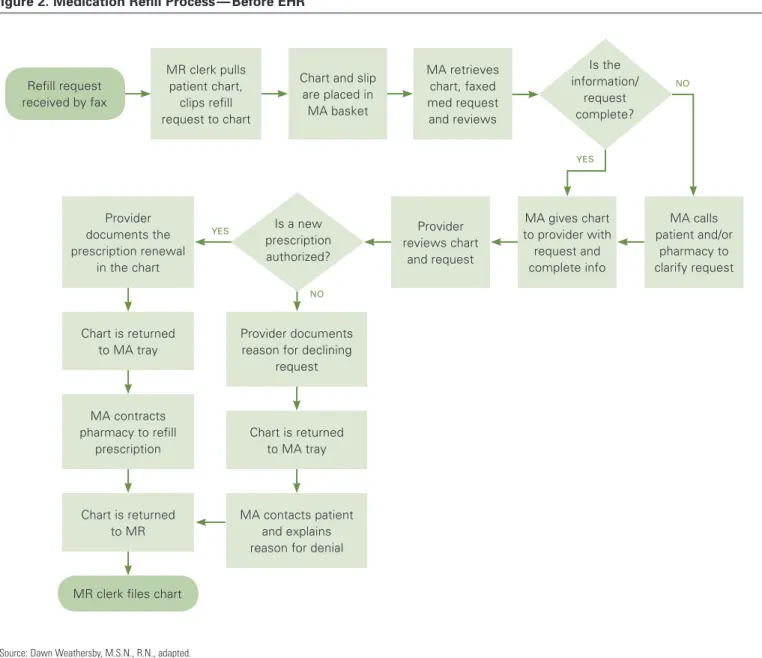
In the following example of one clinic’s process for renewing a prescription, it is clear that many staff members are involved. “Refill requests come in from the pharmacy by fax. Our records clerk gets the requests
off of the fax and pulls the patient chart. Then she clips the request to the chart and puts the whole thing in the medical assistant’s tray. The MA may have to call the patient or the pharmacy before giving the chart to the doctor. The doctor reviews the chart and the request and either creates a new prescription or not. Either way the doctor has to document the decision, and then give the chart back to the MA. The MA then either contacts the patient (if there is not a new prescription) or the pharmacy (if there is), and she documents what she did. Then the records clerk puts the charts back.” 3 Figure 2
shows the same process, converted into a diagram.
Source: Dawn Weathersby, M.S.N., R.N., adapted.
Figure 2. Medication Refill Process — Before EHR
MR clerk pulls patient chart,
clips refill request to chart
Chart and slip are placed in MA basket MA retrieves chart, faxed med request and reviews MA calls patient and/or pharmacy to clarify request MA gives chart to provider with request and complete info Provider reviews chart and request Provider documents the prescription renewal in the chart Chart is returned to MA tray MA contracts pharmacy to refill prescription Provider documents reason for declining
request
Chart is returned to MA tray
MA contacts patient and explains reason for denial Chart is returned
to MR Refill request received by fax
MR clerk files chart
yes yes no no Is the information/ request complete? Is a new prescription authorized?
In a busy clinic that handles dozens of refill requests per day, the diagram reveals several points of potential delay:
Where the records clerk needs to pull the patient’s
◾ ◾
chart, clip the fax to the chart, and provide that information to the MA;
Where the MA needs to contact the pharmacy for
◾ ◾
clarification and provide the request and the patient information to the provider;
Where the provider needs to find and review the
◾ ◾
relevant information in the patient chart;
Where the provider needs to create a new prescription
◾ ◾
order and document it; and
Where the MA needs to contact the pharmacy or
◾ ◾
patient again, once the provider has renewed or declined to renew the prescription.
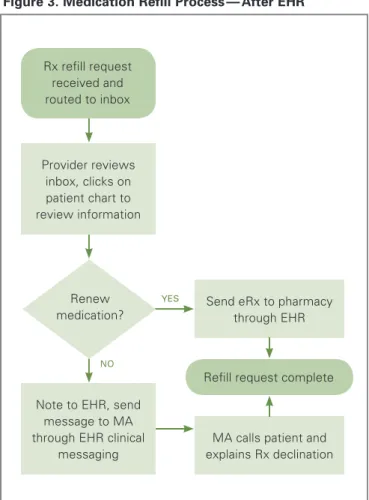
In the medication refill process diagrammed above, several of the delay points could be addressed with the capabilities of an EHR. For example, all of the steps involving pulling charts and physically moving them around can be eliminated, as can separate steps for documentation. The EHR makes all of the patient’s information available immediately, and can be customized to save new prescriptions to the patient’s record. Clinical messaging or tasking eliminates routing paper forms and notices. In the following diagram, the refill request from the pharmacy is received in the EHR, where the provider can review it and take appropriate action. The MA can then contact either the patient or the pharmacy directly if necessary, and send the completed prescription to be refilled. (See Figure 3.) In several CNEA clinics, this process has been further refined to have RNs, working according to clinical protocols and standing orders, accomplishing a large portion of the incoming refill requests thereby freeing providers of this task.
Continuous Process Improvement
Clarifying and improving work processes makes EHR adoption go more smoothly. In turn, EHR implementation further improves work processes. This “conversation” between the EHR and workflow can also facilitate productive conversations among staff members. Often this communication results in more efficient processes and workflows, and gives teams a greater ability to weather the disruption that EHR implementation can bring.
Choosing not to document and analyze workflows before EHR implementation is choosing to do it later. Documenting workflows early in the process provides the opportunity to change inefficiencies even before EHR implementation. Putting off workflow documentation and analysis simply postpones the cost and increases the
Source: Dawn Weathersby, M.S.N., R.N., adapted.
Figure 3. Medication Refill Process — After EHR
Provider reviews inbox, clicks on patient chart to review information
Note to EHR, send message to MA through EHR clinical
messaging
Send eRx to pharmacy through EHR
Refill request complete
MA calls patient and explains Rx declination Rx refill request received and routed to inbox yes no Renew medication?
chances of a chaotic go-live that lasts several months or longer. Moreover, clinics that postponed workflow analysis took longer to return to previous levels of
productivity than those that performed the analysis earlier in the process.4 SMMC found that of their 17 ambulatory
clinics, those that participated in a clinic redesign collaborative in 2004 (pre-EHR) were significantly better prepared for EHR implementation. Essentially, the EHR implementation became an extension of the redesign process and the clinics understood their workflow very well. As RCHC staff put it, “The time dedicated to developing workflows is better spent before go-live than after. The time spent before is a proactive investment; after go-live, the effort is reactive, and can negatively impact implementation.”
Even after implementation, workflows need to be audited and tweaked in a continuous improvement cycle. Ten months after the implementation of their EHR system, TCC realized that they needed to “go back to the basics” and reexamine their workflows. They found that the process maps and workflow assumptions developed during the implementation no longer fit their needs. Staff had developed their own workarounds or verbal changes to the flow that had not been put on paper. Some CNEA grantees had to stop the EHR implementation process to catch up with the documentation of new workflows and decisions that were being made rapidly and on the fly. Continuous assessment of workflow and clinic processes, therefore, is a necessary part of maximizing the benefits of
an EHR. “We have too much invested in this to not have it used properly,” noted the deputy director of GVHC.
Why Workflow Analysis Is Worth the Time
Health care workflows tend to be quite complicated because they are carried out by a variety of staff members, departments, and care partners. Documenting these processes can lead to a detailed understanding of how different tasks interact and depend on each other. Often multiple processes need to be coordinated, with time-sensitive information handed off to different departments and provided to patients.
Analyzing workflow provides other benefits. It creates better communication among managers, providers, and staff; it engenders respect for the part that each process plays in patient care; and it can provide a framework for the coordination of different processes. All of this shared knowledge can help clinics save time and money, create greater staff satisfaction, and provide a better patient experience.
In addition to making the best use of technology, redesigning processes as a group also makes the implementation of the EHR go more smoothly. All staff members come to the technology with a better understanding of how their tasks feed into the larger clinic workflow, and a greater appreciation for the tasks of others. EHR implementation can become an opportunity to re-train staff toward more efficient work processes. EHR systems consist of a set of highly flexible and configurable data input tools that can be sequenced in ways that best suit the staff members who will be inputting data or retrieving patient information. The process of EHR implementation is largely about tailoring the system to these preferences and workflows. If there are four different preferences about how to accomplish the same task, the EHR becomes difficult to set up and nearly impossible to support. As the chief medical officer at SMMC pointed out, “Whenever you do one of these
“Before they can be trained on the
EHR product, clinics need to be trained
on the opportunities for redesign.”
— NANCY OSWALD CEO, RCHC
implementations, you expose your faults.” Despite the many benefits promised for the future, approaching a workflow analysis can seem like an act of faith. It is easy to see at the beginning that it will require work and that some unpleasant realities will have to be faced. The obstacles and problems that no one has wanted to deal with will be revealed quite clearly.
It can be hard to believe, then, that conducting a workflow analysis will be worth the pain. Nevertheless, the experiences of the CNEA grantees suggest that workflow analysis is not only necessary for EHR implementation, but also a positive experience overall. Aside from enabling EHR implementation, process maps created during the workflow analysis will continue to be useful for:
Training new hires; ◾
◾
Training for newly revised EHR processes, for ◾
◾
example at a mock clinic session;
“Institutionalizing” best practices and organizational ◾
◾
standards; and
Embedding clinical protocols in a process. ◾
◾
Conclusion
This issue brief attempts to demystify the process of workflow analysis and highlight the benefits that can accrue at all stages of EHR implementation. The benefits include greater staff readiness for EHR implementation, better coordination between processes, and improved adherence to operational and clinical protocols. All of these result in enhanced satisfaction for staff and patients. Workflow analysis itself is not a high-tech undertaking. Rather it is a process that relies on human interaction, in which respectful attention is paid to each person’s work, and avenues for communication across work functions are broadened and developed. Its usefulness is grounded in the assumption that workflows are not static. They evolve over time in response to changing tasks, new care
processes, technology upgrades, and the discovery of efficiencies.
Therefore it is important to build system audits into the culture of the organization, so that ideal and actual workflows are constantly re-aligned. As one CNEA grantee observed, “Technology must support the workflow. That’s absolutely critical to success.”
A
u t h o rS.A. Kushinka, M.B.A., Full Circle Projects, Inc.
A
b o u t t h eF
o u n d At i o nThe California HealthCare Foundation works as a catalyst to fulfill the promise of better health care for all Californians. We support ideas and innovations that improve quality, increase efficiency, and lower the costs of care. For more information, visit us online at www.chcf.org.
e
n d n ot e s1. The Blue Shield of California Foundation, the California HealthCare Foundation (CHCF), and the Community Clinics Initiative (CCI), a joint project of Tides and The California Endowment, are funding this project.
2. Adapted from Kathy Reims, M.D., presentation to grantees of the Building Clinic Capacity for Quality initiative, August 3, 2010. She is chief medical officer of CSI Solutions, LLC.
3. This written description and the diagrams which follow it are based on examples in: Dawn Weathersby, M.S.N., R.N., Quality Improvement Advisor, DOQ-IT. “Understanding Workflow: Part 1.” Doctor’s Office Quality-Information Technology. Posted on the AHRQ Web site (www.healthit.ahrq.gov).
4. California HealthCare Foundation, “For the Record: EHR Adoption in the Safety Net” (www.chcf.org).