Web Services Users Guide
Adaptive Server
®
Enterprise
DOCUMENT ID: DC10061-01-1550-01 LAST REVISED: October 2009
Copyright © 2009 by Sybase, Inc. All rights reserved.
This publication pertains to Sybase software and to any subsequent release until otherwise indicated in new editions or technical notes. Information in this document is subject to change without notice. The software described herein is furnished under a license agreement, and it may be used or copied only in accordance with the terms of that agreement.
To order additional documents, U.S. and Canadian customers should call Customer Fulfillment at (800) 685-8225, fax (617) 229-9845. Customers in other countries with a U.S. license agreement may contact Customer Fulfillment via the above fax number. All other international customers should contact their Sybase subsidiary or local distributor. Upgrades are provided only at regularly scheduled software release dates. No part of this publication may be reproduced, transmitted, or translated in any form or by any means, electronic, mechanical, manual, optical, or otherwise, without the prior written permission of Sybase, Inc.
Sybase trademarks can be viewed at the Sybase trademarks page at http://www.sybase.com/detail?id=1011207. Sybase and the marks listed are trademarks of Sybase, Inc. ® indicates registration in the United States of America.
Java and all Java-based marks are trademarks or registered trademarks of Sun Microsystems, Inc. in the U.S. and other countries. Unicode and the Unicode Logo are registered trademarks of Unicode, Inc.
IBM and Tivoli are registered trademarks of International Business Machines Corporation in the United States, other countries, or both. All other company and product names mentioned may be trademarks of the respective companies with which they are associated. Use, duplication, or disclosure by the government is subject to the restrictions set forth in subparagraph (c)(1)(ii) of DFARS 52.227-7013 for the DOD and as set forth in FAR 52.227-19(a)-(d) for civilian agencies.
Contents
About This Book ... vii
PART 1 INTRODUCTION CHAPTER 1 Understanding Adaptive Server Enterprise Web Services ... 3
Overview ... 3
Adaptive Server Enterprise Web Services ... 4
Advantages of ASE Web Services ... 4
Stored procedures and functions ... 4
SQL ... 5
Security ... 5
LDAP ... 5
User-defined Web services ... 5
Web services standards ... 6
XML ... 6
WSDL ... 9
SOAP ... 11
CHAPTER 2 Understanding the ASE Web Services Engine... 13
Producer of Web services ... 14
Producer components ... 14
Producer Web methods... 15
User-defined Web services ... 16
Consumer of Web services ... 17
Consumer components ... 17
Proxy tables... 19
PART 2 CONFIGURATION CHAPTER 3 Configuring ASE Web Services ... 23
Contents
Configuring during installation ... 24
Configuring after installation... 24
Licensing ... 25 Configuration files ... 25 ws.properties file ... 26 logging.properties file ... 26 wsmsg.properties file... 26 Security ... 26 Configuring SSL ... 27
Installing a certificate for Microsoft .NET... 28
PART 3 ADMINISTRATION CHAPTER 4 Using ASE Web Services ... 33
Using the ASE Web Services Engine ... 33
Starting and stopping the ASE Web Services Engine... 33
ASE Web Services methods ... 36
Using sp_webservices... 39
Invoking a Web service ... 43
Using user-defined Web services ... 46
Commands for user-defined Web services ... 46
Using sp_webservices with user-defined Web services... 51
Security for user-defined Web services... 53
Auditing for user-defined Web services... 54
ASE Web Services logging ... 55
ASE Web Services log files... 56
Rolling over log files ... 56
Using Sybase Central ... 57
CHAPTER 5 Sample Applications ... 59
Apache sample client ... 59
Creating the sample client... 59
Using runexecute ... 60
Microsoft .NET sample client ... 64
Contents
Remote server class definition setting... 69
Unmapped RPC/encoded Web method ... 70
Truncated document/literal results ... 70
Starting ASE Web Services Engine ... 70
Locating WSDL ... 71
Specifying entries in ws.properties ... 71
Windows NT command-line arguments ... 72
Run or stop scripts fail ... 72
Null passwords ... 72
Specifying SOAP endpoints with SSL ... 73
Abnormal termination of sp_webservices ‘add’ ... 73
Web Services proxy table restrictions ... 73
sysattributes table entry ... 74
Diagnostic tools ... 74
Detailed logging... 75
Enabling JDBC-level tracing... 75
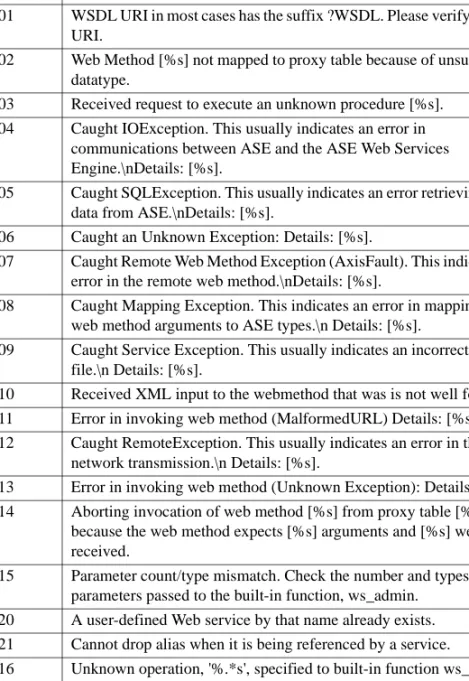
Messages ... 76
PART 5 APPENDIXES A P P E N D I X A Installation Contents ... 81
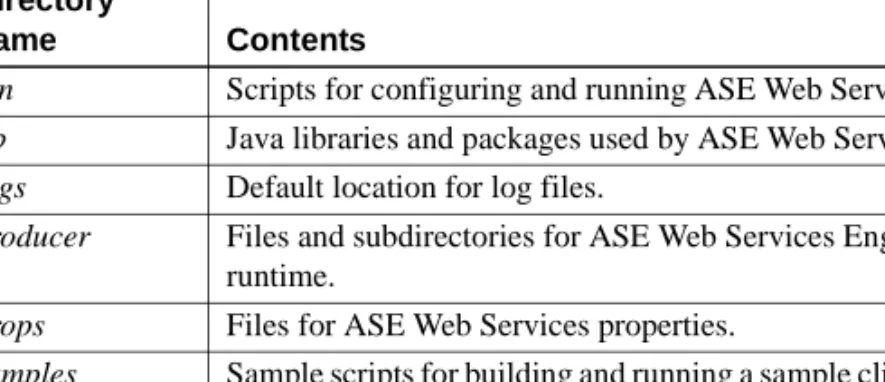
ASE Web Services directory tree ... 81
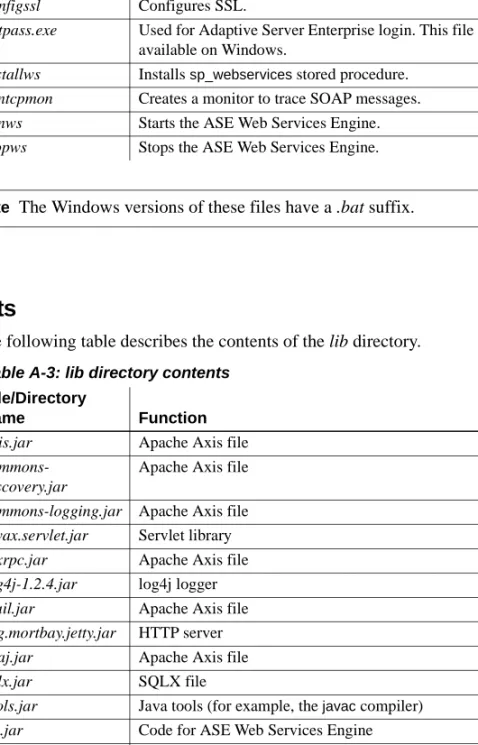
bin directory contents ... 82
lib directory contents ... 82
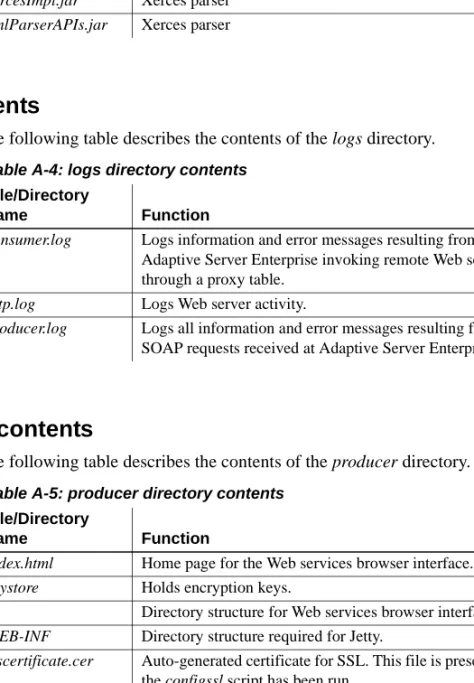
logs directory contents ... 83
producer directory contents ... 83
props directory contents ... 84
samples directory contents... 84
A P P E N D I X B Configuration Properties... 85
ws.properties ... 85
myres.properties ... 87
Specifying properties file entries ... 89
A P P E N D I X C SOAP and Adaptive Server Enterprise Datatype Mapping ... 91
Datatype mapping ... 91
SOAP-to-ASE datatype mappings ... 91
ASE-to-SOAP datatype mappings for the create service command 94 Glossary ... 95
Contents
About This Book
Audience This document is intended for users who want to access user-defined Web services or the Web services provided by Adaptive Server® Enterprise or to use Adaptive Server Enterprise to access the Web services of other applications.
How to use this book This document consists of the following parts:
• Part 1, “Introduction to Adaptive Server® Enterprise Web Services” • Chapter 1, “Understanding Adaptive Server Enterprise Web
Services”
• Chapter 2, “Understanding the ASE Web Services Engine” • Part 2, “Configuration”
• Chapter 3, “Configuring ASE Web Services” • Part 3, “Administration”
• Chapter 4, “Using ASE Web Services” • Chapter 5, “Sample Applications” • Part 4, “Troubleshooting”
• Chapter 6, “Troubleshooting” • Part 5, “Appendixes”
• Appendix A, “Installation Contents” • Appendix B, “Configuration Properties”
• Appendix C, “SOAP and Adaptive Server Enterprise Datatype Mapping”
Related documents The Adaptive Server® Enterprise documentation set consists of: • The release bulletin for your platform – contains last-minute
A more recent version of the release bulletin may be available. To check for critical product or document information that was added after the release of the product CD, use the Sybase Product Manuals Web site. • The installation guide for your platform – describes installation,
upgrading, and some configuration procedures for all Adaptive Server and related Sybase products.
• New Feature Summary – describes the new features in Adaptive Server, the system changes added to support those features, and changes that may affect your existing applications.
• Active Messaging Users Guide – describes how to use the Active Messaging feature to capture transactions (data changes) in an Adaptive Server Enterprise database, and deliver them as events to external applications in real time.
• Component Integration Services Users Guide – explains how to use Component Integration Services to connect remote Sybase and non-Sybase databases.
• The Configuration Guide for your platform – provides instructions for performing specific configuration tasks.
• Glossary – defines technical terms used in the Adaptive Server documentation.
• Historical Server Users Guide – describes how to use Historical Server to obtain performance information from Adaptive Server.
• Java in Adaptive Server Enterprise – describes how to install and use Java classes as datatypes, functions, and stored procedures in the Adaptive Server database.
• Job Scheduler Users Guide – provides instructions on how to install and configure, and create and schedule jobs on a local or remote Adaptive Server using the command line or a graphical user interface (GUI). • Migration Technology Guide – describes strategies and tools for migrating
About This Book
• Monitoring Tables Diagram – illustrates monitor tables and their entity relationships in a poster format. Full-size available only in print version; a compact version is available in PDF format.
• Performance and Tuning Series – is a series of books that explain how to tune Adaptive Server for maximum performance:
• Basics – contains the basics for understanding and investigating performance questions in Adaptive Server.
• Improving Performance with Statistical Analysis – describes how Adaptive Server stores and displays statistics, and how to use the set statistics command to analyze server statistics.
• Locking and Concurrency Control – describes how to use locking schemes to improve performance, and how to select indexes to minimize concurrency.
• Monitoring Adaptive Server with sp_sysmon – discusses how to use sp_sysmon to monitor performance.
• Monitoring Tables – describes how to query Adaptive Server monitoring tables for statistical and diagnostic information.
• Physical Database Tuning – describes how to manage physical data placement, space allocated for data, and the temporary databases. • Query Processing and Abstract Plans – explains how the optimizer
processes queries, and how to use abstract plans to change some of the optimizer plans.
• Quick Reference Guide – provides a comprehensive listing of the names and syntax for commands, functions, system procedures, extended system procedures, datatypes, and utilities in a pocket-sized book (regular size when viewed in PDF format).
• Reference Manual – is a series of books that contains detailed Transact-SQL® information:
• Building Blocks – discusses datatypes, functions, global variables, expressions, identifiers and wildcards, and reserved words. • Commands – documents commands.
• Procedures – describes system procedures, catalog stored procedures, system extended stored procedures, and dbcc stored procedures. • Tables – discusses system tables, monitor tables, and dbcc tables. • System Administration Guide –
• Volume 1 – provides an introduction to the basics of system administration, including a description of configuration parameters, resource issues, character sets, sort orders, and instructions for diagnosing system problems. The second part of Volume 1 is an in-depth discussion about security administration.
• Volume 2 – includes instructions and guidelines for managing physical resources, mirroring devices, configuring memory and data caches, managing multiprocessor servers and user databases, mounting and unmounting databases, creating and using segments, using the reorg command, and checking database consistency. The second half of Volume 2 describes how to back up and restore system and user databases.
• System Tables Diagram – illustrates system tables and their entity relationships in a poster format. Full-size available only in print version; a compact version is available in PDF format.
• Transact-SQL Users Guide – documents Transact-SQL, the Sybase-enhanced version of the relational database language. This guide serves as a textbook for beginning users of the database management system, and also contains detailed descriptions of the pubs2 and pubs3 sample databases.
• Troubleshooting Series –
• Troubleshooting: Error Messages Advanced Resolutions – contains troubleshooting procedures for problems you may encounter. The problems discussed here are the ones the Sybase Technical Support staff hear about most often.
• Troubleshooting and Error Messages Guide – contains detailed instructions on how to resolve the most frequently occurring Adaptive Server error messages.
• Encrypted Columns Users Guide – describes how to configure and use encrypted columns with Adaptive Server.
• In-Memory Database Users Guide – describes how to configure and use in-memory databases.
About This Book
• Using Backup Server with IBM® Tivoli® Storage Manager – describes how to set up and use the IBM Tivoli Storage Manager to create Adaptive Server backups.
• Using Sybase Failover in a High Availability System – provides
instructions for using Sybase Failover to configure an Adaptive Server as a companion server in a high availability system.
• Unified Agent and Agent Management Console – describes the Unified Agent, which provides runtime services to manage, monitor, and control distributed Sybase resources.
• Utility Guide – documents the Adaptive Server utility programs, such as isql and bcp, which are executed at the operating system level.
• Web Services Users Guide – explains how to configure, use, and troubleshoot Web services for Adaptive Server.
• XA Interface Integration Guide for CICS, Encina, and TUXEDO – provides instructions for using the Sybase DTM XA interface with X/Open XA transaction managers.
• XML Services in Adaptive Server Enterprise – describes the Sybase native XML processor and the Sybase Java-based XML support, introduces XML in the database, and documents the query and mapping functions that are available in XML services.
Other sources of
information Use the Sybase Getting Started CD, the SyBooks™ CD, and the Sybase
® Product Manuals Web site to learn more about your product:
• The Getting Started CD contains release bulletins and installation guides in PDF format, and may also contain other documents or updated information not included on the SyBooks CD. It is included with your software. To read or print documents on the Getting Started CD, you need Adobe Acrobat Reader, which you can download at no charge from the Adobe Web site using a link provided on the CD.
• The SyBooks CD contains product manuals and is included with your software. The Eclipse-based SyBooks browser allows you to access the manuals in an easy-to-use, HTML-based format.
Some documentation may be provided in PDF format, which you can access through the PDF directory on the SyBooks CD. To read or print the PDF files, you need Adobe Acrobat Reader.
Refer to the SyBooks Installation Guide on the Getting Started CD, or the README.txt file on the SyBooks CD for instructions on installing and starting SyBooks.
• The Sybase Product Manuals Web site is an online version of the SyBooks CD that you can access using a standard Web browser. In addition to product manuals, you will find links to EBFs/Maintenance, Technical Documents, Case Management, Solved Cases, newsgroups, and the Sybase Developer Network.
To access the Sybase Product Manuals Web site, go to Product Manuals at http://www.sybase.com/support/manuals/.
Sybase certifications
on the Web Technical documentation at the Sybase Web site is updated frequently.
❖ Finding the latest information on product certifications
1 Point your Web browser to Technical Documents at http://www.sybase.com/support/techdocs/.
2 Select Products from the navigation bar on the left. 3 Select a product name from the product list and click Go.
4 Select the Certification Report filter, specify a time frame, and click Go. 5 Click a Certification Report title to display the report.
❖ Finding the latest information on component certifications
1 Point your Web browser to Availability and Certification Reports at http://certification.sybase.com/.
2 Either select the product family and product under Search by Product; or select the platform and product under Search by Platform.
3 Select Search to display the availability and certification report for the selection.
❖ Creating a personalized view of the Sybase Web site (including support pages)
Set up a MySybase profile. MySybase is a free service that allows you to create a personalized view of Sybase Web pages.
1 Point your Web browser to Technical Documents at http://www.sybase.com/support/techdocs/.
About This Book
Sybase EBFs and software
maintenance
❖ Finding the latest information on EBFs and software maintenance
1 Point your Web browser to the Sybase Support Page at http://www.sybase.com/support.
2 Select EBFs/Maintenance. If prompted, enter your MySybase user name and password.
3 Select a product.
4 Specify a time frame and click Go. A list of EBF/Maintenance releases is displayed.
Padlock icons indicate that you do not have download authorization for certain EBF/Maintenance releases because you are not registered as a Technical Support Contact. If you have not registered, but have valid information provided by your Sybase representative or through your support contract, click Edit Roles to add the “Technical Support Contact” role to your MySybase profile.
5 Click the Info icon to display the EBF/Maintenance report, or click the product description to download the software.
Conventions Table 1 shows the conventions for syntax statements that appear in this manual:
Table 1: Font and syntax conventions for this manual
Element Example
Command names,procedure names, utility names, and other keywords display in sans serif font.
select sp_configure
Database names and datatypes are in sans serif font. master database Book names, file names, variables, and path names are
in italics.
System Administration Guide sql.ini file
column_name
$SYBASE/ASE directory
Variables—words that stand for values that you fill in—when they are part of a query or statement, are in italics in Courier font.
select column_name
from table_name
where search_conditions
Type parentheses as part of the command. compute row_aggregate (column_name)
Double colon, equals sign indicates that the syntax is written in BNF notation. Do not type this symbol. Indicates “is defined as.”
• Syntax statements (displaying the syntax and all options for a command) appear as follows:
sp_dropdevice [device_name]
For a command with more options:
select column_name from table_name where search_conditions
In syntax statements, keywords (commands) are in normal font and identifiers are in lowercase. Italic font shows user-supplied words. • Examples showing the use of Transact-SQL commands are printed like
this:
select * from publishers
• Examples of output from the computer appear as follows:
pub_id pub_name city state
Curly braces mean that you must choose at least one of the enclosed options. Do not type the braces.
{cash, check, credit}
Brackets mean that to choose one or more of the enclosed options is optional. Do not type the brackets.
[cash | check | credit]
The comma means you may choose as many of the options shown as you want. Separate your choices with commas as part of the command.
cash, check, credit
The pipe or vertical bar( | ) means you may select only one of the options shown.
cash | check | credit
An ellipsis (...) means that you can repeat the last unit as many times as you like.
buy thing = price [cash | check | credit] [, thing = price [cash | check | credit] ]...
You must buy at least one thing and give its price. You may choose a method of payment: one of the items enclosed in square brackets. You may also choose to buy additional things: as many of them as you like. For each thing you buy, give its name, its price, and (optionally) a method of payment.
About This Book
In this manual, most of the examples are in lowercase. However, you can disregard case when typing Transact-SQL keywords. For example, SELECT, Select, and select are the same.
Adaptive Server’s sensitivity to the case of database objects, such as table names, depends on the sort order installed on Adaptive Server. You can change case sensitivity for single-byte character sets by reconfiguring the Adaptive Server sort order. For more information, see the System Administration Guide for Adaptive Server.
Accessibility
features This document is available in an HTML version that is specialized for accessibility. You can navigate the HTML with an adaptive technology such as
a screen reader, or view it with a screen enlarger.
Adaptive Server HTML documentation has been tested for compliance with U.S. government Section 508 Accessibility requirements. Documents that comply with Section 508 generally also meet non-U.S. accessibility guidelines, such as the World Wide Web Consortium (W3C) guidelines for Web sites.
Note You might need to configure your accessibility tool for optimal use. Some screen readers pronounce text based on its case; for example, they pronounce ALL UPPERCASE TEXT as initials, and MixedCase Text as words. You might find it helpful to configure your tool to announce syntax conventions. Consult the documentation for your tool.
For information about how Sybase supports accessibility, see Sybase Accessibility at http://www.sybase.com/accessibility. The Sybase Accessibility site includes links to information on Section 508 and W3C standards.
If you need help Each Sybase installation that has purchased a support contract has one or more designated people who are authorized to contact Sybase Technical Support. If you cannot resolve a problem using the manuals or online help, please have the designated person contact Sybase Technical Support or the Sybase subsidiary in your area.
P A R T 1
Introduction
This part introduces Adaptive Server Enterprise Web Services.
C H A P T E R 1
Understanding Adaptive Server
Enterprise Web Services
This chapter discusses the following:
Overview
A Web service is a self-contained, modular application that can be accessed through a network connection. Using a Web service, the end user trades performance for increased interoperability enforced by adherence to the Simple Object Access Protocol (SOAP), Web Services Description Language (WSDL), and Extensible Markup Language (XML) open standards.
Regardless of the programming language in which it has been implemented, a Web service can be accessed from many different platforms and operating systems, thus greatly enhancing the ability for diverse applications to share data. By using many discrete Web services, each handling a limited set of specific tasks, business enterprises can dynamically and incrementally integrate by exposing their existing software in a secure and controlled environment. By providing a standardized means to invoke remote applications, Web services reduce the amount of code required for infrastructure. By enabling users to extract implementation from exposed interfaces (WSDL), Web services provide the tools needed to build a service-oriented architecture (SOA).
Topic Page
Overview 3
Adaptive Server Enterprise Web Services 4 Advantages of ASE Web Services 4
Adaptive Server Enterprise Web Services
Adaptive Server Enterprise Web Services
Adaptive Server Enterprise (ASE) Web Services consists of the ASE Web Services Engine that runs independently of Adaptive Server Enterprise. The ASE Web Services Engine provides the following functionality: • Enables client applications to access SQL and stored procedures in
Adaptive Server Enterprise using SOAP.
• Enables Adaptive Server Enterprise to access the Web services of other applications. These external Web services are mapped to Adaptive Server Enterprise proxy tables at runtime.
• Provides user-defined Web services, which enable the execution of SQL commands in Adaptive Server Enterprise using a Web browser or SOAP client.
For more information on the ASE Web Services Engine, see Chapter 2, “Understanding the ASE Web Services Engine.”
Advantages of ASE Web Services
With the ASE Web Services Engine, the user can use stored procedures, user-defined functions, and SQL to query and manipulate data. A client application can send a SOAP request containing SQL commands and receive results through SOAP. Data is returned according to the SQLX standard, and the client application can receive XML data, schema, and DTDs.
Stored procedures and functions
Stored procedures separate the internal, logical view of the data from business-level logic and extend the influence and performance of SQL. Stored procedures can also be executed remotely. The user can use both stored
CHAPTER 1 Understanding Adaptive Server Enterprise Web Services
SQL
Because SQL can be used to manipulate XML data, SOAP-enabled client applications can use the ASE Web Services Engine to manage data in Adaptive Server Enterprise. SQL can also be used to invoke Web services through the ASE Web Services Engine.
Security
The ASE Web Services security features include Secure Sockets Layer (SSL) and provide important database security and authorization features, like access control through the Lightweight Directory Access Protocol (LDAP).
LDAP
LDAP is an Internet protocol for accessing directories in a distributed environment. An LDAP server stores the user information needed to establish connections between resources and grant access to directories, eliminating the need for client applications to know this information. ASE Web Services enables client applications to access Web methods using LDAP.
ASE Web Services supports LDAP version 3 servers. For more detailed information on using LDAP to enable user authentication and to locate Adaptive Server Enterprise data servers, see the System Administration Guide for Adaptive Server Enterprise.
User-defined Web services
Using user-defined Web services, you can execute SQL commands in Adaptive Server Enterprise using a Web browser or SOAP client. This functionality allows you to define the name of a Web service, the SQL to execute, and the URL location.
User-defined Web services allow you to create an interface to Adaptive Server Enterprise that is compliant with SOA.
Web services standards
Web services standards
Web services are structured with XML, described with WSDL, and transferred with SOAP over HTTP. ASE Web Services enables client applications to access Web services and can consume remote Web services.
XML
XML is used to describe data. XML is derived from SGML and possesses some qualities of other markup languages, like HTML. However, XML is extensible because its tags are user-defined, making it ideal for exchanging data in a structure that is intelligible to two or more communicating applications.
Example
The following isql query to the pubs2 database finds information on discounts: select * from discounts
This query produces the following result set:
discounttype stor_id lowqty highqty discount
--- --- --- --- ---Initial Customer NULL NULL NULL 10.500000 Volume Discount NULL 100 1000 6.700000 Huge Volume Discount NULL 1001 NULL 10.000000 Customer Discount 8042 NULL NULL 5.000000
This result set can be represented in XML in many ways. The following is an XML representation produced by ASE Web Services and formatted in SQLX, which is part of the ANSI standard for SQL:
<?xml version="1.0" encoding="UTF-8">
<ws xmlns:xsi="http://www.w3.org/2001/XMLSchema-instance">
CHAPTER 1 Understanding Adaptive Server Enterprise Web Services
<discount>6.7</discount> </row>
<row>
<discounttype>Huge Volume Discount </discounttype> <lowqty>1001</lowqty> <discount>10.0</discount> </row> <row> <discounttype>Customer Discount</discounttype> <stor_id>8042</stor_id> <discount>5.0</discount> </row> </ws>
The initial line describes the XML version and character encoding. The remaining tags are user-defined and describe both the structure and data of the document. These user-defined tags enable documents to be customized for a specific application, such as one that uses discount information to compute prices.
XML document structure
The user-defined elements and their arrangement in a well-formed XML document is defined either by a Document Type Definition (DTD) or an XML schema.
Following is a DTD for the previous example for discount information: <!DOCTYPE ws [
<!ELEMENT ws (row*)>
<!ELEMENT row (discounttype, stor_id?, lowqty?, highqty?, discount)>
<!ELEMENT discounttype (#PCDATA)> <!ELEMENT stor_id (#PCDATA)> <!ELEMENT lowqty (#PCDATA)> <!ELEMENT highqty (#PCDATA)> <!ELEMENT discount (#PCDATA)> ]>
The following is part of an XML schema for the previous example for discount information:
<xsd:schema
xmlns:xsd="http://www.w3.org/2001/XMLSchema"
Web services standards <xsd:import namespace="http://www.w3.org/2001/XMLSchema" schemaLocation="http://www.iso-standards.org/mra/9075/sqlx.xsd" /> <xsd:complexType name="RowType.ws"> <xsd:sequence> <xsd:element name="discounttype" type="VARCHAR_40" />
<xsd:element name="stor_id" type="CHAR_4" minOccurs="0" maxOccurs="1"/>
<xsd:element name="lowqty" type="SMALLINT" minOccurs="0" maxOccurs="1"/>
<xsd:element name="highqty" type="SMALLINT" minOccurs="0" maxOccurs="1"/>
<xsd:element name="discount" type="FLOAT" /> </xsd:sequence>
</xsd:complexType>
<xsd:complexType name="TableType.ws"> <xsd:sequence>
<xsd:element name="row" type="RowType.ws" minOccurs="0" maxOccurs="unbounded"/> </xsd:sequence> </xsd:complexType> <xsd:simpleType name="VARCHAR_40"> <xsd:restriction base="xsd:string"> <xsd:maxLength value="40"/> </xsd:restriction> </xsd:simpleType> <xsd:simpleType name="VARCHAR_4"> <xsd:restriction base="xsd:string"> <xsd:maxLength value=”4”/> </xsd:restriction> </xsd:simpleType> <xsd:simpleType name="SMALLINT"> <xsd:restriction base="xsd:integer"> <xsd:maxInclusive value="32767"/> <xsd:minInclusive value="-32768"/> </xsd:restriction> </xsd:simpleType>
CHAPTER 1 Understanding Adaptive Server Enterprise Web Services
An XML schema or DTD can be included as part of the XML document they describe or be referenced as separate files. The respective file suffixes for an XML schema and a DTD are .xsd and .dtd.
For more detailed information on XML, refer to the following documents: • World Wide Web Consortium (W3C), at http://www.w3.org
• W3C, Extensible Markup Language (XML), at http://www.w3.org/XML/
WSDL
A WSDL document is written in XML and describes a Web service. In addition to specifying the location of the Web service, a WSDL description also specifies the methods provided by the Web service, and the messages, datatypes, and communication protocols used by the Web service with the following tags:
• <service> – defines the name of the Web service. For example, a Web service called ExecuteStoredProcService could be named as follows: <wsdl:service name="ExecuteStoredProcService">
<wsdl:port binding="impl:aseSoapBinding" name="ase">
<wsdlsoap:address location="http://myserver:8181/services/ase"/> </wsdl:port>
</wsdl:service>
A WSDL document may contain one or more <service> tags. In the case of the ASE Web Services Engine, there is only one service, which is named “ase.”
• <binding> – defines the communication protocols used. The following example uses the SOAP protocol:
<wsdl:binding name="aseSoapBinding" type="impl:ExecuteStoredProc"> ...
</wsdl:binding>
WSDL also supports use of HTTP and MIME protocols. • <port> – specifies the Web service address. For example: <wsdl:port binding="impl:aseSoapBinding" name="ase">
<wsdlsoap:address location="http://myserver:8181/services/ase"/> </wsdl:port>
The <port> tag has attributes for name and binding. • <message> – defines the messages used. For example:
Web services standards
<wsdl:message name="executeRequest">
<wsdl:part name="service" type="xsd:string"/> <wsdl:part name="userName" type="xsd:string"/> <wsdl:part name="password" type="xsd:string"/> <wsdl:part name="sqlxOptions" type="xsd:string"/> <wsdl:part name="sql" type="xsd:string"/>
</wsdl:message>
This is a request message for a method called executeRequest. The <part> tags correspond to parameter values for the method call in a request message and to return values in a response.
• <operation> – associates a message with a Web method request or response. For example:
<wsdl:operation name="execute" parameterOrder="service userName password sqlxOptions sql">
<wsdl:input message="impl:executeRequest" name="executeRequest"/> <wsdl:output message="impl:executeResponse" name="executeResponse"/> </wsdl:operation>
• <portType> – defines the methods provided. The <operation> tag is a child element of <portType>. For example:
<wsdl:portType name="ExecuteStoredProc">
<wsdl:operation name="execute" parameterOrder="aseServerName asePortNumber
....
</wsdl:operation> </wsdl:portType>
• <types> – defines the datatypes used. WSDL uses XML schema syntax to define datatypes.
WSDL is usually automatically generated by the ASE Web Services Engine and can be viewed in a Web browser at the following location:
http://myserver:producer_port/services/ase?wsdl
where myserver is the name of the host on which the ASE Web Services Engine is running, and producer_port is the port number.
CHAPTER 1 Understanding Adaptive Server Enterprise Web Services
SOAP
SOAP is a platform- and language-independent protocol based on XML that is used to send messages and data between applications. SOAP defines the structure of messages, describes how messages are to be processed, and provides rules for encoding application-defined datatypes. SOAP allows applications to send and receive remote procedure calls (RPCs) using any standard transport-layer protocol, usually HTTP.
SOAP message structure
A SOAP message consists of a header and a body, both of which are contained in a SOAP envelope. Generally, the SOAP request message contains no header information, but the response message corresponding to the previous request message contains a header and does not necessarily show the body of the message..
For more detailed information on SOAP, refer to the following documents: • Simple Object Access Protocol (1.1):
http://www.w3.org/TR/SOAP/
• Simple Object Access Protocol (1.2) Part 1: http://www.w3.org/TR/soap12-part1/ • Simple Object Access Protocol (1.2) Part 2:
C H A P T E R 2
Understanding the ASE Web
Services Engine
This chapter discusses the following:
The ASE Web Services Engine provides the following functionality: • Producer of Web services – enables a client application to access
Adaptive Server Enterprise stored procedures and SQL using SOAP. • Consumer of Web services – enables Adaptive Server Enterprise to
access and execute Web methods.
Topic Page
Producer of Web services 14
Producer of Web services
Producer of Web services
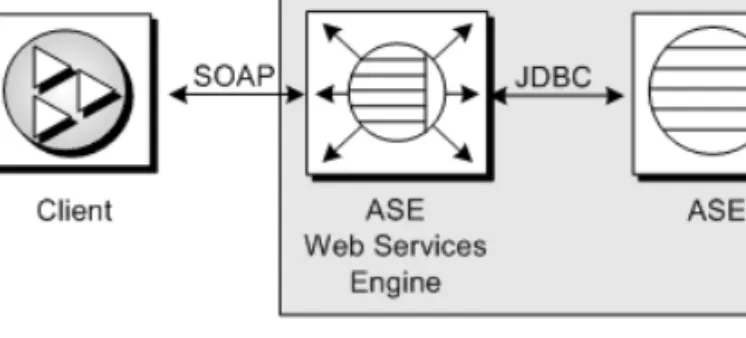
The ASE Web Services Engine acts as a producer of Web services by enabling a client application to access Adaptive Server Enterprise stored procedures and SQL using SOAP. The output of the ASE Web Services Engine complies with SQLX, which is defined as part of the ANSI specification for SQL.
Note Sybase recommends that you run the ASE Web Services Engine on the same machine as Adaptive Server Enterprise.
Figure 2-1: ASE Web Services Engine for client access to ASE
The client can send a SQL or stored procedure command as a SOAP request, and any result is returned as a SOAP response. The data in the SOAP response conforms to the SQLX standard.
Producer components
Acting as a producer of Web services, the ASE Web Services Engine uses three components: an HTTP handler, a SOAP handler, and an XML mapper.
CHAPTER 2 Understanding the ASE Web Services Engine
Figure 2-2: ASE Web Services Engine as producer
HTTP handler
The HTTP handler supports HTTP 1.1 and listens for requests sent using the HTTP POST and GET methods. The HTTP handler also supports SSL connections.
Note Do not use GET HTTP requests. These commands embed all arguments within the URL, which cannot be encrypted. Use POST HTTP, which moves all arguments into the body of the HTTP request and allows the whole contents to be encrypted.
SOAP handler
The SOAP handler supports SOAP 1.2 and processes SOAP requests. The SOAP handler also generates WSDL files describing Web services.
XML mapper
The XML mapper encodes relational data, returned from Adaptive Server Enterprise through JDBC, into XML that complies with the SQLX standard. The XML mapper also generates a DTD and an XML schema to describe the data.
Producer Web methods
The ASE Web Services Engine provides the following methods: • execute – executes a SQL statement or stored procedure.
• login – establishes a persistent connection to Adaptive Server Enterprise. • logout – explicitly terminates an Adaptive Server Enterprise connection.
Producer of Web services
For information on using these Web methods, see Chapter 4, “Using ASE Web Services.”
User-defined Web services
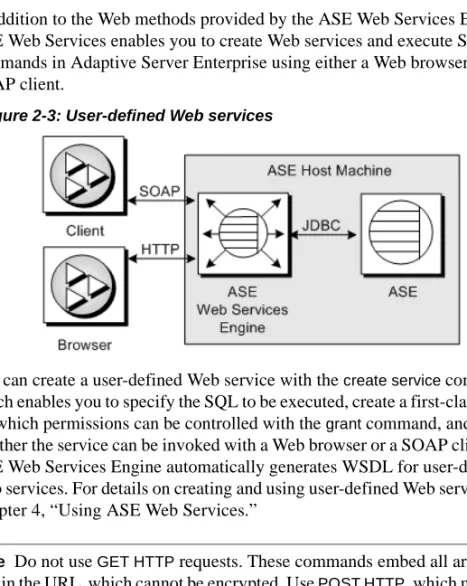
In addition to the Web methods provided by the ASE Web Services Engine, ASE Web Services enables you to create Web services and execute SQL commands in Adaptive Server Enterprise using either a Web browser or a SOAP client.
Figure 2-3: User-defined Web services
You can create a user-defined Web service with the create service command, which enables you to specify the SQL to be executed, create a first-class object for which permissions can be controlled with the grant command, and control whether the service can be invoked with a Web browser or a SOAP client. The ASE Web Services Engine automatically generates WSDL for user-defined Web services. For details on creating and using user-defined Web services, see Chapter 4, “Using ASE Web Services.”
Note Do not use GET HTTP requests. These commands embed all arguments within the URL, which cannot be encrypted. Use POST HTTP, which moves all arguments into the body of the HTTP request and allows the whole contents to be encrypted.
CHAPTER 2 Understanding the ASE Web Services Engine
Consumer of Web services
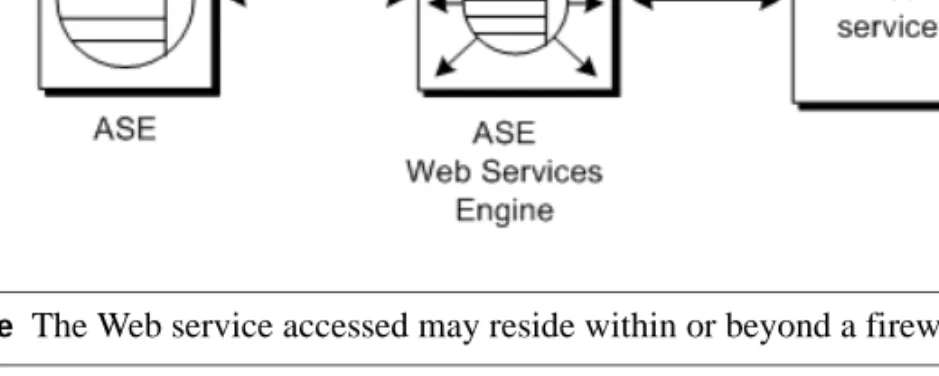
The ASE Web Services Engine acts as a consumer of Web services by enabling Adaptive Server Enterprise to access and execute Web methods. A Web method is made accessible by mapping it to an Adaptive Server Enterprise proxy table using information provided in the WSDL file for the Web method. A Web method can then be invoked with a select on the proxy table.
Figure 2-4: Accessing remote Web services
Note The Web service accessed may reside within or beyond a firewall.
Consumer components
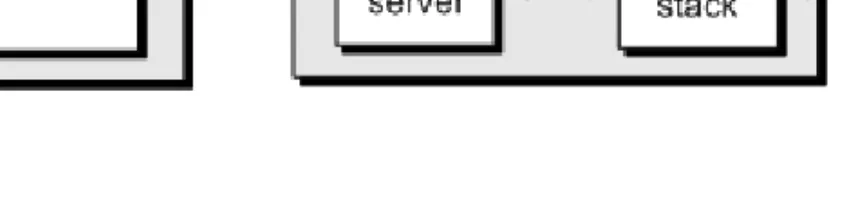
Acting as a consumer of Web services, the ASE Web Services Engine uses a Specialty Data Store (SDS) server and a WSDL parser. The SDS is used as a Component Integration Service (CIS) to map the Web method to a proxy table. The proxy table is constructed using a WSDL file parsed with Apache Axis.
Consumer of Web services
Figure 2-5: ASE Web Services Engine as consumer
SDS server
When Adaptive Server Enterprise receives a select statement for a Web method proxy table, Adaptive Server Enterprise forwards the request to the ASE Web Services Engine in a Tabular Data Stream™ (TDS). The SDS server, which acts as a server for CIS, allows the ASE Web Services Engine to intercept and handle the TDS from Adaptive Server Enterprise.
SOAP stack
The SOAP stack is a layered set of functionalities that collectively handle the serialization and transport of XML-encoded data. The SOAP stack uses the WSDL file for a Web method to determine the structure of a corresponding proxy table. The SOAP stack also generates SOAP requests corresponding to the select statement submitted to Adaptive Server Enterprise and sends these SOAP requests to a SOAP server. The SOAP stack supports both RPC/encoded and document/literal Web methods.
CHAPTER 2 Understanding the ASE Web Services Engine
RPC/encoded
methods The SOAP messages for an RPC/encoded Web method contain an XML element for each method parameter. Messages for an RPC/encoded Web
method are encoded according to the SOAP specification. The proxy table representing an RPC/encoded Web method contains a column for each input and output parameter.
Note If an RPC/encoded Web method has no input or output parameters, it cannot be mapped to a proxy table. A proxy table for a Web method without parameters would have no columns. A table with no columns cannot be created in Adaptive Server Enterprise.
Note Currently, only simple types are mapped to columns. Complex types or arrays used in RPC/encoded Web methods result in the Web method not being mapped to a proxy table.
Document/literal
methods In the SOAP messages for a document/literal Web method, the communicating parties specify the data being transmitted and formatted according to XML
schemas incorporated into the WSDL file. Messages for a document/literal Web method are serialized and deserialized according to the WSDL file for the Web method. The proxy table representing a document/literal Web method contains two columns: _inxml and outxml.
The Web Services Interoperability (WSI) Organization, which defines practical interoperability guidelines, recommends using document/literal Web methods to enhance portability. Sybase supports this recommendation.
Proxy tables
Because they point to Web methods, Web Services proxy tables are of type procedure and are subject to all restrictions for this type:
• Commands – You cannot issue a delete, update, or insert command against a table of type procedure, nor can you issue a create index, truncate table, or alter table command.
• Joins – A Web Services proxy table can only be joined with one other table, and that table cannot be another Web Services proxy table. • Queries – Column names beginning with underscore ('_') are used to
specify input parameters. These columns are referred to as parameter columns and must be in the where clause of a select statement.
Consumer of Web services
For a complete description of the restrictions for procedure tables, see the Component Integration Services User’s Guide.
P A R T 2
Configuration
This part provides instructions for configuring Web Services in Adaptive Server.
C H A P T E R 3
Configuring ASE Web Services
This chapter discusses the following:
ASE Web Services is installed as part of the installation for Adaptive Server Enterprise. ASE Web Services may be configured during the installation of Adaptive Server Enterprise using a configuration wizard or after the installation from Sybase Central. For instructions on installing Adaptive Server Enterprise, see the Installation Guide for Adaptive Server Enterprise.
Note Unless otherwise specified, directories listed in this and subsequent chapters are assumed to reside under the $SYBASE/WS-15_0 directory on UNIX and the %SYBASE%\WS-15_0 directory on Windows.
Configuration
You can use the Configuration Utility to configure ASE Web Services either during or after the installation of ASE Web Services:
• Configuring during installation – You have the option of configuring ASE Web Services during a custom installation of the ASE Web Services feature. Topic Page Configuration 23 Licensing 25 Configuration files 25 Security 26
Configuration
• Configuring after installation – If you do not configure the Web Services feature during installation, you must configure the feature from Sybase Central after the installation is complete. Sybase Central provides a GUI Configuration Utility similar to that used in the installation procedure. You can also configure the Web Services feature in silent mode or in
command/console mode.
Configuring during installation
To configure Web Services, activate the Configuration Utility during the installation of the Web Services feature, and follow the steps in the wizard.
Configuring after installation
If you have already installed ASE Web Services, you can start the
Configuration Utility from the Adaptive Server Enterprise plug-in to Sybase Central. You can configure Web Services using the installation GUI, or you can use the command/console or silent modes.
❖ Starting the Configuration Utility GUI from Sybase Central
1 Click on the Utilities folder in the Folders view for the Adaptive Server Enterprise plug-in of Sybase Central.
2 Find the Configure Web Service icon in the details view to the right of the Folders view. Select the icon for Configure Web Service to start the Configuration Utility.
3 Follow the steps in the wizard.
❖ Starting the Configuration Utility in command/console mode
1 Open a console window. 2 Enter the following command:
CHAPTER 3 Configuring ASE Web Services
❖ Starting the Configuration Utility in silent mode
1 Edit the entries in your myres.properties file to indicate the desired values. To set a property, add “=” and the property value to the myres.properties entry. For details on the contents of the myres.properties file, see “myres.properties” in the Appendix, “Configuration Properties.” 2 Open a console window.
3 Enter the following command: aseplugin -s path
where path is the path to your myres.properties file.
In silent mode, no further user action is necessary to configure Web Services.
Licensing
License entry for ASE Web Services is handled by the InstallShield installation for Adaptive Server Enterprise.
To check out your ASE Web Services license from SySAM, do the following before you run the ASE Web Services Engine:
1 Establish an isql session with your Adaptive Server Enterprise.
2 Activate ASE Web Services by entering the following command in isql: sp_configure ‘enable webservices’, 1
Configuration files
The props directory contains the following configuration files: • ws.properties file
• logging.properties file • wsmsg.properties file
Security
ws.properties file
The ws.properties file contains configuration settings for ASE Web Services. For details on these configuration properties, see Appendix B, “Configuration Properties.”
logging.properties file
The logging.properties file defines where logging output is sent. You can direct output to a log file or to the console. If output is directed to a log file, you can specify when to roll over to a new log file. You can also control the format of logging messages. For information on log rollover policies, see “Rolling over log files” on page 56.
The logging.properties file entries and logging behavior follow that for the Apache log4j package. For detailed information, refer to the documentation for log4j at http://jakarta.apache.org/log4j/docs/documentation.html.
wsmsg.properties file
The wsmsg.properties file is for internal use by ASE Web Services.
Security
To ensure secure operation of ASE Web Services, Sybase recommends that you do the following:
• Install ASE Web Services on the same machine as Adaptive Server Enterprise.
• Use SSL to connect to the ASE Web Services Engine. For instructions on configuring SSL, see “Configuring SSL” on page 27.
CHAPTER 3 Configuring ASE Web Services
Configuring SSL
Note Two certificate passwords are created by default as “sybase” from InstallShield during installation. You can change these from Sybase Central later.
SSL is configured automatically using the Configuration Utility from InstallShield or from Sybase Central. However, you can also configure SSL manually. To manually configure SSL for ASE Web Services, run the configssl script, which can be found in the bin directory:
configssl -d <domain_hostName> -k <keystore> -h <httpsPort> -f <property_file>
-c <certificate_password> -s <keystore_password> where:
• domain_hostName is the host name of the URL to connect to using SSL. For example, the domain_hostName for the following URL would be mydomainhostname:
http://mydomainhostname:8183/services/ase There is no default for this parameter value.
• keystore is the location and file at which to store certificates. The default location for UNIX is $SYBASE/WS-15_0/props/keystore, or
%SYBASE%\WS-15_0\props\keystore for Windows.
• httpsPort is the port on which to listen for an SSL connection. The default is 8182.
• property_file is the location and name of the properties file to update. The default location for UNIX is $SYBASE/WS-15_0/props/ws.properties, or %SYBASE%\WS-15_0\props\ws.properties for Windows.
• certificate_password is the password for the certificate. There is no default for this parameter value. If no password is supplied when the script is invoked, the script will prompt for a value.
Security
• keystore_password is the password for the keystore. There is no default for this parameter value. If no password is supplied when the script is invoked, the script will prompt for a value.
Note You can also add your own certificate for SSL. For instructions on how to add your own certificate, see the documentation for the keytool utility in the JRE that manipulates the keystore file. The JRE delivered with ASE Web Services is version 1.4.
Installing a certificate for Microsoft .NET
A Microsoft .NET client requires a certificate to access the ASE Web Services Engine using SSL. Use the following procedure to install a certificate for Microsoft .NET.
❖ Installing a certificate for Microsoft .NET
1 Start the ASE Web Services Engine with SSL. For instructions on starting the ASE Web Services Engine, see “Starting and stopping the ASE Web Services Engine” on page 33.
2 Enter the following in the Address bar of Microsoft Internet Explorer: https://<producer_host>:<SSL_port>
where:
• producer_host is the host on which the ASE Web Services Engine runs.
• SSL_port is the port for the ASE Web Services Engine. The Security Alert dialog box appears.
3 Click View Certificate. The Certificate dialog box appears.
4 Click Install Certificate. The Certificate Manager Import wizard opens. 5 Click Next until the Certificate Manager Import wizard indicates that the
CHAPTER 3 Configuring ASE Web Services
❖ Verifying the certificate installation
1 Close all browser windows. 2 Restart Microsoft Internet Explorer.
3 Enter the following in the Address bar of Microsoft Internet Explorer: https://<producer_host>:<SSL_port>
where:
• producer_host is the host on which the ASE Web Services Engine runs.
• SSL_port is the port for the ASE Web Services Engine. No Security Alert dialog box should appear.
P A R T 3
Administration
This part describes product functionality and administrative tasks.
C H A P T E R 4
Using ASE Web Services
This chapter discusses the following:
Before using ASE Web Services, make sure you have completed the configuration tasks in Chapter 3, “Configuring ASE Web Services.”
Using the ASE Web Services Engine
This section documents the following:
• Starting and stopping the ASE Web Services Engine • ASE Web Services methods
• Using sp_webservices • Invoking a Web service
Starting and stopping the ASE Web Services Engine
To start the ASE Web Services Engine for ASE Web Services, execute the runws script, which is located in the bin directory:
runws -U <ase_username> -P <ase_password> -S <ase_server_name> -f <property_file> -v
To stop the ASE Web Services Engine for ASE Web Services, execute the stopws script, also located in the bin directory:
stopws -U <ase_username> -P <ase_password>
Topic Page
Using the ASE Web Services Engine 33 Using user-defined Web services 46
ASE Web Services logging 55
Using the ASE Web Services Engine
-S <ase_server_name> -f <property_file> -v The parameters are the same for both the runws and stopws scripts:
• ase_username is the user name for the Adaptive Server Enterprise. There is no default for this parameter value. If you do not supply a value for this parameter, you will be prompted for one.
• ase_password is the password for the Adaptive Server Enterprise. There is no default for this parameter value. If you do not supply a value for this parameter, you will be prompted for one.
• ase_server_name is the name of the Web service. There is no default for this parameter value. If you do not supply a value for this parameter, you will be prompted for one.
• property_file is the location and name of the properties file to update. The default location for UNIX is $SYBASE/WS-15_0/props/ws.properties, or %SYBASE%\WS-15_0\props\ws.properties for Windows.
• -v specifies that the ASE Web Services Engine should display version
information at startup or shutdown.
Conditions
The ASE Web Services Engine will start or stop if the following conditions are met:
• The ase_server_name provided is located on an LDAP server pointed to by the libtcl.cfg file or in the interfaces file for Adaptive Server Enterprise. ASE Web Services first searches for an entry containing the value of ase_server_name on an LDAP server pointed to by the libtcl.cfg file. ASE Web Services locates the libtcl.cfg file using the
com.sybase.ase.ws.libtcl entry in the ws.properties file. If no entry is found on an LDAP server, ASE Web Services looks for an entry in the interfaces file for Adaptive Server Enterprise.
CHAPTER 4 Using ASE Web Services
• A successful login can be made using the ase_username and ase_password provided.
Note The password for an Adaptive Server Enterprise user cannot be set to a null string. The sa login allows null-string passwords by default. Sybase does not recommend using null passwords.
• The login to Adaptive Server Enterprise has sa role privileges.
• The following stored procedure command has been executed in isql for your Adaptive Server Enterprise:
sp_configure ‘enable webservices’, 1
Verification
After successfully executing the runws script, verify that ASE Web Services is enabled and that the ASE Web Services Engine is running.
❖ Verifying that ASE Web Services is enabled
To verify that ASE Web Services is enabled:
• Execute the following command on Adaptive Server Enterprise: sp_configure ’enable webservices’
If sp_configure returns a value of 1, the Web Services feature has been enabled. A return value of 0 indicates the feature is not enabled. ❖ Verifying that the ASE Web Services Engine is running
• Check the producer.log or consumer.log file in the logs directory for messages indicating that the ASE Web Services Engine is running. For example:
2004-03-29 16:29:29.522 INFO [main] - Starting HTTP Server on Port: 8181 For SSL, the log indicates an HTTPS port and related SSL information. For example:
2004-03-29 16:29:29.532 INFO [main] - Https Port [8182], KeyPassword: ...
Note The runproducer, stopproducer, runconsumer, and stopconsumer scripts have been kept in 15.0 release for compatibility with previous releases of ASE Web Services. However, in the 15.0 release, these scripts call the runws and stopws scripts.
Using the ASE Web Services Engine
ASE Web Services methods
To access ASE Web Services, your client must use the methods exposed by the ASE Web Services Engine. These methods are mapped in SOAP as rpc:
<soap:binding style=”rpc” ...> Message data is encoded:
<soap:body use=”encoded” ....>
The ASE Web Services Engine provides the following methods: • execute – executes a SQL statement or stored procedure.
• login – establishes a persistent connection to Adaptive Server Enterprise. • logout – explicitly terminates an Adaptive Server Enterprise connection. These methods are supported by Adaptive Server Enterprise by default and are provided as one Web service (with one WSDL file). The syntax for these methods is the same whether they are invoked using HTTP or SSL.
execute
The execute method executes a Transact-SQL statement or stored procedure in Adaptive Server Enterprise.
Syntax execute aseServerName userName password sqlxOptions sql
Parameters • aseServerName
SOAP string indicating the name of the Adaptive Server Enterprise server in the interfaces file or LDAP server.
At each invocation of the execute method, ASE Web Services uses the value of aseServerName in the same way that ase_server_name is used to start or stop the ASE Web Services Engine. See “Starting and stopping the ASE Web Services Engine” on page 33 for details.
CHAPTER 4 Using ASE Web Services
• sqlxOptions
SOAP string indicating one or more option parameters. These parameters specify characteristics of the SQLX result set. The following are valid option parameters:
• general
• binary={hex | base64}
• columnstyle={element | attribute} • entitize={yes | no | cond} • format={yes | no} • header={yes | no} • multipleentitize={yes | no} • multipleresults={all | data} • ncr={non_ascii | no} • nullstyle={attribute | omit} • prefix=“value” • root={yes | no} • rowname=“value” • schemaloc=“value” • statement={yes | no} • tablename=“value” • targetns=“value” • xsidecl={yes | no}
You must provide a value for value. For more information on SQLX functions and options, see XML Services in Adaptive Server Enterprise. • sql
SOAP string indicating the SQL statement or stored procedure to be executed on Adaptive Server Enterprise. The size of the SOAP string specified in the sql parameter is limited by the value of the
com.sybase.ase.ws.maxpostsize property setting in the ws.properties file. For a description of this and other properties, see Appendix B,
Using the ASE Web Services Engine
Example 1 This example checks the version number for Adaptive Server Enterprise. execute johndoe-sun sa password "tablename=ws" "select @@version"
This example invokes the Web method directly. ASE Web Services returns an XML schema, a DTD, and a result set containing the result of the executed statement.
Example 2 This example computes a left join on tables in the pubs2 database. execute johndoe-sun sa password "tablename=ws" "select title, price, au_fname, au_lname from (titles left join titleauthor on titles.title_id =
titleauthor.title_id ) left join authors on
titleauthor.au_id = authors.au_id and titles.price > $15.00”
login
The login method establishes a persistent connection to Adaptive Server Enterprise.
Syntax login aseServerName userName password
Parameters • aseServerName
SOAP string indicating the name of the Adaptive Server Enterprise on which to execute the SQL statement or stored procedure.
For the login method, ASE Web Services uses the value of aseServerName in the same manner as for the execute method.
• username
SOAP string indicating the user ID needed to log in to the Adaptive Server Enterprise.
• password
SOAP string indicating the password needed to log in to the Adaptive Server Enterprise.
CHAPTER 4 Using ASE Web Services
Usage Before a SQL statement or stored procedure can be executed on Adaptive Server Enterprise, a connection must first be established. However, the login method is optional. If you invoke an execute method without first invoking the login method, ASE Web Services automatically establishes a non-persistent connection to Adaptive Server Enterprise. The login method initiates a persistent connection to Adaptive Server Enterprise. The connection is terminated with the logout method. Persistent connections that are inactive for 60 seconds are terminated automatically.
logout
The logout method terminates a persistent connection to Adaptive Server Enterprise.
Syntax logout
Usage The logout method terminates a persistent connection to Adaptive Server Enterprise established by the login method.
Using sp_webservices
The sp_webservices stored procedure creates and manages the proxy tables used in the ASE Web Services Engine. This section documents the options and parameters for sp_webservices.
The sp_webservices stored procedure has the following options: • add – creates a proxy table.
• help – displays usage information for sp_webservices. • list – lists the proxy tables mapped to a WSDL file. • modify – modifies timeout setting.
• remove – removes proxy tables mapped to a WSDL file.
There are additional sp_webservices options for use with user-defined Web services. For information on these options, see “Using sp_webservices with user-defined Web services” on page 51.
Note For information on restrictions for Web Services proxy tables, see “Web Services proxy table restrictions” in Chapter 6, “Troubleshooting.”
Using the ASE Web Services Engine
add
The add option is used to create a proxy table for a Web method specified by a WSDL file. When the add option is used successfully, the list option is invoked automatically to describe the schema of the new proxy table.
Syntax sp_webservices 'add', 'wsdl_uri' [, sds_name] [, 'method_name=proxy_table
[,method_name=proxy_table ]* ' ]
Parameters • wsdl_uri
The location for the WSDL file to be mapped to the new proxy table. If this parameter is specified, Web Services ensures that the URI exists in the syswsdl table.
• sds_name
The name specified for the ASE Web Services Engine in the interfaces or sql.ini file. The default value is ws. If no entry exists in the sysattributes table, an error results.
• method_name
The name of the Web method to be mapped to a proxy table. The method_name specified must be the name of a Web method specified in the associated WSDL file.
• proxy_table
The name of proxy table to which the Web method specified in method_name is mapped.
Usage If you not specify method_name and proxy_table values for a Web method, the proxy table generated for the Web method is, by default, the name of the Web method specified in the WSDL file. If there is already a proxy table with the name of this Web method, a new proxy table is generated with a name like the following:
method_nameN
where method_name is the default proxy table name, and N is a digit from 1 to 9 denoting each successive mapping of the Web method. There can be as many
CHAPTER 4 Using ASE Web Services
The output from the add option lists the methods that have been successfully mapped to proxy tables as well as those that have not been mapped. The name of a proxy table for an unmapped Web method is indicated as NULL in the output from the add option.
Note The columns used for input and output vary for proxy tables generated for RPC/encoded Web methods and document/literal Web methods. A proxy table representing an RPC/encoded Web method contains a column for each input and output parameter. A proxy table representing a document/literal Web method contains two columns, _inxml and outxml.
Note For information on datatype mappings, see Appendix C, “SOAP and Adaptive Server Enterprise Datatype Mapping.”
help
The help option provides instructions and examples illustrating how to use the sp_webservices stored procedure.
Syntax sp_webservices help [, ’option’]
Parameters • option
The option for which to provide detailed instructions. Valid values are add, list, remove, and modify.
Usage If no value is specified for option, the help option prints a brief syntax description for the add, addalias, deploy, dropalias, list, listalias, listudws, modify, remove, and undeploy options.
list
The list option is used to list Web methods described in a WSDL file.
Syntax sp_webservices 'list' [, 'wsdl_uri'] [, sds_name]
Parameters • wsdl_uri
The URI for the mapped WSDL file. If no value is specified for wsdl_uri, the list option displays information about all Web methods that have been mapped to proxy tables.
Using the ASE Web Services Engine
The name of the SDS server specified for the ASE Web Services Engine in the interfaces or sql.ini file. The default value is ws. If no entry exists in the sysattributes table, an error results.
If neither the wsdl_uri nor the sds_name parameter is specified, all entries in the sysattributes table are listed, ordered by wsdlid.
Usage If the Web methods described in the WSDL file have already been mapped to proxy tables, the list option prints information about each proxy table. If the Web methods described in the WSDL file have not already been mapped to proxy tables, the list option prints SQL that can be used to create proxy tables.
modify
The modify option is used to modify the attribute information for a WSDL file.
Syntax sp_webservices 'modify', 'wsdl_uri', 'timeout=time'
Parameters • wsdl_uri
The URI of the WSDL file for which attribute information is to be changed.
• time
The interval in seconds during which a Web method must respond before the operation is aborted.
remove
The remove option is used to remove a proxy table mapping for a Web method.
Syntax sp_webservices 'remove', 'wsdl_uri' [, sds_name]
Parameters • wsdl_uri
The URI of the WSDL file for which the proxy table is to be removed. • sds_name
The name of the SDS server specified for the ASE Web Services Engine in the interfaces or sql.ini file. The default value is . If no entry exists in