IBM Tivoli Storage Manager
for UNIX
Backup-Archive Clients Installation and
User’s Guide
Version 5 Release 2
GC32-0789-03
IBM Tivoli Storage Manager
for UNIX
Backup-Archive Clients Installation and
User’s Guide
Version 5 Release 2
GC32-0789-03
Note
Before using this information and the product it supports, read the general information under “Notices” on page 417.
Fourth Edition (April 2003)
This edition applies to version 5, release 2, modification 0 of IBM Tivoli Storage Manager (5698-ISM), IBM Tivoli Storage Manager Extended Edition (5698-ISX), IBM Tivoli Storage Manager for Storage Area Networks (5698-SAN), and to all subsequent releases and modifications until otherwise indicated in new editions or technical newsletters. Order publications through your IBM representative or the IBM branch office that serves your locality.
Your feedback is important in helping to provide the most accurate and high-quality information. If you have comments about this manual or any other Tivoli Storage Manager documentation, see “Contacting customer support” on page xiv.
© Copyright International Business Machines Corporation 1993, 2003. All rights reserved.
Contents
Tables . . . vii
About this book . . . ix
Who should read this manual . . . ix
IBM Tivoli Storage Manager Web Site . . . x
Conventions used in this book . . . x
Reading syntax diagrams . . . x
Related publications . . . xiii
Downloading or ordering publications . . . . xiv
Contacting customer support . . . xiv
Reporting a problem . . . xv
Internet . . . xv
Summary of changes for Tivoli
Storage Manager . . . xvii
Technical changes for version 5.2 - April 2003 . . xvii
Technical changes for version 5.1.5 - September 2002 xx Technical changes for version 5.1 - April 2002 . . . xxi
Chapter 1. Installing Tivoli Storage
Manager
. . . 1
Migrating from earlier versions . . . 1
Upgrade path for clients and servers . . . 1
NDMP support requirements (Extended Edition only) . . . 1
Additional migration information . . . 2
Client environment requirements . . . 2
AIX client environment . . . 3
HP-UX client environment . . . 4
Linux for X86 client environment . . . 5
Linux for pSeries client environment . . . 6
Linux for IBM eServer zSeries and S/390 client environment . . . 7
OS/390 and z/OS UNIX System Services client environment . . . 8
Solaris client environment . . . 8
Pre-installation information . . . 9
Online startup information . . . 10
Installing the backup-archive client . . . 10
Installing the AIX client . . . 12
Installing the HP-UX clients . . . 14
Installing the Linux86 client . . . 17
Installing the Linux390 client . . . 19
Installing the Linuxppc client . . . 21
Installing the Solaris clients . . . 23
Chapter 2. Configuring Tivoli Storage
Manager . . . 27
Creating and modifying the client system options file (required root user or authorized user task) . . 27
Creating a default client user options file (optional root user or authorized user task). . . 29
Setting options in an options file . . . 31
Configuring the Web client . . . 32
Tivoli Storage Manager firewall support . . . . 33
Configuring the client scheduler . . . 35
Registering your workstation with a server (required) . . . 35
Using closed registration . . . 36
Using open registration . . . 36
Associating your client node with a host system . . 36
Creating an include-exclude list (optional) . . . . 37
Using include-exclude options . . . 38
Processing include and exclude options . . . . 42
Setting environment variables . . . 44
Setting language environment variables . . . . 44
Setting font defaults . . . 46
Setting processing environment variables . . . 46
Setting Bourne and Korn shell variables . . . . 47
Setting C shell variables . . . 48
Setting API environmental variables . . . 48
Chapter 3. Getting started
. . . 49
Root and authorized user tasks . . . 49
Tivoli Storage Manager client authentication . . . 50
Starting a GUI session . . . 50
Password and user ID . . . 51
Configuration Wizard . . . 51
Starting a command line session . . . 51
Using batch mode . . . 51
Using interactive mode . . . 52
Starting: Additional considerations . . . 52
Starting a Web client session. . . 53
Setting user privileges . . . 55
Starting the client scheduler automatically . . . . 55
Changing your password . . . 55
Sorting file lists . . . 56
Displaying online help . . . 56
Ending a session. . . 57
Online forum . . . 57
Other sources of online help . . . 57
Chapter 4. Backing up your data
. . . 59
Planning your backups . . . 59
Do you want to back up or archive files? . . . . 60
ACL support . . . 60
Pre-backup considerations . . . 61
LAN-free data movement. . . 61
Using an include-exclude options list to control processing . . . 62
Encryption . . . 62
Performing an incremental, selective, or incremental-by-date backup . . . 62
Full and partial incremental backup . . . 63
Incremental-by-date backup . . . 64
Comparing full incremental, partial incremental, and incremental-by-date backups . . . 65
Selective backup . . . 65
Saving access permissions . . . 65
© Copyright IBM Corp. 1993, 2003
iii
| ||
||
Setting a virtual mount point . . . 66
Backing up data using the GUI . . . 66
Backing up data using the command line . . . 67
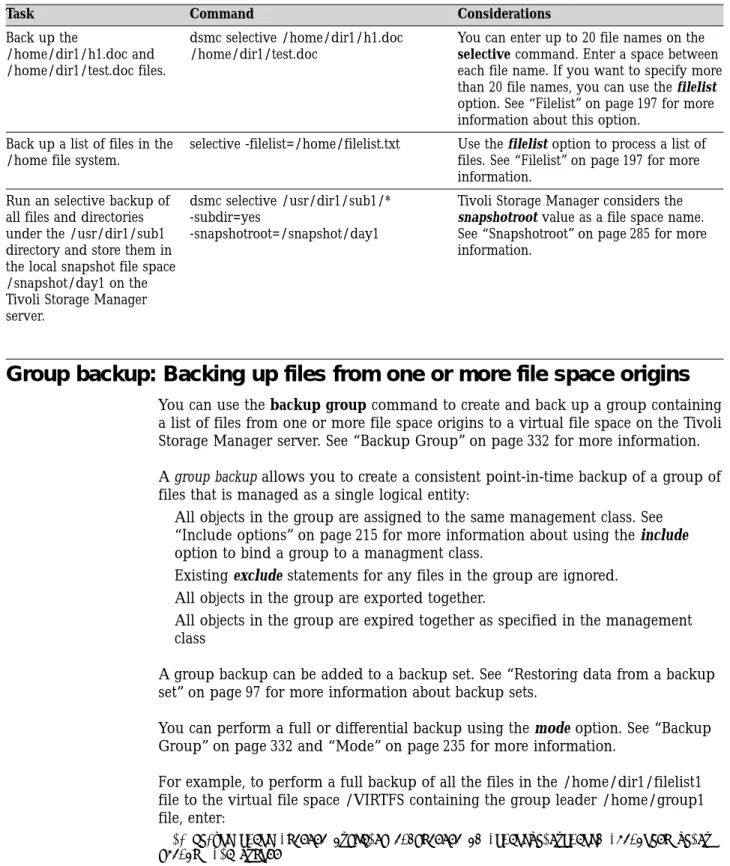
Group backup: Backing up files from one or more file space origins . . . 69
Performing an image backup . . . 69
Before you perform an image backup. . . 70
Utilizing image backup to perform file system incremental backup. . . 72
Performing an image backup using the GUI . . 73
Performing an image backup using the command line . . . 74
Backing up NAS file systems . . . 74
Backing up NAS File Systems using the Web client GUI . . . 75
Backing up NAS File Systems using the command line . . . 77
Backing up the WebSphere Application Server (WAS) . . . 78
Backing up WAS data using the Web client . . . 79
Backing up WAS data using the command line 79 Displaying backup processing status . . . 80
Backup: Additional considerations . . . 82
Understanding how files are stored . . . 82
How special file systems are handled. . . 83
How files are assigned to management classes. . 83
Understanding how symbolic links are handled 83 Understanding how hard links are handled. . . 85
Understanding how NFS hard and soft mounts are handled . . . 85
Backing up opened files . . . 86
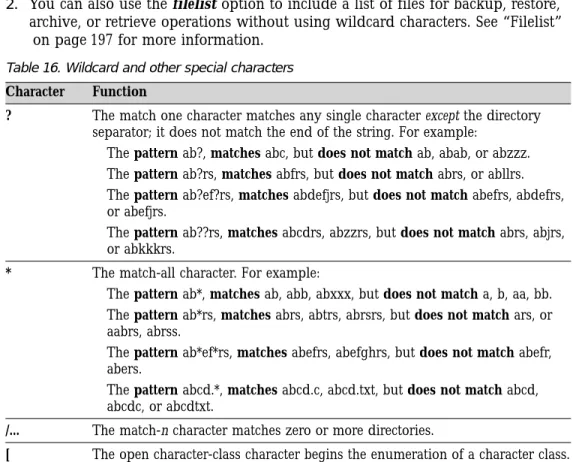
Using wildcard characters . . . 86
Chapter 5. Restoring your data . . . . 89
Do you want to restore an active or inactive backup? . . . 89
Restoring data using the GUI . . . 90
Restoring data using the command line . . . 90
Performing large restore operations . . . 91
No query restore . . . 92
Performing point-in-time restores . . . 94
Restoring an image . . . 95
Peforming an image restore using the GUI . . . 96
Performing an image restore using the command line . . . 97
Restoring data from a backup set . . . 97
Restoring an entire or partial backup set. . . . 98
Restoring backup sets using the GUI . . . 98
Restoring NAS file systems . . . 99
Restoring NAS file systems using the Web Client 99 Restoring NAS files and directories Using the Web client . . . 100
Restoring NAS file systems using the command line . . . 102
Restoring the WebSphere Application Server (WAS) 103 Restore: Additional considerations . . . 104
Authorizing another user to restore or retrieve your files . . . 104
Restoring or retrieving another user’s files. . . 105
Restore or retrieve files to another workstation 105 Restoring a disk in case of disk loss . . . 106
Deleting file spaces . . . 106
Chapter 6. Archiving and retrieving
your data . . . 109
Archiving files . . . 109
Estimating backup processing time . . . 109
Archiving data using the GUI . . . 110
Archiving data using the command line . . . 110
Deleting archived files . . . 111
Archive: Advanced considerations . . . 112
Retrieving archives . . . 113
Retrieving data using the GUI . . . 113
Retrieving data using the command line . . . 114
Understanding how your archives are managed 114
Chapter 7. Automating tasks . . . 117
Configuring the client scheduler . . . 117
Enabling firewall support . . . 117
Specifying scheduling options . . . 117
Starting the client scheduler . . . 117
Return codes from the command line interface . . 119
Displaying information about scheduled work . . 120
Displaying information about completed work . . 121
Scheduling options for commands . . . 122
Enabling or disabling scheduled commands . . . 122
Chapter 8. Understanding storage
management policies . . . 123
Using policy domains and policy sets . . . 123
Using management classes and copy groups . . . 124
Displaying information about management classes and copy groups . . . 125
Copy group name . . . 125
Copy type . . . 125
Copy frequency . . . 126
Versions data exists . . . 126
Versions data deleted . . . 126
Retain extra versions . . . 126
Retain only version . . . 126
Copy serialization . . . 127
Copy mode . . . 127
Copy destination . . . 128
Retain versions . . . 128
Selecting a management class for files . . . 128
Assigning a management class to files . . . 129
Overriding the management class for archived files 130 Selecting a management class for directories . . . 130
Binding and rebinding management classes to files 130 Rebinding backup versions of files . . . 131
Using a retention grace period. . . 131
Chapter 9. Using processing options
133
Overview of processing options . . . 133Communication options . . . 133
TCP/IP options . . . 134
Shared Memory options . . . 134
Server and Node options . . . 135
Server options . . . 135
Node options . . . 136
Backup and archive processing options . . . 137
| || | || || || || | ||
Restore and retrieve processing options. . . 142
Scheduling options . . . 144
Format options . . . 146
Command processing options . . . 146
Authorization options . . . 146
Error processing options. . . 147
Transaction processing options . . . 147
Web client options. . . 148
Diagnostics options . . . 148
Using options with commands . . . 149
Entering options with a command . . . 149
Client options reference . . . 155
Archmc . . . 156 Archsymlinkasfile . . . 157 Automount . . . 158 Changingretries . . . 159 Class . . . 160 Clusternode . . . 161 Commmethod . . . 162 Commrestartduration. . . 163 Commrestartinterval . . . 164 Compressalways . . . 165 Compression . . . 166 Console . . . 168 Dateformat . . . 169 Defaultserver . . . 172 Deletefiles . . . 173 Description . . . 174 Detail . . . 176 Dirmc . . . 177 Dirsonly . . . 178 Domain . . . 179 Domain.image . . . 183 Domain.nas . . . 184 Editor . . . 186 Enablelanfree . . . 187 Encryptkey . . . 189 Errorlogname . . . 191 Errorlogretention . . . 192 Exclude options . . . 193 Filelist . . . 197 Filename . . . 199 Filesonly . . . 200 Followsymbolic. . . 201 Fromdate . . . 202 Fromnode . . . 203 Fromowner . . . 204 Fromtime. . . 205 Groupname . . . 206 Groups . . . 207 Guitreeviewafterbackup . . . 208 Httpport . . . 209 Ifnewer . . . 210 Imagetofile . . . 211 Imagetype . . . 212 Inactive . . . 213 Inclexcl . . . 214 Include options. . . 215 Incrbydate . . . 219 Incremental . . . 220 Lanfreecommmethod . . . 221 Lanfreeshmport . . . 223 Lanfreetcpport . . . 224 Largecommbuffers. . . 225 Latest . . . 226 Localbackupset . . . 227 Location . . . 228 Makesparsefile . . . 229 Mailprog . . . 230 Managedservices . . . 231 Maxcmdretries . . . 233 Memoryefficientbackup . . . 234 Mode . . . 235 Monitor . . . 237 Nasnodename . . . 238 Nfstimeout . . . 239 Nodename . . . 241 Noprompt . . . 243 Numberformat . . . 244 Optfile . . . 246 Password. . . 247 Passwordaccess. . . 248 Passworddir . . . 250 Pick . . . 251 Pitdate . . . 252 Pittime . . . 253 Postschedulecmd/Postnschedulecmd . . . 254 Preschedulecmd/Prenschedulecmd . . . 256 Preservelastaccessdate . . . 258 Preservepath . . . 260 Queryschedperiod . . . 263 Quiet . . . 264 Replace . . . 265 Resourceutilization . . . 267 Retryperiod . . . 269 Revokeremoteaccess . . . 270 Schedcmddisabled. . . 271 Schedlogname . . . 272 Schedlogretention . . . 273 Schedmode . . . 274 Scrolllines . . . 276 Scrollprompt . . . 277 Servername . . . 278 Sessioninitiation . . . 280 Shmport . . . 282 Showmembers . . . 283 Snapshotcachesize . . . 284 Snapshotroot . . . 285 Subdir . . . 287 Tapeprompt . . . 289 Tcpadminport . . . 291 Tcpbuffsize . . . 292 Tcpclientaddress . . . 293 Tcpclientport . . . 294 Tcpnodelay . . . 295 Tcpport . . . 296 Tcpserveraddress . . . 297 Tcpwindowsize . . . 298 Timeformat . . . 299 Toc . . . 301 Todate. . . 303 Totime. . . 304 Contents
v
|| || || || || || || || || || || || ||Txnbytelimit. . . 305 Type . . . 306 Users . . . 307 V2archive . . . 308 Verbose . . . 309 Verifyimage . . . 310 Virtualfsname . . . 311 Virtualmountpoint. . . 312 Virtualnodename . . . 314 Volinformation . . . 316 Washome. . . 317 Wasndhome . . . 318 Wastype . . . 319 Webports . . . 320
Chapter 10. Using commands . . . . 321
Starting and ending a client command session . . 323
Process commands in batch mode . . . 324
Process commands in interactive mode . . . . 324
Entering client commands . . . 324
Command name . . . 324
Options . . . 325
Parameters . . . 325
File specification syntax . . . 325
Maximum file size for operations. . . 327
Remembering previous commands . . . 327
Using wildcard characters . . . 328
Entering commands . . . 328
Client commands reference . . . 329
Archive . . . 330 Backup Group . . . 332 Backup Image . . . 334 Backup NAS . . . 338 Backup WAS . . . 340 Cancel Process . . . 342 Cancel Restore . . . 343 Delete Access . . . 344 Delete Archive . . . 345 Delete Filespace . . . 346 Delete Group . . . 348 Expire . . . 350 Help . . . 352 Incremental . . . 353 Loop . . . 358 Macro . . . 359 Monitor Process . . . 360 Query Access . . . 361 Query Archive . . . 362 Query Backup . . . 364 Query Backupset . . . 366 Query Filespace . . . 368 Query Group . . . 370 Query Image . . . 372 Query Inclexcl . . . 374 Query Mgmtclass . . . 375 Query Node . . . 376 Query Options . . . 377 Query Restore . . . 378 Query Schedule . . . 379 Query Session . . . 380 Query Systeminfo . . . 381 Query WAS . . . 383 Restart Restore . . . 385 Restore . . . 386 Restore Backupset . . . 389 Restore Group . . . 392 Restore Image . . . 394 Restore NAS . . . 397 Restore WAS . . . 399 Retrieve . . . 402 Schedule . . . 404 Selective . . . 406 Set Access . . . 408 Set Password . . . 410
Appendix. Configuring the
backup-archive client in an HACMP
takeover environment . . . 411
Installing the backup-archive client . . . 411
Configuring the backup-archive client to process local nodes . . . 412
Configuring Tivoli Storage Manager backup-archive client to process cluster disk resources . . . 412
Step 1: Register the client to a server . . . . 412
Step 2: Configure the client system options file 412 Step 3: Configure the client user options file . . 413
Defining the client as an HACMP application . . 413
Creating an HACMP resource group to add a client 414 Adding the client to an HACMP resource group 415
Notices . . . 417
Trademarks . . . 418Glossary . . . 421
Index . . . 431
|| || || || || || || || || || || || || ||Tables
1. Typographical conventions . . . x
2. IBM Tivoli Storage Manager client and server publications . . . xiii
3. Client requirements . . . 2
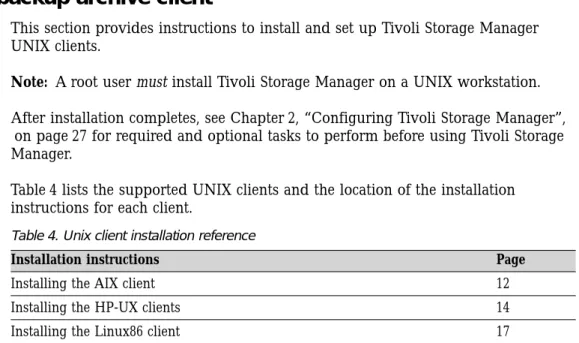
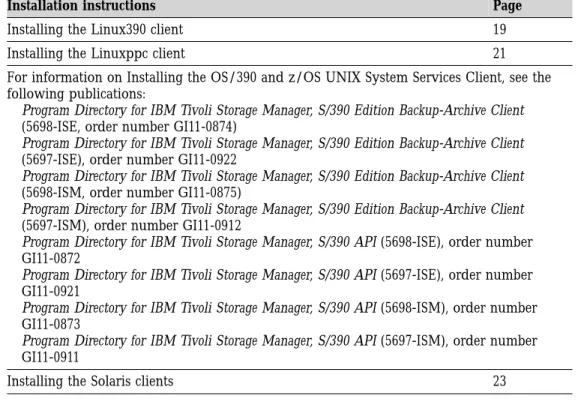
4. Unix client installation reference . . . 10
5. Language codes for installation packages 14 6. Language codes for installation packages 18 7. Language codes for installation packages 20 8. Language codes for installation packages 22 9. Language codes for installation packages 24 10. Tivoli Storage Manager server Quick Start publications . . . 26
11. Tivoli Storage Manager client publications 34 12. GUID commands . . . 37
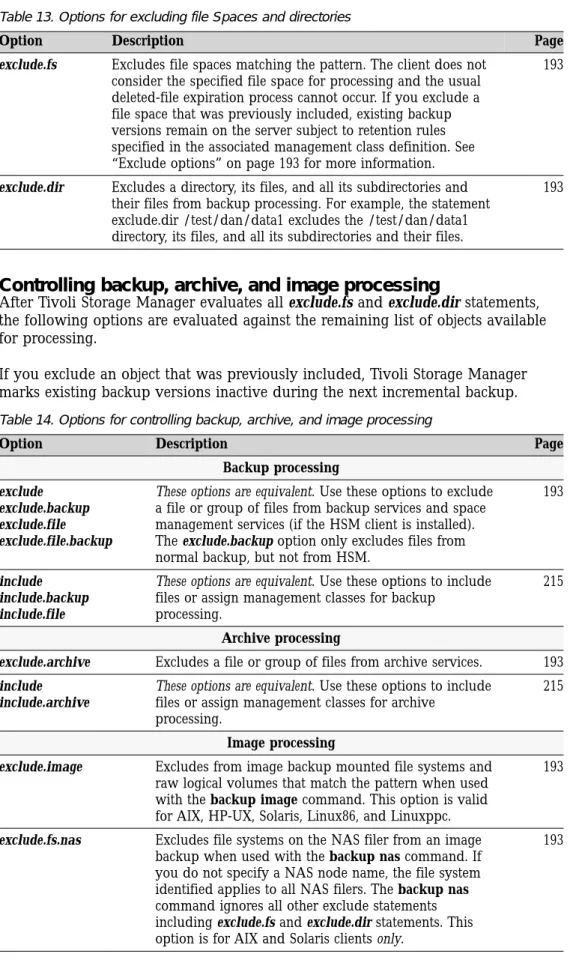
13. Options for excluding file Spaces and directories . . . 39
14. Options for controlling backup, archive, and image processing. . . 39
15. Options for controlling compression and encryption processing . . . 40
16. Wildcard and other special characters . . . . 41
17. Using wildcard characters with include and exclude patterns . . . 42
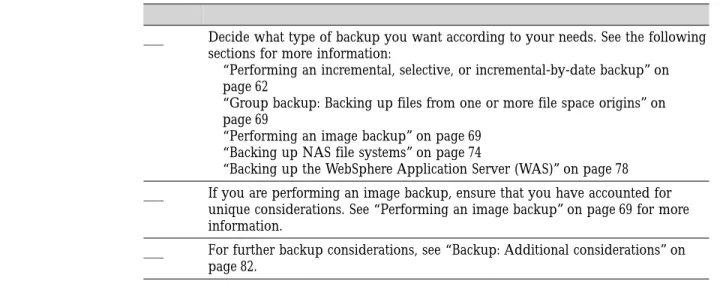
18. Preliminary steps for backing up files . . . . 59
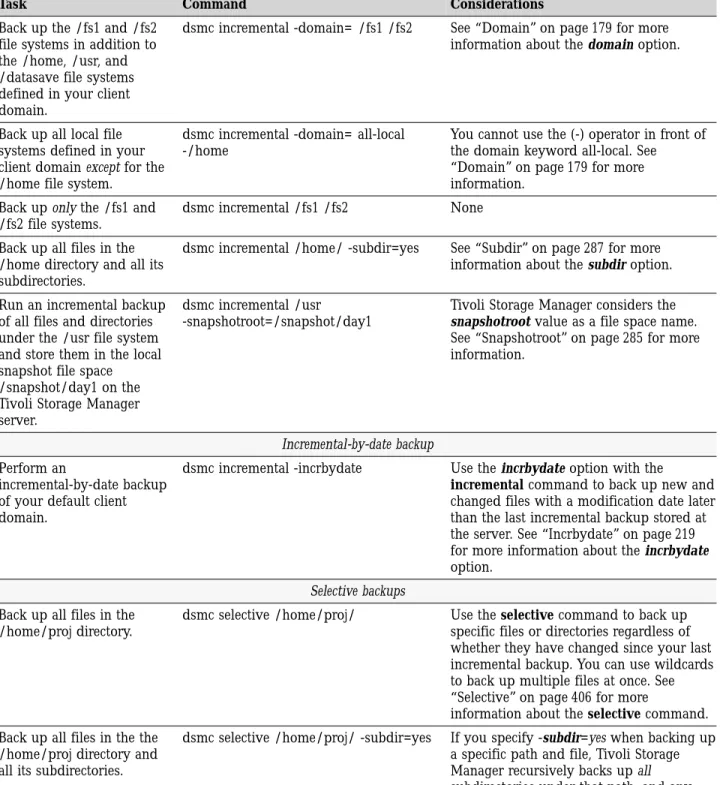
19. Command line backup examples . . . 67
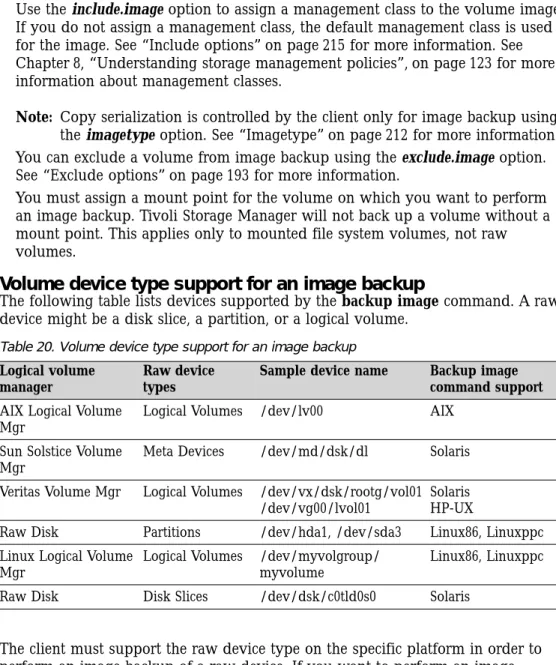
20. Volume device type support for an image backup . . . 71
21. Comparing incremental image backup methods . . . 73
22. NAS options and commands . . . 77
23. WAS options and commands. . . 80
24. Symbolic link management table for backup and restore . . . 84
25. . . 89
26. Command line restore examples . . . 90
27. NAS options and commands . . . 102
28. Archiving and retrieving tasks . . . 109
29. Command line archive examples . . . 111
30. Symbolic link management table for archive and retrieve . . . 112
31. Command line examples of retrieving archives . . . 114
32. Return codes and meanings . . . 119
33. Default values in the standard management class . . . 125
34. TCP/IP options . . . 134
35. Shared Memory communication options 134 36. Server and Node Options . . . 136
37. Backup and archive processing options 137 38. Restore and retrieve processing options 142 39. Scheduling options. . . 144
40. Format options . . . 146
41. Command processing options . . . 146
42. Authorization options. . . 146
43. Error processing options . . . 147
44. Transaction processing options . . . 147
45. Web client options . . . 148
46. Diagnostics options . . . 149
47. Client command options . . . 150
48. Encrypting or decrypting data . . . 189
49. Entering commands . . . 321
50. Commands . . . 321
51. Maximum file size . . . 327
52. Command recall and edit functions . . . . 327
53. Wildcard characters . . . 328
54. Archive command: related options . . . . 330
55. Backup Group command: related options 333 56. Backup Image command: related options 336 57. Backup NAS command: related options 339 58. Backup WAS command: related options 340 59. Delete Archive command: related options 345 60. Delete Filespace command: related options 347 61. Delete Group command: related options 348 62. Expire command: related options . . . 350
63. Supported file systems and ACL Support 354 64. Incremental command: related options 356 65. Query Archive command: related options 362 66. Query Backup command: related options 364 67. Query Backupset command: related options 366 68. Query Filespace command: related options 368 69. Query Group command: related options 370 70. Query Image command: related options 372 71. Query Mgmtclass command: related options 375 72. Query Node command: related options 376 73. Query Options command: related options 377 74. Query Systeminfo command: related options 382 75. Query WAS command: related options 383 76. Restore command: related options . . . . 387
77. Restore Backupset command: related options 390 78. Restore Group command: related options 392 79. Restore Image command: related options 395 80. Restore NAS command: related options 398 81. Restore WAS command: related options 400 82. Retrieve command: related options . . . . 402
83. Schedule command: related options . . . . 404
84. Selective command: related options . . . . 407
© Copyright IBM Corp. 1993, 2003
vii
|| || || || || || || || || || || || ||
About this book
IBM®Tivoli® Storage Manager is a client-server licensed product that provides
storage management services in a multi-platform computer environment. The backup-archive client program permits users to back up and archive files from their workstations or file servers to storage, and restore and retrieve backup versions and archived copies of files to their local file systems.
In addition to the backup-archive client, Tivoli Storage Manager includes the following components available on a variety of platforms:
v A server program that permits systems to perform either as a backup and archive
server or migration server for distributed workstations and file servers. The server program also supplies hierarchical storage management (HSM) services. See “Related publications” on page xiii for available server publications.
v An administrative client program that you can access from a Web browser or the
command line. The program permits an administrator to control and monitor server activities, define storage management policies for backup, archive and space management services, and set up schedules to perform those services at regular intervals. For more information about the Administrative client, see “Related publications” on page xiii for available Tivoli Storage Manager Administrator’s Reference publications.
v An application program interface (API) that permits you to enhance an existing
application with storage management services. When an application is registered with a server as a client node, the application can back up, restore, archive, and retrieve objects from storage. For more information about the Tivoli Storage Manager API, see IBM Tivoli Storage Manager Using the Application Programming Interface, GC32-0793.
v A Web backup-archive client that permits an authorized administrator, help desk
person, or end user to perform backup, restore, archive, and retrieve services using a Web browser on a remote machine. See “Starting a Web client session”
on page 53 for more information.
Associated with Tivoli Storage Manager, but sold separately, is the Tivoli Space Manager client program which was previously a feature of ADSM known as Hierarchical Storage Manager (HSM). Tivoli Space Manager automatically migrates eligible files to storage to maintain specific levels of free space on local file systems and automatically recalls migrated files when they are accessed. It also permits users to migrate and recall specific files. This client program runs only on AIX and Solaris operating systems. For specific software requirements, see the README file that is shipped on the product installation media. See IBM Tivoli Storage Manager for Space Management for Unix User’s Guide for more information.
The terms hierarchical storage management and space management have the same meaning throughout this publication.
Who should read this manual
This manual provides instructions for an end-user to install, configure, and use the Tivoli Storage Manager client. For installation information and supported operating system levels, see Chapter 1, “Installing Tivoli Storage Manager”, on page 1. For configuration information, see Chapter 2, “Configuring Tivoli Storage Manager”, on page 27.
This manual assumes that you are familiar with your workstation, your operating system, and your basic system administration.
Tivoli Storage Manager tasks that can only be performed by authorized users and root users are identified by the phrases, Authorized User and root user. See “Root and authorized user tasks” on page 49 for more information about these tasks. An Authorized User is any user running with a real user ID of 0 (root) or a user who owns theTivoli Storage Manager executable and whose owner execution
permission bit is set to s. In the following example, the user tivoli is an Authorized
User while runningdsmcsince thedsmcowner execution permission bit is set to s:
-rwsr-xr-x 1 tivoli dsmdev 2880479 Nov 5 13:42 dsmc*
IBM Tivoli Storage Manager Web Site
Technical support information and publications are available at the following address:
http://www.ibm.com/software/sysmgmt/products/support/IBMTivoliStorageManager.html By accessing the Tivoli Storage Manager home page, you can access subjects that interest you. You can also access current Tivoli Storage Manager product
information.
Conventions used in this book
This book uses the following typographical conventions:
Table 1. Typographical conventions
Example Description
dsmc.nlm A series of lowercase letters with an extension indicates Tivoli Storage Manager program file names.
archive Boldface type indicates a command that you type at a
workstation, such as a command you type on a command line. dateformat Boldface italic type indicates a Tivoli Storage Manager option.
The bold type is used to introduce the option, or used in an example.
Occasionally, file names are entered in boldface italic for emphasis.
filespec Italicized type indicates either the name of a parameter, a new term, or a placeholder for information that you provide. Italics are also used for emphasis in the text.
maxcmdretries Monospaced type represents fragments of a program or information as it would display on a screen.
plus sign (+) A plus sign between two keys indicates you should press both keys at the same time.
Reading syntax diagrams
This section describes how to read the syntax diagrams used in this manual. To read a syntax diagram, follow the path of the line. Read from left to right, and top to bottom.
v The───+symbol at the end of a line indicates the syntax diagram continues on the next line.
v The+───symbol at the beginning of a line indicates a syntax diagram continues
from the previous line.
v The───+-symbol indicates the end of a syntax diagram. Syntax items, such as a keyword or variable, can be:
v On the line (required element)
v Above the line (default element)
v Below the line (optional element).
Syntax diagram description Example Abbreviations:
Uppercase letters denote the shortest acceptable truncation. If an item appears entirely in uppercase letters, it cannot be truncated.
You can type the item in any combination of uppercase or lowercase letters.
In this example, you can enter KEYWO, KEYWORD, or KEYWOrd.
++ KEYWOrd
+-Symbols:
Enter these symbols exactly as they appear in the syntax diagram.
* Asterisk { } Braces : Colon , Comma = Equal Sign - Hyphen () Parentheses . Period Space Variables:
Italicized lowercase items (var_name) denote variables.
In this example, you can specify a var_name when you enter the KEYWORD command.
++ KEYWOrd var_name
Syntax diagram description Example Repetition:
An arrow returning to the left means you can repeat the item.
A character or space within the arrow means you must separate repeated items with that character or space.
A footnote by the arrow references the number of times you can repeat the item.
++ 3 repeat +-++ 3 , repeat +-++ 3 (1) repeat +-Notes:
1 Specify repeat as many as 5 times. Required choices:
When two or more items are in a stack and one of them is on the line, you must specify one item.
In this example, you must choose A, B, or C.
++ A B C
+-Optional choice:
When an item is below the line, that item is optional. In the first example, you can choose A or nothing at all.
When two or more items are in a stack below the line, all of them are optional. In the second example, you can choose A, B, C, or nothing at all. ++ A +-++ A B C +-Defaults:
Defaults are above the line. The default is selected unless you override it. You can override the default by including an option from the stack below the line.
In this example, A is the default. You can override A by choosing B or C. You can also specify the default explicitly.
++ A B C
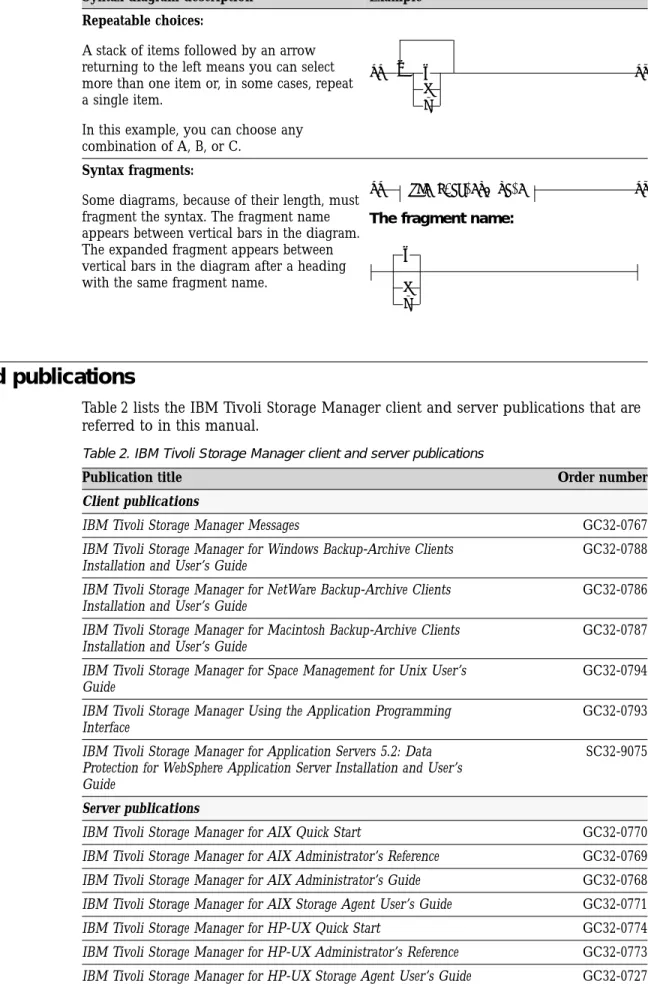
+-Syntax diagram description Example Repeatable choices:
A stack of items followed by an arrow returning to the left means you can select more than one item or, in some cases, repeat a single item.
In this example, you can choose any combination of A, B, or C. ++ 3 A B C +-Syntax fragments:
Some diagrams, because of their length, must fragment the syntax. The fragment name appears between vertical bars in the diagram. The expanded fragment appears between vertical bars in the diagram after a heading with the same fragment name.
++ The fragment name
+-The fragment name:
A B C
Related publications
Table 2 lists the IBM Tivoli Storage Manager client and server publications that are referred to in this manual.
Table 2. IBM Tivoli Storage Manager client and server publications
Publication title Order number
Client publications
IBM Tivoli Storage Manager Messages GC32-0767
IBM Tivoli Storage Manager for Windows Backup-Archive Clients Installation and User’s Guide
GC32-0788
IBM Tivoli Storage Manager for NetWare Backup-Archive Clients Installation and User’s Guide
GC32-0786
IBM Tivoli Storage Manager for Macintosh Backup-Archive Clients Installation and User’s Guide
GC32-0787
IBM Tivoli Storage Manager for Space Management for Unix User’s Guide
GC32-0794
IBM Tivoli Storage Manager Using the Application Programming Interface
GC32-0793
IBM Tivoli Storage Manager for Application Servers 5.2: Data Protection for WebSphere Application Server Installation and User’s Guide
SC32-9075
Server publications
IBM Tivoli Storage Manager for AIX Quick Start GC32-0770
IBM Tivoli Storage Manager for AIX Administrator’s Reference GC32-0769
IBM Tivoli Storage Manager for AIX Administrator’s Guide GC32-0768
IBM Tivoli Storage Manager for AIX Storage Agent User’s Guide GC32-0771
IBM Tivoli Storage Manager for HP-UX Quick Start GC32-0774
IBM Tivoli Storage Manager for HP-UX Administrator’s Reference GC32-0773
IBM Tivoli Storage Manager for HP-UX Storage Agent User’s Guide GC32-0727 About this book
xiii
Table 2. IBM Tivoli Storage Manager client and server publications (continued)
Publication title Order number
IBM Tivoli Storage Manager for Linux Quick Start GC23-4692
IBM Tivoli Storage Manager for Linux Administrator’s Reference GC23-4691
IBM Tivoli Storage Manager for Linux Storage Agent User’s Guide GC23-4693
IBM Tivoli Storage Manager for OS/390 and z/OS Quick Start GC32-0777
IBM Tivoli Storage Manager for OS/390 and z/OS Administrator’s Reference
GC32-0776
IBM Tivoli Storage Manager for OS/400 PASE Quick Start GC23-4696
IBM Tivoli Storage Manager for Sun Solaris Quick Start GC32-0780
IBM Tivoli Storage Manager for Sun Solaris Administrator’s Reference GC32-0779
IBM Tivoli Storage Manager for Sun Solaris Administrator’s Guide GC32-0778
IBM Tivoli Storage Manager for Sun Solaris Storage Agent User’s Guide
GC32-0781
IBM Tivoli Storage Manager for Windows Quick Start GC32-0784
IBM Tivoli Storage Manager for Windows Administrator’s Guide GC32-0782
Downloading or ordering publications
All Tivoli publications are available for electronic download or order from the IBM Publications Center: http://www.ibm.com/shop/publications/order/.
The Tivoli Storage Manager publications are available on the following CD-ROM: Tivoli Storage Manager Publications Version 5.2, SK3T-8176
The format of the publications is PDF and HTML.
The International Technical Support Center (ITSC) publishes Redbooks, which are books on specialized topics such as using Tivoli Storage Manager to back up databases. You can order publications through your IBM representative or the IBM branch office serving your locality. You can also search for and order books of interest to you at the IBM Redbooks Web site at this address:
http://www.ibm.com/redbooks/
Contacting customer support
For support for this or any Tivoli product, you can contact Tivoli Customer Support in one of the following ways:
v Visit the Tivoli Storage Manager technical support Web site at:
http://www.ibm.com/software/sysmgmt/products/support/IBMTivoliStorageManager.html
v Submit a problem management record (PMR) electronically at
IBMSERV/IBMLINK. You can access the IBMLINK from the IBM Web site at: http://www.ibm.com/ibmlink/
v Submit a problem management record (PMR) electronically from the Tivoli Web
site at:
http://www.ibm.com/software/support/probsub.html.
International customers should consult the Web site for customer support telephone numbers.
Hearing-impaired customers should visit the TDD/TTY Voice Relay Services and Accessibility Center Web site at:http://www.ibm.com/able/voicerelay.html. You can also review the IBM Software Support Guide, which is available on our Web site at http://techsupport.services.ibm.com/guides/handbook.html.
When you contact IBM Software Support, be prepared to provide identification information for your company so that support personnel can readily assist you. Company identification information is needed to register for online support available on the Web site.
The support Web site offers extensive information, including a guide to support services (IBM Software Support Guide); frequently asked questions (FAQs); and documentation for all IBM Software products, including Release Notes, Redbooks, and white papers, defects (APARs), and solutions. The documentation for some product releases is available in both PDF and HTML formats. Translated documents are also available for some product releases.
We are very interested in hearing about your experience with Tivoli products and documentation. We also welcome your suggestions for improvements. If you have comments or suggestions about our documentation, please complete our customer feedback survey at:
http://www.ibm.com/software/sysmgmt/products/support/IBMTivoliStorageManager.html by selecting the Feedback link in the left navigation bar.
Reporting a problem
Please have the following information ready when you report a problem:
v The Tivoli Storage Manager server version, release, modification, and service
level number. You can get this information by entering the query status command at the Tivoli Storage Manager command line.
v The Tivoli Storage Manager client version, release, modification, and service
level number. You can get this information by enteringdsmcat the command
line.
v The communication protocol (for example, TCP/IP), version, and release number
you are using.
v The activity you were doing when the problem occurred, listing the steps you
followed before the problem occurred.
v The exact text of any error messages.
Internet
You can get additional information through an anonymous FTP server, ftp://ftp.software.ibm.com. IBM Tivoli Storage Manager information is in the /storage/tivoli-storage-management directory.
A newsgroup, [email protected], is implemented by a third party. IBM supports this newsgroup on a best-effort basis only. See “Online forum” on page 57 for more information.
Summary of changes for Tivoli Storage Manager
This section summarizes changes made to the Tivoli Storage Manager product and this publication. Technical changes to the text are indicated by vertical lines to the left of the change.
Technical changes for version 5.2 - April 2003
The following changes have been made to the product for this edition: Support for backing up files from one or more file space origins
You can use the Tivoli Storage Manager command line client to create and back up a group containing a list of files from one or more file space origins to a virtual file space on the Tivoli Storage Manager server. A group backup allows you to create a point-in-time backup of a group of files that is managed as a single logical entity. See “Group backup: Backing up files from one or more file space origins” on page 69 for more information. NDMP file-level restore
NDMP support is enhanced to allow you to restore individual files from your NAS file system image backups. Use the toc option with the
include.fs.nasoption in your client system options file (dsm.sys) to specify
whether Tivoli Storage Manager saves Table of Contents (TOC) information during a NAS file system image backup. If you save TOC information, you can use the Web client or the Tivoli Storage Manager server restore node command to restore individual files or directory trees from the NAS file system image that you specify. See “Toc” on page 301 for more information. NDMP support is available only on IBM Tivoli Storage Manager Extended Edition.
Support for processing EMC Celerra Network Attached Storage (NAS) file system images
Through support of Network Data Management Protocol (NDMP), Tivoli Storage Manager Windows, AIX, and Solaris servers can efficiently back up and restore network attached storage (NAS) file system images to tape drives or libraries that are locally attached to Network Appliance and EMC Celerra NAS file servers. NDMP support is available only on IBM Tivoli Storage Manager Extended Edition. See “NDMP support requirements (Extended Edition only)” on page 1 for NDMP support requirements. See “Backing up NAS file systems” on page 74 for information on how to back up and restore NAS file system images using the Web client and command line client.
Support for backup and restore of the WebSphere Application Server (WAS) If you installed the Data Protection for WebSphere Application Server, you can use Tivoli Storage Manager to back up the Version 5.0 WebSphere Application Server (WAS) Network Deployment Manager (contains setup, application files, and configuration information) or the Application Server to the Tivoli Storage Manager server. You can restore this information from the Tivoli Storage Manager server and use it to recover a corrupted node application or an entire node (or nodes) in the event of an accident or disaster.
Data Protection for WebSphere Application Server is a separately priced and licensed product. Data Protection for WebSphere Application Server is only
supported on a Tivoli Storage Manager Version 5.2 server and client. Data Protection for WebSphere Application Server is supported on the AIX 5.1 with Maintenance level 2; Solaris 8; Red Hat Advanced Server 2.1 for x86, SuSE Linux 7.3 for x86, SuSE SLSE 7 for x86, and United Linux 1.0 for x86 clients only. See “Backing up the WebSphere Application Server (WAS)” on page 78 for more information.
Enhancements for command line image restore operations
You can use the verifyimage option with the restore image command to specify that you want to enable detection of bad sectors on the destination target volume. If bad sectors are detected on the target volume, Tivoli Storage Manager issues a warning message on the console and in the error log. See “Verifyimage” on page 310 for more information.
If bad sectors are present on the target volume, you can use the imagetofile option with the restore image command to specify that you want to restore the source image to a file. Later, you can use a ’dd’ utility (available on Unix) or its equivalent to copy data from this file to a logical volume. See “Imagetofile” on page 211 for more information.
Support for an external snapshot provider in the backup-archive clients Use the snapshotroot option with the incremental, selective, or archive commands in conjunction with a third-party application that provides a snapshot of a logical volume, to associate the data on the local snapshot with the real file space data that is stored on the Tivoli Storage Manager server. The snapshotroot option does not provide any facilities to take a volume snapshot, only to manage data created by a volume snapshot. See “Snapshotroot” on page 285 for more information.
Enhancements to the Web client interface
The following functions are now supported in the Tivoli Storage Manager Web client interface:
Access Another Node
Displays the backup versions and archive copies of another node. You can then restore the backup versions or retrieve the archives from the other user to your workstation. You must have authorization to access the stored data of another node.
Node Access List
Allows you to authorize other users to access your backup versions and archive copies.
View Policy Information
Displays storage management policy information for your node. Enhanced firewall security
Security for back up and restore operations and Tivoli Storage Manager administrative functions is enhanced to allow the Tivoli Storage Manager server to control whether the server or client initiates sessions through a firewall. See “Sessioninitiation” on page 280 for more information.
Both the server and client can also specify a separate TCP/IP port number on which the server is waiting for requests for administrative client sessions, allowing secure administrative sessions within a private network. See “Tcpadminport” on page 291 for more information.
Veritas file systems, ACLs, and Veritas Volume Manager support on AIX (32-bit and 64-bit) clients
Tivoli Storage Manager supports backup, restore, archive, and retrieve of
| | | | |
Veritas file systems (VxFS) including ACLs on the AIX (32-bit and 64-bit) clients. Image backup and restore of Veritas Volume Manager logical volumes is also supported.
Automounter support for Linux86 and Linux390 clients
The Tivoli Storage Manager Linux86 and Linux390 clients now support the back up of automounted NFS and loopback file systems. Use the
automountoption with the domain option to specify all automounted file
systems the Tivoli Storage Manager client tries to mount at the following points in time:
v When Tivoli Storage Manager client starts
v When the back up is started
v When the Tivoli Storage Manager client has reached an automounted file
system during backup
See “Automount” on page 158 and “Domain” on page 179 for more information.
Support for displaying options and their settings via the command line
Use the query options command to display all or part of your options and their current settings. This command accepts an argument to specify a subset of options. The default is to display all options. See “Query Options” on page 377 for more information.
Support for gathering Tivoli Storage Manager system information
Use the query systeminfo command to gather information on one or more of the following items and output this information to a file name that you specify:
v DSMOPTFILE - The contents of dsm.opt file.
v ENV - Environment variables.
v ERRORLOG - The Tivoli Storage Manager error log file.
v FILE - Attributes for the file name that you specify.
v INCLEXCL - Compiles a list of include-exclude in the order in which
they are processed during backup and archive operations.
v OPTIONS - Compiled options.
v OSINFO - Name and version of the client operating system (includes
ULIMIT information for UNIX).
v POLICY - Policy set dump.
v DSMSYSFILE - The contents of the dsm.sys file.
v CLUSTER - AIX cluster information.
See “Query Systeminfo” on page 381 for more information. Enhancements for the query filespace command
The query filespace command is enhanced to allow you to query a single file space on the Tivoli Storage Manager server. See “Query Filespace” on page 368 for more information.
Separately installable language packs available
Language packs are separately installable packages that contain only language-specific files (such as message catalog, resource file, help files, etc.). You can now install these additional language packs on top of your Tivoli Storage Manager client base install. To change your language
preferences, specify the LANG environment variable or use the Preferences editor.
Technical changes for version 5.1.5 - September 2002
The following changes have been made to the product for this edition: Lan-free data movement support on Linux86 client
Tivoli Storage Manager supports LAN-Free data movement in a storage area network (SAN) environment for the Linux86 client. LAN-Free data movement allows client data to move directly from the client to a
SAN-attached storage device. Shifting the client data movement from the communications network to a SAN decreases the load on the server. This allows the server to support a greater number of simultaneous client connections. See “LAN-free data movement” on page 61 for more information.
New backup-archive option to preserve last access date of files
For backup and archive operations, you can use the preservelastaccessdate option to specify whether the client should reset the last access dates of backed up or archived files to their original value. The default behavior is to not reset the last access date. See “Preservelastaccessdate” on page 258 for more information.
Linux86 client support for the General Parallel File System (GPFS)
Tivoli Storage Manager supports backup and restore of the General Parallel File System (GPFS) on the Linux86 client. See “Incremental” on page 353 for more information.
Enhanced domain processing
Domain processing is enhanced to allow you to include and exclude items from the domain. Previous versions of Storage Manager only allowed you to include items in the domain. See “Domain” on page 179 for more information.
64-Bit support for the Tivoli Storage Manager HP-UX client
The Tivoli Storage Manager 32-bit HP-UX client can perform backup, restore, archive, and retrieve functions to a Tivoli Storage Manager 64-bit server via the Shared Memory communication method.
Support for a globally unique identifier (GUID)
The globally unique identifier (GUID) associates a client node with a host system. When you install the Tivoli software, the tivguid program is run to generate a GUID which is stored in the /etc/tivoli directory on a UNIX system. The GUID for a client node on the server can change if the host system machine is corrupted, if the file entry is lost, or if a user uses the same node name from different host systems. You can perform the following functions from the command line:
v Create a new GUID
v View the current GUID
v Write a specific value
v Create another GUID even if one exists.
See “Associating your client node with a host system” on page 36 for more information.
Enhanced query backup and query archive commands
If you use the detail option with the query archive or query backup commands, the client displays the following additional information:
v Last modification date
See “Query Archive” on page 362 and “Query Backup” on page 364 for more information.
Technical changes for version 5.1 - April 2002
The following changes have been made to the product for this edition: Support for Cyclical Redundancy Checking (CRC)
Tivoli Storage Manager supports cyclical redundancy checking (CRC) to verify that data is not being corrupted in transfer during a backup or restore session.
Support for processing Network Attached Storage (NAS) file system images Through support of Network Data Management Protocol (NDMP), Tivoli Storage Manager Windows NT, 2000, XP, AIX, and Solaris servers can efficiently back up and restore network attached storage (NAS) file system images to tape drives or libraries that are locally attached to the NAS file servers from Network Appliance. NDMP support is available only on IBM Tivoli Storage Manager Extended Edition. See “NDMP support requirements (Extended Edition only)” on page 1 for NDMP support requirements. See “Backing up NAS file systems” on page 74 for information on how to back up and restore NAS file system images using the Web client and command line client.
Support for logical volume backup as a single object (image backup) on Linux86 Client The Linux86 client is enhanced to support a logical volume image backup
of file systems and raw volumes. The Tivoli Storage Manager server does not track individual files in the file system image. File system images are tracked as individual objects and management class policy will be applied to the file system image as a whole. See “Performing an image backup” on page 69 for more information.
Support for snapshot image backup of file systems and raw logical volumes on Linux86 Client
The traditional image backup prevents access to the volume by other system applications during the operation. For Linux86 only: Tivoli Storage Manager can perform an snapshot image backup of file systems residing on a logical volume created by the Linux Logical Volume Manager, during which the volume is available to other system applications. See
“Performing an image backup” on page 69 for more information. Lan-free data movement support on HP-UX client
Tivoli Storage Manager supports LAN-Free data movement in a storage area network (SAN) environment for the HP-UX client. LAN-Free data movement allows client data to move directly from the client to a
SAN-attached storage device. Shifting the client data movement from the communications network to a SAN decreases the load on the server. This allows the server to support a greater number of simultaneous client connections. See “LAN-free data movement” on page 61 for more information.
Enhanced web client interface
The Web client interface is enhanced to support a JRE 1.3.1 Swing-enabled browser. The Web client facilitates the use of assistive devices for users with disabilities and contains improved keyboard navigation. The native look and feel of the platform running the browser is preserved. See “Starting a Web client session” on page 53 for more information.
Support for the z/OS file system on the OS/390 client
Tivoli Storage Manager supports backup and restore of the z/OS file system on the OS/390 Client. See “Incremental” on page 353 for more information.
Support for the Sun Quick File System (QFS) 3.5.0 on the Solaris client Tivoli Storage Manager supports backup, restore, archive and retrieve of the QFS file system on the Solaris client. QFS is a high-performance file system that enables file sharing in a SAN. It eliminates performance bottlenecks resulting from applications using very large file sizes. See “Incremental” on page 353 for more information.
Support for High Availability Cluster Multi Processing (HACMP) on AIX client Tivoli Storage Manager supports HACMP failover on AIX. This allows the client to continue operating in the event of an HACMP node failover and fallback.
Multiple session no query restore
The backup-archive clients can now utilize multiple restore sessions for no query restore operations, increasing the speed of restores. This is similar to the multiple backup session support. It exploits the mount point available on the server. If data is backed up on multiple tapes, and if the server has multiple mount points available, then the restore starts a session for each tape, up to the number your administrator configures. See
“Resourceutilization” on page 267 for more information. Consistent client return codes
Reliable, consistent, and documented return codes have been added to the command line client and the scheduler. This facilitates automation of client operations via user-written scripts. By using the QUERY EVENT command with the FORMAT=DETAILED option, administrators can now distinguish between scheduled backups that completed successfully with no skipped files and scheduled backups that completed successfully with one or more skipped files. Also if you use the processing option preschedulecmd to run a command, and that command returns a non-zero return code, the
scheduled event will not run. This ensures that scheduled events will not run if prerequisite commands do not complete successfully. See “Return codes from the command line interface” on page 119,
“Preschedulecmd/Prenschedulecmd” on page 256, and
Chapter 1. Installing Tivoli Storage Manager
The Tivoli Storage Manager backup-archive client helps you protect information on your workstation. Using Tivoli Storage Manager, you can maintain backup versions of your workstation files that you can restore if the original files are damaged or lost. You can also archive workstation files that you do not currently need, preserve them in their current state, and retrieve them when necessary. You can access Tivoli Storage Manager backup and archive features:
v Locally through the native Graphical User Interface (Motif GUI)
v Locally through the Java Graphical User Interface (Java GUI)
v Locally through the native client command line interface
v Remotely or locally through the Web client interface
Migrating from earlier versions
Upgrade path for clients and servers
As part of a migration plan from Tivoli Storage Manager version 5.1 to Tivoli Storage Manager version 5.2, Tivoli Storage Manager clients and servers can be upgraded at different times. To help prevent disruption to your backup and archive activities during the migration, note the following:
v A Tivoli Storage Manager version 5.1 client can perform backup, restore, archive,
and retrieve functions to a Tivoli Storage Manager version 5.2 server.
v A Tivoli Storage Manager version 5.2 client can perform backup, restore, archive,
retrieve, and query functions to a Tivoli Storage Manager version 5.1 server.
v A Tivoli Storage Manager V5.1 client can perform V3.1 functional level backup,
restore, archive and retrieve functions to a Tivoli Storage Manager Version 3.1 server on VM.
v A Tivoli Storage Manager version 5.1 HSM client can perform migrate and recall
functions to a Tivoli Storage Manager Version 5.2 server.
v A Tivoli Storage Manager version 5.2 HSM client can perform migrate and recall
functions to a Tivoli Storage Manager version 5.1 server.
v Data that has been backed up, archived, or migrated from a Tivoli Storage
Manager version 5.2 client to any Tivoli Storage Manager server can be restored, retrieved, or recalled using a Tivoli Storage Manager version 5.1 client.
v Data that has been backed up, archived, or migrated from a Tivoli Storage
Manager version 5.1 client to any Tivoli Storage Manager server can be restored, retrieved, or recalled using a Tivoli Storage Manager version 5.2 client.
v All command line administrative clients can administer Tivoli Storage Manager
version 5.1 and version 5.2 servers, and the V3.1 VM server.
v SAN storage agents and servers must be at the same level of code. When the
server is upgraded, the storage agents which are using that particular server must be upgraded as well.
NDMP support requirements (Extended Edition only)
Through support of Network Data Management Protocol (NDMP), Tivoli Storage Manager can efficiently back up and restore NAS file systems to tape drives or
© Copyright IBM Corp. 1993, 2003
1
| | |
libraries that are locally attached to Network Appliance and EMC Celerra NAS file servers. NDMP support is available only on IBM Tivoli Storage Manager Extended Edition.
NDMP support requires the following hardware and software :
v Tivoli Storage Manager Version 4.2.1 AIX or Sun Solaris server or higher.
v Tivoli Storage Manager Version 4.2.1 Sun Solaris or AIX (32-bit and 64-bit) client
or higher.
v Network Appliance or EMC Celerra NAS file servers. EMC Celerra file servers
are supported on the Tivoli Storage Manager Version 5.2 client and server only. For supported models and operating systems, refer to:
http://www.ibm.com/software/sysmgmt/products/support/IBMTivoliStorageManager.html
v Tape drive and tape library. For supported combinations, refer to:
http://www.ibm.com/software/sysmgmt/products/support/IBMTivoliStorageManager.html See “Backing up NAS file systems” on page 74 for further information, including how to back up and restore NAS file system images using the Web client and command line client.
Additional migration information
When you install the Web client, you must install the Web client language files that correspond to those languages you want to use.
A command line administrative client is available on all client platforms. The primary intended interface to the server is the Web administrative interface and requires a Web browser. The Web administrative interface is packaged and installed with the server.
Client environment requirements
This section contains client environment information, Tivoli Storage Manager client components, and hardware and software requirements for the UNIX clients. Table 3 lists the location of the environment prerequisites for each supported platform. Attention: For current information concerning the client environment
prerequisites for all Tivoli Storage Manager supported client platforms, refer to the READMEfile that is shipped on the product installation media or go to the Web site at:
http://www.ibm.com/software/sysmgmt/products/support/IBMTivoliStorageManager.html
Table 3. Client requirements
Operating system Page
AIX client environment 3
HP-UX client environment 4
Linux for X86 client environment 5
Linux for pSeries client environment 6
Linux for IBM eServer zSeries and S/390 client environment 7
OS/390 and z/OS UNIX System Services client environment 8
Solaris client environment 8
| | | | | | | | | | | | | | | |
AIX client environment
This section contains client environment information, Tivoli Storage Manager client components, and hardware and software requirements for the AIX platform.
Client components
v Backup-archive client (command line)
v Administrative client (command-line)
v Backup-archive Java Graphical User Interface (Java GUI)
v Backup-archive Native Graphical User Interface (Motif GUI)
v Web backup-archive client
v Tivoli Storage Manager API (32-bit and 64-bit)
v XOpen API (32-bit)
v AFS/DFS (on AIX 4.3.3 only on AFS 3.6, DFS 3.1) at V5.1 functional level
Notes:
1. For more information about the Tivoli Storage Manager API and X/Open API,
see IBM Tivoli Storage Manager Using the Application Programming Interface, GC32-0793.
2. For more information about the Administrative client, see IBM Tivoli Storage
Manager for AIX Administrator’s Reference, GC32-0769
Hardware requirements
v A RISC System/6000 or pSeries
v Disk space: see the README file that is shipped on the product installation
media
v Memory: 128 MB
See “File system and ACL support” on page 354 for a complete list of supported file systems.
For HACMP: Machine:
v At least two identical pSeries (RS/6000)
v SSA shared hard disk array
v One additional network adapter for each machine
v Memory: 128 MB
Operating system:
v AIX 5.1 (32-bit)
v HACMP 4.4 or 4.5
Software requirements
v AIX 5.1 (32-bit and 64-bit) min. required maintenance level for bos.rte 5.1.0.15,
AIX 5.2 (32-bit and 64-bit)
Communication methods
To use this communication method:
Install this software: To connect to these Tivoli Storage Manager servers: TCP/IP TCP/IP (Standard with supported AIX/6000
platforms)
AIX, HP-UX, Linux, OS/390, OS/400 PASE, Solaris, VM, Windows, z/OS Shared Memory TCP/IP (Standard with supported AIX
platforms)
AIX
Additional software requirements
The backup-archive client GUI requires:
v X Window System X11R6
v Motif 1.2 or 2.0
v Common Desktop Environment (CDE)
v Java JRE 1.3.1 for the Web client and Java GUI
HP-UX client environment
This section contains client environment information, Tivoli Storage Manager client components, and hardware and software requirements for the HP-UX platform.
Client components
v Backup-archive client (command-line and GUI)
v Administrative client (command line)
v Backup-archive Java Graphical User Interface (Java GUI)
v Backup-archive Native Graphical User Interface (Motif GUI)
v Tivoli Storage Manager API
v X/Open API
v Web backup-archive client
Notes:
1. For more information about the Tivoli Storage Manager API and X/Open API,
see IBM Tivoli Storage Manager Using the Application Programming Interface, GC32-0793.
2. For more information about the Administrative client, see IBM Tivoli Storage
Manager for HP-UX Administrator’s Reference, GC32-0773
Hardware requirements
v An HP 9000 Series 700 or 800 workstation or server
v Disk space: 70 MB; see the README file that is shipped on the product
installation media
v Memory: 256 MB
Software requirements
v HP-UX 11.0 (32-bit or 64-bit), HP-UX 11.11 (11i Version 1.0) (32-bit or 64-bit)
Communications methods
To use this communication method:
Install this software: To connect to these Tivoli Storage Manager servers:
TCP/IP TCP/IP (Standard with HP-UX) AIX, HP-UX, Linux,
OS/390, OS/400 PASE, Solaris, VM, Windows, z/OS
Shared Memory TCP/IP (Standard with HP-UX) HP-UX
Additional software requirements
The backup-archive client GUI requires:
v X Windows System X11R6
v Motif 2.0
v Common Desktop Environment (CDE)
v Java JRE 1.3.1 for the Web client and Java GUI
v CDE online help facility libraries: libDtHelp.sl and libDtSvc.sl, typically located
Linux for X86 client environment
This section contains client environment information, Tivoli Storage Manager client components, and hardware and software requirements for the Linux for X86 (Linux86) platform.
Client components
v Backup-archive client (command line)
v Administrative client (command line)
v Backup-archive Java Graphical User Interface (Java GUI)
v Backup-archive Native Graphical User Interface (Motif GUI)
v Tivoli Storage Manager API
v Web backup-archive client
Notes:
1. See the README file that is shipped on the product installation media for
requirements to run the application programming interface client.
2. For more information about the Tivoli Storage Manager API, see IBM Tivoli
Storage Manager Using the Application Programming Interface, GC32-0793.
3. For more information about the Administrative client, see IBM Tivoli Storage
Manager for Linux Administrator’s Reference, GC23-4691
Hardware requirements
v X86 based PC architecture (for example Pentium) or higher
v Disk space: see the README file that is shipped on the product installation
media
v Memory: 128 MB
Software requirements
The backup-archive client requires the following software to run:
v Linux kernel 2.4.2 or higher
v glibc 2.2.2 or higher
v libstdc++2.9.6 or higher
v X Window System X11R6 (for end user GUI only)
v RPM 3.0.0 or higher, 4.0
v Java JRE 1.3.1 for the Web client and Java GUI
Note: Please note that X Windows System X11R6 is a requirement to install the client. If it is not installed and you do not plan to use the end user GUI, you have to add the --nodeps option of rpm to disable the check for
requirements.
Please use one of the following Window Manager Systems:
v Gnome
v KDE 2
v Exceed
Note: KDE 2 does not display window frames for some windows. Linux distributions that meet these requirements include:
v SuSE 7.3, 8.0, 8.1, SLES 7, SLES 8
v RedHat 7.2, 7.3, 8.0, and Advanced Server v.2.1
v Turbo Linux 7.5 and 8.0
The Tivoli Storage Manager Web client requires the following software to run:
v The Linux for x86 client was certified by Tivoli for these distributions. Please verify for other distributions that the software requirements listed above are fulfilled.
v A Netscape 4.7 or higher browser or Microsoft Internet Explorer 5.0 or higher
browser
Communication methods
To use this communication method:
Install this software: To connect to these Tivoli Storage Manager servers:
TCP/IP TCP/IP (Standard with Linux) AIX, HP-UX, Linux,
OS/390, OS/400 PASE, Solaris, VM, Windows, z/OS
Linux for pSeries client environment
This section contains client environment information, Tivoli Storage Manager client components, and hardware and software requirements for the Linux for pSeries (Linuxppc) platform.
Client components
v Backup-archive client (command-line)
v Administrative client (command line)
v Tivoli Storage Manager API
v Web backup-archive client
Notes:
1. See the README file that is shipped on the product installation media for
requirements to run the application programming interface client.
2. For more information about the Tivoli Storage Manager API, see IBM Tivoli
Storage Manager Using the Application Programming Interface, GC32-0793.
3. For more information about the Administrative client, see IBM Tivoli Storage
Manager for Linux Administrator’s Reference, GC23-4691
Hardware requirements
v Any Power PC
v Disk space: see the README file that is shipped on the product installation
media
v Memory: 128 MB
Software requirements
The backup-archive client requires the following software to run:
v Linux kernel 2.4.19 or higher
v glibc 2.2.5 or higher
v libstdc++ 3.2 or higher
v RPM 3.0.6 or higher, 4.0
v Java JRE 1.3.1 or higher for the Web client
v A Netscape 4.7 or higher browser or Microsoft Internet Explorer 5.0 or higher
browser
Please use one of the following Window Manager Systems:
v Gnome
v KDE 2
Note: KDE 2 does not display window frames for some windows. Linux distributions that meet these requirements include:
v SuSE 8.0
Note: The Linux for pSeries client was certified by Tivoli for this distribution. Please verify for other distributions that the software requirements listed above are fulfilled.
Communication methods
To use this communication method:
Install this software: To connect to these Tivoli Storage Manager servers:
TCP/IP TCP/IP (Standard with Linux) AIX, HP-UX, Linux,
OS/390, OS/400 PASE, Solaris, VM, Windows, z/OS
Linux for IBM eServer zSeries and S/390 client environment
This section contains client environment information, Tivoli Storage Manager client components, and hardware and software requirements for the Linux for zSeries and S/390 (Linux390) platform.Client components
v Backup-archive client (command line)
v Administrative client (command line)
v Tivoli Storage Manager API
v Web backup-archive client
Notes:
1. For more information about the Tivoli Storage Manager API, see IBM Tivoli
Storage Manager Using the Application Programming Interface, GC32-0793.
2. For more information about the Administrative client, see IBM Tivoli Storage
Manager for Linux Administrator’s Reference, GC23-4691
Hardware requirements
v A 9672 G5 or G6, Multiprise 3000, or zSeries 900 (31/32-bit mode)
v Disk space: see the README file that is shipped on the product installation
media.
v Memory: 128 MB
Software requirements
The backup-archive client requires the following software to run:
v Linux kernel 2.4.7 or higher
v glibc 2.2.2 or higher
v libstdc++2.10.0 or higher
v RPM 3.0.6 or higher
v Java JRE 1.3.1 or higher for the Web client
The Linux distributions that fulfill these requirements include:
v SuSe Linux Enterprise Server 7 and 8 for S390 and zSeries
Note: The Linux z/series and S/390 was certified by Tivoli for this distribution. Please verify for other distributions that the software requirements listed above are fulfilled.