Design and Evaluation of Menu Systems for Immersive Virtual
Environments
Doug A. Bowman and Chadwick A. Wingrave
Department of Computer Science (0106)
Virginia Tech
Blacksburg, VA 24061 USA
{bowman, cwingrav}@vt.edu
Abstract
Interfaces for system control tasks in virtual environments (VEs) have not been extensively studied. This paper focuses on various types of menu systems to be used in such environments. We describe the design of the TULIP menu, a menu system using Pinch Gloves™, and compare it to two common alternatives: floating menus and pen and tablet menus. These three menus were compared in an empirical evaluation. The pen and tablet menu was found to be significantly faster, while users had a preference for TULIP. Subjective discomfort levels were also higher with the floating menus and pen and tablet.
1. Introduction and Motivation
The user interaction in many virtual environment (VE) systems can be characterized in terms of four universal interaction tasks [1]. Navigation refers to the task of moving one’s viewpoint through an environment, and is divided into a cognitive component (wayfinding) and a motor component (travel). Selection is the task of choosing one or more objects from a set. It is often paired with the third task, manipulation, which refers to the specification of object properties such as position and orientation. The final universal task, system control, can be defined as changing the system state or the mode of interaction. Although travel [2], wayfinding [3], and selection/manipulation [4, 5] have been studied extensively using empirical evaluations, very little research has been done on system control tasks.
One of the most common system control interfaces is the menu. Menus are used to issue commands, begin dialog sequences, change the mode of interaction, and so on. Of course, menus are extremely common in 2D graphical user interfaces (GUIs), and take many forms, including pull-down, pop-up, palette-based, pie, and context-sensitive menus. But are menu systems appropriate for VEs? It is often asserted that all VE
interaction should be “natural,” and divorced from the WIMP (Windows, Icons, Menus, Pointer) metaphor [6]. We take the view, however, that the naturalism of the interface should be based on the application, tasks, and user goals. In a training application, where the goal is to replicate the real world to the greatest possible degree, natural interaction metaphors are preferable. However, in applications where the main user goals are efficient and effective completion of tasks, the interface should be constructed so as to minimize time and errors – such an interface may not be natural.
Moreover, many of the complex application domains for which VE tools have been proposed need to make extensive use of system control. Consider a VE for architectural design in which the user can not only view a 3D structure interactively, but can also modify the space and create new elements [7, 8]. Such a system needs techniques for loading new models, changing an object’s texture, and saving one’s work. None of these tasks correspond directly to any real-world action, but the tasks could be force-fitted into pseudo-realistic metaphors. For example, the user could enter a virtual library to choose a new object to be loaded into the environment. However, such metaphors are often cumbersome and unnecessary when simpler techniques such as graphical menus or voice commands would be more efficient and precise. Other VE applications such as scientific visualization [9] or science education [10] have similar properties.
Therefore, system control interfaces, and menus in particular, need to be systematically designed and evaluated to ensure high usability and performance levels in VEs. We have experience in the design and implementation of menus for various VE applications, and have used this experience to design and run an empirical evaluation comparing three types of VE menus. These include two previously published menu systems, and a novel implementation of menus using Fakespace Pinch Gloves™. In the next section, we describe related work on VE menu systems and the use of Pinch Gloves™ in VEs. Next, we present the design of the three menu systems tested in our experiment, with particular emphasis on the
iterative design of the Pinch Glove™ menu. We then describe the implementation and results of our experiment.
2. Related Work
Some of the first menus to be used in VE systems were pull-down menus translated more or less directly from their 2D counterparts [11]. These menus floated in 3D space, and were activated via a ray-casting selection technique. The Conceptual Design Space application [8] extended this idea by fixing the menus to the user’s head so that they were always in view, and allowing submenus to be used. These “floating menus” were quite usable for experts, but were difficult to learn for some users due to the 3D selection technique. Also, ray-casting was often not precise enough to allow for effective use of submenus, and the menus could obscure a large portion of the environment if they had many entries.
Another idea, the “pen and tablet” technique, is to place 2D interface components on a tracked physical surface within the VE, and allow the user to interact with these components using a tracked stylus [12, 13]. The pen and tablet technique can be used not only for menus, but also for other 2D interface elements such as buttons, sliders, and icons that can be dragged. It has the advantages of a physical surface to act as a constraint, the ability to put the interface away when not needed, and the strong associations with familiar 2D GUIs. We have used pen and tablet interfaces in several VE applications [e.g. 14].
A third type of menus that has been used in VEs takes advantage of the fact that menu selection is essentially a one degree-of-freedom (DOF) operation to provide an important constraint. In these 1 DOF menus, the user controls only one parameter, such as wrist rotation about a single axis, to place the desired menu item in a selection box [7, 15]. These menus can be fast and accurate, but performance suffers when the number of commands becomes large. Moreover, because they use only 1 DOF, there is no notion of a menu hierarchy; instead, the menu is simply a list of commands.
Finally, Mine [16] has explored body-centered menus, in which the menu items are fixed to the user’s body (not the head). This allows users to take advantage of their proprioceptive sense when selecting menu items or tools, since they always reside at the same location relative to the body. Theoretically, body-centered menus can be used in an “eyes-off” manner once these locations are learned. Of course, precision is also an issue here when there are a large number of menu items. Body-centered menus also do not inherently support a hierarchy of menu items.
In this paper, we discuss a new menu system design based on Fakespace Pinch Gloves™. Although we know of no published work in which Pinch Gloves™ were used for menus, they have been used for other purposes within VEs. Pierce [17] uses the gloves for novel selection and
manipulation techniques, using different fingers for different functions. The PolyShop system [18] also used gloves for various operations, including viewpoint movement, object placement and scaling, and command selection (with a menu similar to the floating menus described above, where the gloves were simply used to touch the desired selection). Finally, LaViola [19] has prototyped a pair of gloves that combine both pinch inputs and continuous bend sensors to be used for advanced interaction techniques.
3. Designing a Pinch Glove™ Menu System
3.1 Basic Concept
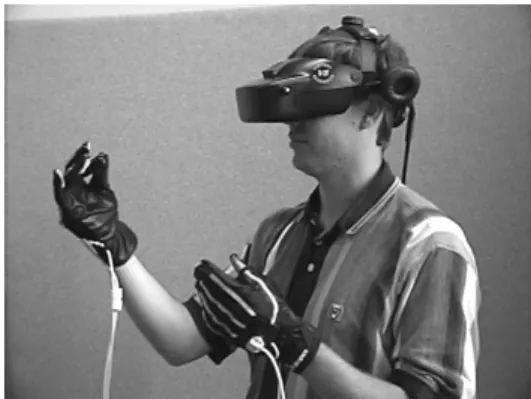
Pinch Gloves™ are a commercial input device designed for use in VEs, in particular on workbench display devices. They consist of a flexible cloth glove augmented with conductive cloth sewn into the tips of each of the fingers (figure 1). When two or more pieces of conductive cloth come into contact with one another, a signal is sent back to the host computer indicating which fingers are being “pinched” (the term pinch is used since the most common gesture involves the thumb touching one of the fingers on the same hand). In terms of logical input devices, Pinch Gloves™ are simply a choice device with a very large number of possible choices. The gloves also have velcro on the back of the hand so that a position tracker can be mounted there.
Figure 1. User wearing Pinch Gloves™.
We felt that an ideal use for Pinch Gloves™ would be for the implementation of a menu system. When designing such a system, several general requirements should be met. First, the new system needs to be at least as efficient and precise as other menu types – performance should not suffer. Second, its use should not cause the user significant discomfort. Third, it should not occlude the environment. Fourth, the menu system should be appropriate for both novice and expert users. Fifth, expert users should be able to do “eyes-off” interaction with the menu.
The gloves allow an almost unlimited number of different gestures. However, simply assigning each menu
item to a different pinch gesture does not produce a usable menu system, since the user has to remember which gesture corresponds to each command. Furthermore, there are very few gestures that have a natural mapping (e.g. pinching the thumb and forefinger represents “OK” in some cultures).
Therefore, something simpler needed to be done. We decided to drastically limit the number of pinch gestures that would be meaningful by using only those gestures in which the thumb touches a single finger on the same hand (eight possible gestures). We also agreed that the menu items needed to be visible to the user so that he is not required to rely on memory. Finally, it seemed important that the menu should allow for some hierarchy or organization of menu items rather than a flat structure containing all commands.
Based on these ideas, we developed the basic concept for our Pinch Glove™ menu system: the top level of the menu hierarchy (menu titles) are displayed on the fingers of the non-dominant hand, and a menu is chosen by pinching the thumb to the appropriate finger; and the second level of the hierarchy (items within each menu) is displayed on the fingers of the dominant hand, and an item is chosen by pinching the thumb of this hand to the appropriate finger. The hands are tracked so that the user can view the labels by moving his hands into view. This design roughly corresponds to research on the use of the two hands [20] stating that the non-dominant hand generally performs coarse, high-level activities while the dominant hand does more precise tasks. In this implementation, both hands are doing the same thing
mechanically, but conceptually the user is making a less precise selection with the non-dominant hand.
3.2 Initial Prototypes
The main problem with the basic concept for our Pinch Glove™ menu system is that it only allows four top-level menus with up to four items each. Of course, many systems will require more menus and items. Thus, our main hurdle was to find ways to implement longer menus without sacrificing the advantages of the basic design.
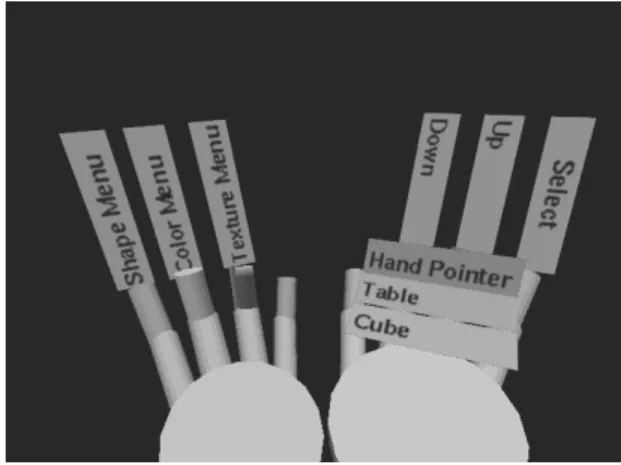
Our first prototype solved the long menu problem by placing all menu options on a scrolling list displayed on the palm of the dominant hand. The fingers were then used to scroll up or down in the menu or to select the currently highlighted item (figure 2). This design allows all options to be displayed at once, but may require a relatively large number of pinches (six in the worst case for our test scenario) to select an item.
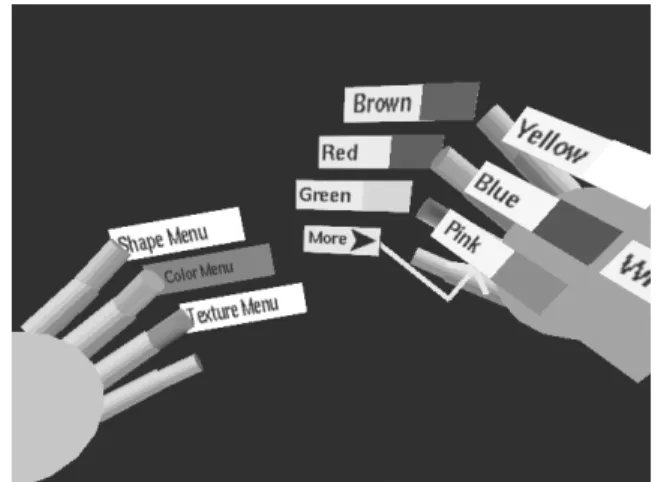
The second prototype adhered to the basic design more faithfully by allowing the fingers of the dominant hand to select menu items directly. Here, in order to accommodate longer menus, the pinky finger was always reserved for a “more options” item (figure 3). When the menu was
originally selected, the first three items would appear on the first three fingers. Pinching the thumb to the pinky (selecting “more options”) caused the next three options to appear on the other three fingers. In this way, the user could step through sets of available entries until the desired entry appeared, then select it. In the worst case for our menus, four pinches would be required to select an item using this “three-up” design. However, this design does not allow the user to see all the options simultaneously, which might confuse novice users.
Figure 2. Scrolling menu prototype.
Figure 3. Three-up menu prototype.
3.3 Formative Evaluation
We ran a pilot study in order to evaluate these initial designs. Users wore a Virtual Research V8 head-mounted display (HMD) and the head and both hands were tracked using a Polhemus Fastrak tracking system. We used an HMD even though the task could have been done using a standard monitor because we wanted to simulate as realistically as possible the use of these menu systems in an immersive VE. The test environment was developed using the Simple Virtual Environment library [21].
For testing purposes, we developed a task in which the user changes a virtual object to match a target object.
Three parameters could be controlled: the object’s shape, color, and texture (this could be considered a manipulation task, but since it’s implemented using menus, we consider it to be system control). Each of these corresponded to a top-level menu. There were three shapes to choose from, eight colors, and six textures – these corresponded to second-level menu items. Thus, the non-dominant hand could choose the top-level menu directly, but support for longer menus was required on the dominant hand. This environment allowed us to measure or observe information relating to each of our requirements.
Four users, representing both novices and those already familiar with VE technology, performed the object-matching task several times using both the scrolling and three-up menus. We alternated the order of presentation so that familiarity with the task or the gloves themselves would not bias the results. We collected informal results through observation of users’ actions, a “think aloud” protocol (users were asked to describe their thoughts, goals, and confusions as they used the menus), and a post-evaluation interview.
The primary result of this study was that neither design met all of our requirements. Users preferred the scrolling menu because all of the menu items were visible, but they also realized that they performed the task faster and with fewer pinches using the three-up menu. Both menus initially caused confusion in users: the three-up menu because some choices were not initially visible, and the scrolling menu because users attempted to select items in their palm directly.
Another important finding was that both menu designs could cause fatigue quite quickly, due to holding the hands in front of the face in order to read the labels, and due to holding the hands at an awkward angle in order to read the labels. We experimented with both down and palm-up configurations. Palm-palm-up was more natural to all the users, but the orientation of the labels was not optimal.
We also observed that only one user ever dropped either of their hands out of view. This user was able to remember the order of the menus on the non-dominant hand and therefore could select the menus by feel alone. However, he commented that he probably would not have thought to do this except for the fact that the hand position required to read the labels was uncomfortable!
Finally, several smaller problems were noted, including the lack of feedback when an item was selected, the lack of an indicator as to which menu was currently being viewed on the dominant hand, and difficulty in differentiating the “more options” entry from the other menu entries in the three-up design.
3.4 TULIP Menus
Based on the results of this formative evaluation, we developed a new menu design for the Pinch Gloves™ that
combined the best properties of our two initial designs. The main innovation of this design is the use of the three-up idea to produce better performance while still displaying all of the options for the current menu. As in the three-up design, the first three items in a long menu are displayed on the first three fingers of the dominant hand, and the “more options” item is displayed on the pinky. However, on the palm we also display, in groups of three, the other menu items (figure 4). An arrow connects the “more options” item to the first group of three items, indicating that these three items will become available if “more options” is selected. The groups are arranged in order so that they appear to slide across the hand as each group is made available. We call this the Three-Up, Labels in Palm (TULIP) menu system.
Figure 4. TULIP menus.
We also made several modifications to increase users’ comfort when using the menus. First, we moved the virtual representation of the hands 0.25 meters up from the location of the physical hands, so that users could hold the hands at a comfortable level and still see them in the virtual world (interestingly, no subjects in the subsequent experiment noticed this!). Before this modification, it was possible to hold the physical hands in a comfortable position and to see the virtual hands by looking downwards. However, quick downward glances in an HMD are more fatiguing than in the physical world, since head movement (rather than eye movement) must be used. We also rotated the labels on the fingers thirty degrees to allow them to be read while holding the hands at a more comfortable angle. The menu items on the palm were not rotated to help differentiate them from the active items.
TULIP menus also include several smaller improvements. On the non-dominant hand, we indicated which menu was currently active on the dominant hand by a color change on the relevant label. We also provided color feedback on the labels of both hands when a pinch was being performed. The “more options” label was shortened and made a different color to help differentiate it
from the other items, and it disappears if the menu has three or fewer entries.
It might be argued that some of the aspects of the TULIP design would not work well in a more complex VE application. For example, our menus require the use of both hands, so that any pinch between a thumb and a finger on the same hand is interpreted as a menu selection. In real-world VE applications, however, the user is likely to need at least one hand for other operations. This problem could be solved in several ways. First, the system might infer whether menus should be active by hand position: if the user holds his hands palm-up and near to his body, a pinch should be interpreted as a menu selection; otherwise, a pinch should be interpreted as some other type of interaction. Another possible solution is to reserve the non-dominant hand for choosing a top-level menu, but only use the dominant hand for menu item selection when a pinch is held down on the non-dominant hand (in our current implementation, there is always an active menu on the dominant hand). Finally, a special pinch gesture could be used to activate the menu (e.g. touching both thumbs together). This is less desirable since it creates explicit modes, but might work best if both hands were needed for other operations.
Another issue is our decision to modify the position of the virtual hands so that they do not match the position of the physical hands. In a VE application where the hands are used for object manipulation, one might claim this is undesirable. In fact, several published VE manipulation techniques perform some mapping between physical and virtual hand position that is not one-to-one [22, 23] with no apparent ill effects. However, if a one-to-one mapping is clearly desirable, the hand position can again be used to infer the correct action. Hands that are palm-up and close to the body should be raised for comfort in using the menus, and hands at other positions should appear at the correct physical location.
4. Experiment
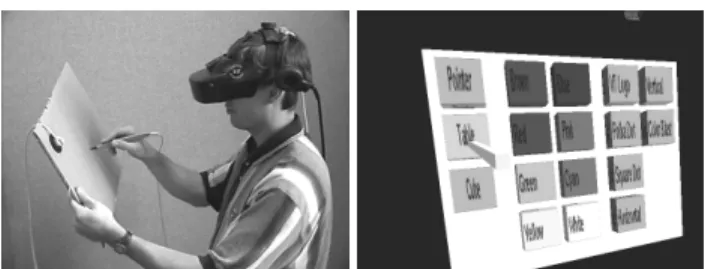
In order to test our design for TULIP menus, we designed and ran a summative evaluation comparing the glove menu system to two other well-known VE menu types: floating menus and a pen and tablet-based menu. Floating menus, as described above, act like pull-down menus in a desktop GUI. The menu titles are always visible and are attached to the user’s head. Selecting a menu title causes the menu items to drop down, from which one can then be selected. We decided to use occlusion selection [24] instead of ray-casting, because our previous experience with floating menus showed that novice users had difficulty selecting the titles using a three-dimensional pointing technique. Our implementation of floating menus is shown in figure 5. The pen and tablet menu system places all menu items onto the surface of a
virtual tablet that corresponds to the surface of a physical piece of cardboard. The virtual pen corresponds to the position of a physical stylus. The menus are separated spatially to show their organization, and the user selects a menu item simply by touching it with the stylus and pressing the stylus button. Our implementation of the pen and tablet menu is shown in figure 6. We did not alter the virtual hand position for these two techniques, since we wanted to compare TULIP to the most common implementation of the techniques.
Our goals for the summative evaluation were to compare the ease of use, ease of learning, efficiency, and comfort of the three menu systems.
Figure 5. Floating menu system.
Figure 6. Physical (left) and virtual (right) views of the pen and tablet menu system.
4.1 Method
To compare these three menu systems, we used the same object-matching task as the formative evaluation. Subjects completed a questionnaire containing demographic information and information about their experience with computers and VEs. They then read a set of instructions discussing the object-matching task in general terms without disclosing the workings of the menu techniques. Before beginning, subjects provided comfort ratings to serve as a baseline for future measurements. The comfort ratings were on a scale of one to ten, with one representing normal conditions and ten representing extreme discomfort, and covered four comfort areas: arm strain, hand strain, dizziness, and nausea.
The equipment and software used was the same as in the formative evaluation, except for the addition of the
Fastrak stylus, used in both the floating and pen and tablet menus, and the tablet itself. The order of presentation of the three techniques was counterbalanced to prevent learning effects from biasing the results. After giving the baseline comfort ratings, subjects were fitted with the HMD and handed the other devices they would use for the first set of trials. Each trial consisted of viewing a target object then changing a second object to match the target’s shape, color, and texture. Subjects completed 30 trials with each menu system. They were instructed to complete each trial as quickly as possible, and were not given any coaching by the experimenter. Thus, subjects learned each interface on their own. After each set of trials, subjects again provided comfort ratings.
We measured the time it took to complete each trial (from the presentation of the target until the match was made) and the number of changes required to make each match. In addition to the comfort ratings for each set of trials, we also polled users about their preferences and perceptions after the experiment was completed.
4.2 Subjects
Twenty-six subjects participated in the experiment. One subject’s data became corrupted, while another subject retired from the experiment, so data was compiled for 24 subjects. The mean age of the subjects was 26.0 years. Four were females. One subject indicated he was left-handed, and another that he was ambidextrous (we did not swap the functions of the two hands for the left-handed subject). Sixteen of the subjects were computer science students, and all but two subjects were students of some type. Half of the subjects had previous VE experience.
4.3 Results
We performed a single factor analysis of variance (ANOVA) using menu type as the independent variable and time per trial as the dependent variable. The average time for trial completion using the TULIP menu was 14.96 seconds; using the floating menus, 12.87 seconds; and using the pen and tablet menu, 11.36 seconds. The ANOVA showed that menu type was indeed a significant factor (F(2, 23) = 4.23, p < 0.05).
We also “normalized” the trial times based on the number of required changes, by multiplying the time for the trials requiring only one change by three, and the time for the trials requiring two changes by 3/2 (assuming that there is a fixed time cost associated with each menu selection). The analysis showed in this case that menu type was marginally significant (F(2, 23) = 2.64, p < 0.1).
The fact that the pen and tablet menu produced significantly faster performance than the other two menu types should not be surprising. The surface of the tablet allows all menu items to be viewed simultaneously and
selected directly, without hierarchy traversal. By contrast, there are at least two motions (select a menu, select an item) necessary to select a menu entry using floating menus, and between one and four pinches necessary to select a menu entry using the gloves. Moreover, the physical surface of the tablet provides a constraint that prevents users from making mistakes in selection.
0 5 10 15 20 25 30 35
TULIP Floating Tablet
Ti me ( seconds) Trials 1-5 Trials 6-10 Trials 11-15 Trials 16-20 Trials 21-25 Trials 26-30
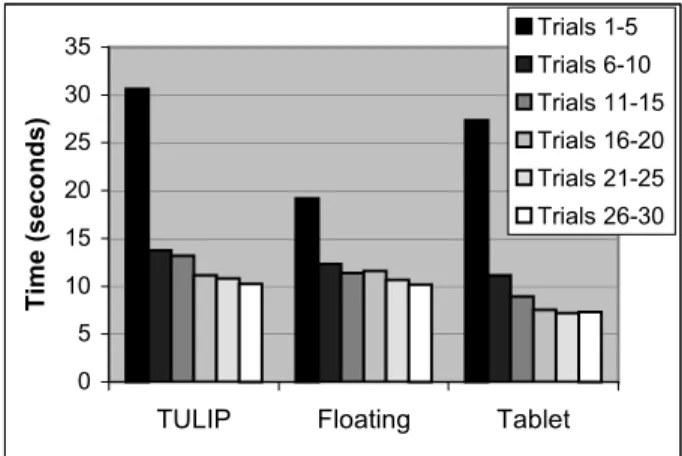
Figure 7. Learning in the menu experiment.
Figure 7 shows the average times for sets of trials with each menu type. We observed that the reason times for the pen and tablet menu are initially poor is that users were not told they needed to look at the tablet in their hand – once they did it was immediately clear what to do.
These results clearly show that learning was taking place with all three menu types. It appears that the gloves were the hardest to learn initially, but performance was at reasonable levels for all three types within five trials. This observation matches the comments we received from many users, such as “the gloves were confusing at first, but once I understood the concept, they were easy to use.” Figure 7 also indicates that performance with the floating menus and the pen and tablet leveled off well before thirty trials, but that users may have still been improving their performance with the TULIP menus. We expect that expert users of the glove-based menus would perform at a level equivalent to or surpassing the other types.
All Trials Last 10 Trials
VE exp. No exp. VE exp. No exp.
TULIP 12.82 17.10 8.82 12.25
Floating 11.91 13.82 9.81 11.39
Tablet 9.08 13.63 6.61 8.40
Table 1. Average times per trial (seconds) for subjects with prior VE experience and those without.
Table 1 compares performance times between the set of users who had some VE experience and the set of users who had not ever used a VE. It is notable here that for the experienced group, the differences between the menu
systems are smaller, and that in the last ten trials, performance using TULIP menus actually surpassed that of the floating menus for the experienced group. Our criteria for experience was simply that the subject had at some point used a VE system of any kind, so these results indicate that even with a minor level of knowledge, TULIP menus can be quite efficient.
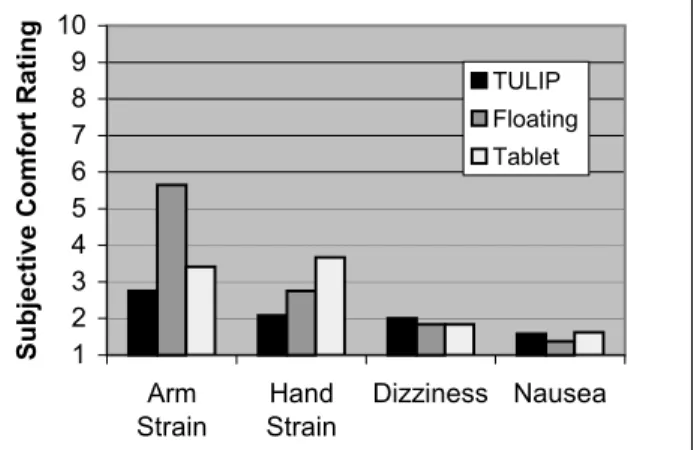
The comfort ratings for each type of menu are shown in figure 8. These results show that floating menus produced a large amount of arm strain (avg. response 5.65), due to the fact that the hand must be held high in the air to use the occlusion selection technique – this replicates an earlier finding [4]. The pen and tablet produced moderate levels of hand strain (avg. response 3.67), although neither of the devices weighs more than a few ounces, possibly due to the lack of a handhold for the user. These results are striking since each menu type was used for no more than ten minutes, and the entire experiment lasted no longer than 45 minutes including rest time. For prolonged usage in an immersive environment, the TULIP menus are clearly preferable. 1 2 3 4 5 6 7 8 9 10 Arm Strain Hand Strain Dizziness Nausea
Subjective Comfort Rating
TULIP Floating
Tablet
Figure 8. Comfort ratings in the menu experiment.
Fifteen users expressed a preference for the TULIP interface, while nine preferred the pen and tablet, and only two preferred the floating menus (two preferred both the gloves and the pen and tablet). When asked which interface they perceived to be the most efficient, nine users responded pen and tablet, eight responded gloves, and five responded floating menus (two users did not respond).
Combining the efficiency, comfort, and preference information, it appears that both the pen and tablet menu and the TULIP menus performed well in this evaluation. The main drawback of the pen and tablet system is the discomfort it causes users, which might be alleviated by adding an ergonomic handle. The main drawback of TULIP menus is their slightly slower speed, but our subjects did not reach asymptotic performance levels in thirty trials, so expert performance may be equivalent to or better than the pen and tablet system.
4.4 Discussion
Our design for the TULIP menus meets the requirements set forth in section 3.1. Their performance is reasonable, as we have discussed. No significant discomfort was found with the use of the gloves. Occlusion of the environment is still a problem, but is only slightly worse than if the hands were displayed with no labels. The environment is occluded much more by the pen and tablet system, since it uses a single large object. TULIP was more difficult for novice users than for other systems, but even for these users, only a short time was needed to understand the system without any outside coaching. Expert users performed quite well using the gloves. After trying all of the menu systems, a majority of users preferred TULIP. Our last requirement related to “eyes-off” use of the menu system. Although this is possible with the TULIP design, none of the subjects in the experiment did this. We surmise that this was due to the comfortable hand and arm position the gloves allowed, and because occlusion of the environment was not a major problem for the experimental task.
There are other interesting issues with the TULIP menus. As we have seen, performance is worse on the first trials using TULIP. The main reason for this is that the interface is less cognitively direct and has fewer affordances. With both the floating and pen and tablet menus, pressing the stylus button while touching or occluding the proper item causes that item to be selected. With the gloves, labels represent menu entries, but the labels themselves are not directly selected. Rather, the user pinches his thumb to the finger on which the label is seen. This is a subtle distinction, but the lack of directness is enough to cause some confusion in novice users. Users tried many things with the gloves, including pointing at or attempting to grasp the object they wanted to change and selecting the items appearing on the dominant hand with the non-dominant hand.
In addition, users of the TULIP menus cannot reverse an incorrect action because the pinch is the only signal that the item should be selected; whereas in the other two menu types, the user can move the stylus away from the menu item if selection is not desired. On the other hand, once an error is made it may be easier to correct using TULIP because it simply requires another pinch, while the other two menus might require large arm motions.
Overall, this evaluation reiterated some important heuristics from the traditional human-computer interaction literature. Menu systems for VEs need to have good feedback, affordances, and constraints, and items and their actions should be visible [25]. In addition, we found that interacting at a comfortable level, even if this means moving some virtual objects away from their physical counterparts, plays an important role in user performance and preference. TULIP menus were shown to be an
appropriate choice for a wide range of VE systems needing system control interfaces.
5. Conclusions and Future Work
Usable system control interfaces for immersive VEs are essential in order to enable complex and useful VE applications. We have presented the design of a novel menu technique using Pinch Gloves™ and the results of an empirical study comparing it to other common VE menu systems. It is our hope that VE developers will seriously consider these results and their implications when designing menus for immersive environments.
We plan to continue our evaluation of system control techniques. Other menu types should be included, and the experiments should be set in the context of more realistic tasks so that menu usage accurately reflects what might happen in a real-world application.
We also plan to continue to explore the use of Pinch Gloves™ for novel VE interaction techniques. The combination of a large number of possible inputs, the ability to combine the gloves with trackers, and the lack of any object that must be carried makes the gloves potentially useful in a variety of areas, including both natural gestures and abstract uses like the TULIP menus.
Acknowledgments
The authors would like to acknowledge the contributions of Ernst Kruijff, Joe LaViola, and Ivan Poupyrev for their discussions on system control interfaces. We also thank our the subjects in our evaluations for their time and effort.
References
1. Bowman, D. and L. Hodges, Formalizing the Design, Evaluation, and Application of Interaction Techniques for Immersive Virtual Environments. The Journal of Visual Languages and Computing, 1999. 10(1): p. 37-53. 2. Bowman, D.A., D. Koller, and L.F. Hodges. Travel in
Immersive Virtual Environments: an Evaluation of Viewpoint Motion Control Techniques. In Virtual Reality Annual International Symposium. 1997.
3. Darken, R. and H. Cevik. Map Usage in Virtual
Environments: Orientation Issues. In IEEE Virtual Reality. 1999.
4. Bowman, D., D. Johnson, and L. Hodges. Testbed Evaluation of VE Interaction Techniques. In ACM Symposium on Virtual Reality Software and Technology. 1999.
5. Poupyrev, I., et al. A Framework and Testbed for Studying Manipulation Techniques for Immersive VR. In ACM Symposium on Virtual Reality Software and Technology. 1997.
6. Nielsen, J., Noncommand User Interfaces. Communications of the ACM, 1993. 36(4): p. 83-99.
7. Mine, M., ISAAC: A Meta-CAD System for Virtual
Environments. Computer-Aided Design, 1997. 29(8): p. 547-553.
8. Bowman, D., Conceptual Design Space: Beyond Walk-through to Immersive Design, in Designing Digital Space, D. Bertol, Editor. 1996, John Wiley & Sons: New York. p. 225-236.
9. Bryson, S., Virtual Reality in Scientific Visualization. Communications of the ACM, 1996. 39(5): p. 62-71. 10. Dede, C., M. Salzman, and R. Loftin. ScienceSpace: Virtual
Realities for Learning Complex and Abstract Scientific Concepts. In Virtual Reality Annual International Symposium. 1996.
11. Jacoby, R. and S. Ellis. Using Virtual Menus in a Virtual Environment. In SPIE: Visual Data Interpretation. 1992. 12. Angus, I. and H. Sowizral. Embedding the 2D Interaction
Metaphor in a Real 3D Virtual Environment. In SPIE, Stereoscopic Displays and Virtual Reality Systems. 1995. 13. Lindeman, R., J. Sibert, and J. Hahn. Hand-Held Windows:
Towards Effective 2D Interaction in Immersive Virtual Environments. In IEEE Virtual Reality, 1999.
14. Bowman, D., et al., Designing Animal Habitats Within an Immersive VE. IEEE Computer Graphics & Applications, 1998. 18(5): p. 9-13.
15. Liang, J. and M. Green, JDCAD: A Highly Interactive 3D Modeling System. Computer & Graphics, 1994. 4(18): p. 499-506.
16. Mine, M., F. Brooks, and C. Sequin. Moving Objects in Space: Exploiting Proprioception in Virtual Environment Interaction. In ACM SIGGRAPH. 1997.
17. Pierce, J., B. Stearns, and R. Pausch. Voodoo Dolls: Seamless Interaction at Multiple Scales in Virtual Environments. In ACM Symposium on Interactive 3D Graphics. 1999. 18. Mapes, D. and J. Moshell, A Two-Handed Interface for
Object Manipulation in Virtual Environments. Presence: Teleoperators and Virtual Environments, 1995. 4(4): p. 403-416.
19. LaViola, J. and R. Zeleznik. Flex and Pinch: A Case Study of Whole-Hand Input Design for Virtual Environment
Interaction. In International Conference on Computer Graphics and Imaging. 1999: IASTED.
20. Hinckley, K., et al. Cooperative Bimanual Action. In CHI: Human Factors in Computing Systems. 1997.
21. Kessler, G., D. Bowman, and L. Hodges, The Simple Virtual Environment Library: An Extensible Framework for Building VE Applications. Presence: Teleoperators and Virtual Environments, 2000. 9(2): p. 187-208.
22. Bowman, D. and L. Hodges. An Evaluation of Techniques for Grabbing and Manipulating Remote Objects in Immersive Virtual Environments. In ACM Symposium on Interactive 3D Graphics. 1997.
23. Poupyrev, I., et al. The Go-Go Interaction Technique: Non-linear Mapping for Direct Manipulation in VR. In ACM Symposium on User Interface Software and Technology. 1996.
24. Pierce, J., et al. Image Plane Interaction Techniques in 3D Immersive Environments. In ACM Symposium on Interactive 3D Graphics. 1997.
25. Norman, D., The Design of Everyday Things. 1990, New York: Doubleday.