www.ijraset.com Volume 4 Issue XII, December 2016 IC Value: 13.98 ISSN: 2321-9653
International Journal for Research in Applied Science & Engineering
Technology (IJRASET)
©IJRASET: All Rights are Reserved
576
Augmented Reality: Home Interior Application
Mandar Parab1, Akshata Parab2
Computer Engineering, Terna Engineering College, Sector 22, Nerul, Navi Mumbai
Abstract— Augmented reality (AR) is a field of computer science research that combines real world and digital data. Augmented reality is an efficient visualisation technique for on-site 3D visualization and location-based services. It is beneficial in situations where the perception skills of a human need to be enhanced. One of the challenges of AR is to align virtual data with the environment. The hardware needed to create a fully immersed VR experience is still cost prohibitive. Another concern is VR training. Training with a VR environment does not have the same consequences as training and working in the real world. AR being a growing area in virtual reality the ultimate purpose was developing a system that the real world and virtual augmentation wouldn’t be distinctive for the user benefits. In this paper we show the implementation of a home interior application which has a user friendly interface for customer convenience.
I. INTRODUCTION
With the immense use of smart phones, AR has begun to get more widely noticed and for good reason. Its potential as an advertising tool is almost limitless. It can be used to find a specific restaurant or hotel and then get reviews on that restaurant or hotel. The application is developed keeping similar interests. Valuing time and user convenience, the proposed system diminishes the traditional method of buying products by benefitting the user with visualization of the product on the intended place giving a virtual image of the product. The home interior application strives to benefit its users in convenient ways for shopping for their homes with no onsite presence required buying the embellished home appliances like furniture, cupboards, dining tables and all sorts of necessary products. The software helps the users save their time and makes them easy to choose furniture that is best suited with the interior at their own ease.
II. PROCESSDESCRIPTION
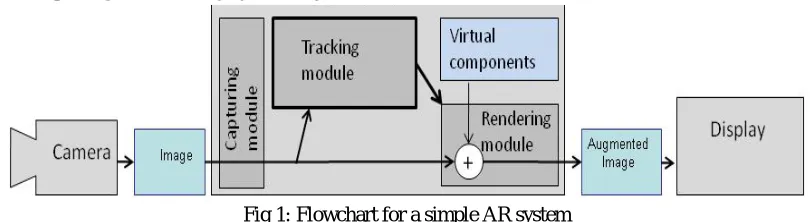
The main objective is to create an AR application that is cost efficient and can be helpful to users to visualize object in the present area i.e. merge the Virtual Reality & Real World. A simple augmented reality system consists of a camera, a computational unit and a display. The camera captures an image, and then the system augments virtual objects on top of the image and displays the result. The system captures an image of the environment, detects the marker and deduces the location and orientation of the camera, and then augments a virtual object on top of the image and displays it on the screen.
[image:2.612.108.513.490.601.2]The flowchart for a simple augmented reality system is given below.
Fig 1: Flowchart for a simple AR system The modules for the process flow are explained below.
A. Capturing module
The system captures an image of the environment, deduces the location and orientation of the camera, and then augments a virtual object on top of the image and displays it on the screen. It captures the image from the camera.
B. Tracking module
and orientation for virtual overlay.
C. Rendering module
The rendering module draws the virtual image on top of the camera image. It combines the original image and the virtual components using the calculated pose and then renders the augmented image on the display. In basic computer graphics, the virtual scene is projected on an image plane using a virtual camera and this projection is then rendered. The trick in augmented reality is to use a virtual camera identical to the system’s real camera. This way the virtual objects in the scene are projected in the same way as real objects and the result is convincing.
The variety of possible devices for an augmented reality system is huge. These systems can run on a PC, laptop, mini-PC, tablet PC, mobile phone or other computational unit. Depending on the application, they can use a digital camera, USB camera, FireWire Camera or the built-in camera of the computational unit. They can use a head-mounted display, see- through display, external display or the built in display of the computational unit, or the system may project the augmentation onto the real world or use a stereo display. The appropriate setup depends on the application and environment. In this project the system is developed with an appropriate SDK which is user friendly and many more features which can be used by the user having a smart phone interface. The application includes a set of steps to have a full- fledge access to it.
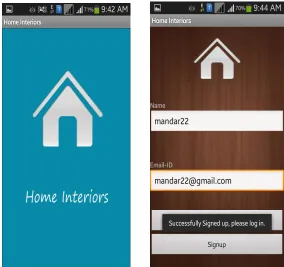
1) Installing of the Application: The Home Interior Application has a basic need of an Android platform like 2.3.3(Gingerbread) and above. The app needs to be downloaded and installed with its desired packages and libraries (.apk) to work accurately in a particular host. After the installation of the application an icon is created on the home screen of the host platform.
2) Login Details: After the application is installed the user needs to be either a registered user if not then has to sign up for the app with the required details i.e. Name, Email-id and Password. The user details are verified using the validation link sent on the email-id provided by the user and thereafter the user is recognized as a authorized one for the application.
3) Camera Calibration: Once the signing process is done the camera of the device is turned on in the background automatically with the list of products displaying on the screen. The user can move the camera around the screen for the placement of the product. The camera is centered according to the desirable position by the user.
4) Visualizing of the Product: The user needs to select the product he intends to visualize on the position and with the help of the camera he will be able to adjust the product at its recognized place. The 3D augmented image of the product is displayed on the screen. The user can move the product according to his needs in any wishful directions.
[image:3.612.163.447.445.712.2]www.ijraset.com Volume 4 Issue XII, December 2016 IC Value: 13.98 ISSN: 2321-9653
International Journal for Research in Applied Science & Engineering
Technology (IJRASET)
©IJRASET: All Rights are Reserved
578
Fig 4: Product List Fig 5: Augmented Furniture
III. CONCLUSIONS
The project concentrates on non-marker-based tracking and lightweight single-camera approaches. In conclusion, AR is a fantastic form of technology that could change the world as we know it for the better. It should not stop being developed just because it has a few problems but the wrinkles should be ironed out before taking the next step into a fully AR world. The augmented reality application developer needs to take into consideration several different issues: technical, application and other issues affecting the user experience. The main technological issues relate directly to the definition of augmented reality (real-time, interactive, 3D, combining real and virtual).
IV. ACKNOWLEDGMENT
We would like to acknowledge and extend our heartfelt gratitude to the following persons who have made the completion of this project successful: Mr. Pravin Hole and Mrs. Lata Ragha(HOD of Computer department) for extending her help directly and indirectly through various channel in our project work. We extend our sincere appreciation to all our professors for their valuable directions during the designing of the project. Their contributions have been valuable through various channels in our project work.
REFERENCES
[1] Interaction between users and Augmented Reality systems: Human-Computer Interaction of the future, By Wouter Alexander de Landgraaf at Vrije University,
Amsterdam
[2] Fundamentals of Image Processing , By Anil K. Jain
[3] Digital Image Processing, By S. Jayaraman, S. Esakkirajan, T. Veerakumar
[4] Layar: http://www.layar.com/
[5] Theory and applications of marker-based augmented reality . Presented by: Sanni Siltanen, http://www.vtt.fi/inf/pdf/science/2012/S3.pdf
[6] Metaio: http://www.metaio.com/, https://dev.metaio.com/creator/tutorials/create-an-ar-application/create-mobile- app-with-metaio-sdk/
[7] Hawk Eye: http://www.hawkeyeinnovations.co.uk/
[8] Vuforia: https://developer.vuforia.com/resources/sdk/android, https://developer.vuforia.com/target-manager