P ascal/MT
+ ™Language
Reference Manual
Copyright © 1983 Digital Research
P.O. Box 579 801 Lighthouse Avenue Pacific Grove, CA 93950
(408) 649-3896 TWX 910 360 5001
COPYRIGHT
Copyright © 1983 by Digital Research. All rights r e served. No pa r t of this publica tion may be reproduced, transmitted, transcribed, stored in a retrieval system, or translated into any language or compu ter language, i'n any form or by any means, electron ic, mechan ical, magnetic, optical, chemical, manual or otherwise, without the prior written permission of Digital Research, Post Office Box 579, Pacific Grove, California, 93950.
This manual is, however, tutorial in nature. Thus, the reader is gran ted permiss ion to include the example programs, either in whole or in part, in his or her own programs.
DISCLAIMER
Digital Research makes no representations or warranties with respect to the contents hereof and spec if ically discla ims any implied war ran ties of me r chan ta bi 1 i ty or fitness for any particular purpose. Further, Dig i tal Research reserves the right to revise this publication and to make changes from time to time in the content hereof without obliga tion of Dig i tal Research to no-tify any person of such revision or changes.
CP/M and CP/M-86 Dig i tal Research.
Dig~tal Research.
TRADEMARKS
are reg is tered trademarks of Pascal/MT+ is a trademark of
Table of Contents
1 Pasca1/MT+ Programs 1.1 Program Stiucture
1.1.1 1.1.2 1.1.3 1.1.4
Program Heading . • • • • • • • . • • 0 Declarations ~nd Definitions . . . • • Statement Body . . . • . • • . Modules . . . .
1.2 Scope
1.3 Comments .
2 Identifiers and Constants 2.1 Identifiers
2.2 Constants 2.2.1 2.2.2 I 2.2.3
Numeric Literals String Literals Named Constants
3 Variables and Data. Types 3.1 Type Definition
3.2 Variable Declaration • .
3.3 Simple Types • 3.3.1 3.3.2 3.3.3 3.3.4 3.3.5 3.3.6 3.3.7
BOOLEAN • • 0 • • • • • • •
CHAR . • • .
INTEGER and LONGINT 0 • • • • • • • . 0 • REAL • • • . . 0 • • • • • • BYTE and WORD . . . • • • . • • • . User-defined Ordinal Types . • . 0 Pointers . • • • . • • • . • • • • . . 3.4 Structured Types •
1-1 1-2 1-2 1-4 1-4 1-5 1-6 2-1 2-2 2-2 2-3 2-3 3-1 3-1 3-2 3-3 3-3 3-4 3-4 3-5 3-5 3=6 3-6 3.4.1 3.4.2 3.4.3 3.4.4 Arrays Strings . • Sets
Records •
. • • . . 3~7
Table-
of Contents
( continued)
4 Operators and Expressions _
4.1 Arithmetic Expressions
4.2 Boolean Expressions
4.3 Logical Expressions
4.4 Set Expressions
5 Statements
5.1 The Assignment Statement
5.2 The CASE Statement • •
5.3 The Empty Statement
· .
5.4 The FOR Statement
5.5 The GOTO Statement
5.6 The IF Statement
.
5.7 The REPEAT Statement
·
5.8 The WHILE Statement
5.9 The WITH Statement
.
·
.
6 Procedures and Functions
6.1 Procedur~ Definitions •
6.2 Parameters
6.3 Conformant Arrays
. ·
·
·
·
·
·
· ·
·
·
·
· ·
· ·
. · ·
· ·
·
·
·
·
·
6~4 Predefined Functions and Procedures •
ABS Function
ADDR Function • • • • ARCTAN Funct ion • • • •
• e. •
·
·
·
·
ASSIGN Function. • • • • • • • • •
·
·
·
-4-3 4-3 4-4 4-5 5-1 5-2 5-3 5-3 5-5 5-6 5-7 5-8 5-8• • • • • 6-2
• • • • • 6-3
• • 6-5
• • 6-8
Table of Contents
(continued)
CLOSE Function CONCAT FUnction • . COpy Function • COS Func tion DELETE Function • DISPOSE Function
EOLN, EOF Function . • • • EXIT Function • •
EXP Function • • • . • • • •
FILLCHAR Function . • • • • • • • • • • GET Function . • • •
HI, LO, SWAP Function INLINE Function . INSERT Function •
IORESULT Function . . • LENGTH Function . • . LN Function . • • • .
MAXAVAIL, MEMAVAIL Function
MOVE, MOVERIGHT, MOVELEFT Function NEW Function . • • • •
ODD Function • • • . OPEN Function . • . • . ORO Function • . • .
.
.
"..
PAC'K, UNPACK Function • . • • • • • • . • • PAGE Function •
POS Function PRED Function • PURGE Function
PUT Function • • • • READ, READLN Function • .
READHEX, WRITEHEX, LWWRITEHEX Function. RESET Func tion • . .,
REWRITE Function • • • . • . • • • . RIM85, SIM85 Function . • • • . ROUND Func tion • • • . • • SEEKREAD, SEEKWRITE Function • • • • SHL, SHR Function •
SIN Function • 0 • 0
SIZEOF Function • SQR Function . • • • SQRT Function .
SUCC FUDC tion • TRUNCFunction
TSTBIT, SETBIT, CLRBIT Function -WAIT Func tion . • • • . • .
Table of Contents
(continued)
@BDOS Function • • • •
@BDOS86 Function • • • • • • @CMD Function •
@ERR Function • • @HLT Function • @HERR Function
@MRK Function • . • . • @RLS Function
. 7 Input and Output
7.1 Fundamentals of Pascal/MT+ I/O • 7.2 Regular I/O
7.3 INP and OUT Arrays
·
·
· . .
7.4 Redirected I/O.
7.5 Sequential I/O
.
.
7.5.1 TEXT Files
·
.
· ·
7.5.2 Writing tq the pr inter 7.6 Random Access I/O·
.
· ·
.
.
.'
.
6-69 6-70 6-71 6-72 6-73 6-74 6-75 6-76
7-1 7-1 7-2 7-5
7-5 7-9 7-9 7-12
Foreword
The Pascal/MT~· language is a full implementation of standard Pascal as set forth in the International Standards Organization (ISO) standard DPS/7185. The Pascal/MT+ language also has several additions to standard Pascal. These addi tions make P'ascal/M~~+ more su i table for commerc ial prog'ramming, and increase its power to develop high-quality, efficiently maintainable software. The additions fall into four categories:
• enhanced I/O
• additional data types
• access to the run-time system • modules and overlays
Pascal/MT+ is useful for both data processing applications and for real-time control applications.
The Pascal/MT+ system, which includes a compiler, linker, and programming tools, is implemented on a variety of operating systems and microprocessors. Because the language is consistent an,ong the various implementations, Pascal/MT+ programs are easily transportable between target processors and operating systems. The Pascal/MT+ system can also generate software for use in a ROM-based environment, to operate with or without an operating syst~m.
This manual describes the Pascal/MT+ language with emphasis on those features that are unique to Pascal/MT+. Information in this manual ,cover s all language-related topics independent of the'
implementation.
Information about the compiler, linker, the Pascal/MT+ programming tools, and topics related to the operating system are contained in the version of the Pascal/MT+ Language Programmer's
~ pertinent to your specific implementation.
This manual assumes you are already familiar with the Pascal language in general. If you are not familiar with Pascal, refer to Appendix C for a bibliography of textbookf~.
Appendixes
A Reserved Words and Predefined Identifiers • • • • • • • • A-l
B BNF Notation • • • • • • • • • • • • • • • • • • • eo • • B-1
c
Differences from ISO Standard C-lFigures,Tables and Listings
Figures
1-1 Block Structure in Pascal/MT+
7-1 Lines in a TEXT File
7-2 Records in a File . • • • • • • •
Tables
Predefined Data Types
1-1
• • • • 7-9 . • • • 7-14
• 3-2 3-1
4-1 4-2 4-3
Summary of Pascal/MT+ Operators • Boolean Operations • • • • • • Logical Ope~ators • . • • • • • •
. • • • 4-1
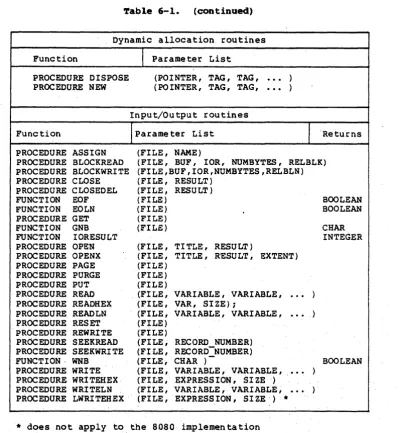
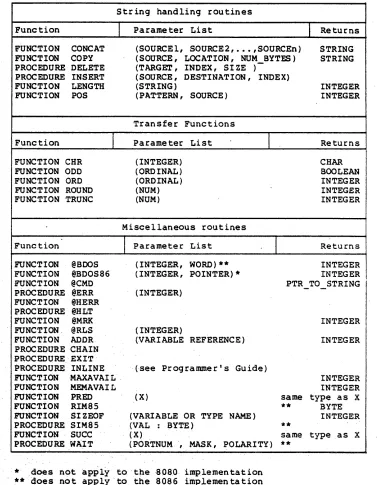
· . • • 4-4 • • 4-5 Predefined Functions and Procedures . • • • • 6-8
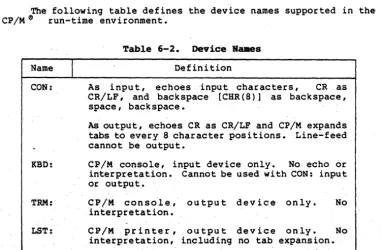
Device ·Names . • • • • • • • • • • . .6-13
· • • • 6-26 6-1
6-2 6-3 6-4
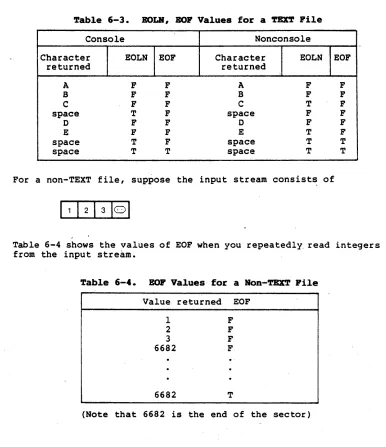
EOLN, EOF Valuses for a TEXT File • .
EOF Values fora Non-TEXT File . . • • .6-26
A-I A-2 Listings 1-1 1-2 '1:-3 1-4
Pascal/MT+ Reserved Words • • • • • . Pascal/MT+ Predefined Identifiers • .
Simple Pascal/MT+ Program • • •
Declarations and Definitions • • • . Example of Scope Rules
Example Program with Comments
3-1 Program Using Sets
4-1 Set Expressions . • •
6-1 FORWARD Declarations • • • • • • 6-2a Parameter Passing • • • • • • .
6-2b Output from VALVAR Program 6-3 6-4 7-1 7-2 7-3 7-4 7-5
Procedural Parameters • • • Conformant Array Example
File Input ~nd Output • • . . . • Red irec ted I/O • • • • . . . • • TEXT File Processing
Writing to a Printer and Number Formatting Random File I/O • . . • • • _. • • • • . • •
· A-I · • . . A-I
· 1-2 · 1-4 • 1-6 1-7
3-10
• 4-7
. • . 6-3 • 6-4 • 6-4 · . • • 6-5 · .6-7
Section 1
Pascal/MT+ Programs
1.1 Program Structure
Pascal/MT+ is a block-structured language. That is, you group one or more statements into logically related units called blc~ks.
Every block has a heading, an optional declaration and definition section, and a set of statements. In every Pascal/MT+ program, the outermost ~lock is the main ~rogram.
You can nest blocks inside your program. That is, you can put one block inside another block, but not overlap them. Inside blocks, you can also nest procedures and functions (see Section 6)e
Figure 1-1 illustrates the typical block-structure of Pascal/MT+.
PROGRAM VAR _
PROCEDURE _
[
BEGIN .
END
PROCEDURE _ . VAR_
[ BEGIN
END BEGIN
[ BEG'"
END:
END.
[
B~~END:
Pascal/MT+ Reference Manual 1.1 Program Structure
Listing 1-1 shows a small Pascal/MT+ program containing a nested block.
CONST
LIMIT
=
lO~MESSAGE
=
'TESTING PASCAL/MT+'~VAR
NAME : STRING~
PROCEDURE RESPOND (ST VAR
I INTEGER~
BEGIN
FOR I :~ 1 TO LIMIT DO BEGIN
WRITELN (ST) ~
STRING) ~
ST : = CONCAT (' I, ST) (* SHIFTS NAME TO RIGHT *)
END
END~
BEGIN
WRITELN (MESSAGE)~
WRITELN (' WHAT IS YOUR NAME? I ) ; READLN (NAME)~
RESPOND ( NAME) ;
WRITELN' ('FINISHED I , MESSAGE) END •.
Listing 1-1. SiJlpl.e Pascal./m.'+ Prograa
1.1.1 Prograa Beading
A program heading has the following form:
PROGRAM <program name> {(<program paramet~rs»};
Pascal/MT+ Reference Manual 1.1 Program Structure
1.1.2 Declarations and Definitions
You must define an identifier before you use it in a program, unless the identifier is predefined by the language (see Appendix A). Listing 1-2 shows an example of the declaration and definition part of a program illustrating each of the major kinds of declarations as shown in the following list.
1) LABEL declarations 2) CONSTANT declarations 3) TYPE definitions 4) VAR declarations
5) PROCEDURE and FUNCTION definitions
Note that LABEL, CONSTANT, TYPE, and VAR declarations can be in any order, and there can be multiple occurrences of each type in a module. PROCEDURE and FUNCTION declarations must appear last, and there can be only one section of these per module.
Pascal/MT+ Reference Manual
LABEL
34, 356, 755, 1000;
= lOa:
=
-TOP;=
1.OE-16:1.1 Program Structure
CONST TOP BOTTOM LIMIT
MESSAGE = 'THANK YOU FOR NOT SMOKING":
TYPE
COLOR = (RED, YELLOW, BLUE, GREEN, INDEX = BOTTOM •• TOP;
PERPt = "PERSON; PERSON RECORD
NAME,
ADDRESS STRING; PHONE S~RING [8] END;
VAR
COLR COLOR: I, J INTEGER;
LIST ARRAY [ INDEX] OF PERPT;
PROCEDURE ECHO (ST : STRING): BEGIN
WRITELN (ST, , " ST) END:
ORANGE) ;
Listing 1-2. Declarations and Definitions
1.1.3 Stateaent Body
The words BEGIN and END surround tpe body of statements in a block, which can contain zero or more statements. I·f the block is the main program block, you must put a period after the word END. Within the statement body, separate each statement with a semicolon =
1 •. 1.4 Modules
Pascal/MT+ Reference Manual 1.1 Program Structure
MODULE SIMPLE~
PROCEDURE MARK (CALL_NUM : INTEGER); BEGIN
WRITELN ('IN MODULE SIMPLE, CALLED FROM: " CALL_NUM) END;
MODEND.
Notice that the word MODULE replaces the word PROGRAM and that the word MODEND replaces the main statement body.
Refer to the Pascal/MT+ Language Programmer's Guide for your implementation for more information about modules and modular programs.
1.2 Scope
Every identifier in a Pascal/MT+ program has a scope. The scope of an identifier is the set of all blocks where you can make a valid reference to the identif ier. The normal scope of an identifier is anywhere inside its defining block, starting from its actual definition.
However, when a nested block redefines. the same identifier, the outer variable is inaccessible from the inner block. When the same identifier has multiple definitions, the innermost definition is the one that applies.
This manual uses the terms global and local. The declarations at the outermost level in the program are the global declarations. Declarations in a block are local to that block. A variable is local to a block if its declaration is in that same block. Inside a nested block, a variable declared in a containing block 'is usable, but it is not local to that nested .block. Wi thin a contained block, a reference to a variable in a containing block is called an "up-level reference".
Listing 1-3 Shows a program containing nested blocks with multiple definitions for the same identifiers. The comments in the program explain which definitions apply at various points.
.
Pascal/MT+ Reference Manual
PROGRAM SHOWSCOPE;
VAR
X, Y, Z : INTEGER; (* X,Y,Z ARE GLOBAL *)
PROCEDURE PROC1; VAR
BEGIN
X := Y / Z END;
PROCEDURE PROC2; VAR
W : INTEGER; Y : STRING; BEGIN
y := 'ABCDEFG' ;
W := X;
Z := X DIV 3 END;
BEGIN
(* Y & Z FROM MAIN BLOCK *)
(* W LOCAL TO PROC2 *) (* Y LOCAL TO· PROC2 *)
(* X FROM MAIN BLOCK *) (* X FROM MAIN BLOCK *)
1.2 Scope
Y : = 35; (*
Z : = 12; (*
X, Y, & Z ARE ALL INTEGERS *) IN THIS BLOCK *)
PROC1; (* CHANGES X PROC2; (* CHANGES Z WRITELN (X, Y, Z) END.
*) *)
Listing 1-3. Exa.ple of Scope Rules
1.3 Comaents
You can put a comment anywhere in a program that you can put a blank space; the compiler ignores comments. There are two ways to write a comment in a Pascal/MT+ program:
• Surround the comment with the characters { and } .
• Surround the couent with the character pairs. (* and *).
Pascal/MT+'Reference Manual
PROCEDURE WALKTREE (TREE TREEPT);
BEGIN
WITH TREE'" DO BEGIN
1.3 Comments
WALKTREE (LEFTREE); {PRE-ORDER WALK OF TREE} WRITELN (INFO.NAME);
(* **** REMOVE THIS LINE FOR DIAGNOS"TICS
WRITELN ('**** IN WALKTREE ****');
IF MARKED(NODE) THEN { LOOK FOR LOOPS IN TREE} BEGIN
WRITELN (' LINK ERROR IN TREE'); TREE DUMP (TREE) { WILL NOT RETURN END
ELSE
MARK (NODE); { TREE OK SO FAR}
****** REMOVE THIS LINE FOR DIAGNOSTICS *)
WALKTREE (RIGHTREE) END
END;
Listing 1-4. Ezallple Prograll with Comaents
Section 2
Identifiers and Constants
This section describes Pascal/MT+ identifiers, and the rules for forming literal constants. It also describes how to define named constants.
2.1 Identifiers
A Pascal/MT+ identifier can represent a variable,· a type, a constant, a procedure or function, or an entire program. The same rules apply to all Pascal/MT+ identifiers, regardless of what kind of objects they represent.
A Pascal/MT+ identifier can be any length, as long as it fits on one line. However, the compiler uses only the first eight characters to distinguish one identifier from another. Only the first seven characters are significant in external identifiers.
Identifiers can contain,any combination of letters, digits, and underscores. They must begin with a letter, and they cannot contail'l any blank spaces. The compiler ignores underscores and typecase. For example,
is the same as
abc
You can also use an @ as the first character in an identifier# as long as you do not use the @ compiler option. You cannot use the @ inside an identifier. The .compiler allows the @ character, so you can access the run-time routines whos~ name begin~ with @.
However, if you use the @ compiler option, then the compiler interprets the @character as the standard pointer character, A, and does not allow the @ as part of an identifier.
The followin9 are examples of valid Pascal/MT+ identifiers:
Pascal/MT+ Reference Manual 2.1 Identifiers
The following are examples of invalid identifiers:
X!2 l23x program STY@HM X 22
Contains an illegal character Begins with a digit
Reserved word
@ not first character Contains a blank space
You cannot use reserved words, such as BEGIN and IF, as identifiers. However, you can use predefined identifiers such as WRITELN and BOOLEAN, to name any object in your program. Predefined identifiers are defined one level above the global level in your program, so changing the definition of a predefined identifier makes the old object inaccessible from wi thin the scope of the new definition.
Appendix A lists the Pascal/MT+ reserved words and predefined identifiers. The Pascal MT+ Language Programmer's Guide for your implementation contains the list of the run-time entry-point names, as well as information about external identifiers.
Note: if you inadvertently use a run-time entry-point name as an external identifier, your program might not link properly.
2.2 Constants
You can express a constant as a literal value, or you can give the constant a name and then use the name anywhere you need that value. Pascal/MT+constants can be str ings, integers, real numbers, or scalar types.
2.2.1 No.eric Literals
A numeric literal can be a decimal integer, a hexadecimal integer, a long integer, or a real number. The form of the constant determines its type.
Bote: long integers are not .available with the 8-bit versions of pascal/MT+"
An integer literal is.any whole number in the range -32768 to 32767. An integer literal cannot have a decimal point or any canmas. To write an integer in hexadecimal, start it with a $. The following are examples of valid integer literals:
Pascal/MT+ Reference Manual 2.2 Constants
A long-integer constant 'must start with a pound sign,
I.
For negative numbers, put the minus sign before theI.
The following are examples of long-integer literals:'6234343
'0
-1678988
A real-number literal can 'be either in fixed- or floating-point format. In fixed-point format, at least one digit must proceed and follow the decimal point. The form for a floating-point literal is a number with or without a decimal point, followed'by an E, fOllowed by an optionally signed integer. Neither format can contain any blanks or commas. .The following are examples of valid real-number
literals: '
64.78E-13 -65.3 -33.677E+lO
In floating-point format, the E is interpreted as "times 10 to , the power of." For example,
6.3E5
is 6.3 times ten to the power of five (10
5),
or 630000.2.2.2 String Literals
A str ing literal can' contain any number of printable
charac~ers, as long as the string fits on one line. You write a string'literal by enclosing it in single apostrophes. Everything between the apostrophes, including blanks, is part of the string. Use two single apostrophes to represent one single apostrophe inside a str ing. Ins ide str ings upper- and lower-case letters are distinct. The following are examples of valid string literals:
'***
INVALID EDIT COMMAND***'
'Steve"s Program'
Pascal/MT+ Reference Manual 2.2 Constants
2.2.3 R..ad Constants
A constant definition defines 'an identifier as a synonym for a constant value. You can use a named constant anywhere that you can use a li teral. The following is an example <:>f a constant definition section:
CONST message size limit esc
conv fact null=str
'VERSION 3.3'; 100;
-size; =' $lB;
3.27E-3; = " ;
Notice that Pascal/MT+ allows the null string.
Section 3
Variables and Data Types
This section describes the data types supported by Pascal/MT+. There are two general categor ies of data types: simple and structured. Simple data types, also called scalar types, have only one element per data item. Integers, characters, and pointers are examples of simple types.
item. types.
Structurea types contain more than one element within a data Records, str ings, and arrays are examples of str.uctured
This section does not discuss files; see Section 7 for information about files.
3.1 'rype Definition
The compiler uses a type definition to determine how to allocate space for a variable. .The type definition section of a block associates names with specific type definitions, as in the following example:
TYPE
NUMBERS
=
ARRAY [1 •• 10} OF INTEGER~ STRPT ='" STR ING ;LETTER I A I • • I Z I ;
3G2 Variable Declaration
A variable declaration establishes the type of a variable, and determines its scope. You must declare all variables before you can use them in a program. The following is an example of a variable declaration section in a block.
VAR
X, Y, Z
NAMES
NUMl
NUM2
INTEGER; LIST;
Oeo200; 0.e200;
Pascal/MT+ Reference Manual 3.2 Var iable Dec la ration
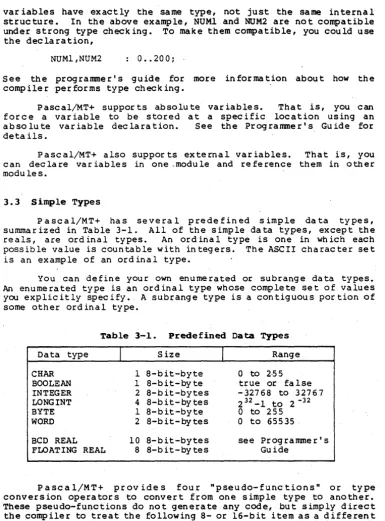
var iables have exactly the same type, not just the same internal structure. In the above example, NUMl and NUM2 are not compatible under strong type checking. To make them compatible, you could use the declaration,
NUMl,NUM2 : O •• 200;
See the programmer's guide for more information about how the compiler performs type checking.
Pascal/MT+ supports absolute variables. That is, you can force a variable to be stored at a specific location using an absolute variable declaration. See the Programmer's, Guide for details.
Pascal/MT+ also suppor ts external var iables. That is, you can declare var iables in one .module and reference them in other modules.
3.3 Simple Types
Pascal/MT+ has several predefined simple data types, summar ized in Table 3-1. All of the Simple da ta types, except the re als, are ord ina 1 types. An ord ina I type is one in wh ich each possible value is countable with integers. The ASCII character set is an example of an ordinal type.
You can define your own enumerated or subrange data types. An enumerated type is an ordinal type whose complete set of values you explicitly specify. A subrange type is a contiguous portion of some other ordinal type.
Table 3-1. Predefined Data Types
Data type
I
SizeI
RangeCHAR 1 8-bit-byte
a
to 2·55BOOLEAN 1 8-bit-byte true or false
INTEGER 2 8-bit-bytes -32768 to 32767
LONGINT 4 8-bit-bytes 232_1 to 2 -32
BYTE 1 8-bit-byte 0 to 255
WORD 2 8-bit-bytes 0 to 65535
BCD REAL 10 8-bit-bytes see Prog ramme r' s FLOATING REAL 8 8'- bit - by te s Guide
[image:22.491.53.438.33.554.2]Pascal/MT+ Reference Manual 3.3 Simple Types
• CHR(x) returns the character whose ASCII value is the specifi~d
expression.
• ORO (x) returns the ordinal value of the expression. The ordinal value of a character is its ASCII numeric representation.
• OOO(x) returns the BOOLEAN value TRUE if the expression is odd, otherwise it returns the BOOLEAN value FALSE.
• WORD (x) directs the compiler to treat the specified e'xpression as a native machine word.
3.3.1 BOOLEAN
The BOOLEAN type has two values: TRUE and FALSE. The ordinal value of FALSE is 0, and the ordinal value of TRUE is 1.
A BOOLEAN variable uses one byte, even in a packed structure (see Section 3.4). Within the byte, only the least-significant bit matters in determining the value. If the bit is set, the value of the variable is TRUE, if not, the value is FALSE. However, logical operations use the whole byte.
3.3.2 CHAR
Variables of type CHAR use one byte. The internal representation of a character is the ASCII value of the character. The range for CHAR variables is CH~(O) to CHR(255).
To express a CHAR value in a program, enclose the character in single apostrophes if it is a print'able character, or use the CHR pseudo-function. Use two single apostrophes to represent the single apostrophe character.
The following example program demonstrates the CHR and ORO pseudo-functions.
PROGRAM CHR_ORO;
VAR
I, J
C, 0
BELL
BEGIN
I : = 7;
Pascal/MT+ Reference Manual 3.3 Simple Types
3.3.3 IftBGBR and LORGIft
INTEGER variables are 2 bytes long. Integers can range from -32768 to +32767. An integer literal iri the range 0 to 255 takes up only one byte in the code.
LONGINT var iables are 4 bytes long. The range for long integers is 2- 32 to 232_1. You can write a LONGINT literal only in decimal; write it like a regular integer literal, but start the number with the t character. For example,
#6234343
You can define LONGINT subranges, but you cannot use them as indexes for arrays.
There are three functions for converting between the LONGINT and other data types:
FUNCTION SHORT(L: LONGINT): INTEGER 1 FUNCTION LONG (S: SHORT ): LONGINTi FUNCTION XLONG(Sr SHORT ): LONGINT1
A short data type is any 8- or 16-bit type, such as CHAR, BOOLEAN, INTEGER, or WORD. The function LONG pads the short value with zeros. The function XLONG sign-extends the short value into the high-order word.
See your programmer's guide for specific information about the internal representation of the INTEGER and LONGINT data types.
Rote: the LONGINT type is not available in the 8-bit versions of Pascal/MT+.
3.3.4 REAL
Pascal/MT+ handles real numbers in two ways to support different applications:
• BCD for business applications
• Binary floating· point fors·cientific and engineering . applications.
A command-line option tells the compiler which format to use.
Pascal/MT+ Reference Manual 3.3 Simple Types
The following are examples of real-number literals, as explained in Section 2.
2l2.3E-l6 -22.454 2.0E+4·
3.3.5 BYTE and lIORD
The BYTE data type uses a single byte. It is compatible in expressions and assignment statements with the CHAR and INTEGER types. BYTE accepts any bit pattern and is useful for handling· control characters, and performing character arithmetic.
The WORD data type uses a native machine word, except in the 8-bit implementation where it uses two bytes. All arithmetic and comparison operations on WORD expressions are unsigned, whereas operations using INTEGER are signed.
3.3.6 User-defined Ordinal Types
You can define two kinds of ordinal types: enumer:ited types and subranges.
An en~merated type is one in which you explicitly list each va·lue in the type. The names for the values must be valid Pascal/MT+ identif iers. The following example shows some type definitions for enumerated types.
TYPE COLOR
=
SCORE SKILL=
(RED, YELLOW, BLUE, GREEN, ORANGE); (LOST, TIED, WON);
Pascal/MT+ Reference Manual 3.3 Simple Types
The ordinal value of an enumerated-type constant is the same as its position in the type definition. The first constant has an ordinal value of O. In the example above, YELLOW has an ordinal value of 1, and EXPERT has an ordinal value of 3.
A subrange is a set of values ranging between two specified values of some previously defined ordinal type. The following are examples of subrange definitions.
TYPE GOOD PRIMARY NUMERAL INDEX
ADVANCED •• WIZARD; RED .. BLUE;
'0' •• '9'; 1 .• 100 ~
Both bounds in a subrange definition must be either literals or named constants of the same ordinal type. The left constant must have an ordinal value less than that of the right constant.
3.3.7 Pointers
A po inter is a var iable whose value is the address of a dynamically allocated variable of some specific type. To define a pointer type, use the pointer character, A, followed by a type name, as in the following examples.
TYPE INTPT LINK NAMEPTR
"INTEGER~
"TREE NODE; "STRING;
You can assign the value NIL to any type pointer to represent a null pointer.
To reference the object whose address a pointer contains, follow the pointer's name with the" character, as in the following examples.
NEWREC := NEXT";
NAME" := 'ALPHA FIVE'; EMPLOYEE".AGE := 32;
If the compiler is using strong type checking, two pointers must be of the .same type to be compatible. When the compiler is using weak type checking, all pointer types are compatible, allowing
you to treat the same ·object as more than one data type.
Pascal/MT+ Reference Manual 3.4 Structured Types
3.4 Structured Types
Structured types are a composite of other types. A simple-type variable only has one value, whereas a structure-type variable can be a collection of values of different types. Arrays, records, sets, and files are the major kinds of structured types. Section 7 discusses filetypes.
When determining the internal layout of a structured type, the compiler sometimes leaves gaps between elements, putting the elements at word boundaries to speed up access. If you want to sacrifice speed for space, you can use the reserved word PACKED. In the context of a structure type definition, the word PAC~ED causes the compiler to eliminate any ~~sted space.
3.4.1 Arrays
An array is a collection of a fixed number of elements of the same type. Arrays can have any type element, including other structured types. An array type definition has the general format:
ARRAY [<index type> {,<index type>}] OF <element type>
The <index type> can be arq subrange type except LONGINT. You can either use the name for a subrange type, or specify the bounds explicitly_ For the <element type>, you can either use a type name, or define the type right in the array definition. The following are examples of array type definitions.
TYPE
LIST = ARRAY [FIRST •• LAST] OF STRING;
GRIDl = ARRAY [1 •• 20] OF ARRAY [1 •• 20] OF INTEGER; GRID2 = ARRAY [1 •• 20, 1 •• 20] OF INTEGER;
TABLE PACKED ARRAY. [INDEX] OF PERPT;
Note that the definitions for GRIDl and GRID2 are functionally identical.
You can use the reserved word PACKED in an array definition of the form:
PACKED ARRAY [1 •• n] OF CHAR:
In this context, the word PACKED causes the compiler to treat the array as a static string_
Pascal/MT+ Reference Manual
PROCEDURE WORTHLESS:
CONST FIRST
=
LASTTYPE LIST
=
VAR
I
NAMESA NAMESB
BEGIN
ARRAY [1 •• 20] OF STRING;
: INTEGER; :'--LIST; : LIST:
FOR I := FIRST TO LAST DO NAMEsA [ I] : = ' '; NAMESB : = NAMESA END;
3.4.2 Strings
3.4 Structured Types
The predefined type STRING is like a packed array of characters in which byte 0 contains the dynamic length of the string and bytes I through n contain the characters. When you declare a string, the compiler allocates a predetermined number "of bytes for the string. The default'length is 80, but you can specify from I to 255 bytes. The dynamic length is the length of the string actually in use, not the total available space. To specify the maximum length of a string, put the length in square brackets, as in the following
example: .
VAR TITLE· LINE LONGLINE
STRING [16] STRING; STRING [255] ;
You can assign a string of any length to a string variable. You can also assign a CHAR value to a str ing. The length byte o'f the string variable reflects the new dynamic length, and the extra bytes are undefined. However, if the assigned str ing is longer than the maximum length of the string variable, errors can occur. Assigning individual characters to a string does not change the declared ).ength.
To access individual characters in a string, you index the string like an array.
Pascal/MT+ Reference Manual 3.4 Structured Types
Pascal/MT+ supports static str ings, which have a preset, static length. To declare a static string, define it as:
PACKED ARRAY [l •• n] OF CHAR
where n is an integer constant in the range 1 to 255.
Keep in mind the following points about static strings:
• You can ass ign a str ing lite ral to a sta tic str ing if the string literal is exactly the same length as the static string.
• You can compare static strings to string literals of exactly the same length.
• You can write static str ings to TEXT files using the' WRITE and WRITELN procedures.
Pascal/MT+ stores str ing literals as dynamic str ing's, and the string routines work only with dynamic strings.
3.4.3 Sets
A set is a structured type that contains elements of the same base type. Unlike arrays or records, in which each element has a value, the elemen ts of a se t are only sign ifican t in their presence or absence from the set. Each element in
a
set has a corresponding bit. If an' element is in a set, its bit is set, if the element is not in the set,' its bit is O. .Set opera tions are the standa rd rna thema tical opera t:Lons lik e union, intersection, and difference. Section 4 describeG the set opefators and expressions.
A set type definition has the general form:
SET OF <base type>
In Pascal/MT+, the <base type> can be any ord inal type. The ordinal value of the upper and lower bounds of the base tyt:e must be in the range
a
to 255. A se t-type var iable always takes up 32 bytes.Pascal/MT+ Reference Manual
PROGRAM USE_SETS;
VAR
LOWER, UPPER : SET OF CHAR; DIGIT, DELIMIT : SET OF CHAR; I, NUMLETS, NUMDIGS : INTEGER; LINE STRING;
BEGIN
LOWER : = [' a ' • • ' z ' ] i
UPPER : = [' A' •• ' Z ' ] ;
3.4 Structured Types
DIGIT :
= ['
0 ' •• ' 9' ] ; DEL IMIT : = [" , • ' , NUMLETS := OJ, ,
, ,
'i', ':', '1', '?',];NUMDIGS :=-0; READLN (LINE) j
FOR I := 1 TO LENGTH(LINE) DO
IF LINE[I] IN (LOWER + UPPER) THEN BEGIN
NUMLETS := NUMLETS +.1;
IF LINE[I] IN LOWER THEN (* MAKE UPPERCASE *)
LINE[I] := CHR(ORD(LINE[I]) - 32) END
ELSE
END.
3.4.4 Records
IF LINE[I] IN DIGIT THEN NUMDIGS := NUMDIGS +1 . ELSE
IF LINE[I] IN PELIMIT THEN LINE [ I ] : =
'*'
Listing 3-1. Prograa Using Sets
A record is a collection of distinct elements called fields, each of which" can be of any type. Records are useful for describing logically related data items that are of different types.
Pascal/MT+ records can either be variant, or nonvariant. Any two nonvariant records of a particular type always have the same internal structure whereas variant records can vary in internal structure.
The type definition for a nonvariant record has the general form:
RECORD
<field list>
Pascal/MT+ Reference Manual 3.4 Structured Types
The <field list> consists of one or more identifiers separated by commas. Within any given record, each field name must be a unique identifer. Outside ,the record, the field names can be used for different identifers. Therefore, two different record types can have identical field names.
The following is an exaniple of a nonvariant record definition:
TYPE
PART
=
RECORDNAME, SOURCE ID NUMBER PRICE END;
STRING[lO]; INTEGER;
REAL
VAR
PARTLIST
NEWPART ARRAY [NUMPARTS] OF PART; PART;
Notice that the field definitions have the same format as variable declarations.
You can reference each element in record by its fiel1 name using the following form:
<record name>e<field name>
where the dot operator connects the record name and field name. For example,
NEWPART.PRICE := 29.95; WRITELN{PARTLIST[I] .NAME);
A variant record is a record whose internal structure varies depending on how you use the record. That is, you can have two or more records of the same type that have different types of fields.
The variant part of the record's definition acts like a CASE statement (see Section 5.2) because each option in the defini tion is labeled with one or more values, and the only option whose label matches the value of a selector is used. .
The variant part of·a record must follow the nonvariant part, and a record can have only one variant part. However, a field within the variant can also be a variant record, so it is possible
to nest variants. .
The type definition for a variant record has the general form:
RECORD
Pascal/MT+ Reference Manual 3.4 Structured Types
field has a variant part, it must be the last field in the list. To indicate that a variant has no fields, use an empty parentheses pair.
The <case selector> is either a <tag field> or simply a type name. In either case, the type must be some previously defined simple (scalar") type. The case labels are constants of the type of the selector. If there are more than one, separate them with commas.
If the <case selector> is a <tag field>, it has the form:
<field name> : <type name>
and is one of the regular fields in the record. The field list, or variant with the correct case label, is selected depending on the value of the <tag field>.
The following example shows a variant record definition:
RECORD
NAME RECORD FIRST MID LAST END;
STRING [15] ; CHAR;
". STRING [15] AGE, BIRTH : INTEGER;
SEX : CHAR;
CASE EMPLOYED : BOOLEAN OF (* START OF VARIANT PART *)
FALSE ( ) ;
TRUE (SALARY: REAL;
END;
CASE EMP BY : EMP TYPE OF SELF :-(YEARS :-INT~GER);
GOV, BUSI : {TITLE: STRING"[12]; NUMYRS : INTEGER
Both the main variant and the nested variant in the preceding example have a field that controls which variant applies. It is also possible to use a type name "to control the variant, as in the following example. This kind of variant is called a free variant.
RECORD CASE 1 2 3
INTEGER OF (A, B, C, 0
(X, Y
: (Z
Pascal/MT+ Reference Manual 3.4 Str uc tured Types
Every field name in a record must be distinct, even if the fields are in different variants. Surround each variant with parentheses; if there are no fields in the variant for a given label, use empty parentheses, ( ).
Pascal/MT+ Reference Manual 4 Operators and Precedence
~ab1e 4-1. (continued)
Operator
I
OperationI
OperandI
ResultI
Precedence=
equality<> inequality
< less than
> greater than
<= less or equal
-or
set inclusion
>= greater or equal
or
set inclusion
IN set membership
NOT riegation
OR disjunction
AND conjunction
-
? one'scomple-or \ mentof operand
1 or
I
logical OR"
logical AND+ union
-Relational
scalar,string set, pointer
record boolean
scalar,string set, pointer
record boolean
scalar or
string boolean
scalar or
string boolean
set boolean
scalar or
string boolean
(see 404) boolean
(see 4.4) boolean
Boolean
boolean boolean
boolean bool"ean
boolean boolean
Logical
integers and same as " pointers operand
integers and same as
pointers operand
.
integers and same as
pointers operand
Set
set set
lowest lowest lowest lowest lowest lowest lowest lowest highest
3rd highest
2nd highest
highest
3rd highest
2nd highest
Section 4
Operators and Expressions
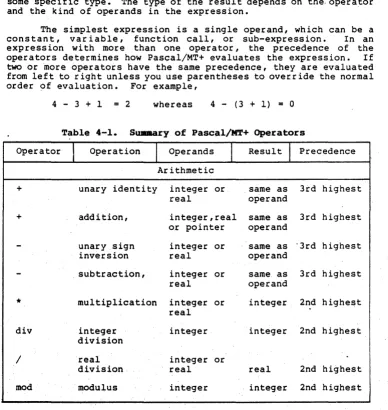
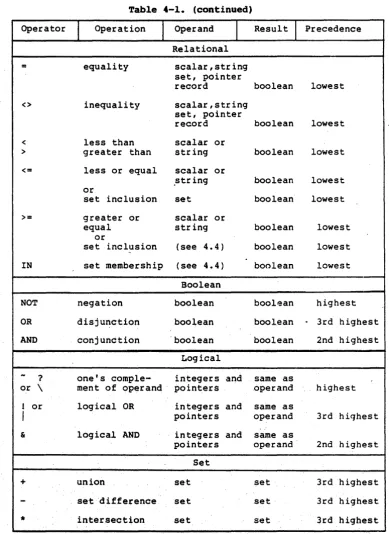
Pascal/MT+ provides a large assortment of operators for building expressions in several general categories. Table 4-1 briefly describes each of the operators.
Pascal/MT+ evaluates every expression to result in a value of some specific type. The type of the result depends on the,operator and the kind of operands in the expression.
The simplest expression is a single operand, which can be a cons tan t, var i able, function call, or sub-expression. In an expression with more than one operator, the precedence of the operators determines how Pascal/MT+ evaluates the expression. If two or more operators have the same precedence, they are evaluated from left to right unless you use parentheses to overr ide the normal order of evaluation. For example,
4 - 3 + I
=
2 whereas 4 - (3 + 1)=
0Table 4-1. Su.mary of Pascal/MT+ Operators
Operator
I
OperationI
OperandsI
ResultI
Precedence Arithmetic+ unary identity integer or same as 3rd highest
real .operand
+ addition, integer,real same as 3rd highest
o.r pointer operand
-
unary sign integer or same as ·3rd highestinversion real operand
-
. subtraction, integer or same as 3rd highestreal operand
*
multiplication integer or integer 2nd highestreal
div integer integer integer 2nd highest
[image:35.487.41.429.159.569.2]Pascal/MT+ Reference Manual 4 Operators and Precedence
Table 4-1. (continued)
Operator
I
OperationI
OperandI
Result1
Precedence Relational= equality scalar,string
set, pointer
record boolean lowest
<> inequality scalar,string set, pointer
record boolean lowest
< less than scalar or
> greater than string boolean lowest
<= less or equal scalar or
,string boolean lowest
or
set inclusion set boolean lowest
>= greater or scalar or
equal string boolean lowest
or
set inclusion (see 4.4) boolean lowest
-IN set membership (see 4.4) boolean lowest
Boolean
NOT negation boolean boolean highest
OR disju~ction boolean boolean
.
3rd highestAND conjunction 'boolean boolean 2nd highest
Logical
-
? one's comple- integers and same asor \ ment of operand' pointers operand highest
1 or logical OR integers and same as
I
pointers operand 3rd highest..
& logical AND integers and same as
pointers operand 2nd highest
Set
[image:36.488.46.435.29.562.2]Pascal/MT+ Reference Manual 4.1 Arithmetic Expressions
4.1 Arithaetic Expressions
Pascal/MT+ multiplication, exponentiation.
has
and division. operators
for addi tion,
There is no operator for subtraction,
The arithmetic operators work with integers and reals, and you can mix integers with reals. If both operands are integers, the result is an integer, except with division. Otherwise, the result is a real. A long integer mixed with a regular integer produces a long integer. In an expression, the compiler treats an integer subrange typ~ like an integer.
Be careful wi th multiplying large numbers, particularly integers. The results of overflows are unpredictable.
The real-numbe~ division operator, I, always produces a real-number result. For integer division, use the DIV and MOD operators. DIV gives the integer quotient, and MOD gives the remainder. For example,
6 I 3
=
2.0 6 DIV 3 = 2 44 DIV 7 6 44 MOD 7=
2 -3 MOD 2=
-1(* REAL RESULT *)
(* INTEGER RESULT *)
OIV and MOD work with regular and long integers.
4.2 Boolean Expressions
Boolean expressions have either the Boolean value TRUE or FALSE. Two kinds of operators form Boolean expt:essions:
• Relational operators produce Boolean resul ts, but take operands of many different types •
• Boolean operators work only with Boolean operands.
Pascal/MT+ Reference Manual 4.2 Boolean Expressions
Leading and trailing blanks are significant. For example,
'THIS , <> 'THIS' and 'XXZZY' <>' XXZZY'
When testing strings for ordering, the evaluator checks character by character, from left to right until it either reaches the end of a string or finds two characters that do not match. Th~
ordering is based on the ASCII values of the characters. For example,
, AAAB' > ' AAAAAAAAA '
The ordering for enumerated types is based on the ordinal values of the items. For example,
FALSE < TRUE
'c' > 'C'
Remember that relational operators have the lowest precedence. You often have to use parentheses around relational expressions to make them evaluate the way you want. Failure to do so is a common cause of compilation errors. For example, the compiler interprecs
the expression
x < 3 OR X > 15 as
x
< (3 OR X) > 15which ,is an invalid expression. expression is
(X < 3) OR (X > 15)
The proper way to wr i te the
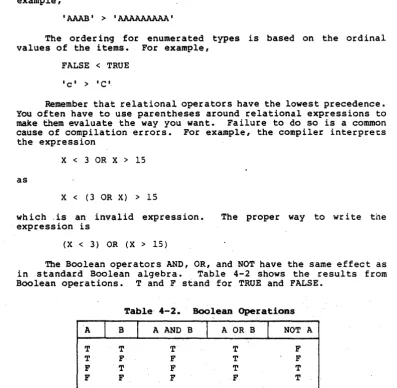
The Boolean operators AND, OR, and NOT have the same effect as in standard Boolean algebra. Table 4-2 shows the results from Boolean operations. T and F stand for TRUE and FALSE.
Table 4-2. Boolean Operations
A r B
I
A AND B'I
A OR BI
NOT AT T T T F
T F F T F
F T F T T
[image:38.489.47.445.119.508.2]Pascal/MT+ Reference Manual 4.3 Logical Expressions
4.3 Logical BxpressioDs
Logical expressions perform bitwise logical operations on simple data items. Table 4-3 shows the three logical operators.
lfIabl.e 4-3. Logical Operat:ors
Operator.
I
Use& ' logical AND
(or
I )
logical OR-
( or ? or \) one's comp lemen t NOTThe following example uses the logical operators to invert four bits in a variable.
MIDBITS FLAGS FLAGS
:= -(FLAGS & $OOFO)i (* ISOLATE AND INVERT *)
:= FLAGS & $FFOF: (*-MASK OUT BITS *)
:= FLAGS! MIDBITS; (* PUT IN NEW FIELD *)
4.4 Set Expressions
There are two classes of operators for sets. One class of operator forms relational expressions that produce Boolean' results. The other class of operator forms expressions that build sets.
'1;'0 form valid expressions, the sets must be of compatible types. Sets are of compatible types if either they are the same type or if the base type~ for the sefs are assignment compatible, as described in Section S.
The set constructor,
[<member list>]
spec ifies the values of a set. The <member list> can be any combination of individual elements and closed intervalS, separated by commas. The following examples demonstrate the set construe tor:
[ l, 3,' 5, 7 •• 20, 22", 34] [1 •• 10, x •. y, i+j] [89, 3, 54, 4 •• 13]
Pascal/MT+ Reference Manual 4.4 Set Expressions
The members do not have to be in any order, and they do not have to be constants. You can specify individual members and intervals with variables or expressions. All of the members listed must be in the declared range of values for the set, and the left-hand bound of an interval must not be greater than the right-left-hand bound.
There are three operato~s that build sets from other sets:
• The + operator produces the union of two setn.
• The
*
operator produces the intersection of two sets.• The - operator produces a set equal to the set on the left, minus all the elements that are in the set on the right.
The following examples demonstrate these set operators:
[RED, YELLOW, BLUE]
*
[RED, GREEN]=
[RED] [1 •• 20] + [3, 5, 11 •• 34] = [1 •• 34]LETTERS CLOSED OPENED
:= ['A' •• 'Z']i
:= ['A', 'B', '0', 'O' •• 'R ' ];
:= LETTERS - CLOSED:
There- are five relational operators.that operate on sets:
• The IN operator tests for membership of an individual item in a set. The item on the left must be of a compatible type with the base type of the set •
. • The
=
operator tests for equali ty of two sets. Both sets must have exactly the same members.• The <> operator tests for inequality.
• The <= operator tests for inclusion of the set on the left in the set on the right.
• The >= operator tests for inclusion of the set on the right in the set on the left.
Pascal/MT+ Reference Manual
PROCEDURE CHECKLINE (ST VAR
CH : CHAR; I : INTEGER;
STRING) ;
ALLOWED, FOUND : SET OF CHARi BEGIN
4.4 Set Expressions
ALLOWED : = [I A I •• ' Z " '0' •• ' 9', ' . ' , ' 'J; FOUND := [];
FOR I := 1 TO LENGTH(ST) DO FOUND := FOUND + [ST[I]]; IF FOUND
=
ALLOWED THENWRITELN ('ALL USED, NO EXTRAS') ELSE
END;
IF FOUND <= ALLOWED THEN BEGIN
WRITELN ('NO EXTRA CHARACTERS IN STRING, BUT'); WRITELN ('THE FOLLOWING CHARACTERS ARE MISSING:'); FOR CH := CHR(32} TO CHR(126) DO
END ELSE
IF (CH IN ALLOWED) AND NOT (CH IN FOUND) THEN WRITELN (CH)
IF FOUND >= ALLOWED THEN BEGIN
WRITELN ('ALL CHARACTERS USED, BUT SOME EXTRA:'); FOR CH := CHR(32) TO CHR(126} DO
END ELSE
IF (CH IN FOUND) AND NOT (CH IN ALLOWED) THEN WRITELN (CH)
WRITELN ('NOT EVEN .IN THE BALLPARK!')
Listing 4-1. Set Expressions
Section 5
Statements
This section describes the syntax for each of the Pascal/MT+ statements in alphabetical order. Anywhere in a .syntax description that
<sta temen t>
appear s, you can use one of the sta temen ts descr ibed in th is section, or you can use a procedure call or compound statemen t. A compound statement is zero or more statements enclosed by a BEGIN and an END.
5.1 ~be Assignment Statement
An assignment statement assigns a value to a variable. The general form is
<variable> := <expression>
The assignment statement evaluates the expression on the right and gives that value to the variable on the left. The statement, does not change the value of the variable until it evaluates the whole expression. If you use the same variable on both sides of the assignment operator, the statement uses the old value in the expression.
The expression assigned can be of any type. The left and right sides of the assignment statement must be of the same type, with the following exceptions:
• If the var iable is REAL the right can be an INTEGER or INTEGER subrange expression.
• The variable's type can bea subrange of the expression as long as the ass igned value is in the range of the variable.
• You can assign different set types if all members of the right set can be members of the left set.
• You can assign expressions of type CHAR to variables of type STRING or BYTE. .
Pascal/MT+ Reference Manual 5.1 Ass ignmen t Sta t~men t
Examples:
COUNT := COUNT + 1;
LETTER : = [' a ' •• ' z', 'A' •• ' Z, ] ;
LIST[I]A.VALUE := l6looo.o;
5.2 'fhe CASE State.ent
The CASE statement is a multiple-path branch. The general form is
or
CASE <expression> OF
{ <constant> {, <constant>} END
CASE <expression> OF
{ <constant> {, <constant>} ELSE
<sta temen t> END
<statement> ;}
<statement> ;}
The·CASE statement evaluates the <expression> and executes the <statement> that is labeled with the matching value. If no label matches, the <statement> after the ELSE executes. If there is no match and there is no ELSE part, the program flow continues at
the next sta temen t after the CASE sta temen t.
The constants labeling the selectable statements must be ~e
same type as the expre ss ion, wh ich can be any ord ina 1 type. The same value cannot label more than one path.
Pascal/MT+ Reference Manual 5.2 The CASE Statement
Examples:
CASE CH OF
I a I , I A' : WRITELN (' A' ) ;
'q', '0' : WRITELN ('0');
ELSE
WRITELN ('NOT A OR 0') END
CASE COMPARE(N[I], N[I+l]) OF LESS ; (* DO NOTHING *)
(* SEMICOLON OPTIONAL *)
SAME : DUPLICATES := DUPLICATES + 1; GREATER
END
BEGIN
SWITCHED := SWITCHED + 1; INTERCHANGE (N [I], N [1+1] ) END
5.3 The Empty Statement
A semicolon by itself is a valid Pascal/MT+ statement called the empty" statement. However, if you misplace a semicolon, you can end up with a program <that acts differently than you expect. For example, in the following program fragment; the semicolon after the reserved word DO causes an infinite loop. Because the semicolon is misplaced, the only statement in the WHILE loop is the 'empty statement, and the control variablanever changes.
WHILE LIST[I] <> ' 'DO; (* MISPLACED SEMICOLON *) BEGIN
WRITELN (LIST[I]); I := I + I
END;
The correct form is to omit the semicolon after DO. In general, it is incorrect to put a semicolon before a BEGIN statement.
5.4 The FOR State.ant
The FOR statement repeats an action a specified number of times. The general form is
or
FOR <control variable> := <expression> TO <expression> DO <statement>
Pascal/MT+ Reference Manual 5.4 The FOR Statement
The FOR statement assigns a succession of values to the <control variable> and executes the statement body once for each value of the var iable. In FOR TO statements, the value of the <control variable> increments by one after each repetition.
In FOR DOWNTO statements, the value of the <control variable> decrements by 'one after each repeti tion. Note that the value of the <control variable> is undefined after the last repetition.
The expressions that control the FOR statement must be of the same ord inal type as the <control var iable>. In the FOR TO statement, if the first <expression> is greater than the second <expression>, the statement body does not execute. The same thing. happens in a FOR DOWNTO statement if the first <expression> is less than the second.
The FOR statement evaluates both expressions and stores the values before it executes the statement body. It evaluates the first <expression> before it evaluates the second <expression>. If the first <expression> contains a function reference that changes the value of a variable in the second <expression>, the new value is the one that applies. Evaluating the second <expression> has no effect on the first <expression>.
The <control variable> must be a simple (scalar) variable: it cannot be a pointer-referenced variable or an element of a structure. The scope of the <control var iable> must be local to the block containing the FOR statement, and its value must not change inside the statement body.
Examples:
FOR CH := ' , TO 'z' DO
WRITELN (ORO (CH) : 3, , " CH)
FOR I := LENGTH (LINE) DOWNTO 1 DO WRITE(LINE[I])
FOR X := LEFT TO RIGHT DO FOR Y := BOTTOM TO TOP DO
IF GRID[X, Y] IN ['*', '+', I : ' ] THEN BEGIN
STORELOC{X, Y): CHECKPATTERN(X, Y)
Pascal/MT+ Reference Manual 5.5 The GOTO Sta temen t
5.5 'file GOTO State.ent
The GOTO statement transfers program control to a labeled statement. The general form is
GOTO <label>
The label can be any positive integer literal of one to four digits. You must declare the label in the label declaration section of the block that includes both the GOTO sta temen t and the labeled sta temen t.
The labeled sta temen t must be in the same block as the GOTO statement or at a higher nesting level. The Pascal/MT+'run-time system can transfer control out of ··routines and structures, including deeply nested recursive routines, to any higher level that meets the scope requirements for the label. However, transferring control into procedures, functions, .or structured statements produces unpredictable results.
Examples:
PROGRAM USE_GOTO;
LABEL
9999;
CONST
MAGIC WORD 'QU·IT'i
VAR
INP : STRING;
PROCEDURE BAILOUT (INST : STRING) r
BEGIN
IF INST <> MAGIC WORD THEN
WRITELN ( , NO, THAT" S NOT RIGHT I )
ELSE
GOTO 9999
END;
BEGIN
WHILE TRUE DO (* INFINITE LOOP *)
BEGIN
WRITELN (' WHAT IS .THE MAGIC WORD? I ) ;
READLN (INP) ; BAILOUT (INP) END;
9999
Pascal/MT+ Reference Manual 5.6 The IF Statement
5.6 ~he IP State~t
The IF statement controls program flow based on the value of a Boolean expression. The general form is
or
IF <Boolean expression> THEN < S ta temen t>
IF <Boolean expression> THEN <statemen t>
ELSE
<sta temen t>
If the <Boolean expression> is TRUE, the first statement executes. If the <Boolean expression> is FALSE and there is an ELSE part, the second statement executes. If the <Boolean expression> is FALSE and there is no ELSE part, the program flow continues at the nex t sta temen t.
In a sta temen t of the form, IF <exp> THEN
IF <exp> THEN < s ta temen t> ELSE
<sta temen t>
Pascal/MT+ Reference Manual
Examples:
IF HELP REQUEST THEN BEGIN
HELP DISP; GET LEVEL (LEV) ; MESG DISP(LEV) END
-IF SCORE < 60 THEN GRAPE := 'F' ELSE
IF SCORE < 70 THEN GRADE :
=
'0 I ELSEIF SCORE < 80 THEN GRADE := 'e'
ELSE
IF SCORE < 90 THEN GRADE := 'B'
ELSE
GRADE : = 'A'
5 • 7 '!'he REPEAT S ta temen t
5.6 The IF Statement
The -REPEAT statement executes a group of statements
repeate~ly until the exit condition is true. The general form is
REPEAT
<sta temen t> {; <statement> }
UNTIL <Boolean expres~ion.>
The REPEAT statement executes the statement body before i t evaluates the <Boolean expression> in the UNTIL part. I f the <Boolean expression> is TRUE, the REPEAT statement is finished. Note that i f the conftolling condition does not change in the
statement body, the statement loops indefinitely.
Notice that a BEGIN-END pair is not required around the sta temen t body.
Examples:
REPEAT
READLN (INP) ; . WRITELN (F, INP);
Pascal/MT+ Reference Manual 5.8 The WHILE Statement
5.8 The WHILE State.ent
The WHILE statement repeatedly executes its statement body, as long as the controlling condition is true. The general form is
WHILE <Boolean expression> DO <statement>
The WHILE statement evaluates the <Boolean expression> before it executes the statement body. If the <Boolean expression> is intitially FALSE, the statement body does not execute. As long as the <Boolean expression> is TRUE, the statement body executes.
Examples:
WHILE NOT EOF(FN) DO BEGIN
READLN (FN, INP); SCAN (INP)
END
WHILE (I < LENGTH(ST)) AND BEGIN
FOUND := ST[I] I := I + 1 END
5.9 The WITH Statement
,
.
'.
,NOT FOUND DO
The WITH statement creates a context for referencing record fields by their individual names. The general form is
WITH <record variabl~> {, <record variable>} DO <statement>
Inside the statement body, you can reference any fi~ld of a specified <record variable> by the field's name. For example, the WITH statement,
WITH EMPLOYEE DO BEGIN
NAME := 'John Doe'; AGE := 47;
Pascal/MT+ Reference Manual 5.9 The WITH Statement
~ WITH statement having more than one <record variable> is equivalent to a series of nested WITH statements with one <record variable> specified at each level. A <record variable> can be a field in a previously specified ,record. For example, the single WITH statement:
WITH Rl, R2, R3 DO <statement>
is equivalent to:
WITH Rl DO WITH R2 DO
WITH R3 DO <statement>
If you specify more than one record, and if two records have a field with the same name, the compiler associates the field name with the innermost <record variable>.
Example:
PROGRAM SHOW_WITH; TYPE
FULLNAME
MEMBER
RECORD
FIRST, LAST MIDDLE END; RECORD
STR~NG[15];
CHAR
NAME JOINED ID
FULLNAME; STRING[8]i INTEGER
VAR NEWMEM BEGIN
END;
MEMBER;
WITH NEWMEM, NAME DO BEGIN
FIRST := 'JOHN'; MIDDLE:= 'Q';
LAST := 'PUBLIC'; JOINED := '02/27/53'; ID :=