Citation:
Chang, V (2006) Web service testing and usability for mobile learning.
In:
Proceedings of
the International Conference on Networking, International Conference on Systems and
Interna-tional Conference on Mobile Communications and Learning Technologies. UNSPECIFIED. ISBN
0769525520, 9780769525525 DOI: https://doi.org/10.1109/ICNICONSMCL.2006.226
Link to Leeds Beckett Repository record:
http://eprints.leedsbeckett.ac.uk/629/
Document Version:
Book Section
The aim of the Leeds Beckett Repository is to provide open access to our research, as required by
funder policies and permitted by publishers and copyright law.
The Leeds Beckett repository holds a wide range of publications, each of which has been
checked for copyright and the relevant embargo period has been applied by the Research Services
team.
We operate on a standard take-down policy.
If you are the author or publisher of an output
and you would like it removed from the repository, please
contact us
and we will investigate on a
case-by-case basis.
1
Web Service Testing and Usability for Mobile Learning
Victor Chang
School of Electronics and Computer Science
University of Southampton, UK
Abstract
Based on the summary of recent renowned publications, Mobile Learning (ML) has become an emerging technology, as well as a new technique that can enhance the quality of learning. Due to the increasing importance of ML, the investigation of such impacts on the e-Science community is amongst the hot topics, which also relate to part of these research areas: Grid Infrastructure, Wireless Communication, Virtual Research Organization and Semantic Web. The above examples contribute to the demonstrations of how Mobile Learning can be applied into e-Science applications, including usability. However, there are few papers addressing testing and quality engineering issues – the core component for software engineering. Therefore, the major purpose of this paper is to present how Web Service Testing for Mobile Learning can be carried out, in addition to re-investigating the influences of the usability issue with both quantitative and qualitative research methods. Out of many mobile technologies available, the Pocket PC and Tablet PC have been chosen as the equipment; and the OMII Web Service, the 64-bit .NET e-portal and GPS-PDA are the software tools to be used for Web Service testing.
1. Introduction
The most common mobile networks are CDMA and GSM, which were originally designed to transfer voices, but then were used to transferring data such as SMS, and to have the WAP capability. The technical advances have been moving beyond SMS and WAP, and have begun to use a more reliable connection whilst displaying geographical information: There are four examples for this. Firstly, GPRS (General Packet Radio Service), which is an always-on internet service, permitting mobile phones to access the internet without requiring slow dial-up connections, which can achieve much faster data transfer speeds of 171.2 kilobits per second according to the theory [16]. Secondly, Bluetooth is a wireless short-range communication technology that can be used to transfer data between Bluetooth-enabled devices. For example, the PDA in hand can receive up messages from the mobile in the bag. Thirdly, SMS has evolved into MMS (Multimedia Messaging Service), which means that text messaging can now incorporate graphics and images. Finally and most importantly, many mobile phones can serve additional functions outside their original designs. This
includes the capability of taking pictures, making diaries, sending emails, becoming lighter in weight, and having GPS (Global Positioning System) for internet connections. Therefore, these high specification mobile phones are also considered as portable PDA (Personal Digital Assistants), the so-called “all-in-one” device [1, 14].
2. Literature Review
2.1 Definitions of Mobile Learning
Definitions vary from one research institute to another. Some define it as a step-up from e-Learning, which means “Individual or collaborative learning through the use of internet, CDs and software” [2]. Others define it as “Learning through the uses of portable devices with internet connections, which include mobile phones, PDA/Pocket PC, Tablet PC and laptops” [1, 9]. Based on the summary of these definitions, Mobile Learning (ML) is defined as “Learning new skills and knowledge through the uses of portable devices and internet connections, which include mobile phones, PDA/Pocket PC, Tablet PC and laptops, in the form of self-directed learning or collaborative learning”. In this paper, new skills and knowledge imply “Web Service”. In other words, the investigations on how Web Services can be taught and delivered in easy and exciting ways are among the research objectives and in the process of regular improvements.
2.2 Review of the existing Literature
investigate the current Java and .NET Web Services for ML and also propose the Proxy architecture for all client-server interactions. Their results are indeed very comprehensive and up-to-date. However, their discussions are purely based on the client-side usability and testing, and do not include any server-side investigations for mobile devices. In order to test Web Service functionality for ML, server-side applications must be thoroughly tested, and this is a critical research objective, and the results of which are discussed in Section Three of this paper.
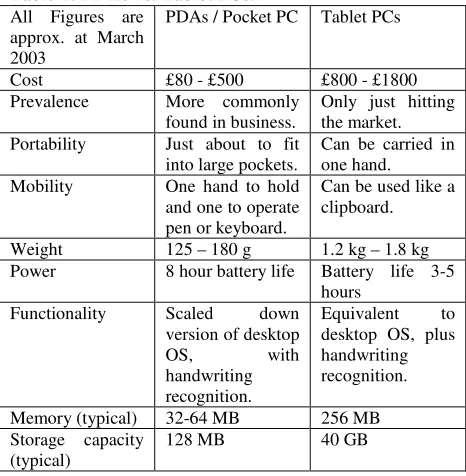
[image:3.612.67.300.242.480.2]Wood [16] summarizes the features for mobile devices, and also presents the advantages and disadvantages of using mobile devices for ML. Out of many possible forms of mobile devices, only Pocket PC and Tablet PC are selected for this investigation. Table 1 below is adapted from Wood’s paper.
Table 1: PDAs vs. Tablet PCs. All Figures are
approx. at March 2003
PDAs / Pocket PC Tablet PCs
Cost £80 - £500 £800 - £1800 Prevalence More commonly
found in business. Only just hitting the market. Portability Just about to fit
into large pockets. Can be carried in one hand. Mobility One hand to hold
and one to operate pen or keyboard.
Can be used like a clipboard.
Weight 125 – 180 g 1.2 kg – 1.8 kg Power 8 hour battery life Battery life 3-5
hours Functionality Scaled down
version of desktop OS, with handwriting recognition.
Equivalent to desktop OS, plus handwriting recognition.
Memory (typical) 32-64 MB 256 MB Storage capacity
(typical) 128 MB 40 GB
Tablet PCs (TPC) are fully-functional laptop PCs, however it is much lighter and also includes handwriting recognition [9]. The default platform for most of TPC is Windows XP Tablet PC Edition 2005, which includes the features and functionalities for Windows XP Professional with its Service Pack 2. Currently there are three models for TPC, which have (a) convertible model, which has an attached keyboard and looks much like a conventional laptop PC; (b) slat model, which is slim and ultra-light without the weight and size of a permanent keyboard and (c) rugged model, which is a tough mobile computer with an industrial-strength shell and shock-mounted hard drive [9].
Tsai and Shen [13] indicate that wireless client-server models require a robust desktop as a centralized server for information management and control. In fact this is a reliable method for wireless communication and ML. However this paper attempts to explain how a Tablet PC can be further customized as a centralized server, so that troubleshooting for wireless communications and the portability for the server can be made easy and convenient. Further server-side results are discussed in the next Section of this paper.
3. Web Service Testing for Mobile
Learning
3.1 PDA: client-side testing and usability
A PDA/Pocket PC with Windows Mobile 2003 operating system was used as a client for the Web Service Testing and Usability. This PDA is able to email, connect to the internet and finally browse dynamic .NET pages of the 64-bit .NET e-portal, which include registration, login/logout, download and submit products. However, there are two disadvantages while doing so. Firstly, the speed is slow because the limitations of the PDA memory, and as a result, it takes more time before the server replies back to the requests on the client side. Prolonged time may also lead to unsuccessful registration, login/logout and product submission, due to the restrictions of the timeout. Secondly, it is not possible to download all the OMII software components due to the small containing capability of its hard-disk. Another phenomenon is that PDA requires Java 2 Platform, Micro Edition (J2ME), which is not included in the OMII requirement that needs Sun J2SE JDK 1.4.2_0 to 1.5.0_5 and IBM JDK 1.4.2. From a user’s point of view, PDA is suitable in only mini-desktop functions, but not appropriate to use as a Web Service client except for GPS applications at this stage.3.2 Tablet PC:
Two Tablet PC (TPC) were chosen as the platform for Web Service Testing, and each TPC was dual-booted with Windows Tablet 2005 and Redhat Enterprise Linux 3. With two TPC and two operating systems (OS), it made multi-platform and JDK testing possible. Each TPC has 1.1 GHz CPU speed, 60 GB Hard-disk and upgraded to have 1 GB Memory. Before proceeding to testing system administration issues need to be resolved, the main task of which is that each IP and machine address has to be registered and to be matched to each other on a reliable network such as the cabled/wireless/router LAN or a trusted ISP. Upon successfully setting these up, there were five types of testing to proceed and investigate:
• Portal Testing
• Multi-platform testing
• JDK testing
• External Testing
• Wireless Testing
3.2.1 Portal Testing
3.2.2 Multi-platform Testing
OMII_2.3.0 is a collection of tested, documented and integrated software components that provide a standard platform for integrating e-Science middleware as well as a simple, secure web service-based Grid infrastructure for new e-Science users [10]. OMII client was installed on both Windows and Redhat OS, and the OMII server was installed and configured on Redhat. The test procedure included creating an account on the server, obtaining the account approval and ensuring the job submission done was completed. It required a security certificate such as omii or e-science certificates for authorization and personal detail checks. During this process, it exercised the account service, job service, database service and the resource allocation service of the OMII_2.3.0 server on the client side. Upon successful job completion, there was a message stating “Build successful”. In this testing, postgres database 8.0.1 and Sun JDK 1.5.0_05 were chosen as the default JDK for Windows and Redhat clients and servers.
3.2.3 JDK Testing
The JDK testing was based on the top of multi-platform testing, except the difference was, taking into consideration of (a) different JDK versions: Sun 1.4.2 (00 – 10), Sun 1.5.0 (01-05) and IBM JDK 1.4.2.1.0.4 (IBM Java142-2) and (b) postgres database 7.3.4 and 8.0.1 to test OMII_2.3.0. Before proceeding to carry out this testing, a matrix of different combinations of JDKs, certificates, databases and platforms was drawn. There were 64 combinations, out of which 14 combinations were selected for JDK testing. The OMII_2.3.0 application, also known as Cauchy, was the core component used to test whether JDK testing was successful, because it took all the considerations of Tomcat, Axis and OMII_2.3.0 server-side components such as “Base/Extension” and “Services”. Upon the successful running of this application, it prompted for PlotWS services, which plotted the graph from the requested job. There was a new feature, Graphical User Interfaced Cauchy (GUI-Cauchy), which simplified the entire process with a few clicks on the GUI-Cauchy itself. In order to test Cauchy and GUI-Cauchy, both clients Cauchy/GUI-Cauchy and server-side Cauchy need to be installed, and at least one account needs to be open on the client and server side. Among the 14 scenarios for testing, the results showed positive outcomes, as both Cauchy and GUI-Cauchy are running successfully.
3.2.4 External Testing
As a part of the quality engineering process, this form of testing was to identify whether the OMII_2.3.0 was able to work outside the local-host environment: In other words, it was to mimic an external user’s experience of using OMII_2.3.0 and to identify any difficulties during the process of configuration and job requests. As a thumb of rule, the venue for the External Testing should be carried out outside Southampton, or at least outside all the Southampton University
campuses. As a result, there were two places for the External Testing, one of which was based at the University College London (UCL) and another one was based outside the UK – a home laboratory in Chengdu, a capital city in Western China.
(a) External Testing at the UCL
The first step was to install the entire OMII_2.3.0 stack on a UCL machine with non-root access. Upon successful installations, the next step was to run Cauchy and GUI-Cauchy. If Cauchy and GUI-Cauchy were running smoothly, it indicated that all the services of OMII_2.3.0 were functioning. In order to test whether the client-server interactions could work, another external machine was used. In this case, one TPC outside Southampton campus was used twice – one client on the Windows OS and another client on the Redhat OS. Each client was attempting to interact with the OMII_2.3.0 server at the UCL each time. When each client was able to run Cauchy and GUI-Cauchy against the UCL server, it meant the client-server interactions were successful and all the services were completed.
(b) External Testing in Western China
The challenge for this task was to set up a trusted and robust network, and to configure this network to have additional functions such as DHCP. This helped to identify the level of difficulties while setting up a home network. With the assistance from the China Telecom network administrators, the network was robust, and able to provide broadband services and wireless communications. The next step was to set up an OMII server on a TCP Redhat machine, and created Redhat and Windows clients on another TCP machine, and finally began JDK testing. When the Cauchy and GUI-Cauchy were running successfully, this indicated all services (account, job, data and resource allocation) were successful and completed.
3.2.5 Wireless Testing
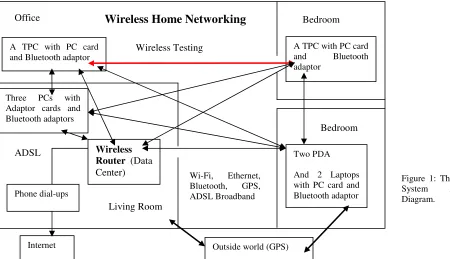
As a core aspect for ML, wireless communications must be tested. The common technique is to set up a server, a wireless ADSL router with the broadband/LAN internet access, so that any clients can be connected to the wireless network with the use of wireless PC cards or PCI adaptors. Wireless network is also known as Wi-Fi (wireless fidelity), which is a term used to describe various standards of wireless network, including IEEE 802.11.
only. The testing results showed a very positive outcome: client-server interactions and the completion of all the services. In summary, Figure 1 on the Page Six is the simplified System Architecture for the successful Wireless Testing.
4. Usability
User experience is the center for Usability and as an excellent software engineering practice, software products should provide users practical experiences before and after each software release [11]. User feedback can indicate what needs to be improved, in addition to evaluating the system design of the software from a non-biased point of view. Hence, user feedback may become part of the quality engineering perspective. There are several ways for carrying out usability. A popular technique is to organize a small group of new users and ask them to read instructions and begin their work [3], which ideally would include installations and command lines tasks which complete four main services. During the process of the user case, it is possible to (a) observe user behavior and understand which part of instructions are not clearer; and (b) obtain direct feedback for which part of the software requires improvement.
4.1 The Software Usability – the 64-bit .NET
e-portal and OMII WS
For this part of the paper, three different software technologies are used for Usability Testing: The OMII Web Service, the 64-bit .NET e-portal and the GPS-PDA: These three technologies are amongst the recommended M-Learning systems. The research technique is known as Observatory and Interactive Usability (OIU), which means “observing how people learn and use software, and providing assistance to users when they encounter problems”. OIU is the combination of the unsupervised e-Learning and the Interactive Learning, the later of which is the combination of e-learning and face-to-face learning. While OIU is deployed for Usability Testing, all the observations and statistics are recorded down.
In this part of the research, forty new users were asked to use 64-bit .NET e-portal and OMII WS, and to advise with regards to areas of improvement. Based on the IT skills, forty users were all divided into three groups. The first group contained users with limited or basic Windows and Linux skills. The second group contained users who were familiar with Windows, but had basic skills in command-lines/Linux. The third group contained users who were familiar with both Windows and Linux, including command-lines. During Usability Testing, observations were made during the process of software installations and command-line tasks. Average time spent and user comments (on what needs to be improved) were recorded down as Table 2 on the next column.
Table 2: Summary of the Research Fieldwork
Group 1
: U
sers with limited/basic Windows and Linux skills. Number of Users AverageTime spent
User Comments
10 (5: Male; 5: Female) 5: Aged above 50; 5: Aged between 30 and 50
About 30 min All users: 30 min
Installations should be made easier.
Should include the ‘demo’ (How to install client) with the OMII release software.
Group 2
:
users who were familiar with Windows, but had basic skills in command-lines/Linux.Number of
Users Average Time spent User Comments 22
8: Male; 14: Female. 10 are aged below 30.
6 are aged above 50.
6 are aged between 30 and 50.
Between 10 - 20 min
6 users: 10 min
6 users: 15 min
8 users: 20 min
Installations should be made easier. Reduce level of command-lines on Windows.
Should ask new users to try and improve on the usability before each software release.
Want to know more about Web Service, but do not want to spend too much time in the installation.
Feel it’s difficult to configure client and do client-server interactions.
Identifies the current OMII Client is suitable to system administrators. Need to think of how to win the Group 2 Users’ heart.
Group 3: Users who were familiar with both Windows and Linux, including command-lines.
Number of
Users Average Time spent User Comments /Observations 8
7: Male; 1 Female 6 are aged below 30;
2 are aged between 30 and 50.
Between 5 - 15 min
First-time use: 5 users: 10 min; 3 user: 15 min. Second-time use:
8 users: 5 min.
Installations should be made easier, preferably the “Wizard” format.
After the first successful attempt, the researcher did ask them to repeat the entire process without any assistance. All of them did very well and the learning curve was very rapidly accelerated.
4.2 The Mobile/Web Service Usability: A
GPS-PDA system
use the GPS-PDA system for communications instead of analog phones or walkie-talkie radio; (c) drivers are amongst part of ML programs with short training sessions and hand-on experiences; (d) taxi company can identify the position of each driver at any time; (e) taxi company can identify the nearest customer to a particular driver. The final point brings positive changes to the organization, because the previous policy was for the call center to decide which driver was allocated to which customer – a human-center model. However, the GPS allocates the ‘nearest’ driver that is located nearest to the customer– a technology-driven model.
In order to test the efficiency of this GPS-PDA system, action research was taken. All taxi companies in Southampton were called nearly at the same time during a rush hour. It took less than five minutes for the GPS-supported taxi to arrive, however it took more than ten minutes for another non-GPS-supported companies, thus leading to cancellations. This exercise took place five times, and each time the result was the same: The GPS-supported taxi company came to the researcher the earliest. This action research supports that the use of mobile devices can (a) improve the speed and efficiency, and (b) can transform the way that people work.
5. The Contributions and Lessons learnt
for e-Science and e-Learning Community
By studying the current WS software – the majority are “time-consuming to learn” and “difficult to use”, which are based on the general comments from hundreds of non-IT background individuals. If the current WS can achieve two main goals – “convenient to use” and “easy to learn”, this may bring new insights and transformations to the way people perceive the uses for WS, which is the target for further improvements among the e-Science community. The 64-bit .NET e-portal has achieved this, with the three supporting reasons: Firstly, all the users completed the Usability Testing tasks including registration, login, download, product submission and logout in less than 6 minutes. Secondly, the feedback from 36 out of 40 users confirm the 64-bit .NET e-portal is simple to use, easy to understand and user-friendly. Thirdly, the 64-bit .NET e-portal has the integrated .NET and Java Web Services, which are supporting “Virtual Research Environment” (VRE), “Content Management” and “Service-Oriented Architecture”. Further details are presented in the next section.5.1 Virtual Research Environment
VRE has been deployed in the context of Grid Services, and the case study of the Virtual Orthopaedic European University (VOEU) demonstrates VRE supports the e-Science activities in the form of a cycle. This includes (a) the collation and analysis of experimental results; (b) the organization of internal projects; and (c) the production of appropriate outline documents depending on the requirements of conferences and journals selected for dissimilation [6].
In the Usability Testing scenario, two Tablet PCs were brought along with the researcher, and then connected to the Cambridge Network (with wireless and LAN). The purpose was to observe how volunteers learnt and how they used the 64-bit .NET and OMII WS. The volunteers were able to access all the resources in Cambridge and Southampton. The key factor was that all the server side applications were pre-installed within the Table PC, which could then act as a central server for managing all the client-server activities. This is a different VRE model, which the portable devices can act as central server and can direct to where the e-Science activities should go in the cycle, rather than using VRE as an agent and as part of the e-Science activities.
5.2 Content Management
As a popular option in e-Learning, Content Management plays a different role in the context of e-Science, where the main purpose is to introduce the Web Service and demonstrate how the Web Service software can work for both Science and non e-Science community. Whilst delivering the Usability Testing, Content Management is deployed and it is presented in the form of the User Guide [10], which demonstrates how OMII WS can work in different platforms. Forty users were asked to read the User Guide, and commented on areas for improvement. Approximately 90% of users agree that the Content Management of the OMII WS is fully integrated with the software implementations of the OMII WS.
5.3 Service Oriented Architecture
The CORE Project [12] identifies the importance of the Service Oriented Architecture (SOA) and demonstrates SOA can integrate e-Learning architecture and e-Science Infrastructure. However, this is just an example for e-Learning and e-Science integrations, and there are several aspects worth investigating. One such aspect is the integrated Java and .NET Web Service, which includes the combined functionality of the 64-bit .NET e-portal service, and the OMII WS, both of which are able to be operational on the 32-bit and 64-bit platforms. The 64-bit .NET Service is able to integrate with emerging technologies such as wireless communications and GPS-PDA system. The paper “Three Elements in the 64-bit .NET Mobile Service” [4] identifies a unique SOA for both e-Learning and e-Science communities, and the 64-bit Mobile Service enables Web Services to work on mobile devices such as PDA, Mobile phones, Tablet PC and laptops.
6. Conclusion
Literature of ML; (b) providing the standard definition of ML; (c) testing the WS server-side applications for mobile devices instead of client-side testing as described in the majority of papers; (d) providing comprehensive testing results that include Portal Testing, Multiplatform Testing, JDK Testing, External Testing and Wireless Testing; and (e) providing comprehensive Usability Testing, including a total of sixty users; (f) researching the characteristics and recommending the three ML systems: the 64-bit .NET e-portal, OMII WS and GPS-PDA and finally (g) summarizing the contributions for Learning and e-Science community. Point (c) and (g) are the major contributions as there are few papers demonstrating the sever-side applications for mobile devices.
6. References
[1] Attewell J, “Mobile technologies and learning: A technology update and m-learning project summary”, Technology Enhanced Learning Research Centre Paper, Learning and Skills Development Agency, UK.
[2] Chang V, “The role and effectiveness of e-learning”, thesis, September 2002, University of Cambridge, UK.
[3] Chang V, “Reusable e-learning development: Case studies, Practices and issues of awareness for knowledge-based organizations”, Proceedings, 2nd International
Conference Information Technology: Research and Education, June 2004, London Metropolitan University, UK.
[4] Chang V, “The Three Elements in the 64-bit .NET Mobile Service: Mobile Framework: Web Service Testing and Interoperability between .NET/Windows and Java/Linux”, submitted to the 15th WWW 2006 Conference.
[5] Hentea M, “Multi-Agent Security Service Architecture for Mobile Learning”, Proceedings, 2nd International
Conference Information Technology: Research and Education, June 2004, London Metropolitan University, UK.
[6] Hall W., David H., et al, “A Grid Services Implementation for a Virtual Research Environment”, In Proceedings of 1st International ELeGI Conference on
Advanced Technology for Enhanced Learning, Vico Equense - Napoli (Italy).
[7] Lockitt B, “Mobile Learning January 2005”, a 3T Post 14 Paper.
[8] Millard D, Davis H. et al, ”Experiences with Writing Grid Clients for Mobile devices”, In Proceedings of 1st International ELeGI Conference on Advanced Technology for Enhanced Learning, Napoli, Italy.
[9] Microsoft Windows XP Tablet Edition 2005, “What is a Tablet PC?”,
http://www.microsoft.com/windowsxp/tabletpc
[10] The OMII User Guide, which is accessible via the OMII website: http://www.omii.ac.uk
[11] Pfleeger S.L., “Software Engineering – Theory and Practice”, Prentice Hall, ISBN 0130931292.
[12] Sim YW, Davis H, et al “A Web/Grid Services Approach for a Virtual Research Environment Implementation”, In Proceedings of the Fourth e-Science All Hands Meeting (AHM 2005), Nottingham, UK.
[13] Tsai C-S, Shen B-F, “Handoff Design For SIP Based Wireless Local Area Network”, Proceedings IADAT-tcn2005, IADAT Conference: Technological Advances in Telecommunications and Computer Networks, 7-9 September 2005, Portsmouth, UK.
[14] Wigley A., Roxburgh P., “Building .NET Applications for Mobile Devices”, Microsoft Press, ISBN0-7356-1532-2.
[15] Wilson, M L., Russell A. et al (2005) <http://eprints.ecs.soton.ac.uk/11101/> mSpace Mobile: A Mobile Application for the Semantic Web. Proceedings, End User Semantic Web Workshop, ISWC2005, Galway, Ireland.
[16] Wood K, “Introduction to Mobile Learning”, March 2003, Ferl British Educational Communications and
Technology Agency,
http://ferl.becta.org.uk/display.cfm?page=65&catid=192&res id=5194&printable=1
Wireless
Router (Data
Center) Three PCs with
Adaptor cards and Bluetooth adaptors
Internet
Two PDA
And 2 Laptops with PC card and Bluetooth adaptor A TPC with PC card and Bluetooth adaptor
A TPC with PC card and Bluetooth adaptor
Bedroom
Living Room
Bedroom Office
Wireless Home Networking
Phone dial-ups ADSL
Outside world (GPS) Wi-Fi, Ethernet, Bluetooth, GPS, ADSL Broadband Wireless Testing
[image:7.612.83.533.516.775.2]