Citation:
García, AM and Stash, N and Fabri, M and De Bra, P and Fletcher, GHL and Pechenizkiy, M (2016)
WiBAF into a CMS: Personalization in learning environments made easy. In: 24th ACM Conference
on User Modelling, Adaptation and Personalisation (UMAP 2016), 13 July 2016 - 16 July 2016,
Halifax, Canada.
Link to Leeds Beckett Repository record:
http://eprints.leedsbeckett.ac.uk/3290/
Document Version:
Conference or Workshop Item
The aim of the Leeds Beckett Repository is to provide open access to our research, as required by
funder policies and permitted by publishers and copyright law.
The Leeds Beckett repository holds a wide range of publications, each of which has been
checked for copyright and the relevant embargo period has been applied by the Research Services
team.
We operate on a standard take-down policy.
If you are the author or publisher of an output
and you would like it removed from the repository, please
contact us
and we will investigate on a
case-by-case basis.
WiBAF into a CMS: Personalization in Learning
Environments Made Easy
Alejandro Montes García
Eindhoven University ofTechnology
Eindhoven, the Netherlands
Natalia Stash
Eindhoven University ofTechnology
Eindhoven, the Netherlands
Marc Fabri
Leeds Beckett UniversityLeeds, United Kingdom
Paul De Bra
Eindhoven University ofTechnology
Eindhoven, the Netherlands
[email protected]
George H. L. Fletcher
Eindhoven University ofTechnology
Eindhoven, the Netherlands
Mykola Pechenizkiy
Eindhoven University ofTechnology
Eindhoven, the Netherlands
ABSTRACT
Adaptivity has proven successful in reducing navigation and com-prehension problems in hypermedia documents. Authoring of adap-tive hypermediadocuments and especially of theadaptivityin these documents has been problematic or at least labour intensive through-out AH history. This paper shows how the integration of a CMS with an adaptive framework greatly simplifies the inclusion of per-sonalization in existing educational applications. It does this within the context of European project Autism&Uni that uses adaptive hy-permedia to offer information for students transitioning from high school to university, especially to cater for students on the autism spectrum as well as for non-autistic students. The use of ourWithin Browseradaptation framework (WiBAF) reducesprivacyconcerns because the user model is stored on the end-user’s machine, and eliminatesperformanceissues that currently prevent the adoption of adaptivity in MOOC platforms by having the adaptation per-formed on the end-user’s machine as well (within the browser).
Authoring of adaptive applications within the educational do-main with the system proposed was tried out with first year stu-dents from the Design-Based Learning Hypermedia course at the Eindhoven University of Technology (TU/e) to gather feedback on the problems they faced with the platform.
CCS Concepts
•Information systems→Web applications;•Software and its engineering→Software creation and management;
Keywords
adaptation, learning styles, content management systems, software development
1.
INTRODUCTION
Adaptive hypermedia has been successful for many years in im-proving the ease of navigation and the user comprehension of the content on Hypermedia documents [3, 5, 7]. However, adaptive hy-permedia needs more effort from the development/authoring team than hypermedia applications without adaptive features [4]. While this is sometimes seen as a burden, the effort that would be needed to have equally good navigation and content and comprehension properties in a non-adaptive hyperdocument would be far greater. The scientific community has been trying to minimize the extra
development and authoring effort for years by using custom-made languages [11, 13, 20] or graphical interfaces [19]. Even without considering adaptation, relatively few people can develop HTML applications directly through writing in HTML syntax and even fewer people can add adaptive behaviour to them.
Content Management Systems (CMSs hereinafter), have become very popular tools for the development and maintenance of web ap-plications, mainly because they enable people without any knowl-edge of HTML, CSS or other (client- or server-side) web languages to design professional looking websites. Some of these CMSs are free and open source, allowing people to develop all kinds of plug-ins or modify the core of the CMS to extend its functionality. Ac-cording to a survey made by the website http://w3techs.com/, as of April 5th, 2016,44.4%of the web pages that they track run one of no less than 313 CMSs that they monitor. Among those WordPress1 is the most popular one, present in26.3%of all the sites tracked.
CMSs have helped many people to build their own website with-out in-depth knowledge of web technologies, yet there are no CMSs that take effective advantage of adaptive hypermedia extensions. Existing Adaptive Hypermedia Systems may try to make the cre-ation of adaptive websites feasible, but no current AHS achieves the user-friendliness of popular CMSs. Hence we turn the process around: fromcreating adaptive websites, we move tomaking web-sites adaptive. To do so an existing CMS needs to be extended with adaptive functionality. This paper describes such an extension: in-tegrating adaptive functionality in WordPress. It also describes the use of this functionality in the European Autism&Uni project2to adapt information to students on the autism spectrum, specifically for helping them with the transition from high school to univer-sity. The adaptive functionality we used is more generic, allowing for adaptation to different learning styles and to general “prereq-uisite” relationships between topics. The WiBAF (Within-Browser Adaptation Framework) extension to WordPress also takes care of typical privacy concerns of users by performing user modelling and adaptation entirely within the browser (and thus on the end-user’s device rather than on a server).
In order to develop our work we have taken the following deci-sions:
• We used WordPress as our CMS because it is free, open-source and the most used in real-life environments.
1
see https://wordpress.org/
2
• We used WiBAF [12] as our adaptation library because the client and server code are decoupled and it is easy to mod-ify the server code to make it compatible with WordPress. (WiBAF is not limited to be used with WordPress and has been also used to add adaptation to websites created with different CMSs, or without any CMS.)
• We focused on an on-line educational setting. In order to perform adaptation in such setting, we focused onhowthe student learns,whatthe student has already learned and what is still to come.
With these decisions taken, our goal became to integrate WiBAF and WordPress in such a way that personalization can be easily added to existing educational sites created using WordPress. At the same time the adaptation should be done efficiently and it should track how the user learns and what she has already learned. The efficiency needed for massive applications like MOOCs (Massive Open Online Courses) can actually easily be obtained because al-most all of the work is done in the browser, thus avoiding server-side performance bottlenecks.
Therefore, our contribution with this paper is the integration of an adaptation library in a Content Management System in order to ease the development of adaptive educational applications. This can be applied to current existing applications like MOOCs in an easy way. This means that rather than developing applications from scratch, our tool allows to make existing applications adaptive.
The remainder of this paper is structured as follows: We describe our use case scenario in Section 2 and then we describe how the integration between WiBAF and WordPress has been made in Sec-tion 3. SecSec-tion 4 explains how to develop adaptive educaSec-tional ap-plications, both for existing applications and new ones. Later, in Section 5, we describe the experiences of first year students with the tool. The related work is presented at Section 6. Finally, we conclude and propose future work in Section 7.
2.
USE CASE SCENARIO
Before describing how the integration has been done, we intro-duce our use case scenario to make the requirements we have come up with more concrete. It is worth mentioning here that the plat-form developed is generic and as such can be applied in different domains. Recently we have used it in the educational context in our first year course Design-Based Learning Hypermedia, in particular for creating the “First Aid Kit” for students entering the university. We set forth to use the WordPress and WiBAF integration in the Autism&Uni project. This project is aimed at widening access to higher education for autistic students by providing a toolkit that can help them overcome the challenges they may face when going to university. The goal is to give students a taste of how higher education works and how to cope with the physical university en-vironment before they start their study. This toolkit3is offered as an Adaptive Web-Based Application.
The adaptive functionality differentiates inhowthe information site presents itself to autistic and non-autistic students, but in the end the toolkit provides the same information to everyone.
Adaptation for autistic students is concerned with adapting to the differences in cognitive abilities, within this project in partic-ular comprehension, between autistic and non-autistic people. In our previous work [14] we discussed that it seems like autistic peo-ple have their own ways of processing and analysing information, their own ways of processing, analysing information and learning and as such they can be considered as having a specific
cognitive-3
http://www.autism-uni.org/toolkit/
or learning style. In order to provide effective adaptation, we uti-lize the specific characteristics and preferences of the user in three different learning styles dimensions [10], i. e. where is the user lo-cated in the: visual vs. verbal axis, global vs. analytical axis and active vs. reflective axis. We make use of the user history as well. These variables together with the adaptation effects provided by the toolkit, have been described in our previous work [8].
A secondary, but also important aspect of performing adaptation in the presence of autistic users is the heightened awareness of (and anxiety for) the user modelling involved. Autistic students do not only experience anxiety when entering an unknown environment, but also when they realize that their personal and possibly sensitive data are stored on an external computer that they cannot access, when they do not feel their data is kept private or they cannot con-trol it. Fortunately WiBAF stores all user data on the client side (using browser storage) by default. Autistic users may choose to keep this setting, thus guarding their privacy, while other users may opt to share their data in order to enable the server side to perform group adaptation. (We currently do not offer group adaptation, but we do offer the user model sharing option).
For this specific use-case, we also consider some factors related to the context, namelywherethe student is andwhat timeit is. The reason for this is that autistic students often feel lost, they need reminders that tell them where they have to go.
We are implementing a feature so that they can import events from their Google Calendar. The tool will show a reminder when the student needs to go to a lecture and a link with the instructions on how to get to the room where she needs to be. This is still under development and not yet part of the generic platform, therefore we will not describe it further. We mention the notification feature because it needs to be developed in order to really help autistic students.
In order to effectively display the content of our learning objects, we have broken it down into small pieces or fragments with some semantic meaning, from which the student can learn something. In our case, we show an introduction first, we show also a comic strip or an image that shows quotes of students about the topic of the learning object, establishing a context for it. Then some back-ground information is provided to justify the learning object. After that we talk about how the learning object being described is impor-tant for the reader and what she should do. We close the article with some additional tips, questions to think about and some follow-on reading. Each learning object can also have an alternative video version as well as pre- and post-requisites.
3.
INTEGRATION OF WIBAF AND
WORD-PRESS
In order for WiBAF to understand the content of a learning ob-ject, the “sections” of a page need to have a unique identifier within that page. WordPress allows developers to create custom themes to change the look and feel and the structure of a page. We used this functionality and created a custom template that creates the sections and assignsidsthat WiBAF can understand.
In order to make content providers aware of this division, we needed to modify not only the page template itself, but also the interface used to enter page content. We used a plug-in called Ad-vanced Custom Fields4or ACF for that.
WordPress also allows developers to create plugins in order to extend its functionality. We have packed all the functionality re-quired for WiBAF in a plugin. We will describe now the func-tionality present in our plugin. (This knowledge is not needed to
4
understand the authoring process.)
WordPress offers a settings interface that has been modified to add new fields related to the user model. The data contained in those fields are stored in the client by default. WiBAF offers users the possibility to send these data to the server if desired. That could make it possible to (potentially) create better personalization (through collaborative filtering) or to provide a facility to synchro-nize their data between devices. By default the data are stored on the browser only, to offer better privacy. We also needed to add these new fields to the user data so that they can be stored on the server (if desired). The management of the database is done au-tomatically by WordPress, we just need to declare that these extra data exist. The communication between server and client to man-age user data is done as follows: when (and if) the user wants to send data to the server, this is done through cookies. These cookies are created using JavaScript after the page is loaded and WiBAF has finished parsing and executing the modelling and adaptation files. Therefore, the cookies will contain the user values after vis-iting the page, but every interaction that the user might do that can change the user model, will not be sent in this cookie, but in the fol-lowing one, after another request. When the server wants to update the client values (e. g. the user logs-in from a new device and she wants to keep her profile), it inserts the JavaScript code required to do so. This code is inserted just after the cookie creation and updates its values. This might not seem efficient, but because the values are stored asynchronously in the IndexedDB, it is more effi-cient to create the cookies and then update them when the database has finished the insertion operations.
The content of a website offered through a CMS is very dynamic because it is very easy to create and update. Therefore, we need to replicate this dynamism in our adaptation code. To do so, we have to update the adaptation automatically when a new learning object is created. We achieve this by usingaction hooks. The action hooks provided by WordPress are not only related to special actions. In every page request, typically around 50 actions are executed. Code can be hooked to a specific action. This code will then be executed when that action occurs. In our plugin we hooked code to several actions to link the WiBAF JavaScript library, the adaptation files, and to store user data in the browser (or on the server if the user wants that). It is worth mentioning that we also “taught” WordPress to write adaptation code for us. Every time a new learning object is created, WordPress writes some lines of adaptation code to track it.
4.
DEVELOPMENT OF ADAPTIVE
APPLI-CATIONS
As we mentioned before, the integration of WiBAF and Word-Press was built so that creation of adaptive applications from scratch is possible, but also adding adaptive behaviour to an existing ap-plication is possible. This means that the tool is useful for creat-ing adaptive applications, but also for makcreat-ing existcreat-ing applications adaptive. While the tool is generic, our implementation was built having in mind the educational domain, therefore in the following subsections we will explain how to create new adaptive applications in the educational domain and how to make an existing educational application adaptive.
4.1
Creating new adaptive applications
In order to create an adaptive application from scratch in our WordPress, the workflow is quite similar to the process of creating a normal WordPress application as described in the official tutorial5. However, because we have divided our content in small fragments5
[image:4.612.324.550.54.393.2]https://make.wordpress.org/support/user-manual/content/
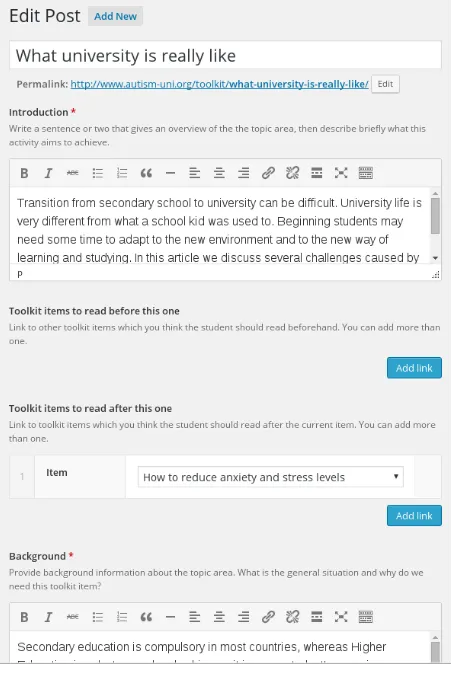
Figure 1: Custom fields as shown on the dashboard.
(sections), this needs to be considered both in the template and in the dashboard. As we mentioned before, we used the ACF plugin to achieve this in the dashboard and we modified the post template in our theme so that it is consistent with the ACF settings. Figure 1 shows the view from the dashboard of the fields; as it can be seen each field should be filled according to the instructions in order to create a learning object.
Once the learning objects are created, the authors can proceed to add the adaptive behaviour to the existing application, as described in the next subsection.
4.2
Adding adaptive behaviour to an existing
application
In order to add adaptive behaviour to an existing application, WiBAF can be added as a WordPress plugin. This can be done as shown in the official WordPress tutorial6.
Once the plugin is installed, WiBAF can be configured from the dashboard as shown in Figure 2. The privacy levels can be config-ured, as well as the path where the adaptation and modelling files are located. These files follow the format described in our previous work [13].
The adaptation and modelling files can be modified in order to fit other needs, but the files we provide automatically track the user learning styles as we defined in our requisites, as well as her user history and it can react to it by hiding the unsatisfied pre-requisites, or by re-ordering fragments of the learning object.
6
Figure 2: WiBAF settings.
WiBAF also offers users control over where its user model is stored. This is done by using a slider with three or more levels. In the first level of the slider, no data are tracked and therefore no personalization is offered. In the second level, all the data is stored on the browser. In the last level, all the data is stored on the server. The WiBAF plugin makes it easy to add new levels between the second and the last, in a way that only certain types of fields are sent to the server, while others are kept private in the browser, always depending on the user preferences.
5.
EVALUATION WITH STUDENTS
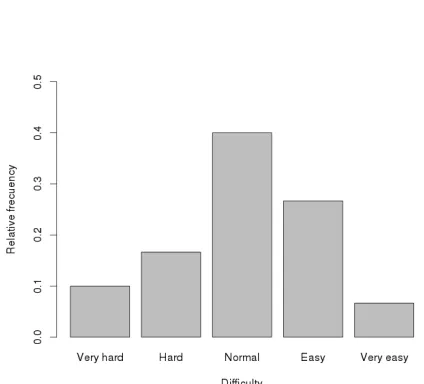
Our first year students from Design-Based Learning Hypermedia course have used a preliminary version of the WiBAF and Word-Press integration in order to develop adaptive educational applica-tions. The most substantial difference between the version that the students used and the one described here is that WiBAF was not offered as a plugin, but its code was closely tied to the WordPress theme used (by the Autism&Uni project). It is worth mentioning that while some of the students that took the course had learnt some programming by themselves, most of them did not develop any web application before, not to mention an adaptive educational web ap-plication. After finishing the course, we invited them to complete a survey about their experiences with the tool. In total, 36 students completed the survey. They made it obvious that a plugin needed to be created, because the most difficult task for them was to extract the changes that made WordPress adaptive from the Autism&Uni theme and incorporate them into their own theme.69%of the stu-dents found this task “hard” or “very hard”. Figure 3 shows the dis-tribution of the opinions of the students regarding this task. With a plugin, this should become easier. Once the students managed to have the whole environment setup, and the WordPress customized as they wanted, the percentage of students that found adding adap-tation “hard” or “very hard” was reduced from69%to22%, with
28%of the students finding it “easy” or “very easy” while the rest judged the difficulty of developing an adaptive educational appli-cation as neither hard nor easy. This can be seen in Figure 4. A similar result was obtained in another similar evaluation of GALE [6], in which the installation aspects were considered harder than the development of applications itself.
[image:5.612.323.531.124.290.2]We also asked students to estimate the extra time that they had to spend in order to make the application adaptive, as compared to the
Figure 3: Difficulty to integrate the adaptation into the Word-Press according to the students.
[image:5.612.322.534.429.621.2]development of a normal application. 48%of them thought that enabling personalization in an educational application takes20%
more time than a non-adaptive educational application while69%
of them estimated that the overhead introduced during the develop-ment was of about50%or less. We think that these numbers will be improved even further, because as we mentioned before, the harder task has been greatly simplified. However, these numbers may not be very significant because the first year students had never before seriously considered adaptation, so more “serious” adaptation au-thoring may take more work because it requires more careful design by the authors.
6.
RELATED WORK
Adaptive Hypermedia is a research field that can be traced back to the nineties [2]. It has become more complex since then and sev-eral frameworks have been developed. They aim to ease the devel-opment of this kind of applications. Some good examples of those frameworks are AHA! [9] or GALE [17]. The work presented here takes an approach more similar to InterBook [4] in the sense that authoring is done using a standard tool (that was Microsoft Word for InterBook) and adding the “hints” for adaptation based on the student’s knowledge and on prerequisites was only a small extra effort. We also take into account student knowledge by checking the browsing history, but we extend that with adaptation to cogni-tive/learning styles and further we combine it with the simplicity of CMSs. We also provide tools to give control to the users about where their data is stored, either in the client or in the server, with all its advantages and disadvantages. Another authoring tool related to our work is the Dynamic Courseware Generator [21], which al-lows to create courses that adapt to the student knowledge. It also allows students to define their own learning goals and the tool will recommend a path to follow. One more research effort worth men-tioning here is ALEF [16]. ALEF divides each learning object into fragments and uses strategies to re-order content; it also supports different types of learning objects such as explanations, questions and exercises and adds metadata to the content to produce the re-sources that are consumed by the students. However, it does not deal with the authoring of the adaptation itself.
Cognitive/learning styles refer to the different ways a person pro-cesses, analyses information and learns. There is previous research on adaptation to cognitive/learning styles and how these can be in-corporated into Adaptive Hypermedia Systems and e-learning plat-forms [15, 18]. While adaptation to learning styles is useful in every e-learning platform, this is especially important in our use case scenario with autistic students as we showed in our previous work [8, 14].
To the best of our knowledge, little work has been done about bridging Content Management Systems and Adaptive Hyperme-dia, at least when considering Adaptive Hypermedia to be a broader concept than responsive design (which is adaptive only to the user’s browsing platform). The only work similar to what we have built was done by a master student in Eindhoven: Sander Brouwer [1]. In his work, a CMS with built-in adaptive characteristics was devel-oped from scratch. This makes it more efficient than our approach, but it is unlikely that real life production environments would adopt a new CMS that does not have a big community solving issues or developing plugins, like WordPress or Joomla7. This work also re-quired authors to write the adaptation rules themselves while in our work, the framework that we developed is already adaptive to the user history and learning styles and has a straightforward usage in the educational domain.
7
https://www.joomla.org
An important new development in learning is the publicly avail-able MOOCs. Themassivenature of MOOCs requires high per-formance platforms for serving content, perhaps even using server-side page caching (to eliminate most of the page regeneration time). Most common adaptation platforms require that the adaptation is performed on the server side, resulting in different page content for each user, and different presentation of links on the pages. By using WiBAF the user modelling and adaptation effort can all be performed inside the end-user’s browser, thereby significantly low-ering the computation to be done on the server side. As a result the approach taken by WiBAF is the only feasible solution for adding adaptation to MOOCs. There may be (still unreported) ongoing work on adaptation for MOOCs but no on-line courses that are re-ally massive are currently adaptive.
7.
CONCLUSIONS AND FUTURE WORK
In this work we have shown how personalization can be enabled in existing Content Management Systems in order to ease the devel-opment of Adaptive Web Based applications in the educational do-main. We have limited our research to the adaptation in e-learning environments, but this could be extended to different domains. We automatically track the user knowledge via her browsing history as well as user learning styles, looking at what users do with the content provided. Then we adapt the content using those user fea-tures. By integrating WiBAF into WordPress, we also allow de-velopers to make existing applications adaptive, besides making adaptive applications, thus allowing content providers in focusing on the content rather than in the adaptation.We tried our framework in the use case scenario for the Autism&Uni project and in the first year Design-Based Learning Hypermedia course at TU/e for creating the “First Aid Kit” for students entering the university. After following the course the students were asked to provide us with some feedback about their experience with the framework. This feedback has been taken into account to greatly ease the most difficult task pointed by the students.
Our framework allows for the development of adaptive applica-tions by using learning styles and user history, but extra function-ality can be supported as long as they are generic for educational applications. This functionality should be added to the plugin code. Non-generic functionality can also be implemented by editing the adaptation and modelling files used in WiBAF.
8.
ACKNOWLEDGMENTS
This research is supported by the project WiBAF and the Life-long Learning Programme (project no. 10018300 Authew 539031-LLP-2013-1-UK). This publication reflects the views only of the authors, and the Commission cannot be held responsible for any user, which may be made of the information contained therein. The authors thank the Autism&Uni project team, TU/e psycholo-gists specialising in autism, TU/e students with autism who partic-ipated in interviews with us and toolkit evaluation, Stichting Hand-icap+Studie8and Autastic!9 for their valuable input.
9.
REFERENCES
[1] S. R. J. Brouwer. Framework for adaptive web-based systems. Master’s thesis, Eindhoven University of Technology, Eindhoven, the Netherlands, 2014. [2] P. Brusilovsky. Methods and techniques of adaptive
hypermedia. InAdaptive hypertext and hypermedia. Springer, 1996.
8
http://www.handicap-studie.nl/
9
[3] P. Brusilovsky. Adaptive hypermedia.User Modeling and User-Adapted Interaction, 11(1-2):87–110, 2001. [4] P. Brusilovsky, J. Eklund, and E. Schwarz. Web-based
education for all: a tool for development adaptive courseware.Computer Networks and ISDN Systems, 30(1-7):291 – 300, 1998. Proceedings of the Seventh International World Wide Web Conference.
[5] L. Calvi and P. De Bra. Improving the usability of hypertext courseware through adaptive linking. InProceedings of the eighth ACM conference on Hypertext. ACM, 1997. [6] V. F. Culmant Ramos, P. De Bra, and D. Smits. GALE
extensibility evaluation: a qualitative approach. InE-Learn: World Conference on E-Learning in Corporate, Government, Healthcare, and Higher Education, 2009.
[7] P. De Bra, L. Aroyo, and V. Chepegin. The next big thing: Adaptive web-based systems.Journal of Digital Information, 5(1), 2006.
[8] P. De Bra, A. Montes García, and N. Stash. Novel adaptive features of the Autism&Uni toolkit for students on the autism spectrum. InProceedings of the INTED 2016 Conference. IATED, 2016.
[9] P. De Bra, D. Smits, and N. Stash. The design of AHA! In Proceedings of the seventeenth conference on Hypertext and hypermedia, pages 133–134. ACM, 2006.
[10] J. W. Keefe. Learning style: An overview.Student learning styles: Diagnosing and prescribing programs, 1:1–17, 1979. [11] M. Kraus, F. Bry, and K. Kitagawa. XML document
adaptation queries (XDAQ): An approach to adaptation reasoning using web query languages. InPrinciples and Practice of Semantic Web Reasoning. Springer, 2003. [12] A. Montes García. WiBAF: Within Browser Adaptation
Framework. InExtended Proceedings of the 22nd Conference on User Modeling, Adaptation, and Personalization. CEUR-WS, 2014.
[13] A. Montes García, P. De Bra, G. H. Fletcher, and M. Pechenizkiy. A DSL based on CSS for hypertext adaptation. InProceedings of the 25th ACM Conference on Hypertext and Social Media, HT ’14. ACM, 2014. [14] A. Montes García, N. Stash, and P. De Bra. Adaptive
applications to assist students with autism in succeeding in higher education. InExtended Proceedings of the 23nd Conference on User Modeling, Adaptation, and Personalization, 2015.
[15] M. d. P. Paule Ruiz, M. J. Díaz Fernández, F. O. Soler, and J. R. Pérez Pérez. Adaptation in current e-learning systems. Computer Standards & Interfaces, 30(1):62–70, 2008. [16] M. Šimko, M. Barla, and M. Bieliková.KCKS, chapter
ALEF: A Framework for Adaptive Web-Based Learning 2.0, pages 367–378. Springer, 2010.
[17] D. Smits.Towards a Generic Distributed Adaptive
Hypermedia Environment. PhD thesis, Eindhoven University of Technology, adaptive version:
http://gale.win.tue.nl/thesis/, ISBN 978-90-386-3115-8, 2012.
[18] N. Stash.Incorporating Cognitive/Learning Styles in a General-Purpose Adaptive Hypermedia System. PhD thesis, Eindhoven University of Technology, ISBN
978-90-386-1050-4, 2007.
[19] N. Stash and P. D. Bra. Building adaptive presentations with AHA! 2.0. InProceedings of PEG Conference,
Saint-Petersburg, Russia, 2003.
[20] N. Stash, A. I. Cristea, and P. De Bra. Adaptation languages as vehicles of explicit intelligence in adaptive hypermedia. International Journal of Continuing Engineering Education and Life Long Learning, 17(4-5):319–336, 2007.