© 2016, IRJET | Impact Factor value: 4.45 | ISO 9001:2008 Certified Journal
| Page 517
Embedded Control for Manipulating Video Game objects in Real Time
using Hand Gesture Recognition
Pranav Pawar
1, Kiran Tupe
2, Sanket Somvanshi
3, Vishal Shinde
4, Sudam Pawar
51234
Student,
5Assistant Professor
Department of Computer Engineering,
STES’s Sinhgad Institute of Technology and Science,
Narhe, Pune, Maharashtra, India.
---***---
Abstract -
The hand gestures provide a natural and intuitive communication modality for human–computer interaction. Efficient human computer interfaces (HCIs) have to be developed to allow computers to visually recognize in real time hand gestures. This deals with real time hand gesture recognition using various microcontroller. In this project the gesture based recognition is of computer graphics. The existing system uses Digital camera for hand gesture recognition. The camera ways used as an input device and the object need to present in front of the camera for capturing gesture. The proposed system, based on the input signal from the accelerometer sensors measure the acceleration such as direction to the graphics like up down motion. It is reliably and accurate detect. The up down motion of sensor makes the graphics movable.Key Words: gestures, human machine interfacing, gaming, controller, gesture recognition for gaming, microcontroller.
1. INTRODUCTION
Gestures as an input modality can provide efficient and flexible interaction between human and computer. Gesture control has few advantages compared with more traditional modalities: gestures are silent, they require no eye focus and, for certain tasks, they can feel more natural than, for instance, pressing a key on the keyboard. Inspired by the proliferation of MEMS accelerometer sensors built-in personal electronic devices, such as smartphones, music players and game consoles, it presents a novel gesture recognition system based solely on accelerometer data. The acceleration data is utilized to recognize the hand gestures. The algorithm used for Gesture recognition is developed based on Sign Sequence and Template Matching Algorithm.
Up to eight hand gestures can be recognised. In future work the hand gesture recognition system is to be used in Human- Machine interface such as controlling a flying machine using the hand gesture etc.
Computer information technology is increasingly entering the hospital applications. It is important that such technology should be used in a safe way in order avoid serious mistakes leading to possible incidents. Keyboards and mice are an important method of human – computer interaction (HCI) nowadays. Unfortunately, it is noticed that a common method of spreading infection from one person to another include computer keyboards and mice in intensive care units (ICUs) used by doctors and nurses [4]. Introducing a more natural human computer interaction (HCI) will have a positive impact in today's hospital environment [4]. Speech and gestures (including facial expressions, hand gestures, body gestures and eye gaze) is the basis of human machine interaction (HMI). In face mouse a surgeon can control the motion of the laparoscope by simply making the appropriate face gesture, without using their hand or foot or voice input. Here we explore the use of hand gestures which can be further enhanced in the future by other modalities. A vision-based gesture capture system is used to manipulate windows and objects in a graphical user interface (GUI). Current research to incorporate hand gestures into doctor-computer interface have appeared in Graetzel et al [4]. They developed a computer vision system that enables surgeons to perform standard mouse functions such as pointer movement and button presses by using hand gestures. Zeng et al. by tracking position of the fingers they gather quantitative data about the breast palpation process which is used for further analysis. Much of the research on real-time gesture recognition is focused exclusively on the dynamic or static gestures. In our work, we consider the hand gesture and posture at the same time. This gives us much richer and realistic gesture representation.
2. Literature Review
© 2016, IRJET | Impact Factor value: 4.45 | ISO 9001:2008 Certified Journal
| Page 518
using Arduino Leonardo microcontroller. In this projectthe gesture based recognition is of computer graphics. The existing system uses a digital camera for recognizing hand gesture. A 2D camera is used as an input device for gesture recognition and the object need to be present in front of the camera for capturing the hand gesture. The proposed system is based on the input signal from the accelerometer sensor ADXL335 measure the acceleration such as direction to the graphics like up down motion and motion along the X,Y and Z axes. It is reliable and accurate detection method. The up down motion of sensor makes the graphics movable.
2.1 Existing Methodologies
i. Depth-aware cameras
Using special cameras such as structured light or time-of-flight cameras, one can generate a depth map of what is being seen through the camera at a limited range, and use this data to approximate a 3-dimensional representation of what is being seen. These can be effective for detection of hand gestures due to their short range capabilities.
ii. Stereo cameras
Two cameras can be used whose relations to one another are known, a 3-dimensional representation can be approximated by the output of the cameras. To get the cameras' relations, one can use a positioning reference such as a infrared emitters or lexian-stripe. In combination with direct motion measurement (6D-Vision) gestures can directly be detected.
iii. Wired gloves
The gloves can provide input to the computer system about the position and rotation of the hands using magnetic or inertial tracking devices. Furthermore, some gloves can also detect high degree (5-10 degrees) of accuracy for the finger bending, or even provide feedback to the user, which is a simulation of the sense of touch. The first commercially available hand-tracking glove-type device was the Data Glove, a glove type device which could identify hand position, movement and finger bending. This uses fiber optic cables attached at the back of the hand. Light pulses are generated and when the fingers are bent, light leaks through small cracks and the loss is registered, giving an approximation of the hand pose.
iv. Single Camera
A standard 2Dimentional camera can be used for gesture recognition where the resources or environment would not be convenient for other forms of image-based recognition. Earlier it was imagined that single camera
may not be as effective as stereo or depth aware cameras, but some companies are challenging this theory. Software-based gesture recognition technology using a standard 2D camera that can detect robust hand gestures.
2.2 Alternate Methods
We can make a device which uses MEMS accelerometers, gyroscopes and other sensors to convert gestures into cursor movement. The sensors of these smart light emitting cubes can be used to sense fingers and hands as well as other objects nearby, and can be used to process data. Most applications are in music and sound synthesis, but can be applied to other fields. Hand gesture recognition systems for virtual reality applications provides the users an interaction experience as it integrates the real and the virtual world object. Growth in virtual environments based upon computer systems as well as development of user interfaces influence the changes in the Human-Computer Interaction (HCI). Gesture recognition based interaction interface, endow with more realistic and immersive interaction compared to the traditional devices. The system enables a physically realistic mode of interaction for the virtual environment. The Hand gesture recognition system based interface proposed and implemented in this paper consists of a identification, tracking and recognition module. For the implementation of these modules various image processing algorithms as Lucas Kanade, Camshift, Haar like features etc has been employed. Comprehensive user acceptability has been considered to exhibit the accuracy, usefulness and ease of use to the implemented and proposed hand gesture recognition system. Hand gesture communication based vocabulary offers various variations ranging from simple action of using our finger to point at to using hands for moving objects around to the rather complex one like expression of the feelings. The hand gesture recognition system offers intensions to traditional input devices for interaction with the virtual environments. The gesture based interaction interface being proposed here can be substantially applied in many applications like sign language, Virtual Reality and Games. Though the present paper considered games as the application domain.
3. Hardware Architecture
© 2016, IRJET | Impact Factor value: 4.45 | ISO 9001:2008 Certified Journal
| Page 519
335 accelerometer, printed circuit board for housing allthe hardware, USB cable for interfacing with the computer.
3.1 Arduino Leonardo
Arduino Leonardo is a microcontroller board which is based on the Atmel ATmega32u4. It has 20 digital input/output pins (out of which 7 can be used as pulse width modulation outputs and 12 as analog inputs). It has a 16 MHz crystal oscillator, a micro USB port for connection, a power jack, an ICSP header, and a reset button. It contains everything needed for supporting the microcontroller; we simply need to connect it to a computer with a USB cable or power it with a AC-to-DC adapter or battery to get the board started.
The Leonardo is different from all preceding boards. The ATmega32u4 has built-in USB communication, which eliminates the need for a secondary processor. This allows the Leonardo to appear to any connected computer as a keyboard and mouse, in addition to a virtual COM port/ (CDC) serial. It also has other implications for the behavior of the board.
Fig- 1 Hardware Architecture
3.2 ADXL 335
The ADXL335 is 3-axis accelerometer with small, thin, low power with signal conditioned voltage outputs. The accelerometer measures acceleration with a minimum full-scale range of ±3 g. It can measure the non dynamic acceleration of gravity in tilt sensing applications, as well as dynamic acceleration resulting from motion, shock, or vibration.
The user can select the bandwidth of the accelerometer using the three capacitors for X, Y, and Z axes at the Xout, Yout, and Zout pins. We can select bandwidths to suit the application, in a range of 0.5-1600 Hz for X and Y axes, and 0.5-550 Hz for the Z axis.
The ADXL335 is available in a small, low profile, 16-lead, plastic lead frame chip scale package.
Fig- 2 ADXL335 Accelerometer
3.3 Cherry MX
Cherry MX switches are usually referenced by their physical colour, with each colour denoting the switch’s functioning characteristics like whether it is clicky, whether it is tactile, and how much force is required to actuate the switch, in centi-Newtons (cN) or grams (g).It has desktop profile and 0.60 inch (15.2mm) from PCB.
The most common types of cherry MX switches are Linear switches, non clicky switches, tacticle-clicky switches and less common cherry MX switches. Cherry MX switches are mechanical switches which are easy to use and are very durable.
3.4 Working of System
In the hardware architecture, the Arduino Leonardo is used for the processing. The Cherry MX switches are connected to the microcontroller using the digital pins as they work using digital signals. The accelerometer (ADXL335) is connected to the microcontroller using analog pins as it gives analog output. The accelerometer has 3 analog outputs: one for each axis. The Arduino Leonardo is connected to the PC by using a serial USB interface (micro-USB to USB).
© 2016, IRJET | Impact Factor value: 4.45 | ISO 9001:2008 Certified Journal
| Page 520
twice. This will start the hardware and the microcontrollerwill send serial signals to the PC according to the respective inputs given by the user.
Fig- 3 Hardware Connection
Fig- 4 Flowchart Diagram
4. Software Architecture
The software of this system is the 3D video game which we are going to use along with our hand gesture recognition device. We are going to develop this game using Unity3D which is a game engine which provides us with lot of options for designing and deploying video
games. It also has a physics engine which manages the objects in the video game.
In this project, we are going to make a simple 2 player 1V1 video game without any AI (Artificial Intelligence).
4.1 Unity3D
Unity3D is a cross-platform game engine developed by Unity Technologies. It is used to develop video games for consoles, PC, mobile devices, handheld devices, and websites. Unity gives support for both 2D and 3D video games. Unity also supports game development for VR (Virtual Reality) based video games. Unity has a dedicated physics engine which manages the physics of the object in the video game. We do not have to specifically write scripts for each object’s physics behavior. Unity3D can be used to deploy applications on multiple platforms such as Microsoft Windows, Linux, OS X, Android, Symbian, iOS, Bada, Playstation gaming consoles, Android TV, Apple TV, Blackberry 10, Nintendo switch, Nintendo Wii consoles, XBOX consoles, etc.
Fig- 5 Unity3D Interface
© 2016, IRJET | Impact Factor value: 4.45 | ISO 9001:2008 Certified Journal
| Page 521
4.2 MonoDevelop
MonoDevelop is an open source integrated application development environment for Linux, macOS and Microsoft Windows. It’s main focus is development of projects which use Mono or .NET frameworks. MonoDevelop is also known as Xamarin Studio. MonoDevelop integrates a Gtk# GUI designer which is called Stetic. It supports C, C++, C#, CIL, D, F#, Java, Oxygene, Vala, and Visual Basic.NET. MonoDevelop has an integrated C# compiler since its earlier versions. Unity3D comes with a customized version of MonoDevelop for running its scripts.
4.3 Software Implementation
In software implementation, we are going to make a 2 player video game which can be controlled using our hand mounted module. We are going to make a game manager which manages the game objects. It is responsible of spawning the game objects, destroying the game objects, managing the movement of objects, movement of the primary camera, player management, audio management, determining the winner, managing the health of the player, etc.
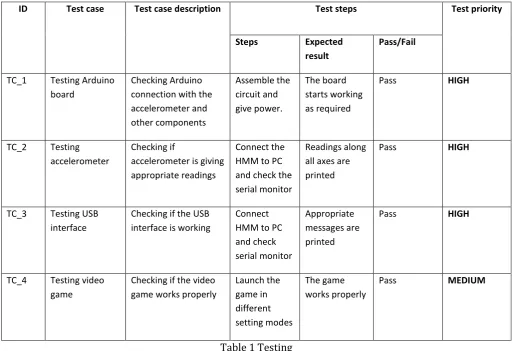
5. Testing
ID Test case Test case description Test steps Test priority
Steps Expected
result
Pass/Fail
TC_1 Testing Arduino
board
Checking Arduino connection with the accelerometer and other components
Assemble the circuit and give power.
The board starts working as required
Pass HIGH
TC_2 Testing
accelerometer
Checking if
accelerometer is giving appropriate readings
Connect the HMM to PC and check the serial monitor
Readings along all axes are printed
Pass HIGH
TC_3 Testing USB
interface
Checking if the USB interface is working
Connect HMM to PC and check serial monitor
Appropriate messages are printed
Pass HIGH
TC_4 Testing video
game
Checking if the video game works properly
Launch the game in different setting modes
The game works properly
[image:5.595.41.555.297.648.2]Pass MEDIUM
Table 1 Testing
In testing phase, we have conducted unit testing on each component in the system. The results are tabulated as shown above
6. Result Analysis
It was found that using multiple gesture operations at the same time can cause confusion for inexperienced users.
© 2016, IRJET | Impact Factor value: 4.45 | ISO 9001:2008 Certified Journal
| Page 522
REFERENCES
[1] M. Shakunthaladevi, R.B.Revathi, “Real time Hand Gesture Recognition using AVR Microcontroller”, Information Communication and Embedded Systems (ICICES), 2014.
[2] Siddharth S. Rautaray, Anupam Agarwal, “Interaction with Virtual Game through Hand Gesture Recognition”, International Conference on Multimedia, Signal Processing and Communication Technologies, 2011.
[3] L. Yeffet and L. Wolf, “Local trinary patterns for human action recognition,” in Proc. IEEE ICCV, 2009, pp.492– 497.
[4] Juan Wachs, Helman Stern and Yael Edan, “ A Real-Time Hand Gesture System based on Evolutionary Search”, International Journal of Engineering Sciences & Research Technology, 2014.